

Page 1
Flip Alarm Clock
Item # PI-1309
Instruction Manual
Features
One side of the clock is engraved with a “clock” icon and the other with an “alarm” icon
To activate the alarm, place the "alarm" side face up and the LED backlit display shows both current and alarm time.
To turn the alarm off, simply flip the clock so the "clock" icon is facing up and only the current time will display.
Alarm turns on and off with flip movement
Blue backlit display
Large easy to ready LCD
12/24 hour selectable mode
Easy to set time and alarm
Perfect travel companion – compact & lightweight
Batteries: 2 ‘AAA’ (not included)
Dimensions: 5” x 3.3” x 1.2’
Weight: only 3 ozs.!
1. Functions
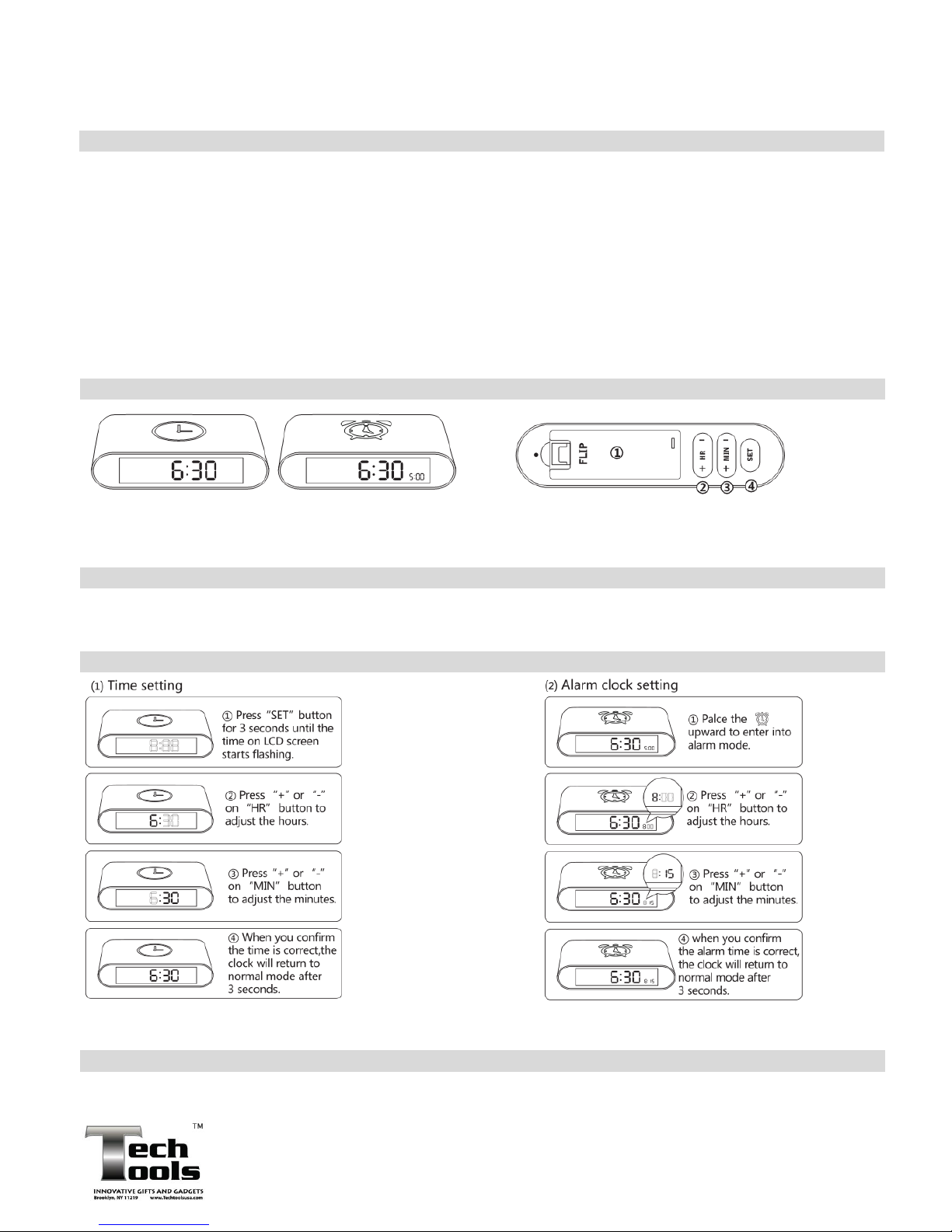
Clock mode – Clock icon faces up Alarm mode – Alarm icon faces up Battery Cover – insert 2 AAA batteries (not included)
The time display is 6:30 The alarm display is 5:00 HR: Adjust hours MIN: Adjust minutes
SET: Time set
2. Batteries
Insert 2 ‘AAA’ batteries into the battery compartment and ensure the polarity (+ -) is correct. The clock will beep which
indicates it is working. When the LCD display or backlight is weak, you have to replace the batteries.
3. Setting – Time & Alarm
The clock is 12/24 hours selectable.. Press the “SET” button for 3 seconds until the time on the LCD starts flashing.
Then press the “SET” button again to enter into select mode. Press the “+” or “-“ on “HR” or “MIN” button to select setting.
4. Alarm & Backlight Function
The alarm will beep for 2 minutes continuously if not turned off. Simply flip the clock so the clock icon is facing upward to stop
the alarm. To activate the LCD backlight, simply shake the clock slightly and the light will turn on.
© 2015
ITEM # PI-1309
MADE IN CHINA
 Loading...