

Page 1
Recognoil – User‘s Manual
Software version 2.2.1_2015-02-21
-
1
-
R
ECOGNOIL
Oil Layer Detector
TechTest s.r.o.
Na Studankach 782
CZ-551 01 Jaromer
http://www.techtest.eu
[email protected]
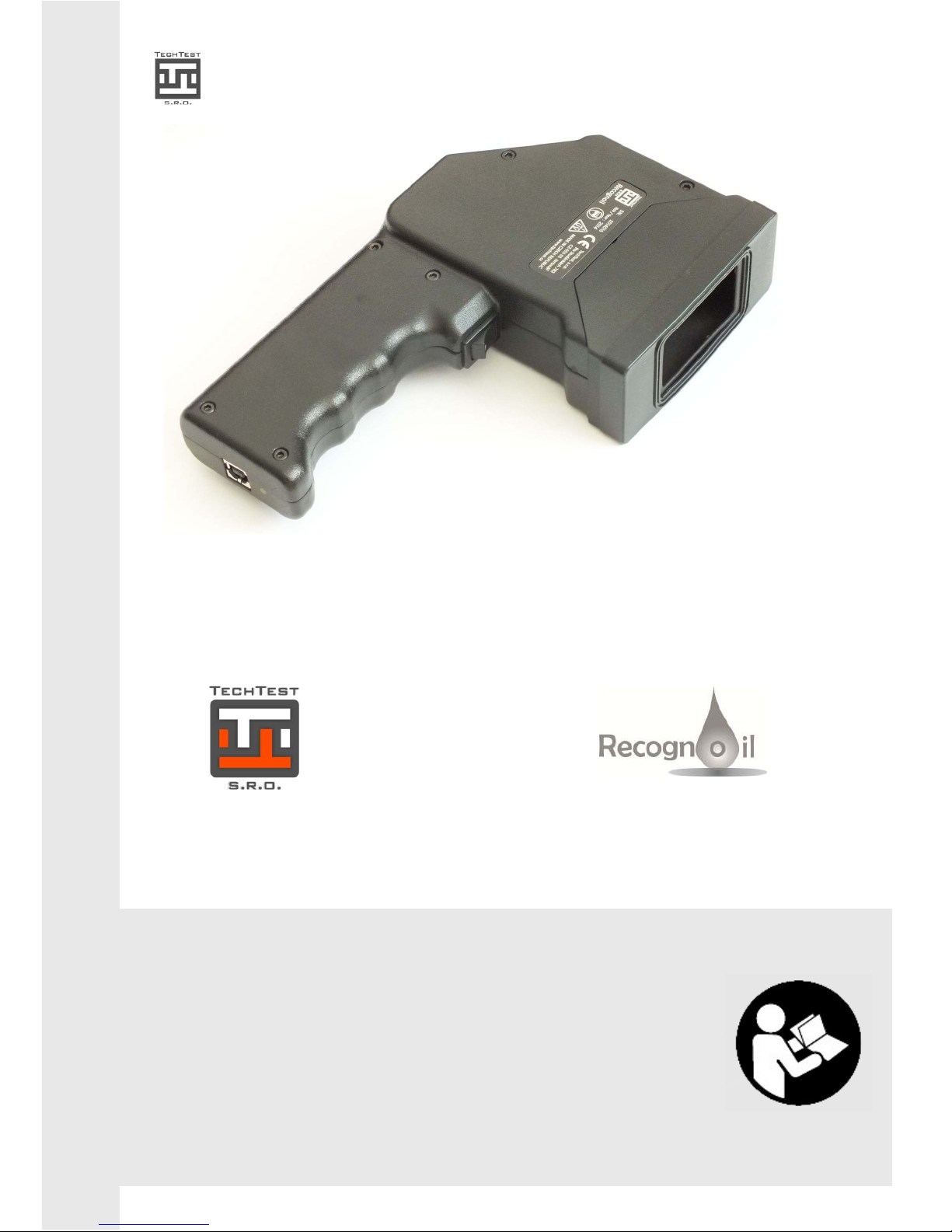
Recognoil oil layer detector
User’s manual
EN
U
SER‘s MANUAL
Page 2
Recognoil – User‘s Manual
Software version 2.2.1_2015-02-21
-
2
-
INTRODUCTION
The Recognoil device enables the user to detect residual oil / grease
contamination on the surface of the material.
It can be used with almost all oil types and lubricant residues, which contain a
part of a synthetic compound. It is not suitable for very refined mineral oils –
these applications often require a fluorescence agent. The Recognoil device is
not suitable for use with silicone oil based compounds.
Recognoil integrates a source of UV radiation and a fluorescence detector.
Together with a personal computer, connected via USB, it is able to create,
evaluate and to display the surface’s detected properties within a few
seconds.
The Recognoil Software is designed to run on Microsoft® Windows™ XP, Vista,
7 and 8 machines.
Page 3

Recognoil – User‘s Manual
Software version 2.2.1_2015-02-21
-
3
-
1. QUICK START
This short introduction chapter assumes that you have the Recognoil detector drivers and
Recognoil Advanced / Professional SW installed on your TabletPC / PC. Otherwise, please
skip this chapter and proceed to page 7.
1) Connect the USB cable to the device. Please
use microUSB adapter if necessary.
2) Run the software using a desktop icon / Start
menu icon / Program list called „Recognoil
V2.2.1“.
3) After a successful initialization, hold approx.
2 seconds the device trigger to activate quick
LIVE mode with which you can scan the
surface while moving the device.
4) Or you can click the trigger shortly to
activate the PHOTO mode. This mode
requires you to hold the device on one place
3 to 5 seconds after touching the trigger
again. After that a double beep is played,
marking the scanning complete.
5) Please note that the detected surface must
be disposed of any dust particles. Please use
dry compressed air, preferably pressurized
cans for electronics cleaning.
6) The most important value is the mean
detector output value, where a smaller value
shows cleaner surface, while bigger numbers
mean bigger oil contaminations. The values
does not have any units, it serves for
comparative purposes.
7) The displayed surface is approx. 12x18 mm.
You can adjust the contrast (limit) by moving
the slider control.
8) The data can be immediately exported as a
BMP / JPEG / GIF using the second menu
icon.
9) Please find more info further in the user’s
manual.
Please always mind the safety
precautions.
Page 4

Recognoil – User‘s Manual
Software version 2.2.1_2015-02-21
-
4
-
INDEX
1.
QUICK START ................................................................................................................ 3
2. SAFETY PRECAUTIONS .................................................................................................. 5
1.1. Safety measures........................................................................................................ 5
1.2. Workplace safety measures ..................................................................................... 5
1.3. Electrical safety ......................................................................................................... 6
1.4. Other precautions ..................................................................................................... 6
3. QUICKSTART GUIDE ..................................................................................................... 7
3.1. Device component overview .................................................................................... 7
3.2. Hardware .................................................................................................................. 7
3.3. Software .................................................................................................................... 7
3.4. SW Recognoil Advanced / Professional .................................................................. 13
3.5. Detection walkthrough ........................................................................................... 14
3.6. Settings and Oil-Pick dialog .................................................................................... 16
3.7. Load RRW function ................................................................................................. 17
3.8. Battery charging ..................................................................................................... 18
3.9. Notes on device operation ..................................................................................... 19
4. MAINTENANCE AND LONG TERM STORING .............................................................. 20
5. PRACTICAL INFORMATION ....................................................................................... 21
5.1. Principle of operation ............................................................................................. 21
5.2. Methodology .......................................................................................................... 22
5.3. Examples of use ...................................................................................................... 24
5.4. Notes ....................................................................................................................... 24
6. VALIDATION - CALIBRATION (Professional version only) ........................................... 25
7. TECHNICAL DATA ....................................................................................................... 27
8. Frequently Asked Questions ...................................................................................... 28
9. APPENDIX ................................................................................................................... 29
Page 5
Recognoil – User‘s Manual
Software version 2.2.1_2015-02-21
-
5
-
2. SAFETY PRECAUTIONS
Please read all the instructions and directions!
Prior to the first use of the device, please read the instructions manual.
Keep the instructions manual for future reference.
1.1. Safety measures
A powerful source of invisible UV-A radiation is used for surface
irradiation.
The Recognoil device can be operated only by an instructed person,
equipped with UV goggles.
No other person is allowed to share the same working place, or, must be
also equipped with UV goggles.
1.2. Workplace safety measures
a) Keep the working place clean and well illuminated. Leaving the workplace untidy and
poorly lit can lead to work accidents.
b) Do not operate the device in explosive environment. Keep away from flammable liquids,
gasses or dust. Electrical appliances may create spark, which are able to ignite
flammable substances.
c) Children and other persons are not allowed to be present at the working place.
Page 6

Recognoil – User‘s Manual
Software version 2.2.1_2015-02-21
-
6
-
1.3. Electrical safety
a) Recognoil device uses only safe voltages, never exceeding 12 Volt DC.
b) The USB charger works with high voltage of 230 Volt AC and is designed to be used only
in indoor environment. It is strictly prohibited to be operated in wet and moist
environment.
c) Please keep all the supplied appliances from rain and moisture. Use only in indoor
environment.
1.4. Other precautions
Operate and store the device only in dry and clean environment. The device must be
immediately cleaned in case of any contamination. Residual oil and dust contaminations
degrade future measurement. Do not use organic solvents when clearing.
Do not use paper towels for device cleaning. The paper fibers show a great amount of
fluorescence and thus influence the oil detection process.
A proper method for dust cleaning is with a help of dry compressed air. Please use dry
compressed air, preferably pressurized cans for electronics cleaning.
!
Please handle the device with care – it contains sensitive electronic
components. Avoid mechanical drops and shocks.
Operate the device at room temperature higher than 10°C, not exceeding 35°C. Do not
operate after sudden temperature change or in case of condensing moisture.
Please use only certified shielded USB cables, for example from the Belkin manufacturer.
Please do not use cables longer than 3 meters.
Page 7
Recognoil – User‘s Manual
Software version 2.2.1_2015-02-21
-
7
-
3. QUICKSTART GUIDE
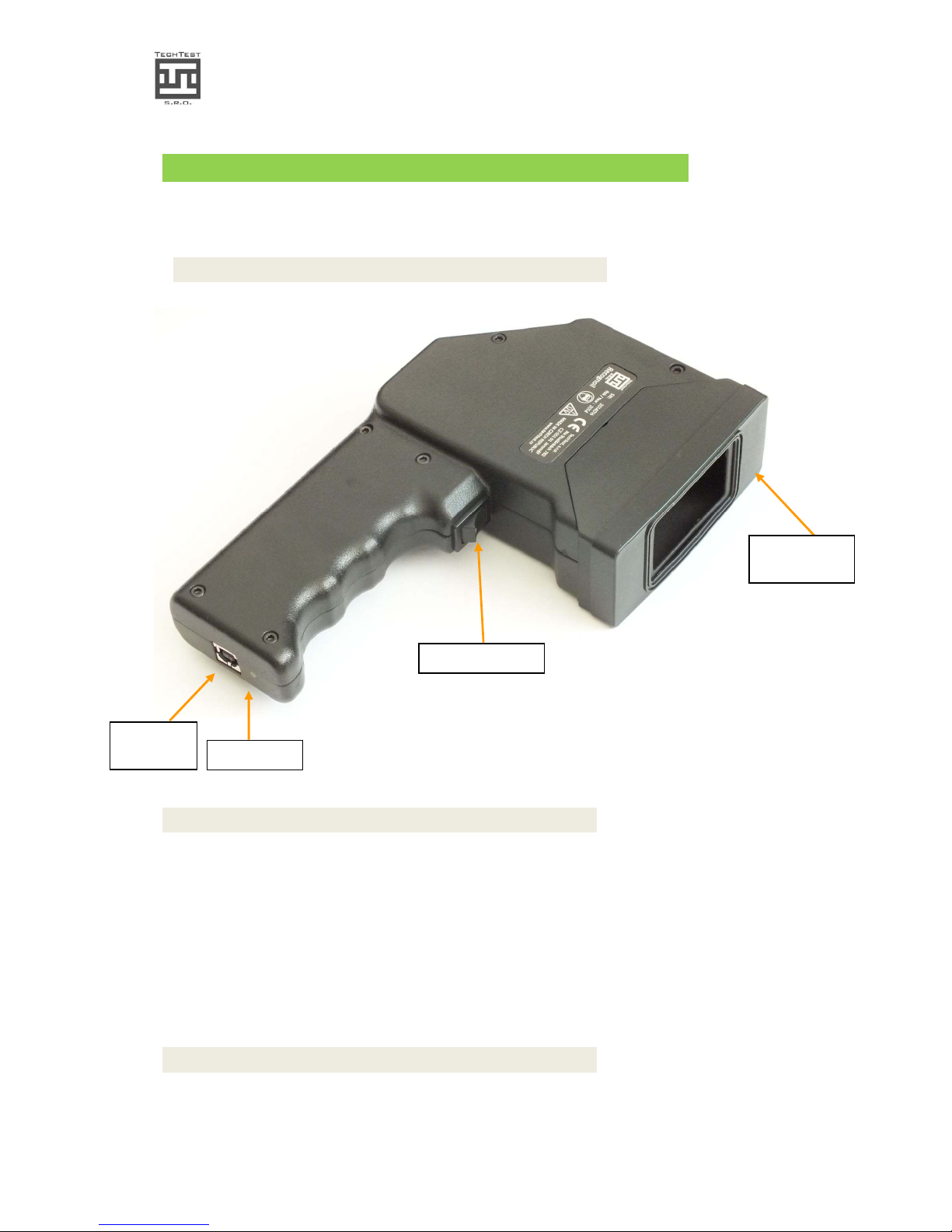
3.1. Device component overview
Img. 1.: Component overview
3.2. Hardware
Prior to use, connect the USB cable. You can run the PC Software Recognoil.
After that, if battery voltage is O.K. you will be able to choose a detection mode.
After the detector activation, choosing a mode and exposition trigger press, the surface is
irradiated and the results are being collected. Please read more information in the
Software chapter.
3.3. Software
Minimum system requirements:
• Intel Atom Z2760, 1 GB RAM
Trigger switch
USB
connector
Removable
silicon sleeve
Charge LED
Page 8
Recognoil – User‘s Manual
Software version 2.2.1_2015-02-21
-
8
-
• Microsoft® Windows™ XP / Vista / 7 / 8 Operating system
Recommended system requirements:
• Intel i3 Processor, 2 GB RAM
The Recognoil detection software must have these prerequisites pre-installed:
• Microsoft .NET Framework 4.0 (free for download at microsoft.com, you will be
noticed during the installation)
• 32-bit version – IDS uEye detector driver x86 (32)
• 64-bit version –IDS uEye detector driver x64
3.3.1. Detector driver installation
The installation must be executed „as Administrator“ i.e. by rightclicking on the executable driver pack and choosing „Run as
Administrator“. This of course requires administrator privileges –
please contact your local network administrator in case of any
problems.
Insert the supplied USB Flash disc in a free USB port
1. At first, it is necessary to set up the detector driver, depending on your operating
system. Open the flash drive and find the “Drivers” directory. If your operating
system is:
• Windows XP - 32 bit
Execute the installation package „\Drivers\uEye32bit_45000.exe“
• Windows 7 or 8 - 32 bit
Execute the installation package „\Drivers\uEye32bit_45000.exe“
• Windows 7 or 8 - 64 bit
Execute the installation package „\Drivers\uEye64bit_45000.exe“
2. Follow the instructions:
• In the first step, you can choose either „English (United States)“ or the
German language.
• Now please click the button „Install Driver“
Page 9

Recognoil – User‘s Manual
Software version 2.2.1_2015-02-21
-
9
-
img.3.
• In the next Windows please select „Custom“ and click „Next >“.
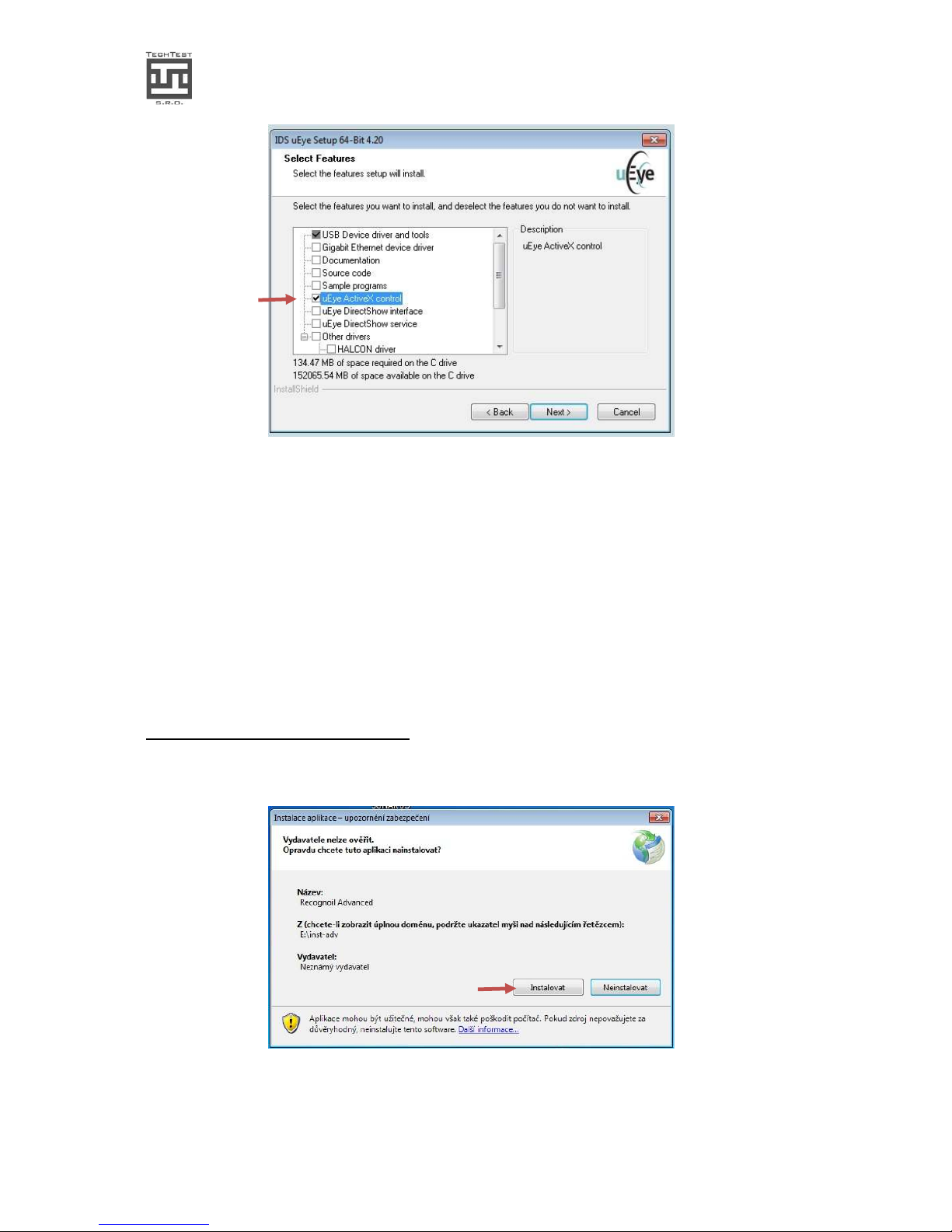
img.4.
• The first item is to be checked, along with „uEye ActiveX control“. The other items
need not be installed. After that, click „Next >“.
Page 10
Recognoil – User‘s Manual
Software version 2.2.1_2015-02-21
-
10
-
obr.5.
• Now if you want the driver to be installed in a different path, please select it and
click „Next“. Otherwise click „Next >“
• Now you can choose the „Start“ item list path and click „Next>”. Otherwise click
“Next>” directly.
• Now click on „Install“ and wait a few seconds for the installation to be finished.
• Now in the „Additional features“ dialog, there is no item necessary. Please uncheck
all fields and click „Next >“.
• After the installation has been finished, please click „Finish“.
3.3.2. Recognoil software installation
• Please run the „setup.exe“ program from the root folder of the flash drive.
img.6.
• In case of any error warning, it is necessary to install the
„dotNetFx40_full_x86_x64.exe“ utility, placed in the „Utilities“ folder on the flash
Page 11

Recognoil – User‘s Manual
Software version 2.2.1_2015-02-21
-
11
-
drive. After this utility has been installed, continue by executing the „setup.exe“ file
once again.
3.3.3. Recognoil software – first run
After the first run of the software, the default directory is „c:\recognoil“. The result files
are also stored in this directory.
You can change the path in Settings dialog. Please do not choose any network or flash card
disc. In case of any error, choose a different folder, which has the full access privileges.
Please note that after the folder has been changed, the software has to be restarted.
Page 12
Recognoil – User‘s Manual
Software version 2.2.1_2015-02-21
-
12
-
3.3.4. Software Recognoil Basic
Software Recognoil Basic is supplied with every Recognoil device free of charge. It does not
contain either security or license restrictions. It can be operated with every Recognoil
device.
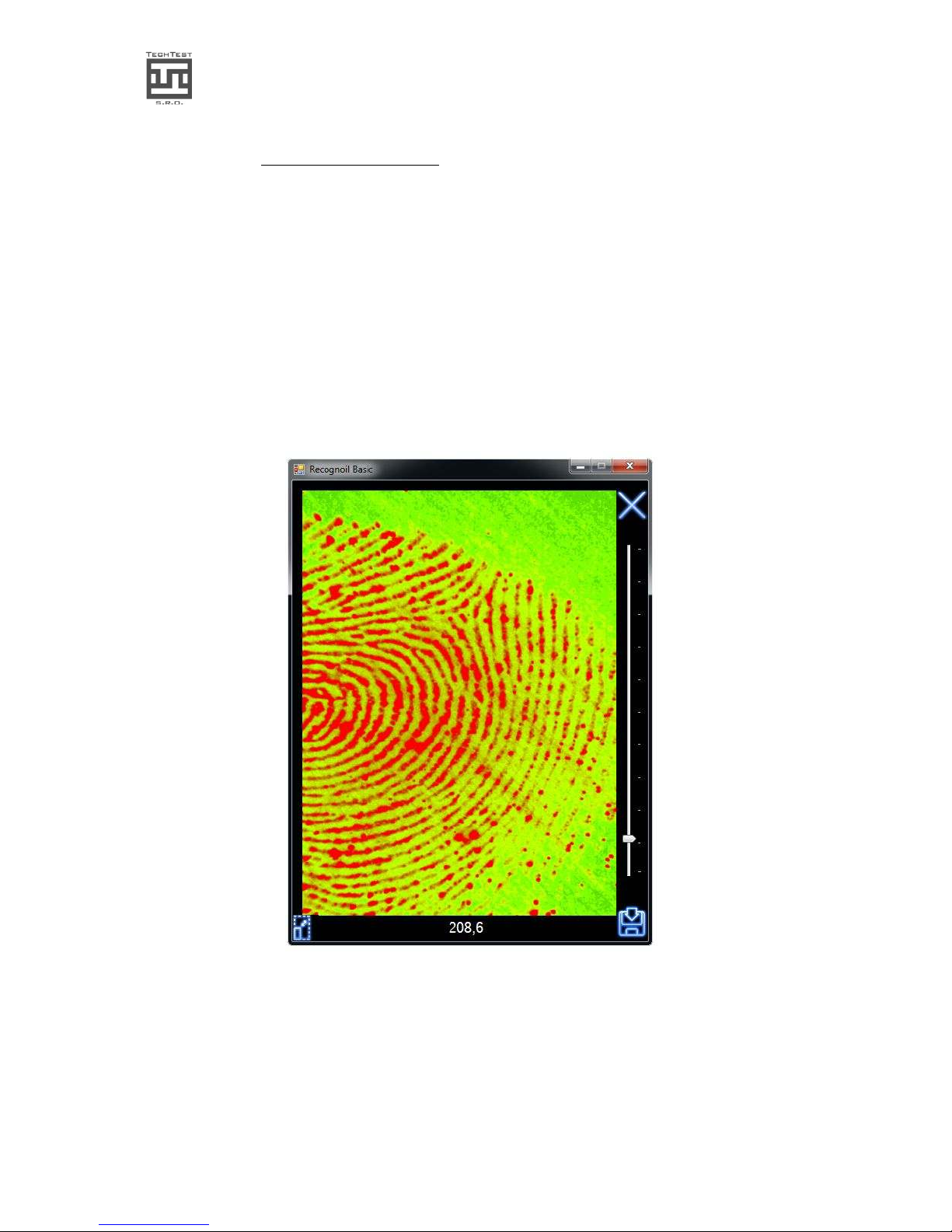
After device connection and after the trigger has been pressed, the map of detector output
intensity (DO [-]) is shown, together with its arithmetic mean value of the whole evaluated
surface (18x12 mm).
With help of this value, it is possible to compare different samples and thus for example
experimentally determine maximal admissible value, which results in optimal surface
parameters.
img.8. Software Recognoil - Basic version
Page 13
Recognoil – User‘s Manual
Software version 2.2.1_2015-02-21
-
13
-
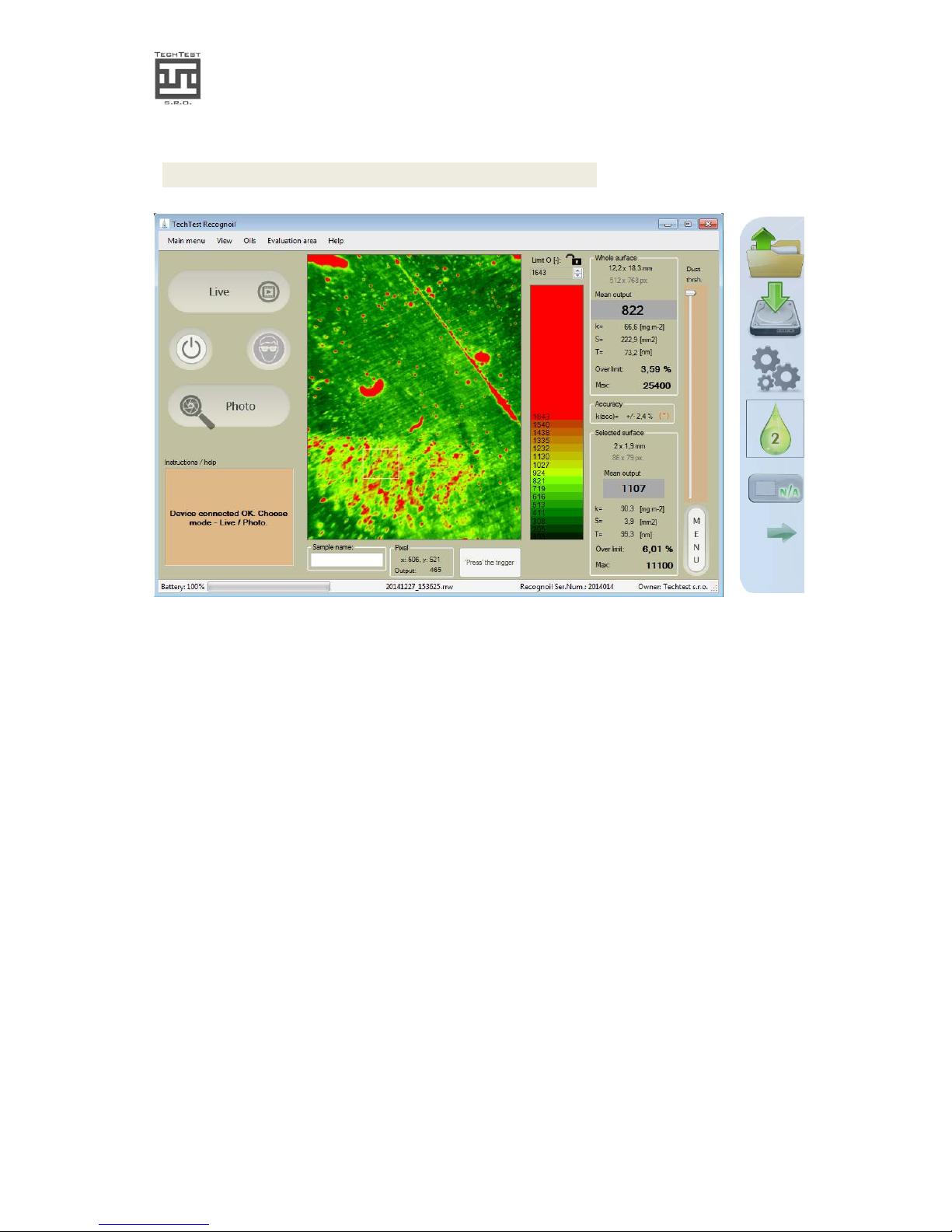
3.4. SW Recognoil Advanced / Professional
img.10. Software Recognoil Advanced / Professional + MENU
Page 14
Recognoil – User‘s Manual
Software version 2.2.1_2015-02-21
-
14
-
3.5. Detection walkthrough
Plug the supplied USB cable into the device and then into a USB2.0 port of your computer.
! Please DO NOT plug the USB cable in a USB 3.0 port ! (unless there is no 2.0 port present)
Run the Recognoil program (Recognoil 2.2.1)
Prepare the object and put the Recognoil device facing down on the surface.
1. switch on the device
The device will be switched on automatically upon correct USB connection.
2. detector activation
If the detector serial number is correct, you can now choose one of two detection modes:
3. LIVE preview
(only for Professional Edition)
Click the “LIVE” button (or hold the trigger 1.5 to 4 secs.) for a real-time video feed of the irradiated
surface. Put the device on the surface. Press and hold the trigger to begin. Exposure time is
automatically selected. The result values are displayed in the bar graph diagram on the right hand side.
The mode will be quit after touching the “LIVE” button again. If the device is detecting big amount of
light entering the detector, it will stop working for the reason of personnel safety – risk of eye damage
when viewed directly in to the UV source.
4. choosing the surface contamination
This step is optional. The oil files are loaded in the /Recognoil/OilDB/ directory. Choose “LOAD OILS” to
show the list. After the oil has been chosen from the list, the surface concentration and layer thickness
values are shown.
Warning – the resulting values of surface
concentration and layer thickness are strongly
dependent on the substrate layer. Please be
careful when interpreting the results.
5. Activating Photo mode
Click on the PHOTO button or touch the trigger (0.2 to 1 sec). Put the device onto the surface and press
the trigger. Please do not move the device during the scanning procedure (3-5 seconds).
6. Standard mode
The standard mode offers automatic intelligent sequence detection.
7. ALD mode – ambient light deduction
In case of improper light shielding, the detector switches itself in to the ALD mode. The detection now
takes double the time, but the ambient light is eliminated. This function has its own limit of the amount
of light that can be deducted. When the limit is exceeded, you will be noticed that the exposition could
not be finished.
8. Manual mode
In case of the automatic mode is not applicable, i.e. in need of very long or very short exposure times,
you can click the MAN button and manually set the exposure time. This function also finds out, whether
to use intelligent light deduction or not.
Page 15

Recognoil – User‘s Manual
Software version 2.2.1_2015-02-21
-
15
-
9. ALD always on
If you want to use light deduction all the time to ensure the very same results at all condition, you can
turn this function on in the Settings dialog.
10. Contrast adjustment and area of interest selection
After the detection has been executed, you may now wish to adjust the contrast, because the main
window shows most likely a black area with a few bright dots. These are locations with maximum grease
layer thickness, or, dust particles. Move the contrast slider downwards to show the smaller layer
thicknesses. After that you may choose an area of interest by clicking, holding, moving and de-clicking the
display or the mouse button. The outcome is then computed only for this selected area.
The contrast slider may be locked to an exact value, e.g. when performing scans of similar samples – to
see the color differences. Exposition lock is activated by clicking the “Lock” icon.
11. Dust particles deduction
(only for Professional Edition)
In the Professional version, you may use the second slider to lower the influence of the dust particles.
Please do this option only if you are sure, that it’s about dust. The detector output outcome changes
accordingly.
It is recommended to get the object’s surface disposed of any dust particles prior to the
detection. Please use dry compressed air, preferably in pressurized cans suited for electronics cleaning.
12. Protocol JPEG / BMP / GIF Save
After every detection, you may export the values and image data by clicking the second icon from the
Menu.
Page 16
Recognoil – User‘s Manual
Software version 2.2.1_2015-02-21
-
16
-
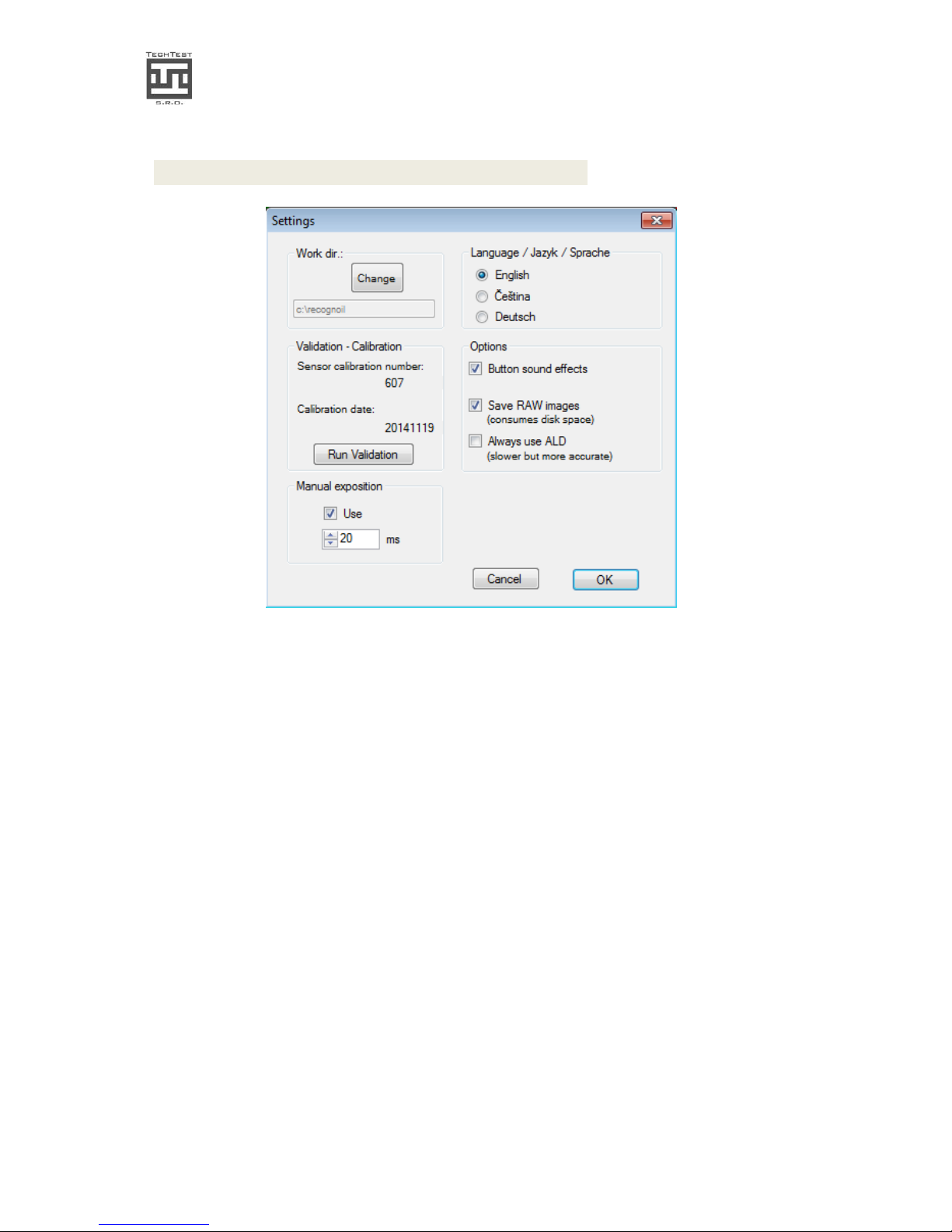
3.6. Settings and Oil-Pick dialog
img. 11. The Options dialog
• Validation - calibration module: Please see chapter 6.
• Working directory: click Change if you want to choose other directory, which
contains oil files, RAW files and Result files.
• Manual exposition – in case of need of very short or very long exposure times, use
this option. The Detector output outcome may not be the same as in the automatic
intelligent mode. For advanced users only.
• You can disable the button sound effects by un-checking “Button sound effects”
• Save RAW images – the default setting is ON – the software records every detection
into a RRW file, which can be later opened and evaluated. Every files has approx.
0.5 Mbytes.
• Always use ALD option – in automatic intelligent mode, the ALD method is
activated, when there is the environment light getting to the detector. If you want
to use this mode every detection, regardless on this amount of light, check this
option. The detection then takes twice the time
Page 17
Recognoil – User‘s Manual
Software version 2.2.1_2015-02-21
-
17
-
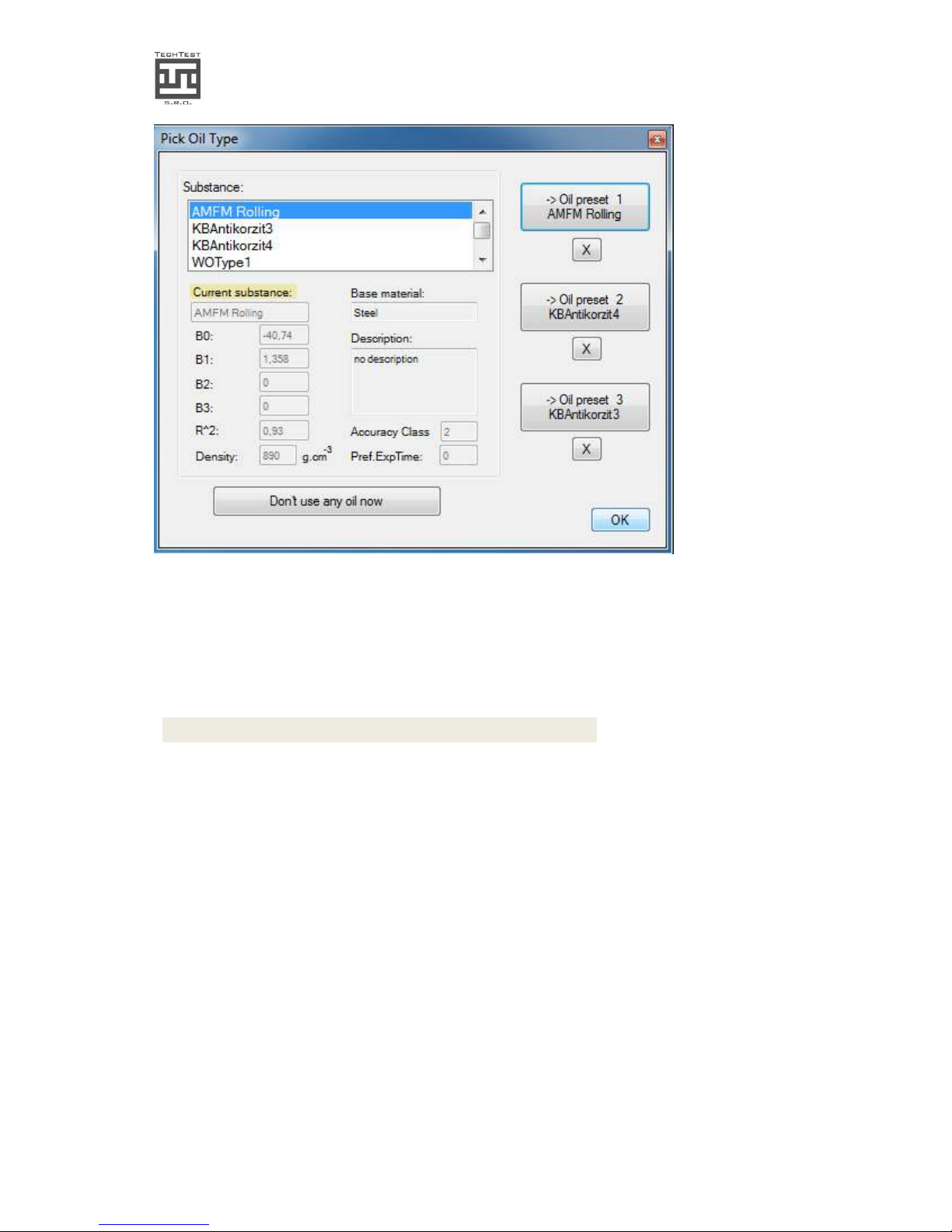
img. 12. The Pick Oil dialog
Please select the appropriate oil from the database. If you do not wish to use the kT
computing, please click “None” and OK.
3.7. Load RRW function
If you have the option “Save RAW images” checked in the Setting dialog, the raw
(RRW – Recognoil RAW) files are saved in the working directory under “/Raw”. You
can open these files later after the detection and evaluate and save it without the
need of repeated surface scanning.
Please note that to use this function, the Recognoil device must be connected to
the computer anyway. It is a part of a license security measure.
RRW Converter
– find this utility in the main menu to convert old type RRW
files (to compress and to upgrade for further evaluation purposes).
Page 18
Recognoil – User‘s Manual
Software version 2.2.1_2015-02-21
-
18
-
3.8. Battery charging
Please let the device charge whenever the battery capacity drops to 25%.
The device is in the charging mode when:
• Connected to the computer while the Recognoil software is not opened
• Connected to the USB wall adapter
If the battery capacity value drops to 5%, you will not be able to continue working with the
device.
Please leave the device plugged in a USB port or in a USB charger and let charge for
minimum of 4 hours. The full recharge takes up to 20 hours.
Do not leave the battery discharged for a long period
of time.
The lifetime of a battery decreases with charging at
high temperatures. Charge at room temperatures.
If the device is not to be used for a prolonged period, it is recommended to charge to 50%
capacity. Please store the device in dry environment with temperatures around 20°C.
Page 19
Recognoil – User‘s Manual
Software version 2.2.1_2015-02-21
-
19
-
3.8.1. Charging walkthrough
The new 2014 hardware version now contains an USB Lithium-Ion battery charger.
The device is in the charging mode when:
• Connected to the computer while the Recognoil software is not opened
• Connected to the USB wall adapter
The full charge takes up to 20 hours of charging.
It is generally recommended to fully charge the battery every two months, without the
need of previous discharge (unlike the older NiMH battery types).
The device contains Lithium-Ion battery pack.
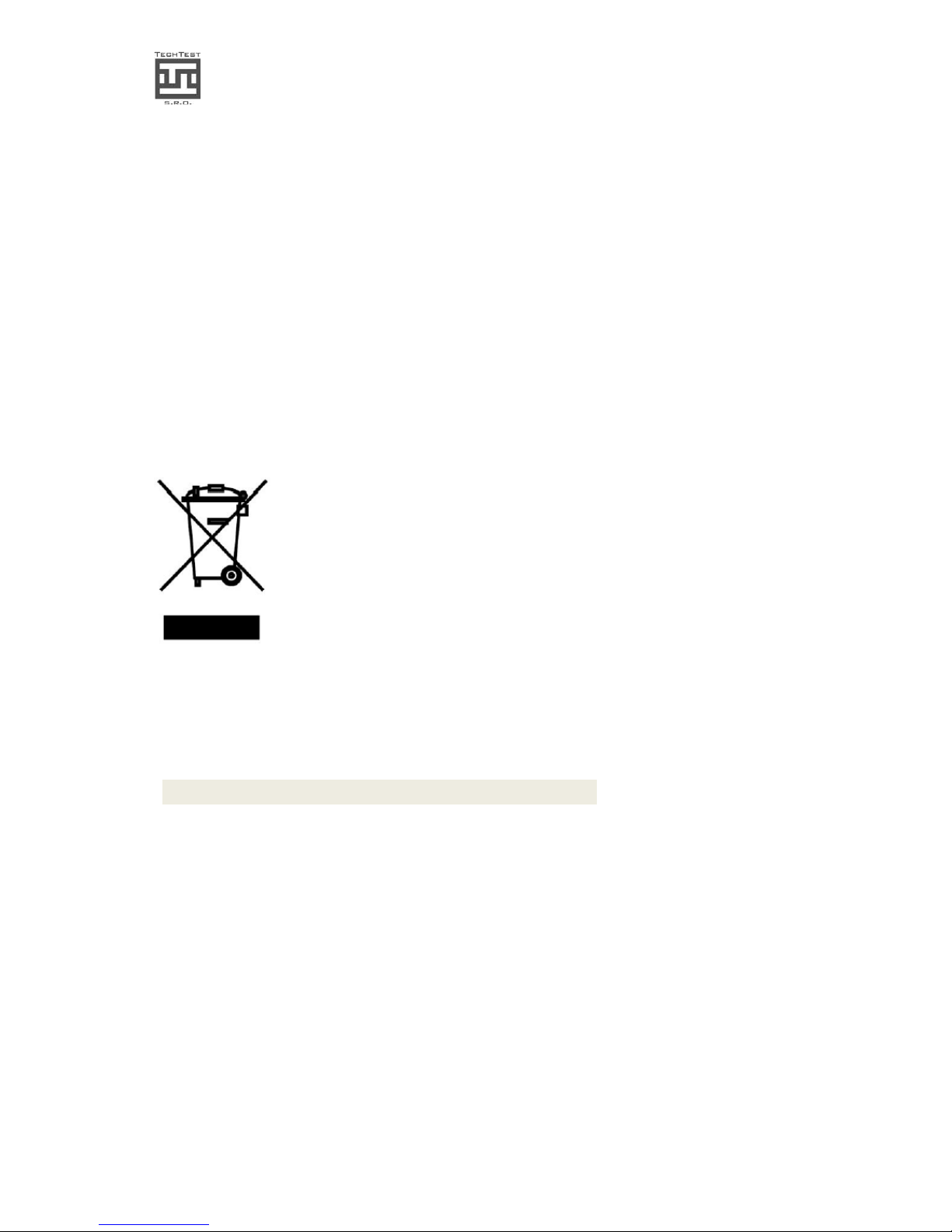
Correct disposal of this product. This symbol indicates that this product should not
be disposed of with your household waste, according to the WEEE Directive
(2002/96/EC) and your national law. This product should be handed over to an
authorized collection site for recycling waste electrical and electronic equipment
(EEE). Improper handling of this type of waste could have a possible negative
impact on the environment and human health due to potentially hazardous
substances that are generally associated with EEE. At the same time, your
cooperation in the correct disposal of this product will contribute to the effective
usage of natural resources.
3.9. Notes on device operation
In case of the computer had entered the standby mode, it is recommended to re-plug the
USB cable and restart the Recognoil software.
The software is under constant development. Please excuse any runtime errors you may
encounter. When this happens, please restart the software. If the problem persists, please
contact our technical support at: http://www.techtest.eu/support
More information can be found at http://www.techtest.eu/
It is possible to contact us directly at [email protected]
Page 20

Recognoil – User‘s Manual
Software version 2.2.1_2015-02-21
-
20
-
4. MAINTENANCE AND LONG TERM STORING
• store the device always in its protective package
• do not store in a dusty environment / on a dusty surface
• do not store in a damp environment
• do not store in temperatures below 5 deg. Celsius and not exceeding 40 degrees.
• when cleaning the device, use a damp cloth, do not use paper towels or organic
solvents
• in case of long term storing, charge the battery pack once per 6 months
• after a long term storing, please charge the battery pack to its maximum level at
the room temperature of about 20 degrees Celsius
Page 21
Recognoil – User‘s Manual
Software version 2.2.1_2015-02-21
-
21
-
5. PRACTICAL INFORMATION
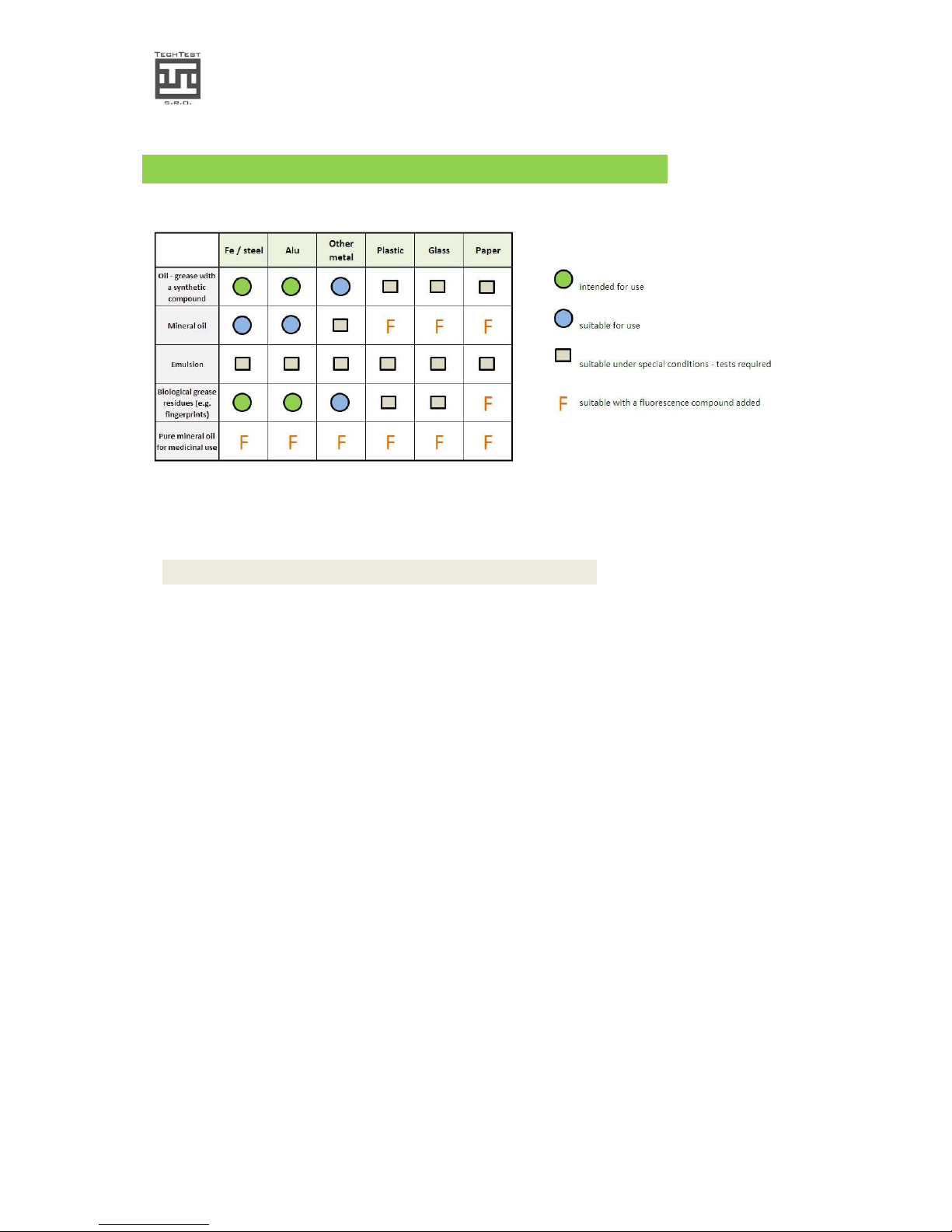
Table of applications:
chart 1.: area of suitable applications
Please note that it is not possible to detect oils of silicone nature.
5.1. Principle of operation
To get the fully trusted results and outcomes of the Recognoil device, it is important to get
to know the basic principles of device operation.
The device irradiates the surface with invisible and undetectable UV light. The certain
physical and chemical properties of the residual grease and oils force the chemical
elements and molecules to emit visible light. This natural phenomenon is called
fluorescence. Now we are getting close to the first limitation of this method.
The first limitation
The UV source, as mentioned above, emits invisible and undetectable radiation. On the
other hand, the detector then receives the outcomes of the fluorescence process, which
emit radiation in the domain of visible light. If there is a light coming from the
environment, not originating from the process of fluorescence, it interferes with the
fluorescence signal and disrupts the detection. For this reason, detections need 100% lightfree environment. The exceptions are described later in this section.
The second limitation
The detector consists of a small detecting plate, which converts the incident light into
electrical signal, which is then analyzed by the software. Because of the need of
transferring the light from a bigger surface onto this very small detecting plate, a set of
lens must focus the incoming light. Every lens has a focusing point. The Recognoil device
has a fix focusing point, which cannot be changed. The second limitation limits the allowed
distance of the object within +/- 3 mm far from the focusing point.
The goal of a successful detection is to find the ideal conditions – to eliminate the
environmental light and to find the ideal distance of the desired surface.
Page 22

Recognoil – User‘s Manual
Software version 2.2.1_2015-02-21
-
22
-
NOTE
Please do not use paper towels or cloth containing industrial bleachers for manual
degreasing, as they can influence the result values.
Bleacher can be transferred to the object’s surface when using solvents. Since the
bleachers present a very high fluorescence activity, the result values of the Recognoil
detection may be much bigger than the actual amount of oily residues on the surface.
5.2. Methodology
Detection of grease residues with the Recognoil device on objects of different
shapes and sizes
This section has been written for the reason of two basic existing limitations of the
Recognoil device. First – the need of exact distance of the object and the Recognoil detector
head, second – the need of 100% light out-screening. The Recognoil device is primarily
designed for planar objects of bigger dimensions, but, with the help of this manual, the
number of possible applications can be made considerably greater.
1. Objects with planar surface with dimensions greater than 100x50 mm
E.g. sheet metal, ALU profiles, etc.
Detection may be performed directly by putting the detector head to the surface.
Note 1: Even though the detection itself is called non-destructive, it is to be remembered,
that the Recognoil device touches the surface with a rubber profile, ensuring that no light
can get inside the detector head. If this rubber profile has been contaminated by touching
a highly polluted surface, it will hand over the residues to a surface, which is cleaner,
causing unwanted contamination. Please remember, that this may damage the sample in a
way that it cannot be used in the production any further and must be degreased again. For
this purposes it is recommended to use multiple “detector head protectors” – one for the
“polluted” surface, one for the “supposed-clean” surfaces.
Note 2: Due to undesirable reflections of the UV radiation directly to the main detector
aperture, there may, in case of low oil film and in case of high contrast amplification,
emerge unwanted elongated shapes, which do not denote elevated oil film thickness, but
the undesirable UV reflection. For this reason, we recommend to perform these detections
in a “cross-align” or “diagonal-align” way to minimize the influence of these effects. Please
see the Appendix of this document.
2. Objects with planar surface with dimensions smaller than 100x50 mm
E.g. sheet metal samples, cutoffs, etc.
Again, the detection may be performed directly, but the sample must be placed on an
appropriate clean metal surface that it does not influence the detection outcomes. The
unwanted background surface can be neglected by selecting the appropriate surface in the
software. As the underlying object it is recommended to use a black anodic oxidized
aluminum sheet metal due to its low reflectivity and high absorption. In case of higher
Page 23

Recognoil – User‘s Manual
Software version 2.2.1_2015-02-21
-
23
-
amount of usable samples, there can be more of them laid next to each other, creating an
appropriate surface size.
3. Objects with a curved surface with radius R > 400 mm
E.g. steel wheels for railway transport, etc.
Detection can be performed directly, but if there is light detected, coming from the
environment, the ALD exposition type is automatically executed. It takes twice the time,
but it can eliminate the influence of the light.
The focusing distance may also come to the point, but for the radiuses greater than 400
mm, the influence is neglectable.
4. Objects with a curved surface with radius R < 400 mm
The oil film detections of these objects may suffer from poor focus of the detector. Due to
this issue, we recommend using a special-designed “detector head protector”, copying the
surface curvature and setting the right focusing distance.
5. Wire, a circle-shaped cross section profile with diameter up to 2 mm
This type of object can be detected directly, putting the detector head on to the wire,
which has been laid on an appropriate underlying surface. Again, a black anodic oxidized
aluminum metal sheet is recommended for these purposes. It is recommended to place
the wire in a “diagonal-alignment” to minimize the effects of unwanted UV radiation
reflections, influencing the results.
6. Wire, a circle-shaped cross section profile with diameter greater than 2 mm
Under certain circumstances, the wire can be detected directly, but there will be an ALD
type exposition automatically executed to minimize the influence of the environment light.
7. A complex-shaped object with the longest dimension not exceeding 200 mm
For this purposes, there is a special product called “black-box”, which is a closeable box,
made of a black anodic oxidized aluminum metal sheet, in which there is the object placed.
The Recognoil device is put on the other side and secured in its place. The object is placed
in an adjustable holder, to be allowed to set the appropriate focusing distance.
8. A complex-shaped object with the dimensions exceeding 200 mm
There is no special recommendation for detection of these types of objects. It is
recommended to find and use the most even surface, while the detector is in ALD mode.
There are some advanced techniques developed right now, to scan the surface in realtime, without the need of special light out-screening.
Page 24

Recognoil – User‘s Manual
Software version 2.2.1_2015-02-21
-
24
-
5.3. Examples of use
For the purposes of demonstration, we can suggest 3 spheres of the device application.
Example 1 – a paint shop
The Recognoil device serves as a quick random check of the surface degreasing quality. The
operator has already found out, what limit settings are appropriate for the type of object
being detected. A value of detector output, together with a per cent value, which shows
how big part of the surface has grease / oil amounts exceeding the limit, are displayed 2
seconds after the trigger has been pressed.
Example 2 – a laboratory
A laboratory would need to know exact surface concentrations and layer thicknesses. For
this reason, the one and only oil / grease type must be present on the surface and the
substance must be “sampled” in our laboratory. After this sampling process, we send an
“oil file”, which is then imported into the software and the results are from that time
represented in surface concentrations and layer thicknesses.
Example 3 – sheet metal factory
In a sheet metal factory equipped with a degreasing line, an operator would check at which
state the material goes into the degreasing line and then would check the output. The
operator has already the knowledge, how much DO (detector output) shows the Recognoil
device after degreasing at a normal state. When the device begins to show greater
numbers and shows areas of brighter colors on the display (selective accumulation of the
grease residues), it is a warning for the operator, that the degreasing line is faulty.
5.4. Notes
Even with the best degreasing method ever, it is not possible to get lower detector output
outcomes than approx. 50 units. This value strongly depends on material roughness and
anisotropy, together with the material constitution (value 50 for steel, value approx. 80 for
aluminum). The value 50 consists of basic fluorescence properties of the material (and its
oxides) plus non 100 per cent exact device radiation filtering, which then causes noise,
visible at large amounts of amplification.
For very precise detections, it is recommended to use always the same set of materials
with the same roughness as a reference sample.
If you are working with objects that contain smooth curved surfaces, it is possible that
“direct reflections” happen. Under certain angle, the incident UV ray bounces off directly
into the detector aperture, causing a small brighter elliptic-shaped area, which acts as
detected oil or grease.
Page 25
Recognoil – User‘s Manual
Software version 2.2.1_2015-02-21
-
25
-
6. VALIDATION - CALIBRATION
(Professional version only)
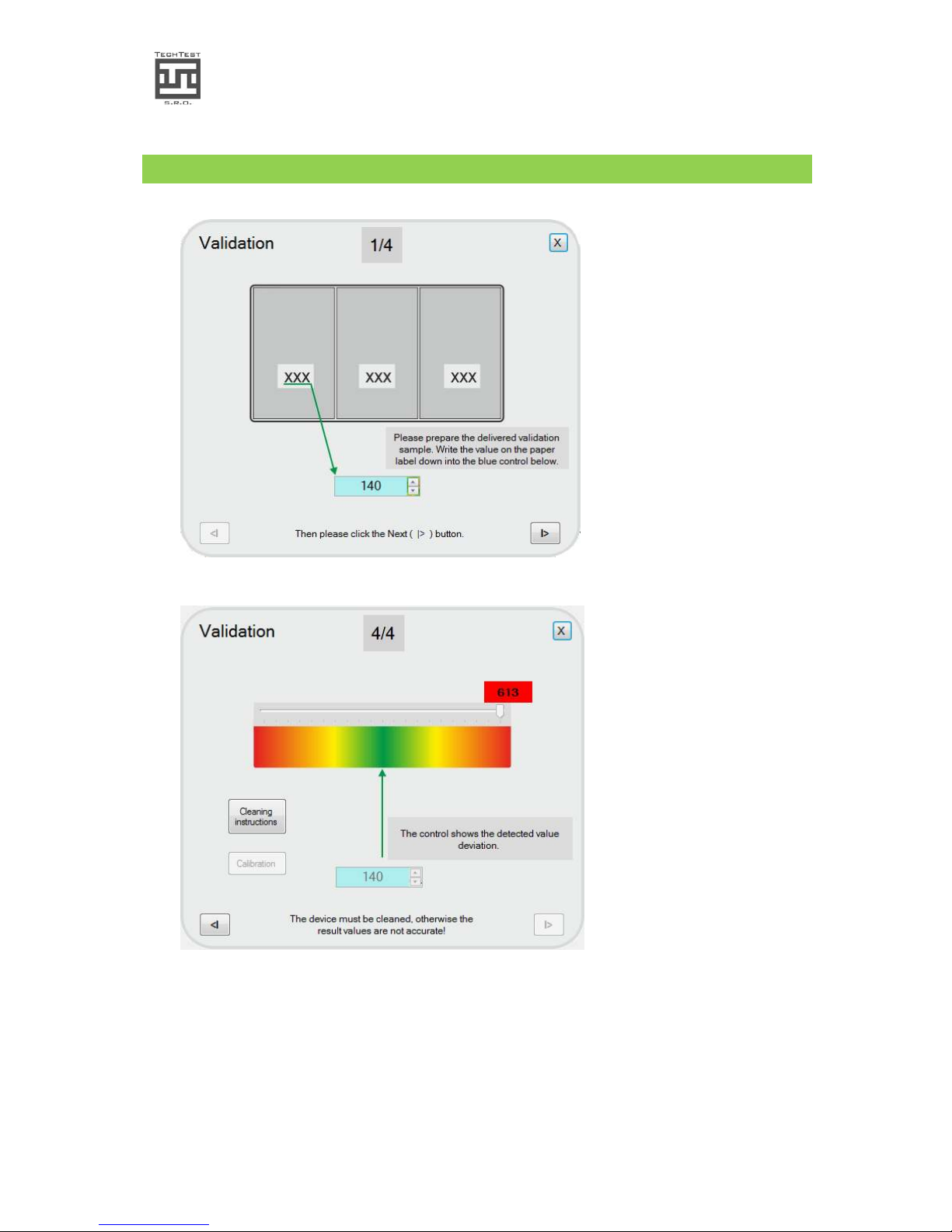
In case of Recognoil
Professional version, an
aluminium sample validationcalibration sheet has been
delivered to you, allowing
you to perform validation
test periodically.
Validation procedure can be
executed from the Settings
menu.
Please follow the
instructions of every
step.
In the final step, the
resulting value is shown. If
the value is much bigger
than the preset sample
value, it is necessary to clean
the device. Please click
“Cleaning instructions”.
If the value is smaller, it is
recommended to perform
calibration, clicking the
Calibration button.
Page 26

Recognoil – User‘s Manual
Software version 2.2.1_2015-02-21
-
26
-
Recognoil device calibration dialog
If the validation procedure has indicated that the calibration is recommended, you may
use the same sample to calibrate the device.
The calibration utility automatically makes a couple of detections with different
settings and at the end, it chooses the best options.
The method is easy to accomplish and starts with the sample preparation.
1) Remove the foil from one part of the metal surface and right at the moment, place
the Recognoil device on to this surface.
2) Click the Execute the calibration sequence button. After that, follow the
instructions.
3) The calibration process takes up to 60 second to complete. During this time, you
are obliged to hold the device in a steady position, without any movement.
4) After the calibration process has finished, the calibration results are displayed. After
that, you can press the Save and write to EEPROM button, which records the
settings permanently in to the device memory.
5) After a successful save, please restart the application for the changes to take effect.
Please note:
a. the part of the sheet metal, from which the foil has been removed, cannot be used
anymore. The reason is mainly the dust and the surface changes after being
exposed to the air and the light. In some cases, the sample can be re-used, if it has
been instantly tightly covered with plastic foil after use and kept at r.h. up to 50%.
b. the calibration has to be executed immediately, after the foil has been removed
Page 27
Recognoil – User‘s Manual
Software version 2.2.1_2015-02-21
-
27
-
7. TECHNICAL DATA
Device name
Method of detection
Function principle
Detection time
Detection limit minimal
Detection limit maximal
Necessary hardware
Supplied software
Data interface
Digital output resolution
Detected surface dimensions
Evaluated surface dim.
El. voltage maximal
UV wavelength
UV radiated power
Battery type and capacity
Battery life
Weight
Operating temperature
Storing temperature
Dimensions (W x H x D)
Recognoil
Contactless (e.g. the device is simply put on the
surface). Non-destructive, does not affect the object
properties
Grease residue excitation using UV rays and analysis of
its fluorescence.
0.5 sec. to 5 seconds, dependent on detection type
Surface concentration approx.20 to 70 mg.m-2 (approx.
22 to 77 nm layer thickness), according to the material
type and substrate material properties
Up to 5 to 10 µm
Laptop / tablet with operating system Windows XP / 7 /
8.
Recognoil Basic free of license, Recognoil Advanced /
Professional for extra charge
USB 2.0
512 x 768 px.
Approx. 40 x 30 mm
approx. 18 x 12 mm
9V DC
365 nm
900 mW +/- 15%
Lithium-Ion 3.7 V, 3400 mAh
Approx. 1,000 single detection operations
approx. 500 g
+10 to +30°C
+5 to +40°C
130 x 210 x 45 mm
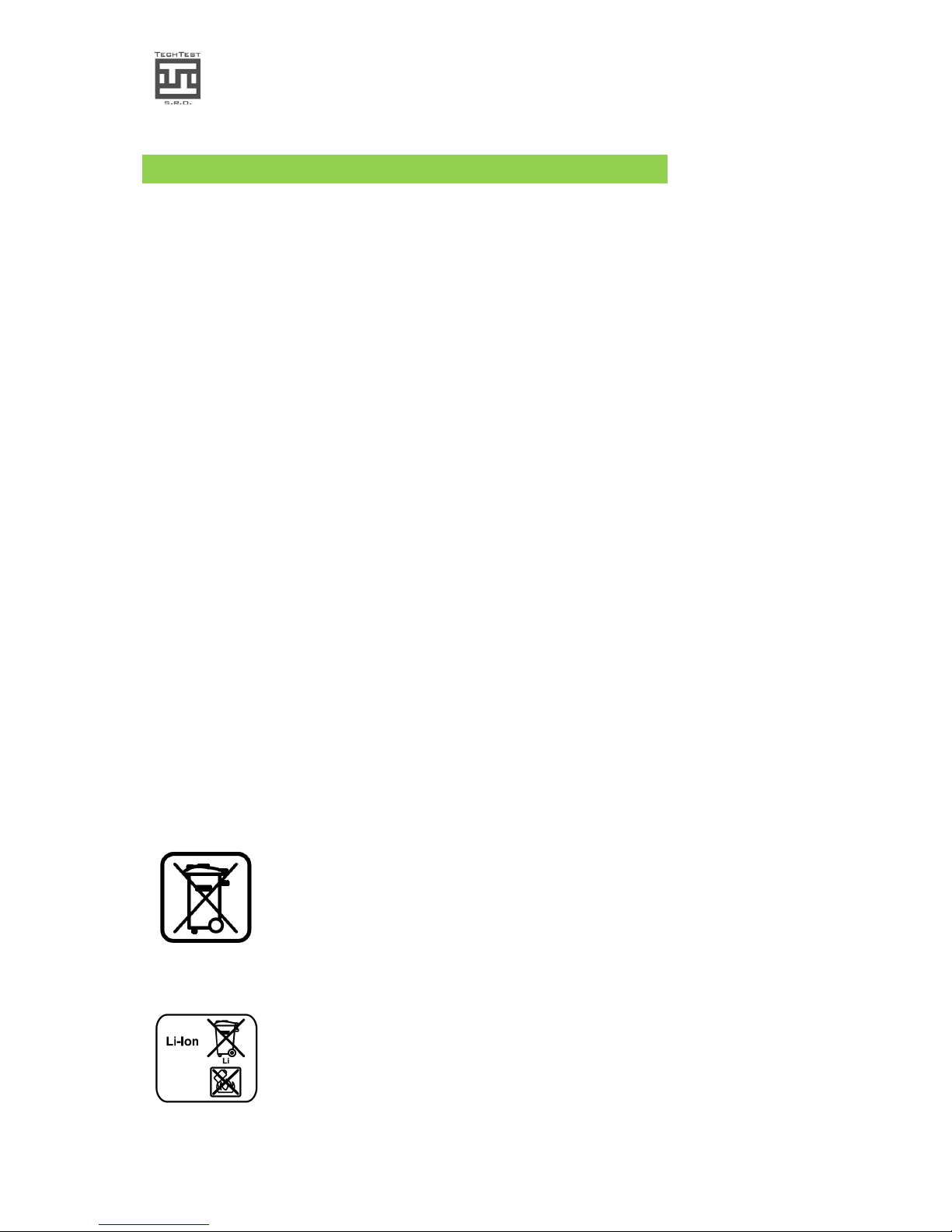
Correct disposal of this product. This symbol indicates that this product should not be
disposed of with your household waste, according to the WEEE Directive (2002/96/EC)
and your national law. This product should be handed over to an authorized collection
site for recycling waste electrical and electronic equipment (EEE). Improper handling of
this type of waste could have a possible negative impact on the environment and human
health due to potentially hazardous substances that are generally associated with EEE.
At the same time, your cooperation in the correct disposal of this product will contribute
to the effective usage of natural resources.
Do not dispose the battery of in household litter, in fire or in water.
Battery pack must be recycled or disposed of ecologically according
to the 91/157/EHS regulation.
Page 28

Recognoil – User‘s Manual
Software version 2.2.1_2015-02-21
-
28
-
8. Frequently Asked Questions
Q: There are often detection interruptions present, program errors, even computer
crashes
A: Please change the current USB port on your laptop. The ports certified as USB 3.0
can cause these problems. Please use only USB 2.0 ports.
Q: There are detection interruptions and unspecified errors emerge
A: Please use a different USB cable, with shorter length, certified and shielded.
Q: The driver installation interrupts with an error
A: Please run the driver pack as administrator, i.e. by right-clicking on the file and
choosing “Run as Administrator”. In case of any problem with privileges, please
contact your local network administrator.
Q: It is not possible to connect to a Tablet, or, the detection process is unstable, often
resulting in errors
A: This problem may be caused by insufficient USB power of the Tablet. Please, charge
the Recognoil’s internal battery to its maximum level, as well as the battery of the
Tablet prior to using the device.
Please note that an updated Frequently Asked Questions section is being built on our web
page at
http://www.techtest.eu/customer-faq/
Page 29
Recognoil – User‘s Manual
Software version 2.2.1_2015-02-21
-
29
-
9. APPENDIX
 Loading...