

Page 1
CCYYCCLLOODDOONN
bbyy tt ee cc hh nn oo ss aa uu rr uu ss
1166 -- sstteepp aannaalloogg sseeqquueenncceerr
sswwiissss pprreemmiiuumm qquuaalliittyy
OWNERS MANUAL
Produced and developed by
tt ee cc hh nn oo ss aa uu rr uu ss
• Switzerland
CH-3400 Burgdorf • Phone +41(0)34 422 9555 • Fax +41(0)34 424 0111
[email protected] • www.technosaurus.ch
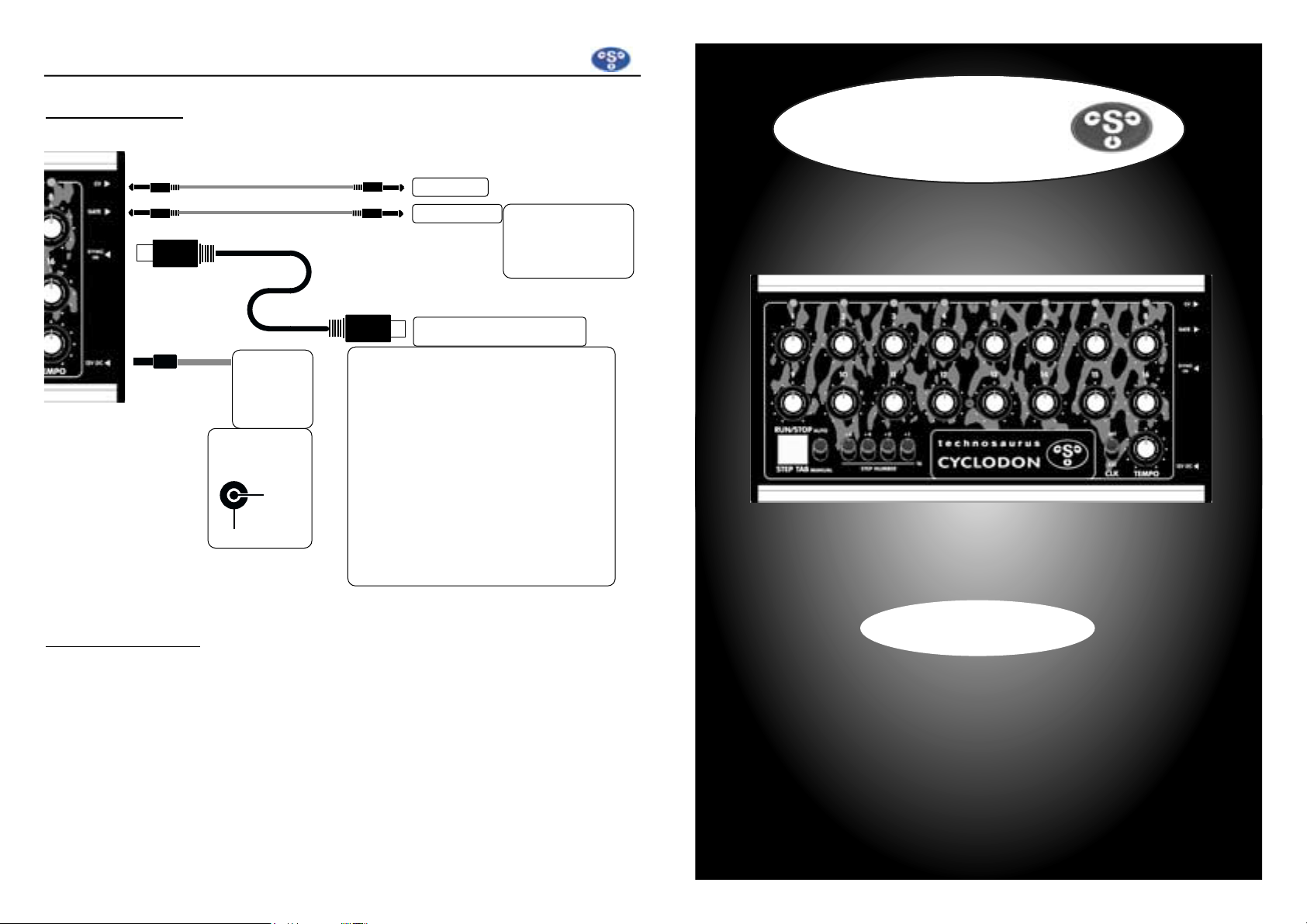
CONNECTIONS
CCYYCCLLOODDOONN
bbyy tt ee cc hh nn oo ss aa uu rr uu ss
mono mini-jack
mono mini-jack *
mono mini-jack *
mono mini-jack
DIN-SYNC cable 5 pins
*stereo mini-
jack when using
with
tec hn osa ur us
The CYCLODONs SYNC Input is a
standardized DIN-SYNC.
Examples for other equipment using
DIN-SYNC:
Roland TB-303, MC-202, CR-8000,
TR-707, TR-727, TR-808, Jupiter-8, MC4, MSQ-700, CSQ-600, SBX-10
KORG KPR-77, KMS-30
KENTON PRO-2, PRO-2000, PRO-4
Doepfer MSY-1
POWER
SUPPLY
12 to 15
Volts DC
DIN-SYNC INPUT
SPECIFICATIONS
CV OUTPUT Voltage 0 ...+5V POWER 12 or 15 Volts DC /
SUPPLY 45mA (±5mA)
GATE OUTPUT Voltage 0 / +5V
Dimensions 206 x 103 x 53mm
CLOCK INT (TEMPO) 25...250 bpm
(Quarter notes) Weight 550g
CLOCK EXT (SYNC IN) until 250 bpm
(CLOCK Divider = 4)
All descriptions of the product may be subject to change without notice
© 1998 by
t echn o s auru s
• Switzerland
Polarity of DC-
Connector:
+12V/
+15V
GND
Page 2
CCYYCCLLOODDOONN
bbyy tt ee cc hh nn oo ss aa uu rr uu ss
INTRO
We congratulate you for purchasing this real analog sequencer. The
CYC LOD ON
is handmade in Switzerland. It allows you to generate patterns of sequential
control voltages (CV and GATE). When connected to a voltage controlled synthesizer, the
CYC LOD ON
can produce a pattern consisting of 1 to 16 steps to play
a repetitive melody called a sequence.
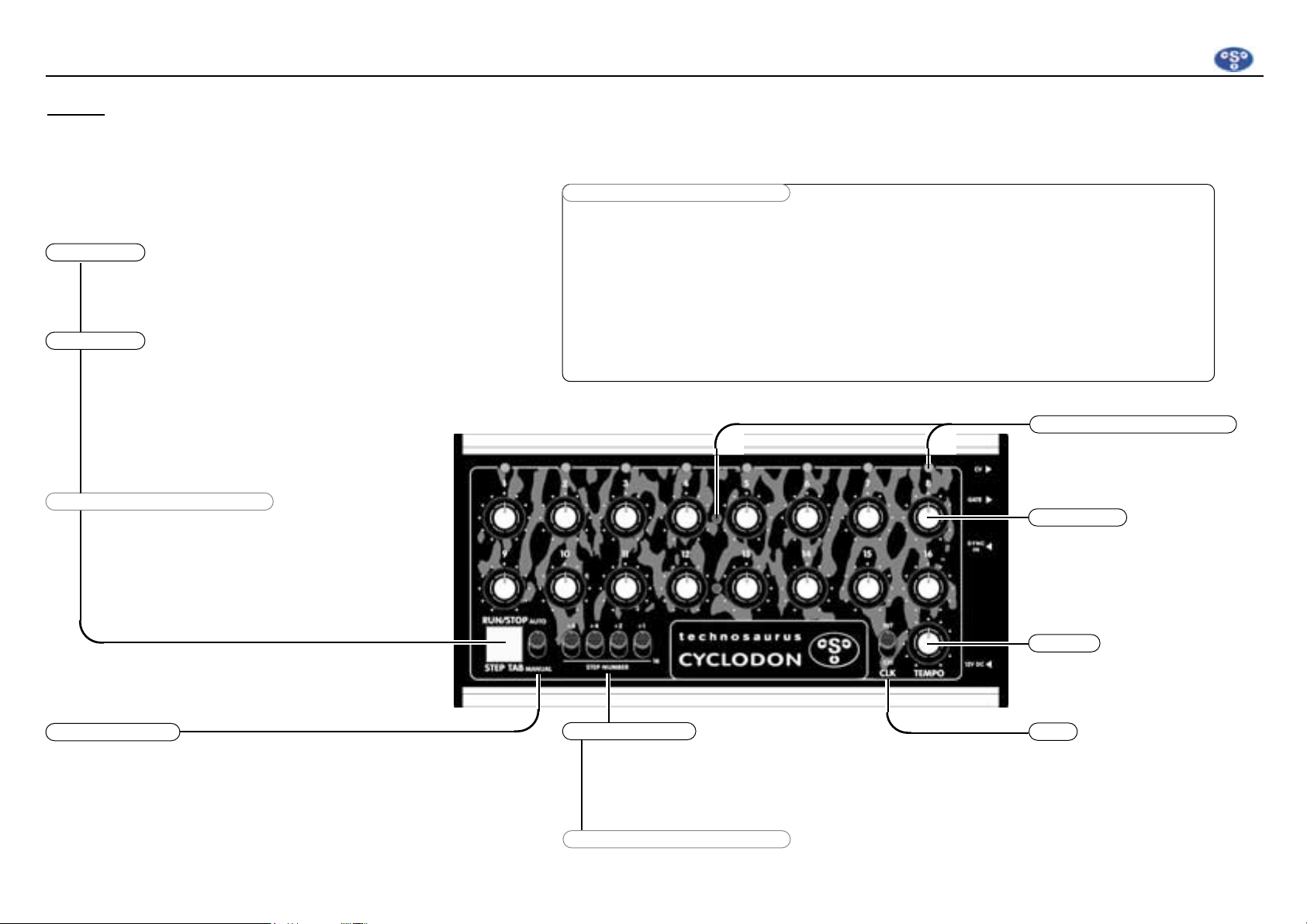
RUN /S TOP
STE P TTAB
CLOCK DDIVID ER SSETTI NG
CLOCK DDIVID ER SSETTI NG
AUT O/ MAN UA L
STE P NN UM BER
This button starts and stops the pattern in
AUT O
mode.
This function is not active if the
CYC LO DON
is controlled
by an external unit and the
CLK
-switch is in position
EXT
.
In
MAN UAL
mode the button allows
you to advance step by step.
This function is not active if the
CYC LO DON
is controlled by an
external unit and the
CLK
-switch is in
position
EXT
.
The
CYC LO DON
has a programmable
Clock-Devider which allows you to syncronize to other units with a selectable
dividing ratio.
Please refer to the text above for pro-
This switch allows you to choose between
AUT O
and
MAN UAL
mode.
The
MAN UAL
mode is recommended for fine tuning each step.
These 4 switches allow you to choose the number of steps from
1 to 16 within a pattern.All the numbers of the switches in the upposition will be added to get the desired pattern length.
When all switches are in down-position, 16 steps will be generated.
In position INT the CYCLODON runs
according to the TEMPO set.
To syncronize it from another unit,
set it to the position EXT.
This pot sets the TEMPO if CLK is in
the INT position.
Please refer to text above for programming.
CLK
TEM PO
These 16 pots set the pitch (CV) of
each individual step. The voltage
between 0 and +5Volts is available
on the CV output.
The green LEDs indicate the current
played step.
The red LEDs indicate the current
row (steps 1-8 or steps 9-16).
STE P 11 -1 6
STEP // RR OW IIndic ators
Programming the CLOCK-Divider:
1. The
CYC LO DON
must be in a rest position with no SYNC signal connected.
2. Set the
CLK
-switch to the position
EXT
.
3. Select the desired divider ratio with the 4
STE P NN UM BER
switches as follows:
16 = Sixteenth notes 4 = Quarter notes 1 = Whole notes
8 = Eighth notes 2 = Half notes
4. To store the adjusted setting, press the
RUN /S TOP
button until the lower red LED of the second
row lights up. The setting is now stored. It remains stored even when turning off the power supply.
CLOCK DDIVID ER SSETTI NG
 Loading...