

Page 1
WARNING!
The HDMI 4 to 2 Matrix Switch includes a 230V mains adaptor, which supplies 5V
DC. All normal precautions should be observed towards electronics devices. Do
not spill any liquids on the unit or power supply. Do not attempt to service the unit.
Do not cover the unit, do allow for ventilation. Do not spray the unit with any combustible substances.
In the unlikely event the unit falters for any reason, disconnect from the mains
supply and retry after a few minutes. Contact information is provided below.
Input:
4x HDMI.
Resolutions from 480i to 1080p inclusive.
HDMI 1.3 3D and HDCP compatible.
Output:
2x HDMI.
Remote Control:
IR remote with CR2025 battery (included).
Power:
5V DC power supply, 2A.
Dimensions:
200x100x20mm.
Technical Specification.
J.S. Technology Ltd.,
APL Centre,
Stevenston Ind. Est.,
Stevenston.
Ayrshire
KA20 3LR
© 2016.
E-mail: [email protected] Tel: 01294 471468 Fax: 01294 470916
HDMI 4 to 2 Matrix Switch.
http://www.js-technology.com
Instruction Manual.
Connect four HDMI sources to two HDMI displays.
Matrix function—Same picture to both screens, or different to each.
Supports HDMI 1.3 and 3D.
Supports 12-bit Deep Colour.
1080p, 2k and 1920x1200 compatible.
Gold plated connectors.
Discrete IR Remote Control.
HDCP Compatible.
Optional Stereo Audio Output for one OUTPUT A.
It is recommended that good quality cables / leads be used with the matrix switch. Suitable leads are available from J.S. Technology as well as most good retailers. The unit
requires 5V DC supply to operate, a suitable mains adaptor is provided.
2016.
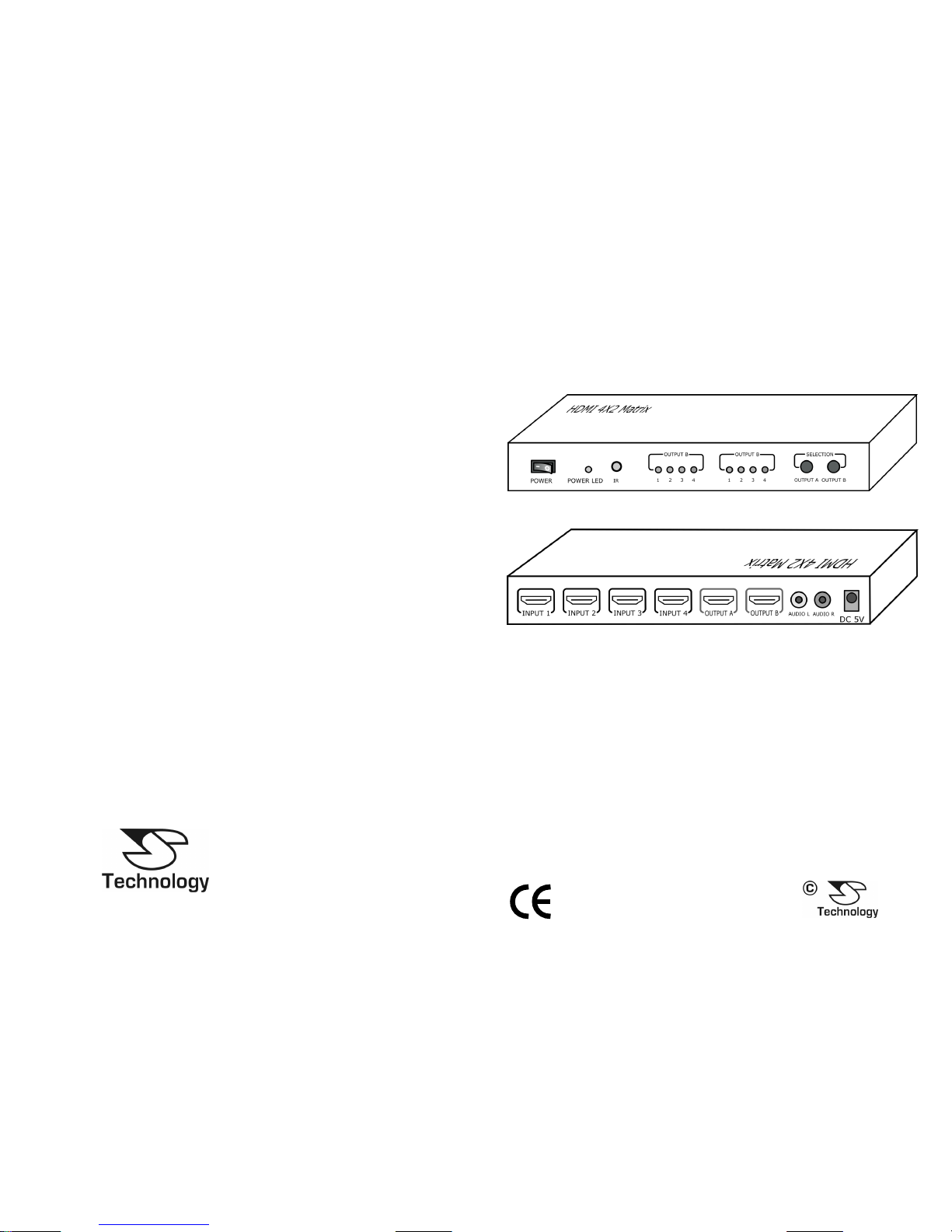
Front
Rear
Page 2
HDMI 4 to 2 Matrix Switch.
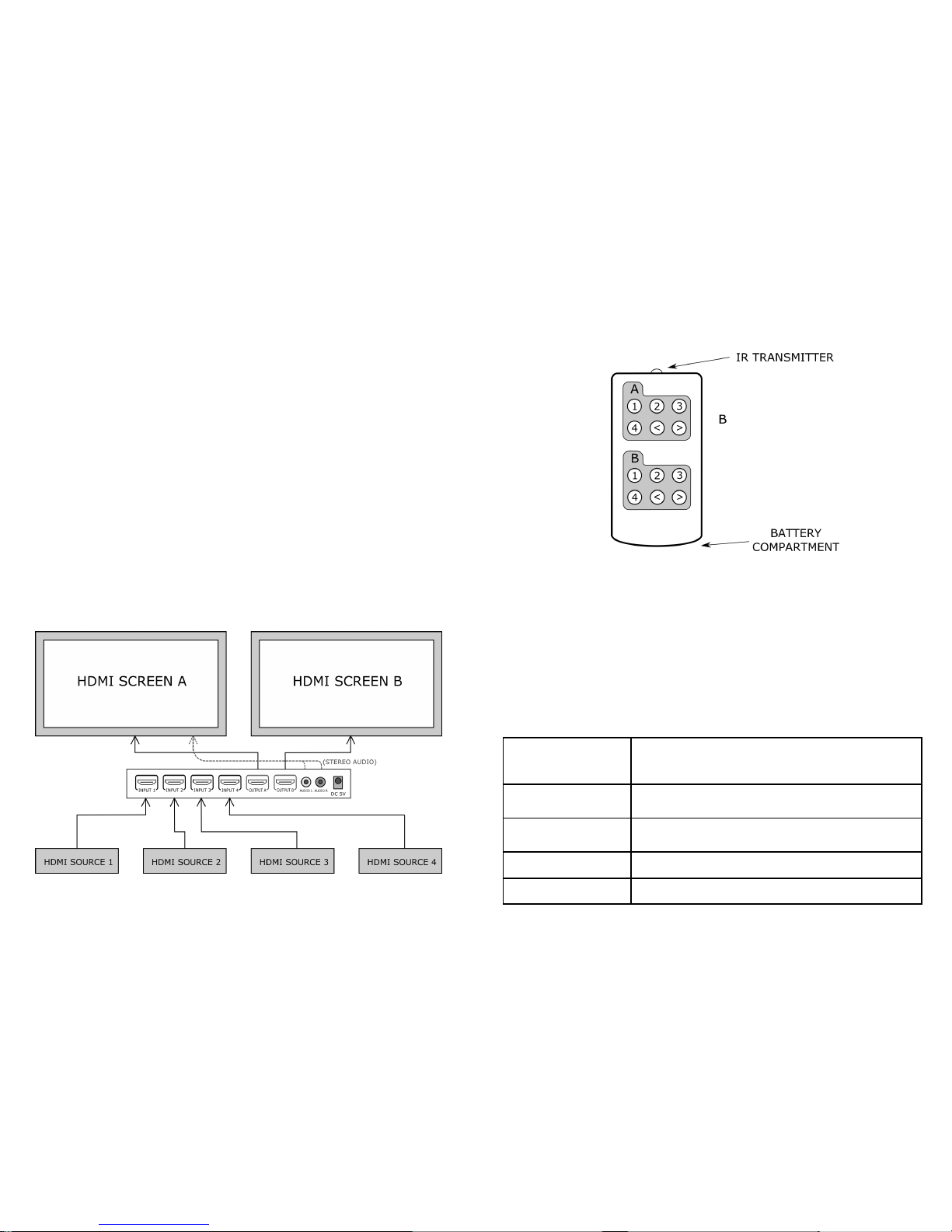
The HDMI 4 to 2 Matrix Switch has four inputs and two outputs. Up to 4 HDMI sources
can be connected to the switch with both outputs from the matrix switch then connected
to a separate display screen. Once the HDMI leads are connected the power adaptor can
be connected to the switch. The power switch on the front of the unit should be toggled
tothe ON position.
A connection scheme is shown below.
The HDMI 4 to 2 Matrix Switch is a true matrix switcher. As such it allows the HDMI
source for each display to be selected independently of the other display. This allows
each screen to display a different HDMI source at the same time or both screens to display
the same source if required.
The matrix switch will take a moment to negotiate with the HDMI sources and displays
when displaying identical sources, which may cause a brief interruption to the picture on
both screens.
Stereo audio output is provided for OUTPUT A only. This is an optional connection to
the screen or an external amplifier as HDMI will also carry audio to the screen.
There are two methods to change the input of the HDMI 4 to 2 Matrix Switch. Firstly
there is the “OUTPUT A” or “OUTPUT B” button on the front of the device itself which
can be pressed to cycle through each input. Secondly via the IR Remote Control as pictured above. The IR Transmitter should be pointed directly at the switch and with a clear
path to it.
On initial use of the IR Remote Control the clear plastic keeper should be pulled out from
the battery compartment. This is used to ensure that the battery is fresh. The battery
compartment can be opened by pulling the battery caddy carefully outward. Replacement
battery (CR2025) can easily be swapped in when required.
Input Selection and Remote Control.
Trouble Shooting
No picture Check that all HDMI leads are correctly connected to the
HDMI 4 to 2 Matrix Switch, HDMI source and display. Ensure that all HDMI leads are off adequate quality.
No power light Check that the power adaptor is correctly connected and pow-
er switch is at the “ON” position.
No sound 1. Cycle the power on the HDMI source.
2. If still no sound cycle power on HDMI switch.
Remote not working Change battery in remote control for another.
Poor picture on display Check HDMI leads and consider replacing if picture still poor.
 Loading...