

Page 1
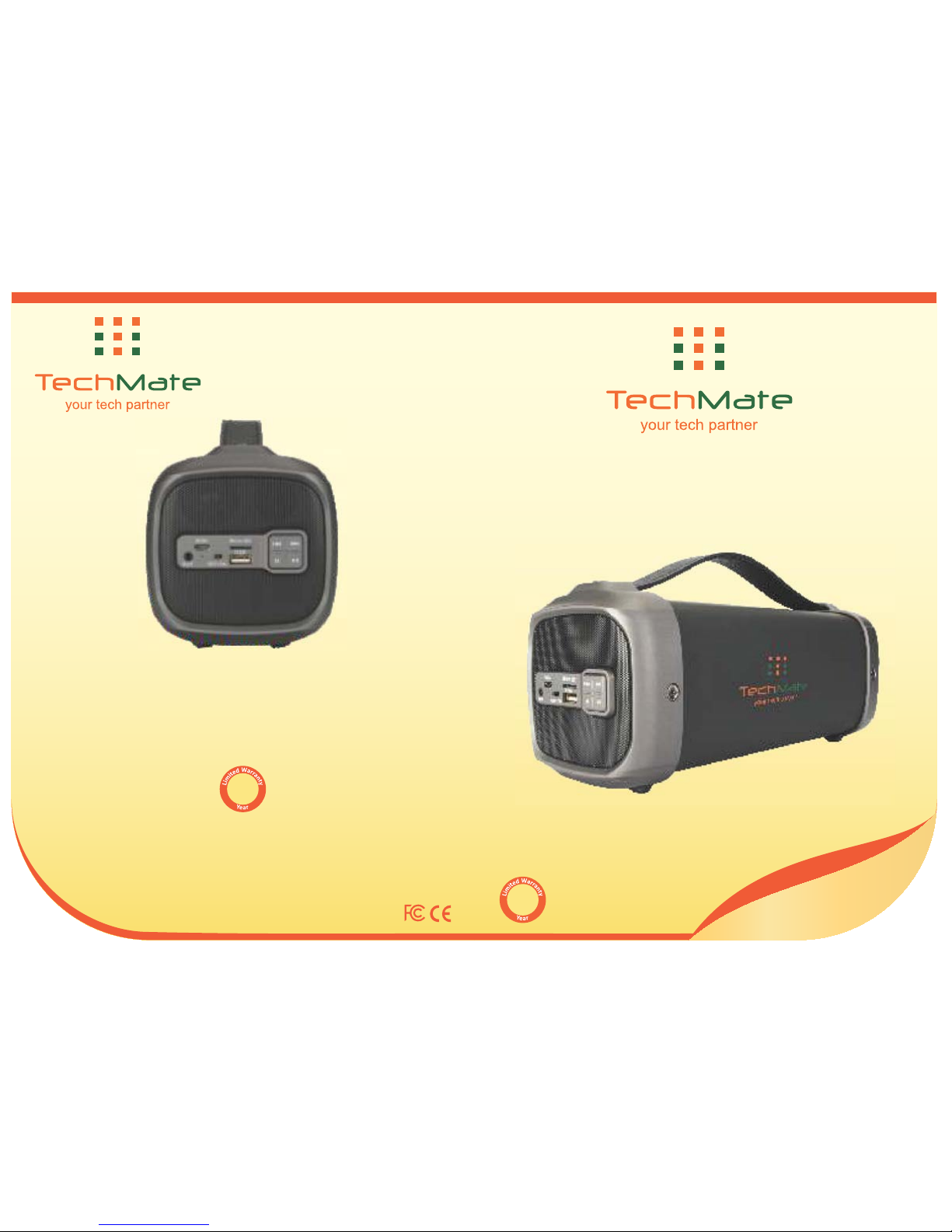
Use & Care Manual
TMBS - 152
®®
®
Please save this manual and this warranty card. You will need to produce this while
requesng for service within the warranty period. All returns must be carefully packed and
made transportaon prepaid with a descripon of the claimed defect, complete model
number, your name, street address (No P. O. Box numbers, please), phone number and
original dated sales receipt & this warranty card, to address below:
Trisha Corporation
12, Jamnadas Industrial Estate, Dr. Rajendra Prasad Road,
Opp. Jawahar Talkies, Mulund West, Mumbai 400 080, Maharashtra.
Tel: 022 6136 8888
www.techmateindia.com
Wireless Speaker
1
1
Page 2
Congratulaons on the purchase of your new Techmate® wireless speaker. This will definitely
become one of the most favorite equipment in your home. You will soon find out how easy
and quickly you can listen to your favorite songs with Techmate® wireless speaker. You just
have to push the buon of Techmate® wireless speaker.
We have provided instrucons on use of Techmate® wireless speaker. Now you can listen to
your favorite songs anywhere and anyme, always at your convenience.
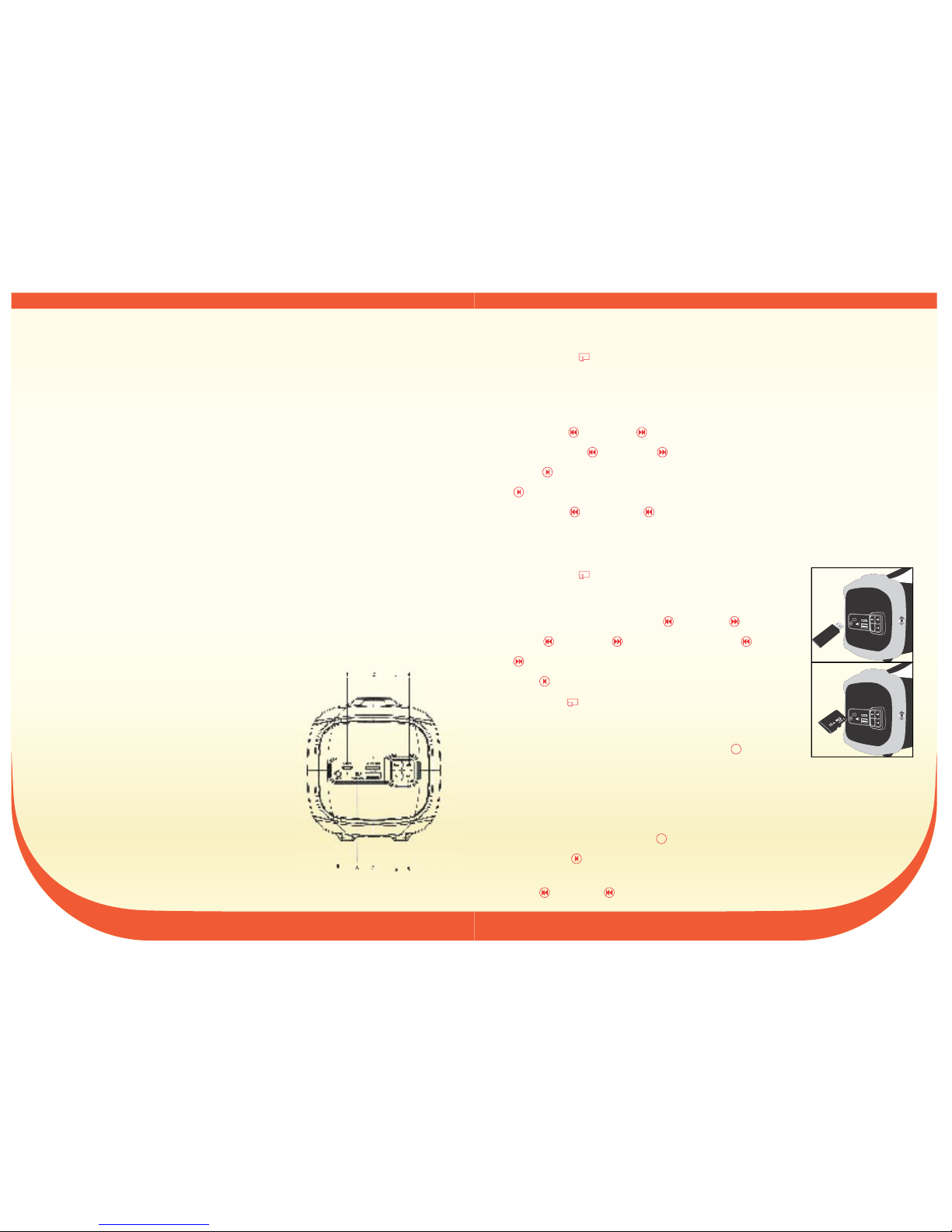
KNOW YOUR Techmate® WIRELESS SPEAKER
1. Charging jack
2. Micro SD slot
3. Previous / Volume down
4. Next / Volume up
5. Play / Pause
6. Mode (Switch Bluetooth, , USB pen drive
, FM and AUX-IN state)Micro SD memory card
7. USB port
8. OFF/ON
9. Aux-in jack
Please read this manual carefully before using
OPERATING INSTRUCTIONS
Wireless connecon:
1. Turn “ON” the power, the blue LED light will turn on and blink rapidly and beep twice.
2. Acvate Bluetooth on mobile phone and search for device name "Techmate®
TMBS-152" then connect it. The blue LED light will blink slowly and beep three mes,
when connecon is successful.
3. Play the music from your mobile phone and enjoy.
4. Short press
previous or next buon on Techmate® wireless speaker or on Mobile
phone to select
previous or next song.
5. Press Play/pause buon on Techmate® wireless speaker or on Mobile phone to
play/stop the music.
6. Long press previous or next buon to adjust volume up and down on your
Techmate® wireless speaker or adjust the mobile phones' volume.
Playing music from USB pen drive and Micro SD memory card:
1. Turn “ON” the power.
2. Insert USB pen drive or Micro SD memory card into slot, the
music stored will play automacally and blue LED light will be ON.
3. While playing music, Short press
previous or next buon to
select
previous or next song, or Long press previous or
next buon to adjust volume up and down.
4. Press PLAY/PAUSE buon to play or pause.
5. Turn “OFF” the power buon when speaker is not in use.
Note: Wireless connecon will be disconnected when you insert USB
pen drive or card while speaker is connected Micro SD memory card
with phone and music is playing. You can press the
MODE buon
to switch to wireless mode and establish wireless connecon.
FM Radio:
1. Please insert the audio cable to get the best FM signal before using. The audio cable
works as antenna.
2. Turn “ON” the power; press the “MODE” buon to switch to FM radio.
3. Short press “Play/pause” buon, while playing FM radio, to auto search the FM
Channel and store it automacally.
4. Press
previous or next buon to change the stored FM channel.
OFF/ON
OFF/ON
OFF/ON
M
M
SPECIFICATIONS:
B T version: 4.2
Support A2DP and AVRCP profile
Wireless range: up to 10 meters
Speaker: 1.4 inch, 3w, 4Ω
Subwoofer: 3 inch, 10w, 4Ω
Connecons: Micro SD; USB; Aux-in 3.5mm
Power source: Rechargeable lithium 1500 mAh baery
(Up to 2 hours playme with maximum volume)
Voltage: DC 5V 1A (USB-to-micro USB charging cable included)
Radio: FM
1 2
M
M
Micro SD
DC5V
USB
AUX
OFF/ON
M
Micro SD
DC5V
USB
AUX
OFF/ON
Page 3
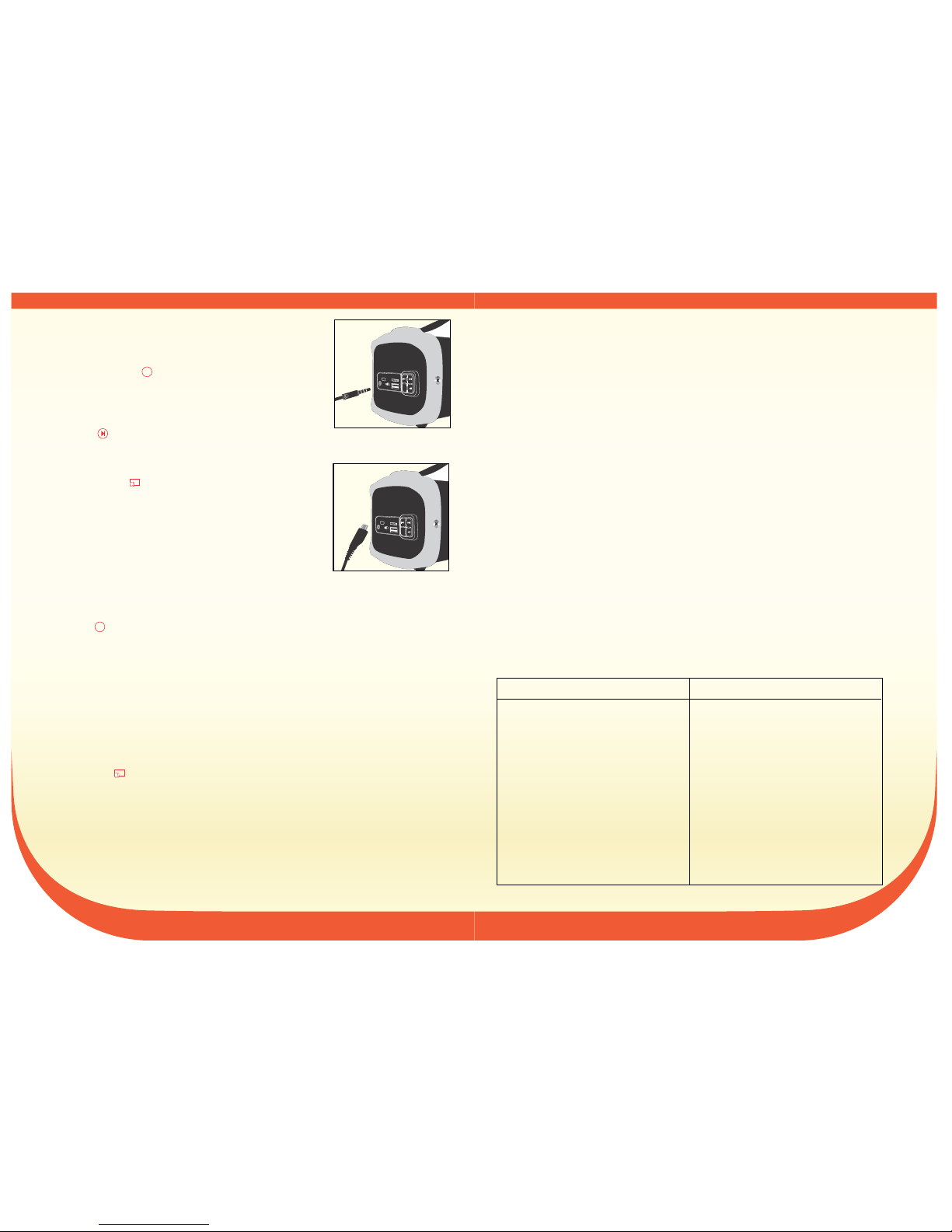
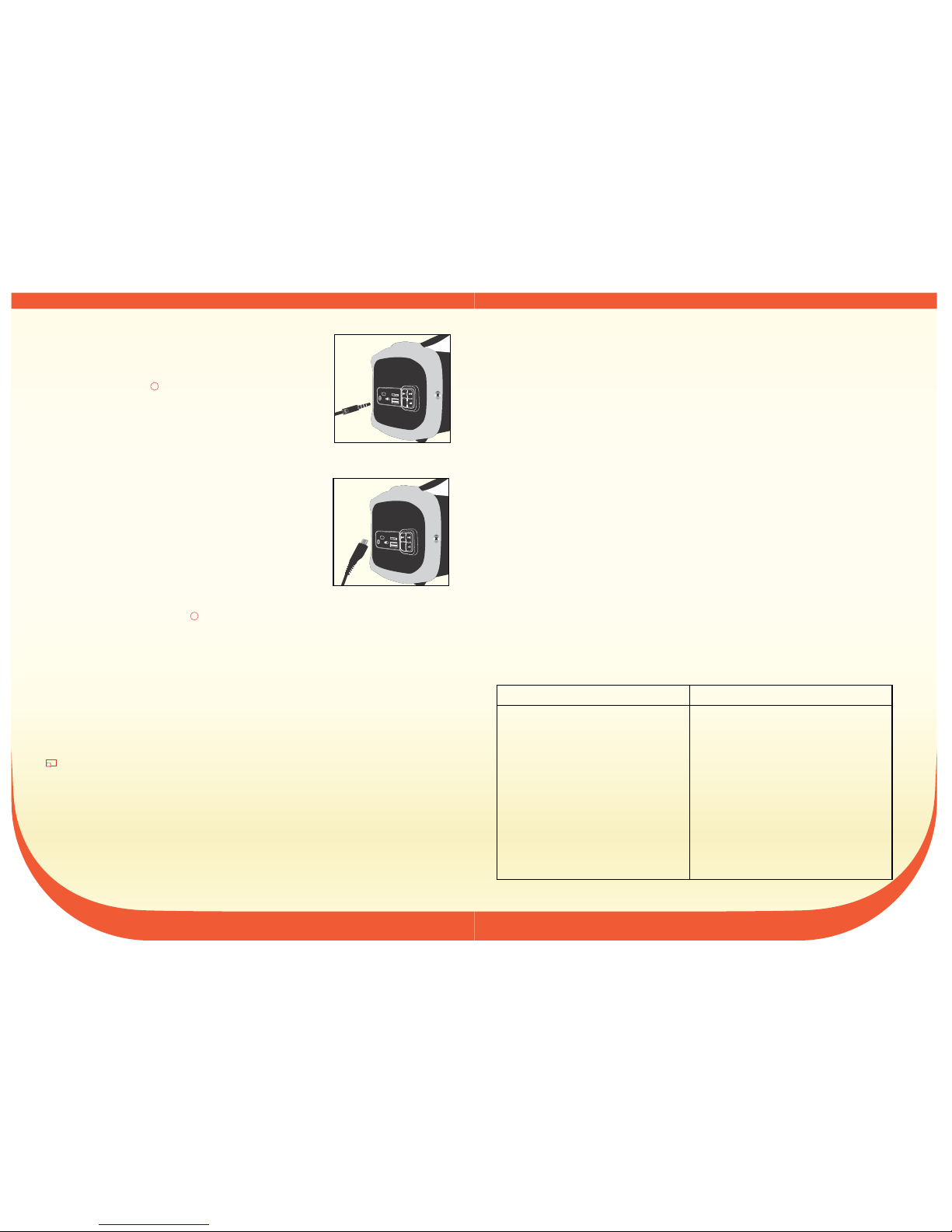
AUX-IN:
Use the supplied audio line cable to connect from the other
source device's “Line Out” to the “Aux-In” of Techmate® wireless
speaker. Then press the “MODE” buon and switch to switch to
AUX-IN.
While using a source device with AUX-IN connecon, all funcons
will be controlled by the external device. Speaker can control only
volume +/- & “Play/pause” buon.
How to charge Baery:
1. Turn “OFF” the power, Connect the charging cable to
speaker and PC or other charger with DC5V output, the red
LED charging indicator will come ON.
2. Charging me should be about 3-5 hours. The LED indicator
light will go OFF, when charging is completed.
3. Do not charge your Techmate® wireless speaker for more
than 8 hours to prolong the life of baery.
Important Reminders:
1. Press the MODE buon to switch the different modes, the order is Wireless, Micro SD
memory card, USB pen drive, FM radio and AUX-IN.
2. Your Techmate® wireless speaker will operate without the wire connecon using the
lithium baery. The amount of baery life depends on how hard the unit is working.
Heavy, loud, bass music will use more energy to produce than vocal lyrics.
3. The built-in rechargeable baery is not replaceable. Do not remove or replace it; do not
discard in the trash or in the fire.
4. Wipe your Techmate® wireless speaker with so damp cloth. Do not use any detergent,
chemicals or abrasives to clean the speaker. Do not immerse the speaker in water or any
other liquid.
5. Turn “off” the power, when Techmate® wireless speaker is not in use.
6. If the speaker is le unused for over two weeks, then you should charge the baery
periodically for longevity of baery life.
M
OFF/ON
M
OFF/ON
LIMITED WARRANTY
a. This one year limited warranty is for consumers only, from the date of original purchase.
You are a consumer if you have bought the Techmate® wireless speaker for personal,
family or household use. Except as otherwise required under applicable state law, this
warranty is not available to retailers, other commercial buyers or owners who have
bought used unit.
b. The warranty should be completed and stamped by the dealer immediately upon the
purchase.
c. Techmate® warrants this product to be free of defects in material or workmanship during
normal household use for one year limited warranty from the date of first purchase.
d. This warranty does not apply to damage resulng from misuse, abuse, accidents or
alteraons to the product, or to damages incurred in transit, other than ordinary
household use. This limited warranty does not cover plasc parts, cords or plugs, charging
cable, colour & belt.
e. Your Techmate® wireless speaker has been manufactured to strict specificaons and
been designed for use with approved Techmate® accessories only. This warranty
expressly excludes any defects and damages caused by accessories or repair service other
than those that have been authorized by Techmate®.
f. This warranty card needs to be produced along with the product for service/ repair.
g. In the unlikely event, if your Techmate® wireless speaker proves to be defecve in
material or workmanship, we will repair free of charge, within the warranty period.
h. The liability of Techmate® is limited to the extent of the cost of product and will not
include any other compensaon whatsoever.
i. The decision of Techmate® will be final on all warranty claims.
j. This warranty is subject to jurisdicon of court of Mulund West, Mumbai, India,
irrespecve of place of transacon.
Techmate® will pay for Techmate® will not pay for
1. Replacement parts and repair labour
costs to correct defect in materials and
workmanship.
2. Se rvice mu st be pr ovide d by an
authorized Techmate® service center.
1. Repairs when the product is used in
other than normal household use.
2. Damage resulng from abuse, misuse,
accidents or alteraons.
3. Any shipping or handling costs to ship
your product to and from authorized
service center.
4. O rigin al c ode or s erial num ber is
deleted, defaced or altered.
5. Electrical parts as they are subject to
voltage fluctuaons, wear & tear.
6. Replacement parts or repair labour
costs for product operated outside
India.
Authorized Service Center will levy service charge for parts and labor to repair any product out
of warranty period.
3 4
M
Micro SD
DC5V
USB
AUX
OFF/ON
M
Micro SD
DC5V
USB
AUX
OFF/ON
Page 4
M
Micro SD
DC5V
USB
AUX
OFF/ON
viuh ubZ Techmate® ok;jysl Lihdj dh [kjhnh ij c/kkbZ ;g fuf'pr :i ls vkids ?kj esa lcls
vuqdwy midj.k cu tk,xkA vkidks tYnh gh irk py tk,xk fd Techmate® ok;jysl Lihdj ds
lkFk vki vius ilanhnk xhrksa dks fdrus vklkuh vkSj rsth ls lqu ldrs gSA vkidks flQZ Techmate®
ok;jysl Lihdj ds cVu dks nckuk gksxkA
geus Techmate® ok;jysl Lihdj ds mi;ksx ds ckjs esa funsZ'k çnku fd, gSa vc vki vius ilanhnk
xhrksa dks dgha Hkh vkSj dHkh Hkh viuh lqfo/kkuqlkj ges'kk lqu ldrs gSaA
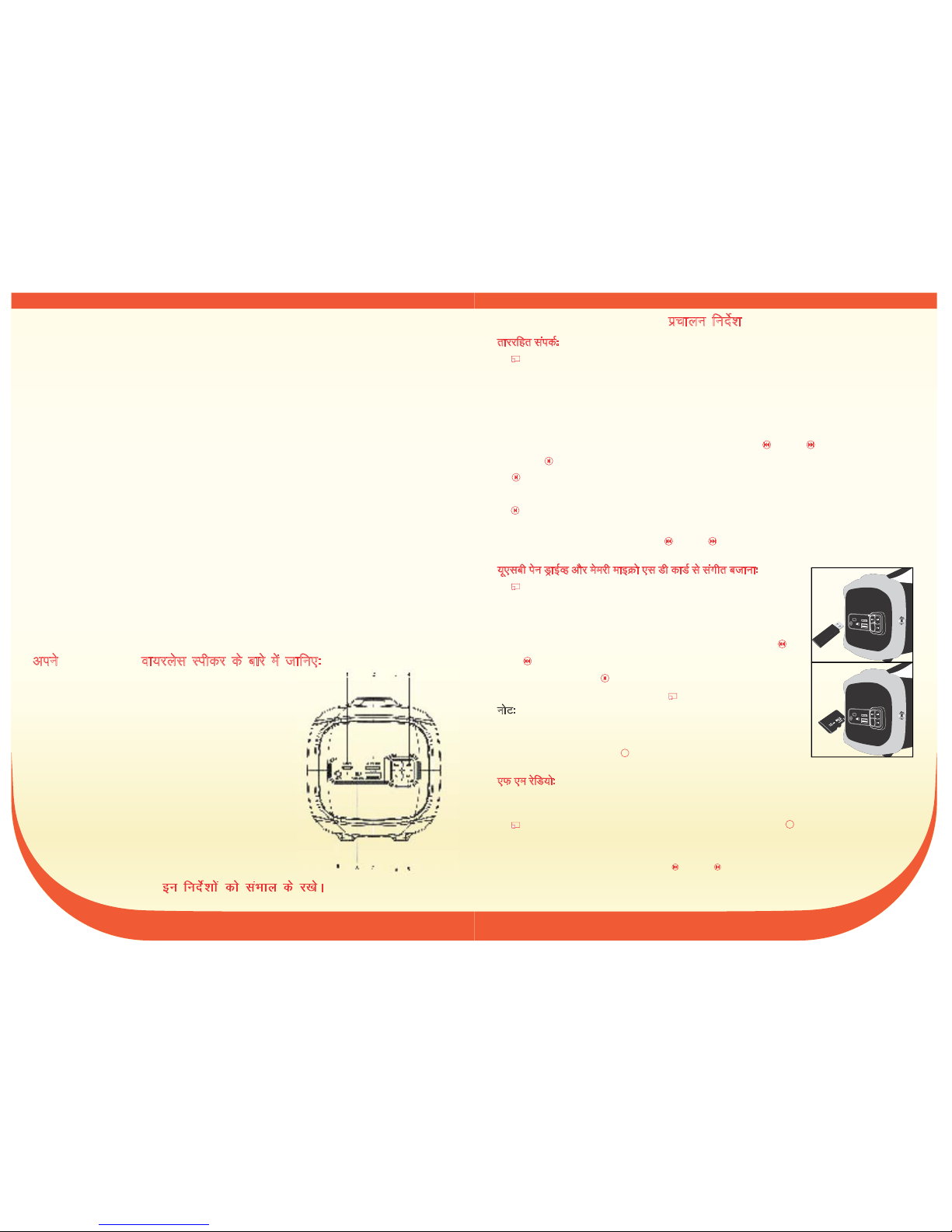
1- tSd pktZ
2- ekbØks ,lMh esejh dkMZ Ly‚V
3- fiNyk @ ek=k uhps
4- vxyk @ ek=k Åij
5- pyk;sa @ jksdsa
6- eksM ¼fLop CywVwFk] ;w,lch MªkbZOg]
ekbØks ,lMh esejh dkMZ] ,Q,e vkSj vkWDl&bu½
7- ;w,lch iksVZ
8- can @ pkyw
9- v‚Dl&bu tSd
r
kjjfgr laidZ%
1- ^^pkyw^^ cVu nck ds pkyw djsa] uhyh ,ybZMh ykbV rsth lsa >idsxh vkSj nks ckj Vh Vh vkokt
djsaxhA
2- eksckby Qksu ij dks lfØ; djsa vkSj midj.k uke
"Techmate® TMBS-152" ds fy,
Bluetooth
[kkst djsa vkSj fQj bls dusDV djsaA tc dusD'ku lQy gksxk rc uhyh ,ybZMh ykbV /khjs&/khjs
>idsxh vkSj rhu ckj Vh Vh vkokt djsxhA
3- vius eksckby Qksu ls e/kqj laxhr lquus dk vkuan ysaA
4- vkidk eu pgk xkuk pquus ds fy, Lihdj ;k eksckby Qksu ij
vkxs ;k ihNs okyk cVu nck,aA
5- laxhr Iys@ ikWt ds fy, Techmate® ok;jysl Lihdj ij ;k eksckby Qksu ij
Iys@i‚t cVu nck,aA
5- laxhr dks pykus@jksdus ds fy, Techmate® ok;jysl Lihdj ij ;k eksckby Qksu ij
Iys@i‚t cVu nck,aA
6- vkokt dks /kheh vkSj rst djus ds fy, ok;jysl midj.k dk mi;ksx djsa ;k fQj Øe'k% /kheh vkSj
rst ek=k dks lek;ksftr djus ds fy,
vkxs ;k fiNs okyk cVu ij 3 lsdan rd nck ds j[ksA
;w,lch isu MªkbZOg vkSj esejh ekbØks ,l Mh dkMZ ls laxhr ctkuk%
1- ^^pkyw^^ cVu nck ds pkyw djsaA
2- ;w,lch isu MªkbZOg ;k esejh ekbØks ,l Mh dkMZ dks Ly‚V esa Mkysa] lafpr
laxhr Lor% pysxk vkSj uhyh ,ybZMh ykbV pkyw gksxhA
3- tc vki laxhr ilan djrs gSa] rc /kheh ;k rst ek=k lek;ksftr djus ds
fy, vkxs ;k ihNs ds fy, yacs le; rd vkSj xkuk cnyus ds fy,]
vkxs
;k
ihNsokyk cVu nck,aA
4- pkyw ;k jksdus ds fy,
Iys@ikWt dk cVu nck,aA
5- Lihdj mi;ksx esa ugha gS rc ikoj cVu
^^can^^ j[ksA
uksV% tc vki dk Lihdj Qksu vkSj laxhr ds lkFk tqM+k gqvk gS] rks ;w,lch isu
MªkbZOg ;k esejh ekbØks ,l Mh dkMZ lfEefyr djrs le; ok;jysl dusD'ku
fMLdusDV gks tk,xkA vki ok;jysl eksM esa fLop djus ds fy, vkSj ok;jysl
dusD'ku LFkkfir djus ds fy, MODE cVu nck ldrs gSaA
,
Q ,e jsfM;ks%
1- mi;ksx djus ls igys lcls vPNk ,Q,e ladsr çkIr djus ds fy, v‚fM;ks dscy MkysaA v‚fM;ks
dscy ,aVhuk ds :i esa dke djrk gSA
2-
^^pkyw^^cVu nck ds pkyw djsa ,Q,e jsfM;ks ij fLop djus ds fy, ^^MODE** cVu nck,aA
3- ,Q,e jsfM;ks [ksyrs le; ,Q,e pSuy dks Lor% [kkst djus vkSj bls Lopkfyr :i ls laxzghr djus
ds nkSjku ^^Iys@jksdsa^^ cVu nck,aA
4- laxzghr ,Q,e pSuy dks cnyus ds fy, vkxs ;k ihNs okyk cVu nck,aA
OFF/ON
OFF/ON
OFF/ON
M
OFF/ON
M
izpkyu funsZ'k
SPECIFICATION:
B T version: 2.1
Support A2DP and AVRCP profile
Wireless range: up to 10 meters
Speaker: 1.4 inch, 3w, 4Ω
Subwoofer: 3 inch, 10w, 4Ω
Connecons: Micro SD; USB; Aux-in 3.5mm
Power source: Rechargeable lithium 1500 mAh baery
(Up to 2hours playme with maximum volume)
Voltage: DC 5V 1A (USB-to-micro USB charging cable included)
Radio: FM
5 6
vius ok;jysl Lihdj ds ckjs esa tkfu,%Techmate®
M
M
Micro SD
DC5V
USB
AUX
OFF/ON
Page 5
vkWDl&bu%
vU; lzksr midj.k ds ^^ykbu vkmV^^ ls Techmate® ok;jysl Lihdj
ds ^^v‚Dl&bu^^ ls dusDV djus ds fy, vkiwfrZ dh xbZ v‚fM;ks ykbu
dscy dk mi;ksx djsa fQj "MODE" cVu nck,a vkSj AUX-IN esa
fLop djsaA
AUX-IN dusD'ku ds lkFk ,d lzksr midj.k dk mi;ksx djrs gq,] lHkh
QaD'ku ckgjh midj.k }kjk fu;af=r fd;k tk,xkA
cSVjh dSls pktZ djs %
1- fLidj dks can djs] Lihdj vkSj daEI;qVj ;k DC5V output ds lkFk vU;
pktZj dks pkftaZx dscy ls dusDV djsa] yky ,ybZMh pkftaZx lqpd
izdkf'kr gks tk,xkA
2- pktZ djus dk le; yxHkx 3&5 ?kaVs gksuk pkfg,A pkftaZx iwjk gks tkus
ij] ,ybZMh lwpd çdk'k can gks tk,xkA
3- cSVjh ds thou dks yEck j[kus ds fy, 8 ?kaVs ls vf/kd ds fy, vius
Techmate® ok;jysl Lihdj dks pktZ u djsaA
egRoiw.kZ vuqLekjd%
1- fofHkUu eksM dks fLop djus ds fy, MODE cVu nck,a] Øe ok;jysl] esejh ekbØks ,l Mh dkMZ
;w,lch isu ] ,Q,e jsfM;ks vkSj vkWDl&bu gSAMªkbZOg
2- vkidk ok;jysl Lihdj fyfFk;e cSVjh dk ç;ksx djds rkj dusD'ku ds fcuk dke Techmate®
djsxkA cSVjh thou dh ek=k ;g fuHkZj djrk gS fd vki bldks fdl rjg bLreky djrs gSSSA Hkkjh] tksj
ls] ckl laxhr eq[kj xhrksa dks ctkrs le; vf/kd ÅtkZ dk mi;ksx gks ldrk gSA
3- varfuZfgr fjpktsZcy cSVjh cnys ughaA bls gVk,a ;k bls u cnysa bls dpjs esa ;k vkx esa er NksMsA
4- uje ue diM+s ds lkFk vius Techmate® ok;jysl Lihdj dks lkQ djsaA Lihdj dks lkQ djus ds
fy, fMVtsaZV] jlk;u ;k ,czkflo dk mi;ksx u djsaA Lihdj dks ikuh ;k fdlh vU; rjy esa folftZr
u djsaA
5- ikoj can djsa] tc Techmate® ok;jysl Lihdj mi;ksx esa ugha gSA
6- ;fn Lihdj nks lIrkg ls vf/kd vç;qä NksM+ fn;k tkrk gS] rks vkidks cSVjh thoudky dh yach mez ds
fy, le;≤ ij pktZ djuk pkfg,A
M
M
OFF/ON
1 lky* dh lhehr okjaVh
a. ;g ,d o"kZ lhfer okjaVh dsoy miHkksäkvksa ds fy, gS] ewy [kjhn dh rkjh[k lsA ;fn vki futh]
ifjokj ;k ?kjsyw mi;ksx ds fy, Techmate® ok;jysl Lihdj [kjhnrs gSa rks vki miHkksäk gSa flok;
blds fd ykxw jkT; dkuwu ds rgr vU;Fkk visf{kr gS] ;g okjaVh] [kqnjk foØsrkvksa] vU; okf.kfT;d
[kjhnkjksa ;k ekfydksa ds fy, miyC/k ugha gS ftUgksaus bLrseky dh;k gqvk Lihdj [kjhnk gSA
b. [kjhn ds rqjar ckn Mhyj }kjk okjaVh dks iwjk vkSj eqækafdr fd;k tkuk pkfg,A
c. Techmate® bl mRikn dks igyh [kjhn dh rkjh[k ls ,d lky lhfer okjaVh ds fy, lkekU; ?kjsyw
mi;ksx ds nkSjku lkexzh ;k dkjhxjh esa nks"k ls eqä gksus dh okjaVh nsrk gSA
d. ;g okjaVh mRikn dks nq#i;ksx] nqO;Zogkj] nq?kZVuk ;k ifjorZu ls mRiUu {kfr ;k lkekU; ?kjsyw mi;ksx
ds vykok ikjxeu esa gksus okys uqdlku ds fy, ykxw ugha gksrk gSA ;g lhfer okjaVh IykfLVd ds
fgLlksa] Mksfj;kWa] dyj] pkthZax dscy] csYV ;k Iyx dks doj ugha djrk gSA
e. vkidk Techmate® ok;jysl Lihdj l[r fofunsZ'kksa ds fy, fufeZr fd;k x;k gS vkSj dsoy
vuqeksfnr Techmate® ds lkeku ds lkFk mi;ksx ds fy, fMtkbu fd;k x;k gSA ;g o‚jaVh Li"V
-
:i ls fdlh Hkh nks"k ;k {kfr ds dkj.k lkeku ;k ejEer lsok ds vykok tks Techmate® }kjk
vf/k—r fd;k x;k gS vkSj blds vykok vU; 'kkfey ugha gSA
f. ;g okjaVh dkMZ lsok@ejEer ds le; midj.k ds lkFk iznku djuk vko';d gSA
g. vçR;kf'kr ?kVuk esa] ;fn vkidk Techmate® ok;jysl Lihdj lkexzh ;k dkjhxjh esa nks"kiw.kZ
lkfcr gksrk gS] rks ge okjaVh vof/k ds Hkhrj] fu% 'kqYd ejEer djsaxsA
h. Techmate® dh ns;rk mRikn dh ykxr dh lhek rd lhfer gS vkSj blesa fdlh Hkh vU; eqvkot-s
dks 'kkfey ugha fd;k tk,xkA
I. Techmate® dk fu.kZ; lHkh okjaVh nkoksa ij vafre gksxkA
j. ysunsu ds LFkku ij /;ku fn, fcuk] ;g okjaVh eqyqaM osLV] eqacbZ] Hkkjr ds U;k;ky; ds vf/kdkj {ks= ds
v/khu gSA
1- lkexzh vkSj dkjhxjh esa nks"k dks nwj djus ds fy,
çfrLFkkiu Hkkxksa vkSj ejEer Je ykxrA
2- ,d vf/k—r Techmate® lsok dsaæ }kjk lsok
çnku dh tkuh pkfg,A
1- ejEer tc mRikn lkekU; ?kjsyw mi;ksx ds
vykok vU; esa mi;ksx fd;k tkrk gS
2- nqO;Zogkj] nq:i;ksx] nq?kZVukvksa ;k ifjorZuksa ls
mRiUu gksus okys uqdlku
3- vf/k—r lsok dsaæ ls vkSj vkids mRikn dks tgkt
djus ds fy, dksbZ f'kfiax ;k gSaMfyax ykxrA
4- ewy dksM ;k lhfj;y uacj esa cnyko fd;k tkukA
5- fo|qr Hkkxksa esa oksYVst }kjk mrkj p<+ko] gksusij
?khl tkus ds v/khu gSaA
6- Hkkjr ds ckgj lapkfyr mRikn ds fy, fjIyslesaV
ikVZ ;k ejEer Je ykxr
okjaVh vof/k ds ckgj çkf/k—r lsok dsaæ Hkkxksa vkSj etnwjh ds fy, lsok çHkkj yxk,xkA ftlesa ls fdlh Hkh mRikn dks
ejEer ds fy, yxk;k tk,xkA
Techmate® blds fy;s Hkqxrku djsxk% Techmate® blds fy;s Hkqxrku ugh djsxk%
7 8
M
Micro SD
DC5V
USB
AUX
OFF/ON
M
Micro SD
DC5V
USB
AUX
OFF/ON
 Loading...