

Page 1
User Manual
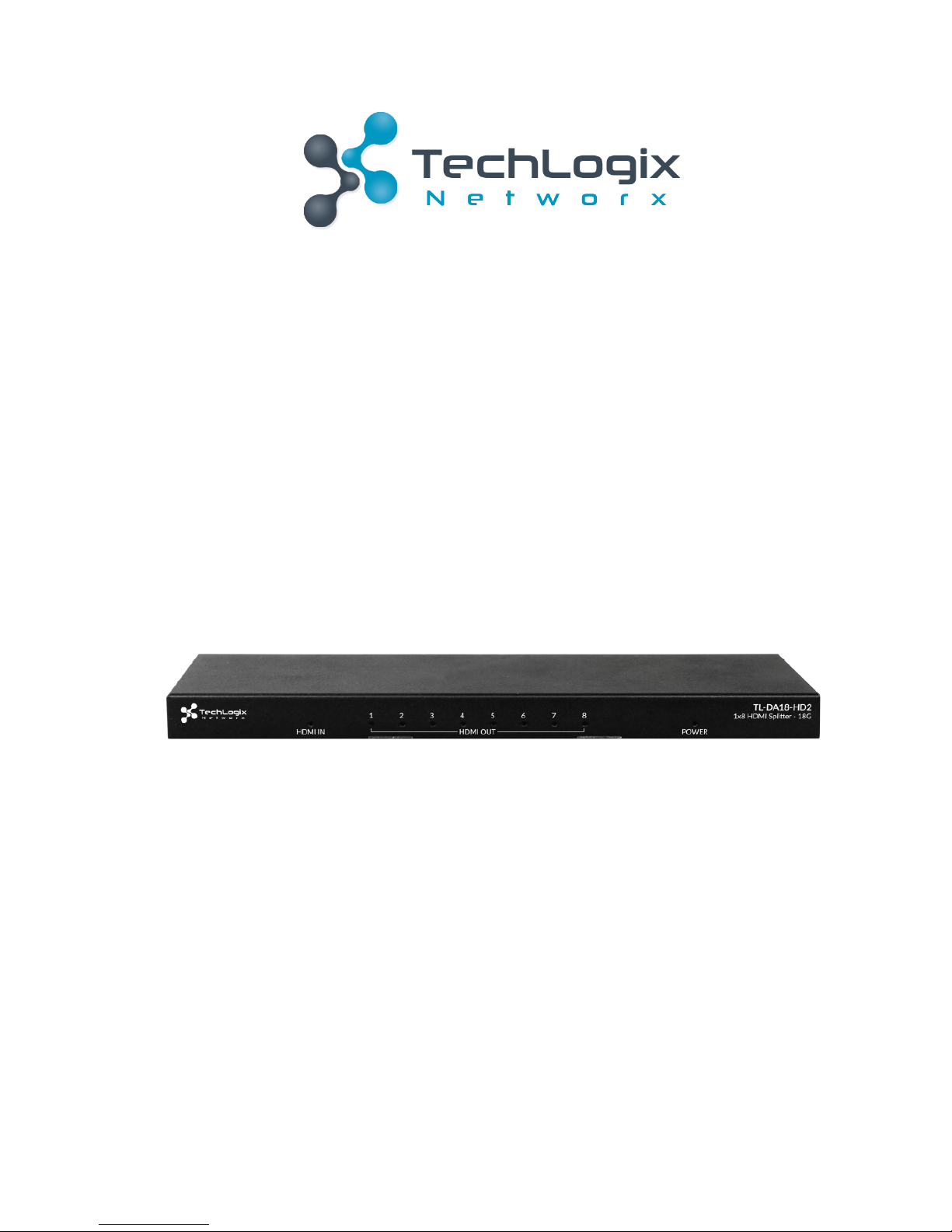
TL-DA18-HD2
1x8 HDMI 4K Splitter with HDCP 2.2
All Rights Reserved
Versi on: TL-DA18-HD2_161031
Page 2
1
TL-DA18-HD2- User Manual
www.tlnetworx.com
Preface
Read this user manual carefully before using this product. Pictures shown in this manual
are for reference only, slight differences may be evident on the real product.
This manual is only for operation instruction only, not for any maintenance usage.
Trademarks
Product model and logo are trademarks. Any other trademarks mentioned in this manual
are acknowledged as the properties of the trademark owner. No part of this publication
may be copied or reproduced without prior written consent.
FCC Statement
This equipment generates, uses and can radiate radio frequency energy and, if not
installed and used in accordance with the instructions, may cause harmful interference
to radio communications. It has been tested and found to comply with the limits for a
Class B digital device, pursuant to part 15 of the FCC Rules. These limits are designed to
provide reasonable protection against harmful interference in a commercial installation.
Operation of this equipment in a residential area is likely to cause interference, in which
case the user at their own expense will be required to take whatever measures may be
necessary to correct the interference
Any changes or modifications not expressly approved by the manufacture would void the
user’s authority to operate the equipment.
Page 3
2
TL-DA18-HD2- User Manual
www.tlnetworx.com
SAFETY PRECAUTIONS
To i ns u re t he b e st experience from the product, please read all instructions carefully
before using the device. Save this manual for further reference.
l Unpack the equipment carefully and save the original box and packing material for
possible future shipment
l Follow basic safety precautions to reduce the risk of fire, electrical shock and injury
to persons.
l Do not dismantle the housing or modify the module. It may result in electrical shock
or burns.
l Using supplies or parts not meeting the products’ specifications may cause damage,
deterioration or malfunction.
l Refer all servicing to qualified service personnel.
l To p re v e n t f i re o r s h o c k h a za r d , d o n o t e x p os e t he u ni t to r ai n , m o i s tu r e o r i n st a l l t h i s
product near water.
l Do not put any heavy items on the extension cable in case of damage.
l Do not remove the housing of the device as opening or removing housing may
expose you to dangerous voltage or other hazards.
l Install the device in a place with proper ventilation to avoid damage caused by
overheat.
l Keep the module away from liquids.
l Spillage into the housing may result in fire, electrical shock, or equipment damage. If
an object or liquid falls or spills on to the housing, unplug the module immediately.
l Do not use liquid or aerosol cleaners to clean this unit. Always unplug the power to
the device before cleaning.
l Unplug the power cord when left unused for a long period of time.
l Information on disposal for scrapped devices: do not burn or mix with general
household waste, please treat them as normal electrical wastes.
Page 4
3
TL-DA18-HD2- User Manual
www.tlnetworx.com
1. Introduction
TL-DA18-HD2 is a 1x8 HDMI splitter with HDMI 2.0 and HDCP 2.2 compliance, and
reliably distributes one HDMI source signal to 8 HDMI displays.
It supports HDMI 2.0 specification features including data rates up to 18Gbps 4K@60Hz
video, and automatic HDCP 2.2 compatibility.
It also provides EDID management which provides multiple EDID options for various
resolutions output, and HDCP management which authenticates HDCP encryption
between all devices, ensuring the HDMI source reliably outputs correct content for
display.
Additional features, includes input cable equalization and signal regeneration
compensation, which reduces the need for additional signal conditioning equipment by
compensating for signal loss when using long input cable or cascading multiple units.
1.1 Features
l Distributes one HDMI sources to 8 HDMI displays
l Full 18Gbps HDMI 2.0 and HDCP 2.2 compliant
l Automatic HDCP 2.2 compatibility
l Independent DIP switch for EDID management
l Multiple splitters can be cascaded to expand distribution
l RS232 port for firmware update
l Threaded power port for locking or standard DC 12V connection
l Front panel LED indication for I/O and Power connectivity
l Automatic input cable equalization and signal regeneration compensation
Page 5
4
TL-DA18-HD2- User Manual
www.tlnetworx.com
1.2 Package List
ü 1 x TL-DA18-HD2
ü 1 x Mounting brackets (Pair)
ü 1 x Power Adapter (DC 12V 1.5A)
ü 1 x User manual QR Card
ü 1 x Phoenix male connector (3 Pin
3.5mm)
&
Check whether all the items listed above are included in your package. If not,
contact your dealer.
Page 6
5
TL-DA18-HD2- User Manual
www.tlnetworx.com
2. Appearance
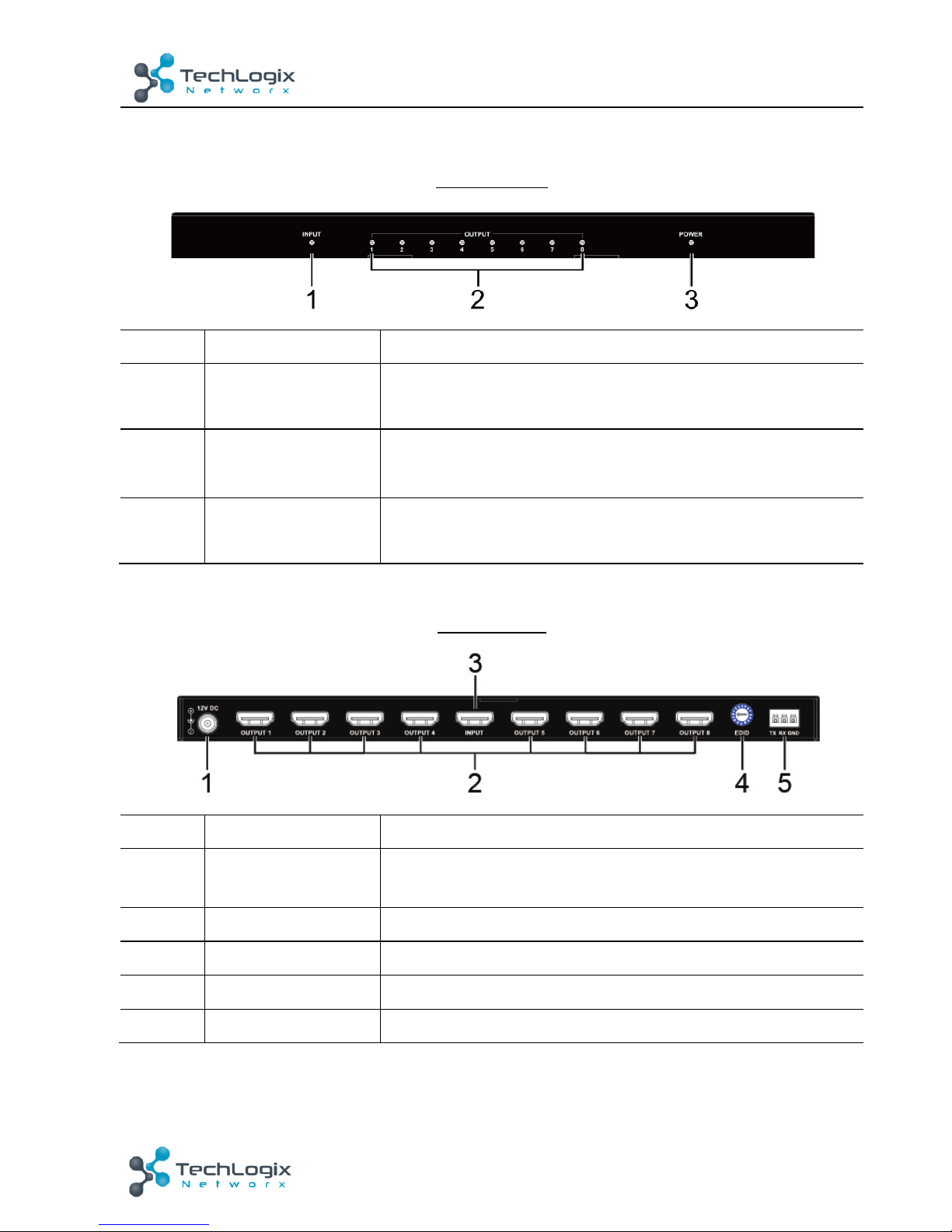
Front Panel
No.
Name
Description
1
Input LED
ON: An HDMI source is connected to the splitter.
OFF: No HDMI source is connected to the splitter.
2
Output LED
ON: HDMI display is connected to the splitter.
OFF: No HDMI display is connected to the splitter.
3
Power LED
ON: The splitter is on.
OFF: The splitter is off.
Rear Panel
No.
Name
Description
1
12V DC
12V DC power input, threaded port for standard or
locking connection
2
HDMI OUT1~8
Connects to HDMI display devices
3
HDMI IN
Connects to HDMI source device
4
EDID
Choose different EDID modes
5
RS232
For firmware update
&
Pictures shown in this manual are for reference only.
Page 7
6
TL-DA18-HD2- User Manual
www.tlnetworx.com
3. Appearance
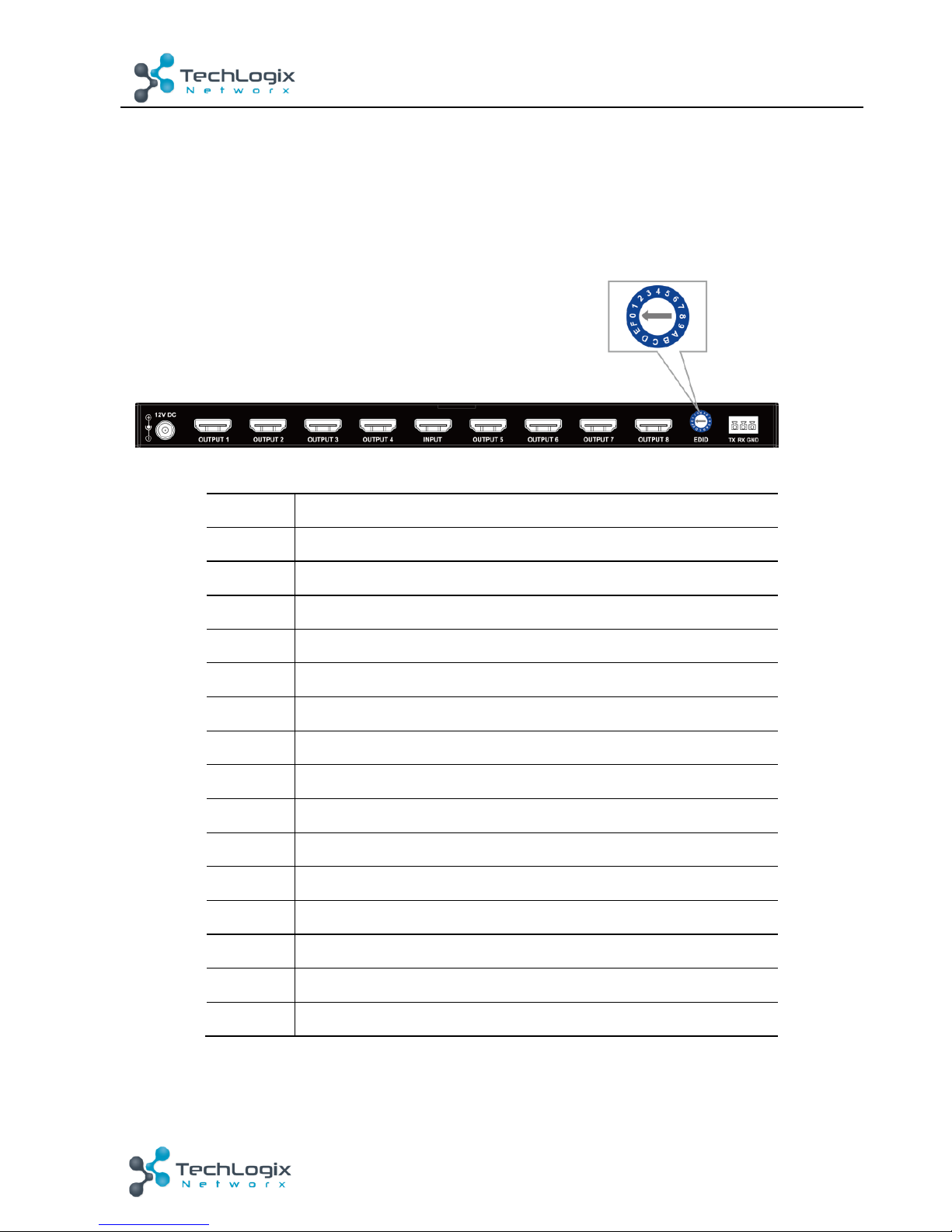
EDID (Extended Display Identification Data) is data generated from each display in the
system to communicate the capabilities of the device. The splitter features an EDID copy
mode that can be used when the EDID does not meet the installation requirements. The
EDID mode has several options available to encourage device communication.
Note: Repower the device to make the change effective.
Position
Descriptions
0
Copy EDID from HDMI output1 (default setting)
1
1080i, 2CH Audio
2
1080i, Dolby/DTS5.1
3
1080i, HD Audio
4
1080P, 2CH Audio
5
1080P, DOLBY/DTS5.1
6
1080P, HD Audio
7
3D, 2CH Audio
8
3D, DOLBY/DTS5.1
9
3D, HD Audio
A
1280x1024 DVI
B
1920x1080 DVI
C
1920x1200 DVI
D
4K@30HZ ,2CH Audio
E
4K@60HZ ,2CH Audio
Note: If failed to copy EDID, the device will output 1080p with stereo audio.
Page 8
7
TL-DA18-HD2- User Manual
www.tlnetworx.com
4. System Connection
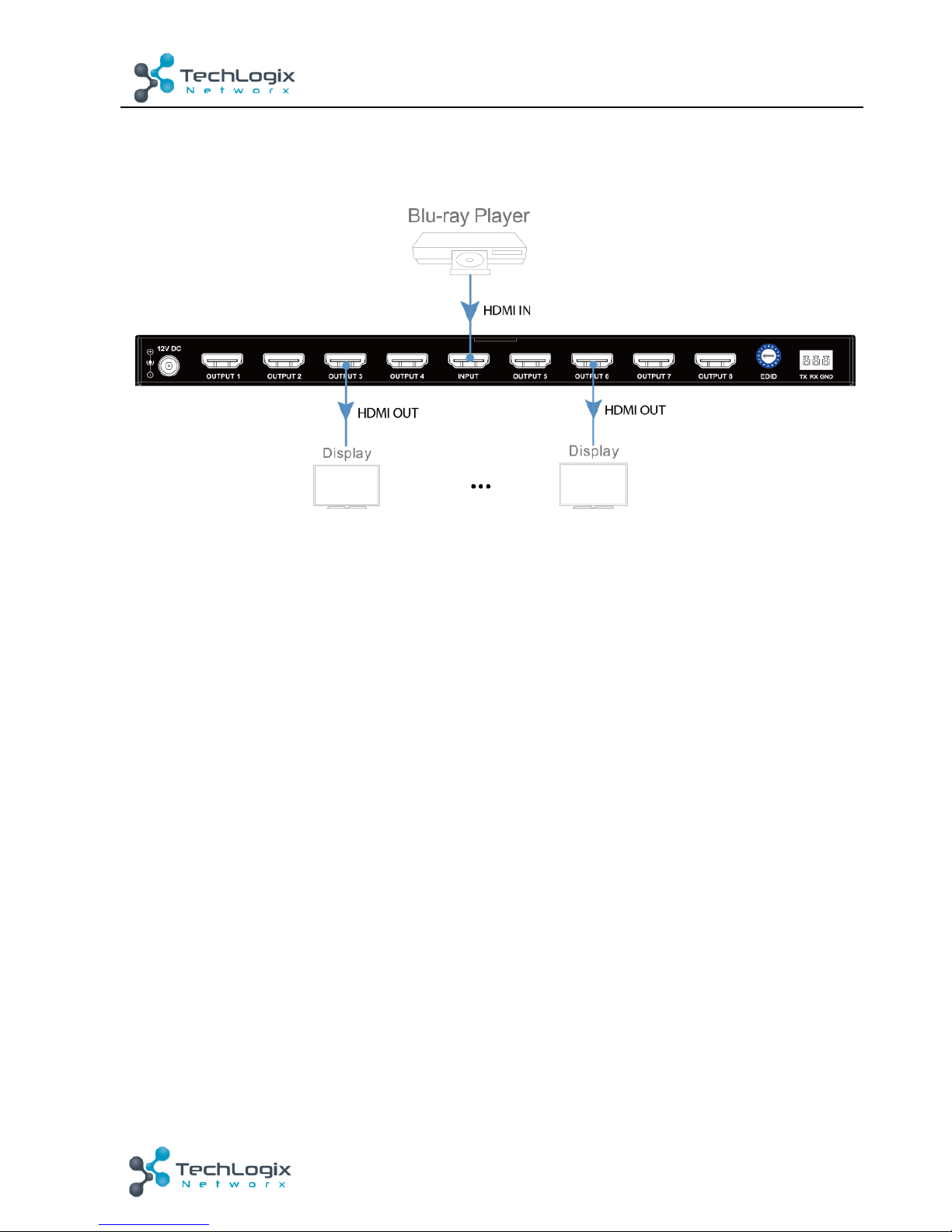
The figure below illustrates a typical connection that can be utilized with TL-DA18-HD2:
Step1. Connect an HDMI source (e.g. a Blu-ray DVD) to INPUT port of TL-DA18-HD2;
Step2. Connect HDMI displays (e.g. a LCD TV) to OUTPUT ports of TL-DA18-HD2;
Step3. Plug DC 12V 1.5A power adapter into the power port of TL- DA18-HD2.
&
1) System should be installed in a clean environment with proper temperature and
humidity.
2) All of the power switches, plugs, sockets and power cords should be insulated.
3) All devices should be connected before power on.
Page 9
8
TL-DA18-HD2- User Manual
www.tlnetworx.com
5. Specification
Te c h n i c al
Input
1 x HDMI IN (Type A female connector)
Input Signal Type
HDMI 2.0
HDCP 2.2
Input Resolution Support
VESA:
640x480@60Hz, 800x600@60Hz,
1024x768@60Hz, 1280x768@60Hz,
1280x800@60Hz, 1280x960@60Hz,
1280x1024@60Hz, 1360x768@60Hz,
1366x768@60Hz, 1400x1050@60Hz,
1440x900@60Hz, 1600x900@60Hz,
1600x1200@60Hz, 1680x1050@60Hz,
1920x1200@60Hz.
SMPTE:
[email protected]/60Hz,
[email protected]/60Hz,
[email protected]/24Hz/25Hz/29.97Hz
/30Hz/50Hz/59.94Hz/60Hz,
1920x1080i@50Hz/60Hz,
[email protected]/24Hz/25Hz/29.97H
z/30Hz/50Hz/59.94Hz/60Hz
3840x2160@24Hz/25Hz/30Hz/50Hz/60Hz
,
4096x2160@24Hz/25Hz/30Hz/50Hz/60Hz
.
Page 10
9
TL-DA18-HD2- User Manual
www.tlnetworx.com
Input Video Level
0.5-1.2 V p-p
Maximum Pixel Clock
600 MHz
Output
8 x HDMI OUT (Type A female connector)
Output Signal Type
HDMI 2.0
HDCP 2.2
Output Resolution Support
VESA:
640x480@60Hz, 800x600@60Hz,
1024x768@60Hz, 1280x768@60Hz,
1280x800@60Hz, 1280x960@60Hz,
1280x1024@60Hz, 1360x768@60Hz,
1366x768@60Hz, 1400x1050@60Hz,
1440x900@60Hz, 1600x900@60Hz,
1600x1200@60Hz, 1680x1050@60Hz,
1920x1200@60Hz.
SMPTE:
[email protected]/60Hz,
[email protected]/60Hz,
[email protected]/24Hz/25Hz/29.97Hz
/30Hz/50Hz/59.94Hz/60Hz,
1920x1080i@50Hz/60Hz,
[email protected]/24Hz/25Hz/29.97H
z/30Hz/50Hz/59.94Hz/60Hz
3840x2160@24Hz/25Hz/30Hz/50Hz/60Hz
,
4096x2160@24Hz/25Hz/30Hz/50Hz/60Hz
.
Page 11
10
TL-DA18-HD2- User Manual
www.tlnetworx.com
General
Operating Temperature
0°C to 45°C (32°F to 113°F)
Storage Temperature
-20°C to 70°C (-4°F to 158°F)
Humidity
10% to 90%, non-condensing
ESD Protection
Human-body Model:
±8kV(Air-gap discharge)/
±4kV(Contact discharge)
Power Supply
DC 12 V/1.5 A
Power Consumption
(Maximum)
8W (4K@60Hz)
Device Dimension
(W x H x D)
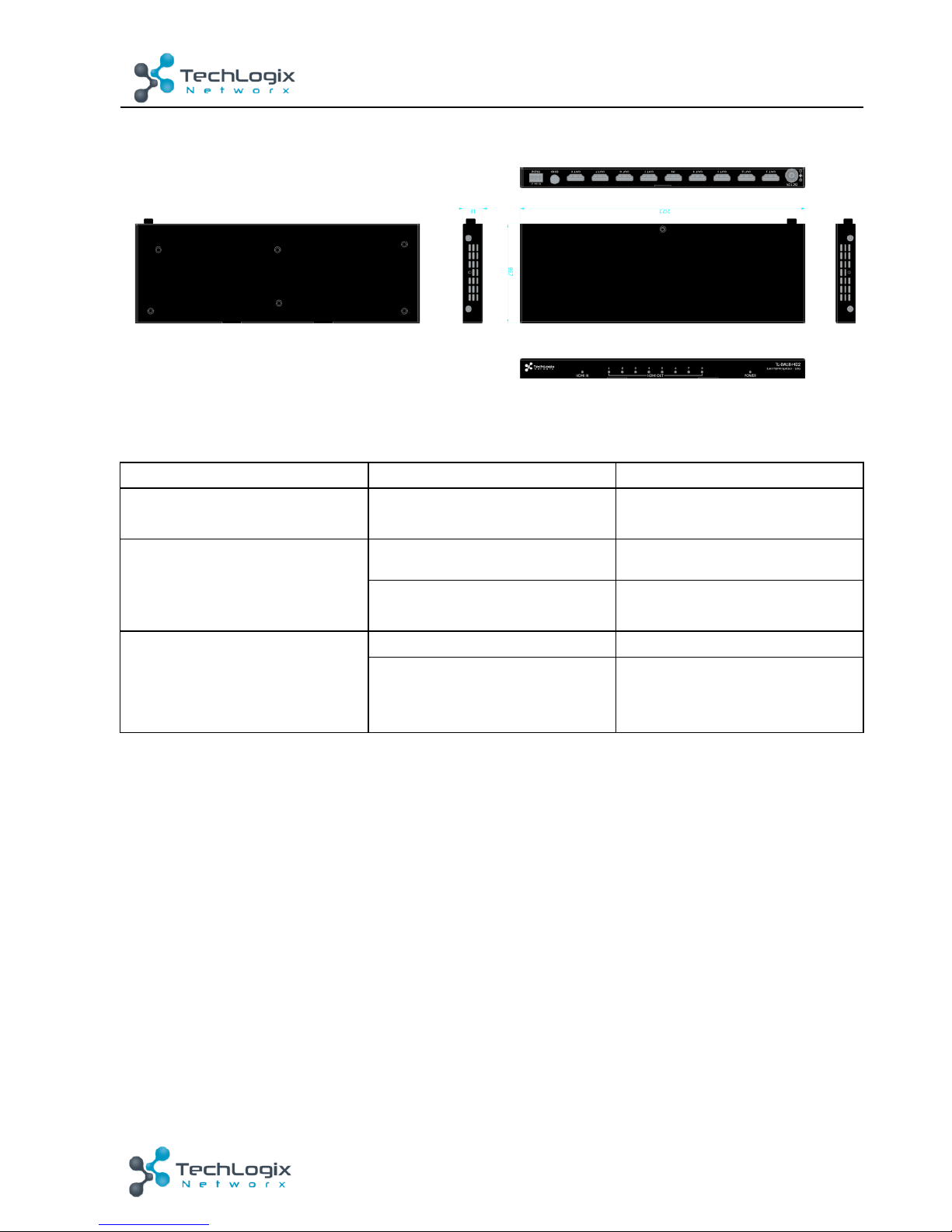
257.2mm x 18mm x 89.7mm/
10.13" x 0.71" x 3.53"
Product Weight
0.58kg / 1.28lbs
Certification
CE, FCC
&
Use quality HDMI cable to connect the devices to ensure preferred transmission
effect.
Page 12
11
TL-DA18-HD2- User Manual
www.tlnetworx.com
6. Panel Drawing
7. Troubleshooting & Maintenance
Problems
Causes
Solutions
Color loss or blurry/ double
image on HDMI display
Poor quality of the HDMI
cable
Change for qualified HDMI
cable.
Power led is off, operations
don’t work
No power
Power up the unit
Poor contact of power port
Make sure power adapter is
properly seated
No output on the display
Source/ Display is off
Tu rn o n th e source/ display
Poor contact of HDMI
ports
Check the HDMI ports one
by one to make sure they’re
properly seated.
&
If your problem persists after following the above troubleshooting steps, seek
further help from authorized dealer or our technical support.
Page 13
12
TL-DA18-HD2- User Manual
www.tlnetworx.com
8. After-sales Service
If there appear some problems when running the device, please check and deal with the
problems referenced in this user manual.
4) Product Limited Warranty: We warrant that our products will be free from defects in
materials and workmanship for three years. Please see warranty page posted on
www.tlnetworx.com for more info.
5) What the warranty does not cover:
l Warranty expiration.
l Factory applie d s er ial number has be en altered o r removed from th e product .
l Damage, deterioration or malfunction caused by:
l Normal wear and tear
l Use of supplies or parts not meeting our specifications
l No certificate or invoice as the proof of warranty.
l The product model showed on the warranty card does not match with the
model of the product for repairing or had been altered.
l Damage caused by force majeure.
l Non-authorized service
l Other causes which does not relate to a product defect
l Delivery, installation or labor charges for installation or setup of the product
6) Te c h n i c a l Su p p o r t : Email to our after-sales department or make a call, please inform
us the following information about your cases.
l Product version and name.
l Detailed failure situations.
l The formation of the cases.
Remarks: For any questions or problems, please try to get help from your local
distributor.
 Loading...