

Page 1
!
!
User!Manual!
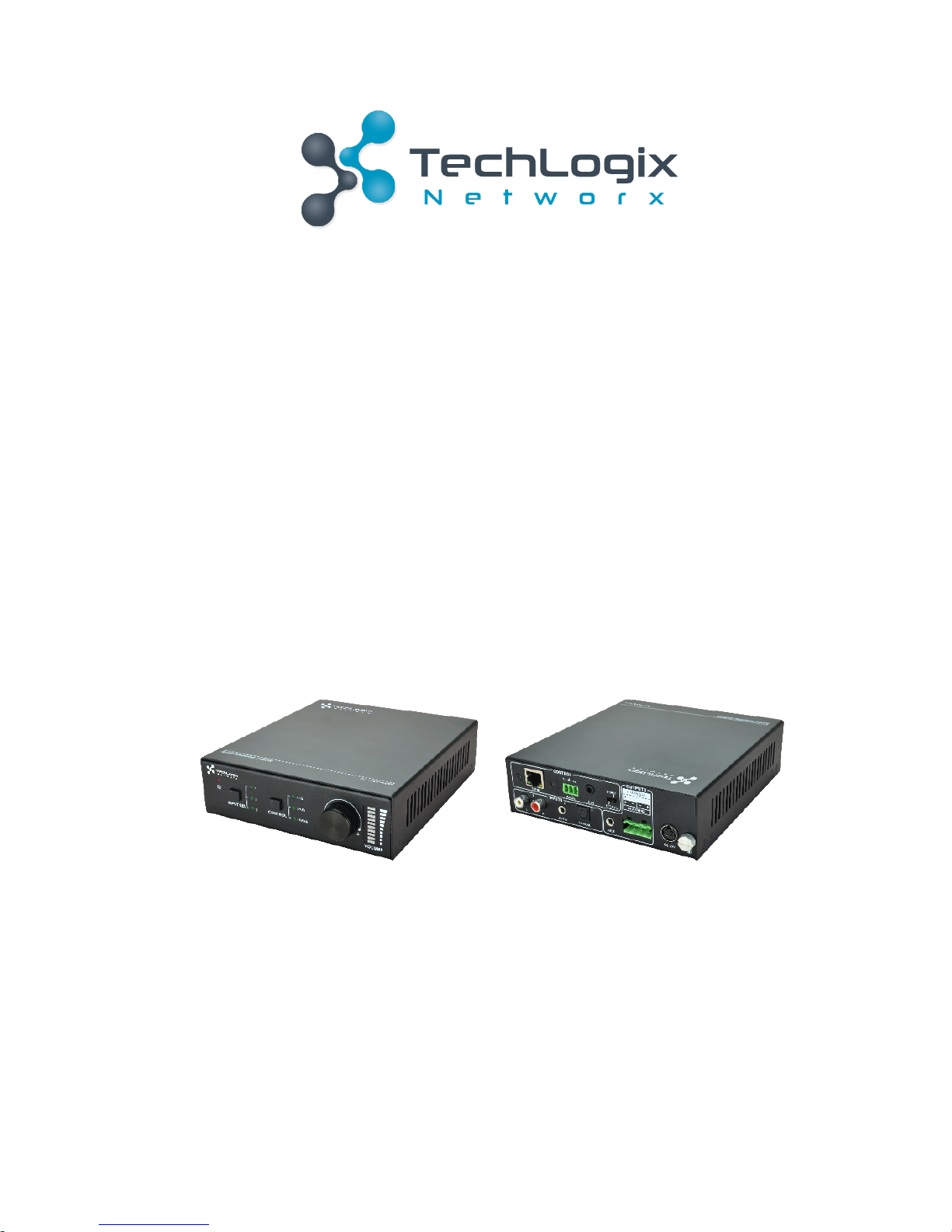
TL-A8O-50W!
50!Watt!Power!Amplifier!
!
!
!
!
!
!
!
!
!
!
!
!
All!Rights!Reserved!
Version:!TL-A8O-50W_161027
!
Page 2

TL-A8O-50W!User!Manual
www.tlnetworx.com!
Preface!
Read!this!user!manual!carefully!before!using!this!product.!Pictures!shown!in!this!manual!is!for!
reference!only,!different!model!and!specifications!are!subject!to!real!product.!
This!manual!is!only!for!operation!instruction!only ,!not!for!any!maintenance!usage.!
!
Trademarks!
Product!model!and!logo ! are!trademarks.!Any!other!trademarks!mentioned!in!this!manual!are!
acknowledged!as!the!properties!of!the!trademark!owner.!No!part!of!this!publication!may!be!
copied!or!reproduced!without!prior!written!consent.!
!
FCC!Statement!
This!equipment!generates,!uses!and!can!radiate!radio!frequency!energy!and,!if!not!installed!and!
used!in!accordance!with!the!instructions,!may!cause!harmful!interference!to!radio!
communications.!It!has!been!tested!and!found!to!comply!with!the!limits!for!a!Class!B!digital!
device,!pursuant!to!part!15!of!the!FCC!Rules.!These!limits!are!designed!to!provide!reasonable!
protection!against!harmful!interference!in!a!commercial!installation.!
Operation!of!this!equipment!in!a!residential!area!is!likely!to!cause!interference,!in!which!case!the!
user!at!their!own!expense!will!be!required!to!take!whatever!measures!may!be!necessary!to!
correct!the!interference!
Any!changes!or!modifications!not!expressly!approved!by!the!manufacture!would!void!the!user’s!
authority!to!operate!the!equipment.!
!!!!! !!!!!! !!!
! !
Page 3
TL-A8O-50W!User!Manual
www.tlnetworx.com!
SAFETY!PRECAUTIONS!
To!insure!th e!best!from!t he!product,!please!rea d!all!instru ctions!carefully!before!using !the!
device.!Save!this!manual!for!further!reference.!
l Unpack!the!equipment!carefully!and!save!the!original!box!and!packing!material!for!possible!
future!shipment!
l Follow!basic!safety!precautions!to!reduce!the!risk!of!fire,!electrical!shock!and!injury!to!
persons.!
l Do!not!dismantle!the!housing!or!modify!the!module.!It!may!result!in!electrical!shock!or!burn.!
l Using!supplies!or!parts!not!meeting!the!products’!specifications!may!cause!damage,!
deterioration!or!malfunction.!
l Refer!all!servicing!to!qualified!service!personnel.!
l To!prevent!fire!or!shock!h azard,!do!not!expose!the!unit!to!rain ,!moisture!or!install!this!
product!near!water.!
l Do!not!put!any!heavy!items!on!the!extension!cable!in!case!of!extrusion.!
l Do!not!remove!the!housing!of!the!device!as!opening!or!removing!housing!may!expose!you!to!
dangerous!voltage!or!other!hazards.!
l Install!the!device!in!a!place!with!fine!ventilation!to!avoid!damage!caused!by!overheat.!
l Keep!the!module!away!from!liquids.!
l Spillage!into!the!housing!may!result!in!fire,!electrical!shock,!or!equipment!damage.!If!an!
object!or!liquid!falls!or!spills!on!to!the!housing,!unplug!the!module!immediately.!
l Do!not!twist!or!pull!by!force!ends!of!the!optical!cable.!It ! can ! cau se!malfunction.!
l Do!not!use!liquid!or!aerosol!cleaners!to!clean!this!unit.!Always!unplug!the!power!to!the!
device!before!cleaning.!
l Unplug!the!power!cord!when!left!unused!for!a!long!period!of!time.!
l Information!on!disposal!for!scrapped!devices:!do!not!burn!or!mix!with!general!household!
waste,!please!treat!them!as!normal!electrical!wastes.!
! !
Page 4
TL-A8O-50W!User!Manual
www.tlnetworx.com!
Table!of!Contents
!
1.!Introduction ................................................................................................................... 1!
1.1!Introduction!to!TL-A8O-50W .................................................................................. 1!
1.2!Features ............................................................................................................... 1!
1.3!Package!List .......................................................................................................... 1!
2.!Panel!Description ........................................................................................................... 2!
2.1!Front!Panel ........................................................................................................... 2!
2.2!Rear!Panel ............................................................................................................ 3!
3.!System!Connection ......................................................................................................... 4!
3.1!Usage!Precautions ................................................................................................. 4!
3.2!System!Diagram .................................................................................................... 4!
3.3!Connection!Procedure ........................................................................................... 4!
3.4!Audio!Output!Connection ...................................................................................... 5!
3.4.1!Stereo!output!(default):!2x50Watt@8Ohm .................................................... 5!
3.4.2!Mono!output:!1x100Watt@4Ohm ................................................................ 5!
3.5!Loop!Connection ................................................................................................... 6!
3.6!Application ........................................................................................................... 6!
4.!System!Control ............................................................................................................... 7!
4.1!Front!Panel!Button!Control ..................................................................................... 7!
4.2!IR!Control ............................................................................................................. 8!
4.3!RS232!Control ....................................................................................................... 9!
4.3.1!Installation/uninstallation!of!RS232!Control!Software ...................................... 9!
4.3.2!Basic!Settings .............................................................................................. 9!
4.3.3!RS232!Communication!Commands ............................................................. 11!
4.4!TCP/IP!Control ..................................................................................................... 11!
4.4.1!Control!Modes .......................................................................................... 12!
4.4.2!Control!via!TCP/IP!communication!software ................................................. 13!
4.4.3!Control!via!web-based!GUI ......................................................................... 15!
4.4.4!Port!Management ..................................................................................... 17!
5.!Specification ................................................................................................................ 18!
6.!Panel!Drawing .............................................................................................................. 19!
Page 5
TL-A8O-50W!User!Manual
www.tl networx.com !
7.!Troubleshooting!&!Maintenance .................................................................................... 20!
8.!After-sales!Service ........................................................................................................ 21!
Page 6
1!
TL-A8O-50W!User!Manual
www.tl networx.com !
1.
Introduction!
1.1
Introduction!to!TL-A8O-50W!
TL-A8O-50W!is!a!50!Watt!Power!Amplifier!(Class-D)!with!low-impedance!output!(8!o hms).!It!has!
[2]!analog!stereo!inputs!and![1]!digital!input.!It!features!switchable!stereo!or!mono!output!
modes.!It!includes!powerful!functions!including!EQ!and!a!robust!list!of!control!options.!
!
1.2
Features!
l Switchable!between!stereo!(8!ohm)!and!mono!(4!ohm)!output.!
l Stereo!audio!output!at!50!watts.!Mono!audio!output!at!100!watts.! !
l Two!stereo!audio!inputs!and!one!digital!audio!input,!switchable!by!button,!IR!remote,!
RS232,!&!TCP/IP.!
l Volume/Bass/Treble!controllable!by!rotary!knob,!IR!remote,!RS232,!&!TCP/IP .!
l Audio!loop!output.!
l Intuitive!LED!indicators!for!input!source,!control!and!volume!setting.!
l Web-based!GUI.!
l Power!off!memory.!
!
1.3
Package!List!
ü 1!x!TL-A8O-50W!
ü 2!x!Detachable!Mounting!Ears!
ü 4!x!Screws!
ü 2!x!Pluggable!Terminal!Blocks!(1!3-pin&!1!4-pin)!
ü 1!x!IR!Remote!
ü 1!x!Power!Adapter!(DC!33V!4A)!
ü 1!x!User!manual!
ü 1!x!IR!Receiver!(5V,!without!carrier)!
&
Please!confirm!if!the!product!and!the!accessories!are!all!included,!if!not,!please!contact!
the!your!local!distributor.!
!
Page 7
2!
TL-A8O-50W!User!Manual
www.tl networx.com !
2.
Panel!Description!
2.1
Front!Panel!
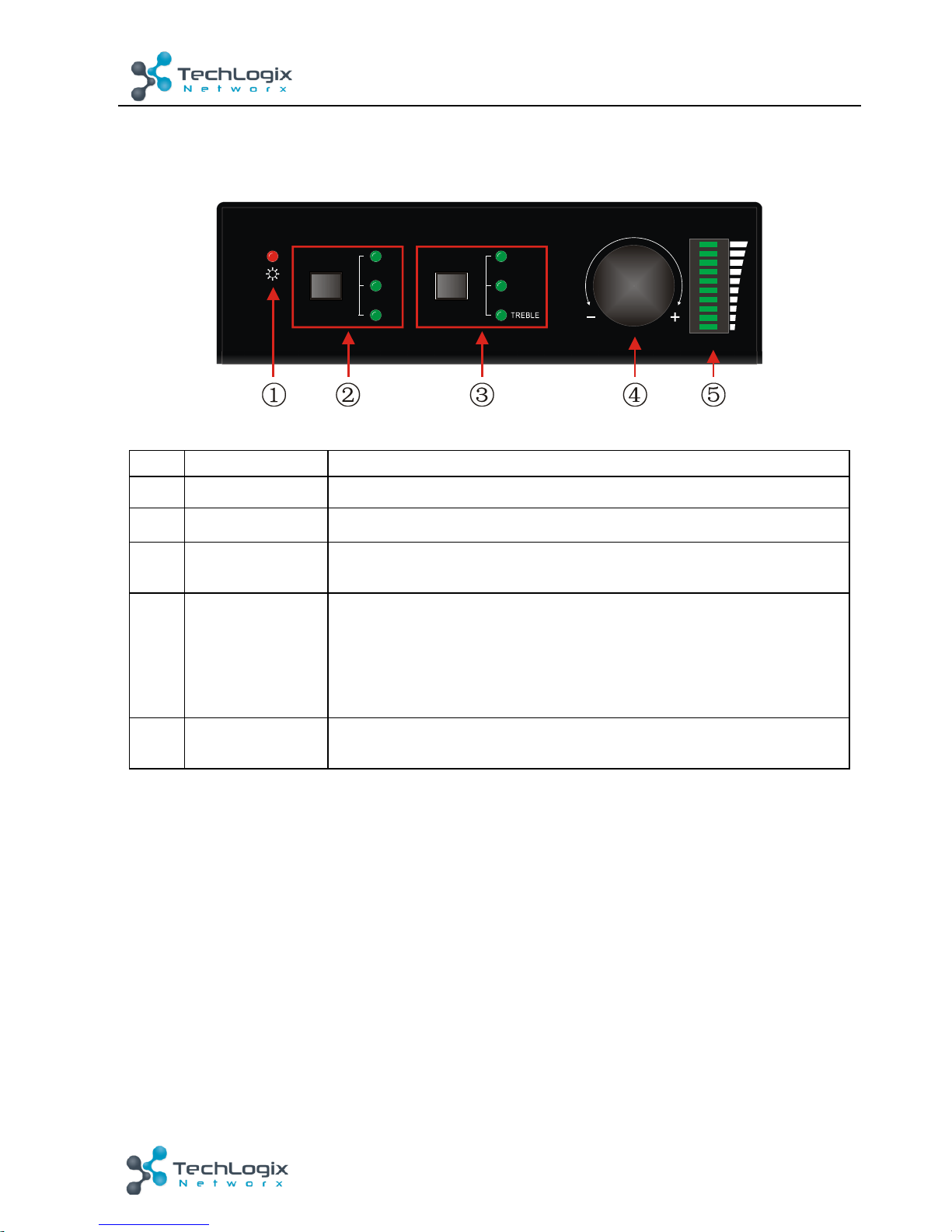
Figure!2-!1!Front!Panel!
No.!
Name!
Description!
① !
Power!LED!
Turns!red!when!power!is!connected!
② !
Input!Selection!
Audio!source!selection!
③ !
Control!
Selector!for!adjusting!the!volume!of!the!Line!or!the!level!of!Bass!
and!Treble!with!this!button!
④ !
Volume!Knob!
l Press!to!mute/unmute!the!audio!
l Rotate!the!knob!to!adjust!volume;!volume!bars!will!change!
accordingly!
Ø Clockwise!Rotation:!Volume!up!
Ø Anticlockwise!Rotation:!Volume!down!
⑤ !
Volume!Bars!
Indicate!real-time!volume!setting,!10!bars!in!total.!No!volume!LEDs!
will!be!lit!when!the!audio!is!muted.!
Operation!Format
:!“INPUT!SEL”!+!“CONTROL”!+!“Volume!Knob”!
Example
:!To!ad ju st!bass!au d io!o f !inp u t!3 ,!s e le c t!in p u t!3 !->!choose!bass!->!adjust!the!volume!
knob.!
!
CONTROLIN PUT S EL
1
2
3
LINE
BASS
VOLUME
Page 8
3!
TL-A8O-50W!User!Manual
www.tl networx.com !
2.2
Rear!Panel!
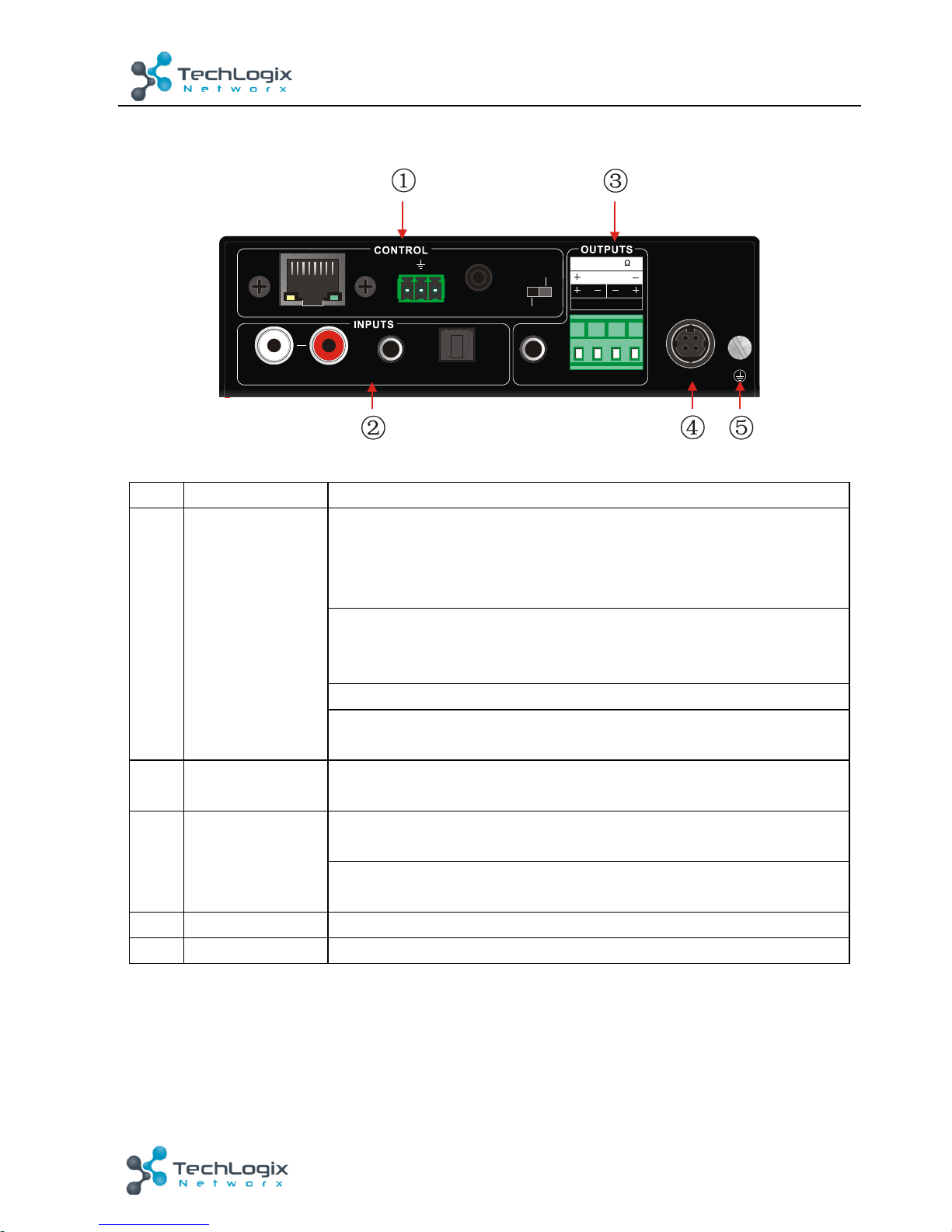
Figure!2-!2!Rear!Panel! !
No.!
Name!
Description!
① !
CONTROL!
TCP/IP
:! ! connect!with!control!device!to!enable!IP!control!via!webbased!GUI!&!TCP/IP!communication!software.! !
Indicators!will!blink!when!connected!to!control!device!and!
communicating!normally.!
RS232
:!3-pole!captive!screw!connector!for!serial!control,!it!can!be!
connected!with!PC!(Use!a!3-pole!captive!to!9!pin!female!D!
connector!and!serial!control!software)!to!control!TL-A8O-50W!
IR!IN
:!To!connect !with!the !IR!receiver,!works!with!the!IR!remote.!
Output!Switch
:!Set!to!STEREO!or!MONO!to!enable!corresponding!
output!mode!
② !
INPUTS!
Audio!inputs!area,!3!audio!inputs!in!total,!including!1!stereo!audio,!
1!analog!audio!and!1!optical!audio!
③ !
OUTPUTS!
LOOP
:!analog!audio!loop!output!po rt ,!available!only!whe n!in p ut !
signal!is!analog!stereo!audio!
Audio!Output
:!including!stereo!audio!(2x50W@8Ω),!or!mono!
output!(1x100W@4Ω)!
④ !
DC!33V!
To!connect !the!power!adapter!(DC!33V! 4A )!
⑤ !
GND!
Connect!to!ground!
&
Set!the!Output!Switch!to!the!proper!speaker!configuration!prior!to!applying!power!to!the!
device.!
!
! !
LOOP
3
1
DC 33 V
IR INRS232
Tx
Rx
AUDIO OPTICALL R
2
TCP/IP
2x50W 8@
Ω
1x1 00W 4 @
STEREO
MONO
Page 9
4!
TL-A8O-50W!User!Manual
www.tl networx.com !
3.
System!Connection!
3.1
Usage!Precautions!
1)
Speakers!must!be!connected!before!powering!the!amp!on.!
2)
All!devices!should!be!connected!before!powering!the!amp!on.!
3)
Use!straight-thru!Cat5e/Cat6!with!TIA/EIA!T568B!terminations!to!connect!TCP/IP!port.!
3.2
System!Diagram!
!
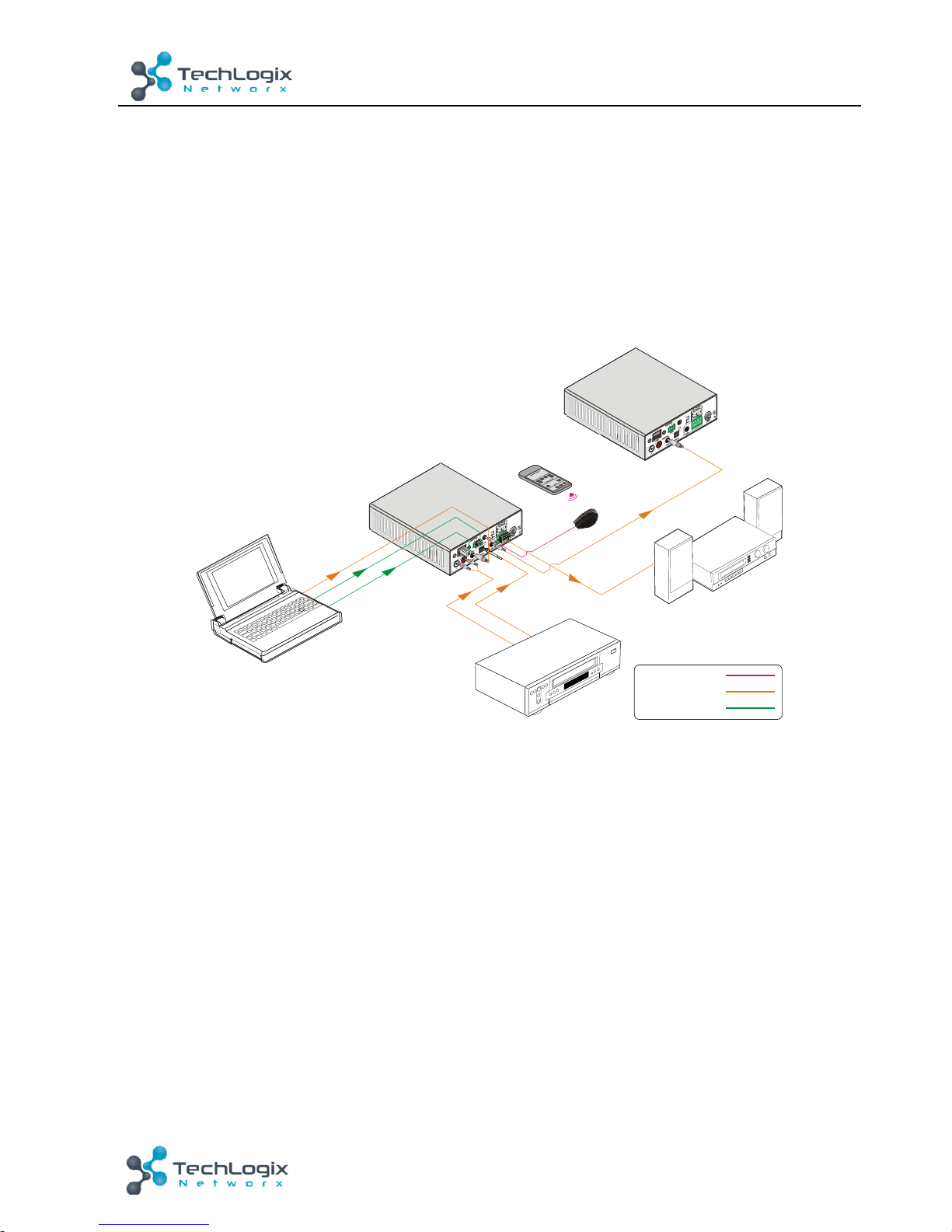
Figure!3-!1!System!Diagram!
3.3
Connection!Procedure!
Step1.
Connect!audio!sources!to!the!
INPUT
!ports!of!the!device!with!quality!audio!cables.!
Step2.
Set!the !Output!Switch!to!the!desired!mode!and!connect!the!speakers!to!audio!output!
port!(Specified!in!3.4$Audio$Output$Connection).!
Step3.
(o ptional)!Insert!an!IR!receiver!(5V,!without!carrier)!to!
IR!IN
!to!enable!IR!control.!
Step4.
(o ptional)!Connect!a!control!device!(e.g.!a!PC)!to!
RS232!
port!to!enable!serial!control.!
Step5.
(o ptional)!Connect!a!control!device!(e.g.!a!PC)!to!
TCP/IP!
port!to!enable!IP!control.!
Step6.
Plug!DC! 33V!power!adaptor!to!the!power!port!of!TL-A8O-50W.!
!
!
!
Laptop
Speaker
T
L
-
A
8
0
-
5
0
W
T
L
-
A
8
0
-
5
0
W
IR Remote
IR Receive r
IR Sign al:
AUDIO S ignal :
Contr ol Sign al:
Page 10
5!
TL-A8O-50W!User!Manual
www.tl networx.com !
3.4
Audio!Output!Connection!
3.4.1
Stereo!output!(default):!2!x!50!Watts!at!8!Ohms!
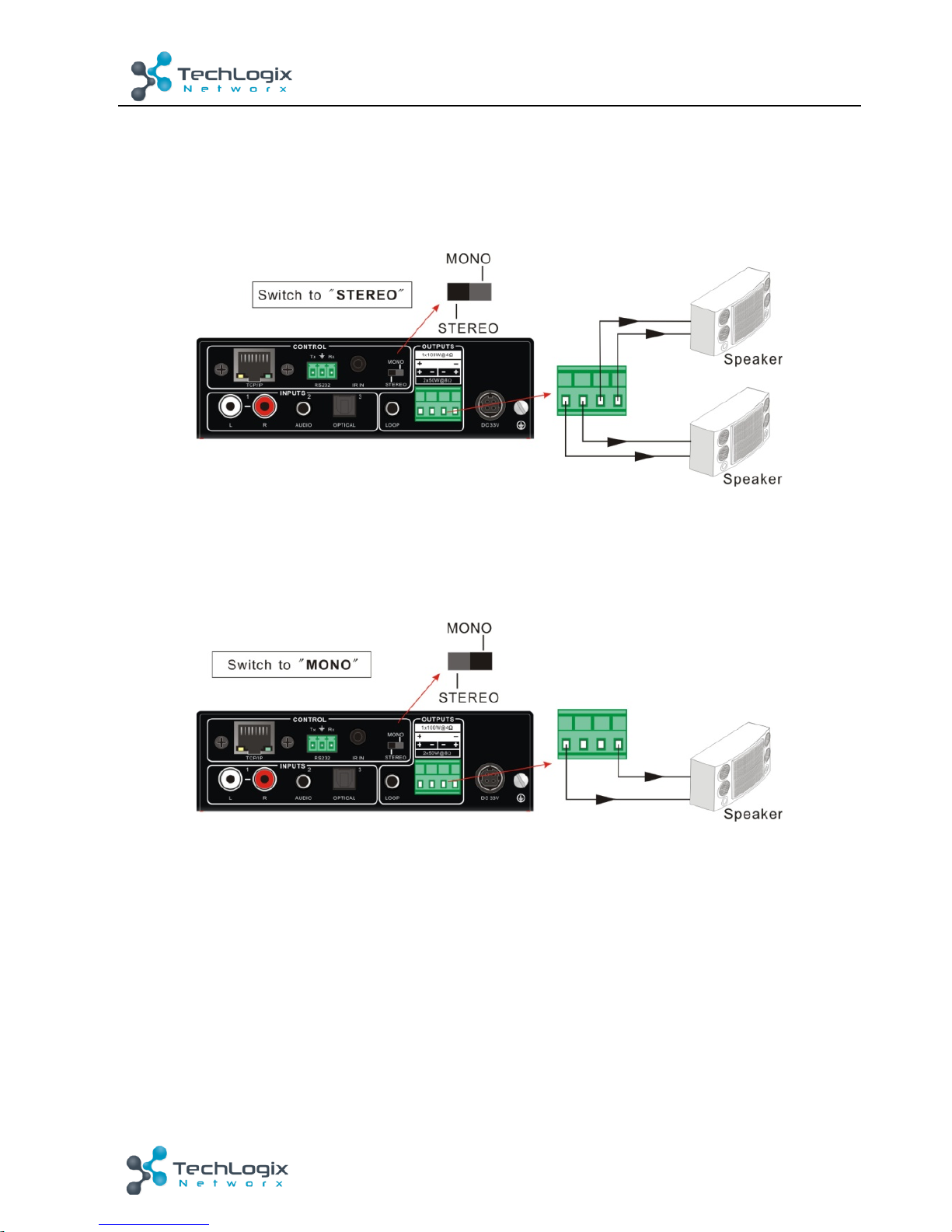
To!enable!stereo!2!x!50!Watts!at!8!Ohms!output,!set!the!output !switch!to!STEREO!and!connect!
the!speakers!as!shown!in!the!figure!below.!
!
Figure!3-!2!Stereo!Output!Connection!
3.4.2
Mono!output:!1!x!100!Watts!at!4!Ohms!
To!enable!mono!1!x!100!Watts!at!4!Ohms!output,!set!the!output!switch!to!MONO!and!connect!
the!speakers!as!shown!in!the!figure!below.!
!
Figure!3-!3!Mono!Output!Connection!
!
!
Page 11
6!
TL-A8O-50W!User!Manual
www.tl networx.com !
3.5
Loop!Connection!
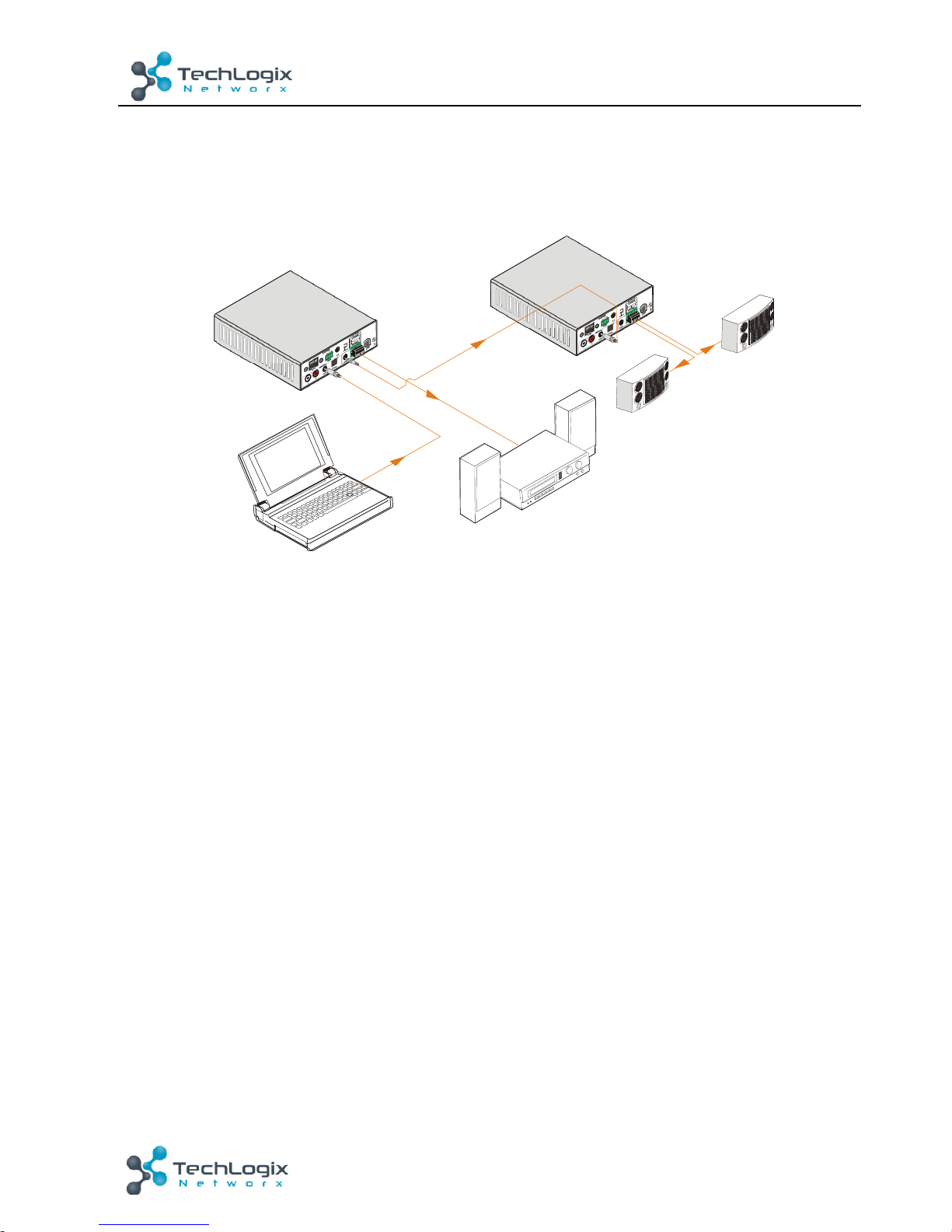
TL-A8O-50W!features!an!analog!LOOP!port!for!audio!signal!loop!output.!A!maximum!of!255!units!
can!be!looped!within!the!same!system.!Connect !the !TL-A8O-50W!as!shown!in!the!figure!below.!
!
Figure!3-!4!Loop!Connection!
The!audio!signal!sent!to!the!first!TL-A8O-50W!is!cascaded!to!another!connected!TL-A8O-50W,!
which!enables!multiple!TL-A8O-50W!share!the!same!audio!source.!
&
!
1. Audio!loop!output!is!available!only!when!the!first!TL-A8O-50W!is!using!an!an a lo g !a u d io!input!
as!the!source.!
2. Audio!control!operations,!such!as!EQ!and!mute,! are!not!available!to!the!looped!audio!signal.!
3.6
Application!
TL-A8O-50W!can!be!used!in!different!applications,!such!as!classrooms,!small!meeting!rooms,!
lecture!halls,!bars!and!hotels!etc.!
!
!
Laptop
Speaker
T
L
-
A
8
0
-
5
0
W
T
L
-
A
8
0
-
5
0
W
Speaker
Speaker
Page 12
7!
TL-A8O-50W!User!Manual
www.tl networx.com !
4.
System!Control!
4.1
Front!Panel!Button!Control!
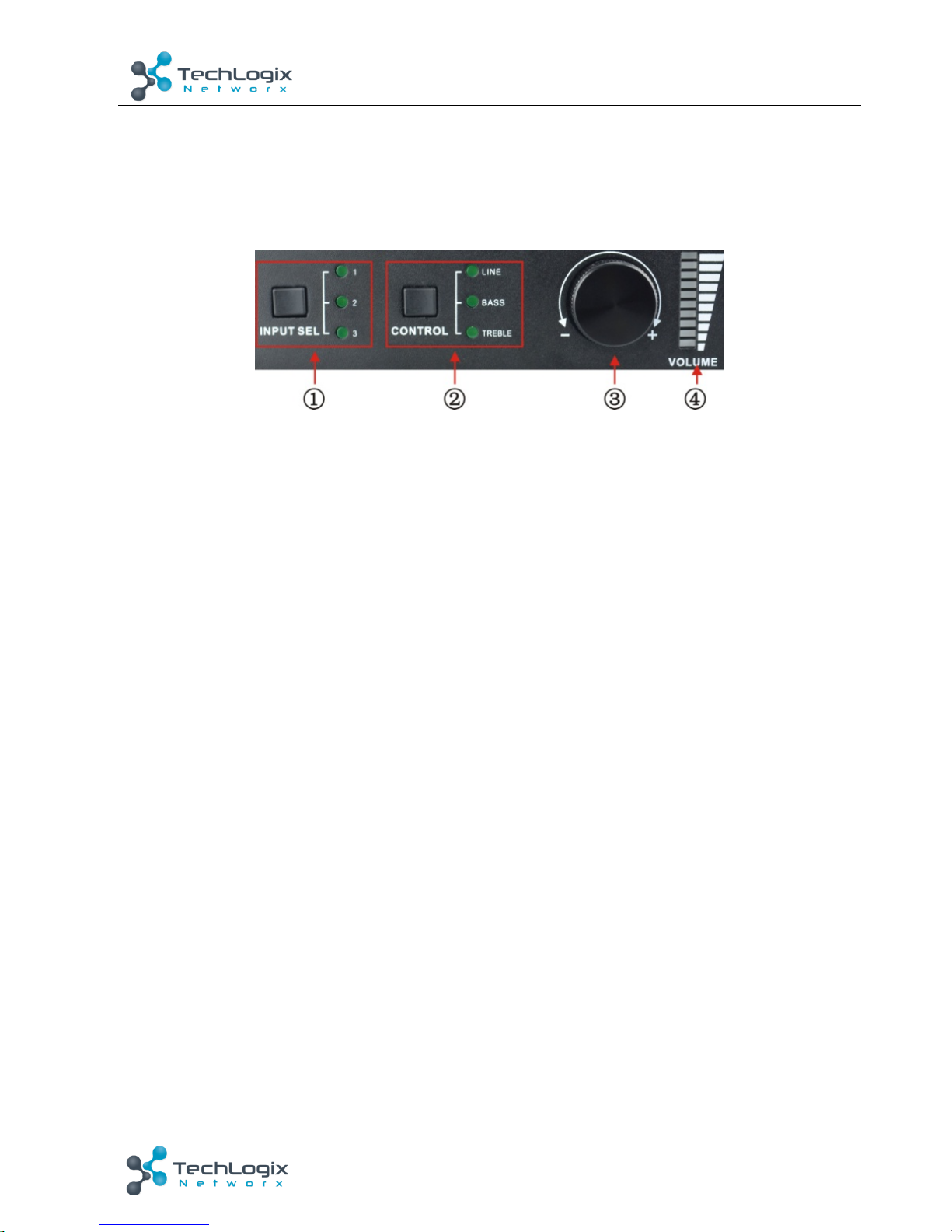
Front!panel!buttons!provide!direct!audio!control!including!input!source!selection!and!audio!
effect!adjustment.!
!
Figure!4-!1!Front!Panel!Buttons!
Operation!Format
:!Input!Sel!+!Control!+!Volume!Knob!(indicators!and!volume!bar!will!display!
real-tim e!o pe ration)!
Ø
Input!selection!(area! ①):! !
Press!
INPUT!SEL
!to!cycle!through!the!three!inputs.!The!corresponding!LED!will!light!to!
indicate!the!selection.!The!input!number!selection!and!the!associated!input!are:!
1:!dual-mono!RCA!input!
2:!3.5mm!jack!input!
3:!digital!fiber!audio!input!
Ø
Control!(EQ!management)!(area! ②):!
The!LINE!volume,!bass!and!treble!will!be!selected!by!the!buttons,!and!controlled!by!the!
volume!knob.!
Ø
Volume!Knob!(area! ③):!
Clockwise!Rotation:!Volume!up!
Counter-clockwise!Rotation:!Volume!down!
Press:!Mute!and!unmute.!
About!the!Volume!Bar!(area! ④):!
The!volume!bar!indicates!a!real-time !volume !setting!with!10!bars!in!total.!The!volume!bar!
functions!will!change!based!on!the!current!Control!selection.!
l LINE:!Line!volume!can!be!0~60!where!one!volume!bar!will!light!when!the!volume!is!turned!
up!by!6.!
l BASS:!bass!volume!can!be!0~10!
l TREBLE:!treble!volume!can!be!0~10!
!
Page 13
8!
TL-A8O-50W!User!Manual
www.tl networx.com !
4.2
IR!Control!
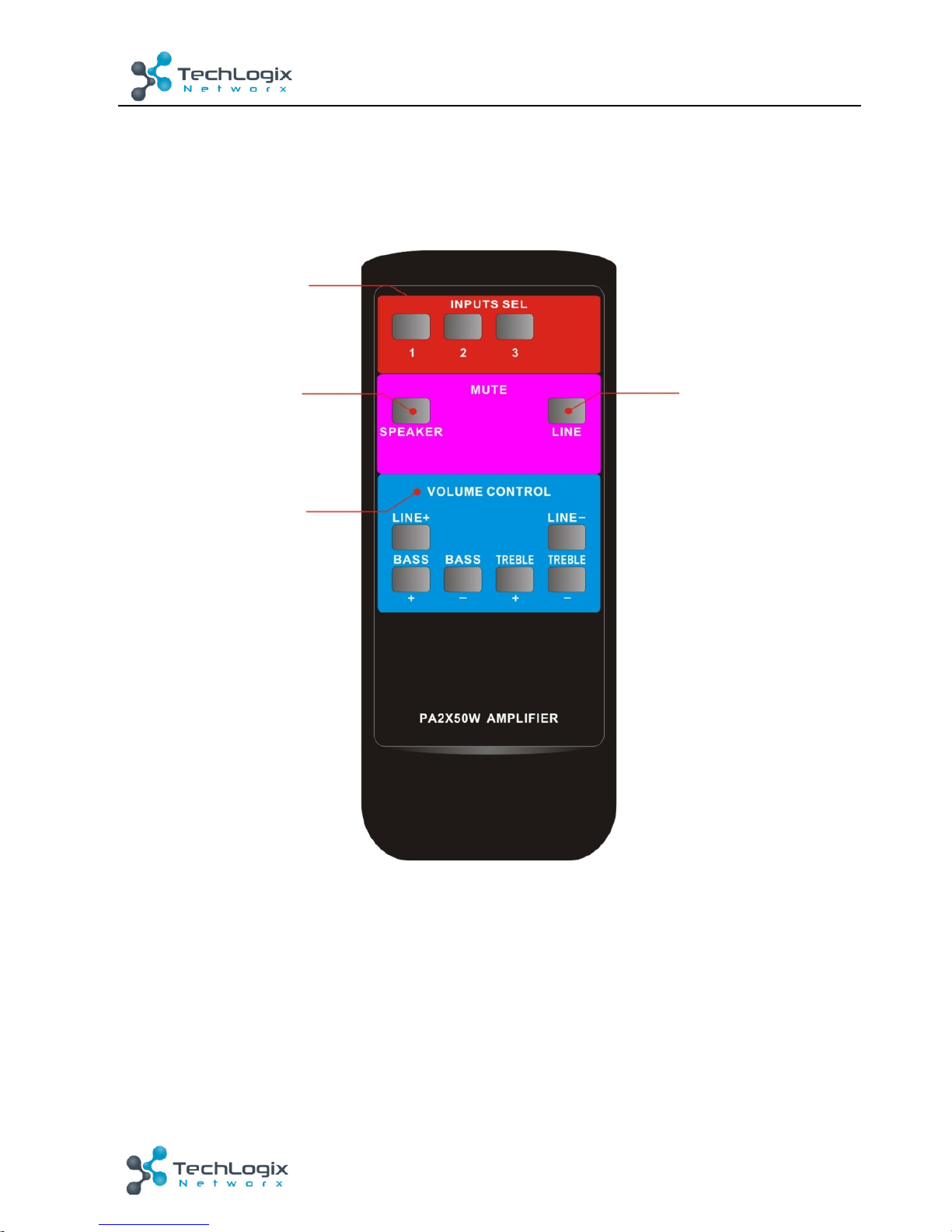
Connect!the!included!IR!receiver!(5V,!without!carrier)!to!IR!IN!port!on!the!rear!panel.!Users!are!
able!to!control!the!amplifier!by!the!included!IR!remote!(see!as!below):!
!
!
!
Figure!4-!2!IR!Remote!
!
!
Input!Selection!
Unmute!
Mute!
Volume!Control!
Including!LINE,!BASS!
and!TREBLE!volume!
adjustment!
Page 14
9!
TL-A8O-50W!User!Manual
www.tl networx.com !
4.3
RS232!Control!
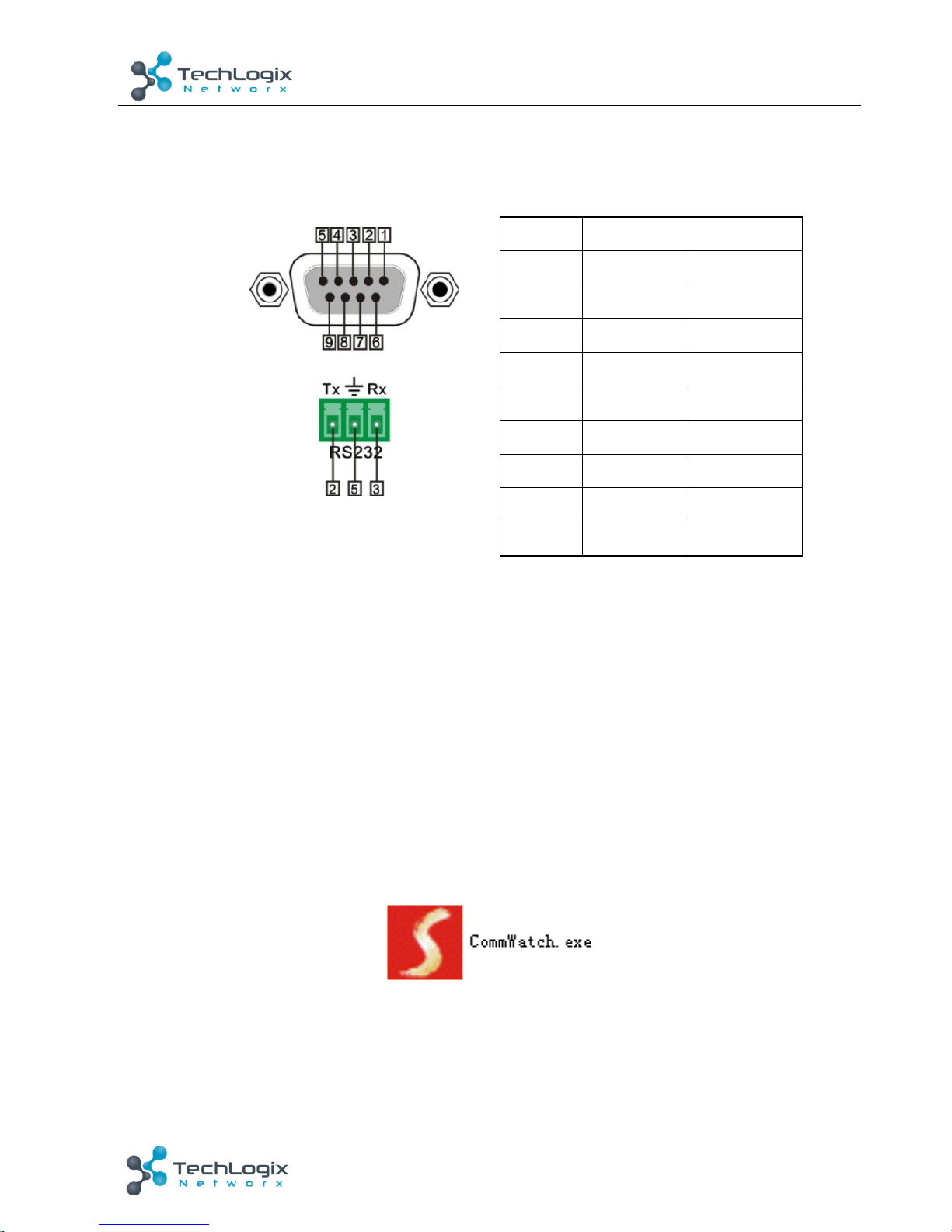
TL-A8O-50W!uses!a!3-pin!pluggable!terminal!block!for!serial!control.!The!pinout!is!listed!in!the!
table!below.!
!
No.!
Pin!
Function!
1!
N/u!
Unused!
2!
Tx!
Transmit!
3!
Rx!
Receive!
4!
N/u!
Unused!
5!
Gnd!
Ground!
6!
N/u!
Unused!
7!
N/u!
Unused!
8!
N/u!
Unused!
9!
N/u!
Unused!
!
When!the!amplifier!connects!to!the!COM!port!of!a!computer!with!control!software,!users!can!
control!it!by!that!computer.!
To!control!the!amplifier,!users!should!use!a!3-pole!male!captive!screw!to!9-pin!HD!female!
connector!and!use!the!CommWatch!software!published!on!the!www.tlnetworx.com.!
4.3.1
Installation/uninstallation!of!RS232!Control!Software!
Installation:!
Copy!the!control!software!file!to!the!computer!connected!with!TL-A8O-50W.!
Uninstallation:!
Delete!all!the!control!software!files!in!corresponding!file!path.!
4.3.2
Basic!Settings!
Ø Connect!the!input!source!devices!and!the!output!device!according!to!the!system!diagram.!
Ø Copy!the!RS232!control!software!to!the!computer,!and!then!connect!the!RS232!port!of!the!
computer!to!the!TL- A8O-50W.!
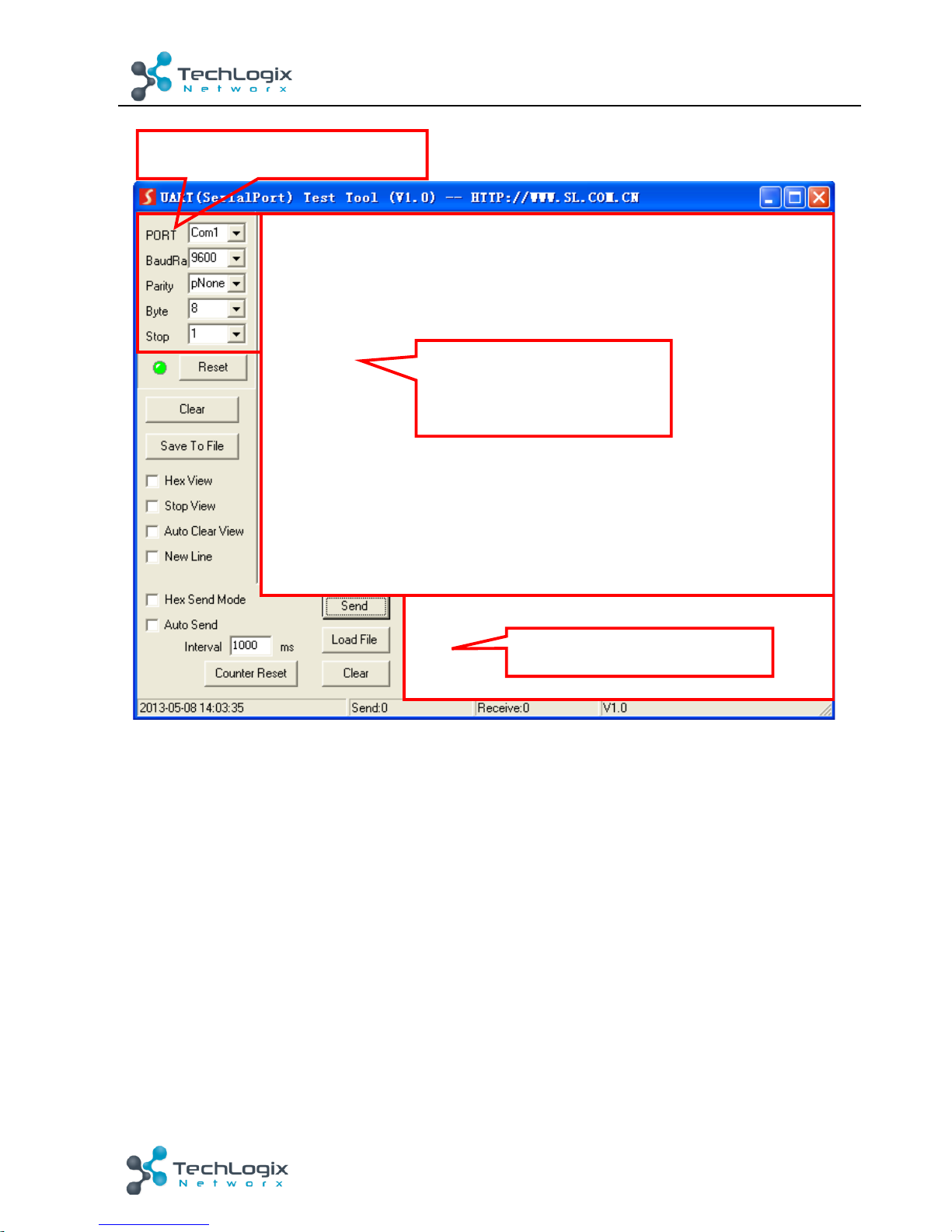
Ø Double-click!the!EXE!program!to!execute!the!software.!The!icon!is!shown!below:!
!
With!the!control!software,!we!can!easily!sw itch!the!input!channel,!mute!the!output,!check!the!
status,!and!adjust!the!volume!etc.!Please!refer!the!details!in!RS232!Communication$Commands.!
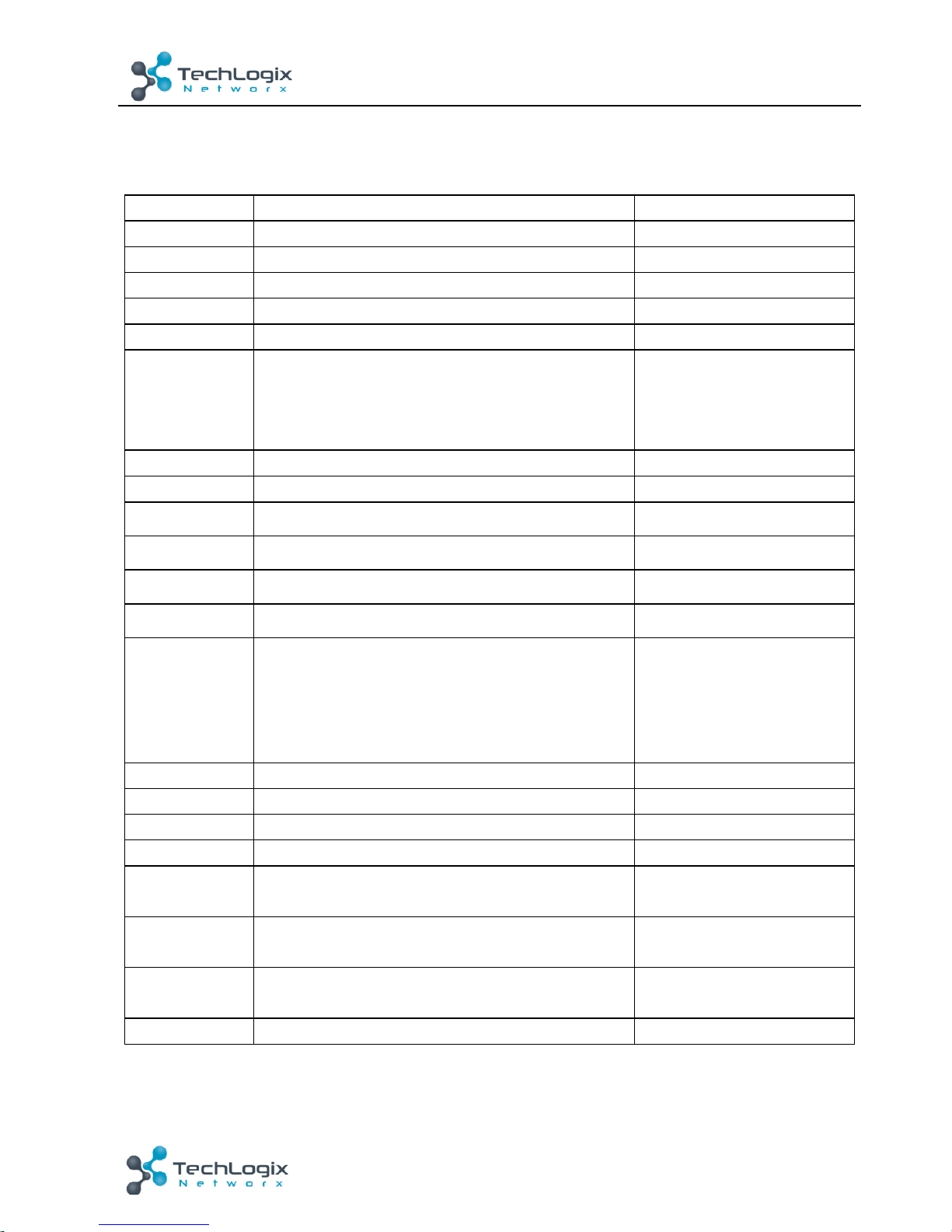
The!primary!functions!of!the!software!are!highlighted!below.! !
Page 15
10!
TL-A8O-50W!User!Manual
www.tl networx.com !
!
!
Please!set!the!parameters!of!COM!number,!baud!rate,!data!bit,!stop!bit!and!the!parity!bit!
correctly,!only!then!will!you!be!able!to!send!command!in!Command!Sending!Area.!
!
!
Monitoring area, indicates
whether the command
sent works.
Command Sending area
Parameter!Configuration!area!
Monitoring!area,!indicates!
whether!the!command!sent!
works.!
Command!Sending!area!
Page 16
11!
TL-A8O-50W!User!Manual
www.tl networx.com !
4.3.3
RS232!Communication!Commands!
Communication!protocol:!
Baud!rate:!9600;!Data!bit:!8;!Stop!bit:!1;!Parity!bit:!none.!
Notice:!
1.
The!letter!inside!bracket![!]!is!the!variable!code,!which!is!changeable.!
2.
The!bracket![!]!is!not!included!to!the!RS232!commands.!
Command!
Description!
Feedback!
1A1.!
Switch!to!inpu t!1 !
A:!1!->!1!
2A1.!
Switch!to!input!2!
A:!2!->!1!
3A1.!
Switch!to!input!3!
A:!3!->!1!
0A0.!
Mute!Audio!Line!out!
Mute!Audio! !
0A1.!
Unmute!Audio!Line!out!
Unmute!Audio! !
600%!
Inquire!present!working!status!
A:! 1! ->! 1!
Volume:! 30!
Bass:! 0!
Treble:!0!
601%!
Turn!up!Line!volume!by!1! !
Volume!of!LINE:!51! !
602%!
Turn!down!Line!volume!by!1! !
Volume!of!LINE:!51! !
603%!
Turn!up!Bass!volume!by!1! !
Bass!of!LINE:!4! !
604%!
Turn!down!Bass!volume!by!1! !
Bass!of!LINE:!4! !
605%!
Turn!up!Treble! volume!by!1! !
Treble!of!LINE:!4! !
606%!
Turn!down!Treble!volume!by!1! !
Treble!of!LINE:!4! !
607%!
Restore!factory!default!
Factory! Default!
A:! 1! ->! 1!
Volume:! 45!
Bass:! 5!
Treble:!5!
610%!
Turn!up!Line!volume!by!3! !
Volume!of!LINE:!54!
620%!
Turn!down!Line!volume!by!3! !
Volume!of!LINE:!51!
61X%!
Turn!up!Line!volume!by!X! !
Volume!of!LINE:!54!
62X%!
Turn!down!Line!volume!by!X! !
Volume!of!LINE:!54!
7[x][x]%!
Preset! line! volume,! [xx]! can! be! 00~60,! 61!
degrees!in!total.!
Volume!of!LINE:!50! !
8[x][x]%!
Preset! the! bass! level,! [xx]! can! be! 00~10,! 11!
degrees!in!total.! !
Bass!of!LINE:!7!
9[x][x]%!
Preset! the! treble! level,! [xx]! can! be! 00~10,! 11!
degrees!in!total.! !
Treble!of!LINE:!7!
GetIP;!
Get!the!IP!of!the!device!
IP:!192.168.0.178!
Page 17
12!
TL-A8O-50W!User!Manual
www.tl networx.com !
3.
Any!dot!“.”!after!the!letters!is!part!of!the!commands.!
4.4
TCP/IP!Control!
TL-A8O-50W!provides!a!TCP/IP!port!for!IP!control.!
Default!settings:!IP:!192.168.0.178;!Subnet!Mast:!255.255.255.0;!Gateway:!192.168.0.1;!Port:!
4001.! !
IP!and!gateway!can!be!changed,!but!the!port!cannot!be!changed.!
Connect!the!Ethernet!port!of!control!device!to!the!TCP/IP!port!of!TL- A8O-50W,!and!set!same!
network!segment!for!the!two!devices.!Users!are!able!to!control!the!device!via!a!web-based!GUI!
or!TCP/IP!communication!software.!
4.4.1
Control!Modes!
TL-A8O-50W!can!be!controlled!by!PC!without!Ethernet!access!or!PC(s)!within!a!LAN.!
l
Controlled!by!PC!without!Ethernet!access!
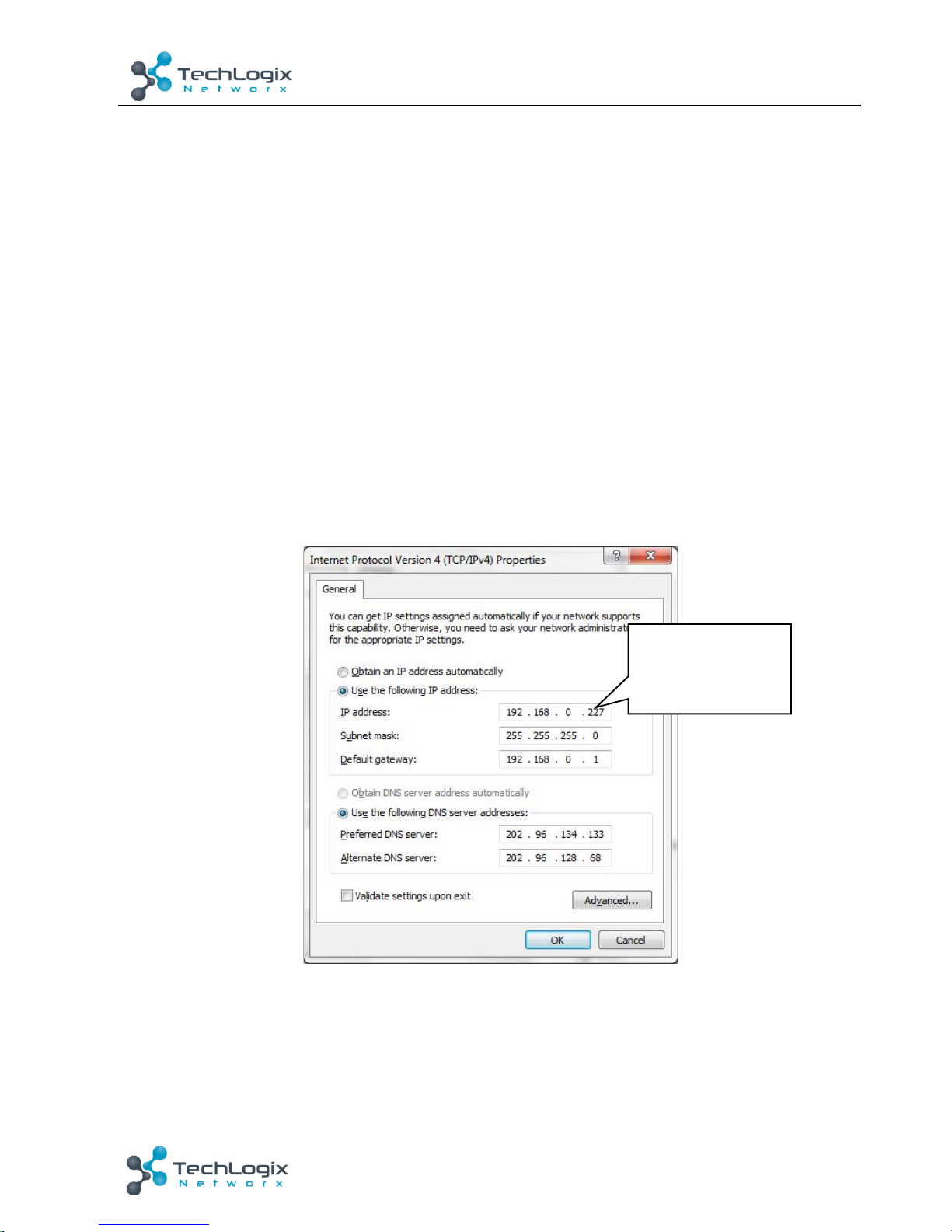
Connect!a!computer!to!the!TCP/IP!port!of!the!TL-A8O-50W!and!set!its!network!segment!to!the!
same!as!the!TL-A8O-50W.$
!
l
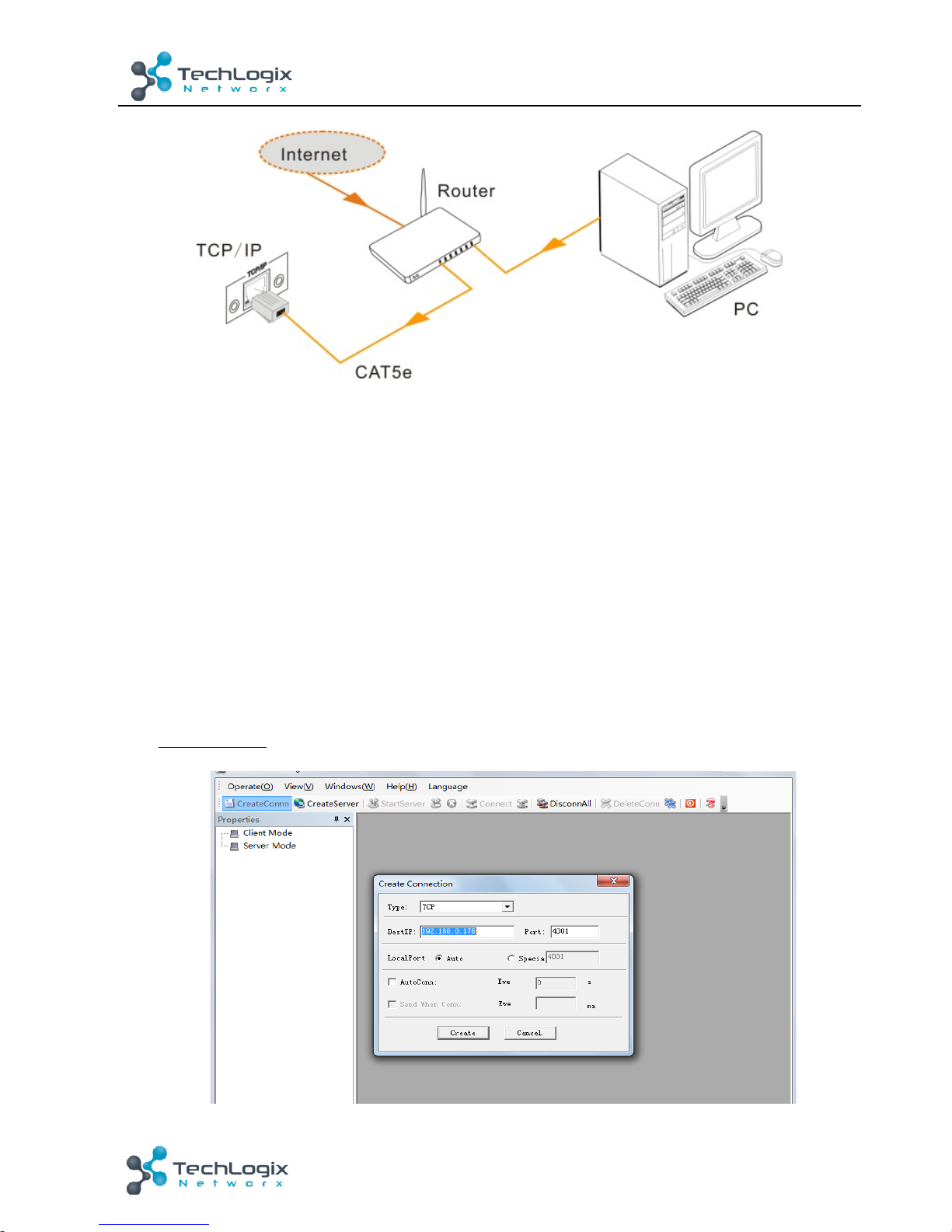
Controlled!by!PC(s)!in!LAN!
Connect!TL-A8O-50W,!a!router!and!several!PCs!to!setup!a!LAN!(as!shown !in !the!following!figure).!
Set!the!network!segment!of!TL-A8O-50W!to!the!same!as!the!router’s,!then!PCs!within!the!LAN!
are!able!to!control!TL-A8O-50W.!
Same!network!
segment!as!the!
TL-A8O-50W!
Page 18
13!
TL-A8O-50W!User!Manual
www.tl networx.com !
!
Follow!these!steps!to!connect!the!devices:!
Step1.
Connect!the!TCP/IP!port!of!the!TL-A8O-50W!to!Ethernet!port!of!PC!with!straight-thru!
CAT5e/6.!
Step2.
Set!the!PC’s!network!segment!to!the!same!as!the!TL-A8O-50W’s.!
Step3.
Set!the!TL-A8O-50W ’s!network!segment!to!the!same!as!the!router.!
Step4.
Set!the!PC’s!network!segment!to!the!original!ones.!
Step5.
Connect!the!TL-A8O-50W!and!PC(s)!to!the!router.!PC(s)!within!the!LAN!is!able!to!control!
the!TL-A8O-50W!asynchronously.!
4.4.2
Control!via!TCP/IP!communication!software!
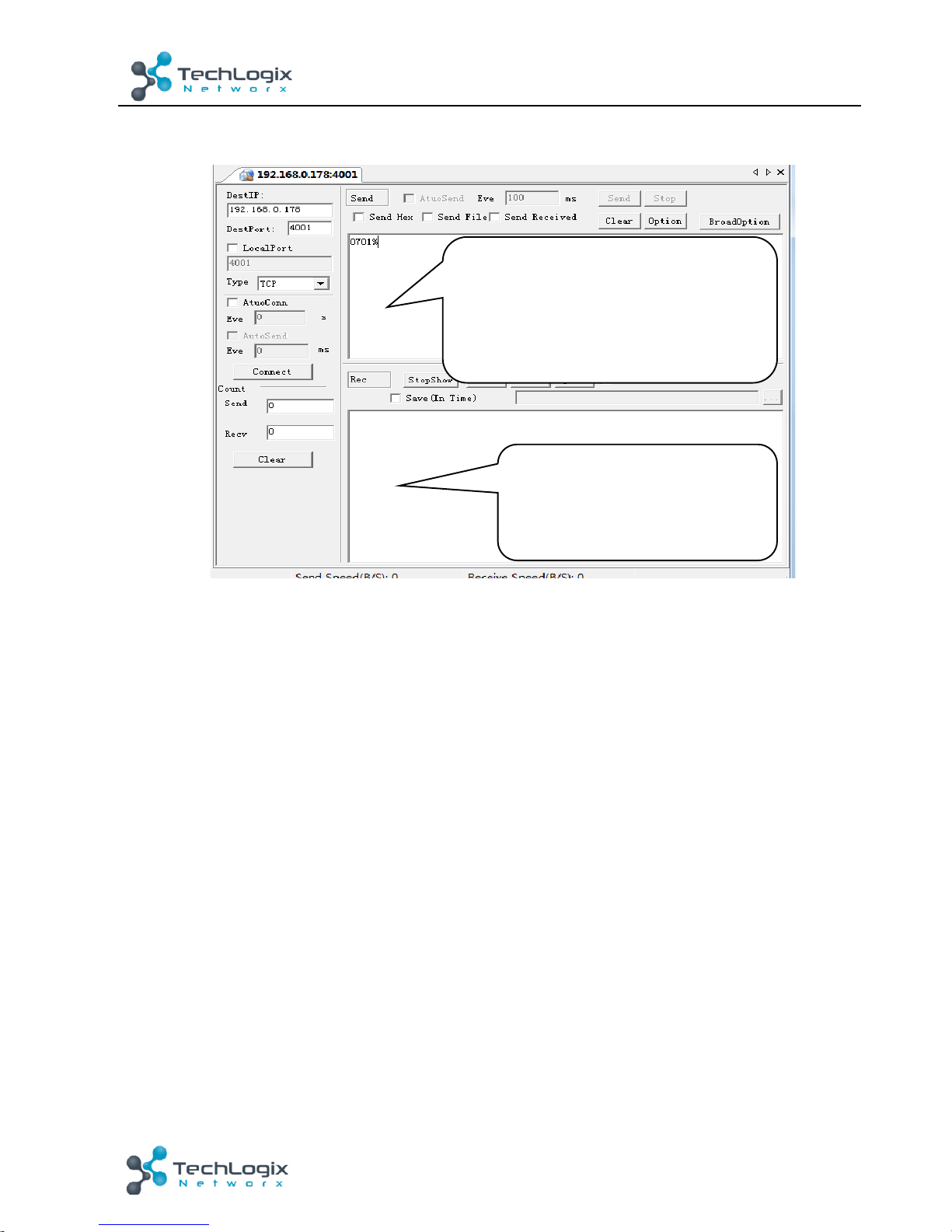
1)
Connect!a!computer!and!TL-A8O-50W!to!the!same!network.!Open!TCP/IP!communication!
software!and!create!a!connection.!Enter!the!IP!address!and!port!of!TL-A8O-50W!(default!IP:!
192.168.0.178,!port:4001):!
!
Page 19
14!
TL-A8O-50W!User!Manual
www.tl networx.com !
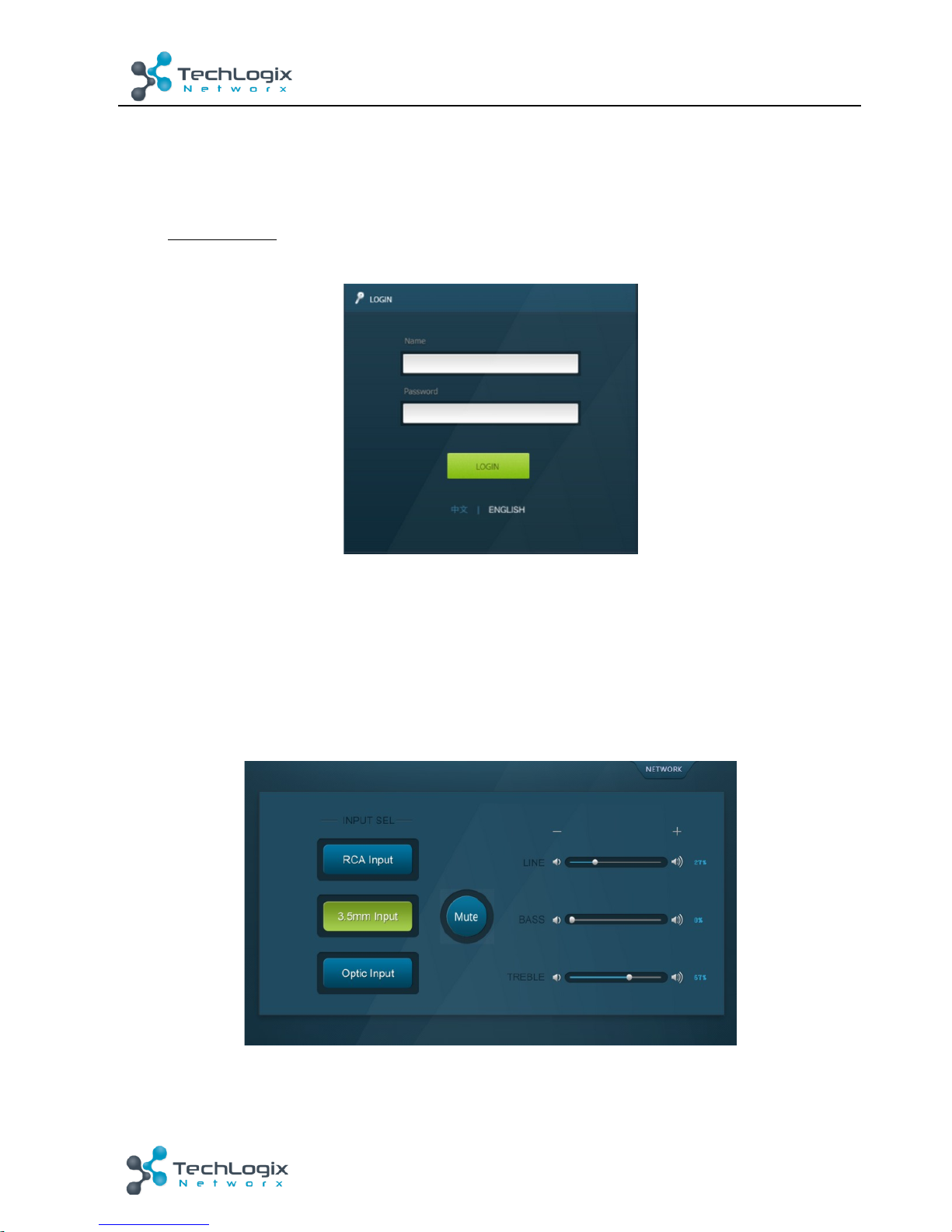
2)
After!connected!successfully,!we!can!enter!commands!to!control!the!TL-A8O-50W,!as!below:!
!
!
!
!
!
!
!
!
!
!
!
!
!
Here!you!will!receive!the!
feedback!when!a!command!is!
sent.!
Enter!your!command!here.!
Commands!are!the!same!with!RS232!
commands!listed!in!
4.3.3$RS232$
Page 20
15!
TL-A8O-50W!User!Manual
www.tl networx.com !
4.4.3
Control!via!web-based!GUI!
TL-A8O-50W!provides!with!built-in!GUI!for!convenient!TCP/IP!control.!GUI!allows!users!to!
interact!with!TL-A8O-50W!through!graphical!icons!and!visual!indicators.!
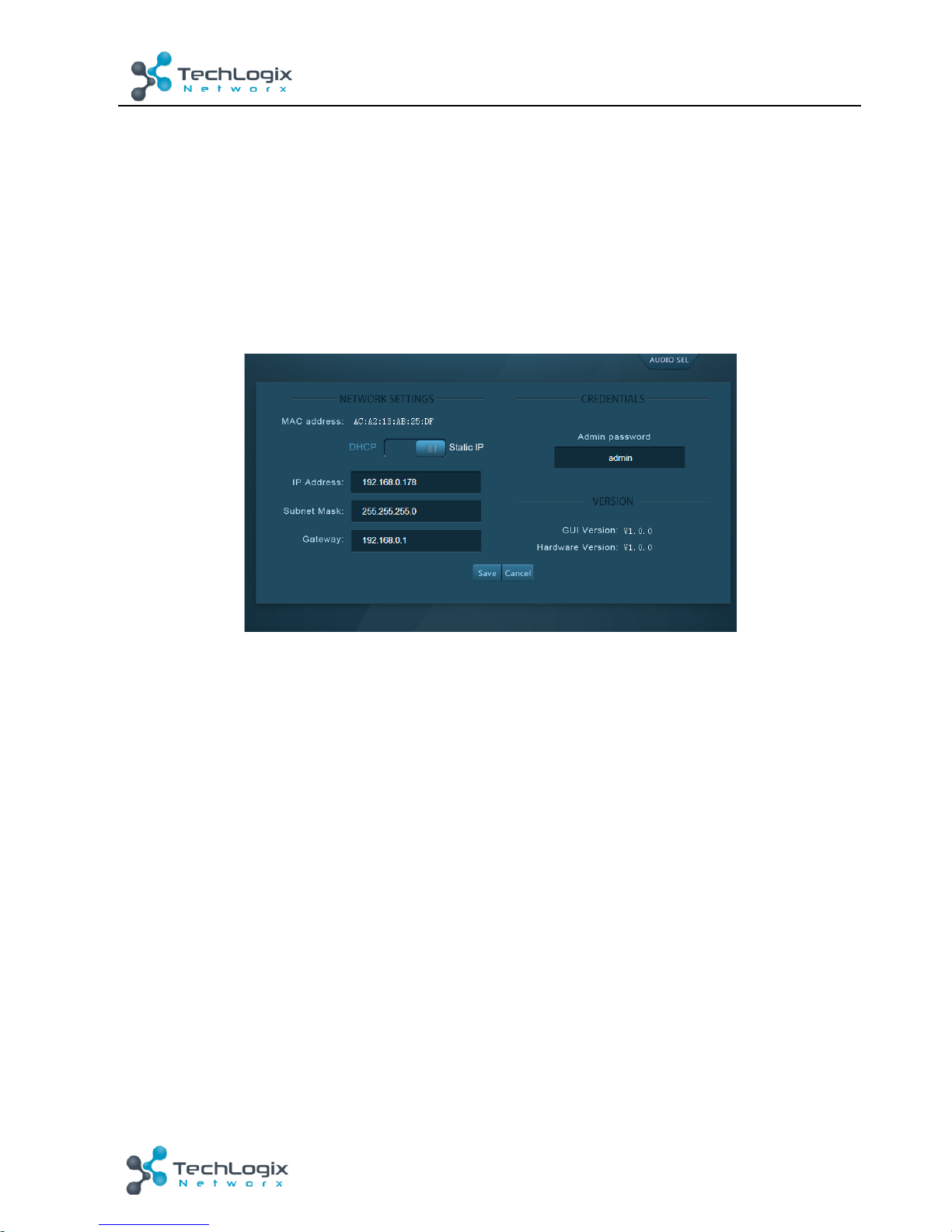
Type!192.168.0.178!(default!IP,!changeable!via!GUI)!in!your!browser,!it!will!enter!the!log-in!
interface!shown!as!below:!
!
Figure!4-!3!Log-in!interface!
GUI!interfaces!can!be!displayed!in!Chinese/!English,!selectable!by!clicking! 中文/!ENGLISH.!
Type!the!right!name!and!password!in!relative!column
:!
Name
:!admin;!
Password
:!admin!(default!setting,!changeable!via!GUI)!
Click
!LOGIN
,!it!will!show!the!audio!selection!interface!as!shown!below:!
Audio!Selection:!
!
!
Figure!4-!4!Network!Control!
!
Page 21
16!
TL-A8O-50W!User!Manual
www.tl networx.com !
In!this!interface,!you!can:!
Ø Select!input!
Ø Mute/!Unmute!
Ø LINE/!BASS/!TREBLE!control:!drag!the!volume!dot!to!turn!down/!up!the!corresponding!
volume!
Ø Switch!to!network!configuration!interface!by!clicking!
NETWORK
!
Network!Configuration:!
!
Figure!4-!5!Audio!Selection!
In!this!interface,!you!can:!
Ø Configure!network!settings:!
IP:!support!DHCP!and!Static!IP,!choose!d emanded!state!by!clicking!the!button!
DHCP:!IP!Address,!subnet!mask!and!gateway!are!fixed!in!this!mode.!
Static!IP:!set!IP!Address,!subnet!mask!and!gateway!manually.!Make!sure!the!IP!is!
different!with!control!device’s.!
Ø Modify!password:!type!in!new!password!in!the!column,!max!at!5!numbers/!letters!
Ø Inquire!software!version!
Ø Switch!to!audio!selection!interface!by!clicking!
AUDIO!SEL
!
If!there!is!any!modification!in!this!interface,!press!
Save
!to!restore!the!settings,!or!press!
Cancel
!to!withdraw.!Click!
AUDIO!SEL
!to!return!to!NETWORK!interface.!
&
Clear!the!cach e !o f!t h e !b rowser!beforehand!to!ensure!reliable!GUI!operation.!
!
Page 22
17!
TL-A8O-50W!User!Manual
www.tl networx.com !
4.4.4
Port!Management!
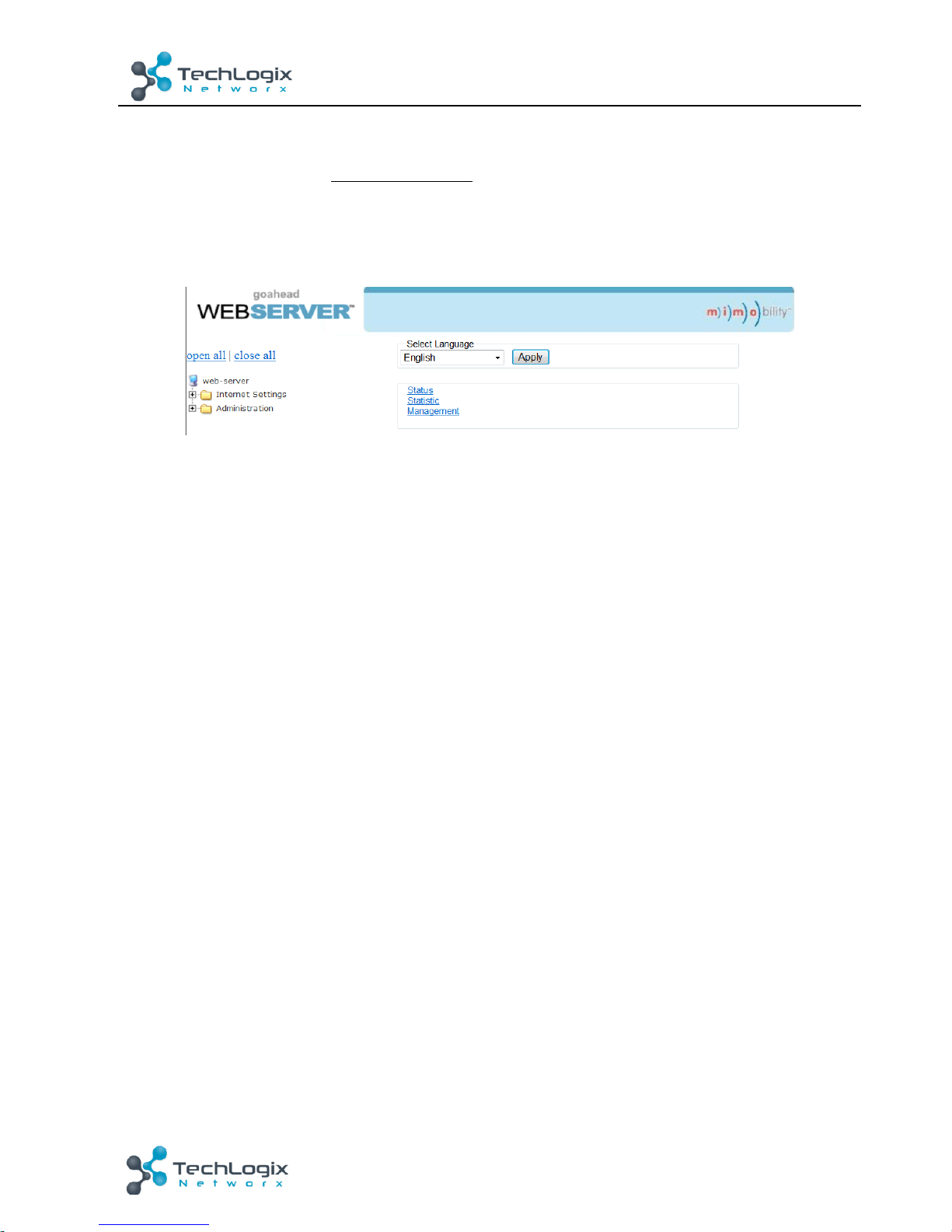
Type!the!designed!website!192.168.0.178:100!(Default,!changeable!via!GUI)!in!your!browser.!
Enter!correct!username!and!password!(s ame!with!GUI!name!and!password)!to!log!in!the!
WebServer:!
Here!is!the!main!configuration!interface!of!the!WebServer:!
!
In!this!interface,!you!can:!
Ø Change!website!display!language!
Ø Modify!network!settings:!Go!to!Internet!Settings!->!WAN!
Ø Upgrade!TCP/IP!module:!Go!to!Administration!->!Upload!Program!->!Select!program!file!->!
Start!upgrading!
Reboot!the!device!after!upgrading.!
! !
Page 23
18!
TL-A8O-50W!User!Manual
www.tl networx.com !
5.
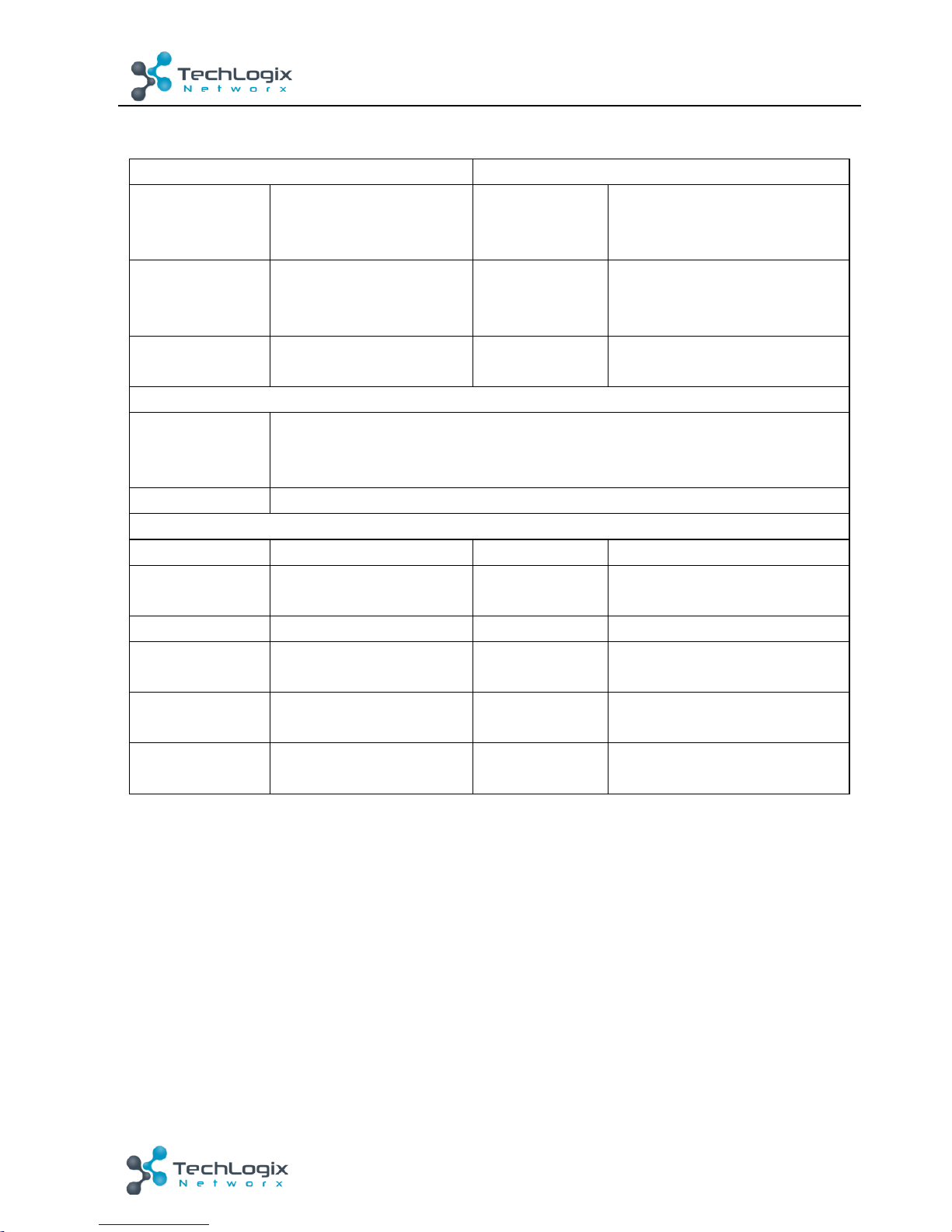
Specification!
Input!
Output!
Input!Signal!
1x!L+R!stereo!audio!
1x!3.5mm!analog!audio!
1x!Optical!Fiber!audio!
Output!Signal!
1x!LOOP!
2x!Stereo!audio/!1!Mono!
audio!
Connectors!
2x!RCA!
1x!3.5mm!TRS!plug!
1x!SPDIF!
Connectors!
1x!3.5mm!jack!
1x!4-pin!5.08mm!connector!
Input!
impedance!
>10KΩ!
Damping!
coefficient!
>100!
Control!
Control!Ports!
1x!RS232!(3-pin!pluggable!terminal!block)! !
1x!IR!IN!(3.5mm!female)! !
1x!TCP/IP!(RJ45!female,!optional)!
Panel!Control!
Front!panel!buttons&!rear!panel!switcher!
General!
SNR!
80dB!
THD+!Noise!
1%@1KHz!50W!
Separation!
75dB!20Hz~20KHz!
Damping!
coefficient!
100!
Voltage!Gain!
32dB!
Output!Power!
1×100W@4Ω/2×50W@8Ω!
Power!Supply!
DC!33V!4A!
Power!
Consumption!
1.48W!
Work!
Temperature!
0~50℃!
Reference!
Humility!
10%~90%!
Dimensions!
(W*H*D)!
148!x44!x165!mm!
Weight!
0.72kg!
NOTE
:!All!nominal!levels!are!at!±10%.!
!
!
Page 24
19!
TL-A8O-50W!User!Manual
www.tl networx.com !
6.
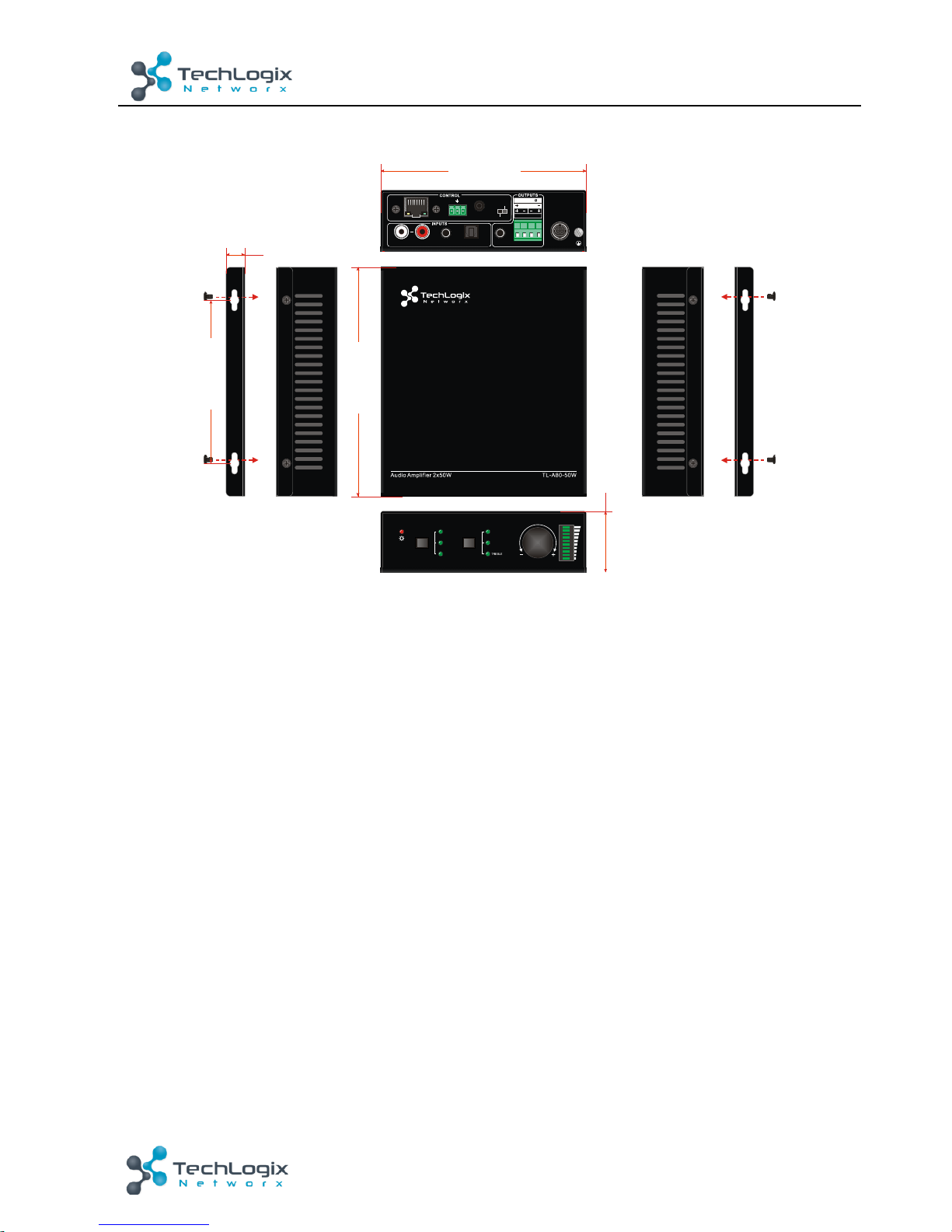
Panel!Drawing!
!
!
CONTROLINPUT SE L
1
2
3
LINE
BASS
VOLUME
LOOP
31
DC 33V
IR INRS232
Tx
Rx
AUDIO OPTICALL R
2
TCP/IP
2x50W 8@
Ω
1x100W @4
STEREO
MONO
117 mm
14 mm
148 mm
165 mm
44 mm
Page 25
20!
TL-A8O-50W!User!Manual
www.tl networx.com !
7.
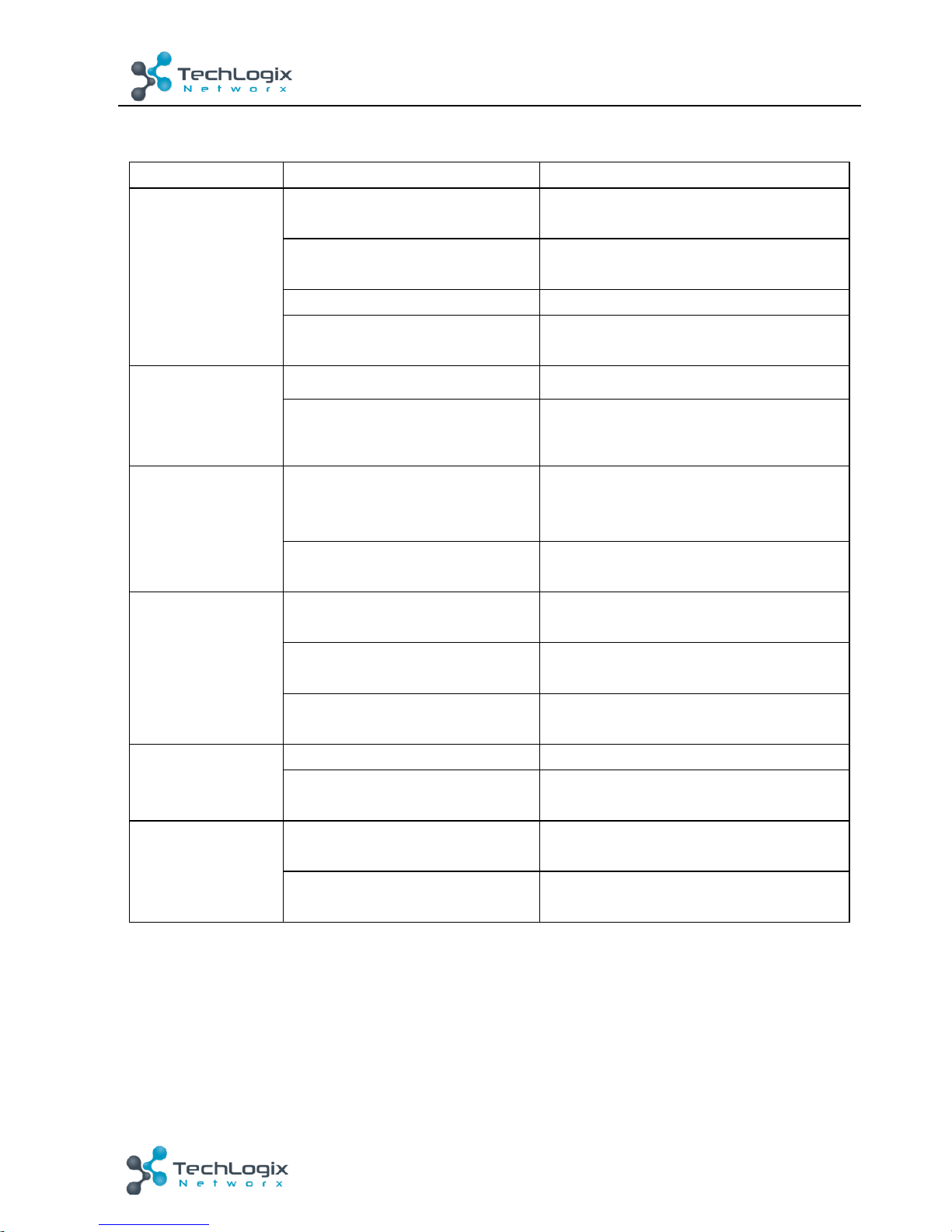
Troubleshooting!&!Maintenance!
Problem!
Possible!Cause!
Solution!
No!output!audio!
Loose!or!broken!connection!at!
input/!output!end!
Reconnect!the!devices.!
No! connected! source! at! the!
chosen!input!channel!
Insert!source!to!the!port!or!change!for!
other!input!channels.!
Audio!has!been!muted!
Press!the!volume!knob!to!unmute.!
Wrong!output!connection!
Connect!output!according!to!different!
transmission!mode!(stereo!or!mono).!
Power!indicator!is!
off!and!the!device!
respond! nothing!
to!any!operation!
Not!energized!yet!
Energize!the!device.!
Loose! or! broken! power!
connection!
Reconnect!the!power!adapter.!
Fail! in! TCP/IP!
control!
Control! device! and! TL-A8O-
50W! are! on! different!network!
segment!
Set! the! network! segment! of! control!
device! to! the! same! with! TL-A8O-
50W’s.!
Network! segment! of! TL-A8O-
50W!is!different!with!LAN’s.!
Set! the! network! segment! of! TL-A8O-
50W!to!the!same!with!LAN’s.!
Fail! in! RS232!
control!
Loose! or! broken! RS232!
connection!
Reconnect! the! devices! or! change! for!
another!RS232!cable.!
Wrong!command!
Send! the! exact! command! listed! in!
4.3.3.!
Wrong! communication!
protocol!
Set!the! protocol!to:! Baud! rate:!9600;!
Data!bit:!8;!Stop!bit:!1;!Parity!bit:!none.!
Fail!in!IR!control!
Run!out!of!battery!
Change!for!new!batteries.!
Exceed! effective! control!
distance!or!angle!
Adjust!control!distance!and!angle.!
No!loop!output!
No!connected!source!at!input!1!
&!2!of!the!1st!TL-A8O-50W!
Connect!audio!source!to!input!1!or!2!of!
the!1st!TL-A8O-50W.!
Wrong!input!selection!at!the!1st!
TL-A8O-50W!
Select!input!1/2!at!the!1st!TL-A8O-50W!
If!your!problem!persists!after!following!the!above!troubleshooting!steps,!seek!further!help!from!
authorized!dealer!or!our!technical!support.! !
Page 26
21!
TL-A8O-50W!User!Manual
www.tl networx.com !
8.
After-sales!Service!
If!there!appear!some!problems!when!runnin g !the !devic e,!p le as e !c h e ck !a n d !d e a l!w it h !th e !
problems!referenced!in!this!user!manual.!
1)
Product!Limited!Warranty:!
We!warrant!that!our!products!will!be!free!from!defects!in!
materials!and!workmanship!for!
three!years.!
Please!see!warranty!page!posted!on!
www.tlnetworx.com!for!more!info.!
2)
What!the!warranty!does!not!cover:
!
l Warranty!expiration.!
l Factory!applied!serial!number!has!been!altered!or!removed!from!the!product.!
l Damage,!deterioration!or!malfunction!caused!by:!
l Normal!wear!and!tear!
l Use!of!supplies!or!parts!not!meeting!our!specifications!
l No!certificate!or!invoice!as!the!proof!of!warranty.!
l The!product!model!showed!on!the!warranty!card!does!not!match!with!the!model!of!
the!product!for!repairing!or!had!been!altered.!
l Damage!caused!by!force!majeure.!
l Non-authorized!service!
l Other!causes!which!does!not!relate!to!a!product!defect!
l Delivery,!installation!or!labor!charges!for!installation!or!setup!of!the!product!
3)
Technical!Suppo rt:!
Email!to!our!after-sales!department!or!make!a!call,!please!inform!us!the!
following!information!about!your!cases.!
l Product!version!and!name.!
l Detailed!failure!situations.!
l The!formation!of!the!cases.!
!
Remarks
:!For!any!questions!or!problems,!please!try!to!get!help!from!your!local!distributor.!
!
 Loading...