

Page 1
!
!
User!Manual!
TL-SM3X1-HDV!
3x1!Video!Switching!System!
!
!
!
!
!
!
!
!
!
All!Rights!Reserved!
Version:!TL-SM3X1-HDV_161011!
Page 2

! !
www.tlnetworx.com!
TL-SM3X1-HDV! User! Manual
Preface!
Read!this!user!manual!carefully!before!using!this!product.!Pictures!shown!in!this!manual!are!for!
reference!only;!the!actual!product!may!vary.! !
This!manual!is!only!for!operation!instruction!only!and!not!for!any!maintenance!or!repair.! !
!
Trademarks!
Product!model!and!logo!are!trademarked.!Any!other!trademarks!mentioned!in!this!manual!are!
acknowledged!as!the!properties!of!the!trademark!owner.!No!part!of!this!publication!may!be!
copied!or!reproduced!without!prior!written!consent.!
!
FCC!Statement!
This!equipment!generates,!uses!and!can!radiate!radio!frequency!energy!and,!if!not!installed!and!
used!in!accordance!with!the!instructions,!may!cause!harmful!interference!to!radio!
communications.!It!has!been!tested!and!found!to!comply!with!the!limits!for!a!Class!A!digital!
device,!pursuant!to!part!15!of!the!FCC!Rules.!These!limits!are!designed!to!provide!reasonable!
protection!against!harmful!interference!in!a!commercial!installation.! !
Operation!of!this!equipment!in!a!residential!area!is!likely!to!cause!interference,!in!which!case!
the!user!at!their!own!expense!will!be!required!to!take!whatever!measures!may!be!necessary!to!
correct!the!interference.!
Any!changes!or!modifications!not!expressly!approved!by!the!manufacture!would!void!the!user’s!
authority!to!operate!the!equipment.!
!!!!!!!!! !!!!!!! ! !! !
!
!
Page 3

! !
www.tlnetworx.com!
TL-SM3X1-HDV! User! Manual
SAFETY!PRECAUTIONS!
To!in s ure! p rope r !operatio n,!please!read!all!instructions!carefully!before!using!the!device. !S ave!
this!manual!for!further!reference.!
l Unpack!the!equipment!carefully!and!save!the!original!box!and!packing!material!for!possible!
future!shipment!
l Follow!basic!saf ety!precautions!to!reduce!the!risk!of!fire,!electrical!shock!and!injury!to!
persons.!
l Do!not!dismantle!the!housing!or!modify!the!module.!It!may!result!in!electrical!shock!or!
burn.!
l Using!supplies!or!parts!not!meeting!the!products’!specifications!may!cause!damage,!
deterioration!or!malfunction.!
l Refer!all!servicing!to!qualified!service!personnel.!
l To!pr even t !fir e!or! s hock! hazar d,!d o !not! expos e !the! unit! to!rain,!moisture!or!install!this!
product!near!water.!
l Do!not!remove!the!housing!of!the!device,!as!opening!or!removing!housing!may!expose!you!
to!dangerous!voltage!or!other!hazards.!
l Install!the!device!in!a!place!with!adequate!ventilation!to!avoid!damage!caused!by!
overheating.!
l Keep!the!device!away!from!liquids.!
l Spillage!into!the!housing!may!result!in!fire,!electrical!shock,!or!equipment!damage.!If!an!
object!or!liquid!falls!or!spills!on!to!the!housing,!unplug!the!device!immediately.!
l Do!not!use!liquid!or!aerosol!cleaners!to!clean!this!unit.!Always!unplug!the!power!to!the!
device!before!cleaning.!
l Unplug!the!power!cord!when!left!unused!for!a!long!period!of!time.!
l If!disposing!of!the!unit,!do!not!burn!or!mix!with!general!household!waste.!The!device!must!
be!disposed!of!per!local!regulations!for!electronic!recycling.! !
!
Page 4

! !
TL-SM3X1-HDV! User! Manual
www.tlnetworx.com!
Contents!
1.!Introduction!...............................................................................................................................!1!
1.1!Introduction!to!TL-SM3X1-HDV!.......................................................................................!1!
1.2!Features!...........................................................................................................................!1!
1.3!Package!List!.....................................................................................................................!2!
2.!Panel!Description!......................................................................................................................!3!
2.1!Front!Panel!......................................................................................................................!3!
2.2!Rear!Panel!........................................................................................................................!4!
2.3!Example!Table!Inserts!......................................................................................................!4!
3.!System!Connection!....................................................................................................................!6!
3.1!Usage!Precautions!...........................................................................................................!6!
3.2!System!Diagram!...............................................................................................................!6!
3.3!Connection!Procedure!.....................................................................................................!7!
4.!System!Operations!....................................................................................................................!9!
4.1!Front!Panel!Buttons!.........................................................................................................!9!
4.1.1!Manual-switching!.................................................................................................!9!
4.1.2!Auto-switching!......................................................................................................!9!
4.2!IR!Remote!......................................................................................................................!10!
5.!Specification!............................................................................................................................!11!
6.!Panel!Drawing!..........................................................................................................................!12!
7.!Troublesho oting!& !Maintena nce!.............................................................................................!13!
8.!After-sales!Service!...................................................................................................................!14!
Page 5

! !
1!
TL-SM3X1-HDV! User! Manual
www.tlnetworx.com!
1. Introduction!
1.1 Introduction!to!TL-SM3X1-HDV!
The!TL-SM3X1-HDV!is!a!3x1!video!switcher!with!two!HDMI!inputs,!one!VGA!input!and!one!
HDMI!output.!The!unit!supports!HDMI!video!resolutions!up!to!4K@30,!as!well!as!multichannel!
audio.!The!unit!supports!VGA!video!resolutions!up!to!1920x1200@60Hz.!
The!TL-SM3X1-HDV!supports!two!operating!modes:!auto-switch!mode!and!manual!switch!
mode.!When!in!auto-switch!mode,!the!unit!will!automatically!switch!to!a!signal!input!as!soon!
as!a!new!source!is!connected.!When!the!active!source!is!removed,!the!unit!will!select!the!first!
source!on!the!lowest!numbered!input.! !
In!manual!switch!mode,!the!TL-SM3X1- HDV!will!switch!between!connected!inputs!when!a!
control!command!is!sent!to!the!unit!via!IR!or!through!a!command!sent!by!compatible!table!
inserts,!or!by!using!buttons!on!the!front!panel!of!the!unit.! ! !
In!addition!to!controlling!the!switching!of!the!source!inputs,!the!TL-SM3X1-HDV!also!controls!a!
display!connected!via!an!HDMI!cable!via!CEC!commands.!This!allows!for!automatic!power!
on/off!commands!to!be!transmitted!from!the!unit!(as!well!as!connected!table!inserts)!to!the!
display,!thereby!providing!a!complete!room!connectivity!and!control!solution.! !
!
1.2 Features!
l Two!HDMI!inputs,!one!VGA!input!&!one!HDMI!output!
l HDMI!video!resolution!up!to!4K@30Hz!4:4:4! !
l VGA!video!resolution!up!to!1920x1200@60Hz!
l HDMI!1.4!&!HDCP!1.4!compliant!
l MHL!support!on!HDMI!input!channel!1!
l IR!remote!control!&!front!panel!control!
l Integration!with!TechL o g ix!table!in s ert s!for!signal!pa ss -th rough!&!remote!control!
l Micro!USB!firmware!port!
l EDID!pass-through!
l CEC!pass-through!with!display!control!
l Hot-plug!support!
! !
Page 6

! !
2!
TL-SM3X1-HDV! User! Manual
www.tlnetworx.com!
1.3 Package!List!
l 1!x!TL-SM3X1-HDV!switcher!
l 1!x!IR!Remote!
l 1!x!3.5mm!audio!cable!(3m)!(optional)!
l 1!x!Power!Adapter!(DC!12V!1A)!
l 2!x!Mounting!rails!(with!8!screws)!
l 4!x!Rubber!feet!
l 1!x!User!Manual!
! !
Page 7

! !
3!
TL-SM3X1-HDV! User! Manual
www.tlnetworx.com!
2. Panel!Description!
2.1 Front!Panel!
!
No.!
Name!
Description!
① !
Built-in!IR!Receiver!
Receives!IR!control!signals!sent!from!a!remote!control!
② !
Power!LED!
Illuminates!red!when!properly!powered!on!
③ !
HDMI!1!input!
Selector!&!Activity!
LED!
Button:!Provides!manual!switching!to!HDMI!channel!1!
LED:!illuminates!green!when!HDMI!chann e l!1 !is !se lec ted !
④ !
HDMI!2!input!
Selector!&!Activity!
LED!
Button:!Provides!manual!switching!to!HDMI!channel !2!
LED:!illuminates!green!when!HDMI!chann e l!2 !is !se lec ted !
⑤ !
VGA!1!input!
Selector!&!Activity!
LED!
Button:!Provides!manual!switching!to!VGA!channel! !
LED:!illuminates!green!when!VGA! ch anne l!is!selected!
⑥ !
Auto-Switching!
Mode!Selector!&!
Activity!LED!
Button:!Turns!on/off!auto-switching!
LED:!illuminates!green!when!auto-switching!mode!is!selected!
Note:! During! auto-switching! mode,! front! panel! switching! is!
disabled!
⑦ !
Firmware!
Micro!USB!port!used!for!firmware!update!
Note:!Pictures!shown!in!this!manual!are!for!reference!only;!actual!product!may!vary.! !
! !
IR
FIRMWARE
HDM I 1 HDM I 2
VGA AUTO
1
2
3
4
5
6
7
Page 8
! !
4!
TL-SM3X1-HDV! User! Manual
www.tlnetworx.com!
2.2 Rear!Panel!
!
No.!
Name!
Description!
① !
HDMI/MHL!IN!1!
HDMI!input!port!1!
Note:!Supports!both!HDMI!and!MHL!connections!
② !
HDMI!IN!2! !
HDMI!input!port!2!
③ !
VGA!IN!
VGA!input!port!3!
④ !
AUDIO!IN!
External! audio! port;! embeds! onto! the! VGA! stream! when!
converting!to!HDMI!
⑤ !
HDMI!OUT!
HDMI!output!port!
⑥ !
C1~C3!
Dry! contact! closure! control! ports! (for! use! with! compatible!
TechL o gix!t able! inser t s)!
⑦ !
RES!RESET!
Resets!the!units’!resolution!to!1280x720p!
⑧ !
DC!12V!
12V!power!port!
Note:!Pictures!shown!in!this!manual!are!for!reference!only;!actual!product!may!vary.! !
! !
DC12V RES RESET C3C2C1HDMI/MHL IN 1 HDM I OUTHDM I IN 2 AUDIO INVGA IN
1
2
3
4
5
6
7 8
Page 9
! !
5!
TL-SM3X1-HDV! User! Manual
www.tlnetworx.com!
2.3 Example!Table!Inserts!
!
No.!
Name!
Description!
① !
SHOW!ME!
Button:!Selects!the!corresponding!input!on!the!TL-SM3X1-HDV! !
② !
ON/OFF!
Button:!Select!to!power!on/off!a!connected!display!
③ !
HDMI!input!port!
Local!table!connection!for!sources!
④ !
HDMI!output!port!
Connection!to!switcher!
Note:!HDMI!signals!are!passed!from!the!source!device!(connected!via!the!HDMI,input,port),!
through!the!table!insert,!and!to!the!switcher!(connected!via!the!HDMI,output,port).! !
!
!
!
SHOW ME
ON OFF
/
3
4
1
2
SHOW ME
ON OFF
/
3
4
1
2
Page 10

! !
6!
TL-SM3X1-HDV! User! Manual
www.tlnetworx.com!
No.!
Name!
Description!
⑤ !
SHOW!ME!
Button:!Selects!the!corresponding!input!on!the!TL-SM3X1-HDV! !
⑥ !
ON/OFF!
Button:!Select!to!power!on/off!a!connected!display!
⑦ !
VGA!input!port!
Local!table!connection!for!sources!
⑧ !
VGA!output!port!
Connection!to!switcher!
Note:!VGA!signals!are!passed!from!the!source!device!(connected!via!the!VGA,input,port),!
through!the!table!insert,!and!to!the!switcher!(connected!via!the!VGA,output,port).! !
3. System!Connection!
3.1 Usage!Precautions!
1) System!should!be!installed!in!a!clean!environment!that!has!a!proper!temperature!and!
humidity.!
2) All!of!the!power!switches,!plugs,!sockets!and!power!cords!should!be!installed!properly.! !
3) All!devices!should!be!connected!before!powering!on!the!devices.!
4) If!mounting!the!unit,!the!included!m ou nting!hardware!must!be!used.! !
!
3.2 System!Diagram!
!
!
!
!
!
!
!
!
!
!
!
!
!
!
3-1!Example!System!Diagram!(without!table!inserts) !
DC12 V RES RE SET C3C2C1HDMI /MHL IN 1 HDMI O UTHDMI I N 2 AUDI O INVGA IN
Laptop
Blu ray DVD-
Blu ray DVD-
Page 11
! !
7!
TL-SM3X1-HDV! User! Manual
www.tlnetworx.com!
!
3-2!System!Diagram!(with!table!inserts)!
!
3.3 Connection!Procedure!
1. Verify!all!components!included!with !th e! TL-SM3X1-HDV!are!present!before!
installation.!
2. If!the!TL-SM3X1-HDV!will!be!permanently!mounted!to!a!surface,!attach!the!included!
Mounting!rails!with!the!supplied!screws.! !
3. If!the!TL-SM3X1-HDV!will!be!sitting!on!a!shelf,!attach!the!included!rubber!feet!to!the!
bottom!of!the!unit.! !
4. Turn!off!power!and!disconnect!the!audio/video!equipment!by!following!the!
manufacturer’s!instructions.! !
5. Connect!HDMI!signal!cables!between!the!HDMI!sources!and!the!HDMI!IN!1!and!HDMI!
IN!2!ports.!
Rea r Pan e l
SHOW ME ONOFF
/
Fr on t Pan el
VGA Table Plug Module
-
Lapt op
DC12V RES R ESET C3C2C1HDM I/MHL IN 1 HDM I OUTHDM I IN 2 AUD IO INVGA IN
Fr on t Pan el
SHOW ME ONOFF
/
HDMI Table Plug M odule
-
Rea r Pan e l
Bl u r ay DVD
-
Fr on t Pan el
SHOW ME ONOFF
/
HDMI Table Plug M odule
-
Rea r Pan e l
Bl u r ay DVD
-
HDTV
Page 12
! !
8!
TL-SM3X1-HDV! User! Manual
www.tlnetworx.com!
6. Connect!a!VGA!signal!cable!between!the!VGA!sources!and!the!VGA!IN!ports.! !
7. Connect!an!HDMI!cable!between!the!display!and!the!HDMI!OUT!port.!
8. If!the!3x1!video!switcher!will!be!controlled!via!TechL o gix!table!inserts:!
1) Separately!connect!HDMI!signal!cables!between!the!HDMI!sources!and!HDMI!
ports!of!the!table!inserts.!
2) Separately!connect!a!VGA!signal!cable!between!the!VGA!source!and!the!VGA!
port!of!the!table!insert.! !
3) Separately!connect!HDMI!signal!cables!between!the!HDMI!ports!of!table!inserts!
and!the!HDMI!IN!1!and!HDMI!IN!2!ports!of!the!TL-SM3X1-HDV.!
4) Seperately!connect!a!VGA!signal!cable!between!the!VGA!port!of!the!table!insert!
and!the!VGA!IN!port!of!the!TL-SM3X1-HDV.!
5) Separately!connect!three!table!inserts!to!the!C1,!C2,!and!C3!ports!of!the!TL-
SM3X1-HDV.!
9. Connect!the!included!12VDC!power!adaptor!to!the!TL-SM3X1-HDV.!
10. Power!on!attached!audio/video!devices.!
!
!
!
!
!
!
!
!
!
Important notice:
l Do!not!attempt!to!disassemble!or!alter!the!TL-SM3X1-HDV!housing.!There!are!no!
user-serviceable!parts!inside!the!unit.!Doing!so!will!void!your!warranty.!
l To!mi nimize!t h e!po s sibil i ty!o f !equ i pmen t!dam a ge!from! e lectrostatic! d isc h arge !(ES D ),!
all!source!and!destination!equipment!must!be!powered!off!during!installation.!
l Allow!proper!ventilation!to!reduce!the!risk!of!thermal!failure.!
Page 13

! !
9!
TL-SM3X1-HDV! User! Manual
www.tlnetworx.com!
4. System!Operations!
4.1 Front!Panel!Buttons!
The!front!panel!buttons!may!be!used!for!source!selection.!Video!signals!support!auto-switching!
and!manual!switching!(factory!default).!
4.1.1 Manual-switching!
Press!HDMI!1,!HDMI!2!or!VGA!on!front!panel!to!select!the!corresponding!input!source.!
4.1.2 Auto-switching!
Press!AUTO!to!enter!into!auto-switching!mode.!
The!auto-switching!mode! abides!by!the!following!principles:!
Ø New!input!
When!a!new!signal!(or!connection)!is!detected,!the!TL-SM3X1-HDV!switches!to!this!new!
signal!automatically.!
Ø Rebooting!device!
The!TL-SM3X1-HDV!will!save!the!last!configuration!before!losing!power.!If!the!last!switching!
mode!is!auto-switching,!once!rebooted,!the!TL-SM3X1-HDV!will!automatically!enter!autoswitching!mode,!then!detect!all!inputs!and!memorize!their!connection!status!for!future!use.!
If!the!last!displayed!signal!is!still!available,!the!unit!will!output!the!signal.!If!not,!the!unit!will!
detect!all!the!input!signals!with!priority!from!HDMI!1!to!HDMI!2!to!VGA.! !
Ø Removing!signals!
Should!an!active!signal!be!removed,!the!TL-SM3X1-HDV!will!detect!all!input!signals!with!
priority!from!HDMI!1!to!HDMI!2!to!VGA.!It!will!transfer!the!first!signal!detected!to!the!
display.!
, ,
Page 14
! !
10!
TL-SM3X1-HDV! User! Manual
www.tlnetworx.com!
4.2 IR!Remote! !
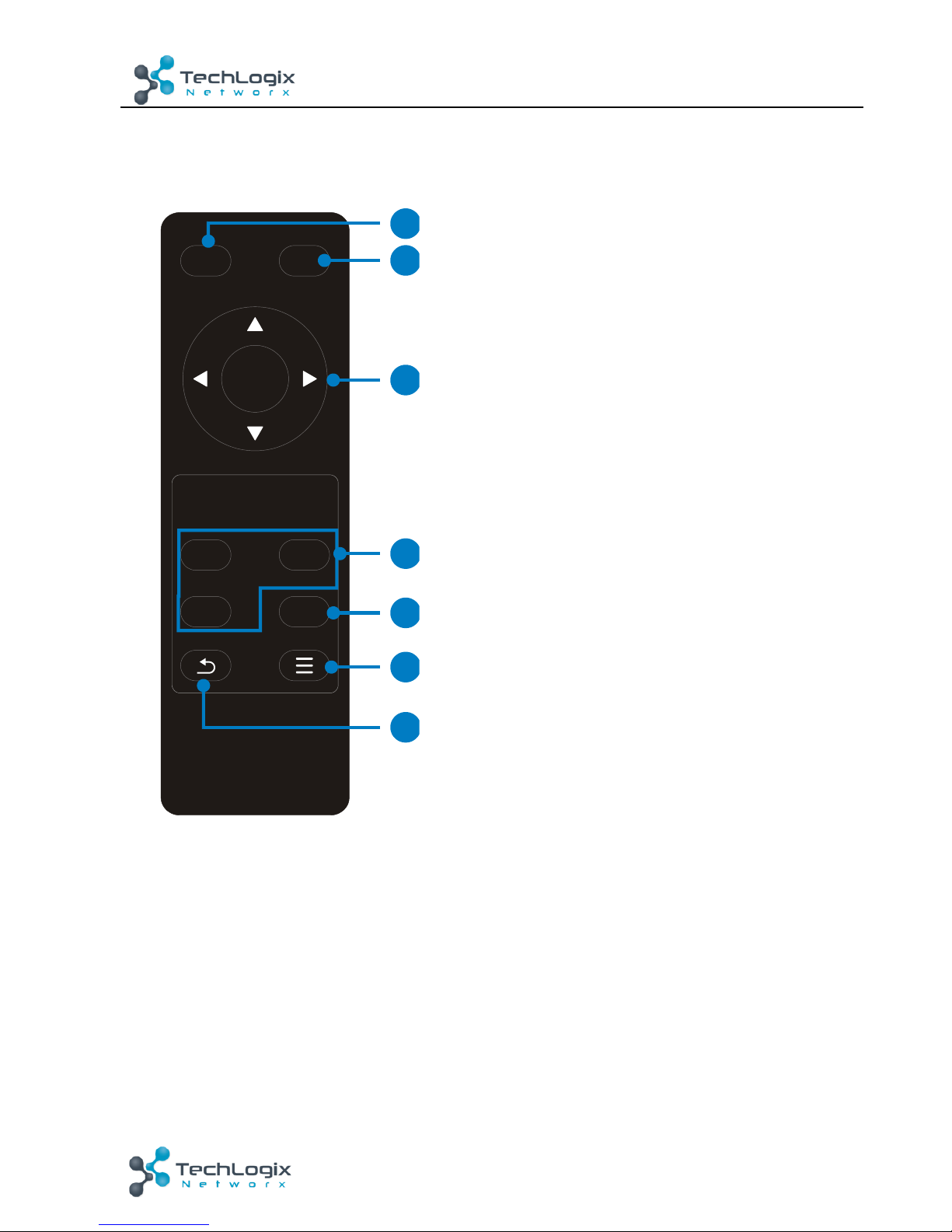
The!built-in!IR!receiver!on!the!front!panel!will!receive!IR!control!signals!sent!by!a!remote!
control!(included).! !
!
① OFF! !
Powers!off!the!connected!display!using!CEC!
commands!
② ON!
Powers!on!the!connected!display!using!CEC!
commands!
③ OK:!confirm!button!
Navigation!buttons:!UP/DOWN/LEFT/!RIGHT!allow!
for!resolution!selection! !
④ Input!source!selection!buttons!
1=HDMI!1,!2=HDMI!2,!3=VGA!
Select!video!source!via!pressing!corresponding!
button!
⑤ Auto!button!
Enter/Exit!auto-switching!mode!
⑥ Menu!button!
Enters!the!OSD!menu.!Allows!for!navigation!
through!supported!output!resolutions.! !
⑦ Return!button!
!
OK
1 2
AUTO
3
ONOFF
2
3
4
5
6
7
1
Page 15
! !
11!
TL-SM3X1-HDV! User! Manual
www.tlnetworx.com!
5. Specification!
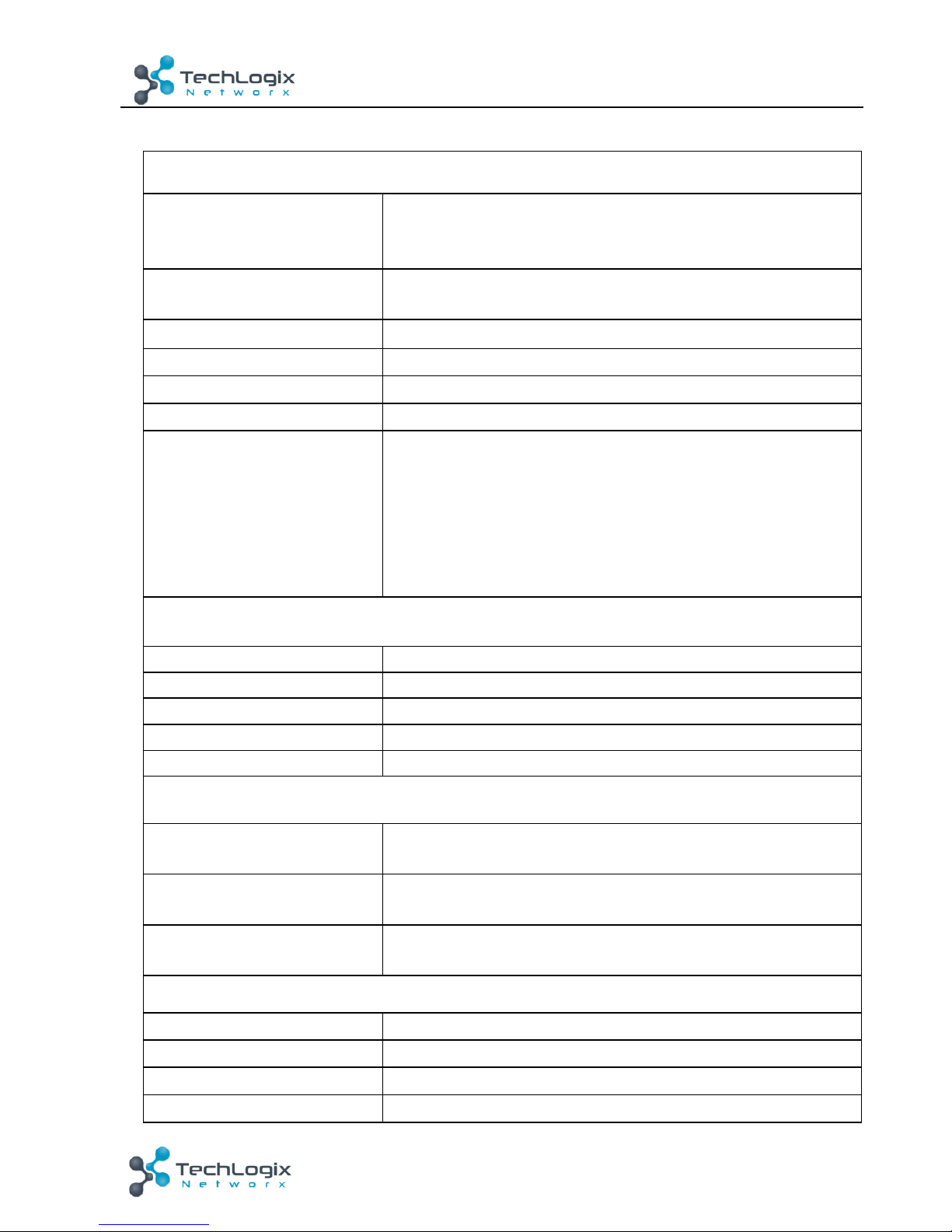
Input/output! !
Video!Input!
1!HDMI/MHL!
1!HDMI!
1!VGA!
Video!Input!Connector!
2!female!HDMI!
1!female!VGA!(15-pin)!
Input!Video!Signal!
HDMI,!YPbPr,!C-video,!VGA!
Video!Output!
1!HDMI!
Video!Output!Connector!
1!female!HDMI!
Output!Video!Signal! !
HDMI!
Output!Resolution!
HDMI!output!video!support!HDMI!1.4!&!HDCP!1.4;!
maximum!resolution!of!4K@30!4:4:4!
VGA!output!video!support!HDMI!1.4!&!HDCP!1.4;!maximum!
resolution!of!1920x1200.!Other!supported!resolutions!
include:!1920x1080,!1600x1200,!1600x900,!1360x768,!
1280x800,!1280x720,!or!1024x768.!
Audio!
Audio!Input!
1!stereo!audio!input!for!VGA!video!
Audio!Input!Connector!
1!3.5mm!stereo!jack!
Audio!Input!Impedance! !
>10kΩ!
Frequency!Response!
20Hz~20K!Hz!
Stereo!Channel!Separation! !
>80dB!@1KHz!
Control!Part!
Control!Port!
3!Dry!Contact!(C1~C3)!
1!FIRMWARE!
Control!Connector!
3!3.5mm!mini!jack!
1!Micro-USB!
Control!Buttons!
Front!Panel:!HDMI!1,!HDMI!2,!VGA,!AUTO!
Rear!Panel:!RES!RESET!
General!
Temperature!
0!~!+50℃!
Humidity!
10%!~!90%!
Power!Supply!
DC12V!1A!
Max!Power!Consumption!
2W!
Page 16
! !
12!
TL-SM3X1-HDV! User! Manual
www.tlnetworx.com!
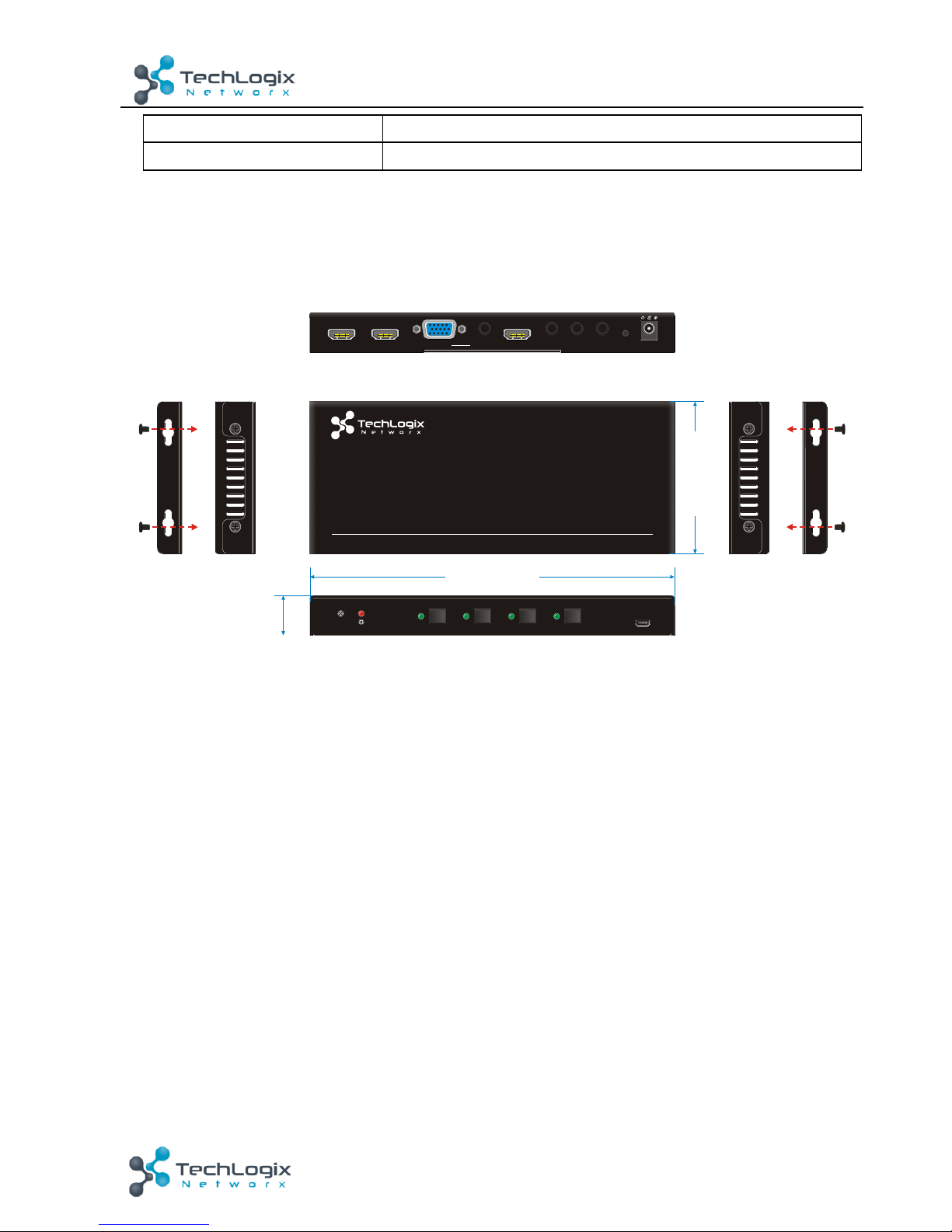
Dimension!(W*H*D)!
201.5mm!x!22.0mm!x!84.0mm!
Weight!
246g!
!
!
6. Panel!Drawing!
!
!
IR
FIRMWARE
HDMI 1 HDMI 2 VGA AUTO
3x1 V ideo Sw itche r
TL-SM3X1-HDV
DC12V RES RES ET C3C2C1HDMI/ MHL IN 1 HDMI O UTHDMI IN 2 AUDIO I NVGA IN
20 1.5 mm
84 .0 mm
22 .0 mm
Page 17
! !
13!
www.tlnetworx.com!
TL-SM3X1-HDV! User! Manual
7. Troubleshooting!&!Maintenance!
Problems!
Causes!
Solutions!
Output!image!with!
snowflakes!or!static!
Poor!cable!quality!
Replace!the!cable!
Failing!or!loose!connection!
Check!the!cable!connection!
No!output!image!when!
switching!
No!signal!at!the!input!/!
output!end!
Check!with!oscilloscope!or!
multi-meter!
Failing!or!loose!connection!
Check!the!cable!connection!
Failure!of!the!unit!
Contact!TechLogix!technical!
support!
POWER!indicator!doesn’t!
illuminate!or!lack!of!unit!
response!
Power!supply/cable!failure!
Check!the!power!supply!
connection!
Static!becomes!stronger!
when!connecting!the!video!
connectors!
Bad!grounding!
Check!unit!and!power!
supply!ground!connection! !
!
If!your!problem!persists!after!following!the!above!troubleshooting!steps,!please!contact!your!
authorized!reseller!or!TechLogix!technical!support.! !
! !
Page 18

! !
14!
www.tlnetworx.com!
TL-SM3X1-HDV! User! Manual
8. After-sales!Service!
1) Product!Limited!Warranty:!We!warrant!that!our!products!will!be!free!from!defects!in!
materials!and!workmanship!for!three!years.! !
2) Warranty!coverage!may!be!voided!when:! !
l The!warranty!period!has!expired!
l The!factory!applied!serial!number!has!been!altered!or!removed!from!the!product!
l There!is!damage,!deterioration!or!malfunction!caused!by:!
l Atypical!wear!and!tear!
l Use!of!supplies!or!parts!not!meeting!the!specifications!
l No!certificate!or!invoice!as!the!proof!of!warranty!
l Damage!caused!by!force!majeure!
l Non-authorized!service!
3) Technical!Support:!When!contacting!TechLogix!support,!please!have!the!following!
information!available:! !
l Product!part!number!
l Installation!and!sale!date!
l Detailed!failure!information!
!
 Loading...