

Page 1
© 2023 techBite. Wszystkie prawa zastrzeżone. PIX 15.6 PL
1
INSTRUKCJA OBSŁUGI
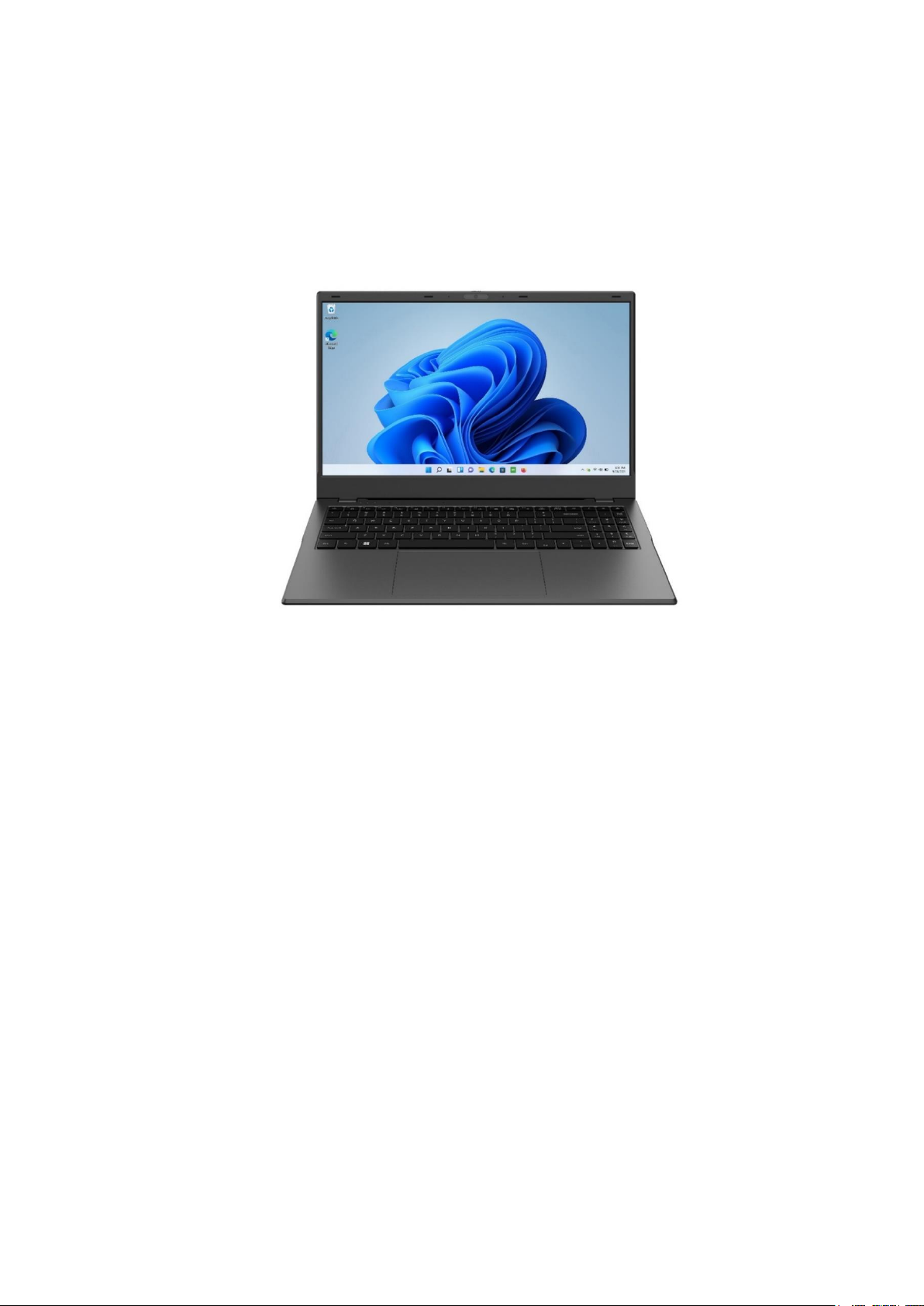
techbite PIX 15.6 128GB FHD
(laptop)
Nr partii: 202308
Tworzymy dla Ciebie.
Dziękujemy za wybranie urządzenia marki techBite. Produkt został
zaprojektowany z myślą o Tobie, dlatego robimy wszystko, aby korzystanie z
niego sprawiało Ci przyjemność.
Zadbaliśmy, aby elegancja, funkcjonalność oraz wygoda użytkowania łączyły się
z przystępną ceną.
W trosce o Twoje bezpieczeństwo zalecamy uważne przeczytanie poniższej
instrukcji obsługi.
Dane producenta:
mPTech Sp. z o. o.
ul. Nowogrodzka 31
00-511 Warszawa
Polska
Infolinia: (+48 71) 71 77 400
Punkt dostarczania sprzętu:
mPTech Sp. z o. o.
ul. Krakowska 119
50-428 Wrocław
Polska
Strona internetowa: techBite.eu
Wyprodukowano w Chinach
Page 2
© 2023 techBite. Wszystkie prawa zastrzeżone. PIX 15.6 PL
2
Instrukcja obsługi
Rzeczywisty produkt, dołączone do niego
akcesoria oraz niektóre jego funkcje mogą
różnić się od prezentowanych na zdjęciach
i w opisach w niniejszej instrukcji.
Najnowsza wersja instrukcji dostępna jest
na stronie produktu:
https://techbite.eu/qr/pix-15-6-fhd-128gb
Aby otworzyć tę stronę wystarczy zeskanować
znajdujący się obok kod QR.
1. Spis treści
1. Spis treści ......................................................................................................... 2
2. Bezpieczeństwo ............................................................................................. 3
3. Korzystanie z instrukcji obsługi ............................................................... 4
4. Ważne informacje ......................................................................................... 5
5. Specyfikacja techniczna .............................................................................. 5
5.1 Dane techniczne ............................................................................................... 5
5.2 Zawartość zestawu .......................................................................................... 6
6. Wygląd laptopa .............................................................................................. 7
6.1 Ekran i pulpit roboczy ..................................................................................... 7
6.2 Lewy bok ............................................................................................................. 8
6.3 Prawy bok ........................................................................................................... 8
6.4 Spód ...................................................................................................................... 8
7. Przed pierwszym uruchomieniem ........................................................... 8
8. Klawiatura ....................................................................................................... 9
9. Podstawowa obsługa systemu operacyjnego Windows 11 ............ 9
9.1 Włączanie urządzenia ................................................................................. 10
9.2 Ekran startowy - pulpit ................................................................................ 10
9.3 Menu startowe ............................................................................................... 11
9.4 Pasek zadań ..................................................................................................... 11
9.5 Wyłączanie urządzenia ............................................................................... 11
9.6 Centrum powiadomień ................................................................................ 12
9.7 Jak wyłączyć Tryb S ...................................................................................... 12
10. Wymiana pamięci SSD i RAM ............................................................... 14
10.1 Montaż pamięci M.2 2280 PCIE SSD .................................................... 16
10.2 Montaż pamięci RAM ................................................................................ 17
11. Uwagi dotyczące bezpieczeństwa ....................................................... 17
11.1 Rozwiązywanie problemów .................................................................... 17
11.2 Obsługa pamięci przenośnych ............................................................... 18
Page 3

© 2023 techBite. Wszystkie prawa zastrzeżone. PIX 15.6 PL
3
11.3 Ochrona danych osobowych i ważnych informacji ......................... 18
11.4 Uwagi na temat poprawnego używania akumulatora ................... 19
12. Konserwacja urządzenia ........................................................................ 19
13. Bezpieczeństwo otoczenia .................................................................... 20
14. Korzystanie z instrukcji .......................................................................... 21
14.1 Zgody .............................................................................................................. 21
14.2 Wygląd ........................................................................................................... 21
14.3 Znaki towarowe .......................................................................................... 21
15. Prawidłowa utylizacja zużytego sprzętu .......................................... 22
16. Prawidłowa utylizacja zużytych akumulatorów ............................ 22
17. Deklaracja zgodności z dyrektywami UE .......................................... 22
2. Bezpieczeństwo
Zapoznaj się uważnie z podanymi tu wskazówkami. Nieprzestrzeganie tych
wskazówek może być niebezpieczne lub niezgodne z prawem.
—NIE RYZYKUJ—
Wszystkie urządzenia bezprzewodowe mogą powodować zakłócenia mogące
wpływać na pracę innych urządzeń. Nie włączaj urządzenia w miejscach,
w których zabrania się korzystania z urządzeń elektronicznych, ani wtedy, gdy
może to spowodować zakłócenia lub inne zagrożenia.
—STACJE PALIW—
Wyłączaj urządzenie podczas tankowania paliwa na stacji paliw. Nie używaj go
również w pobliżu chemikaliów.
—OBSZARY O OGRANICZONYM DOSTĘPIE—
Wyłącz urządzenie w samolocie, ponieważ może zakłócać pracę innych
znajdujących się w nim urządzeń. Urządzenie może zakłócać pracę sprzętu
medycznego w szpitalach i placówkach ochrony zdrowia. Należy stosować się do
wszelkiego rodzaju zakazów, przepisów i ostrzeżeń przekazywanych przez
personel medyczny.
—PROWADZENIE POJAZDÓW—
Nie korzystaj z urządzenia podczas prowadzenia żadnych pojazdów.
—PROFESJONALNY SERWIS—
Ten produkt może naprawiać wyłącznie wykwalikowany serwis producenta lub
autoryzowany punkt serwisowy. Naprawa urządzenia przez
niewykwalikowany lub nieautoryzowany serwis grozi uszkodzeniem
urządzenia i utratą gwarancji.
—WI-FI (WLAN)—
W krajach Unii Europejskiej z sieci WLAN możesz korzystać bez ograniczeń
wewnątrz budynków.
—NIEPEŁNOSPRAWNI RUCHOWO LUB PSYCHICZNIE—
Urządzenie nie powinno być obsługiwane przez osoby (w tym także dzieci) o
ograniczonych predyspozycjach ruchowych lub psychicznych, a także przez
Page 4
© 2023 techBite. Wszystkie prawa zastrzeżone. PIX 15.6 PL
4
osoby bez doświadczenia w obsłudze sprzętu elektronicznego. Mogą one z niego
korzystać tylko pod nadzorem osób odpowiadających za ich bezpieczeństwo.
Urządzenie nie jest zabawką. Przewody i foliowe elementy opakowania mogą
owinąć się wokół szyi dziecka i spowodować uduszenie lub inny rozstrój zdrowia.
Dla bezpieczeństwa dzieci przechowuj urządzenie i jego akcesoria poza ich
zasięgiem.
—AKUMULATORY I AKCESORIA—
Unikaj wystawiania akumulatora na działanie bardzo niskich lub bardzo
wysokich temperatur (poniżej 0°C / 32°F lub powyżej 40°C / 104°F).
Ekstremalne temperatury mogą mieć wpływ na pojemność i żywotność
akumulatora. Unikaj narażania akumulatora na kontakt z płynami i metalowymi
przedmiotami, gdyż może to doprowadzić do całkowitego lub częściowego
uszkodzenia akumulatora. Akumulatora używaj tylko zgodnie z jego
przeznaczeniem. Nie niszcz, nie uszkadzaj ani nie wrzucaj akumulatora do ognia
– może to być niebezpieczne i spowodować pożar. Zużyty lub uszkodzony
akumulator należy umieścić w specjalnym pojemniku. Nie należy ładować
akumulatora dłużej niż 1 dzień. Zamontowanie akumulatora nieodpowiedniego
typu grozi jego wybuchem. Nie otwieraj akumulatora. Utylizuj akumulator
zgodnie z instrukcją. Nieużywaną ładowarkę odłączaj od zasilania. W przypadku
uszkodzenia przewodu ładowarki nie naprawiaj go, tylko wymień ją na nową.
Używaj tylko oryginalnych akcesoriów producenta.
—SŁUCH—
Aby uniknąć uszkodzenia słuchu, nie używaj urządzenia na
wysokim poziomie głośności przez dłuższy czas, ani nie przykładaj
włączonego urządzenia bezpośrednio do ucha.
3. Korzystanie z instrukcji obsługi
Urządzenie oraz zrzuty ekranu zamieszczone w tej instrukcji obsługi mogą się
różnić od występujących w rzeczywistym produkcie. Akcesoria dołączone do
laptopa mogą wyglądać inaczej niż na ilustracjach zamieszczonych w niniejszej
instrukcji.
W instrukcji obsługi zostały opisane opcje
znajdujące się w systemie Microsoft Windows
11. Opcje te mogą się różnić, w zależności od
wersji systemu operacyjnego i aplikacji, które
będą zainstalowane w urządzeniu.
Obszerny poradnik dotyczący obsługi i
elementów systemu Microsoft Windows 11
znajduje się pod poniższym adresem:
https://support.microsoft.com/plpl/products/windows?os=windows-11
Można do niego dotrzeć skanując prezentowany powyżej kod QR.
Page 5
© 2023 techBite. Wszystkie prawa zastrzeżone. PIX 15.6 PL
5
4. Ważne informacje
Większość aplikacji, które mogą być zainstalowane na urządzeniu to aplikacje z
Microsoft Store. Aplikacje instalowane na urządzeniu mogą się różnić w
zależności od kraju, regionu i parametrów technicznych sprzętu. Producent nie
ponosi odpowiedzialności za problemy spowodowane przez oprogramowanie
innych rm. Producent nie odpowiada za nieprawidłowości, które mogą się
pojawić podczas edytowania ustawień rejestru i modykowania
oprogramowania systemu operacyjnego. Próby wprowadzania zmian w
systemie operacyjnym mogą być przyczyną nieprawidłowego działania
urządzenia i aplikacji oraz podstawą do unieważnienia gwarancji.
5. Specyfikacja techniczna
Ekran o przekątnej 15,6” i rozdzielczości 1920 x 1080 px
Nowoczesny wyświetlacz zapewnia głębokie barwy i szeroki kąt widzenia, co
pozwoli Wam docenić lmy, zdjęcia i gry w niesamowitych, realnych i soczystych
kolorach.
Wi-Fi
Laptop PIX 15.6 wyposażony jest w łączność Wi-Fi, zapewniającą transmisję
danych z prędkościami zgodnymi ze standardami 802.11a/b/g/n/ac, dzięki temu
możesz bezprzewodowo łączyć się z wszechobecnymi hot spotami oraz z siecią
domową. Odbieraj i wysyłaj dane, programy i pliki bez ograniczeń do sieci i na
inne urządzenia.
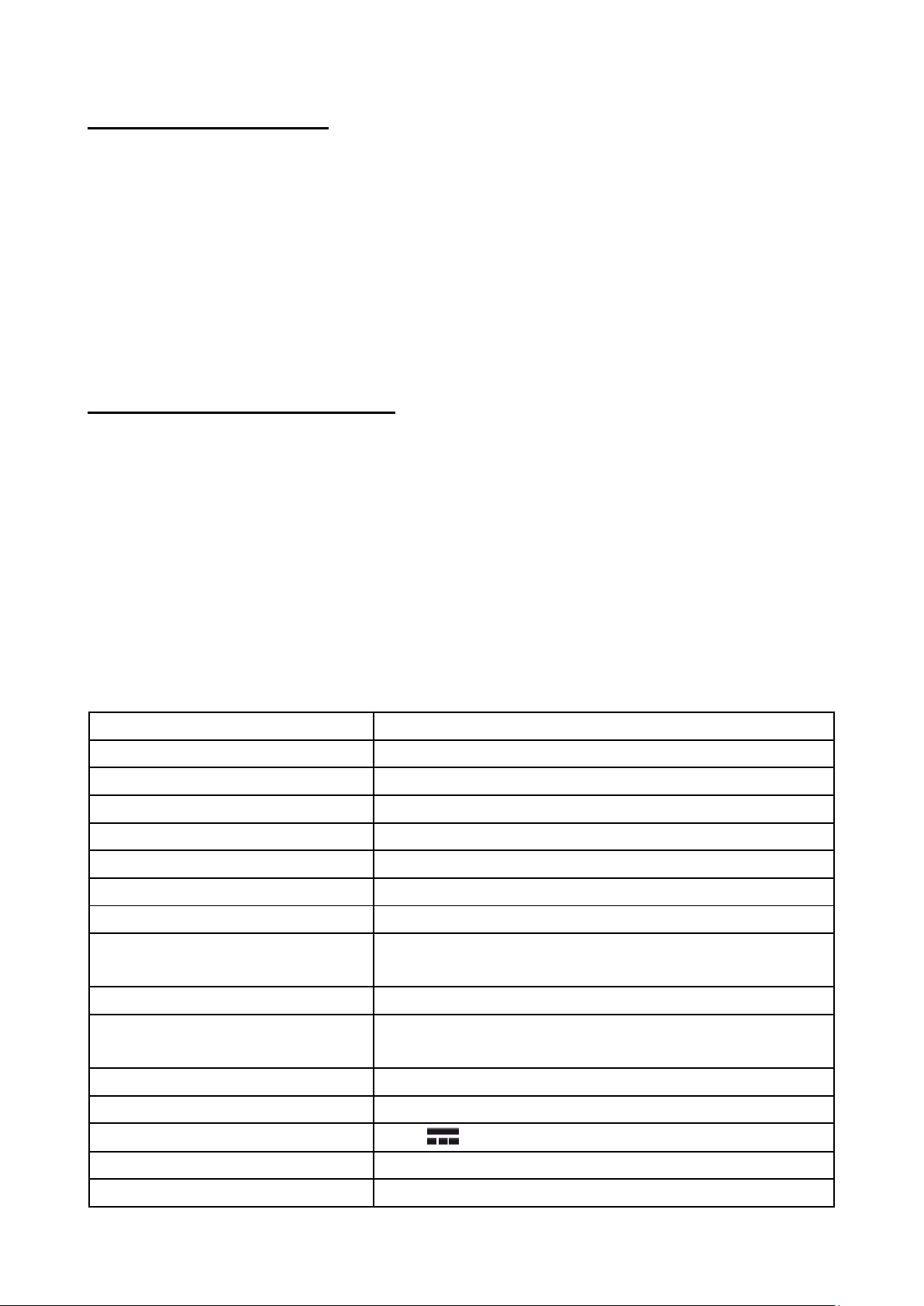
5.1 Dane techniczne
Wyświetlacz
15.6" IPS, 1920x1080 FHD
Procesor
Intel Celeron N5105 (4M Cache, do 2.90 GHz)
Grafika
Intel® UHD Graphics
Pamięć RAM
1x8GB, możliwość wymiany modułu
Pojemność nośnika danych
128GB M.2 PCIE SSD
System operacyjny
Windows 11 Home (S-mode)
Kamera
2.0 Mpix z mikrofonem
Łączność
Wi-Fi IEEE 802,11 ac/b/g/n, Bluetooth 5.0
Audio
Wbudowane głośniki stereo
Gniazdo minijack 3,5 mm
Wyjście wideo
HDMI
Złącza
2xUSB-C, 2xUSB 3.0, USB 2.0, Ehternet,
zasilania
Akumulator
7.6V/6400mAh
Parametry wej. zasilacza
100-240V~ 0,7A, 50-60Hz
Parametry wyj. zasilacza
12V 2A
Wymiary
358.25 x 241.94 x 19.9mm
Waga netto
1.7kg
Page 6

© 2023 techBite. Wszystkie prawa zastrzeżone. PIX 15.6 PL
6
5.2 Zawartość zestawu
• Laptop PIX 15.6 128GB FHD
• Zasilacz sieciowy
• Instrukcja obsługi
• Karta gwarancyjna
Jeśli brakuje którejkolwiek z powyższych pozycji lub jest ona uszkodzona,
skontaktuj się ze sprzedawcą.
Radzimy zachować opakowanie na wypadek ewentualnej reklamacji.
Przechowuj opakowanie z dala od zasięgu dzieci.
Page 7
© 2023 techBite. Wszystkie prawa zastrzeżone. PIX 15.6 PL
7
6. Wygląd laptopa
6.1 Ekran i pulpit roboczy
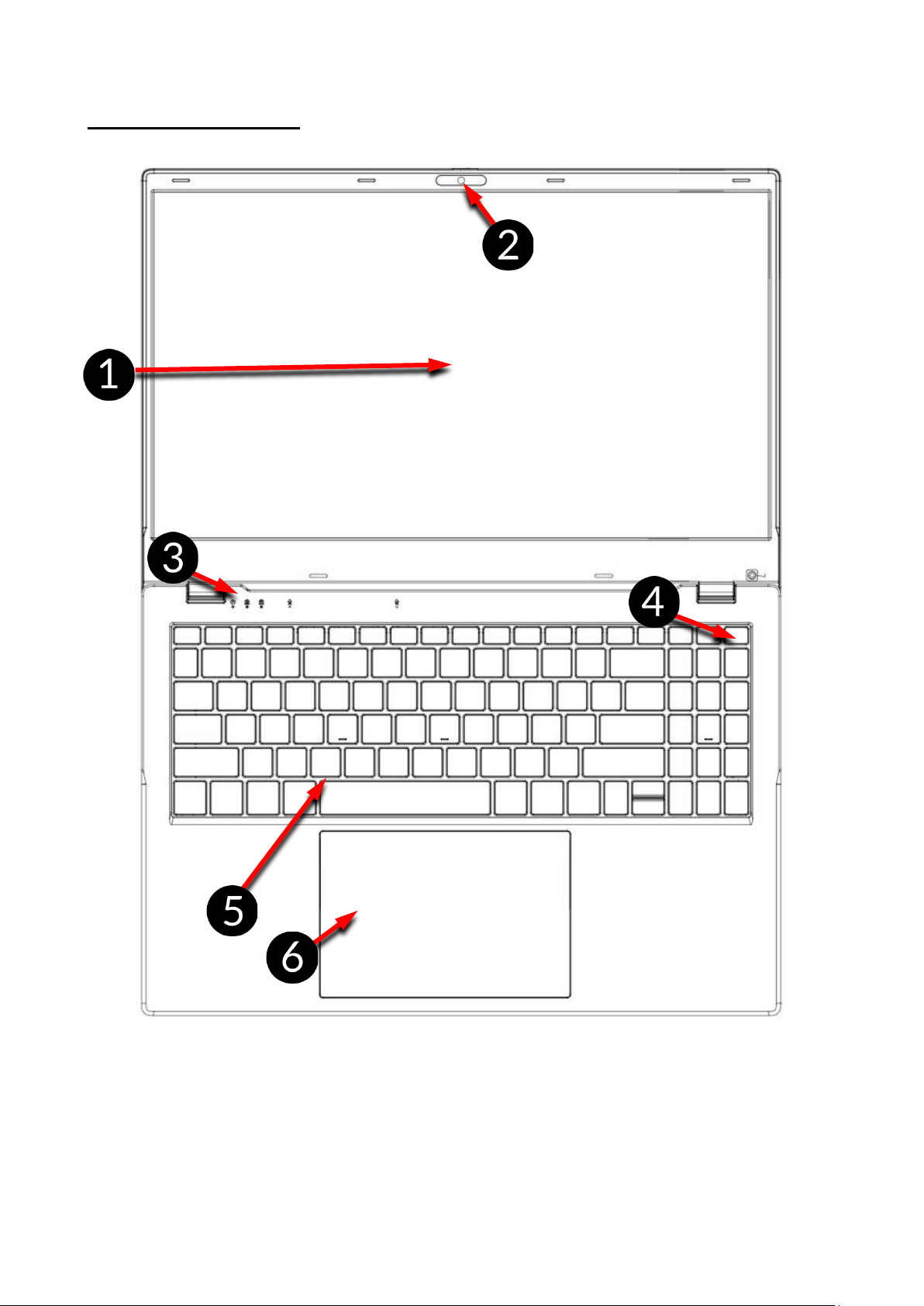
1. Ekran
2. Kamera
3. Diody stanu pracy
4. Przycisk zasilania
5. Klawiatura
6. Panel dotykowy z dwoma
przyciskami
Page 8
© 2023 techBite. Wszystkie prawa zastrzeżone. PIX 15.6 PL
8
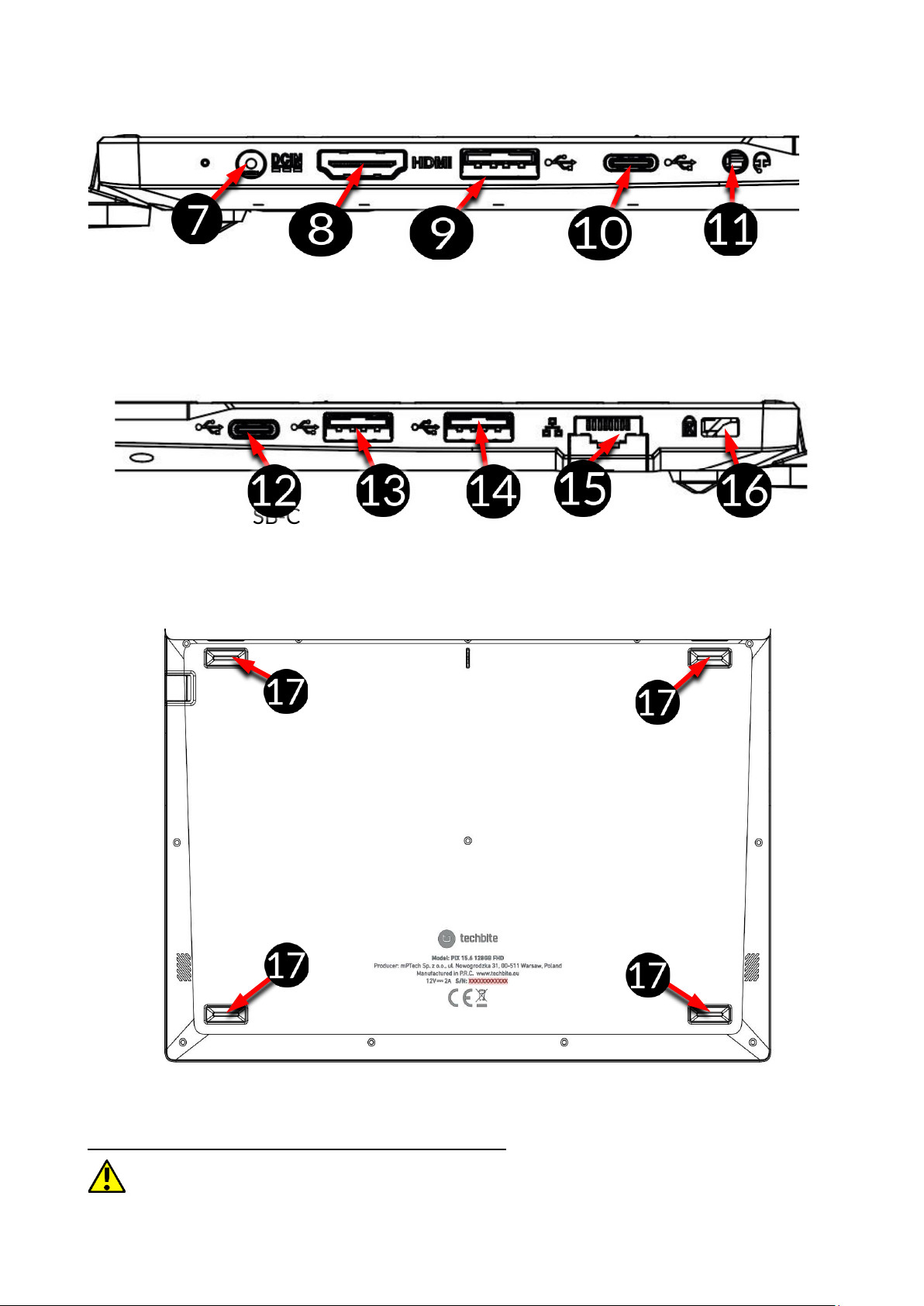
6.2 Lewy bok
7. Gniazdo ładowania z diodą
8. Gniazdo HDMI
9. Gniazdo USB 3.0
10. Gniazdo USB-C
11. Gniazdo słuchawkowe Jack
3,5mm
6.3 Prawy bok
12. Gniazdo USB-C
13. Gniazdo USB 2.0
14. Gniazdo USB 3.0
15. Gniazdo Ethernetowe
16. Kensington lock
6.4 Spód
17. Gumowa nóżka
7. Przed pierwszym uruchomieniem
Przed pierwszym włączeniem urządzenia należy naładować akumulator przy
użyciu zasilacza z zestawu. Należy używać wyłącznie zasilaczy zalecanych przez
Page 9
© 2023 techBite. Wszystkie prawa zastrzeżone. PIX 15.6 PL
9
producenta. Używanie niezgodnych zasilaczy może spowodować eksplozję
akumulatora albo uszkodzenie urządzenia. W razie wątpliwości skontaktuj się ze
sprzedawcą lub serwisem producenta. Gdy akumulator jest bliski rozładowania,
wyświetlany jest komunikat o niskim poziomie jego naładowania. Aby kontynuować
korzystanie z urządzenia, należy naładować jego akumulator. Po całkowitym
rozładowaniu akumulatora urządzenie może nie dać się włączyć nawet wtedy, gdy jest
ładowane. Należy przez kilka minut ładować akumulator.
Aby naładować akumulator podłącz wtyczkę na przewodzie zasilacza do gniazda
zasilania (9) w urządzeniu.
Nie używaj zbyt dużej siły, gdyż może to spowodować uszkodzenie urządzenia
lub zasilacza. Uszkodzenia wynikające z nieprawidłowej obsługi nie są objęte
gwarancją.
Podłącz zasilacz do gniazda sieciowego.
Podczas ładowania urządzenie może się nagrzewać. To normalne zjawisko, które
nie powinno wpływać na trwałość ani wydajność urządzenia.
Jeżeli urządzenie nie jest prawidłowo ładowane lub występują inne problemy
z akumulatorem, należy dostarczyć je wraz z zasilaczem do centrum
serwisowego producenta.
8. Klawiatura
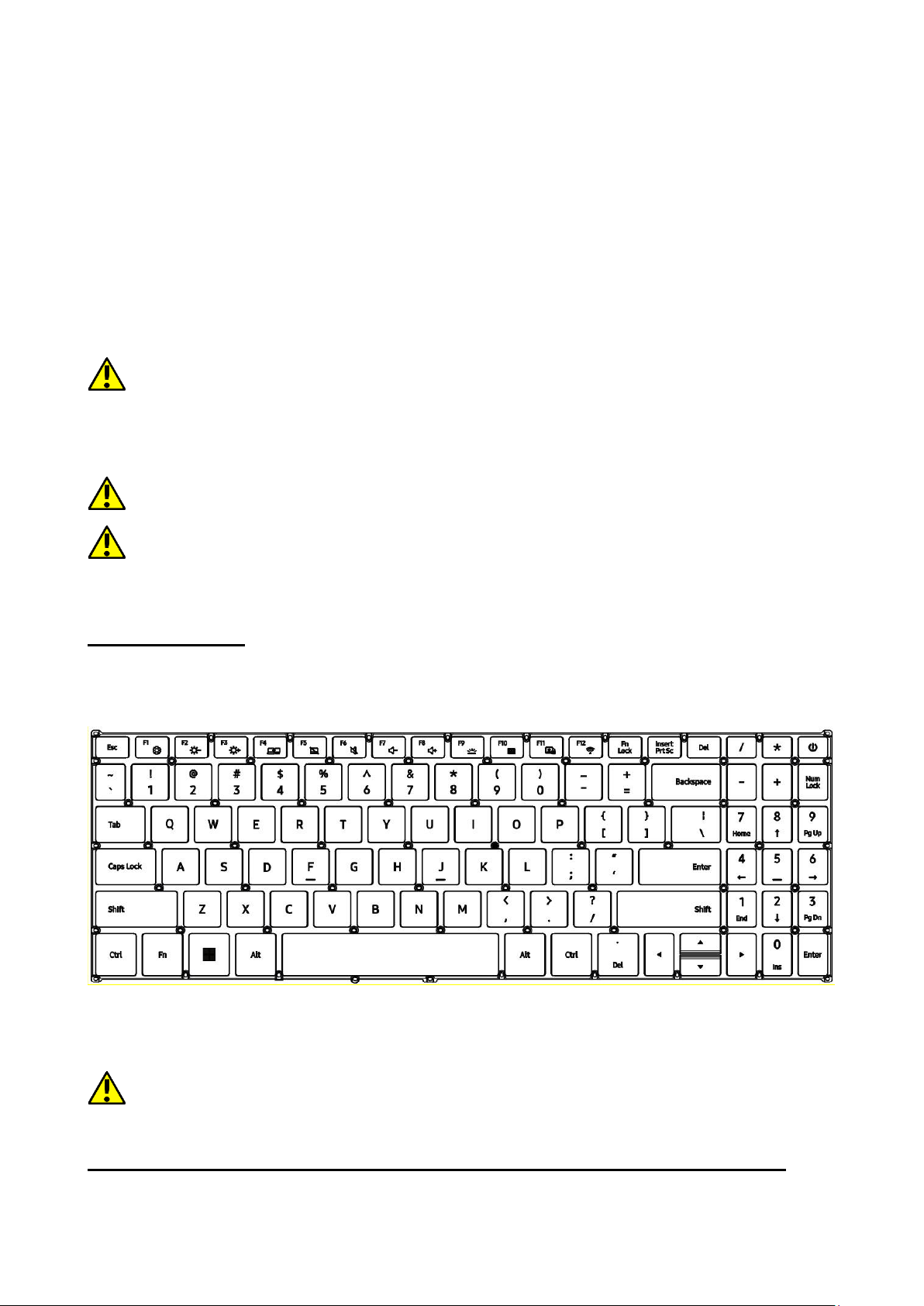
Klawiatura w laptopie ma standardowy układ QWERTY. Dodatkowo znajdują się
w prawym dolnym rogu przyciski kierunkowe. Za pomocą klawiatury
wprowadzane są teksty.
Dzięki kombinacjom niektórych klawiszy z przyciskiem Fn możliwe jest użycie
funkcji przypisanych klawiszom F1-F12 i dezaktywacji/aktywacji panelu
dotykowego.
Wersje językowe klawiatur przeznaczone na rynki lokalne mogą różnić się od
siebie.
9. Podstawowa obsługa systemu operacyjnego Windows 11
W urządzeniu zainstalowany jest system operacyjny Microsoft Windows 11.
Page 10
© 2023 techBite. Wszystkie prawa zastrzeżone. PIX 15.6 PL
10
Aby móc pracować z systemem Microsoft Windows 11 należy mieć lub założyć
konto Microsoft i zalogować się na nie przy pierwszym uruchomieniu systemu
operacyjnego.
9.1 Włączanie urządzenia
Aby włączyć urządzenie należy krótko przycisnąć włącznik/klawisz znajdujący
się w prawym górnym rogu klawiatury - .
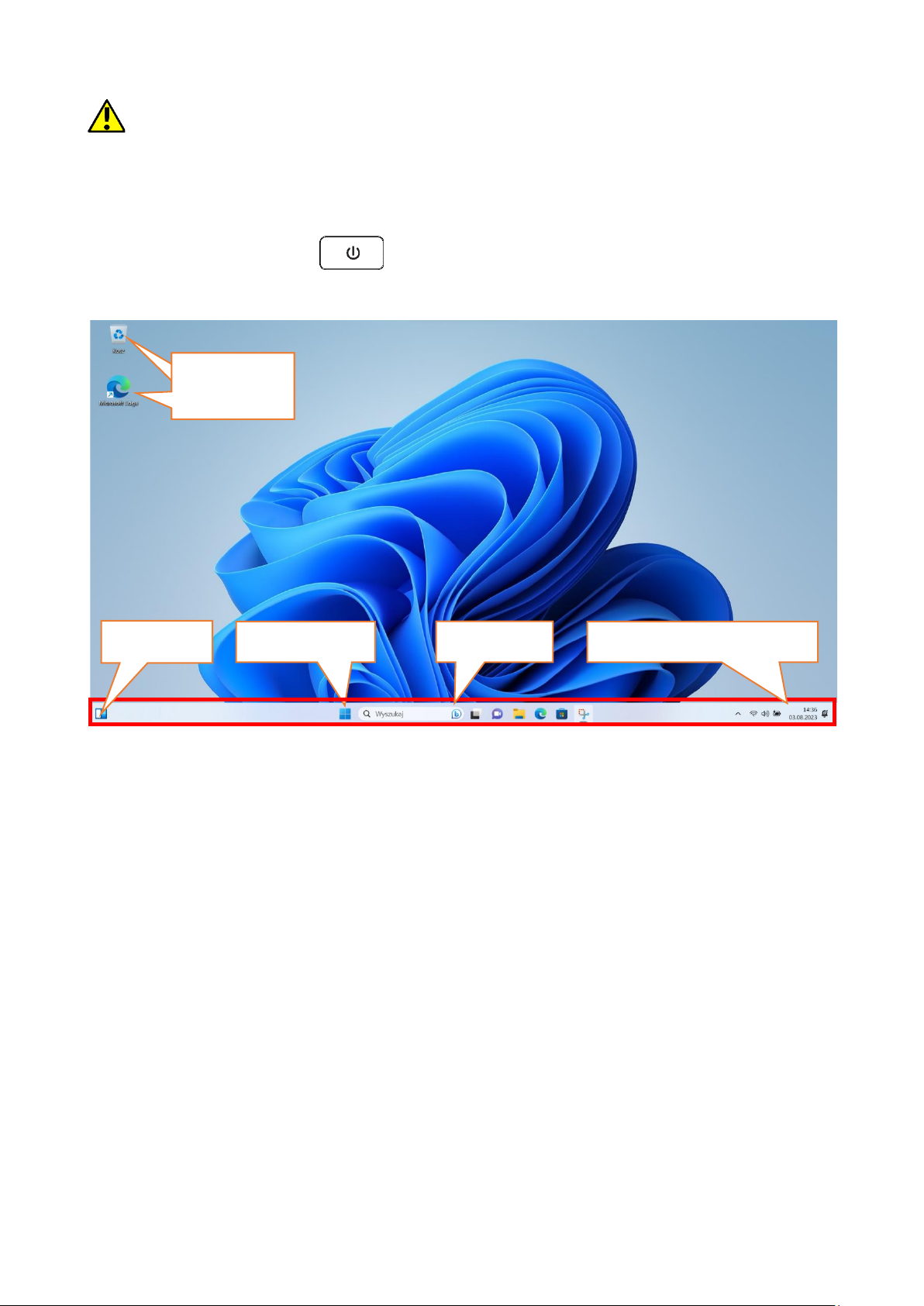
9.2 Ekran startowy - pulpit
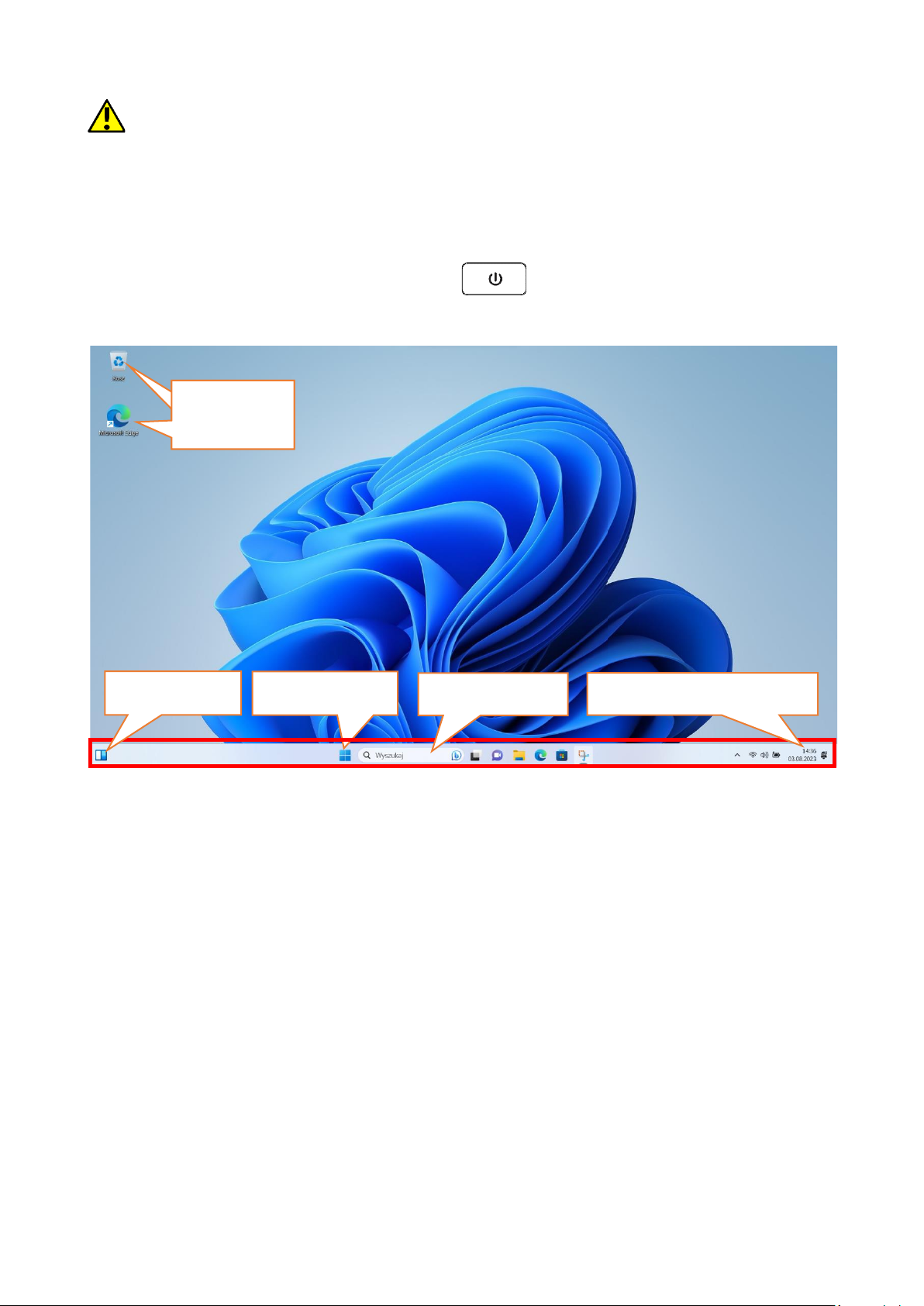
Ekran startowy zawiera ikony aplikacji, przycisk START (środek ekranu) oraz
pasek zadań (na dole ekranu, po prawej od przycisku START).
Na ekranie można umieszczać ikony aplikacji, skróty do aplikacji lub
dokumentów, linki do stron internetowych, widgety, etc.
Na pasku zadań także można umieszczać skróty do aplikacji i stron WWW, ale
też pojawiają się tam ikony symbolizujące otwarte i aktywne aplikacje.
Przycisk START wywołuje menu startowe.
Ikony aplikacji
Ikony
aplikacji
Przycisk START
Pasek zadań
Obszar powiadomień
Widgety
Page 11
© 2023 techBite. Wszystkie prawa zastrzeżone. PIX 15.6 PL
11
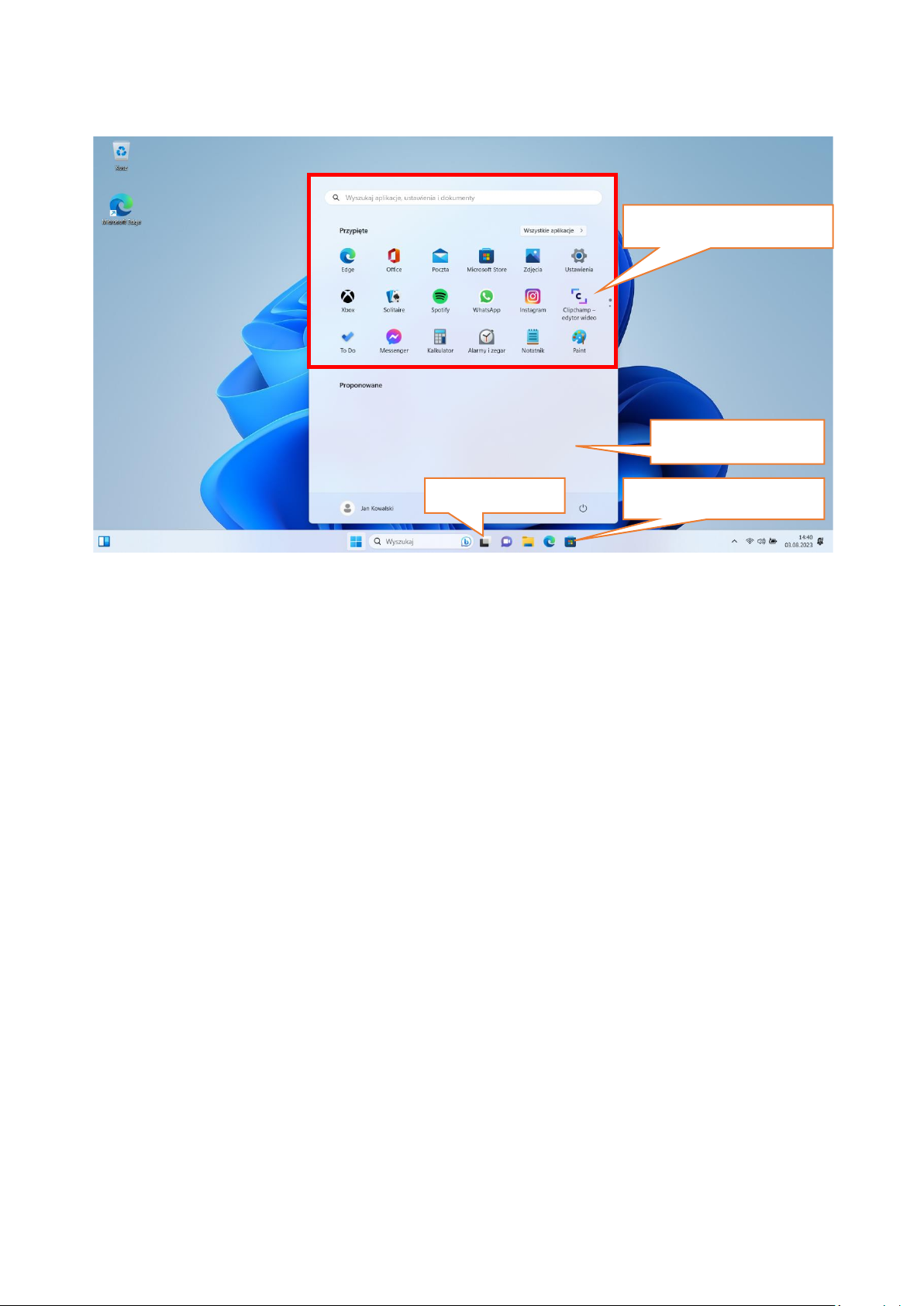
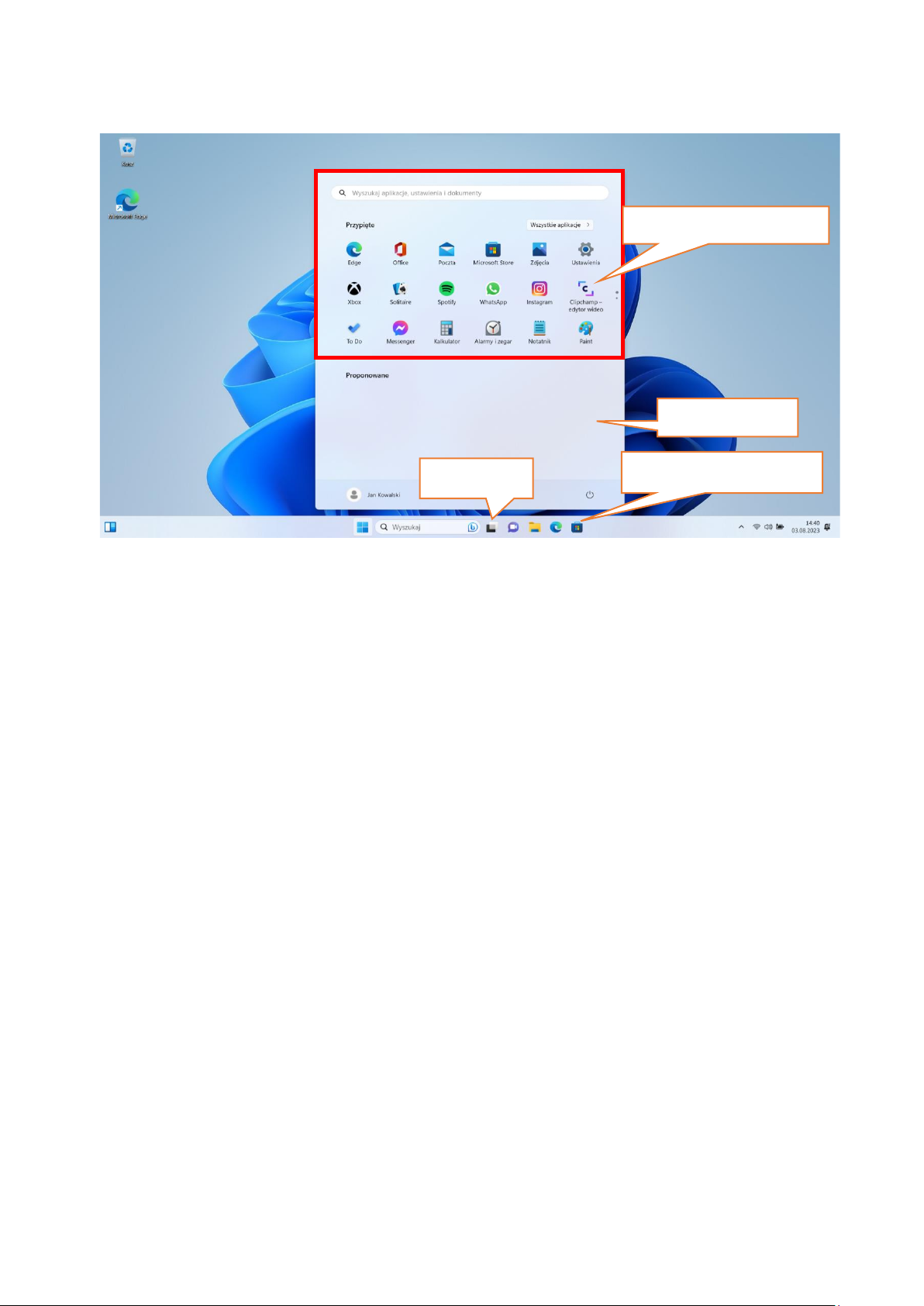
9.3 Menu startowe
Menu startowe pozwala na uruchamianie zainstalowanych w komputerze
aplikacji (programów). Po środku znajdują się przyciski przenoszące do menu
zarządzającego kontami użytkownika, dokumentami, obrazami, ustawieniami
systemu oraz zasilania (tu można komputer uśpić, wyłączyć lub uruchomić
ponownie).Powyżej zaznaczono listę wszystkich zainstalowanych w komputerze
programów. Można ją przewijać w dół i w górę, dzięki czemu użytkownik ma
dostęp do wszystkich aplikacji. Poniżej tego obszaru są umieszczone ostatnio
zainstalowane i najczęściej używane programy. Są także aplikacje do instalacji
sugerowane przez Microsoft Store.
9.4 Pasek zadań
Pasek zadań znajduje się na dole ekranu startowego – pulpitu. Po środku
znajduje się przycisk START. Kolejną ikoną jest lupka, pozwalająca na szybkie
wyszukiwanie aplikacji zainstalowanych w systemie, jeśli znana jest ich nazwa.
Kolejna ikonka uruchamia chronologiczny widok działań uruchamianych na
komputerze. Potem znajdują się ikony aplikacji, które można umieszczać i
kasować samemu. Pozwalają one na szybkie uruchamianie aplikacji. Tutaj także
pojawiają się czasowo ikony uruchamianych programów, które znikają po ich
zamknięciu. Dzięki temu łatwiej zorientować się w tym, które programy są
aktywne. Po prawej stronie paska zadań znajduje się obszar powiadomień.
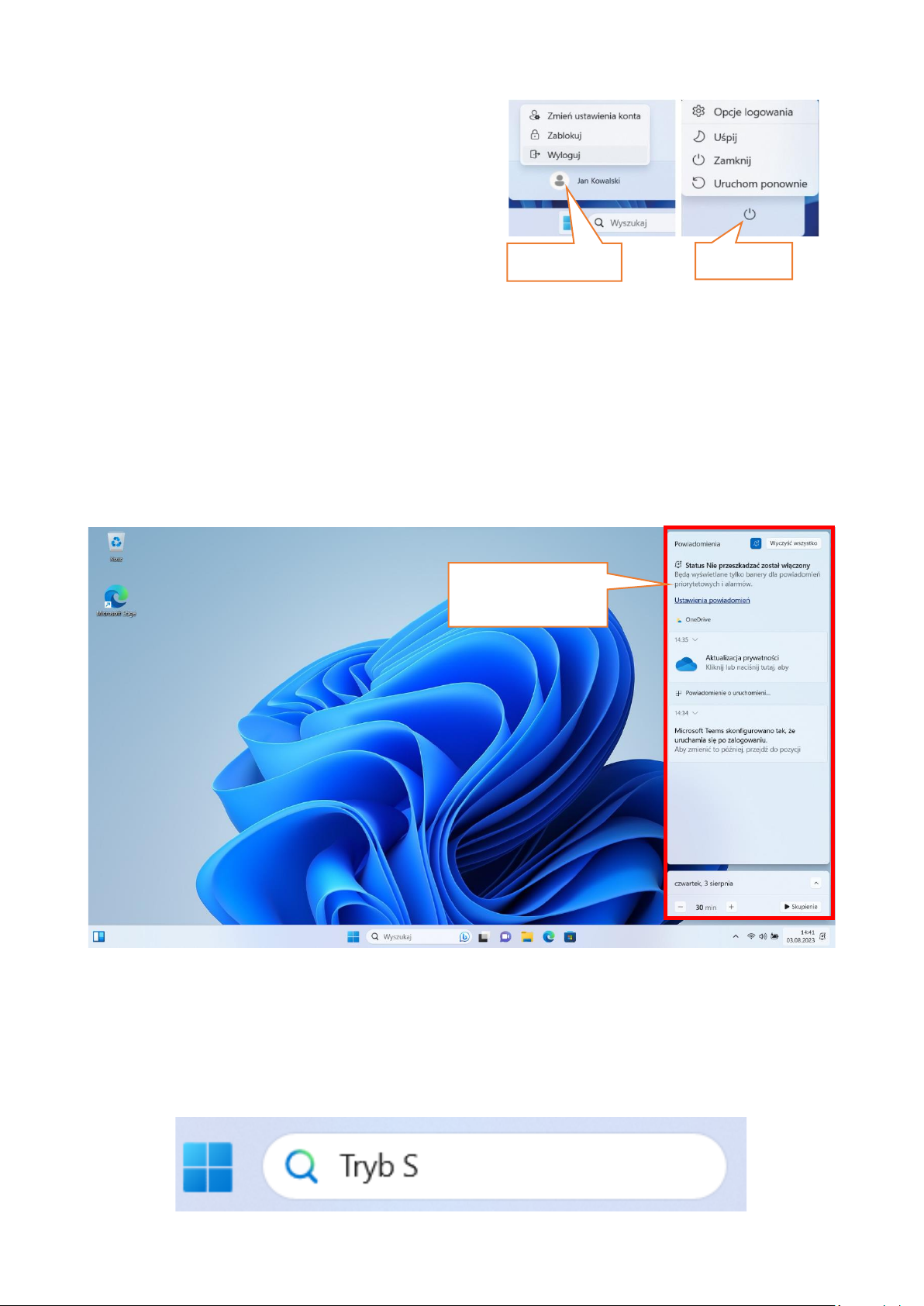
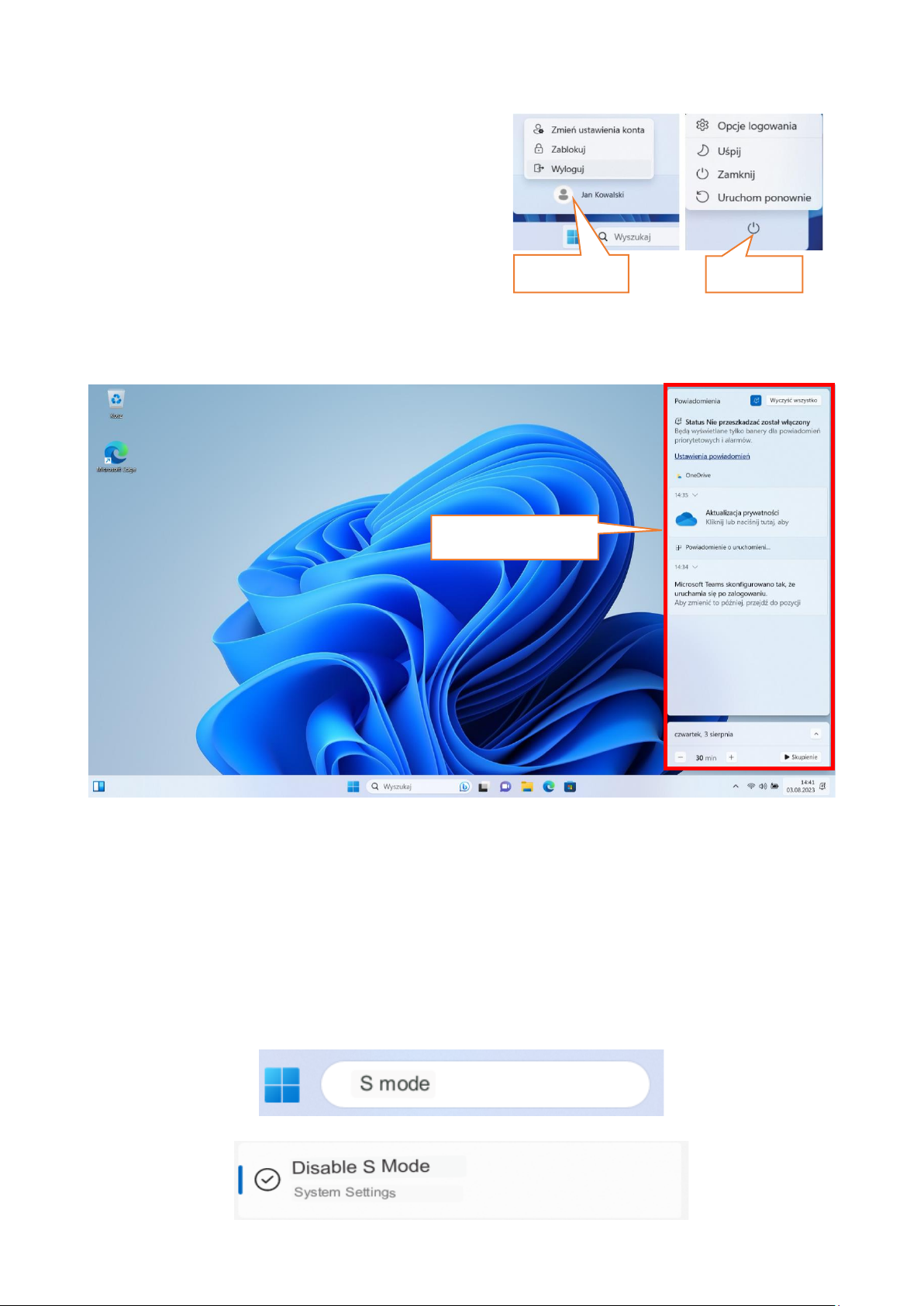
9.5 Wyłączanie urządzenia
Aby uśpić, wyłączyć lub uruchomić ponownie laptop należy wybrać menu start i
z niego ikonę zasilania. Pojawi się menu pozwalające wybrać jedną z pożądanych
akcji.
Zainstalowane aplikacje
Ostatnio używane
Sklep z aplikacjami
Widok działań
Page 12
© 2023 techBite. Wszystkie prawa zastrzeżone. PIX 15.6 PL
12
Wybranie opcji Uśpij spowoduje
zatrzymanie pracy dysku oraz wygasi ekran
urządzenia, co pozwoli zaoszczędzić
energię bez konieczności wyłączania
komputera. Powrót z uśpienia jest szybszy
niż włączanie laptopa.
Wybranie opcji Zamknij spowoduje całkowite wyłączenie laptopa.
Wybranie opcji Uruchom ponownie spowoduje wyłączenie i automatyczne
uruchomienie komputera.
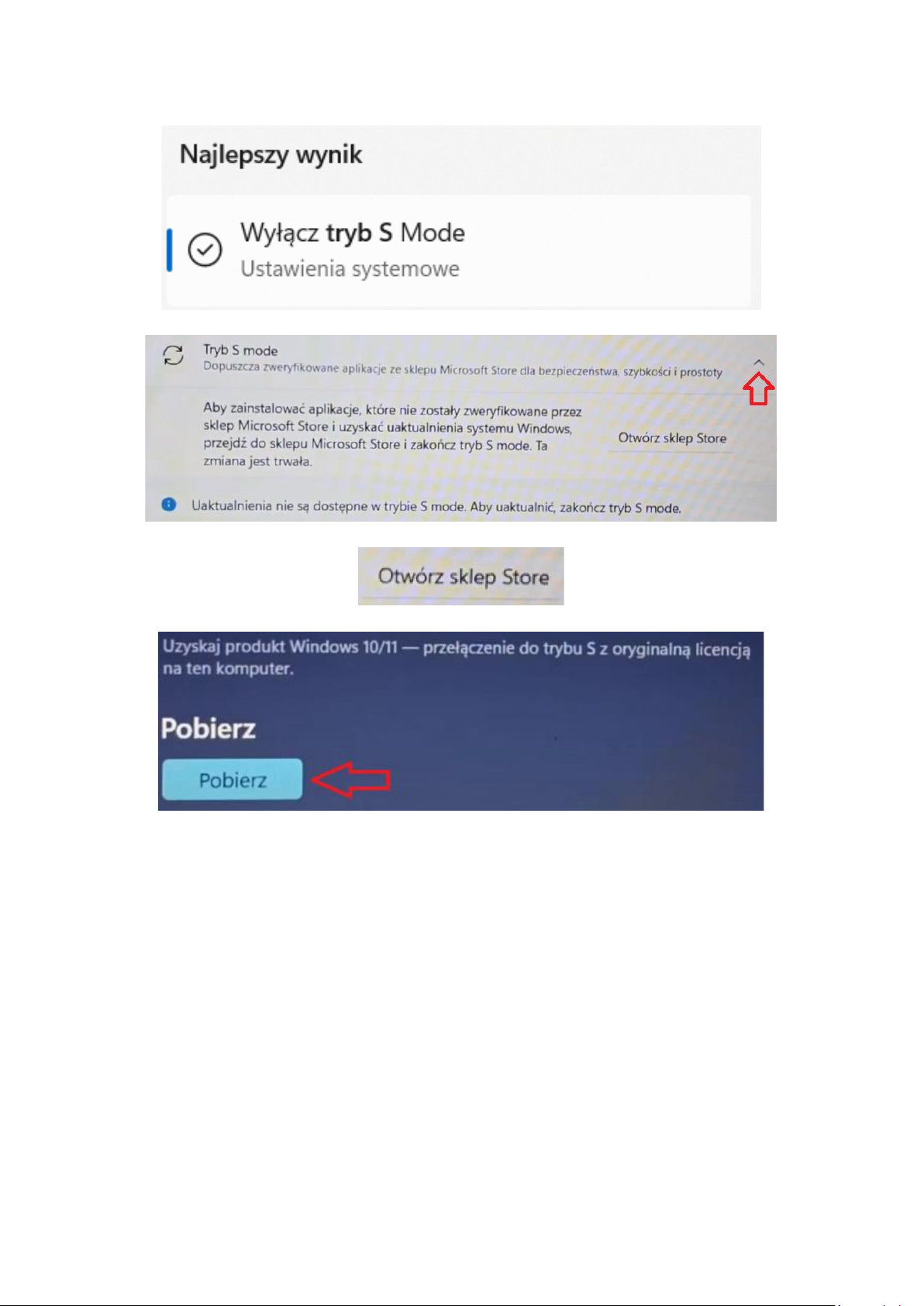
9.6 Centrum powiadomień
Centrum powiadomień pozwala przejrzeć komunikaty, które wysyła system w
związku z działaniami systemu i przedstawia opisy występujących problemów.
Poniżej znajdują się kafelki pozwalające uruchamiać szybko niektóre funkcje
komputera lub dające dostęp do przydatnych menu.
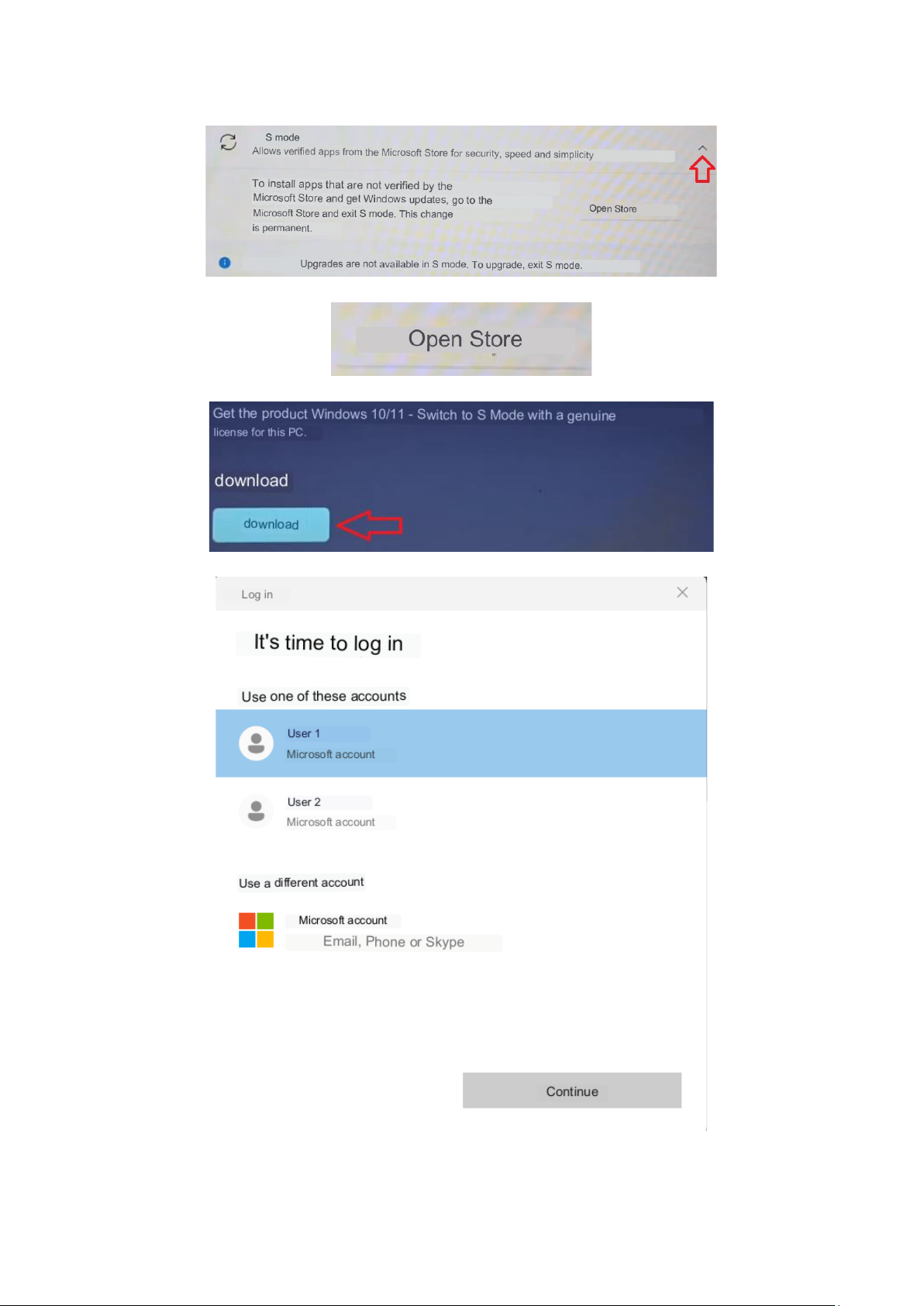
9.7 Jak wyłączyć Tryb S
Tryb S zezwala na instalowanie aplikacji wyłącznie ze sklepu Microsoft Store.
Jeśli chcesz instalować aplikacje zewnętrzne w formie domyślnego instalatora,
wyłącz Tryb S za pomocą poniższej instrukcji.
1. W wyszukiwarce wpisz ,,Tryb S” i wciśnij klawisz Enter.
Centrum
powiadomień
Zasilanie
Logowanie
Page 13
© 2023 techBite. Wszystkie prawa zastrzeżone. PIX 15.6 PL
13
2. Z listy wybierz opcję ,,Wyłącz Tryb S mode”.
3. W nowym oknie rozwiń pasek ,,Tryb S mode”.
4. Kliknij ,,Otwórz sklep Store”.
5. W wyświetlonym oknie wciśnij przycisk ,,Pobierz”.
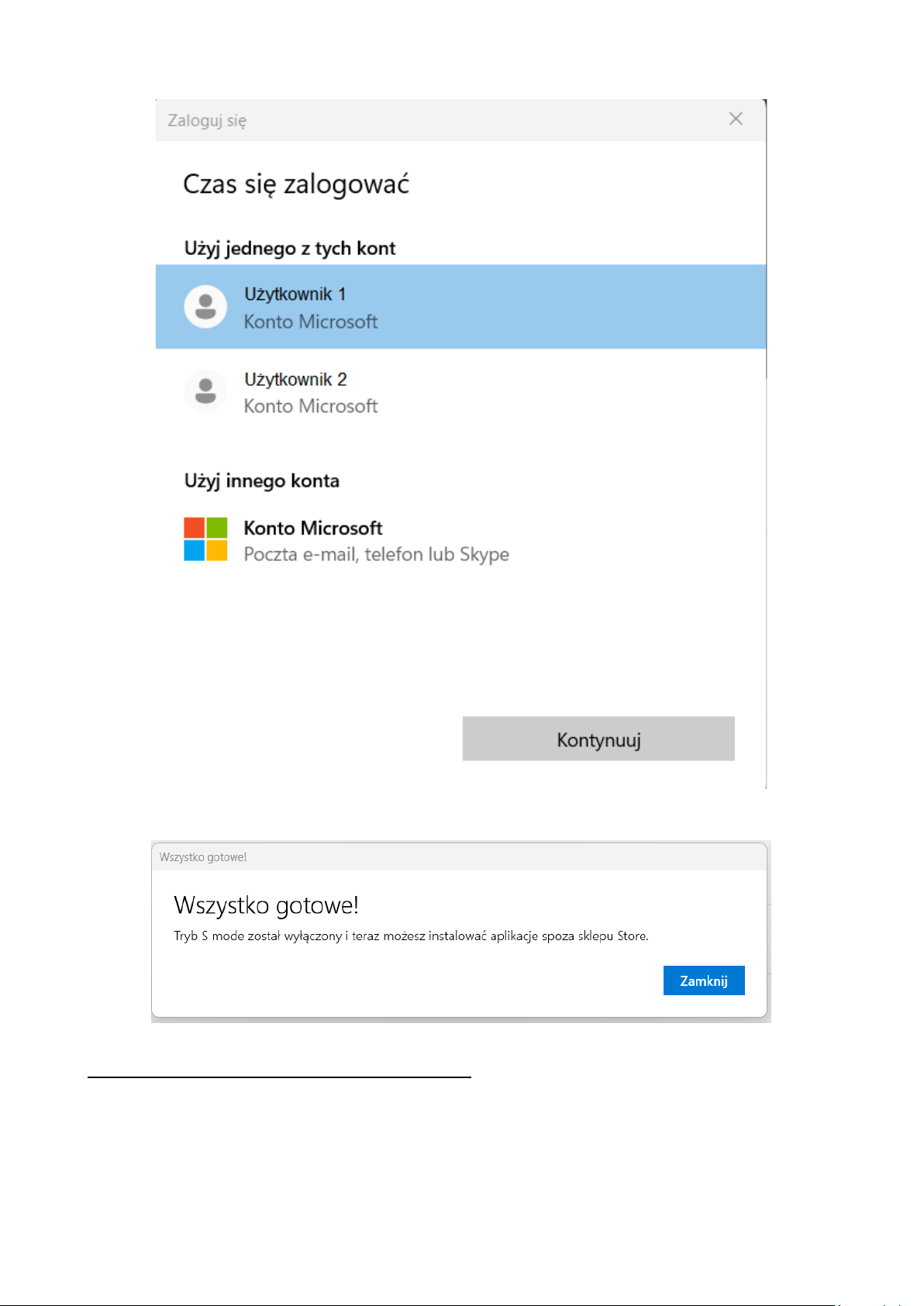
6. Zaloguj się do konta Microsoft lub wybierz konto z listy.
Page 14
© 2023 techBite. Wszystkie prawa zastrzeżone. PIX 15.6 PL
14
7. Zostaniesz poinformowany o poprawnym wyłączeniu ,,Trybu S” oknem
dialogowym
10. Wymiana pamięci SSD i RAM
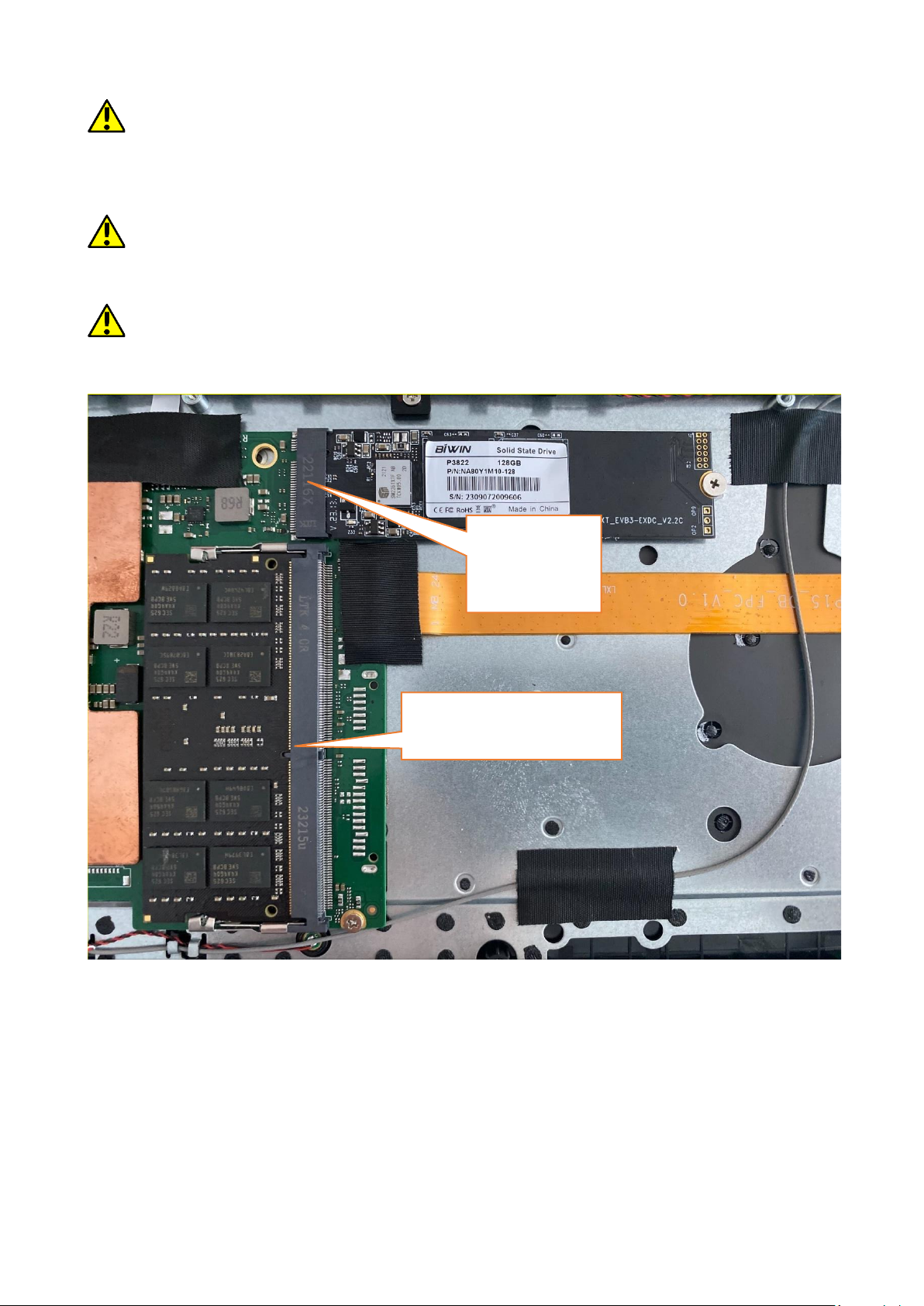
Pamięć urządzenia oraz pamięć RAM można wymienić na większą montując je
odpowiednich gniazdach znajdujących się pod dolna pokrywa urządzenia.
Page 15
© 2023 techBite. Wszystkie prawa zastrzeżone. PIX 15.6 PL
15
Format B/M jest uniwersalny i może być wykorzystywany zarówno w gniazdach
B i M. Format M nie może być wykorzystany w tym urządzeniu. Formaty różnią się od
siebie umieszczeniem wcięcia oraz ilością połączeń.
Kupując moduł rozszerzający pamięć koniecznie poproś sprzedawcę
o sprawdzenie, czy pasuje do gniazda w Twoim urządzeniu i czy działa poprawnie.
Nie wkładaj modułu pamięci na siłę, gdyż możesz uszkodzić moduł oraz gniazdo,
co może doprowadzić do utraty gwarancji na urządzenie.
Aby zamontować pamięć w urządzeniu należy wyłączyć komputer, a jeśli jest
podłączony do zasilacza, to odłączyć go, zamknąć klapę i ułożyć na niej
urządzenie. Najlepiej robić to na miękkiej, stabilnej i płaskiej powierzchni (np.
suchy ręcznik na blacie stołu lub biurka), aby nie porysować obudowy.
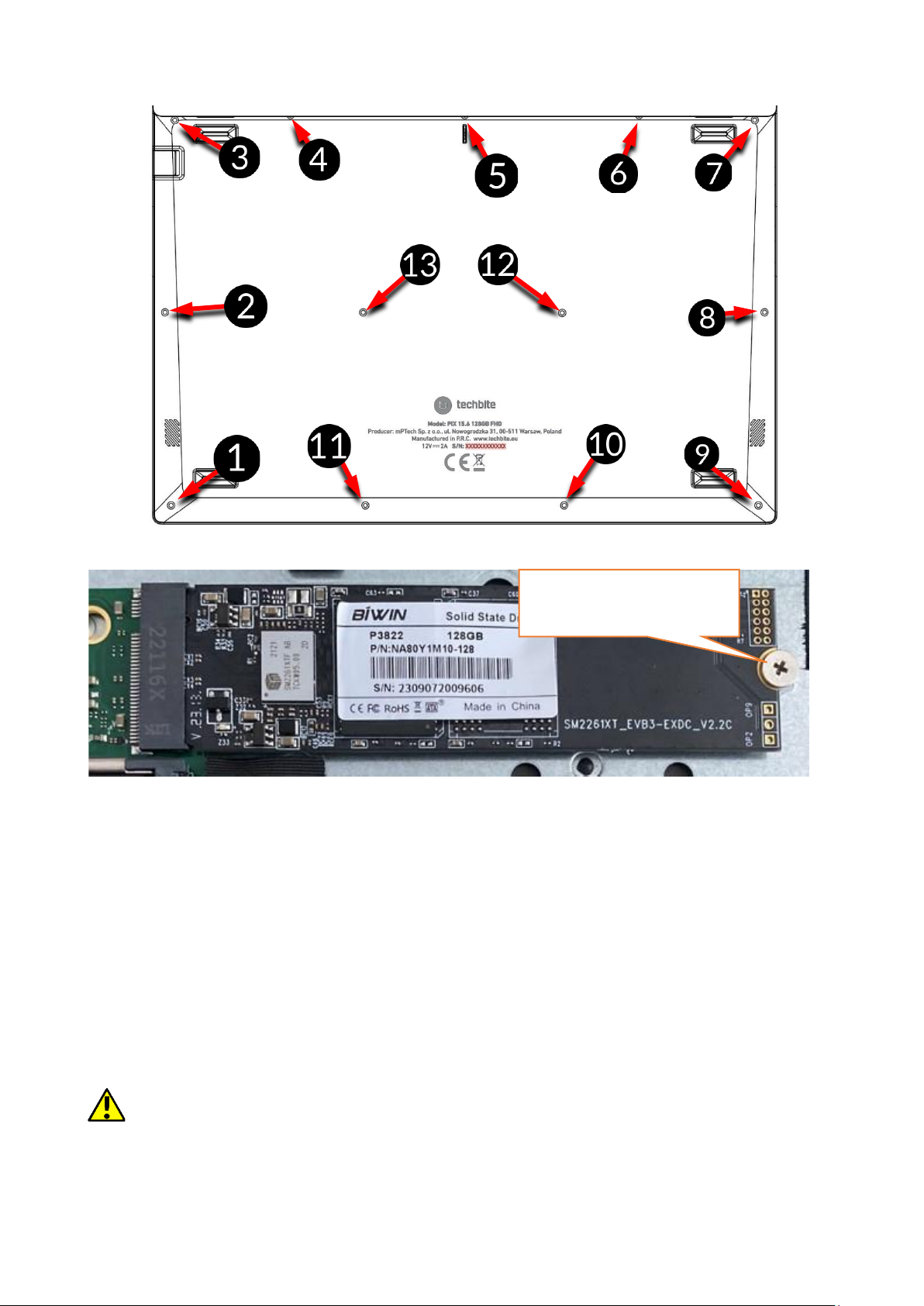
Małym śrubokrętem krzyżakowym odkręć wszystkie śrubki i delikatnie podważ
dolna osłonę urządzenia w miejscu, gdzie znajduje się wycięcie i zdejmij ją.
Gniazdo SSD
Gniazdo pamięci RAM
Page 16
© 2023 techBite. Wszystkie prawa zastrzeżone. PIX 15.6 PL
16
10.1 Montaż pamięci M.2 2280 PCIE SSD
Odkręć śrubkę zabezpieczającą ogranicznik. Wsuń delikatnie moduł M.2 2280
do złącza tak, aby wycięcie w module pasowało do wypustki w gnieździe.
Zabezpiecz moduł przykręcając go delikatnie śrubką do obudowy. Załóż
pokrywę komory i dokręć śrubki, które ją zabezpieczają.
Panel sterowania \ Wszystkie elementy Panelu sterowania \ Narzędzia
administracyjne \ Zarządzanie komputerem \ Zarządzanie dyskami
możesz zakładać i kasować partycje na nowym dysku. Po założeniu partycji w
systemie operacyjnym odnajdź nowy dysk i sformatuj go zgodnie z własnymi
preferencjami.
Odradzamy jakiekolwiek manipulowanie parametrami „Dysku 0”, czyli
systemowego, gdyż wszelkie problemy spowodowane ingerencją w jego strukturę
mogą skutkować unieważnieniem gwarancji.
Śrubka zabezpieczająca
Page 17
© 2023 techBite. Wszystkie prawa zastrzeżone. PIX 15.6 PL
17
10.2 Montaż pamięci RAM
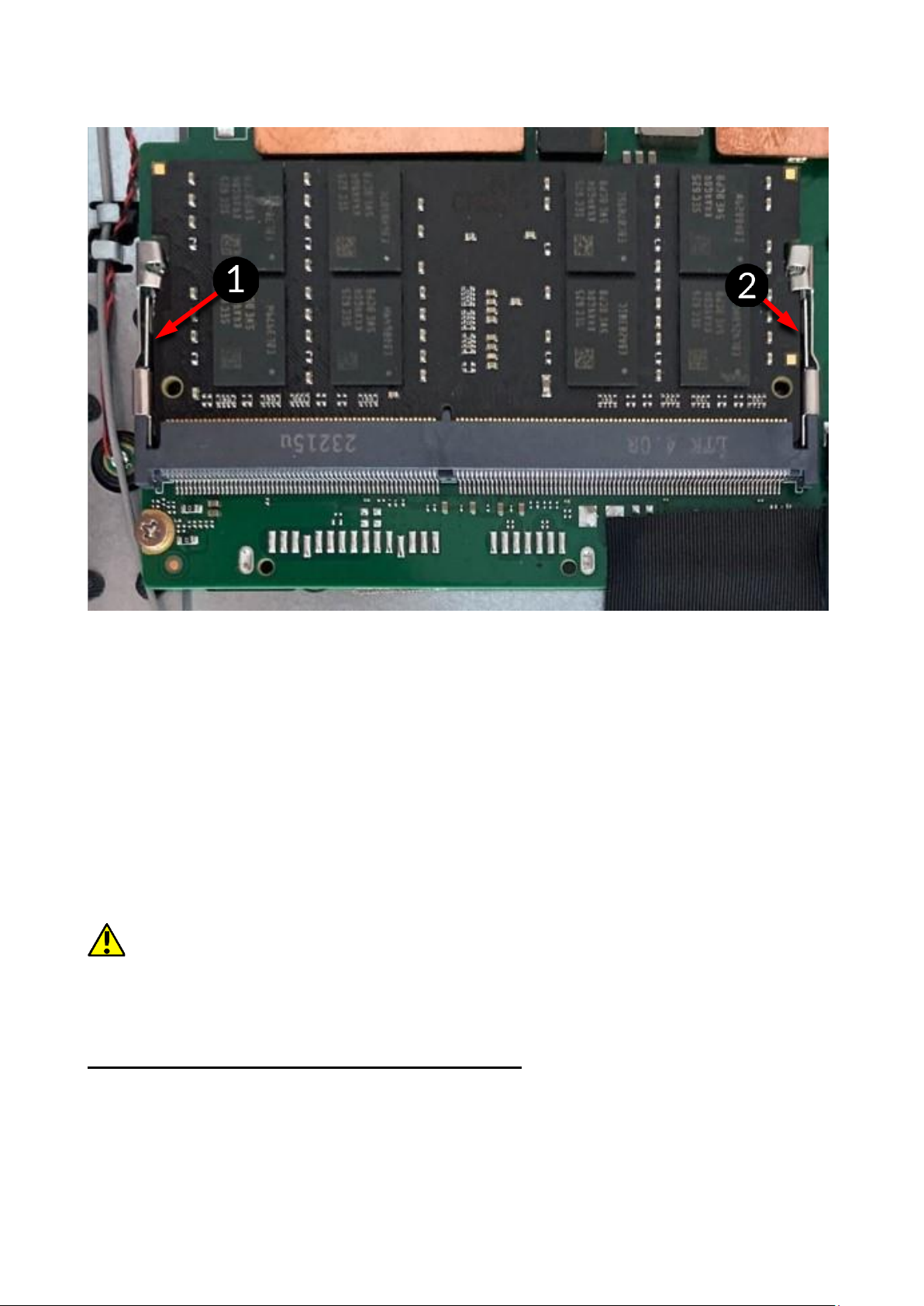
Odegnij zabezpieczające ograniczniki i moduł pamięci. Wsuń delikatnie moduł
RAM do złącza tak, aby wycięcie w module pasowało do wypustki
w gnieździe. Zabezpiecz moduł zatrzaskując ograniczniki. Załóż pokrywę
komory i dokręć śrubki, które ją zabezpieczają.
Panel sterowania \ Wszystkie elementy Panelu sterowania \ Narzędzia
administracyjne \ Zarządzanie komputerem \ Zarządzanie dyskami
możesz zakładać i kasować partycje na nowym dysku. Po założeniu partycji w
systemie operacyjnym odnajdź nowy dysk i sformatuj go zgodnie z własnymi
preferencjami.
Odradzamy jakiekolwiek manipulowanie parametrami „Dysku 0”, czyli
systemowego, gdyż wszelkie problemy spowodowane ingerencją w jego strukturę
mogą skutkować unieważnieniem gwarancji.
11. Uwagi dotyczące bezpieczeństwa
11.1 Rozwiązywanie problemów
W razie jakichkolwiek problemów z urządzeniem przeczytaj poniższe porady
i zastosuj się do podanych poniżej sugestii.
• Praca gniazda USB – sprawdź przewód, podłączając za jego pomocą inne
urządzenie. Jeśli to nie pomoże - użyj innego przewodu.
Page 18

© 2023 techBite. Wszystkie prawa zastrzeżone. PIX 15.6 PL
18
• Wi-Fi – sprawdź, czy laptop nie pracuje w trybie samolotowym –
uniemożliwia on korzystanie z jakichkolwiek funkcji sieci
bezprzewodowych. Sprawdź zasięg sieci. Sprawdź, czy funkcja
w urządzeniu jest uruchomiona, a parametry poprawnie ustawione.
Sprawdź poprawność hasła logowania do sieci Wi-Fi.
• Bluetooth – sprawdź, czy połączenie jest aktywowane oraz opcje
widoczności urządzeń Bluetooth. Upewnij się, że obydwa urządzenia
znajdują się w zasięgu połączenia Bluetooth i czy nie ma pomiędzy nimi
przeszkód zakłócających pracę Bluetooth (ciekawostka – niektóre
monitory LCD pochłaniają fale magnetyczne). Upewnij się, że urządzenia
mają dostatecznie dużo wolnej pamięci w celu wymiany plików. Sprawdź,
czy obydwa urządzenia pracują w trybie samolotowym (tryb samolotowy
blokuje pracę Bluetooth).
• Dźwięki – upewnij się, że dźwięk w laptopie nie jest wyciszony i skontroluj
pozostałe ustawienia dźwięków laptopa. Sprawdź, czy do gniazda minijack
3,5 mm nie jest podłączona wtyczka przewodu słuchawek, głośników lub
mikrofonu.
Niektóre końcówki minijack różnią się od pozostałych, to również może
być powód problemów z dźwiękiem z gniazda minijack - wypróbuj inny
przewód lub zastosuj przejściówkę.
• Mimo, że akumulator jest ładowany, poziom jego naładowania
nieustannie spada – wyłącz wszystkie opcje takie jak Wi-Fi, Bluetooth,
Lokalizacja, a następnie zmniejsz jasność ekranu, po czym włącz tryb
samolotowy w urządzeniu i zaprzestań intensywnej pracy lub ją ogranicz
na czas ładowania. Te proste kroki przyspieszają ładowanie akumulatora.
Zaleca się ładować urządzenie za pomocą ładowarki dostarczonej przez
producenta.
Jeśli problem nadal występuje, to skontaktuj się z dostawcą urządzenia.
11.2 Obsługa pamięci przenośnych
• Nie wyjmuj pamięci przenośnych, gdy informacje są przenoszone na nie lub
wykorzystywane przez urządzenie. Może to być przyczyną utraty danych lub
uszkodzenia nośników danych lub/i urządzenia.
• Nie należy dotykać styków nośników danych palcami lub metalowymi
przedmiotami. W razie zabrudzenia należy wytrzeć nośniki danych suchą
i miękką ściereczką.
11.3 Ochrona danych osobowych i ważnych informacji
• Zalecamy regularne wykonywanie kopii zapasowych ważnych danych.
Producent nie odpowiada za utratę żadnych informacji.
• Przed sprzedażą lub odstąpieniem urządzenia skasuj wszystkie dane
i przywróć laptopa do ustawień fabrycznych. W ten sposób możesz
zabezpieczyć się przed dostępem do osobistych informacji ze strony
niepowołanych osób.
Page 19

© 2023 techBite. Wszystkie prawa zastrzeżone. PIX 15.6 PL
19
• Pobierając aplikacje, zapoznaj się z wyświetlanymi na ekranie informacjami.
Szczególną ostrożność należy zachować w przypadku aplikacji, które
uzyskują dostęp do wielu funkcji lub do znacznej ilości informacji osobistych.
• Regularnie kontroluj konta w kwestii nieautoryzowanego lub podejrzanego
wykorzystywania. Jeżeli odkryte zostaną ślady niewłaściwego
wykorzystania informacji osobistych, skontaktuj się z dostawcą usługi w celu
skasowania lub zmiany danych konta.
• W przypadku zgubienia lub kradzieży urządzenia natychmiast zmień hasła do
kont (systemowego, pocztowych, portali społecznościowych, etc.).
• Staraj się nie korzystać z aplikacji pochodzących z nieznanych źródeł. Blokuj
urządzenie za pomocą hasła, odcisku palca lub kodu PIN.
• Nie rozpowszechniaj materiałów chronionych prawem autorskim.
• Nie wolno rozprowadzać treści chronionych prawami autorskimi bez
uzyskania zezwolenia posiadacza praw autorskich. Niezastosowanie się do
tego zalecenia może być przyczyną naruszenia praw autorskich. Producent
nie odpowiada za żadne skutki prawne nielegalnego rozpowszechniania
przez użytkownika materiałów chronionych prawem autorskim.
• Korzystaj z programów antywirusowych, w których regularnie aktualizuj
bazy sygnatur wirusów.
11.4 Uwagi na temat poprawnego używania akumulatora
• Jeśli poziom akumulatora jest niski, naładuj go, aby dalej używać urządzenia.
Jeśli chcesz przedłużyć żywotność akumulatora, pozwalaj mu wyładować się
poniżej 10% poziomu pojemności akumulatora, po czym naładuj go do pełna.
• Temperatura akumulatora ma wpływ na jego ładowanie. Zanim rozpocznie
się proces ładowania, akumulator wraz z urządzeniem możesz ochłodzić lub
podnieść jego temperaturę, aby była zbliżona do standardowej w warunkach
pokojowych. Jeśli temperatura akumulatora przekracza 40°C, to nie może on
być ładowany!
• Nie używaj uszkodzonego akumulatora!
• Żywotność akumulatora może być skrócona, jeśli jest on wystawiony na
działanie bardzo niskiej lub bardzo wysokiej temperatury; powoduje to
zakłócenia w działaniu urządzenia, nawet, jeśli akumulator został
naładowany poprawnie.
12. Konserwacja urządzenia
Aby przedłużyć żywotność urządzenia przestrzegaj poniższych zaleceń.
• Przechowuj urządzenie oraz jego akcesoria z dala od zasięgu dzieci.
• Unikaj kontaktu urządzenia z cieczami, gdyż może to powodować
uszkodzenia części elektronicznych urządzenia.
• Unikaj bardzo wysokich temperatur, gdyż mogą one powodować
skrócenie żywotności elektronicznych komponentów urządzenia, stopić
części z tworzyw sztucznych i zniszczyć akumulator.
Page 20
© 2023 techBite. Wszystkie prawa zastrzeżone. PIX 15.6 PL
20
• Nie próbuj rozmontowywać urządzenia. Nieprofesjonalna ingerencja
w urządzenie może je poważnie uszkodzić lub zniszczyć.
• Do czyszczenia urządzenia używaj tylko suchej i miękkiej ściereczki.
• Używaj jedynie oryginalnych akcesoriów. Złamanie tej zasady może
spowodować unieważnienie gwarancji.
Opakowania można poddać recyklingowi zgodnie z lokalnymi
przepisami.
Symbol oznaczający tekturę płaską.
13. Bezpieczeństwo otoczenia
Wyłącz urządzenie w miejscach, gdzie zakazane jest jego używanie lub gdzie
może powodować zakłócenia i niebezpieczeństwo. Używanie wszelkich
urządzeń wykorzystujących fale radiowe powoduje zakłócenia w pracy urządzeń
medycznych (np. rozruszników serca), jeśli nie są one prawidłowo zabezpieczone
(w razie wątpliwości, skonsultuj się z lekarzem lub producentem urządzenia
medycznego), jest zabronione. W miejscach użytkowania urządzeń należy
przestrzegać przepisów krajowych i lokalnych.
Uwaga
Oświadczenie
Producent nie jest odpowiedzialny za
konsekwencje sytuacji spowodowanych
nieprawidłowym użytkowaniem urządzenia lub
niezastosowaniem się do powyższych zaleceń.
Wersja oprogramowania
może być ulepszona bez
wcześniejszego
powiadomienia.
Funkcje
Zakres częstotliwości
Moc transmitowania
BT(BR+EDR)
2402MHz~2480MHz
5.21dBm
BT(BLE)
2402MHz~2480MHz
-1.01dBm
Wi-Fi 2.4G
(802.11b/g/n20/n40)
802.11b/g/n20:
2412MHz~2472MHz;
802.11n40:
2422MHz~2462MHz
16.87dBm
Page 21

© 2023 techBite. Wszystkie prawa zastrzeżone. PIX 15.6 PL
21
Wi-Fi 5.2G
(802.11a/n20/n40/ac20
/ac40/ac80)
802.11a/n(20MHz):
5180~5240MHz;
802.11n/ac(40MHz):
5190~5230MHz;
802.11ac(80MHz):
5210MHz
12.4dBm
Wi-Fi 5.3G
(802.11a/n20/n40/ac20
/ac40/ac80)
802.11a/n(20MHz):
5260~5320MHz;
802.11n/ac(40MHz):
5270~5310MHz;
802.11ac(80MHz):
5290MHz
12.66dBm
Wi-Fi 5.6G
(802.11a/n20/n40/ac20
/ac40/ac80)
802.11a/n(20MHz):
5500~5700MHz;
802.11n/ac(40MHz):
5510~5670MHz;
802.11ac(80MHz):
5530~5610MHz
12.67dBm
Wi-Fi 5.8G
(802.11a/n20/n40/ac20
/ac40/ac80)
802.11a/n(20MHz):
5745~5825MHz;
802.11n/ac(40MHz):
5755~5795MHz;
802.11ac(80MHz):
5775MHz
13.34dBm
14. Korzystanie z instrukcji
14.1 Zgody
Bez uprzedniej pisemnej zgody producenta żadna część niniejszej instrukcji
obsługi nie może być powielana, rozpowszechniana, tłumaczona ani
przekazywana w jakiejkolwiek formie czy przy użyciu jakichkolwiek środków
elektronicznych bądź mechanicznych, w tym przez tworzenie fotokopii,
rejestrowanie lub przechowywanie w jakichkolwiek systemach
przechowywania i udostępniania informacji.
14.2 Wygląd
Urządzenie oraz zrzuty ekranu zamieszczone w tej instrukcji obsługi mogą się
różnić od występujących w rzeczywistym produkcie.
14.3 Znaki towarowe
• Windows 11 i Windows HELLO są zastrzeżonymi znakami towarowym
Microsoft Corp.
• Intel®, Intel® Celeron® są zastrzeżonymi znakami towarowymi Intel
Corporation.
• Wi-Fi® oraz logo Wi-Fi to zastrzeżone znaki towarowe stowarzyszenia
Wi-Fi Alliance.
Page 22
© 2023 techBite. Wszystkie prawa zastrzeżone. PIX 15.6 PL
22
• Wszelkie inne znaki towarowe i prawa autorskie należą do odpowiednich
właścicieli.
15. Prawidłowa utylizacja zużytego sprzętu
Urządzenie oznaczone jest symbolem przekreślonego kontenera na
śmieci, zgodnie z Dyrektywą Europejską 2012/19/UE o zużytym
sprzęcie elektrycznym i elektronicznym (Waste Electrical and
Electronic Equipment – WEEE). Produktów oznaczonych tym
symbolem po upływie okresu użytkowania nie należy utylizować lub
wyrzucać wraz z innymi odpadami z gospodarstwa domowego. Użytkownik ma
obowiązek pozbywać się zużytego sprzętu elektrycznego i elektronicznego,
dostarczając go do wyznaczonego punktu, w którym poddawane są procesowi
recyklingu. Gromadzenie tego typu odpadów w wydzielonych miejscach
i właściwy proces ich odzyskiwania przyczyniają się do ochrony zasobów
naturalnych. Prawidłowy recykling zużytego sprzętu elektrycznego
i elektronicznego ma korzystny wpływ na zdrowie i otoczenie człowieka.
Informacji o miejscu i sposobie bezpiecznego dla środowiska pozbycia się
zużytego sprzętu elektrycznego i elektronicznego udzielają odpowiednie organy
władz lokalnych, punkty zbiórki odpadów lub sprzedaży, gdzie kupiono sprzęt.
16. Prawidłowa utylizacja zużytych akumulatorów
Zgodnie z dyrektywą UE 2006/66/EC ze zmianami zawartymi w
Dyrektywie 2013/56/UE o utylizacji akumulatora, produkt ten jest
oznaczony symbolem przekreślonego kosza na śmieci. Symbol
oznacza, że zastosowane w tym produkcie baterie lub akumulatory
nie powinny być wyrzucane razem z normalnymi odpadami z gospodarstw
domowych, lecz traktowane zgodnie z dyrektywą i miejscowymi przepisami.
Nie wolno wyrzucać akumulatorów razem z niesortowanymi odpadami
komunalnymi. Użytkownicy baterii i akumulatorów muszą korzystać z dostępnej
sieci odbioru tych elementów, która umożliwia ich zwrot, recykling oraz
utylizację. Na terenie UE zbiórka i recykling baterii i akumulatorów podlega
osobnym procedurom. Aby dowiedzieć się więcej o istniejących w okolicy
procedurach recyklingu baterii i akumulatorów, należy skontaktować się z
urzędem miasta, instytucją ds. gospodarki odpadami lub wysypiskiem.
17. Deklaracja zgodności z dyrektywami UE
mPTech Sp. z o.o. niniejszym oświadcza, że laptop PIX 15.6 jest
zgodny z Dyrektywą 2014/53/UE. Pełny tekst deklaracji
zgodności UE jest dostępny pod następującym adresem
internetowym:
https://techbite.eu/qr/pix-15-6-fhd-128gb
Page 23
© 2023 techBite. All rights reserved. PIX 15.6 EN
23
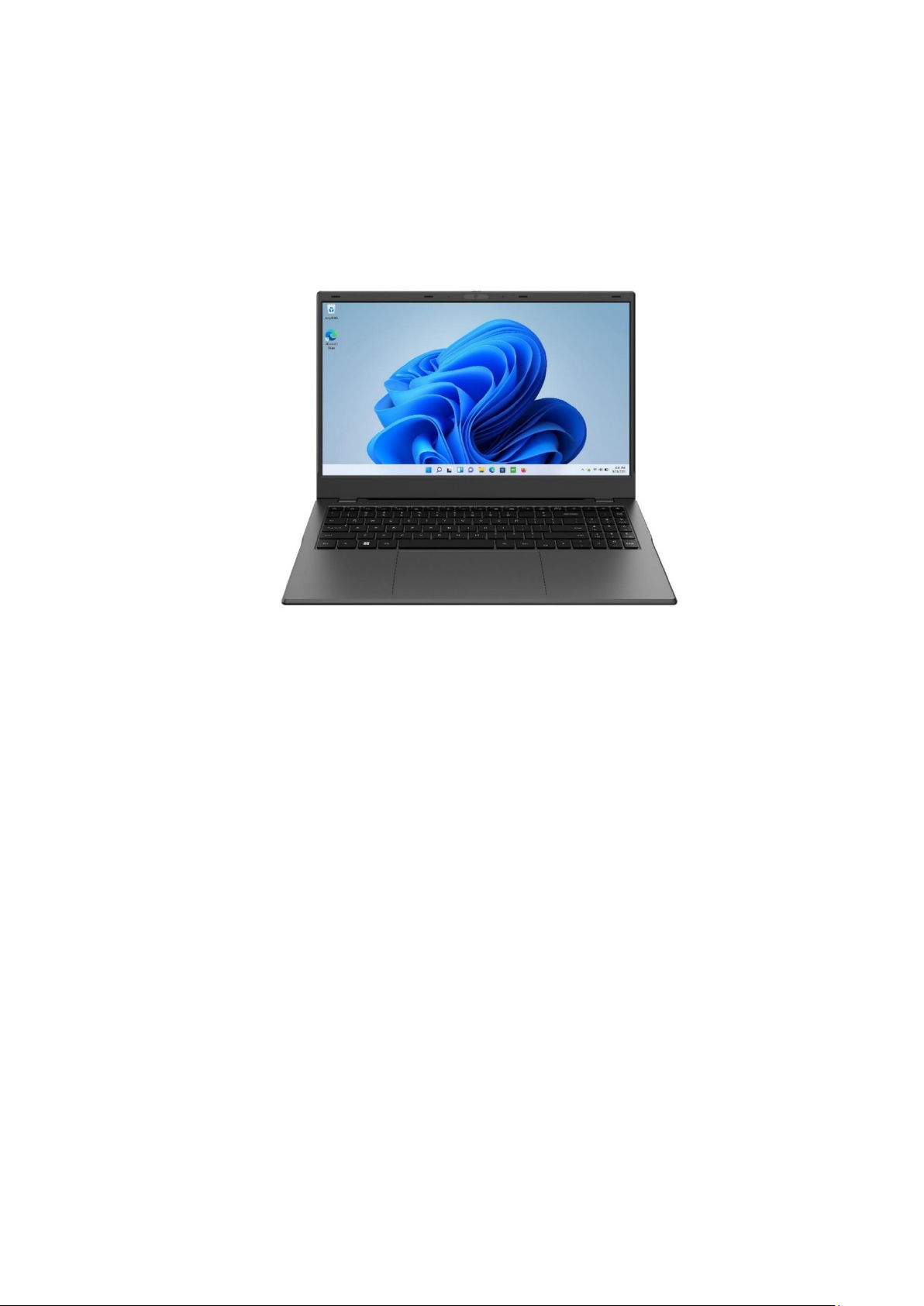
USER MANUAL
techbite PIX 15.6 128GB FHD
(laptop)
Lot number: 202308
We create for you.
Thank you for choosing techBite device. This product has been designed
especially for you. We are doing everything to make its use pleasurable and
comfortable.
We made sure that elegance, functionality and convenience of use were
combined with an affordable price.
For your own safety, please read this manual carefully.
Manufacturer
mPTech Ltd.
Nowogrodzka 31 street
00-511 Warsaw
Poland
Helpline: (+48 71) 71 77 400
Equipment delivery location:
mPTech Ltd.
Krakowska street 119
50-428 Wrocław
Poland
Website: techBite.eu
Manufactured in China
Page 24
© 2023 techBite. All rights reserved. PIX 15.6 EN
24
User manual
The actual product, accompanying accessories
and some of its features may differ from the
presented in this manual images and descriptions.
The newest version of the manual is available on
the website:
https://techbite.eu/qr/pix-15-6-fhd-128gb
To open this page simply scan this QR Code.
1. Table of contents
1. Table of contents ......................................................................................... 24
2. Safety ............................................................................................................... 25
3. The use of the manual ................................................................................ 26
4. Important information............................................................................... 26
5. Technical Specification .............................................................................. 27
5.1 Technical data ................................................................................................ 27
5.2 Package content ............................................................................................ 27
6. Appearance of laptop ................................................................................. 28
6.1 Screen and desktop ...................................................................................... 28
6.2 Left side ............................................................................................................ 29
6.3 Right side .......................................................................................................... 29
6.4 Bottom .............................................................................................................. 29
7. Before the first start ................................................................................... 30
8. Keyboard ........................................................................................................ 30
9. Basic support for Windows 11 ................................................................ 30
9.1 Turning on the device .................................................................................. 31
9.2 Start screen - desktop .................................................................................. 31
9.3 Menu startowe ............................................................................................... 32
9.4 Taskbar ............................................................................................................. 32
9.5 Turning the device off .................................................................................. 32
9.7 Turning off „S mode” .................................................................................... 33
10. Replacement of SSD and RAM ............................................................. 35
10.1 Memory assembly M.2 2280 PCIE SSD ............................................... 36
10.2 RAM assembly ............................................................................................. 37
11. Safety remarks ........................................................................................... 37
11.1 Troubleshooting .......................................................................................... 37
11.2 Support for portable memory and memory cards ........................... 38
11.3 Protection of personal data and important information .............. 38
11.4 Remarks on correct battery use ............................................................ 39
Page 25

© 2023 techBite. All rights reserved. PIX 15.6 EN
25
12. Maintenance of the device .................................................................... 39
13. Surroundings security ............................................................................. 40
14. The use of the manual .............................................................................. 41
14.1 Consents ........................................................................................................ 41
14.2 Appearance ................................................................................................... 41
14.3 Trademarks ................................................................................................... 41
15. Correct disposal of used equipment ................................................... 41
16. Correct disposal of used battery ......................................................... 42
17. Declaration of conformity with European Union Directives ..... 42
2. Safety
Read these guidelines carefully. Not following them may be dangerous or illegal.
—DO NOT RISK—
All wireless devices may cause interferences, which could affect the
performance of other devices. Do not switch on the device when the use of
mobile phones is prohibited or if it might cause interference or danger.
—PETROL STATIONS—
Always turn off the device while refuelling your car on petrol station. Do not use
your device close to chemicals.
—RESTRICTED AREAS—
Switch OFF the device in an airplane since it may disturb the operation of other
equipment located therein. The device may interfere with operation of the
medical equipment in hospitals and health protection entities. Abide by any
kinds of prohibitions, regulations and warnings conveyed by the medical staff.
—QUALIFIED SERVICE—
Only qualied personnel or an authorized service center may install or repair
this product. Repairing the device by an unqualied or unauthorized service
technician may result in damage to the device and void the warranty.
—WI-FI (WLAN)—
In the European Union Member States, a WLAN network may be used indoors
without any restrictions.
— PHYSICALLY OR MENTALLY DISABLED PEOPLE—
This device should not be operated by people (including children) with limited
physical or mental abilities, as well as by people with no earlier experience in
operation of electronic equipment. They may use the device only under
supervision of people responsible for their safety. This device is not a toy. Cables
and plastic parts of packaging may wrap around a child's neck and cause
strangulation or other health problems. Keep the device and its accessories out
of reach of children.
—ROAD SAFETY—
Do not use this device while driving any kind of vehicle.
Page 26
© 2023 techBite. All rights reserved. PIX 15.6 EN
26
—BATTERY AND ACCESSORIES—
Avoid exposing the battery to very high/low temperatures (below 0°C/32°F and
over 40°C/104°F). Extreme temperatures may inuence capacity and battery
life. Avoid contact with liquids and metal objects as it may cause partial or
complete battery damage. The battery should be used according to its purpose.
Do not destroy, impair or throw the battery into ames - it might be dangerous
and may cause re. Worn-out or impaired battery should be placed in a
dedicated container. A single battery charge should not last longer than 1 day.
Installing an incorrect battery type can cause an explosion. Never open the
battery. Please dispose of battery according to the instructions. Disconnect an
unused charger from power grid. Disconnect an unused charger from power
grid. In case of the charger wire damage, it should not be repaired but replaced
with a new one. Use the original manufacturer’s accessories only.
—HEARING—
To avoid hearing damage, do not use the device at high volume
levels for a long period of time, do not put operating device directly
to an ear.
3. The use of the manual
The device and screen shots contained in this user manual may differ from the
actual product. Accessories attached to the Laptop may differ from the
illustrations included in manual.
Options described in the manual are found in
Microsoft Windows 11 system. Those
descriptions may differ, depending on the
version of the operating system and
applications installed on the device.
You can nd a comprehensive manual of
Microsoft Windows 11 manuals and
components at the address below:
https://support.microsoft.com/plpl/products/windows?os=windows-11
It can be reached by scanning the QR code presented above.
4. Important information
The majority of applications which can be installed on the device are Microsoft
Store applications. Apps installed on the device may vary depending on country,
region, and hardware specications. The manufacturer is not liable for problems
caused by third party software. The manufacturer is not responsible for
anomalies that may occur when editing the registry settings and modifying the
operating system software. Attempts to modify the operating system can cause
malfunctions and problems with applications. It may cause a loss of warranty.
Page 27
© 2023 techBite. All rights reserved. PIX 15.6 EN
27
5. Technical Specification
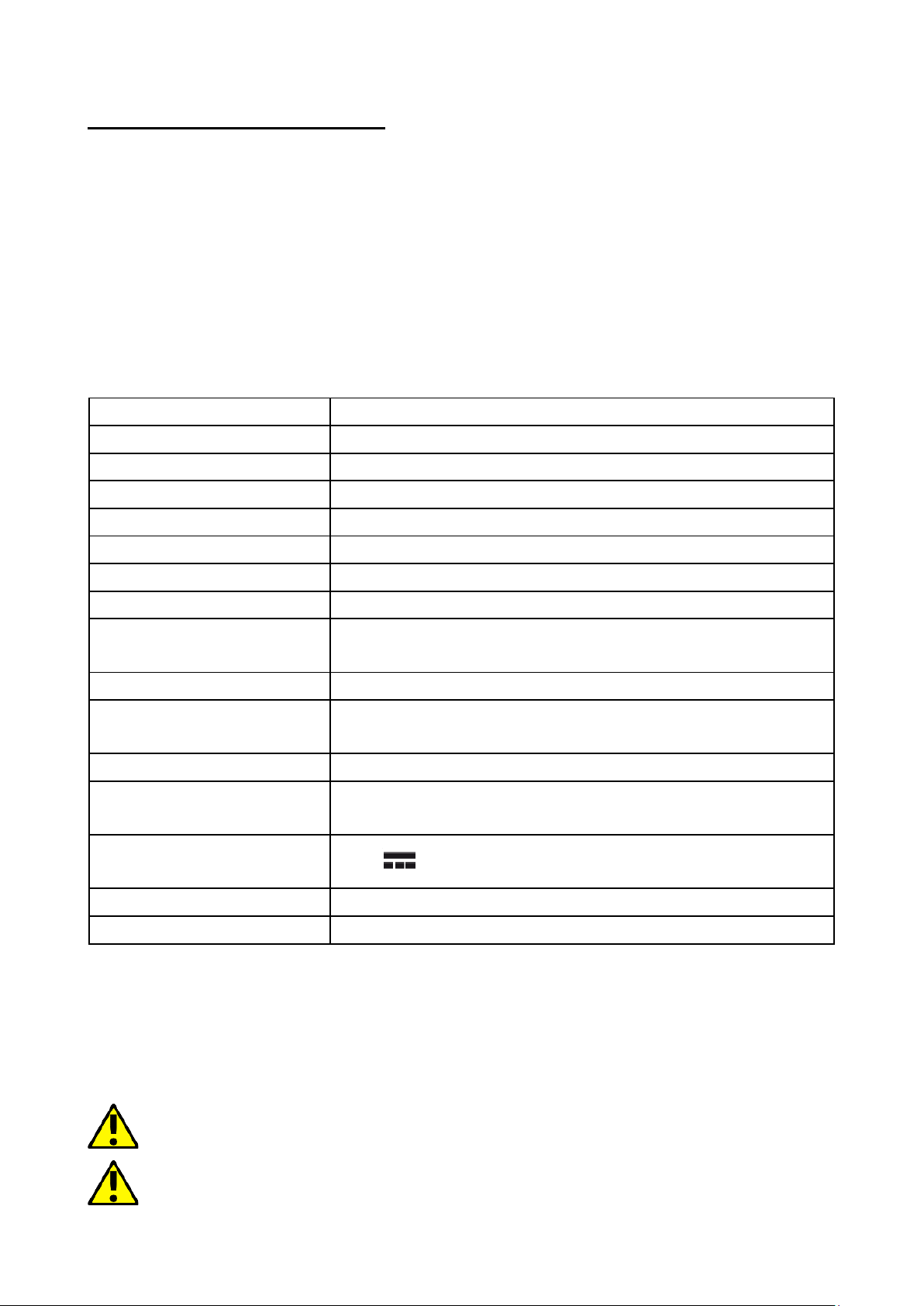
15.6” screen and 1920x1080 px resolution
The modern display provides deep colors and a wide viewing angle, allowing you
to appreciate movies, photos and games in incredible, real and juicy colors.
Wi-Fi
Laptop PIX 15.6 is equipped with Wi-Fi r, providing data transmission at speeds
compatible with 802.11a/b/g/n/ac, so you can wirelessly connect to the the
omnipresent hot spots and home network. Receive and send data, programs, and
les to the network and other devices without restrictions.
5.1 Technical data
Display
15.6" IPS 1920x1080 FHD
Processor
Intel Celeron N5105 (4M Cache, up to 2.90 GHz)
Graphics
Intel® UHD Graphics
RAM memory
8 GB, module can be exchanged
Data carrier capacity
128GB M.2 PCIE SSD
Operating system
Windows 11 Home (S-mode)
Video Camera
2.0 Mpix with a microphone
Connectivity
Wi-Fi IEEE 802,11 ac/b/g/n, Bluetooth 5.0
Audio
Built-in stereo speakers
Minijack port 3.5 mm
Video output
HDMI
Connectors
2xUSB-C, 2xUSB 3.0, USB 2.0, Ehternet, power
supply
Battery
7.6V/6400mAh
Power supply input
parameters
100-240V~ 0.7A 50-60Hz
Power supply output
parameters
12V 2A
Dimensions
358.25 x 241.94 x 19.9mm
Net weight
1.7kg
5.2 Package content
• Laptop PIX 15.6 128GB FHD
• AC Power Supply
• User manual
• Warranty card
If any of the above items is missing or damaged, please contact your dealer.
We advise to keep the container in case of any complaints. Keep the container
out of reach of children.
Page 28
© 2023 techBite. All rights reserved. PIX 15.6 EN
28
6. Appearance of laptop
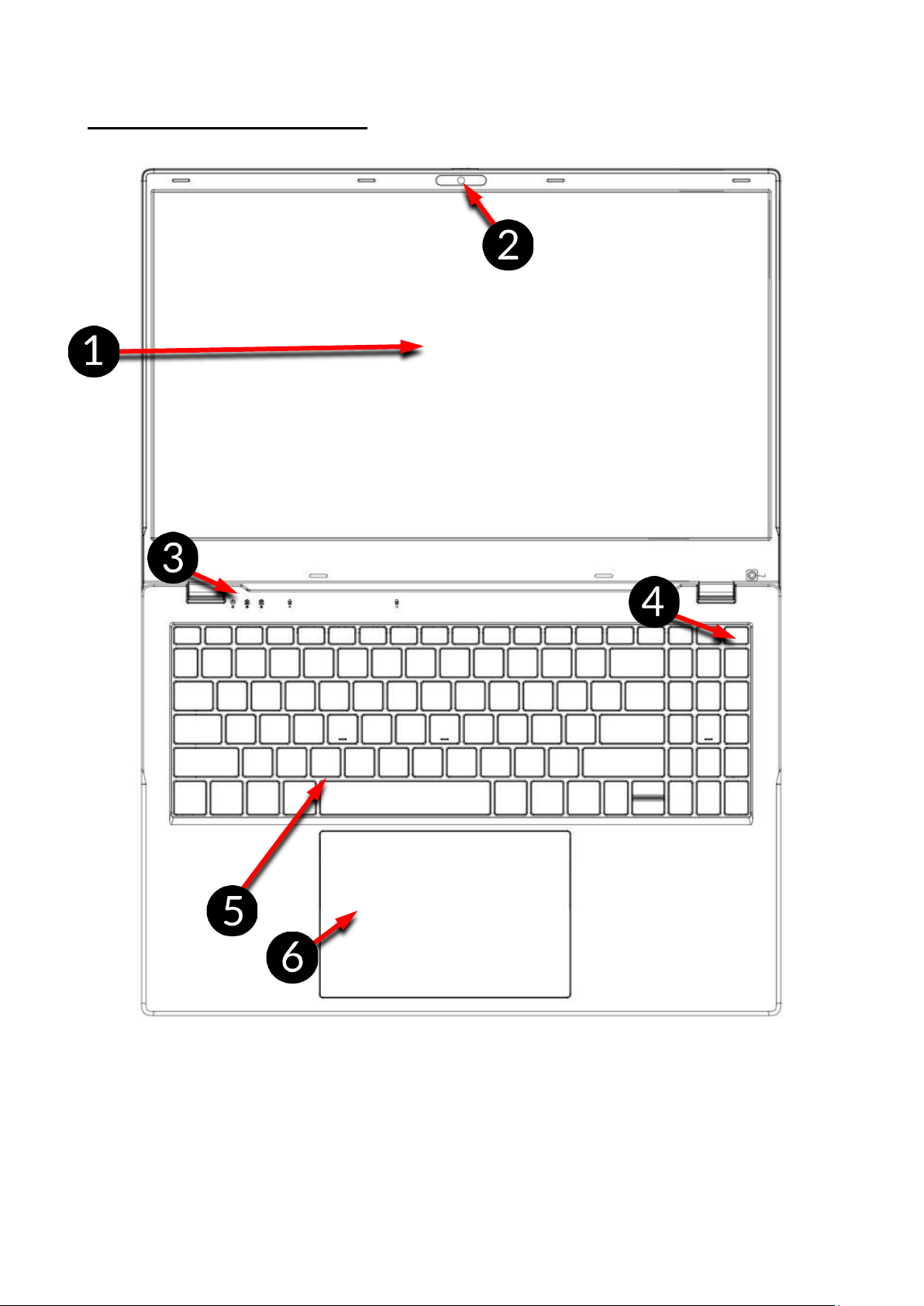
6.1 Screen and desktop
1. Display
2. Camera
3. Operating status LED
4. Power button
5. Keyboard
6. Touchpad
Page 29
© 2023 techBite. All rights reserved. PIX 15.6 EN
29
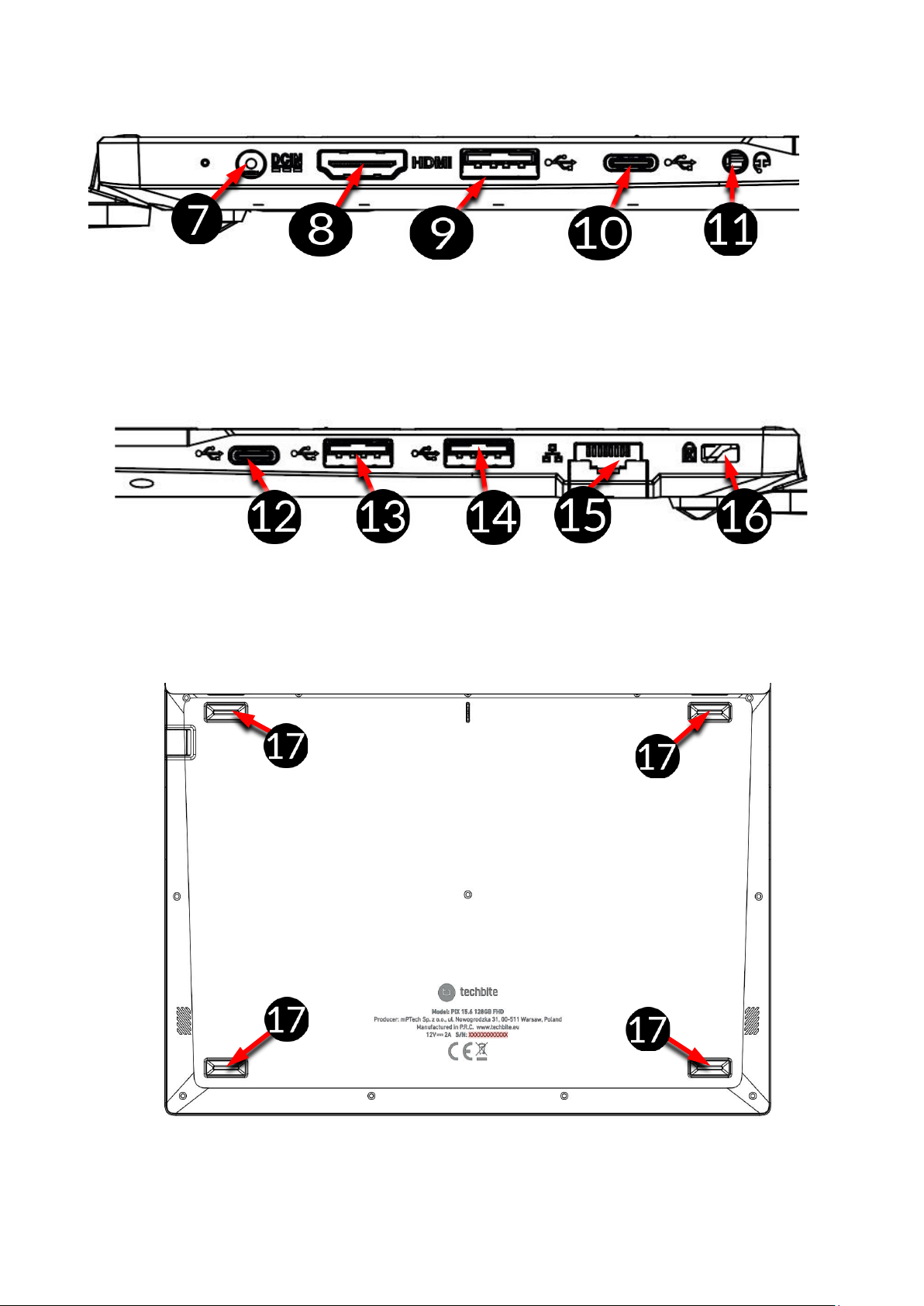
6.2 Left side
7. DC jack with power indicator
8. HDMI socket
9. USB 3.0 socket
10. USB-C socket
11. Jack 3,5mm
6.3 Right side
12. USB-C socket
13. USB 2.0 socket
14. USB 3.0 socket
15. Ethernet
16. Kensington lock
6.4 Bottom
17. Rubber feet
Page 30
© 2023 techBite. All rights reserved. PIX 15.6 EN
30
7. Before the first start
Before turning the device on for the rst time, charge the battery using the
supplied power supply unit. Use only power supply recommended by the
manufacturer. Using incompatible power supply can cause explosion of the battery or
damage to your device. If in doubt contact the seller or manufacturer service. When
the battery is near a complete discharge, the notication is displayed on a low battery
charge. To continue use of the device charge the battery. If the battery is completely
discharged the device can not be switched on even when the loading process is
ongoing. If so, the battery has to be charged for at least a few minutes.
To charge the battery, connect the plug on the power supply cable to the unit's
power outlet (8).
Do not use excessive force for it can cause damage to the AC adapter or the
device. The damages resulting from improper handling are not covered by the
warranty.
Plug the power supply into the wall socket.
The device can heat up during charging. It is a regular occurrence and should not
affect the stability or performance of the device.
If the device does not charge properly or there are other problems with the
battery, it should be delivered with the power supply to the manufacturer's
service center.
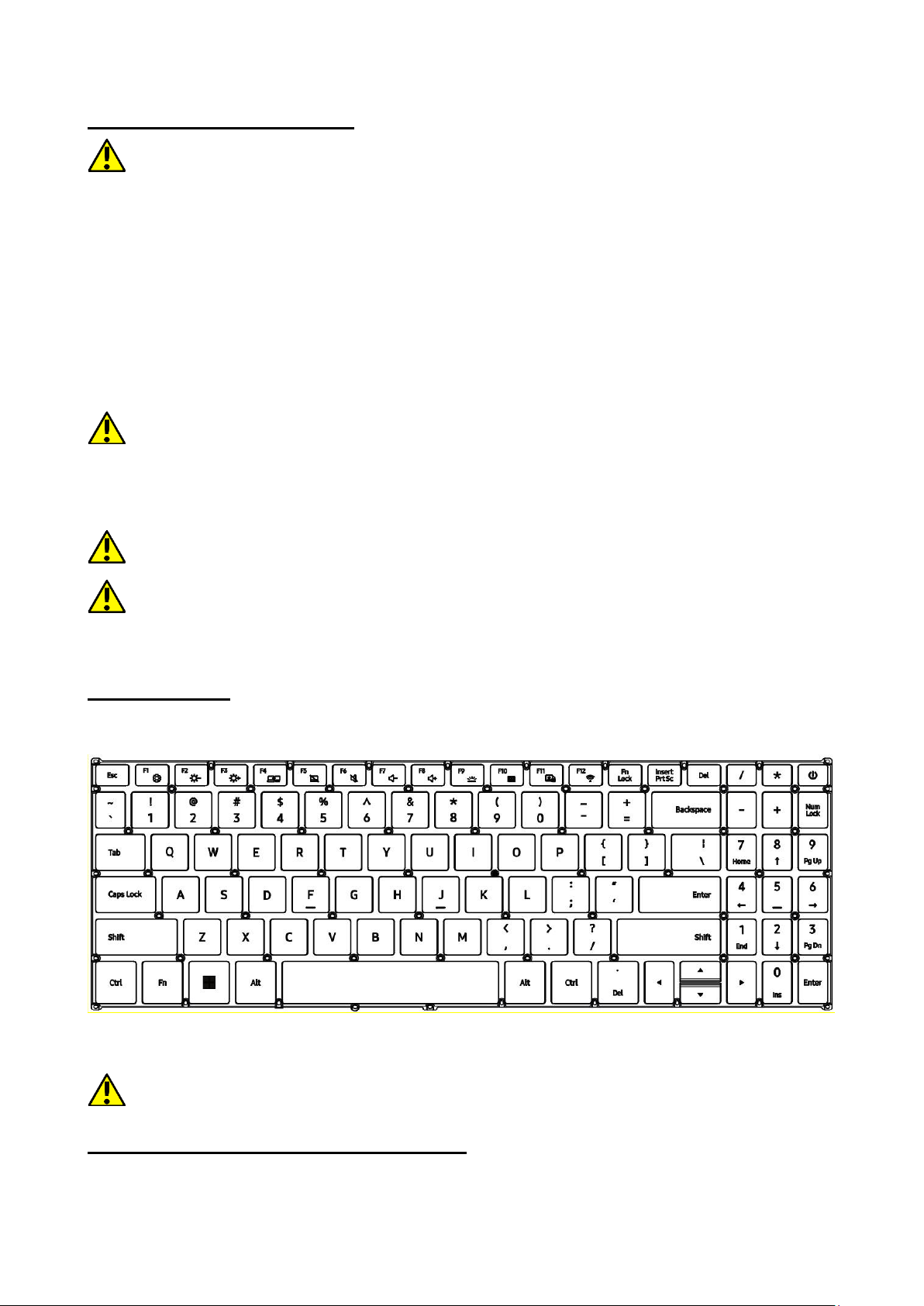
8. Keyboard
The laptop keyboard has a standard QWERTY layout. In addition, there are
directional buttons in the lower right corner. Text is entered using the keyboard.
With some key combinations with the Fn key it is possible to use the functions
assigned to F1-F12 keys and deactivate/activate the touch panel.
The keyboard language versions for local markets may differ.
9. Basic support for Windows 11
Your device has Microsoft Windows 11 installed.
Page 31
© 2023 techBite. All rights reserved. PIX 15.6 EN
31
To work with Microsoft Windows 11, you must have or create a Microsoft account
and log-in when you rst boot up your operating system.
9.1 Turning on the device
To turn on the device, shortly press the switch/key located in the upper right
corner of the keyboard - .
9.2 Start screen - desktop
The start screen contains the application icons, the START button (center
screen) and the taskbar (the bottom right of the screen, next to START button).
You can place application icons, shortcuts to applications or documents, links to
websites, widgets, etc. on your screen.
You can also place shortcuts to applications and web pages in the taskbar, but
also icons that symbolize open and active applications.
START button activates the start menu.
Ikony aplikacji
Application
icons
START button
Taskbar
Notication area
Widgets
Page 32
© 2023 techBite. All rights reserved. PIX 15.6 EN
32
9.3. Start menu
The start menu allows you to run the applications (programs) installed on your
computer). In the center there are buttons that transfer you to the menu
managing user accounts, documents, images, system settings and power (here
you can switch your computer into standby, turn it off or restart it). Above is a list
of programs installed on the computer. It can be scrolled up and down, giving you
access to your applications. Below this eld are the most recently installed and
frequently used programs. There are also applications for installation suggested
by the Microsoft Store.
9.4 Taskbar
The taskbar is located at the bottom of the start screen - desktop. There is a
START button in the center. Another icon is a magnifying glass, which allows you
to quickly nd applications installed on your system - if you know he name of the
application. The next icon opens a chronological view of your computer
activities. Then there are the application icons, which you can insert and delete
yourself. They allow you to launch applications quickly. Here, too, the icons for
running programs appear temporarily and disappear when you close them. This
makes it easier to nd out which programs are active. There is a notication area
on the right side of the taskbar.
9.5 Turning the device off
To turn your laptop into the sleep mode, turn it off or restart, select the start
menu and then select the power icon. A menu will appear to select one of the
desired actions.
Installed applications
Recently used
Microsoft Store
Action view
Page 33
© 2023 techBite. All rights reserved. PIX 15.6 EN
33
If you select Sleep mode, the drive will stop
operating and the device screen will fade,
saving power without turning off the
computer. It is faster to return from sleep
mode than to switch on the laptop again.
Selecting the Switch off option will turn off
your laptop completely.
Selecting Restart will switch the laptop off
and on again automatically.
9.6 Notication center
The notication center allows you to view the messages that the system sends
out in relation to the system's activities and presents descriptions of problems
that occur. Below you will nd tiles that allow you to quickly run some of the
functions of your computer or to access useful menus.
9.7 Turning off „S mode”
S Mode only allows you to install applications from the Microsoft Store. If you
want to install third-party applications as the default installer, disable S Mode
with the following instructions.
1. In the search bar type “S mode" and press the Enter key.
2. From the list select "Disable S mode”.
Notication center
Power
Account
Page 34
© 2023 techBite. All rights reserved. PIX 15.6 EN
34
3. In the new window expand the “S mode" bar.
4. Select ”Open Store”.
5. In the window that appears, press the button “Download”.
6. Log into your Microsoft account or select an account from the list.
7. You will be informed about the disabling of ,,S Mode" with a dialog box.
Page 35
© 2023 techBite. All rights reserved. PIX 15.6 EN
35
10. Replacement of SSD and RAM
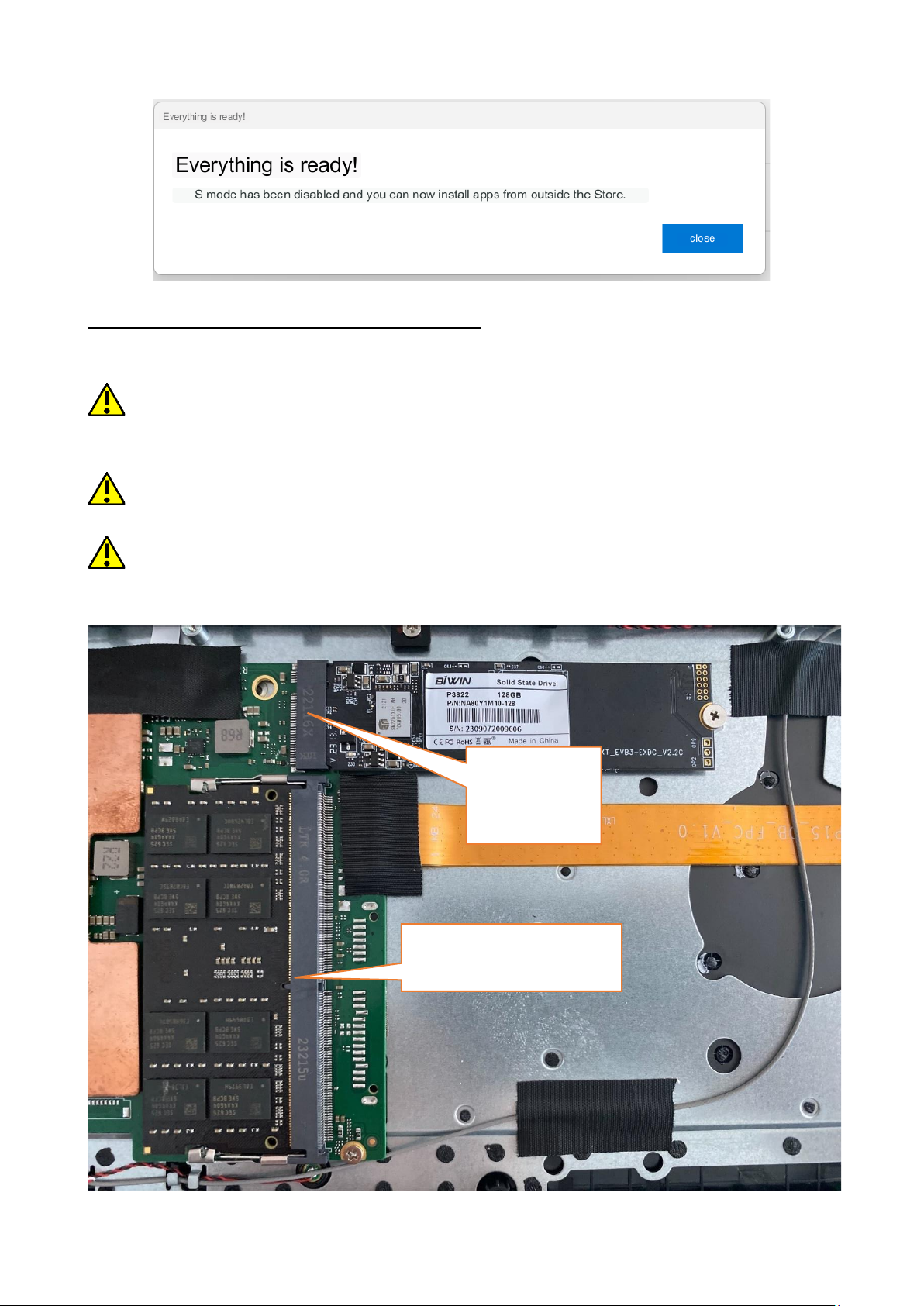
The device's memory and RAM can be replaced with a larger one by installing
them in the appropriate slots located under the lower cover of the device.
The B/M format is universal and can be used in both B and M slots. The M format
cannot be used in this device. Formats differ in the placement of the indentation and
the number of connections.
When buying a memory expansion module, be sure to ask the seller to check that
it ts the slot on your device and that it works properly.
Do not insert the memory module by force, as you may damage the module and
the socket, which may void the device warranty.
SSD socket
RAM socket
Page 36
© 2023 techBite. All rights reserved. PIX 15.6 EN
36
To install the memory in the device, turn off the computer, and if it is connected
to a power supply, unplug it, close the lid and lay the device on it. It is best to do
this on a soft, stable and at surface (such as a dry towel on a table top or desk)
so as not to scratch the case.
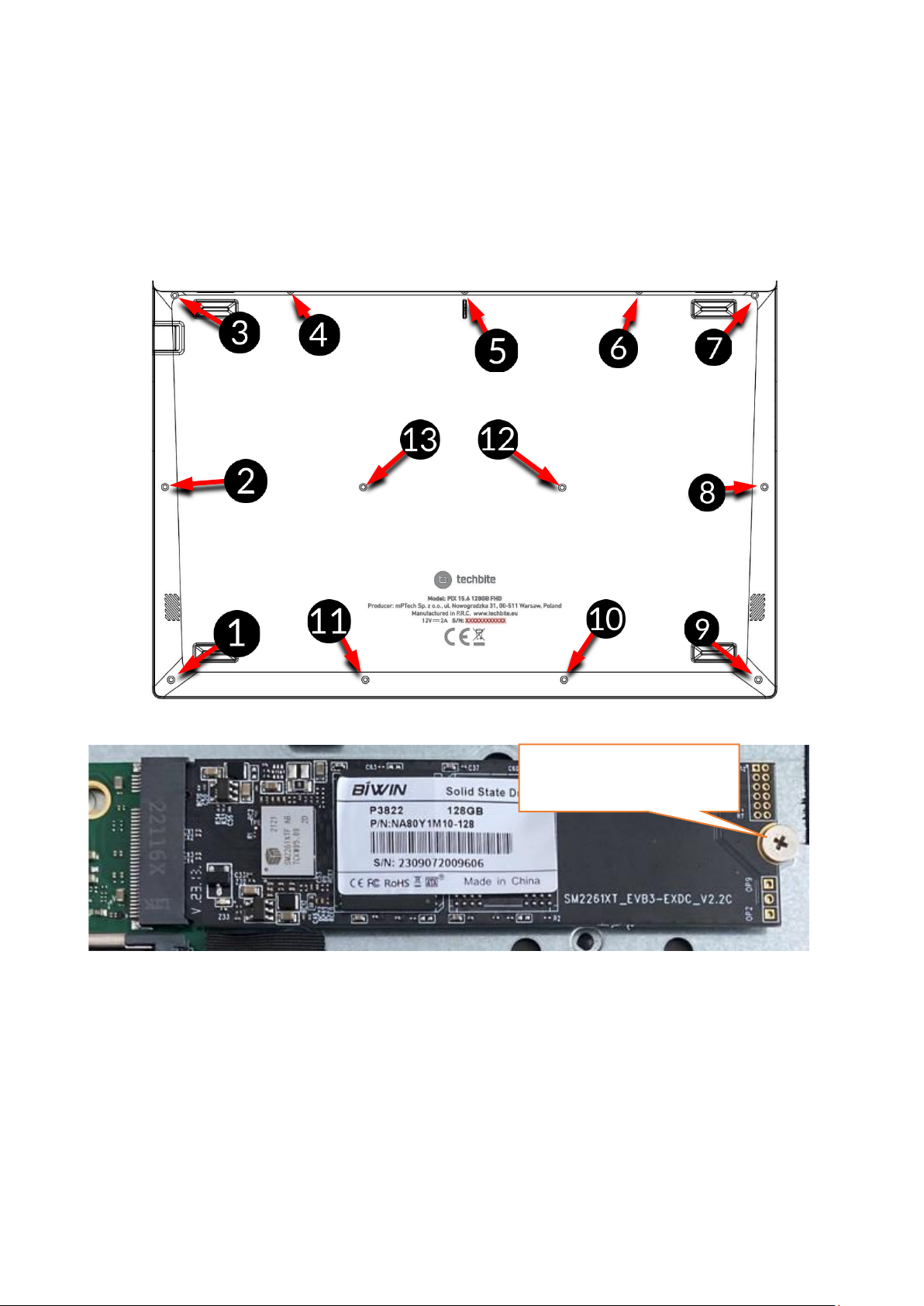
With a small Phillips screwdriver, unscrew all the screws and gently lever up the
lower cover of the device where the cutout is located and remove it.
10.1 Memory assembly M.2 2280 PCIE SSD
Remove the screw securing the stop. Slide the M.2 2280 module gently into the
connector so that the notch in the module matches the tab in the socket. Secure
the module by screwing it gently into the case with a screw. Replace the
compartment cover and tighten the screws that secure it.
Control Panel \ All elements of the Control Panel \ Administrative tools \ Manage
your computer \ Disk management
You can create and delete partitions on the new drive. After creating partitions
in the operating system, nd the new disk and format it according to your
preferences.
Safety screw
Page 37
© 2023 techBite. All rights reserved. PIX 15.6 EN
37
We advise against any manipulation of the parameters of the "Drive 0", i.e. the
system drive, as any problems caused by tampering with its structure may result in
the voiding of the warranty.
10.2 RAM assembly
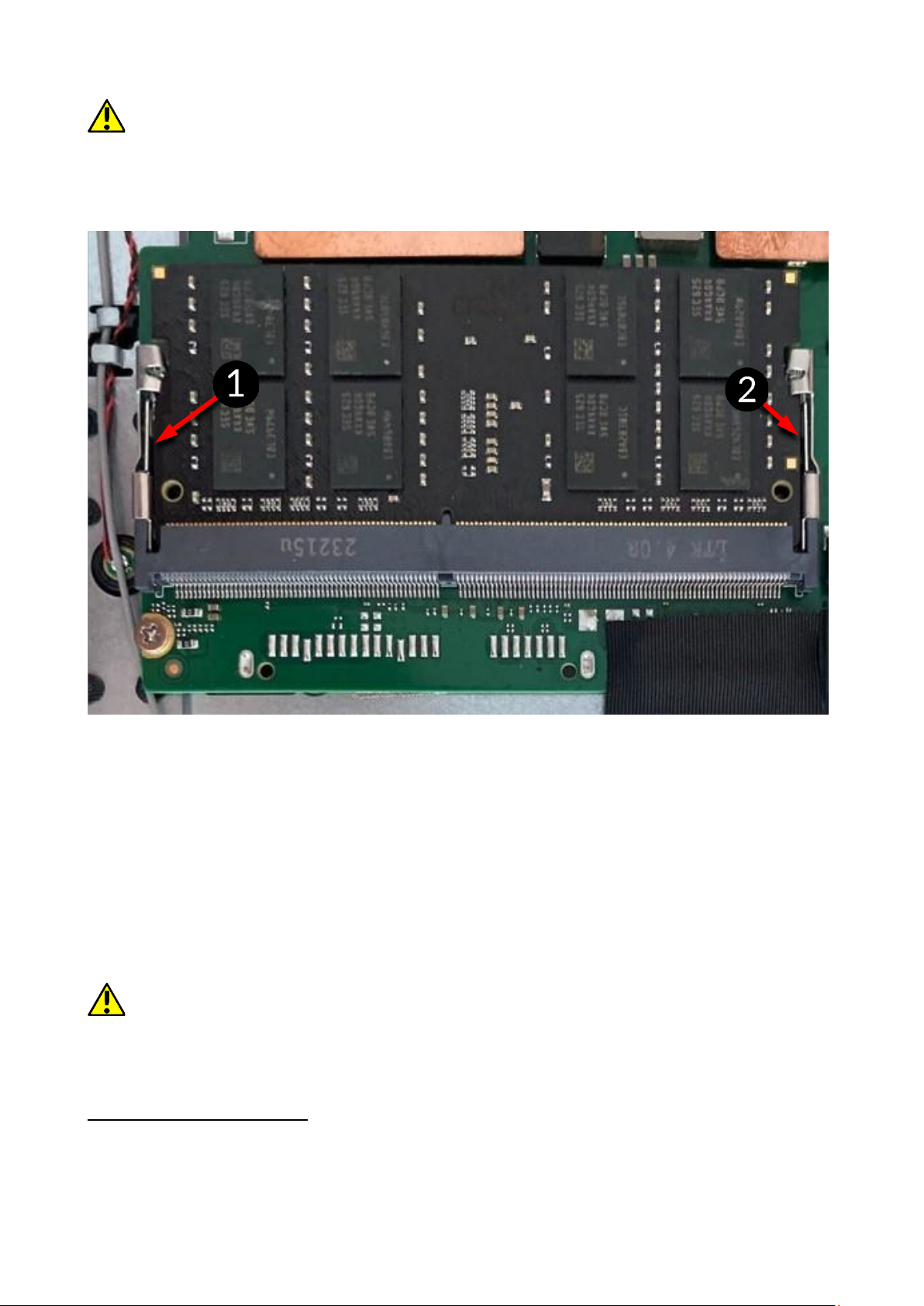
Unscrew the securing stops and the memory module. Slide the RAM module
gently into the connector so that the notch in the module matches the tab
in the socket. Secure the module by snapping the stops into place. Replace the
compartment cover and tighten the screws that secure it.
Control Panel \ All elements of the Control Panel \ Administrative tools \ Manage
your computer \ Disk management
You can create and delete partitions on the new drive. After creating partitions
in the operating system, nd the new disk and format it according to your
preferences.
We advise against any manipulation of the parameters of the "Drive 0", i.e. the
system drive, as any problems caused by tampering with its structure may result in
the voiding of the warranty.
11. Safety remarks
11.1 Troubleshooting
If you have any problems with the device, please read the following advice and
follow the instructions below.
Page 38

© 2023 techBite. All rights reserved. PIX 15.6 EN
38
• USB socket - Check the cable by connecting another device. If it doesn't
help, use another cable.
• Wi-Fi – Check if the aeroplane mode is not on because it disables using any
wireless network functions. Check network range. Check if the function is
activated in the device and the parameters set correctly. Check the login
password to the Wi-Fi network.
• Bluetooth – check whether the connection is active and Bluetooth
visibility options are enabled. Make sure that both devices are in Bluetooth
connection range and there are no obstacles between them (interesting
fact - some LCDs absorb magnetic waves). Make sure that the devices have
a sufcient amount of memory to exchange les. Check if both devices
work in aeroplane mode (Aeroplane mode blocks Bluetooth).
• Sounds – make sure that the sound in the laptop is not muted. Check other
laptop sound settings. Make sure that the headset, speaker, or microphone
cable plug is not plugged into the 3.5 mm mini-jack socket.
Some minijack tips are different from others, and this may also cause a
sound problem - try a different cable or use an adapter.
• Although the battery is being charged, its level of charge is constantly
dropping – turn off all options such as Wi-Fi, Bluetooth, Location, and then
reduce the brightness of the screen, then turn on the aircraft mode in the
device and stop working intensively or limit it for the duration of charging.
Those easy steps will accelerate the charging process. It is recommended
to charge the device with the charger supplied by the manufacturer.
If the problem persists, contact your dealer.
11.2 Support for portable memory and memory cards
• Do not remove portable memories or memory cards when the information
is being transferred to or used by the device. This may cause data loss or
damage to the portable memory and/or the device.
• Do not touch the pins with your ngers or metal objects. In case of any dirt,
wipe the portable memory with a soft dry cloth.
11.3 Protection of personal data and important information
• We recommend regular backups of important data. The manufacturer is
not liable for any loss of information.
• Before selling or donating the device, delete all data and restore the laptop
to its factory settings. This way you can protect yourself from accessing
your personal information by unauthorized people.
• Downloading applications, refer to the on-screen information. Particular
caution should be exercised in the case of applications that have access to
many functions or to a signicant amount of personal information.
• Regularly check your account in terms of unauthorized or suspicious use.
If traces of misuse of personal information are discovered, contact your
service provider to delete or change your account information.
Page 39

© 2023 techBite. All rights reserved. PIX 15.6 EN
39
• In the case of loss or theft of the device immediately change the passwords
for the accounts (system, email, social networking, etc.).
• Try not to use applications coming from unknown sources. Lock the device
using the password, ngerprint or PIN code.
• Do not distribute copyright-protected material.
• Do not distribute copyrighted content without permission of the copyright
holder. Failure to do so may result in copyright infringement. The
manufacturer is not liable for any legal consequences of illegal use by the
user of copyrighted material.
• Use anti-virus software, which regularly update the virus signature
database.
11.4 Remarks on correct battery use
• If the battery level is low, recharge it to continue the use of the phone. If
you wish to prolong the battery lifespan , discharge the battery beneath
10% of the battery capacity and charge it back to 100%.
• The temperature of the battery has an impact on its charging cycle. Prior
to the charging process, cool the battery and the device or raise its
temperature so that it is similar to the room temperature. If the battery
temperature exceeds 40ºC the battery must not be charged!
• Do not use a damaged battery!
• The battery life span can be shortened, if it has been exposed to very low
or very high temperatures - this causes interference to the device, even
when the battery has been properly charged.
12. Maintenance of the device
To prolong the lifespan of the device act according to these instructions.
• Keep the device and its accessories out of reach of children.
• Avoid contact with liquids; it can cause damage to electronic components
of the device.
• Avoid very high temperatures for it can shorten the life of device electronic
components, melt the plastic parts and destroy the battery.
• Do not try to disassemble the device. Tampering with the device in an
unprofessional manner may cause serious damage to the phone or destroy
it completely.
• To clean the device use only a dry, soft cloth.
• Use the original accessories only. Violation of this rule may result in an
invalidation of the warranty.
The packaging of the device can be recycled in accordance with local
regulations.
Page 40
© 2023 techBite. All rights reserved. PIX 15.6 EN
40
Symbol for cardboard.
13. Surroundings security
Turn off the device in areas where its use is forbidden or when it may cause
interference or danger. The use of any devices that radio waves causes
interference with medical devices (i.e. cardiac pacemaker), if they are not
properly secured (if in doubt, consult your doctor or medical device
manufacturer). Please observe the national and local regulations at the place of
use.
Attention
Statement
The manufacturer is not responsible for any
consequences caused by improper usage of the
device and not obeying the above instructions.
The software version can
be upgraded without
earlier notice.
Functions
Frequency range
Transmission power
BT(BR+EDR)
2402MHz~2480MHz
5.21dBm
BT(BLE)
2402MHz~2480MHz
-1.01dBm
Wi-Fi 2.4G
(802.11b/g/n20/n40)
802.11b/g/n20:
2412MHz~2472MHz;
802.11n40:
2422MHz~2462MHz
16.87dBm
Wi-Fi 5.2G
(802.11a/n20/n40/ac20
/ac40/ac80)
802.11a/n(20MHz):
5180~5240MHz;
802.11n/ac(40MHz):
5190~5230MHz;
802.11ac(80MHz):
5210MHz
12.4dBm
Page 41
© 2023 techBite. All rights reserved. PIX 15.6 EN
41
Wi-Fi 5.3G
(802.11a/n20/n40/ac20
/ac40/ac80)
802.11a/n(20MHz):
5260~5320MHz;
802.11n/ac(40MHz):
5270~5310MHz;
802.11ac(80MHz):
5290MHz
12.66dBm
Wi-Fi 5.6G
(802.11a/n20/n40/ac20
/ac40/ac80)
802.11a/n(20MHz):
5500~5700MHz;
802.11n/ac(40MHz):
5510~5670MHz;
802.11ac(80MHz):
5530~5610MHz
12.67dBm
Wi-Fi 5.8G
(802.11a/n20/n40/ac20
/ac40/ac80)
802.11a/n(20MHz):
5745~5825MHz;
802.11n/ac(40MHz):
5755~5795MHz;
802.11ac(80MHz):
5775MHz
13.34dBm
14. The use of the manual
14.1 Consents
Without prior written consent of the manufacturer, no part of this manual may
be photocopied, reproduced, translated or transmitted in any form or by any
means, electronic or mechanical, including photocopying, recording or storing
in any systems of storing and sharing information.
14.2 Appearance
The device and screen shots contained in this user manual may differ from the
actual product.
14.3 Trademarks
• Windows 11 and Windows HELLO are registered trademarks of Microsoft
Corp.
• Intel® and Intel® Celeron® are registered trademarks of Intel
Corporation.
• Wi-Fi® Wi-Fi logo are a registered trademarks Wi-Fi Alliance association.
• All other trademarks and copyrights belong to their respective owners.
15. Correct disposal of used equipment
The device is marked with a crossed-out garbage bin, in accordance
with the European Directive 2012/19/EU on used electrical and
electronic Equipment (Waste Electrical and Electronic equipment WEEE). Products marked with this symbol should not be disposed of or
dumped with other household waste after a period of use. The user is
obliged to dispose of waste electrical and electronic equipment by delivering it
Page 42
© 2023 techBite. All rights reserved. PIX 15.6 EN
42
to a designated recycling facility. Collecting this type of waste in designated
locations, and the actual process of their recovery contribute to the protection
of natural resources. Proper disposal of used electrical and electronic equipment
is benecial to human health and environment. Information on where and how
to dispose of waste electrical and electronic equipment in an environmentally
sound manner shall be provided by the relevant local authorities, collection or
sales points where the equipment was purchased.
16. Correct disposal of used battery
According to the EU directive 2006/66/EC with changes contained in
EU directive 2013/56/UE on the disposal of batteries, this product is
marked with crossed-out garbage bin symbol. The symbol indicates
that the batteries used in this product should not be disposed with
regular household waste, but treated according to the legal directives and local
regulations.
It is not allowed to dispose of accumulators with unsorted municipal waste.
Users of batteries and accumulators must use the available collection points of
these items, which allows them to return, recycle and disposal. Within the EU,
the collection and recycling of batteries and accumulators is a subject to
separate procedures. To learn more about existing procedures of recycling of
batteries and accumulators please contact your local ofce or an institution for
waste disposal or landll.
17. Declaration of conformity with European Union Directives
mPTech Ltd. hereby declares that laptop PIX 15.6 is compliant
with Directive 2014/53/EU. The full text of the EU Declaration
of Conformity is available at the following Internet address:
https://techbite.eu/qr/pix-15-6-fhd-128gb
 Loading...