

Page 1
Accelerator Pulse
Owner's Manual
Page 2

2
ACCELERATOR PULSE OWNER'S MANUAL
TABLE OF CONTENT
Introduction pg. 3
Buttons pg. 3
Chest strap pg. 4
Menu System pg. 4
Major Functions Modes: pg. 4
Home Time Display pg. 5
Dual Time View pg. 5
Chronograph Mode pg. 6
Countdown Timer Mode pg. 7
Exercise Mode pg. 8
Maximum Heart Rate pg. 10
Exercise Settings Menu pg. 12
1 of 5 Memory Save/Clear pg. 12
2 of 5 Exercise History pg. 13
3 of 5 Exercise Schedule pg. 14
4 of 5 Pedometer Setting pg. 15
5 of 5 Heart Rate Setting pg. 16
Main Settings Menu pg. 17
1 of 11 Home Time Setting pg. 17
2 of 11 Alarm Setting pg. 18
3 of 11 Exercise Schedule pg. 19
4 of 11 Pedometer Setting pg. 20
5 of 11 Memory Save/Clear pg. 21
6 of 11 Exercise History pg. 22
7 of 11 Timer Setting pg. 23
8 0f 11 Personal Profile pg. 24
9 of 11 System Setting pg. 25
10 of 11 Heart Rate Setting pg. 26
11 of 11 Dual Time Setting pg. 30
Power Saving Mode pg. 30
Battery pg. 31
Trouble Shooting pg. 32
Warranty pg. 33
Contacts pg. 34
Page 3
3
Buttons
INTRODUCTION
Thank you for purchasing a Tech4O
Accelerator Pulse Watch. Your watch
uses an advanced accelerometer sensor
technology to accurately measure speed,
distance, heart rate and calories
Although your Accelerator watch has a
pre-programmed profile, it is extremely
important to enter your own profile in
the MAIN SETTINGS MENU – 8 of 11
Personal Profile.
Accurate measurement and input of your
weight, age, gender and walking/running stride lengths is crucial to achieving
accurate results. For help with measuring
your average strides, visit www.tech4o.
com and use the stride length calculator
on the Accelerator product pages
Your new Accelerator watch uses a menu
system navigation to access, display and
adjust its various modes. Understanding
how this system works is important to
enjoying your new watch. Please take the
time to read and follow this manual
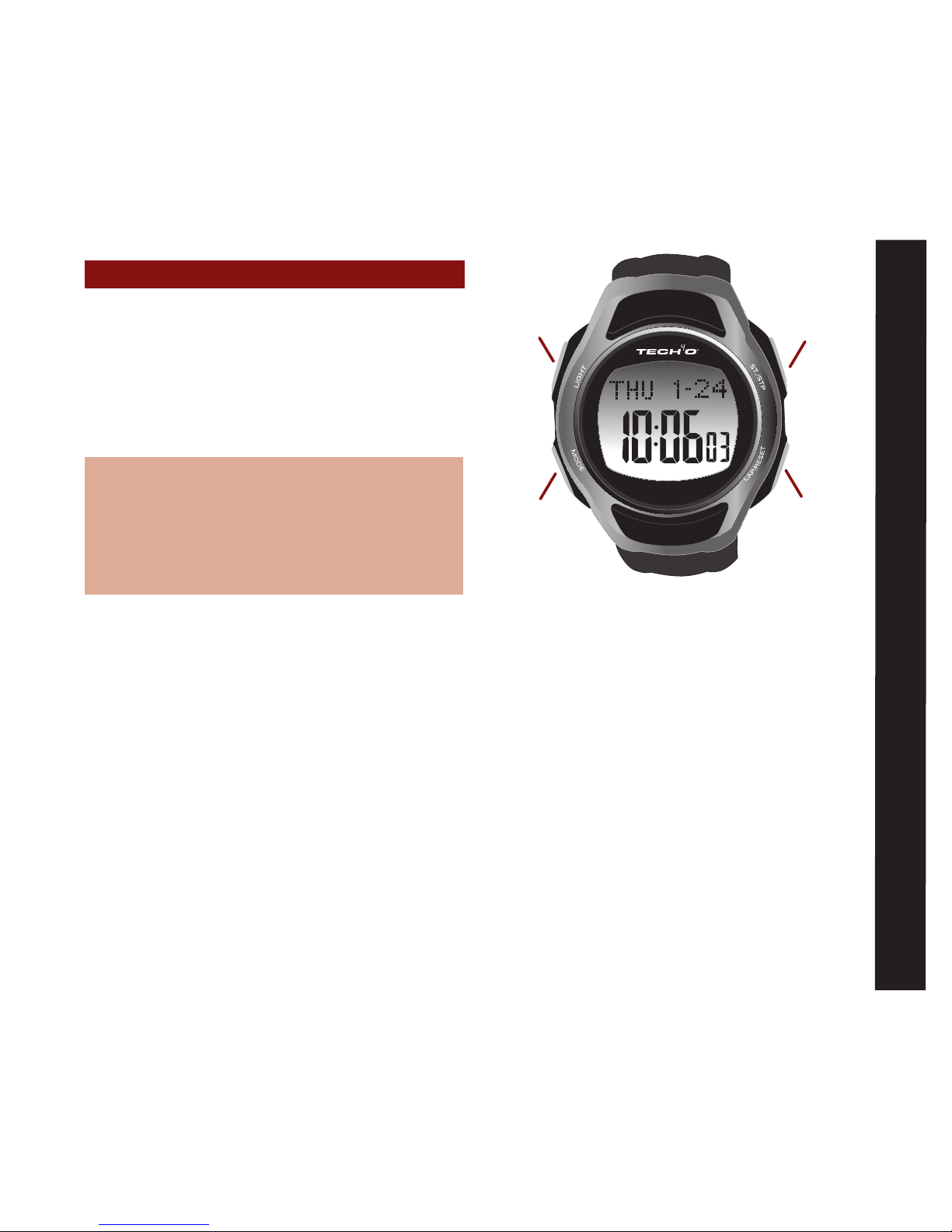
Buttons:
LIGHT • Turns on an electroluminescent
backlight
MODE • Enters/Exits setting modes
• Selects among major functions
• Moves among different items in
setting modes
ST/STP • Activates Start /Stop in several modes
• Scrolls to previous menu items
• Increases values in setting modes
LAP/RESET
• Enters/Exits Exercise Mode
• Resets/loads values in several modes
• Scrolls to next menu item
• Decreases values in setting modes
MAJOR F See fig.1
fig.1
LIGHT
MODE LAP/RESET
ST/STP
Page 4
4
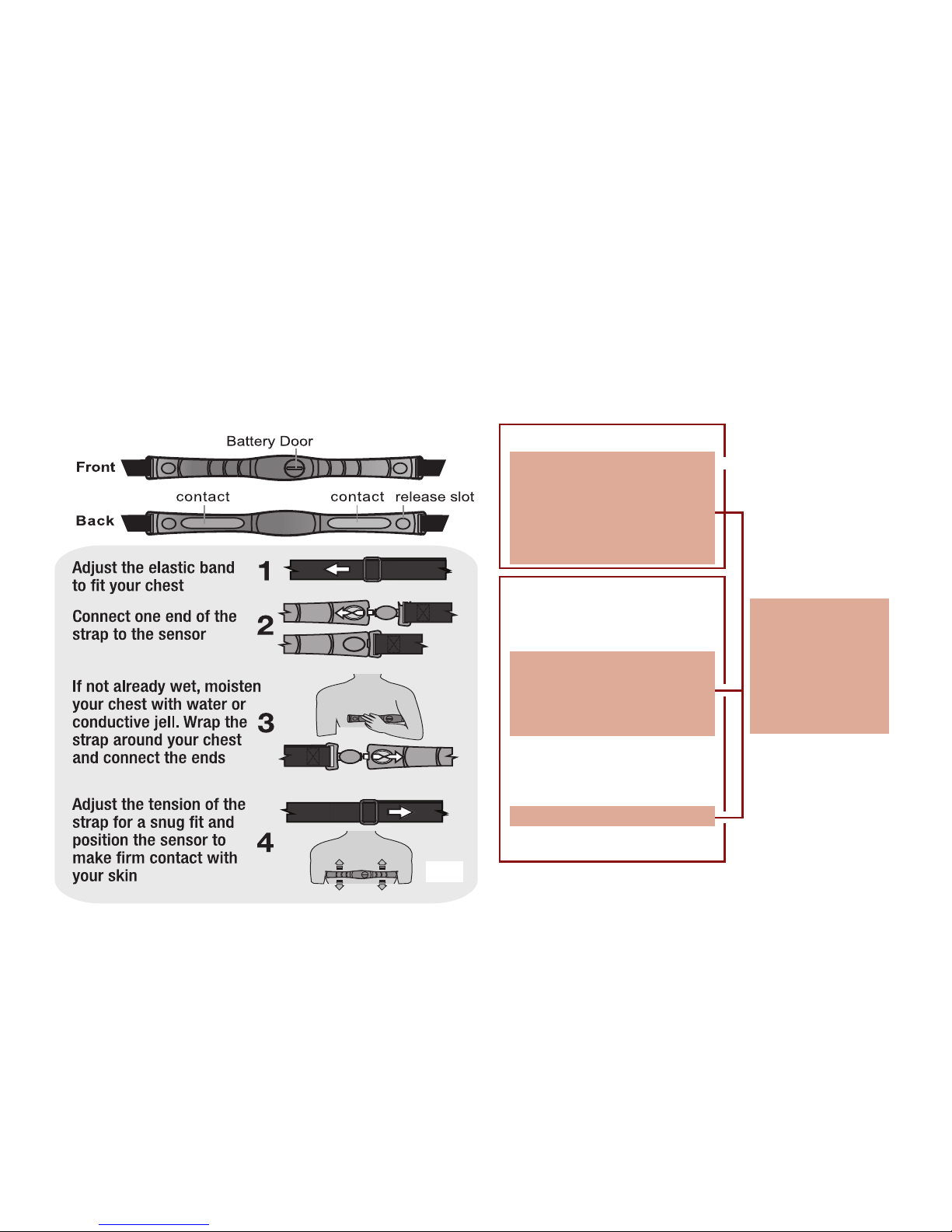
To Wear Heart Rate Chest Strap: see fig.2
The Accelerator Pulse has two primary menus:
Exercise Mode and Home Time Mode each
have their own menu system. See fig.3
Note: For your
convenience, these
two menus share 5
features that can be
accessed through
either menu
Chest Strap Information:
The chest strap will allow your watch to capture,
display and save heart rate data. This strap must be
worn with good contact on your bare skin. Moisture
between the strap and your skin aids in conductivity
and allows the heart rate feature to work properly.
ExERcISE MENU
1 of 5 Memory Save/Clear
2 of 5 Exercise History
3 of 5 Exercise Schedule
4 of 5 Pedometer Setting
5 of 5 Heart Rate Setting
MAIN SETTING MENU
1 of 11 Home Time Setting
2 of 11 Alarm Setting
3 of 11 Exercise Schedule
4 of 11 Pedometer Setting
5 of 11 Memory Save/Clear
6 of 11 Exercise History
7 of 11 Timer Setting
8 0f 11 Personal Profile
9 of 11 System Setting
10 of 11 Heart Rate Setting
11 of 11 Dual Time Setting
fig.2
fig.3
Page 5
5
Home Time Mode
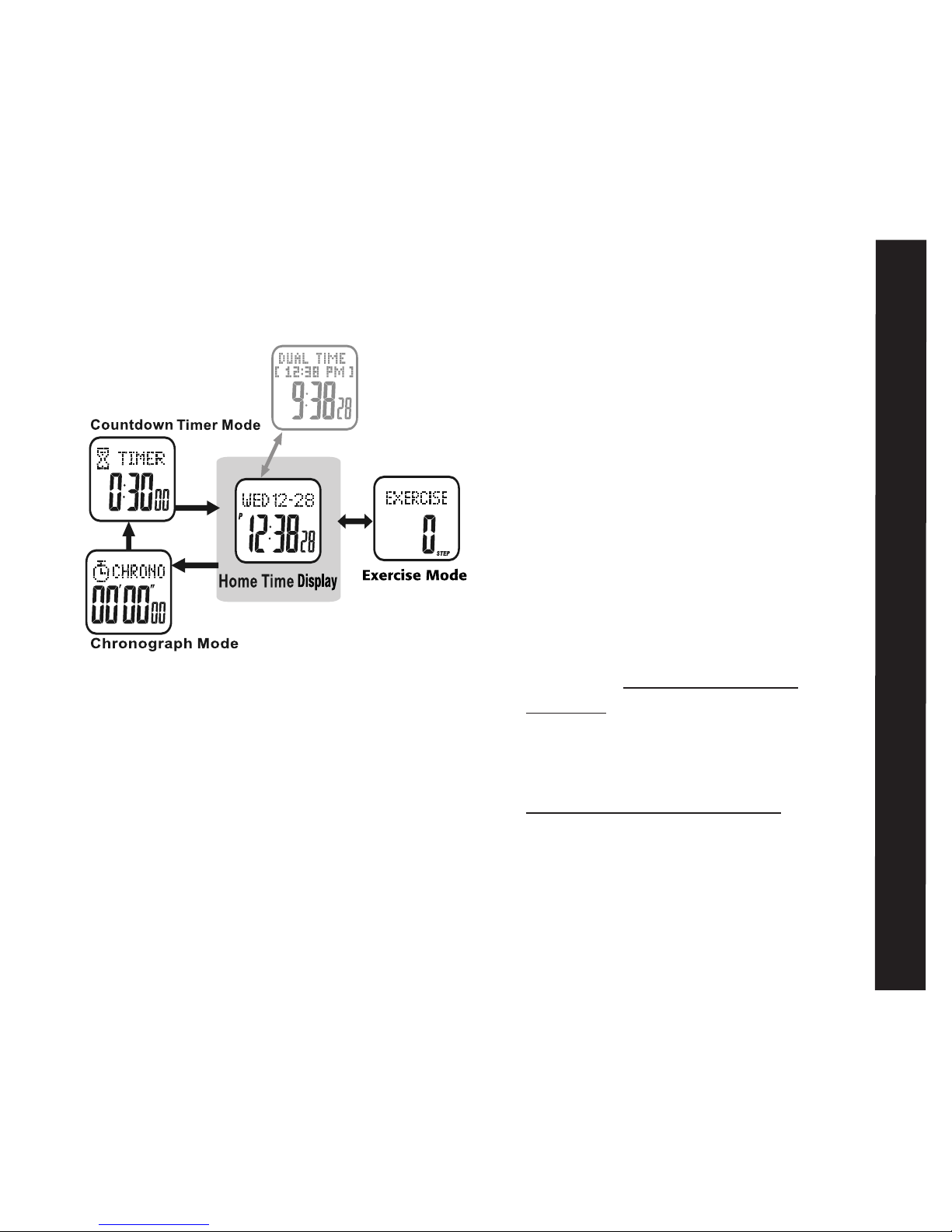
The Accelerator Pulse has 4 major functions:
• Home Time/Dual Time • Chronograph
• Countdown Timer • Exercise Mode
See fig. 4
Home Time Mode:
The Home Time display is the default display.
In any settings mode, if no button is pressed
for one minute, the watch will automatically
and continually revert to the previous
display, until it returns to Home Time
Home Time Display:
Top line: day of week, month, and date
Bottom line: current
hours, minutes and
seconds
or Top Line: Dual Time
Center line: Current Home Time
Bottom line: Current Dual
hours, minutes
and seconds
To set home time: see MAIN SETTINGS
MENU– Home Time Setting: 1 of 11
Dual Time View:
Your accelerator watch is capable of storing an
alternate time zone. There are 2 ways to
view Dual Time zones
• QUICK VIEW- PRESS ST/STP in the
Home Time display. The Dual Time zone
will appear for 3 seconds. After 3 seconds
the Home Time display will return
• DUAL VIEW- HOLD ST/STP FOR 3
SECONDS in the Home Time display.
Home Time will appear in the top line.
The Dual Time zone time will show in the
bottom line
HOLD ST/STP FOR 3 SECONDS to
return the view to home time display
To set dual time: see MAIN SETTINGS
MENU - Dual Time Setting: 11 of 11
hold S/S to toggle between
L/R
M
M
M
fig.4
Page 6
6
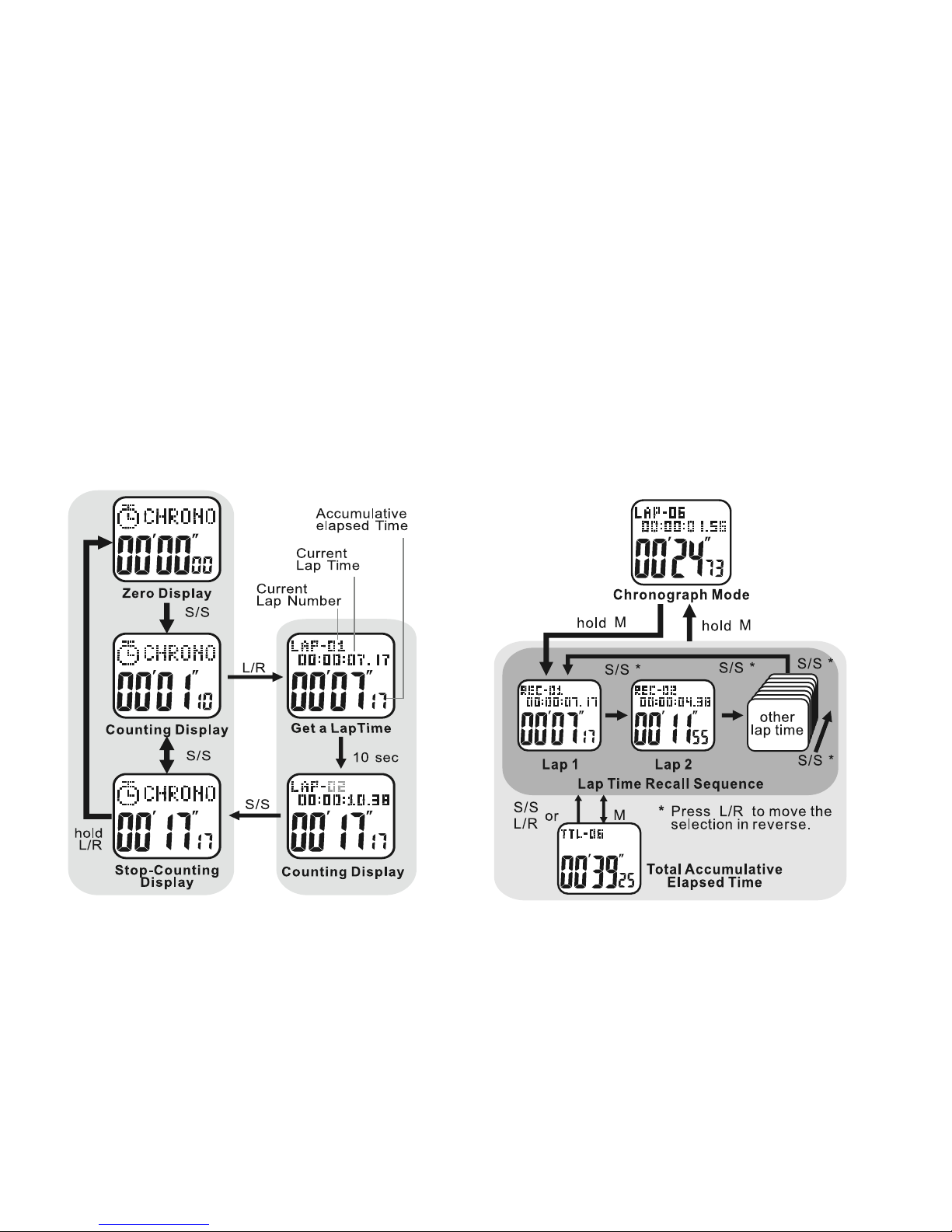
Chronograph Mode: See fig. 5
• PRESS MODE ONCE from the Home Time
display to access the Chronograph
Chronograph Mode displays:
T
op line: CHRONO
Bottom line: running time- minutes, seconds, and
hundredth seconds for the first hour
OR hours, minutes and seconds thereafter
To Use the Chronograph Mode:
• PRESS ST/STP to start the Chronograph
• PRESS ST/STP again to stop the
Chronograph
To Record Lap Times: See fig. 6
• PRESS ST/STP or start the Chronograph
• PRESS LAP/RESET to record a lap time
The recorded lap time will display in the top
fig.5 fig.6
Page 7
7
Countdown Timer
line for 10 seconds. After 10 seconds the
current lap time will display in the top line
and the current total elapsed time will
display in the bottom line
Repeat the above steps to record additional
lap times. A total of 50 lap times can be
recorded
• PRESS ST/STP to stop the Chronograph
To View the Recorded Lap Times: See fig.6
HOLD MODE FOR 3 SECONDS
• PRESS ST/STP to view first lap time
(REC–01
) Recorded lap time will display
in top line and Total elapsed time will
display in the bottom line
• PRESS ST/STP again to view additional
recorded lap times
HOLD MODE FOR 3 SECONDS to exit the
Chronograph memory
• PRESS MODE to exit Chronograph Mode
To Clear the Chronograph:
HOLD LAP/RESET FOR 3 SECONDS to
clear the chronograph memory
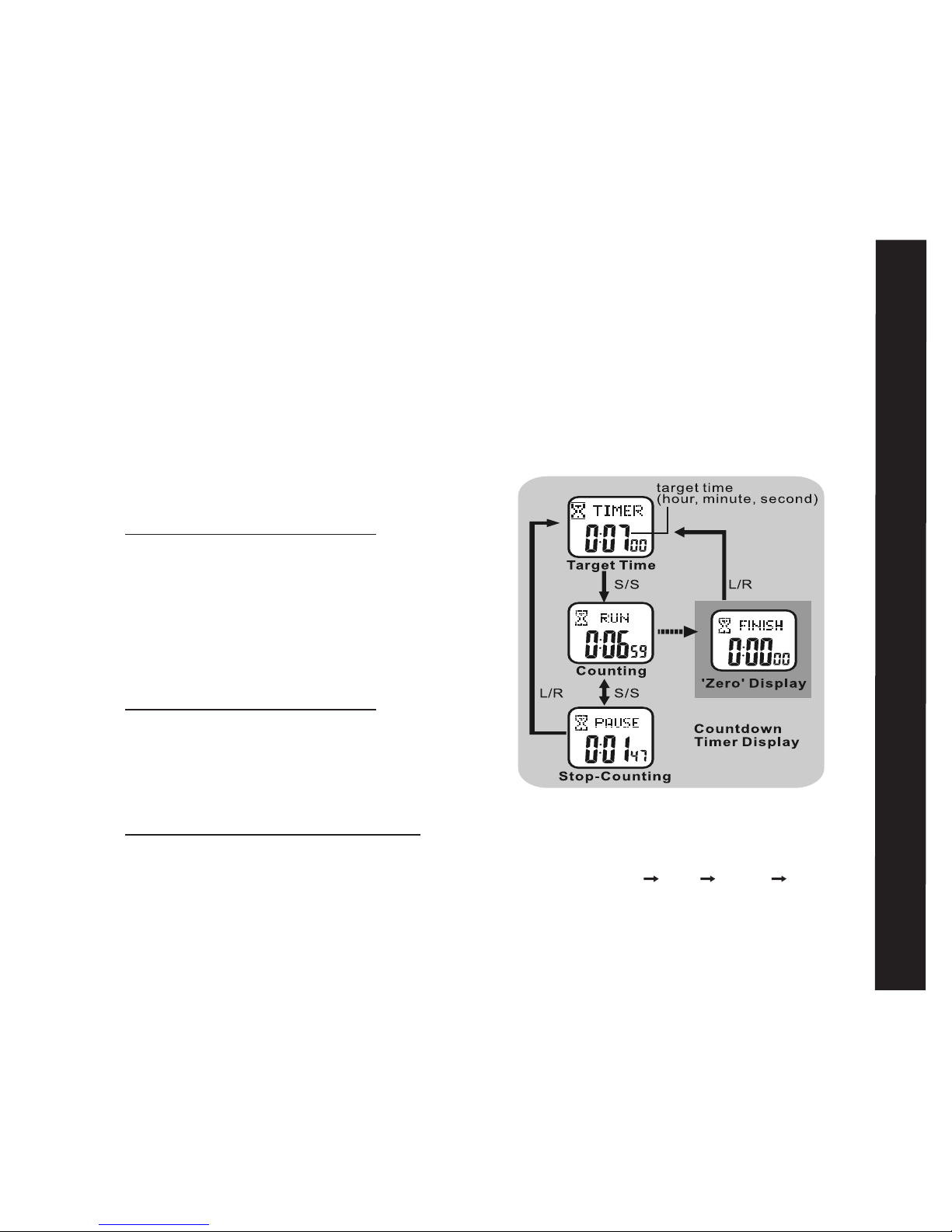
Countdown Timer Mode: See fig.7
Your Accelerator watch has a convenient
Countdown Timer. The timer can be
used for advanced training or as a quick
reminder. The timer counts backwards
from your programed time and beeps at
critical intervals. See the following to set the
Countdown Timer
Countdown Timer Mode Displays:
Top line: TIMER RUN PAUSE FINISH
Bottom line: hours, minutes, seconds
fig.7
Page 8
8
• PRESS MODE TWICE from the Home Time
display to access Countdown Timer
To Use the Countdown Timer: See fig.8
• PRESS ST/STP to start Countdown Timer
• PRESS ST/STP to stop Countdown Timer
The Countdown Timer will beep:
On the minute for the last 10 minutes.
Every 10 seconds during the last minute.
Every second for the last 5 seconds.
For 10 seconds at expiration
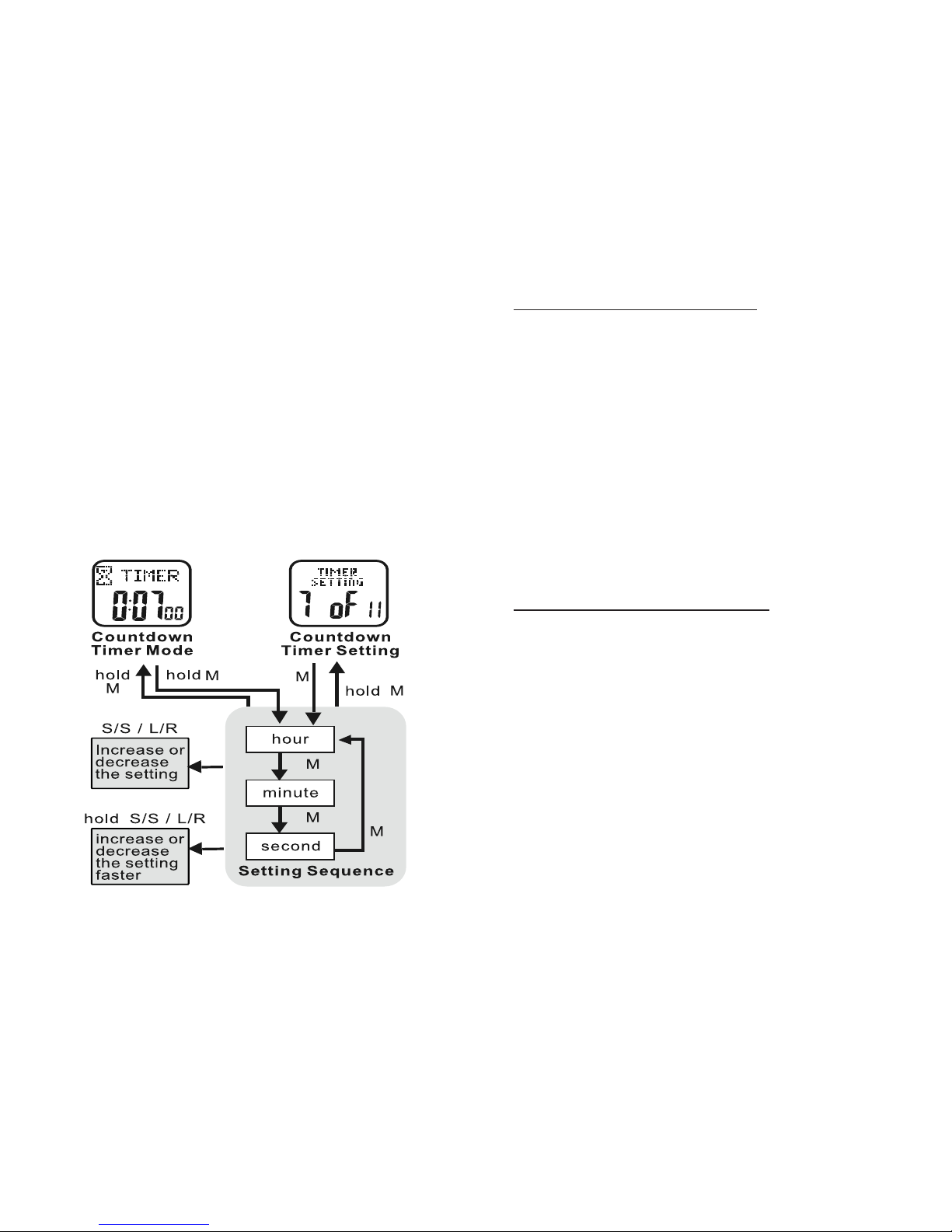
To Set the Countdown Timer: See fig.8
HOLD MODE FOR 3 SECONDS in the
Countdown Timer display to access the
settings menu
• PRESS ST/STP or LAP/RESET to adjust
the hours
• PRESS MODE to confirm
• PRESS ST/STP or LAP/RESET to adjust
the minutes
• PRESS MODE to confirm
• PRESS ST/STP or LAP/RESET to adjust
the seconds
• PRESS MODE to confirm
HOLD MODE FOR 3 SECONDS to return
to the Countdown Timer display
To Re-Set the Countdown Timer:
• PRESS LAP/RESET when the
countdown timer is stopped or at
expiration to reset
• PRESS MODE to exit Countdown Timer
Mode
Exercise Mode:
Your Accelerator’s Exercise Mode accurately
measures your speed, distance, calories,
steps and heart rate
fig.8
Page 9
9
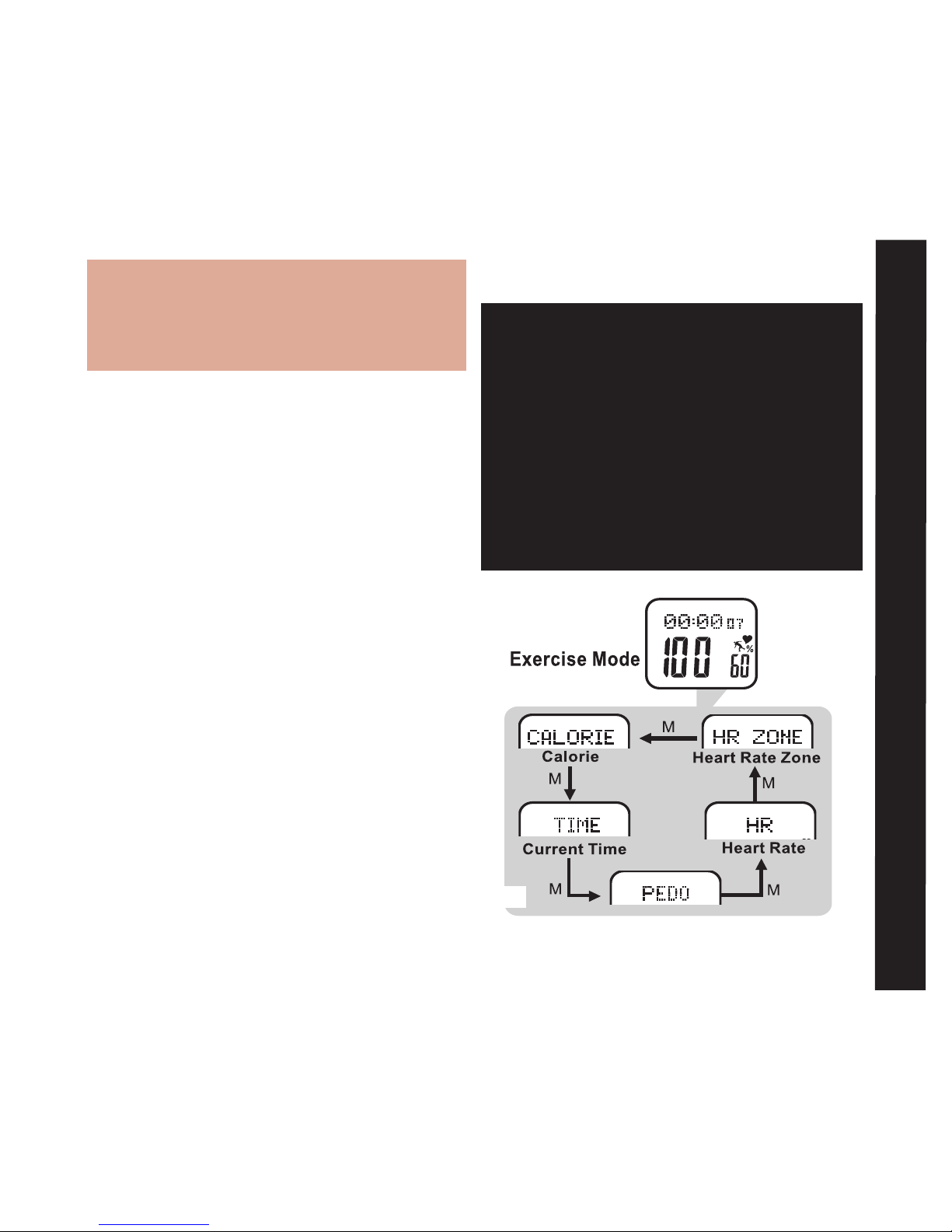
To Use the Exercise Mode: See fig.9
Important: Although Exercise Mode will
automatically record information once
it has been accessed, the sensors still
need time to initialize. The watch will
beep when the sensors are ready. It is
extremely important that you wait for
the beep. If you begin your exercise
before initialization, the results will be
grossly inaccurate.
Although this watch has a pre-programmed
profile, it is extremely important to enter
your personal profile in the MAIN
SETTINGS
MENU – Personal Profile: 8 of 11
Correct age, weight and gender are important
to establish heart rate parameters. Correct
measure of your weight and walking/
running stride lengths is crucial to achieving
accurate speed and distance info. For help
with measuring your average stride lengths,
visit www.tech4o.com and use the stride
length calculator on the Accelerator product
page. See the following on how to access
and navigate the five Exercise Mode displays
Exercise Mode Displays:
• PRESS LAP/RESET from the Home Time
display to access Exercise Mode
• PRESS MODE to scroll through the
exercise data displays
Top line: various exercise mode data
(see following sections for details)
Bottom line: current heart rate,
percentage of maximum heart rate,
pedometer and heart rate icons
Exercise Mode Displays
fig.9
Page 10
10
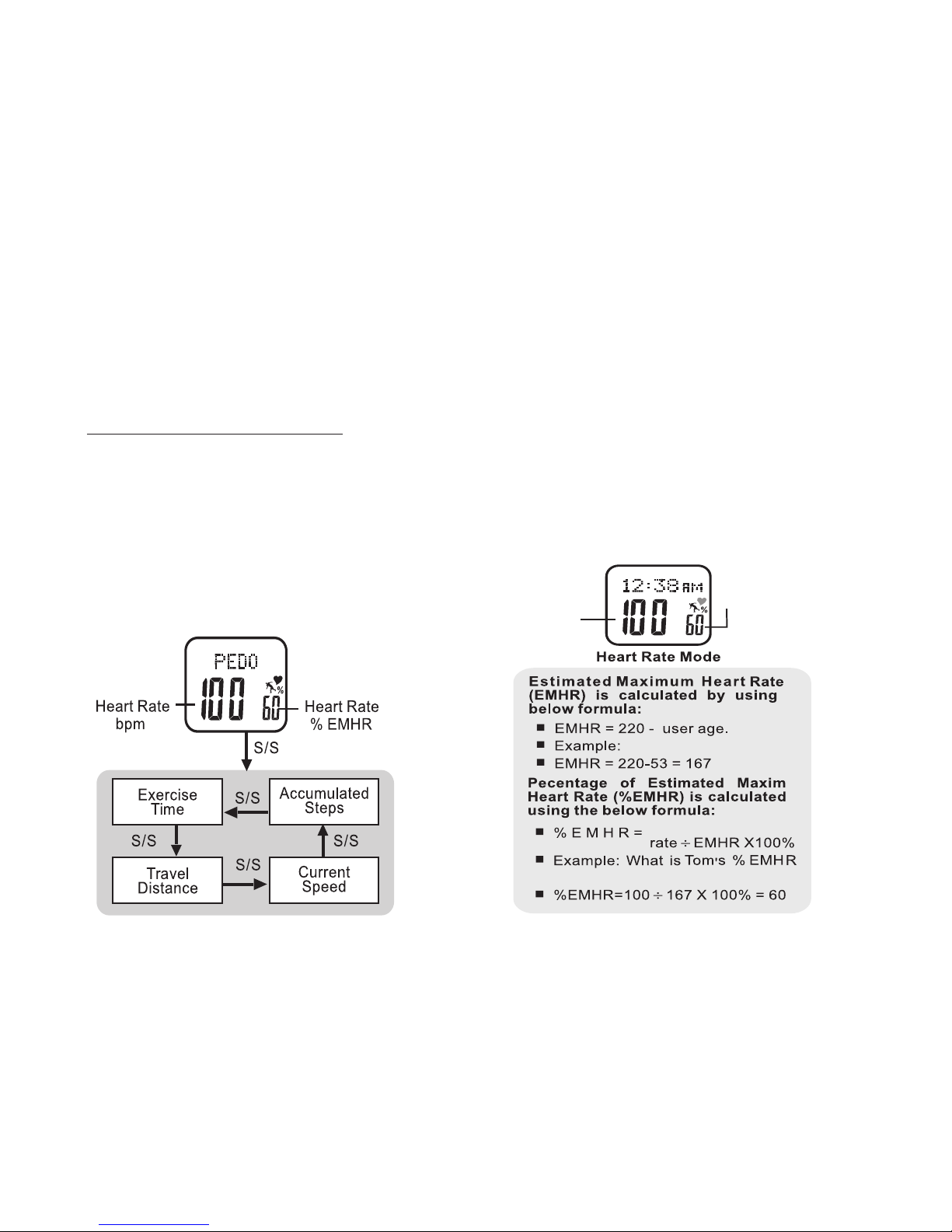
Estimated Maximum Heart Rate and
Percentage of Maximum Heart Rate:
Your Accelerator watch records and calculates
various heart rate data. Much of this data is
based on your estimated maximum heart
rate which is determined by the information
entered in your personal profile. See fig 11
for an explanation of your watch's calculation
of estimated maximum hear rate
percent of
maximum
heart rate
heart rate
in BPM
Tom is 53
Current heart
if his current heart rate is 100
Your accelerator watch automatically distinguishes
between walking and running and adjusts its calculations accordingly
• PRESS
LAP/RESET
at any time to exit Exercise
Mode. It will continue to record exercise data as
you navigate elsewhere in the watch
• HOLD ST/STP FOR 3 SECONDS to manually
start or stop recording
To View Pedometer Exercise Data: See fig.10
While in Exercise Mode:
• PRESS MODE to scroll PEDO display
• PRESS ST/STP to view pedometer data
• PRESS LAP/RESET to exit Exercise Mode
fig.11fig.10
Page 11
11
Before starting any exercise program involving
heart rate monitoring, please consult your
physician for a more accurate measurement
of your actual maximum heart rate.
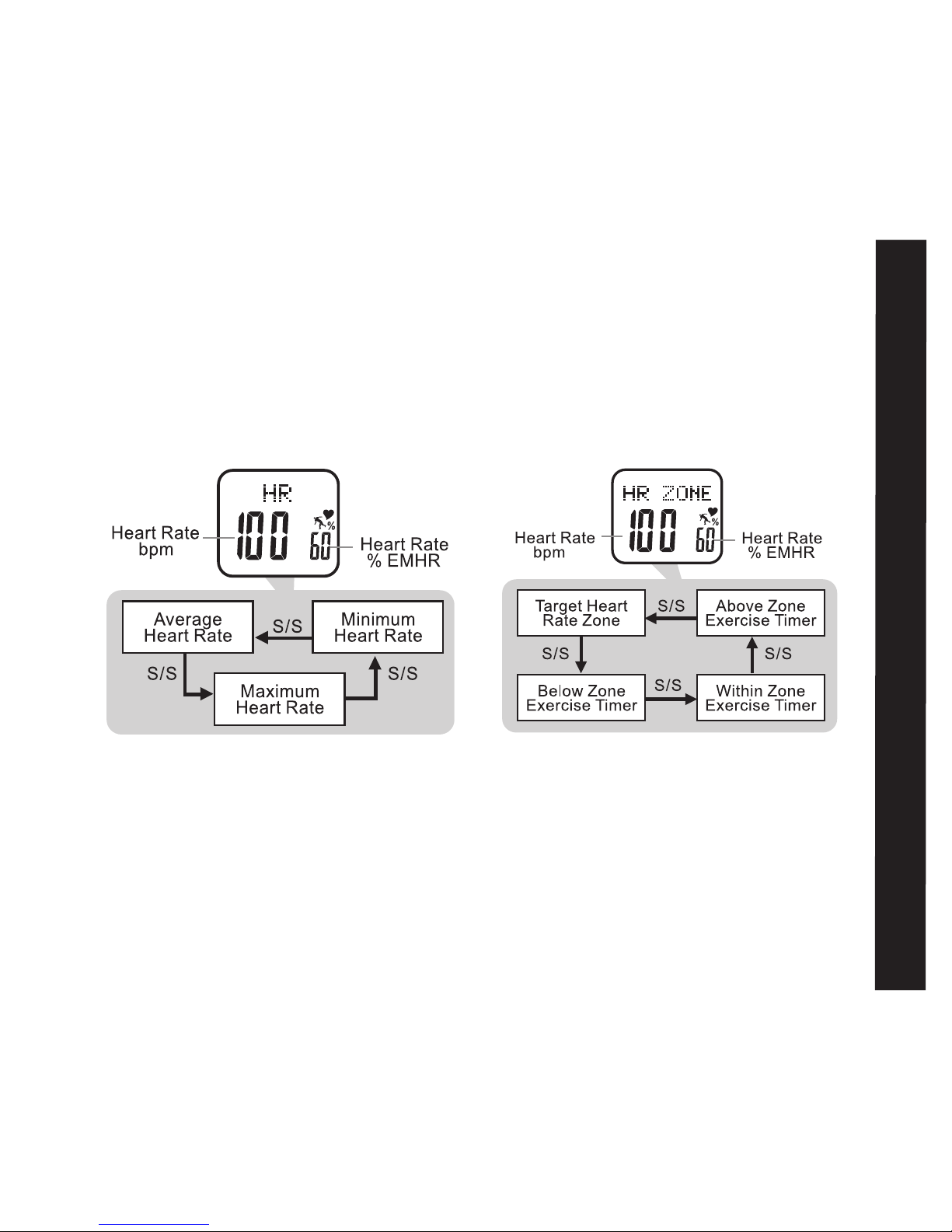
To View Heart Rate Exercise Data: See fig.12
While in Exercise Mode: .
• PRESS MODE to scroll HR display
• PRESS ST/STP to view various heart
rate data
• PRESS LAP/RESET to exit Exercise Mode
Heart Rate Data
T
o View Heart Rate Zone Exercise Data:
See fig.13
While in Exercise Mode:
• PRESS MODE to scroll HR ZONE display
• PRESS ST/STP to view various heart rate
zone data
•
PRESS LAP/RESET to exit Exercise Mode
T
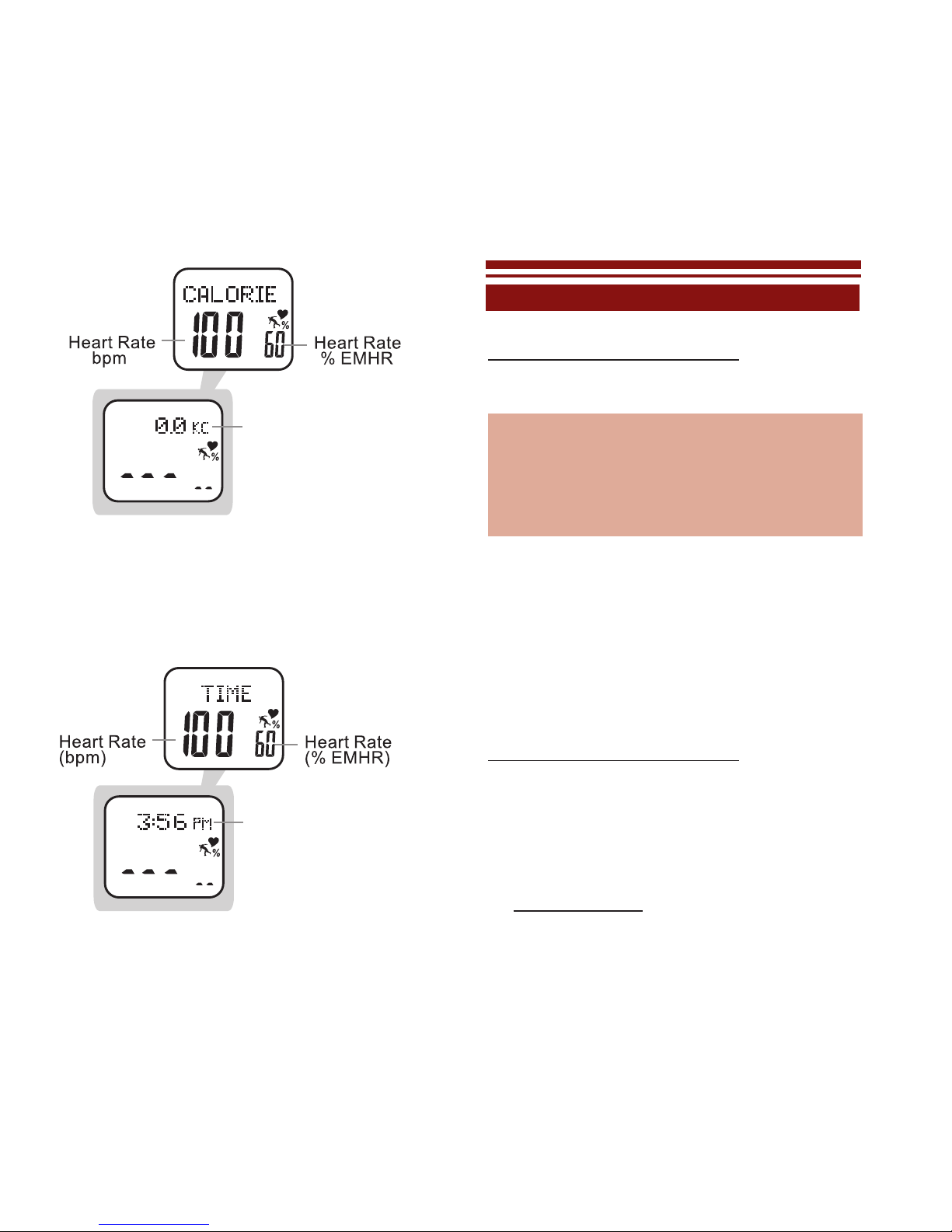
o View Calorie Exercise Data: See fig.14
While in Exercise Mode:
• PRESS MODE to scroll CALORIE display
• PRESS LAP/RESET to exit Exercise Mode
fig.12
fig.13
Page 12
12
Home Time will display if
entered from Home Time
Dual Time will display if
entered from DualTime
Caloric expenditure from
current exercise session
- continously updated
T
o View Time Of Day in Exercise Mode: See
fig.15
While in Exercise Mode:
• PRESS MODE to scroll TIME display
• PRESS LAP/RESET to exit Exercise Mode
EXERCISE SETTINGS MENU
HOLD MODE FOR 3 SECONDS in Exercise
Mode to access the Exercise Settings Menu
Memory Save/Clear: 1 of 5
Exercise History: 2 of 5
Exercise Schedule: 3 of 5
Pedometer Setting : 4 of 5
Heart Rate Setting : 5 of 5
Note: the ve menu selections are also accessible
through the MAIN SETTINGS MENU
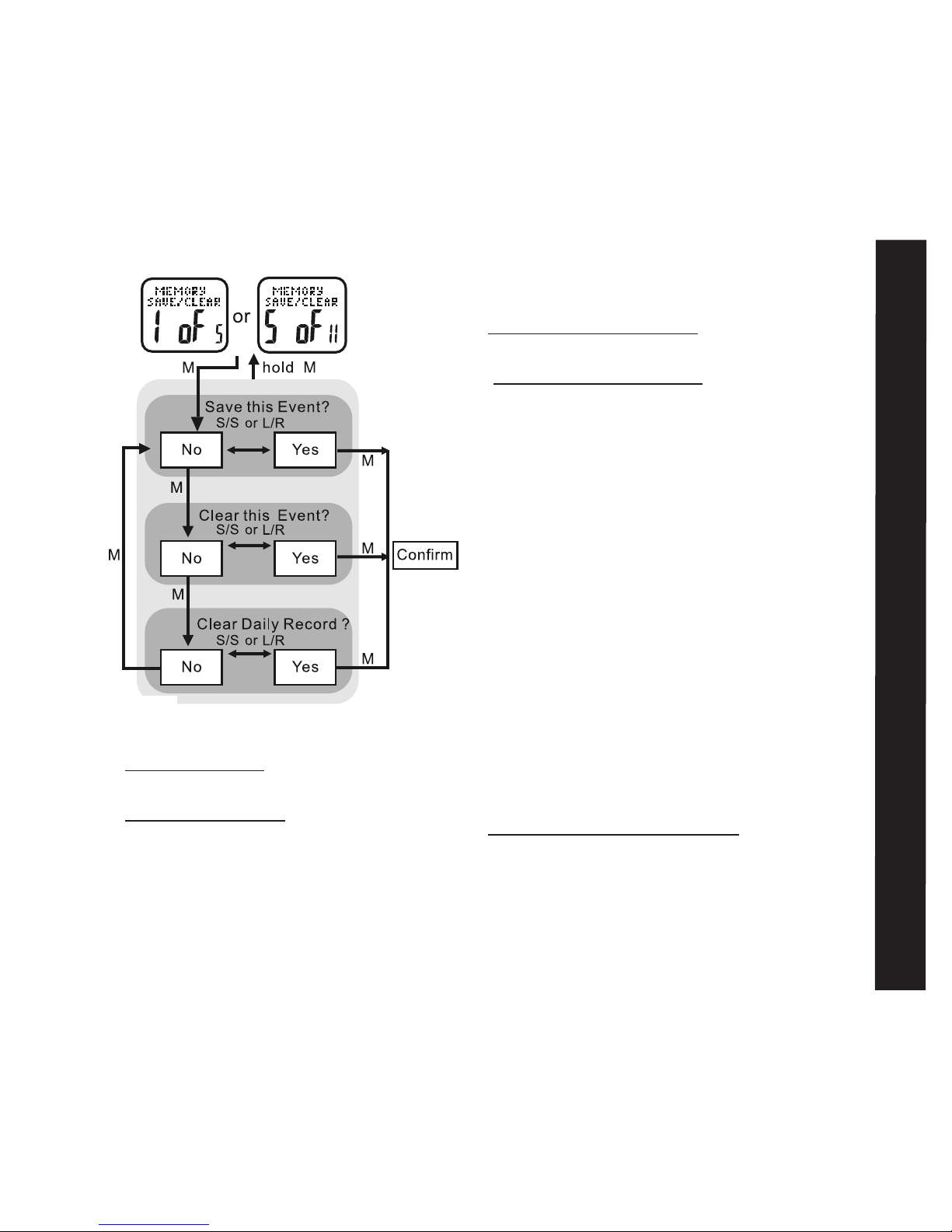
Memory Save/Clear: 1 of 5 See fig.16
Your Accelerator watch makes it easy to save
or delete any current exercise data that has
been recorded in exercise mode. See the
following to save or clear current data
HOLD MODE FOR 3 SECONDS in Exercise
Mode to access the Exercise Settings Menu
• PRESS MODE to enter Memory Save/
Clear: 1 of 5
• Press MODE to scroll through the various
saving/clearing options:
Save this event = saves data currently
fig.15
fig.14
Page 13
13
• Press ST/STP to select between yes/no
• Press MODE to confirm selection
Hold MODE for 3 seconds to return to the
Exercise Settings Menu
Hold MODE for 3 seconds to return to
Exercise Mode
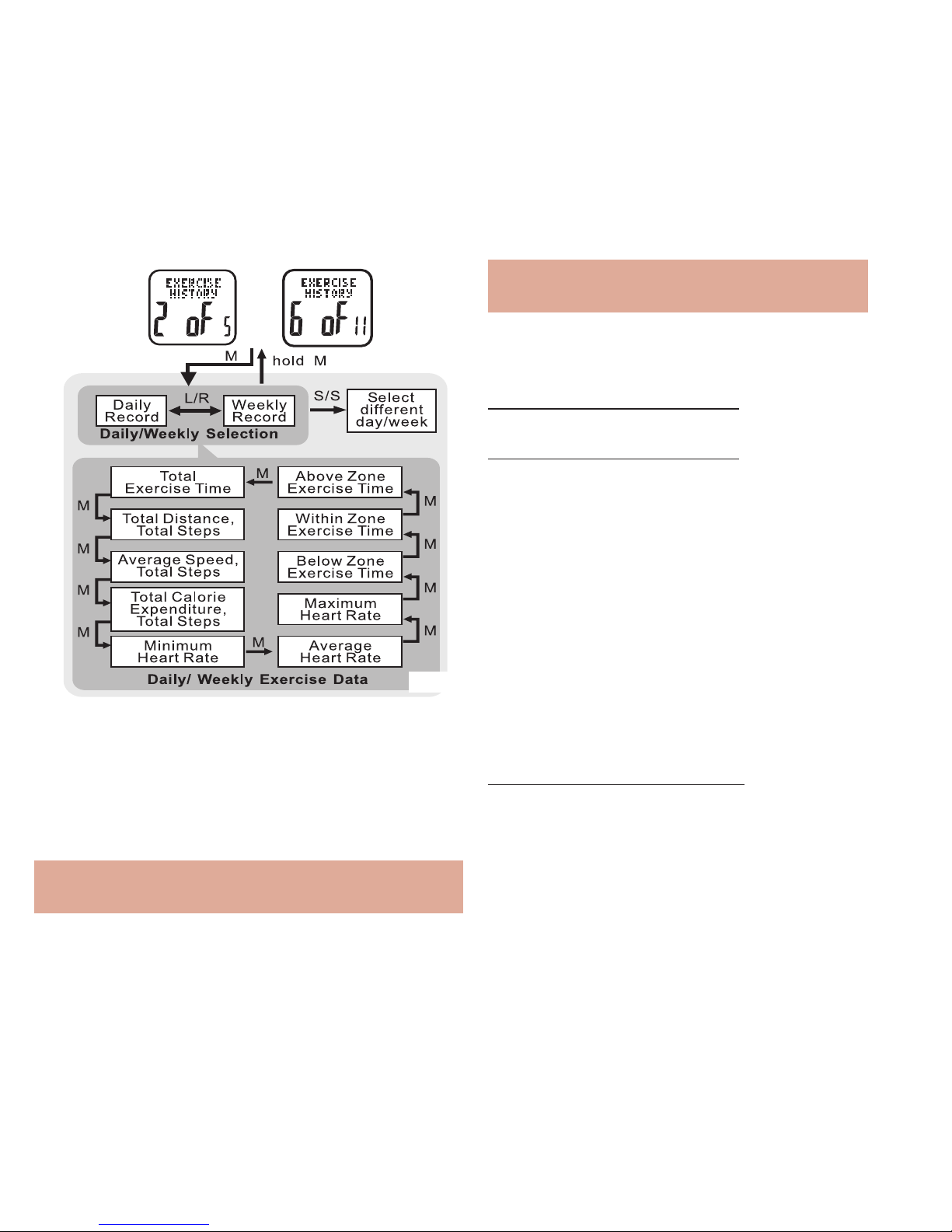
Exercise History: 2 of 5 See fig.17
Your Accelerator watch contains a vast amount
of internal memory. Daily exercise data
is
automatically stored every night at midnight.
The watch’s memory will store up to 7 days
of individual daily exercise data and log
the current day. After 7 days, the daily data
is automatically cataloged into a weekly
exercise record. The Accelerator’s memory
stores 10 weeks of records plus the last 7
days as daily exercise data. All data is stored
on a rolling counter i.e.: after 10 weeks, the
oldest record is replaced by the most recent
weekly data. See the following steps to
access the Accelerator’s internal memory
HOLD MODE FOR 3 SECONDS in Exercise
Mode to access the Exercise Settings Menu
• PRESS ST/STP or LAP/RESET to scroll
to Exercise History: 2 of 5
Exercise History
being recorded in exercise mode
Clear this event = deletes data currently
being recorded in exercise mode
Clear daily record = deletes previously
saved data for the current day, but
maintains data currently being recorded
in exercise mode
fig.16
Page 14
14
Example: 51W = weekly record for the
51st week of the year
• PRESS ST/STP to select the proper day
or week
HOLD MODE FOR 3 SECONDS to return to
the Exercise Settings Menu
HOLD MODE FOR 3 SECONDS to return to
the Exercise Mode
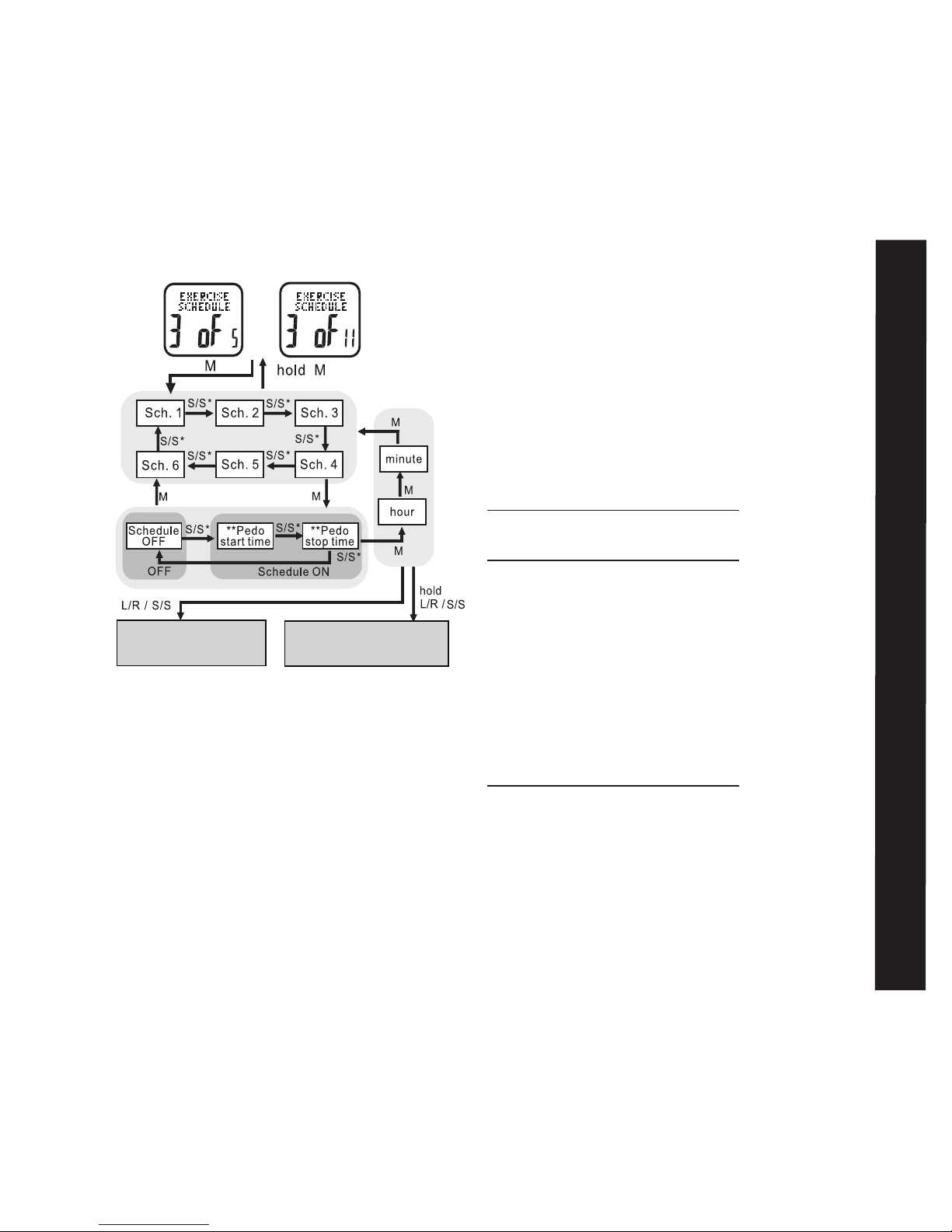
Exercise Schedule: 3 of 5 See fig.18
Your Accelerator watch has a useful scheduling
feature for exercise mode. This feature allows
you to determine specific times of the day
when exercise mode will automatically turn
on and off so that you don’t accidentally
forget to record important data.
Six start and/or stop times can be set in the
exercise schedule. See the following to set
your own exercise schedule
HOLD MODE FOR 3 SECONDS in Exercise
Mode to access the Exercise Settings Menu
• PRESS ST/STP or LAP/RESET to scroll
to Exercise Schedule: 3 of 5
• PRESS MODE to enter Exercise Schedule:
3 of 5
• PRESS MODE to enter Exercise History:
2 of 5
• PRESS LAP/RESET to select between daily
(previous 7 days) or weekly (previous 10 weeks
records)
Example: 12-20D = daily record for
December 20th
or
fig.17
Page 15
15
Pedometer Setting
• PRESS ST/STP to select from one of the
six exercise schedule start/stop times
• PRESS MODE to confirm
• PRESS ST/STP to select between off /
start / stop
• PRESS MODE to confirm
• PRESS ST/STP or LAP/RESET to adjust
the hour. Check whether the hour is for
AM or PM
• PRESS MODE to confirm
• PRESS ST/STP or LAP/RESET to adjust
the minutes
• PRESS MODE to confirm
Repeat above steps to set the remaining
exercise schedule start/stop times
HOLD MODE FOR 3 SECONDS to return to
Exercise Settings Menu
HOLD MODE FOR 3 SECONDS to return to
Exercise Mode
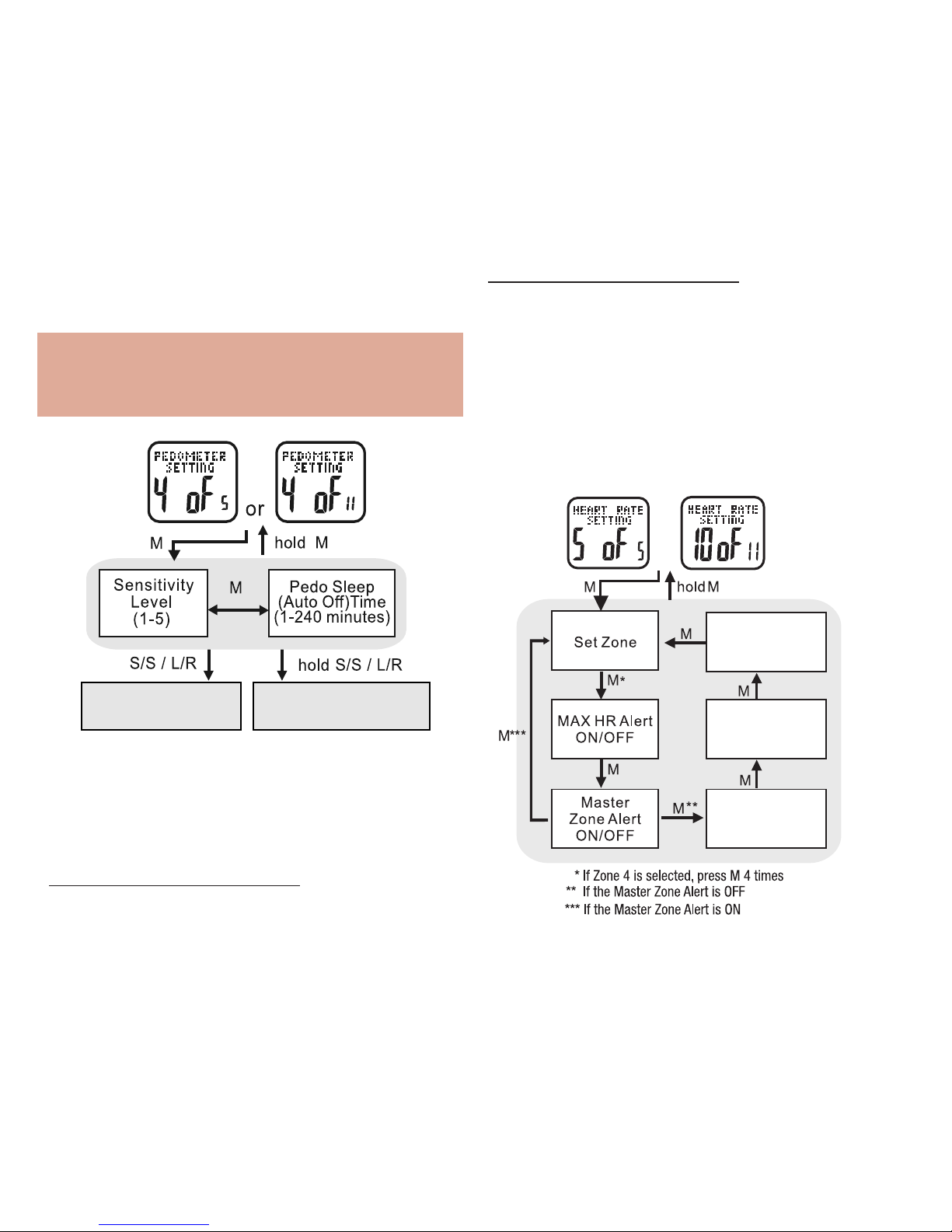
Pedometer Setting: 4 of 5 See fig.19
Your accelerator watch is highly customizable;
just tailor the accelerometer sensor to
match your workout. See the following
steps to adjust the sensitivity and sleep
timer of exercise mode
HOLD MODE FOR 3 SECONDS in Exercise
Mode to access Exercise Settings Menu
• PRESS ST/STP or LAP/RESET to scroll
to Pedometer Setting: 4 of 5
• PRESS MODE to enter Pedometer
Setting: 4 of 5
* Press L/R to move the selection by a reverse direction
* * Either a “start” or “stop” time can be for a schedule
or
Increase or decrease
the setting
Continously increase or
decrease the setting
fig.18
Page 16
16
HOLD MODE FOR 3 SECONDS to return to
Exercise Mode
Heart Rate Setting: 5 of 5 See fig.20
Your Accelerator watch, along with the included
chest strap, provides these advanced features:
current, maximum, average, minimum and
continuous heart rates. See the following to
enter heart rate settings
or
In Zone Alert
ON/OFF
Below Zone Alert
ON/OFF
Above Zone Alert
ON/OFF
fig.20
• PRESS ST/STP to adjust the pedometer’s
sensitivity level from 1-5
Note: Sensitivity range is from:
1=least sensitive to 5=most sensitive.
For most people, level 1 works best
• PRESS MODE to confirm
• PRESS ST/STP or LAP/RESET to adjust
pedometer’s sleep timer from 1 to 240 minutes
• PRESS MODE to confirm
HOLD MODE FOR 3 SECONDS to return to Exercise
Settings Menu
increase or decrease
the setting
continously increase or
decrease the setting
fig.19
Page 17

17
THE MAIN SETTINGS MENU
The main settings menu is used to calibrate all
the settings of your accelerator watch
Note: The main settings menu can only be
accessed via the home time display. If no
button is pressed for 1 minute, the watch
will scroll through all previous screens until
it returns to home time display
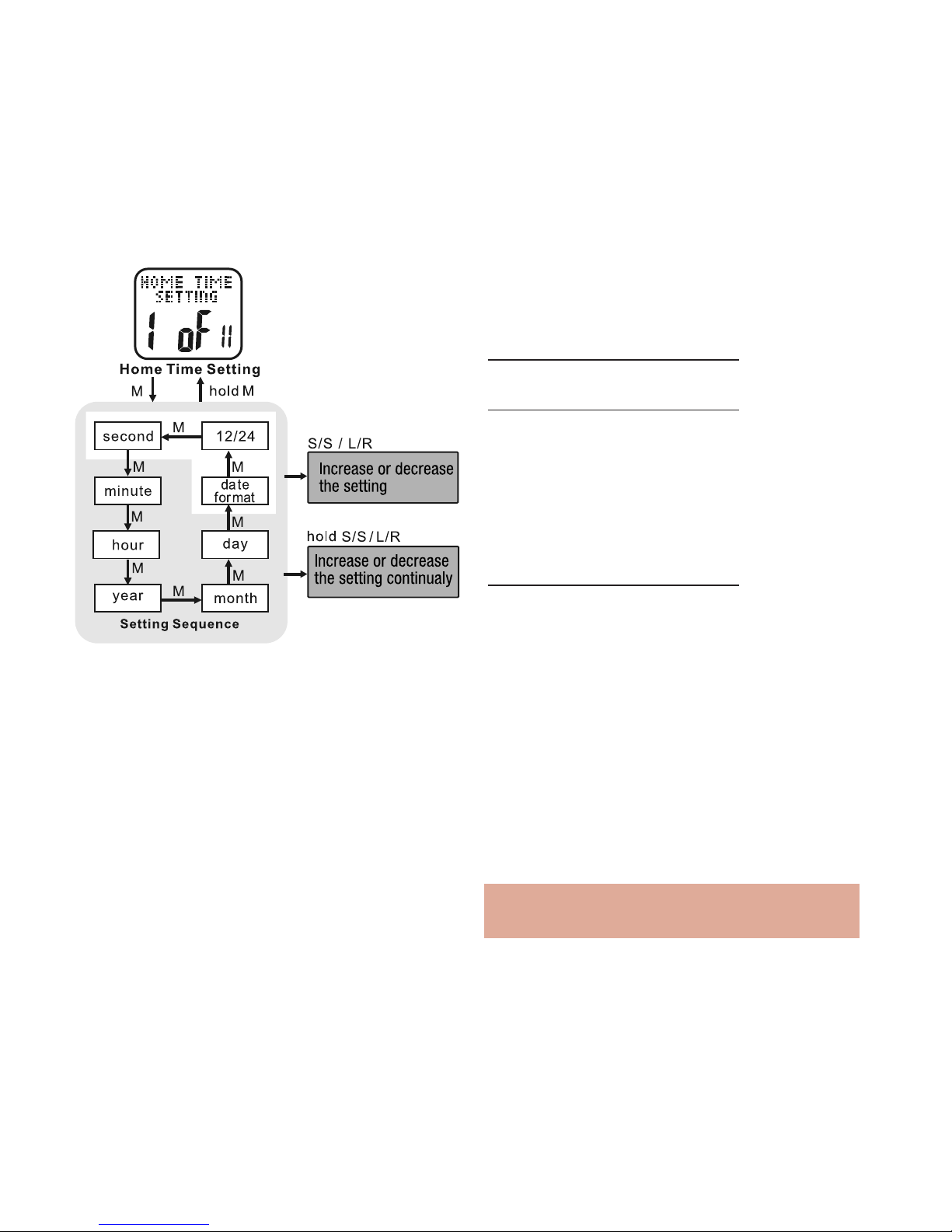
Home Time Setting: 1 of 11 See fig.21
HOLD MODE FOR 3 SECONDS in the home
time display to access the Main Settings
Menu
• PRESS MODE to enter Home Time
Setting: 1 of 11
• PRESS ST/STP or LAP/RESET to zero
the seconds
• PRESS MODE to confirm
• PRESS ST/STP or LAP/RESET to adjust
the minutes
• PRESS MODE to confirm
• PRESS ST/STP or LAP/RESET to adjust
the hour. Check whether the hour is for
AM or PM
HOLD MODE FOR 3 SECONDS in Exercise
Mode to access the Exercise Settings Menu
• PRESS ST/STP or LAP/RESET to scroll
to Heart Rate Setting: 5 of 5
• PRESS MODE to enter Heart Rate
Setting: 5 of 5
• PRESS ST/STP to select a set zone: 1- 4
• PRESS MODE to confirm selection
• PRESS MODE to navigate among the 6
settings
• PRESS ST/STP or LAP/RESET to turn
ON/Off
HOLD MODE FOR 3 SECONDS to return to
Exercise Settings Menu
HOLD MODE FOR 3 SECONDS to return to
Exercise Mode
Complete instructions for all the menus,
functions and settings available for heart
Rate data are found in the Main Settings
Menu: Heart Rate Setting: 10 of 11
Main Settings Menus
Page 18
18
• PRESS ST/STP or LAP/RESET to adjust
the time format
• PRESS MODE to confirm
HOLD MODE FOR 3 SECONDS to return to
the Main Settings Menu
HOLD MODE FOR 3 SECONDS to return to
the Home Time display
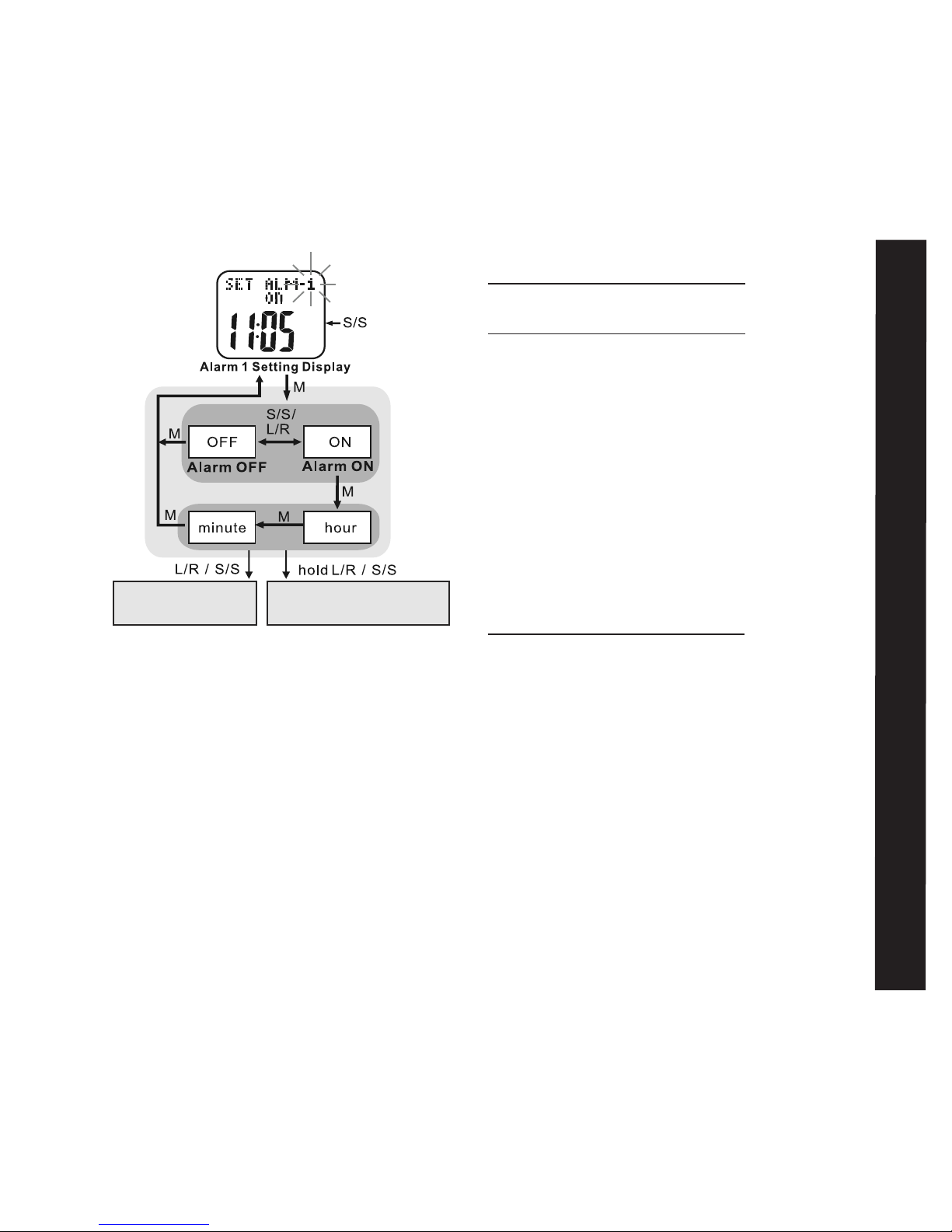
Alarm Setting: 2 of 11 See fig.22
Your Accelerator watch has 5 Daily Alarm
Settings. See the following to set the daily
alarms
HOLD MODE FOR 3 SECONDS in the home
time display to access the Main Settings
Menu
• PRESS ST/STP or LAP/RESET to scroll
to Alarm Setting: 2 of 11
• PRESS MODE to enter Alarm Setting:
2 of 11
• PRESS ST/STP to select from 1 of the 5
daily alarms
• PRESS MODE to confirm
• PRESS ST/STP to toggle the alarm on /off
• PRESS MODE to confirm
Note: if alarm is off, you will not be able to
adjust the alarm time
• PRESS MODE to confirm
• PRESS ST/STP or LAP/RESET to adjust the year
• PRESS MODE to confirm
• PRESS ST/STP or LAP/RESET to adjust the
month
• PRESS MODE to confirm
• PRESS ST/STP or LAP/RESET to adjust the day
• PRESS MODE to confirm
• PRESS ST/STP or LAP/RESET to adjust the
day/month or month/day format
• PRESS MODE to confirm
fig.21
Page 19
19
HOLD MODE FOR 3 SECONDS to return to
the Main Settings Menu
HOLD MODE FOR 3 SECONDS to return to
return to the Home Time display
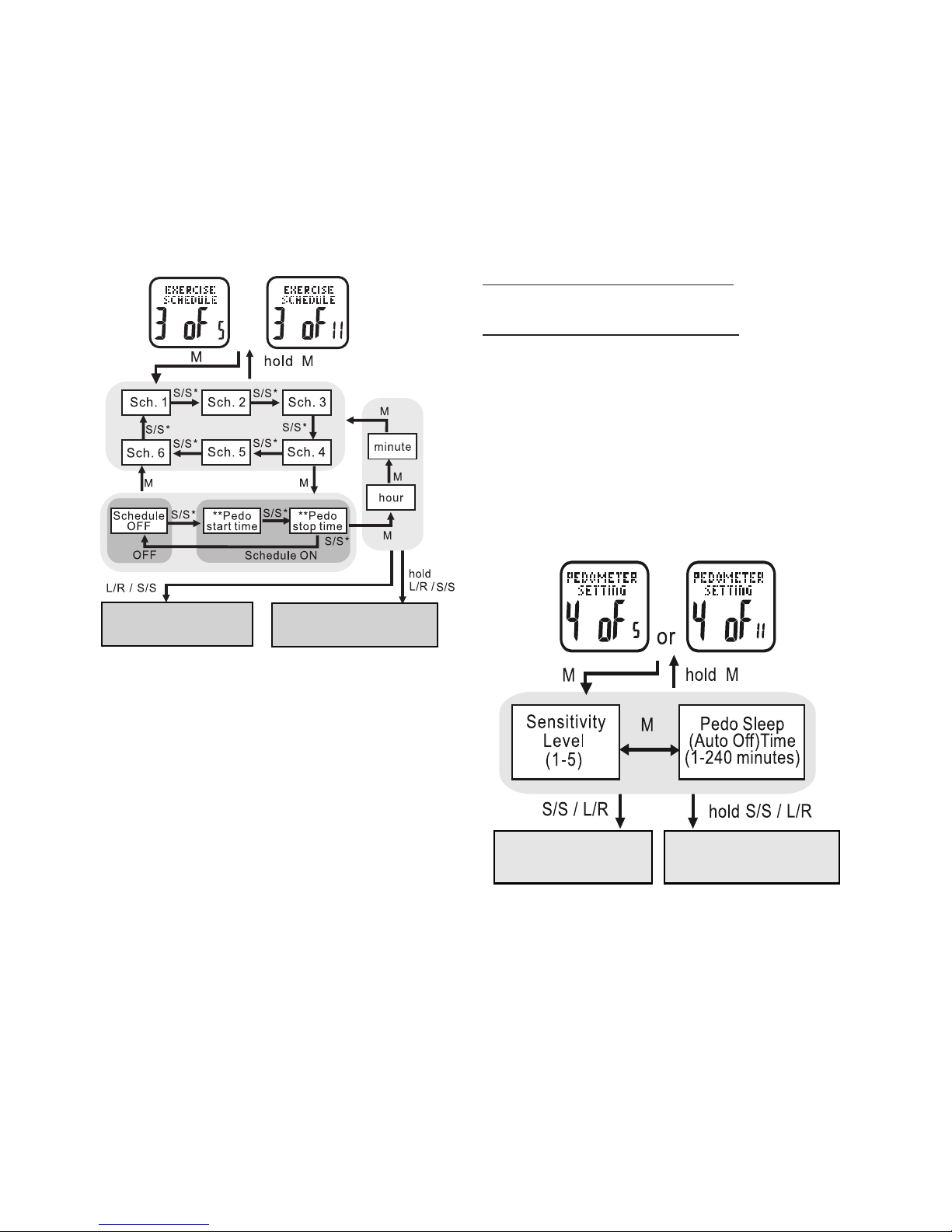
Exercise Schedule: 3 of 11 See fig. 23
Your Accelerator watch has a useful scheduling
feature for exercise mode. This allows you
to determine specific times of the day when
exercise mode will automatically turn on and
off so that you don’t accidentally forget to
record important data. Six start and/or stop
times can be set in the exercise schedule.
See the following to set your own schedule
HOLD MODE FOR 3 SECONDS in the Home
Time display to access Main Settings Menu
• PRESS ST/STP or LAP/RESET to scroll
to Exercise Schedule: 3 of 11
• PRESS MODE to enter Exercise Schedule:
3 of 11
• PRESS ST/STP to select from one of the
six exercise schedule start/stop times
• PRESS MODE to confirm
• PRESS ST/STP to select between
off/start/stop
• PRESS MODE to confirm
• PRESS ST/STP or LAP/RESET to adjust
the hour. Check whether the hour is for
AM or PM
• PRESS MODE to confirm
• PRESS ST/STP or LAP/RESET to adjust
the minute
• PRESS MODE to confirm
Repeat above steps to set the remaining
alarms
Exercise Schedule
increase or decrease
the setting value
continously increase or
decrease the setting value
fig.22
Page 20
20
• PRESS ST/STP or LAP/RESET to adjust the
hour. Check whether the hour is for AM or PM
• PRESS MODE to confirm
• PRESS ST/STP or LAP/RESET to adjust the
minutes
• PRESS MODE to confirm
Repeat above steps to set the remaining exercise
schedule start/stop times
HOLD MODE FOR 3 SECONDS to return to
the Main Settings Menu
HOLD MODE FOR 3 SECONDS to return to
the Home Time display
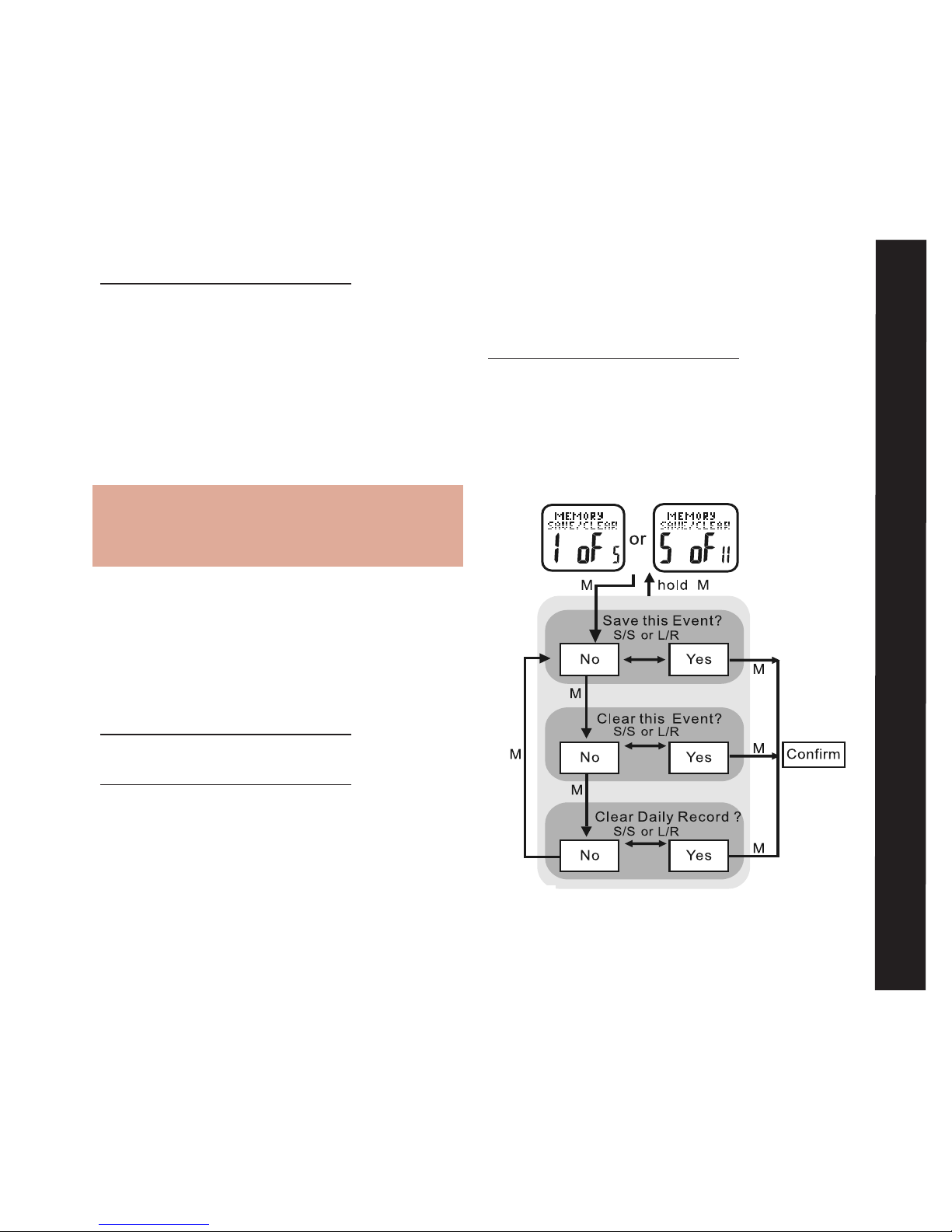
Pedometer Setting: 4 of 11 See fig.24
Your accelerator watch is highly customizable;
just tailor the accelerometer sensor to
match your workout. See the following to
adjust the sensitivity and sleep timer of
exercise mode
increase or decrease
the setting
continously increase or
decrease the setting
fig.24
* Press L/R to move the selection by a reverse direction
* * Either a “start” or “stop” time can be for a schedule
or
Increase or decrease
the setting
Continously increase or
decrease the setting
fig.23
Page 21
21
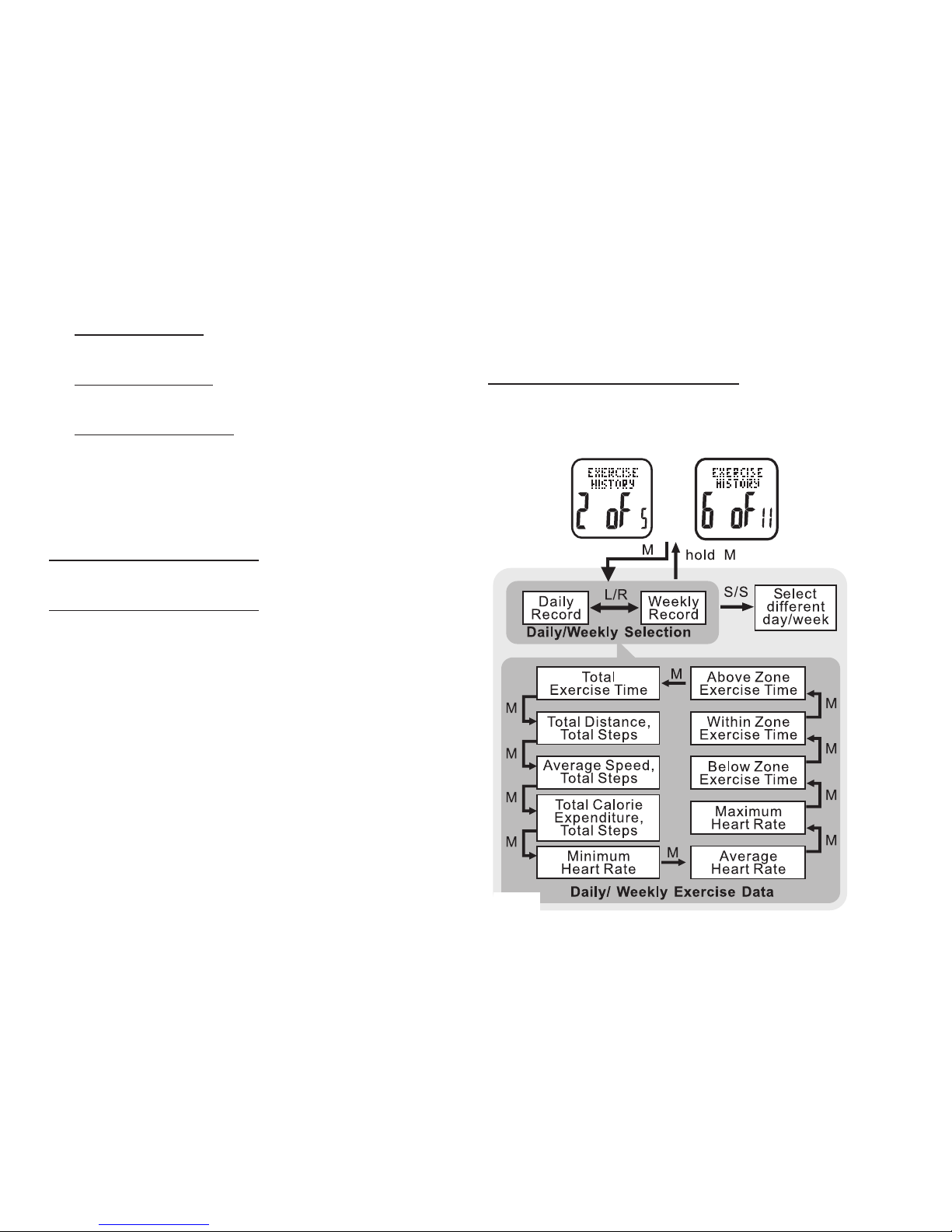
that has been recorded in exercise mode.
See the following to save or clear current
exercise data
HOLD MODE FOR 3 SECONDS in Exercise
Mode to access the Exercise Settings Menu
• PRESS ST/STP or LAP/RESET to scroll
to Memory Save/Clear: 5 of 11
• PRESS MODE to enter Memory Save/
Clear: 5 of 11
HOLD MODE FOR 3 SECONDS in the Home
Time display to access Main Settings Menu
• PRESS ST/STP or LAP/RESET to scroll to
Pedometer Setting: 4 of 11
• PRESS MODE to enter Pedometer
Setting: 4 of 11
• PRESS ST/STP to adjust the pedometer’s
sensitivity level from 1-5
Note: Sensitivity range is from:
1=least sensitive to 5=most sensitive.
For most people, level 1 works best
• PRESS MODE to confirm
• PRESS ST/STP or LAP/RESET to adjust
pedometer’s sleep timer from 1 to 240
minutes
• PRESS MODE to confirm
HOLD MODE FOR 3 SECONDS to return to
the Main Settings Menu
HOLD MODE FOR 3 SECONDS to return to
the Home Time display
Memory Save/Clear: 5 of 11 See fig.25
Your Accelerator watch makes it easy to quickly
save or delete any current exercise data
Memory Save/Clear
fig.25
Page 22
22
• Press MODE to scroll through the various
saving/clearing options:
Save this event = saves data currently being
recorded in exercise mode
Clear this event = deletes data currently being
recorded in exercise mode
Clear daily record = deletes previously saved
data for the current day, but maintains data
currently being recorded in exercise mode
• Press ST/STP to select between yes/no
• Press MODE to confirm selection
Hold MODE for 3 seconds to return to the Main
Settings Menu
Hold MODE for 3 seconds to return to the Home
Time display
Exercise History: 6 of 11 See fig.26
The watch contains a vast amount of internal
memory. Daily exercise data is automatically stored
every night at midnight. The watch’s memory will
store up to 7 days of individual daily exercise data
and log the current day. After 7 days, the daily data
is automatically cataloged into a weekly exercise
record. The Accelerator’s memory stores 10 weeks
of records plus the last 7 days as daily exercise
data. All data is stored on a rolling counter i.e.:
after 10 weeks, the oldest record is replaced
by the most recent weekly data. See the
following steps to access the Accelerator’s
internal memory
HOLD MODE FOR 3 SECONDS i
n Home Time
display to access the Main Settings Menu
• PRESS ST/STP or LAP/RESET to scroll
or
fig.26
Page 23
23
to Exercise History: 6 of 11
• PRESS MODE to enter Exercise History:
6 of 11
• PRESS LAP/RESET to select between:
* daily- previous seven days or
* weekly- previous ten weeks
Example: 12-20D = daily exercise record
for December 20th
Example: 51W = weekly exercise record for
the 51st week of the year
• PRESS ST/STP to select the proper day
or week
HOLD MODE FOR 3 SECONDS to return to
the Main Settings Menu
HOLD MODE FOR 3 SECONDS to return to
the Home Time display
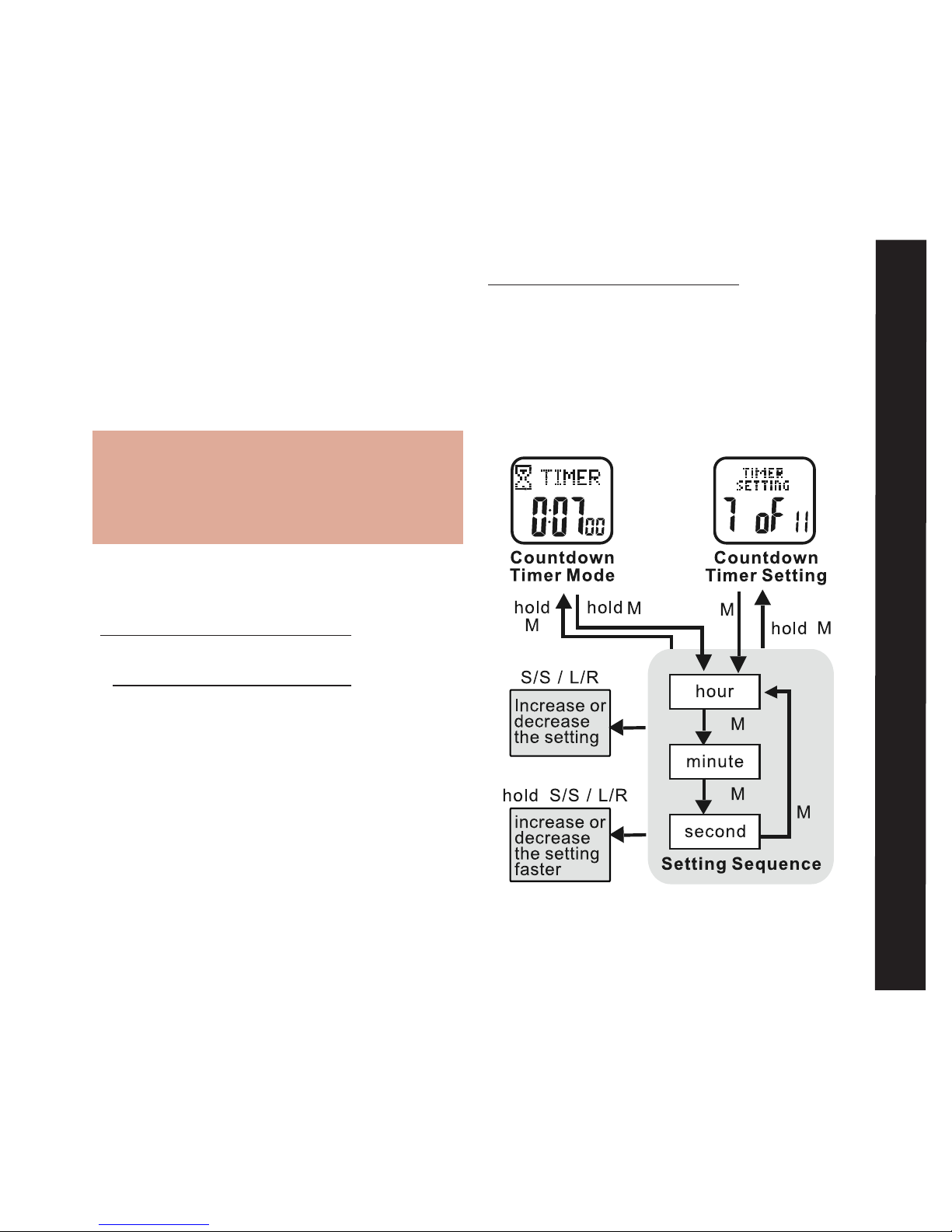
Timer Setting: 7 of 11 See fig.27
Your Accelerator watch has a convenient
Countdown Timer. The timer can be used
for advanced training or as a quick reminder.
The timer counts backwards from your programmed time and beeps at critical intervals.
See the following to set the Countdown Timer.
HOLD MODE FOR 3 SECONDS in the home
time display to access the Main Settings
Menu
• PRESS ST/STP or LAP/RESET to scroll
to Timer Setting: 7 of 11
• PRESS MODE to enter Timer Setting:
7 of 11
fig.27
Timer Setting
Page 24
24
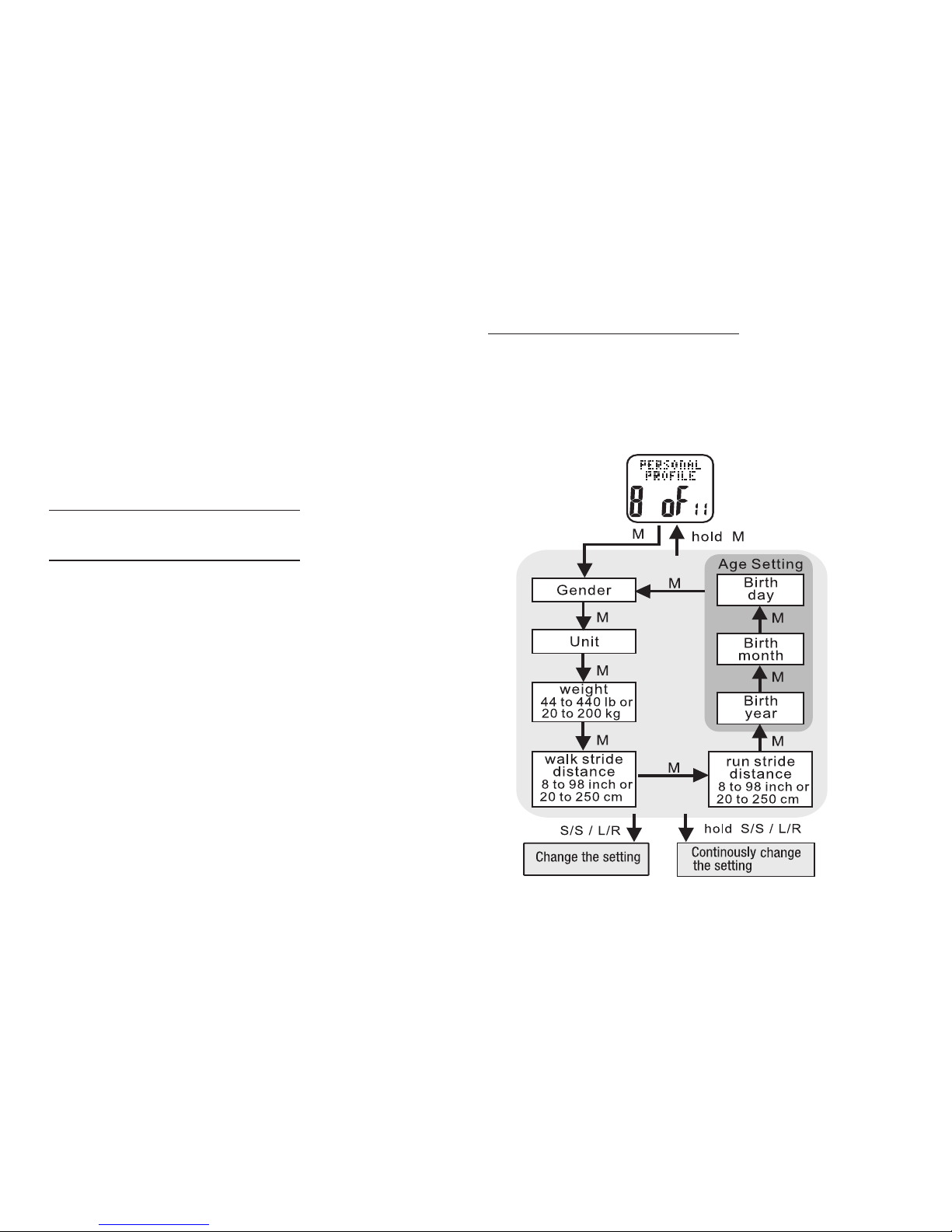
length conversions. See the following to set
a personal profile
HOLD MODE FOR 3 SECONDS in the Home
Time display to access the Main Settings
Menu
• PRESS ST/STP or LAP/RESET to scroll
to Personal Profile: 8 of 11
• PRESS ST/STP or LAP/RESET to adjust the
hour. Check whether the hour is for AM or PM
• PRESS MODE to confirm
• PRESS ST/STP or LAP/RESET to adjust the
minutes
• PRESS MODE to confirm
• PRESS ST/STP or LAP/RESET to adjust the
seconds
• PRESS MODE to confirm
HOLD MODE FOR 3 SECONDS to return to the
Main Settings Menu
HOLD MODE FOR 3 SECONDS to return to the
Home Time display
Personal Profile: 8 of 11 See fig.28
Taking 5 minutes to determine your personal
profile measurements is key to enjoying your
Accelerator watch. Most important is determining
your average stride lengths. The greater the test
distance, the more accurate your data will be. A
distance of 100m or 300ft is sufficient for proper
calibration. This distance is easy to measure at
a local running track, as it is the length of one
straightaway. Use the online stride calculator at
www.tech4o.com for help with various stride
fig.28
Page 25
25
• PRESS MODE to enter Personal Profile:
8 of 1
• PRESS ST/STP to select preferred units
• PRESS MODE to confirm
• PRESS ST/STP or LAP/RESET to
adjust the weight to match your own
• PRESS MODE to confirm
• PRESS ST/STP or LAP/RESET to
adjust the average walking stride to
match your own
• PRESS MODE to confirm
• PRESS ST/STP or LAP/RESET to adjust
the average running stride to match
your own
• PRESS MODE to confirm
HOLD MODE FOR 3 SECONDS to return to
the Main Settings Menu
HOLD MODE FOR 3 SECONDS to return to
the Home Time display
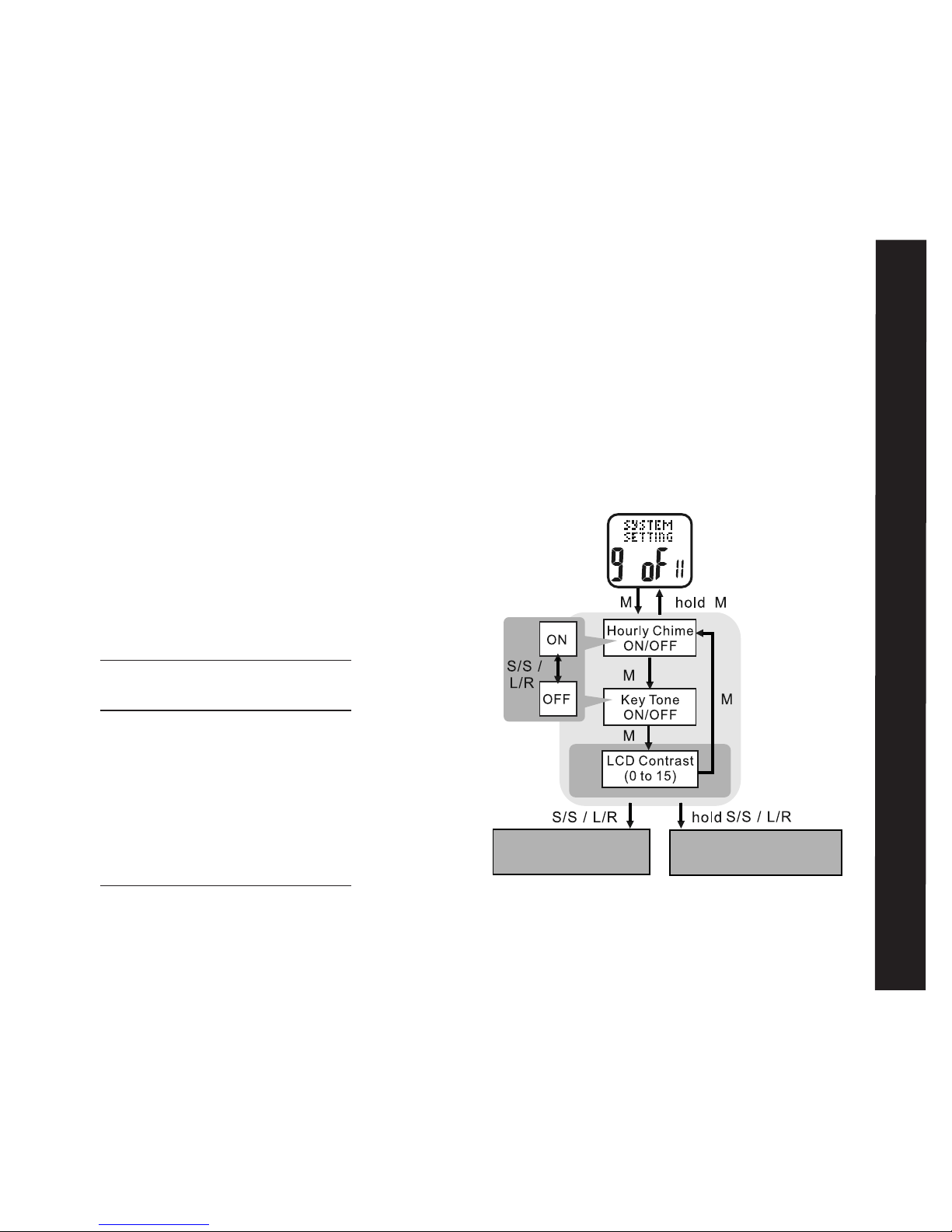
System Setting: 9 of 11 See fig.29
This section describes how to adjust various
audio and visual characteristics of the
Accelerator watch
HOLD MODE FOR 3 SECONDS in the
Home Time display to access Main Settings
Menu
• PRESS ST/STP or LAP/RESET to scroll
to System Setting: 9 of 11
• PRESS MODE to enter System Setting:
9 of 11
• PRESS ST/STP to adjust the hourly chime
on or off
• PRESS MODE to confirm
System Setting
Increase or decrease
the setting
Continously increase or
decrease the setting
fig.29
Page 26
26
See the following 5 sections for detailed
instructions on how to set and adjust each
of the five alerts .
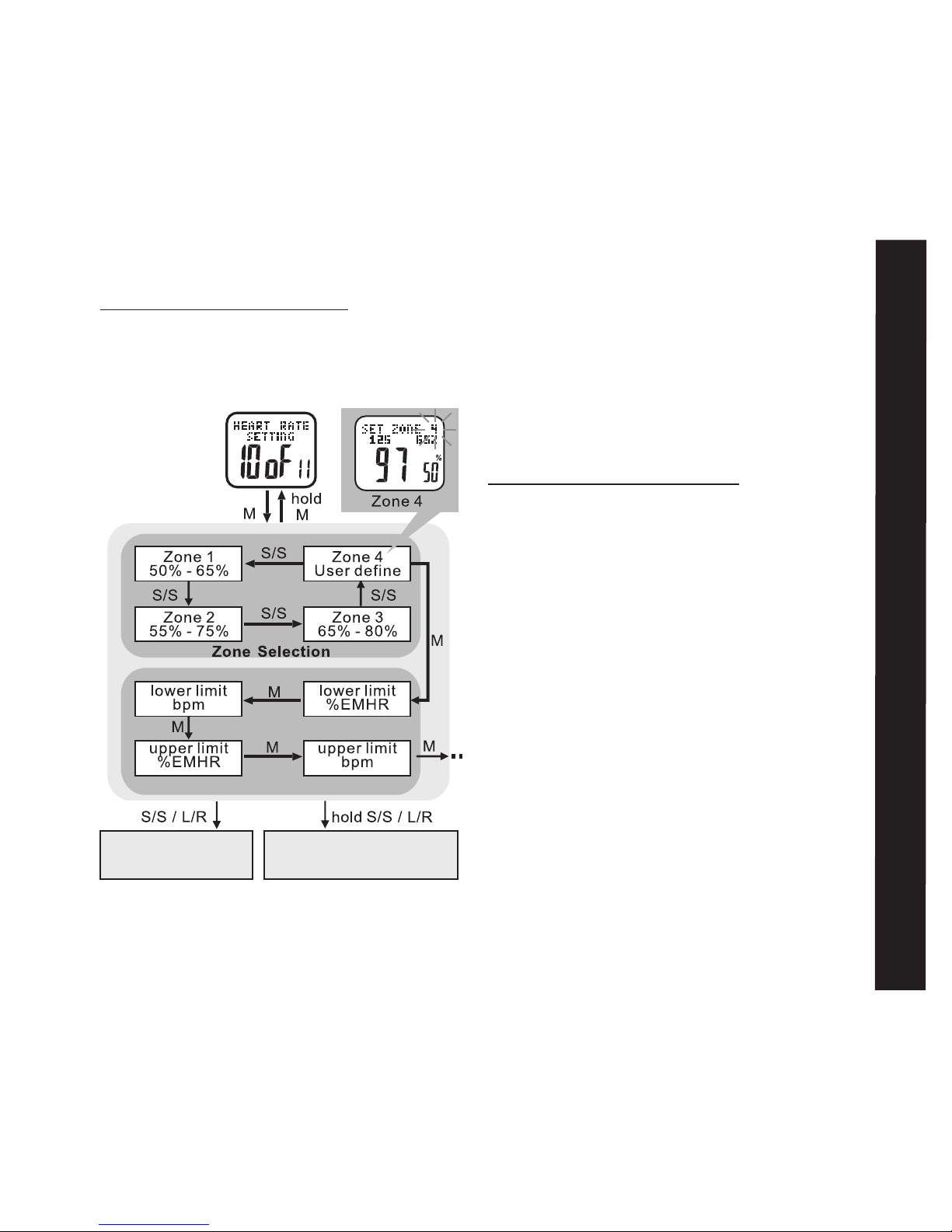
Note: You are able to change the limits in
zone 4 only. The setting range is 40-240
bmp. The limits in zones 1-3 are pre-set.
• PRESS ST/STP to turn the key tone on or off
• PRESS MODE to confirm
• PRESS ST/STP or LAP/RESET to adjust LCD
screen contrast
• PRESS MODE to confirm
HOLD MODE FOR 3 SECONDS to return to the
Main Settings Menu
HOLD MODE FOR 3 SECONDS to return to the
Home Time display
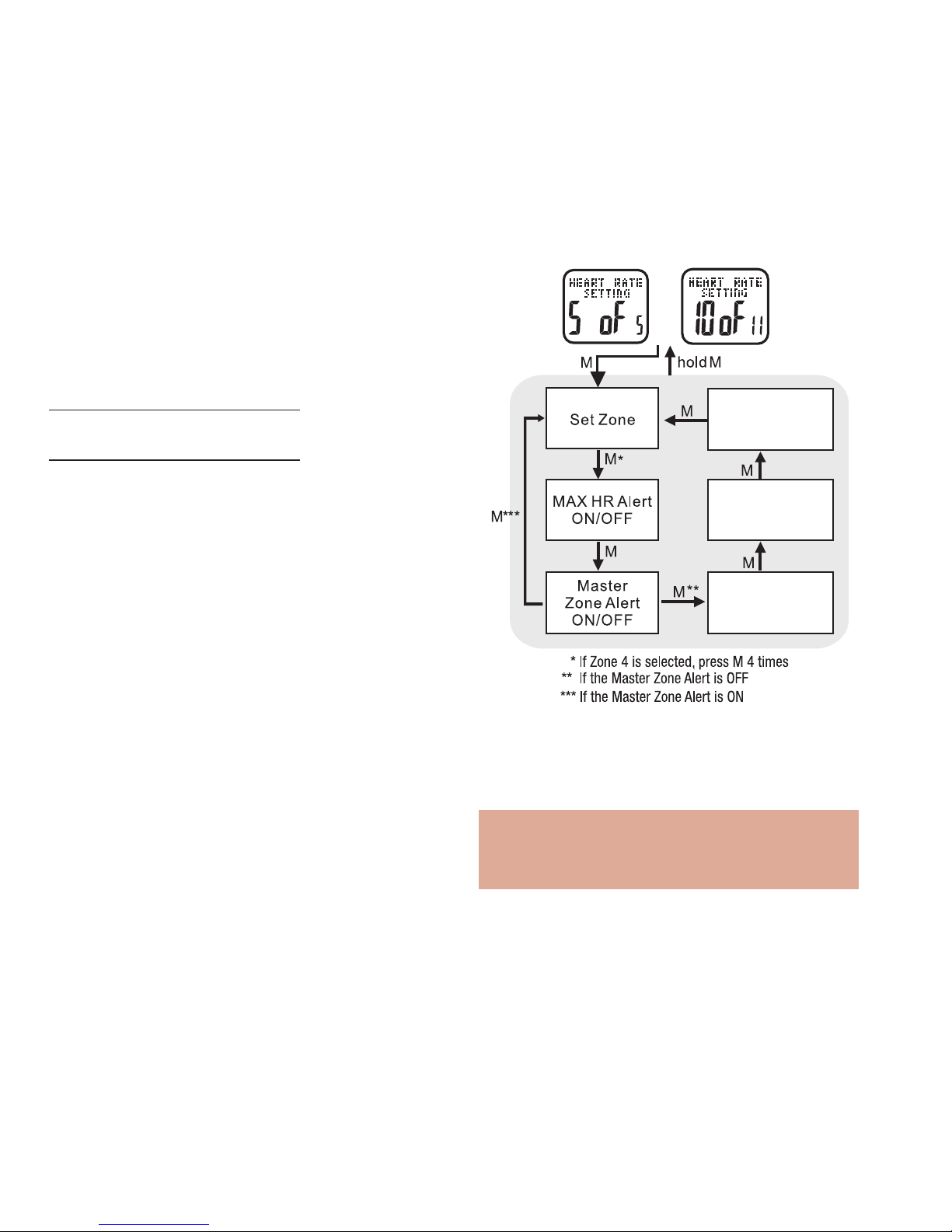
Heart Rate Setting: 10 of 11 See fig.30
The following five alerts can be customized for each
of the 4 heart rate zones. The active alerts will
beep every 10 seconds.
• MHR Alert - is 4 quick beeps when you exceed
your estimated maximum heart rate.
• Zone Alert - is the master volume ON/OFF for
all alerts in this zone
• Above Zone Alert - is 3 quick beeps when your
current heart rate exceeds the maximum beats/
minute for that zone.
• In Zone Alert- is 1 beep when you are in the
target zone.
• Below Zone Alert - is 2 quick beeps when your
heart rate drops below the minimum beats/
minute for that zone.
or
In Zone Alert
ON/OFF
Below Zone Alert
ON/OFF
Above Zone Alert
ON/OFF
fig.30
Page 27
27
To Set Limits for Zone 4: See fig.31
HOLD MODE FOR 3 SECONDS in the Home
Time display to access Main Settings Menu
• PRESS ST/STP or LAP/RESET to scroll
to Heart Rate Setting: 10 of 11
• PRESS ST/STP or LAP/RESET to scroll
until SET ZONE 4 displays
• PRESS MODE to enter lower and upper
limit setting
• PRESS ST/STP or LAP/RESET to adjust
your upper and lower limits for bmp and
%EMHR
• PRESS MODE to confirm selection
HOLD MODE FOR 3 SECONDS to return to
Main Settings Menu
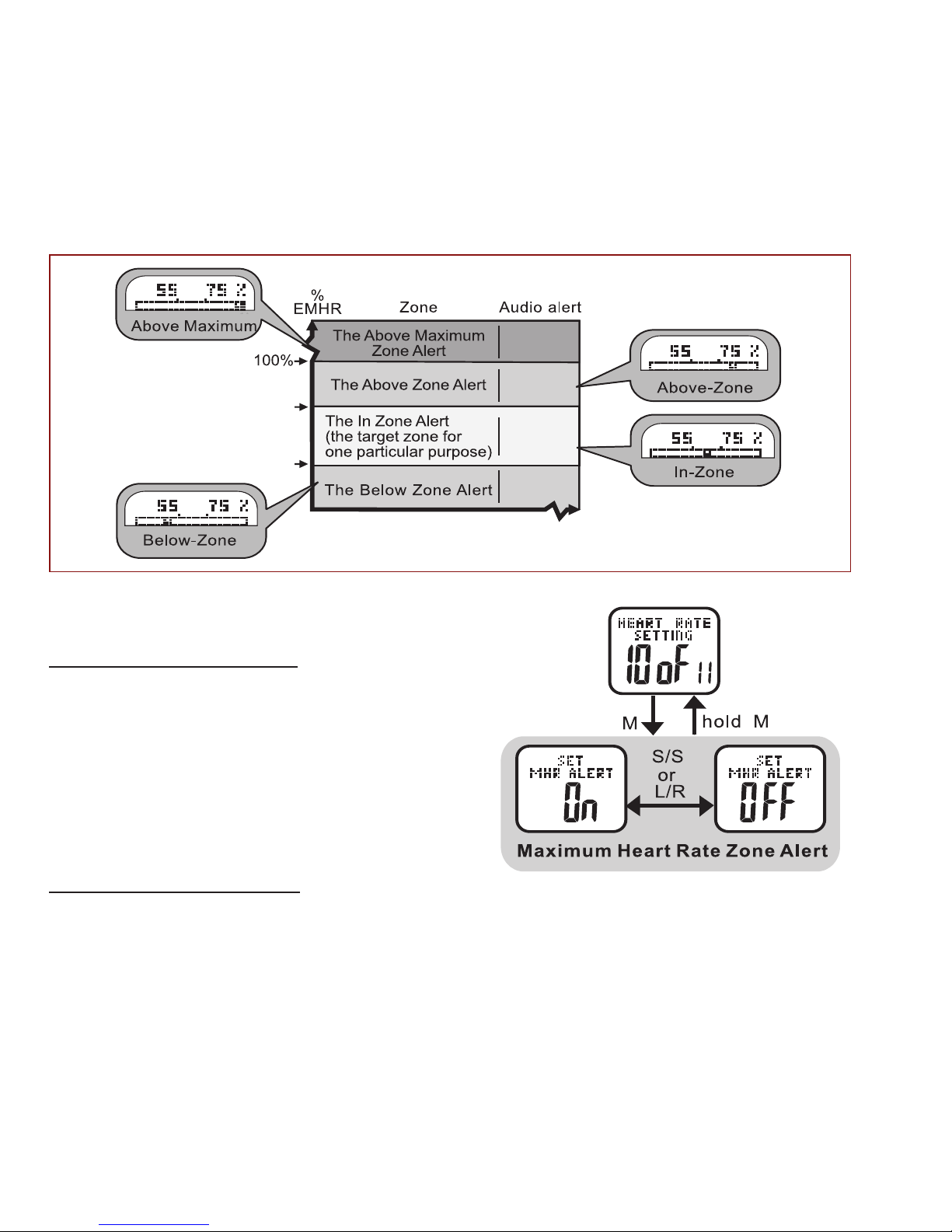
The Heart Rate Zone Alerts:
Your Accelerator watch features four different
heart rate zone alerts that sound whenever
a threshold is reached within the chosen
zone. See example: Zone 2 in the chart on
the next page fig.32
Heart Rate Alerts
increase or decrease
the setting value
continously increase or
decrease the setting value
Zone 4 Limit Selection
fig.31
Page 28
28
4 BEEPS
3 BEEPS
1 BEEP
2 BEEPS
upper limit
lower limit
T
o Switch Maximum Heart Rate Alert On/Off:
See fig.33
HOLD MODE FOR 3 SECONDS in the Home Time
display to access Main Settings Menu
• PRESS ST/STP or LAP/RESET to scroll to Heart
Rate Setting: 10 of 11
• PRESS MODE to scroll until SET MHR ALERT
displays
• PRESS ST/STP or LAP/RESET to turn alert
ON or OFF
• PRESS MODE to confirm selection
HOLD MODE FOR 3 SECONDS to return to Main
Settings Menu
fig.33
fig.32
Page 29
29
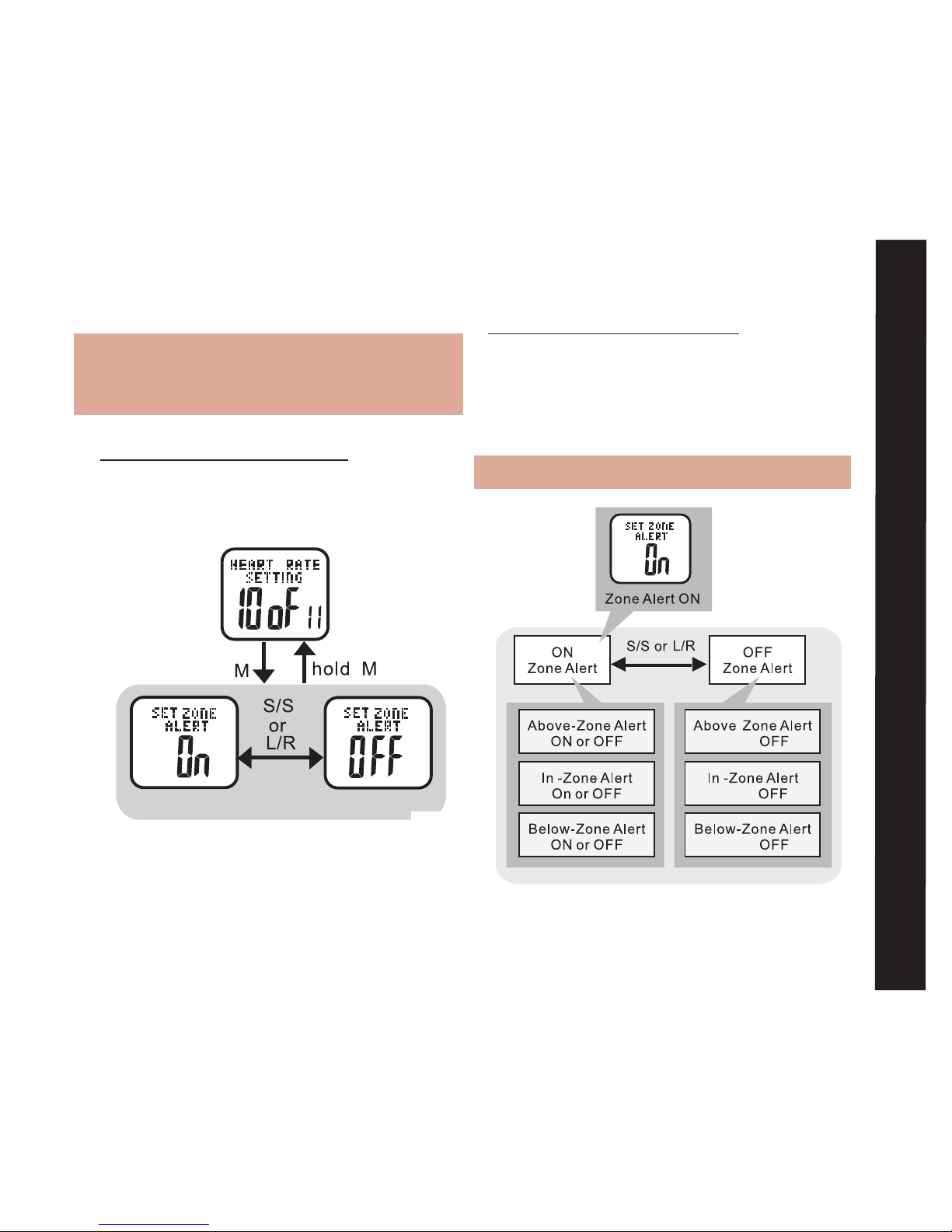
To Switch Heart Rate Zone Alerts On/Off:
See fig.34
Note: Setting this to OFF also turns OFF:
Above Zone, In Zone, and Below Zone
alerts
HOLD MODE FOR 3 SECONDS in the Home
Time display to access Main Settings Menu
• PRESS ST/STP or LAP/RESET to scroll to
Heart Rate Setting: 10 of 11
• PRESS MODE to scroll until SET
ZONE ALERT displays
• PRESS ST/STP or LAP/RESET to turn
alert ON or OFF
• PRESS MODE to confirm selection
HOLD MODE FOR 3 SECONDS to return to
Main Settings Menu
To Switch Individual Heart Rate Alerts
On/Off: See fig.35
Note: SET ZONE ALERT must be ON.
Heart Rate Alerts On/Off
fig.35
Heart Rate Zone Alert Setting
fig.34
Page 30
30
HOLD MODE FOR 3 SECONDS in the Home Time
display to access Main Settings Menu
• PRESS ST/STP or LAP/RESET to scroll to Heart
Rate Setting: 10 of 11
• PRESS MODE to scroll through ABOVE ZONE,
IN ZONE, OR BELOW ZONE ALERTS
• PRESS ST/STP or LAP/RESET to turn an alert
ON or OFF
HOLD MODE FOR 3 SECONDS to return to Main
Settings Menu
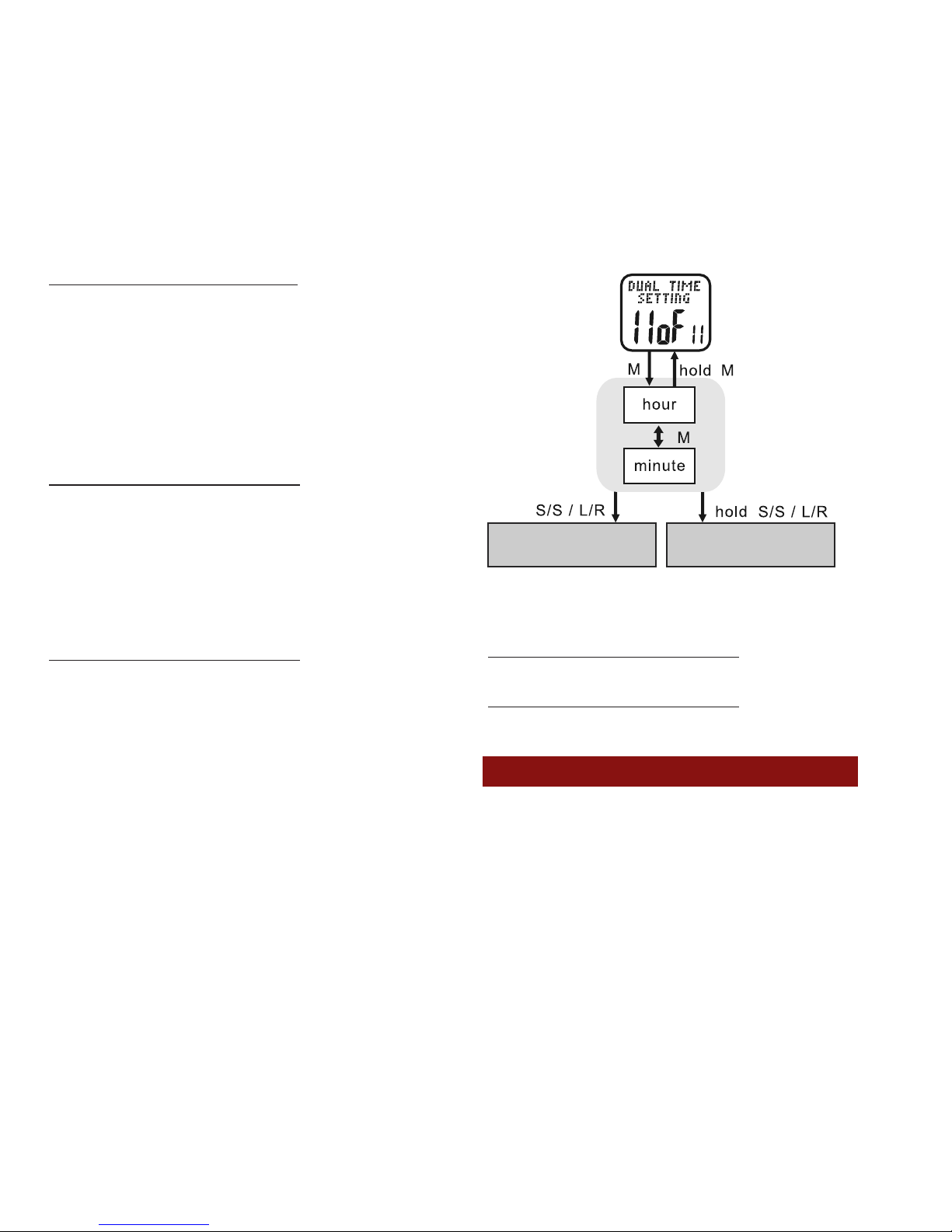
Dual Time Setting: 11 of 11 See fig.36
Your Accelerator watch is capable of storing an
alternate time zone. See the following to set up a
Dual Time and its display options
HOLD MODE FOR 3 SECONDS in the Home Time
display to access the Main Settings Menu
• PRESS ST/STP or LAP/RESET to scroll to Dual
Time Setting: 11 of 11
• PRESS MODE to enter Dual Time Setting: 11
of 11
• PRESS ST/STP or LAP/RESET to adjust the
hour. Check whether the hour is for AM or PM
• PRESS MODE to confirm
• PRESS ST/STP or LAP/RESET to adjust the
minutes
• PRESS MODE to confirm
HOLD MODE FOR 3 SECONDS to return to
the MAIN SETTINGS MENU
HOLD MODE FOR 3 SECONDS to return to
the Home Time display
POWER SAVING MODE:
All Accelerator watches have a power saving
mode to conserve battery life. The power
saving mode turns off the display but does
not turn off the watch functions
increase or decrease
the setting
continually increase or
decrease the setting
fig.36
Page 31
31
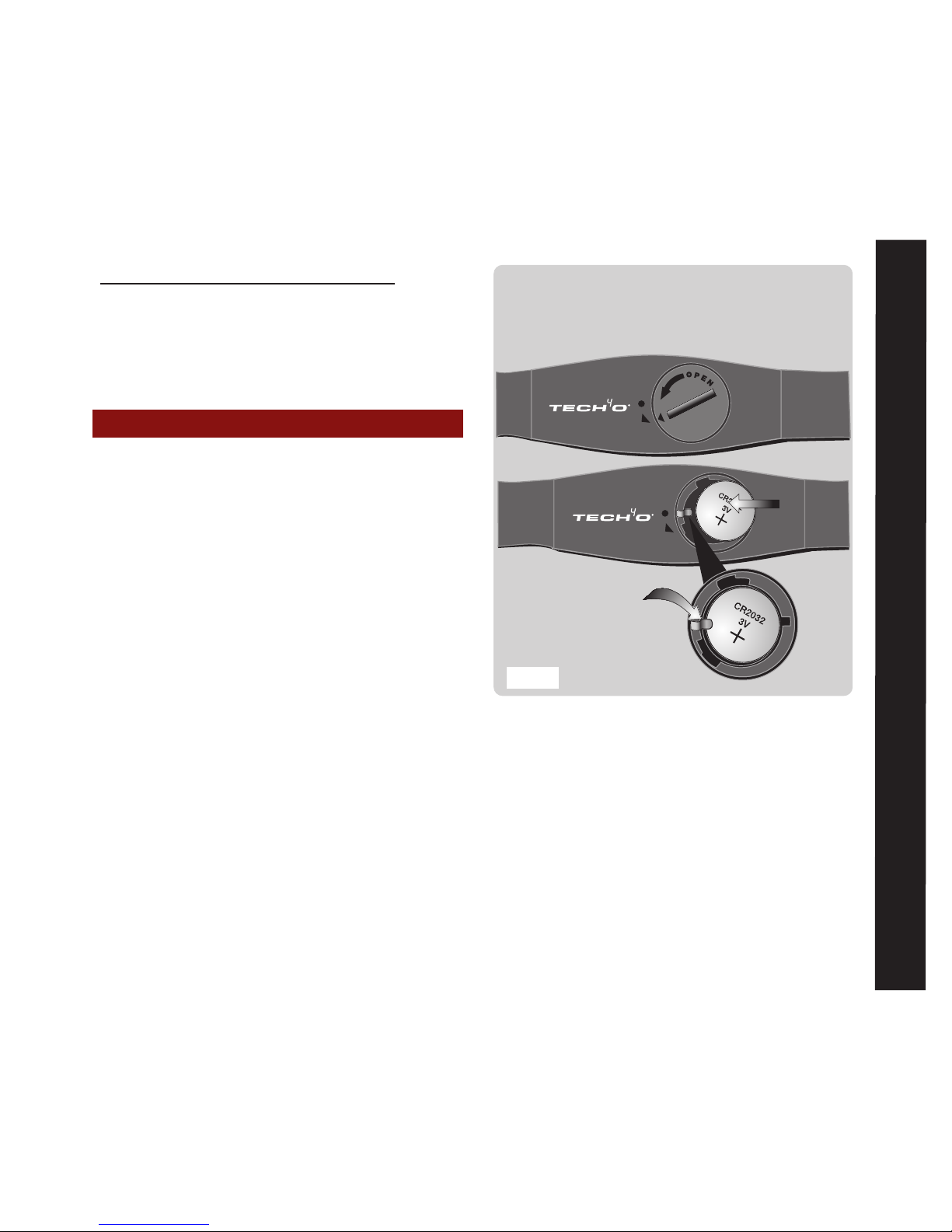
3. Align the cover ARROW with the case
ARROW and gently press down until the
cover is level with the case
4. Turn the cover with a coin until the
cover ARROW again aligns to the case
DOT. See fig 37TROUBLESHOOTING
HOLD LAP/RESET FOR 5 SECONDS from
the home time display to put the watch in
power saving mode.
• PRESS any button to exit power saving
mode
BATTERY REPLACEMENT:
Your Accelerator watch requires 2 batteries:
WRIST WATCH - CR2032 Johnson Out-
doors recommends you take the wrist watch
to a jeweler for battery replacement
HEART RATE STRAP - CR2032 The battery
on the heart rate strap is user replaceable
To Replace the Chest Strap battery:
1. Fit a coin into the slot on the back of
battery cover. Gently turn the cover from
the DOT towards the ARROW until the
cover pops out. Take out the old battery
and dispose of properly
2. Replace the battery with the [+] side up.
Take care to slide the battery under the
metal contact arm
Be sure to slip the
battery underneath the
metal contact arm
With a coin in the cover slot, turn the small
cover arrow just past the strap arrow and
the cover will pop up for easy removal
fig.37
Battery Replacrment
Page 32

32
TROUBLESHOOTING:
The distance measurements are off
This situation could arise because of the following
conditions:
• Have you properly set up your personal
profile?
Although the Accelerator comes with a pre-
programmed profile, a you will achieve much
greater accuracy by taking the 5 minutes to set a
personal profile
• Have you properly adjusted the pedometer
settings?
You may need to adjust the sensitivity or sleep
timer to better match your personal stride
characteristics and schedule
• Do you exhibit drastic variations in your
running/walking pace, or does your exercise
pace differ from the pace you used to
determine your stride length?
Accelerators work best when you maintain a
relatively steady running or walking pace.
Although your watch can readily differentiate
between running and walking, it is important
that when you determine your stride
lengths that you mimic the actual stride
and vigor you exhibit when exercising
I can't get rid of Dual Time!
HOLD ST/STP FOR 3 SECONDS to return
the Dual Time view to Home Time view.
Refer to the instructions in the Main
Functions Mode; Dual Time View page 5
The Exercise Mode keeps turning off.
Exercise Mode will automatically shut off
to conserve battery power. You can alter
the frequency of the auto shut off by
adjusting the sleep timer (1-240min).
Follow the instructions in Pedometer
Setting: 4 of 11 in the Main Settings
Menu or 4 of 5 in the Exercise Mode
Settings Menu
The Heart Rate doesn't read or is too
slow
• Make sure you allow Exercise Mode
to initialize before beginning exercise.
The watch will beep when it's ready.
Beginning exercise too quickly after
Page 33

33
entering Exercise Mode will probably
cause inaccurate heart rate measurement.
• Make sure that there is good, firm
contact between you and the sensors.
Some reasons for poor contact are: Dry
skin or excessive hair on your chest. We
recommend that you wet your skin or use
a conductive gel, but avoid lotions and
creams as they often insulate and inhibit
the sensor
• The watch cannot provide reliable
readings for those with arrhythmia -
Irregular heart beat.
• Low battery
• Interference from RF devices
LIMITED WARRANTY:
What is covered?
Johnson Outdoors Gear LLC warrants your
Tech4O Watch to be free from defects in
materials or workmanship, and to perform
accurately, for one (1) year provided it has
not been damaged by the causes described
in the next paragraph.
What is not covered?
Normal wear, and damage due to the
abrasion, melting, misuse, alteration, and
abuse (including any disassembly) are not
covered by this warranty. Digital Watches
are water resistant, they are not waterproof.
Damage resulting from excessive exposure
to water, heat or cold is not covered under
this warranty. Additionally, the battery is not
covered under the warranty. Always have
the battery replaced by an authorized repair
center or jeweler. Should you do the work
yourself, you may void this warranty.
How to obtain warranty service or
repair of your watch?
Should a defect covered by this warranty
appear in your watch, call our Consumer
Service Department toll-free at
1.800.572.8822 for return authorization
and instructions. (You must pay the cost
of returning the unit to us). If the product
is found to be defective in material or
workmanship, we shall, at our option,
either repair or replace it without charge,
Limited Warranty
Page 34

34
U.S.A.:
Johnson Outdoors Gear LLC
625 Conklin Road, PO Box 966
Binghamton, New York 13902
Phone: 607.779.2222
Toll Free: 1.800.572.8822
Canada:
Johnson Outdoors Canada Inc.
4180 Harvester Road
Burlington, Ontario Canada L7L 6B6
Phone: 905.634.0023
Toll Free: 1.800.263.6390
Europe:
Nigor Net BV
Kabelweg 100
1014 BC Amsterdam
Phone: +31 (0)20-5818550
Web: www.tech4o.eu
E-mail: [email protected]
For technical help: www.tech4o.com
and will pay the cost of return shipment to you.
If repairs are required to correct any problem not
covered by this warranty, we will contact you for
approval to proceed and to charge you for the
components repaired or replaced, plus a nominal
charge for labor.
THERE ARE NO EXPRESS WARRANTIES ON YOUR
WATCH THAT ARE NOT CONTAINED IN THIS
DOCUMENT. IN NO EVENT SHALL WE BE LIABLE
FOR INCIDENTAL OR CONSEQUENTIAL DAMAGES
ARISING FROM USING OR LOSS OF USE OF YOUR
WATCH.
Some states do not allow exclusion or limitation of
incidental or consequential damages, so the above
exclusion may not apply to you.
This warranty gives you specific legal rights, and you may
have other rights which vary from state to state.
Page 35

35
With 23 locations around
the world, Johnson
Outdoors the parent
of Tech4O, is a
recreational and sports
products leader. Visit
the rest of our brands
johnsonoutdoors.com
Page 36

36
Johnson Outdoors Gear LLC © 2008, All Rights Reserved Rev. B March 09
 Loading...