

Page 1
WiFi
WiFi
WiFi
WiFi BORESCOPE
BORESCOPE
BORESCOPE
BORESCOPE
INSTRUCTION
INSTRUCTION
INSTRUCTION
INSTRUCTION MANUAL
A
A
A
A
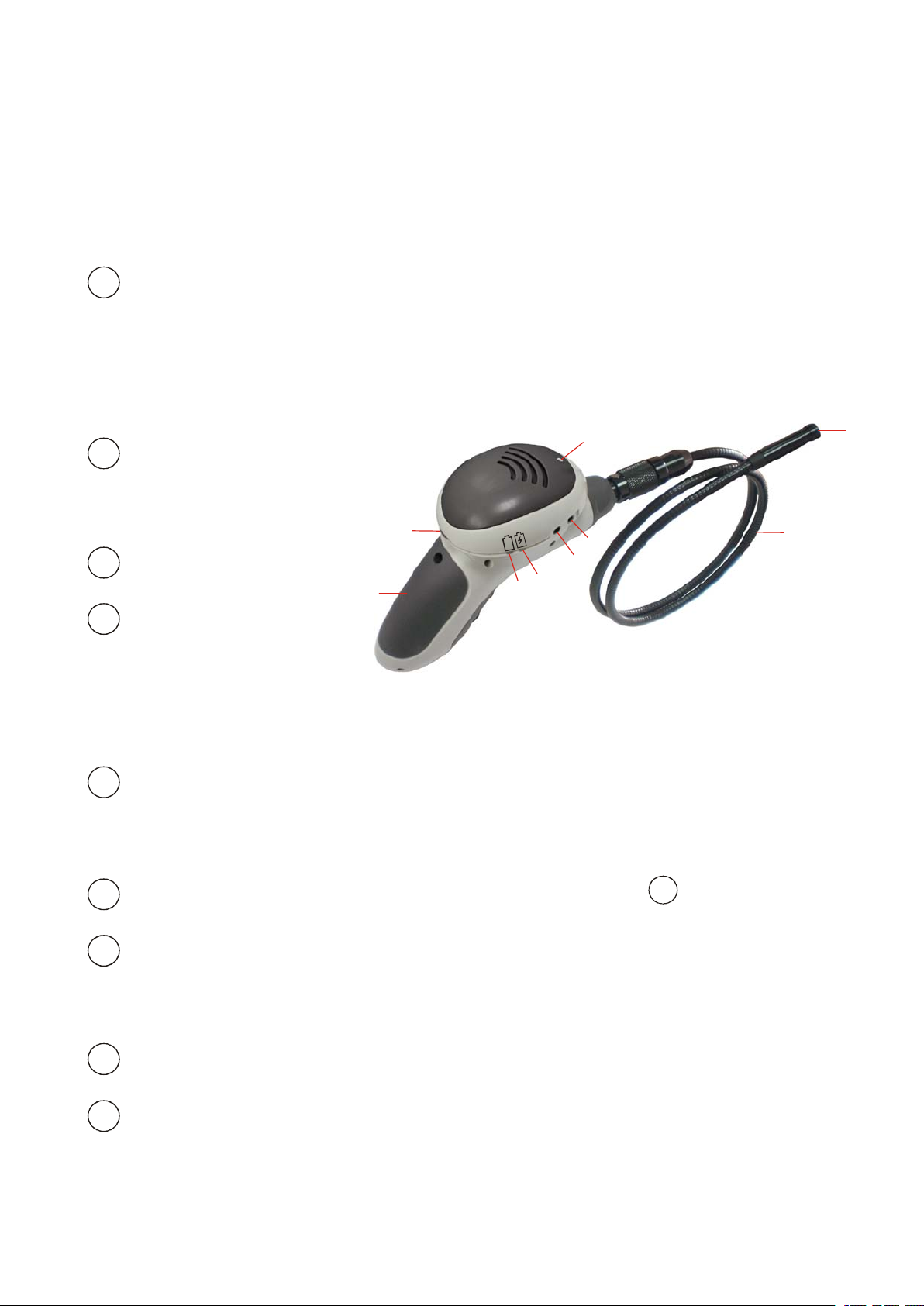
WiFi Indicator
Red : POWER ON
Green : WiFi Connecting
TV out
B
B
B
B
To
switch live view to TV
Charging Port
C
C
C
C
Charging I ndicator
D
D
D
D
MANUAL
MANUAL
MANUAL
A
F
G
L
L
L
L
O
O
O
O
W
W
W
W
D
E
B
C
H
I
Orange : Charging
Indicator Off : Fully charged
E
E
Battery Low Indicator
E
E
Red : Battery low
Power ON / OFF & LED Brightness Adjustment for
F
F
F
F
Battery C ompartment
G
G
G
G
2300 mAh of rechargeable Lithium Battery is embedded
H
H
Flexible tube
H
H
Camera and LED s
I
I
I
I
I
I
I
I
1
Page 2
Accessories
Accessories
Accessories
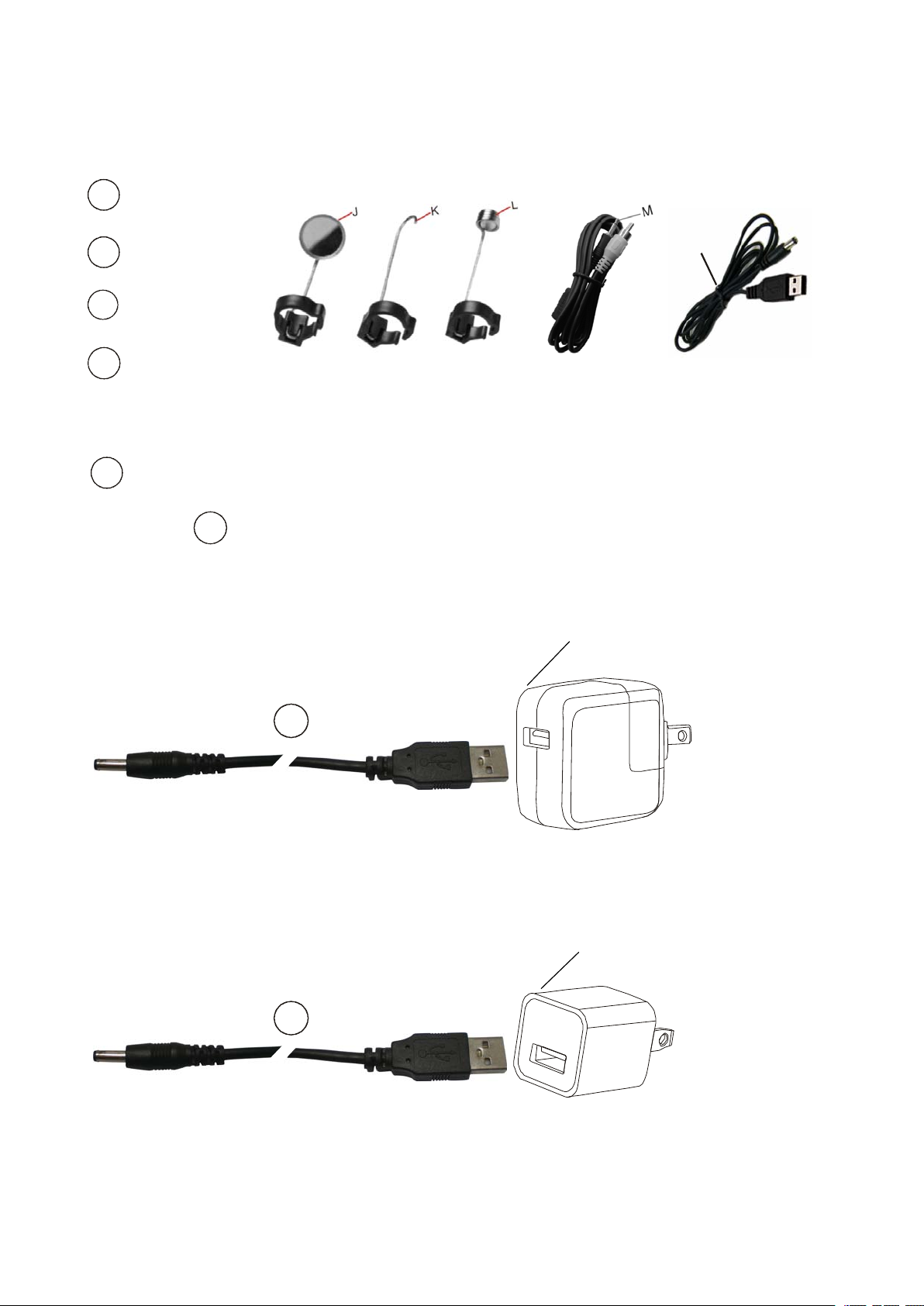
Accessories part
J
Mirror
J
J
J
part
part
part List
List
List
List
Hook
K
K
K
K
L
L
L
L
Magnet
TV C able
M
M
M
M
To
switch live view to TV
USB charging Cable
N
N
N
N
Using + iPad or iPhone Power Adapter to charge the unit.
N
N
N
N
iPad Power Adapter
N
N
N
N
N
iPhone Power Adapter
N
N
N
N
2
Page 3

Pls following User Guide below:
Step 1: Charging
N
N
N
Using + iPhone or iPad Power Adapter to charge the unit .
It takes about 7 hrs for fully charged.
Step 2: Download APP
Download i BORESCOPE fm App Store on iPhone / iPad.
Step 3: Turn ON TF3003WX
Red WiFi Indicator means POWER ON.
N
A
A
A
A
Green WiFi Indicator means WiFi Connecting.
It takes about 30 seconds to get WiFi Connected.
Step 4:
4.1 Turn on iPhone / iPad.
4.2 Setting
4.3 Wi Fi
4.4 iBORESCOPE
4.5 √ iBORESCOPE
iBORESCOPE marked means the unit is connected with iPhone
A
A
A
A
/ iPad.
3
Page 4
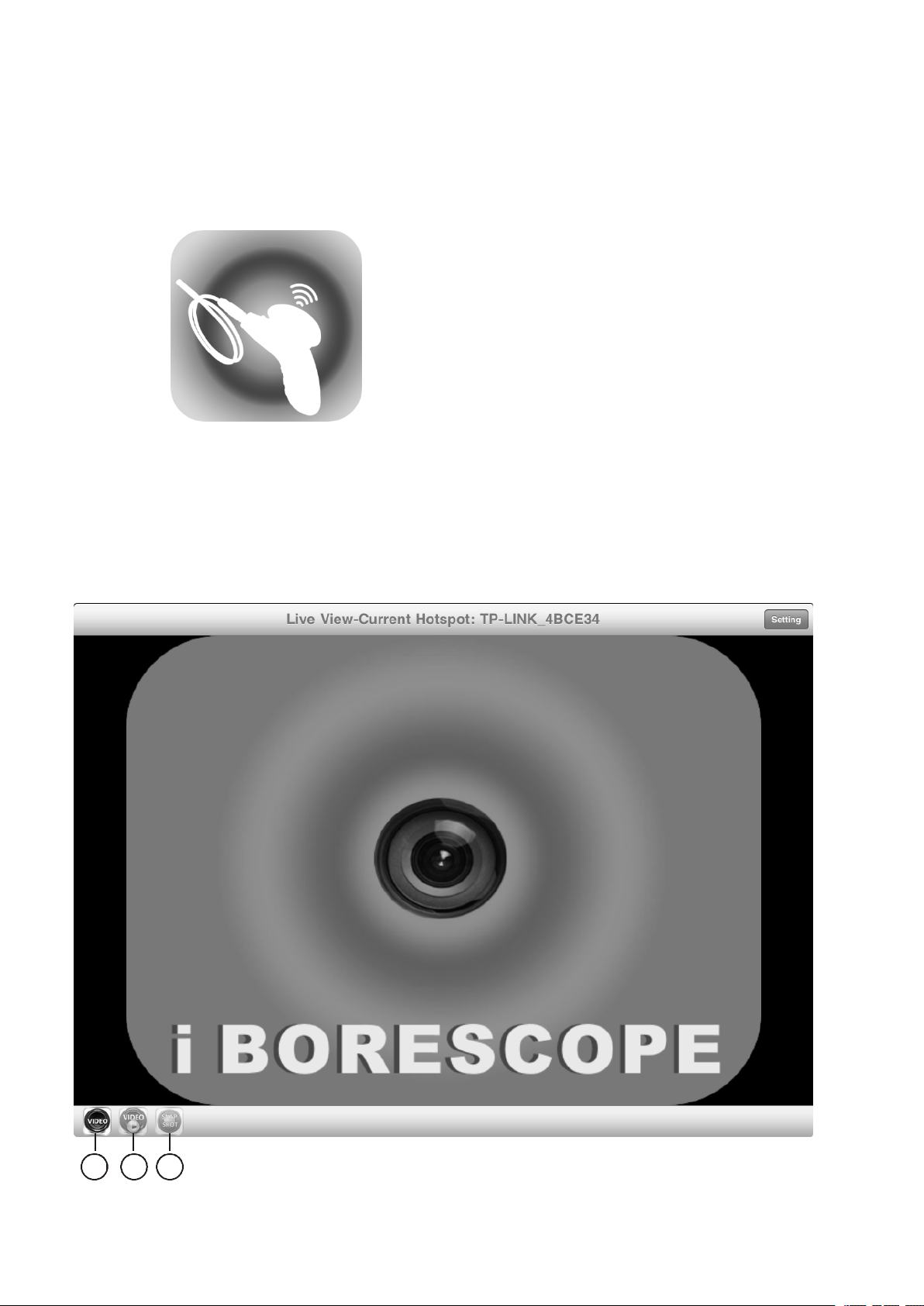
4.6 Touch iBORESCOPE
Returning to main menu to touch iBORESCOPE ICON below
Step 5:
CONTROL
CONTROL
CONTROL
CONTROL LAYOUT
(ON YOUR DEVICE ’ S TOUCH-SCREEN)
LAYOUT
LAYOUT
LAYOUT
O P Q
4
Page 5
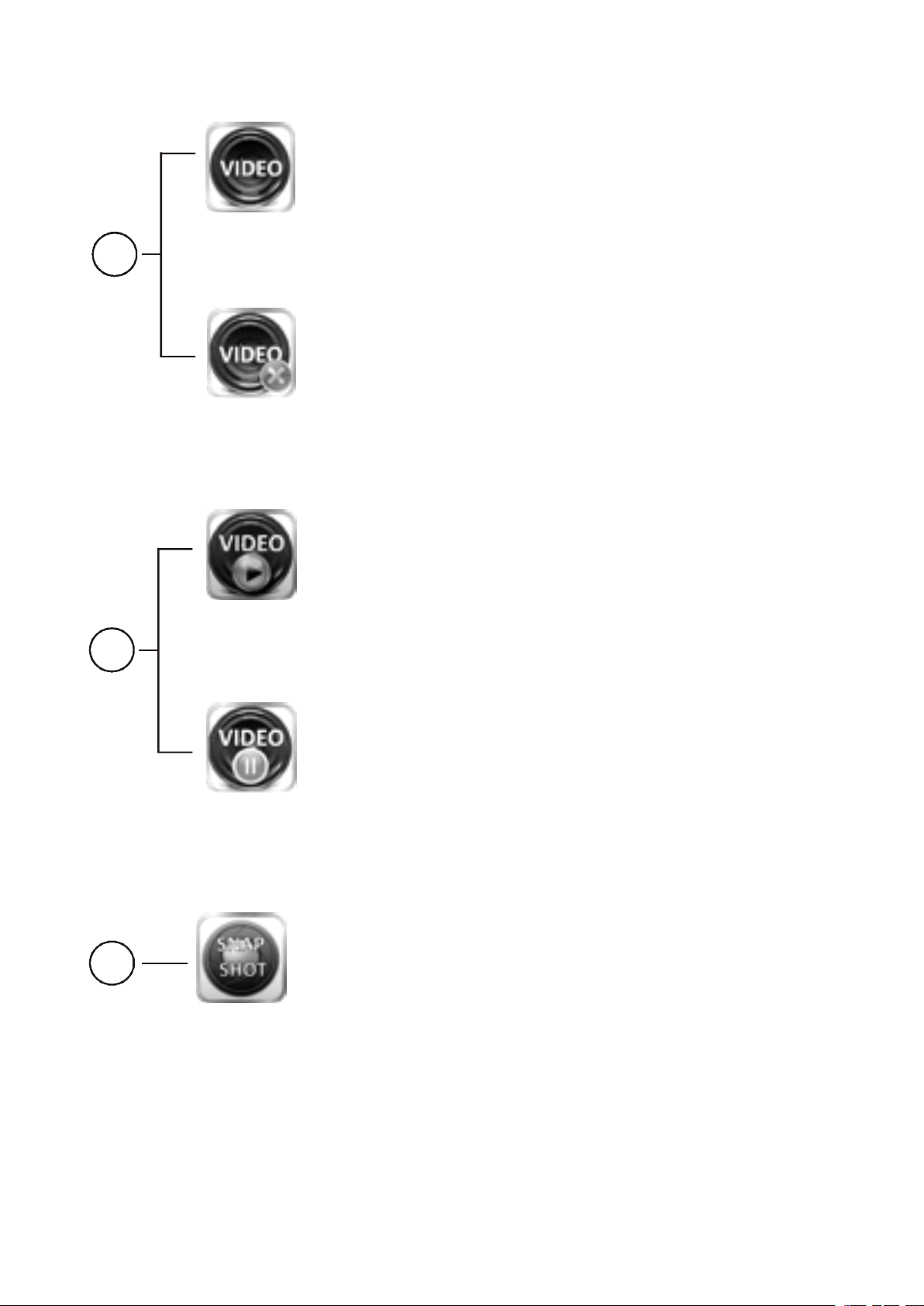
To
start live view
O
To
stop live view
To
play live view
P
To
pause live view
To
take photos. The captured photos will be saved
Q
under photo folder on your iPhone / iPad.
5
Page 6
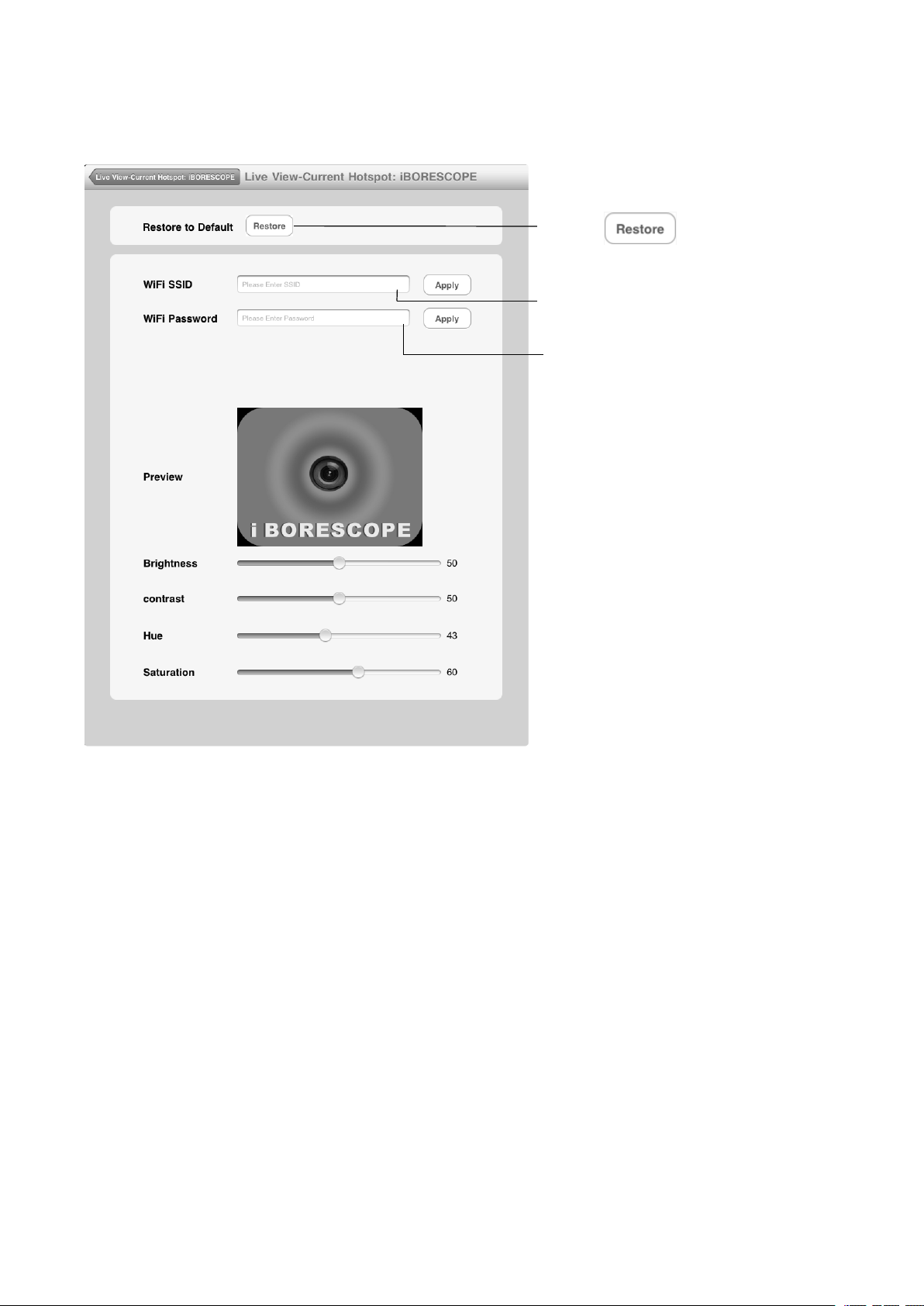
Further
Further
Further
Further Setting
Setting
Setting
Setting
Touch to go back original
Default
Original Default : iBORESCOPE
Original Default : 12345678
You are allowed to change the Default WiFi SSID & WiFi Password by
using digits 0 – 9 and letters
A
– Z, minimum 8 numbers.
6
Page 7

Brightness
Brightness
Brightness
Brightness
Adjust brightness
C
ontrast
C
ontrast
C
C ontrast
ontrast
Adjust contrast
Hue
Hue
Hue
Hue
Adjust hue
Saturation
Saturation
Saturation
Saturation
Adjust saturation
IMPORTANT
IMPORTANT
IMPORTANT
IMPORTANT SAFETY
All of the safety and operating instructions should be read, adhered to and
followed before the unit is operated.
WARNING
WARNING
WARNING
WARNING
1. Close supervision is necessary when this unit is used by or near
SAFETY
SAFETY
SAFETY INSTRUCTIONS
INSTRUCTIONS
INSTRUCTIONS
INSTRUCTIONS
children or mentally disabled individuals.
2. Use this unit only for its intended use as described in this manual.
7
Page 8
3. The unit should be situated away from direct sunlight or heat sources
such as radiators, electric heaters, heat registers, stoves or other units
that produce heat.
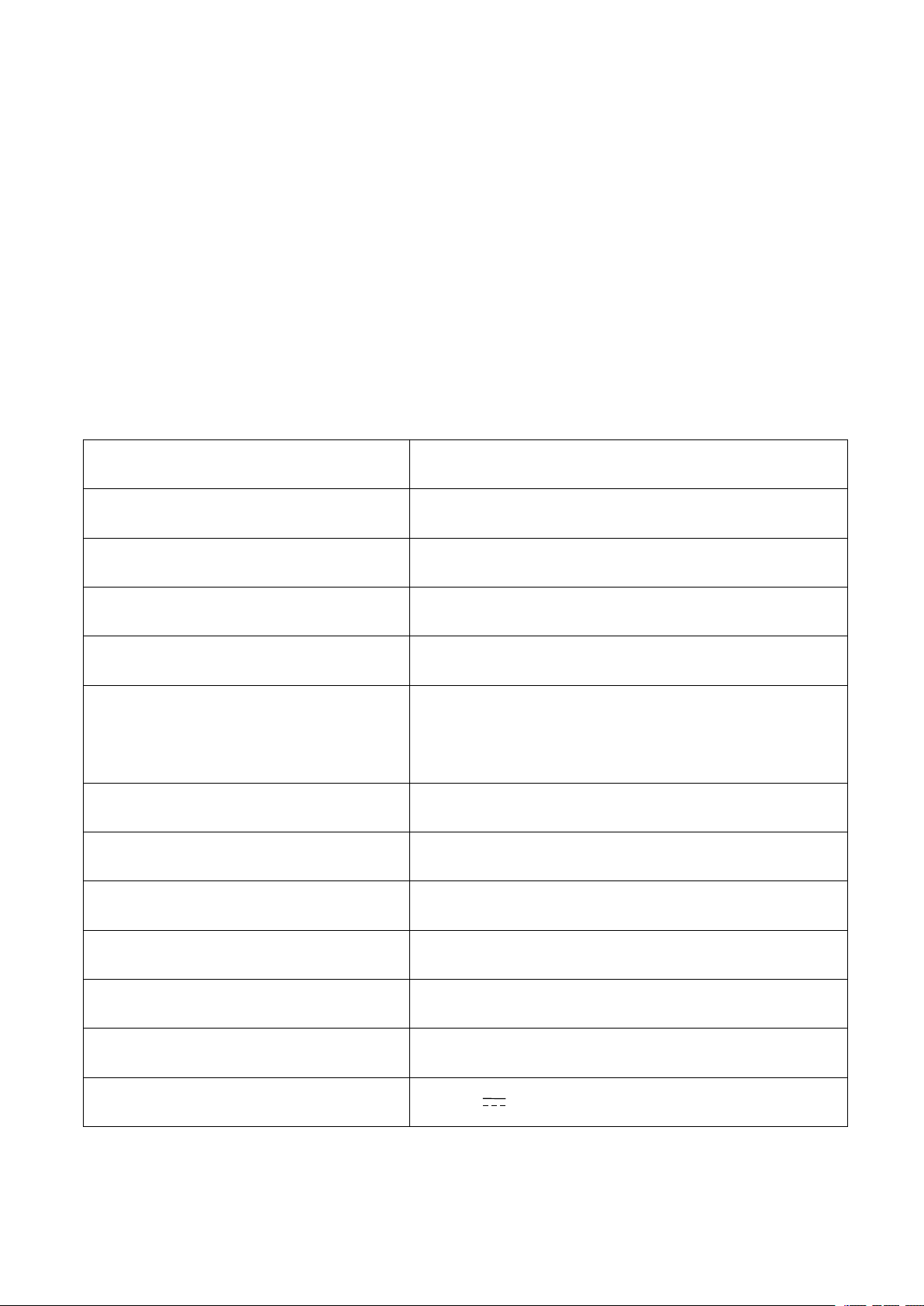
Product
Product
Product
Product Specifications
Image Sensor 1/9 ” VGA CMOS
Video Resolution 640 x 480 (VGA)
Frame Rate 25fps (VGA on iPhone / iPad)
Video Streaming Format MPEG4
Operation Temperature 0 ~ 4 5 ℃
Mobile Surveillance
Security WEP(WiFi) Password Setup
Specifications
Specifications
Specifications
iPad / iPad2 / iPhone3GS / iPhone4 /
iPhone 4S
Camera Lighting 2 white LEDs
Camera Ф 9.8 mm
Gooseneck Length 88 ± 2 cm
Min. bending radius 45mm
Power Source Rechargeable Lithium Battery
Rechargeable Lithium Battery 3.7 V 2300 mAh
8
Page 9

FCC
FCC
FCC
FCC INFORMATION
This device complies with Part 15 of the FCC Rules.
Operation is subject to the following two conditions: (1) this device may
not cause harmful interference, and (2) this device must accept any
interference received, including interference that may cause undesired
operation.
INFORMATION
INFORMATION
INFORMATION FCC ID : N3ITF3003WX
FCC
FCC
FCC
FCC NOTE
THE MANUFACTURER IS NOT RESPONSIBLE FOR ANY RADIO OR
TV INTERFERENCE CAUSED BY UNAUTHORIZED MODIFICATIONS
TO THIS EQUIPMENT. SUCH MODIFICATIONS COULD VOID THE
USER ’ S AUTHORITY TO OPERATE THE EQUIPMENT.
(b) For a Class B digital device or peripheral, the instructions furnished
the user shall include the following or similar statement, placed in a
prominent location in the text of the manual:
NOTE
NOTE
NOTE :
Note:
Note:
Note:
Note: This equipment has been tested and found to comply with the limits
for a Class B digital device, pursuant to part 15 of the FCC Rules. These
limits are designed to provide reasonable protection against harmful
interference in a residential installation. This equipment generates, uses
and can radiate radio frequency energy and, if not installed and used in
9
Page 10

accordance with the instructions, may cause harmful interference to radio
communications. However, there is no guarantee that interference will not
occur in a particular installation. If this equipment does cause harmful
interference to radio or television reception, which can be determined by
turning the equipment off and on, the user is encouraged to try to correct
the interference by one or more of the following measures:
-- Reorient or relocate the receiving antenna.
-- Increase the separation between the equipment and receiver.
-- Connect the equipment into an outlet on a circuit different from that to
which the receiver is connected.
-- Consult the dealer or an experienced radio/TV technician for help.
Hereby,Teamforce Company Limited,declare that this WIFI Borescope is
in compliance with the essential requirements and other relevant provisionos of
Directive 1999/5/EC.
10
 Loading...