

Page 1

PDF created with pdfFactory Pro trial version www.pdffactory.com
Page 2

PDF created with pdfFactory Pro trial version www.pdffactory.com
Page 3

PDF created with pdfFactory Pro trial version www.pdffactory.com
Page 4

Specifications
ACCESSORIES:
Remotecontrol
User'smanual
Warrantycard
Audio/videocables
batteries
Insertingthebatteriesinremotecontrol
Openthebattery
compartmentlid
Insert2x'AA'batteriesinthe
directionshown
Replacethebattery
compartmentlid
DiscCompatibility
SomeDVDdiscsmayhavespecialrequirementsforplaying,withwhichthisplayermaynotbecompatible.
Pleaserefertospecificationsonindividualdisc.
DiscType
OrdinaryCD
VCD
SuperVCD
MP3
KodakpictureCD,JPEG
DVD 12cm/8cm
MPEG4 12cm/8cm
DiscSize
12cm/8cm
12cm/8cm 74min*
12cm/8cm
12cm/8cm
12cm/8cm
Playtime
74min*
45min* WithPBCfunction
~600min* WithPBCfunction
N/A N/A
~242min(SS/DL)*
~266min(DS/SL)*
~484min(DS/DL)*
~10hr(DS/SL)
~20hr(DS/DL)*
*
InteractiveFunctions
WithoutPBCfunction
VCD1.1:withoutPBCfunction
VCD2.0:withPBCfunction
WithDirectorymenu~133min(SS/SL)*
WithDirectorymenu
WithDirectorymenu
WithDirectorymenu
WithDirectorymenu
NOTE:
DivX,DVD-R,DVD-RW,CD-R,CD-RWDiscscanbeplayedinthisDVDplayer.
*Playtimesreferto12cmdiscsonly.
PDF created with pdfFactory Pro trial version www.pdffactory.com
Page 5

Foreword
DearCustomer
ThankyouforpurchasingthisproductandwewelcomeyoutoyournewDVDplayer.WeareconfidentthisDVDplayerwill
continuetoupholdthetraditionofhighqualitydigitalproductssuppliedbyus.Togetthemostoutofthisequipment,we
recommendreadingthisinstructionmanualbeforeconnectionandoperation.Althoughitmayseemcomplicatedatfirst,
byreadingthisinstructionmanualbeforeoperationyouwillquicklylearnhowtomastersimpleoperationssuchas
playbackaswellasmoreadvancedtopicssuchassurroundsoundspeakerplacement.
Asyoumayhavenoticedfromthestylingofthisunitwehavemadeeffortsinaspectsofdesign,
convenienceinoperation,manufacturing,engineering,etc.tobetterm.
Pleasekeepthismanualsafeforfuturereference.
Featuresoftheproduct
◆
DOLBYDIGITAL(AC-3)internal,5.1channeloutput;
KodakpictureCD,JPEGhighresolutiondigitalpicturediscplayback;
◆
◆
FullycompatiblewithregionDIVX,MPEG4,DVD,VCD,MP3,WMA,HDCD,CD,CDR,DVDRW,etc.;
◆
New,wideranging,switchmodepowersupplydesignrangingfrom100V~240V.Suitableforeverywhere;
Languagesubtitleselecmultiplea
◆
(discdependant);
◆
Multiplefilmplots(discdependant),multilevelzooming,easyinteractiveoperatingsystem;
◆
Highpicturequality,horizontalresolutionupto500lines,4:3or16:9aspectratioselection;
PAL/NTSC/AUTOcoloursystemconversion;
◆
◆
Videooutput/S-VIDEOoutput/DVDcomponentvideooutput;
◆HDMI(HighDefinitionMultimediaInterface)audio/videooutput,support720p,1080iscanmodeetc.,
◆
2CHmix-outaudiooutput/5.1CHanalogaudiooutput/Digitalcoaxialaudiooutput/Opticaldigitaloutput;
Computermemorizedplay,settimeplay,doublespeedscanningandsectionbysectionrepeatplaymodes.
◆
tion(discdependant),udiolanguages(discdependant)andmultianglefunction
eetourcustomers'need
±±
ImportantNote:
Toprotectthedisplaydevice,thisplayerwillinvokethescreensaverfunctionafter3-4minutesof
inactive.Pressplay,enter,andopen/closekeystowaketheunitup.
Theplayerwillenterstandbyifthereisnooperationforalongtime.Wheninstandbypressthestandby/on
being
PDF created with pdfFactory Pro trial version www.pdffactory.com
Page 6

Instructions
DivXIntroduction
WhatisDivX
DivXisthebrandnameoftheworld'smostpopularvideocompressiontechnology.Atitscore,DivXisacodec(shortfor
compression/decompression)-apieceofsoftwarethatcompressesvideofromvirtuallyanysourcedowntoasizethatis
transportableovertheInternetwithoutreducingtheoriginalvideo'svisualquality.
WithDivXvideotechnology,youcancompressaVHStapedowntoone-hundredthofitsoriginalsizeoraDVDtoonetenthofitssize.DivXvideocompressionissoefficientyoucanfittheentirecontentsofaDVDonaregulardataCDwithno
perceivablelossinquality.Nowyoucantakeanydigitalvideocontent,fromhomemoviestoyourpersonalDVD
cveitonCDstosharewithfriendsorstoreitonyourcomputer'sharddrivewithoutspendinghuge
ollectionandsa
amountsonextrastorage.Traditionally,videoontheInternetwasgrainy,lowresolutionandpostagestamp-sized.Today
allthatischanging.SincetheintroductionofDivXvideotechnologyfiveyearsago,videocontentprovidersfinallyhavea
realsolutiontodelivertheircreationstotheworldwithoutsacrificingvisualqualityorshellingoutmajorcashforextra
bandwidth.MillionsofpeopleworldwidearealreadyusingtheirstandardhighspeedconnectionstodownloadfeaturelengthmoviesfromtheInternetinlessthanthetimeittakestowatchthem.AndDivXvideotechnologypowersasecure
video-on-demandsystemthatalreadyboastsover15,000videotitlesfromourcontentpartners.
NotonlyhasDivXvideotechnologyenabledthefastandsecuredeliveryofhighlycompressed,DVD-qualityvideo,itis
alsotakingvideofromthecomputermonitortothelivingroomTV.WiththefullrangeofDivXCertifieddevicesflooding
themarketthisyear,youcannoweasilytakethatDivXmoviecreatedonyourcomputer,popitintoyourDivXCertified
DVDplayerandenjoyitonyourbigscreenTV.TheDivXcodecevenletsyoumakemoviesspecificallyforyourfavorite
device,beitPortable(yourpersonalvideoplayerforwhenyoutravel),HighDefinition(yourfancynewHDTV),Handheld
(yourvideo-capablePDA,likeCompaq'sPocketPC)orHomeTheater(yourDivXCertifiedDVDplayer).
Who'susingDivX
DivXisdoingforvideowhatMP3didformusic,andwedon'tcallittheworld'smostpopularvideocompression
technologyfornothing.Over120millionpeopleworldwidehavealreadydownloadedtheDivXcodectocreateorwatch
high-qualityDivXmovies,andhundredsofthousandsofDivXmoviescanbefoundontheInternetonanygivenday.
PDF created with pdfFactory Pro trial version www.pdffactory.com
Page 7

Instructions
WhatisDVD?
AstandardDVDisahigh-densityopticaldisc,consistingoftwopiecesof0.6mmthickcirculardiscsboundtogether.
Withrecentenhancementsofaudioandvideocompressiontechnology,eachdisciscapableofrecordingupto135
minutesofMPEG2audioandvideoinformationatstandardhigh-resolutionbitrates.DVDhasthecapabilityof
deliveringaverynearperfectpicturewhileotherformatslagfarbehind.ThehorizontalresolutionofDVDisinexcess
of500lines,VCDis250linesandSVCDhas350lines.Putsimply,aDVD,withMPEG2encodingdeliversadata
transmissionratenearlyfiftytimesthatofanMPEG1encodedVCD.
AboutComponentOutput
ComponentvideooutputisanadvancedvideotransmissionmodeforcurrentDVDplayerswhichtransmitsoriginal
picturesignalstoTVsetsthroughY/Cb/Croutputterminalsandcanavoidinterferenceduringsignaltransmission.
Thisproducesthebestimagequalityandpresentsamorelifelike,vividimagetotheviewer.
AboutJPEGHighResolutionDigitalPictures
JPEG(JointPhotographicExpertsGroup)isagroupjointlyestablishedbytwoinstitutions,ISOandIEC.Thestatic
digitalpicturecodingstandardjointlydevelopedbyISOandIECisknownasJPEG.ThealgorithmforJPEG
compressedcodedpictureconstitutesthebasisforVCDandDVDtechniques.TheJPEGdigitalpicturehasbecome
thestandardformatforphotograde,highresolutionpicturesoninternet,andalsoistheformatformostdigitalcamera
picturestorage.ItisrecommendedyourecordJPEGpicturefilesstoredindigitalcameras,orscannedfromphotos,
usingascannerontoCD-RdiscbecauseCD-R'sareareliable,longtermstoragesolutionofdigitalpictures.This
playercanbrowsealldiscsrecordedwithJPEGpicturesandprovidesmultipleimagingmodes(lefttoright,from
upsidetodownside,shuttermode,etc.)
AboutDolby
'Dolby','ProLogic'anddouble'D'marksaretrademarksofDolbyLaboratories.ProductionauthorizedbyDolby
Laboratories.Confidentialworksnotpermittedtoissue.DolbyLab1992-1997.Allrightsreserved.
AboutHDMI
HDMI
isaacronymofHighDefinitionMultimediaInterface.Itisaspecificationthatcombinesvideoandaudiointoa
singledigitalinterfaceforusewithdigitalversatiledisc(DVD)players,digitaltelevision(DTV)players,set-topboxes,
andotheraudiovisualdevices.ThebaseofHDMIisHighBandwidthDigitalcontentProtection(HDCP)andthecore
technologyofDigitalVisualInterface(DVI).HDCPisanIntelspecificationusedtoprotectdigitalcontenttransmitted
andreceivedbyDVI-compliantdisplays.
HDMI
supportsstandard,enhanced,orhigh-definitionvideoplusstandardtomulti-channelsurround-soundaudio.
HDMIbenefitsincludeuncompresseddigitalvideoabandwidthofupto5gigabytespersecond,oneconnector
insteadofseveralcablesandconnectors,andcommunicationbetweenthevideosourceandtheDTV.HDMI
developmentisoverseenbytheHDMIWorkingGroupthatincludesSony,Hitachi,SiliconImage,Philips,andToshiba
asmembers.
HDMIsupportsthefollowingvideoandaudioformats:
VIDEO:
SDTV(StandarddefinitionTV):480i,480p,576i,576p
HDTVHighdefinitionTV):720p,1080i,1080p
(
AUDIO:
CD:16bit@32/44.1/48KHz,
DVDvideo:Digitalaudio@96KHz
DVD-AUDIO:24bit@192KHz
8channel
channel1
PDF created with pdfFactory Pro trial version www.pdffactory.com
Page 8

ImportantSafetyMeasures
Notes:Pleasereadtheinstructionsonthispagecarefullyforthesakeofsafety.
Thissignistoreminduserswith
importantinstructionsattachedwiththe
unit.
1.Ventilation
Toguaranteelasting,stableand
reliableoperationoftheunit,do
notplaceitonbed,sofa,piece
goodsorothersimilarmaterials
toensuregoodventilationand
heatemission.
2.HeatSource
Theunitshouldbeplacedaway
fromheatsources,suchas
warmingmachine,heatregulator,
heatingfurnaceorother
exothermicproducts.
3.Moisture,OilSmoke
Operatetheunitawayfroma
placewithmuchmoistureoroil
smoke,suchasbathtub,washing
poolandkitchen,etc.toavoid
reductionindiscreadingorerror
correctingabilitycausedby
condensationorcoherenceofoil
smokeondiscorlaserhead.
4.Cleaning
Thissignistoremindusersof
dangerousvoltagewiththeunit.“”
6.Overload
Donotoverloadthepower
supplyonsocketandbe
doublycarefulinextending
powerwire,integratedsocket,
forthesemaycausean
electricshockorfire.
7.Videodisc
Donotusebroken,distorted
orrepairedvideodiscs,which
isbreakableandmaycause
bodilyinjuryormalfunctionof
theunit.
8.Load
Donotplacedheavyobjects
ortrampleontheunit,nor
placeotherobjectsonthe
powerwire,payspecial
attentiontotheplug,socket
andpowerwire.
9.ProtectionofPowerWire
Donotcleanuntiltheplugis
disconnectedfromthesupply
socketonthewall,donotusea
liquiddetergentoraerosol
cleanser,usesoftcleanclothto
wipeforcleaning.
5.Intrusionofforeignmattersorliquid
Neverletforeignmattersorliquid
fallintotheunitfromanyopening
orgap,forthismightgetin
contactwithdangeroushigh
voltageorcauseshort-circuit
amongpartsinside,whichmight
causeanelectricshockorfire.
Donotsplashorsprinkleany
similarliquidintotheunit,either.
Thepowerwireshouldbe
placedoutofthereachoffeet.
Donotputotherarticleson
thepowerwire.
Payspecialattentiontothe
plug,socketandpowerwire.
10.Repair
Donotattempttorepairthe
unitbyyourself,becausethe
dangeroushighvoltage
electricshockmightcause
injurewhentheenclosureis
opened.Therefore,allrepair
workshallbeentrustedto
qualifiedtechnicians.
PDF created with pdfFactory Pro trial version www.pdffactory.com
Page 9
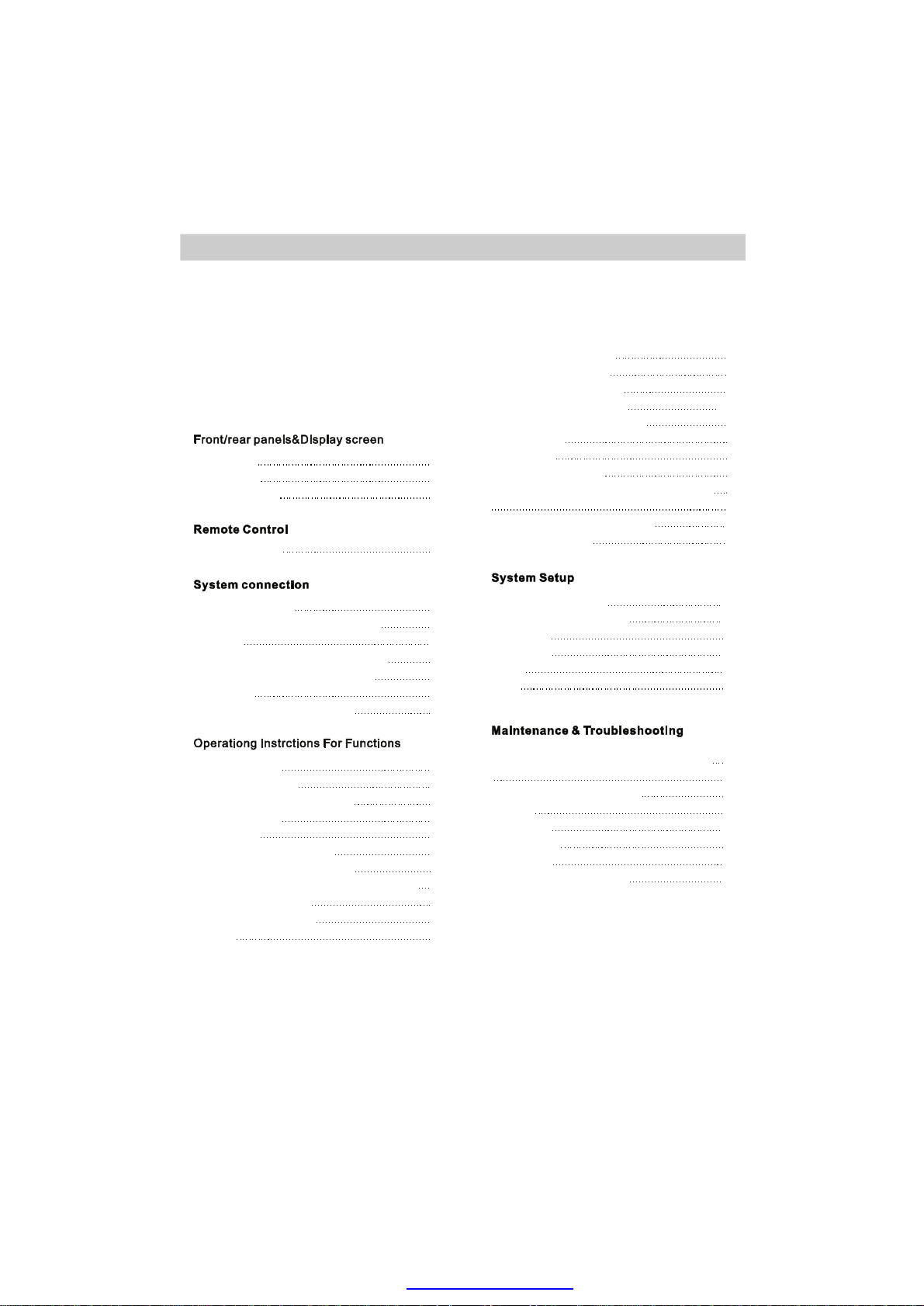
TableofContent
TableofContent
Warrantyregistration
Specifications
Foreword
Instructions
ImportantSafetyMeasures
Rearpanel
Frontpanel
Displayscreen
RemoteControl
ConnecttoTVset
Connectto5.1channelanalogue
amplifier
Settingfor5.1CHanalogueoutput
Digitalaudioconnecttosuitable
equipment
Digitalaudiooutputsettings
Turntheuniton
TVsystemsetting
Videooutputmodeselection
Volumecontrol
Play/pause
MenuplayforDVDdiscs
VCD/CDdisctrackselection
Fastforward/fastbackward/slowmotion
Framebyframeplay
Trackorchapterskip
Repeat
Picturezoomfunction
MultiangleDVDplay
OSD-Onscreendisplay
Audiochannelselection
Subtitlelanguageselection
Memoryplay
1
1
1
2
3
4
4
5
5
6
6
6
6
6
7
7
7
7
8
8
Timedplay
MP3/WMAplayback
PlayingKodakPictureCDorJPEGfiles
MPEG-4,DIVXdiscPlayback
Programfunction
Systemsetupmenu
Detailsforsystemsetup
Language
VideoOut
Audio
Misc
Howtohandle,protectandcleardiscs
DVDPlayer
Output
Copyright
Discstypes
TVsystem
ProblemsandSolutions
Specifications
8
8
8
8-9
9
9
9
9
10
10
11
12
12
13
13
14
14
15
15
15
15
15
15
16
Weareconstantlystrivingtoimproveourproductsandthereforespecificationsanddesignofproductsare
subjecttochangewithoutpriornotice.
PDF created with pdfFactory Pro trial version www.pdffactory.com
Page 10
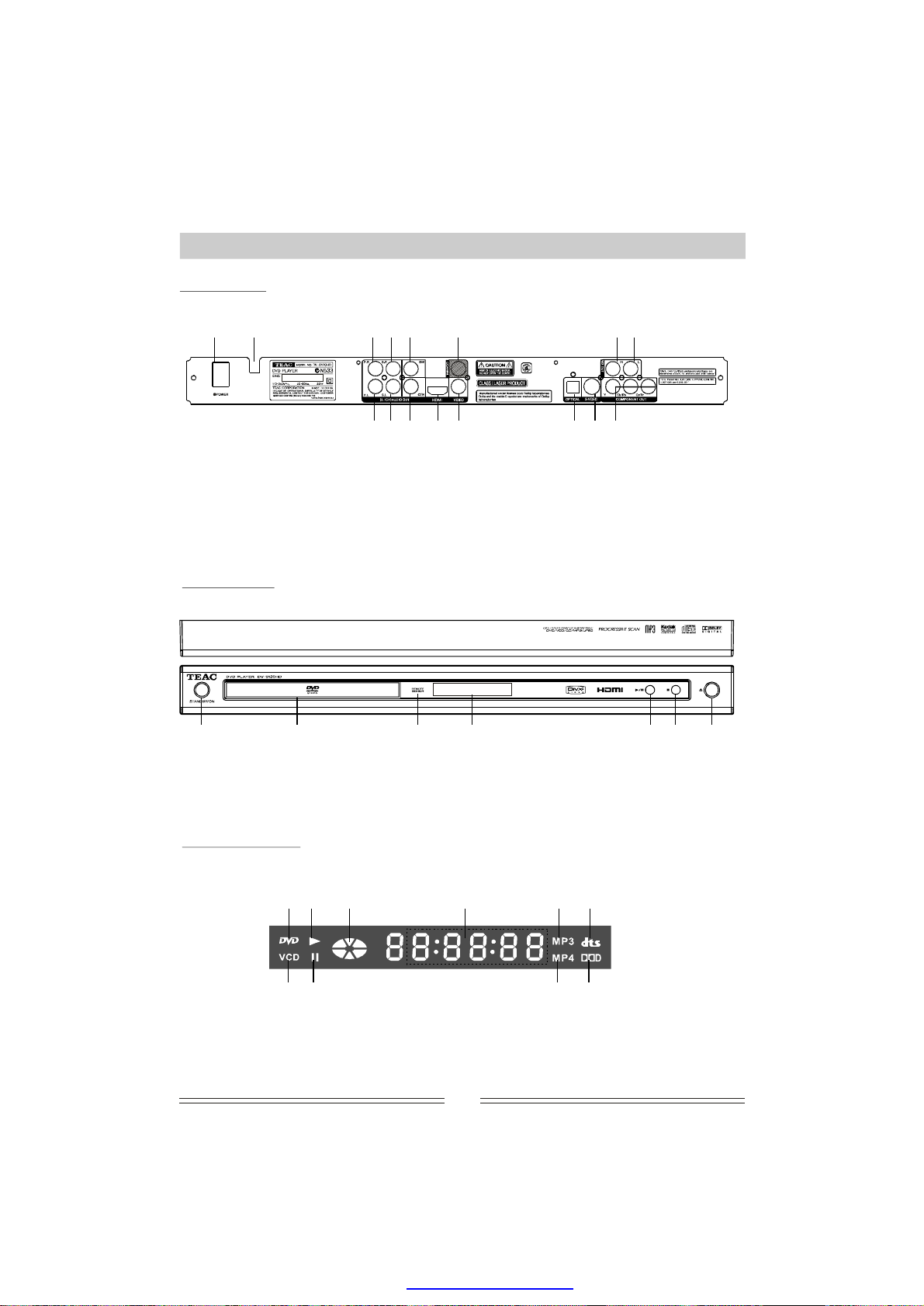
Front/RearPanels&DisplayScreen
RearPanel
1 2 3 4 5 6 78
91011 1213 141516
1.Powerswitch
2.ACpowerwire
3.Frontrightaudiooutput
4.Surroundrightaudiooutput
5.Subwooferaudiooutput
6.Digitalcoaxialaudiooutput
7.Mix-outrightaudiooutput
8.Mix-outleftaudiooutput
9.Frontleftaudiooutput
10.Surroundleftaudiooutput
11.Centeraudiooutput
12.HDMI(audio/video)output
13.Compositevideooutput
14.Opticaldigitalaudiooutput
15.S-videoterminal
16.Componentvideooutput
FrontPanel
1 2 3 4 5 6
1.Standby/On
2.Disctray
3.Remotesensor
4.Displayscreen
5.Play/Pause
6.Stop
7.Open/Close
Displayscreen
5
76
10
7
2314 8 9
1.DVD
2.VCD
3.Play
4.Pause
5.Playingstatus
6.Playingtime
7.MP3
8.MP4
9.Dolbydigital
10.DTS
1
PDF created with pdfFactory Pro trial version www.pdffactory.com
Page 11
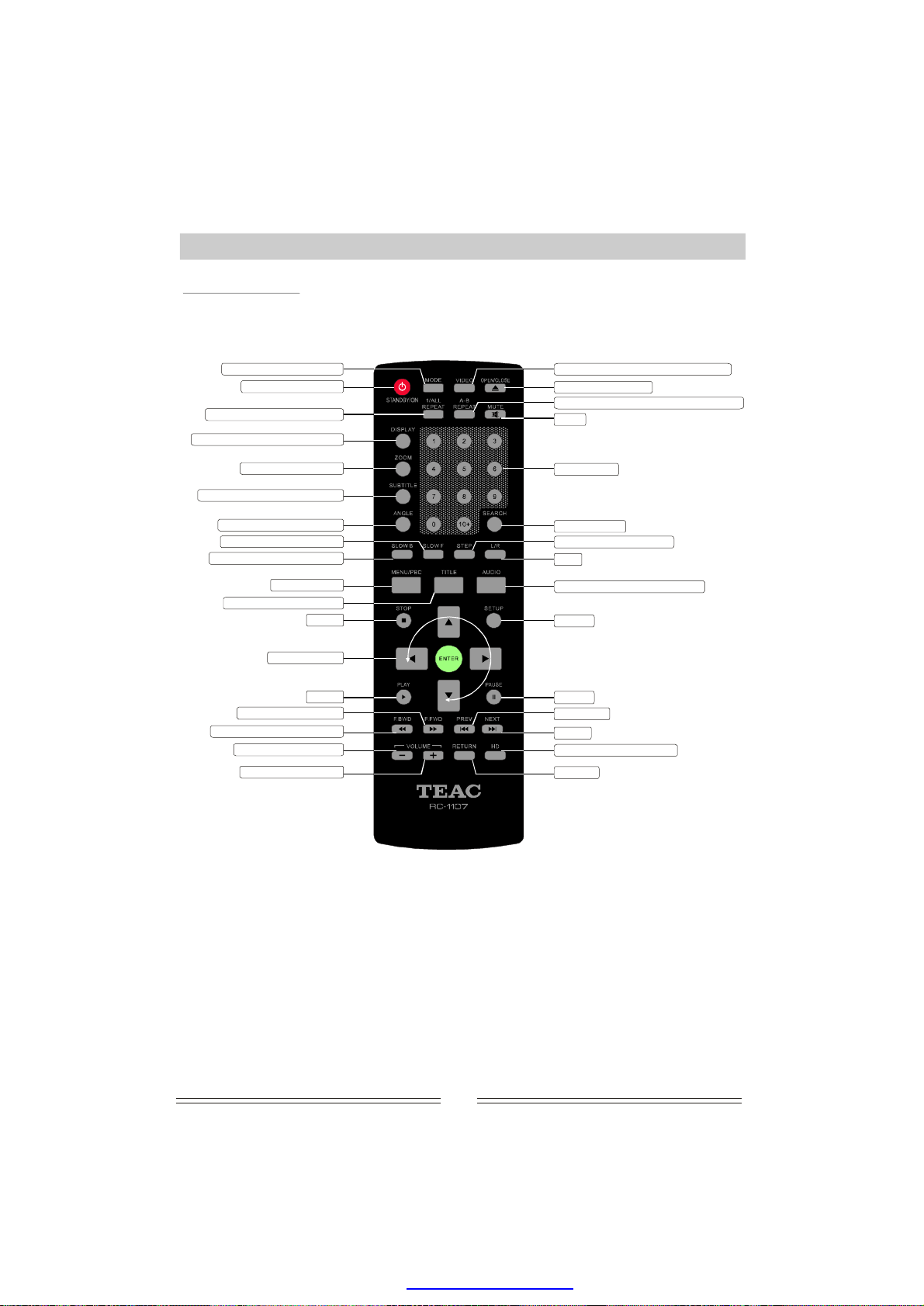
RemoteControl
RemoteControl
Playmodeselection
Standby/ON
Repeatmodeselection
Discplayinginformation
Picturezooming
Selectsubtitlelanguage
Multi-angleplayback
Playforwardslowly
Playbackwardslowly
MENU/PBC
Returntotitlemenu
Stop
Arrowkeys
Play
Playfastforward
Playfastbackforward
Decreasevolume
Increasevolume
Videooutputmodeconversion
Trayopen/close
Playappointmentpartrepeatedly
Mute
Digitkeys
Searchplay
Framebyframeplay
L/R
Audiolanguageselection
Setup
Pause
Previous
Next
HDresolutionswitch
Return
Notes:
1.Thedistancemayvaryaccordingtoientlight.
remoteoperatingtheamb
2.Donotleavetheremoteinanextremelyhotorhumidplace.
3.Iftheremoteunitisnotusedforanextendedperiod,removethebatteriestoavoidanypossible
damagefrombatteryleakageandcorrosion.
4.Thebatteriesnormallylastforaboutayear,dependingonhowoftentheremoteunitisused.Iftheremote
controldoesnotworkevenifitisoperatedneartheDVDplayer,PleasereplacebothbatteriesnonrechargeableAAAlkalinebatteries.
please
2
PDF created with pdfFactory Pro trial version www.pdffactory.com
withnew
Page 12
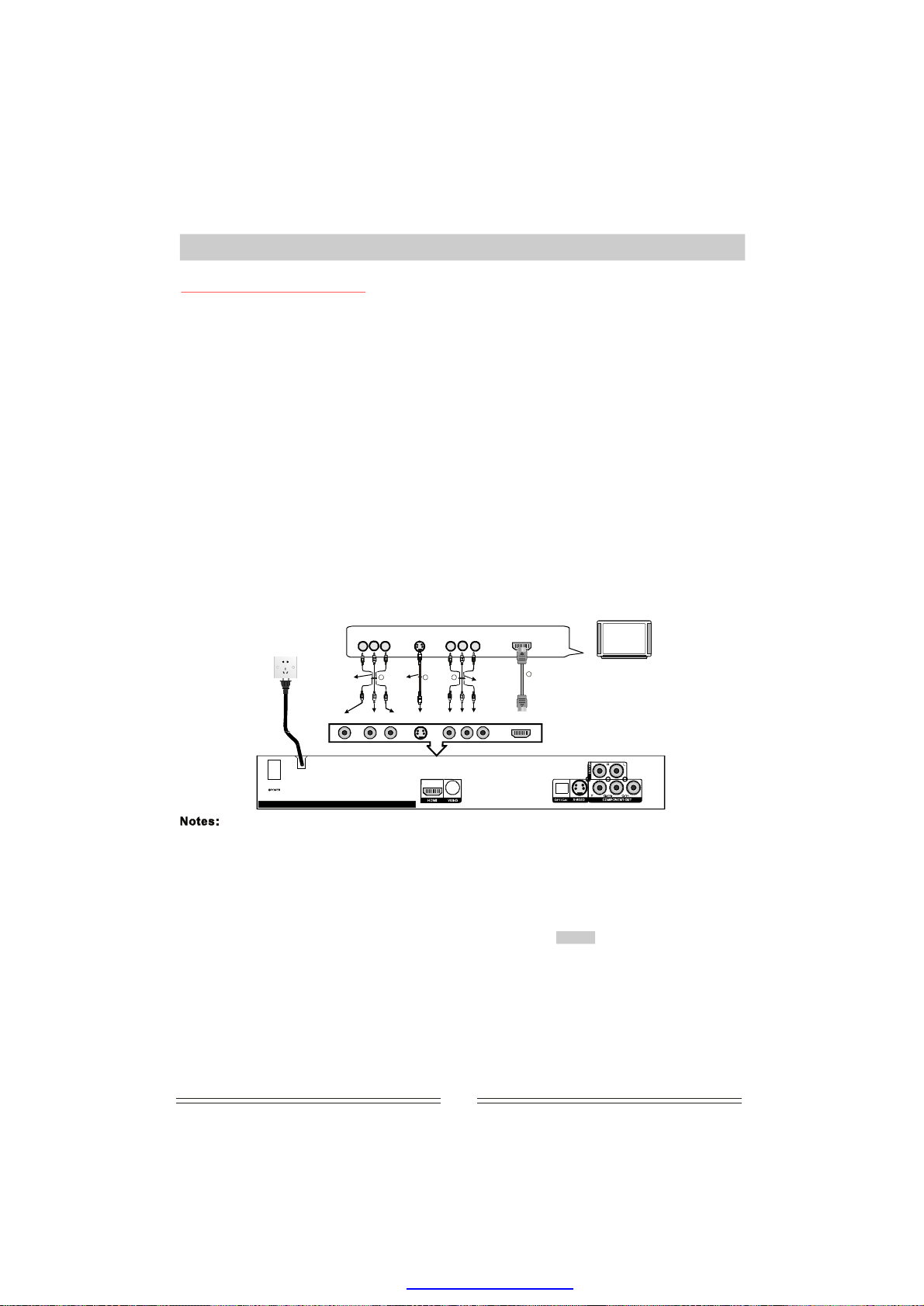
SystemConnection
ConnectingToaTVSet
1.
IfyourTVhasanRCA(phono)inputpanel,connecttheunittotheTVsetwiththesuppliedaudio/video
connectinglead.SettheTVtoAVmodewhnectioniscompleteandconfirmedcorrect.()
2.
IntheeventthatyourTVhasanS-VIDEOinputsocket,connecttheDVDplayerwithaS-VIDEOconnectinglead
(optional).Thiswillgiveaslightlybet)
3.
IfyourTVhasacomponentvideoinputpanel(alsoknownascolourdifferenceinput),connecttheDVD
componentoutputtorrespondinginputsocketsonyourTV.ThepicturequalityisbetterthanS-VIDEO.
3
().
Progressivecomponent(P-SCAN)canalsobeoutputthroughthesesockets(pleaseensurewhenselecting
progressivemodethatyourTVsupportsthismode).
4.IfyourTVhasaHDMIsocket,youcanconnectTVsetviaHDMIcable.ThensettheTVsetandtheunitat
HDMImode.Thiswillgivehighdefinitionpicturequality.(4)
theco
enthecon
terpicture.(
2
the
AboutHDconnection
A.Afterconnecting,Presskeyonremotecontroltoselectmodeoftheunitortoswitchto
HDMImode
viaSYSTEMSETUP(Seerdetails.
B.PleaseswitchtheTVsettotogetthestandardpictureatthesametime.
C.Gotoandselectoptioninthesubmenuunderthe
SETUPPAGE
SYSTEMSETUPPCMDIGITALOUTPUTAUDIO
togetaudiooutput.(SeeP13forsystemsetupdetails)
VIDEOHDMI
P14)fo
HDMImode
Note:
ThevideooutputmodeoftheDVDplayermeastheTVsetinputmode,ifnot,theTVsetwill
nopictureorthepictureIftherenopicture,pleaseuseAVcabletoconnect
haveis
willbedistorted.
betweenTVsetandDVDplayerviasocket,thenpresskeyonremote
controltoopenthedisctrayandpresskeyonremotecontroltoswitchtheDVDplayertoVIDEO
mustbethesa
VIDEOinput/outputOPEN/CLOSE
VIDEO
mode,thensettheTVsettoAVmodetoresumenormaldisplay.
Note:PushingtheVIDEObuttonrepeatedlywillcyclebetweenallthevideooutputs.Thisbuttonwillonly
operatewhennodiscisplaying.
S-terminal
Y
Pb/Cb
Pr/Cr
HDMI
videoinputAudio/RAudio/L
1
audio/video
connectingwires
(accessories)
MIXOUTR MIXOUTL
RearpanelconnectionterminalofDV5120HD
TheconnectionoptionsabovedescribeethodsofconnectiontotheTV
1.Compositevideoconnectionwith2channelaudio.
2.S-VIDEOconnection.Thissolutionprovidesabetterpicturedefinition.Audiocanbeconnectedinthe
S-video
1 2 3
cable
Video S-video Y Pb/CbPr/Cr
4m
Progressive
orinterlace
connection
cables
HDMI
4
HDMI
VIDEO/AUDIO
singnalCable
TVset
samewayasoption1withapairofRCA(phono)leadsconnectedtoeithertheTVorexternalamplifier.
3.Progressivecomponentconnection.Thisconnectionprovidespicturequality
over
connectedtoeithertheTVorexternalamplifier.
4.HDMIconnection.ThisprovidesbothavideoandaudioconnectiontotheTVandtheHDMIpicture
definitionisbetterthanthatofaconnection.Presskeyonremotecontrolto
switchtoHDMImodedirectly.
Beforemakinganyconnections,ensurethatboththeplayerandtheTVareswitchedoff;
AdjusttheoutputoftheplayertosuitthesystemofyourTV(P
●
OnlyselectoneconnectionoptiontoavoidtheTVmixingsignalsandreducingqualityandinterference;
●
Donotturntheunitonandoffrapidly.Allowatleast10secondsforthesystemtobootupbeforeturning
●
offagain;
Donotconnectdigitalaudiooutputsocketsoropticalfibresocketstotheanalogueinputofany
●
amplifier.Itmaydamageit;
Don'tnotconnectComponentVideoOutput,S-Videoterminaloutput,HDMIoutputtotheTVatthe
●
ornormal
S-VIDEO.Audiocanbeconnectedinthesamewayasoption1withapairofRCA(phono)leads
thecomponent
ALStandardTV//NTSC);
anincreasein
VIDEO
sametime,orthequalityoftheimagewoulddeteriorate.
3
PDF created with pdfFactory Pro trial version www.pdffactory.com
Page 13
SystemConnection
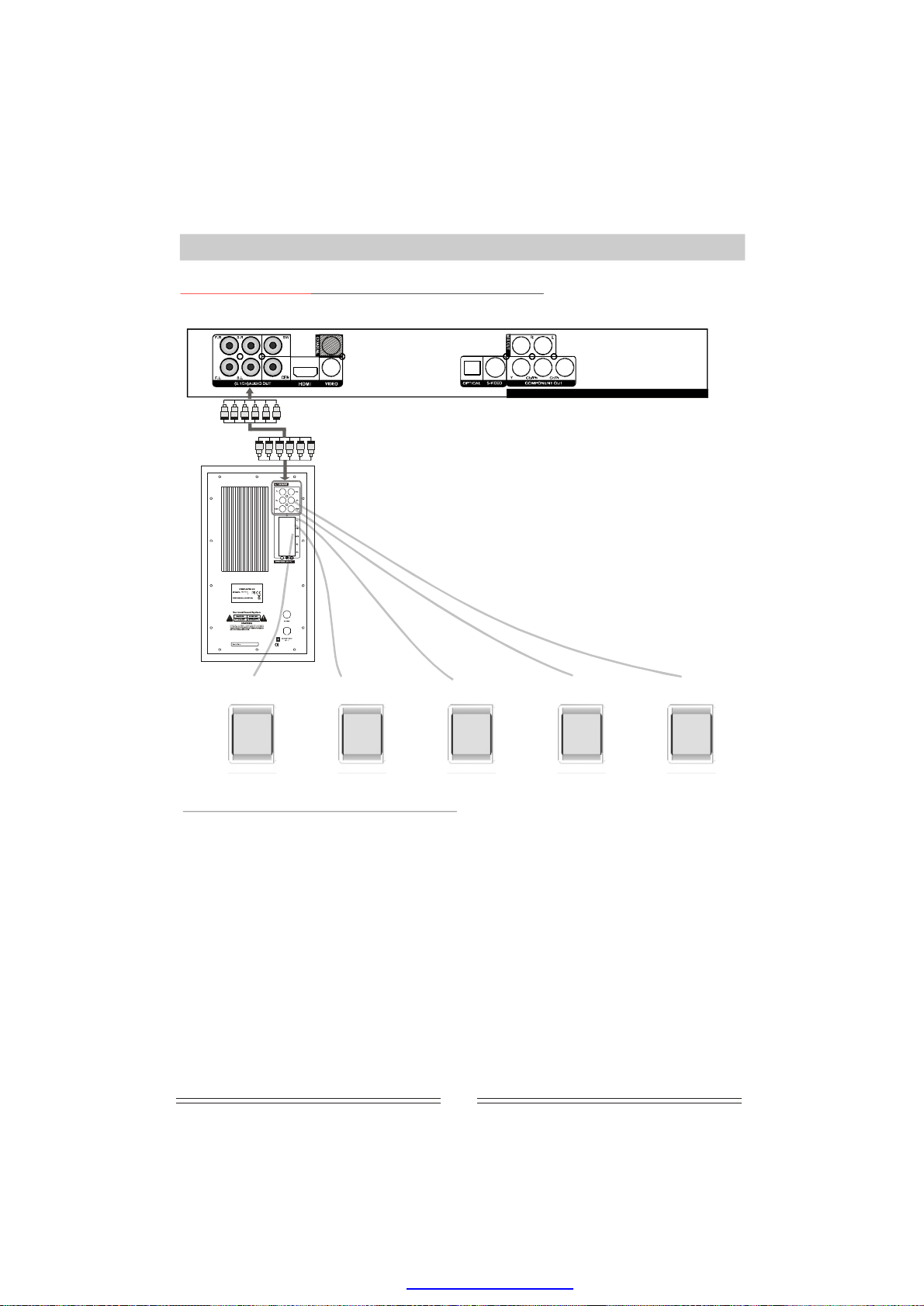
ConnectingToA5.1ChannelAnalogueAmplifier
RearpanelconnectionterminalofDV-5120HD
IMPEDANCE:4
CONSUMPTION:100WATTS
MADEINCHINA/FABRIQUEENCHINE
F.R. F.L.S.L CENTERS.R.
SettingsFor5.1CHAnalogueOutput
1.Connecttheanalogue5.1channeloutput(6channelsintotal)oftheDVDplayertotheinputofyour6
channelamplifier.
2.PressthebuttontodisplaythepageontheTV.Usingthedirectionarrows,move
thecursortotheAUDIOicon.Movethecursortoandpressthebutton.
Theoptionshouldbehighlighted.Pressarrowandmovethecursorto
ONNTERETUP
SETUPSYSTEMSETUP
BASEMANAGEMENTENTER
BASEMANAGEMENTDOWN
Pretoconfirmandpressbuttonagaintoexit.
ssthe
ES
the
3.Usetheinstructionsthataccompaniedyouramplifierinconjunctionwiththismanual.
4.EnsurethatboththeamplifierandtheTVareswitchedoffbeforecommencingconnection.
5.5.1channelaudiorefersto2mainchannels,2surroundchannels,acentrechannelandabass(0.1)
channel.
6.Whensettingthespeakers,thefollowingisrecommendedfortheoptimalsurroundsoundexperience:
Usehighperformanceloudspeakers
●
●
Ensuremenusettingsforthesespeakersmatchthespeakerdescription
Tryandplaceeachspeakerthesamedistanclisteningposition
●
Donotturnonthepowerbeforeconnectioniscompleted.
●
Note:For5.1channelsound,ensurethatallspeakershavebeenturnedon(seepage14).
efromthe
4
PDF created with pdfFactory Pro trial version www.pdffactory.com
Page 14
SystemConnection
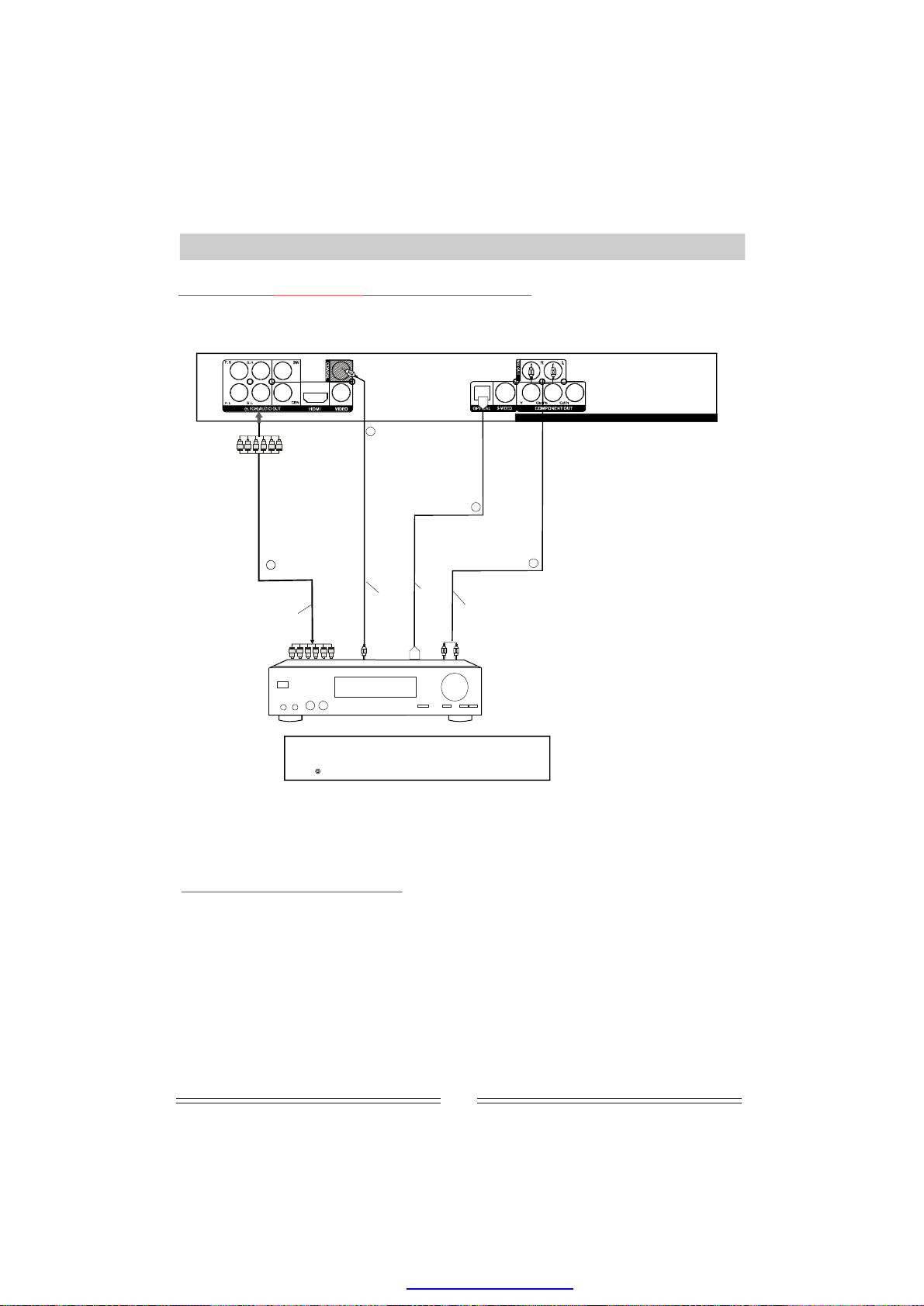
DigitalAudiotoSuitableEquipmentConnection
TheDolbyDigitalsystemdevelopedbyDolbyLaboratories,DigitalTheatreSystemInc.provides
highqualitysurroundsoundwhichcanturnyourhomeintoyourownpersonalcinema.
To5.1CH
audiooutput
Tocoaxial
outputplughole
4
To5.1CH
audioinput
(AC-3)
“”“”
DolbyanddoubleDmarksaretrademarksofDolbyLab.
ProductionauthorizedbyDolbyLab.Confidentialworksnotpermittedto
issue.DolbyLab1992-1997.Allrightsreserved.
3
Importantnote:
Onlyselect1from4groupsnnections.audiocoof
Tocoaxial
audioinput
plughole
Tooptical
audioinput
plughole
RearpanelconnectionterminalofDV-5120HD
Tooptical
digitaloutput
2
To
Stereo
input
PoweramplifierwithDolbyDigitalorDTSdecoder
Stereooutput
1
DigitalAudioOutputSettings
1.Connectdigitalcoaxialoutput/opticalfibre/5.1CHanalogoutput/2CHmix-out/toasuitableamplifier.
2.PresstheSETUPbuttontodisplaythepageontheTV.Usingthedirectionarrows,movethe
cursortotheiconandWiththedirectionkeys,movethecursortoandpressthe
AUDIODIGITALOUTPUT
ENTERbuttontodisplaytheoptions.Withthedirectionkeys,move
efaultsettingisALL)andpressENTER.Presskeyagaintoexit.
(dALL
SYSTEMSETUP
DIGITALOUTPUT
SETUP
3.Usetheinstructionsthataccompaniedyouramplifierinconjunctionwiththismanual.
4.EnsurethatboththeamplifierandtheTVareswitchedoffbeforecommencingconnection.
5
PDF created with pdfFactory Pro trial version www.pdffactory.com
thecursorto
Page 15
OperatingInstructionsForFunctions
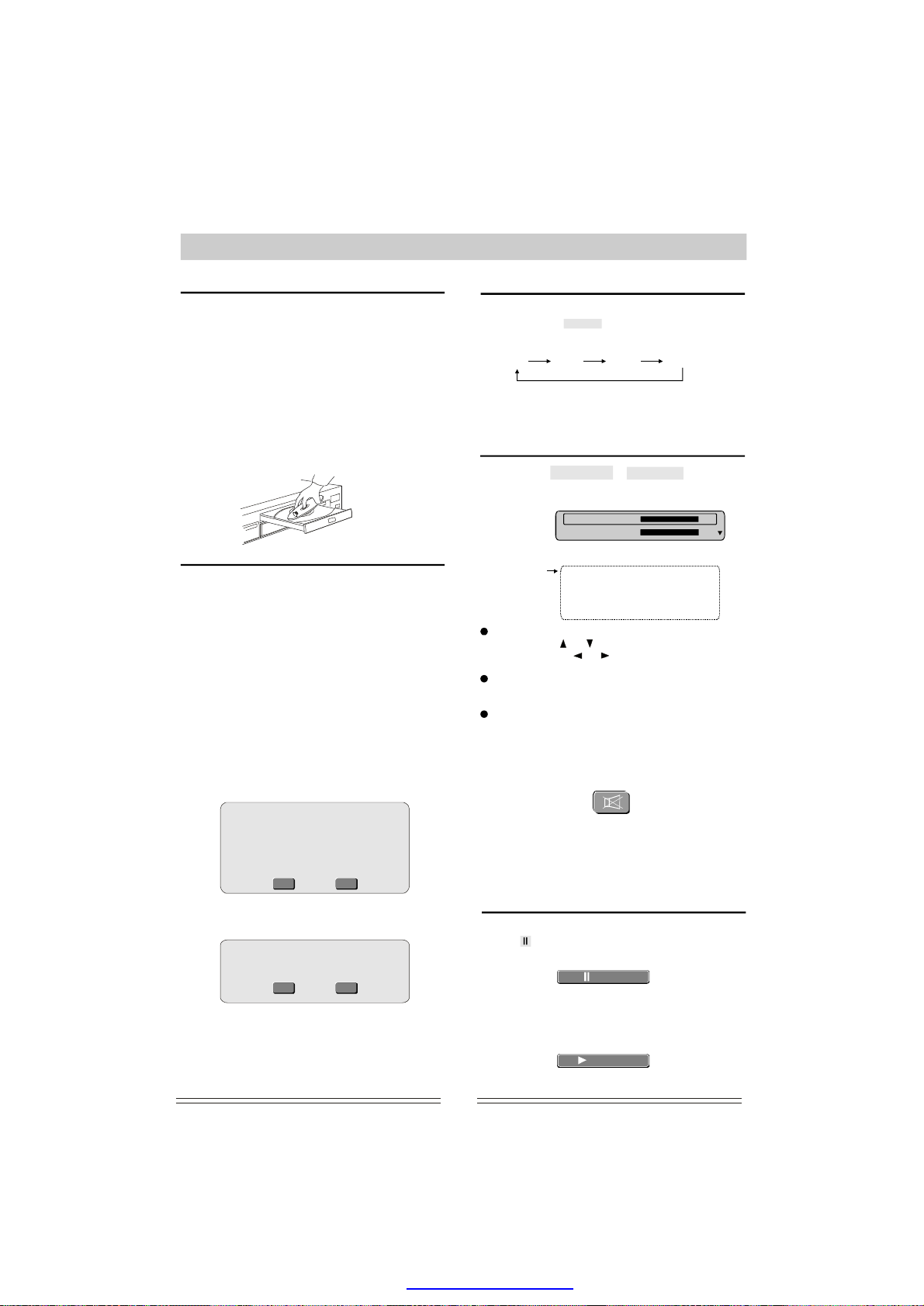
Turning theuniton
1.Beforestartingtheunit,makesuretheconnection
amongtheunitandotheracousticsiscorrectand
reliable.Afterconfirmation,connectthepowerplugof
thisunitintoAC110~240V50/60Hzsupplysocket.
2.Turnonthe"POWER"switchlocatedontherearon
theunit,dependingonhowtheunithasbeen
connectedtheTEAClogowillappear.
(ifapicturedoesnotappearensurethatallconnectionsarecorrectandthatthecorrectmodehas
beenselected,seeVideoOutputModeSelection).
Open/C3.Pressheremotecontrolorfront
lose
ont
paneltoejectthedisctray.Placeadiscontoit.Note:
theletteredsideupward.)Pressthekeyagainto
the
closedisctray.
VIDEO
(
TVsystemSetting
AdjusttheDVDplayeroutputsuchthatitmatches
thesupportedTVsystemonyourTV.Forexample,
ifyourTVusesPAL,youhavetoprogramyour
DVDplayer
willnotbeabletoviewonyourTVscreenwhen
playingTVprogramsormoviediscs.Youcan
switchtheTVsystemtoMulti,NTSCorPALvia
thesystemsetupmenu.
1.Presskeyonremotecontrol.
2.Usedownarrowkeymovethecursorto
VIDEO
3.UserightarrowkeyTV
SYSTEMoptionandpress
system
pressENTERtoconfirm.Forexampleyouselect
NTSCandconfirm,thescreenwillshowadialog
boxas
toplayinPALmode,otherwiseyou
SETUP
theand
thenthedetailsofvideosetupwillappear.
thetomovetothe
bypressingarrowkeyand
the
ENTER
up/down
selectyour
below:
VideoOutputModeSelection
AccordinourconnectionmethodtotheTV
set,Presskeycontinuouslytoselect
thevideooutputmode:
Note:Thisfunctioniscanonlybeusedintrayempty
ortrayopenstate.
WhenHDMIisselectedtherewillbenovideooutput
fromtheVideo,SVideoorComponentoutputs.
gtoy
the VIDEO
HDMIP-scan Video
Component
VolumeControl
Pressing
displaybox:
theVOLUME+orVOLUME-buttonwill
thisdialog
Master 0 63
Left
Hiddenoption
Nowyoucanselectanyoptioby
pressingorarrows,andadjustthevalue
bypressingtheorarro
decreasethevolumeofthechannel.
Whenyouadjustthemastervolume,allof6
channels
sametime.
Thedialogboxwilldisa-pearautomatically
afewseconds,
Pressthebuttontomutethe
anddigitalaudiooutput.
Thescreenwillsh
Right
Center
Leftsurround
Rightsurround
Subwoofer
the
willbeincreaseordecreaseatthe
MUTE
ow:
63
15
0 15
0
15
0
0
0
0
15
15
15
15
15
15
15
15
15
nyoudesire
wkeystoincreaseor
selected
a
analogue
fter
ChangingPALtoNTSC
1.EnsureyourTVsystemsupport
NTSCstandard
2.Ifthereisadistortedpictureonthe
TV,wait15secondsforautomatic
recover.
Yes
YES
Selectandpresstoconfirm.The
YES ENTER
followingsshown:
creenwillbe
Confirmagaintousenewsetting
Reverttooriginalsettingin14
seconds.
Yes
YES
Here,youcanpressENTntoconfirmnew
No
YES
No
YES
ERagaithe
setting.NowyourTVsystemisinNTSCmode.
Note:ToexittheSETUPmenupushthesetup
button.
Pressitagaintocancel.mute
NOTE:Whenaudioisoutputthroughthe
Coaxial,OpticalorHDMIconnectorsthe
volumecannotbechangeditcanonlybe
muted.
Play/Pause
Whenplayingadisc.
Whenispressedforthefirsttime,
playwillbestoppedtemporary.As:
)(PAUSE
shownbelow
Pause
Pressontheremotecontrolor
frontpaneltoreleasepauseandresumeplaying.
Thescreenshows:
orPLAYENTER
Play
6
PDF created with pdfFactory Pro trial version www.pdffactory.com
Page 16
OperatingInstructionsForFunctions
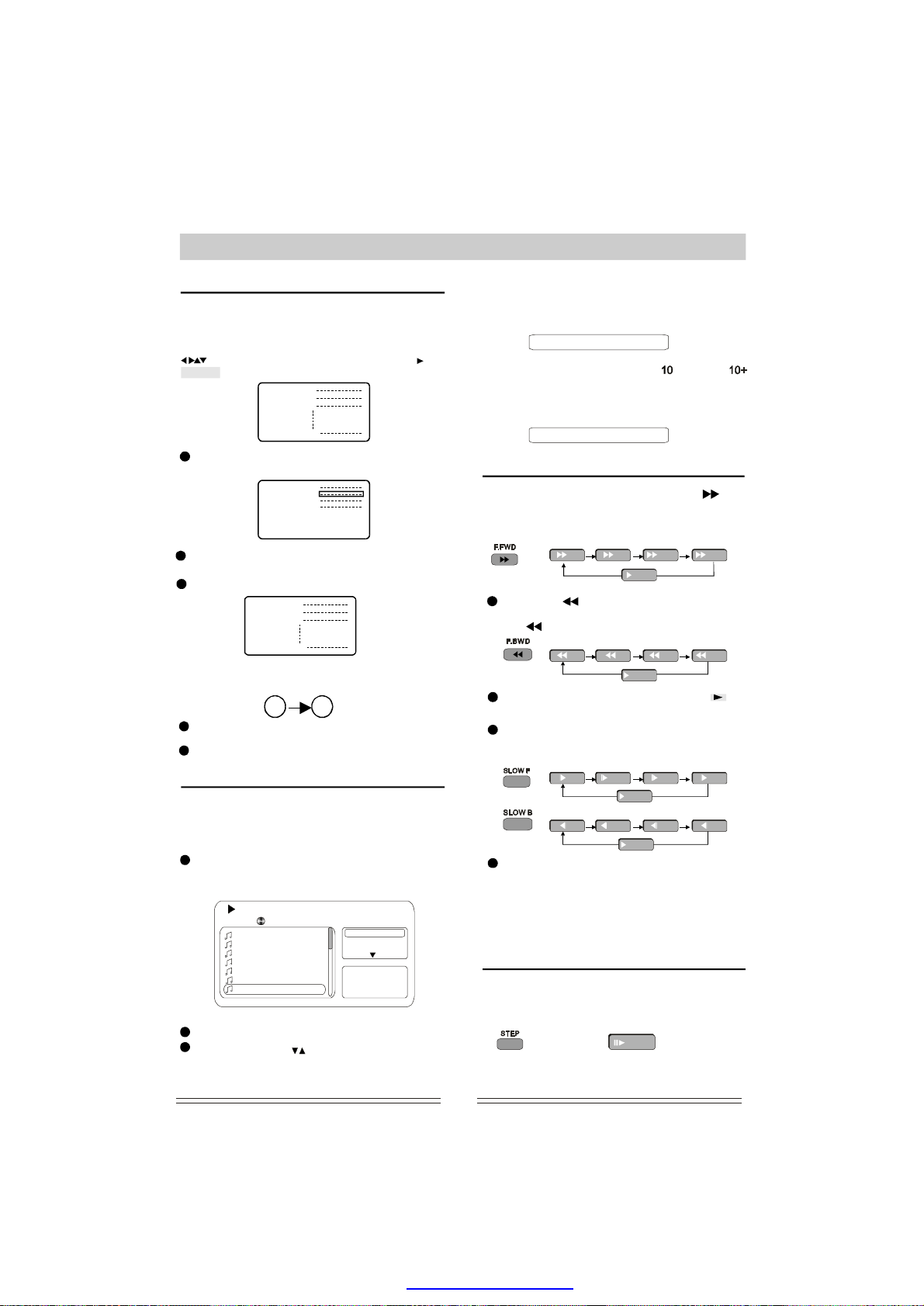
MenuplayforDVDdiscs
WhenplayingDVDdiscs,somediscscontaintitle
menusorrootmenus,
ssthisfeature.
toacce
TheTVscreenwillshowmenupictureuse
toscroll.Toconfirmselection,pressor
ENTER.
Forexample:Toselectthe13song
pressandTITLE
thethe
Menu
Menu
1.
2.
3.
11.
12.
13.
14.
15.
MENU/PBC
th
Alternatively,youcanalsoselectdirectlyby
usingthenumericbuttons.
Menu
1.
2.
3.
11.
Directselectbynumericbutton:
10+3
Pressturntotitlemenuifthereis
atitlemenu.
Pressreturntotherootmenu.M
VCD/CDdisctrackselection
LoadaCD,thesongswillbeplayedautomatically;you
canselectsongswithumericbuttoIfthetrack
numberislessthan10,pressnumericbuttons1-9to
select.
Forexample:Toselectthe8thsongpress
numberbutton8.Thecursorwilljumptothe8th
trackoption,asbelowshow:
8:18
Now,youcanpresstostartplaying.ENTER
Youalsocanusekeystoselectyourdesired
tracks,pressthekeytostartplayback.ENTER
reTITLE
ENU/PBCtoto
00:00:41
Track08.CDA
/
Track01
Track02
Track03
Track04
Track05
Track06
Track07
Track08
thenns.
Filter
Repeat:Off
Mode:Normal
MusicPlaying
LoadaVCD(e.g.VCD2.0),uponreadingthedisc;you
canplaysongswiththenumeric.Ifyouwantto
selectthe8th,pressescreenshows:
buttons
th8
8
Toselectsongbeyondthe,press
button,followedbythenumber0-9.E.g.Youwantto
selectthe12thsong,press10+andthenpressbutton
2,theTVscreenwillshow:
numbersthe
12
FastForward/FastBackward/SlowMotion
WhenplayingDVDorVCDdiscs,press(
WD)to
differentspeedsavailableonhow
manytthebuttonpressed.
enterfastforwardmode.Thereare4
imesis
x2 x4 x8 x16
Pressingnterfastrewind
mode.Selectfastrewindbypressing
thebutton.
Toresmalplay,pressor
Whenplayingadisc,pressor
toplaybackwardorforwardslowly.Thespeed
will
goslowerwitheverypress.
Wheninslowlyplayingmode,Pressor
toresumenormalplay.
PLAY
(F.BWD) wille
continuously
x2 x4 x8 x16
umenorthe
button.ENTER
1/2 1/4 1/6 1/8
1/2 1/4 1/6 1/8
depending
Play
speeds
Play
SLOWBSLOWF
Play
Play
Note:
1.CD/JPEG/MP3discshavenoslowplayfunction.
2.DivX,MPEG4discshavenoslowbackwardfunction.
3.Wheninabovefunctionthesoundwillbe
removed.
the
F.F
ENTER
Framebyframeplay
WhenplayingavideodiscotherthanpictureCD,
Pressotecontroltocreateastill
STEP ontherem
image,pressitagaintocreatethenextstillimage.
Thescreenshows:
Step
Presstoresumenormalplay.PLAY
7
PDF created with pdfFactory Pro trial version www.pdffactory.com
Page 17
OperatingInstructionsForFunctions
TrackorChapterSkip
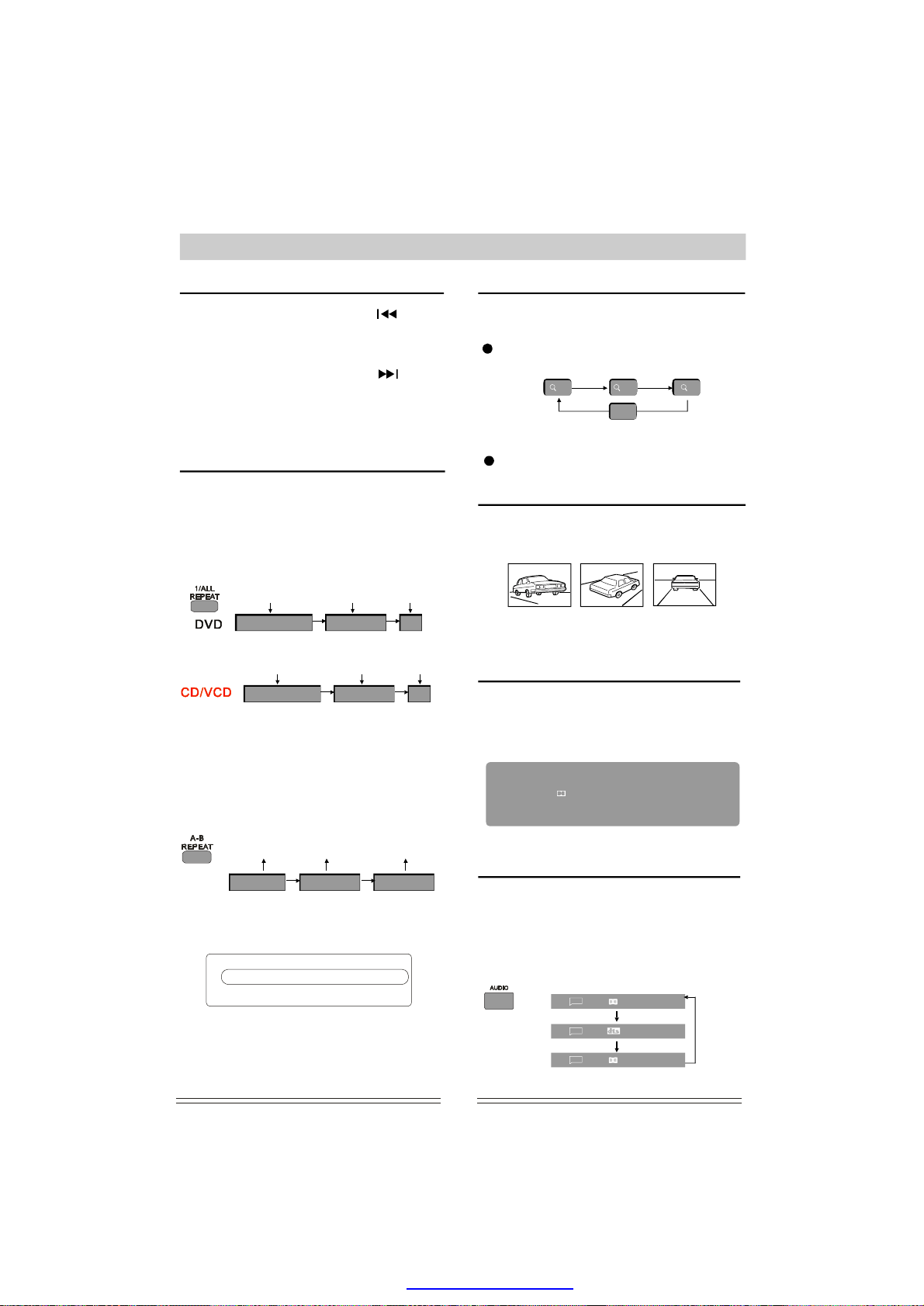
WhenplayingaDVDdisc,pressthebuttonto
skiptothepreviouschapter.Whenothertypesof
discsare
previous.
WhenplayingaDVDdisc,pressthebutton
toskiptothenextchapter.Whenothertypesof
discsarethe
nexttrack.
Note:
used.
played,pressthisbuttontoskipto
tracks
played,pressthisbuttontoskipto
Thisfunctiononthetypeofdisc
depends
Repeat
WhenplayingDVDandotherdiscs,theplayercan
playaspecifiedtitle,chapter,trackorothercontent
repeatedlyorrepeatthewholediscorrepeatplayfrom
pointAtopointB.
ForDVDdiscs,whenthebutton
ispressedcontinuously,thescree
Repeat
currentchapter
RepeatChapter
Repeat
currenttrack
RepeatSingle RepeatAll Off
Note:ForVCDplayback,repeatwillonlywork
whenPBCisoff.
1/ALLREPEAT
nwillshow:
Repeat
currenttitle
RepeatTitle Off
Repeat
alldisc
repeatmode
Cancel
Cancel
repeatmode
PictureZoomfunction
This featureisusedtozoommotionpictu-
reorstillimageswhenplayingVideoDiscs.
Thereare3levelsofZoom,Press
buttontochoose.
(ZOOM)
Whenthepictureiszoomedin,usethearrowkeys
toshiftandpantodisplaythepartyouwanttoview.
Toreturntonormalsize,rthe
fourthtime.
1
inonthe
2
OFF
press ZOOM fo
ZOOMthe
3
MultiangleDVDplay
SomeDVDdiscsmaycontainscenesshotfromdifferent
angles,inthiscasethekeymaybeusedtoview
ANGLE
thesamescenefromdifferentangles.
Thisfunctionisonlyapplicabletodiscsrecordedwith
scenesshotatdifferentangles.
OSD-OnScreenDisplay
Theonsc
theplayingtimeandremessthe
DISPLAY
DISPLAY
reendisplaycanbedisplayedtocheck
keytocheck.E.gDVDbypressing
,thescreenwill
ainingtime,Pr
,
show:
Repeatappointedpart
Toselectapointtopointrepeatlocation.
thePressbuttontoselect:A-BREPEAT
SetpointA SetpointB
RepA- RepA-B Repoff
Tocancel
repeatfunction
Youalsocanpressremotecontrol:MODE onthe
PlayMode
Mode
Repeat
UseUP/DOWNarrowkeylectoneoption,
thetose
andpressrepeatedlytochangetheplay
modyourliking.
Presskeyagaintocanceleditmode
state.
eto
the
ENTER
MODE
:Normal
:Off
DVDVideo
Title
1/10
Audio
1/36ChEng
Subtitle
1/4Eng
Angle
1/1
Whenplayingotherdiscs,theanddisplay
interfacearesimilarDVD.
to
00:17:4201:36:34
Chapter8/40
Bitrate6.912Mbps
method
AudioChannelSelection
WhenplayingDVDdiscs,pressthebutton
toselectyourdesiredaudiochannel.Thisisonly
applicableifthedischasadifferentaudiochannel
functionincorporated.
Forexample:amoviediscwithEnglish,
nchandSpanish,youcanpressthe
Fre
buttoncontinuouslytoselectandconfirm.
On
1/36ChEng
1/36ChFre
1/36ChSpa
AUDIO
8
AUDIO
PDF created with pdfFactory Pro trial version www.pdffactory.com
Page 18
OperatingInstructionsForFunctions
WhenplayingVCD/CD/MP3disc,pressthe
Keytoswitchbetween
(L/R)
Left
Whenplayingofamoviedisc,ifithastwolanguages,
pressthekeytoselectbetweenthetwolanguages.
L/R
NOTE:
1.ThisfunctioncanonlybeusediftheCenter,
SurroundandSubwooferspeakersaresettoNONE.
(Seesystemsetupfordetails.P14)
2.Theaboveoptionsdependonwhethertheyare
theleftandrightchannels.
Right Mix
L/R
Stereo
supportedbythedisc.
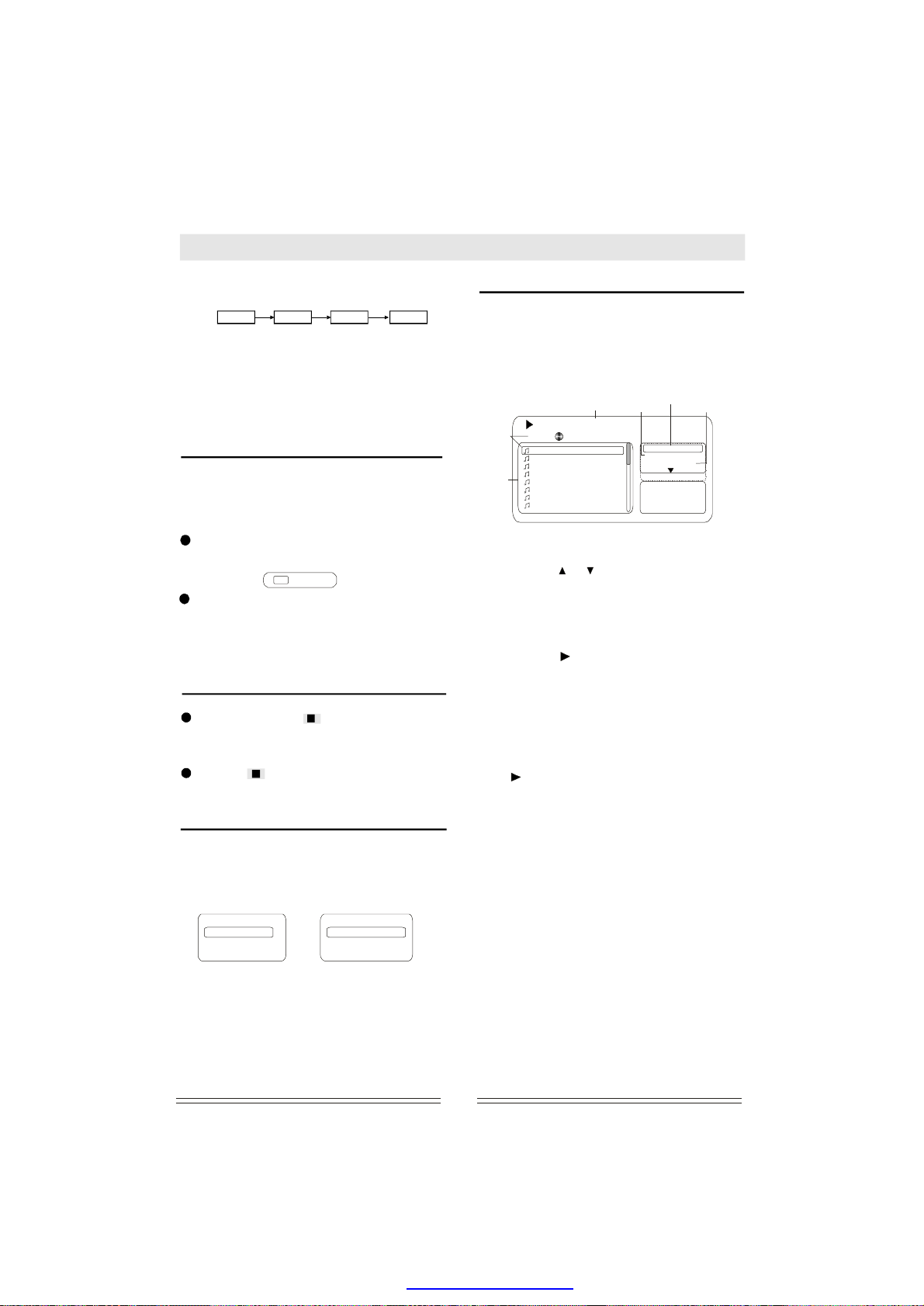
SubtitleLanguageSelection
WhenplayingaDVDdisctitles,youcan
chooseadesiredsubtitlewiththe
button:
Forexample:Thereare3differentlanguage
subtitlesavailableontheDVDdisc.
Pr
essthebuttontoselectasubtitle
SUBTITLE
anguage
asshownontheTVscreen.
...
Todisablesubtitledisplay,press
SUBTITLE
onTVscreen.
Remark:
discswithsubtitles.Thesubtitlelanguage.varies
disctodisc
thethe
buttonuntil"Subtitle:off"isshown
Thesubtitlefunctionisonlyavailablefor
1/3:Fre
withsub
SUBTITLE
MemoryPlay
Whenplaying,pressoncetostopplayback.
Theplayerwillmemorizethecurrentpoint.
Press toresumeplayfromthatpoint.Play
Pressing twicewillclearthememoryandif
playisresumed,thediscwillbeplayedfrom
thebeginning.
Timedplay
WhenplayingaDVD/VCD/CDdisc,Youcangoto
yourdesiredpositiondirectlyviathisfunction.
pressthekeytodisplayonscreenas
follows:
UseUP/DOWNarrowkeytoselecttitle,chapteror
timeandusedigitkeytoyourdesired
ocationortime
l
NOTE:0
continuouslytoclearit.
SEARCH
DVD VCD/CD
Search
Title
...
Chapter
...
Time
--:--:--
the
the
thenpresstostartplaying.
Ifyouenteranincorrectdigit,youcanpress
Track
Time
DiscTime
ENTER
Search
ENTER
...
...
--:--:--
MP3/WMA/AVIPlayback
TheDVDplayercanplaybackdiscs,including
CD-R,CD-RW,DVD+R,DVD-Retc.recordedwith
MP3/WMA/AVIaudiofiles.Multipleandmulti-level
directoriesaresupported.
UponloadingMP3disc,thescreenshowsa
menuasAJustforreference)andplaying
thefirstsong:
Thecurrent
playingtrack
Filearea
an
(
01/53
01morethana--02
03
04
05
06
07
08
Playingtime
00:00:41
01morethana.Mp3
/
Repeatmode
Repeat:Off
Mode:Normal
MusicPlaying
Operations:
1.Selecttrack
Method1:Useorarrowoscrolltoyour
desiredtrackthenthepresskeytoconfirm
p
lay.
Method2:Uenterthedesired
numberandthenpressstartplaying.
2.Selectrepeatmode
Method1:Usearrowkeymovethecursorto
REPEAT
Single,Allorcanceltherepeatmode.
Method2:Presskeyonremote
controltoselect.
Single:
All:
3.Mode
Usearrowkeytomovethecursorto
option,andpressoselect
Normal:
Shuffle:
Intro:
4.Stopplaying
Presskeytwicetostopplaying.
.Filter
5
Ifthecon
videofiles,
play.
OtherFunctions
FunctionssuchasMUTE,VOLUME,PAUSE,
PREVIOUS,NEXTetc.arealsoavailableforMP3
discs andfunctionthesameasanaudioCD.
se
thedigitkeysto
andpresscontinuouslytoselect:
ENTER
1/ALLREPEAT
Repeatthecurrenttrackagainandagain.
Repeatallcontentofdiscagainandagain.
ENTE
Toplayinnormalorder.
Toplaythetnarandomorder.
Everytrackwillbeplayedforafewseconds.
STOP
the
tentofadiscincludesaudio,photoand
youcanselectonetypetodisplayand
keyst
PLAY
to
PLAY
to
the
t.
R
racksi
starts
Filter
Filter
EditMode
Playmode
Mode
9
PDF created with pdfFactory Pro trial version www.pdffactory.com
Page 19
OperatingInstructionsForFunctions
PlayingKodakPictureCDorJPEGfiles
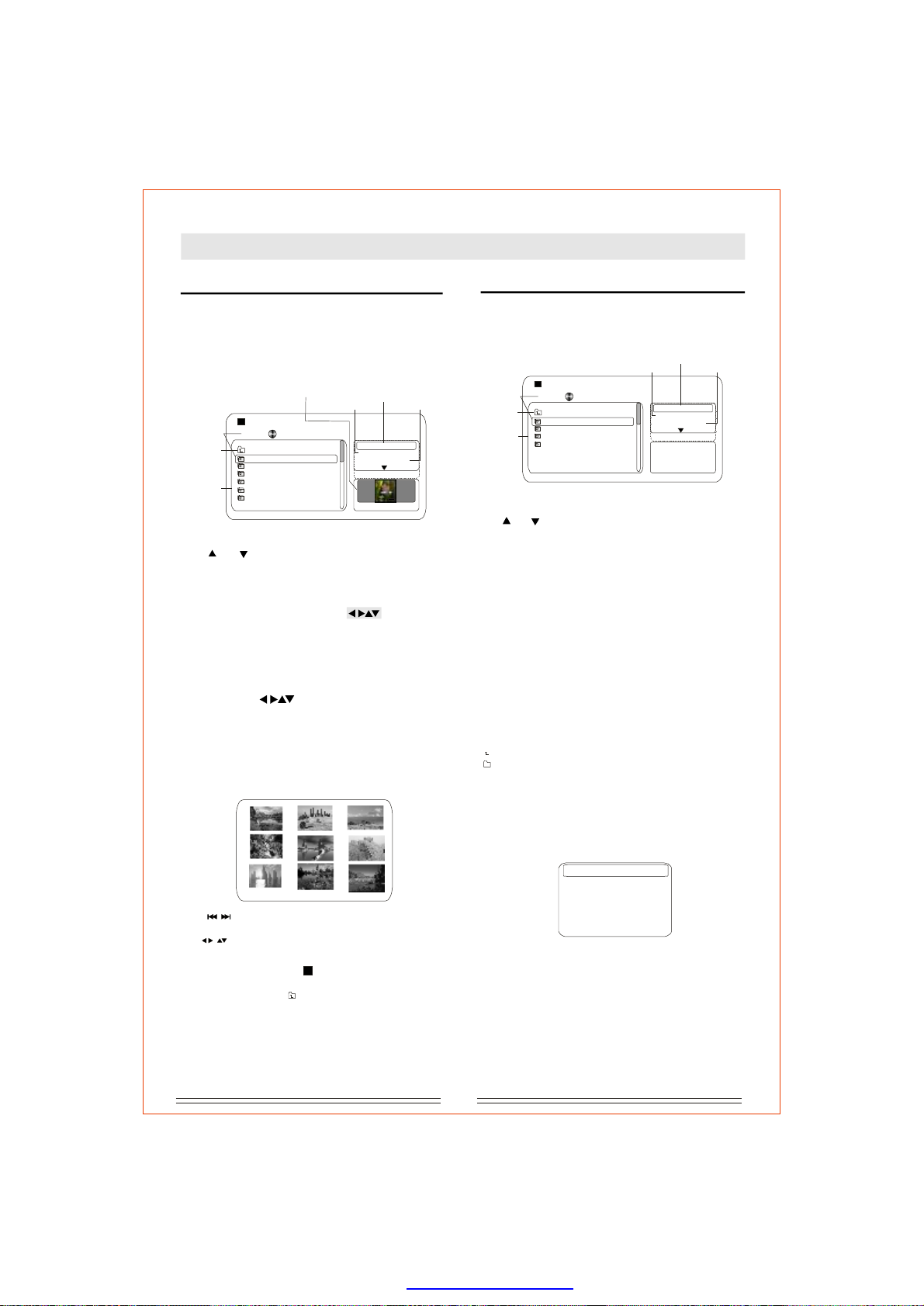
TheDVDplayeriscompatibleKodakPicture
CDanddiscscontainingJPEGimagefiles(with
.JPGfileextension).
ck.
UponloadingaKod
containingJPEGfiles,:
Thecurrent
playingpicture
Filearea
Root
directory
0/45
ThisissimilartoMp3playba-
Previewarea
Jpeg/001.JPG
/
..
01
03
04
05
06
07
with
akPictureCDordisc
theTVscreenshows
Filter
Repeatmode
Filter
Repeat:Off
Mode:Normal
EditMode
W:400H:572
Playmode
Previewandplay
Useortoselectthetargetfile,the
arrows
picturewilldisplayinthepreviewarea.Press
rtplay.PLAY
tosta
RotatePicture
Youcanusearrowbuttons
invert
Zoomintheplayingpicture
YoucanpressZOOMbuttontozoomthe
playingpicturefor1/2/3timesorcancel.
Whenthepictureiszoomedinyoucanuse
thetorotateor
thecurrentshowingpicture.
the
the
Digest
Whenloadingapicturssany
time,theplayerwillenterintodigestdisplaymode.
As
below:
show
TITLeCDpreat
E
MPEG-4,DIVXdiscPlayback
Uponloadingadisc,thescreenshowsawindow
asfollows:(Thefollowingpicturorreference
only)
Thecurrent
playingpicture
Root
directory
Filearea
SelectionandPlaying
Useorarrowstoselectandpresskeyto
startplaying.
Whenplaying,manyfunctesameas
DVD.SuchasZOOM,AUDIO,L/R,VOLUME+,,DISPLAY,MENU/PBCetc..
OtherfunctsuchasFILTER,REPEAT,MODE,
EDITMODEareeasMp3.
Pauseplaying
PressMENU/PBCbuttondirectlyreturntomenu
interfaceandpauseplaying
option.A PLAY
continuously.Presspausekeytopauseplay
temporarilyandnotreturntomenu.
Stopplaying
Pressbuttontwicetostopplayingand
the
returntopreviousdirectory.Movethecursorto
andpresstoreturnmenu.
..
DivXSubtitle
WhenloadingaDivXdiscthatcordedwith
manysubtitlafteryouselectonefileand
confirm,Thescreenwilladialogbox:
justforreference)(
eisf
Filter
Repeatmode
1/5
Mpeg/001.MPG
/
..
01
03
04
05
Filter
Repeat:Off
Mode:Normal
EditMode
JPEGPreview
Playmode
PLAY
ion'sareth
ions
thesam
tthistimepresskeytoplayforward
STOP
the
ENTER
es,
youcanselectother
totheroot
isre
show
Useoscrolltopreviouspageornext
page.
Usetoselectandpresskeytoview.ENTER
StopPlaying
Whenplaying,pressorMENU/PBCtostop
playingatanytime.
Movethecursortodocumentandthenpress
ENTEpreviousmenu.Rtoreturntothe
OtherfunctuchasFILTER,REPEAT,
MODE,EDITMODEaresameasMp3.
keystthe
keys
..
ionsthes
the
Youcanselectthefirstoptiontoclosethe
caption,orselectonesubtitl
toslaying.
tartp
NOTE:
Thisfunctionmustbesupportedby thedisc.
10
PDF created with pdfFactory Pro trial version www.pdffactory.com
ExternalSubtitleFileSelection
ExternalSubtitleOff
Charmed-S06E1.SRT
Charmed-S06E1.SSA
ENT
EReandpress
Page 20
OperatingInstructionsForFunctions
Programfunction
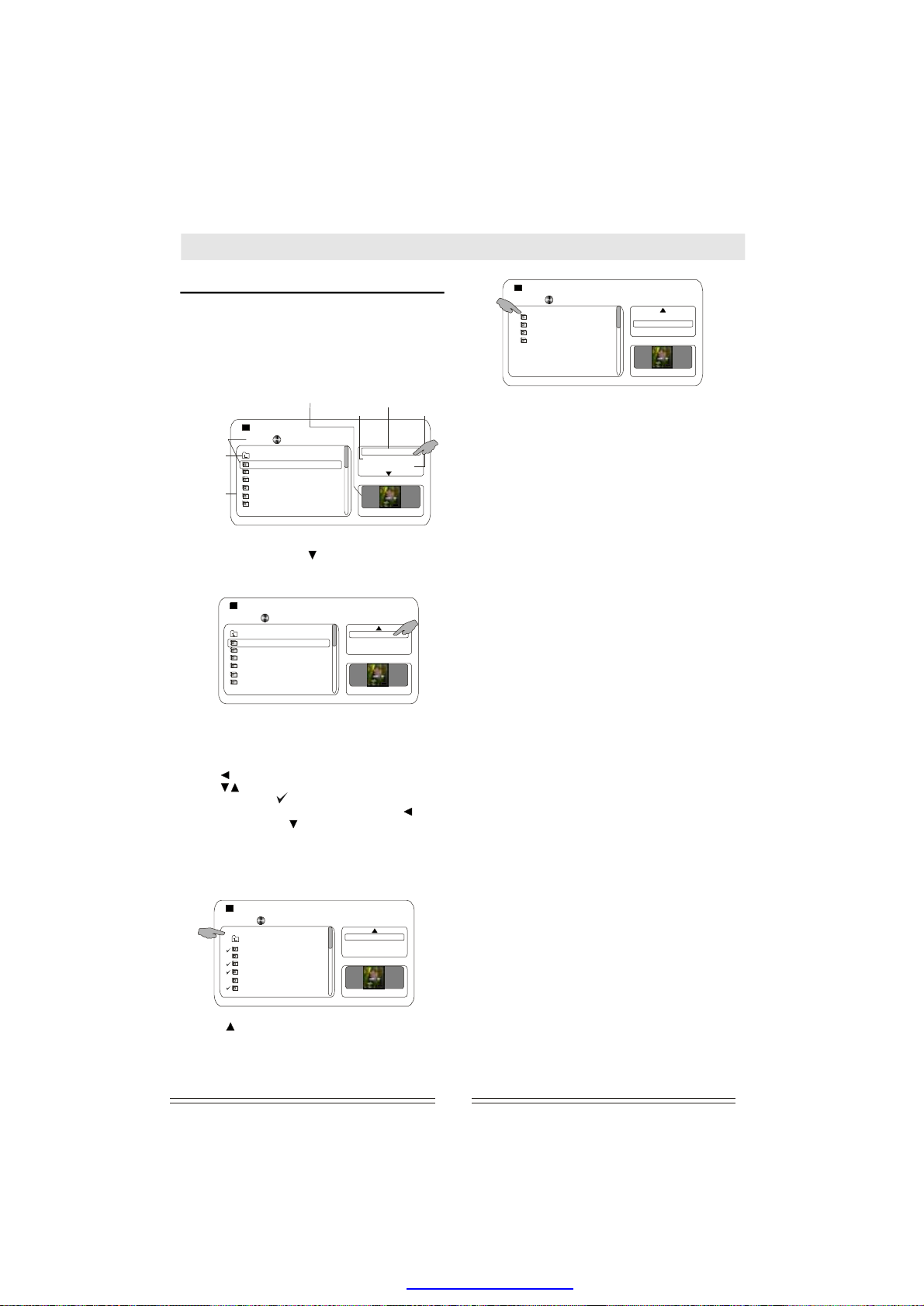
Playinganyoneofthefollowing:CD,Mp3,MPEG4,
JPEGorDivX,
Afterthedischasloaded,thescreenwillappear
asshownbelow,
thecursortorightoption.Asbelow:shown
Thecurrent
playingpicture
Root
directory
Filearea
youcangotoprogram.
userrowkeytomove
thea
RIGHT
Previewarea
Jpeg/001.JPG
/
Repeatmode
Repeat:Off
Mode:Normal
Filter
Filter
W:400H:572
0/45
the
..
01
03
04
05
06
07
Playmode
1.Atthistime,pressbuttontomovedown,
andthescreenwillshowthehiddenoptions:
EditMode,ProgramView,AddToProgram.
0/45
Jpeg/001.JPG
/
..
01
03
04
05
06
07
2.Editmode:Allowsoselectthedesired
trackforprogramplay.thecursortothisoption
andpressto
highlighted.
3.Pressbuttonandmovethecursortofilearea,
andusetoselectdesiredtracksandpress
key,thenasymbolwillappearontheleftof
yourselection.Whenfselecting,pressbutton
toleftmenuandusebuttontomovethecursorto
ENTER
confirm
tracks/fileswillbeaddedtothePROGRAM.
yout
Move
confirm
inished
press.Alloftheselected
theoptionwillbe
ENTERAddToProgram
EditMode
ProgramView
AddToProgram
W:400H:572
the
ENTER
0/45
01
04
05
07
5.Ifyouwanttoaddotherfilestoprogram
menu,pleaseselectAndthen
repeatsteps2,3and4toaddprogramfiles.
6.Ifyouwanttodeletesomefiles
program,youcanpresscetostopplayingcompletely,andselect,movethe
cursortoprogramfileareaandselecttdesired
filetoconfirm,afterselecting,movethecursorto
therightandselectthenyour
selectionwillbedeleted.
delete,thentheprogramwillbecancelled.
EditMode
BrowserView
ClearProgram
W:400H:572
BrowserView.
STO
EditMode
ClearProgram
Ifyouselectallfilesto
the
twi
P
he
fromthe
0/45
Jpeg/001.JPG
/
..
01
03
04
05
06
07
4.Presskeymovethecursorto
andpressthefileareawillttheprogram
filesthatyouhadselectedbefore.
PresstostartProgrammedplayback.PLAY
to
ENTER.
EditMode
ProgramView
AddToProgram
W:400H:572
ProgramView
lis
11
PDF created with pdfFactory Pro trial version www.pdffactory.com
Page 21
SystemSetup
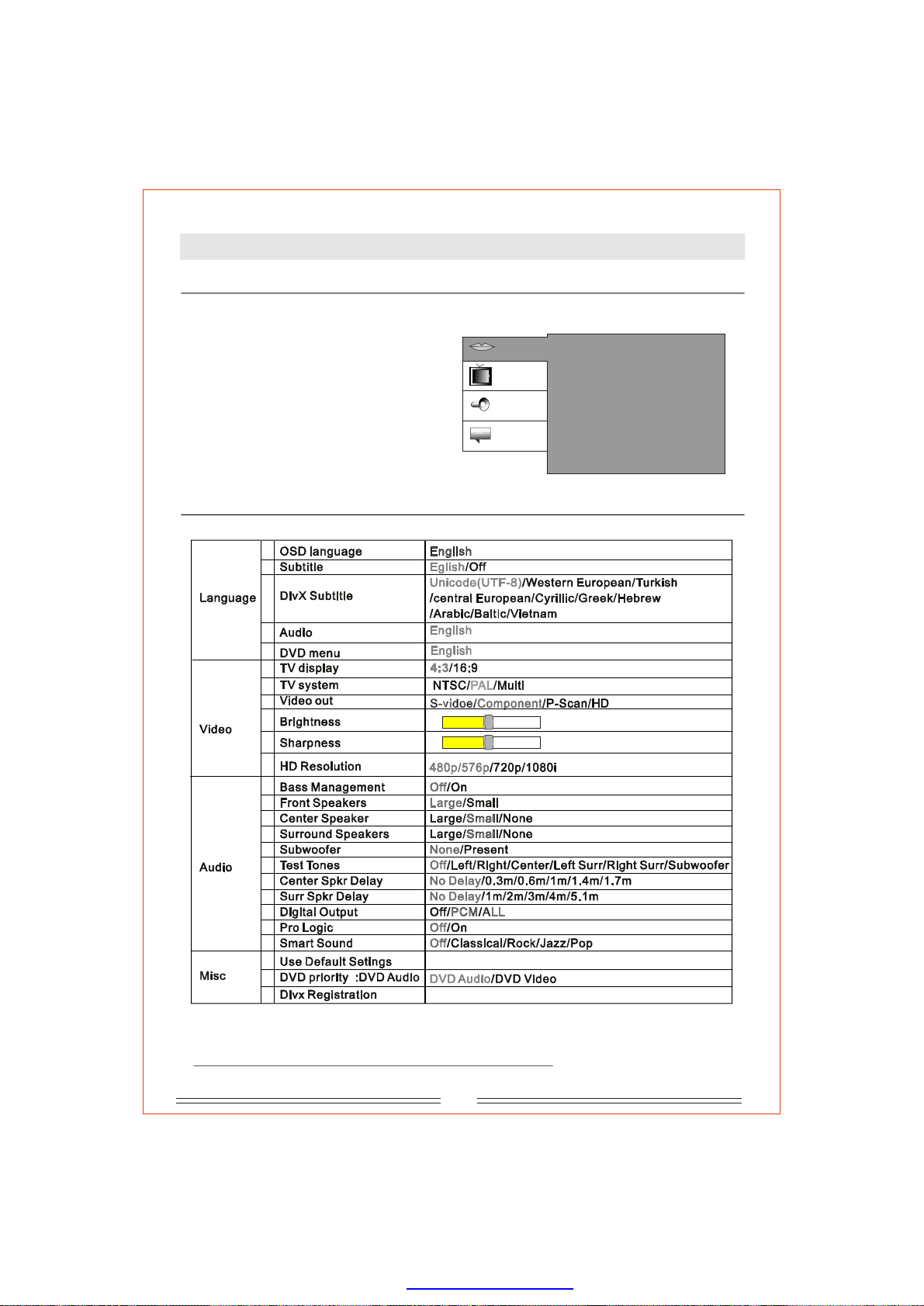
Systemsetupmenu
SystemsetupisforyoutoyourDVD
configure
player.
YoucancustomizetheperformanceofDVD
the
playertoyourpersonalpreference.
Whenyoupress,theTVscreenwill
showinterfaceas:
anshownatright
Normal:
operation
1.Usearrowkemovethecursorto
theysto
targetopti
2.PressENTERkeyenterintoyour
SETUP
ons.
theto
selectionorconfirmyourselection..
Detailsforsystemsetup
A
B
C
D
E
A
B
C
D
E
1 16
1 16
F
A
B
C
D
E
F
G
H
I
J
K
A
B
C
Language
Video
Audio
Misc
8
8
OSDlanguage
Subtitle
DivXSubtitle
Audio
DVDmenu
:
English
:
English
:
Unicode(UTF-8)
:
English
:
English
Note:Thegrayoptionsarethefactorydefaultsettingvalue.
12
PDF created with pdfFactory Pro trial version www.pdffactory.com
Page 22
SystemSetup
Language
A.OSDlanguage
ToselecttheOn-Screen-Displaylanguage:
ENGLISH.OSDistheinformationdisplayed
onTVscreen.
the
The
B.Subtitle
Subtitleistheinformationforshowinpoken
words.selectthesubtitlelanguageorclose
To
thesubtitledisplay.
gs
C.DivXSubtitle
ToselectthesubtitlelanguageDivXdisc.
Unicode(UTF-8)/WesternEuropean/Turkish
/centralEuropean/Cyrillic/Greek/Hebrew
/Arabic/Baltic/Vietnam.
Subtitlesthe
displayed.
NOTE:Thisfunctionmustbesupportedbythe
outofaboveareacan'tbe
disc.
ofa
D.Audio
Audiolanguageisthelanguageyouhear.There
isonelanguageforyouselection:ENGLISH.
E.DVDmenu
DVDmenulanguageisthelanguageinwhich
themenuonthediscisrecorded.
NOTE:
Thelanguagesaredifferencefordifferent
thelanguagetodisplayorhearmust
discs,
besupportedbydisc.
the
VideoOut
A.TVdisplay
4:3:
Selectthisoptionwhentheplayeris
connectedtoastandard4:3aspectratioTVset.
Thefull16:9widescreensourcepictureswillbe
shownonthescreen,butwithblackbarsonthe
topandbottom.
16:9ris
connectedtoawidescreenTVset
thisoptionwhentheplaye
Select
B.TVsystem
Youcanselectthevideooutputsystemasper
yourTVsettingamongPAL/NTSC/MULTI.
"Multi"modesupportsbothPAL/NTSC.
P-Scan: Thisistosetcomponentvideooutput
formatinY-Pb-Prforprogressivescanmode.It
canbeusedwhenyouconnecttheTVsetvia
Y/Pb/Prthreecables.
ThisisusedforhighdefinitionDigitalTV.
HDMI:
Whenyouselectthisoption,the
Resolution
SelectthisoptiononlyyouconnecttheTV
setviaaHDMIcable.
Note:
TheVIDEObuttonontheremotecontrolalso
allowsyoutoselectbetweenthedifferent
outputs(theplayermustbeinstopmodeor
havethetrayejected).IfHDMIisselectedthere
willbenooutputfromtheothervideooutputs.
submenuwillbeactivated.
when
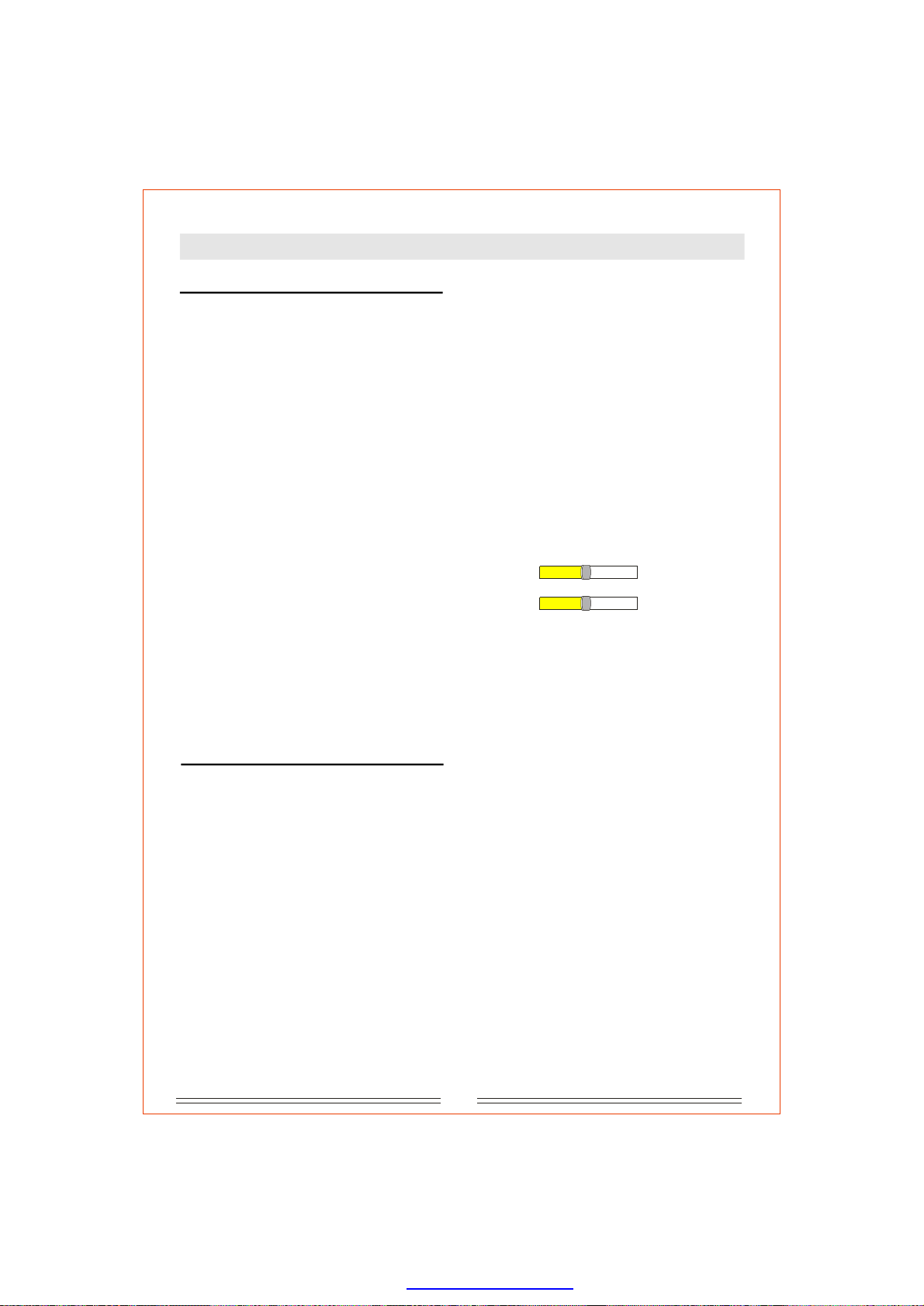
D,E.Brightness,Sharpness
Allowsyoutoadjustthebrightnessand
sharpness ofthepicture.
ENTER
8
8
arrows
to
1 16
1 16
Usetochangethevalue,
LEFT/RIGHT
andpressconfirmyourselection.
F.HDResolution
Allowsselectbestbefittingresolution
youtothe
accordingtoyourHighDefinitionTVsetstatus.
ThereoptionsforyoutoSelect:480p/576p,
are3
720p,1080i.
Note:
1.YouswitchtheHDmodeby
canalso
pressingHDonremotecontrol.
2.IfthereisnodisplaywhenselectingaHD
modeontheHDMIoutput,pushtheHD
buttonuntilasuitableHDmodeisselected
thatyourTVwillsupport576P,720P
1080i.(refertoyourTVmanualforit's
supportedmodes)
the
HDMI
C.Videooutput
Forythev
outoselectideooutputmode
accordingtoyourTVsetselectionmethod.
S-video:
thenyoucanselectthisoption.
Component:
outputformatinY-Cb-Crforinterlacedscan
mode.Iteusedwhenyouconnectthe
TVsetviaY/Cb/Crthreecables.
IfyouconnecttoTVsetviaS-video
Thisistosetcomponentvideo
canbonly
a
13
PDF created with pdfFactory Pro trial version www.pdffactory.com
Page 23
SystemSetup
Audio
A.BassManagement
ON:
Off:
akerselectthisoption.
thebassloudspeaker.
Enable
Whennotconnectingtbassloudspe-
oa
B/C/D.Front,Center,SurroundSpeakers
Large:
Isrecommendedfor
widefrequencyrange(20Hz-20KHZ).
Small:
Isrecommendedforordinaryspeakers
(200Hz-20KHz).
NONE:
speakersconnected.
lectthisoptiononlyifthereareno
Se
speakerswitha
E.Subwoofer
NONE:
Selectthisoptionwhennosubwoofer
speakerconnected.
is
Present:
connected.
Note:
Forthesubwoofertobeactivethespeaker
settingsmustbesettoSmall.
Remark:
1)Toenjoythedownmix2.0,Center,Surround
speakersandSubwoofershouldbesettooff.
2)Thespeakers(Front,Center,)can
onlysettosmallwhenBASSMANAMENTis
settoON.
Note:
Whenonlytwospeakers(frontleftandright)
arebeingused.Thisdirectsallaudiotothetwo
frontspeakers.
Whenanis
activesubwooferspeaker
Surround
F.TestTones
Intrayopenoremptystate,can
beusedtocheck5.1CHoutput.Itgivessound
fromindividualsspeakerstoensureconnectionsareOK.
thetesttones
J.ProLogic
DolbyProLogciisamatrixdecoderthat
decodesthefourchannelsofsurroundsound
(Frontleft,center,frontrightandsurround)
thathavebeenencodedontothestereo
soundtracksofDolbySurroundencoded
materialsuchasVHSmovies.Thesurround
channelismonaural,butisplayedthroughtwo
surroundspeakers.
CloseProLogicfunction.
Off:
Thisconvertstwochannelto
On: recordings
5.1channeloutput.
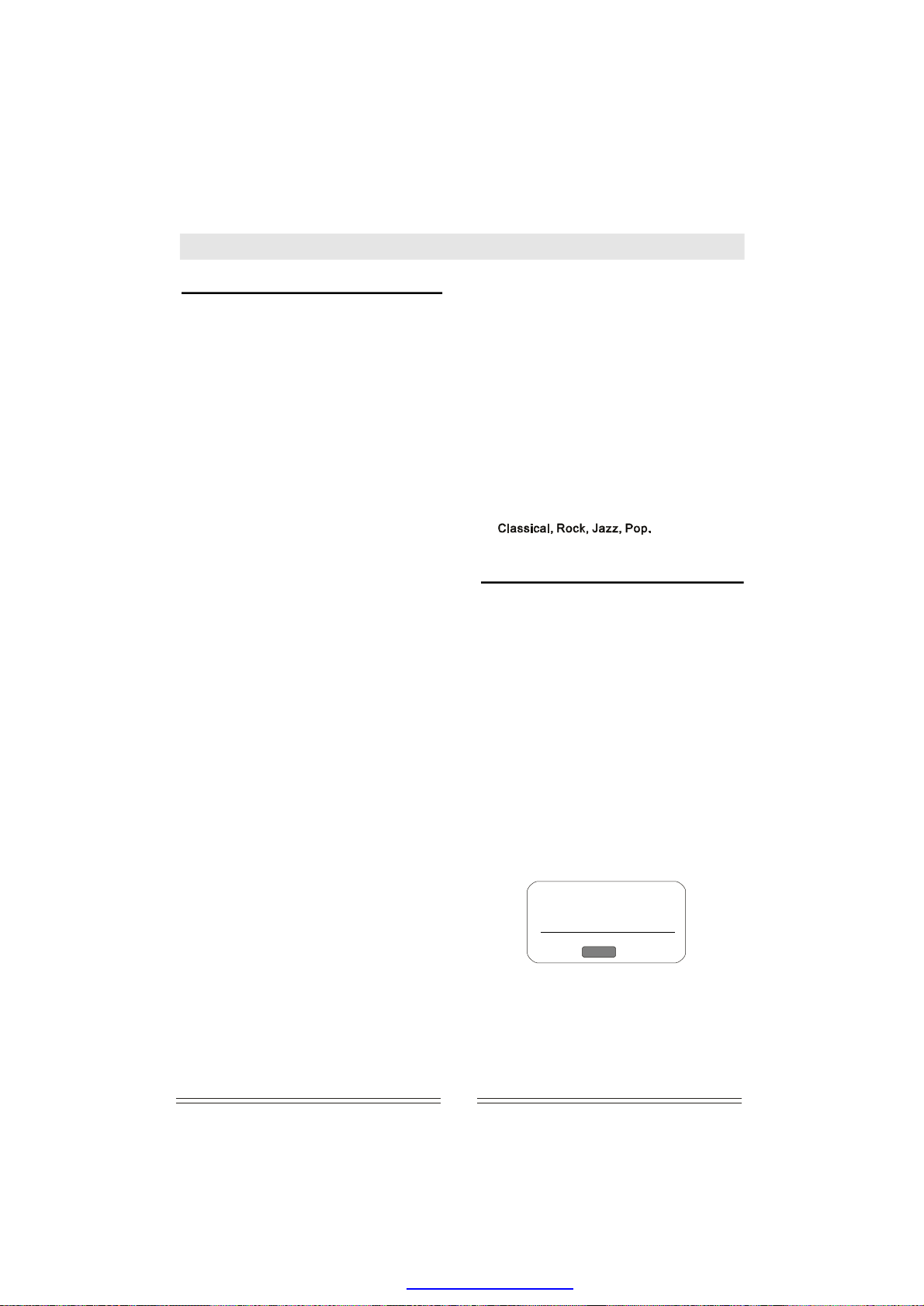
K.SmartSound
Whenyouplay
audiochannels,
digitaloutputinthesystemsetup,orwhen
analogstereosignalsareinput,youcanselect
oneofthefollowingsurroundsoundmode:
aCD/VCDrecordedwith2
orselectthePCMmodeof
Misc
A.Usedefaultsetting
Thisallowsyoutorestorethefactorydefault
settings.
Whenyouselectthisoptionandpress
keytoconfirm,thescreenshows:'UseDefault
Setting','Yes','No',movethecursorto'Yes',and
pressestoreallsetupparametersto
ENTER tor
factorysettings.
ENTER
B.DVDpriority
ForsomeDVDcordedwithDVDaudio
filesandDVDvideofiles.Whenplaying,youcan
selectonekindoffiletoplayfirst.
Thisselectsthepriorityorderof
AudioorVideo.
discsre
aDVDdisc:
C.DivXregistration
SelectthistoshowtheDivXregistration
informationdialogbox:
G/H.Center/Surrspeakerdelay
Thisallowsyoutobalancethespeakers.You
canbalancethembyadjustingthedelayvalue
inmforcenter,surrroundspeakers.
DivX@VideoOnDemand
Yourregistrationcodeis:
XXXXXXXX
(http://www.divx.com/vod)
I.Digitaloutput
Off:
This
thedigital(coaxial/optical)outputsareturnedoff
PCM/ALL:
Pleaseselecttheoptionwhenyouconnectedt
tedthroughtheHDMIconnection".
isforstereo/5.1channel/analogoutput,
Fordigital(opticalorcoaxial)output.
oa2.1CHdigitalamplifierorwhenconnec-
PCM
.
are
1.Thiscodeistheonlyonefromthisweb.
2.Thisisthatthisproductistobe
auth-orizedtousetheDivXpatent.Our
companyhasobtainedthisrightvianormal
legitimateUserscanusethisunitto
playallOriginalEdition)DivXdiscs.
3.Usercanenterintothewebsitetovalidate.
totelltheuser
means
14
PDF created with pdfFactory Pro trial version www.pdffactory.com
OK
,
site
(Nocopied
Page 24
Maintenance&Troubleshooting
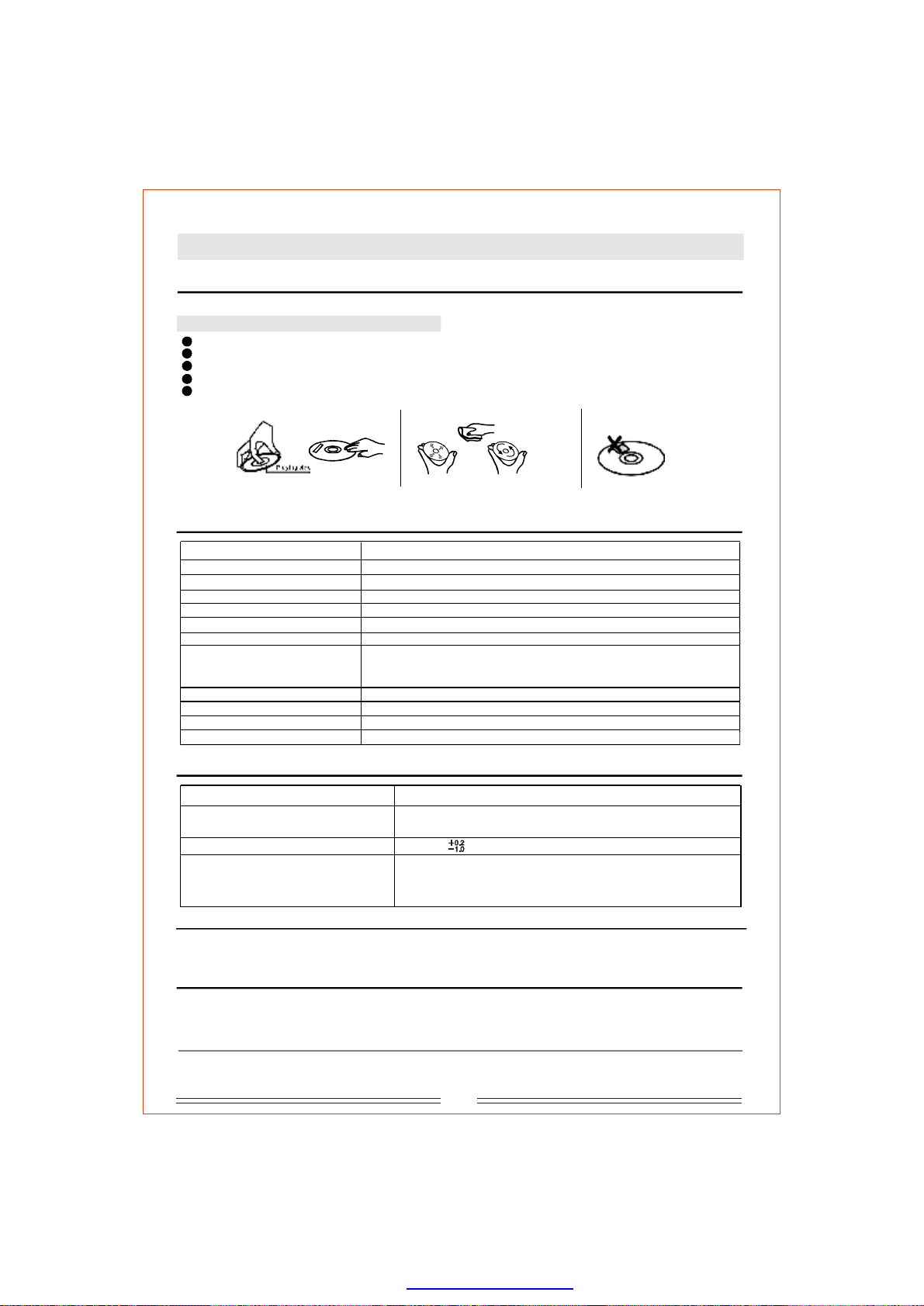
Howtohandle,protectandcleardiscs
Tohandle,cleanandprotectdiscs
Avoidscratchingthediscandalwaysreplaceintheboxafteruse.
Cleanthediscbywipingitoutwardsfromthecentregentlywithaclean,soft,lintfreecloth.
Donotusealcohol,detergentorotherchemicalstocleanthedisc.
Donotheat,bendorattachadhesivepaper(e.g.'PostIt'notes)tothedisc.
Onlyuseproperdiscpensforwritingonthelabelsideofthediscotherwisediscdamagemayoccur.
Right Wrong Right Wrong
Takethedisc
Surfacecleaning
Nostickylabels
DVDPlayerSpecifications
Modelnumber
Powersupply
Powerconsumption
Weight
Dimension
Signalsystem
Laser
Frequencyrange
S/N
Audiodynamicrange
Flickerrate
Operationcondition
DV-5120HD
110-240V~,50-60Hz
20W
2.15Kg
430x38x250mm(W/H/D)
NTSC/PAL/Multi
Semi-conductorlaser,wavelength650nm,780nm
DVDlinearsound:48KHzpulsemodulation20Hz~20KHz
96KHzpulsemodulation20Hz~20KHz
CDAudiofrequency:20Hz~20KHz
90dB
≥
85dB
≥
Smallerthandetectablerange
Temp:0~40,Operationstate:Levelsurface
℃℃
Output
Videooutput
S-Videooutput
1.00.2(P-P),75ohm
±
V
(Y)1.0V(P-P),75ohm
(C)286mV(P-P),75ohm
Analogaudiooutput 2.0V(rms)
(Y)0.70.14V(P-P),75ohm
Componentvideooutput
±
(Cb)0.70.14V(P-P),75ohm
(Cr)0.70.14V(P-P),75ohm
±
±
Copyright
Accordingtotherelatedlaw,DVDdiscswithoutproperauthorizationarenotallowedtobecopiedandtobe
playedpublicly.AsDVDdiscsareanti-piracy,thecopiedcontentisalwaysdistorted.
Discstypes
ThisDVDplayercanplaythefollowingtypesofdiscs:Discsotherthanlistedabovecannotbeplayerbythisplayer.
ThisplayerusesNTSC/PALcolorsystem.Itcannotplaydiscsrecordedwithothersystems,suchasSECAM.
TVsystem
ConnectthisplayertoaPAL/NTSCcompatibleTV.
15
PDF created with pdfFactory Pro trial version www.pdffactory.com
Page 25
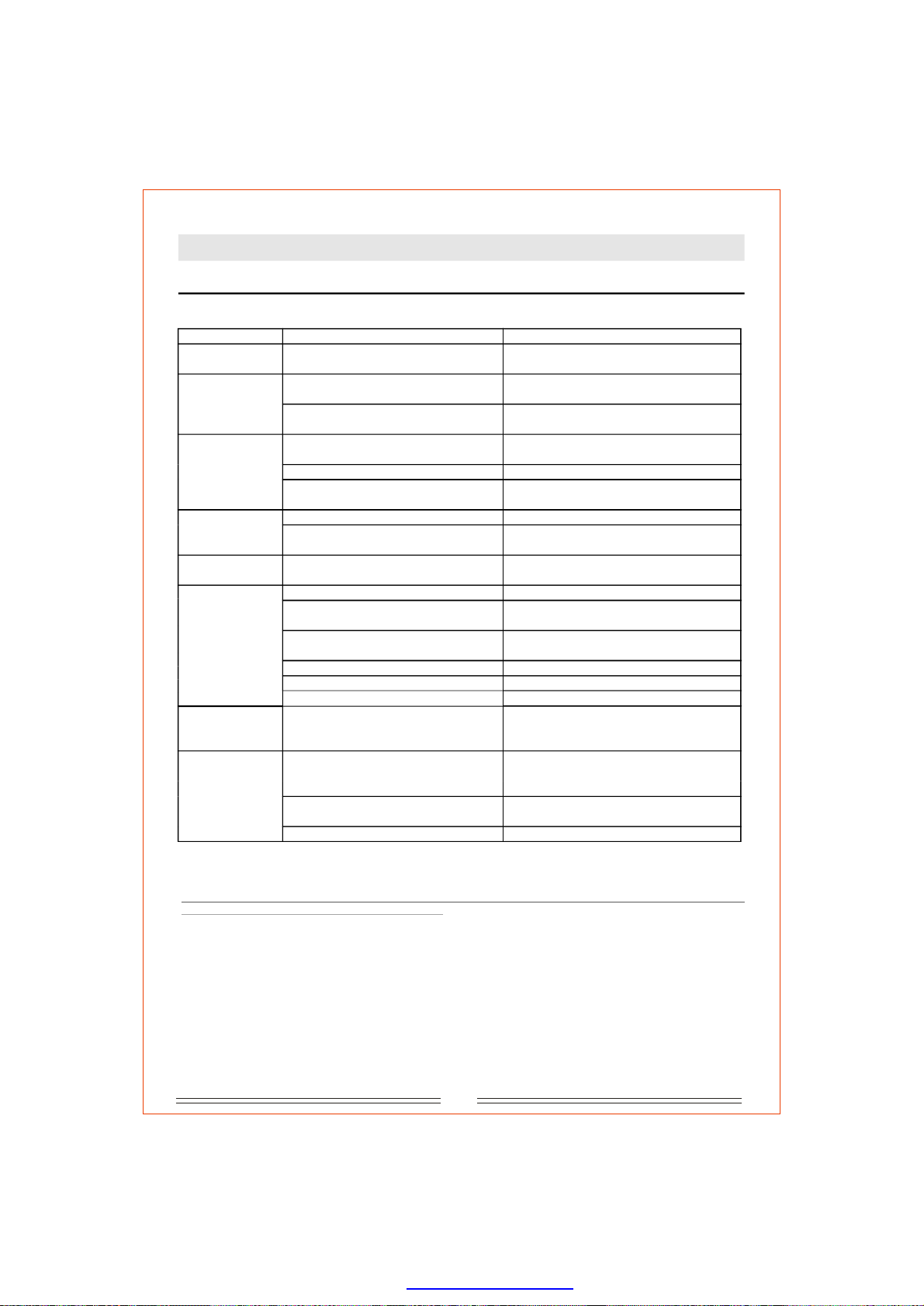
Maintenance&Troubleshooting
ProblemsandSolutions
ProblemsCauseSolution
Nopower
indication
Nopicture
Nosound
Picturedistortion
Brightness
unstableornoisy
Theplayerdoes
notwork
Noresponseto
keypress
Remotecontrol
doesnotwork
Powerplugnotconnected
TVhasnotbeensettothecorrectvideo
input
Videocablenotfirmlyconnected.
Audiocablenotconnectedtightly
Powerofaudioapparatusisoff
Audiooutputsettingisincorrect
Discisdirty
Fastforward/backwardisactivated
Affectedbyanti-piracycircuit
Nodisc
Discnotcompatible
Thediscisplacedupsidedown
Thediscnotputinthetraycorrectly
Discisdirty
Playersettingareincorrect
Interferenceofpowerwaveorother
factorssuchasstaticinterference
Theremotecontrolnotpointedatthe
remotesensoronthefrontpanelof
theplayer
Theremotecontrolisoutofspecified
range
Batterypowerexhausted
Plugthepowercordintothepowersupply
SetcorrectTVvideoinputformatforreceiving
theplayer'soutputsignals.
Firmlyinsertthevideocableendstothe
relatedterminals.
Firmlyinserttheaudiocableendstothe
relatedterminals.
Turnonthepowerofaudioapparatus.
Setupaudiooutputcorrectlyviathesetup
menu.
Takeoutthediscandclean.
Thepicturemaybedistortedduring
fast-forward/backwardplayback.
ConnecttheplayerdirectlytoTV.
Loadadisc.
Loadacompatibledisc(Checkthediscformat
anditscolorsystem).
Loadacompatibledisc(Checkthedisc
formatanditscolorsystem).
Checkdiscisputincorrectly.
Cleanthedisc.
Changethesettingviathesetupmenu.
Turnoffthemainswitchorpulloutthepower
plug,plugitinandturnonthepoweragain.
Pointtheremotecontrolattheremotesensor.
Makesuretheremotecontrolrangewithin7
meterstotheremotesensor.
Replacewithnewbatteries.
Duetothecontinuousresearch/upgradationoftheproductthecompanyreservestherightsto
makedesignchangeswithoutanypriornotice.
16
PDF created with pdfFactory Pro trial version www.pdffactory.com
Page 26
PDF created with pdfFactory Pro trial version www.pdffactory.com
 Loading...