

Page 1
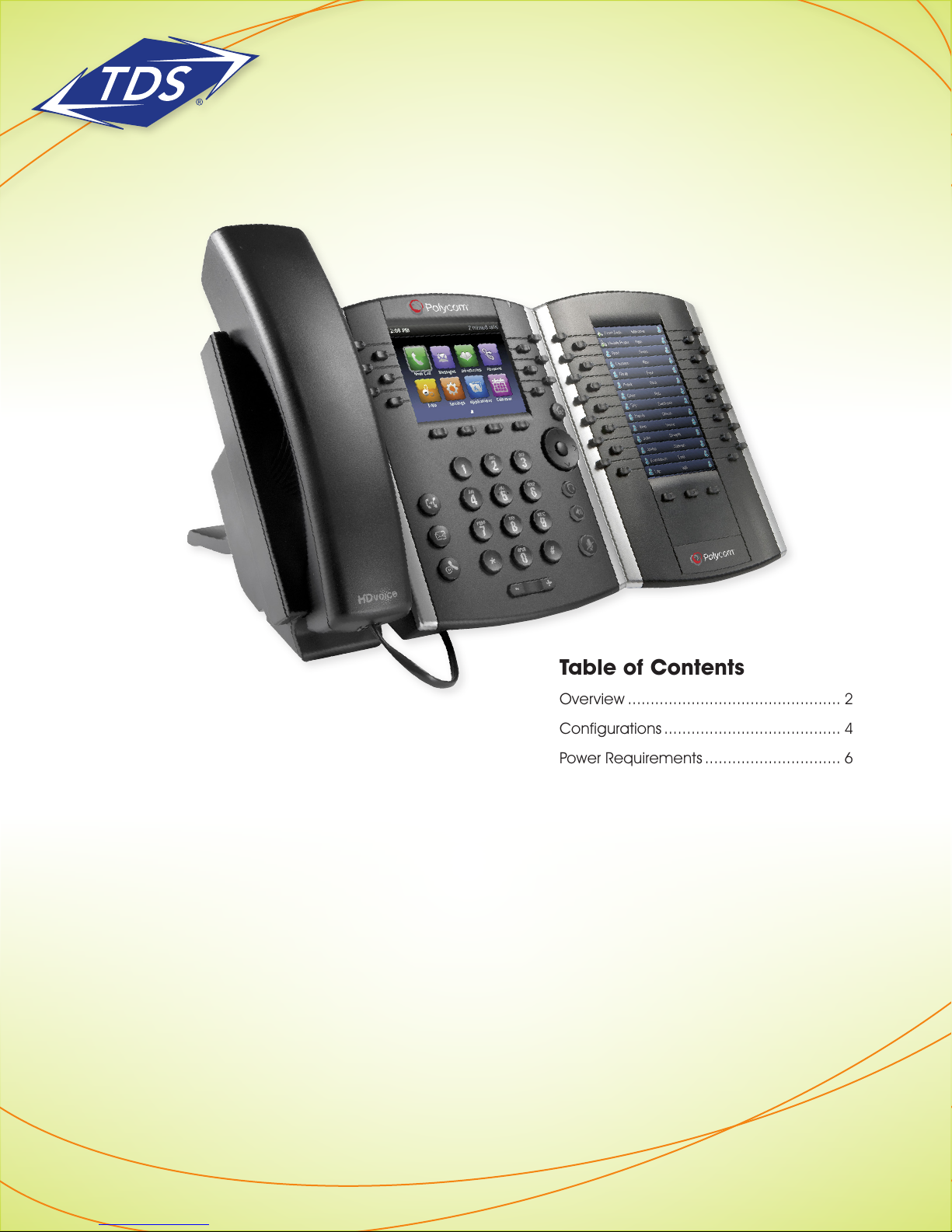
Polycom® VVX® Series
Expansion Module Administrator Guide
Table of Contents
Overview ............................................... 2
Configurations ....................................... 4
Power Requirements .............................. 6
Appendix ............................................... 7
Additional Support ................................. 8
166015/6-15/9072
1
Page 2
Polycom® VVX® Series
Expansion Module Administrator Guide
VVX (Color) Expansion Modules
The VVX Expansion Module (EM) enables configuration of additional keys on the VVX Business Media Phones.
Although the EM is optimized for use with the VVX410, it may also be used with the VVX500 and VVX600 touch
screen phones.
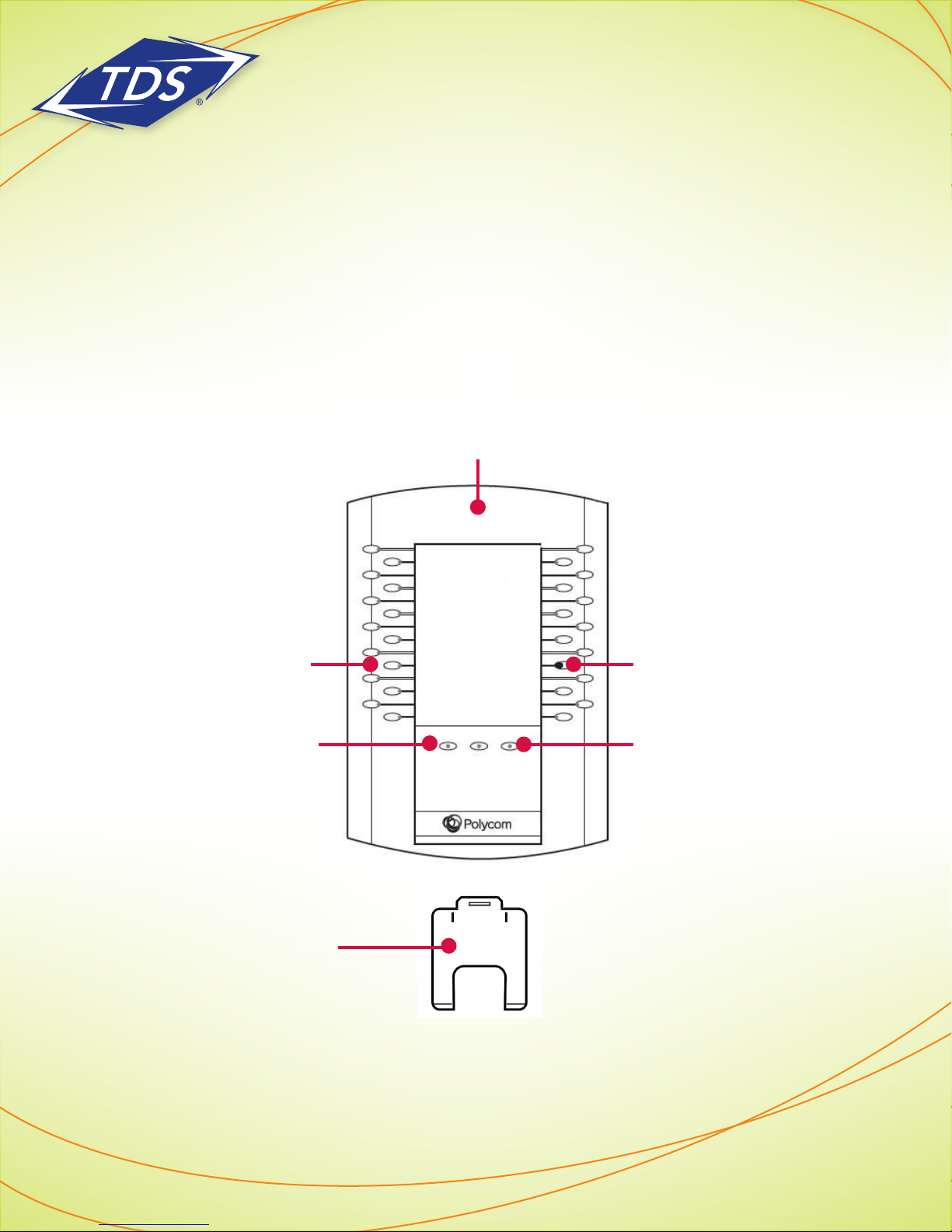
Each EM has 28 keys with LED Indicators and 3 Page Keys under the display, allowing you to add up to 84
additional Function keys to your phone (3 x 28 = 84). By combining up to 3 EM’s per phone, you can add up
to 252 additional keys to your VVX Business Media Phone. Please refer to the diagram below.
Color Display
Function
Keys
Base Stand
LED Indicators
LED Page IndicatorsPage Keys
166015/6-15/9072
2
Page 3
Polycom® VVX® Series
Expansion Module Administrator Guide
Color Display—Displays Status Connect Monitored Users and local Speed Dial Favorites.
Function Keys—Press these keys to select an available feature or function.
• LED Indicators—Light up to indicate line or busy lamp field contact’s status.
- Fast-Flashing Green—Incoming call to Status Connect monitored user.
- Solid Red—The phone of the Status Connect monitored user is off-hook busy, has a held call,
or is placing a call.
- Red & Green Alternate Flashing—Status Connect monitored user is on a call while another call is
waiting on their station.
Page Keys—Press these keys to navigate to a different page on the display and to view additional lines.
• LED Indicators—Light up to indicate page status.
- Fast-Flashing Green—Incoming call on a page not currently displayed. When you press the page key
with the fast-flashing green LED indicator, the LED indicator stops flashing.
- Solid Red—Current page displayed.
Base Stand—Inserts into one of three slots on the back of the EM to stand up the display.
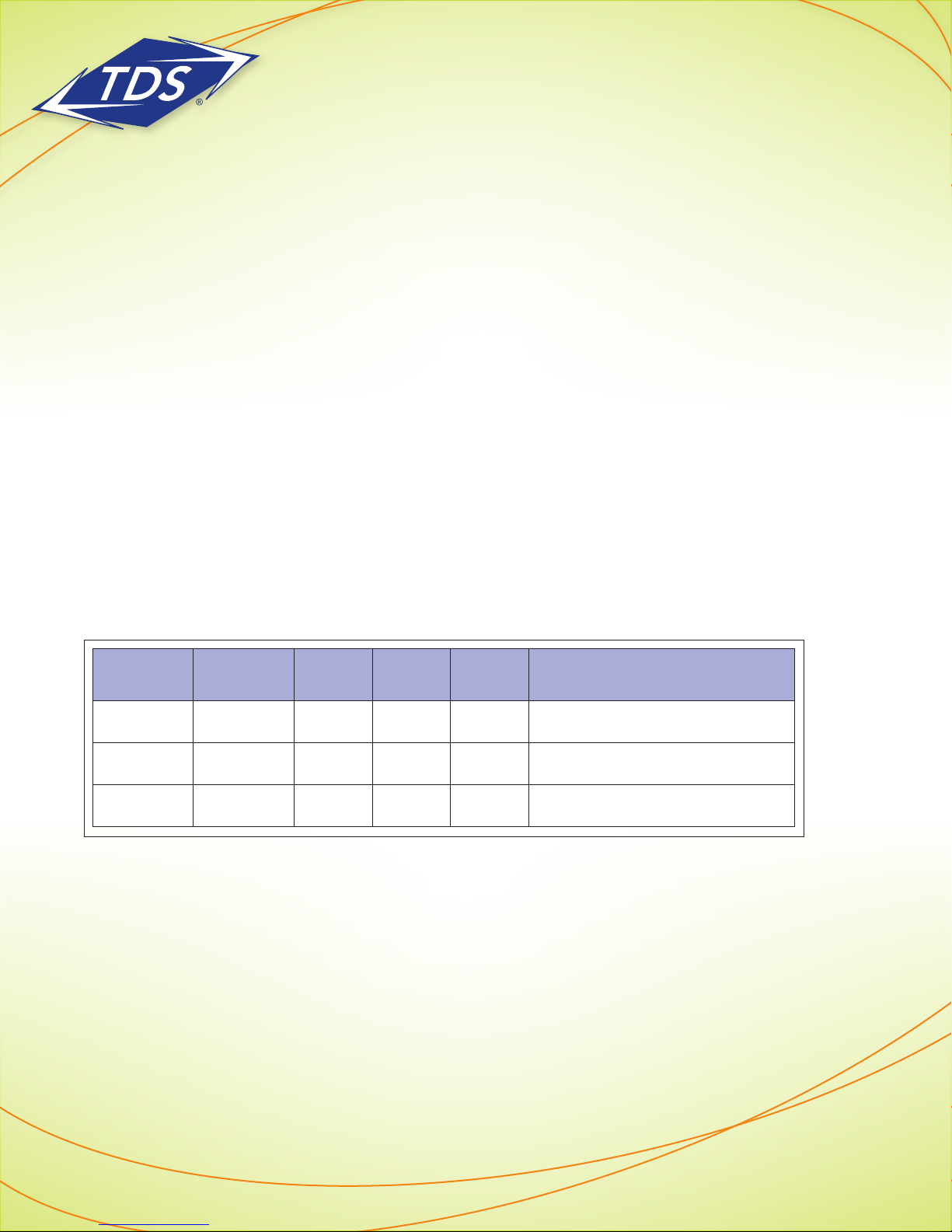
The maximum keys that can be supported by each VVX phone with an expansion module is outlined
in the table below:
VVX Model Line Keys 1 EM 2 EM’s 3 EM’s Maximum Programmable Keys*
410 12 84 168 252 264
500 12 84 168 252 264
600 16 84 168 252 268
* Maximum Programmable keys equals the line keys plus three Expansion Modules. Programmable keys can be a combination
of line keys (phone dependent), Status Connect Monitored Users (limit 50), and Speed Dial Favorites.
166015/6-15/9072
3
Page 4

Polycom® VVX® Series
Expansion Module Administrator Guide
Depending on the user’s role and use of the EM’s, the following configurations are available:
Standard Configuration
The standard configuration will automatically assign keys to your phone and EM(s) in the following order:
• Line Keys (includes Primary line, Shared Call Appearances (SCAs), & Secondary Directory Numbers (SDNs)
• Status Connect (SC) Monitored Users
• Speed Dial/Favorites (Directory)
Note: Please visit the managedIP Hosted support site at http://support.tdsmanagedip.com to learn more
about monitoring users via the Status Connect feature.
For example, if you have 4 line keys on your VVX500 phone, 35 Status Connect Monitored Users, and 50 Speed
Dial entries, the following configuration will appear on your phone and EM:
Line keys 1 – 4 VVX500, keys 1 – 4
SC Monitored Users 1 – 8 VVX500, keys 5 – 12
SC Monitored Users 9 – 35 EM (1), page 1, keys 1 – 27
Speed Dial (1) EM (1), page 1, key 28
Speed Dial (2 – 29) EM (1), page 2, keys 1 – 28
Speed Dial (30 – 50) EM (1), page 3, keys 1 – 21
Note: With the standard configuration, all functions are assigned to consecutive keys. Unassigned keys
always appear at the end of your key configuration. The standard configuration is the default, which
means no web portal changes are required.
Custom Configuration 1 – Mini-console with 1 EM
This configuration is ideal for an answering position (“mini-console”) with only one EM that uses Status Connect
to monitor other users.
With this custom configuration, only line keys will appear on the VVX phone. Status Connect keys (up to 50)
will appear on pages 1-2 of the EM, with Speed Dial Favorites appearing on additional keys. Although this
configuration is primarily targeted for a single EM, additional EM’s may be used to provide access to more
Speed Dial Favorites. See the Appendix - Custom Configuration 1, for specific key assignments.
166015/6-15/9072
4
Page 5

Polycom® VVX® Series
Expansion Module Administrator Guide
To enable Custom Configuration 1:
1. Log in to the managedIP Administrator web portal and navigate to the user with the expansion module(s).
2. Enable Expansion Module Templates by using the “Modify Tags” function. Change the value of
%EXP_MOD_TEMPLATES_ENABLED% to “1” (on) to activate.
3. Rebuild the device.
4. Reset the device.
NOTE: Please refer to the managedIP Administrator User Guide for more detailed instructions on the
“Modify Tags” function.
Custom Configuration 2 – Mini-console with 2 or 3 EMs
This configuration is ideal for an answering position (“mini-console”) with two or more EM’s that uses Status
Connect to monitor other users. With this configuration, Status Connect keys appear on page 1 of both the first
and second EM’s.
This eliminates the need for a busy answering position monitoring more than 28 Status Connect users to toggle
between pages one and two of the first EM. By selecting page 1 of both EM 1 and EM 2, all Status Connect
users are visible with a single glance, providing greater efficiency for the user. See the Appendix - Custom
Configuration 2, for specific key assignment.
To enable Custom Configuration 2:
1. Log in to the managedIP Administrator web portal and navigate to the user with the expansion module(s).
2. Using the “Modify Tags” function:
a. Enable Expansion Module Templates by changing the value of
%EXP_MOD_TEMPLATES_ENABLED% to “1” (on).
b. Enable the Status Connect View by changing the value of
%EXP_MOD_STATUS_CONNECT_VIEW% to “Unassigned”.
3. Rebuild the device.
4. Reset the device.
NOTE: With the EM custom configurations, specify the exact key a Speed Dial Favorite should appear
on by setting the Favorite Index to the value noted on the template. Please refer to the Polycom Detailed
Guide, “Managing Favorites” for further detail on programming Favorites and changing indices.
166015/6-15/9072
5
Page 6
Polycom® VVX® Series
Expansion Module Administrator Guide
Power Requirements for VVX Expansion Modules
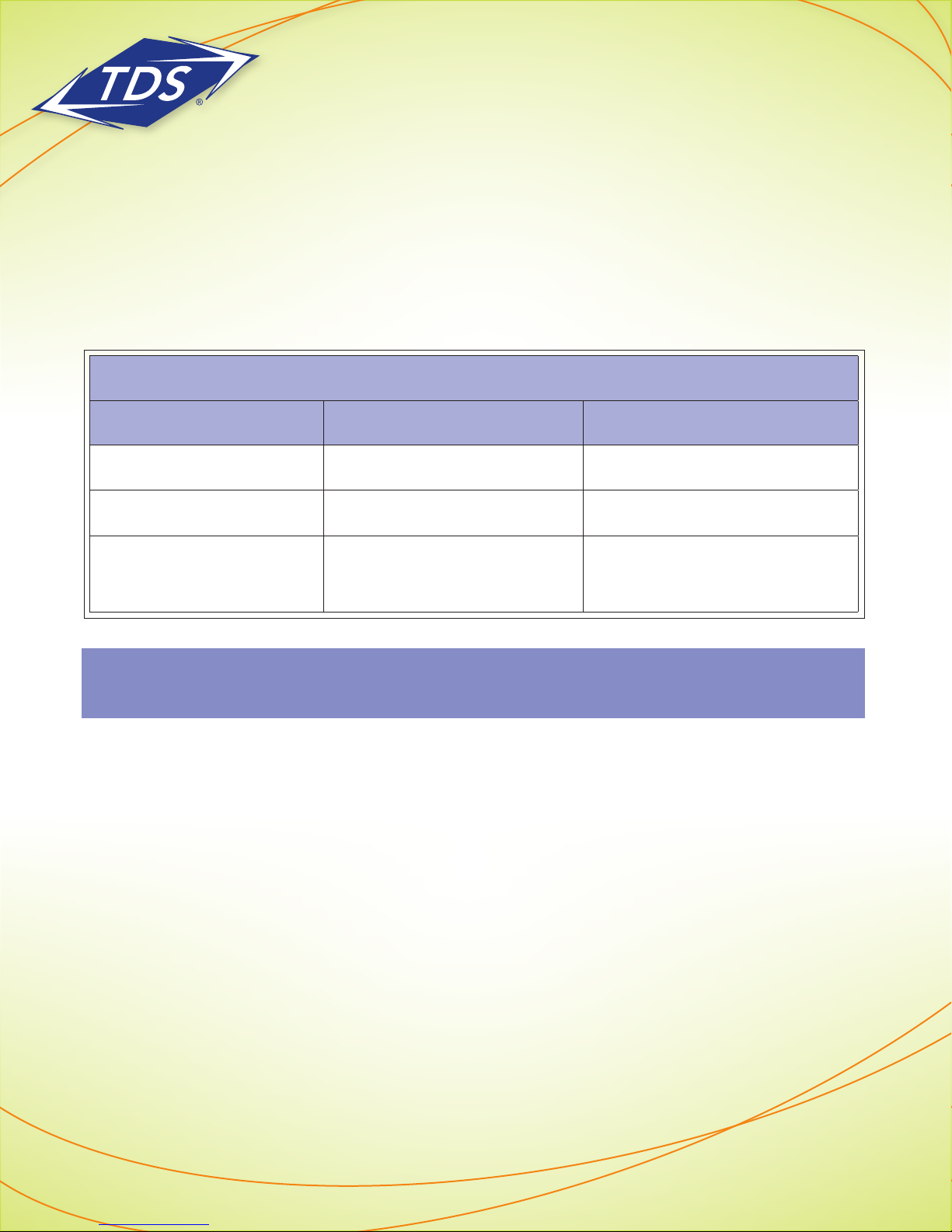
Due to the additional power required for Expansion Module(s), the Power over Ethernet (PoE) that powers your
phone may not be sufficient to power multiple expansion modules and the USB port(s) on the phone (VVX500/
VVX600 only). Please refer to the table below to determine whether you need an additional 48V power supply
unit to accommodate your configuration.
VVX Expansion Modules – Power Requirements
Model PoE Only Additional Power Supply Required
VVX410 Up to 3 Expansion Modules N/A
VVX500 Up to 2 EM’s and 1 USB Port 3 EM’s
VVX600
Note: The USB port on the rear of the VVX500 and VVX600 phones is used for local call recording with
a USB thumb drive.
2 EM’s and top USB port OR
1 EM and rear USB port
3 EM’s OR
2 EM with rear USB port
166015/6-15/9072
6
Page 7
Polycom® VVX® Series
Expansion Module Administrator Guide
APPENDIX – Custom Configuration 1
Expansion Module 1 - Page 1
Key Key Function Key Key Function Key Key Function Key Key Function Key Key Function Key Key Function
1 SC - 1 15 SC - 15
2 SC - 2 16 SC - 16
3 SC - 3 17 SC - 17
4 SC - 4 18 SC - 18
5 SC - 5 19 SC - 19
6 SC - 6 20 SC - 20
7 SC - 7 21 SC - 21
8 SC - 8 22 SC - 22
9 SC - 9 23 SC - 23
10 SC - 10 24 SC - 24
11 SC - 11 25 SC - 25
12 SC - 12 26 SC - 26
13 SC - 13 27 SC - 27
14 SC - 14 28 SC - 28
Expansion Module 2 - Page 1 Expansion Module 3 - Page 1
Key Key Function Key Key Function Key Key Function Key Key Function Key Key Function Key Key Function
85 Unassigned 99 Unassigned
86 Unassigned 100 Unassigned
87 Unassigned 101 Unassigned
88 Unassigned 102 Unassigned
89 Unassigned 103 Unassigned
90 Unassigned 104 Unassigned
91 Unassigned 105 Unassigned
92 Unassigned 106 Unassigned
93 Unassigned 107 Fav - 400
94 Unassigned 108 Fav - 401
95 Unassigned 109 Fav - 402
96 Unassigned 110 Fav - 403
97 Unassigned 111 Fav - 404
98 Unassigned 112 Fav - 405
Expansion Module 1 - Page 2
29 SC - 29 43 SC - 43
30 SC - 30 44 SC - 44
31 SC - 31 45 SC - 45
32 SC - 32 46 SC - 46
33 SC - 33 47 SC - 47
34 SC - 34 48 SC - 48
35 SC - 35 49 SC - 49
36 SC - 36 50 SC - 50
37 SC - 27 51 Fav - 300
38 SC - 38 52 Fav - 301
39 SC - 39 53 Fav - 302
40 SC - 40 54 Fav - 303
41 SC - 41 55 Fav - 304
42 SC - 42 56 Fav - 305
Expansion Module 2 - Page 2 Expansion Module 3 - Page 2
113 Fav - 29 127 Fav - 43
114 Fav - 30 128 Fav - 44
115 Fav - 31 129 Fav - 45
116 Fav - 32 130 Fav - 46
117 Fav - 33 131 Fav - 47
118 Fav - 34 132 Fav - 48
119 Fav - 35 133 Fav - 49
120 Fav - 36 134 Fav - 50
121 Fav - 37 135 Fav - 51
122 Fav - 38 136 Fav - 52
123 Fav - 40 137 Fav - 53
124 Fav - 41 138 Fav - 54
125 Fav - 42 139 Fav - 55
126 Fav - 42 140 Fav - 56
SC = Status Connect Fav = Favorites Index
Expansion Module 1 - Page 3
57 Fav - 1 71 Fav - 15
58 Fav - 2 72 Fav - 16
59 Fav - 3 73 Fav - 17
60 Fav - 4 74 Fav - 18
61 Fav - 5 75 Fav - 19
62 Fav - 6 76 Fav - 20
63 Fav - 7 77 Fav - 21
64 Fav - 8 78 Fav - 22
65 Fav - 9 79 Fav - 23
66 Fav - 10 80 Fav - 24
67 Fav - 11 81 Fav - 25
68 Fav - 12 82 Fav - 26
69 Fav - 13 83 Fav - 27
70 Fav - 14 84 Fav - 28
Expansion Module 2 - Page 3 Expansion Module 3 - Page 3
141 Fav - 57 155 Fav - 71
142 Fav - 58 156 Fav - 72
143 Fav - 59 157 Fav - 73
144 Fav - 60 158 Fav - 74
145 Fav - 61 159 Fav - 75
146 Fav - 62 160 Fav - 76
147 Fav - 63 161 Fav - 77
148 Fav - 64 162 Fav - 78
149 Fav - 65 163 Fav - 79
150 Fav - 66 164 Fav - 80
151 Fav - 67 165 Fav - 81
152 Fav - 68 166 Fav - 82
153 Fav - 69 167 Fav - 83
154 Fav - 70 168 Fav - 84
Key Key Function Key Key Function Key Key Function Key Key Function Key Key Function Key Key Function
169 Fav - 85 183 Fav - 99
170 Fav - 86 184 Fav - 100
171 Fav - 87 185 Fav - 101
172 Fav - 88 186 Fav - 102
173 Fav - 89 187 Fav - 103
174 Fav - 90 188 Fav - 104
175 Fav - 91 189 Fav - 105
176 Fav - 92 190 Fav - 106
177 Fav - 93 191 Fav - 107
178 Fav - 94 192 Fav - 108
179 Fav - 95 193 Fav - 109
180 Fav - 96 194 Fav - 110
181 Fav - 97 195 Fav - 111
182 Fav - 98 196 Fav - 112
197 Fav - 113 211 Fav - 127
198 Fav - 114 212 Fav - 128
199 Fav - 115 213 Fav - 129
200 Fav - 116 214 Fav - 130
201 Fav - 117 215 Fav - 131
202 Fav - 118 216 Fav - 132
203 Fav - 119 217 Fav - 133
204 Fav - 120 218 Fav - 134
205 Fav - 121 219 Fav - 135
206 Fav - 122 220 Fav - 136
207 Fav - 123 221 Fav - 137
208 Fav - 124 222 Fav - 138
209 Fav - 125 223 Fav - 139
210 Fav - 126 224 Fav - 140
225 Fav - 141 239 Fav - 155
226 Fav - 142 240 Fav - 156
227 Fav - 143 241 Fav - 157
228 Fav - 144 242 Fav - 158
229 Fav - 145 243 Fav - 159
230 Fav - 146 244 Fav - 160
231 Fav - 147 245 Fav - 161
232 Fav - 148 246 Fav - 162
233 Fav - 149 247 Fav - 163
234 Fav - 150 248 Fav - 164
235 Fav - 151 249 Fav - 165
236 Fav - 152 250 Fav - 166
237 Fav - 153 251 Fav - 167
238 Fav - 154 252 Fav - 168
166015/6-15/9072
7
Page 8
Polycom® VVX® Series
Expansion Module Administrator Guide
APPENDIX – Custom Configuration 2
Expansion Module 1 - Page 1
Key Key Function Key Key Function Key Key Function Key Key Function Key Key Function Key Key Function
1 SC - 1 15 SC - 15
2 SC - 2 16 SC - 16
3 SC - 3 17 SC - 17
4 SC - 4 18 SC - 18
5 SC - 5 19 SC - 19
6 SC - 6 20 SC - 20
7 SC - 7 21 SC - 21
8 SC - 8 22 SC - 22
9 SC - 9 23 SC - 23
10 SC - 10 24 SC - 24
11 SC - 11 25 SC - 25
12 SC - 12 26 SC - 26
13 SC - 13 27 SC - 27
14 SC - 14 28 SC - 28
Expansion Module 2 - Page 1 Expansion Module 3 - Page 1
Key Key Function Key Key Function Key Key Function Key Key Function Key Key Function Key Key Function
85 SC - 29 99 SC - 43
86 SC - 30 100 SC - 44
87 SC - 31 101 SC - 45
88 SC - 32 102 SC - 46
89 SC - 33 103 SC - 47
90 SC - 34 104 SC - 48
91 SC - 35 105 SC - 49
92 SC - 36 106 SC - 50
93 SC - 27 107 Fav - 400
94 SC - 38 108 Fav - 401
95 SC - 39 109 Fav - 402
96 SC - 40 110 Fav - 403
97 SC - 41 111 Fav - 404
98 SC - 42 112 Fav - 405
Expansion Module 1 - Page 2
29 Unassigned 43 Unassigned
30 Unassigned 44 Unassigned
31 Unassigned 45 Unassigned
32 Unassigned 46 Unassigned
33 Unassigned 47 Unassigned
34 Unassigned 48 Unassigned
35 Unassigned 49 Unassigned
36 Unassigned 50 Unassigned
37 Unassigned 51 Fav - 300
38 Unassigned 52 Fav - 301
39 Unassigned 53 Fav - 302
40 Unassigned 54 Fav - 303
41 Unassigned 55 Fav - 304
42 Unassigned 56 Fav - 305
Expansion Module 2 - Page 2 Expansion Module 3 - Page 2
113 Fav - 29 127 Fav - 43
114 Fav - 30 128 Fav - 44
115 Fav - 31 129 Fav - 45
116 Fav - 32 130 Fav - 46
117 Fav - 33 131 Fav - 47
118 Fav - 34 132 Fav - 48
119 Fav - 35 133 Fav - 49
120 Fav - 36 134 Fav - 50
121 Fav - 37 135 Fav - 51
122 Fav - 38 136 Fav - 52
123 Fav - 40 137 Fav - 53
124 Fav - 41 138 Fav - 54
125 Fav - 42 139 Fav - 55
126 Fav - 42 140 Fav - 56
SC = Status Connect Fav = Favorites Index
Expansion Module 1 - Page 3
57 Fav - 1 71 Fav - 15
58 Fav - 2 72 Fav - 16
59 Fav - 3 73 Fav - 17
60 Fav - 4 74 Fav - 18
61 Fav - 5 75 Fav - 19
62 Fav - 6 76 Fav - 20
63 Fav - 7 77 Fav - 21
64 Fav - 8 78 Fav - 22
65 Fav - 9 79 Fav - 23
66 Fav - 10 80 Fav - 24
67 Fav - 11 81 Fav - 25
68 Fav - 12 82 Fav - 26
69 Fav - 13 83 Fav - 27
70 Fav - 14 84 Fav - 28
Expansion Module 2 - Page 3 Expansion Module 3 - Page 3
141 Fav - 57 155 Fav - 71
142 Fav - 58 156 Fav - 72
143 Fav - 59 157 Fav - 73
144 Fav - 60 158 Fav - 74
145 Fav - 61 159 Fav - 75
146 Fav - 62 160 Fav - 76
147 Fav - 63 161 Fav - 77
148 Fav - 64 162 Fav - 78
149 Fav - 65 163 Fav - 79
150 Fav - 66 164 Fav - 80
151 Fav - 67 165 Fav - 81
152 Fav - 68 166 Fav - 82
153 Fav - 69 167 Fav - 83
154 Fav - 70 168 Fav - 84
Key Key Function Key Key Function Key Key Function Key Key Function Key Key Function Key Key Function
169 Fav - 85 183 Fav - 99
170 Fav - 86 184 Fav - 100
171 Fav - 87 185 Fav - 101
172 Fav - 88 186 Fav - 102
173 Fav - 89 187 Fav - 103
174 Fav - 90 188 Fav - 104
175 Fav - 91 189 Fav - 105
176 Fav - 92 190 Fav - 106
177 Fav - 93 191 Fav - 107
178 Fav - 94 192 Fav - 108
179 Fav - 95 193 Fav - 109
180 Fav - 96 194 Fav - 110
181 Fav - 97 195 Fav - 111
182 Fav - 98 196 Fav - 112
Additional Support
• Contact Technical Support at 1-888-850-5915 or
• Visit support.tdsmanagedip.com/hosted for additional resources
197 Fav - 113 211 Fav - 127
198 Fav - 114 212 Fav - 128
199 Fav - 115 213 Fav - 129
200 Fav - 116 214 Fav - 130
201 Fav - 117 215 Fav - 131
202 Fav - 118 216 Fav - 132
203 Fav - 119 217 Fav - 133
204 Fav - 120 218 Fav - 134
205 Fav - 121 219 Fav - 135
206 Fav - 122 220 Fav - 136
207 Fav - 123 221 Fav - 137
208 Fav - 124 222 Fav - 138
209 Fav - 125 223 Fav - 139
210 Fav - 126 224 Fav - 140
225 Fav - 141 239 Fav - 155
226 Fav - 142 240 Fav - 156
227 Fav - 143 241 Fav - 157
228 Fav - 144 242 Fav - 158
229 Fav - 145 243 Fav - 159
230 Fav - 146 244 Fav - 160
231 Fav - 147 245 Fav - 161
232 Fav - 148 246 Fav - 162
233 Fav - 149 247 Fav - 163
234 Fav - 150 248 Fav - 164
235 Fav - 151 249 Fav - 165
236 Fav - 152 250 Fav - 166
237 Fav - 153 251 Fav - 167
238 Fav - 154 252 Fav - 168
166015/6-15/9072
8
 Loading...