

Page 1

Copyright © Tapplock Corp.
Tapplock lite
User Manual
Manuel d’utilisateur
World’s fi rst smart fi ngerprint padlock
Le premier cadenas intelligent à empreintes
digitales au monde
Tapplock.com
Page 2

This device complies with Industry Canada licence-exempt RSS
standard(s).
Operation is subject to the following two conditions: (1) This device
may not cause interference, and (2) This device must accept any
interference, including interference that may cause undesired
Cutting-edge fi ngerprint technology
• Unlocks in 0.8 seconds
• Stores up to 100 fi ngerprint
• Adaptive algorithm: faster and more
accurate access each time you use it
Shareable wireless access
• Supports wireless Bluetooth access via
the Tapplock app
• Share & control access remotely to
unlimited users
• View access history with time and
location
operation of the device.
Le présentappareilestconforme aux CNR d’Industrie Canada applicables
aux appareils radio exempts de licence. L’exploitationestautorisée
aux deux conditions suivantes: (1) l’appareil ne doit pas produire
de brouillage, et (2) l’utilisateur de l’appareildoit accepter tout
brouillageradioélectriquesubi, mêmesi le brouillageest susceptible
d’encompromettre le fonctionnement.
The device has been evaluated to meet general RF exposure
requirement.
The device can be used in portable exposure condition without
restriction.
Le dispositif a été évalué à satisfaire l’exigence générale de
l’exposition aux rf.
l’appareil peut être utilisé dans des conditions d’exposition portatif
sans restriction.
Visit Tapplock.com for
newest updates, instructions and FAQ.
Tapplock.com pour
Visitez
les dernières mises à jour, instructions et FAQ.
Contact us by emailing / Contactez-nous par courriel
2
:
23
Page 3
FCC notice
This device complies with part 15 of the FCC Rules. Operation
is subject to the following two conditions: (1) This device may
not cause harmful interference, and (2) this device must accept
any interference received, including interference that may cause
undesired operation.
Any Changes or modifi cations not expressly approved by the
party responsible for compliance could void the user’s authority to
operate the equipment.
Note: This equipment has been tested and found to comply with
the limits for a Class B digital device, pursuant to part 15 of the FCC
Rules. These limits are designed to provide reasonable protection
against harmful interference in a residential installation. This
equipment generates uses and can radiate radio frequency energy
and, if not installed and used in accordance with the instructions,
may cause harmful interference to radio communications. However,
there is no guarantee that interference will not occur in a particular
installation. If this equipment does cause harmful interference to
radio or television reception, which can be determined by turning
the equipment off and on, the user is encouraged to try to correct
the interference by one or more of the following measures:
- Reorient or relocate the receiving antenna.
- Increase the separation between the equipment and receiver.
- Connect the equipment into an outlet on a circuit different from
that to which the receiver is connected.
- Consult the dealer or an experienced radio/TV technician for help.
The device has been evaluated to meet general RF exposure
requirement. The device can be used in portable exposure condition
without restriction.
22
Rechargeable battery
• Up to 8-month battery life per 2-hour
charge time
• Check remaining power using the
Tapplock app
Morse code backup access
• Setup Morse code access using the
power button in case a user’s fi ngerprint
isn’t enrolled and the phone ran out of
batteries
3
Page 4
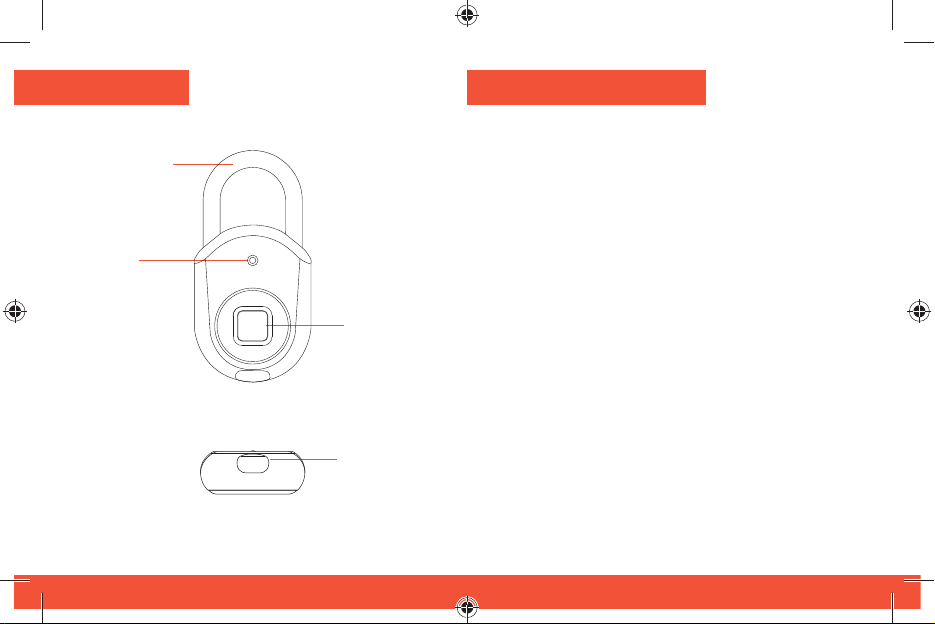
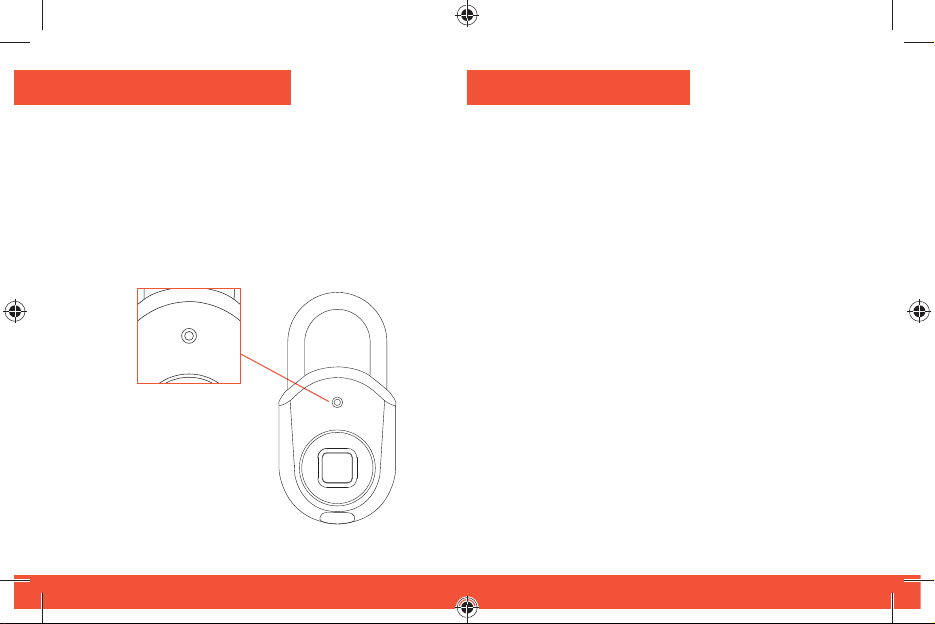
Overview
Power
button
Status
indicator
FRONT VIEW
BOTTOM VIEW
Fingerprint
sensor
Charge port
Mode code Morse
Le code Morse est un mode d’accès de secours.
Il vous permet de déverrouiller votre appareil à
l’aide de combinaisons longues / courtes consistant
à appuyer sur l’arceau du cadenas (bouton
d’alimentation). Le code Morse permet d’accéder à
votre cadenas sans votre empreinte digitale ou votre
téléphone.
Suivez les instructions dans l’application Tapplock
pour confi gurer votre code morse personnalisé.
Appuyez trois (3) fois sur le bouton d’alimentation
pour accéder au mode code Morse. Le voyant d’état
doit être vert.
Si vous ne parvenez pas à accéder au mode code
Morse, maintenez le bouton d’alimentation enfoncé
jusqu’à ce que le voyant d’état s’éteigne, ce qui met
votre cadenas en mode veille. Appuyez ensuite trois
fois sur le bouton d’alimentation jusqu’à ce que le
voyant d’état devienne vert.
4
21
Page 5
Mode Bluetooth
Quick Start
Connectez votre téléphone en utilisant le mode
Bluetooth pour:
• Ajouter un nouveau Tapplock à votre compte
• Débloquer avec votre téléphone
• Confi gurer / supprimer les empreintes digitales
• Confi gurer le code morse
Appuyez deux fois (2) sur l’arceau du cadenas
(bouton d’alimentation) pour passer en mode
Bluetooth pour le jumelage de téléphones. Le
voyant d’état doit être bleu.
Si vous ne parvenez pas à accéder au mode
Bluetooth, maintenez le bouton d’alimentation
enfoncé jusqu’à ce que le voyant d’état
s’éteigne, mettant ainsi votre cadenas en mode
veille. Appuyez ensuite deux fois sur le bouton
d’alimentation pour passer en mode Bluetooth.
20
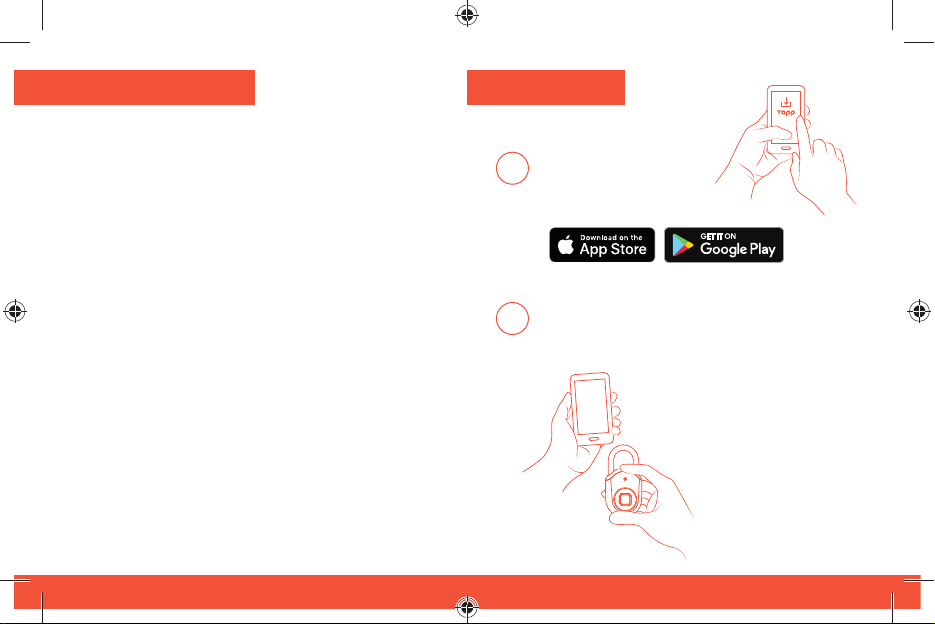
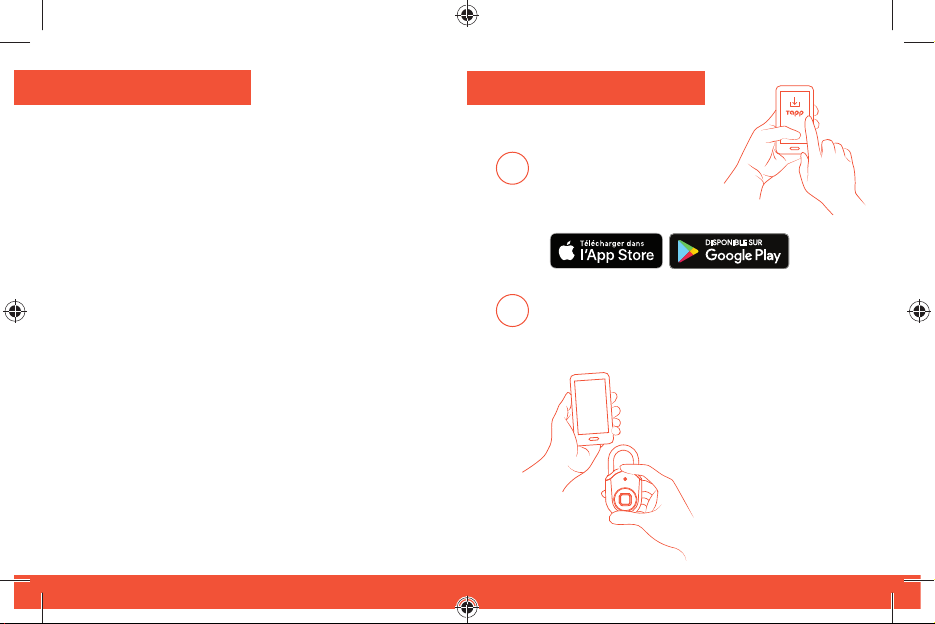
Download the
Tapplock app from
1
Google Play Store or
iOS App Store.
Register / log in on the Tapplock app and
2
follow instructions to setup your new
Tapplock.
Make sure Bluetooth is
turned on in your phone
settings before beginning
to setup the lock.
5
Page 6
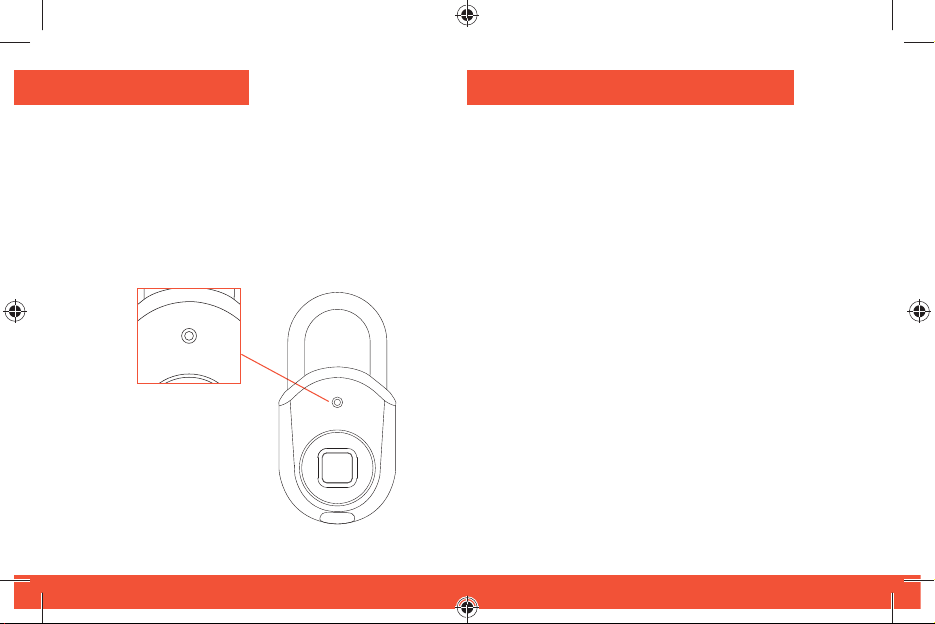
Status Indicator
Mode d’empreinte digitale
The status indicator is the visual cue to
understanding your Tapplock lite.
Refer to table to understand what each color
means.
6
Pour activer Tapplock, appuyez sur l’arceau du
cadenas (bouton d’alimentation). Le voyant d’état
doit être blanc et votre Tapplock doit être prêt à
être déverrouillé avec votre empreinte digitale.
Si vous ne parvenez pas à accéder au mode
Empreintes digitales, maintenez le bouton
d’alimentation enfoncé jusqu’à ce que le voyant
d’état s’éteigne, mettant ainsi votre cadenas
en mode veille. Appuyez ensuite sur le bouton
d’alimentation pour passer en mode Empreintes
digitales.
** Tapplock lite passera automatiquement en
mode veille après 10 secondes d’inactivité. Cela
augmente la durée de vie de votre batterie.
19
Page 7
3 façons de déverrouiller
Tapplock lite est équipé d’une capacité d’accès
multiple pour permettre un maximum de
commodité et de fl exibilité.
Accès à l’empreinte digitale: 0,8 secondes
Accès Bluetooth: accès Bluetooth via
l’application Tapplock à l’aide de votre
téléphone intelligent
Accès au code Morse: accès de secours à
l’aide de combinaisons longues et courtes
18
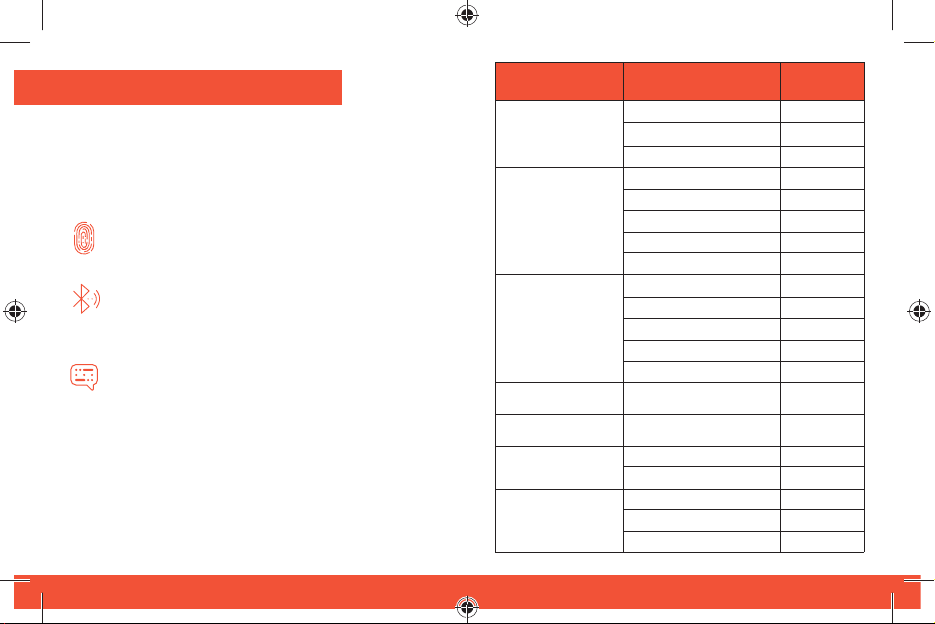
Status Mode
Fingerprint
Bluetooth
Morse Code
Lock Successful
Lock Notifi cation
Charging
Low Battery
Notifi cation
Function/Action
Press power button 1x
Fingerprint accepted
Fingerprint rejected
Press power button 2x
Searching
Connected
Unlock via Bluetooth
Upgrading fi rmware
Press power button 3x
Long press
Short press
Correct Morse code
Incorrect Morse code
Locking successful
Lock is unlocked
Charging
Fully charged
Battery at 30%
Battery at 20%
Battery at 10%
LED Color
White
Green
Red
Blue
Blue
Blue
Blue
Yellow
Purple
White
Blue
Green
Red
Green
Green
Red
Green
Red
Red
Red
7
Page 8
3 ways to unlock
Tapplock lite is equipped with multiple access
capability to allow for maximum convenience and
fl exibility.
Fingerprint access: 0.8 seconds
Bluetooth access: Bluetooth access via the
Tapplock app using your smartphone
Morse code access: backup access using
long-short combinations
8
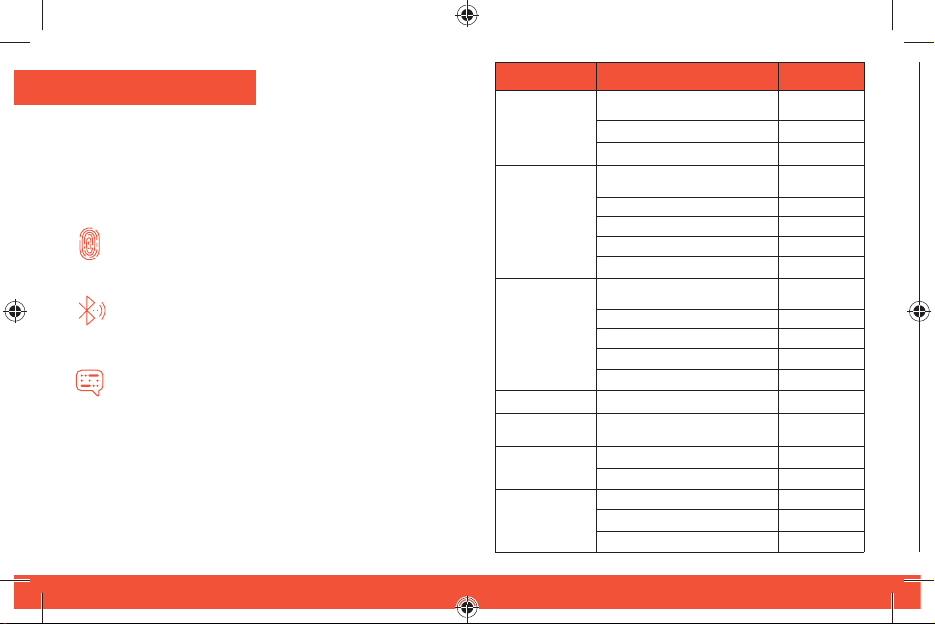
Mode État
D’empreinte
digitale
Bluetooth
Morse Code
Bien verrouillé
Notifi cation sur
le verrouillage
Mode de
charge
Notifi cation
de batterie
faible
Fonction/Action
Appuyez sur le bouton de
démarrage 1x
Empreintes digitales acceptées
Empreintes digitales refusées
Appuyez sur le bouton
de démarrage 2x
Recherche
Connecté
Déverrouillage par Bluetooth
Mise à jour du fi rmware
Appuyez sur le bouton de
démarrage 3x
Appuyez longuement
Appuyez brièvement
Bon code Morse
Mauvais code Morse
Verrouillage réussi
Le verrou est déverrouillé
En charge
Complètement chargée
Batterie à 30 %
Batterie à 20 %
Batterie à 10 %
Couleur à DEL
Blanc
Vert
Rouge
Bleu
Bleu
Bleu
Bleu
Jaune
Violet
Blanc
Bleu
Vert
Rouge
Vert
Vert
Rouge
Vert
Rouge
Rouge
Rouge
17
Page 9
Indicateur de statut
Fingerprint Mode
L’indicateur d’statut est le repère visuel pour
comprendre votre Tapplock lite.
Reportez-vous au tableau ci-dessous pour
comprendre ce que chaque couleur signifi e.
16
To turn on Tapplock, press down on the shackle of
the lock (power button).The status indicator light
should be white, and your Tapplock should be
ready to unlock with your fi ngerprint.
If you are having trouble getting to fi ngerprint
mode, hold down the power button until the status
indicator light turns off, putting your lock in sleep
mode. Then press down on the power button to
enter fi ngerprint mode.
** Tapplock lite will automatically enter sleep
mode after 10 seconds of inactivity. This
increases the lifespan of your battery.
9
Page 10
Bluetooth Mode
Démarrage rapide
Connect your phone using the Bluetooth mode to:
• Add new Tapplock to your account
• Unlock with your phone
• Setup / remove fi ngerprints
• Setup Morse code
Press down on the shackle of the lock (power
button) twice (2) to enter Bluetooth mode for phone
pairing. The status indicator light should be blue.
If you are having trouble getting to Bluetooth
mode, hold down the power button until the status
indicator light turns off, putting your lock in sleep
mode. Then press down on the power button twice
to enter Bluetooth mode.
10
Téléchargez
l’application Tapplock
1
sur Google Playstore
ou sur iOS App Store.
Inscrivez-vous ou connectez-vous sur
2
l’application Tapplock et suivez les instructions
pour confi gurer votre nouveau Tapplock.
Assurez-vous que
Bluetooth est activé
dans les paramètres
de votre téléphone
avant de commencer
à confi gurer le
cadenas.
15
Page 11
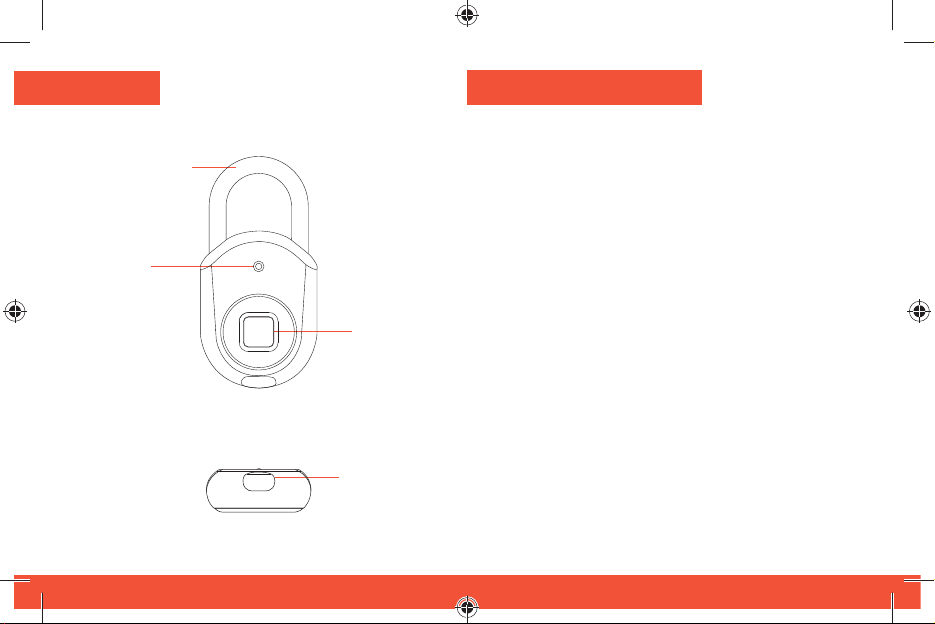
Aperçu
Morse code Mode
d’alimentation
Indicateur
de statut
14
Bouton
VUE DE FACE
VUE DE DESSOUS
Détecteur
d’empreinte
digitale
Port de
charge
Morse code is a backup access mode. It allows
you to unlock your device using long / short
combinations of pressing down on the shackle of
the lock (power button). Morse code allows access
to your lock without your fi ngerprint or your phone.
Follow instructions in the Tapplock app to setup
your custom Morse code.
Press down on the power button three (3) times to
enter Morse code mode. The status indicator light
should be green.
If you are having trouble getting to Morse code
mode, hold down the power button until the status
indicator light turns off, putting your lock in sleep
mode. Then press down on the power button three
times until the status indicator light turns green.
11
Page 12
Technologie d’empreintes digitales de
pointe
• Déverrouillage en 0,8 seconde
• Peut stocker jusqu’à 100 empreintes
digitales
• Algorithme adaptatif: accès plus rapide et
plus précis chaque fois que vous l’utilisez
Pile rechargeable
• Durée de vie de la batterie jusqu’à 8-mois
par 2-heures de temps de charge
• Vérifi ez la puissance restante en utilisant
l’application Tapplock
Accès partageable sans fi l
• Prend en charge l’accès Bluetooth sans-fi l
via l’application Tapplock
• Partagez et contrôlez l’accès à distance
pour un nombre illimité d’utilisateurs
• Affi cher l’historique d’accès avec l’heure
et l’emplacement
12
Accès de secours en code Morse
• Confi gurez l’accès au code morse à
l’aide du bouton d’alimentation au cas où
l’empreinte digitale d’un utilisateur n’est
pas enregistrée et que le téléphone n’a
plus de piles
13
 Loading...