

Page 1
SLIM
User Manual
Käyttöohjeet
Page 2
English
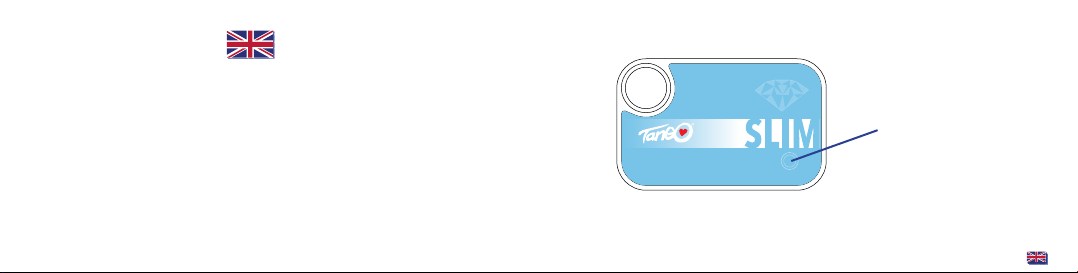
• Press the operating button
shortly once to check your
activity level progress
(led indicator 1-7)
• To synchronize the data with
the mobile app:
press the operating button
longer (2-3 sec) when the
app and Bluetooth are on
1
Page 3

USING THE TANGO SLIM
Tango SLIM is easy-to-use and thin - it fits to your wallet. Tango works with Tango GO!,
the app designed to help you tracking your fitness goals. Simply sync your
activity data with the fitness app daily so you can review and monitor
your daily STEPS, DISTANCE, CALORIES, EXERCISE TIME and TARGET GOAL
PLEASE NOTE : Tango SLIM will automatically RESET AT MIDNIGHT.
At that time the data in the from previous day will be saved. Tango will
store your activity data from 30 days.
.
SETTING THE TANGO SLIM
You need to install the free Tango GO! App on your Bluetooth smart ready
device before setting up or transferring data to the Tango SLIM. Search for
the Tango GO! in AppStore or Google Play.
To provide you with the most accurate information, please set up all
information requested in the App. Incorrect or missing information
may result in inaccurate workout / activity recordings.
Once all the information is entered in the App, all information is ready to
sync to your Tango SLIM. SIMPLE!
2
3
Page 4

SYNC THE TANGO SLIM & APP TANGO GO!
Once all of your information has been entered in the App, it is time to
SYNC to the Tango SLIM.
STEP 1 (APP)
START the APP from the mobile device. Make sure the Bluetooth is ON.
STEP 2 (TANGO SLIM)
PRESS & HOLD the button for about 2 seconds.
7 led lights start running from left to right to indicate that the sync has started.
STEP 3 (APP)
The sync will stop automatically after 10 seconds.
Your activity data will appear in the app once the sync is completed.
NOTE: if you change your data during this process (update weight, age etc.)
Simply “SYNC” the Tango SLIM again and the settings will update.
It is important to SYNC the Tango SLIM with your mobile device everytime
you start using it (after recharging or change your data), since the calculation
of calories and distance on the Tango SLIM are all dependent on the settings at the
App. In case you find the calories with no data (or strange data), it may be
due to not having to sync your device properly before using it. If this happens,
simply sync it again.
System requirements:
iOS 6.0+, iPhone 4S+, iPod Touch (5th Generation+)
Android 4.3+
4
5
Page 5

UNDERSTANDING THE DATA
ESTIMATED CALORIES BURNED
NOTE : The ESTIMATED CALORIES BURNED are based on an advanced 24-hour
calories burn formula.
BASAL Metabolic Rate (BMR) :
This is the estimated amount of energy burned daily while you are at rest.
Even as you sleep, your body burns energy (expressed in the form of calories).
Therefore, when you wake up in the morning, the app will already display
a certain number of burned calories based on the BMR. You DO NOT have
to have Tango SLIM with you for the BMR to record, the BMR is based on a formula,
not movement.
EXERCISE : When you have Tango SLIM with you, your steps + distance +
calories + exercise time will automatically record (based on your motion).
Like all exercise routines, the more you walk, the more calories you burn.
You DO have to have Tango SLIM with you for the STEPS, DISTANCE & EXERCISE TIME
to record; these are all based on movement.
6
7
Page 6
TARGET GOAL %
During the information set-up (on the App), you will select a daily goal
based on calories, steps or distance. You can see your daily progress by % of the goal
you have achieved.
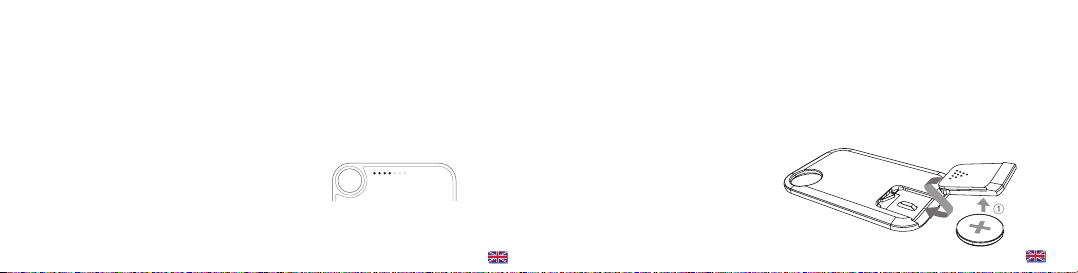
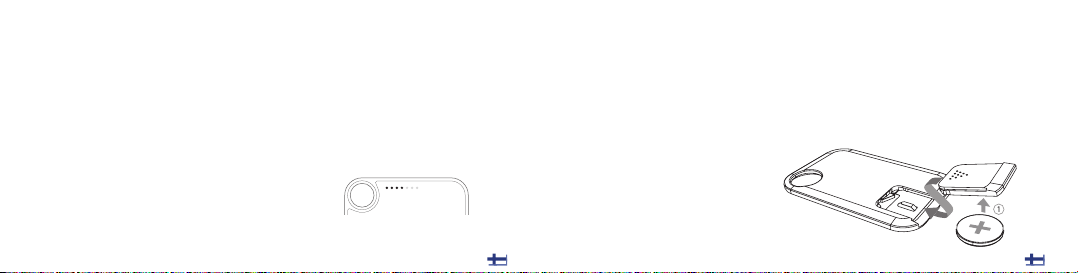
You can also check your progress by pressing the operating button once shortly.
Led lights indicates your target goal progress (1-7).
SYNC the Tango SLIM data to Tango GO! app
TRACK your goals and progress
REPLACING THE BATTERY
Tango SLIM uses CR2025 battery.
Simply open the battery door and take out the exhausted battery
and replace it with a new one. Please be sure the battery are replaced
with correct polarity.
8
9
Page 7

WARNINGS & CAUTIONS
WARNING : Before starting any exercise program, we strongly suggest that you visit
your doctor for a complete physical and to discuss your exercise plans.
PLEASE READ all information in this instruction manual before using this unit.
This is NOT A MEDICAL DEVICE!
NOTICE TO PEOPLE WEARING PACEMAKERS : While Bluetooth is a passive
system and should have no direct effect on a pacemaker, we strongly
recommend anyone fitted with such a device contact their physician or
cardiologist before using this product or starting an exercise program.
Please keep in mind: This is a sensitive technical instrument. Improper care and
handling can cause the various sensors to be damaged.
TRADEMARKS
The Bluetooth word mark and logos are registered trademarks owned by
Bluetooth SIG, Inc. and any use of such marks is under license. Other trademarks and
trade names are those of their respective owners.
iPhone, iPod touch, iPad mini, Mac, iTunes and App Store are trademarks of Apple Inc.,
registered in the US & other countries. Tango is a trademark registered by
Health Care Success Oy Ltd.
10
11
Page 8

Page 9
Suomi
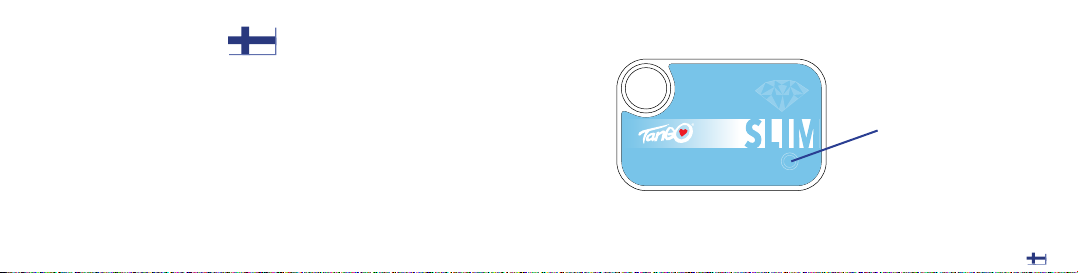
• Paina käyttöpainiketta kerran
lyhyesti tarkistaaksesi
aktiivisuustasosi
(led-osoitin 1-7)
• Synkronoi laite mobiili sovelluksen kanssa:
paina käyttöpainiketta
pidempään (2-3 sek.)
sovelluksen ja Bluetoothin
ollessa päällä
1
Page 10

TANGO SLIM:N KÄYTTÄMINEN
Tango SLIM on helppokäyttöinen ja ohut - se mahtuu vaikkapa lompakkoosi.
TANGO toimii Tango GO! -mobiiliaplikaation kanssa hyvinvointisi ja fyysisen kuntosi
seuraamiseen. Kun synkronoit laitteen mobiiliapplikaation kanssa päivittäin, voit
tarkastella askelmäärääsi, kuljettua matkaa, kuluttamiasi kaloreita, liikkeelläoloaikaa,
asetettujen tavoitteiden täyttymistä.
HUOM: laite nollautuu automaattisesti keskiyöllä. Silloin edellisenä päivänä
kerätyt tiedot tallentuvat automaattisesti. TANGO tallentaa aktiviteettisi tiedot
30 päivän ajalta, joten voit synkronoida tietosi mobiiliapplikaation kanssa silloin,
kuin sinulle sopii.
.
TANGO SLIM:N KÄYTTÖÖNOTTO
Asenna ilmainen Tango GO! -mobiiliaplikaatio Bluetooth Smart -yhteensopivaan
matkapuhelimeen tai tablettitietokoneeseen ennen TANGOn käyttöönottoa. Voit ladata
sen ilmaiseksi AppStoresta tai Google Playstä.
Saadaksesi tarkimmat tiedot hyvinvoinnistasi, täytä kaikki tiedot tarkasti, mitä
mobiiliapplikaatio sinulta pyytää. Väärät tai puutteelliset tiedot voivat johtaa
vääränlaiseen harjoitteluun ja/tai aktiivisuuden mittaustuloksiin. Kun kaikki pyydetty
tieto on syötetty applikaatioon, synkronoi ranneke mobiililaitteen kanssa.
Näin tietosi synkronoituvat TANGOn kanssa. Helppoa!
2 3
Page 11

TANGO SLIM:N & TANGO GO! -SOVELLUKSEN SYNKRONOINTI
Kun kaikki tiedot ovat syötetty sovellukseen, ne synkronoidaan laitteen kanssa.
VAIHE 1: Tango GO! (applikaatio)
Käynnistä applikaatio mobiililaitteessasi. Tarkista, että Bluetooth-yhteys on laitteessasi
päällä.
VAIHE 2: TANGO (laite)
Paina ja pidä nappia pohjassa n. 2-3 sek. ajan
7 led-valoa alkaa juosta vasemmalta oikealle. Synkronointi on käynnissä.
VAIHE 3: Tango GO!
Kun synkronointi on valmis, aktiivisuustietosi näkyvät aplikaatiossa. Synkronointi
päättyy automaattisesti n. 10 sekunnin kuluessa.
Huom! Jos muutat tietojasi (painoa, ikää jne.), synkronoi Tango SLIM ja mobiilisovellus
uudelleen.
TANGOn on tärkeää olla synkronoitu Tango GO! -applikaation kanssa aina kun käytät
sitä latauksen tai tietojen päivittämisen jälkeen, koska mittaustulosten oikeellisuus on
riippuvainen applikaatiossa olevista asetuksista ja tiedoista. Jos mittaustulokset
näyttävät omituisilta tai tyhjiltä, laitetta ja applikaatiota ei ole luultavasti synkronoitu
ennen kyseistä käyttökertaa. Jos näin käy, synkronoi ne uudestaan.
Järjestelmävaatimukset:
iOS 6.0+, iPhone 4S+, iPod Touch (5th Generation+)
Android 4.3+
4 5
Page 12

KERÄTTYJEN TIETOJEN YMMÄRTÄMINEN
CALORIES – Kalorien arvioitu kulutus
Kalorien arvioitu kulutus perustuu 24 tunnin energiankäyttökaavaan
perusaineenvaihduntasi (Basal Metabolic Rate, BMR) mukaan, joka on arvioitu
päivittäin levossa kuluttamasi energiamäärä. Nukkuessakin kehosi käyttää energiaa,
eli “polttaa kaloreita”.
Siksi aamullakin heretessäsi TANGO näyttää perusaineenvaihduntasi mukaan
kulutetun energian määrää. Sinun EI TARVITSE pitää laitetta mukanasi katsoaksesi
perusaineenvaihduntaasi, koska se perustuu kaavaan eikä liikkumiseesi.
EXERCISE – Harjoittelu
Kun käytät TANGOa ranteessasi, ottamasi askeleet + kulkemasi matka + kalorit +
liikkeelläoloaika kirjautuvat automaattisesti (liikkumiseesi perustuen). Kuten kaikessa
harjoittelussa ja liikunnassa, mitä enemmän liikut, sitä enemmän kulutat kaloreita.
Sinun TARVITSEE pitää laitetta mukanasi mitataksesi askeleet + matkan +
liikkeelläoloajan, koska ne perustuvat liikkumiseesi.
6 7
Page 13
TAVOITE %
Syöttäessäsi tietojasi mobiiliaplikaatioon sinun pitää valita päivittäinen energiankulutus-, matka- tai askeltavoitteesi. Sovelluksessa näet, kuinka monta prosenttia
päivän tavoitteesta olet saavuttanut.
Voit myös tarkistaa tavoitteesi täyttymisen painamalla käyttöpainiketta kerran lyhyesti.
Led-valot näyttävät tavoitteesi täyttymisen (1-7 valoa palaa).
PARISTON VAIHTAMINEN
Tango SLIM toimii CR2025-patterilla.
Avaa patteriluukku laitteen pohjassa ja vaihda uusi paristo loppuneen pariston
tilalle. Varmista, että asetat pariston oikein päin laitteeseen (kts. kuva).
8 9
Page 14

VAROITUKSET
Ennen minkään liikunta- tai harjoitusohjelman aloittamista on suositeltavaa käydä
lääkärintarkastuksessa ja keskustella lääkärin kanssa asiasta.
Lue nämä käyttöohjeet kokonaan läpi ennen laitteiden ja palveluiden käyttöönottoa.
Tämä ei ole terveydentilan diagnostiikkaan tai hoitoon suunniteltu laite.
HUOM: Vaikka Bluetooth-yhteydellä ei pitäisi olla vaikutusta sydämentahdistimeen,
sydämentahdistinta käyttäviä suositellaan keskustelemaan lääkärin tai kardiologin
kanssa ennen laitteiden ja palveluiden käyttöönottoa, sekä ennen minkään liikunta- tai
harjoitusohjelman aloittamista.
Muista, että TANGO on herkkä tekninen laite. Huolellisella käytöllä se kestää useita
vuosia, mutta sen herkät sensorit voivat vaurioitua huolimattomalla käytöllä.
TAVARAMERKKIOIKEUDET
Bluetooth sanana ja logona ovat rekisteröityjä tavaramerkkejä, joiden kaikki
käyttöoikeudet omistaa Bluetooth SIG, Inc.
iPhone, iPod touch, iPad mini, Mac, iTunes ja App Store ovat Apple Inc:n
rekisteröimiä tavaramerkkejä. Android on Google Inc:n rekisteröimä tavaramerkki.
Tango on Health Care Success Oy Ltd:n rekisteröimä tavaramerkki.
10 11
Page 15

 Loading...