

Page 1

1
TALK ELECTRONICS LTD. THE OLD BARN HIGHER PARK FARM HALEBOURNE LANE CHOBHAM SURREY GU24 8SL
T
EL: +44 (0)8456 123388 E-MAIL: [email protected] www.talkelectronics.com
Tornado 2.2 Stereo Power Amp
User Manual
Talk Electronics
Page 2

2
INTRODUCTION
Thank you for choosing a Talk Electronics
Tornado power amplifier. We are confident
that it will provide you with many years of
musical enjoyment and reliable service.
However, please take the time to read this
guide thoroughly before using the amplifier.
It explains how to install and connect it, and
suggests how to ensure that you always
enjoy its optimum performance.
UNPACKING LIST
Power amplifier
Instruction manual
AC power cord
Guarantee card
NOTE: We recommend that the supplied AC power
cord is replaced with a high quality Merlin Cables
power cord for best results.
Please be aware that this unit is not supplied with
interconnects and we recommend the use of the
Merlin series of interconnect cables.
INSTALLATION INSTRUCTIONS
HOW TO SITE AND CONNECT YOUR TORNADO POWER AMPLIFIER FOR
BEST PERFORMANCE AND SAFE OPERATION
Please unpack your amplifier carefully and position
it on a stable, level surface close to a mains socket.
Before attempting to connect it into your system
please read this manual carefully.
The Tornado will perform well when placed on a cof
fee table or bookshelf but if you wish to achieve the
best performance we suggest you place it on a specialist hi-fi support. There are many suitable designs
available, which your dealer will be happy to advise
you about.
Position the amplifier so that it will not be subjected
to high ambient temperatures: avoid sites where it
will be in direct sunlight or close to a central heat
-
ing radiator. For your own safety - and your ampli
-
Tornado User Manual
fier’s well-being - do not allow it to come into contact with water. Keep it away from potted plants to
avoid those all-too-common watering accidents! To
clean the amplifier’s case disconnect it from the wall
socket and wipe it with a barely damp, lint-free cloth
or chamois leather. If you suspect that water has
entered the casework, return the amplifier to your
dealer so that he can examine it.
Once you have installed the amplifier
please do not
throw away its packaging.
If you move home or
need to return the unit to your dealer for example for
upgrade, the original packaging will protect it and
ensure it arrives undamaged.
ELECTRICAL CONNECTIONS
Using your mains lead of choice, connect the amplifier directly to a wall socket. We strongly recom
mend that you do not use extension blocks as they
degrade sound quality. For the same reason we also
advise against “line filters” and “mains conditioners”.
If your mains supply is noisy or you have household
appliances that generate clicks and pops that can be
heard through your hi-fi system, have an electrician
correct the problem at its source. We do however
recommend the use of ‘Merlin Cables’ power chords
which do not interfere with the current flow and offer
a significant performance improvement.
Should you need to replace the fuse in your (UK)
mains plug, please fit only the correct replacement
type. This is a standard 5A.
If, for any reason, you wish to replace the plug or
cable, please note that the lead must be connected
as follows. NOTE: These instructions apply in the
United Kingdom only - consult your dealer about wiring conventions in other countries.
Green and yellow wire connects to EARTH (E or
symbol )
Blue wire connects to NEUTRAL (N)
Brown wire connects to LIVE (L)
This unit must be earthed.
Page 3

3
SIGNAL CONNECTIONS
The Tornado Series was developed using high quality interconnects and speaker cables from Merlin
Cables, these allow the amplifiers to operate as
intended and deliver their optimum performance. We
strongly recommend that you use these cables for all
connections. You can obtain these from your dealer
or distributor..
Please note that we particularly advise you not to
use solid core interconnect or speaker cables, or any
type of high capacitance speaker cables. We further
suggest that you use short cable runs. Try to keep
interconnects to 2 metres/6 feet or less and speaker
cable runs below 10 metres/30 feet. Even though
a Tornado amplifier will drive longer speaker cables
you will find its performance improves with shorter
cables. The use of “litz” or “goertz” type cables may
cause your amplifier to overheat under certain cir
-
cumstances. These are best avoided.
REAR PANEL
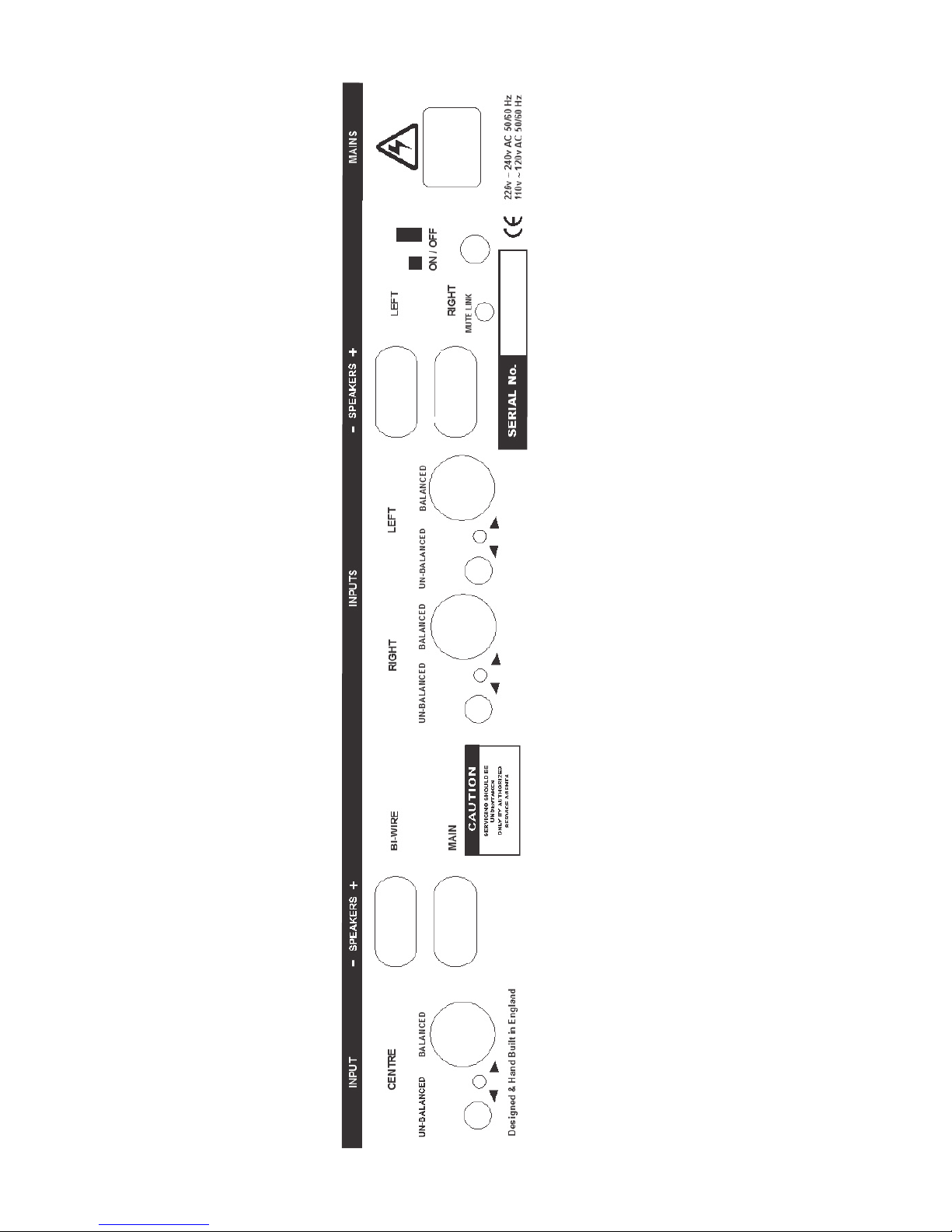
A diagram can be found on page 6 of this manual.
MAINS CONNECTIONS
The Tornado’s mains switch is fitted on the left of the
rear panel (when viewed from the rear). Use this to
switch off the amplifier completely. Next to it is an
IEC socket into which the supplied mains lead fits. If
an internal fuse should blow i.e. the blue LED will not
illuminate when the amplifier is not hot but plugged
in and switched on, then the amplifier should be
returned to your dealer for examination. Any replace
-
ment should only be of an identical type.
The amplifier, whilst powered ON, will be warm to
the touch even as idle, due to the class A quiescent
current flowing in the output stage. This is perfectly
normal.
INPUT CONNECTIONS
The input sockets for the Tornado are either RCA
phono or XLR balanced. Connect your pre-am
plifier’s main audio outputs to these. Use the rear
mounted switch to select the input type that you
have connected to. The switch points towards the
input selected. Left and right are clearly marked, see
rear panel diagram.
SPEAKER CONNECTIONS
Gold plated 5-way binding posts are provided for
your speakers. The red terminal is the positive con
nection and the black terminal is negative. If you use
bare cables or spade terminals that require clamping
in the binding posts, be sure to arrange the leads
so that they do not short-circuit the amplifier. Clamp
the connections tightly but do not over-tighten them:
do not, for instance, tighten the binding posts with
pliers. Check this sort of connection periodically to
make sure that the wire is still tightly gripped. Better
still, use high quality cables factory fitted with appropriate plugs! The uppermost pair is for the left channel, whilst the bottom pair is for the right channel.
Tornado amplifiers are suitable for use with most cur
rent loudspeaker systems with an impedance rating
between 4 and 16 Ohms. Contact your dealer if you
have a particularly unusual loudspeaker system and
are uncertain about how your amplifier might react
to it. Under all normal circumstances the amplifier is
well protected against encounters with demanding
speakers: it has thermal protection, voltage and cur
-
rent limiting and DC offset protection.
MUTE LINK INPUT
This is to allow simultaneous mute control over the
power amplifier when used with a Hurricane preamplifier, just connect using the 3.5mm jack lead
provided with your Hurricane pre-amplifier.
BI-WIRING
Although there are not two sets of speaker terminals
provided, if you intend to bi-wire - or tri-wire - your
loudspeakers, we recommend that you use cables
correctly fitted with a single pair of plugs at the am
plifier end for four reasons. 1) To bi/tri wire properly
you should have a common ground point. 2) Trying
to squeeze two or three individual cables into a bind
ing post will give a poor connection that will degrade
sound quality. 3) It increases the likelihood of wiring
one or more of the speaker drive units out of phase
by reversing its connections. 4) It invites accidents
through wires breaking free and shorting the amplifi
-
er’s output.
FRONT PANEL
Although there are no front panel controls Connecting the mute link cable between your Hurricane preamplifier (if you have one) will operate internal relays
that connect the audio signal to the loudspeakers
when the mute button on the Hurricane’s front panel
is pressed once. To un-mute press it a second time.
It does not connect the mains supply to the amplifier:
the actual mains power switch is on the rear panel.
If you do not have a Hurricane pre-amplifier then the
Tornado will un-mute itself automatically a few seconds after being powered on.
Leaving the mains supply permanently connected
and silencing the amplifier with the Hurricane’s mute
switch means the Tornado will deliver optimum performance immediately it is brought out of its “standby” state.
When the amplifier’s output is muted the red indica
-
tor light on the front panel extinguishes.
Page 4

4
SPECIFICATIONS TORNADO 2.2
Type Stereo
Nominal power output 20-20k 8 ohms 100W
Input impedance 22k ohms
Input sensitivity 1V for full output
Distortion 1KHz 8Ohms <0.005%
Mains Voltage 230V or 115V AC ± 10%
Dimensions
width 440mm
height 89mm
depth 325mm
(allow at least 400mm for connections)
Weight per unit unpacked 16.2kg
T
ALK ELECTRONICS LTD. THE OLD BARN HIGHER PARK FARM HALEBOURNE LANE CHOBHAM SURREY GU24 8SL
T
EL: +44 (0)8456 123388 E-MAIL: [email protected] www.talkelectronics.com
Talk Electronics’ policy of continued research and development means that the above specification may change without
notice.
The Tornado has been manufactured to conform with the protection requirements of the EC Council directive 89/336/EEC
relating to EMC by application of the following standards:
EN50081-1 1997 Emissions Standard
EN50082-1 1997 Immunity Standard
and also the requirements of the EC low voltage directive relating to electrical safety by application of the following standard
BSEN60065: 2002 Safety standard
For the purposes of testing the Tornado was used with the mains cables and high quality interconnects supplied by Merlin
Cables. Compliance with the above standards can only be made if the unit is installed as per this manual and using the
correct cables.
*Guarantee: 3 Years return to dealer.
To help us provide you with the most efficient service please return your guarantee card promptly. Your amplifier is
guaranteed against manufacturing and component defects for a period of 3 years. The guarantee does not cover and
damage caused by accident, misuse, neglect or through incorrect installation, adjustment or repair by unauthorised
personnel or the cost of collecting the Tornado from you and returning it to the dealer. The above does not effect your
statutory rights as a consumer.
E & OE. Due to our policy of continued development we reserve the right to change the specifications at any time.
*Upon return of Guarantee Card
PROTECTION MODE
INTERNAL FUSES
If for any reason these are found to have blown or
the red LED on the front panel will not illuminate
within 20 seconds of power up, then the protection
circuits have identified a possible fault condition. The
amplifier should immediately be switched off and
returned to your dealer or distributor for examination.
There are no user serviceable parts in your power
amplifier. Units contain lethal voltages, so only quali
-
fied personnel should service your amplifier.
HINTS AND TIPS
Although you can stack a Tornado power amplifier
with a pre-amplifier and other components, your sys
tem will not perform at its best if you do. The power
supply in the amplifier can induce hum into sensitive
components.
When using a Tornado with our Hurricane pre-amplifier we recommend that you place the units side
by side or arrange them on separate shelves of a
system rack, separated by about 15cm. Keep your
turntable, if you are using one, as far away as pos
-
sible from the power amplifier.
Don’t be tempted to take a little look inside the am
plifier: there’s nothing very exciting to see and there
are some dangerous voltages floating about inside
its case. Similarly, do not try to modify or “improve”
the design with the latest audiophile fad components. We know what we are doing and we chose
the most appropriate components for this design.
We certainly will not repair the amplifier under guar
-
antee if you’ve been fiddling with it!
Talk Electronics
Page 5

5
GUARANTEE
To extend your guarantee from 1 year to 3 years FREE of charge please complete and return this form
TALK ELECTRONICS LTD.
T
HE OLD BARN
HIGHER PARK FARM
HALEBOURNE LANE
C
HOBHAM
SURREY GU24 8SL
U
NITED KINGDOM
FOLD HERE
FOLD HERE
Customer Name __________________________
Address _________________________________
_________________________________________
_________________________________________
Post Code _______________________________
E-mail address ____________________________
Data Protection Act
Your details will be held by Talk Electronics Ltd. for promotional and statistical
purposes.
■
If you do not wish to receive marketing information please tick this box
Model: Tornado 2.2
Purchase date ____________________________
Price paid ________________________________
Serial Number ____________________________
Colour:
■
Black ■ Silver
Type:
■
Stereo ■ Mono
Where did you purchase your Tornado 2.2
_________________________________________
How did you hear about Talk Electronics?
■
Existing customer
■
Family/Friend
■
Dealer
■
Advertising
■
Review
■
Internet
Other ____________________________________
Please tell us about the rest of your system
CD Player ________________________________
Pre-amplifier ______________________________
Tuner ____________________________________
Speakers ________________________________
Mains Cables _____________________________
Interconnect Cables _______________________
Speaker Cables ___________________________
Why did you choose the Tornado 2.2
_________________________________________
_________________________________________
Are you interested in Home Cinema?
■
Yes ■ No ■ Undecided
Have you visited our website?
www.talkelectronics.com
■
Yes ■ No ■ Do not have connection
Comments _______________________________
_________________________________________
_________________________________________
_________________________________________
_________________________________________
_________________________________________
_________________________________________
_________________________________________
_________________________________________
Page 6
6
REAR PANEL LAYOUT
 Loading...