

Page 1
TTAALLKKCCO
O
M
M TTCC-- 550000
User´s manual
Page 2
INGLÉS
1 / 14
TC-500
2-Way Radio user’s guide
446MHz PMR 2-Way Radio
Model: TC-500
FEATURES
1. 8 Channel – PMR version
2. 38 CTCSS code
3. VOX ( 3 Levels of Sensitivity)
4. 10 Group Call Tone Selection
5. Key Lock
6. Scan
7. Dual Watch
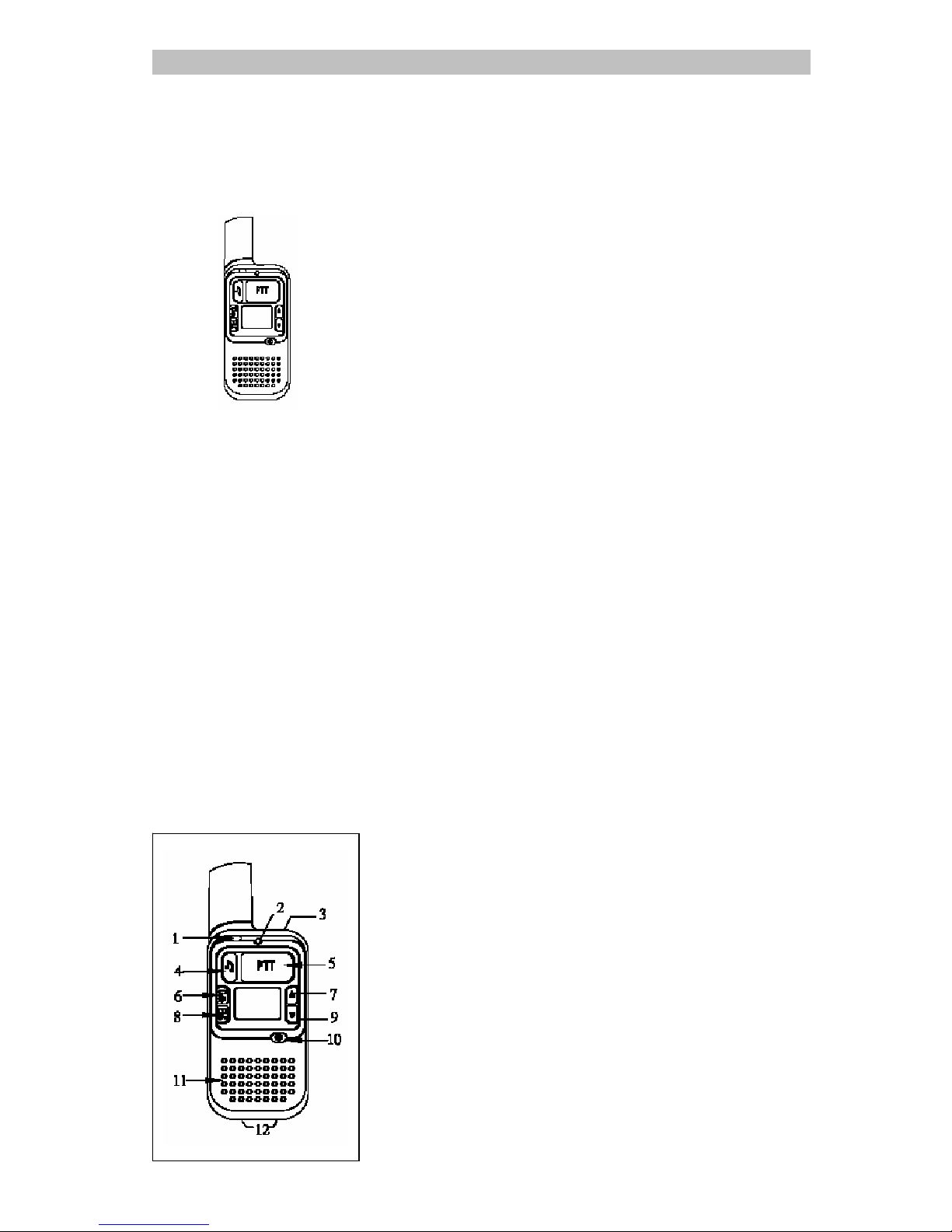
1. Transmit LED indicator
2. Microphone
3. Earphone and Wall Charger jack
4. Call Key
5. PTT (Push To Talk) Key
6. Scan / Monitor Key
7. Up Key
8. Menu / Lock Key
9. Down Key
10. Power On/Off Key
11. Speaker
12. Desktop Charger Pins
Page 3
INGLÉS
2 / 14
CAUTION
AVOID PLACING THE 2-WAY RADIO FOR
PROLONGED PERIODS OF TIME IN DIRECT
SUNLIGHT OR TEMPERATURES BELOW
-20 OR ABOVE 60.
KEEP THE ANTENNA AT 1 INCH (2.5cm)
AWAY FROM YOUR HEAD AND BODY. DO
NOT USE YOUR 2-WAY RADIO
WITH A DAMAGED ANTENNA.
BATTERY :
THIS 2-WAY RADIO IS DESIGNED TO USE
3.7V LI-ION RECHARGEABLE BATTERY. THE
BATTERY INCLUDE WITH THE RADIO IS WELL
DESIGNED TO HAVE A PROTECTION CIRCUIT
TO PROTECT THE BATTERY FROM INTERNAL
SHORT CIRCUIT AND OVER CHARGE.
AVOID ANY CONDUCTIVE MATERIALS SUCH
AS JEWELRY, KEYS, OR BEADED CHAINES
TOUCH EXPOSED TERMINALS OF THE
BATTERY. A CONDUCTIVE MATERAILS MAY
COMPLETE AN ELECTIRCAL CIRCUIT (SHORT
CIRCUIT) AND CAUSED THE BATTERY OVER
HEAT AND EXPLOSION IS POSSIBLE.
EXERCISE CARE IN HANDLING ANY CHARGED
BATTERY, PARTICULARLY WHEN PLACING IT
INSIDE A POCKET, PURSE, OR OTHER
CONTAINER WITH METAL OBJECTS.
NEVER ATTEMPT TO REPLACE THE BATTERY
WITH OTHER BRAND AND UNAUTHORIZED
BATTERY, OR IT WILL DAMAGE THE RADIO
AND BATTERY,
OR EVEN CAUSE EXPLOSION.
R & TTE Standard
EN 300 296
EN 300 279
EN 600 65.
WARNING
z Do not use this radio in or near a mining
facility, which uses remotely triggered
explosives or in areas labeled"Blasting
"Area. Premature or accidental
detonation may result.
z Do not attempt to modify or in any way
increase the output of this radio. This
radio is designed to comply with CE
z Do not use this radio or change the
battery in potentially explosive
environment as sparks in such areas
could cause explosion.
Page 4
INGLÉS
3 / 14
z Turn off the radio wherever posted
notices restrict the use of radios or
cellular telephones. Facilities such as
hospitals may use equipment that is
sensitive to RF energy
z Turn off the radio on board
aircraft when requested to do so
z Do not place your radio in front
of a vehicle's air-bag. If the
air-bag deploys, the radio may
be propelled with great forces
and cause serious injury to
occupants of the vehicle.
WARNING CHOKING HAZARD
SMALL PARTS
Not for children under 3
years. This product is not
intended to be used as a toy
or plaything.
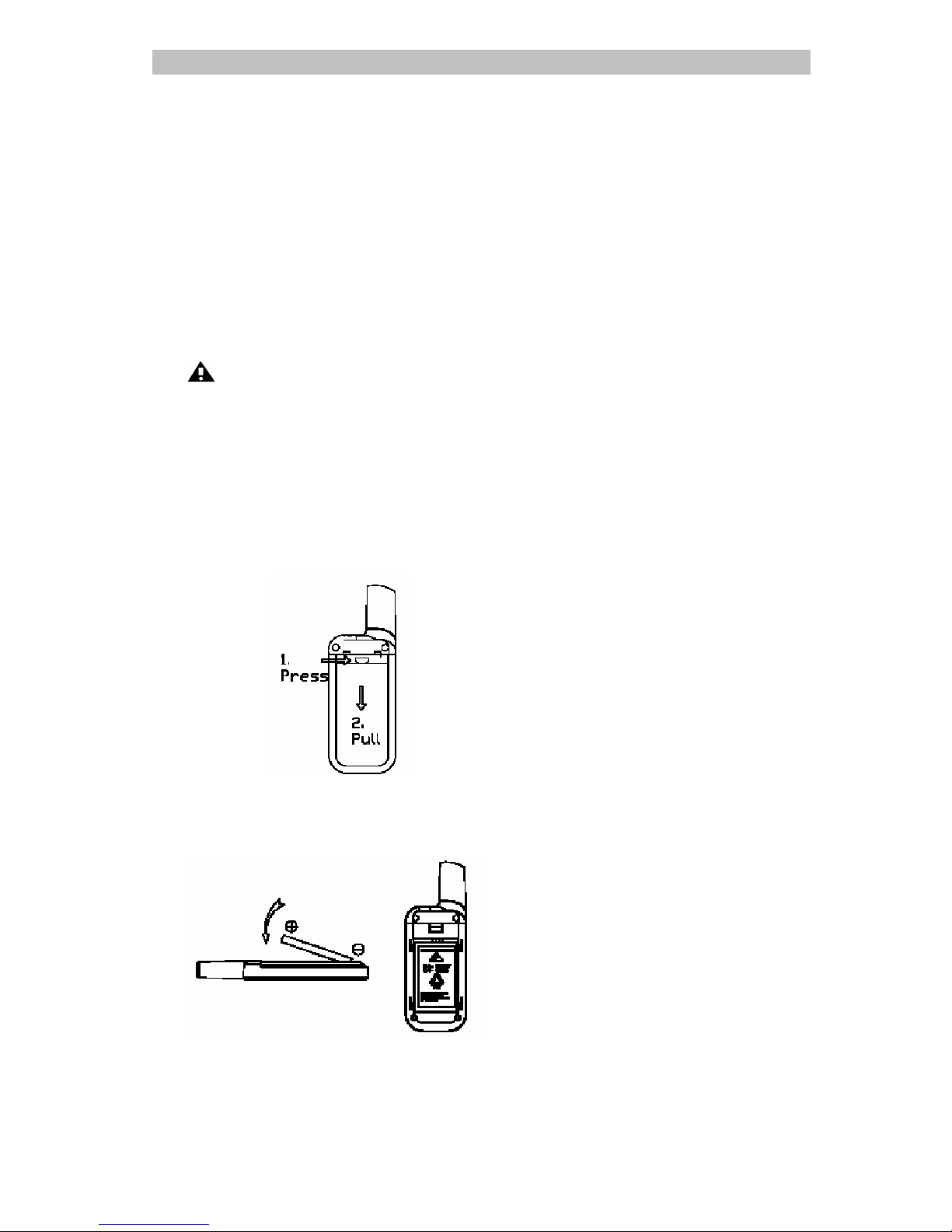
BATTERY INSTALLATION
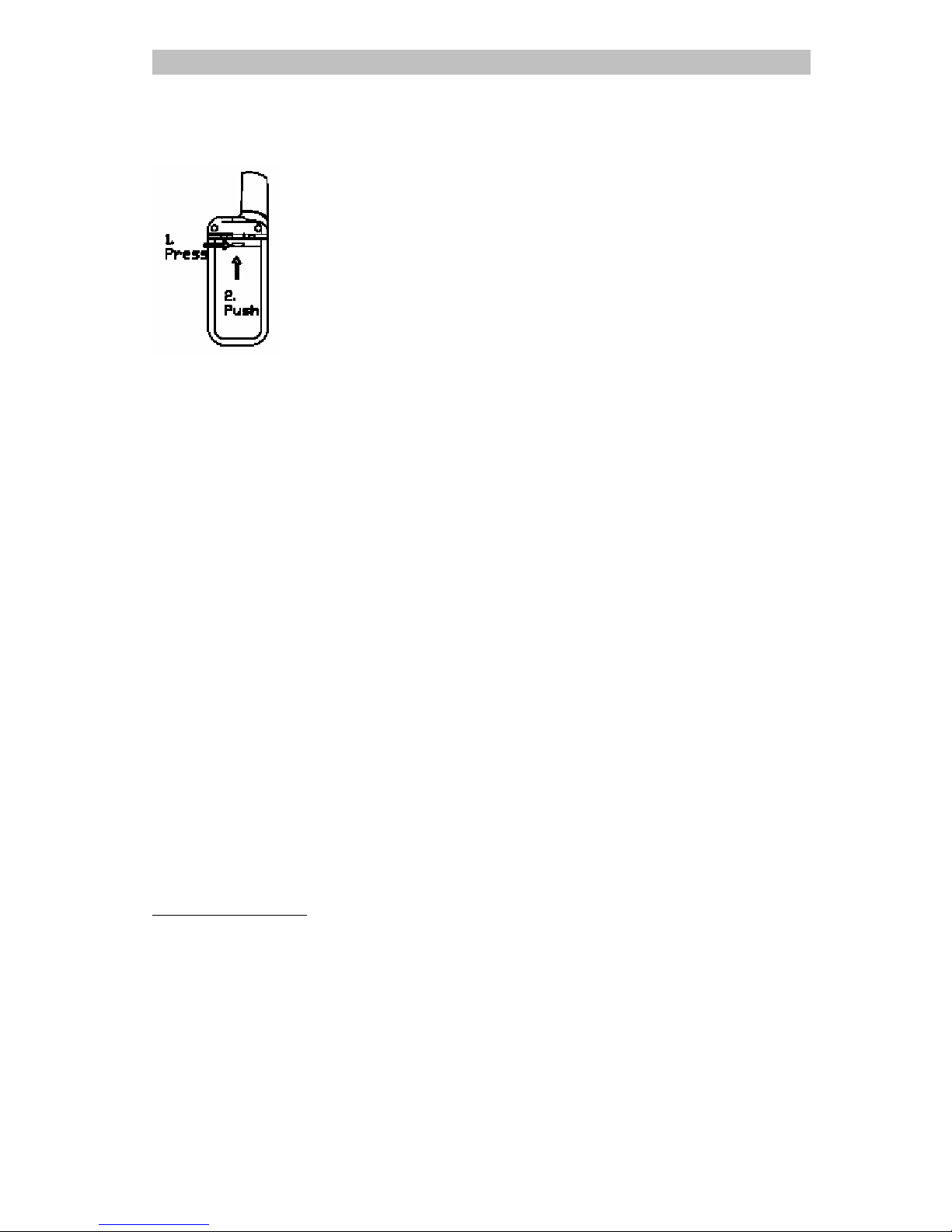
1. Press slightly & hold the battery door knob
2. and then slide down the battery door
Page 5
INGLÉS
4 / 14
3. Follow "This side out" and +/- direction to
install the Li-ION battery pack into the
compartment.
4. Press slightly & hold the battery door knob
5. and then push up the battery door to close
Warning:
A. Reverse the polarities of battery
would damage the unit and the
battery.
B. Do not replace the battery with
other brand name or type of
battery, otherwise, the unit will
not work or be damage.
C. When battery level low, recharge
the battery with the adaptor or
desk top charger enclosed. Do
not use other brand name or type
of charger to recharge the
battery, otherwise, the unit &
battery will be damage.
D. If you're not going to use the unit
for a long period of time e.g
several weeks, please take out
the battery. Otherwise, it will
erode and damage the battery.
E. When battery damaged or not
working, disposed it safely.
Never turn them or put them
close to heat, otherwise, it may
cause explosion.
Power On / Off the unit
To power on the radio, press Power On/Off
Key for 3 seconds until hear a beep and LCD
display the Channel no. and battery level
icon.
To power off the radio, press Power On/Off
Key for 3 seconds until LCD display turn off.
Page 6

INGLÉS
5 / 14
MAKING COMMUNICATIONS
The Radio has 8 main channels & 38 CTCSS
code. You can communicate with any other
user who is using the same main channel &
CTCSS code.
Speak to other radio
1. Press & hold the PTT key , tr ansmit LED turn
on.
2. Hold the unit in a vertical position with
the Microphone 5-8cm from the mouth
and then speak
3. When you finish speaking, release the PTT
key and you will hear a beep tone.
Listen to other radio
1. When you press the PTT key, you can not
listen to other radio. Make sure you do not
press the PTT key for listening.
2. Adjust volume control if necessary.
ADJUSTING SPEAKER VOLUME (8 LEVEL)
1. Press the key to increase the volume.
2. Press the key to decrease the volume.
OVERTIME FUNCTION
1. Overtime function can avoid transmitting
by chance and to prolong the battery life.
2. The radio will end to transmit and utter a
warning tone when PTT is held over 60
seconds. You then need to release PTT and
press it again for further transmission.
3. In VOX mode, the unit will stop transmitting and
utter a warning tone after continuing talk for 60
seconds. You can re-activate VOX after the
overtime stop. (Please refer to VOX function for
details VOX operation)
TALK RANGE
The communication range is optimal in open field
and is vary in different environment:
Optimal Range–range up to 3 km in open field
Medium Range – reduced range in area with obstacle
of trees, houses.
Shortest Range– further reduced range in dense
forest, high mountain, tall building area.
Warning - Do not transmit within 1.5 meter among
other radio because of interference.
Page 7
INGLÉS
6 / 14
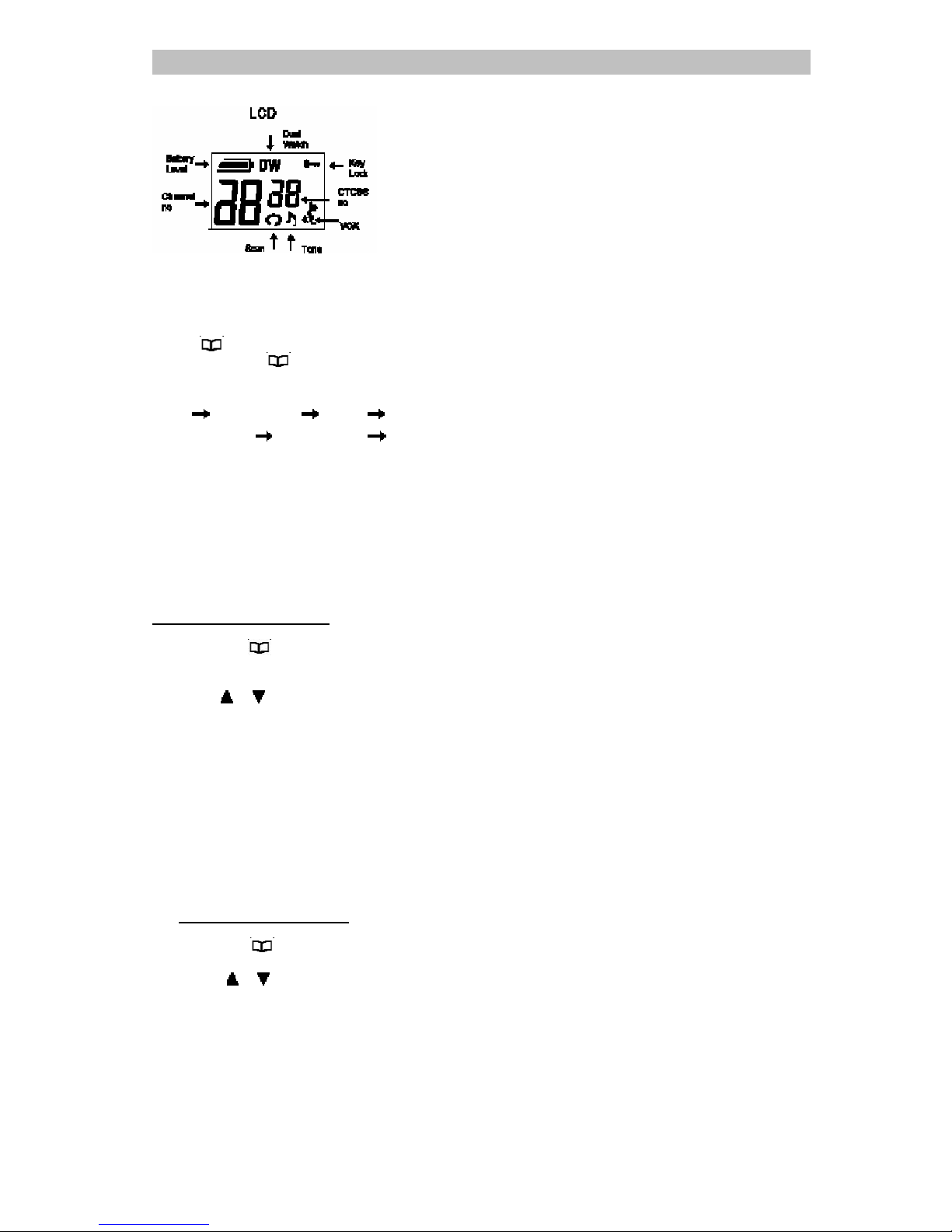
MENU FLOW CHART
Press"
" once to enter main channel
selection press " " again for next function
selection.
Menu Main channel CTCSS Call tone
VOX sensitivity
VOX overtime Dual Watch
SELECT CHANNEL
You can communicate with any other user who
is using the same channel.
To set the main channel
1. Press the"
" key once, the channel
number display will flash,
2. Press"
"," " key to select your desired
main channel.
3. Press the "PTT" key to confirm, the
channel number display will stand.
CTCSS CODE FUNCTION
This function can help you to identify your group of
users among the same channel. Only the users
with the same CTCSS tone can listen and talk to
each other, but all the users on the same channel
can listen to the conversation.
To select a CTCSS code
1. Press the "
"key twice , the CTCSS code
display will flash,
2. Press "
"," " key to select your desired
the CTCSS code (1~38, " 0 " is off)
3. Press the "PTT" key to confirm, the CTCSS
code display will stand.
Page 8
INGLÉS
7 / 14
SCANNING CHANNEL
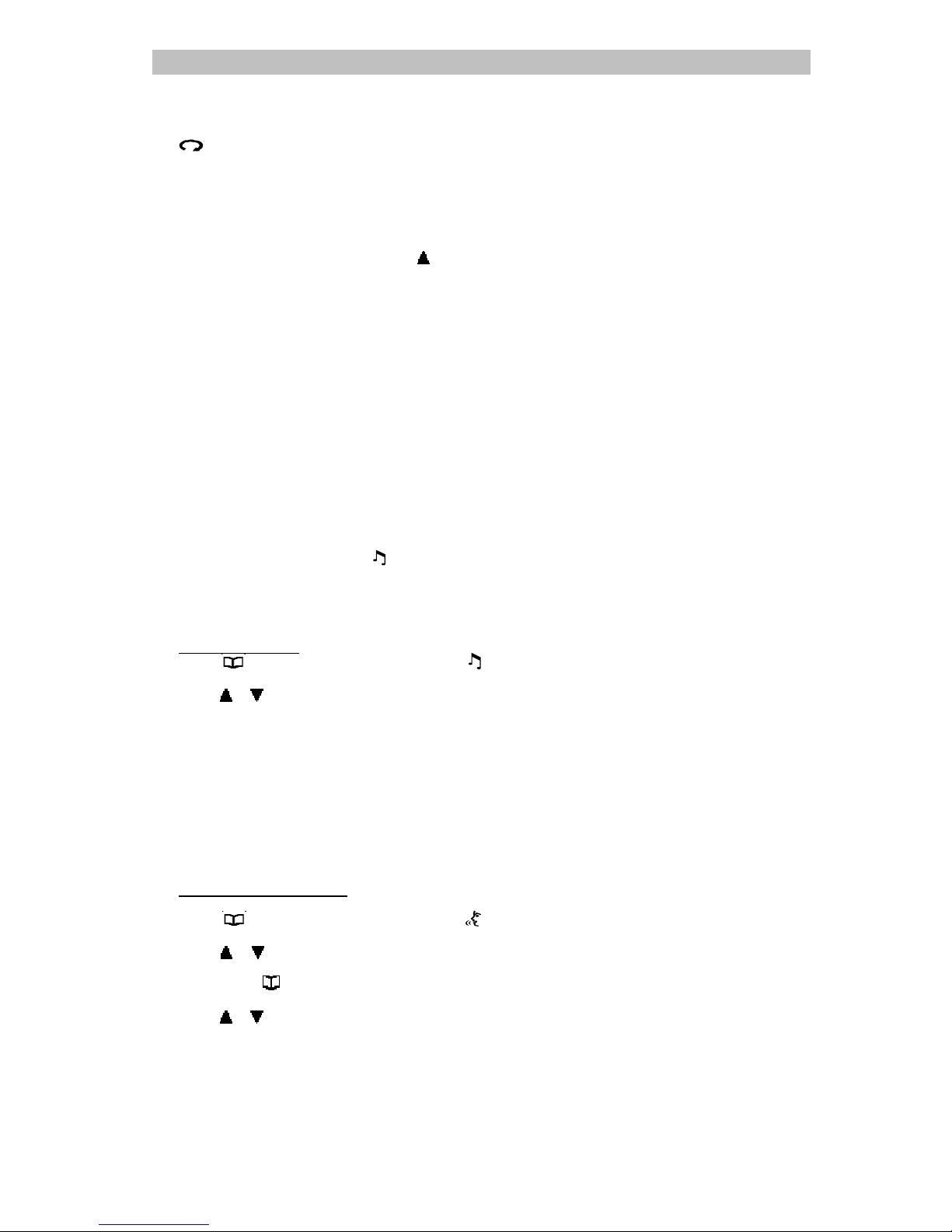
1. Press "Scan / Monitor " Key, LCD display
icon. It will start to scan channel
automatically.
Note: If press and hold the button
over 2 seconds, it will break the
squelch noise and listen to the
current channel.
2. The unit scan all channels one by one it will
stay on the occupied channel. Press"
" Key to
continue scanning.
3. If there is no sig na l, it w ill c ont inu e t o s ca n.
Press PTT key, it will stay on the current
channel and continue to scan after 5
seconds.
4. Press"Scan/Mon"Key to quit and return to
current channel.
Note: Occupied Channel means main
channel and CTCSS code are same.
SENDING CALL TONES
You can use Call Tones to get the attention of other
people with radios on the same channel and CTCSS
tone. You can also use Call Tones as the signal of the
start or end of a transmission.
1. Press"CALL"key , LCD display
icon and your
call tone will be transmitted to nearby
receivers set at the same channel.
2. The call tones have 10 kinds of sound for
personal selection.
Select call tones
1. Press" "key three times, LCD display
icon and call tone number will flash,
2. Press" "," "key to select your desired the
call tone
3. Press the"PTT"Key to confirm, the call tone
number display will stand.
VOX - HANDS-FREE FUNCTION
The Radio has a built-in Voice Activated
Circuit(VOX)function,You can connect the radio
with the earphone for hands-free talking and
listening without pressing PTT Key.
To turn on VOX fuction
1. Press"
"key four times, LCD display
icon and VOX sensit ivity d igit disp lay will f lash
2. Press"
"," " key to select 1, 2, 3 for low,
medium & high sensitivity. (0 is off )
3. Then press key again, the digit of VOX
overtime digit will flash.
4. Press"
"," "key to choose overtime from 1
to 5 seconds
5. After turn on VOX, you need to connect
the earphone to use the hands-free
function. See below steps.
Page 9

INGLÉS
8 / 14
Use VOX with earphone
1. Press"
"key to power off the radio.
2. Plug the earphone into the earphone jack
3. Press"
"key to power on the radio, LCD display
icon.
4. Set the earphone microphone close to
your mouth (1~3 cm) and speak to the
microphone, the radio will transmit
automatically.
5. Stop speaking, depends on Overtime
setting, the radio will stop transmit and go
into receiving status.
6. Adjust the volume to comfortable level if
necessary.
Note :You must power off the unit before plug
in the earphone ,otherwise, the unit will
always transmit & not work.
KEY LOCK
1. Press and hold "
"key for 1.5 second, LCD
display
icon
2. After that all key are locked except PTT and
CALL key.
3. T o un lock, press and hold MENU key for 1.5
second again
DUAL WATCH
1. Set main channel first (example channel 2)
2. Press '
' key six times, LCD display ' '
icon and the channel number display will
flash,
3. Press '
', ' ' key to select your desired
Watch channel(example channel 6) .
4. Press the 'PTT' key to confirm, the unit will
watch channel 2 & 6 by shift, LCD will flash
between channel 2 & 6.
5. repeat step 2 and 3 and select '0 'to turn
off this function
RECHARGING BATTERY
When LCD display battery level is low, you
must charge the battery with the enclosed
AC/DC ADAPTER or Desktop Charger. The
battery have a built-in charging current limit
circuit, when the battery fully charge, the
circuit will cut the charge current automatic to
protect the battery.
Page 10
INGLÉS
9 / 14
With AC/DC Adaptor:
1. Plug the adapter into the wall socket and
another end plug into the earphone jack
2. The LCD display battery Level icon
flashing when it under charging.
3. Charge arrange 3 hours, the battery Level
display full bar
and red LED will on.
4. During charging, the unit will auto off,
After charging, please turn on the unit.
With Desk Top Charger
1. Plug the adaptor into the desk top charger.
2. Put the radio into the charger.
3. During charging, the LED of the charger
will on, the radio remain on.
4. Charge around 6 hours, the LED of the
charger will off & the radio red LED will on,
and then take out the radio to stop
charging.
Warning: Use only the enclosed AC/DC
adaptor or desktop charger. Do not use other
brand or type of adaptor or desktop charger,
otherwise, it will damage the radio and
battery.
Technical Specification
Operating frequency :
446.00625 to 446.09375 MHz
Channels : 8
CTCSS : 38 codes
Channel Spacing: 12.5 KHz
Transmit power : 500mW
Battery : 3.7V 700mAh Lion
rechargeable battery
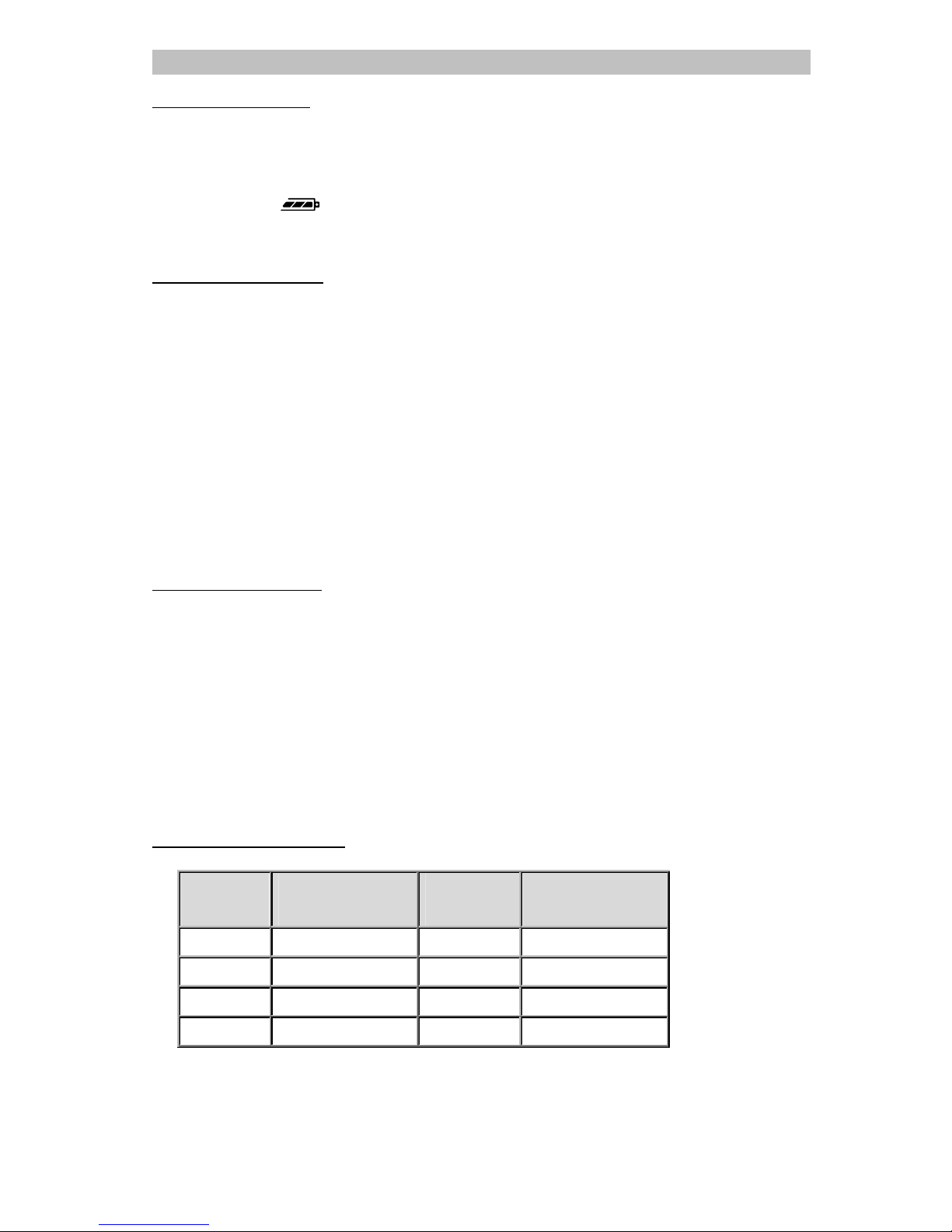
Channel Frequency Table
Channel Frequency (MHz) Channel Frequency (MHz)
1 446.00625 5 446.05625
2 446.01875 6 446.06875
3 446.03125 7 446.08125
4 446.04375 8 446.09375
Page 11
INGLÉS
10 / 14
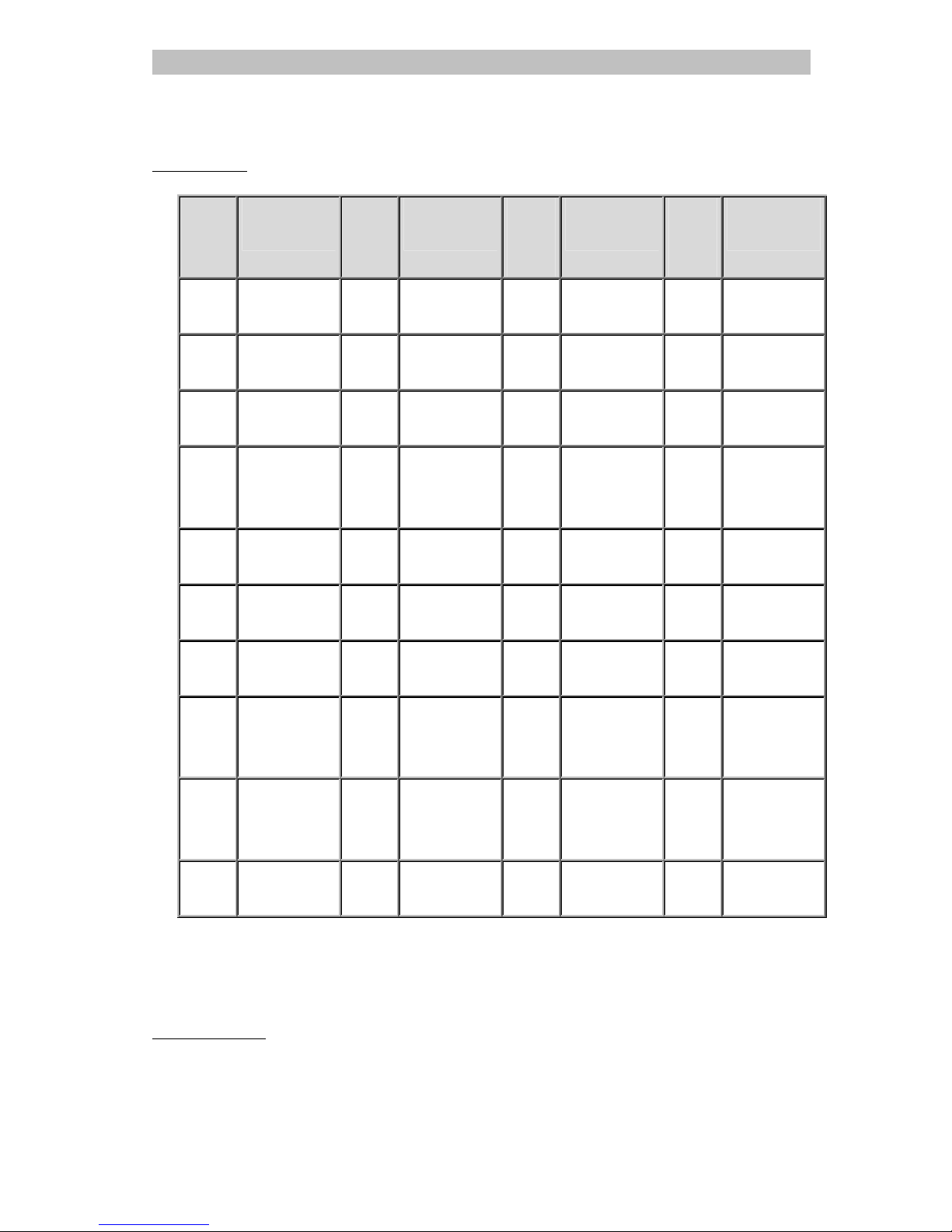
CTCSS Code
CTCSS
.
Freq. (Hz) CTCSS
.
Freq. (Hz) CTCSS
.
Freq. (Hz) CTCSS
.
Freq. (Hz)
1
67.0
11 97.4
21 136.5
31 192.8
2
71.9
12 100
22 141.3
32 203.5
3
74.4
13 103.5
23 146.2
33 210.7
4
77.0
14 107.2
24 151.4
34 218.1
5
79.7
15 110.9
25 156.7
35 225.7
6
82.5
16 114.8
26 162.2
36 233.6
7
85.4
17 118.8
27 167.9
37 241.8
8
88.5
18 123.0
28 173.8
38 250.3
9
91.5
19 127.3
29 179.9
10 94.8
20 131.8
30 186.2
SAFETY INSTRUCTIONS
Damage antenna
Do not use any communicator that has a damaged Antenna. If a damaged antenna comes in contact
with the skin, a minor burn may result.
Page 12

INGLÉS
11 / 14
Batteries
As batteries can cause property damage and/or bodily injury such as burns if conductive material
such as jewelry, keys or beaded chains touches exposed terminals. The material may complete an
electrical circuit (short circuit) and become quite hot. Exercise care in handling any charged battery,
particularly when placing it inside a pocket, purse or other container with metal objects. Do not
replace or charge batteries in a potentially explosive atmosphere. Contact sparking may occur while
installing or removing batteries and cause an explosion.
For vehicles with air bag
Do not place your Communicator in the area over an air bag or in the air bag deployment area. Air
bags inflate with great force. If a communicator is placed in the bag deployment area and the air bag
inflates, the communicator may be propelled with great force and cause serious injury to the
occupants of vehicle.
Potentially Explosive Atmospheres
T urn your communicator off when in a ny area with a p otentially explos ive atmosphe re, unless it is a
type specifically qualified for such use. Sparks in such areas could cause an explosion or fire
resulting in bodily injury or even death.
Blasting caps and areas
To avoid possible interference with blasti ng operation, turn your communicator off near electrical
blasting caps or in a “blasting area” or in areas posted: “Turn off two way radio”. Obey all signs and
instructions.
Note: Areas with potentially explosive atmospheres are often, but not always, clearly marked. They
include fueling areas such as below deck on boats, fuel or chemical transfer or storage facilities;
areas where the air contains chemicals or particles, such as grain, dust or metal powders; and any
other area where you would normally be advised to turn off your vehicle engine.
Electromagnetic Interference/Compatibility
Nearly every elect ronic de vice is su scept ible to electromagnetic interference (EMI) if inadequeately
shielded, designed or otherwise configured for electromagnetic compatibility.
Turn your unit OFF in any facilities where posted notices instruct you to do so. Hospitals or health
care facilities may be using equipment that is sensitive to external RF energy.
Turn your unit OFF when on board an aircraft when instructed to do so. Any use of the unit must be
accordance with airline regulations or crew instructions.
Page 13

INGLÉS
12 / 14
CARE AND MAINTENANCE
T o clean the unit, wipe with a soft cloth dampened with water. Don’t use a cleaner or solvents on the
unit; they can harm the case and leak inside, causing permanent damage. Battery contacts may be
wiped with a dry lint-free cloth. If the unit gets wet, turn it off and remove the batteries immediately .
Dry the BATTERY COMPARTMENT with a solf cloth to minimize potential water damage. Leave the
cover off the BATTERY COMPARTMENT overnight or until completely dry. Do not use the unit until
completely dry.
WARRANTY
This equipment comes with a 24-month warranty . The warranty will be honoured on presentation of
the original or a c op y b ill o r re ce ip t, pr o vid e d t he date of purchase and the unit type are indicated.
During the time of the warranty TELCOM will repair free of charge any defects caused by material or
manufacturing faults. TELCOM will at its own discretion fulfil its warranty obligations by either
repairing or exchanging the faulty equipment.
Any warranty claims will be invalidated as a result of intervention by the buyer or unqualified third
parties.
Damage caused by inexpert treatment or operation, and damage resulting from the use of
non-original parts or accessories not recommended by TELCOM is not covered by the warranty.
The warranty does not cover damage caused by outside factors, such as lightning, water and fire,
nor does it apply if the unit numbers on the equipment have been changed, removed or rendered
illegible.
Note: Please do not forget to enclose your receipt if you return the equipment.
FOR USE IN:
Austria, Belgium, Denmark, Finland, France, Germany, Iceland, Ireland, Italy, Luxembourg, The
Netherlands, Portugal, Spain, Switzerland, United Kingdom, Sweden.
Page 14
INGLÉS
13 / 14
IMPORTANT
Notification of intended purpose of product use:
This product is an FM two way radio transceiver suitable for use in the 446 private mobile radio
service (446PMR). This is a license exempt service, but restrictions of use might apply in some
countries.
Product details:
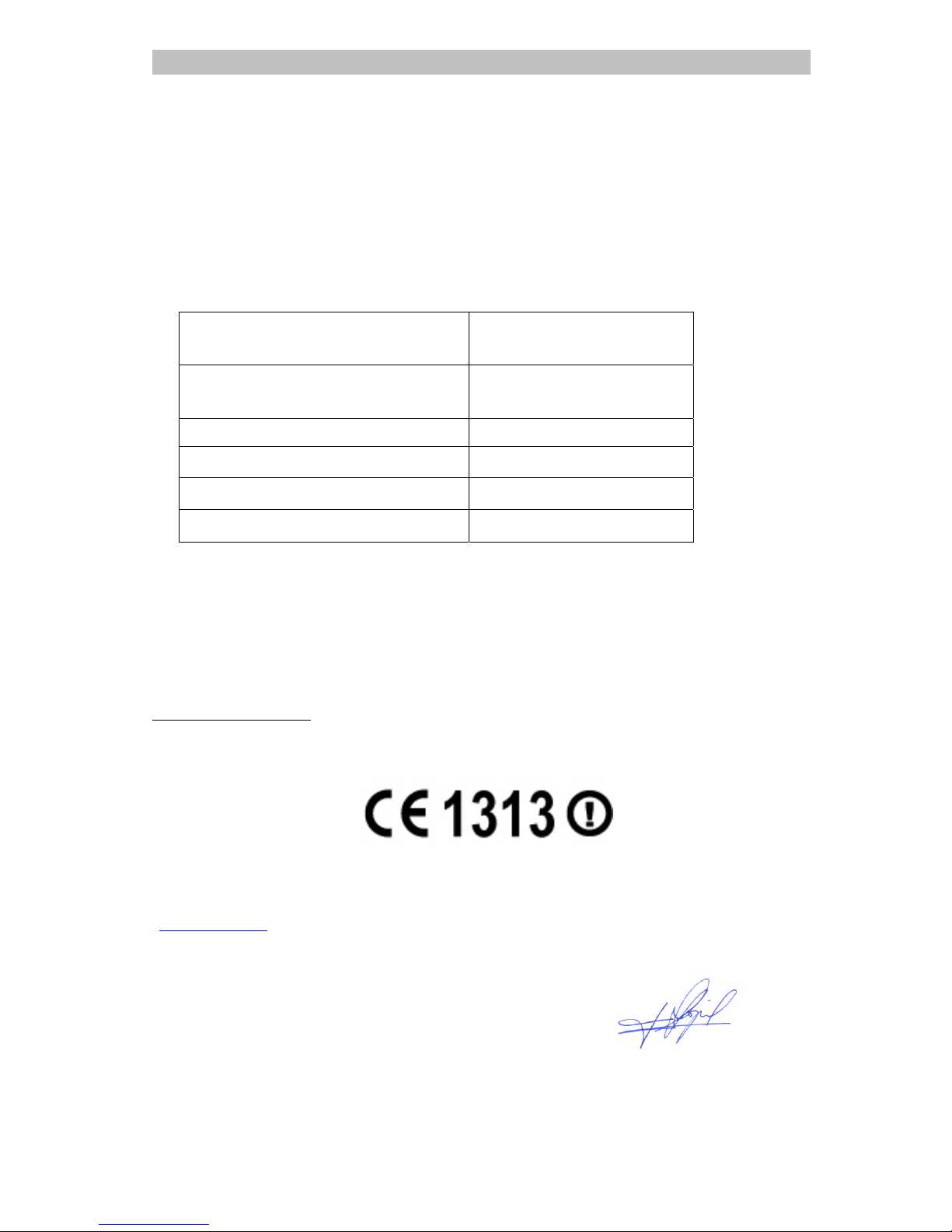
Type Designation WT-202
(Talkcom TC-500)
Operating Frequency Range (MHz) 446-446.1
Transmitter Power (Watts) 0.5 W
Modulation Type Frequency
Channel Spacing (KHz ) 12.5
Channel Protocol CTCSS
Declaration of Conformity:
TELCOM, S.A., as responsible for the commercialisation of this product into the market, declares
under its own responsibility that the radio type listed above is declared compliant with the essential
requirements and other relevant provisions of Directive 1999/5/EC.
Relevant Specifications:
Radio: EN 300 296-2 V1.1.1 (2001-03) ; EMC: EN 300 279 V1.2.1 (1999-02)
Seguridad: EN 60065:2000
A copy of a signed and dated Declaration of Conformity is av ailable on requ est via your Talkcom help
desk:
www.talkcom.es
/ Tel: +34 902 111 446 / Fax: +34 91 103 30 10
Madrid, July 28th 2004
Responsible commercialisation:
Telcom, s.a.
Av. Industria, 32
28108 Alcobendas (Madrid) Spain Javier López Sánchez
Tel.: +34 902 111 446 TELCOM, s.a.
Page 15

INGLÉS
14 / 14
DECLARATION OF CONFORMITY
Supplier and certifying organisation: Telcom, s.a.
Address: Av. de l a Industria, 32, 28108 Alcobendas (Madrid) Spain
Telephone/Fax: +34 91 103 3000 / +34 91 103 3020
ID: A-28271823
As distributor of the manufacturer Shenzhen Daxian Digital Tel ecommunication., and responsable
for the introduction into the market of this product
DECLARES UNDER ITS SOLE RESPONSIBILITY
THE CONFORMITY OF THE PRODUCT:
PMR446 portable transceiver
PMR446 T ALKCOM, Model TC-500, with equipment type number
WT -202, manufactured b y Daxian-Win dsor T ec hnology Limited, in P. R. of China, to wh ich refers this
declaration, with the following norms:
Radio:
EN 300 296-2 V1.1.1 (2001-03)
EMC:
EN 300 279 V1.2.1 (1999-02)
Safety:
EN 60065:2000
according with the provisions of the Directive of the Council of the European Communities on the
approximation of the la ws of the Member status relating to 1999/5/EC (R adio & T eleco mms T erminal
Equipment Directive) of March , 9
th
1999.
Signed in Madrid, the 28th of July of 2004:
Javier López Sánchez
General Manager, TELCOM, s.a.
 Loading...