

Page 1

2.1 SPEAKERS SPK-2101BT
Page 2

Dear customer:
Thank you for purchasing our SPK-2101 2.1 speakers.
Welcome you to our customer family. We hope you will be happy using our product as
its quality, reliability and performance are remarkable.
From the onset of the product development, each minute par has been thoroughly
tested and experimentad in order to provide the ultimate customer satisfaction. The
goal of your everyday life with a focus on the future.
In the unlikely events that your product needs guarantee service, please refer to the
guarantee card with this product.
If there may be any chances that you are unhappy with our products, please feel free
to contact us and voice your concern to your nearest sparkle dealer. We assure you that
appropriate action will be taken.
Please spare few minutes to go through this manual carefully before using the product
in order to enjoy maximum pleasure of using this product.
PANEL AND USB FUNCTIONAL INTRODUCTIONS.
FRONT PANEL
1. MODE
- Cycles the selection between lnput AUX, USB, SO/MMC CARD, FM Mode.
2.
- Under USB/SO CARD Mode, press the button to play the Previous song.
3.
- Functions as PLAY/ PAUSE under USB/SO CARD Mode.
- Under FM Mode, press the button willsearch channels automatically and store, and
short press againwill stop channel searching.
4.
- Under USB/SO CARD Mode, press the button to playthe Next song.
Page 3

5. 0-9
to select direct in USB/Memory card ,to select 10 digits above by pressing righ
combination of the digits.
REMOTE INSTRUCTIONS
1. INPUT: Cycles the selection between lnputAUX, USB, SD/MMC CARD, FM Mode.
2. POWER: standby (STANBY)-ON/OFF.
3. REPEAT: repeat all is the default mode for he player, once you press the repeat
botton it will repeat the current song.
4. MODE: cycle selection input USB or SD/MMC
5. PREV: to select the previous song in USB/Memory card or to select next channel in
radio station.
6. NEXT: to select the next song in USB/Memory card or to select previous channel in
radio stalion.
7. EQUALIZER: normal, jazz, rock, pop, classic.
8. SCAN: to play/pause in USB/Memory card, long press “play/pause” for seconds to
search and save channels automatically in radio station, 20 channels can be saved up
at most.
9. VOL+: to increase the overall volume.
1O. VOL-: to decrease the overall volume.
11. 0-9: to select direct in USB/Memory card, to select 10 digits above by pressing right
combination of the digits.
OPERATONAL INSTRUCTION
This is 2. 1ways multimedia hi- audio system. lt has adopted the best components and
the advanced integrated circuit amplication and the sound eect in performed vividly
and perfectly. lt will always dynamic sound eects. We suggest you read this user’s
manual before youoperate it and take good care of it.
BLUETOOTH
Anytime you select Bluetooth mode, Talius 2101BT will play a beeping sound from its
speaker which indicates that you can start searching the device in your smartphone or
tablet by his pairing name: “SPK-2101-BT”.
Once you have the device pinpointed, press over it for pairing. If done correctly, you
will hear a beep from the speaker of Talius 2101BT. From now on, the speaker will
automatically connect to the last paired device whenever it is active and in scope.
SPECIFICATIONS
(1) Compatible with sound sources like VCD/DVD player, LCD, TV, PC etc.
(2) Magnetic shielded treat designed, able to be congured with TV sets or computers.
(3) Creating a larger dynamic range in the low frequency, a smoother middle
frequency, and a pure and harmonious high frequency.
(4) Power supply: 220v AC 50Hz.
Page 4
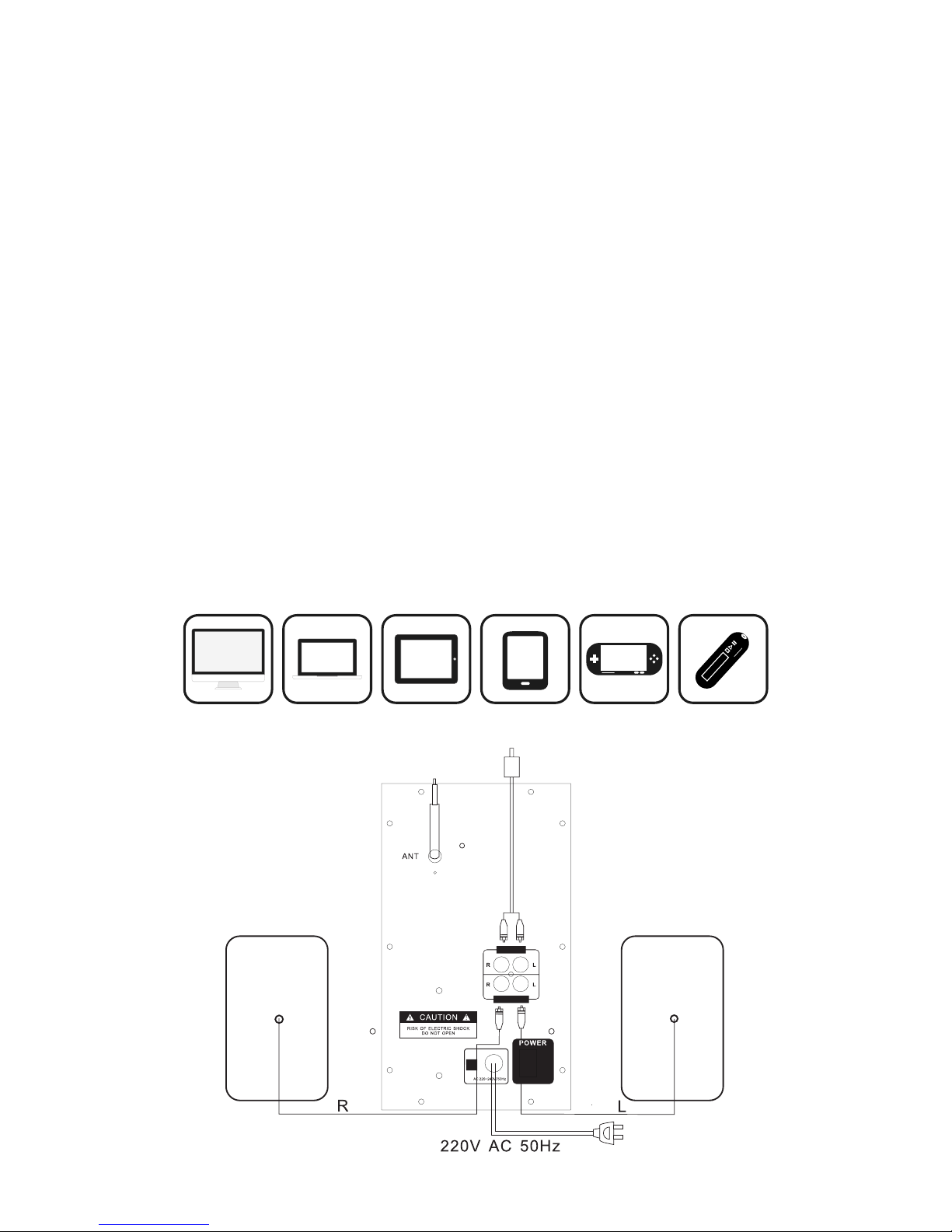
OPERATION
(1) Please connect the sound and powers in accordance with sketch map.
(2) When all of the units are connected correctly, turn on the power switch.
(3) Turn on your sound sources, then adjust the volume knob, treble knob, bass for a
satised personalized eect.
(4) After your use, please turno the power supply switches. TIPS.
(1) Please turn the volume knob to the mínimum position before your operation to
prevent any damage to the speakers due to the instant impact.
(2) Please avoid being exposed or put in humid environment.
(3) Please do not open the back cover of the main speaker in case of getting an
electric shock or breaking the warranty regulations.
(4) Please turn o the power switch and ralease the plugs if you probably do not use
itwithina long period.
SYSTEM SOMPOSITIONS
(1) One subwoofer and two satellite units.
(2) One set of signal input cable.
(3) One user manual.
(4) One remete
 Loading...