

Page 1
The 1st multifunction
mask combining
Light Therapy
®
& Electrostimulation.
GENIUS LIGHT
Multiprogram Hi-tech Care
QUICK START GUIDE
Beauty on demand
8 beauty programmes, 2 options:
Light mode: LED combined with ionophoresis microcurrent.
Light mode + Electrostimulation: LED combined with different types of electrical stimulation.
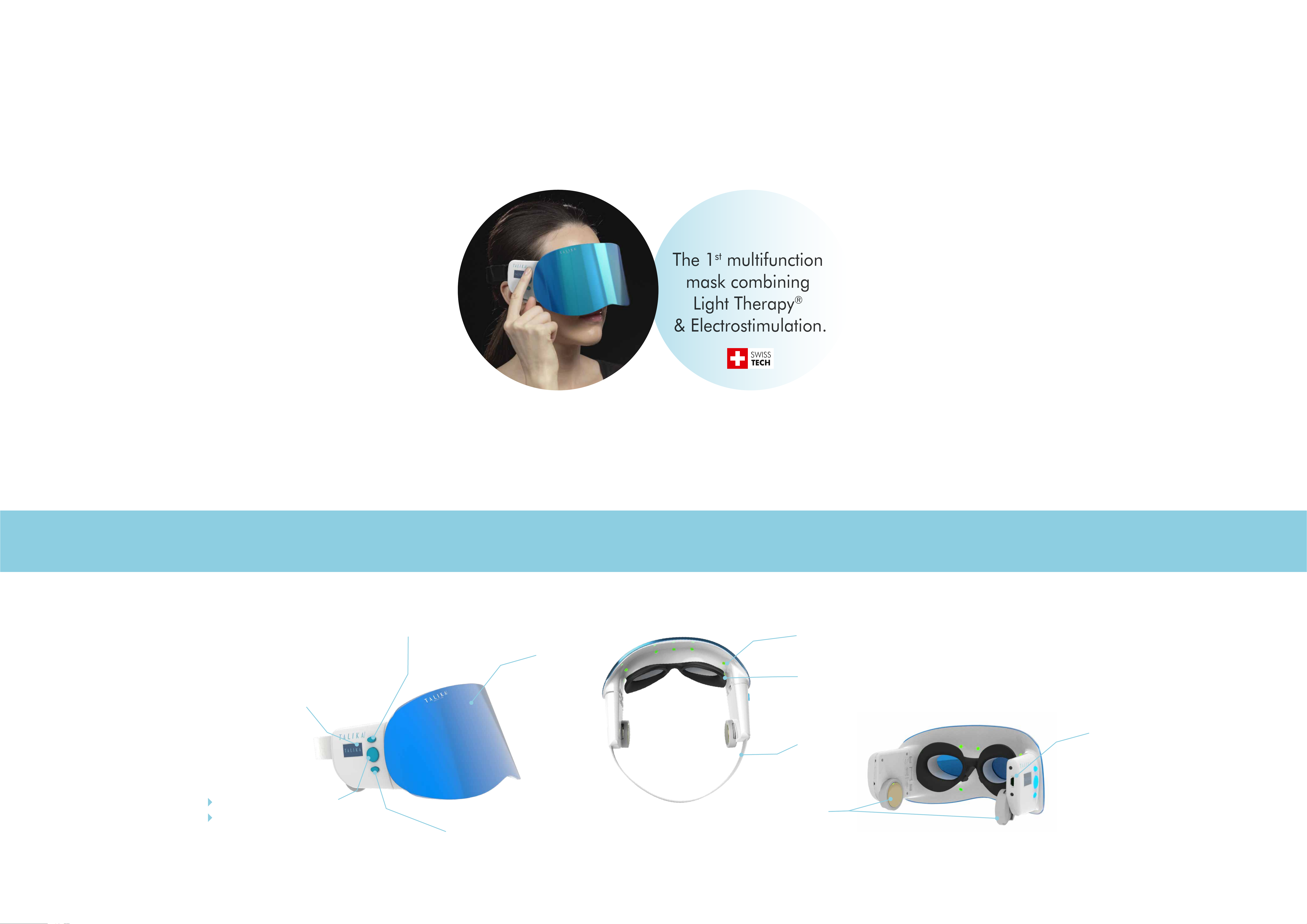
A. DEVICE OVERVIEW
Programme selection arrow (UP)
LED
Visor
Display screen
(menu, programmes,
languages...)
Eye protection
from blue light
Mini USB slot
Strap
Power ON / OFF
Gold-plated
START / SELECT / PAUSE
electrodes
Programme selection arrow (DOWN)
2 pairs:
1 removable pair
1 fixed pair
Page 2
B. BEFORE USE
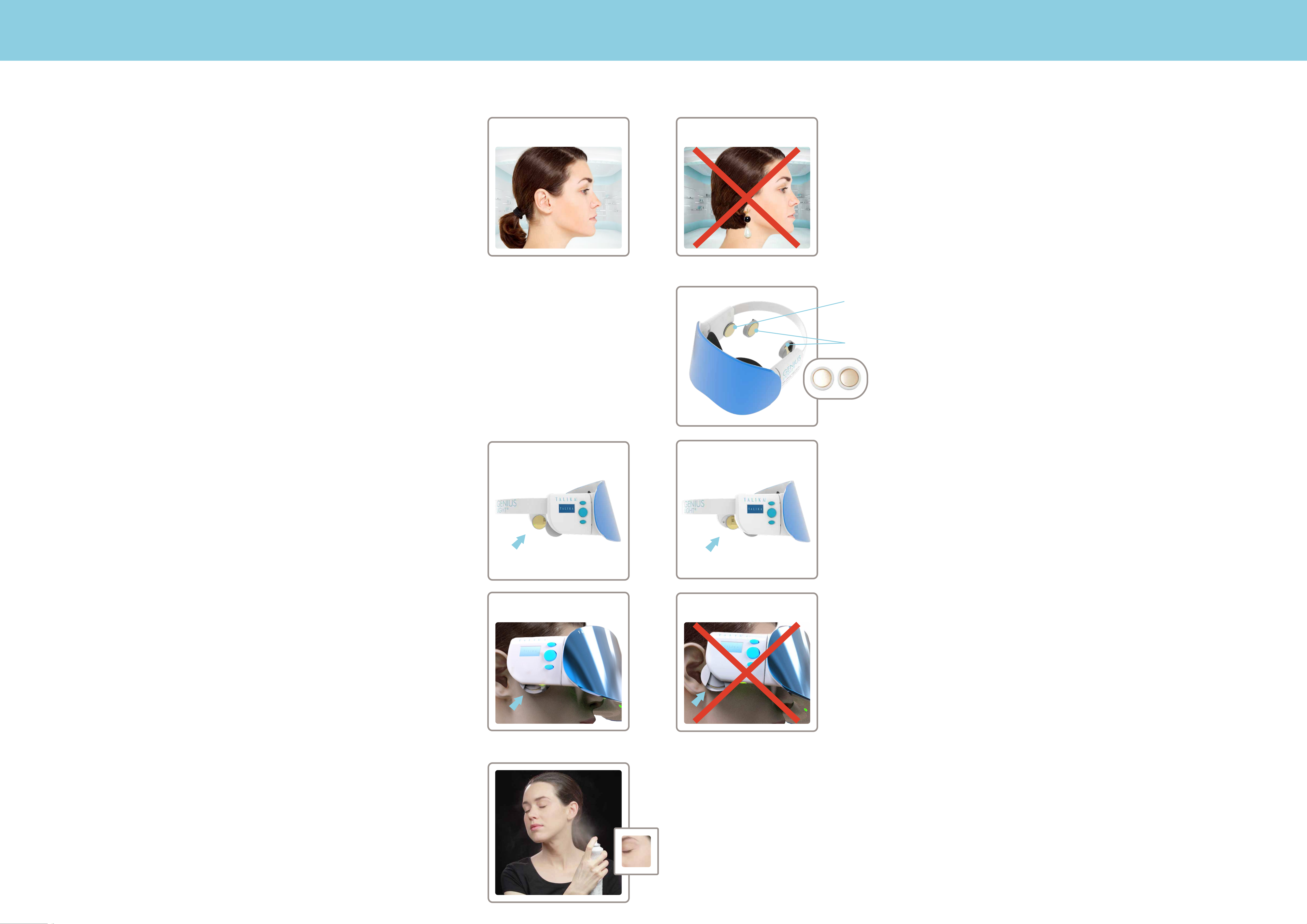
1. Cleanse your face thoroughly. Do not use GENIUS LIGHT while wearing make-up.
2. Tie back your hair.
DO
DON’T
3. Before switching on GENIUS LIGHT, first put it on and adjust the strap length and gold-plated
electrodes for optimal and comfortable fit.
Fixed electrodes
If the fit of the electrodes is too tight,
take off the removable pair of electrodes
and adjust the position of the main
electrodes by sliding it.
Removable electrodes
To adjust electrodes position slide them
back or forward.
YES NO
4. Humidify your face using cosmetic sponge or water spray.
Apply water on the area of skin contact with electrodes.
5. Set up GENIUS LIGHT beauty care programme.
Page 3
C. PROGRAMME SET UP
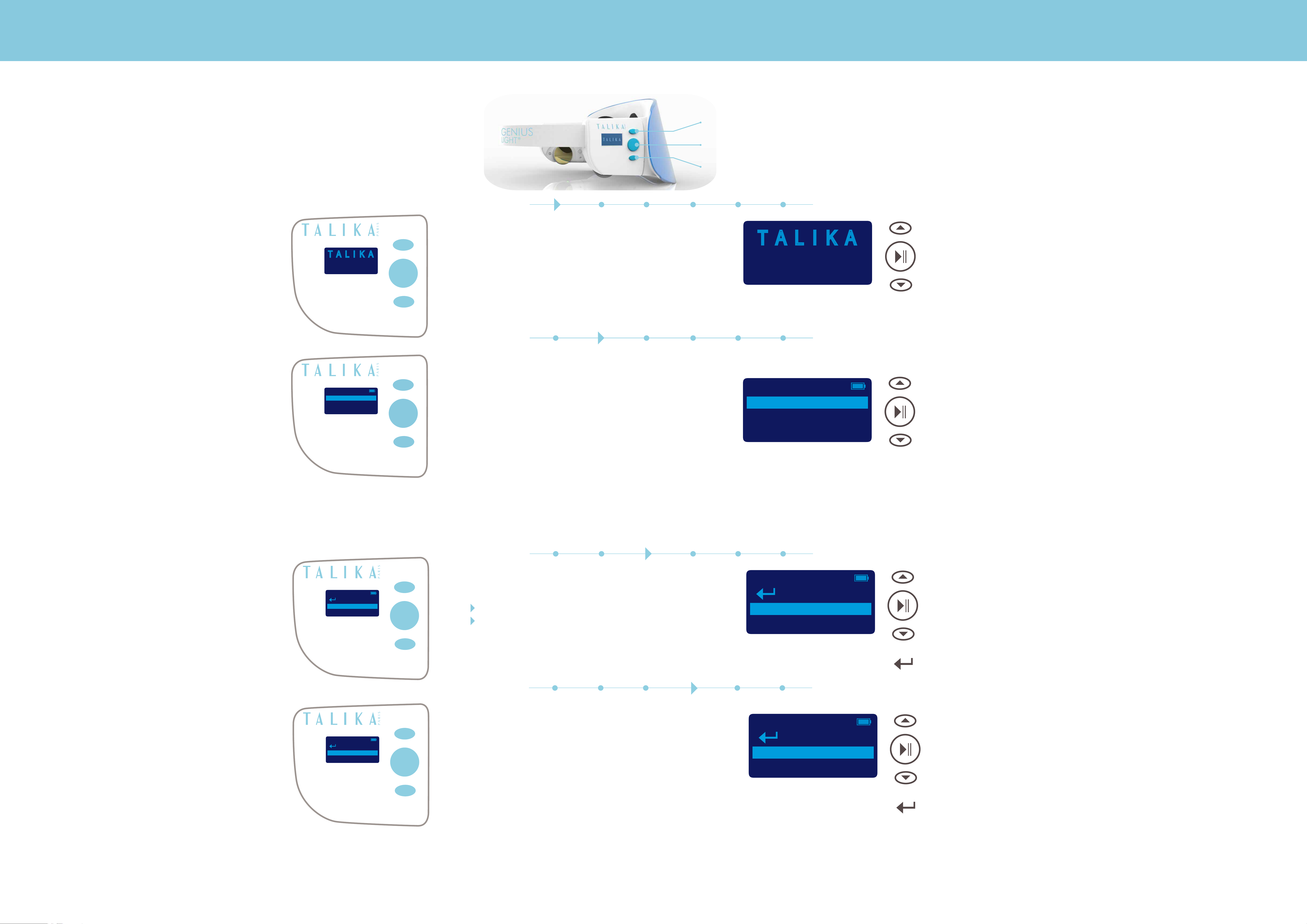
GENIUS LIGHT CONTROL BUTTONS
UP
START / SELECT / PAUSE
T A L I K A
GENIUS LIGHT
HELLO
®
DOWN
1. SWITCH ON GENIUS LIGHT
Press START button to turn on GENIUS LIGHT.
Display screen will light up with TALIKA GENIUS LIGHT
logo.
T A L I K A
®
GENIUS LIGHT
HELLO
UP
START / SELECT / PAUSE
LANGUAGE
ENGLISH
FRANCAIS
DEUTSCH
Press START button once more to go to
SELECT LANGUAGE screen.
2. SELECT LANGUAGE
Use UP and DOWN buttons to select
one the following languages:
ENGLISH
FRANCAIS
LANGUAGE
ENGLISH
FRANCAIS
DOWN
UP
START / SELECT / PAUSE
DEUTSCH
ITALIANO
ESPANOL
PORTUGES
NEDERLANDS
РУССКИЙ
中文
日本語
Press SELECT to confirm.
DEUTSCH
DOWN
MODE
LIGHT
LIGHT + EMS
3. SELECT MODE
Use UP and DOWN buttons to select MODE:
LIGHT
LIGHT + Electrostimulation
Press SELECT to confirm.
To return to previous MENU select BACK
arrow sign using UP button and press SELECT.
MODE
LIGHT
LIGHT + EMS
UP
START / SELECT / PAUSE
DOWN
BACK
TREATMENT
1. GLOBAL ANTI-A
2. 1ST WRINKLES
4. SELECT PROGRAMME
Use UP and DOWN buttons to select
one of the following programmes:
1. GLOBAL ANTI-AGING
2. 1
3. ANTI DARK SPOTS
4. ANTI-BLEMISH
5. DETOX
ST
WRINKLES
TREATMENT
1. GLOBAL ANTI-A
2. 1ST WRINKLES
UP
START / SELECT / PAUSE
DOWN
BACK
6. STRESS RELIEF
7. RADIANCE BOOST
8. AFTER SUN
Press SELECT to confirm.
Tu return to previous MENU select BACK
arrow sign using UP button and press SELECT.
Page 4
D. PROGRAMMES
LIGHT MODE
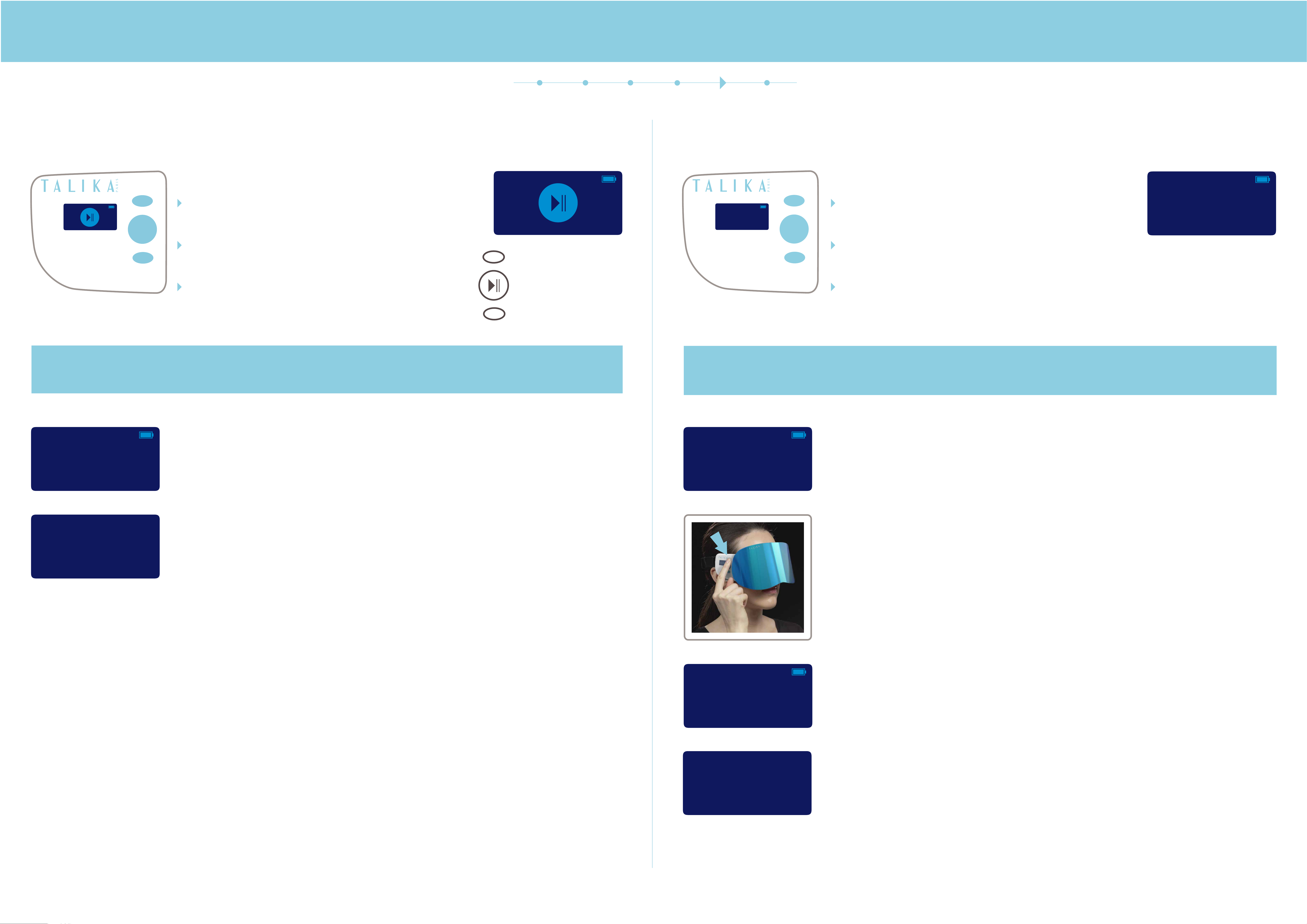
5. START PROGRAMME
START icon will appear on the screen
after confirmation of your selection.
You can begin the care.
LIGHT MODE + ELECTROSTIMULATION
5. START PROGRAMME
Ready to Start
“Ready to Start” message will appear on the screen
after confirmation of your selection.
You can begin the beauty programme.
Ready to Start
Make sure your face is still damped.
If your face gets dry during the device set up,
humidify your face again.
Put GENIUS LIGHT on before pressing START to
start the beauty care in order to avoid being dazzled
by the lights.
START / SELECT / PAUSE
Make sure your face is still damped.
If your face gets dry during the device set up,
humidify your face again.
Put on GENIUS LIGHT.
The programme will start automatically with the contact
of the gold-plated electrodes on your skin.
Ionophoresis is an imperceptible & fixed intensity current. No need to adjust the intensity level.
This current does not involve any sensation except from a slight tickle for some types of skin.
The duration of programme is pre-set. The count down clock
on the display shows time remaining programme duration.
ANTI-AGING
Electrostimulation programme is an electrical stimulation that will make your face muscles move.
You can adjust the intensity from 1 to 20, depending on your skin feeling.
There are 20 level of intensity shown on the display next to the
count down clock for the programme.
ANTI-AGING
Use UP and DOWN buttons to adjust intensity.
03m 45s
BYE
Programme will stop automatically after pre-set time is run off.
If you don’t use the device for more than 3 minutes it will SWITCH OFF
automatically.
To force the device to shut down press START button for 2 seconds.
The screen will display “BYE” and the device will be shut down.
03m 45s Int:08
IF YOU FEEL ANY UNCOMFORTABLE ELECTRICAL SENSATION:
you can either decrease the intensity by scrolling down
or press START / SELECT / PAUSE to stop the device.
The duration of programme is pre-set.
PAUSE
ANTI-AGING
03m 45s Int:08
Programme will stop automatically after pre-set time is run off.
If you take off the device before the end of programme, it will get on “PAUSE”
mode automatically.
If you don’t use the device during 3 minutes it will SWITCH OFF automatically.
BYE
If you don’t use the device for more than 3 minutes it will SWITCH OFF
automatically.
To force the device to shut down press START button for 2 seconds.
The screen will display “BYE” and the device will be shut down.
Page 5
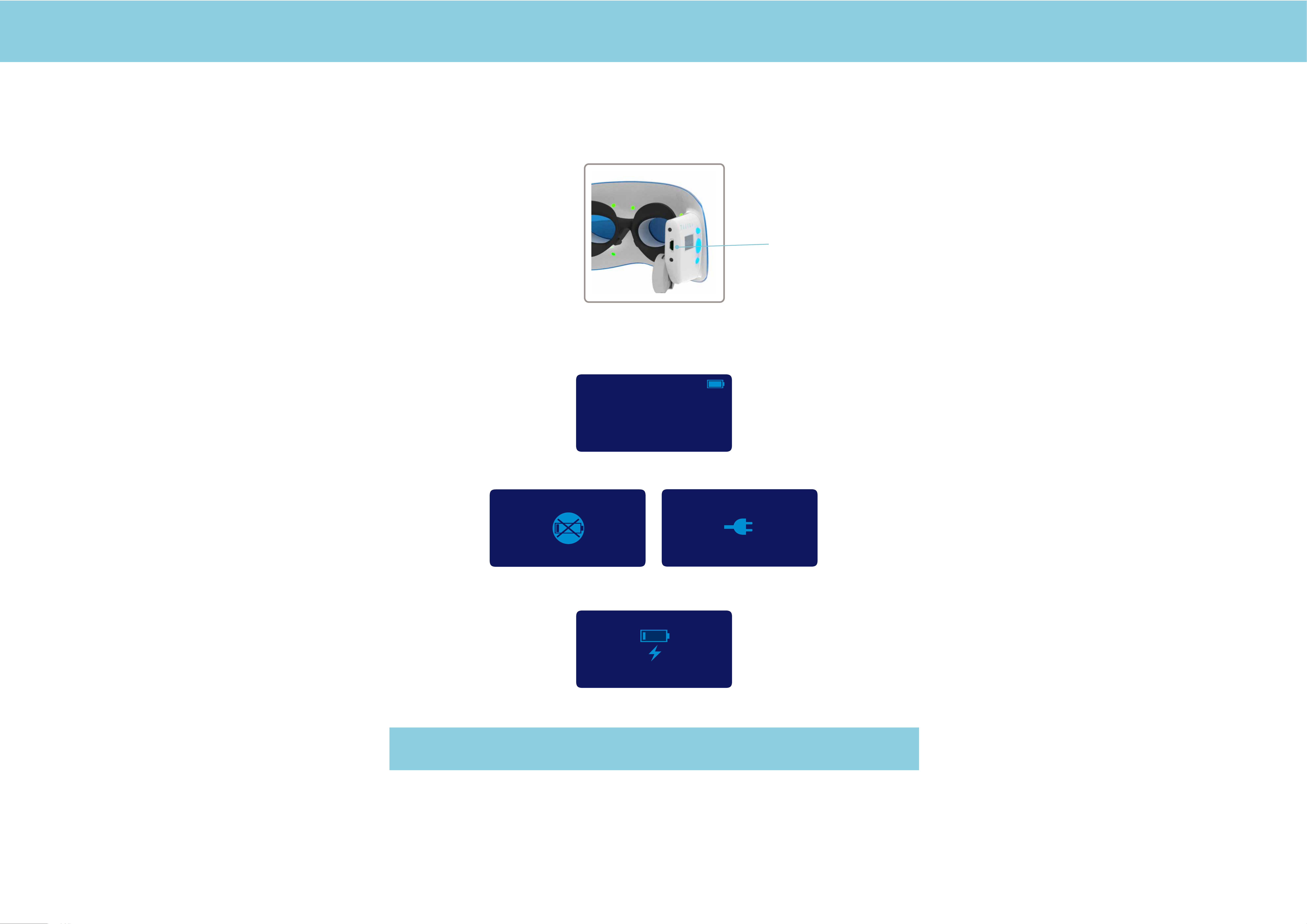
E. CHARGING
Take the cable and connect the mini USB
part on the mask to a USB charger with adapter
or straight into a computer port.
Mini USB part
Battery power status is indicated on display screen.
BATTERY FULL
BATTERY NEEDS TO BE CHARGED (ICONS WILL ALTERNATE)
CHARGING
GENIUS LIGHT device cannot work while charging.
 Loading...