

Page 1
ML 70DW
1
2
1
2
4
3
6
5
7
8
9
Guangdo ng Takstar Electronic Co., Ltd.
Addre ss : Lo ng qi ao Road Longxi Boluo Huizhou Guangd on g Ch in a 51 61 00
Tel:86 752 6383644 Fax: 86 752 6383952
Email: sales@ takstar.co m Web si te: www.takst ar.com
User Manual
Dynamic silver plated and glossy UV painted earcups design
Innovat iv e HI D co ntrolling di rective supp or ts long distan ce con trolli ng o f
music playing software on computers ; th e vo lu me, prev io us song, next
song, playing and pa us e fu nction of the music p laying s of tware on
computers can b e controlled via the b utton on headp ho nes
2.4G frequency band gu arantees accurate sou nd rep roduct io n and full-
duplex for su pp orting wireless chatting
Wireless operat in g range is up to 10 meters/360 degree in open area
Dyn-Elec technolog y features automatic sleep functio n for reducing
power con sumption
Built-in rechargeable lithium io n battery, the c onti nu ous play time is
about 9 hours when the battery is fully charged
Fea tu re s
Welcome to use TAKSTAR new wi reless h ea dp hones, it is specia ll y de signed
for fashion. It features high quality wireless transmissi on , stable dig ital
wireless headphone s syste m, i nteg rated vol ume and program controlling
and conveni ent folding desi gn for ease of car ry ing. Please read this manua l
detai ledly befo re using to make sure t he c or rect o pe ration and exer t the
optimum functi on .
Operation
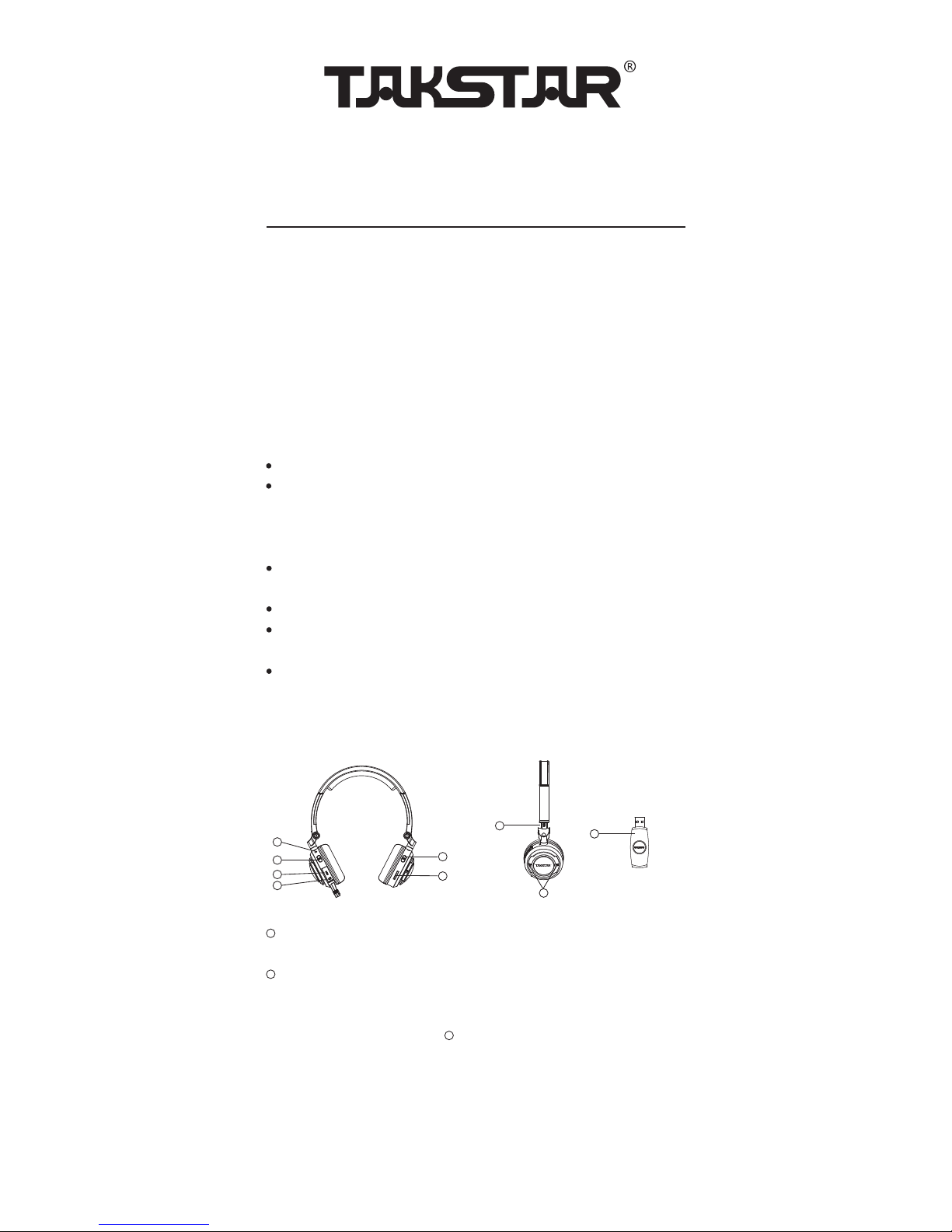
Power on/off butto n: pre ss this button c on ti nu ously fo r ab out 3 seconds
for t ur ning on/of f th e headphones
Power ind icator
When the headpho ne i s turned on, the indi cator will light green;
When there’s no signal, the indicator will flicker e ve ry 5 00ms;
When pressing the ID button , the indicator will flicke r ever y 150ms;
When the frequency of transmitter and receiver is match ed, the
indicator w ill light gree n co nt in uously;
When the system is at sleep state, t he indicat or w il l flicker every 5s;
When the system is at low power, the indi cator will flicker ever y 1s;
When the system is unde r rech arging , the indicato r will light red
conti nuously;
When the recharging is finishe d, t he i ndicator w il l be o ff
5
Page 2

4
3
5
6
DC socket: pl ug o ne s ide of the USB power cable into this socket, a nd t he
other side of the US B po we r cabl e into USB soc ket of co mputer(or mains
supply by adding the p ower a da ptor to th e US B ca bl e) for recharging
the battery
Audio input/output soc ket: when the headph on e is w or king at wire le ss
status, t he a ud io signal can be connected to other headp ho nes or other
audio equipment for sharing the mu si c with you r friends by plug gi ng a n
audio cable into the audio outpu t so cket; when the wireless fu nc ti on is
turned off, plug in audio playing equipment suc h as I PO D, MP3 or
computer into t hi s socket with an aud io c ab le , the headphone wil l be
used as a common wired headpho ne
ID button : plug the tra nsmitt er i nto USB so cket of computer, then press
the ID button on headphones, t he L ED indicat or o n th e left earcu p will
flicker every 150 ms . Ma ke sure that the distance between the
tra ns mitter and t he h eadphones are within 50cm . Wh en t he LED
indicator l ight s gree n co nt in uo usly, it mean s th e freq ue ncy matc hi ng is
finished, the he ad phones can be used normal ly ( Th e headphones an d
tra ns mitter in th e sa me p acka ge a re already matched during producti on ,
no need to operate the freque nc y ma tching u nl ess the headphone i s
used together with a new transmitte r, or th e tran sm itter is use d
toget he r will a new headphone)
Pre vi ous song, next song a nd p au se control kno b: t urn the knob to fo r
pre vi ous song; turn the kn ob to for next song, p ress the k no b ve rt ical ly
for p laying or pa us e
Volume control: pres s VO L+ for in increasing t he vol um e, pre ss VOL - for
decreasing the volume
Adjusta ble headband
2.4G wireless tra nsmitter : pl ug the tra ns mitter i nto USB socket of
computer, the tra nsmitter i s at working status
ML 70DW headphones 1 pc
2.4G wireless tra nsmitter 1 pc
Y-type audio cable 1 pc
Power ada ptor 1pc
USB power cable 1pc
USB exten sion cable 1pc
Por tabl e ba g 1p c
User manual 1pc
7
9
8
2
Standard Confi gu ration
Page 3

This device complies with part 15 of the FCC Rules. Operation is subject to the
following two conditions: (1) This device may not cause harmful interference, and (2)
this device must accept any interference received, including interference that may cause
undesired operation.
Any Changes or modifications not expressly approved by the party responsible
for compliance could void the user's authority to operate the equipment.
Note: This equipment has been tested and found to comply with the limits for a
Class B digital device, pursuant to part 15 of the FCC Rules. These limits are designed
to provide reasonable protection against harmful interference in a residential
installation. This equipment generates uses and can radiate radio frequency energy and,
if not installed and used in accordance with the instructions, may cause harmful
interference to radio communications. However, there is no guarantee that interference
will not occur in a particular installation. If this equipment does cause harmful
interference to radio or television reception, which can be determined by turning the
equipment off and on, the user is encouraged to try to correct the interference by one or
more of the following measures:
-Reorient or relocate the receiving antenna.
-Increase the separation between the equipment and receiver.
-Connect the equipment into an outlet on a circuit different from that to which the
receiver is connected.
-Consult the dealer or an experienced radio/TV technician for help.
The device has been evaluated to meet general RF exposure requirement. The de
vice can be used in portable exposure condition without restriction.
 Loading...