

Page 1

User Manual
Tahoe 289
E3/T3/Ethernet Bridge
Page 2

Page 3

User Manual
Tahoe 289
E3/T3/Ethernet Bridge
Page 4

II
Tahoe 289 E3/T3/Ethernet Bridge
Tahoe 289 E3/T3/Ethernet Bridge User Manual
Firmware version 1.0.3
Published January 2008
©2005-2008 Tahoe. All rights reserved.
Trademarks of other companies are used only for explanation and to the owner’s benet, without
intent to infringe.
THE SPECIFICATIONS AND INFORMATION REGARDING THE PRODUCTS IN THIS MANUAL ARE
SUBJECT TO CHANGE WITHOUT NOTICE. ALL STATEMENTS, INFORMATION AND RECOMMENDATIONS IN THIS MANUAL ARE BELIEVED TO BE ACCURATE, BUT ARE PRESENTED WITHOUT WARRANTY OF ANY KIND, EXPRESSED OR IMPLIED, AND TAHOE MAKES NO COMMITMENT TO UPDATE
THE INFORMATION CONTAINTED HERE.
NOTWITHSTANDING ANY OTHER WARRANTY HEREIN, ALL DOCUMENT FILES AND SOFTWARE
OF THESE SUPPLIERS ARE PROVIDED “AS IS”. TAHOE DISCLAIM ALL WARRANTIES, EXPRESSED OR
IMPLIED, INCLUDING, WITHOUT LIMITATION, THOSE OF MERCHANTABILITY, FITNESS FOR A PARTICULAR PURPOSE AND NONINFRINGEMENT OR ARISING FROM A COURSE OF DEALING, USAGE,
OR TRADE PRACTICE.
IN NO EVENT SHALL TAHOE BE LIABLE FOR ANY INDIRECT, SPECIAL, CONSEQUENTIAL, OR INCIDENTAL DAMAGE, INCLUDING, WITHOUT LIMITATION, LOST PROFITS OR LOSS OR DAMAGE TO
DATA ARISING OUT OF THE USE OF, OR INABILITY TO USE THIS MANUAL.
Page 5

III
Tahoe 289 E3/T3/Ethernet Bridge
Safety Instructions
Read the following safety notices before installing or operating the device:
is warning symbol means danger. You are in a situation that could cause bodily injury. Before you
work on any equipment, be aware of the hazards involved with electrical circuitry and be familiar
with standard practices for preventing accidents.
Read the installation instructions before you connect the device to its power source.
Reliable earthing of this equipment must be maintained.
is product relies on the building’s installation for short-circuit (overcurrent) protection. Ensure that
a fuse no larger than 240 VAC, 16A is used.
Check nameplate ratings to ensure there is no overloading of supply circuits that could have an eect
on overcurrent protection and supply wiring.
ere is no physical circuit separation if the outlet is disabled. Always disconnect the power cord before removing the cover of any powered device.
Immediately disconnect the unit from the outlet and contact qualied service personnel if
any of the following events are noted:
1. e power cord has become frayed or damaged.
2. Liquid has been spilled on to the device or the device has been exposed to rain or water.
No serviceable parts inside! Do not attempt to repair or service this device yourself. Internal components must be serviced by authorized personnel only.
Do not work on the system, or connect or disconnect cables during periods of lightning activity.
Page 6

IV
Tahoe 289 E3/T3/Ethernet Bridge
Contents
Introduction .................................................................................................................................. 1
G.703 interface ...................................................................................................................................... 1
Ethernet interface ................................................................................................................................. 2
LED indicators ...................................................................................................................................... 2
Management ................................................................................................................................. 3
LCD Menu ............................................................................................................................................. 3
Serial Console ........................................................................................................................................ 3
Control and settings ..................................................................................................................... 5
G.703 settings ........................................................................................................................................ 5
Ethernet settings ................................................................................................................................... 6
Advanced options ................................................................................................................................. 7
Reset counters ....................................................................................................................................... 7
Restore settings ..................................................................................................................................... 7
Save settings ........................................................................................................................................... 8
Reboot..................................................................................................................................................... 8
Statistics ........................................................................................................................................ 9
Appendix A, Troubleshooting .....................................................................................................11
Appendix B, Technical Specication ......................................................................................... 12
Appendix C, Declaration of Conformity ................................................................................... 13
Page 7

V
Tahoe 289 E3/T3/Ethernet Bridge
Preface
About this Manual
is manual contains following chapters:
Chapter 1, Introduction An overview of Tahoe 289
Chapter 2, Management e ways to access and manage the device
Chapter 3, Control and Settings e device settings available for the user
Chapter 4, Statistics Statistics displayed by the device
Appendix A, Troubleshooting Description of typical problems that may occur during
use of the device
Appendix B, Technical Specication Technical parameters of the device
Appendix C, Declaration of Conformity
Information about compliance with European standards
Page 8

VI
Tahoe 289 E3/T3/Ethernet Bridge
Document Conventions
is manual uses following conventions:
boldface font Commands and keywords
< > Required arguments
[ ] Optional arguments
{ a | b | c } Alternative arguments
[ a | b | c ] Alternative optional arguments
typewriter font
Information displayed during a serial or remote connection
boldface
typewriter font
Information to be entered during a management session
LCD font
Information displayed on the LCD
Note
Notes contain helpful suggestions that may be worth remembering
Caution
is symbol means a situation that requires you to be careful.
Otherwise equipment damage or loss of data may occur.
Warning
is warning symbol means danger. You are in a situation that
could cause bodily injury. Before you work on any equipment
be aware of the hazards involved with electrical circuitry and be
familiar with standard practices in preventing accidents.
Page 9
1
Tahoe 289 E3/T3/Ethernet Bridge
Introduction
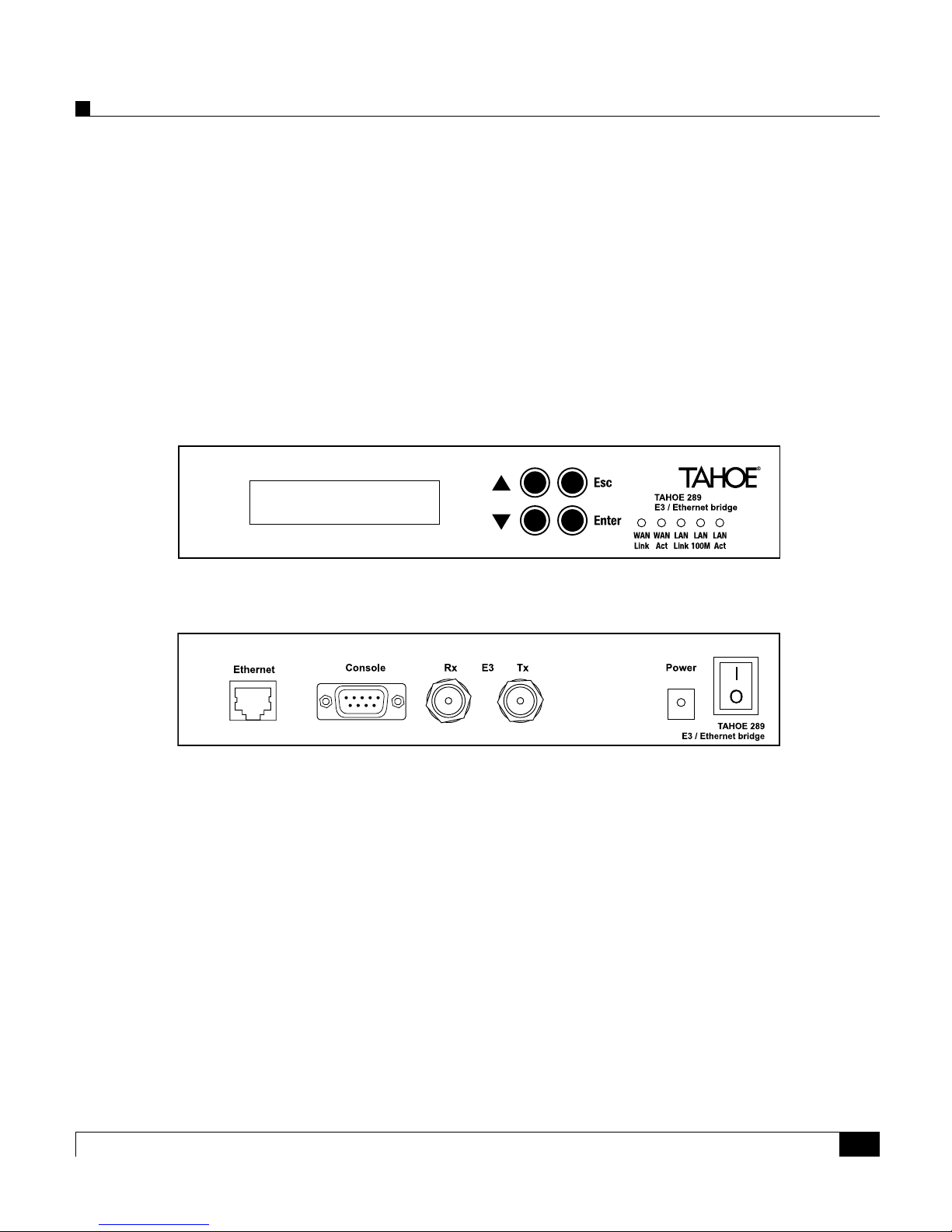
Tahoe® 289 bridges allow connecting two LANs over an E3 / T3 (DS3) line. ey are a cost-eective
alternative to expensive E3 / T3 routers.
Bridges are transparent, that is both interconnected networks appear as a single LAN, as if both
were plugged into the same Ethernet switch.
Tahoe 289 has two network interfaces, the serial WAN G.703 interface and the FastEthernet interface for Local Area Network (LAN) connection.
G.703 interface
e G.703 (WAN) interface consists of two coaxial BNC connectors. One of them is a transmit output (Tx), while the other one is a receive input (Rx). e Tx and Rx connectors should be connected
to the corresponding line terminating the equipment’s Rx and Tx ports.
e WAN interface type – E3 or T3 depends on the device variant and should be specied during
ordering. e data transmission rates are 34.368 Mbps and 44.736 Mbps respectively.
front panel
back panel
Page 10

2
Tahoe 289 E3/T3/Ethernet Bridge
Ethernet interface
e Ethernet interface used for local network (LAN) connection. It may work at speeds of 10 Mbps
(10Base-T) or 100 Mbps (100Base-Tx), in full-duplex or half-duplex mode. e mode of operation
is selected automatically, although a specic setting can be forced. An Automatic ow control is
supported while in full-duplex mode.
LED indicators
Besides the LCD display, the following status LEDs are placed on the front panel:
WAN
Rx G.703 receiver activity
Tx G.703 transmitter activity
LAN
Link lit when the device is connected to a LAN
100M
LAN connection throughput – lit when 100 Mbps connection speed
is negotiated
Act LAN activity, blinks when data is sent or received
Page 11

3
Tahoe 289 E3/T3/Ethernet Bridge
Management
e Tahoe 289 bridge is equipped with an LCD display/keypad and a serial console (RS232) connector. Both give equivalent access to device settings and statistics.
All setting adjustments take immediate eect. Settings have to be saved before restart with the “Save
setting” option, otherwise previously stored values will be loaded during startup. Factory default
settings may be loaded with the “Factory defaults” option in the “Advanced options” submenu.
LCD Menu
e LCD display with keypad is used to adjust device settings and display statistics. e main LCD
screen is shown below:
e CIR indicator is shown when the Committed Information Rate is set.
An asterisk (*) is shown when there are unsaved settings.
In the second line the current total data rate is displayed.
When the main screen is shown use the Up and Down keys to view other statistics, and press the
Enter key to enter device settings. Options may be shown or adjusted with the keypad as follows:
Up previous option/setting
Down next option/setting
Enter enter a submenu, change a setting, accept a change, perform an action
Esc leave a submenu, cancel a change
Serial Console
e serial console gives access to all device settings and statistics via the interactive terminal screen.
Any VT100 compatible terminal may be used to access the device. To connect use a DB9 null-modem cable at 9600bps, 8 data bits, no parity, 1 stop bit without ow-control.
e main terminal screen is shown below. It is divided into three distinct sections. e interactive
menu is displayed on the le side of screen, the statistics are displayed on the right side. e bottom
half of the screen is reserved for log messages. e status line below the log shows a quick key map
to assist the operator.
Tahoe 289 CIR *
47512kbps
Page 12

4
Tahoe 289 E3/T3/Ethernet Bridge
Tahoe 289 Statistics
> G.703 settings Total data rate 0kbps
Ethernet settings Tx data rate 0kbps
Advanced options Rx data rate 0kbps
Reset counters Tx frames 0
Restore settings Rx frames 0
Save settings Frame errors 0
Reboot Ethernet state 100BaseT-FD MDIX
Uptime 0d 00h07m48s
Version HW:B FW:1.0.3
Log
0d 00:00:00 Tahoe 289 Rev:B Ver:1.0.3
0d 00:00:00 built Jan 14 2008 15:02:38
0d 00:00:00 Factory defaults loaded.
0d 00:00:01 G703 link up
0d 00:00:03 Ethernet link up
arrows Navigate +/- Change Enter Accept D Default R Refresh screen
Use the arrow keys to navigate through the menu. Settings can also be adjusted with the plus and
minus keys. Press D for the default setting. Press Enter (or Return) to accept a change.
Page 13

5
Tahoe 289 E3/T3/Ethernet Bridge
Control and settings
Device settings are available from the LCD menu and through the serial console.
G.703 settings
Serial E3 / T3 (DS3) interface settings.
CIR
Committed Information Rate. Limits the transmit data rate to a specied value from 512kbps up to
full link throughput in 512kbps steps.
Transmit clock
Choses the source of the transmitter clock. A local oscillator or a remote clock recovered from the
serial line receiver may be selected. Available settings:
Local Osc. use local reference oscillator
Received clock use recovered clock
Invert clock
Determines on which clock edge data is updated and sampled respectively.
Normal update and sample on rising clock edge
Inverted update and sample on falling clock edge
Inverted Tx update on falling and sample on rising clock edge
Cable length
Indicates cable length for waveform shaping in T3 (DS3) mode. Ignored for E3 converters.
below 70m cable no longer than 70m (225)
above 70m cable longer than 70m (225)
Page 14

6
Tahoe 289 E3/T3/Ethernet Bridge
Loopback
Enables serial loop back (for testing purposes). e following modes are available:
Local local loop back
Remote (line) remote loop back (not using framer)
Remote (frame) remote loop back (using framer)
is setting is not saved.
Ethernet settings
Ethernet interface settings.
Ethernet mode
Selects the speed and duplex mode of the Ethernet interface. Available modes are:
Auto use auto-negotiation, recommended setting
10BaseT-HD force 10Mbps, half-duplex
10BaseT-FD force 10Mbps, full-duplex
100BaseT-HD force 100Mbps, half-duplex
100BaseT-FD force 100Mbps. full-duplex
e auto mode is the recommended setting, but forced modes are also available. When selecting a
forced Ethernet mode, make sure the link partner has the same mode selected as duplex cannot be
detected in such circumstances.
Flow control
Select a ow control to be used on the Ethernet interface, as follows:
Auto ow-control, depends on advertised link partner abilities (recom-
mended setting)
Enabled force ow control
Disabled don’t use ow control
e recommended setting is Auto. When ow-control is enabled and Ethernet is in full-duplex
mode, the device will send and accept pause frames to prevent network congestion.
Receive queue
Changes the size of the Ethernet receive queue in 64kB (32 frames) steps. May be used to adjust
latency in a heavily-loaded network.
Page 15

7
Tahoe 289 E3/T3/Ethernet Bridge
Transmit queue
Changes the size of the Ethernet transmit queue with 64kB (32 frames) step. May be used to adjust
latency in a heavily-loaded network.
Reset connection
Resets the Ethernet interface and reinitializes auto-negotiation if enabled.
Advanced options
Advanced user options.
POST
Power On Self Test,
Enabled self test will be performed on every boot
Disabled self test will not be performed
Disabling POST may shorten startup time. e recommended setting is Enabled.
Factory defaults
Loads the factory default settings.
Upgrade
Enters the rmware upgrade mode. Check Tahoe web site for updates.
Reset counters
Resets frame and error counters.
Restore settings
Restores previously saved settings.
Page 16

8
Tahoe 289 E3/T3/Ethernet Bridge
Save settings
Stores settings to nonvolatile memory.
Reboot
Reboots the device.
Page 17

9
Tahoe 289 E3/T3/Ethernet Bridge
Statistics
e following bridge statistics are available from the LCD menu and through the serial console.
Name Description
Total data rate Total data rate used in kbps.
Tx data rate Transmit data rate used in kbps.
Rx data rate Receive data rate used in kbps.
Tx frames Count of transmitted frames.
Rx frames Count of received frames.
Frame errors Count of frames received with errors.
Ethernet state State of Ethernet link: speed, duplex and cable crossover is displayed.
Uptime Time from device startup in days, hours, minutes and seconds.
Version e hardware revision and rmware version.
Page 18

10
Tahoe 289 E3/T3/Ethernet Bridge
Page 19

11
Tahoe 289 E3/T3/Ethernet Bridge
Appendix A, Troubleshooting
Problem Possible solutions
Serial interface is connected
but there is no link
Make sure Rx and Tx connectors are not swapped. Make sure a
link partner is connected and properly congured
WAN link is detected at only
one end
Make sure both Tx and Rx connectors are properly connected
at both ends
ere is a WAN link, but no
data ows
Check G.703 settings at both ends
LCD shows “Tx fail”
Transmit line is shorted at local end, remove the short circuit
Page 20

12
Tahoe 289 E3/T3/Ethernet Bridge
Appendix B, Technical Specification
throughput
E3 34.368 Mbps
T3 (DS3) 44.736 Mbps
memory 16MB, SDRAM @100MHz
connectors
G.703 (Rx, Tx) 2x BNC, unbalanced 75 Ohm
Ethernet RJ45
Console DB-9/M
network protocols HDLC
Ethernet interface 10/100Base-T, RJ45 connector
serial console RS-232, DB-9/M connector, 9600bps, 8N1
power consumption 6W
power input 15V DC, 400mA
power supply 100-240V AC, 50/60Hz, 1A
dimensions 200 mm (width) x 45 mm (height) x 130 mm (depth)
environmental
conditions
storage: temperature -20°C to 65°C, humidity 5% to 95%
operation: temperature 0°C to 50°C, humidity 0% to 85%
Page 21

13
Tahoe 289 E3/T3/Ethernet Bridge
Appendix C, Declaration of Conformity
TAHOE
Piotr Kaczmarzyk
ul. Hercena 3/5
50-453 Wrocław
We declare that the product Tahoe 289 complies with the regulations of the following European
Directives:
73/23/EEC low voltage safety requirements
89/336/EEC EMC requirements
99/5/EEC radio & telecommunication terminal equipment requirements
e compliance of Tahoe 289 with the requirements of the above-mentioned directives is ensured
by complete application of the following harmonized European Standards:
EN 60950:2000
EN 55022:1998
EN 61000-6-1:2002
EN 61000-6-3:2002
e products also comply with the directive 2002/95/EC on the restriction of the use of certain
hazardous substances in electrical and electronic equipment (“RoHS Directive”) with the exemptions applicable for network infrastructure equipment for switching, signalling, transmission and
network management (according to clause 7 of the Annex to the directive).
Signed: Piotr Kaczmarzyk
Position: Director
Signature:
Date: 20 January 2008
Place: Wrocław, Poland
Page 22

14
Tahoe 289 E3/T3/Ethernet Bridge
Page 23

Page 24

Hercena 3-5
50453 Wrocław, Poland
phone: +48 71 344 26 37, fax: +48 71 344 26 42
www.tahoe-group.com
 Loading...