

Page 1

Tachyon OPS & OPS HD Instruc tion Manual
Select Languag e
Po we re d by Tra nslat e
Tachyon , Inc.
40 1 E. Corporate Dr. Ste 100
Lewi sville, TX 75057 USA
Te l : 9 72- 35 3- 0 8 8 8
Web sit e : ww w.t ac hyoninc .co m
Email:
supp or t @t ac hyon inc .com
Dear Cust o mer,
Thank you f or buying t he Tachyon OPS o r OPS HD, the lat es t generat io n video and s t ill helmet camera des igned f or f ilming ext reme action
in ext reme conditions. It is very rugged and very s imple t o us e, while delivering 30FPS of quality video .
Tachyon OPS cameras are incredibly light and incredibly eas y t o use. Take them almos t anywhere to bring back yo ur stunt s , advent ures, and
bloopers.
About Tachyon
Tachyon, Inc. is a co mpany that deals in ext remes: We make extremely co o l product s f or ext reme peo ple who engage in ext reme activit ies . In
order to make t he best pro ducts, Tachyo n, Inc. do es not compromise on materials o r on t he qualit y o f cons t ructio n. We exceed indus trial
st andards to ens ure t hat o ur product s exceed yo ur expectations.
Please be s ure t o s et up yo ur new act io n camera using t he f ollo wing instruct io ns . If you have any ques t io ns f eel f ree to co nt act us.
The Management
Tachyon, Inc.
PDFmyURL.co m
Page 2

INDEX
No te : To prin t th is HT ML m an ual, pl e ase se t you r prin t er
t o prin t bl ack t ext on whit e b ack gro und .
Char g ing Your Camera Micr o Memor y Cards
Ins e r t ing Me mor y Car d Op erat ing Sys t e ms
Rec ording Vide o Vide o Sho ot ing T ip s
Vide o - Pho t o Swit ch T e c hnical S up po r t
Vide o Disc laimer
T ime-Lapse Ph ot os Vide o Publish ing Guid e
LED Fun ct ions Vide o St at ist ic s
Moun t ing War r ant y
Conne c t in g t o Your Compu t e r
PDFmyURL.co m
Page 3

Charging Your Camera
PDFmyURL.co m
Page 4

• To charg e your OPS camera, ope n the rubbe r ca p o ver the USB and memory c ard slo ts . Then plug the small
end o f the US B ca ble into the bac k of the ca mera and the large e nd into your co mputer's US B slot.
• Another great way to charge your ca mera , eve n when awa y from a fixed po we r so urce , is to use Tachyon's
Battery- Po we red Charge r (Botto m Photo). It's small and light - perve ct for ta king into the field with your
ca mera s. It may also be use d to charge your other US B-bas ed e lec tro nic de vice s.
You ca n buy it in our st ore .
• This charge r co mes with 4 AA Energizer Ultimate Lithium ba tte ries. Thes e will fully charge yo ur came ra
multiple times.
• We s ugge s t that you only use Energizer Ultimate Lithium ba tterie s in this unit. If you use lowe r-q uality
batte ries , you may se e a "Charging is not supported with this accessory ," warning.
• This ba ttery-po we red charge r will work with most e lec tro nic de vice s that c harge via a US B ca ble - including
iPhones and iPods .
• You may also use a USB ada ptor a nd a normal wall so cke t, or car-lighte r adap to r to c harge yo ru came ras .
• When charging your camera, the LED on the top will show blue. When the bat te ry is fully charged, this LED will
turn off.
Im p o rtant : Use only the supplied USB cable for charging your OPS or OPS HD camer as. Others may
not work and may harm your cam era .
Inserting Memory Card
PDFmyURL.co m
Page 5

• On the back of the ca mera is a small rubb er flap. Pull this do wn to reve al the USB ja ck a nd the micro memory
ca rd s lot.
• Inse rt a micro memory c ard into the s lot. Be s ure the g old leads are fac ing up.
Be sure that the memory card clicks into place. You may need to use your fingernail to push it in far
enough to lock it into place.
Rec o rding Video
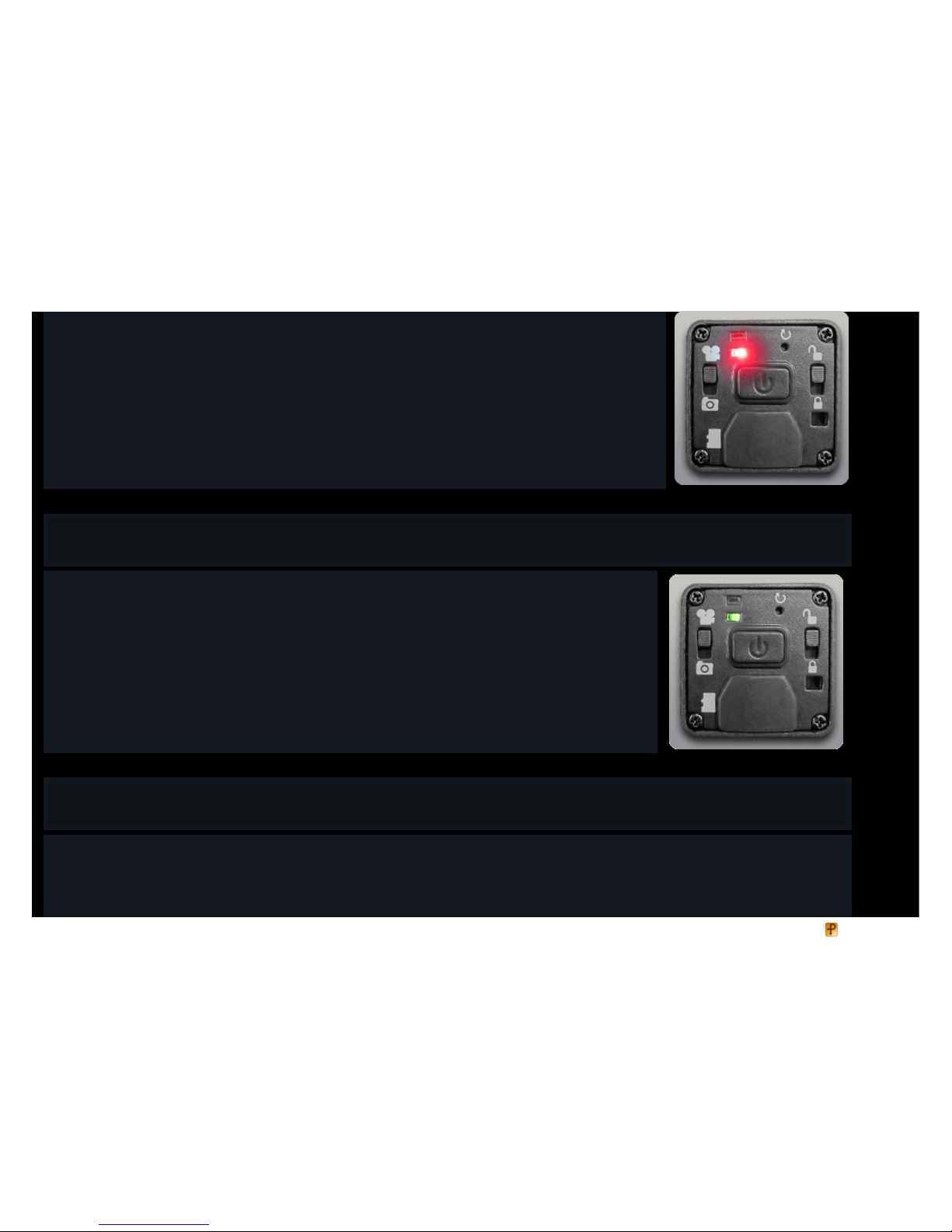
• Once your bat te ry has b ee n charged and a micro memory ca rd inse rte d, turn on your camera b y pushing, but not holding, the po we r butto n.
• You will hea r a bee p sound and se e the gree n LED light up, quickly followed by the red.
• That’s it! You have be gun shooting vide o!
• To sto p filming, push and hold do wn the po we r butto n aga in. You will hear a lowe r be ep sound and the red LED will turn off.
Video - Phot o Swit ch
• Change rec ord ing mode s from Video to P hoto (Time-Lapse ) by sliding the switc h on the left to the de sire d pos ition.
Video
PDFmyURL.co m
Page 6
• Fo r video, make sure the switch on the left is in the UP pos ition.
• Your camera will rec ord video a t 30 FPS . The OPS will record in Standa rd Definition, and the OP S HD in High
Definition.
• Afte r you have been rec o rding for 30 minutes, your ca mera will pause fo r five se c onds to sa ve your file to yo ur
memory ca rd. But don’t worry; it will automatic ally start up again afte r thos e five se c onds .
• You may edit your video files with most c ommon video editing pro gra ms.
• A 4G B Micro S DHC c ard will hold just over one hour of video. Large r ca rds will hold multiple s o f that a mount.
Time-Lapse Photos
• To shoo t time- lap se photos, slide the left switch down to the PHOTO pos ition.
• No w pre ss, but do not hold, the po we r butto n in the middle . There will be a be ep sound and the LED will flash
alte rnate ly Gre e n and Red to show that you are now taking photos - one photo eve ry two se c onds .
• To sto p, pres s and hold the po wer button until you hear two be e ps and the LED turns off.
LED Functions
• When you are re cording video , the LED on the bottom will shine in RED.
• When you are re cording in Time-Lap se Photo mode , this LED will flash RED - GREEN - RED - GREEN.
• If your memory card is full, this LED will flash GREEN for 30 seco nds and then turn off.
PDFmyURL.co m
Page 7
• If there is no memory card in your camera, or if there is a n error with the card, this LED it will flash GREEN for 30 sec o nds b efo re turning off.
Mounting
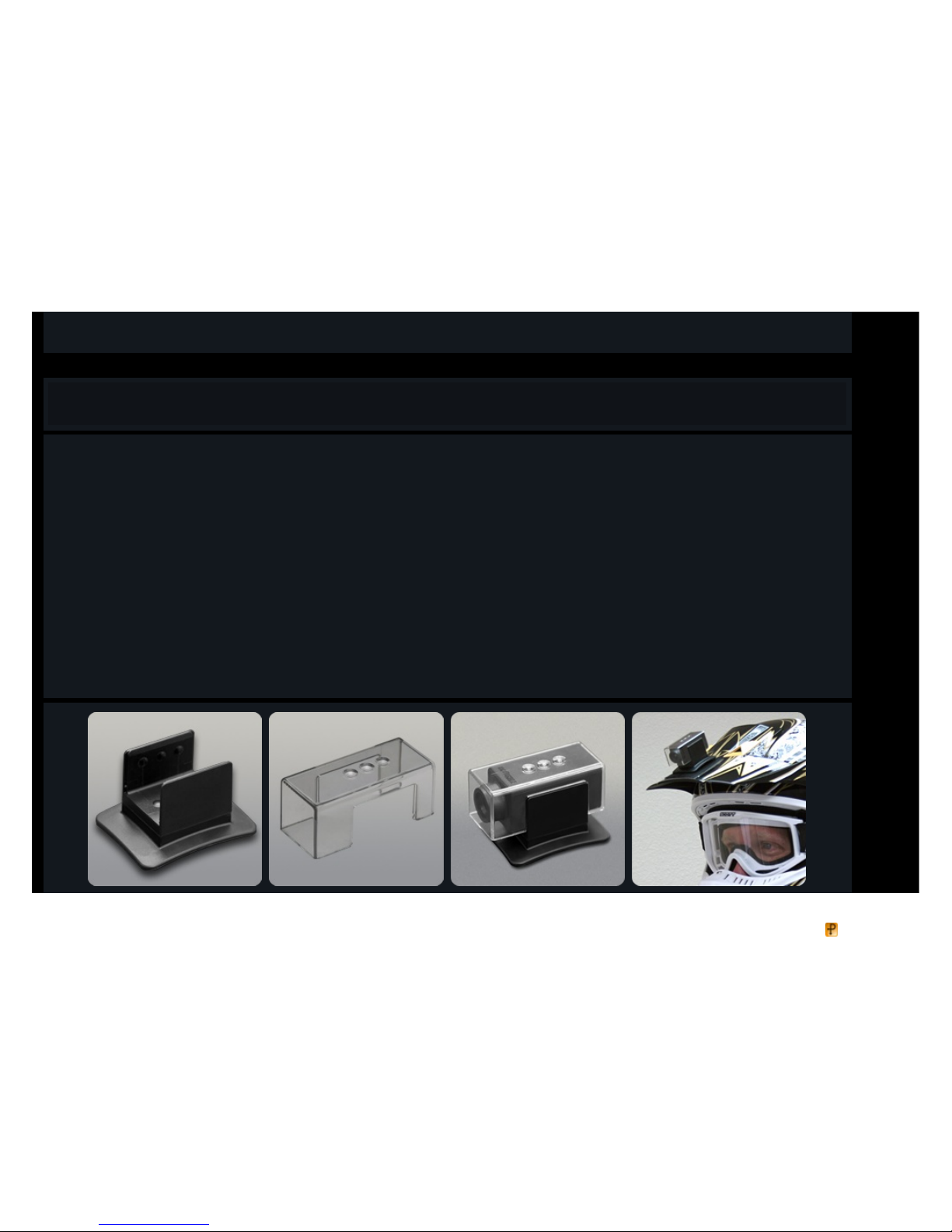
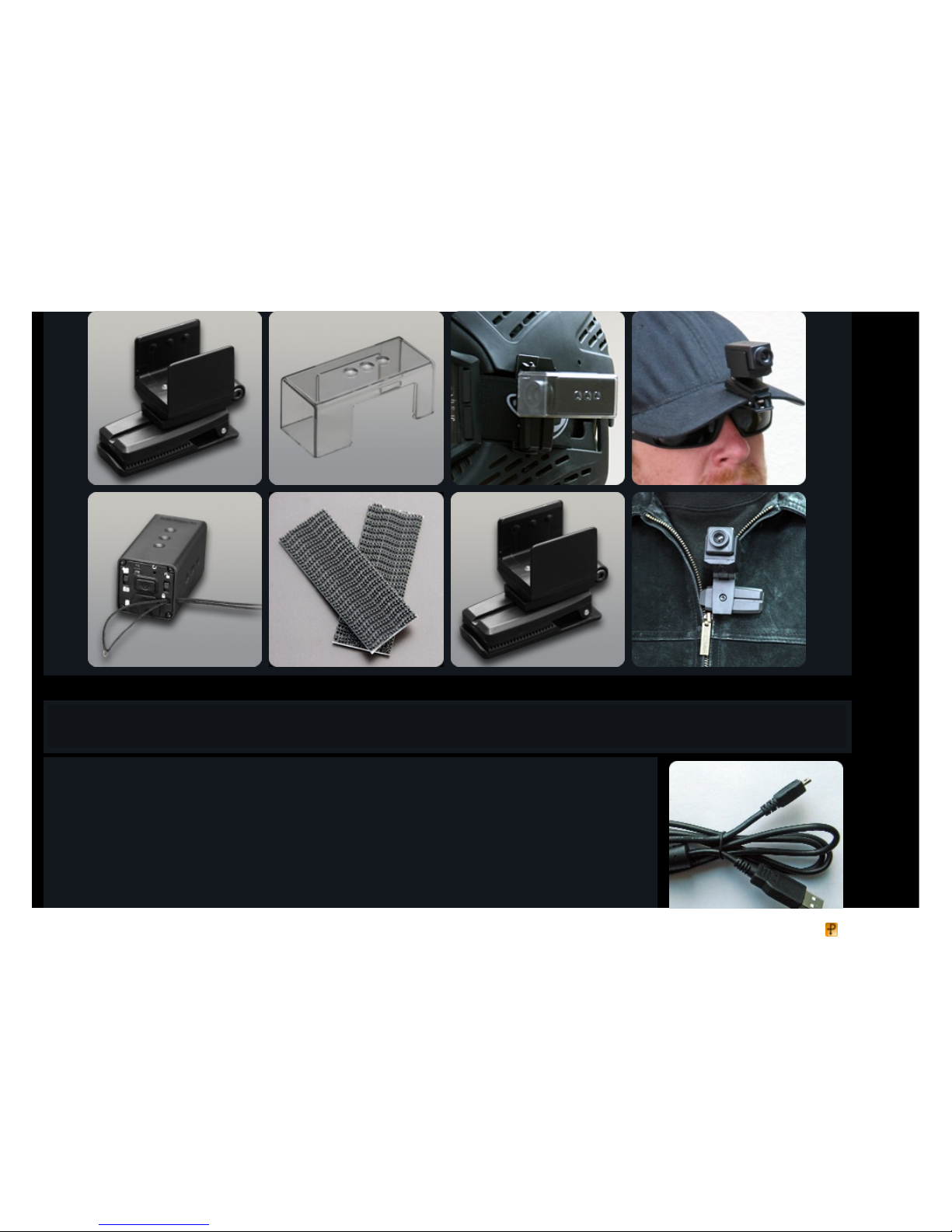
The OPS a nd OP S HD cameras come with a pa te nted 8-d irec tio n mounting sys te m gives you a variet y of mounting optio ns.
• The three dimple s o n ea ch side of your ca mera matc h up with the three b ubble s o n the gripp ing pa rts of the mounts. You ca n rotate your ca mera
inside your mounts from the 12 to 3 to 6 to 9 o 'clo ck p os itions and face it either forwa rds or bac kwa rds .
• Why rota te your camera? Supp os e your mount is mounted at an angle that would cause yo ur video to b e rota te d 90 de gre e s. All you need to do is
rota te your ca mera inside the mount so that the top is fa cing up. This will ensure tha t your vide o c omes o ut right side up. The e ngrave d Tac hyon
logo shows which side is up.
• A te ther is also included with your ca mera . Thread it through the hole on the ba c k and make use of it when engag ing in very extre me activities, as
a bac kup to your sta nda rd mounts.
• The clea r Impac t Armor is bes t to use when enga ging in activities that p otentia lly might harm the lens of your ca mera , such as paintba ll, airso ft, or
when riding in dirt a nd gra vel.
3M™ Dual-Lock™ is a trademark of 3M Compa ny in the Unite d S ta te s a nd/or o ther c ountries .
PDFmyURL.co m
Page 8
Connect ing t o Your Co mputer
• The Tachyon OP S ca mera s c ome with with a USB c able. Use o nly the cable that c omes with your ca mera .
Ca ble s that you have purchase d s epa rately, or ca bles that c ame with other devices, may not wo rk corre ctly
with your OPS camera .
• P lug the small end into the ja ck inside the back doo r of your camera a nd the large end into yo ur compute r’s
USB port.
• Turn your camera o n by pushing the Powe r button. When you do , a window will pop up on your scree n as king
you to "Open folder to view files".
• Ope n this folde r to vie w the files in your camera's memory ca rd.
PDFmyURL.co m
Page 9

• You can now cop y, move , rename, or de lete the files o n your card . We sugge st that yo u copy your files to yo ur
co mputer first, befo re playing or editing them.
• Vide o files pla yed dire ctly from your came ra may not play as smoo thly as those that have be en cop ied to your
co mputer first and then played.
• When your camera is c onnecte d to yo ur compute r and p owere d on, you will see both the blue c harging LED
and the green po we r LED lit up. If your camera is fully charge d, the b lue LED will turn off.
tachyo n ops charging usb
Micro Memory Cards
• We reco mmend that yo u use a Class 6 , 8GB Micro SDHC card or larg er. These will give you longe r reco rding
times s o that you can be reco rd more actio n without having to stop and load a new ca rd.
• 4G B, 8GB, 16GB, and 32GB (when available ) ca rds are all compa tible with your ca mera .
• With a 4GB card you will get 1 hour of video . With larg er cards, you can double , quadruple and oc tuple these
numbe rs.
• Do NOT use Class 4 cards or below. These may cause problems with your camera.
Operat ing Systems
Tac hyon OP S ca meras a re compatible with Windo ws ® XP/Vista/7 a nd Apple Mac OS® X
PDFmyURL.co m
Page 10

Apple MAC OS® X is a trade mark of App le Inc., regist ere d in the U.S. and other countries .
Windows ® XP/Vist a/7 is a re gis te red trade mark of Micros oft Corporatio n in the United S ta te s a nd/or o ther c ountries .
Pl e as e no te that some of our customers who are using Windows XP have reported problems with corrupt SDHC cards. This is not a fault with your
camera or your card, but with Windows XP and older computer hardware. If this happens to you, we highly recommend that you use another computer
running Windows Vista or Windows 7 to transfer your files and to reformat your cards.
Video Shoot ing T ips
Although Tachyon OPS cameras pe rform well indo ors and in low-light situations, it is spec ifica lly tuned for s hoo ting in sunlight. So for the best looking
video s , try to s hoot your ac tion when the light is goo d.
Always be sure to use the fa stest (Cla ss 6) micro memory ca rds that you ca n. These will be written to at a fas te r rate, giving you smoother video.
Make sure that your lens is clea n. One s mall spot c an ruin a gre at video.
Tec hnical Support
For te c hnical supp ort, plea se c onta ct us at supp or t @t ac hyon inc .com
Disclaimer
Tachyon , Inc. will not unde r any circumst ance s b e responsible f or injurie s or prope rty damage incur re d during t h e use of any of
our pr oduct s.
Video Publishing Guide
Video s take n with your OPS cameras are pe rfect for uploa ding to YouT ube® , or other vide o s haring sites .
PDFmyURL.co m
Page 11

You may edit your video with most common editing prog rams. Be s ure to ed it and s ave a t the highest p os s ible quality se ttings so that your videos
will look their be s t.
Se e t his YouT ube pag e for o pt imizing you r vide o up loads .
Ple as e be sure to mention "Tachyon OP S" or "Tachyon OP S HD" and "Helmet Ca mera" in your title or ta gs s o tha t ot her OP S users can find and
co mment on your video s.
Video Stat ist ics
OPS c ameras us Micro memory c ard s. From 4GB up to 32GB.
We rec ommend a lways using Cla ss 6 o r Class 10 ca rds for fastes t write -t o times.
Class 2 or 4 ca rds are not fa st enough to rec ord and sa ve this ca mera 's vide o and may c ause further pro blems with your ca mera .
With a 4GB ca rd you will ge t 1 hour of video , and o ver 100,000 s till photo s.
With large r ca rds , you ca n double , quad ruple a nd oc tuple thes e numbers.
The memory ca rds pic tured on our website a n in this manual may be replac e d by similar or superior ca rds , depe nding on supp ly.
Warranty
Warrant y
Tac hyon pro ducts a re covere d by a s ix month limited warra nty from the da te of purchase from Tachyon, Inc. The warra nty co vers only defects in
workmanship and mate rials. It doe s not apply to products which have been da maged due to unreaso nable use or by intention nor does it co ver
diss a tisfa ction with the pro duct. This warra nty does not c over thos e pro ducts purchas ed from othe r individuals & re se llers and is not tra nsfe rab le.
Tac hyon, Inc.’s warra nty policy only co vers pro ducts purchas ed dire ctly from Tac hyon Inc. If you purchas ed the prod uct from our webs ite you will
have b een given a purchase numbe r with your confirmation email. Please quote this number, along with your name and email addres s, in your
de alings with us.
If you purchas ed the prod uct from an authorize d re se ller, pleas e co ntac t the m for their warra nty information.
(a) Tachyon, Inc.’s return policy cove rs only defe ctive p rod ucts . All sales are final. Monetary refunds will not be iss ued for any rea s on.
(b) Tac hyon Inc will only accep t returns of de fective pro duct within six months of purchase , as stated in the warra nty above .
(c) All products will be exc hange d for new products, and not for moneta ry returns.
PDFmyURL.co m
Page 12

(d) Before pro ducts a re exc hange d o r returned, customer must c onta ct Tachyon, Inc. ,via email or phone. Tachyon, Inc. will help
trouble shoot the pro ble m to a void the unnecess ary returns. If it is determined that the c ame ra is de fec tive , Tac hyon, Inc. will authorize
the return, in writing, via e mail. Tachyon, Inc. may req ues t sample vide o c lips to be s ent to s up po r t @t ac hyo nin c.co m in ord er to
as certa in the pro ble m/defe ct .
(e) Customer will pay for one-way s hipping to Tac hyon, Inc. There is no need to use any exp res s or overnight se rvice . Tachyon, Inc. will
pay the shipping co st s for the exchange product.
(f) Returns should be se nt to: 4 01 E Co rpo r at e Dr ive , St e 1 00 Le wis ville T X, 75057 USA
T ac hyon, Inc . sh all on ly be liab le fo r :
(a) the replacement of a defe ctive p rod uct with a new pro duct.
T ac hyon, Inc . sh all NOT be liable f or:
(a) injury to perso ns, or da mag e to property or conse quential los ses aris ing from the use of the p rod uct.
(b) a pro duct that has be e n tampe re d with, alte red, or bee n se rvice d b y an unauthorized age nt.
(c) damage due to the use of mounting acc e ss o ries that were not included with the product or those not s old as optional ac ces sories
on our web site.
(d) loss of vide o or still picture files for a ny reaso n.
In the eve nt that goo ds are undelivered to recipient a nd are returned to Tachyon Inc by po st, for any of, but not limited to , the following rea so ns:
a) the rec ipient entered his/her add ress on Tachyon’s o rde r form incorre ctly or incomple te ly,
b) the rec ipie nt refuse d the pa ckag e,
c) the re cipient did not pic k up the pa ckag e in a timely manner from his/her loca l post office , customs o ffice , or any other loc ation in
which the packa ge wa s be ing held,
the recipient will be re sponsible for co ve ring the shipping costs nee ded to res end their good s to them.
The original shipping co st s c annot be rec ove re d by Tac hyon Inc and will be co nsidere d p ayment for a s ervice alread y rende re d.
In the eve nt that the rec ipient refuses to have the goo ds rese nt and the go od s a re still in like new co ndition, Tachyon Inc will not refund shipping
co sts a nd will charge a 15% res to cking fee.
PDFmyURL.co m
Page 13

 Loading...