

Page 1

Tachyon Micro & Micro HD Instruction Manual
Tachyon Inc.
Website: www.tachyoninc.com
Email: [email protected]
Phone: 972-353-088 8
Dear Customer,
Thank you for buying the Tachyon XC Micro or Micro HD. These Micro cameras are the latest of our video and still helmet cameras designed for
filming extreme action in extreme conditions. They are very rugged and very simple to use, while delivering 30FPS of quality video.
The Tachyon Micros are shockproof, waterproof, and foolproof. Take them anywhere on land, into the sea, and into the air and bring back your
stunts, adventures, and bloopers. A patented shock-proof battery system eliminates an all-too -common problem among other action cameras; the
loss of power and recorded files caused by the jarring loose of the batteries. This innovation ensures that videos taken in challenging and perhaps
impossible-to-repeat situations will not be lost.
And unlike other action cameras which need to rely on an external waterproof case, the Tachyon XC Micros are designed to be waterproof from
the start. Combined with the patented Dive Lock (see below), the Micros allow you to film to a depth of 100 feet (30 Meters).
The Tachyon Micro shoots video in superior quality standard ng modes: Superior-Quality Video and Time-Lapse Photography. It makes use of the
4GB - 64GB Micro Memory cards, for the longest recording times on the market.
About Tachyon
Tachyon, Inc. is a company that deals in extremes: We make extremely cool products for extreme people who engage in extreme activities. In
order to make the best products, Tachyon, Inc. does not compromise on materials or on the quality of construction. We exceed industrial
standards to ensure that our products exceed your expectations.
Please be sure to set up your new action camera using the following instructions. If you have any questions feel free to contact us.
The Management
Tachyon, Inc.
INDEX
Note: To print this HTML manual, please se t your printer
to print black text on white background.
Quick Start Video Connecting to Your TV
Inserting Batteries NTSC & PAL
Micro Memory Cards TV Playback
Recording Video Storage
Video/Photo - Unlock/Lock Operating Systems
Time Lapse Photos Battery Details
Setting Time & Da te (optional) Technical Support
Mounting Video Shooting Tips
Sound Recording Disclaime r
Shock Resistance Video Publishing Guide
Waterproofing & Dive Lock Video Statistics
Connecting to Your Computer
Managing Files
Warranty
Computer Playbac k
Page 2

Quick Start Video
Inserting Batteries
• To get started, insert two AAA batteries into the battery cartridge. Always insert the + side of the battery first, before snappin g
the - side firmly into place.
• Now insert the cartridge , with the two contact points lea ding, into back of your Micro camera. Make sure the red latch lo cks
firmly over the cartridge.
• For batteries, we recommend Energizer Ultimate Lithium. These give the long est battery life. In cold weathe r use ONLY this
kind of battery. You may also make use of bran d-na me recha rgeable AAA batteries.
• Rechargeable batteries, while saving money, will not last as long - especially in cold weather. And there is a chance that
you will lose the last file you are rec ording due to a sudden drop in power.
Page 3

Micro Memory Cards
• In the slot to the left, insert your micro memory card with the gold leads facing up .
• Be sure that the memory card clicks into place. You may need to use your fingernail to push it in far enou gh to lock.
• To prevent possi ble problems with you r camera, use only Cl ass 6 or above micro memory cards.
• Beware of counterfeit cards.
• We recommend that you use a Cl ass 6, 8GB Micro Memory card or larger. These will give you longe r recording times so that
you can be record more action without having to stop and lo ad a ne w card.
• 4GB, 8GB, 16GB, 32GB, 64GB cards are all comp atible with you r camera.
• With a 4GB card you wil l get 1 hour of video.
Recording Video
• Once your batterie s and memory card ha ve bee n inse rted, turn on you r Micro camera by push ing (but not holding) the START/STOP button. You will hear a beep sound
and see the green LED, qui ckly follo wed by the red.
• That's it! You have begu n shoo ting vid eo!
•To stop filming, push and hold down the START/STOP button again.
• You will hear a double beep sound and the red LED will turn off.
• When in video mode, the Tachyon Micro will record superior-quality VGA video. The Micro HD will record in 720p HD.
• After you have bee n recording for 30 minutes, your camera will pause for five seconds to save your file to your memory card . But don’t worry; it will automa tically start up
agai n after those five seconds.
• You will be abl e to edit your video with most common editing programs. Always try to edit and save your videos at the best resolution that you can (but not necessari ly
high er than the original file ). Then, when you upload to a video-sh aring site, your videos will look their best.
• A 4GB Micro Memory card will hold ju st over one hour of vide o. Large r cards will hold multiples of that amount.
Video - Photo / Unlock - Lock
• You may change recording modes from Video to Photo (Time-Lapse) by sliding the switch on the left to the desired position
(camera icon).
• To lock the camera so that it cannot shut off due to extreme water pressure, or by the user accidentally pressing the button, slide
the right switch to the Lock position (lock icon). See Waterproofing below for more details.
• If you are having video playback prob lems when con nected to your TV, please see below for how to use the Unlock - Lock to
switch TV playback modes.
Time-Lapse Photos
Page 4
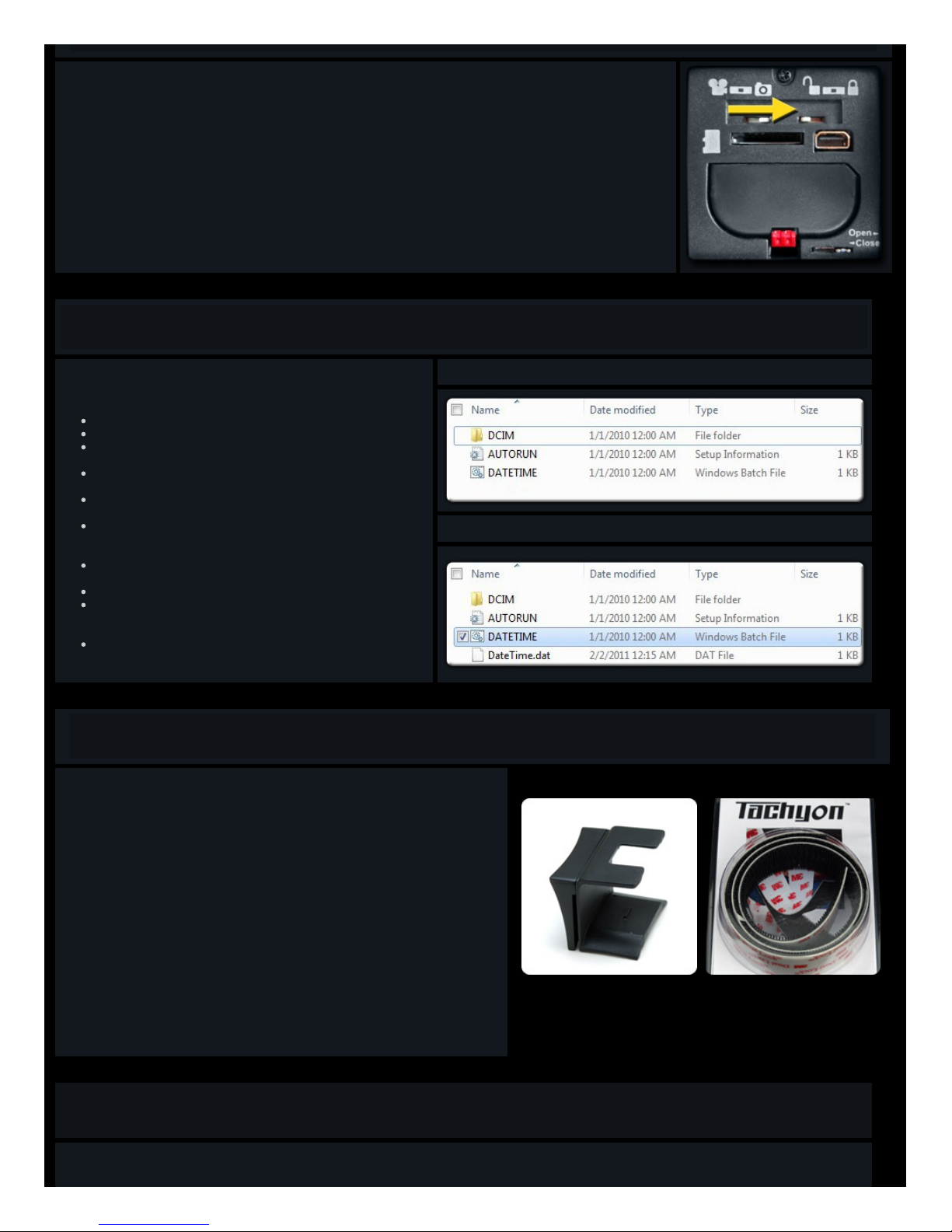
• To switch from Video mode to Time Lapse Pho to mode, stop an y current video recording and then slide the left switch from
Video to Photo.
• When you press the START/STOP button you will now he ar a bee p soun d and see the LED flashing red and green. You are
now capturing one .JPG photo every two seconds.
• To return to video mode, press an d hold the START/STOP button until you hear a double beep and the LED turns off. Then slide
the switch ba ck to Video.
Setting Time & Date (Only for Micros delivered in 2011)
To set your camera's time and date you will need to follow these simple
steps:
First, record a short video with your camera and then turn it off.
Then, connect your camera to your computer with wi th the USB cabl e.
Turn on you r camera and you will soon see a pop-up window. (Top
Righ t). Notice the file "DATETIME.bat"
Doub le-C lick "DATETIME.bat"
This will create a file calle d "DateTime.dat".
Now, press and rel ease the button on your camera . This will sync the
Date/Time of your computer with your came ra. You will hea r a beep
when this is done.
The open window will no w close .
Press and hold the button to turn off your camera.
Now unplu g your USB cable and use your camera as usual. Files
recorded will now be marked with the correct date and time.
Note: If your batteries are taken out of your camera for more than a
few minutes, this setting wil l be lost and you will ne ed to repeat it.
Mounting
The Tachyon XC Micro come s with one reversible Universal Mount that allow s you to
securely mount your camera on the top or on either side of your hel met.
You Micro will easily snap in and out of the Universal Mount, which itself will easily slip over
the strap of your goggles, or on to the top or either side of your helme t.
We also reco mmend , for secure and easy mounting, 3M™ Dual-Lock™ Fastening Strips.
You will get one 8-inch strip in you r box. These are simila r to Velcro but much stronger.
When filming in extreme situations, it is important to further tether your came ra to the moun t
that you are using. This will ensure that your camera is no t lost in water, snow, or rugged
terrain when you fall or hit your camera. The rear door of your camera is designed to allow
fishing line to be passed through the top, near the latch, so when the door is locked shut your
camera will be securely attached to whatever you tie it to.
3M™ Dual-Lock™ is a trademark of 3M Company in the United States an d/or other countries.
See our Tachyon XC Micro Mounting Page for more mounting tips.
Sound Recording
For waterpro ofing reasons, the microphone of the Tachyon XC Micro is sealed inside the case. This ensures that your camera will function well in extreme situations. But
your sound-recording qua lity wil l be qu ite a bit lower than on a camera that is not desig ned to be waterproof.
Page 5
To improve sound recordi ng, you may open the back door of your camera . But it would no t be a good idea to do this when you are shootin g outsid e in an area wh ere an y
dust or water could enter your came ra. An open back door will also create a lot of noise if you are moving the camera aro und. So it would be preferable to do this only
when the camera is still. NEVER op en the back door when going under water!
Shock Resistance
Tachyon, Inc. has patented a shock-resistance system that keeps your batteries in pl ace an d connected in event of severe jarring.
Disconnected batteries would result in the shut down of the camera and the loss or corruption of your vid eo files.
Be sure that your batteries are inserted correctly in to the shock-proof battery cartrid ge, and that your cartridg e is inserted correctly
into the came ra, so that the red latch snaps securely over the back of the cartrid ge.
For additional shock resistance, the Micro has a locking switch to the right of the red latch. When you switch it to the left, the
cartridge will be locked into your camera and you will be unable to remove it even when you depress the red latch.
To remove your battery cartridge, you must move the lockin g switch back to the right, and then depress the red latch.
Waterproofing & Dive Lock
The Tachyon XC Micro make s use of its patented Dive Lock feature to work under water to a depth of 100 feet (30 Meters).
To ensure waterpro ofing, be sure to keep the rubbe r seal around the rear door clean and the door closed properly.
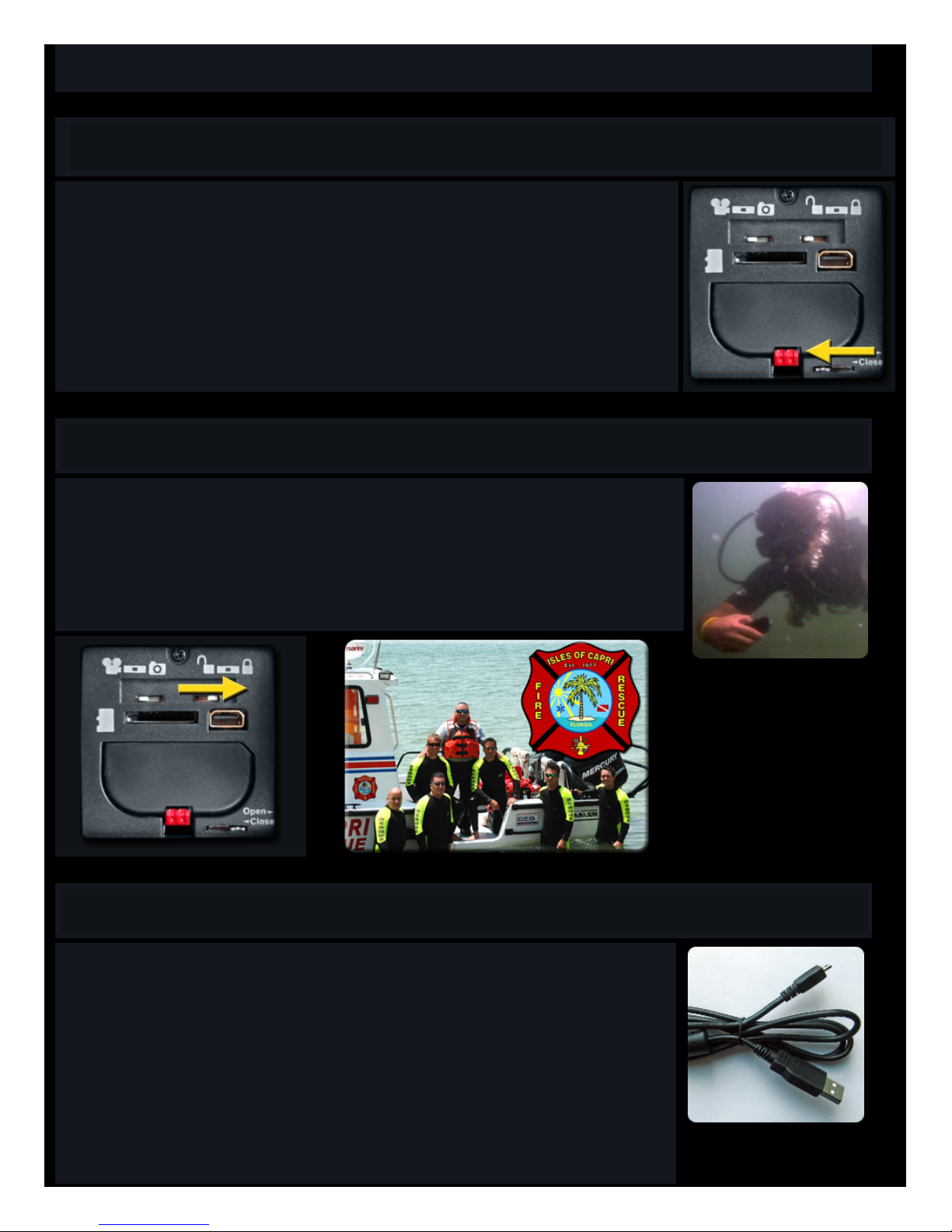
The Dive Lock preve nts water pressure from shutting off your camera in the deep water. Lock your camera by ope ning the back
door and slid ing the lockin g switch to the Right. Close and lock the door and then start recording as normal. You (and high water
pressure) will now be unable to stop the recordin g.
To stop recording, you must surface, dry your camera, open the door, slide the switch back to the left, and then push the ON/OFF
button until the camera stops.
Connecting to Your Computer
The Tachyon XC Micro come s with a USB cable.
To open your files from your camera, first set the switches on the back of your camera to Photo and Lock.
Then plug the smal l end into the jack inside the back door of your camera and the large end into your computer’s USB po rt. (The
jack on your camera is used for both the TV and the USB cab les).
Now turn on your camera. You sho uld hear a beep and see a window popping up askin g you to view your file s.
We suggest that you save your files to your computer as soon as possible after reco rding.
But if your computer is able to read Micro Memorycards, we highly recommend removin g the card from your Tachyon XC Micro,
inserting it into its ada ptor, and then pluggin g it into your computer. Then you will be able to move your files from your camera
onto your computer.
This will not only save the batteries of your cameras, but video files watched directly from the memory card may not run as
smoothly as files that have been copied to your computer’s hard drive.
Page 6
Managing Files
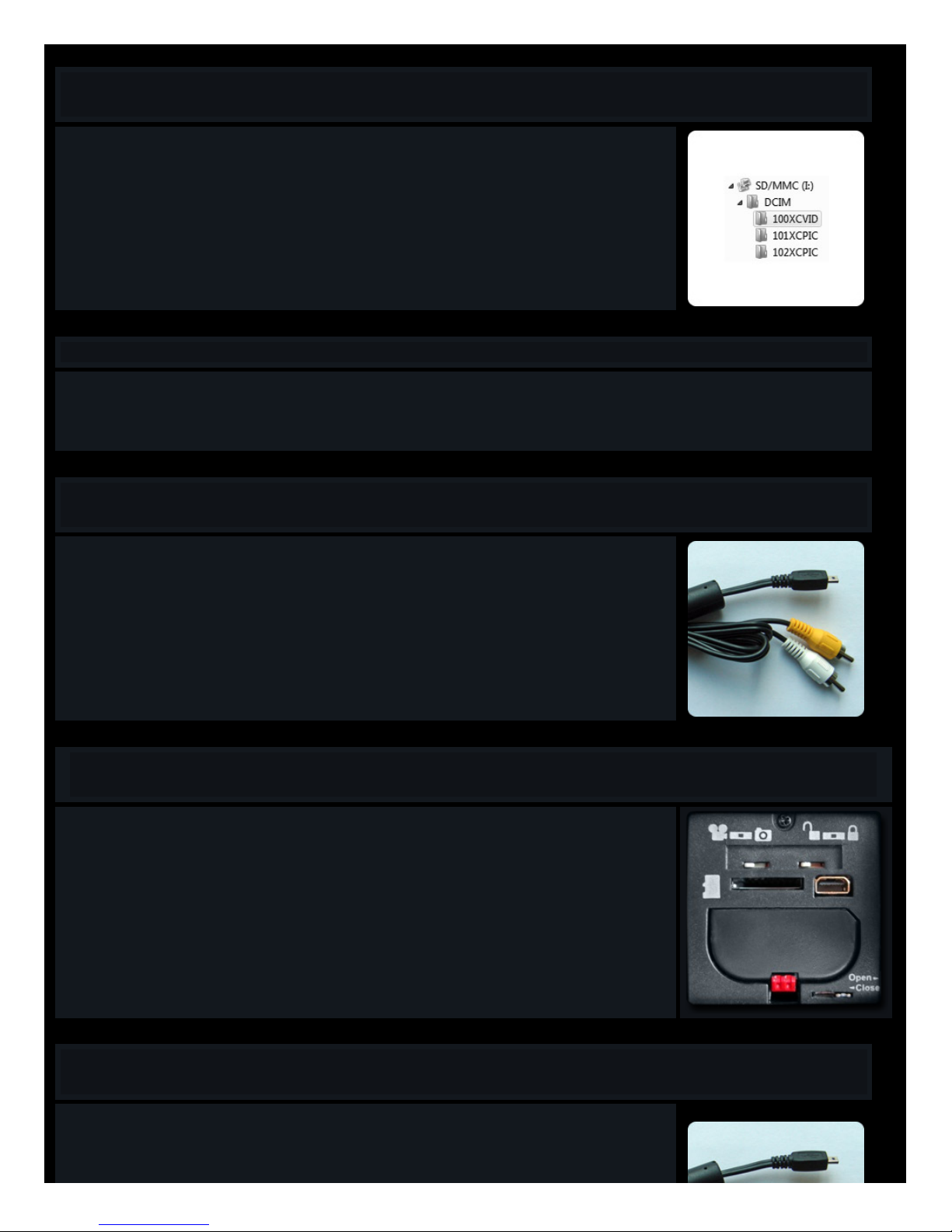
When your Micro USB cab le or memory card is in serted in to your adaptor/card reader/computer, you should see the foll owing in
your file manager.
Unde r the DCIM folder you will see one video folder (100XCVID) for all of the videos that you have taken on that card.
And you will see a separate picture folder (101,102 XCPIC) for each “session” of photo taking. That means that every time you
start and stop taking your time lapse photos, a new folder wi ll be created. This will help you to keep thing s organ ized.
You may cop y, paste and delete these files ju st as you would do with any other file on your compu ter.
We urge you to copy your file s to the computer as quickly as possib le, to free up spa ce for more file s and to be sure that you don’t
lose any great video or photos.
Computer PLayback
• For playing back raw, unedited video files, Tachyon highly recommends the VLC media player. It is possibl e that some video files recorde d by your cameras will not play
back clearly or smoo thly on some other media pl ayers.
• It can be downl oaded for free here.
Connecting to Your TV
To connect the Micro to your TV, insert the TV cable into the back of your camera, and then plug in the yellow and white leads into
the back of your TV (to the corresponding color plugs)
See the next section for selecting your TV system.
NTSC & PAL
NTSC and PAL are two different TV systems. The videos that you take with the Tachyo n XC Micro are compa tible with both.
You can switch betwe en the two systems using the Lock and Unlo ck switch on the back of your camera. When con nected to your
TV and turnin g on the camera when unlocked, you will be in NTSC mode. Turning it on wh en locked, you will be in PAL mode.
Your camer a ships with the switch set to Unlock. Therefore the default mode is NTSC system. So if you are in an PAL
country, and your TV playback is in black and white or with a wavy image, you will need to switch.
With the first batch of production for the Micro, these switches were rev ersed. It was Unlock for PAL and Lock for NTSC. So
if you purchased your camera before February, 2010, please try the opposite of these instructions!
TV Playback
Playback:
When the camera is on with the TV cable connecting it to the TV:
Left switch - changes the file type (AVI or JPEG) displa yed.
Right switch - chang es the direction of play.
Page 7

Next (Lock) Previous (Unlock).
START/STOP button
Press to play .AVI (video) file.
Press and hold to see Next / Previous video.
Please note that older analogue TV systems may have problems viewing XC Micro files when attached to the camera.
Newer digital systems will all work fine.
Storage
As with most electronic pro ducts, it is better if you take the batteries out if you don’t pla n on usi ng them. Leaking or expandin g batteries could cause damage to your
conne ctions, or eve n become jammed insi de you r camera.
It is also a good idea to remove the ba tteries from the cartrid ge and the cartridge from the camera and leave the back door open. This will relieve pressure on the springs,
contacts, and rubber seal.
If you do leave the back door open, it is probab ly a good ide a to keep the camera in a Ziploc® bag, to prevent dust or dirt from getting inside.
If using your camera in salt water, be sure to rinse it in fresh water after use. The salt can cause rustin g of metal parts. Also be sure to clean any sand from around the
seals, as this could allow water to enter the working s.
Store your Tachyon XC in a cool dry place.
Operating Systems
Tachyon Micro cameras are comp atible with Windows® XP/Vista/7 and App le Mac OS® X
Apple MAC OS® X is a trademark of Apple Inc., registere d in the U.S. and other countries.
Windows® XP/Vista/7 is a registered trademark of Microsoft Corporation in the United States and/or other coun tries.
Battery Details
The Tachyon XC Micro req uires good-quality batteries to support its high-capacity functions, so low-co st carbon-zinc batteries are
not recomme nded. For best results, use AA A Energizer® Ultimate Lithium Batteries. In cold weathe r, use ONLY this kind!
You will get up to 4 hours of life with Ultimate Lithium Batteries. Other types of batteries wil l give you less recording time.
In cold weather, use ONLY this kind of battery!
• DO NOT mix new and used or different kinds of batteries.
• DO NOT use rechargeable batteries.
• DO NOT try to force your batterie s into the Tachyo n XC if they are not going in easily. You may ha ve inse rted them incorrectly, or
you may be using batteries that are too thick.
• ALWAYS put the positive pole of the batteries in to the cartridge first, before snap ping in the negative side. This will ensure a firm
conne ction.
AAA-Size recharge able batteries must not be used for several reasons:
1. They are larger than normal AAA batteries and will not fit well in to our shockproof battery cartridge, which wa s
desig ned to be a tight fit to prevent loo se batteries from losin g conn ection and losing your files.
2. When they run out of power, they run out suddenly. This wi ll also cause you to lose your files.
3. They are no good in the cold, and our use rs take a lot of cold-weather video.
Over the life of your camera battery technolo gy may improve, so you should make use of the most advance d (non-rechargeable)
batteries available .
Note: There is no low-power indi cator on the Micro, so you won't be able to tell when your batteries are becoming low . But before
your camera shuts off, the file that you are recording will be saved, so that you won't lose any important footage. Always carry
extra batterie s with you when you go, just in case you have misjudged the power remaining in your camera.
Energizer® is a registered trademark of
Eveready Battery Company, Inc. in the United States
and/or other countries.
Duracell® is a registere d trademark of P. R. Mallory & Co. Inc.
in the United States and/or other cou ntries.
Page 8

Technical Support
For technica l support, please contact us at [email protected]
Video Shooting Tips
Although the Tachyo n Micro cameras perform well indo ors, unde rwater, and in low-lig ht situations, it is specifically tuned for shootin g in sun light. So for the best looking
video s, try to shoot your action when the light is good.
Make sure that your lens is clean. One small spot can ruin a great video. Don’t be afraid to pour water ove r your camera to clean it. Just be sure that the rear door is
securely closed.
Disclaimer
Tachyon, Inc. will not under any circumstances be responsible for inju ries or property damage incurred during the use of any of our
products.
Video Publishing Guide
Video s taken with your Tachyon Micro or Micro HD are perfect for uploading to YouTube®, or other video sha ring sites.
For best results, edit your videos first, cutting out all of the uninteresting bits. Adding music really helps to make a great video.
Always edit and save your videos to at least the same video resolution at which they were recorded. Don't downgrade your video qua lity.
See this YouTube page for optimizing your video uploads.
Be sure to mention Tachyon Micro or Tachyon Micro HD and Helmet Camera in your title or tags so that other Tachyon users can find and comment on your videos.
And be sure to see our website for video samples an d for further tips and tricks on video recording and ed iting.
Video Statistics
The Micro XC uses Micro memory memory cards. From 4GB up to 64GB.
With a 4GB card you will ge t 1 hour of video, and ove r 100,00 0 still photos.
With larger cards, you can double, quadruple and octuple these numbers.
The Micro Memory cards pi ctured on our website an in this manu al may be repla ced by similar or superior cards, dep ending on supply.
Warranty
Warranty
Tachyon products are covered by a six month limited warranty from the date of purchase from Tachyon, Inc. The warranty covers only defects in workmanship and materials.
It does not apply to products which ha ve bee n dama ged due to unre asonable use or by in tention nor doe s it cover dissa tisfaction with the product.
Tachyon, Inc.’s warranty pol icy onl y covers products purch ased directly from Tachyon Inc. or from our authorized resell ers. If you purchased the product from our website
you will have been given a purcha se number with your confirma tion email. Please quo te this number, along with you r name and email add ress, in your dealings with us.
Customers outside of the United States who have purchased items from authorized resellers or from online resellers such as Amazon .com, and have problems that need to
be addressed, please contact Tachyon first to see if we can help you. We are more likely to be your quickest solution.
If our support staff cannot solve your problem by email, we will further advi se you on how to proceed to remedy the problem.
This warranty does not cover items purchased from a third party that is not authorize d by Tachyon. It is not transferable to online purchases from sites such as eBay or
Craigslist.
(a) Tachyon , Inc.’s return poli cy covers only defective produ cts. All sales are final. Monetary refund s will not be issued for any reason.
(b) Tachyon Inc will only accept returns of defective produ ct within six months of purchase, as stated in the warran ty above.
(c) All prod ucts will be exchange d for new products, and not for monetary returns.
(d) Before pro ducts are exchanged or returned, customer must contact Tachyon, Inc. ,via email or ph one. Tachyon, Inc. will help troublesh oot the problem to
avoid the unnecessary returns. If it is determined that the camera is defective, Tachyon, Inc. will autho rize the return, in writing, via email. Tachyon , Inc. may
Page 9

reque st sample video clips to be sent to [email protected] in order to ascertain the proble m/defect.
(e) In case of return, the customer will pay for one-way shipping to Tachyon , Inc. There is no need to use any express or ove rnight service. Tachyo n, Inc. will
pay the shipping costs for the excha nge product.
Tachyon, Inc. shall only be liable for:
(a) the replacement of a defective pro duct with a new product.
Tachyon, Inc. shall NOT be liable for:
(a) injury to person s, or damage to property or consequential losses arising from the use of the product.
(b) a product that has been tampere d with, altered, or been service d by an unautho rized agent.
(c) damage due to the use of mountin g accessories that were not included with the product or those not sold as optional accessories on our we bsite.
(d) loss of video or still picture files for any reason.
In the event that goods are un delivered to recipient and are returne d to Tachyon Inc by post, for any of, but not limited to, the follo wing reasons:
a) the recipient entered his/her add ress on Tachyon’s order form incorrectly or in compl etely,
b) the recipient refused the package,
c) the recipi ent did not pick up the package in a timely manner from his/her local post office, customs office, or any other location in which the package was
bein g held, the recipient will be responsi ble for covering the shipping costs needed to resend their go ods to them.
The original shipp ing costs cannot be recovered by Tachyon Inc and will be considered payment for a service already rendered.
In the event that the recipient refuses to have the goods resent and the goods are still in like ne w cond ition, Tachyon Inc wil l not refund shipping costs and
will charge a 15% restocking fee.
Tachyon, Inc. shall NOT be liable for:
(a) injury to person s, or damage to property or consequential losses arising from the use of the product.
(b) a product that has been tampered with, altered, or been serviced by an unauthorized agent.
(c) damage due to the use of mounting acce ssorie s that were not included with the produ ct or those not sold as optional accessories on our website.
(d) loss of video or still picture files for any reason.
In the event that goods are un delivered to recipient and are returne d to Tachyon Inc by post, for any of, but not limited to, the follo wing reasons:
a) the recipient entered his/her add ress on Tachyon’s order form incorrectly or in compl etely,
b) the recipient refused the pa ckage ,
c) the recipient did not pick up the package in a timely mann er from his/he r local post office, customs office, or any other location in which the package was
bein g held,
the recipient will be responsible for covering the shipping costs needed to resen d their goods to them.
The original shipp ing costs cannot be recovered by Tachyon Inc and will be considered payment for a service already rendered.
In the event that the recipient refuses to have the goods resent and the goods are still in like ne w cond ition, Tachyon Inc wil l not refund shipping costs and will charge a
15% restocking fee.
 Loading...