

Page 1

High Security Systems
Technical Manual
Page 2

Page 3

High Security Systems
Technical Manual
Page 4

Copyright © 2006 TAC AB. All rights reserved.
This document, as well as the product it refers to, is only intended for licensed users. TAC AB owns the copyright of this document and reserves
the right to make changes, additions or deletions. TAC AB assumes no responsibility for possible mistakes or errors that might appear in this
document.
Do not use the product for other purposes than those indicated in this document.
Only licensed users of the product and the document are permitted to use the document or any information therein. Distribution, disclosure,
copying, storing or use of the product, the information or the illustrations in the document on the part of non-licensed users, in electronic or
mechanical form, as a recording or by other means, including photo copying or information storage and retrieval systems, without the express
written permission of TAC AB, will be regarded as a violation of copyright laws and is strictly prohibited.
Trademarks and registered trademarks are the property of their respective owners.
Page 5

High Security Systems, Technical Manual Contents
TAC AB, Nov 2006 5 (20)
04-00007-01-en
Contents
1 About this Manual 7
1.1 Typographic Conventions .......................................................................................... 8
2 Basic Demands 9
2.1 System Topology and Configuration ......................................................................... 9
2.1.1 TAC Xenta Protection................................................................................................ 11
2.1.2 Functional Description ............................................................................................... 11
3 User's Guide for System Configuration 13
3.1 Setting up Windows Accounts in TAC Vista. ........................................................... 15
4 Setting up Access Control Protection of Objects in the TAC Vista Database 17
Page 6

Contents High Security Systems, Technical Manual
6 (20) TAC AB, Nov 2006
04-00007-01-en
Page 7

High Security Systems, Technical Manual 1 About this Manual
TAC AB, Nov 2006 7 (20)
04-00007-01-en
1 About this Manual
This manual describes a particular process. For information on certain
products, we refer you to the manual or the Help for the product in question.
For information on how to install software, we refer you to the instructions delivered with the software.
For information on third party products, we refer you to the instructions
delivered with the third party product.
If you discover errors and/or unclear descriptions in this manual, please
contact your TAC representative.
Note
We are continuously improving and correcting our documentation.
This manual may have been updated.
Please check our Docnet site at www.tac.com for the latest version.
Page 8
1 About this Manual High Security Systems, Technical Manual
8 (20) TAC AB, Nov 2006
04-00007-01-en
1.1 Typographic Conventions
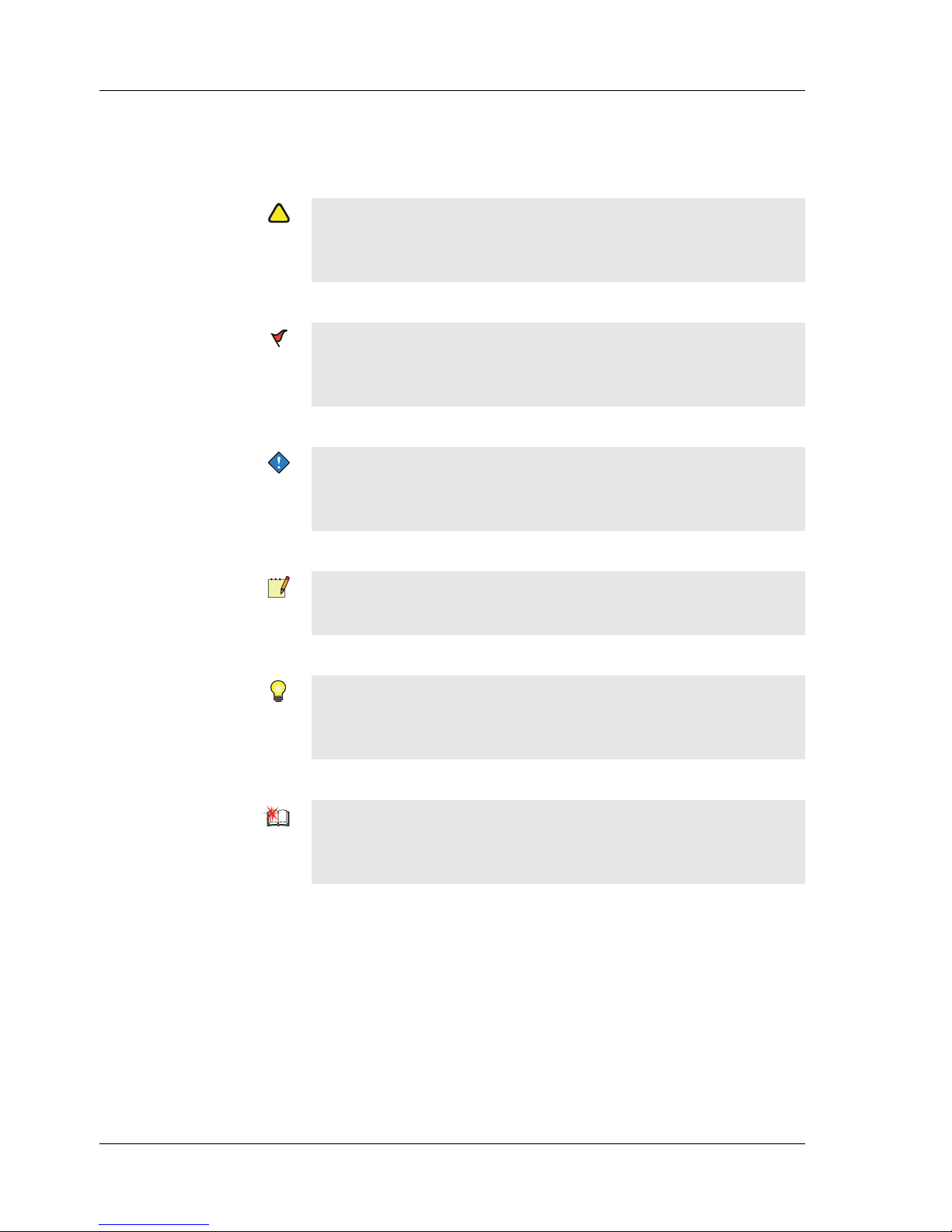
Throughout the manual the following specially marked texts may occur.
!
Warning
Alerts you that failure to take, or avoid, a specific action might result
in physical harm to you or to the hardware.
Caution
Alerts you to possible data loss, breaches of security, or other more
serious problems.
Important
Alerts you to supplementary information that is essential to the completion of a task.
Note
Alerts you to supplementary information.
Tip
Alerts you to supplementary information that is not essential to the
completion of the task at hand.
Advanced
Alerts you that the following information applies to complex tasks or
tasks restricted by access.
Page 9
High Security Systems, Technical Manual 2 Basic Demands
TAC AB, Nov 2006 9 (20)
04-00007-01-en
2 Basic Demands
The basic demands of the system are to fulfil the following requirements:
• Data security – Data security ensures that raw data collected by
the system is not corrupted or distorted during transport from the
sensor to a secure database. The raw data includes both the actual
values and the time stamps of these values.
• Data integrity – Data integrity ensures that raw data in the secure
database cannot be compromised, manipulated or altered accidentally or intentionally by any user of the system. This also covers
the transport of values from the sensors to the secure database.
• System reliability – System reliability ensures that a single point
of failure in the system is not fatal for the continuous recording of
raw data in the secure database.
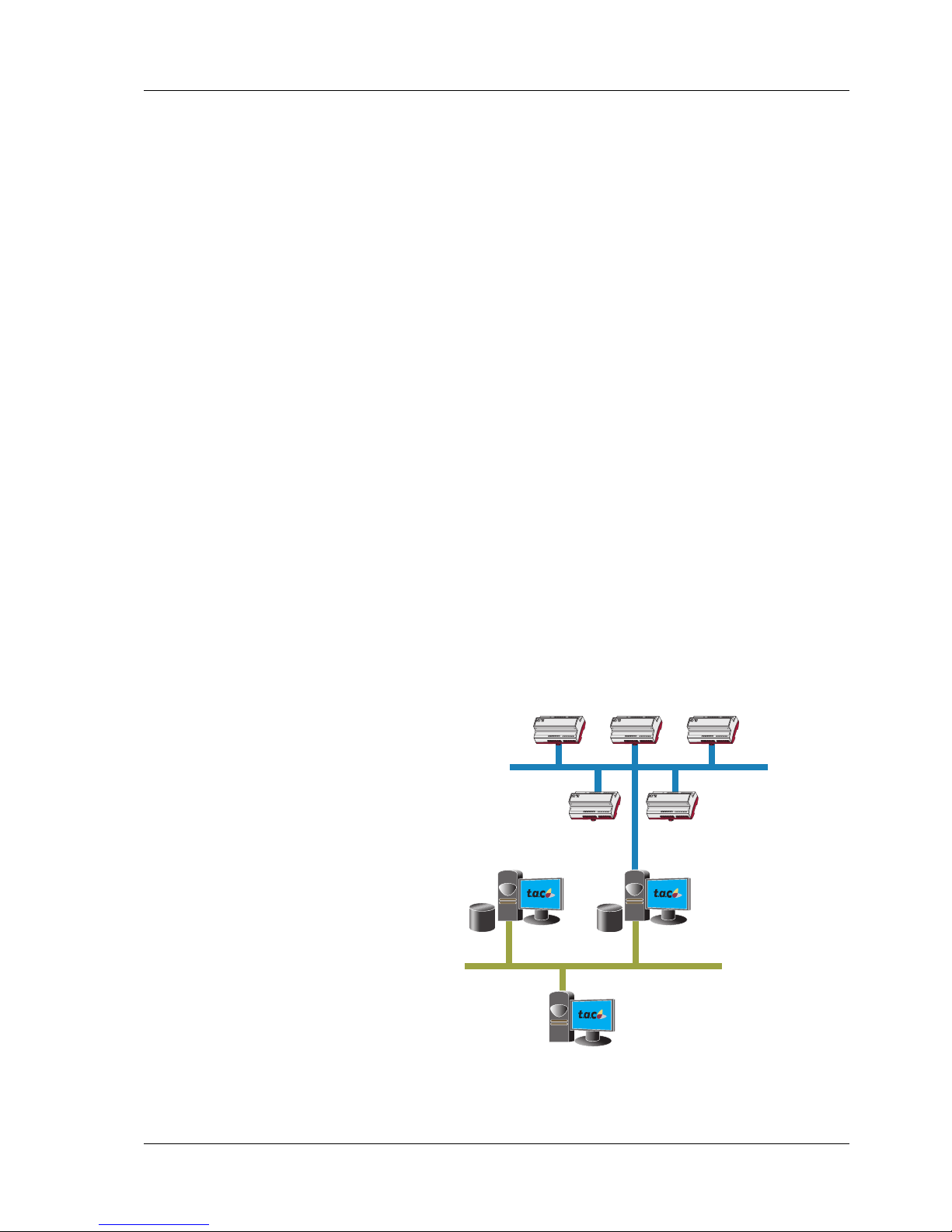
2.1 System Topology and Configuration
The system requires a Windows domain controller to administer users
and user groups.
The server has to be run under a domain account with administrative
privileges on the local computer, and be executed as a Windows service.
TAC Vista Server
Logging in the Secure
Database
Windows NT Server
Domain controller
TAC Vista Server
Supervising the Log
server
Page 10

2 Basic Demands High Security Systems, Technical Manual
10 (20) TAC AB, Nov 2006
04-00007-01-en
The Vista server should be configured to accept Windows user authorization only. This means that Vista users defined in the TAC Vista database cannot gain access to the system.
The disk volume of the Vista system and database should be formatted
as NTFS partitions, which enables files and directories to be protected
from changes in access. The TAC Vista database directories (object
database and event log database) should be protected from changes in
access by normal users, but of course be fully accessible by the account
running the TAC Vista server. An automatic function of the TAC Vista
server provides this protection.
The TAC Vista servers should be configured to perform scheduled
backup automatically. The backup files should be directed to a shared
directory on the server. The server should be scheduled to create these
backup files on a write-only medium such as a CD-ROM. A stand-alone
TAC Vista and Server can be installed on the server to view the backups
made.
TAC Vista database objects that are critical to the requirements of data
security during data logging, should be protected from being changed
by the users of TAC Vista. Only one user account should be registered
as the Owner of the TAC Vista database. No user should be given the
right to change access to TAC Vista objects. Only the owner has the
right to make changes. Protected objects should include:
• Sensor objects in data log definitions
• Data log definition objects
• Event log definition object
• Alarm objects reporting conditions on hardware involved in logging data
• Database Backup definition objects
• Time event objects controlling automatic backup
• Xenta outstation objects
The owner account should be protected from intrusion by using password expiration and maximum logon attempts in Windows. The server
should be set up to log invalid logon attempts.
The Vista has to be set up to create backups automatically at regular
intervals. The log database definitions in Vista have to define cyclic
logs. It is the creation of backups that secures the data. The hard disk
storing the TAC Vista database should have sufficient capacity to cover
a full cycle of all data logs and the event logs.
At least two Vista servers have to be running permanently on the network. They have to be configured so that if one fails, the other sends an
alarm to a permanently manned site.
The TAC Xenta should be programmed to store eight days of data on a
rolling re-writeable cycle. The TAC Xenta is capable of storing eight
Page 11

High Security Systems, Technical Manual 2 Basic Demands
TAC AB, Nov 2006 11 (20)
04-00007-01-en
days of data at 30 minute intervals (that is, 384 readings) for each of the
controllers channels, on a rolling re-writeable cycle for a maximum of
10 channels (Xenta 300) / 18 channels (Xenta 401)
The TAC Xenta units logging data or acting as master units should have
an UPS (uninterrupted power supply) backup.
The TAC Xenta OP panel configuration should be set NOT to expose
data objects involved in data logging and all other signals are set to readonly for the OP panel.
The service menu has to be disabled.
2.1.1 TAC Xenta Protection
After commissioning the TAC Xenta unit is set in protected mode from
TAC Vista. This prevents any serial port access using a code hidden in
a protected memory area in the TAC Xenta.
2.1.2 Functional Description
Data security is governed by the following operations and functions:
• UPS backup on TAC Xenta units ensures uninterrupted local data
logging. Database backups secure the collected data at the TAC
Vista level. The database backups should be copied onto another
media automatically, either by TAC Vista or an external backup
system.
Data integrity is governed by the following operations and functions:
• A manual procedure should be in place that inspects all hardware
used on a regular basis.
TAC Xenta Data Protection
Critical data is set as read only or not shown at all in the OP tree. This
protects the data being logged from being altered via the OP panel.
There is no way of altering the log data stored in the TAC Xenta. Even
though the service menu in the OP panel is protected by a password, it
is recommended that this menu should be disabled to ensure a higher
level of security.
All changes in the TAC Xenta application programming are reported as
an alarm and recorded in the event log in the TAC Vista. The required
Windows access level is needed in order to make any changes in the
TAC Xenta from TAC Vista.
!
NOTE! TAC Xenta version 3.41 or later is required.
Page 12

2 Basic Demands High Security Systems, Technical Manual
12 (20) TAC AB, Nov 2006
04-00007-01-en
TAC Xenta Protection
Once the TAC Xenta programming is confirmed, it can be locked.
Sending a command from Vista to the Xenta locks and unlocks the
Xenta device. These events are recorded in the Event log. This mode
locks the Xenta from any access via the serial port. This excludes TAC
Menta, Download Wizard and LonWorks network connection through
the serial port on the Xenta. Whether a Xenta is locked or not can be
seen in Vista by viewing the Xenta object. Access rights in Vista are
then set using NT security. Any changes to a Xenta are recorded in the
Historical log. It is recommended that the administrator is the only person allowed to Lock/Unlock and write to the Xenta.
TAC Vista Data Protection
At the TAC Vista level, the Windows access control functionality protects the data from being changed. This includes protection of the TAC
Vista object databasee as well as the directories and files on the hard
disk drive. The system also protects the system from time change by a
normal user. However, it should be noted that Vista stores trend log data
stamped with UTK time. All user-initiated changes to object data and
alarms are recorded in the event log of Vista.
System Reliability
System reliability is governed by the following operations and functions:
Being able to store data from eight days in the Xenta makes it possible
to recover a failure in the Vista server that stores the data. Having two
Vista servers enables them to monitor each other's operation. A Xenta
unit failure is reported as an offline alarm in Vista. The master Xenta
devices also have UPS backup. This ensures offline alarm reporting to
Vista in the event of failure. The data loss resulting from a permanent
failure to a Xenta unit, where the unit has to be exchanged, is limited to
the rate of reporting log data from the Xenta to Vista.
The data loss resulting from a permanent failure to the hard disk drive
of Vista is limited to the rate of incremental backups made to another
disk.
Page 13

High Security Systems, Technical Manual 3 User's Guide for System Configuration
TAC AB, Nov 2006 13 (20)
04-00007-01-en
3 User's Guide for System
Configuration
This is a guide for configuring the Windows and TAC Vista systems in
order to fulfil the requirements of Data integrity of the TAC Vista database.
Create the Users
• Create a domain in the domain controller. In our example we call it
"PlantTAC". Create the following groups in the domain:
"PlantTAC\VistaAdministrators"
"PlantTAC\VistaOperationManagers"
"PlantTAC\VistaFieldManagers"
"PlantTAC\VistaUsers"
Users belonging to the "PlantTAC\VistaAdministrators" group administer the security of the TAC Vista database. At least one user must be
created and belong to this group. It is assumed that one of these users is
called "PlantTAC\VistaAdmin".
Users belonging to the "PlantTAC\VistaOperationManagers" group are
supposed to have 'Change authority' for some parts of the TAC Vista
database. They can change all programming and behavior of objects,
create and delete objects and so on. They can also block and acknowledge alarms.
Users belonging to the "PlantTAC\VistaFieldManagers" group should
have 'Write authority" for some objects in the TAC Vista database.
They can change the writeable value property of these objects, typically
"setpoint" values. They can also acknowledge all or some of the alarms.
Users belonging to the "PlantTAC\VistaUsers" group only have 'Read
authority' to the database. They have a general "view" authority, but
cannot change anything or acknowledge alarms.
It is assumed that there is one "PlantTAC\Vista" user that belongs to the
three groups above.
The group "PlantTAC\Domain Users" is predefined and contains all the
users in the "PlantTAC" domain.
The "PlantTAC\Domain Admins" group is predefined and contains all
administrators of the domain. Note that the users in "PlantTAC\VistaAdministrators" do not have to be "Domain Admins".
Page 14

3 User's Guide for System Configuration High Security Systems, Technical Manual
14 (20) TAC AB, Nov 2006
04-00007-01-en
Note that the computers running the TAC Vista servers have to be
defined in this domain. Those computers also have to specify this
domain as their primary logon domain in the network setup.
Executing TAC Vista Server as a Service under Windows NT.
1 Log on as VistaAdmin in the domain PlantTAC on the TAC Vista
Master PC.
2 Install TAC Vista.
3 After installation, issue the following commands from a command
window (Start button-Run-Open:command):
>cd \tac330
>tacos /service
>exit
4 Start the TAC Vista Setup program and select the Authority sheet.
5 In the Vista security level area, select High Level (Use NT
Accounts).
6 In the Protected by account area, select This Account and enter
"PlantTAC\VistaAdministrators". Also select "Current user" in the
"Windows user in TAC Vista" sheet.
7 On the control panel, double-click Services. You will find
"TACOS" as a service.
8 Highlight TACOS and click Startup ...
9 Select Startup Type: Automatic which makes TACOS start auto-
matically at Windows startup.
10 Select Log On As: This Account and enter "PlantTAC\VistaAd-
min" and password for this administrative account.
11 Click OK. Finally, start the TAC Vista Server by clicking Start
button.
12 Repeat the steps above on the TAC Vista Slave computer as well
and set up the TAC Vista network between the computers.
Page 15

High Security Systems, Technical Manual 3 User's Guide for System Configuration
TAC AB, Nov 2006 15 (20)
04-00007-01-en
3.1 Setting up Windows Accounts in TAC Vista.
Note that the "PlantTAC\VistaAdmin" account running the TAC Vista
servers does not have to be an administrator of the domain (that is
belonging to the group "Domain Admins"). The TAC Vista administrative domain account needs only to be an administrator on the computers
where TAC Vista server is running (that is belonging to the local group
"Administrators" and to the group "Domain Users").
1 Start the TAC Vista Workstation. The "VistaAdmin" user is auto-
matically logged in. The group "PlantTAC\VistaAdministrators"
has automatically been created in the ACL editor, and the users in
this group can be expanded. Note also that the users of this group
have been added to the Vista group "$ADMINISTRATORS"
together with the Vista user "SYSTEM". It is recommended to
keep the "SYSTEM" user in this group although this account can
be utilized in the "High security" mode. This makes it possible to
analyse the database in a location that does not have any connection with the "PlantTAC" domain.
2 Add the account objects "PLANTTAC.VISTAOPERATION-
MANAGERS" with the authority level "Operation manager",
"PLANTTAC.VISTAFIELDMANAGERS" with the authority
level "Field manager" and finally "PLANTTAC.VISTAUSERS"
with the authority level "User" to the TAC Vista database. Note in
the ACL editor that these NT accounts can be expanded into their
users.
Page 16

3 User's Guide for System Configuration High Security Systems, Technical Manual
16 (20) TAC AB, Nov 2006
04-00007-01-en
Page 17

High Security Systems, Technical Manual4 Setting up Access Control Protection of Objects in the TAC Vista Database
TAC AB, Nov 2006 17 (20)
04-00007-01-en
4 Setting up Access Control Protection
of Objects in the TAC Vista Database
The user and user group objects as well as most other global objects are
automatically protected by the "$ADMINISTRATORS" Vista group.
This group is also defined as the owner of the database. It is not recommended that you change these settings. It is preferable to control access
to these objects through membership of the "PlantNT\Administrators"
group.
When logging on as VistaAdmin, start by protecting all local (non-global) objects using the ACL editor. From the beginning, all objects have
the "Everyone Full Control (All)" ACL defined. This should be changed
to "Everyone Read(R)" for all objects. Do this by choosing each top
level unit in the database including the operator unit and set this ACL,
having checked "Replace permissions on Sub units" and "Replace Permissions on Existing objects". Now all the database objects are protected from change by any user, although owners can still change the
ACL of any object.
Now proceed with the parts of the database that should be open for
change. The normal ACL for these objects can be:
• Everyone Read (R)
• PlantTAC\VistaFieldManagers ReadWrite (RW)
• PlantTAC\VistaOperationManagers Change (RWXD)
If some users should not be able to see some objects at all, the above
ACL could be combined with an entry like
• PlantTAC\VistaUsers No Access (None)
On objects requiring a valid Electronic Signature and a "Reason for
Change" information to be entered, the "Require Signature on DBObject change" must be checked.
Select the Enforced acknowledge response required check box if you
want to acknowledge alarms using cause and action codes.
Set up a backup schedule for the TAC Vista database
Both the Log and object database must be configured to perform automatic backups.
Make sure that the backups are saved on write-only media.
For more information on backups, see TAC Vista, Technical Manual.
Page 18

4 Setting up Access Control Protection of Objects in the TAC Vista Database High Security Systems, Technical Man-
18 (20) TAC AB, Nov 2006
04-00007-01-en
Page 19

Page 20

Copyright © 2006, TAC AB
All brand names, trademarks and registered trademarks are
the property of their respective owners. Information contained within this document is subject to changewithout notice. All rights reserved.
04-00007-01-en
Europe / Headquarters
Malmö, Sweden
+46 40 38 68 50
Americas
Dallas, TX
+1 972-323-1111
Asia-Pacific
Sydney, Australia
+61 2 9700 1555
www.tac.com
Last Manual Page
 Loading...