

Page 1
QUICK
REFERENCE GUIDE
GETTING STARTED
TX1
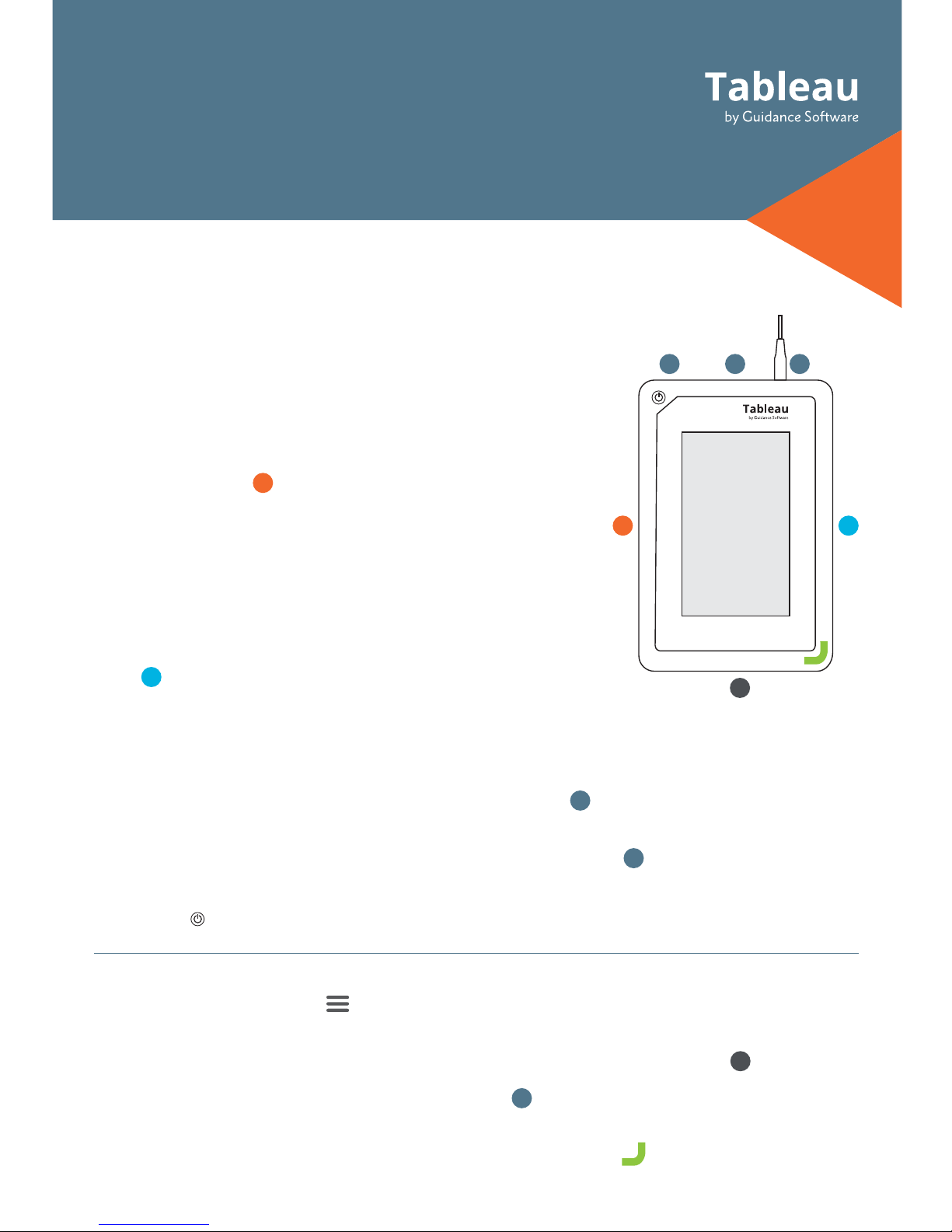
Clock – After initial start-up, or following a factory settings reset, verify the TX1 date, time, and
time zone are properly set. > System Settings.
USB 3.0 Accessory Ports (Optional) – Connect a USB storage device to save log files, or a
USB keyboard for easier data entry via the two front USB 3.0 ports on the TX1
SD Card Slot – Contains the TX1 operating system . To update firmware, insert this SD card
into a Windows PC and run Tableau Firmware Update (TFU).
Status LED – Located in lower right corner of the TX1 top panel
White: TX1 starting up, Blue: active job, Green: job successful, Off: idle, Red: error
The TX1 Imager operates as a standalone device or with
the TX1-S1 Drive Bay
*
. The Drive Bay enables cable-less
SATA/SAS destination drive connections and drive cooling.
* Align the TX1 into place on top of the TX1-S1 and slide the TX1
to lock it in place. See product labels for additional direction.
1. Source Drive(s)
– Connect one or more drives to the
TX1’s source (left) side: SATA/SAS (x2), USB 3.0, PCIe
*
,
FireWire, or IDE
**
.
*The TX1 needs to be off to connect a PCIe drive. A Tableau PCIe
Adapter is required to image PCIe media.
**The Tableau IDE-PCIe Adapter [TDA7-5] is required to image
IDE drives.
2. Destination Drive(s) – Connect one or more drives to
the TX1’s destination (right) side: SATA/SAS (x2), or USB
3.0 . If using Drive Bay
*
, insert one or more 2.5” or 3.5”
SATA/SAS drives.
*When the Drive Bay is connected, the TX1 destination DC Out ports for SATA/SAS are disabled.
See User Guide for more information.
3. Ethernet – Connect network cable to the Ethernet port to mount network shares.
Network shares are able to mount as a source or destination.
4. Imager Power – Connect the power supply to the TX1’s DC In
5. Power On – Press the power button and begin operation through the TX1’s touch-screen
interface
TX1
3
5
1 2
46
1
2
3
4
5
6
Page 2

FIRMWARE UPDATES
Guidance Software releases free firmware updates for Tableau products through the
Tableau Firmware Update (TFU) utility. Visit the Tableau Download Center for more
information:
www.guid.com/tableau/tfu
For support:
Toll Free +1 (866) 973-6577
Main +1 (626) 229-9191
[email protected]
For additional product information, visit:
www.guid.com/tableau
© Guidance Software, Inc. All rights reserved.
Tableau is a registered trademark of
Guidance Software, Inc. Updated 6/2017
USER GUIDE
For a comprehensive overview of the Tableau TX1 features and functions, see the Tableau
TX1 User Guide:
www.guid.com/tableau/tx1
CABLE RECOMMENDATIONS
*A Tableau PCIe Adapter is required (sold separately).
**Tableau Imager IDE Expansion Module [TDA7-5] is required for IDE drives (sold separately).
Use a Tableau SATA/SAS Signal & Power cable [TC4-8-R3], or
Drive Bay [TX1-S1]
Use cable supplied with USB drive enclosure or directly
connect
Use a Tableau PCIe cable [TC-PCIE-8]
Use cable supplied with FireWire drive enclosure
Use a Tableau IDE Power cable [TC2-8-R2] and Tableau PCIe
cable [TC-PCIE-8]
Use a Tableau CAT6a cable [TC-CAT6A]
Use a Tableau Power Supply [TP6]
For SATA/SAS Drive
For USB Drive
For PCIe Drive
*
For FireWire Drive
For IDE Drive
**
Ethernet
For Power (DC In)
 Loading...