

Page 1

TWIRL 360
User Guide
Motion-sensing, auto-rotating 1.25” curling iron
Model No. 76570, 76571
Page 2

2
IMPORTANT SAFETY
INSTRUCTIONS
READ ALL INSTRUCTIONS BEFORE USING
When using electrical appliances, especially when children are
ENGLISH
present, basic safety precautions should always be followed,
including the following:
DANGER
KEEP AWAY FROM WATER
Electricity and water are a dangerous combination and can
cause death by electric shock. Do not allow electrical cords to
come into contact with water or other liquids.
ELECTRICAL APPLIANCES ARE ELECTRICALLY LIVE WHEN
PLUGGED IN, EVEN IF TURNED OFF.
To reduce the risk of death by electric shock:
1. Always unplug the appliance immediately after using.
2. Do not use while bathing.
3. Do not place or store the appliance where it can fall or be
pulled into a bath tub or sink.
4. Do not place in or drop into water or other liquid.
5. If the appliance falls into water, unplug it immediately. Do not
reach into the water.
Page 3

IMPORTANT SAFETY
INSTRUCTIONS
WARNING
To reduce the risk of burns, electrocution, fire or injury to
persons:
1. An appliance should never be left unattended when
plugged in.
2. Close supervision is necessary when this appliance is used
on, or near children or individuals with certain disabilities.
3. Use this appliance only for its intended use as described in
this manual. Do not use attachments not recommended by
the manufacturer.
4. Never operate this appliance if it has a damaged cord or
plug, if it is not working properly, or if it has been dropped,
damaged, or dropped into water. Return the appliance to a
service center for examination and repair.
5. Keep the cord away from heated surfaces. Do not wrap the
cord around the appliance.
6. Never use while sleeping.
7. Never drop or insert any object into the appliance.
8. Do not use outdoors or operate where aerosol (spray)
products are being used or where oxygen is being
administered.
9. Do not use an extension cord with this appliance.
3
ENGLISH
Page 4

4
IMPORTANT SAFETY
INSTRUCTIONS
ENGLISH
WARNING
10. This curling iron and clip are hot when in use. Do not let eyes
and bare skin touch heated surfaces.
11. Do not place the heated curling iron directly on any surface
while the tool is hot or plugged in. Use the attached stand.
Do not use the appliance near a bath tub, washbasin
or other vessel filled with water. Never place the
appliance in water or any other liquid.
SAVE THESE INSTRUCTIONS
Page 5

MAINTENANCE INSTRUCTIONS
TWIRL 360
5
This appliance is intended for household use.
Use on Alternating Current (50-60 Hz).
This appliance has a polarized plug (one blade is wider than the
other). As a safety feature, this plug will fit in a polarized outlet
only one way. If the plug does not fit fully into the outlet, reverse
the plug. If it still does not fit, contact a qualified electrician. Do
not attempt to defeat this safety feature.
Make sure to remove the plug from the outlet after use.
Do not use if the plug is loose in the outlet as there may be
risk of fire, electric shock, electrical shortage and burning.
WARNING
AUTO SHUT-OFF
After approximately one hour, the unit will automatically shut
itself off. To reactivate the unit, press the Power & Temperature
Switch.
ENGLISH
Page 6

6
MAINTENANCE INSTRUCTIONS
TWIRL 360
1. Your appliance is virtually maintenance free. It contains no
ENGLISH
user serviceable parts and no lubrication is needed.
2. Keep heated surface clean and free of dust, dirt and
hairspray.
3. If cleaning becomes necessary, disconnect the appliance
from the power source and let it cool. Wipe the exterior with
a damp cloth.
4. If any malfunction occurs, unplug the appliance, allow it to
cool and return it to a service center for repair.
5. Never wrap the cord around the appliance since this will
cause the cord to wear prematurely and break. If the cord
becomes twisted, untwist it prior to use.
6. Handle the cord carefully for longer life and do not put any
stress on the cord where it enters the handle. Avoid jerking,
twisting or straining, especially at the plug connections.
This could cause the cord to fray and possibly break.
7. When not in use, your curling iron should be disconnected
and stored in a safe, dry location, out of reach of children.
Do not wrap the cord around the curling iron. Allow the cord
to hang or lie loose and straight at the point of entry into
the iron.
8. Do not attempt to repair the appliance yourself.
Page 7

OPERATING INSTRUCTIONS
TWIRL 360
SERVICING OF DOUBLE-INSULATED APPLIANCES
In a double-insulated appliance, two systems of insulation are
provided instead of grounding. No grounding means is provided
on a double-insulated appliance, nor should a means for
grounding be added to the appliance.
Servicing a double-insulated appliance requires extreme care
and knowledge of the system, and should be done only by
qualified service personnel.
Replacement parts for double-insulated appliances must be
identical to the parts they replace. A double-insulated appliance
is marked with the words “DOUBLE INSULATION” or “DOUBLE
INSULATED”. The symbol (square within a square) may also be
marked on the appliance.
7
ENGLISH
Page 8
8
OPERATING INSTRUCTIONS
TWIRL 360
ENGLISH
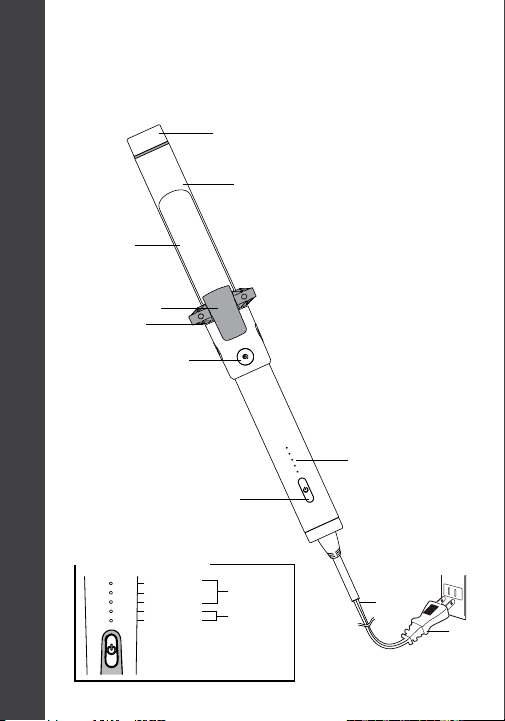
Temperature Guide
Clamp
Stand
Lever
GO Button
Power &
Temperature
Switch
410ºF / 210ºC
390ºF / 199ºC
350ºF / 177ºC
300ºF / 149ºC
260ºF / 127ºC
Cool Tip
Barrel
Normal to
thick hair
Fine, damaged
or chemically
treated hair
Heat Settings
Indicator
Cord
Plug
Page 9
HOW TO USE YOUR
TWIRL 360
9
The Twirl 360 has a slow speed for beginners and a fast speed
for experts. You can set the speed at the time you turn on the
iron.
SELECTING THE RIGHT SPEED
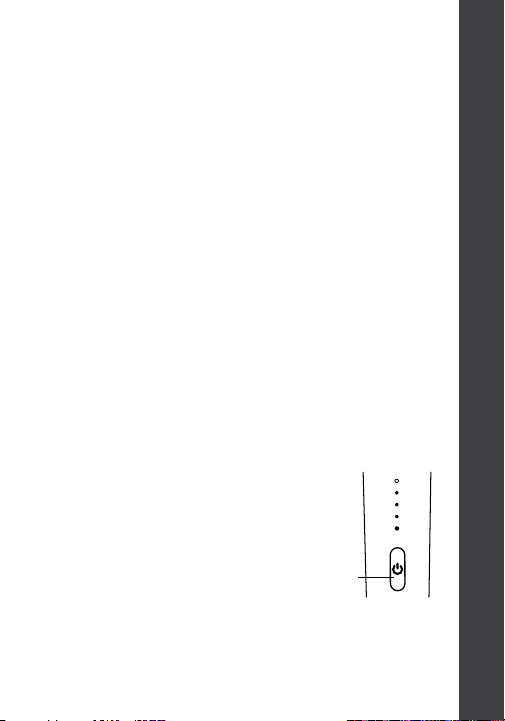
Slow Speed: While the iron is OFF, press the Power &
Temperature Switch once quickly to begin operating at a slower
speed. The lights on the Heat Settings Indicator will cascade up
slowly while the iron is heating up.
Fast Speed: While the iron is OFF, hold the Power & Temperature
Switch down for 2 seconds to begin operating at a faster speed.
The lights on the Heat Settings Indicator will cascade up quickly
during heat up.
Changing Speeds: Turn the iron off first, and then turn it back on
using the Slow or Fast Speed directions above.
Press the Power & Temperature
1
Switch to activate your appliance
and select the desired speed
(directions above). The lights will
cascade up and become solid
when the iron is ready to use.
To turn the iron off, hold the
Power & Temperature Switch
down for 1 second until all lights turn off.
Power &
Temperature
Switch
ENGLISH
Page 10
10
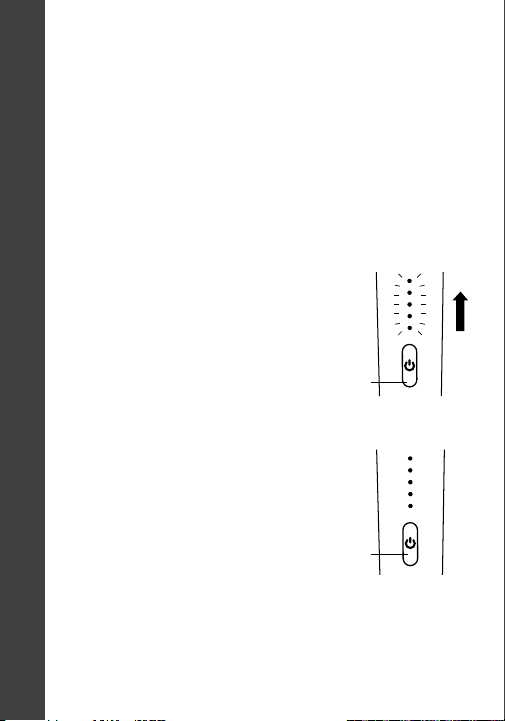
The iron is automatically set to heat up to 390ºF, indicated by 4
ENGLISH
solid lights, upon first use.
Note: Each time you turn the iron on, it will heat up to your last
set temperature.
To change the temperature*,
2
After selecting your desired
3
HOW TO USE YOUR
TWIRL 360
SELECTING THE RIGHT TEMPERATURE
double click the Power & Temperature
Switch. Then continue to click to
select your desired temperature.
The Heat Settings Indicator
will change each time
you click.
heat setting, release the
button and wait for the
iron to reach the selected
temperature. When the
light(s) stop flashing, the
iron has reached the
selected temperature.
Power &
Temperature
Switch
Power &
Temperature
Switch
* See Temperature Guide in OPERATING INSTRUCTIONS for
recommended settings.
Page 11
HOW TO USE YOUR
TWIRL 360
11
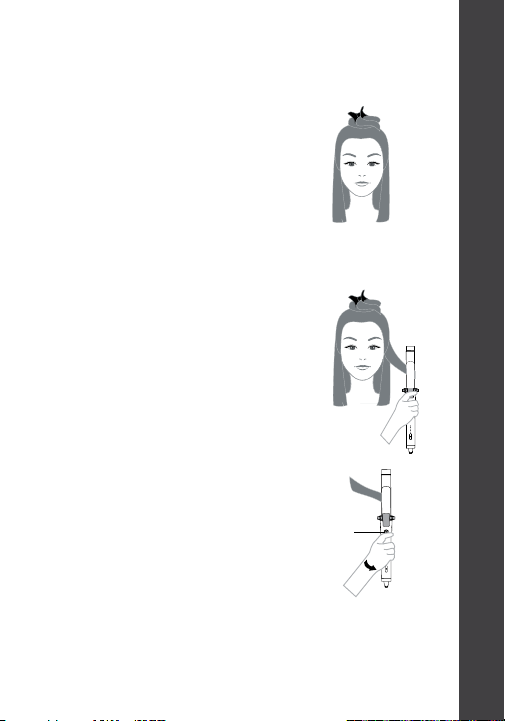
Gather and clip the top half of your
4
hair out of the way.
Note: Sectioning your hair makes
styling faster and easier.
From the bottom half of your hair,
5
clamp a 1-2” wide section and
glide the iron along it to the end.
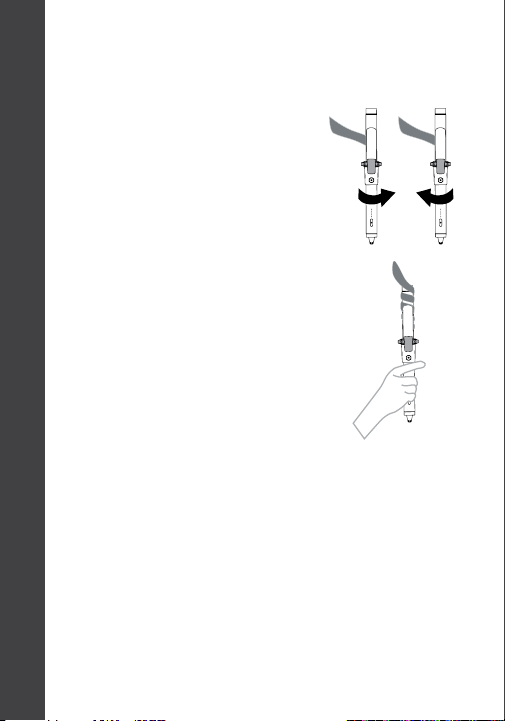
Holding the GO Button, slowly
6
rotate your wrist in one motion
to activate the rotating barrel.
It is not necessary to jerk your
wrist to activate the barrel.
ENGLISH
GO Button
Page 12
12
SN
GO Button
Note: The barrel will rotate
ENGLISH
in any direction your wrist
turns. However, do not rotate
the barrel against the hair
as it will cause a kink.
Release the GO button
7
to stop the rotation. Hold
the iron in place for a few
seconds, then press the
Lever to release the curl.
HOW TO USE YOUR
TWIRL 360
YE
O
Tip: You may want to double-click the GO Button to return
the Lever to its original position above the GO Button before
you style each section of hair.
Page 13

HOW TO USE YOUR
TWIRL 360
13
STYLING TIPS
• After releasing each curl from the curling iron, cup the curl
in your hand for a few seconds before placing it down gently.
This will increase the style retention.
• For a more natural finish, use a paddle brush to relax and
blend your curls after styling.
• For beachy, undone waves, lightly tug the end of each section
after curling.
• After styling, spritz your hair all over with a light hairspray for
extra hold.
ENGLISH
Page 14

14
T3 LIMITED WARRANTY
TERMS & CONDITIONS
T3 Micro will repair or replace (at our option) T3 products for twenty-
ENGLISH
four (24) months from the date of purchase if they are defective in
workmanship or materials. This limited warranty does not cover (1)
damage due to misuse or abuse, such as incorrect voltage supply,
dropping, or failure to follow enclosed instructions or (2) tampering,
such as repair or attempt to repair. To obtain service under this
warranty, please visit t3micro.com/warrantyclaim to submit a
warranty claim, or call us at (866) 376-8880 to receive detailed
instructions. You will be required to provide proof of purchase.
THIS LIMITED WARRANTY IS ONLY VALID IF THE PRODUCT IS
PURCHASED FROM AN AUTHORIZED SELLER OF T3 GOODS AND IF
THE ORIGINAL SERIAL NUMBER ON THE PRODUCT HAS NOT BEEN
REMOVED OR OTHERWISE TAMPERED WITH.
Any implied warranties, obligations, or liabilities, including but not
limited to the implied warranty of merchantability and fitness for
a particular purpose, shall be limited in duration to the 24 month
duration of this written limited warranty. Some states do not allow
a limitation on how long an implied warranty lasts, so the above
limitation may not apply to you.
IN NO EVENT SHALL T3 BE LIABLE FOR ANY SPECIAL, INCIDENTAL,
OR CONSEQUENTIAL DAMAGES FOR BREACH OF THIS OR ANY
OTHER WARRANTY, EXPRESS OR IMPLIED.
Visit www.T3micro.com/register to complete your warranty
registration.
Page 15

MODEL NO.
76570, 76571
SPECIFICATIONS
Operating Voltage: 120V
Power Consumption: 60W
T3 Micro, Inc.
Venice, CA USA
Made in China
01UGT365217
Page 16
Model: 76570, 76571
This device complies with Part 15 of the FCC Rules:
Operation is subject to the following two conditions:
(1) this device may not cause harmful interference,
(2) and (2) this device must accept any interference
received, including interference that may cause
undesired operation.
 Loading...