

Page 1
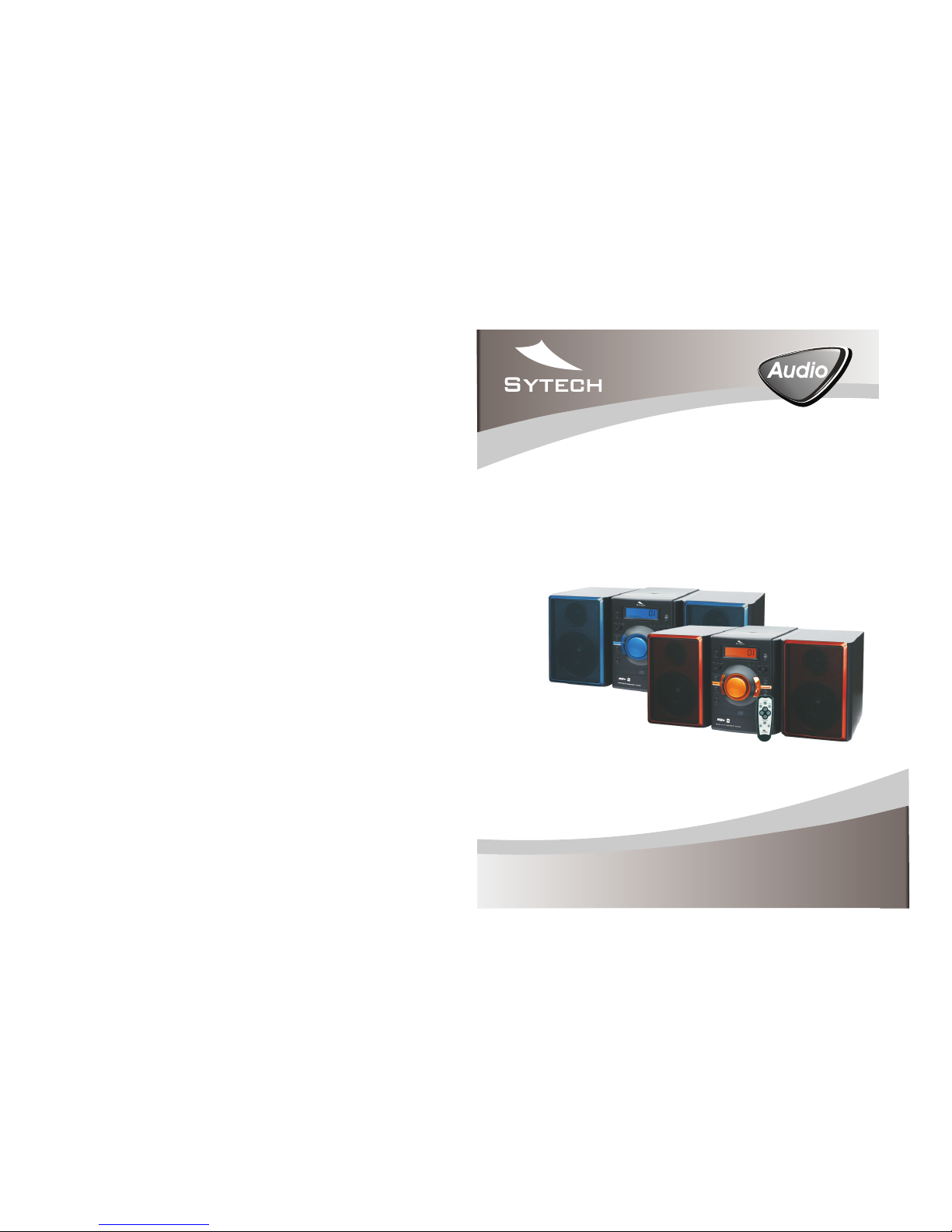
PO RTA BL E
ST ER EO R AD IO C AS SE TT E RE CO RD ER
WI TH M P3 /C D/ CD -R /U SB /S D/ MM C PL AYE R
Mp3
MP 3 - 78 USB/ SD
Mp3
MIC RO SYST EM. CD/ MP3/U SB
INSTRUCTION MANUAL
SY-8035
Page 2
PREPARATION FOR U SE
Unp ackin g and Set up
* Car efull y remov e the uni t from th e giftb ox and re move al l packi ng mate rial fr om the un it itse lf.
* Rem ove any d escri ptive l abels t hat may b e found o n eithe r the fro nt or top c abine t of the un it. Do no t
rem ove any l abels l ocate d on eith er the ba ck or bot tom cab inet of t he unit .
Pow er Sour ces
Usi ng AC Pow er
Con nect th e AC po wer int o Stand ard hou sehol d wall ou tlet. F or dual v oltag e versi on.
Mak e sure th at the AC VO LTAG E SEL ECTOR i s sw itc hed to yo ur loca l volta ge.
EN- 2
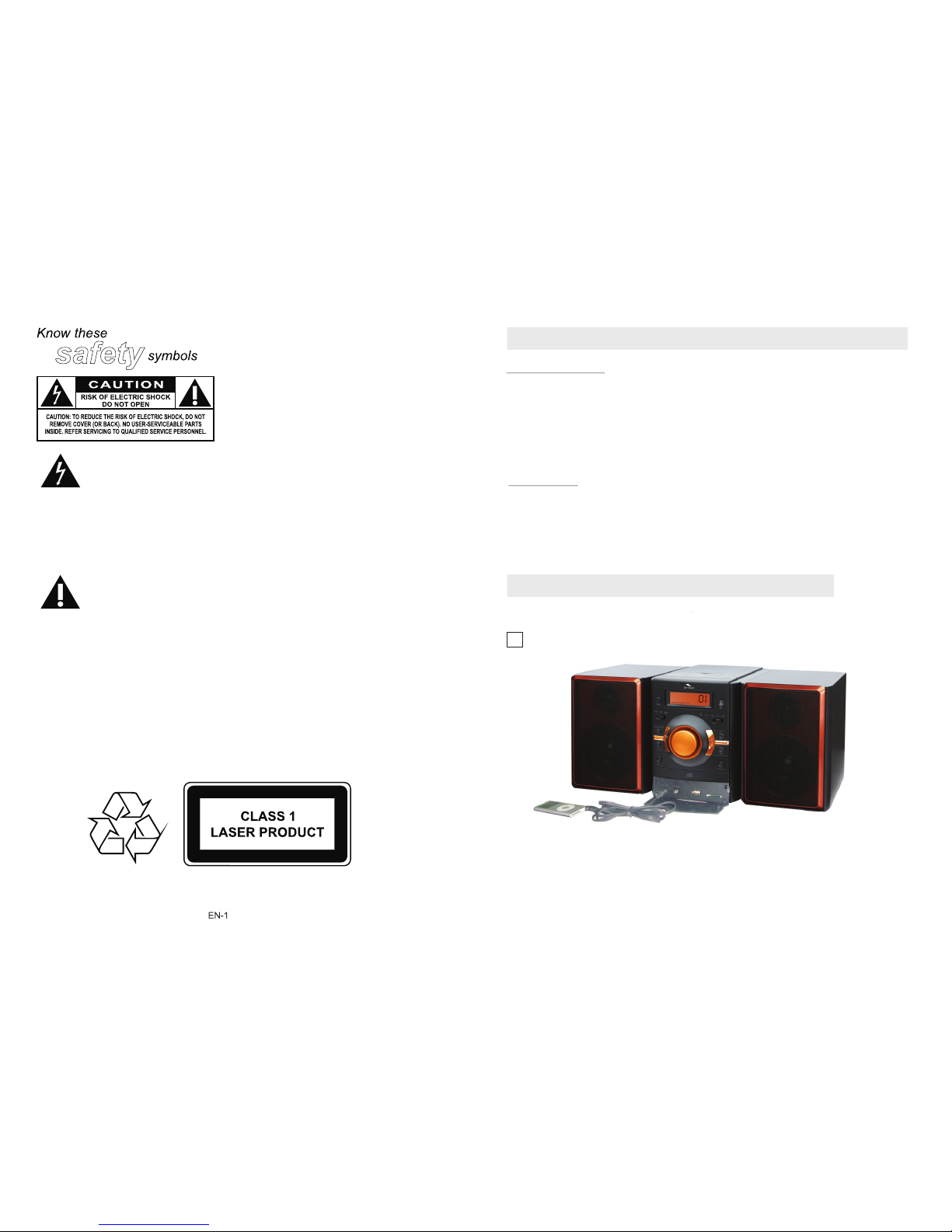
AUX IN C ONN ECTIONS
1
Thi s blo t of ligh tning" "
ind icate s unins ulate d
mat erial w ithin y our uni t
whi ch may ca use an el ectri cal sho ck.
For t he safe ty of eve ryone i n your
hou sehol d,ple ase do no t remov e
pro duct co verin g.
WARN ING: TO P RE VEN T FI RE O R
SHO CK HAZA RD,DO N OT EXPO SE TH IS
EQU IPMEN T TO RA IN OR MOI STURE .
The "e xcl amati on poin t"
cal ls atte ntion t o featu res
for w hich yo u shoul d read
the e nclos ed lite ratur e close ly to
pre vent op erati ng and ma inten ance
pro blems .
CAU TION: T O PRE VENT
ELE CTRIC S HOCK, MATCH WI DE
BLA DE OF PLU G TO W IDE S LOT,
AND F ULLY INS ERT.
Dri pping w arnin g:
The p roduc t shall n ot be exp osed to
dri pping o r splas hing an d that no
obj ects fi lled wi th liqu ids,s uch as
vas es,sh all be pl aced on t he prod uct.
Vent ilati on warn ing:
The n ormal v entil ation o f the
pro duct sh all not b e imped ed for
int ended u se.
Page 3
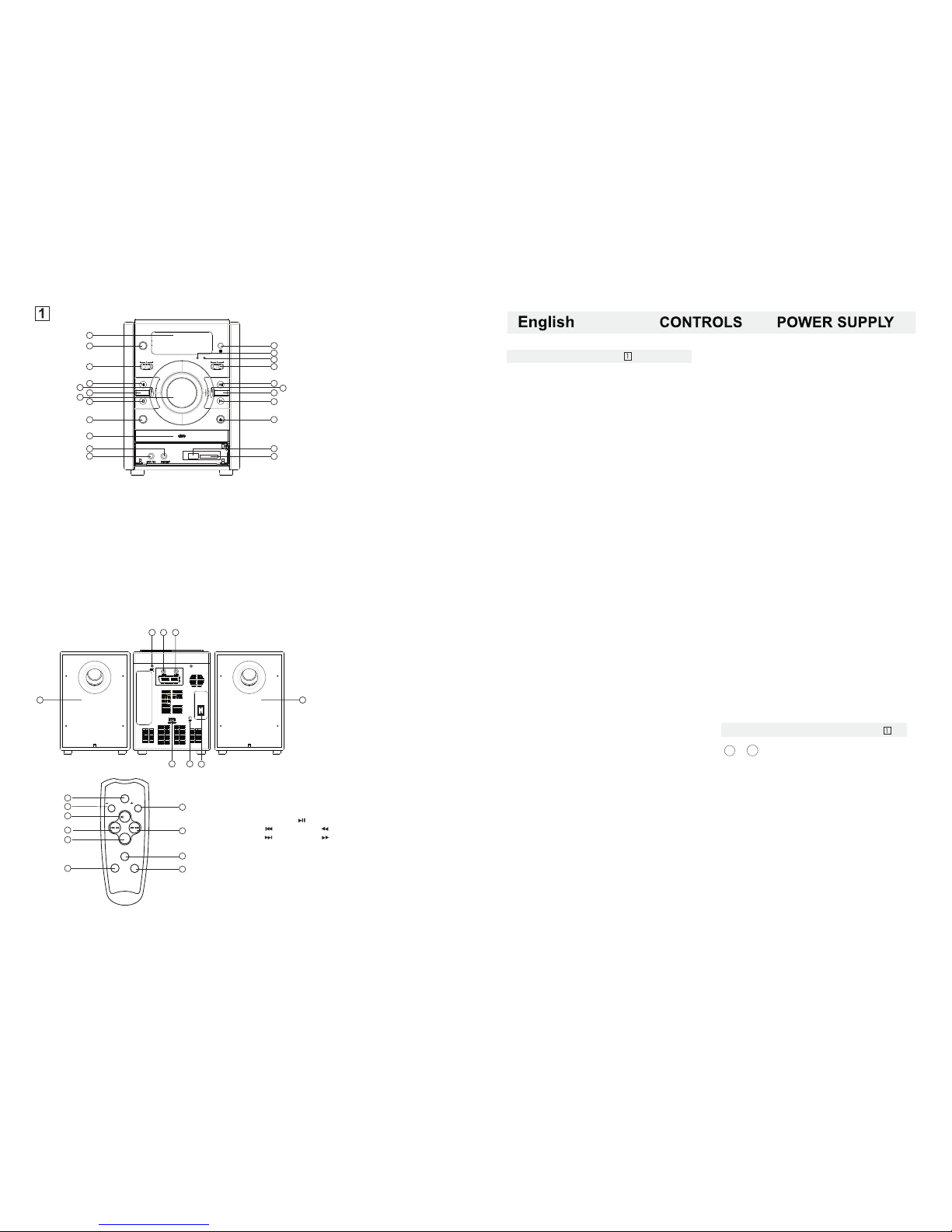
1. LC D DI SPL AY
- Dis play th e AM/ FM dial f reque ncy
- Dis play th e numbe r of trac ks
2. RA ND OM BU TT ON
- Pla y CD/M P3 t ra cks i n ra ndom or de r
3. FU NC TIO N SE LEC TOR
- Sel ect sou rce of so und MP3 /CD, A UX,
or RA DIO.
4. PL AY/PA USE /U SB BUTT ON
- Sta rt or pau se MP3/ CD/US B/SD/ MMC
- Pre ss and ho ld more t han 1. 5 se c
cha nge to CD /USB mo de.
5. RE PE AT BUT TON
- Rep eat a tra ck/CD /MP3/ U SB /S D
/M MC /p rogra m
6. VO LU ME CO NT ROL -
- adj ust the v olume l evel to l ower.
7. TU NI NG CO NT ROL
- sel ect AM/F M/FM ST. St ation s
8. ST OP/ SD B UTTON
- sto p CD/MP 3/USB /SD/M MC play back;
-Pr ess and h old mor e than 1. 5 s ec c han ge
to MM C(SD ) mod e
9. BA SS B UTT ON
-to e nhanc es bass r espon se
10. C D DO OR
11. ST ER EO HE AD PHONE J AC K
- 3.5 m m stere o headp hone ja ck.
12. A UX J ACK
-Pu sh FUNC b utton , s elect A UX stat ion.
pla y 、 、
MP3 DIS CMAN WAL KMA N A UX
13. R EM OTE S EN SOR
14. B AS S IND IC ATOR
15. F M STERE O IN DIC ATO R
- Dis plays t he FM ste reo ind icato r
16. B AN D SEL EC TOR ( AM·F M·FM ST.)
- Sel ect AM/F M/FM ST. wa ve band
17. S EA RCH N EX T
-To sel ect nex t track
- Pre ss and ho ld more t han 1. 5 se c to
for ward se arch in tra tra ck
EN- 3
18. P RO GRA M
-Pr ogram a nd revi ew prog ramme d
tra ck numb ers.
19. V OL UME C ON TRO L+
- Adju st the vo lume le vel to hi gher.
20. S EA RCH B AC K
- to se lect ba ck trac k
- Pre ss and ho ld more t han 1. 5 se c to
rew ind sea rch int ra trac k.
21. C D DO OR OP EN /C LO SE B UTT ON
- Pre ss this b utton t o open/ close t he CD doo r.
22. U SB J ACK
-In sert a US B to list en your M P3 musi c files .
23. S D/ MM C CA RD JA CK
- Ins ert a SD/ MMC/c ard to li sten yo ur MP3
mus ic file s.
24. L EF T&R IG HT SP EAKER B OXES
25. F M ANT ENNA
- Hel ps to imp rove th e FM rece ption .
26. S PE AKE R WI RE CONN EC TOR ( R)
27. S PE AKE R WI RE CONN EC TOR ( L)
28. V OLTAG E SELEC TOR
29. A C MA INS
-In let for p ower co rd
REM OTE CON TROL HA NDS ET (See )
1
10
The r emote c ontro l butto ns func tion ar e the sam e
as th e butto n of CD/M P3 sec tion ./US B/SD
~
1. LCD D ISPLAY
2. RAN DOM BUT TON
3. FUN CTION S ELECT OR
4. PLAY /PAUSE /USB B UTTON
5. REP EAT BUTTO N
6. VOL UME- BU TTON
7. TUN ING CON TROL
8. STO P/SD BU TTON
9. BAS S BUTTO N
10. CD D OOR
11. STE REO HEA DPHON E JACK
12. AU X IN JACK
13. RE MOTE SE NSOR
14. BA SS INDI CATOR
15. FM S TEREO I NDICATO R
16. BA ND SELE CTOR(AM·F M·FM ST. )
17. NE XT BUTT ON
18. PR OGRAM B UTTON
19. VO LUME+ B UTTON
20. BA CK BUTT ON
21. CD D OOR OPE N/CL OSE BUT TON
22. US B JACK
23. MM C/SD C ARD
Select the CD/MP3 tracks by (+10)/(-10) button.
1. PRO GRAM BU TTON
2. - 10/ FO L- BUTT ON
3. + 10/ FO L+ BUTT ON
4. PLAY /PAUSE ( )/US B
5. BAC K( )/ SEA RCH( )
6. NEX T( )/ SEA RCH( )
7. STO P/SD B UTTO N
8. REP EAT/R AND OM BUTTO N
9. VOL UME - BUT TON
10. VOLUM E + BUTTO N
-T he r em ote c on trol vo lu me butt on h as no f uncti on
in th e AUX or an d radio m ode.
EN- 4
1
3
2
PROGRAM
REPEAT/RAND OM
10/FOL-
STOP/SD
10/FOL+
4
6
5
7
8
/
/
/USB
10
9
VOL-
VOL+
24. LE FT&R IGHT SP EAKER B OXES
25. FM A NTENN A
26. SP EAKER W IRE CON NECTO R(R)
27. SP EAKER W IRE CON NECTO R(L)
28. VO LTAG E SELEC TOR
29. AC M AINS
MP3 AUX RADIO
AM FM FM ST.
IR
VOL-
BASS FM ST.
NEXT
BACK
PLAY/PAUSE/USB
STOP/SD
OPEN/CLOSE
VOL+
SD/MMC CARD
USB
1
2
3
4
5
6
7
8
9
10
11
12
13
14
15
16
17
18
19
20
21
22
23
BASS
30. PO WER SWI TCH
30. P OW ER SW IT CH
- to co ntrol t he unit e lectr ical so urce.
25
24
26 27
28 29
24
ON
OFF
30
RANDOM
REP
EAT
Top an d fr ont p anels (See )
Page 4
EN- 5
CD-Rewritables,Do not try to play CD-ROM,
CDi,VCD,DVD or computer CD.
Insert a MP3/CD or CD-R with the printed
side facing up and press CD OPEN/CLOSE
button to close the CD door.
The SY-8035 can play Audio Discs,MP3 CD-R、
To open the CD door, press CD OPEN/CLOSE
button.
-the CD/MP3 has reached to its end.
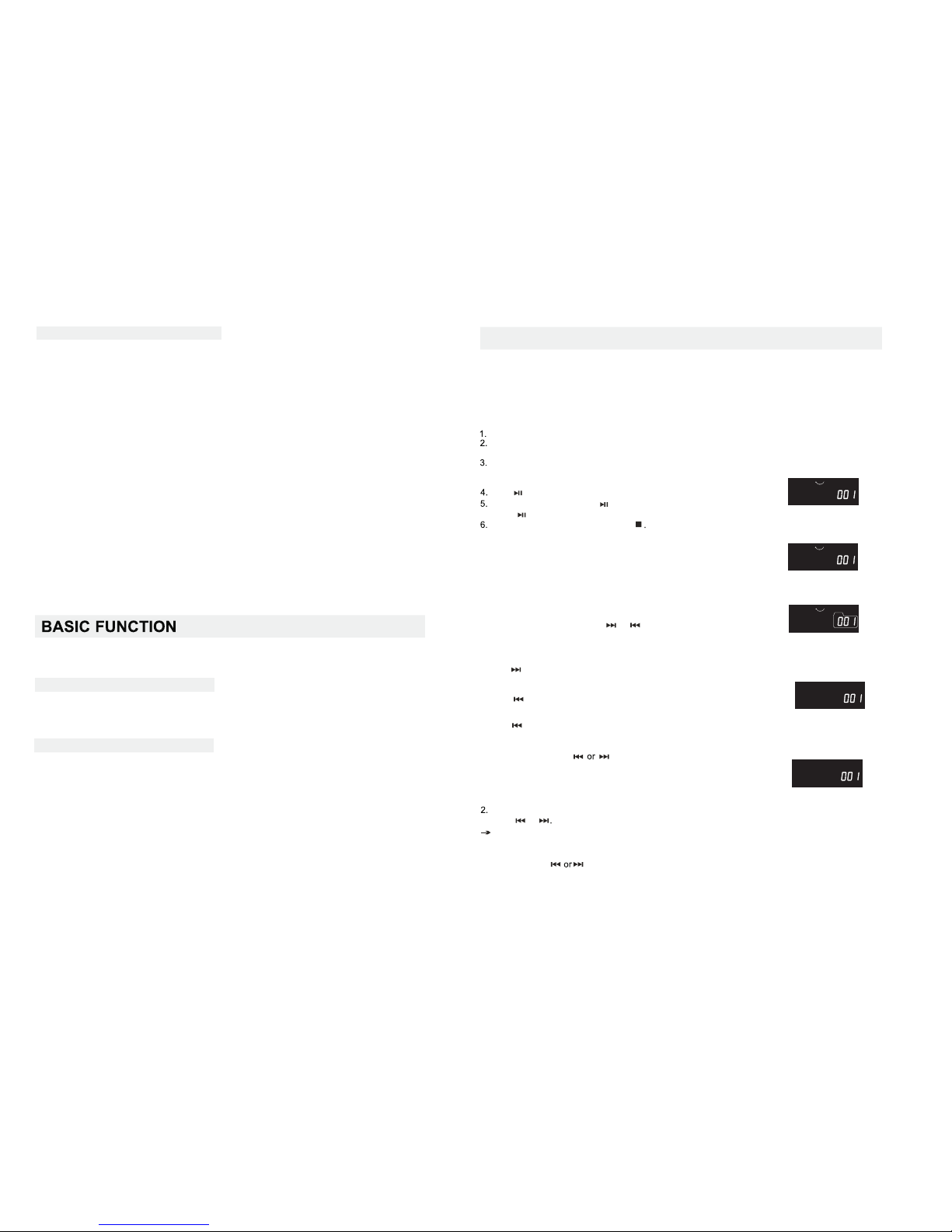
CD/MP3 PLAYER
Playing a CD/MP3
1.P ress & ho ld down c ontin ously.
The d isc wil l forwa rd or rew ind at hi gher
spe ed!
Dur ing thi s procc ess the re will b e no soun d until
you r eleas e the but ton
2>P layin g track s in Repe at mode h aving p resse d
Rep eat but ton twi ce,Th e
dis play wi ll appe ar as bel ow:
/Ra ndom
3>P
Rep eat/R andom b utton t hrice ,The
dis play wi ll appe ar as bel ow:
lay ing tra cks in Re peat mo de havi ng pres sed
1>P layin g track s in Repe at mode a fter ha ving
pre ssed th e Repea t/Ran dom but ton onc e.The
dis play wi ll appe ar as bel ow:
MP3
PLAY
REP.
MP3
PLAY
REP.ALL
MP3
PLAY
REP.ALL
ALBUM
5>W hen the R epeat /Rand om butt on is pre ssed
fiv e times ,the Ra ndom in dicat or ligh t goes
off T he un it retu rns to no rmal mo de.
The d is pla y will ap pear as b elow:
4>W hen the R epeat /Rand om butt on is pre ssed
fou r times ,the Re peat in dicat or ligh t goes of f
And th e Rando m mode is a ctiva ted.T he
dis play wi ll appe ar as bel ow:
Dif feren t play mo des:
Rep eat/R andom
Rep eat-P lays th e curre nt trac k conti nuous ly.
Rep eat all -Play s the ent ire CDc ontin uousl y.
MP3
PLAY
MP3
PLAY RANDOM
3. Pr es s the + 1 0/ FO L o r -1 0/ FO L- butt on on
the r emote t o the sel ect tra cks or fo lder.
-Yo u can u se t o se lec t a pa rt icu la r
tra ck.
-T he L CD d isp la y th e cur re nt song f ol der a fter
5 sec onds, T he disp lay wil l not sho w the fol der
if th ere are n o folde rs.
+
EN- 6
-you select the other mode of AUX or RADIO.
Not e:
-T he d is pla y wi ll o nly s ho w “MP3" w he n the F omat
of th e file is M P3.
-T he d is pla y wi ll o nly s ho w USB whe n au dio fil es a re
bei ng play ed from t he USB.
Rad io rece ption
1. Sl id e the F UN CT ION s el ector t o " RAD IO ”.
2. Sl id e the B AN D se lec to r to a desi re d setti ng - FM S TE RE O, FM ,A M.
3. Ro ta te th e TU NING co nt rol t o find th e desired s ta tio ns.
NOT E:If t he B AND sel ec tor is se t to t he FM s tereo s tatio n,th e FM s te reo L ED
ind icato r will li ght.
Rem ote co ntr ol
1. Op en the ba ttery c over to r emove i t.
2. In sert tw o (AAA) b atter y ( inclu ded) co rrect ly so tha t t he + and - po larit ies mat ch the po larit y
dia grams i nside t he batt ery com partm ent.
Ins tall ba ttery
Not e:
* The b at ter ies can l ast app roxim ately h alf a yea r for nor mal ope ratio n.
* Whe n the bat terie s are exh auste d, the re mote co ntrol w ill no lo nger op erate t he syst em.
Rep lace bo th batt eries w ith new o nes.
* Whe n the rem ote con trol is n ot to be us e for a lon g time, r emove t he batt eries t o avoid
dam age cau sed by ba ttery l eakag e and cor rosio n.
* Avoi d ke epi ng the re mote co ntrol i n extre mely ho t or humi d locat ions.
* Mak e sure th ere are n o obsta cles be tween t he remo te cont rol and t he sens or of the u nit.
The m aximu m angle p ermit ted is wi thin 30°.
* The r em ote c ontro l opera ting di stanc d is abou t 0.2 met ers to 6 me ters aw ay from t he remo te
sen sor.
- For a b etter AM r ecept ion , the u nit inc orpor ates a bu ilt-i n anten na whic h means t he visi ble
ant enna is o f no use. Direc t the who le unit t o obtai n the bes t possi ble sig nal.
Duri ng
playb ack
you
can
use
or
to
sele ct a parti cula r track in play or pause mod e.
· If you hav e selec ted a trac k numb er in the sto p or
paus e posit ion, pr ess play/pa use to st art pla ybac k.
· Press on ce bri efly fo r the next tr ack
Pres s repea tedl y until the desi red tra ck numb er appe ars
on the dis play.
· Press
once b rief ly to re turn to the be ginn ing o f a
curr ent tra ck.
· Press
more th an once f or a previ ous tra ck.
2.Connect the power cord to the AC MAINS inlet and the wall outlet. Press the power button
to switch on the unit .
The power supply is now connected and ready for use.
Adj ust the s ource s elect or to MP3 /CD
Press on the set to start playback
To paus e playb ack pre ss .
To resu me ,
pre ss agai n.
To stop C D playb ack,p ress ST OP
-yo u open th e CD comp rtmen t;
Not e:CD / MP3 p lay wil l also st op when :
Sel ectin g a diffe rent tr ack
Whe n you rec ogniz e the pas sage yo u want
rel ease or
Nor mal pla yback r esume s.
Usi ng AC Powe r
1.C heck if t he powe r volta ge, as sh own on th e type pl ate loc ated on t he bott om of the s et,
cor respo nds to yo ur loca l AC po wer sup ply. If it d oe s not , consu lt your d ealer o r servi ce
cen tre.
3.To sw itch of f co mpl etely, u np lug t he powe r cord fr om the wa ll outl et.
• Unp lug the p ower co rd from t he wall o utlet t o prote c your se t durin g heavy t hunde rstor ms.
- For a b etter F M recep tion, p ull out t he unro lling w ire ant enna
Red uce its l ength i f the sig nal is to o stron g (very c lose to a t ransm itter ).
1.To se lect yo ur soun d sourc e adjus t the sou rce sel ector t o MP3/A UX/RA DIO
2.A djust t he volu me cont rol bef ore pla ying ba ck and ma ke sure i t is low.
Whe n the uni t is not in u se, mak e sure th e switc h power i s set to OF F and avo id unne ccess ary
ene rgy con sumpt ion.
Fin ding a pa ssage w ithin a t rack
Pow er Supp ly
Gen eral op erati on
RAD IO
Page 5

2.P ress th e “ PROGR AM” but ton on th e remot e contr ol once .The di splay w ill app ear
as be low:
The p rogra m funct ion can o nly be op erate d from th e remot e contr ol whil e the uni t is on
sto p mode.
AUD IO CD
1.M ake sur e the uni t is on Sto p mode wi th a CD ins erted .
4
.
R
epe
at t
h
e abo
ve o
pe
ra
tio
n to pro
g
ram t h
e ne
xt f
a
vo
rit e tr
ac
k On
c
e you ha
v
e sel
e
ct
e
d
a
ll t
h
e tra ck
s you w i
s
h t
o he
ar,
p
re
ss t
he
”P
L
AY
” but
ton t o p
la
y th
e s
e
le
c
t
e
d au
dio f
ile
s
.
T
h
e di
sp
la
y w
i
ll a
p
pe
ar a
s fol l
ow
:
5.P
res s th
e “S
T
O
P
” but
t
on on
ce t
o sto
p the p
ro
g
ra
m pla y
. P
res
s the “ST
O
P” bu
tto n
o
nc
e mo
r
e to e
ra
s
e t
he s
el
e
c
ted p
rog
r
a
m
.
2. Pr ess the “ PROGR AM” but ton on th e remot e contr ol once . Th e
dis play wi ll appe ar as bel ow:
4.
R
epe
a
t t
he a
bo
ve op
e
ra
t
io
n t
o pr
o
g
ra
m th
e ne
xt f
a
vo
r
ite trac
k On
ce yo
u ha
ve s
e
le
ct
e
d
a
ll t
h
e track s y
o
u wi
sh t
o he
ar, pr
es
s the ”
P
LA
Y
”
bu
tt
on to p
la
y th
e s
e
le
c
t
e
d au
dio f
i
le
s
.
T
h
e d
is
p
lay w
i
ll a
p
pe
a
r as fo
ll
o
w:
MP3 D ISC
1. Ma ke sure t he unit i s in Stop m ode wit h a MP3 CD in serte d.:
Dif feren t play mo des: Pr ogram
PLAY PROGR AM Mp3
Pla ying a US B/SD
PLAY PROGR AM
PROGRAM
PROGRAM
PLAY
PLAY PROGR AM
PROGRAM
PROGRAM
MP3
PROGRAM
MP3
PLAY
MP3
EN- 7
EN- 8
PROGRAM
3.P ress bu tton to s elect y our fav orite t rack No . Th e LC D dis play wi ll appe ar
as fo llow, P ress “ PR OGRAM ” again t o confi rm your s elect ion.
Not e: -CD M P3 c an s upp or t a maxim um o f 99 tr acks fo r progr am.
-W he n pla ying an MP3 f il e thr ough a US B, the di splay w ill sho w USB.
SU PER B AS S FU NC TIO N:
BAS S-The S Y-8 035 i nclud es a “BAS S” func tion wh ich enh ances t he lowe r frequ encie s.
1. P res s th e "B AS S" b ut to n to acti va te a nd e nj oy the st un ni ng B as s Bo os t so un d.
Press onc e mo re t o de ac ti vat e th e fu nc ti on .
USB a udio fu nctio ns
1) PL AY/ PAUS E/STO P
2) NE XT/FW, B ACK/F B SKIP SE AR CH
3) +1 0 TR AC K/ -1 0 TR AC K SKI P SE AR CH
4) FO LDER UP /FOLD ER DOWN S KIP SEA RC H
5) PR OGRAM T RACKS (99 TRA CK S)
6) RE PEAT/ RA NDO M FU NCTIO N: SEQ UENCE AS B ELOW:
NOR MAL-> REPEAT 1 ->R EPEAT ALL -> RE PEAT ALBU MS- >RAND OM ->NO RMAL
-P re ss a nd ho ld t he [PLAY ] key m ore tha n 1.5se c at CD mod e ,The un it will c hange U SB mode .
The d ispla y will sh ow “USB ”. Your uni t is now re ady to pl ay MP3 fi les fro m your US B. Pres s the “PL AY”
but ton to st art lis tenin g to the fi rst tra ck
-To sw it ch b etw ee n the CD/ US B/S D funct ions, s imply p ress th e “STOP ” bu tto n durin g 1.5se c.
The u ni t wil l switc h from on e funct ion to th e other
Whe n the dis play sh ows “- - -“ , it mean s the uni t is read y to play t he cont ent on th e devic e conne cted.
Pre ss the “P LAY” but to n to st art the p layba ck.
- If th e unit fa ils to re ad the co nnect ed devi ce, the d ispla y will sh ow “NO” . Th is m ean s that yo ur devi ce
is no t compa tible w ith the S Y-8 035 . Chang e to anot her dev ice and t est aga in.
Not e:
-Wh en inse rting a U SB/SD d evice a nd if no CD i s inser ted ins ide the u nit, th e SY-803 5 wil l
aut omati cally r ead the U SB/SD .
-Du e to many f ormat s of USB an d SD card s, Syte ch cann ot guar antee a ll devi ces can b e read.
HDD a nd MP3 pl ayers m ay not be s uppor ted.
-Wh en the un it fail s to read a c onnec ted dev ice or no d evice i s conne cted, t he unit w ill aut omati cally
tur n to Stop m ode.
AUT O PO WER O FF ALAR M
Whe n the uni t is not be ing use d for ove r 10 minu tes in CD o r USB mod e. It wil l autom atica lly tur n to
“Po wer Off Al ar m”.
At th is time t he unit w ill ale rt you to s witch i t off by ev er y 10 se conds w ith a “Be ep” sou nd and wi ll repe at
eve ry 10 min utes in o rder to s ave ene rgy.
3.P ress or b utton s to sele ct your f avori te trac k No. The L CD d isp lay wil l appea r as
fol low.Pr ess “PR OGRAM ”agai n to conf irm you r selec tion.
Page 6
EN- 10
EN- 9
Ins ert a CD, MP3, CD -R.
•Ins ert a CD, MP3, CD -R.In sert a CD ,MP3, C D-R.
-No C D/MP3 i nsert ed
CD/ MP3/ US B/ SD p la yba ck d oe s not w or k
-CD /MP3 ba dl y scr atche d/dir ty/U SB /S D
Rep lace/ clean C D/MP3
(se e maint enanc e)
/U SB /S D
The C D/MP3 s kips tr acks
-CD /MP3 da maged o r dirty
Rep lace or c lean CD /MP3
Pre cauti on & Gene ral Mai ntena nce
•Pla ce the se t on a hard a nd flat s urfac e so that
the s ystem d oes not t ilt.
•Do no t expos e the set , batte ries or C Ds to
hum idity, r ai n, sa nd or exc essiv e heat ca used
by he ating e quipm ent or di rect su nligh t.
•Do no t cover t he set. A de qua te v en til at ion wit h
a min imum ga p of 6 inch es betw een the
ven tilat ion hol es and su rroun ding su rface s is
nec essar y to prev ent hea t build -up.
•The m echan ical pa rts of th e set con tain se lf lub ricat ing bea rings a nd must n ot be oil ed or
lub ricat ed.
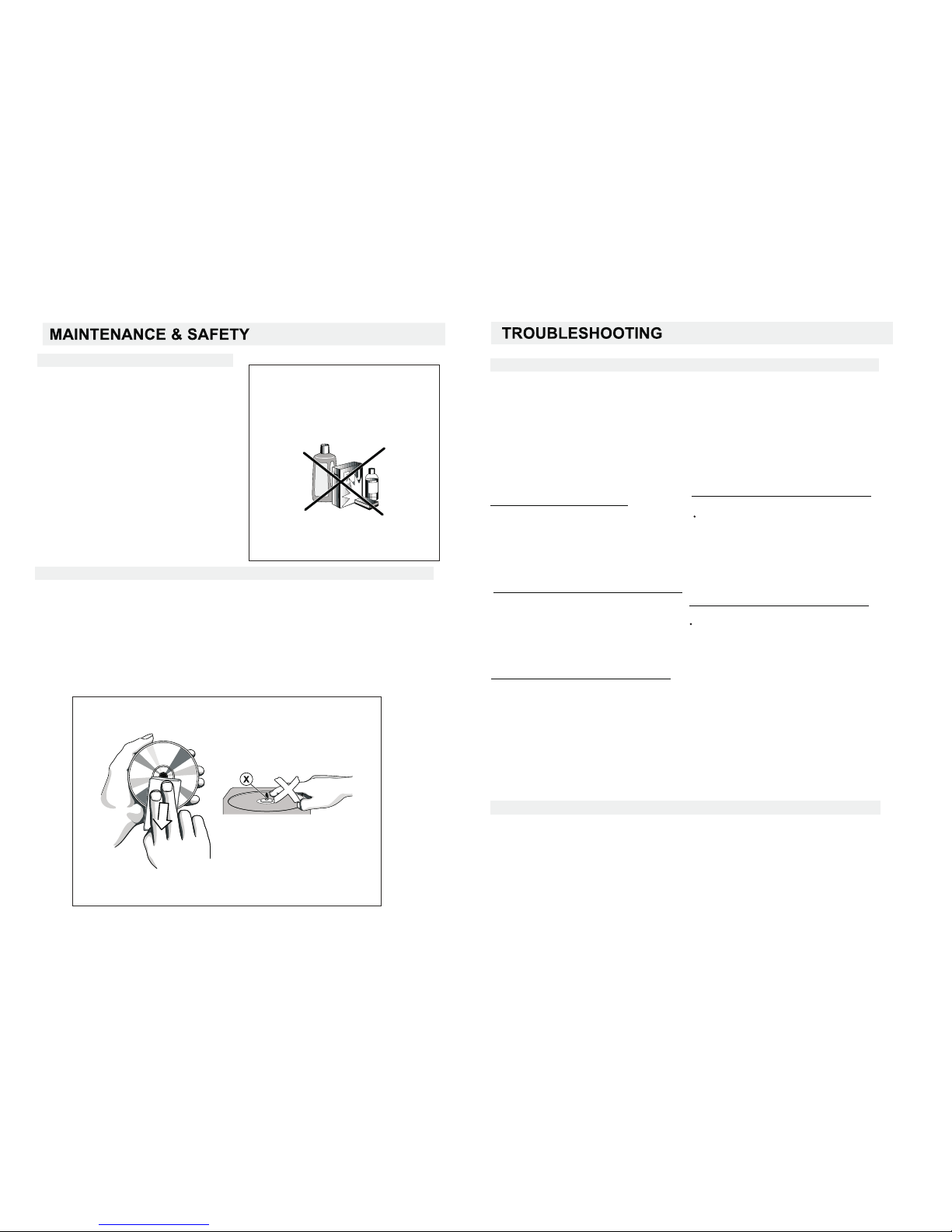
•To clea n the set ,use a so ft dry cl oth.D o not
use a ny clea ning ag ents co ntain ing alc ohol,
amm onia, b enzen e or abra sives a s these m ay
har m the hou sing.
•The l ens of th e CD play er shou ld neve r be touc hed!
•Sud den cha nges in t he surr oundi ng temp eratu re can ca use con densa tion to f orm and t he
len sof you r CD play er to clo ud over. Playi ng a CD is th en not po ssibl e.Do no t attem pt to
cle an the le ns but le ave the s et in a war m envir onmen t until t he mois ture ev apora tes.
•Alw ays clo se the CD d oor to ke ep the CD c ompar tment d ust-f rdd. To cle an , dus t the
com partm ent wit h a soft dr y cloth .
•
To clea n the CD, w ipe in a st raigh t line fr om the ce ntre to wards t he edge u sing a so ft,
lin t-fre e cloth . Do not us e clean ing age nts as th ey may da mage th e disc.
•Nev er writ e on a CD or at tach an y stick ers to it .
It is n ecess ary to cl ean you r CD lens a fter so me use. U se a CD len s clean ing set ( not inc luded )
Thi s wi ll he lp the un it to rec ogniz e the Audi o CD, MP3 C D's.
Not e: Syte ch will n ot be res ponsi ble for a p oor mai ntena nce of th e Optic al l en s.
Trou blesh ootin g
If a fa ult occ urs, fi rst che ck the po ints li sted be low bef ore tak ing the s et for re pair.
Do no t open th e set as th ere is a ri sk of ele ctric s hock.
If yo u are una ble to re medy a pr oblem b y follo wing th ese hin ts, con sult yo ur deal er or
The S ytech t echni cal dep artme nt.
WARN ING: Un der no ci rcums tance s shoul d you try t o repai r the set y ourse lf, as th is will
inv alida te the wa rrant y.
-Pr oblem
•Sol ution
No so und / pow er
- Volu me not ad juste d
•Adj ust the V OLUME
-po wer cor d not sec urely c onnec ted
•Con nect th e AC powe r cord pr operl y
Dis play do es not fu ntion p roper ly /NO
rea ction t o opera tion of a ny of the c ontro ls
-El ectro stati c disch arge
Swi tch off a nd u npl ug the se t.Rec onnec t
aft er a few se conds
•
- Las er lens s teame d up
•Wai t unt il lens h as adju sted to r oom
tem perat ure
-Pr ogram i s activ e
Qui t Progr am mode (s)•
No di sc indi catio n
-CD b adly sc ratch ed or dir ty
Rep lce/c lean CD ,see Ma inten ance•
-CD -R、is bla nk or the d isc is
not final ized
•Use a f inali zed CD- R.
Env ironm ental i nform ation
We ha ve d one o ur best t o reduc e the pac kagin g and mak e it easy t o separ ate int o 3 mater ials:
car dboar d,pap er pulp a nd expa ndabl e polye thyle ne.
Your s et co nsist s of mate rials w hich ca n be recy cled if d isass emble d by a spec ializ ed comp any.
Ple ase obs erve th e local r egula tions r egard ing the d ispos al of pac kagin g, dead b atter ies and
old e quipm ent.
CD pl ayer an d CD hand ing
Page 7

EN- 11
TECHNIC AL SP ECI FIC ATI ONS
GEN ERAL
REC EIVER S ECTIO N
Rec eivin g Bands AM/ FM
Tun ing R ange AM5 20 -1 620 KH z
FM: 88 -1 08M Hz
COM PAC T DIS C SECTI ON
Pow er Requ ireme nt AC :11 0/2 20 V~ 50/ 60 Hz
Pow er cons umpti on AC :2 0 Wat ts
Dim ensio ns Ap pr ox .47 8 mm (L )x2 32 m m(W) x 22 9 mm (H)
Ope ratio n tempe ratur e +5 ℃-+35℃
Opt ical Pi ckup 3- Be am L ase r
Fre quenc y Respo nse 100 Hz - 1 6K H z
AUD IO SECT ION
Pow er outp ut Maxi mu m 3 Wat t x 2
Hea dphon e Imped ance 4 ~ 32 O hm s
ACC ESSOR IES
Ins truct ion Boo klet 1
Rem ote con trol 1
MP3 K bps
USB c ompat ibili ty 1.1
SD co mpati tbili ty SD
Aud io form ats WMA /M P3
Mic ro HiFi , SY-803 5 1
Ins truct ion Boo klet 1
Rem ote con trol 1
Bat terie s 1
192 Kbps, 128Kb ps,96 Kbps, 64Kbp s,48K bps,
320 Kbps
 Loading...