

Page 1
Page 2
1) Read these instructions.
2) Keep these instructions.
3) Heed all warnings.
4) Follow all instructions.
5) Do not use this apparatus near water.
6) Clean only with dry cloth.
7) Do not block any ventilation openings, install in accordance with
the instructions.
8) Do not install near any heat sources such as radiations, heat
registers, stoves, or other apparatus
(including amplifiers) that produce heat.
9) Do not defeat the safety purpose of the polarized plug. If the
provided plug does not fit into your
outlet, consult an electrician for replacement of the obsolete outlet.
10) Protected the power cord from being walked on or pinched
particularly at plugs, convenience
receptacles, and the point where they exit from the apparatus.
11) On ly use a tt ac hm en ts /a cc es so ri es s pe ci fi ed b y th e
manufacturer.
12) Unplug this apparatus during lighting storms or when unused
for long periods of time.
13) Refer all servicing to qualified service personnel. Servicing is
required when the apparatus
has been damaged in any way, such as power-supply cord or plug
is damaged, liquid has been
spilled or objects have fallen into the apparatus, the apparatus has
been exposed to rain or
moisture, does not operate normally, or ha s be en d ro pped.
14) Mains plug is used as the disconnect device, the disconnect
device shall remain readily operable.
15) The ventilation should not be impeded by covering the
ventilation openings with items, such as
newspapers, table-cloth, curtains, etc.
16) No naked flame sources, such as lighted candles, should be
placed on the apparatus.
17) Attention should be drawn to the environmental aspects of
battery disposal.
18) The use of apparatus in moderate climate.
19) The apparatus shall not be exposed to dripping or splashing
and that no objects filled with
liquids, such as vases, shall be placed on the apparatus.
This marking indicates that this product should not
be disposed with other household wastes
throughout the EU. To prevent possible harm to the
environment or human health from uncontrolled
waste disposal, recycle it responsibly to promote
the sustainable reuse of material resources. To
return your used device, please use the return and
collection systems or contact the retailer where
the product was purchased. They can take th is
product for environmental safe recycling.
1
Important Safety Instructions
WARNING: To reduce the risk of fire or electric shock, do not
expose this apparatus to rain or moisture.
WARNING: The batteries shall not be exposed to excessive heat
such as sunshine, fire or the like.
CAUTION: Danger of explosion if battery is incorrectly replaced.
Replace only with the same or
equivalent type. (Only for with Lithium ion battery apparatus)
WARNING: The excessive sound pressure from earphones and
headphones can cause hearing
loss. (Only for with earphones port apparatus)
The symbol indicates that dangerous voltages constituting a
risk of electric shock are present within this unit.
The symbol indicates that there are important operating and
maintenance instructions in the literature accompanying this
unit.
This symbol indicates that this product incorporates double
insulation between hazardous mains voltage and user
accessible parts. When servicing use only identical
replacement parts.
Page 3

Notes on Copyrights:
It is forbidden by law to copy, broadcast, show,broadcast via
cable, play in public, or rent copyrighted material without
permission.
This product features the copy protection function developed by
Macrovision.Copy protection signals are recorded on some discs.
When recording and playing the pictures of these discs picture
noise will appear.This product incorporates copyright protection
technology that is protected by method claims of certain U.S.
Patents and other intellectual property rights owned by Macrovision
Corporation and other rights owners.Use of this copyright protection
technology must be authorized by Macrovision Corporation, and is
intended for home and other limited viewing uses only unless
otherwise authorized by macrovision Corporation. Reverse
engineering or disassembly is prohibited.
SERIAL NUMBER:
You can find the serial number on the back of the unit.This number
is unique to this unit and not available to others.You should record
requested information here and retain this guide as a permanent
record of your purchase.
Model No. ______________________________
Serial No. ______________________________
Date of Purchase_________________________
2
Safety Precautions
Warning: when the unit using by child, parents must make sure
to let the child understand all contents in Instruction book how
battery using to guarantee using battery correctly all the time.
Warning: we will not take any responsibility if user incorrectly
use battery, not f ol lo wi ng o ur warning instructi on label on the
battery case.
Warning: more than 250mm USB extension cord is prohibited
to use for USB port
Warning: This digital video disc player employs a laser system.
Use of controls,adjustments, or the performance of procedures
other than those specified herein may result in hazardous
radiation Exposure.
Warning: To prevent direct exposure to laser beam,do not open
the enclosure.Visible laser radiation when open.
Warning: Never stare directly into the laser beam.
Caution: Do not install this product in a confined space such
as a book case or similar unit.
RISK OF ELECTRIC SHOCK
DO NOT OPEN
WARNING
N
N
Page 4
Identification of Controls
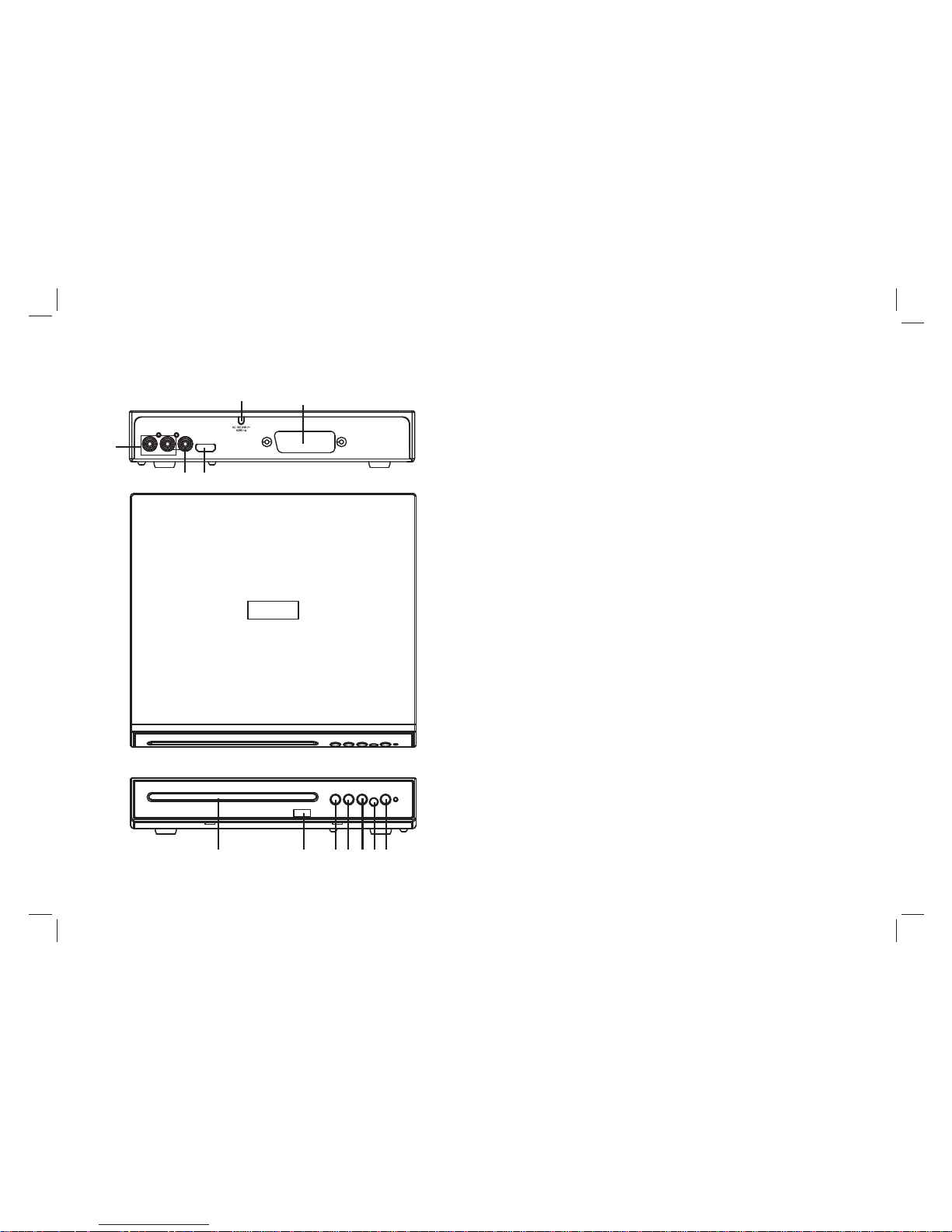
Main Unit
3
L
R
VIDEO HDMI
SCART
2
6
7
11
8
10
12
1 SCART.
.
.
.
7. USB
. OPEN/CLOSE KEY
9. PLAY/PAUSE
10. STOP KEY
11. REMOTE WINDOW
12. POWER KEY
24POWER CORD
VIDEO OUT
6 CD DOOR
8
9
1
3
4
5
3. AUDIO OUT/L/R(Left/Right)
5. HDMI
Page 5
4
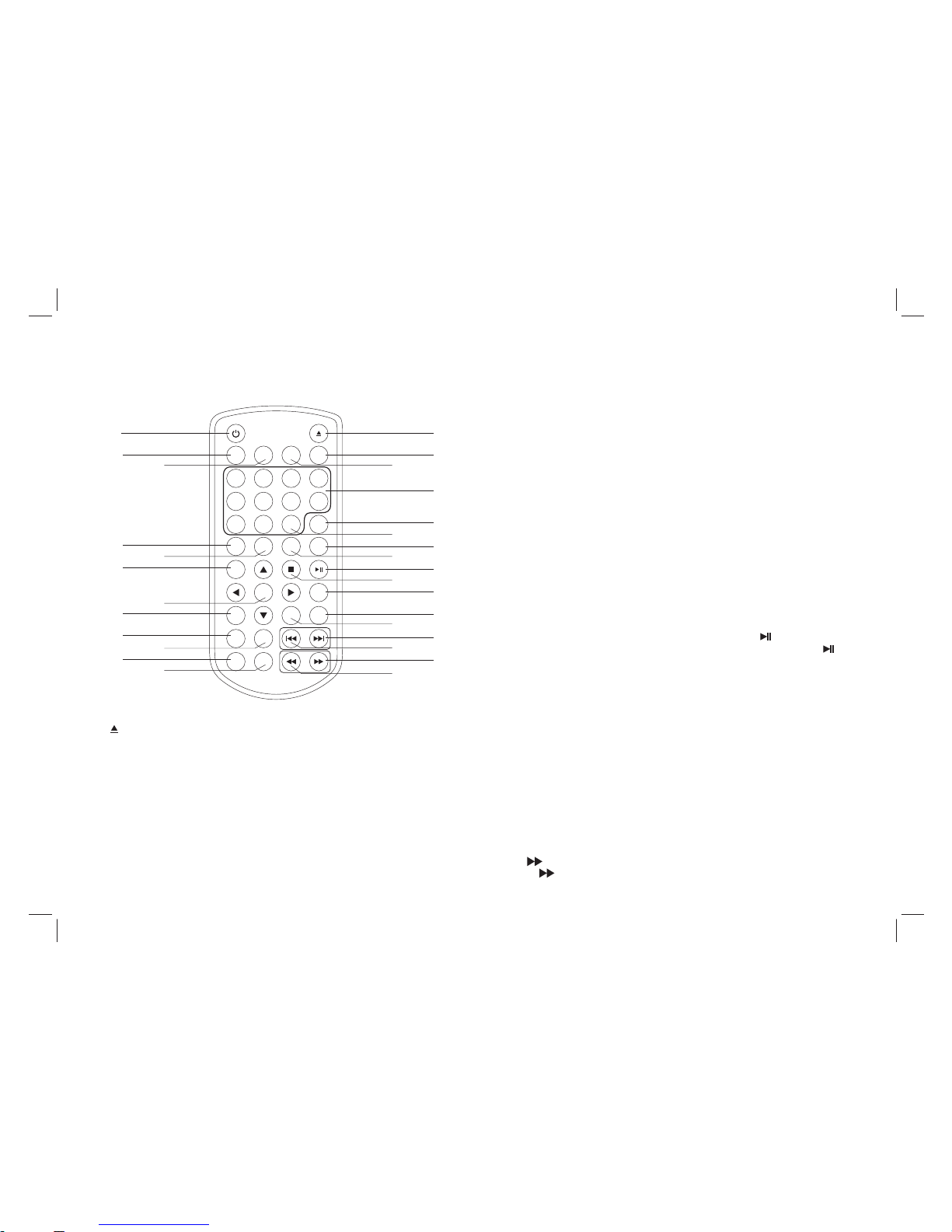
Remote control unit
Identification of Controls
1.
2. SOURCE
OPEN/CLOSE.
DVD/USB.
3. MUTE
Disable Audio output.
4.0-9 NUMBER BUTTON
Selects numbered items in a menu.
5.DISPLAY
To display the playtime and status information.
6.10+ BUTTON
In order to select a track 10 or greater, first press 10+, For example;
select track 12, first press 10+, and then press number 2 button.
7. MENU/PBC
Return to DVD root menu(DVD).
PBC on/off switch (VC D).
8.AUDIO
DVD:Press AUDIO repeatedly during playback to hear a different
audio language or audio track, if avilable.
CD/VCD:Press AUDIO repeatedly during playback to hear a
different audio channel ( Left,Right,Mix,Ster eo).
9.PLAY/PAUSE
Press PLAY/PAUSE once to pause playback, pressing
PLAY/PAUSE second time will resume the playback.
10.STOP
When this buttom is pressed once, the unit records the stopped
point,from where playback will resume if PLAY( ) is p re ss ed a ft er
wards. But if STO P button is pressd again instead of PLAY( )
button, there will be no resume function.
11.A-B
-repeat a specific segment
12.VOL+
Adjust volume
13.VOL-
Adjust volume.
14.Forward Skip
Go to next chapter/track.
15.Reverse Skip
Go to previous chapter/ track to the beginning.
16. BUTTO N
Press BUTTO N al lo w sk ip pi ng a he ad a t 5- le ve l sp ee d
(X2->X4->X8->X16->X32->PLAY) , pr es s PL AY button return to
normal playback.
19
20
3
2
1
4
5
6
7
8
9
10
11
12
14
15
16
17
29
28
27
26
13
25
24
23
21
22
1 2
3
4
5
6
7
8
9 0
10+
VOL -
VOL+
REPEAT
SEARCH
TITLE
ENTER
DISPLAY
SUBTITLE
A NGLE
AUDIO
MENU/
PBC
SETUP
ZOOM
STEP
MUTE
SOURCE
A-B
SLOW
PROGRAM
18
Page 6

Identification of Controls
5
Remote control unit
17. BUTTO N
Press BUTTO N al lo w sk ip pi ng b ac k at 5 -l ev el s pe ed
(X2->X4->X8->X16->X32->PLAY) , pr es s PL AY button return to normal
playback.
18.
Normal play/Standby mode switch.
19.STEP
Step the motion in DVD mode.
20.SEARCH
Goto time point, title or chapter you want in DVD Mode.
21.SUBTITLE
Press SUBTITLE repeatedly during playback to hear a diffe re nt sub ti tl e
languages.
22.ANGLE
DVD:Press ANGLE will change the view angle, on DVDs that support
this feature.
23.TITLE
Return to DVD title menu.
24.ENTER
Confirms menu selection.
25.SETUP
Accesses or removes setup menu.
26.REPEAT
Press REPEAT during playback to select a desired repeat mode.
DVD: you can play select repeat chapter/title/off .
CD/VCD: you can select repeat single/all/off.
MP3: you can select repeat single/folder/off.
27.SLOW
Press Slow button repeatedly to enter slow playback, and cycle
between different speeds. The speeds are 1/2,1/4,1/8,1/16,
and normal.
28.PROGRAM
DVD/VCD: The program function enables you to store yo ur fav ou ri te
tracks from the disc. Press PROGRAM button, then PROGRAM MENU
will appear on screen, now you can use the number key to direct input
the titles,chapters or tracks number and select PLAY option. TO
resume normal playback, press PROGRAM and select clear program
option on the program menu,press PROGRAM again to exit program
menu.
29.ZOOM
DVD/VCD: Use ZOOM to enlarge or shrink the video image.
1.Press ZOOM during playback or still playback to activate the
Zoom function. Th e square fra me a ppears briefly in th e ri gh t bo tt om
of the picture.
2. Each press of the ZOOM button changes the TV s cr ee n in t he
following sequence:
JPEG: Use ZOOM to enlarge or shrink the picture.
1.Press 'ZOOM' .
2,Used " " to enlarge,or " " to shorten the picture.
Use the button to move through the zoomed picture.
Page 7
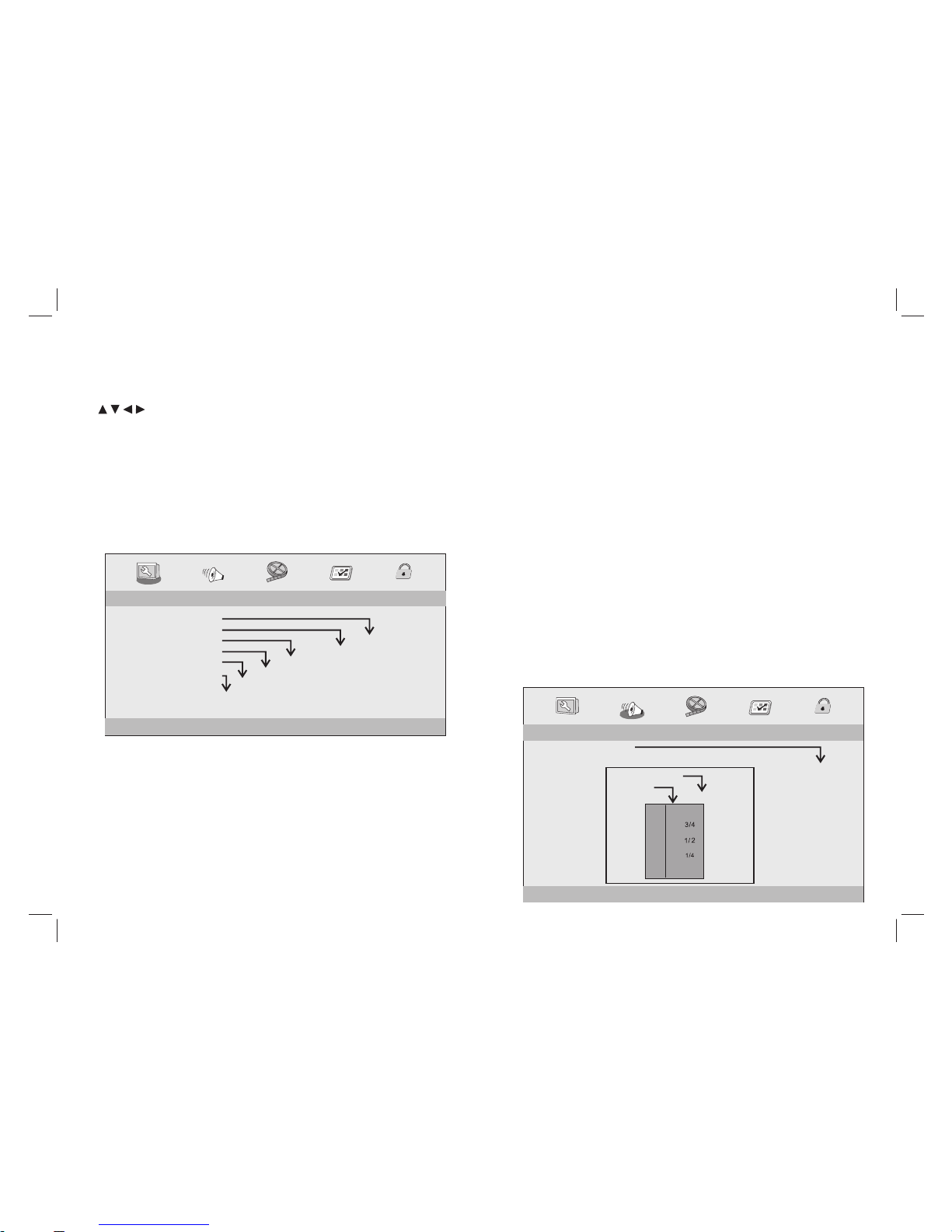
SETUP Menu Setting
General Setup Page
6
Angle Mark
Displays current angle setting information on the right hand corner
of the TFT screen if available on the disc.
OSD Language
You can select your own preferred language seetings.
Closed Captions
Closed captions are data that are hidden in the video signal of some
discs.Before you select this function,please ensure that the disc
contains closed captions information and your TV set also has this
function.
Screen Saver
This function is used to turn the screen saver On or Off.
Auto Standby
This function is used to select auto standby settings after 3 or 4 hours.
3 HOURS: the unit will turn to standby mode after 3 hours if there is
no interaction from user within this period of time.
4 HOURS: the unit will turn to standby mode after 4 hours if there is no
interaction from user within this period of time.
OFF: the auto standby function is disabled, and unit will stay in “on”
mode even if no interaction from user.
Audio Setup Page
Press SETUP butto n to g et t he s et up m en u. U se d ir ec ti on b ut to ns
to select the preferred item. After finishing settings, press
SETUP again to normal display.
The following menu items can be changed:
GENERAL: selects the GENERAL PAGE menu.
AUDIO: selects the AUDIO PAGE m en u.
VIDEO: selects the VIDEO PAG E me nu .
PREFERENCE : selects the PREFERENCE PAGE m en u.
PASSWO RD : se le ct s th e PASSWORD PAGE menu.
General Setup Page
- - GENERALSETUP PAGE - -
GOTO GENERAL SETUP PAGE
TV DISPLAY WIDE
ANGLE MARK ON
OSD LANGUAGE ENG
CLOSED CAPTIONS ON
SCREEN SAVER ON
AUTO STANDBY 3H
4:3 PANSCAN
4:3 LETTERBOX
16:9
ON
OFF
ENGLISH
FRENCH
GERMAN
ITALIAN
SPANISH
PORTUGUESE
ON
OFF
ON
OFF
TV DISPLAY: selects the aspect ratio of the playback picture.
4:3 PANSCAN: if yo u have a normal TV and want both sides of the
picture to be trimmed or formatted to fit your TV s cr ee n.
4:3 LETTERBOX: if you have a normal TV. In this case, a wide
picture with black bands on the upper and lower portions of the TV
screen will be displayed.
16:9:wide screen display.
-- --
DOWNMIX
STR
DOLBY DIGITAL
LT/RT
DUAL MONO
DYNAMIC
STR
STR
L-MONO
R-MONO
MIX-MONO
-
-
-
-
-
-
-
-
-
-
-
-
-
-
-
-
-
-
FULL
OFF
-
- - - -AUDIO SETUP PAGE
GO TO AUDIO SETUP PAGE
STEREO
Audio Setup Page
3 HOURS
4 HOURS
OFF
Page 8
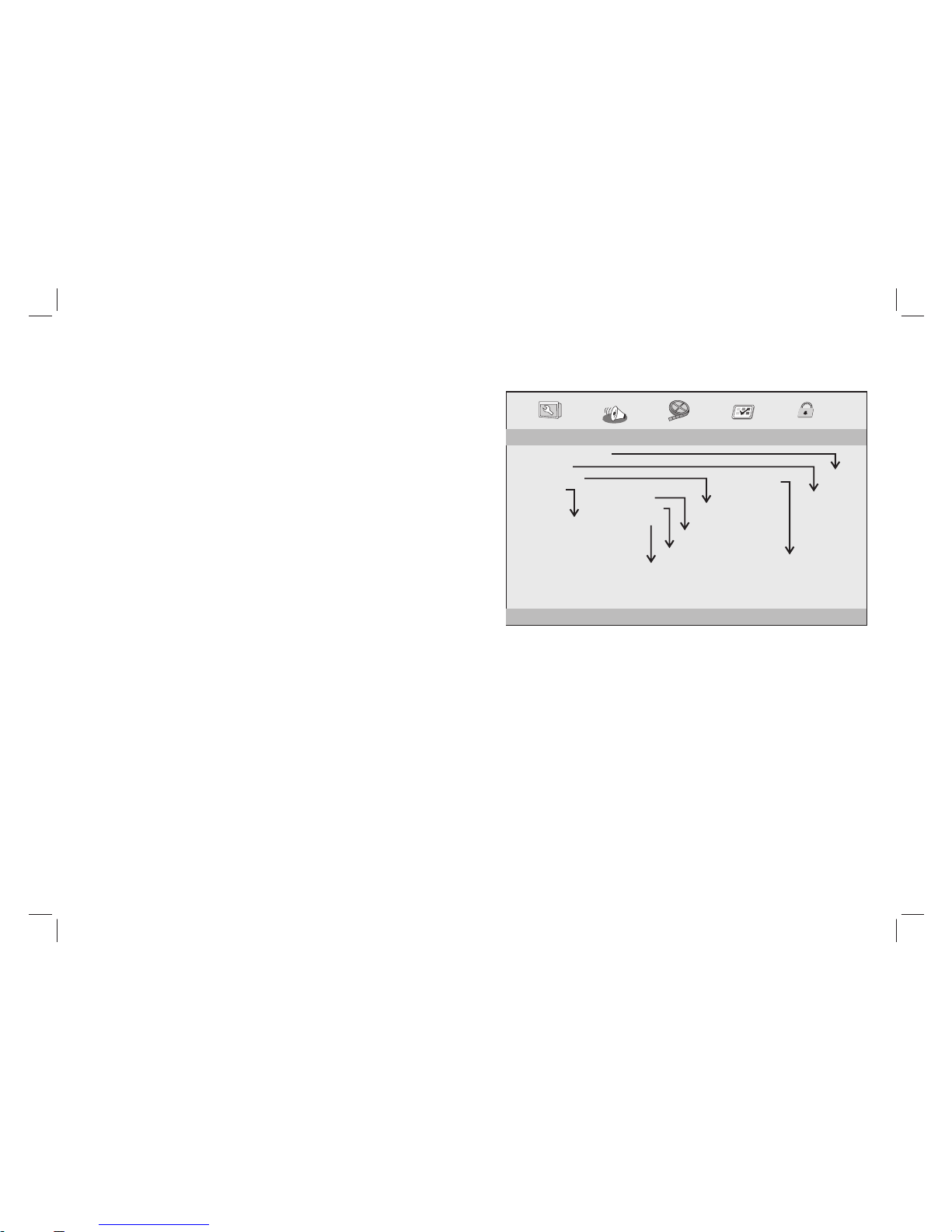
SETUP Menu Setting
7
Downmix
This options allows you to set the stereo analog output of your
DVD Player.
→
Dolby Pro Logic decoder.
→ Stereo :Select this option when output delivers sound from only
the two front speakers.
Dolby digital
The options included in Dolby Digital Setup are: 'Dual Mono ' and
'Dynamic '.
Dual Mono
→ Stereo:Left mono sound will send output signals to Left speaker
and Right mono sound will send output signals to Right speaker.
→ L-Mono:Left mono sound will send output signals to Left speaker
and Right speaker.
→ R-Mono:Right mono sound will send output signals to Lef t speaker
and Right speaker.
→ Mix-Mono:Left and Right mixed mono sound will send output
signals to Left and Right speakers.
Dynamic
Dynamic range compression.
LT/R T :Select this option if your DVD Player is connected to a
Audio Setup Page
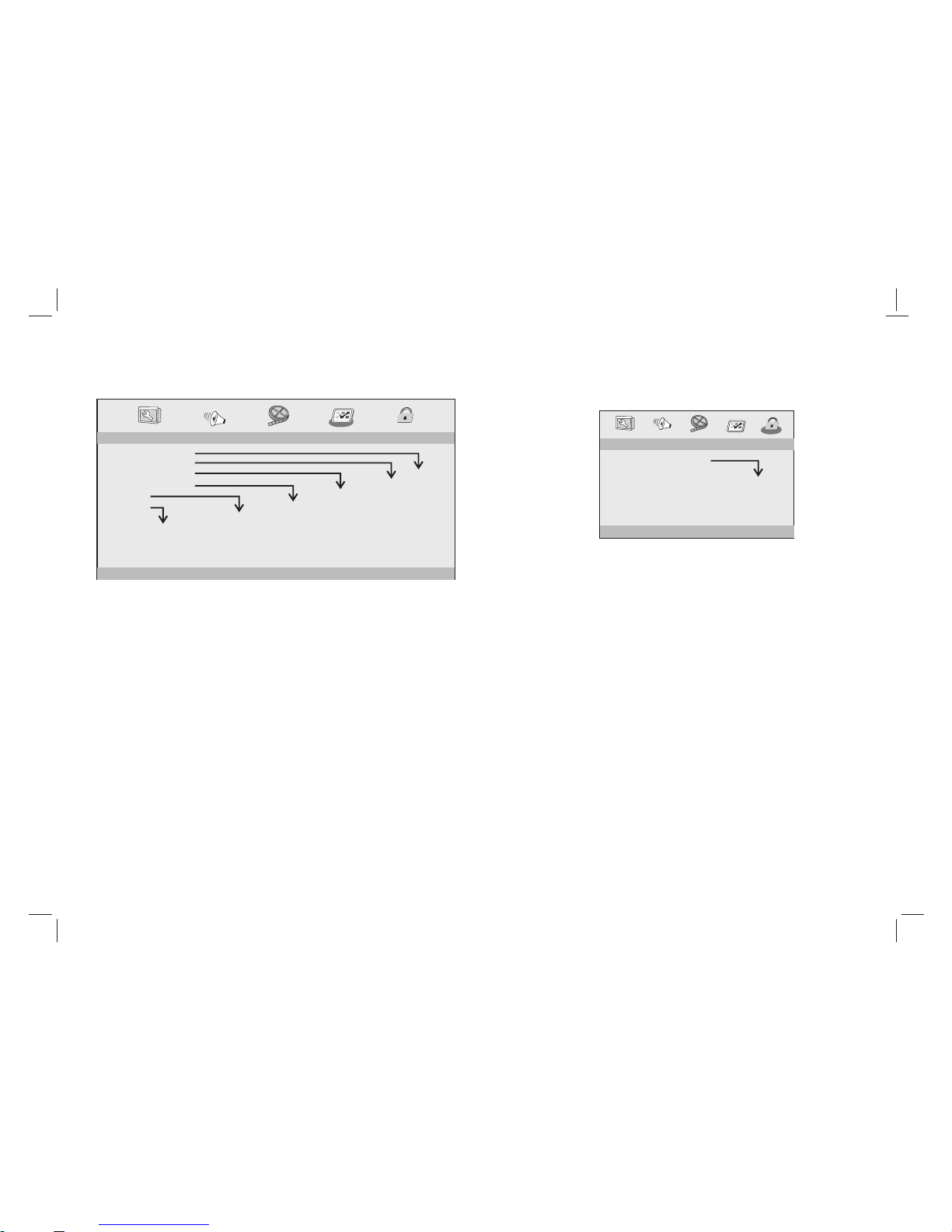
Video Setup Page
VIDEO OUTPUT
Set it for SCART output.
RESOLUTION
Please select proper resolution according to your TV, otherwise the
TV will have no signal.
COLOR SETTING
Setting the video quality.
HDMI
Setting the options related to the HDMI.
-- --
VIDEO OUTPUT RGB
RESOLUTION
COLOR SETTING
HDMI SETUP
- - - -VIDEO SETUP PAGE
RESOLUTION
480I
480P(720)
720P(60Hz)
1080I(60Hz)
1080P(60Hz)
576I
576P(720)
720P(50Hz)
1080I(50Hz)
1080P(50Hz)
24BIT
30BIT
36BIT
SHARPNESS
BRIGHTNESS
CONTRAST
HUE
SATURATION
MID
00
00
00
00
HIGH
MEDIUM
LOW
HDMI
AUDIO SOURCE
DEEP-COLOR
ON
AUTO
24BIT
ON
OFF
AUTO
PCM
RGB
OFF
Page 9
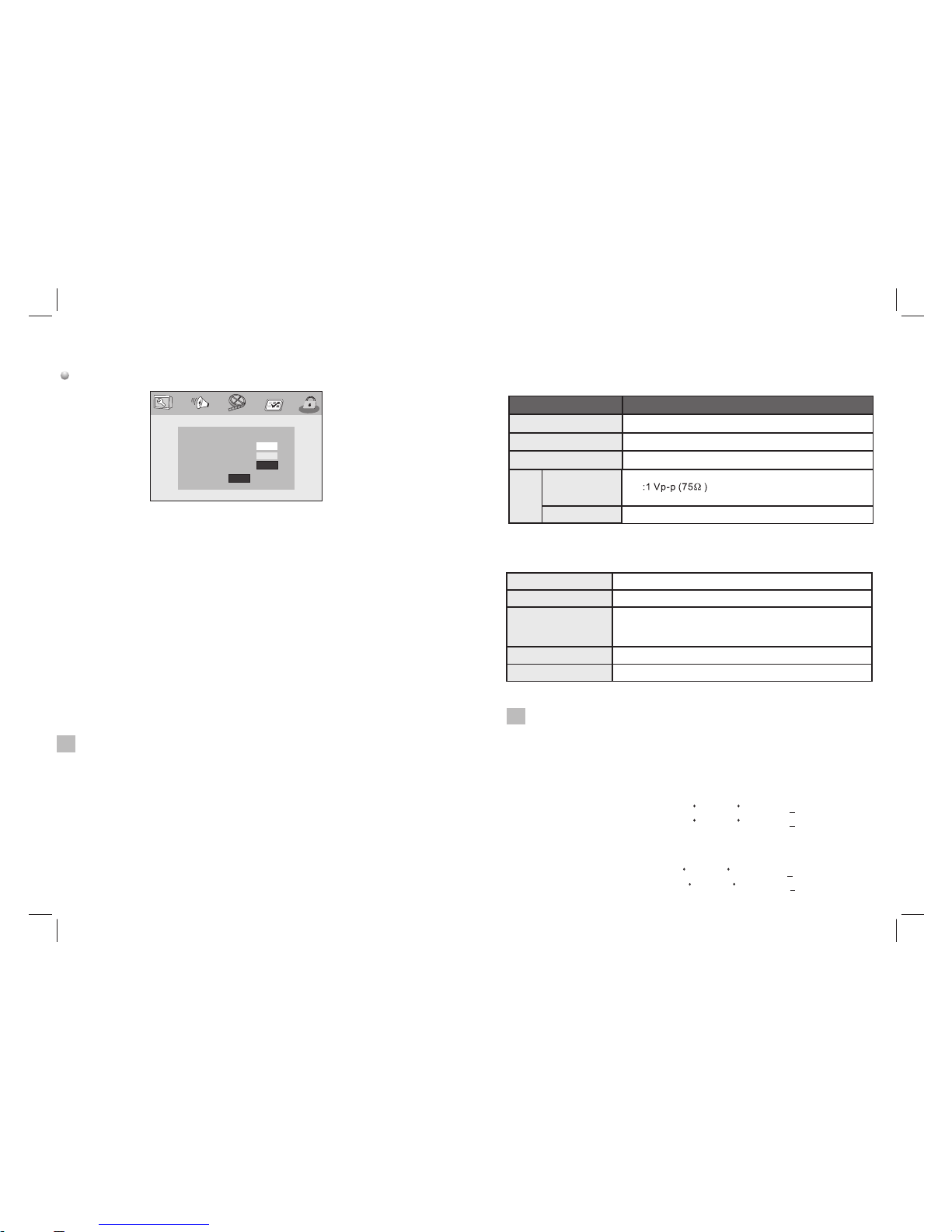
8
Preference Page
Preference Page
- - PREFERENCE SETUP PAGE - -
GOTO PREFERENCE PAGE
TV TYPE PAL
AUDIO ENG
SUBTITLE ENG
DISC MENU ENG
PARENTAL
DEFAULT
PAL
AUTO
NTSC
1 KID SAF
2 G
3 PG
4 PG13
5 PGR
6 R
7 NC17
8 ADULT
RESET
TV Type
Selecting the colour syste m th at corresponds to your TV when AV
outputs.This DVD Player is c om patible with both NTSC and PAL.
ENGLISH
FRENCH
GERMAN
ITALIAN
SPANISH
PORTUGUESE
ENGLISH
FRENCH
GERMAN
ITALIAN
SPANISH
PORTUGUESE
OFF
ENGLISH
FRENCH
GERMAN
ITALIAN
SPANISH
PORTUGUESE
SETUP Menu Setting
PAL - Select this if the connected TV is PAL system.It will c ha ng e th e
video signal of a NTSC disc and output in PAL format.
NTSC-Select this if the connected TV is N TS C sy st em .I t wi ll c ha nge
the video signal of a PAL disc and output in NTSC format.
Auto:Chang the video signal output automatic according to the
playing disk format.
Audio:Selects a language for audio (if available).
Subtitle:Selects a language for subtitle (if available).
Disc Menu:Selects a language for disc menu (if available).
Parental
Some DVDs may have a parental level assigned to the complete disc
or to certain scenes on the disc.This feature lets you set a playback
limitation level.The rating levels are from 1 to 8 and are country
dependent. You can prohibit the playing of certain discs that are not
suitable for your children or have certain discs played with alternative
scenes.
Default:Back to the factory setting.
Password Setup Page
Password Setup Page
- - PASSWORD SETUP PAGE - -
GOTO PASSWORD SETUP PAGE
PASSWORD MODE ON
PASSWORD
ON
OFF
Password mode: Set password mode on/off . If s et t o off, change
parental level will not check password.
SETUP Menu Setting
Page 10
9
Password: select the menu password change page.
Password Setup Page
OSD PASSWORD
NEW PASSWORD
CONFIRM PWD
OK
OSD PASS WO RD : En te r th e OL D pa ss wo rd , (F ac to ry s et ti ng i s
1369), and the cursor will jump automatically to
NEW PASS WO RD .
NEW PASS WO RD : En te r th e NE W pa ss wo rd . En te r 4 di gi ts f ro m
the remote control unit numeric buttons, and the
cursor will automatically jump to CONFIRM PASS WO RD .
CONFIRM PASS WO RD : Co nf ir m th e NE W pa ss wo rd b y en te ri ng
it again. If the confirmation is incorrect, the cursor
will stay in this column. After entering, the correct new password
again, the cursor will jump automatically to OK.
OK: When cursor is on this button, press ENTER key to confirm
setting.
Note: If the password has been changed, the parentaland disc
lock code will also be changed.
The default password(1369)is always active even the password
has been changed.
N
Item
Standard requirement
Output
VIDEO O UT
AUDIO O UT
:2 Vrms (1 KHz , 0 dB)
Power r equirem ents
Power c onsumpt ion
Opera ting humi dity
: AC 100-2 40 V , 50/60 Hz
: <10W
: 5 % to 90 %
Parameters and specifications
Electronical parameters
System
Laser
:Semi conduct or laser, wa velengt h 650 nm
Signa l system
: NTSC / PAL
Frequ ency
respo nse
Sig nal-t o-noi se rati o
:More t han 80 dB (AN ALOG OUT connect ors only)
Dynam ic range
:More t han 85 dB (DV D/CD)
Note: Design and specifications are subject to change prior notice.
: 20Hz to 2 0 kHz(1dB )
N
Storage and work circumstances:
1. Storage circumstances Temp er at ur e Hu mi di ty
2.Wor k ci rc um st an ce s Temperature Humidity
6 months
-20 C +45 C~
-20 C +65 C~
65+20%
65+20%
Standard charge
Standard discharge
0 C +45 C~
-20 C +65 C~
65+20%
65+20%
1 week
Page 11

Declaration of Conformity
Manufacturer Name: Satyatrade S. L.
Address: Pol.Ind.La Raya. C/ Guadalquivir, 2.
Camarma de Esteruelas, 28816 Madrid
Tel: 902 430 967
Fax: 91 8864285
NIF: B83254763
Manufacturing country: China
Description: DVD player
Sytech® SY-438 complies with the following directives:
CE Standard: Directive 2004/108/EC
LVD Standard: Directive 2006/95/EC
ROHS Standard: Directive 2011/65/EU Restriction of Hazardous Substances
Signed: Ajeet Nebhwani Utamchandani
Sole Administrator
 Loading...