

Page 1
Y-2024
S
Page 2
Fo
r C
ustomer Us
e
E
n
te
r b
elo
w th
e S
e
ri
al N
o
. whi
ch is located
O
n t
h
e b
o
t
to
m of the ca
bin
e
t. R
eta
in t
h
i
s
In
fo
r
mati
on fo
r f
u
t
u
re r
e
f
e
ren
c
e
.
Mo
d
e N
o.
Se
ri
al N
o
.
EN-2
PREPARATION FOR USE
Unpacking and Setup
* Carefully remove the unit from the display carton and remove all packing material from the unit itself.
* Remove any descriptive labels that may be found on either the front or top cabinet of the unit. Do not
remove any labels located on either the back or button cabinet of the unit.
* Press the CD door OPEN Button to open the CD compartment door. There is a white card in the CD
compartment which is intended to prevent the CD pickup from moving during shipment of the product,
Remove this card from the CD compartment before use.
,
,
,
,
,
,
,
,
Batteries (not included)
Open the battery compartment and insert eight batteries, type LR14, UM-2 or C-cells,
(preferably Alkaline) with the correct polarity as indicated by the + and - symbols
inside the compartment
Batteries contains chemical substances, so they should be disposed of properly.
Incorrect use of batteries can cause electrolyte leakage and will corrode the compartment or
cause the batteries to burst. Therefore:
Do not mix battery types: e.g. alkaline with carbon Zinc. Only use batteries of the same
type for the set.
When inserting new batteries, do not try to mix old batteries with new ones.
Remove the batteries if the set is not be used for a long time.
Using AC power
1.Check if the power voltage, as shown on the type plate located on the bottom of the set,
corresponds to your local AC power supply. If it does not , consult your dealer or service centre.
2.Connect the power cord to the AC inlet and the wall outlet. the power supply is nowsocket
connected and ready for use.
3.To switch off completely, unplug the power cord from the wall outlet.
Unplug the power cord from the wall outlet to protect your set during heavy thunderstorms.
Page 3
20
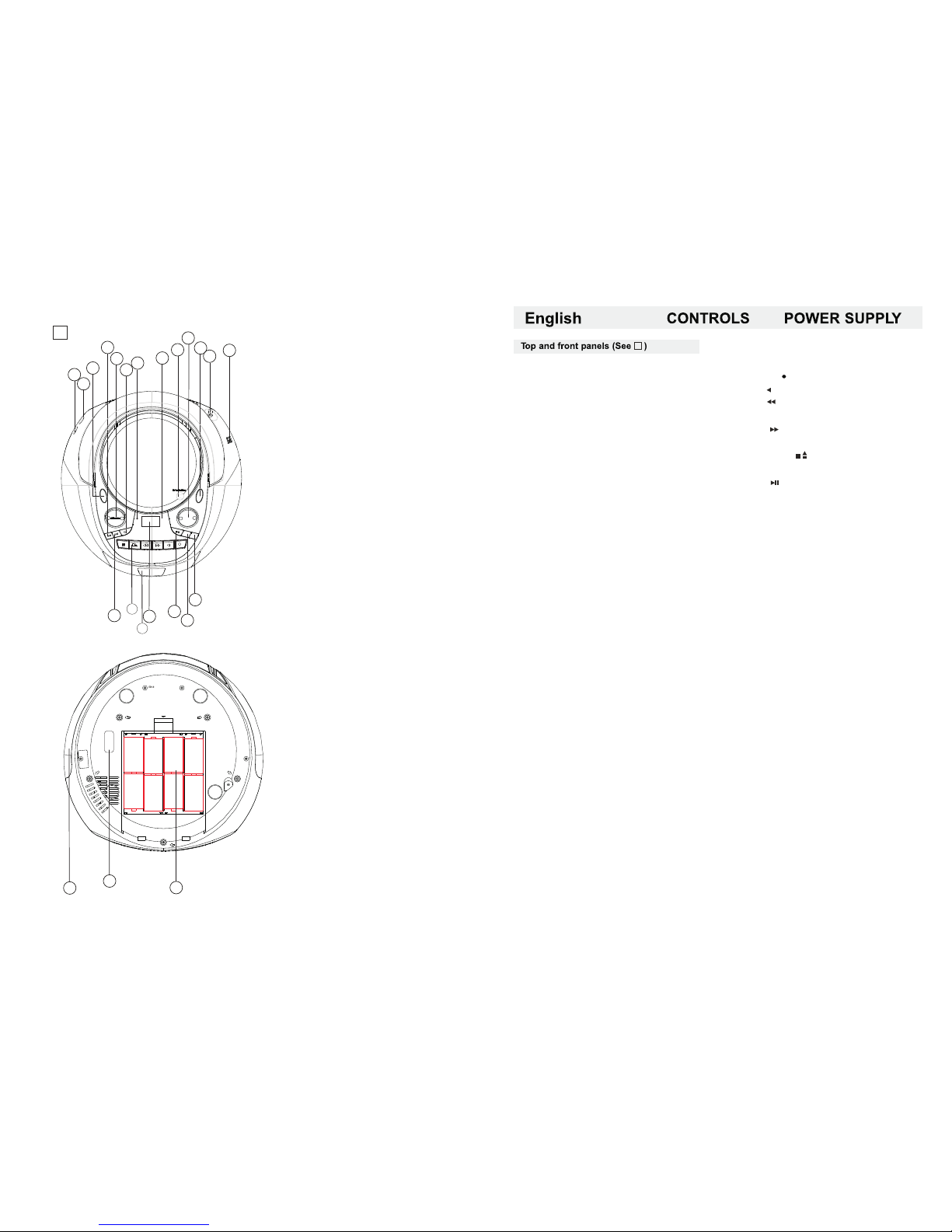
1.POWER BUTTON
2.SEARCH BACK
3.VOLUME BUTTON
4.STOP BUTTON
5.REMOTE SENSOR
6.STANDBY INDICATOR
7.CD DOOR OPEN/CLOSE BUTTON
8.PRE-DN/PRE-UP BUTTON
9.FUNCTION SELECT
10.FM ANTENNA
11.USB JACK
12.SEARCH NEXT
13.CASSETTE RECORDERS KEYS
14.CASSETTE DOOR
15.LCD DISPLAY
16.PLAY/PAUSE BUTTON
17.REPEAT BUTTON
18.TIME/PROGRAM BUTTON
19. AUX JACK
20.STEREO HEADPHONE JACK
21.BATTERY DOOR
22.VOLTAGE SELECTOR
23.AC SOCKET
1
2
3
4
6
7
8
9
10
11
18
19
OPEN
BATT.SUPPLY:UM-2 LR14 SIZE "C" 1.5VX8
21
12
15
16
17
22
23
EN-3
EN-4
13.CASSETTE RECORDERS KEYS
RECORD ( ) - start recording
PLAY ( ) - start playback
F.FWD ( ) -rewind the tape
toward the beginning.
F.REW ( ) -advance the tape
toward the end.
STOP/EJECT ( ) - stop the tape
- open the cassette compartment
PAUSE ( ) - interrupt recording or
playback
14.CASSETTE DOOR
15.LCD DISPLAY
- Show the FM dial frequency.
- Show the number of tracks.
- Show the time.
16.PLAY/PAUSE BUTTON
- Start or pause MP3/CD/USB playback.
- In the radio mode, press this button will enter
the low end of the manual channel scan mode.
17.REPEAT BUTTON
- Repeat a track CD/MP3/USB program.
- Repeat mode : repeat ->repeat all->
repeat album ->normal
18.TIME/PROGRAM BUTTON
-In standby mode, to setup the time of the unit.
-Program and review programmed track numbers.
-In the working status, press this button can of
CD/MP3/USB/RADIO for programming.
19.AUX JACK
-Press FUNCTION button , select AUX station.
Play Mp3、DISCMAN、 WALKMAN AUX
insert when no disc.
NOTE: please take out the CD disc.
20.STEREO HEADPHONE JACK
- 3.5 mm stereo headphone jack.
21.BATTERY DOOR
- To open battery compartment.
22.VOLTAGE SELECTOR
- To select the voltage.
23.AC SOCKET
- Inlet for power cord.
-Press POWER button to turn on/off power.
2.SEARCH BACK
-To setup the time of the unit.
-To select back track of CD/MP3/USB.
-Press this button 1.5 sec backward
search intra track.
-In the radio mode, press this button will enter
the low end of the manual channel scan mode.
3.VOLUME BUTTON
- Press the VOLUME button mark place adjust
volume level.
4.STOP BUTTON
- Stop CD/MP3/USB playback; erase a CD program.
5.REMOTE SENSOR
6.STANDBY INDICATOR
7.CD DOOR OPEN/CLOSE BUTTON
- Press here to open/close the CD door.
8.PRE-DN/PRE-UP BUTTON
PRE-DN BUTTON
- In the radio mode, press PRE-DN button mark
place to choose the back channel.
- In the mp3 mode, press PRE-DN button mark
place to enter the back folder.
PRE-UP BUTTON
-In the radio mode, press PRE-UP button mark
place to choose the next channel.
-In the mp3 mode, press PRE-UP button mark
place enter into the next folder.
9.FUNCTION SELECT
- Select source of sound CD/USB/AUX/TAPE/RADIO.
10.FM ANTENNA
- To improve FM reception.
11.USB JACK
-To listen to your USB with Mp3 music files.
12.SEARCH NEXT
-To setup the time of the unit.
-To select back track of CD/MP3/USB.
- Press this button 1.5 sec forward
search intra track.
- In the radio mode, press this button will enter
the high-end manual channel scan mode.
1.POWER BUTTON
1
1
5
13
14
Page 4

EN-5
EN-6
To setup the time of the unit
1.Connect the ac on(The following operation must be in standby mode).
2.Short according to the time button, the time will flashing on the lcd display.
3.Press BACK、NEXT to select the number of the time. you can setup the time format by
12h or 24h.
4.Press time button to confirm.
5.Then you can set the hour and the minute with the same method of steps 3-4.
6.After setup the unit time, long press the time button can setup the unit begin working time ,
with the same method of steps 3-4.
Radio reception
1.Press FUNCTION button select RADIO mode.
2.Tune to required station by press BACK、NEXT or PRE-UP、 PRE-DN button.
Manual Tuning: Press BACK or NEXT button and then release within 1 sec.
Auto Tuning: Press the PLAY/PAUSE button enter the automatic channel
surfing mode, and to be put automatically sets.
Preset Channel:(FM 30 Preset memories)
(1) Press BACK or NEXT button select desired station.
(2) Press PROGRAM button once , The MEMORY number indicator begins steady in the display.
(3) Press PRESET-UP OR PRESET DOWN buttons to select the desired number.
(4) Press PROGRAM button to save that station.
(5) Repeat steps (1) to (4) procedures for other stations.
3.After end of program. Press PRE-UP or PRE-DN to start play the frequency that you selected or
Press number key on the remote control .
4.Press [VOL-]or [VOL +] to adjust the volume.
5.Extend TELESCOPIC ANTENNA to its full length if you are listening to FM broadcasting.
6.Turn off the radio by press FUNCTION button select other mode or press power button to off the unit.
7.Switch on again after shut down, the memory frequency still exists.
USE REMOTE CONTROL OTHER IMPORTANT BUTTON
RANDOM BUTTON
-In the player CD/MP3/USB/AUX , press the RANDOM button can be played at random.
Press again to cancel.
BBS BUTTON
-In the player CD/MP3/USB/AUX/RADIO, press the BASS button can make into the bass state.
Press again to cancel.
EQ BUTTON
-In the player CD/MP3/USB/AUX/RADIO, press the EQ button to change music style.
-When playing the music, press this button is in the classica-rock-popular-jazz-FLR.
MUTE BUTTON
-In the player CD/MP3/USB/AUX/ RADIO,press the MUTE button to enter the mute state.
Press again to restore volume.
INTRO BUTTON
-In the player CD/MP3/USB,press the INTRO button into 10 seconds browsing repertoire state,
press again cancel browse.
Page 5

EN-7
EN-8
USING THE CASSETTE
UNDERSTANDING THE BUTTONS
RECORD - Press to record from the radio or CD play.
PLAY - Press to play cassettes.
REW - From stop mode, press to rewind the tape toward the beginning.
F.FWD - From stop mode, press to advance the tape toward the end.
STOP/EJ. - Press to stop current tape activity or to open the cassette compartment door when
no buttons are active.
PAUSE - Press to interrupt tape play or record mode, press the second time to resume tape play
or tape record mode.
PLAY A CASSETTE TAPE
1.Press FUNC button select TAPE mode.
2.Press STOP/EJ.key to open the cassette compartment door.
3.Insert a recorded cassette and close the cassette compartment door.
4.Press PLAY to start playback.
5.To interrupt playback, press PAUSE ,To resume, press the key again.
6.Press REW/F.FWD to move tape to the desired starting point.
7.Adjust the volume to your desired listening level.
8.To stop the tape ,press STOP/EJ.
- The keys are automatically released at the end of the tape, except if PAUSE has been activated.
、 、 .
To listen music with a mp3 discman walkman
1.Connect to the AUX .
2.Press function button selector to AUX, the sound source of the mp3
or discman or walkman will output from the unit.
-Press the volume control to adjust the volume.
-The unit can't control the player.
USE AUX
RECORDING FROM CD
RECORDING FROM THE RADIO
1.Tune to the desired radio station.
2.Press STOP/EJ. To open the cassette door.
3.Insert a suitable cassette into the cassette deck and close the cassette door.
4.Press RECORD to start recording. RECORD key and PLAY key go down simultaneously.
5.For brief interruptions ,press PAUSE .To resume recording, press PAUSE again.
6.To stop recording , press STOP/EJ.
7.To hear what you recorded, follow instructions in PLAYING a cassette tape.
PROGRAM METHOD
(1)Press the [PROGRAM] key at STOP mode, system will go to PROGRAM mode.
-The PRG icon and P01 will blink at 2Hz. This prompts the user to enter the first songs in the
program PLAY list.
(2)The user can select the desire tracks by using [NEXT], [BACK] keys.
Once these keys are pressed, the Display will show the selected track.
(3)After select the desired track, press [PROGRAM] key again and it will be stored in the memory.
Mp3 Maximum 99 and CD Maximum 20 tracks can be programmed when Repeat
steps (2) to (3) procedures.
(4)If press the [STOP] key during the program mode, then the selected TRACKS will be stored
in the memory and return to STOP mode (Continuous Play mode)
(5)If press the [PLAY] key during the program mode, it will start the program PLAY mode.
PLAY start from P01 Track
Erasing a program
You can erase the content of the memory by:
- While playing, press STOP button twice.
- Opening the CD door
- Select the other mode.
1.Insert a blank tape into the tape deck.
2.Press CD button on.
3.Load a CD disc into disc compartment and select the desire track you want to record.
4.Press DISC PLAY/PAUSE button to play the desired track(passage)
5.Press RECORD key and the PLAY key will automatically engage.
6.Press PAUSE key to interrupt or edit recording. Press it again to resume recording.
7.Press STOP/EJ. Key to end recording.
8.To hear what you recorded, follow instructions in PLAY A CASSETTE TAPE
Page 6
Note: at the mode of CD/MP3 / USB ,the lcd will
display the number of song or the song playing time.
-The unit don't support the HDD all and the
portion usb with mp3 player.
USB Audio functions
1)Press function button or stop usb button to
choose the usb state.
2) PLAY/PAUSE
3) NEXT, BACK Skip search
4) Program Track(MP3 99 Track CD 20 Track )
5) REPEAT MODE : repeat 1->repeat all->
repeat album ->normal
6) Maximum Folder : 99 Folders
7) Maximum File : 999 Files
*Notice :
-When the unit has not the disc,inserting the
usb card will automatically real usb card,
it read the USB first while having the USB.
This CD-player can play Audio Discs,MP3 CD-R.
Do not try to play CD-ROM,CDi,VCD,DVD or
computer CD.
1.Press function button to CD state.
2.to open the cd door, press cd open button.
3.insert a mp3/cd or cd-r、with the printed side
facing up and press cd door gently to close.
4.press play/pause on the set to start playback.
5.Press the pause button to pause play, press
the play button back playing.
6.to stop cd playback , press stop.
note: cd/mp3 play will also stop when:
-you open the cd compartment;
-you select radio sound source;
-the cd/mp3 has reached to the end.
selecting a different track.
during playback you can use back or next to
select a particular track.
if you have selected a track number in the
stop or pause position, press play to start
playback.
Press next once briefly for the next track,
or press repeatedly until the desired track
number appears in the display.
Press back once briefly to return to the
beginning of a current track.
Press back more than once briefly for a
previous track.
finding a passage within a track
1.Press and hold down back or next.
the cd is played at high speed.
2.when you recognize the passage you want
release back or next.
normal playback resumes.
different play modes:repeat
repeat-play the current track continuously.
repeat all-plays the entire cd continuously.
playing tracks in random order after press
the random button, the tracks will be played
in random order.
CD/MP3 PLAYER
CD/MP3 Player
Playing a CD/MP3
Playing a USBPlaying a USB
Altering the VOLUME controls will not affect
EN-9
EN-10
Page 7
EN-11
EN-12
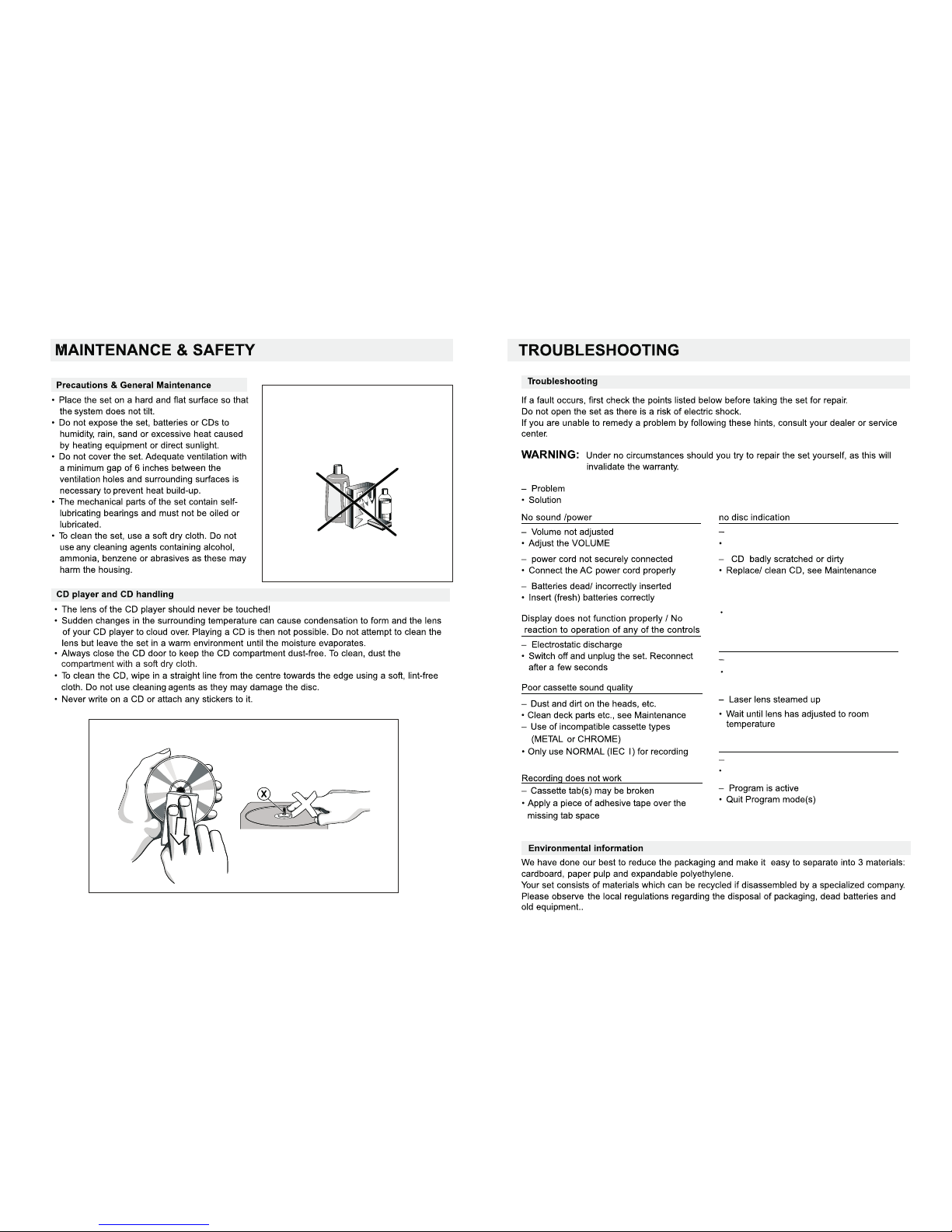
Insert a CD,MP3, CD-R.
No CD/MP3 inserted
CD/MP3/USB playback does not work
CD/MP3 badly scratched/dirty/USB
Replace/clean CD/MP3
(see maintenance)
/USB
The CD/MP3 skips tracks
CD/MP3 damaged or dirty
Replace or clean CD/MP3
- CD-R is blank or the disc is
not finalized
Use a finalized CD-R.
Page 8

TECHNICAL SPECIFICATIONS
GENERAL
Power Requirement ............................................................
Power consumption .............................................................AC 16 Watts
Dimensions......................................................Approx268 mm(L)x273 mm(W) x 156 mm(H)
Operation temperature.........................................................+5 ℃ - +35℃
RECEIVER SECTION
Receiving Bands....................................................................FM ST.
Tuning Range.........................................................FM:88-108MHz
COMPACT DISC SECTION
Optical Pickup...................................................................... .3-Beam Laser
Frequency Response.............................................................100Hz - 16KH z
AUDIO SECTION
Power output .........................................................................Maximum 1.8 Watt x 2
Headphone Impedance ............................................................4 ~ 32 Ohms
ACCESSORIES
Instruction Booklet.....................................................................1
Remote control.....................................................................1
Ac line cord.....................................................................1
AC:110/220V-50/60Hz
EN-13
 Loading...