

Page 1
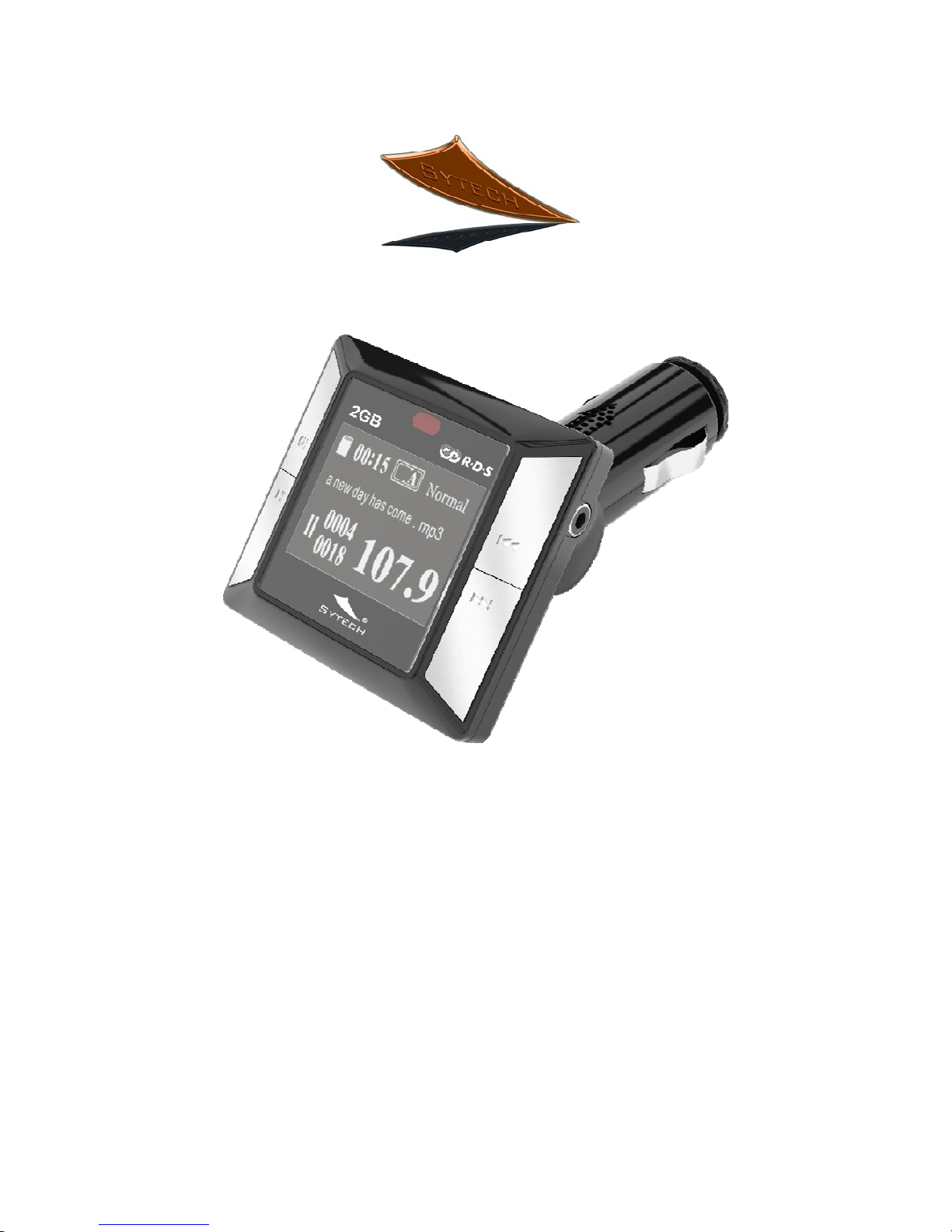
SY-1535
FM Transmitter, RDS. 2 GB. MP3 player.
USB / SD / Micro SD slot
Page 2

User Manual
Thank you for purchasing the Sytech SY-1535 FM transmitter. We are sure
this product will satisfy your needs. Store this user manual in a safe place for
future reference. Welcome to Sytech!
• Supports: SD card, Micro SD, USB port as well as a audio jack to connect
an external MP3 or MP4 player.
• Built in 2 GB. Internal flash memory.
• RDS function (Radio Data System).
• Supports: MP3 and WMA format.
• 206 Selectable frequencies: range from (87.5 to 108.0 MHz).
• Last memory of the frequency and song.
• Rotating shaft which makes it convenient for installation.
• Attractive visual outlook and appearance.
• Restores the last frequency, track number and volume when restarting.
Loading songs into the SY-1535
The SY-1535 allows you to record Mp3 or WMA files into the built in 2 GB.
Flash memory. Follow the below instructions to upload music into the internal
memory.
1. Connect the supplied USB cable from the SY-1535 to the USB port of your
PC.
2. Copy the desired songs to the main folder of the SY-1535. Make sure the
capacity does not exceed the internal flash memory size.
3. Click on the “Remove safely USB” Icon to disconnect the SY1535 from the
PC.
4. The SY-1535 can now playback directly your favorite tracks stored in its
internal flash memory.
Operation:
1. Insert the SY-1535 FM transmitter to a 12V/24V car cigarette socket power.
2. Press the CH button on the unit to enter the Channel frequency mode.
Press the
or to select a desired frequency. Make sure the selected
Page 3

frequency does not contain any radio station as this will create higher radio
interference. Chose a clear frequency to avoid interference and enjoy a
clear sound.
3. Switch on your Car radio and enter the FM mode. Select the same FM
frequency as on the SY-1535. Now your car transmitter and car radio are
paired to the same frequency.
4. If the SY-1535 contains MP3 or WMA files into the internal flash memory,
simply press the Play button to start listening to your tracks.
5. In the case no songs are recorded into the internal flash memory. Insert an
SD memory card, Micro SD, USB Pen drive / Mp3 or connect an external
Mp3/Mp4/Cd player to the audio line. Make sure MP3 or WMA files are
recorded into the Flash memory.
3. Press the key or the key to select the desired track. These keys are
located on the right side of the transmitter.
4. Press the key to pause a song. Press once more to resume. This key
is located on the left side of the transmitter.
5. You can change the FM frequency at any time by pressing the CH button
and then the or buttons to reduce or increase the frequency.
Note: If the frequency is modified on the SY-1535, you will need to change it as
well on your car radio.
RDS.
The SY-1535 includes RDS function which allows you to view the name of the
song on your Car radio while it is playing.
Configuration Menu:
The SY-1535 includes a menu which allows you to configure settings.
Press the CH key on the unit for about 6 seconds and a menu appears on the
LCD display.
Page 4

Local Folder.
This function lets you see the list of all the tracks. Chose the desired track and
Play it back.
Card Folder.
This function lets you see the list of all the folders and tracks in the selected
folder.
Delete file.
This option lets you delete a track.
Delete all.
This option deletes all the tracks.
Language.
You can select any of the following languages for the OSD:
Spanish, English, French, Portuguese
Repeat function.
The following options are available:
NORMAL
REPEAT ONE (Repeats the selected song)
FOLDER (Repeat all the songs in the selected folder)
REPEAT FOLDER (Repeats all the folders)
REPEAT ALL (Repeats all the songs in the order of recording)
SHUFFLE (Plays back all the songs randomly)
INTRO (Plays back 10 seconds of each song in the memory)
Contrast.
The contrast function allows you to adjust the display intensity.
Firmware Information.
View the firmware version and date.
Exit.
This function lets u exit to the main window.
Page 5
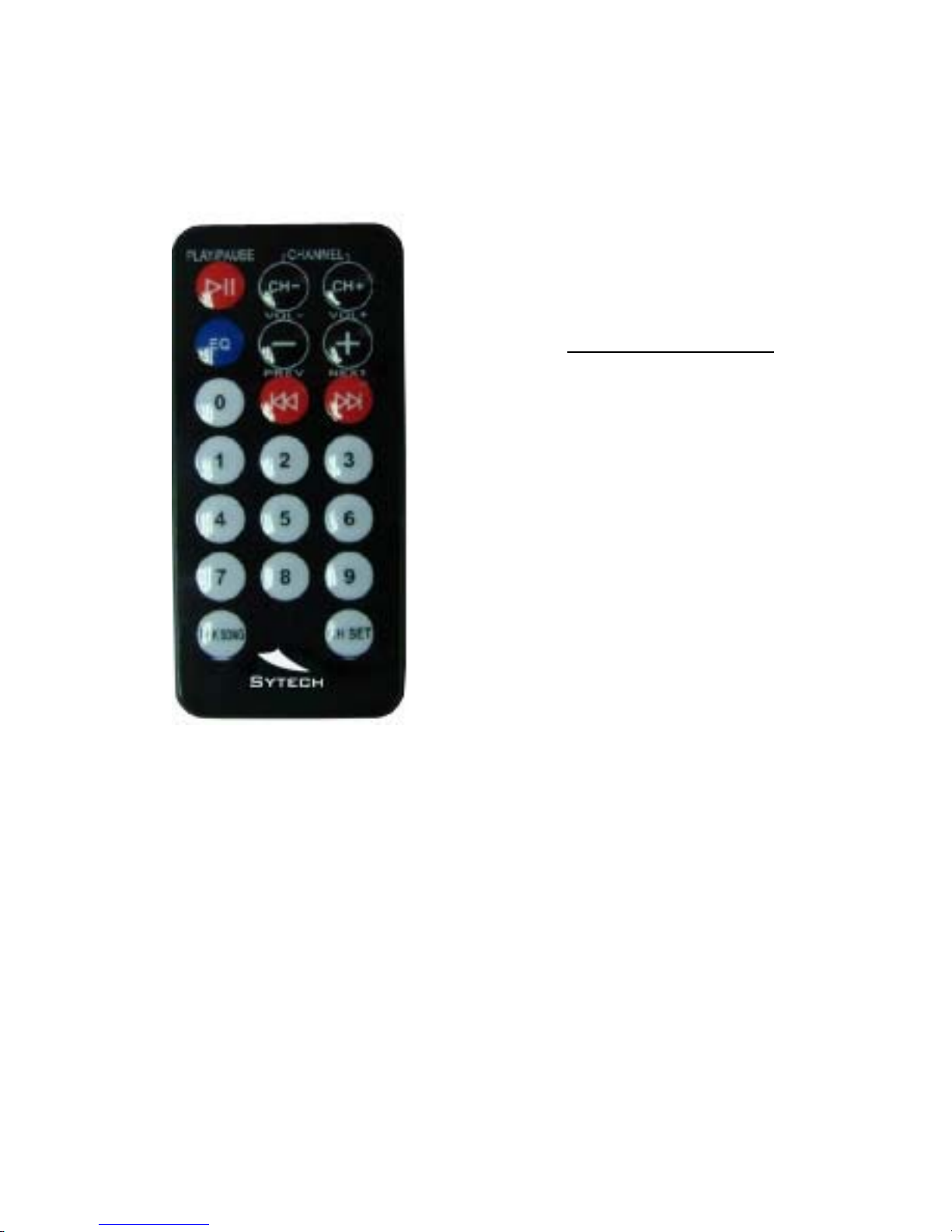
20 Key Remote Control
Play / Pause
Start / Stop the music
CH ( -- )
Frequency down
CH ( + )
Frequency up
EQ
Changes the Equalizer settings.
Normal (default) Æ Rock Æ Pop
Æ
Classic Æ Jazz Æ Blues Æ Hall
Æ
Bass Æ Soft Æ Country Æ
Opera
Volume ( -- )
Decrease Volume
V olume ( + )
Increase Volume
PREV
Previous track
NEXT
Next track
0123456789
Number keys for setting the
frequency and for selecting the
desired song.
Pick Song
Confirms picking a song after
selecting the number keys.
CH Set
Confirms setting the frequency
after selecting it with the number
keys.
Page 6

Remote functions:
1. The SY-1535 allows you to select up to 206 frequencies (87.5 – 108.0 MHz).
Select by:
Use the number keys from (0-9) to select a frequency.
Once done, press the CH SET key to confirm and save the frequency.
2. Use the number keys from (0-9) to select the music track number.
Once done, press the PICK SONG key to confirm.
Setting the Equalizer.
6. To select the different Equalizer modes, simply press the EQ key.
The different settings are indicated below in the same order.
NORMALÆ POPÆ ROCKÆ JAZZÆ CLASSICÆ COUNTRY
Press long the EQ key for the system to return back to the NORMAL
mode.
4. The last settings for volume, FM-transmission-frequency and music track are
stored when the device is powered off.
5. USB and SD-cards can both be connected to the device at the same time.
The SY-1535 will first select the first connected media. To select the other
media, you will need to disconnect the first one.
6. When an external audio device is connected to the audio-in jack, the
playback from the USB or SD-card stops automatically. It cannot be
started or paused by pressing the PLAY/PAUSE button.
Replacing the Remote Control Battery
1) Remove the battery compartment cover by pulling the cover in the
direction of the arrow.
2) Remove the battery.
3) Insert the replacement battery.
Keep attention on the direction of the correct polarization (+/-).
Page 7
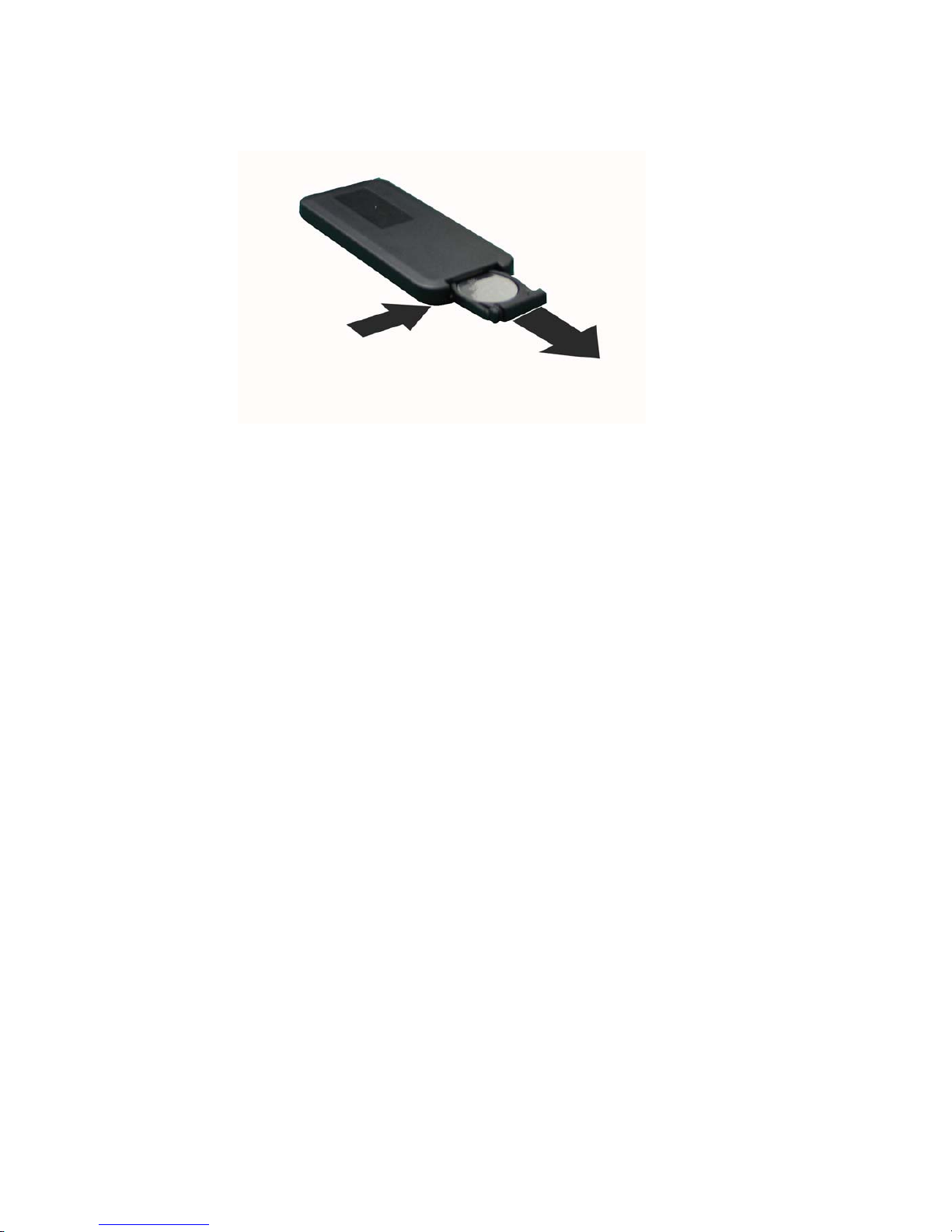
4) Place the cover back onto the battery compartment.
Technical Specifications:
◆ Storage temperature: -5℃ up to +45℃
◆ Working conditions temperature: 0℃ up to +40℃
◆ Operation relative humidity: 20% - 90% (40℃)
◆ Storage relative humidity: 20% - 93% (40℃)
◆ EMI standard: FCC (class B)
◆ Supply voltage: 12V DC power
◆ Electric current: 12V (normal working)<100mA
◆ Bit rate: 32Kbps – 256Kbps
◆ FM transmitting frequency: 87.5 – 108.0 MHz
◆ Transmitting frequency options: Press CH key to switch channels
(can be stored in advance).
◆ Frequency response: 30 – 15 KHz ± 3db
◆ SNR (Signal to Noise Ratio): 30db
◆ Harmonic distortion: ≤1%
◆ Transmitting distance: 3 – 5 m
Page 8

DECLARATION OF CONFORMITY
Manufacturer name: Satyatrade S. L.
Address: Pol. Ind. La Raya. C/ Guadalquivir, 2.
Camarma de Esteruelas, 28816 Madrid
Tel: 902 430 967
Fax: 91 8864285
NIF: B83254763
Manufacturing country: China
Sytech® SY-1535 complies with the following directives.
CE standard:EMC Directive 1999/5/EC
EN 301 489-1 V1.8.1:2008
EN301 489-9 V1.4.1:2007
EN301 357-1 V1.3.1:2006
EN301 357-2 V1.3.1:2006
EN50371:2002
EN60065:2002+A1:2006+A11:2008
Directive: Electromagnetic field
EN50371:2002
ROHS standard:2002/95/EC Restriction of Hazardous Substance
Signed: Ajeet Nebhwani Utamchandani
Sole Administrator
 Loading...