

Page 1
SN1100
2 Zone NetAmp
Systemline 7 NetAmp, two zone smart multi-room amplifier
Instruction manual: NetAmp IR control
Page 2

2
Contents
1.0 IR Control of Netamp 3
2.0 IR Code Table 3
3.0 Setting up a Sky HD handset for NetAmp volume 4
4.0 Setting up a Sky HD remote for TV control 5
5.0 Setting up a Humax RM-F01 for NetAmp volume 5
6.0 Setting up a Humax RM-F01 for TV control 5
7.0 Setting up a Virgin Media remote control 6
8.0 Setting up a Sky Q Touch remote control 7
9.0 Setting up a SkyQ IR remote 8
Page 3
3
1.0 IR Control of Netamp
The S7 Netamp has been designed for IR control via a Local Input Module or KPS11 keypad
plugged in from the zone. The IR codes are RC5 … …
A Sky digital HD handset can be set up to control a TV as well as the Netamp volume, see section
1.2
A Humax remote RM-F01 can be setup to control a TV and Netamp as well as a DVD player, see
section 1.4
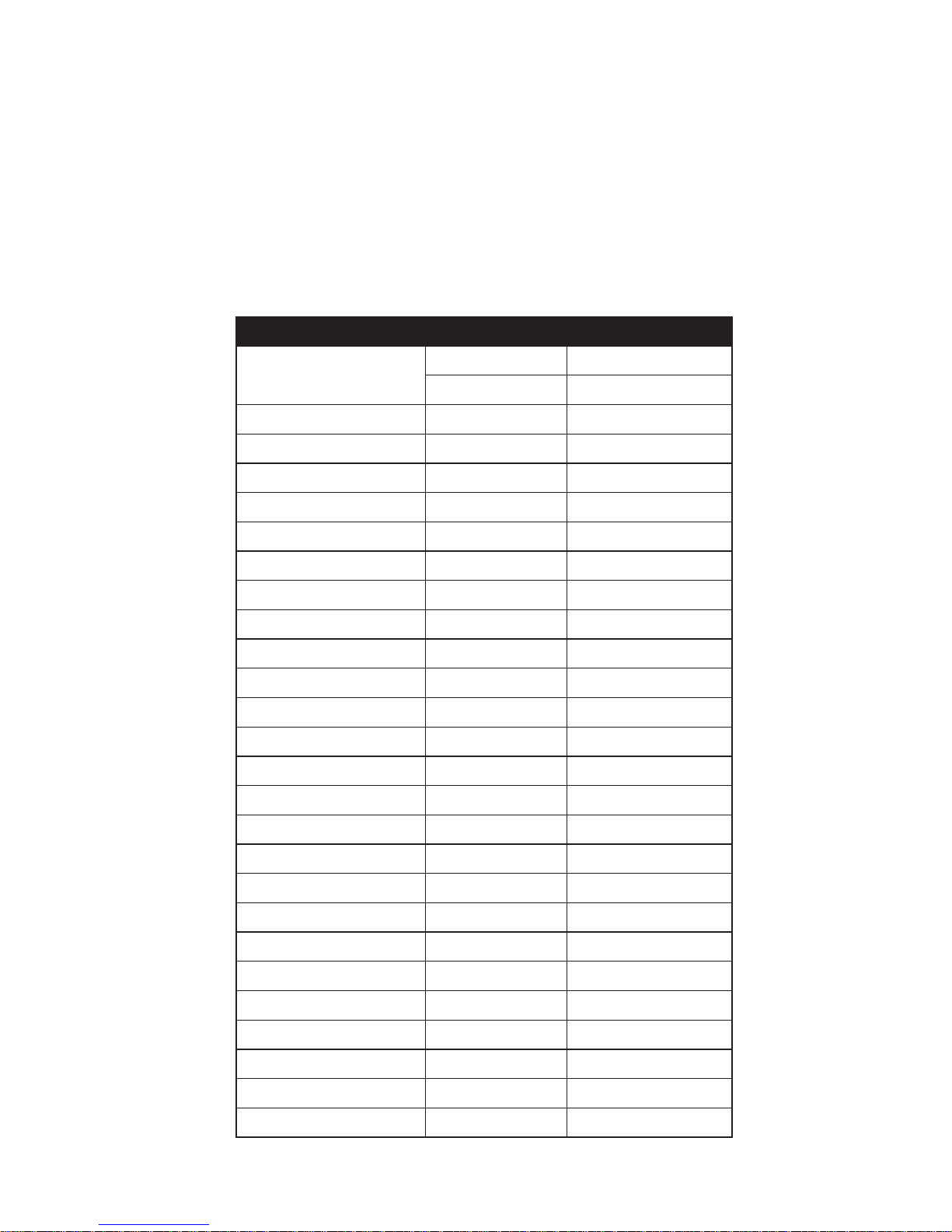
2.0 IR Code Table
Below is a list of all supported IR codes and their references:
Function System code Command code
Standby
16 012
16 013 (long press)
Mute 16 013
Volume up 16 016
Volume down 16 017
Source up 16 070
Source down 16 001
Source 1
*
16 002
Source 2
*
16 003
Source 3
*
16 004
Local
*
16 005
O 16 006
# 1
*
27 001
# 2
*
27 002
# 3
*
27 003
# 4
*
27 004
# 5
*
27 005
# 6
*
27 006
# 7
*
27 007
# 8
*
27 008
# 9
*
27 009
# 0
*
27 000
Play
*
27 053
Pause
*
27 048
Stop
*
27 054
Skip forwards
*
27 052
Skip back
*
27 050
* NetAmp software 003-008 or 004-0012 or higher required
Page 4
4
3.0 Setting up a Sky HD handset for NetAmp volume
You can set up a Sky handset to operate the NetAmp volume; handset revision 9 has been tested.
3.1 Press TV.
3.2 Press Select and 0 together. The LED will ash twice.
3.3 Enter the 4 digit code 1217. The LED will ash twice.
3.4 Press Select and 1 to store. The LED will ash twice.
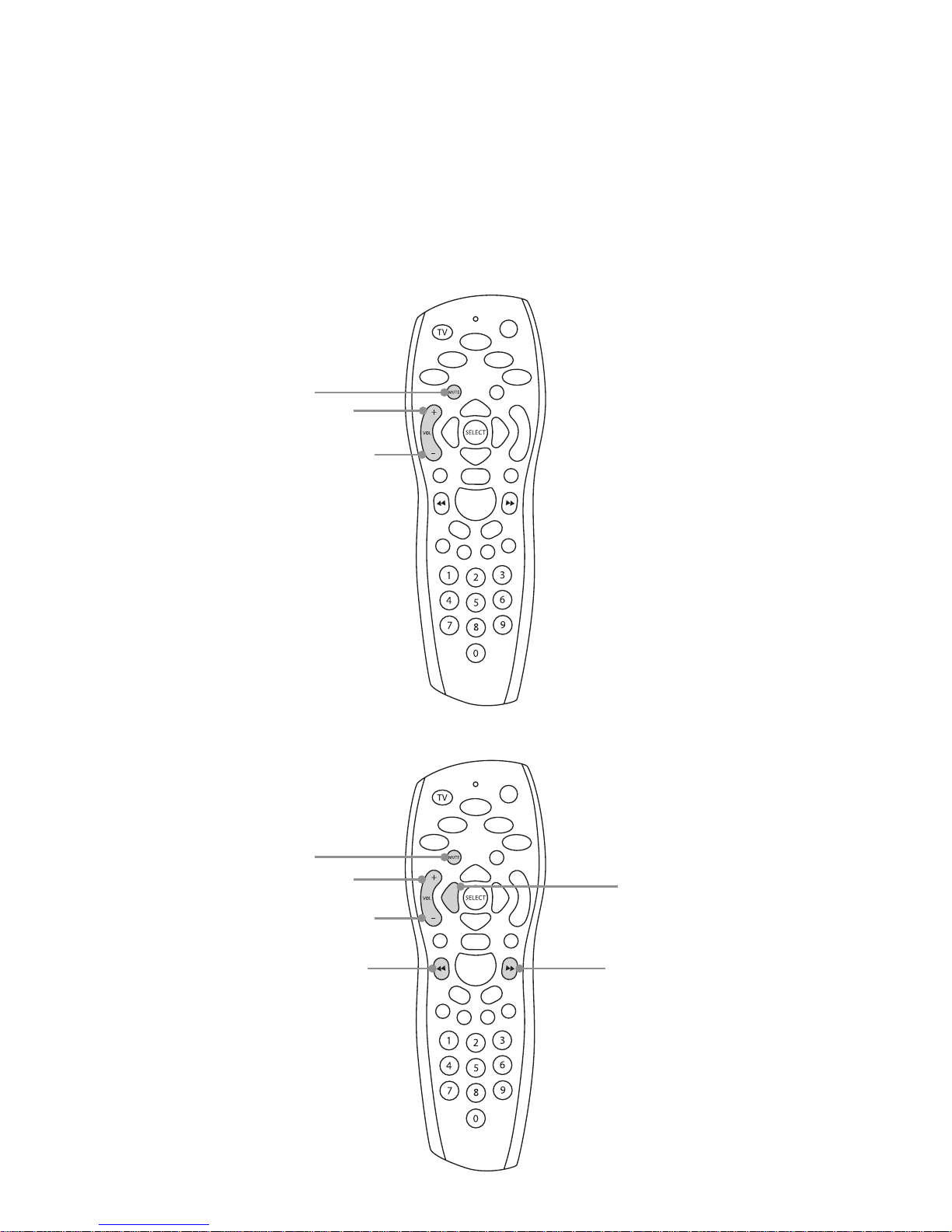
After completion the Sky handset will allocate volume and mute buttons when in Sky control
mode as shown below:
When in TV control mode, the handset will allocate some additional IR functions as shown below:
Mute
Volume up
Volume down
Mute
Volume up
Volume down
Source down
Standby
Source up
Page 5

5
4.0 Setting up a Sky HD remote for TV control
The Sky handset can also be set up to control your TV. You will need to look up the four digit code
for the TV manufacturer found on this website: http://sky.uebv.com/
4.1 Press TV.
4.2 Press Select and Red until the LED ashes twice.
4.3 Enter the four digit code followed by Select.
4.4 Test by pressing TV followed by Ch+ or Ch- and also the Standby button.
4.5 If unsuccessful repeat using an alternative code given on the website.
5.0 Setting up a Humax RM-F01 for NetAmp volume
If you have purchased a Humax YouView Freeview receiver, or other model of Freeview receiver
then you will need to purchase the Humax RM-F01 remote control. These are widely available for
about £20.
The full instructions and IR code bank can be viewed here:
http://www.humaxdigital.com/rcu/rcucodelist_mdb1.3_gb.pdf
5.1 Press and hold Audio for three seconds until the button light remains on.
5.2 Enter the three digit code 044. The light will blink twice.
5.3 Press OK and the light will blink three times.
The volume up, volume down, mute and standby keys on the remote control will now operate the
NetAmp via a LIM or KPS-11. You must select the audio device rst as the remote control will not
use these volume codes when in PVR mode.
6.0 Setting up a Humax RM-F01 for TV control
The RM-F01 can also be set up to operate a TV and DVD player. Follow the same instructions for
the NetAmp volume in section 5.0 but using the TV source button or DVD and using the correct
three digit number for the manufacturer.
Page 6

6
7.0 Setting up a Virgin Media remote control
Some Virgin Media remote control can be set up to control an amplier or TV. We have tested
remote control type 13 listed on the website and pictured below:
7.1 Turn the S7 zone onto a local source with a LIM and IR receiver and turn the volume up.
7.2 On the Virgin Media remote control press and hold Clear and then Vol+ until the LED ashes
green twice.
7.3 Enter the code 1999, the LED will ash twice.
7.4 Point the remote at the IR receiver and press the Ch+ button until the volume mutes,
it should take 6 presses.
7.5 Press Mute to turn the volume back on.
7.6 Press OK to store this.
7.7 Vol+, Vol- and Mute should now operate the NetAmp.
Please note: it is not possible to set up this remote to control the TV and the NetAmp.
Volume up
Mute
Volume down
Page 7
7
8.0 Setting up a Sky Q Touch remote control
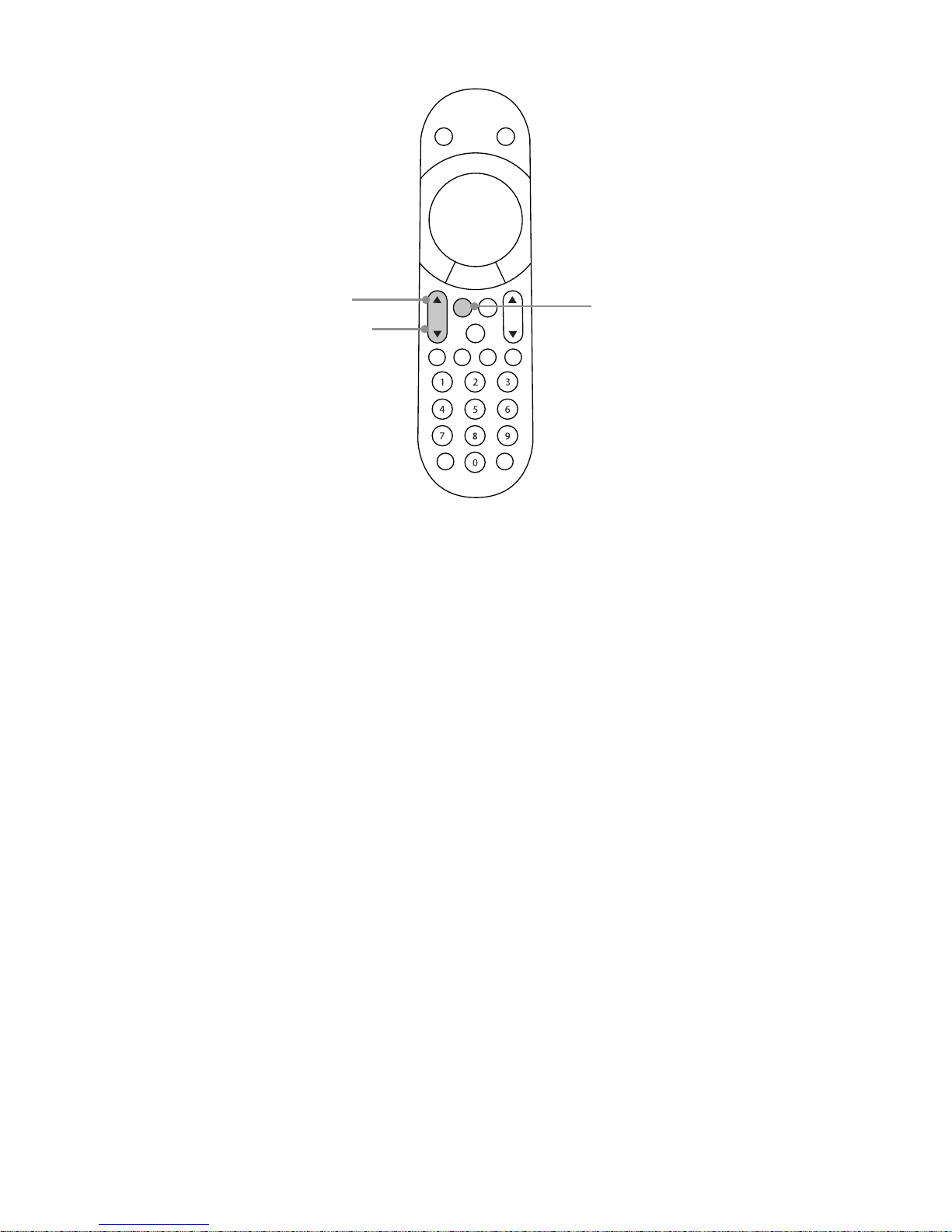
8.1 There are no direct codes for this remote, the setup is done inside the Sky Q box menu. Select
Philips as the manufacturer. You are then given 33 possible options and just have to work through
them until the Touch remote controls the volume on the soundbar. It normally works on option 7.
8.2 Volume up, down and mute should now operate the NetAmp.
VOL
CH
MUTE
Volume up
Mute
Volume down
Page 8
8
9.0 Setting up a SkyQ IR remote
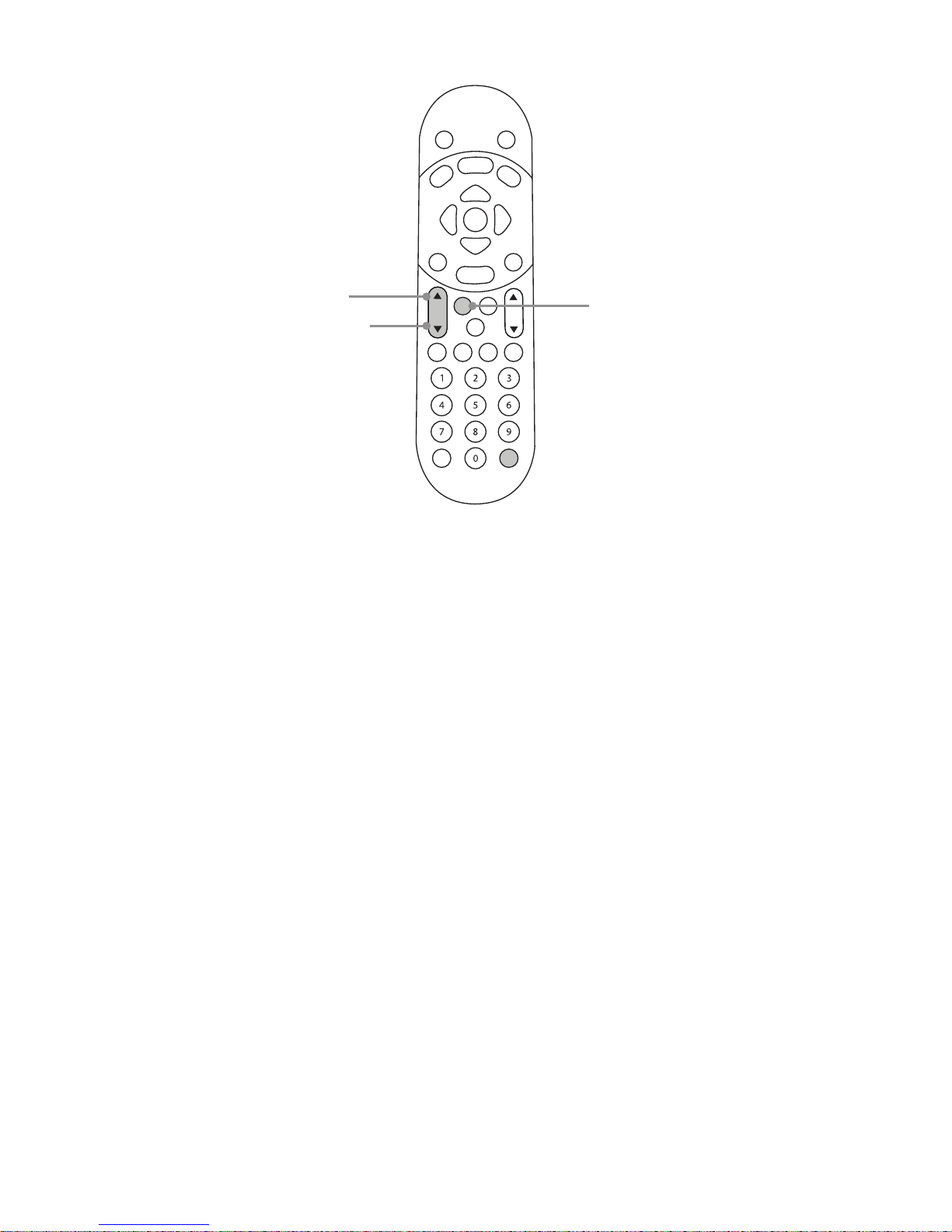
9.1 Hold down buttons 1 and 3 on the Sky Q remote (not touch remote) you should see red LED
ash twice.
9.2 Press ? (bottom right).
9.3 Press 0 2 9 7 each digit should respond with a ash on the red LED the last digit will give 2
ashes from the Red LED which will indicate that the code has been successfully stored.
9.4 Volume up, down and mute should now operate the NetAmp.
?
CH
VOL
MUTE
Volume up
Volume down
Mute
Page 9
Stortford Hall Industrial Park
Dunmow Road
Bishops Stortford
Hertfordshire
CM23 5GZ
United Kingdom
www.armourhome.co.uk
©2015 Armour Home Electrioncs, All rights reserved.
Our policy is one of continuous product improvement. We reserve
the right to change the design and specications without notice.
All information is given in good faith. The manufacturer accepts
no responsibility for errors, omissions or incorrect assumptions.Q15485-IS_r1
 Loading...