

Page 1
www.systemline.co.uk/modular
www.armourhe.co.uk
User Guide
Multi-source
TUN
DISC
SAT
VID
AUX
AUX
1
2
L
R
AV
TEXT
MENU
BACK
1
2 3
6 5 4
7 8 9
0
i
+
-
VOL
CH
OK
-
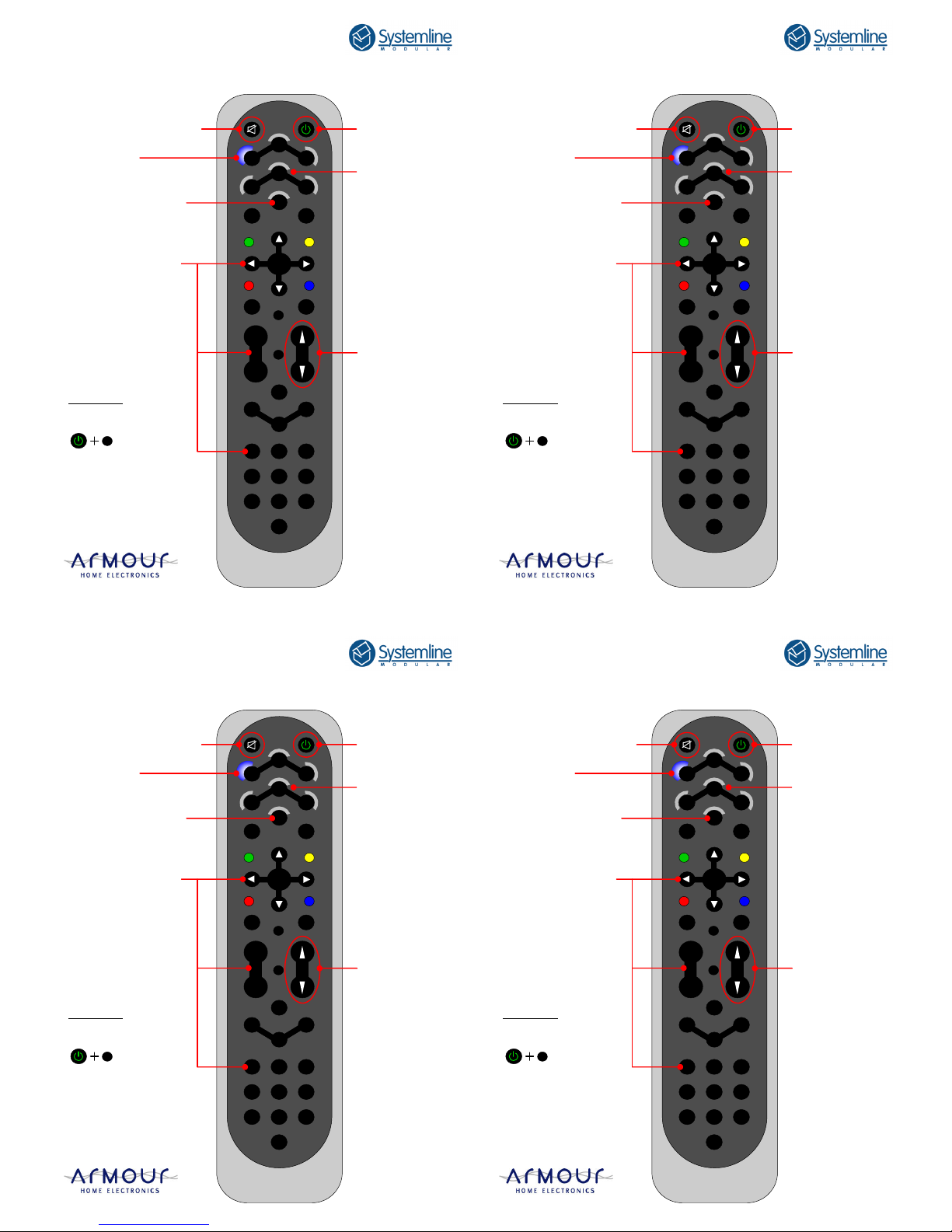
Power on/off
System mute
Source power on
and selection of up
to 7 sources.
Pressing the appropriate button
will switch the
system to the
desired source.
Speaker
volume control
LED indicator
Showing source selected
All other buttons can
be programmed by the
system installer to
replace original remote
controls like Sky+ etc.
Local source
LRN7 Remote Control
Child Lock
(Enable/disable)
Press and hold the
Power & Info buttons
for 5 seconds.
i
www.systemline.co.uk/modular
www.armourhe.co.uk
User Guide
Multi-source
TUN
DISC
SAT
VID
AUX
AUX
1
2
L
R
AV
TEXT
MENU
BACK
1
2 3
6 5 4
7 8 9
0
i
+
-
VOL
CH
OK
-
Power on/off
System mute
Source power on
and selection of up
to 7 sources.
Pressing the appropriate button
will switch the
system to the
desired source.
Speaker
volume control
LED indicator
Showing source selected
All other buttons can
be programmed by the
system installer to
replace original remote
controls like Sky+ etc.
Local source
LRN7 Remote Control
Child Lock
(Enable/disable)
Press and hold the
Power & Info buttons
for 5 seconds.
i
www.systemline.co.uk/modular
www.armourhe.co.uk
User Guide
Multi-source
TUN
DISC
SAT
VID
AUX
AUX
1
2
L
R
AV
TEXT
MENU
BACK
1
2 3
6 5 4
7 8 9
0
i
+
-
VOL
CH
OK
-
Power on/off
System mute
Source power on
and selection of up
to 7 sources.
Pressing the appropriate button
will switch the
system to the
desired source.
Speaker
volume control
LED indicator
Showing source selected
All other buttons can
be programmed by the
system installer to
replace original remote
controls like Sky+ etc.
Local source
LRN7 Remote Control
Child Lock
(Enable/disable)
Press and hold the
Power & Info buttons
for 5 seconds.
i
www.systemline.co.uk/modular
www.armourhe.co.uk
User Guide
Multi-source
TUN
DISC
SAT
VID
AUX
AUX
1
2
L
R
AV
TEXT
MENU
BACK
1
2 3
6 5 4
7 8 9
0
i
+
-
VOL
CH
OK
-
Power on/off
System mute
Source power on
and selection of up
to 7 sources.
Pressing the appropriate button
will switch the
system to the
desired source.
Speaker
volume control
LED indicator
Showing source selected
All other buttons can
be programmed by the
system installer to
replace original remote
controls like Sky+ etc.
Local source
LRN7 Remote Control
Child Lock
(Enable/disable)
Press and hold the
Power & Info buttons
for 5 seconds.
i
Page 2
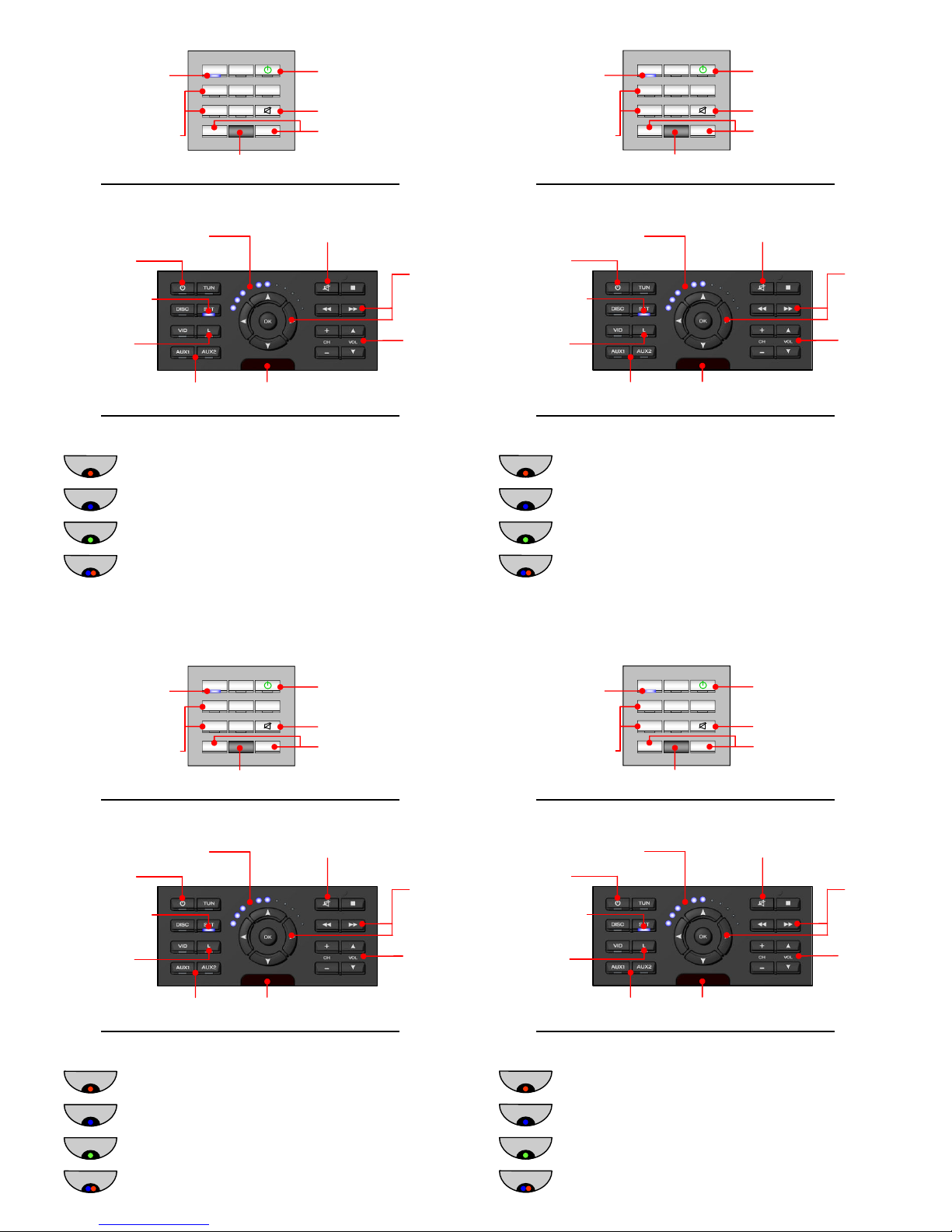
RED - System off.
Speaker LED indicators
BLUE - System on, main source. Mute if flashing.
GREEN - System on, local source. Mute if flashing.
RED & BLUE - System protect.
(Turn system off then on to reset)
KPM7 Keypad
Power on/off
Source power on and selection
Speaker
volume
Control
System mute
Programmable
buttons
LED indicator
Showing source
selected
Local source
Infrared receiver
Volume indicator
LKPM7 Keypad
TUN DISC
L VID SAT
AUX1 AUX2
+ —
Power on/off
System mute
Speaker volume control
Infrared receiver
LED indicator
Showing source
selected
Source power on
and selection
RED - System off.
Speaker LED indicators
BLUE - System on, main source. Mute if flashing.
GREEN - System on, local source. Mute if flashing.
RED & BLUE - System protect.
(Turn system off then on to reset)
KPM7 Keypad
Power on/off
Source power on and selection
Speaker
volume
Control
System mute
Programmable
buttons
LED indicator
Showing source
selected
Local source
Infrared receiver
Volume indicator
LKPM7 Keypad
TUN DISC
L VID SAT
AUX1 AUX2
+ —
Power on/off
System mute
Speaker volume control
Infrared receiver
LED indicator
Showing source
selected
Source power on
and selection
RED - System off.
Speaker LED indicators
BLUE - System on, main source. Mute if flashing.
GREEN - System on, local source. Mute if flashing.
RED & BLUE - System protect.
(Turn system off then on to reset)
KPM7 Keypad
Power on/off
Source power on and selection
Speaker
volume
Control
System mute
Programmable
buttons
LED indicator
Showing source
selected
Local source
Infrared receiver
Volume indicator
LKPM7 Keypad
TUN DISC
L VID SAT
AUX1 AUX2
+ —
Power on/off
System mute
Speaker volume control
Infrared receiver
LED indicator
Showing source
selected
Source power on
and selection
RED - System off.
Speaker LED indicators
BLUE - System on, main source. Mute if flashing.
GREEN - System on, local source. Mute if flashing.
RED & BLUE - System protect.
(Turn system off then on to reset)
KPM7 Keypad
Power on/off
Source power on and selection
Speaker
volume
Control
System mute
Programmable
buttons
LED indicator
Showing source
selected
Local source
Infrared receiver
Volume indicator
LKPM7 Keypad
TUN DISC
L VID SAT
AUX1 AUX2
+ —
Power on/off
System mute
Speaker volume control
Infrared receiver
LED indicator
Showing source
selected
Source power on
and selection
 Loading...