

Page 1

Warranty & Registration
Thank you for purchasing a Bluefish444
Synapse SDI110
S/N
For your warranty to be valid and to obtain free email and telephone support please regi ster your product at;
www.bluefish444.com , select “Register here”.
Or type in http://www.bluefish444.com/products/warra nty/register.asp
You will be presented with a Product Registration page.
Enter the serial number as show n here.
Your serial number is located underneath your converter and i s also attached to this warranty and reg istration
document, located above.
Registering your product will activ ate you r 1 year warranty. If you do not regist er your produc t, the
warranty will not apply and you will not receive any email or phone support from Bluefish444.
By registering your product you will also be notified of new product releases, seminars, news, driver updates and
announcements.
.
Support Contacts
World North America Europe
9am to 5pm
(GMT+10 hours)
tel: +61 (0)3 9682 9477
[email protected]
9am to 5pm
(GMT -5 hours)
tel: +1-818-633-8866
tel: +1-617-418-1792
[email protected]
9am to 5pm
tel: +44 (0)20 8868 2575
[email protected]
Page 2

Page 3
SDI 110
SDI => HDMI
SDI110 User Manual
Converter Conguration
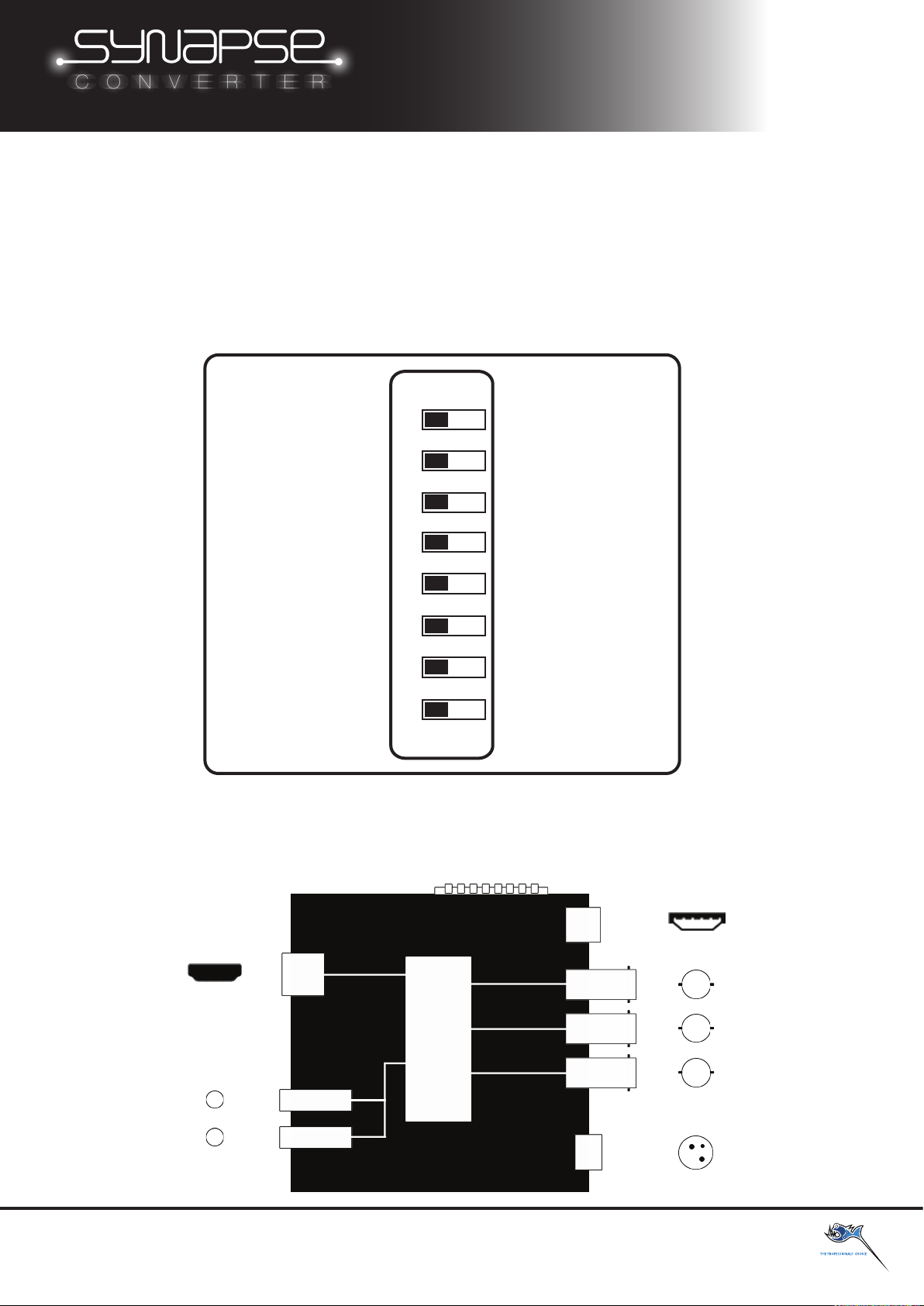
Synapse converters are congured via DIP switches on the side of the converter. SDI conversion to the
HDMI signal includes video scaling, PsF mode and de-interlacing, all congured via the DIP switches.
The SDI input signal is displayed as an SDI loop through on the SDI output BNC. A second SDI input is
provided for redundancy, providing a fail safe mechanism should an input be lost.
OFF ON
1
2
3
4
5
6
7
NA NA
*NOTE: Only one conversion process can take place at once, either Down Conversion,
De-Interlace or PsF mode.
*NOTE: The user may be required to power cycle the converter when an Input signal is changed
and/or the DIP switches are re-congured.
8
DVI outHDMI Out
HDMI Converter OnHDMI Converter O
HDMI Pattern OnHDMI Pattern O
Status OSD OnStatus OSD O
PsF Mode OnPsF Mode O
De-Interlace OnDe-Interlace O
NANA
Conguration DIP switches
HDMI Output
Type A HDMI
Video/Audio
Processing
AES/EBU Output
1/4in Stereo TRS jack
Analog Output
1/4in Stereo TRS jack
Bluesh444 17b Market Street, South Melbourne Victoria, 3205 Australia
support@bluesh444.com
http://www.bluesh444.com
USB
Mini-A
SDI Output
BNC
SDI Input 2
BNC
SDI Input 1
BNC
Power Input
+12v DC
Page 4
1080p59,94
1080p59,94
1080p24
1080p24
720p60
720p60
LED Status
Off
Green
Orange
Green + Orange
HDMI Out
NA
SD
HD
3G
SDI Audio Present
NA
SD
HD/3G
NA
SDI 1 In
Inacve
SD
HD
3G
Power Status
Not Connected
Connected
NA
NA
720p59,94
NA
PAL - i50
NA
NTSC - i59,94
NA
SDI 110
SDI => HDMI
SDI110 User Manual
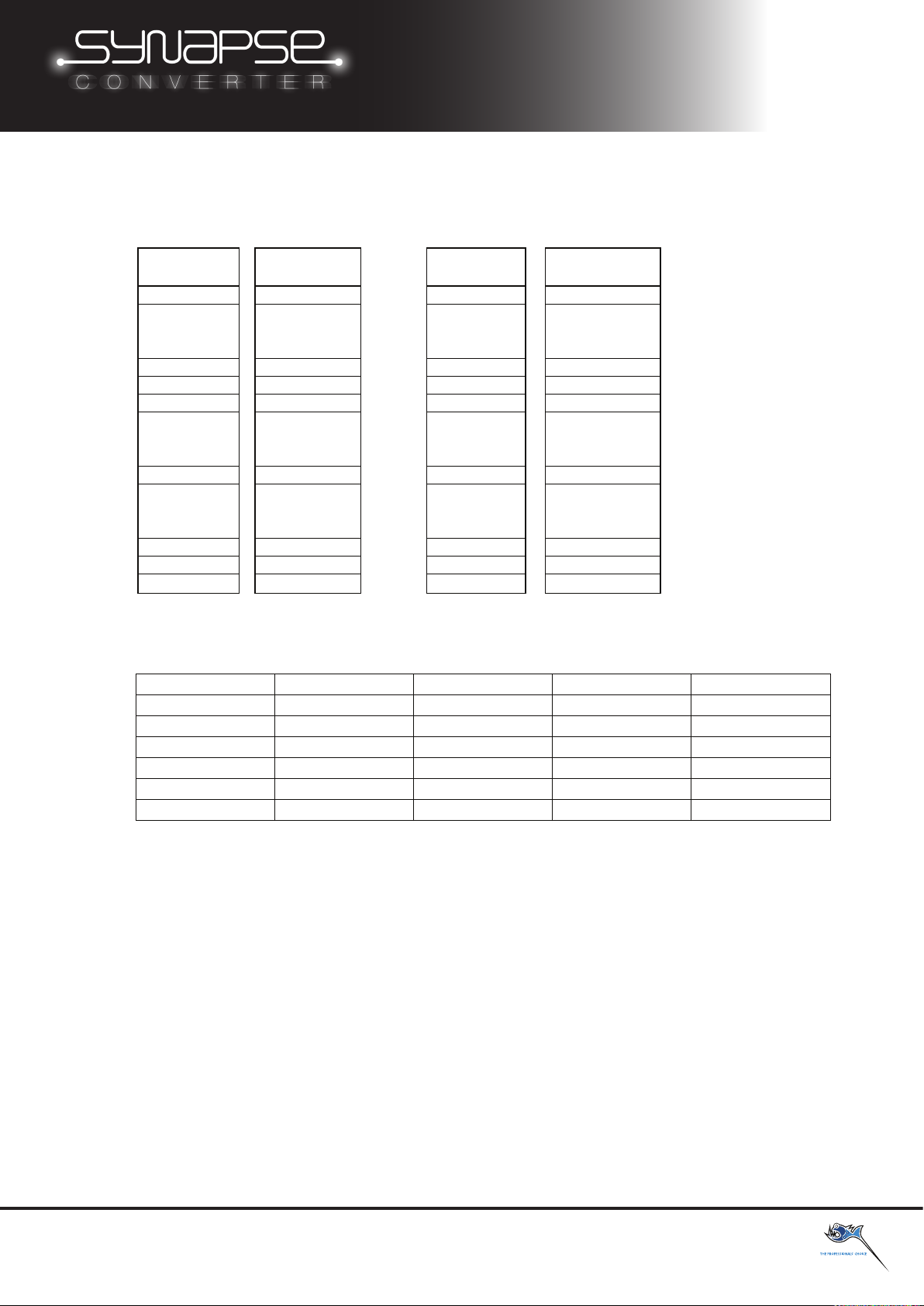
Synapse converters support the following Input, and Output formats:
Input format
HD-SDI
1080p60 1080p60
Output Format
HMDI
Down
OR
Conversion
720p60 NA
OR
De-Interlace
1080p50 1080p50
1080p30 1080p30
1080p29,97 1080p29,97
1080p25 1080p25
1080p23,976 1080p23,976
1080i60 1080i60
1080i59,94 1080i59,94
1080i50 1080i50
720p59,94 720p59,94
720p50 720p50
576p PAL
PAL - i50 PAL - i50
NTSC - i59,94 NTSC - i59,94
720p50 NA
NTSC - i59,94 NA
NTSC - i59,94 NA
PAL - i50 NA
PAL - i50 NA
NTSC - i59,94 1080p30
NTSC - i59,94 1080p29,97
PAL - i50 1080p25
NTSC - i59,94 NA
PAL - i50 NA
NA NA
NA 625p25
NA 525p29,97
Synapse converters come with Status LED’s for each connection these LED’s can be used to diagnose connection issues.
See table below:
USB Not connected Connected NA NA
SDI 2 In Inacve SD HD 3G
Bluesh444 17b Market Street, South Melbourne Victoria, 3205 Australia
support@bluesh444.com
http://www.bluesh444.com
 Loading...