

Page 1
REPEAT PLAY - SINGLE SONG
To repeat the SAME song over and over again, do the following:
1. Select the song you want to repeat, press the Repeat Button once.
2. The repeat lamp will flashing. Then press PLAY/PAUSE button to start.
3. To stop the repeat function, press Repeat Button twice.
REPEAT PLAY - ALL SONGS
To repeat ALL SONGS on a disc, do the
1. Press Repeat Button twice during playback. The repeat lamp will be steady on.
2. All the songs on the CD will play in order and start all over again. To stop the repeat then
function, press Repeat Button once.
following:
PROGRAMMED PLAY
Up to 20 tracks can be programmed for disc play in the order you like.
1. Press Program Button when CD has stopped.
2. Press the Search/Skip Buttons either or until the desired track shows on the
Display.
3. Press the Program Button to store the first track.
4. Repeat steps 2 and 3 until all the desired tracks are programmed.
NOTE: Programming can only be done when the CD is in the stop mode.
SPECIFICATIONS
Radi o Fr equency range: AM 53 0~ 1710KHz
FM 88~108M Hz
10%T HD P ower output 1W
Spea ke r impedance: 8ohm
Batt er y operation: DC12V
Powe r so urce: AC120V-60Hz,1 2Watts
×2
8xUm 2
SRCD302
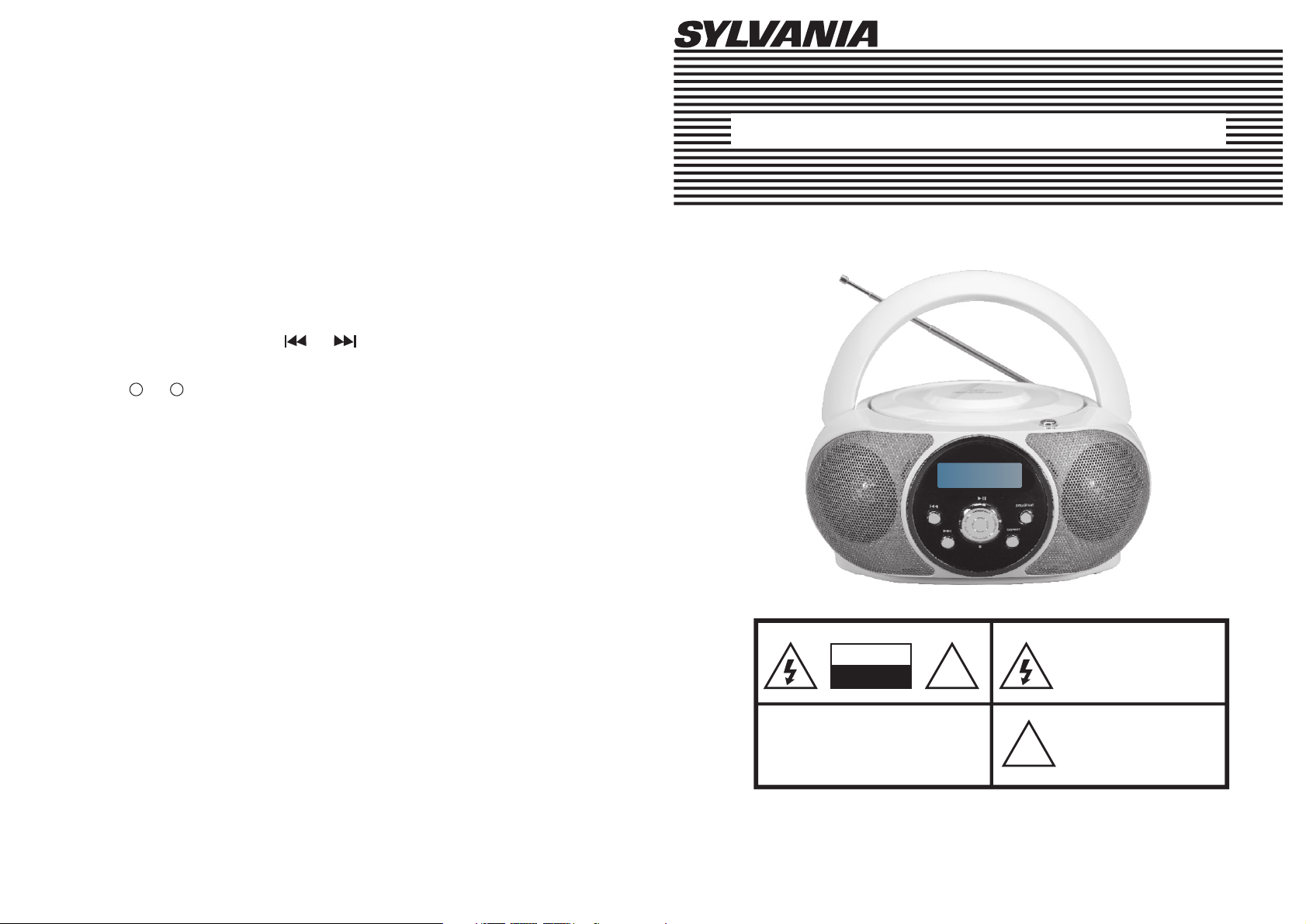
INSTRUCTION MANUAL
PORTABLE CD RADIO PLAYER
CAUTION
RISK OF ELECTRIC SHOCK
DO NOT OPEN
TO REDUCE THE RISK OF ELECTRIC SHOCK.
NO USER SERVICEABLE PARTS INSIDE
QUALIFIED SERVICE PERSONNEL.
WARNING:TO AVOID THE HAZARDS OF FIRE OR ELECTRICAL SHOCK;
DO NOT EXPOSE THIS APPLIANCE TO RAIN OR OTHER MOISTURE.
*Design and specifications subject to change without notice.
CAUTION:
DO NOT REMOVE COVER,
REFER SERVICING TO
!
This symbol indicates that
dangerous voltage corresponding
a risk of electric shock is
presence within this unit.
This symbol indicates that
there are important operating
and maintenance instructions
in the literature accompanying
!
this unit.
Page 2
8
9
1
2
3
4
5
10
6
7
11
18
12
13
14
15
16
17
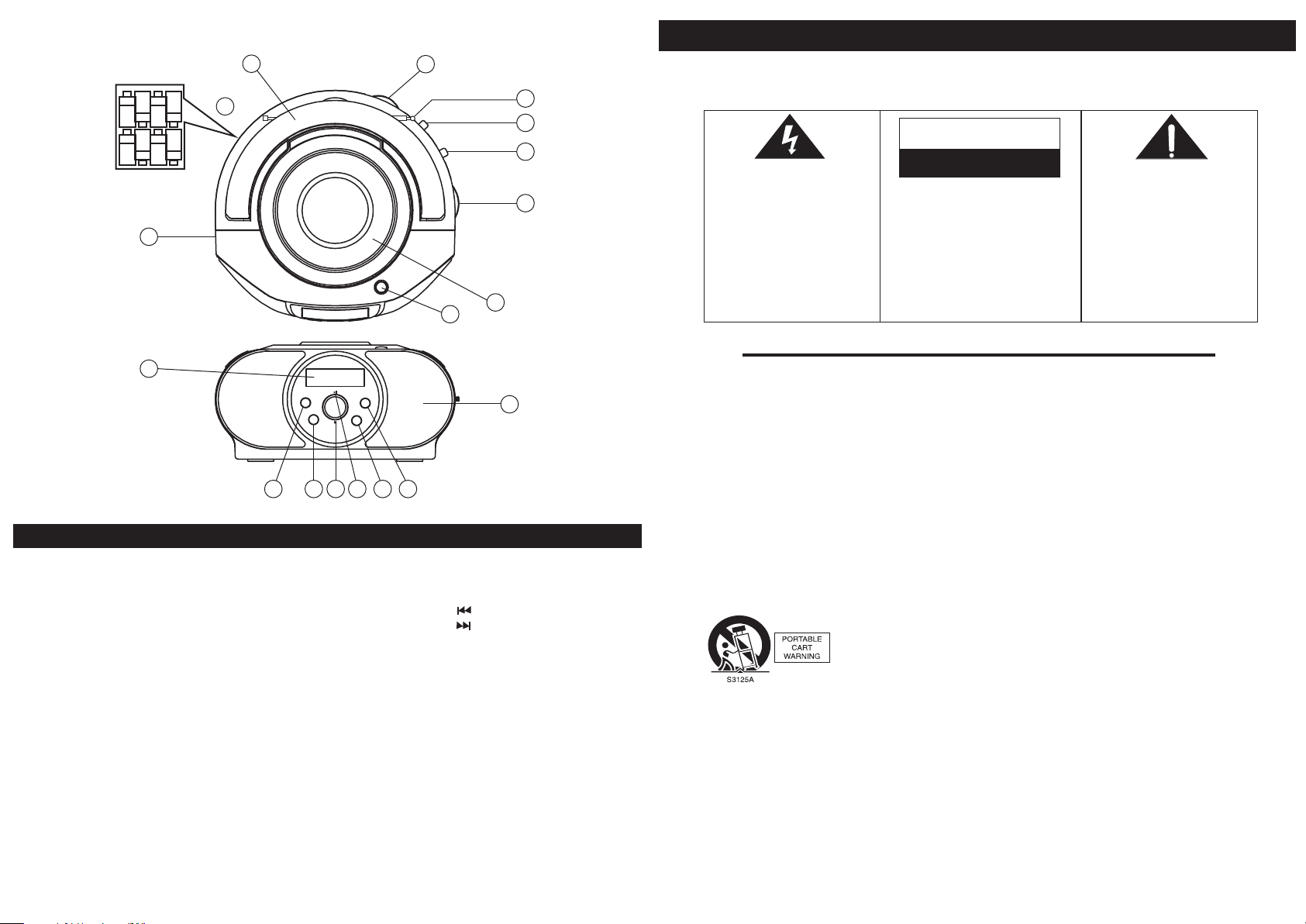
CONTROL AND COMPONENT IDENTIFICATIONS
1. Volume Control
2. Aerial
3. Function Selector
(CD/POWER OFF/RADIO)
4. Band Selector(FM/AM)
5. Tuning
6. CD Door
7. CD Open Knob
8. Handle
9. Battery Door
4 1
10. AC Mains
11. LCD Display
12. Skip ( )
13. Skip ( )
14. CD Stop Button
15. CD Play/Pause Button
16. Repeat Button
17. Program Button
18. Speaker
Warnings and Precautions
?TO PR EV ENT FIRE OR SH OCK HAZ ARD. DO N OT EXPO SE TH IS APPLI ANCE TO RAIN O R MOIST URE.
?THIS APP LIANC E SHALL NOT BE E XPO SE D TO DRIPP IN G OR SP LA SHI NG WAT ER AND THAT NO O BJECT
FILLE D WITH LI QUIDS S UC H AS VASE S SHALL BE P LA CED ON APPARATU S.
CAUTION
RISK OF ELE CTR IC SHOCK
This lightnin g fl ash with
arrowhead sym bo l:within an
equilateral t ri angle, is
intended to ale rt t he user to
the presence of u ni nsulated
“dangerous vo lt age” within
the product’s enclosure th at
may be of suffi cient
magnitude to co ns titute a
risk of electri c sh ock to
persons.
Wa r ning : To r educ e th e r i s k o f
ele c t ric sho c k ,do not rem o ve
cov e r ( o r b a ck) no u ser ser v i cea b l e p a rts ins i d e.R e f er
ser v i cin g to qua l ifie d se r vice
per s o nne l .
DONOT OPE N
IMPORTANT SAFETY INSTRUCTIONS
1) Read I nstru ction s – All t he sa fe ty and op erati ng inst ructi ons sho uld be re ad befo re t he pr od uct is op erate d.
2) Reta in Inst ructi on s – The s afety a nd oper ating i nstru ction s sh oul d be r etain ed for fu ture re feren ce.
3) Heed Warn ings – All w arnin gs on the p roduc t an d in th e op erati ng inst ructi ons sho uld be ad hered t o.
4) Foll ow Inst ructi on s – All op er ating a nd use in struc tions s hould b e follo wed.
5) Clea ning – Un pl ug th is p rod uc t from th e wall ou tlet be fore cl eanin g. Do not u se liqu id c lea ne rs or aer osol cl eaner s.
Use a dam p cloth f or clea ni ng.
6) Attac hment s – Do not us e at tac hm ents no t recom mende d by the pr oduct m anufa cture r as they m ay c aus e
hazar ds.
7) Wa ter and M oistu re – Do not u se this p roduc t ne ar wa te r – for e xa mple, n ear a bat h tub, wa sh bowl , kitch en sink ,
or laun dry tub ; in a wet ba se men t; o r near a sw immin g pool; a nd the li ke.
8) Acces sorie s – Do n ot pl ac e thi s pr oduct o n an unst able ca rt, sta nd, tri pod, br acket , or tabl e. The pr oduct m ay fall ,
causi ng seri ou s inj ur y to a ch il d or adul t, and se rious d amage t o the pro duct. U se only w it h a car t, s tan d, t ripod ,
brack et, or ta ble rec om men de d by the ma nufac turer, o r sold wi th the pr oduct . Any moun ti ng of t he p rod uc t shoul d
follo w the man ufact ur er' s in struc tions , and sho uld use a m ounti ng acce ssory r ec omm en ded by th e manuf actur er.
9) A produc t and car t combi na tio n sh ould be m oved wi th care . Quick s tops, e xcess ive for ce , and u ne ven s ur faces
may cau se the pr oduct a nd c art c om binat ion to ov ertur n.
10) Vent ilati on – S lot s an d ope ni ngs in th e cabin et are pr ovide d for ven tilat ion and t o en sur e re liabl e opera tion of t he
produ ct and to p rotec t it f rom o ve rheat ing, an d these o penin gs must n o be bloc ked or co ve red . The ope nings s hould
never b e block ed b y pla ci ng th e pr oduct o n a bed, so fa, rug , or othe r simil ar surf ace. Th is prod uct sho uld not b e
place d in a buil t- in in st all at ion suc h as a book case or r ack unl ess pro per ven tilat io n is pr ov ided or t he manu factu rer's
instr uctio ns have b ee n adh er ed to.
11) Po we r Sourc es – Th is prod uct sho uld be op er ate d on ly from t he type o f power s ource i ndica ted on th e marki ng
label . If you ar e not sur e of t he ty pe o f power s upply t o your ho me, con sult yo ur prod uct dea ler or lo ca l pow er
compa ny. For pr oduct s inten ded to op erate f rom bat tery po wer, or ot he r sou rc es, ref er to the o perat ing ins truct ions.
12) Gro undin g or Pola ri zat io n – Thi s produ ct may be e quipp ed w ith a p ol arize d alter natin g-cur rent li ne plug ( a plug
havin g one bla de w ide r th an th e ot her). This p lug wil l fit int o th e pow er o utl et o nly one w ay. Th is is a s af ety fea ture. I f
you are u nable t o in ser t th e plu g fu lly int o the out let, tr y rever sing th e plug. I f the plu g sh oul d st ill f ai l to fit, c ontac t
your el ectri cian to r ep lac e yo ur obso lete ou tlet. D o not def eat the s afety p urpos e of t he po la riz ed p lug.
Alter nate Warni ngs – Thi s pro du ct is equ ipped w ith a thr ee-wi re grou nding -type p lu g, a pl ug h aving a t hird
(grou nding ) pi n. Th is plug w ill onl y fit int o a groun ding- ty pe po we r outle t. Th is is a saf ety fea ture. I f you are u na ble t o
inser t the plu g into th e ou tle t, c ontac t your el ectri cian to r eplac e your ob solet e ou tle t. D o not d ef eat the s afety
purpo se of the g round in g-t yp e plug.
(Lett er height 4 .8 mm min .)
The exclamati on p oint within
an equilatera l tr iangle is
intended to ale rt t he user to
the presence of i mp ortant
operating and m ai ntenance
(servicing) i ns tructions in
the literatur e ac companying
the appliance .
Page 3

Important Safety Instructions
13) Pow er-Co rd Prot ec tio n – Po wer-s upply c ords sh ould be r outed s o that th ey are no t li kel y to b e walke d on or
pinch ed by ite ms p lac ed u pon o r ag ainst t hem, pa ying pa rticu lar att entio n to cord s at p lug s, c onv en ience
recep tacle s, and th e po int w he re they e xit fro m the pro duct.
14) Pro tecti ve Attac hm ent P lu g – The p roduc t is equi pped wi th a n att ac hme nt p lug hav ing ove rload p rotec tion. T his
is a safe ty feat ure. Se e In str uc tion Ma nual fo r repla cemen t or rese tting o f prote ctive d ev ice . If r eplac ement o f the
plug is r equir ed , be su re t he se rv ice tec hnici an has us ed a repl aceme nt plug s pecif ie d by th e ma nufac turer t hat has
the sam e overl oad pro te cti on a s the ori ginal p lug.
15) Out door Ant en na Gr ou ndi ng – I f an outs ide ant enna or c able sy stem is c onnec ted to th e pr odu ct , be su re t he
anten na or cab le s yst em i s gro un ded so as t o provi de some p rotec tion ag ainst v oltag e su rge s an d built -up sta tic
charg es. Arti cle 810 o f th e Nat io nal Ele ctric al Code ,ANSI /NFPA 70, p rov id es info rmati on with r egard t o prope r
groun ding of t he m ast a nd s upp or ting st ructu re, gro undin g of the le ad-in w ire to an a nt enn a di schar ge unit , size of
groun ding co nd uct or s, lo ca tion of a ntenn a-dis charg e unit, c onnec tion to g ro und in g elect rodes , and req uirem ents
for the g round ing ele ct rod e.
NEC -NATION AL ELEC TRICA L CODE
16) Lig htnin g – Fo r add ed p rot ec tion fo r this pr oduct d uring a l ightn ing sto rm, or wh en i t is le ft u nat te nded an d
unuse d for lon g pe rio ds o f tim e, u nplug i t from th e wall ou tlet an d disco nnect t he ante nn a or ca bl e syste m. Th is will
preve nt dama ge to the p ro duc t du e to ligh tning a nd powe r-lin e surge s.
17) Pow er Line s – An ou tsi de a nte nn a syste m shoul d not be lo cated i n the vic inity o f overh ea d pow er l ines or o ther
elect ric lig ht or pow er c irc ui ts, or wh ere it ca n fall in to such p ower li nes or ci rcuit s. W hen i ns tal li ng an out side
anten na syst em, ext re me ca re s hould b e taken t o keep fr om touc hing su ch powe r lines o r ci rcu it s as co nt act wit h
them mi ght be fa tal.
18) Ove rload in g – Do no t ov erl oa d wall ou tlets , exten sion co rds, or i ntegr al conv en ien ce r ecept acles a s this ca n
resul t in a risk o f fire or e le ctr ic s hock.
19) Obj ect and L iq uid E nt ry – Ne ve r push ob jects o f any kin d into th is prod uct thr ough op en ing s as t hey may t ouch
dange rous vo lt age p oi nts o r sh ort-o ut part s that co uld res ult in a fi re or ele ctric s ho ck. N ev er sp il l liqui d of any ki nd
on the pr oduct .
20) Ser vicin g – Do n ot at te mpt t o se rvice t his pro duct yo ursel f as open ing or re movin g co ver s ma y exp os e you to
dange rous vo lt age o r ot her h az ards. R efer al l servi cing to q ualif ied ser vice pe rs onn el .
21) Dam age Req ui rin g Se rvi ce – U nplug t his pro duct fr om the wa ll outl et and re fer ser vi cin g to q ualif ied ser vice
perso nnel un de r the f ol low in g condi tions :
a) When t he powe r-sup pl y cor d or p lug is da maged ,
b) If liq uid has b een spi ll ed, o r ob jects h ave fal len int o the pro duct,
c) If the p roduc t has bee n ex pos ed t o rain or w ater,
d) If the p roduc t does no t op era te n ormal ly by fol lowin g the ope ratin g instr uctio ns . Adju st o nly t ho se cont rols th at are
cover ed by the o pe rat in g ins tr uctio ns as an im prope r adjus tment o f other c ontro ls m ay re su lt in d am age and w ill
often r equir e exten si ve wo rk b y a quali fied te chnic ian to re store t he prod uct to it s no rma l op era ti on,
e) If the p roduc t has bee n dr opp ed o r damag ed in any w ay, an d
f) When t he prod uct exh ib its a d is tinct c hange i n perfo rmanc e – this in dicat es a need f or s erv ic e.
22) Rep lacem en t Par ts – W hen r ep lacem ent par ts are re quire d, be sur e the ser vice te ch nic ia n has u se d
repla cemen t parts s pe cif ie d by the ma nufac turer o r have th e same ch aract erist ics as th e or igi na l part. U nauth orize d
subst ituti ons may r es ult i n fi re, ele ctric s hock, o r other h azard s.
23) Saf ety Che ck – Upon c om ple ti on of any s ervic e or repa irs to th is prod uct, as k the ser vice te ch nic ia n to perf orm
safet y check s to dete rm ine t ha t the pro duct is i n prope r opera ting co nditi on.
24) Wall or Ce iling M ounti ng – Th e pr oduct s hould b e mount ed to a wal l or ceil ing onl y as reco mm end ed b y the
manuf actur er.
25) Hea t – The pro duct sh ould be s ituat ed away f rom hea t sourc es such a s ra dia to rs, hea t regis ters, s toves , or othe r
produ cts (in cludi ng a mpl if iers) t hat pro duce he at.
2 3
POWER SUPPLY AND CONNECTION
AC OPERATION
Connect the AC power plug to wall outlet with AC 120V/60Hz.
BATTERY OPERATION
Remove the battery cover and insert batteries (8 x Um2 or C size).Note: Unit
cannot be operated on batteries with AC power connected. Observe the polarity (+)(-)
markings in battery compartment.
LISTENING TO RADIO BROADCAST
OPERATION
Set the function switch to RADIO position on unit.
Slide the BAND switch to desired band.
Pull out & extend the rod antenna for FM, station.
Rotate the tuning knob to receive the desired broadcast.
CD OPERATION INSTRUCTION
PLAYING CD-COMPACT DISC
1. Slide the Function Switch to the CD position, the lndicator will light and the Display will
show a dash.
2. Press of the disc compartment cover and lift up the cover.OPEN
3. Place a disc with label side up on the centre hub. Make sure to place a disc flat in the
compartment.
4. Close the disc compartment cover, display will show the total number of tracks (songs)
on the CD.
5. To start the music, press the CD Play/Pause Button (wait a few seconds for music to
start). The first track number “1” will appear in the Display, the Play/Program lndicator
will light and the disc will start playing.
6. Adjust the Volume Control to your taste.
7. To pause the music, press the Play/Pause Button, the track number will flash to remind
you that you are in pause mode.
8. To resume the music from pause, press the Play/Pause Button again. The track number
will stop flashing.
9. To stop playing music. press the CD Stop Button.
10.To turn off the CD, slide the Function Switch to position. The Power Indicator will OFF
go off.
SKIPPING TRACKS (SKIP)
1. This function enables you to find any desired track during playing. If the CD Forward
search/Skip( )Button is pressed once or repeatedly the NEXT TRACK or one of the
following tracks will be selected. The Display will show the track or song number.
2. If the CD Back Search/Skip( )Button is pressed, play will go BACK one track per press.
3. When the set is in the pause mode, it is also possible to select the beginning of a certain
track by using the CD Forward Search/Skip ( )Button and CD Back Search/Skip ( )
Button to reach the desired track. After selection, press Play.
4. Press and HOLD the CD Forward Search/Skip ( )Button to search forward at a high
speed for a particular point of a song. Press and HOLD the CD Back Search/Skip ( )
Button to search backward. Release the button to resume normal play when the point is
found.
 Loading...