

Page 1
SPA151
SPEAKER
SYLVANIA is a registered trademark of OSRAM Sylvania Inc. used under license.
Page 2
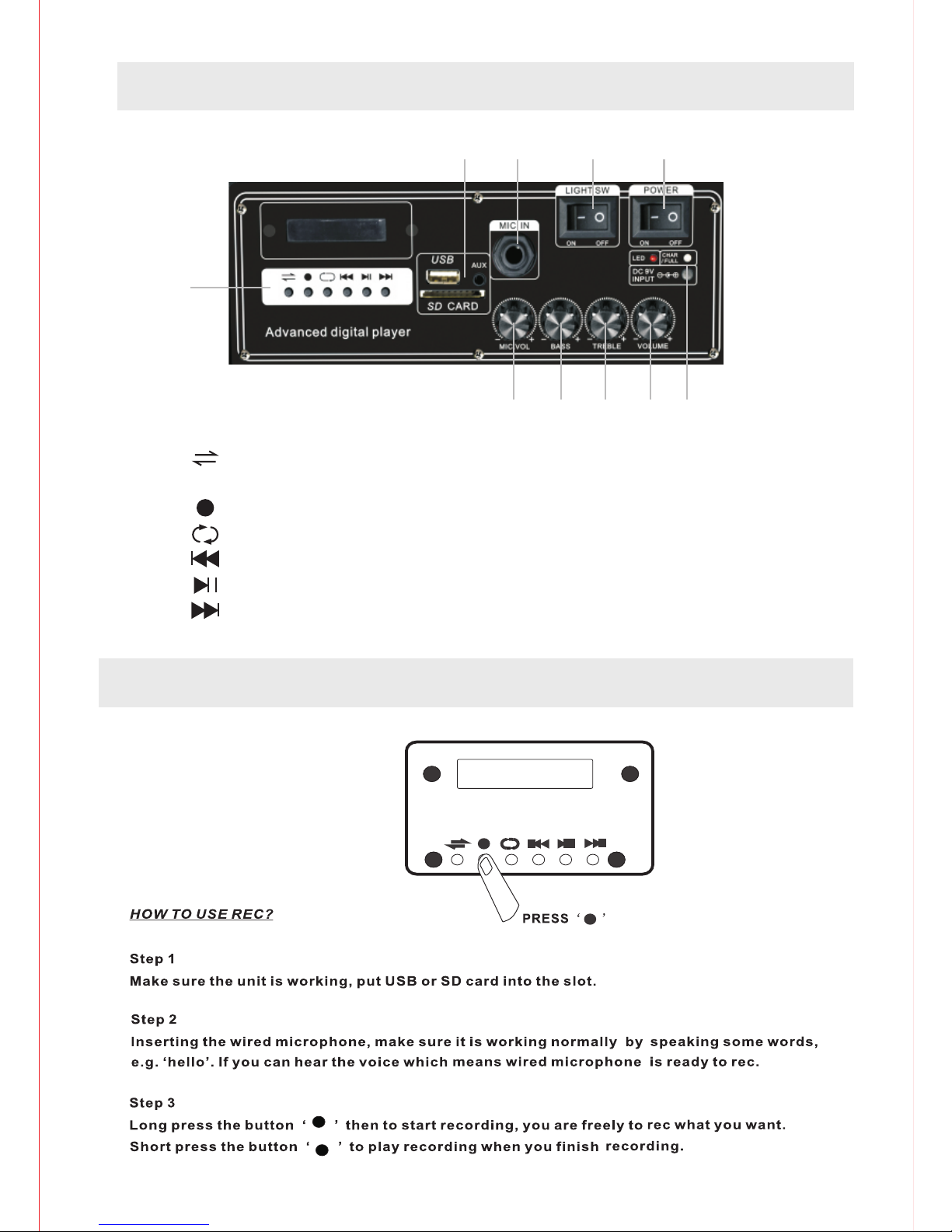
1
2 3 4 5
6 7 8 9 10
1. : INTERCHANGE
( MODE SWITCH)
: REC
: REPEAT
: PREVIOUS SONG
: PLAY/PAUSE
: NEXT SONG
2.USB/SD CARD/AUX
3.MICROPHONE INPUT
4.LIGHT ON/OFF
5.POWER ON/OFF
6.ADJUST THE VOLUME OF MICROPHONE
7.BASS
8.TREBLE
9.ADJUST THE VOLUME OF WHOLE UNIT
10.LED / DC9V INPUT / CHAR/FULL
REC FUNCTION DECLARATION
PANEL FUNCTION DECLARATION
< 1 >
Page 3
< 2 >
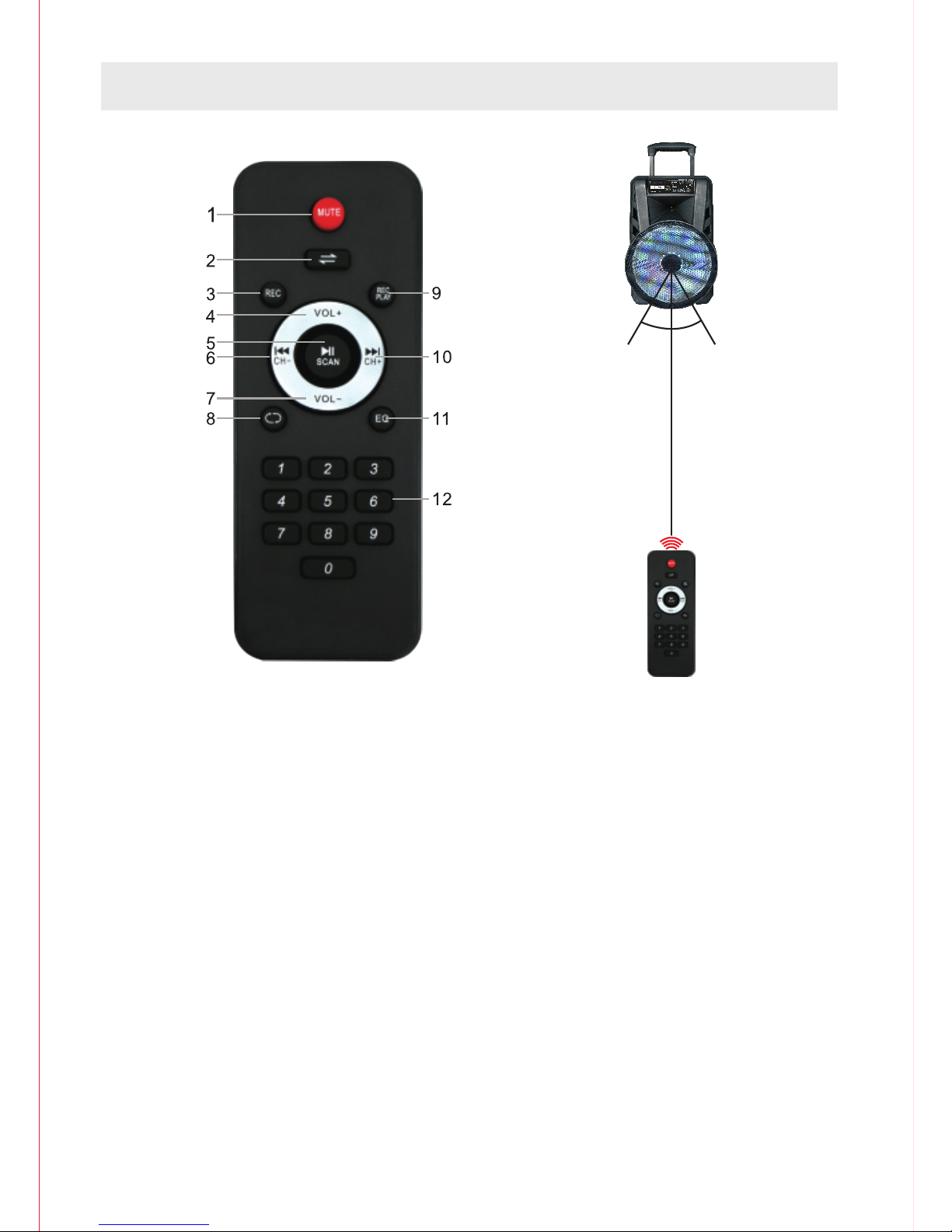
REMOTE FUNCTION DECLARATION
1. MUTE: Press this button to mute the unit.
2. Press this button to toggle between the various inputs(AUX,USB,SD,FM,BLUETOOTH),
Long press this button to turn on/turn off the voice prompt.
3. Press this button to start recording.
4. Press this button to increase the master volume for the unit.
5. Press this button to pause or play the unit when it is on the mode of USB. When it is on
the mode of FM,press this button to auto scan all channels. Long press to change language
to Chinese/English for the voice prompt.
6. Press this button to select the previous song/channel.
7. Press this button to reduce the master volume for the unit.
8. Press this button to repeat one/repeat all.
9. Press this button to play the recording.
10. Press this button to select the next song/channel.
11. Press this button to the EQ mode of Normal,Jazz,Rock,Pop,Classical.
12. 0-9,Key number for selecting the certain songs in the USB/SD/TF Card.
30°30°
16.4Feet (5M)
Page 4

ST EP 3
When the "Syl vania SPA151" appears on your de vices, tap to connect it . It will show" Connecte d"
on your devic e after connected succ essfully.
Depending o n which dev ice you are trying to conn ect the speaker to, it may b e necessary to enter
a passcode. E nter passcode "0000" i f prompted by the device .
ST EP 1
Press the mod e button on f ront panel to launch the b luetooth applicati on.Then you will see tha t
‘bluetoot h’ logo show o n the screen.
ST EP 2
Slide the ‘bl uetooth ’ switch to ‘on’.Your ot hers devices with blue tooth fun ction,like smart pho ne
,computer o r others,then it autom aticall y begins scanning for ne arby bluetooth devic es.
ST EP 4
Tap the entry for bluet ooth accessory when it i s detected by the smart ph one or computer and
displayed o n the scree n.Then it can use blueto oth to operate in conjun ction with accessory.
BLUETOOTH FUNCTION DECLARATION
TECHNICAL SPECIFICATIONS
Frequency range: 2.4-2.48Ghz
Working distance: up to 15 meters in open space
Supporting: USB/SD card play
FM Radio: frequency 87.5 ~108MHz
Remote Control: up to 5 meters in open Space LED
light with on/of Switch
Output power: 40W
Distortion: ≤1.0%
Frequency response: 180Hz – 20Khz Microphone
sensitivity: -40dB
Working time: Music time 3 to 4 hours
Input jack: Aux input ,wired microphone input
Charging input power: DC 9V (Adapter) Charging
time: 6 to 7 hours
CHARGING INDICATOR
Charging: the led light will be in red color
Full: when full-charging the led light will be in green color
Charging time : 6 to 7 hours
Working time : 3 to 4 hours
< 3 >
Page 5
FCC STATEMENTS
NOTE: This equipment has been tested and found to comply with the limits for a Class
B digital device, pursuant to part 15 of the FCC Rules. These limits are designed to
provide reasonable protection against harmful interference in a residential installation.
This equipment generates uses and can radiate radio frequency energy and, if not
installed and used in accordance with the instructions, may cause harmful interference
to radio communications. However, there is no guarantee that interference will not
occur in a particular installation. If this equipment does cause harmful interference to
radio or television reception, which can be determined by turning the equipment off and
on, the user is encouraged to try to correct the interference by one or more of the
following measures:
- Reorient or relocate the receiving antenna.
- Increase the separation between the equipment and receiver.
- Connect the equipment into an outlet on a circuit different from that to which the
receiver is connected.
- Consult the dealer or an experienced radio/TV technician for help.
Changes or modifications not expressly approved by the party responsible for
compliance could void the user's authority to operate the equipment.
This device complies with Part 15 of the FCC Rules. Operation is subject to the
following two conditions:
(1) this device may not cause harmful interference, and
(2) this device must accept any interference received, including interference that may cause
undesired operation.
This equipment complies with FCC radiation exposure limits set forth for an uncontrolled
environment. This equipment should be installed and operated with minimum distance 20cm
between the radiator & your body.
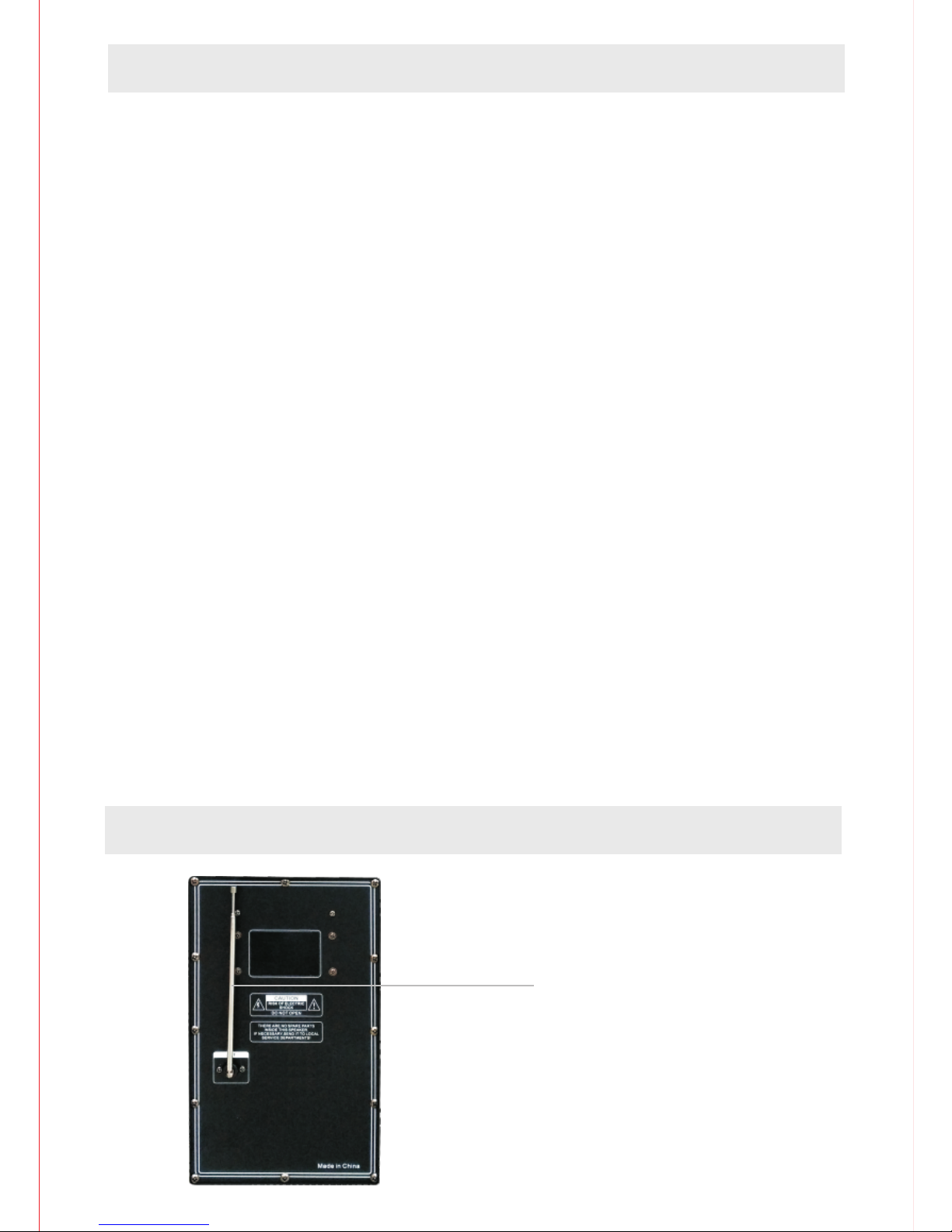
BACK PANNEL
FM RADIO ANTENNA
< 4 >
Page 6
For service assistance and product information, please call: 1-800-968-9853.
Curtis International Ltd.
7045 BECKETT DRIVE, UNIT 15, MISSISSAUGA, ON, L5S 2A3
www.curtisint.com
INSTRUCTION
ATTENTION
< 5 >
 Loading...