

Page 1
Schnurlostelefon
Téléphone sans fil
Telefono senza fili
Cordless telephone
Bedienungsanleitung
Istruzioni per l’uso
BDT 710
Mode d’emploi
Operating Instructions
Page 2

2
Bedienungsanleitung 3........
Mode d’emploi 23............
Istruzioni per l’uso 43..........
Operating Instructions 63.......
Declaration of Conformity 84....
2
Page 3

1
Inhaltsverzeichnis
1 Sicherheitshinweise 4......................
2 Telefon in Betrieb nehmen 5..................
3 Bedienelemente 7.........................
4 Wie bediene ich mein Telefon? 8...............
5 Telefonieren 1 1............................
6 Nebenstellenanlagen / Zusatzdienste 15..........
7 Menüstruktur 16...........................
8 Erweitern des Telefonsystems 17...............
9 Falls es Probleme gibt 18.....................
10 Technische Eigenschaften 19..................
1 1 Pflegehinweise / Garantie 21..................
12 Index 22.................................
3
Page 4
Sicherheitshinweise
1 Sicherheitshinweise
LesenSiedieseBedienungsanleitungsorgfältig durch.
Bestimmungsgemäße Verwendung
DiesesTelefonistgeeignetfürdasTelefoniereninnerhalbeinesTelefonnetzes.Jede andereVerwendunggilt als nicht bestimmungsgemäß.EigenmächtigeVeränderungenoder
Umbautensindnichtzulässig.Öffnen Sie das Gerät in keinem Fall selbst und führen Sie
keineeigenen Reparaturversuchedurch.
Aufstellungsort
Vermeiden Sie BelastungendurchRauch,Staub,Erschütterungen,Chemikalien,Feuchtigkeit,Hitzeoder direkte Sonneneinstrahlung.
VerwendenSie das Mobilteil nicht in explosionsgefährdetenBereichen.
Netzteil
Achtung:VerwendenSienurdasmitgelieferteSteckernetzteil,daandereNetz-
teiledasTelefonbeschädigenkönnen.SiedürfendenZugangzumSteckernetzteilnichtdurchMöbeloderandereGegenständeversperren.
Aufladbare Akkus
Achtung:WerfenSieAkkusnichtinsFeuerundtauchen SiesienichtinsWas-
ser.
Stromausfall
BeiStromausfallkann mit dem Telefonnichttelefoniert werden. HaltenSiefürNotfälleein
schnurgebundenesTelefonbereit,welchesohne externeStromversorgungarbeitet.
Medizinische Geräte
Achtung:BenutzenSie dasTelefonnichtinder NähevonmedizinischenGerä-
ten.EineBeeinflussungkann nicht völlig ausgeschlossen werden.
DECT1-Telefonekönnenin Hörgeräteneinen unangenehmenBrummtonverursachen.
Entsorgung
Siesindgesetzlichzursachgerechten EntsorgungvonGebrauchsgüternverpflichtet.Das nebenstehende Symbol auf IhremTelefon bedeutet,dasselektrischeundelektronischeAltgeräte und AkkusgetrenntvomHausmüll zu entsorgen sind.
Elektrischeoder elektronische Geräte entsorgenSiebeieinerSammelstelle
einesgeeignetenEntsorgungsträgers.
Akkus entsorgenSiebeimbatterievertreibendenHandel sowie beizuständigen
Sammelstellen,die entsprechende Behälterbereitstellen.
VerpackungsmaterialienentsorgenSie entsprechend den lokalen Vorschriften.
1
DECT:DigitallyEnhanced Cordless Telephone =Standard für kabellose Telefone.
4
Page 5
Telefon in Betrieb nehmen
2 Telefon in Betrieb nehmen
Sicherheitshinweise
Achtung:LesenSievorderInbetriebnahmeunbedingtdieSicherheitshinweise
in Kapitel1.
Verpackungsinhalt prüfen
Zum Lieferumfanggehören:
- eine Basisstationmit Netzteil - ein Telefonanschlusskabel
- einMobilteil - zwei Akkus
- eine Bedienungsanleitung
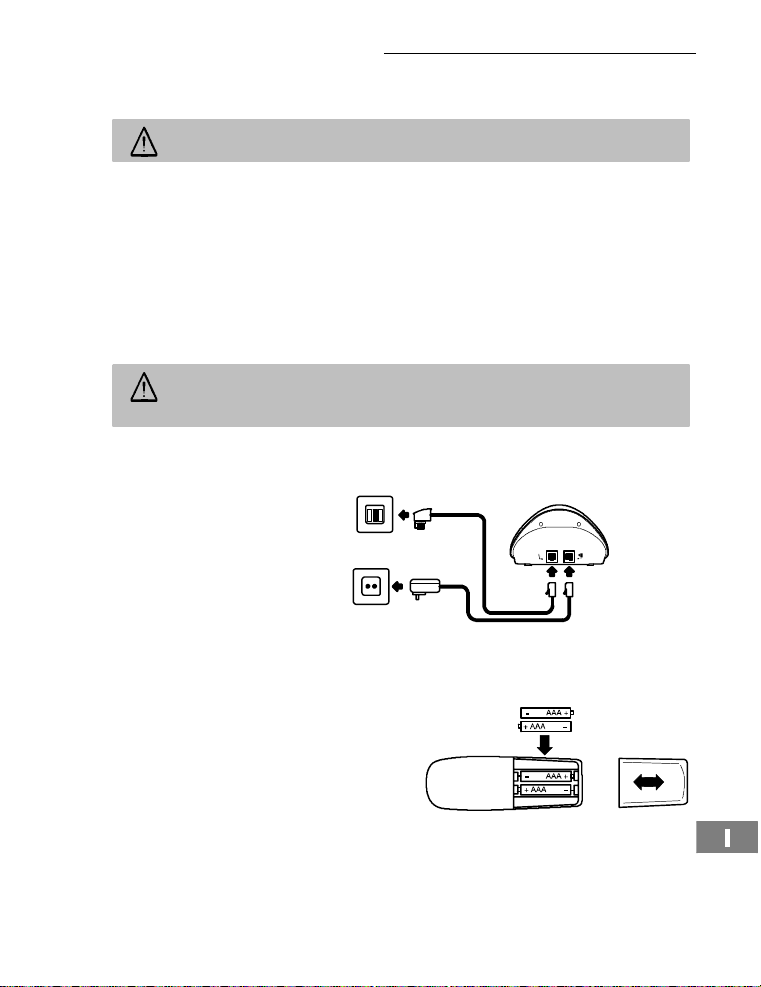
Basisstation anschließen
Achtung:StellenSie die Basisstation mit einem Abstand von 1 m zuanderen
elektronischenGeräten auf, da es sonst zu gegenseitigen Störungenkommen
kann.
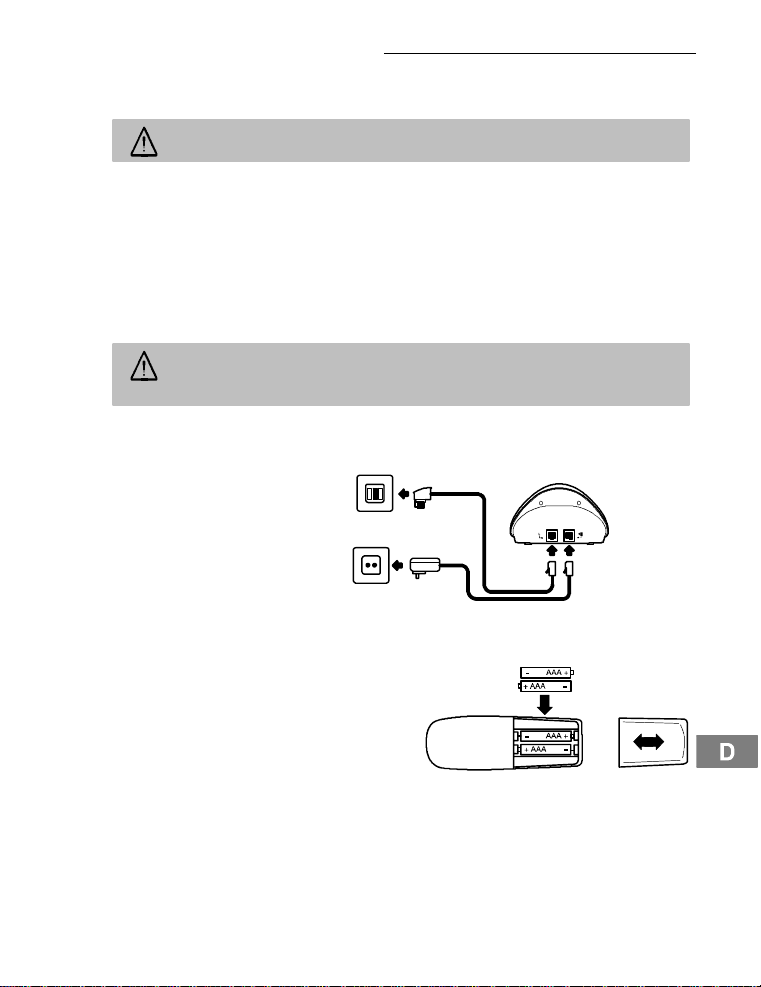
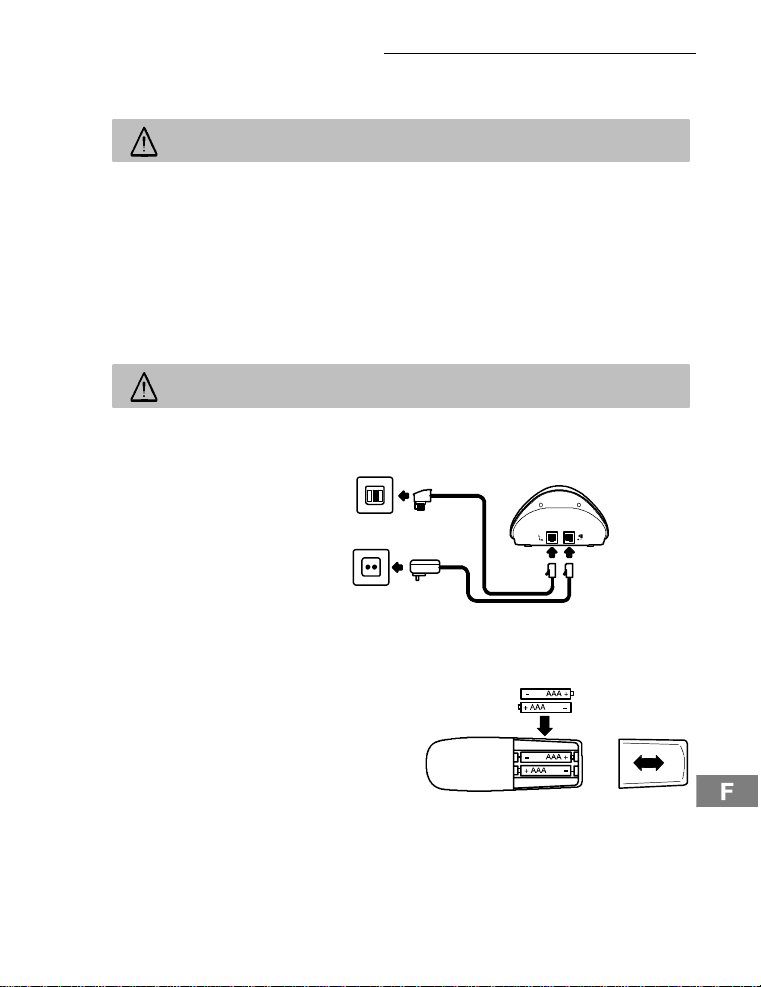
SchließenSiedieBasisstationwie auf der Skizze abgebildet an. VerwendenSieausSicherheitsgründennurdasmitgelieferteNetzteilsowiedasbeigefügteTelefonanschlusskabel.
Telefonanschlussdose
Netzsteckdose
Ladestation anschließen
SteckenSiedasSteckernetzteilineinevorschriftsmäßiginstallierteNetzsteckdose.
Akkuseinlegen
Legen Sie die Akkusin das geöffneteBatteriefach
ein.Verwenden Sie nur AkkusdesTypsAAA
Ni-MH1,2V.AchtenSie auf die richtige Polung!
SchließenSiedasBatteriefach.
5
Page 6

Telefon in Betrieb nehmen
Akkus aufladen
StellenSiedasMobilteilbeidererstenInbetriebnahme fürmindestens14Stundenindie
Basisstation/ Ladestation. Haben Sie das MobilteilrichtigindieBasisstation/ Ladestation
gestellt,ertönt ein Hinweissignal und die Ladekontrollleuchte leuchtet.DasMobilteilerwärmtsichbeimLaden.Diesistnormal und ungefährlich. Laden Sie das Mobilteil nicht
mitfremdenAufladegeräten.DeraktuelleAkkuladezustand wird im Displayangezeigt:
Voll Halb Schwach Leer
Nebenstellenanlagen
AufSeite15erhaltenSieweitereInformationen,wenn Sie IhrTelefonan einer Nebenstellenanlage anschließen möchten.
6
Page 7
3 Bedienelemente
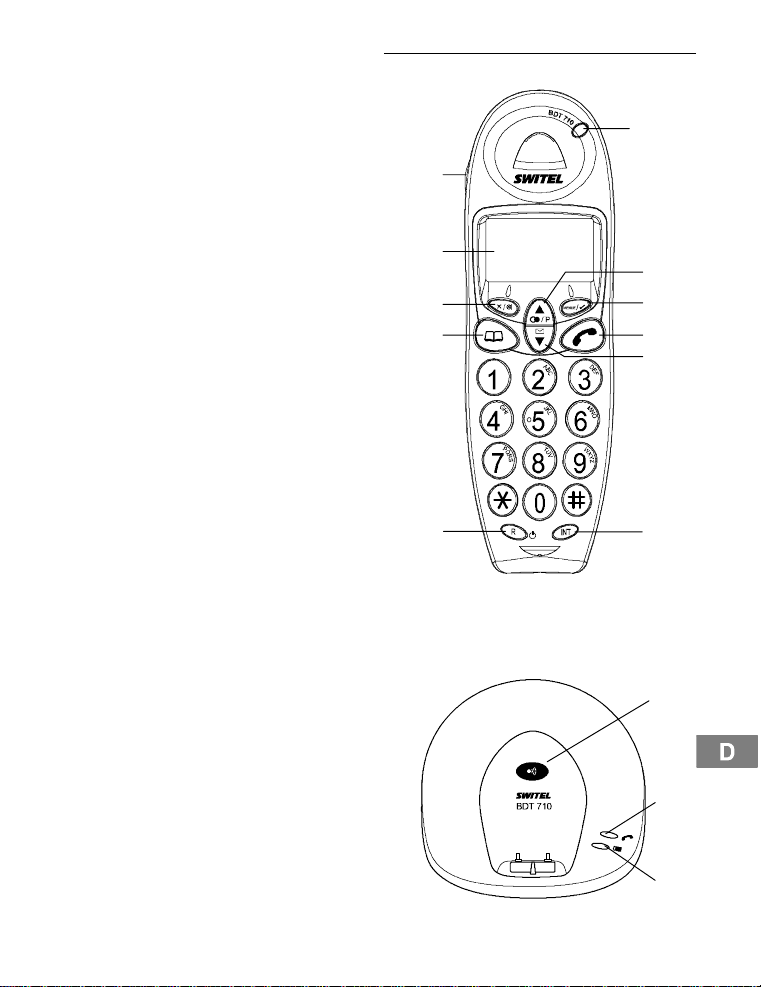
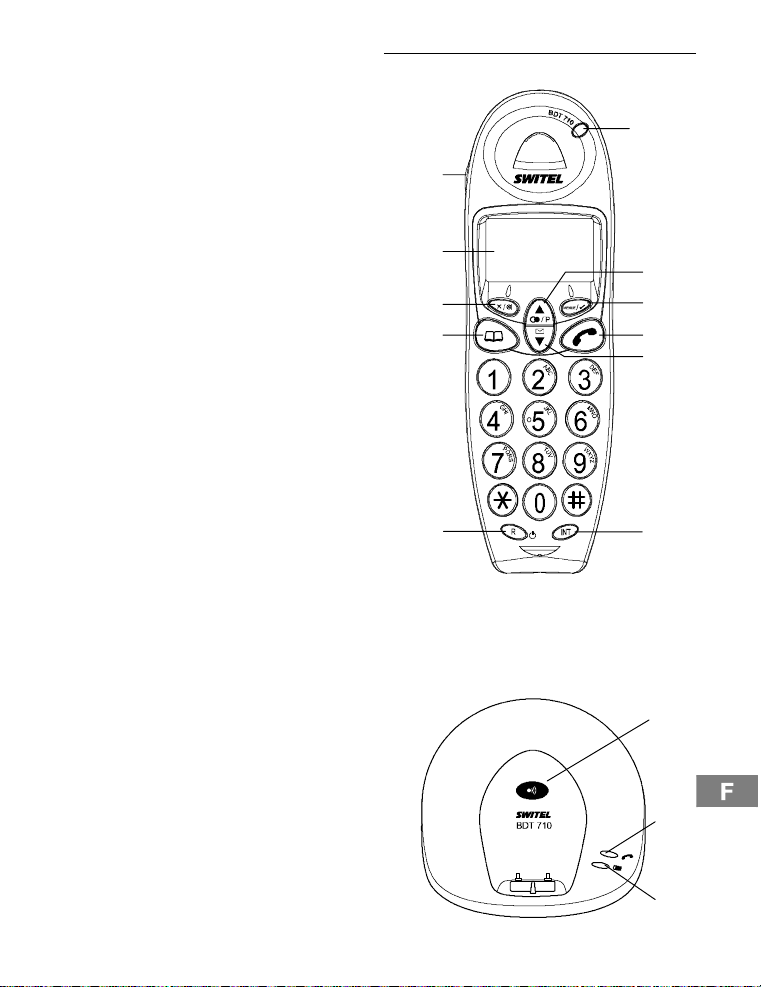
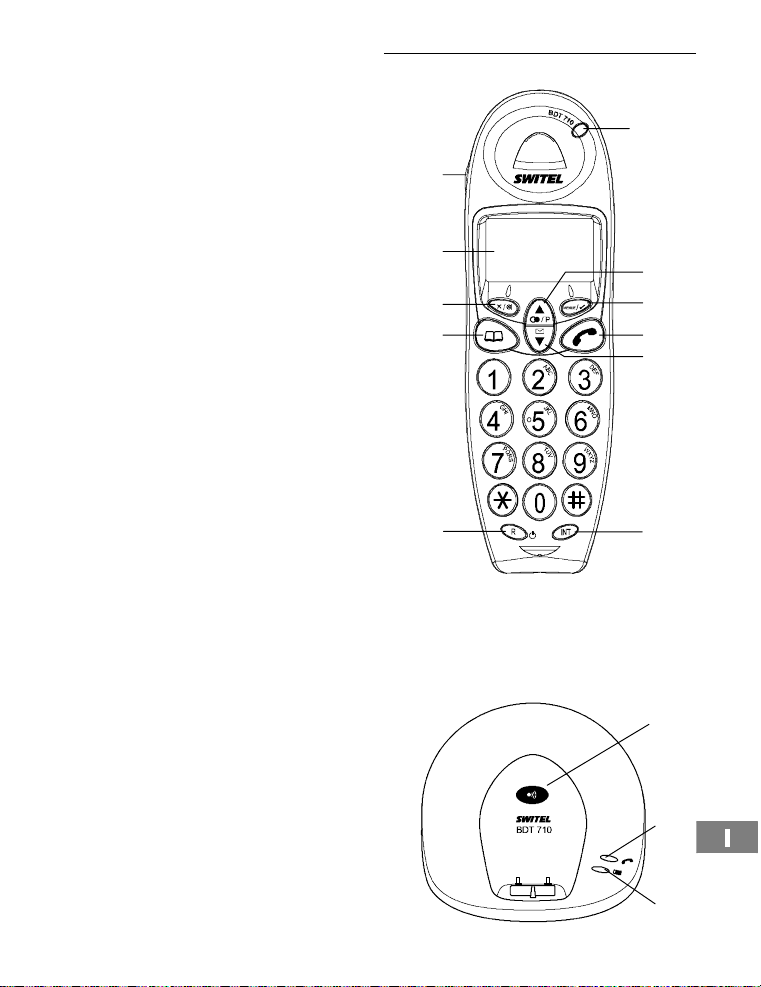
Mobilteil
1. Gesprächsanzeige
2. Auswahltaste/Wahlwiederholung
3. Menü-Taste
4. Gesprächstaste
5. Auswahltaste/Anrufliste CLIP
6. InterneGespräche
7. R-Signaltaste
8. Telefonbuch/Menüverlassen
9. Stumm/Löschtaste
10. Display
11. Freisprechen
11
10
9
8
Bedienelemente
1
2
3
4
5
Basisstation
1. Paging-Taste(Mobilteilsuchen)
2. Gesprächs-undNetzanzeige
3. LEDLadekontrollleuchte
7
6
1
2
3
7
Page 8
Wie bediene ich mein Telefon?
4 Wie bedieneich mein Telefon?
Darstellungen und Schreibweisen
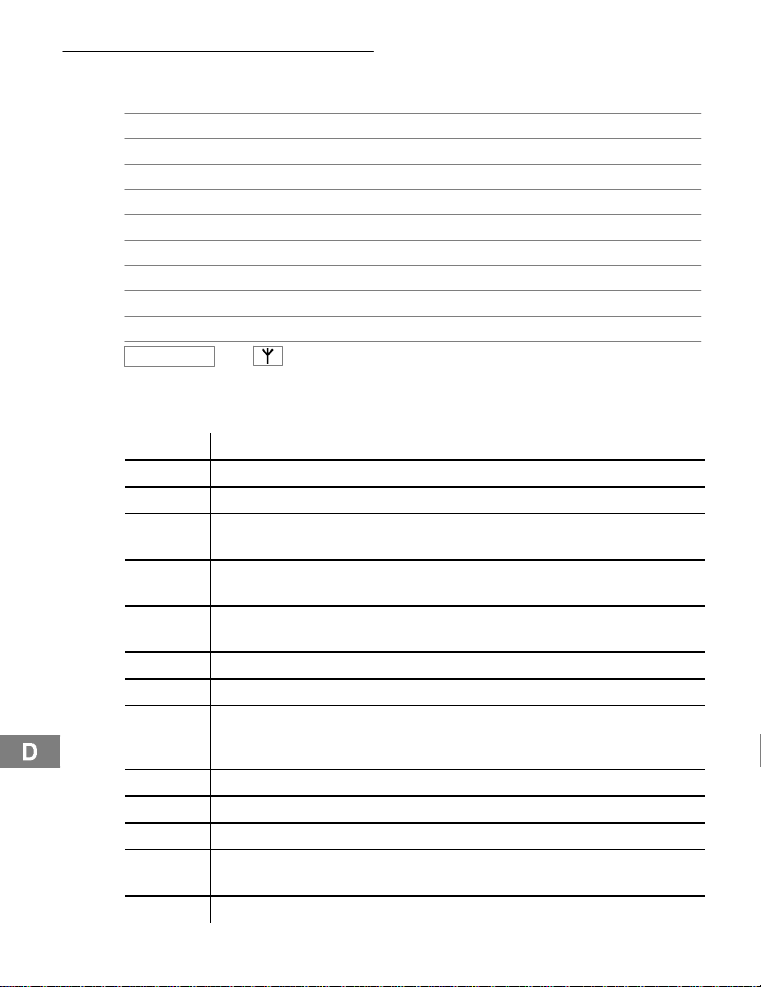
ë NummernoderBuchstabeneingeben
AbgebildeteTastekurzdrücken
2sec AbgebildeteTaste2Sekundendrücken
halten AbgebildeteTastehalten
loslassen AbgebildeteTasteloslassen
{í} Mobilteilklingelt
{ì} Basisstationklingelt
è MobilteilausderBasisstation nehmen
é MobilteilindieBasisstation stellen
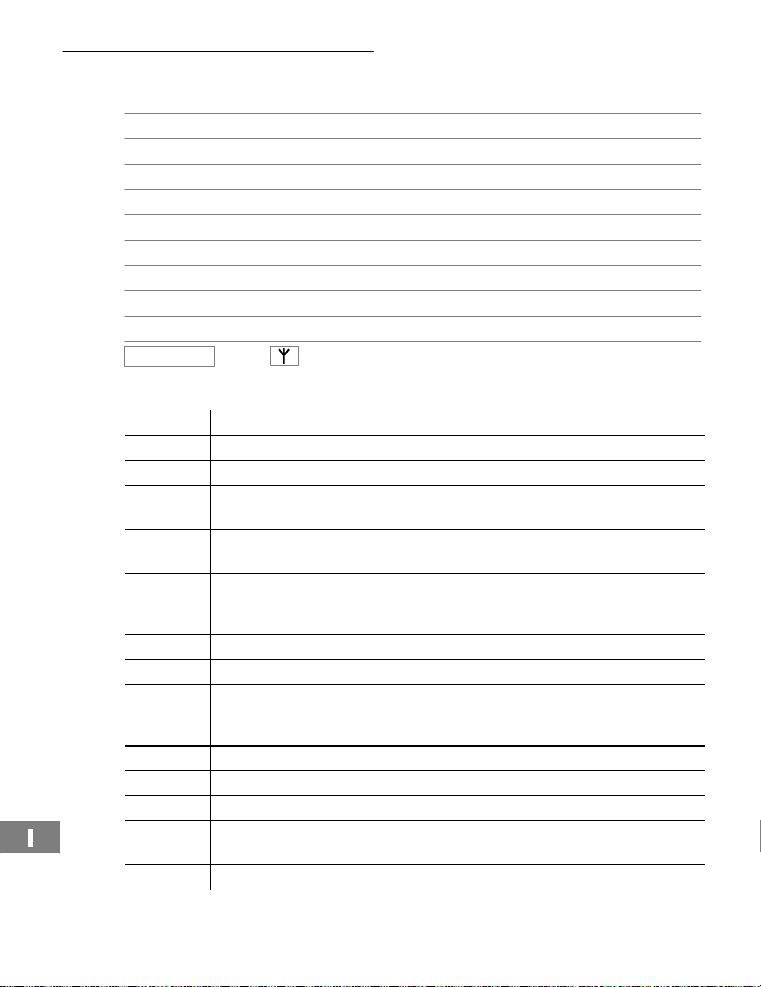
BEISPIEL oder TextoderSymboleimDisplay
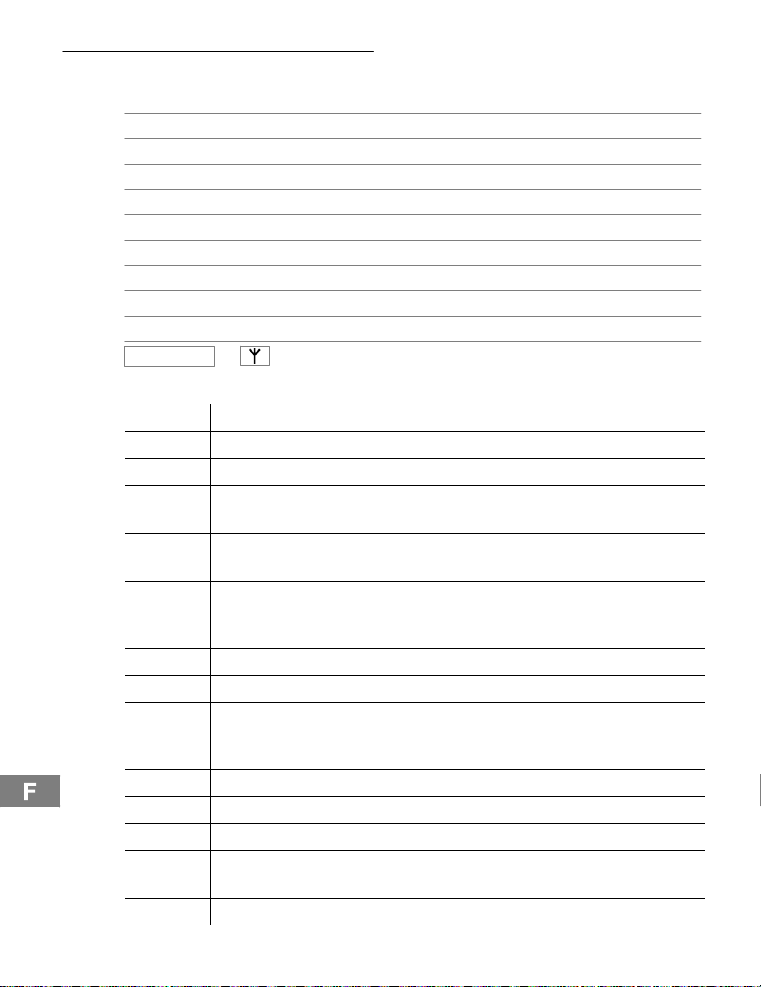
Symbole im Display
Symbol Beschreibung
Konstant:Sieführen ein Gespräch.
a
Konstant:Freisprechen ist eingeschaltet.
b
e
i
c
d
k
m
Konstant:Sieführen ein externes Gespräch.
Blinkt: Es erreicht Sieein externer Anruf.
Konstant:Sieführen ein internes Gespräch.
Blinkt: Es erreicht Sieein interner Anruf.
Konstant: SiebefindensichinderAnrufliste(CLIP).
Blinkt:EssindneueAnrufeinder Anrufliste(CLIP) gespeichert.
Konstant: VerpassterAnr u f.
f
Konstant:Angenommener Anruf.
g
Blinkt:BittedasMobilteilladen.
Konstant:Anzeigeder Batteriekapazität.
Durchlaufen der Segmente: Das Mobilteil wird geladen.
Konstant:Beider Benutzung des Telefonbuchs.
h
Konstant:SobalddieProgrammierung aktiviertist.
j
Konstant: Die Tastatursperre ist eingeschaltet.
Konstant:Die Verbindungzur Basisstation istgut.
l
Blinkt:DieReichweitezurBasisstation ist überschritten.
Konstant:Die Rufnummer ist länger als 12 Stellen.
8
Page 9
Wie bediene ich mein Telefon?
Navigationstasten
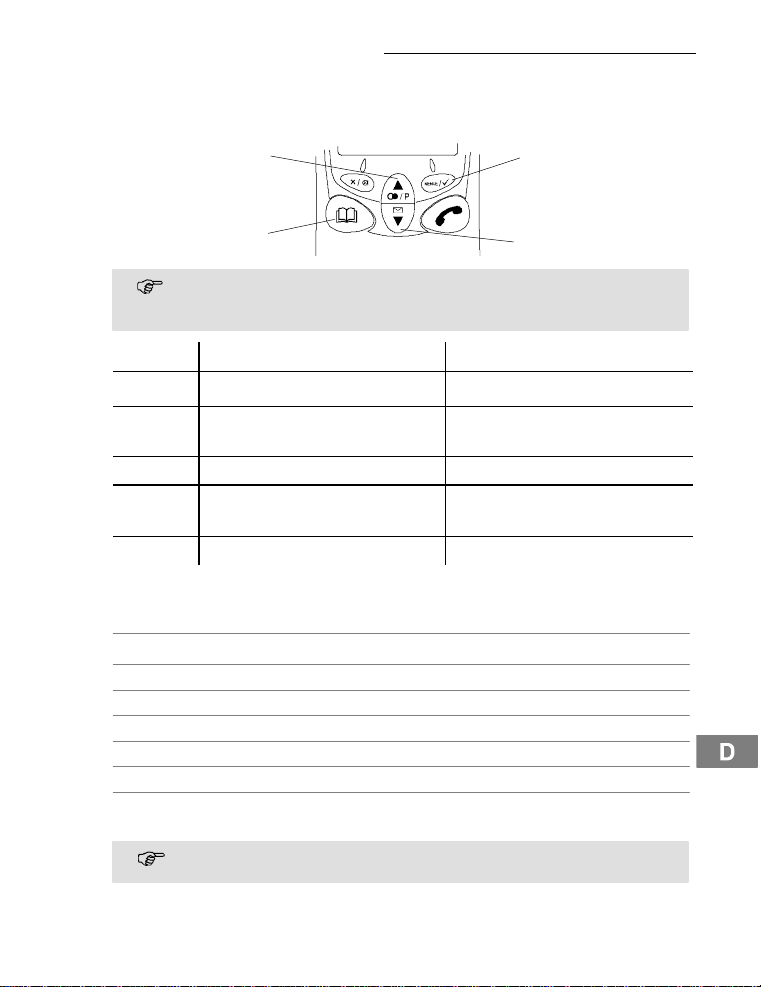
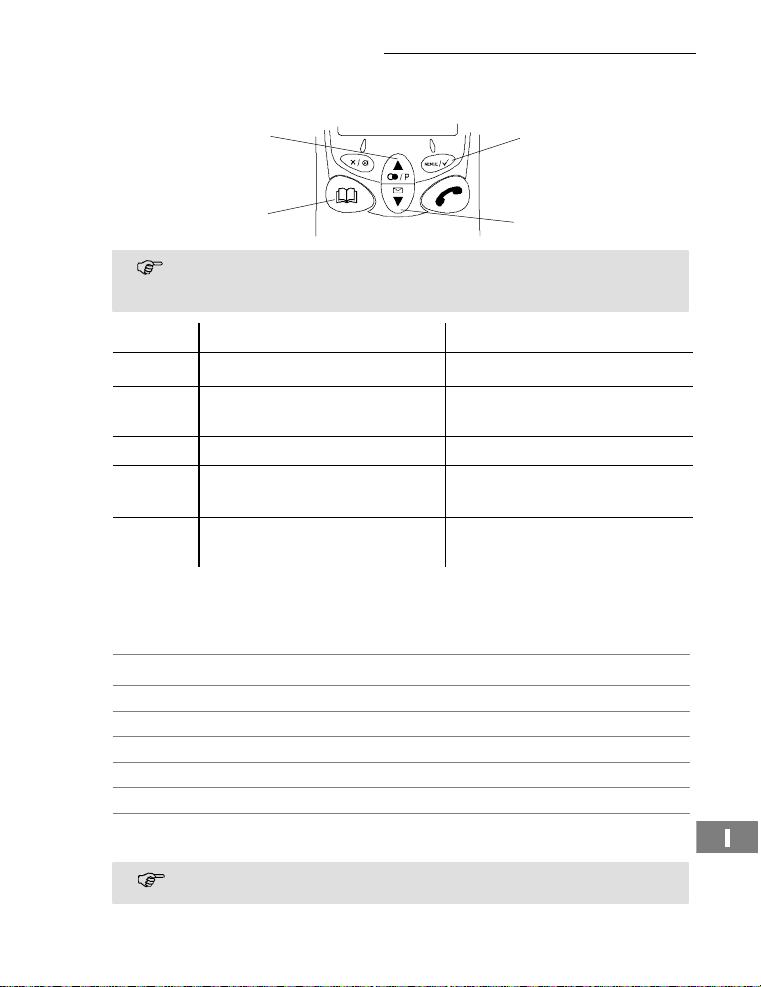
AlleBeschreibungenindieserBedienungsanleitunggehen davonaus,dass sich das MobilteilimStandby-Modusbefindet. Den Standby-ModuserreichenSiedurchDrückender
Taste ¤.
Taste ImStandby-Modus Im Menü
1
2 ,
3 ¤ - öffnetdas Telefonbuch - eine Ebene zurück
4 +
R - Mobilteilein-/auschalten - keineFunktion
Navigation im Menü
AlleFunktionensindüberunterschiedlicheMenüszuerreichen.Den Weg zur gewünschtenFunktionentnehmenSiederMenüstruktur . Seite16.
Hauptmenüöffnen
+ oder, GewünschtesUntermenüauswählen
Untermenüöffnen
ë ÜberTastenfeldNummernoderBuchstabeneingeben
Eingaben bestätigen
¤ eine Ebene zurück
2sec¤ Programmier-undSpeichervorgängeabbrechen und
2
4
+
3
¤
In dem Beschreibungsteil dieses Dokumenteswerden standardisierte Tastensymboleverwendet,d.h.dieKonturenunddie SymbolikderTastenkönnenvon
den tatsächlichenetwasabweichen.
- öffnetdas Hauptmenü - öffnetangezeigtes Menü
- öffnetdie Anrufliste
- öffnetdie Wahlwiederholliste
in den Standby-Moduszurückkehren
JederVorgang wird automatisch abgebrochen, wenn innerhalb von 30Sekunden keine Eingabe erfolgt.
- in den Menüs blättern
- ändernvonEinstellungen
- in den Menüs blättern
- ändernvonEinstellungen
1
2
,
9
Page 10
Wie bediene ich mein Telefon?
Telefonbucheinträge erstellen - Beispiel
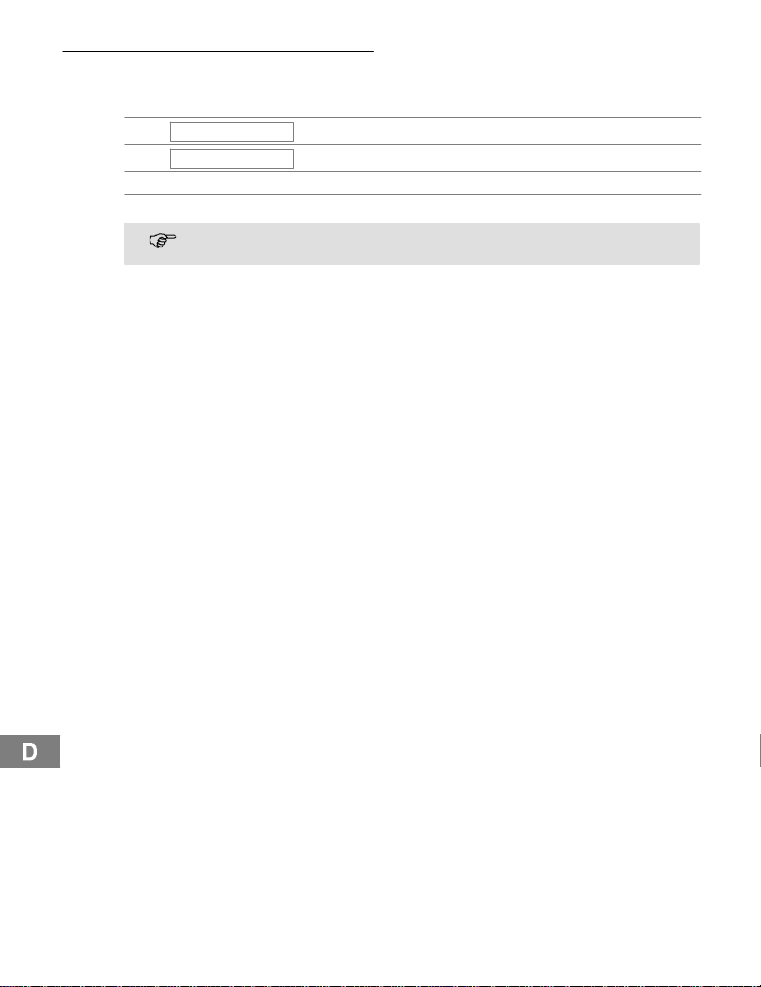
Wie Sie in den Menüs navigieren und Eingaben vornehmen,isthieranhanddesBeispiels
Telefonbucheinträgeerstellenerklärt. Der Telefonbuchspeicher umfasst30Einträge.
TELEFONBUCH
,
HINZUFUEGEN
,
ë, Nameneingeben und bestätigen
ë, Rufnummereingebenundbestätigen
VerfahrenSiebeiallenEinstellungenwiebeidiesemBeispiel.SieheMenüstruktur . Seite 16.
, F unktion auswählen und bestätigen
3
Hauptmenüöffnen
10
Page 11
5 Telefonieren
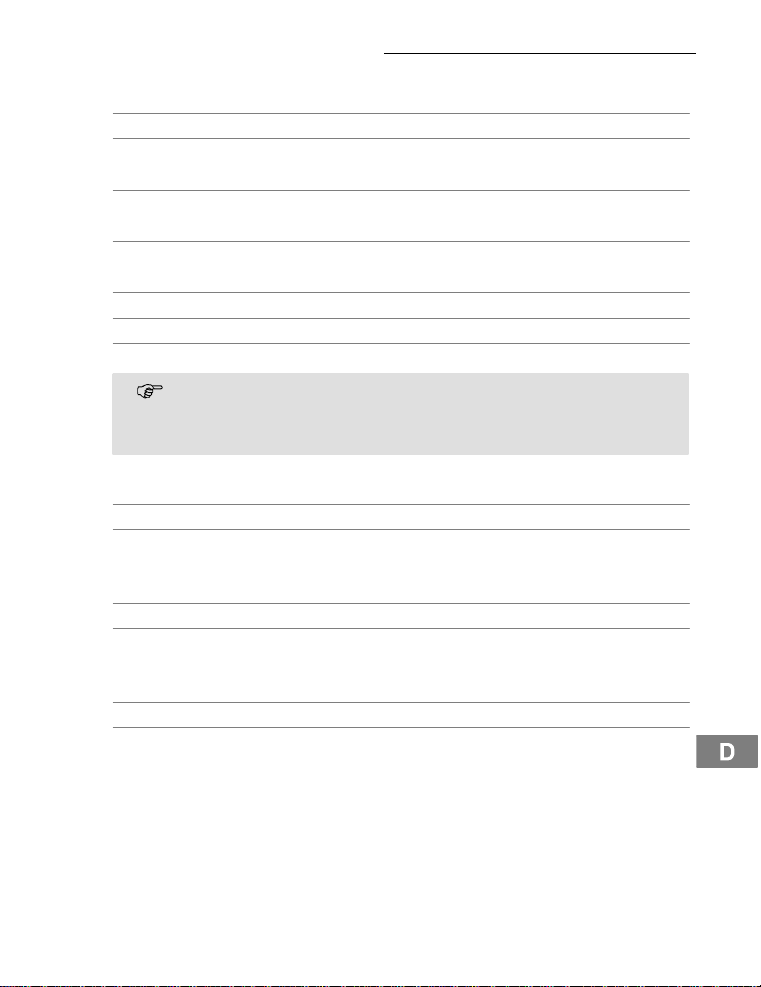
Mobilteil ein-/ausschalten
2secR Mobilteileinschalten
2secR Mobilteilausschalten
Anruf annehmen
{í},è oder ƒ Anrufannehmen
Gespräch beenden
ƒ oder é Gesprächbeenden
Anrufen
ë Rufnummereingeben(max.20 Z iffern)
BeiFalscheingabeletzteZiffer löschen
ƒ Rufnummerwählen
Sie können auch zuerst die Gesprächstaste drücken und erhalten damit das
Freizeichen.DieeingegebenenZiffernIhrergewünschtenRufnummerwerden
sofort gewählt. Eine Korrektur einzelner Zi ffern der Rufnummer ist bei dieser
FormdesGesprächaufbausnichtmöglich.
Wahlwiederholung
IhrTelefonspeichertdie5zuletztgewähl ten Rufnummern in einer Wahlwiederholliste.
y Wahlwiederhollisteöffnen
y oder z, ƒ EintragauswählenundVerbindung herstellen
Eingegangene Anrufezurückrufen
IhrTelefonspeichert20eingegangeneAnrufein einerAnrufliste.
z Anruflisteöffnen
y oder z, ƒ EintragauswählenundVerbindung herstellen
Rufnummern aus dem Telefonbuch wählen
SiemüssenRufnummernim Telefonbuchgespeicherthaben. . Seite 16.
¤ Telefonbuchöffnen
y oder z, ƒ EintragauswählenundVerbindung herstellen
Telefonieren
11
Page 12
Telefonieren
Intern telefonieren
Interne Gespräche führen
SiemüssenzweiodermehrMobilteile(MT1,MT2, ...) an einer Basisstation angemeldet
haben,uminterne,kostenloseGespräche führen zu können.
MT1: I,z.B. 2 InterneRufnummer des gewünschtenMobilteils
MT2: ƒ InternesGesprächam anderen Mobilteilannehmen
MT1 / MT2:ƒ InternesGesprächbeenden
Externe Gespräche intern weiterleiten
MT1: I,z.B.2 Während des externenGesprächsinterneRufnummer
MT2: ƒ InternesGesprächam anderen Mobilteilannehmen
MT1: ƒ Gesprächweiterleiten
Sollte sich das gerufene Mobilteil nicht melden, können Sie sich das externe
Gespräch durch Drücken der TasteI wieder zurückholen.
Rücksprache / Makeln
Während eines externenGesprächskönnenSieeinanderesMobilteilanwählen,um
Rücksprache zu halten. Der externe Gesprächspartner wird gehalten, während Sie mit
deminternenGesprächspartnersprechen. Sie können den Gesprächspartnerbeliebig oft
wechseln.
MT1: I,z.B.2 Während des externenGesprächsinterneRufnummer
MT2: ƒ InternesGesprächam anderen Mobilteilannehmen
MT1: I Gesprächspartner wechseln
Konferenzgespräche führen
EinexternesGesprächkannmiteinem weiteren internen GesprächspartnerzumKonferenzgesprächgeschaltetwerden.
MT1: I,z.B.2 Während des externenGesprächsinterneRufnummer
MT2: ƒ InternesGesprächam anderen Mobilteilannehmen
MT1:2secI Konferenzstarten
MT1 / MT2:ƒ DurchAuflegeneinesinternenGesprächspartners
Einstellen der Hörerlautstärke
Siekönnenwährend eines GesprächsdieLautstärkein5Stufenanpassen.
+ oder, Während des Gesprächsdrücken
wählen
wählen
wählen
wählen
wirddie Konferenzbeendet
12
Page 13
Telefonieren
Anzeige der Gesprächsdauer
Während eines GesprächsundkurzdanachwirddieGesprächsdauerinStunden,MinutenundSekundenangezeigt.
Freisprechen
NutzenSiedieseFunktion,umdenGesprächspartnerüber den Lautsprecher zu hören.
™ Freisprecheneinschalten
™ Freispechen ausschalten
Mikrofon im Mobilteil stummschalten
Siekönnenwährend eines TelefongesprächsdasMikrofondesMobilteilsaus- und einschalten.
Mikrofonausschalten(stummschalten)
Mikrofoneinschalten
Tastensperre
BeieingeschalteterTastensperrekönnen Sie eingehende Anrufe wie gewohnt annehmen.
3sec*
2x * Tastensperreausschalten
Temporäre Tonwahl
WennSieIhrTelefonnurmitdemImpulswahlverfahrenbetreibenkönnen,kannwährend
desGesprächesauftemporäreTonwahl umgeschaltetwerden,umz.B. einen Anrufbeantworterabzufragen.
* TemporäreTonwahleinschalten
* TemporäreTonwahlausschalten
Wahlpause
4
BeiNebenstellenanlagenisteserforderlich,eine bestimmteNummerzu wählen (z. B. 0
oder9),umeinFreizeichenfüreineAmtsleitungauf den Apparat zu bekommen.BeiälterenAnlagenkannesetwasdauern,bisdasFreizeichenzuhörenist.F ügen Sieeine
Wahlpauseein.
DiePausekannauchbeiderEingabe vonRufnummernindas Telefonbucheingegeben werden.
0,2secP, 1234... Pause einfügen
Tonrufmelodie des Mobilteils
Siekönnendie TonrufmelodieamMobilteilausschalten . Seite 16.
AnrufewerdennunüberdieBasisstationundnichtmehrüberdasMobilteilsignalisiert.
Tastensperreeinschalten
13
Page 14

Telefonieren
Mobilteil suchen (Paging)
WennSieIhrMobilteilverlegthaben, können Sie es über einen Suchton leicht wiederfinden.
{«} Suchton starten
oder © Suchton beenden
Reichweite
Die ReichweitedesMobilteilsbeträgtca. 50 Meter in geschlossenen Räumenund ca.300
MeterimFreien.BeieinergutenVerbindungzurBasisstation leuchtetimDisplaydas
Symbol
l.Haben Sie sich zu weitvonderBasisstationentfernt,blinktdasSymboll
und Sie hören Warntöne.NähernSiesichindiesemFallwiederderBasisstation,da
sonstdasGesprächunterbrochenwird.
14
Page 15

Nebenstellenanlagen / Zusatzdienste
6 Nebenstellenanlagen/ Zusatzdienste
R-Taste an Nebenstellenanlagen
IstIhrTelefonaneinerNebenstellenanlageangeschlossen,können Sie über die R-Taste
Funktionen,wiez.B.Anrufeweiterleiten und automatischenRückruf,nutzen. Lesen Sie
bitteinderBedienungsanleitungIhrerNebenstellenanlage, welche Flash-Zeit Sie zur NutzungdieserFunktioneneinstellenmüssen.Ob IhrTelefonanIhrerNebenstellenanlage
einwandfreifunktioniert,erfahren Sie bei dem Händler,beidemdieAnlagegekauftwurde.
EinstellenderFlash-Zeit. Seite16.
Wahlpause
BeiNebenstellenanlagenisteserforderlich,eine Amtskennzahlvorzuwählen,um ein
Freizeichenzubekommen.Beiwenigen,älteren Nebenstellenanlagen dauert es einige
Zeit,bisdasFreizeichenzuhörenist.F ügen Siefürdiesen F all nachderAmtskennziffer
eine Wahlpauseein.SiekönnendanndieRufnummereingeben,ohneaufdasFreizeichen warten zu müssen . Seite13.
R-Taste und Zusatzdienste
IhrTelefonunterstütztZusatzdiensteIhresNetzbetreibers,wie z.B.Makeln,Anklopfen
und Konferenz.ÜberdieR-TastekönnenSiedieseZusatzdienstenutzen.Bitte fragen
SieIhrenNetzbetreiber, welche Flash-Zeit Sie zur Nutzung von Zusatzdiensteneinstellen
müssen.ZurFreischaltungvon Zusatzdienstenwenden Sie sichbitte an Ihren Netzbetreiber.Einstellen der Flash-Zeit . Seite 16.
Anrufbeantworterim Telefonnetz
WennIhrNetzbetreibereinen AnrufbeantworterimTelefonnetzfürSiebereitstellt,werden
SiemiteinemBriefsymbol (VMWI
terunddie InformationüberneueNachrichtenmit dem BriefsymbolsindoptionaleServicesIhresNetzbetreibers.ÜberdieseFunktionenkönnenSienur dann verfügen,wenn
IhrNetzbetreiberdiesen Service anbietet.BittefragenSieIhrenNetzbetreiber nach weiterenInformationen.
Rufnummernanzeige (CLIP2)
WenndieseFunktionanIhrerTelefonleitungzurVerfügungsteht,wird Ihnen bereits die
RufnummerdesAnrufersangezeigt, wenn das Telefonklingelt. Hat der Anrufer das ÜbertragenseinerRufnummerunterdrückt,wirdeine entsprechendeMeldungangezeigt.Die
Rufnummerkannnichtangezeigt und somit auch nicht in der Anruflistegespeichertwerden.
DieRufnummernanzeigeisteinoptionalerServiceIhresNetzbetreibers.Fragen
SieIhrenNetzbetreibernach weiteren Informationen.
1
)über neue Nachrichteninformiert.Der Anrufbeantwor-
1
VMWI:VisualMessageWaiting Indication
2
CLIP:CallingLine IdentificationPresentation
15
Page 16
Menüstruktur
7 Menüstruktur
TELEFONBUCH HINZUFUEGEN
EINSTELLUNG BASIS LAUT LAUTST 1, 2,3, TON AUS
5
LOESCHEN
AENDERN
BASIS MELODIE MELODIE1,2,3
MT ABMELDEN PIN?
PIN CODE
MFV-IWV MFV
FLASHZEIT FLASH 1 (100 ms)
5
5
PIN?
IWV
FLASH 2 (300 ms)
MOBILTEIL?
NEUEPIN WIEDERH
WERKSEINST PIN?
MOBILTEIL TOENE TASTENTON EIN -AUS
INT RUF LAUT LAUTST 1, 2,3, TON AUS
EXTRUF LAUT
INT MELODIE MELODIE1,2,3
EXT MELODIE MELODIE1,2,3
AUTOANNAHME EIN - AUS
NAME .........
SPRACHE (7 SPRACHEN)
TASTENSPERRE
ANMELDEN BASIS WAHL BS1___
BASIS ANMELD BS1234
5
Werkseinstellung System-PIN: 0000
2
Haben Sie dieFunktion aktiviert, wird ein Anruf automatisch beim Herausnehmen des Mobilteils aus der Basis-
station angenommen.
5
AKKU LEER EIN - AUS
REICHWEITE EIN - AUS
LAUTST 1, 2,3, TON AUS
2
.........
16
BESTAETIGEN
Page 17
Erweitern des Telefonsystems
8 Erweiterndes Telefonsystems
Überden internationalgenormtenGAP1StandardistdieKompatibilitätvonMobilteilen
und Basisstationenverschiedener Herstellergeregelt.So ist es möglich, SWITEL-Geräte
und GeräteandererHerstellerzusammenin einemTelefonsystemzuintegrieren.
Mehrere Mobilteile
Siekönneninsgesamt5MobilteileanIhreBasisstation anmelden.
AnmeldenvonMobilteilen
BevorSiedenAnmeldevorgangeinesMobilteilsdurchführen,setzenSiediejeweiligeBasisstationindenRegistriermodus.
3sec Registriermodusstarten
Führen Sie jetztdenAnmeldevorganganIhremMobilteil durch . Seite 16. BenutzenSie
zurAnmeldungdenaktuelleingestelltenPIN-Code . Seite 16.
NachdemAnmeldenwirddemMobilteileineinterneRufnummergegeben. Diese interne
RufnummerwirdimDisplayangezeigt.
UmMobilteileandererHerstelleranzumelden,lesenSiebittederenBedienungsanleitungen.
AbmeldenvonMobilteilen
Siekönnenein Mobilteil voneinerBasisstationnurdurch einweiteresandieser
Basisstationangemeldetes Mobilteil abmelden.
Mehrere Basisstationen
IhreMobilteilekönnengleichzeitigan 4 verschiedenen Basisstationenangemeldetsein.
JedeBasisstationbenötigt eine eigene Telefonsteckdose.EskönnenAnschlüssemitder
selbenund auch mitunterschiedlichenRufnummern sein.
LaufendeGesprächekönnennichtvoneinerzuranderen Basisstationübertragen werden.
Erhöhung der Reichweite
PlatzierenSiedieBasisstationen so,dasssichdieReichweitedereinzelnenBasisstationen überschneidet.TestenSiedieReichweiteIhrer Mobilteile, da Hindernissein Gebäuden die Reichweiteeinschränken.MeldenSie das Mobilteilan alle Basisstationenan.
SchaltenSiedieFunktionautomatischeWahl vonBasisstationenein . Seite 16. Das
MobilteilsuchtsichautomatischdienächstgelegeneBasisstationmitderbestenVerbindung.
Mobilitätdurchverschiedene Standorte
MeldenSiedasMobilteilanverschiedenenStandorten an Basisstationenan.Schalten
Siedie Funktionautomatische Wahl von Basisstationenein. Seite16. An welchem
StandortSiesichauch befinden, das Mobilteil sucht sich automatischeineinReichweite
liegende Basisstation.
1
GAP:GenericAccessProfile=Standardfürdas Zusammenwirkenvon Mobilteilen
und BasisstationenandererHersteller.
17
Page 18

Falls es Probleme gibt
9 Fallses Probleme gibt
Haben Sie ProblememitIhremTelefon,kontrollierenSie zuerst die folgenden Hinweise.
BeiGarantieansprüchenwendenSiesichanIhrenFachhändler.DieGarantiezeitbeträgt
2 Jahre.
Fragen und Antworten
Fragen Antworten
KeineVerbindungzur Basisstationmöglich
KeinTelefongesprächmöglich - DieTelefonleitungist nicht korrektangeschlossen
Verbindungabgehackt, fälltaus - Sie haben sich zu weit von der Basisstationent-
DasSystemreagiertnicht mehr - SetzenSiealleFunktionenindenWerkszustand
Die Akkus sind inkürzester Zeit
leer
Die Rufnummernanzeige(CLIP)
funktioniertnicht
- PrüfenSie,obSiesichmitdem richtigen PIN-Code an der Basisstationangemeldethaben.. 16.
odergestört.Verwenden Sie nur das mitgelieferte
Telefonanschlusskabel.
- TestenSiemiteinemanderenTelefon,obIhrTelefonanschlussinOrdnungist.
- DasNetzteilistnicht eingesteckt oder es liegtein
totaler Stromausfall vor.
- Die aufladbarenAkkussindleeroderdefekt.
- Siehaben sichzuweitvonderBasisstationentfernt.
- Wahlverfahrenfalsch eingestellt.. 16.
fernt.
- FalscherAufstellungsortder Basisstation.
zurück. . 16.
- Ziehen Sie kurzzeitigdasNetzteilausderSteckdose.
- Die Akkussindleeroderdefekt.
- StellenSiedasMobilteilrichtig auf die Basisstation.ReinigenSiedieKontaktflächenam Mobilteilundan der Basisstationmiteinem weichen,
trockenenTuch.
- StellenSiedasMobilteilfür14 Stundenin die
Basisstation.
- Die Rufnummernanzeigeistein optionaler ServiceIhresNetzbetreibers.BittefragenSieIhren
NetzbetreibernachweiterenInformationen.
- DerAnruferhatdasÜbertragenseinerRufnummerunterdrückt.
18
Page 19

10 Technische Eigenschaften
Technische Daten
Merkmal Wert
Standard DECT-GAP
Stromversorgung Eingang:220/230V,50Hz
Reichweite Außen: ca. 300 m
Standby biszu 150 h
Max.Gesprächsdauer bis zu 11 h
AufladbareAkkus 2x1.2V,Größe:AAA
Wahlverfahren Ton-Wahlverfahren(Voreinstellung)
Zulässige Umgebungstemperatur 10°C bis 30°C
ZulässigerelativeLuftfeuchtigkeit 20% bis75%
Flash-Funktion 100ms,300ms
Mobilteilname DECT BDT 710 (änderbar)
Telefonbuch 30 Einträge
Anrufliste 30 Einträge
Wahlwiederholliste 5 Einträge
Akku-Warnanzeige ja
Tastenton Ein/Aus
Reichweitenwarnung ja
AutomatischeRufannahme Ein/Aus
Ruftonlautstärke Mobilteil(int.undextern) 3 Stufen und Aus
Hörerlautstärke 5 Stufen
RuftonmelodieMobilteil(int. und extern) 3 Melodien
Tastensperre ja
Ruftonlautstärke Basis 3Stufen und Aus
PIN-CODE 0000 (Voreinstellung)
Freisprechen ja
RPAS ja
1
DECT:DigitallyEnhanced C ordless Telephone =Standard für kabellose Telefone.
GAP:GenericAccessProfile=Standardfürdas ZusammenwirkenvonMobilteilenund
Basisstationenanderer Hersteller.
Technische Eigenschaften
1
Ausgang:6,5V,150mA
Innen:ca.50m
Impuls-Wahlverfahren
19
Page 20

Technische Eigenschaften
AnzahlMobilteileaneinerBasis max.4
Sprachen 7
ZugriffaufsTelefonbuchwährenddesTe-
lefonierens
Konferenzschaltung ja
Hörgerätekompatibel
DasTelefon istmitdenmeistenam Markt befindlichen Hörgerätenkompatibel.EineeinwandfreieFunktionkannjedochnichtfürjedesHörgerätgarantiert werden.
SofernIhrHörgerätnicht mit dem Telefonkompatibel sein sollte und Störungen auftreten,
könnenSiefolgendeLösungausprobieren:
-SchaltenSieIhrHörgerät NICHT auf die Stellung ”T”.
-BenutzenSiezumTelefonierendieFreisprecheinrichtungdes Mobilteils, welches Sie
möglichstlauteinstellensollten.
-HaltenSiedasMobilteilmiteinem Abstand von ca. 15 cm zum Hörgerät.
ja
20
Page 21

Pflegehinweise / Garantie
11 Pflegehinweise/ Garantie
Pflegehinweise
S ReinigenSie die Gehäuseoberflächen mit einem weichen und fusselfreienTuch.
S Verwenden Sie keine Reinigungsmittel oder Lösungsmittel.
Garantie
SWITEL-GerätewerdennachdenmodernstenProduktionsverfahrenhergestelltund geprüft.AusgesuchteMaterialienundhochentwickelteTechnologiensorgenfüreinwandfreieFunktionundlangeLebensdauer.Ein Garantiefall liegt nichtvor,wenn die Ursache
einerFehlfunktiondesGerätesbeidemTelefonnetzbetreiberoder einer eventuell zwischengeschaltetenNebenstellenanlage liegt. Die Garantie gilt nichtfürdieinden ProduktenverwendetenAkkusoder Akkupacks. Die Garantiezeitbeträgt24Monate,gerechnet
vomTage des Kaufs.
InnerhalbderGarantiezeitwerdenalleMängel,die aufMaterial- oder Herstellungsfehler
zurückzuführensind, kostenlos beseitigt.DerGarantieansprucherlischt bei Eingriffen
durchdenKäuferoderdurchDritte.Schäden, die durch unsachgemäße Behandlung oder
Bedienung,durchfalschesAufstellen oder Aufbewahren,durchunsachgemäßenAnschlussoderInstallation sowie durch höhere Gewalt oder sonstige äußere Einflüsseentstehen,fallennichtunter die Garantieleistung. Wir behalten uns vor,bei Reklamationen
die defektenTeileauszubessernoderzuersetzenoder dasGerätauszutauschen.AusgetauschteTeileoderausgetauschteGeräte gehen in unserEigentum über.Schadenersatzansprüchesindausgeschlossen,soweit sie nicht auf Vorsatzoder grober Fahrlässigkeit
desHerstellersberuhen.
SollteIhrGerätdennocheinenDefektinnerhalb der Garantiezeit aufweisen,wenden Sie
sichbitteunterVorlageIhrerKaufquittungausschließlichandasGeschäft,in demSieIhr
SWITEL-Gerätgekaufthaben. Alle Gewährleistungsansprüche nach diesen Bestimmungen sind ausschließlich gegenüberIhremFachhändlergeltendzumachen.NachAblauf
vonzwei JahrennachKaufundÜbergabeunsererProduktekönnenGewährleistungsrechtenichtmehrgeltendgemacht werden.
21
Page 22

Index
12 Index
A
Abmelden von Mobilteilen, 17
Akkuladezustand, 6
Akkus,4
Akkus aufladen, 6
Akkuseinsetzen, 5
Anmelden von Mobilteilen, 17
Anruf annehmen, 11
Anrufbeantworter im
Telefonnetz, 15
Anrufen, 11
Aufstellungsort, 4
Auswahltaste/AnruferlisteCLIP, 7
Auswahltaste/
Wahlwiederholung, 7
automatische Wahl,17
B
Basisstation, 7
Basisstation anschließen, 5
Bestimmungsgemäße
Verwendung, 4
D
Darstellungen, 8
Display, 7
E
Eingegangene Anrufe
zurückrufen, 11
Entsorgung, 4
Erhöhung der Reichweite, 17
Erweitern des Telefonsystems, 17
Externe Gespräche intern
weiterleiten, 12
F
Fragen und Antworten, 18
Freisprechen, 7 ,13
G
Garantie, 21
Gespräch beenden, 11
Gesprächs- und Netzanzeige, 7
Gesprächsanzeige, 7
Gesprächsdauer, 13
Gesprächstaste, 7
H
Hörerlautstärke, 12
I
Intern Telefonieren, 12
Interne Gespräche, 7
Interne Gespräche führen, 12
K
Konferenzgespräche führen, 12
L
Ladekontrollleuchte, 7
Ladestation anschließen, 5
M
Makeln,12
Medizinische Geräte, 4
Mehrere Basisstationen, 17
Mehrere Mobilteile, 17
Menü-Taste, 7
Mikrofon stummschalten, 13
Mobilität, 17
Mobilteil, 7
Mobilteil suchen, 14
N
Navigation , 9
Navigationstasten, 9
Nebenstellenanlagen, 15
P
Paging, 14
Paging-Taste, 7
Pflegehinweise, 21
R
R-Signaltaste, 7
R-Taste an Nebenstellen-
anlagen, 15
R-Taste und Zusatzdienste, 15
Reichweite, 14
Rücksprache, 12
Rufnummern aus dem
Telefonbuchwählen, 11
Rufnummernanzeige, 15
S
Schreibweisen, 8
Sicherheitshinweise, 4
Stromausfall, 4
Stumm/Löschtaste, 7
Symbole im Display, 8
T
Tastensperre, 13
Technische Daten, 19
TelefoninBetrieb nehmen, 5
Telefonbuch/Menü verlassen, 7
Telefonbucheinträge erstellen, 10
Telefonieren,11
Tonrufmelodie, 13
V
Verpackungsinhalt, 5
VMWI, 15
W
Wahlpause, 15
Wahlwiederholung, 11
Wie bediene ich mein Telefon?, 8
Z
Zusatzdienste, 15
22
Page 23

6
Table des matières
1 Consignes de sécurité 24.....................
2 Mise en service du téléphone 25................
3 Eléments de manipulation 27..................
4 Comment me servir du téléphone 28.............
5 Comment téléphoner 31......................
6 Installations à postes supplémentaires / Services
supplémentaires 35.......................
7 Structure du menu 36........................
8 Élargissementdusystèmetéléphonique 37........
9 En cas de problèmes 38......................
10 Caractéristiques techniques 39.................
1 1 Remarques d’entretien / Garantie 41.............
12 Index 42.................................
23
Page 24
Consignes de sécurité
1 Consignes desécurité
Liseztrèsattentivementcemoded’emploi.
Utilisation conforme aux prescriptions
Ce téléphoneconvientpourtéléphoneràl’intérieurd’unréseautéléphonique.Touteautre
utilisationestconsidérée comme non conforme à l’usage.Desmodificationsouchangementseffectuésd’unpropregrénesontpasautorisés.N’ouvrez en aucun cas l’appareil
etn’effectuezaucun essaide réparationvous-même.
Lieu d’installation
Eviteztoutenuisance par la fumée, la poussière, les tremblements,les produits chimiques,l’humidité,la grandechaleuroul’ensoleillementdirect.
N’utilisezpaslecombinédansdeszonesexposéesaux explosions.
Bloc secteur
Attention : N’utilisez que leblocd’alimentationfourniavecl’appareil,d’autres
pouvantdétruirevotretéléphone.Vousnedevezpasbloquer sonaccèspardes
meublesouautresobjets.
Piles rechargeables
Attention : Nejetezpas les pilesdanslefeuou ne les plongez pas dans l’eau.
Panne de courant
Encasdepanne de courant,vousnepouvezpastéléphoneraveccetappareil. Pour les
casd’urgence,ayezàvotredisposition un téléphone à fil fonctionnantsansalimentation
externeencourant.
Appareils médicaux
Attention:N’utilisezpasletéléphoneàproximitéd’appareilsmédicaux.Unein-
fluencenepeutêtretotalementexclue.
DECT1-Les téléphonesDECTpeuventcauserunbourdonnementdésagréabledansles
prothèsesauditives.
Élimination
La loi vous oblige à éliminer de manière appropriée les biens de consommation.
L’icôneci-contresurvotretéléphone signifie que les anciens appareils électriquesetélectroniquesdoiventêtre éliminés séparément des ordures ménagères.
Éliminezlesappareilsélectriquesouélectroniquesdans le centrede collected’unorganismeappropriéd’évacuationdes déchets.
Éliminez les piles auprèsd’un revendeur spécialisé ainsi que dans des centres de
collectequi tiennent à votredispositionlescollecteursappropriéscorrespondants.
Éliminez les matériaux d’emballage conformémentaurèglementlocal.
24
1
DECT : Digitally Enhanced C ordless Telephone = Standard pour téléphones sans fil.
Page 25
2 Mise enservice du téléphone
Remarques concernant la sécurité
Attention : Avant de mettrevotreappareilenservice,lisezimpérativementles
consignesdesécuritémentionnéesau chapitre 1.
Vérificationdu contenude l’emballage
Lesélémentssuivantsfont partie de la livraison :
Mise en service du téléphone
- une base avecblocd’alimentation - uncâblederaccordementtéléphoni-
- un combiné - deuxpilesrechargeables
que
- un mode d’emploi
Raccordement de la base
Attention : Posez la base à une distanced’1 m des autres appareils électroni-
quespouréviterd’éventuellesperturbations.
Raccordezlabasetelquedécritsurlecroquis.Pour des raisons de sécurité,n’utilisez
que le bloc d’alimentationfourniavecl’appareilainsiquelecâblederaccordementtéléphonique ci-joint.
Prisederaccordement
téléphonique
Priseréseau
Raccordement du chargeur
Introduisezle blocd’alimentation enfichabledansune priseréseauinstalléedemanière
réglementaire.
Mise en place des piles
Placezlespilesdanslecompartimentprévu à cet
effet.N’utilisezquedespilesdetypeAAA
Ni-MH1,2V.Observezune polarisation
correcte!Fermezlecompartimentà piles.
25
Page 26

Mise en service du téléphone
Chargement des piles rechargeables
Lorsdela premièremiseenservice,posezlecombinépendantau moins14 heuressur
sabase/le chargeur.Si vous avez placé le combiné correctementsursabase/lechargeur,vous entendez un signal sonore et la diode de contrôle de chargement s’allume. Le
combinéchauffe lors du chargement.C’estnormalet inoffensif.Nechargezpaslecombiné avecdeschargeursd’unautrefabricant.Le niveau actuel de chargement despiles
estaffiché surl’écran:
Plein Moyen Faible Vide
Installations à postes supplémentaires
La page 35 vous donnera de plus amples informationssivousdésirezraccordervotre téléphone à une installationà postessupplémentaires.
26
Page 27
3 Eléments demanipulation
Combiné
1. Afichagedecommunications
2. Touche de sélection/ToucheBIS
3. Touche de menu
4. Touche de communication
5. Touche de sélection/
ListedesappelsCLIP
6. Communicationsinternes
7. Touche de signal R
8. Répertoire/Quitterle menu
9. Discret/touche de suppression
10. Écran
11. Mode mains-libres
Eléments de manipulation
1
11
10
2
9
8
3
4
5
Base
1. Touche de paging
(chercherlecombiné)
2. Affichage de la communication
etduréseau
3. Voyantde charge DEL
7
6
1
2
3
27
Page 28
Comment me servir du téléphone
4 Comment meservir du téléphone
Représentations et notations
ë Saisirdeschiffresoudeslettres
Appuyerbrièvementsurla touche
2sec Appuyer2secondessurlatouchereprésentée
Maintenir Maintenirla touche représentée
Relâcher Relâcher la touche représentée
{í} Le combinésonne
{ì} La base sonne
è Retirerlecombinédelabase
é Poserlecombinésurlabase
EXEMPLE ou Texteouicônessurl’écran
Symboles à l’écran
Symbole Description
a Encontinu: Voustéléphonez.
b Encontinu:Lafonctionmains-libres est activée.
e
i
c
d
k Encontinu:Leverrouillageduclavierestactivé.
m Encontinu:Lenumérod’appelaplusde12chiffres.
Encontinu:Vouspassezunecommunicationexterne.
Clignotant:Unappelexternevousparvient.
Encontinu:Vouspassezunecommunicationinterne.
Clignotant:Unappelinternevousparvient.
Encontinu:Vousvoustrouvezdanslalisted’appels(CLIP).
Clignotant:Denouveauxappelssontenregistrés dans la listed’appels
(CLIP).
f Encontinu: Appel manqué.
g En continu:Appelréceptionné.
Clignotant:Veuillezchargerlecombiné.
Encontinu:Affichagedela capacitédespiles.
Passagesdessegments: Le combiné est en charge.
h Encontinu:Àl’utilisationdu répertoire.
j Encontinu:Dèsquelaprogrammationestactivée.
Encontinu:Laliaisonaveclabaseestbonne.
l
Clignotant:Vousavezdépassélaportéedelabase.
28
Page 29
Comment me servir du téléphone
Touches de navigation
Touteslesdescriptionsdecemoded’emploipartentdu principequelecombinésetrouve
en mode d’attente.Vousaccédezaumoded’attenteen appuyant sur la touche ¤.
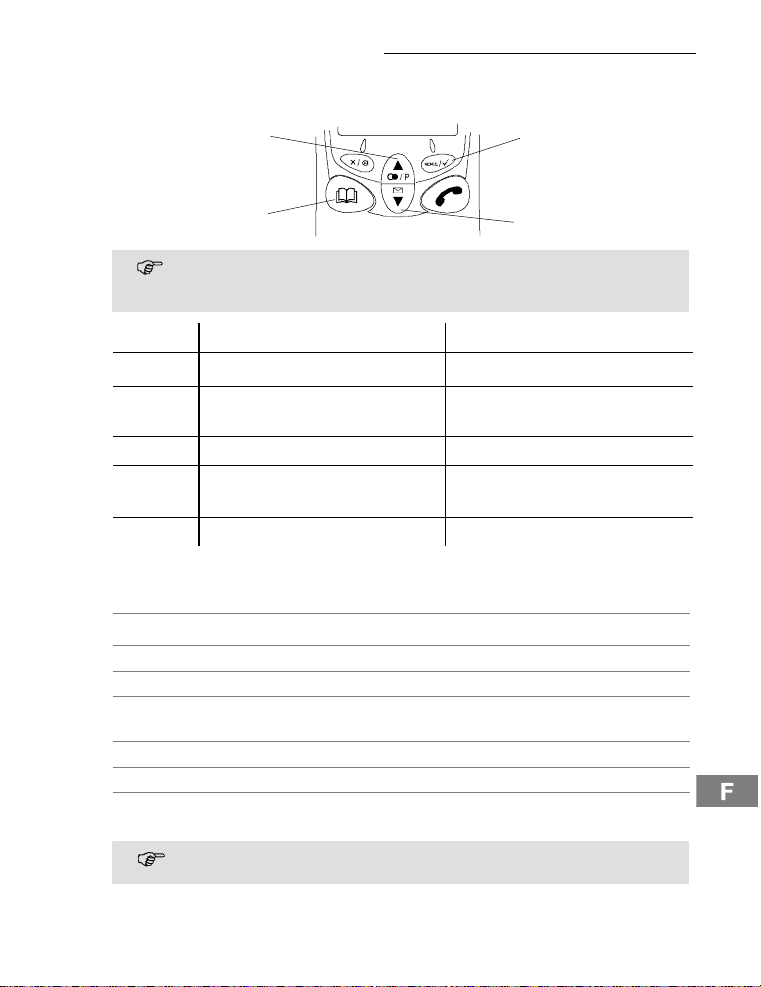
Dans la partie descriptive de cedocumentsontutilisésdes icônes de touches
standardisées,ce qui signifiequelescontourset la symbolique de cestouches
peuventsedifférencierun peu des réelles.
Touche En modedeveille Danslemenu
1
2 ,
3 ¤ - ouvrelerépertoire - reculer d’une position
4 +
R - Activer/Désactiverlecombiné - pas de fonction
Navigation dans le menu
Vouspouvez accéder à toutes les fonctionsviadifférentsmenus.Lastructurede menu
vousmontrecommentaccéder à la fonction désirée . Page 36.
Ouvrirle menu principal
+ ou , Sélectionnerle sous-menu désiré
Ouvrirle sous-menu
ë Saisirdeschiffresoudeslettresvialepavé
Confirmerlesentrées
¤ Reculerd’uneposition
Aveclatouche2 sec¤ Interromperlaprogrammationetlamémorisation et
Chaqueopérationest automatiquementinterrompuesi vousn’effectuez pasde
saisiedansles30secondes.
7
4
+
3
¤
- ouvrelemenuprincipal - ouvrele menu affiché
- ouvrelalisted’appels
- ouvrelalistedelarépétitionsde
numéros.
numérique.
retournezaumoded’attente
- feuilleterdanslesmenus
- modifierlesparamétrages
- feuilleterdanslesmenus
- modifierlesparamétrages
1
2
,
29
Page 30
Comment me servir du téléphone
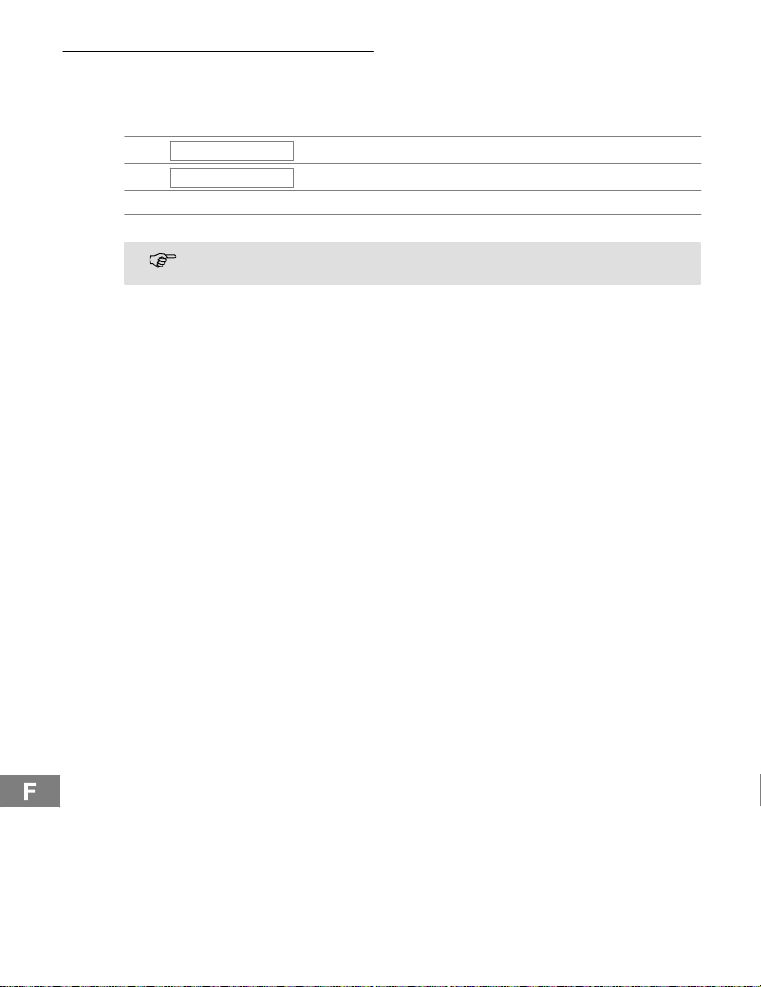
Créer des enregistrements du répertoire- Exemple
L’exempleCréerdesenregistrementsdans le répertoireexpliquecommentvous naviguezdanslesmenuseteffectuezdesentrées.Lamémoiredurépertoirecomprend 30
enregistrements.
RÉPERTOIRE
,
AJOUTER
,
ë, Entrerlenometconfirmer
ë, Entrerlenometconfirmer
Pour tous les réglages, procédez comme dans cet exemple. Voir structuredu
menu. Page36.
Ouvrirlemenuprincipal
, Sélectionner la fonction et confirmer
8
30
Page 31
Comment téléphoner
5 Comment téléphoner
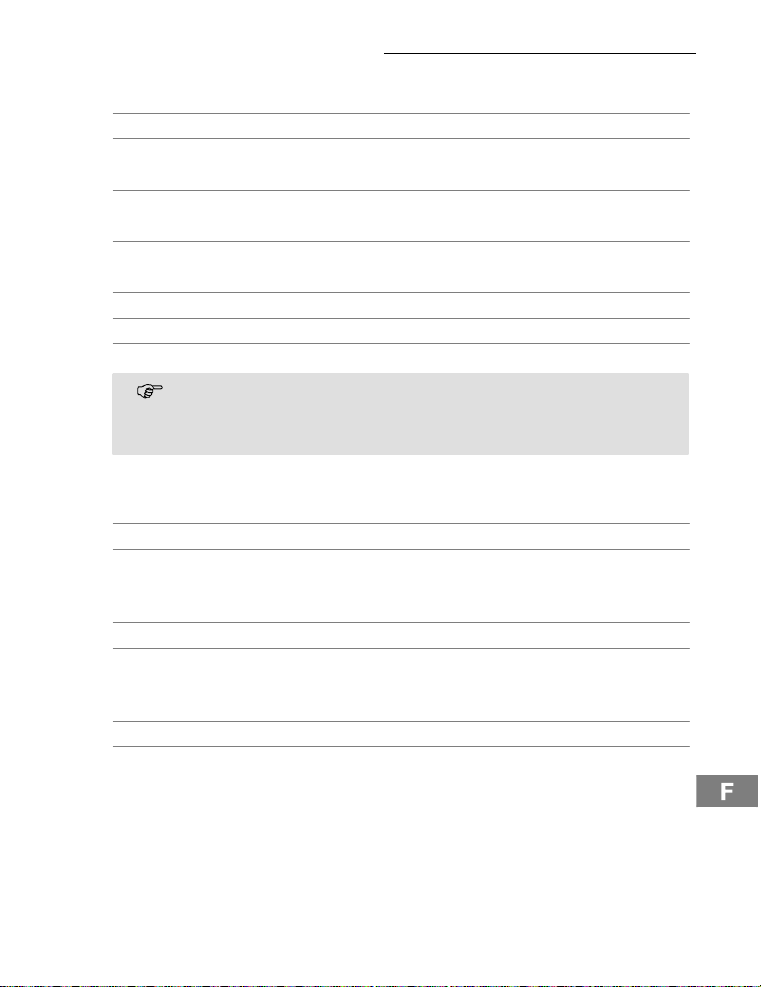
Activer et désactiver le combiné
2secR Activerlecombiné
2secR Désactiver le combiné
Prised’appel
{í},èou ƒ Prendrel’appel
Fin de la communication
ƒ ou é Terminerla communication
Appeler
ë Composerlenumérod’appel(max.20chiffres)
Sila saisieesterronée,effacerledernierchiffre
ƒ Composerlenuméro
Vouspouvez également appuyer tout d’abord sur latouchedecommunication,
vousobtenezainsilatonalité.Leschiffressaisisdevotrenumérod’appelseront
immédiatement composés. La correction individuelle des chiffres du numéro
d’appeln’estpaspossiblequandlacommunicationestétabliede cettemanière.
Touche de répétition automatique des derniersnuméros
Votre téléphoneenregistreles5derniersnuméroscomposésdans une liste de répétition
desderniersnuméros.
y Ouvrirlalistederépétitiondesderniersnuméros
y ou z, ƒ Sélectionnerl’enregistrementet confirmer
Rappel des appels entrés
Votre téléphoneenregistreles20appelsmanquésdansunelisted’appels.
z Ouvrirlalisted’appels
y ou z, ƒ Sélectionnerl’enregistrementet confirmer
Composition de numéros du répertoire
Vousdevez avoir enregistré des numérosd’appel dans le répertoire.. Page36.
¤ Ouvrirlerépertoire
y ou z, ƒ Sélectionnerl’enregistrementet confirmer
31
Page 32
Comment téléphoner
Téléphoner en interne
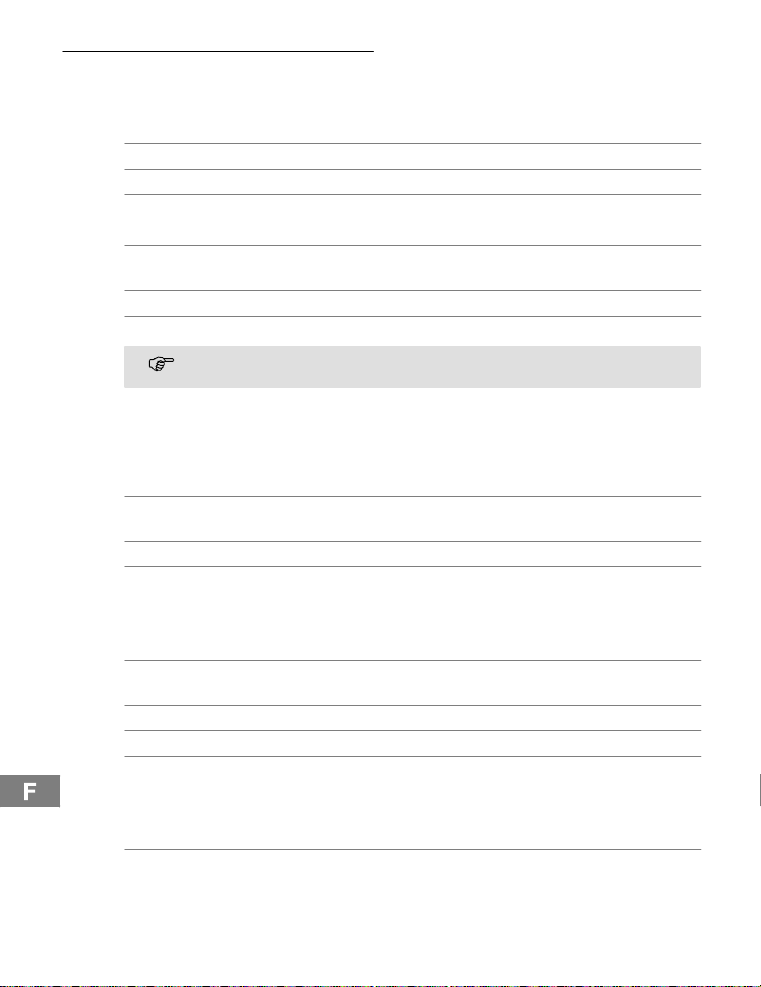
Téléphoner en interne
Vousdevez avoir déclaré deux combinés ou plus (MT1, MT2, ...) sur une base pourpouvoirpasserdescommunications en internegratuites.
MT1 : I,p.ex.2 Sélectionnerdesnumérosinternes du combiné désiré
MT2 : ƒ Prendre la communicationeninterne sur l’autre combiné
MT1 / MT2 :ƒ Terminerlacommunicationinterne
Comment transférer des communications externes à des internes
MT1 : I,p.ex.2 Pendantlacommunicationexterne, sélectionnerdes
numérosinternes
MT2 : ƒ Prendre la communicationeninterne sur l’autre combiné
MT1 : ƒ Transférer la communication
Sile combinéappelénesemanifestepas,vouspouvezretournerà lacommunicationexterneparlatoucheI.
Intercommunication / va-et-vient
Vouspouvez, pendant une communicationexterne,sélectionnerun autre combiné pour
intercommuniquer.Lecorrespondantexterne est maintenu en ligne pendant que vous
parlezaveclecorrespondantinterne.Vouspouvezchangerdecorrespondantautantde
foisquevousledésirez.
MT1 : I,p.ex.2 Pendantlacommunicationexterne, sélectionnerdes
MT2 : ƒ Prendre la communicationeninterne sur l’autre combiné
MT1 : I Changer de correspondant
Comment mener des conférences téléphoniques
Une communicationexternepeut être branchée sur un autre correspondant internedans
le butde mener une conférence.
MT1 : I,p.ex.2 Pendantlacommunicationexterne, sélectionnerdes
MT2 : ƒ Prendre la communicationeninterne sur l’autre combiné
MT1:2secI Commencer la conférence
MT1 / MT2 :ƒ La conférencese termine quand un correspondant
Régler le volume sonore de l’écouteur
Vousdisposez de 5 niveaux pour régler le volume pendant une communication.
+ ou , Appuyerpendant la communication
numérosinternes
numérosinternes
interneraccroche
32
Page 33
Comment téléphoner
Affichage de la duréede la communication
La durée d’une communicationestaffichéeenheures,minutesetsecondespendant cette
communicationetpeudetempsaprès.
Mode mains-libres
Utilisezcettefonction pour entendre le correspondantpar l’intermédiaireduhaut-parleur.
™ Activerlemodemains-libres
™ Débrancherle mode mainslibres
Débranchement du microphone du combiné
Pendantunecommunication,vous pouvez activer et désactiverlemicrophoneducombiné.
Désactiverlemicrophone(réglersur muet)
Activerlemicrophone
Verrouillagedu clavier
Lorsqueleverrouillageduclavierestactivé,vous pouvez continuer de réceptionner des
appelsentrants.
3sec*
2x * Désactiverleverrouillagedu clavier
Numérotation par tonalité temporaire
Sivousnepouvezutiliservotretéléphone qu’avec le système de numérotationparimpulsions,vouspouvezcommuter pendantla communicationsurnumérotation par tonalité
temporairepourinterrogerpar exemple un répondeur.
* Activerlanumérotation par tonalitétemporaire
* Désactiverlanumérotation par tonalitétemporaire
Pause de numérotation
Dansle casd’installationsàpostessupplémentaires, il est nécessairedecomposerun
certainnuméro(parex.le ”0”oule”9”)pourobtenirlatonalitéde laligneprincipale.Dans
lesanciennesinstallations,il sepeutquelatonalitése fasse attendre. Insérezunepause
de numérotation.
Lapausepeutégalementêtreenregistréedanslerépertoire lorsdela saisiede
numérosd’appel.
0,2secP, 1234... Insérer une pause
9
Mélodie de sonnerie d’appel du combiné
Vouspouvez désactiver la mélodie de sonnerie d’appel du combiné . Page 36.
Lescommunicationsentrantessontmaintenantsignaléesparlabaseetnonplus
parle combiné.
Activerleverrouillageduclavier
33
Page 34

Comment téléphoner
Comment chercherle combiné (Paging)
Sivousavezperduvotrecombiné,vous pouvez le retrouver facilementgrâceàunson
explorateur.
{«} Démarrerlesonexplorateur
ou © Terminerlesonexplorateur
Portée
La portéeducombinéestd’env.50 mètresenpiècesferméeset d’env.300mètresàl’extérieur.Sila connexion à la base est bonne, l’icône
en êtestropéloigné,lesymbole
ment.Rapprochezvous dans ce cas de l a baseafinquelaconversationne soitpas interrompue.
l clignoteetvousentendezdestonalitésd’avertisse-
l est allumésurl’écran.Sivousvous
34
Page 35

Installationsàpostessupplémentaires/Servicessupplémentaires
6 Installations à postes supplémentaires /Services
supplémentaires
Touche R sur les installations à postes supplémentaires
Sivotretéléphoneestraccordéà une installation à postes supplémentaires,vous pouvez,
parl’intermédiairedelatoucheR,tirerprofit des fonctions commeparex.letransfert
d’appelsetle rappel automatique.Veuillezliredanslemoded’emploide votreinstallation
à postessupplémentairesquel tempsde flash vous devez régler pour l’utilisationde ces
fonctions.Votrerevendeur,auprèsduquel vousavezachetél’installation,vous informera
sivotretéléphonefonctionneparfaitement sur ce genre d’installation.Réglagedutemps
de flash. Page36.
Pause de numérotation
Dansle casd’installationsàpostessupplémentaires, il est nécessairedecomposerauparavantuncoderéseaupourobtenirlatonalité.Sur les quelques installations à postes
supplémentairesplusanciennes,cela dure quelques instants jusqu’à ce que vous entendiezla tonalité.Pourcecas,insérez une pause de numérotation après le code réseau.
Vouspouvez entrer le numéro sans avoir besoin d’attendrela tonalité. Page33.
Touche R et services supplémentaires
Votre téléphonesupportedesservicessupplémentairesde votreopérateur,commepar
ex.leva-et-vient,la signalisation d’appel en instance et la conférence.Vouspouvez utilisercesservicessupplémentaires par l’intermédiairedela touche R.Demandezàvotre
opérateurqueltempsdeflashvousdevezrégler pour utiliser ces services supplémentaires.Contactezvotre opérateur pour déconnecterlesservicessupplémentaires. Réglage
du tempsdeflash. Page36.
Répondeur dans le réseautéléphonique
Sivotreopérateurmetà votre disposition un répondeur dans le réseau téléphonique, un
icônesousformedelettre(VMWI
deuretcetteinformation avecl’icônesousformedelettresont des services optionnels de
votreopérateur.Vous ne pouvez disposerde cesfonctionsquesicederniersupportece
service.Veuillezluidemanderdeplusamplesinformations.
Affichage du numéro d’appel (CLIP2)
Sicettefonctionest à votre dispositionsurvotrelignetéléphonique,lenuméroducorrespondantvousseraaffiché dès que le téléphone sonne. Si votrecorrespondantabloquéla
transmissiondesonnuméro,un messagecorrespondant sera affiché.Lenumérod’appel
ne peutpasêtreaffichéet donc être enregistré dans la liste des appels.
L’affichagedu numéro d’appel est un service optionnel de votre exploitant de
réseau.Veuillezlui demander de plus amples informations.
1
)vousinformeradesnouveauxmessages.Le répon-
1
VMWI : VisualMessageWaiting Indication
2
CLIP : Calling Line IdentificationPresentation
35
Page 36
Structure du menu
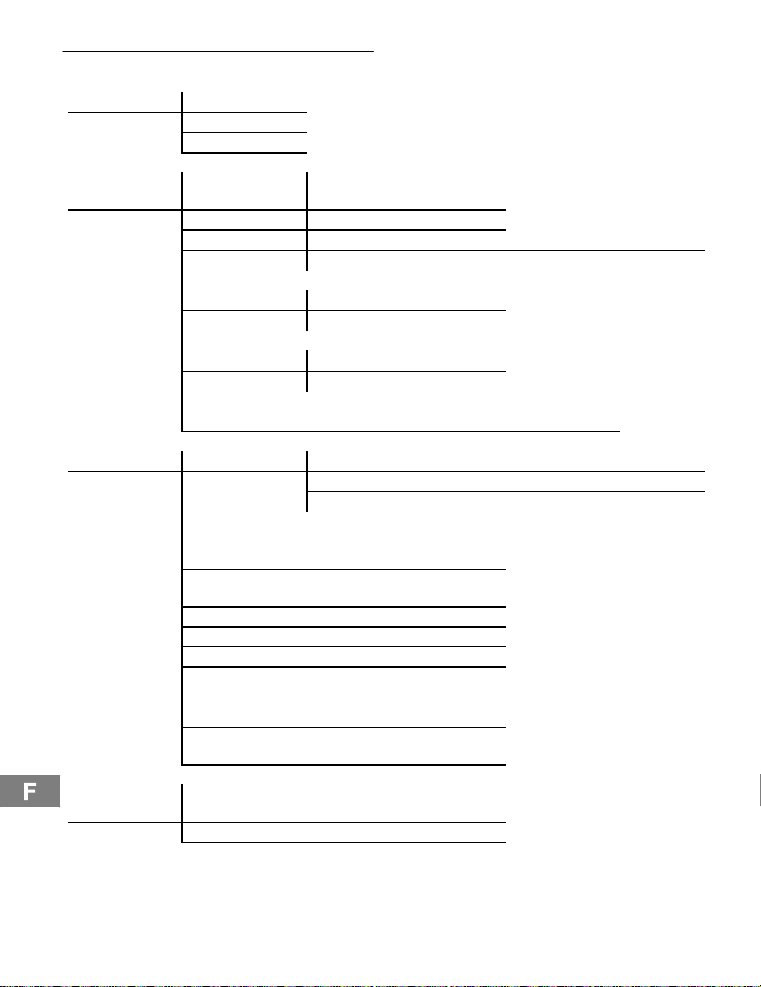
7 Structure du menu
RÉPERTOIRE AJOUTER
SUPPRIMER
MODIFIER
10
RÉGLAGE VOLUME BASE VOLUME 1, 2, 3, SONN. DÉS-
MÉLODIE BASE MÉLODIE1,2,3
ANNULDCLCB PIN ?
CODEPIN
NUMÉROTATION FRÉQ VOCALE
TOUCHER FLASH 1 (100 ms)
RÉGLDÉFAUT PIN?
COMBINÉ BIPS SONTOUCHES ACTIVÉ - DÉSACTIVÉ
VOL SON INT VOLUME 1, 2, 3, SONN. DÉSVOL SON EXT
MÉLODIEINT MÉLODIE1,2,3
MÉLODIE EXT MÉLODIE1,2,3
RÉPONSEAUTO ACTIVÉ - DÉSACTIVÉ
NOM .........
LANGUE (7LANGUES)
VERROUILLAGE
DU CLAVIER
ACTIVÉ
5
5
PIN ?
DÉCIMALE
FLASH 2 (300 ms)
5
BATTERIE FAIBLE ACTIVÉ -DÉSACTIVÉ
HORSPORTÉE ACTIVÉ -DÉSACTIVÉ
ACTIVÉ
VOLUME 1, 2, 3, SONN. DÉS-
ACTIVÉ
2
.........
COMBINÉ?
NOUVPIN REPET
CONFIRMER
DÉCLARER NUMÉROTATION
5
Réglageusine duPINsystème : 0000
2
Si vous avez activé la fonction, un appel est pris automatiquement si vous retirez le combiné de labase.
36
BASE
DECL. BASE BS1234
BS1___
Page 37
Élargissement du système téléphonique
8 Élargissementdu système téléphonique
Via le GAP1répondantàla normeinternationale,acompatibilité de combinésetdebases
de différentsfabricants estrégléedefaçonstandard.Ainsi est-il possible d’intégrer des
appareilsSWITELetdesappareilsd’autresfabricants conjointementdansunsystèmetéléphonique.
Plusieurs combinés
Vouspouvez déclarer 5 combinés à votre base.
Déclaration de combinés
Avantd’effectuerlaprocédurededéclarationd’uncombiné,mettez la base concernée en
moded’enregistrement.
3sec Démarrerlemoded’enregistrement
Effectuezmaintenantlaprocédurededéclarationde votrecombiné . Page 36. Pour
cela,utilisezlecodePINactuellement paramétré. Page36.
Un numérod’appel interneestattribuéautomatiquementaucombinéaprèsladéclaration.
Ce numérod’appel interneestaffiché à l’écran.
Pourdéclarerdescombinésd’autresfabricants,veuilezlireleurs modesd’emploi.
Annuler des combinés
Vousnepouvezannuleruncombinéd’unebasequeparunautrequiestdéclaré
à cettebase.
Plusieurs bases
Vouspouvez déclarer simultanémentvoscombinésà4basesdifférentes.Chaquebasea
besoind’une prisetéléphoniqueindividuelle.Cepeuventêtredesraccordementsavecle
mêmenumérod’appeloubien avec des numérosdifférents.
Lescommunicationsencoursne peuventpasêtretransféréesd’unebaseàl’autre.
Augmentation de la portée
Placezvosbasesdetellesorteque laportéedechacuneserecoupe.Testezlaportéede
voscombinés,desobstaclesdans les bâtiments pouvantla restreindre.Déclarezle combiné à touteslesbases.Activez la fonctionNumérotation automatique de bases .
Page36.Lecombinérecherchealorsautomatiquementlabasela plus procheoffrantla
meilleureconnexion.
Mobilitégrâceà différentsemplacements
Déclarezvotrecombinésurdes bases à deslieuxdifférentsActivez la fonctionNuméro-
tation automatique de bases . Page 36. Le lieu où vous trouvez’importepeu,lecom-
biné rechercheautomatiquementune base à saportée.
1
GAP:GenericAccess Profile=Standardpourl’actionconjointede combinéset de
basesdefabricantsdifférents.
37
Page 38

En cas de problèmes
9 En casde problèmes
Sivousavezdesproblèmesavecvotretéléphone, contrôlez d’abord les remarquessuivantes.Sivousavezdesdroitsde garantie, adressez-vousà votrerevendeur.La durée
de la garantieestde2 ans.
Questions etréponses
Questions Réponses
Pasdeconnexionpossibleavec
la base
Pasdecommunicationtéléphonique possible
La liaison esthachée,coupée - Vousvousêtestropéloigné delabase.
Le système ne réagit plus - Remetteztoutes les fonctionsen configuration
Lespilesrechargeablessontvidesau bout de peu de temps
L’affichagedu numérod’appel
(CLIP)nefonctionnepas
- Contrôlezsivousvousêtesbien identifiésur la
baseparle code PINcorrect.. 36.
- Le câble du téléphone n’estpascorrectement
branchéouestsoumisàdesperturbations.N’utilisezquele câble de raccordementtéléphonique
fourniavecl’appareil.
- Testezavecunautretéléphonesivotreraccordementtéléphoniquefonctionne.
- Le bloc d’alimentationn’estpasbranchéou ilya
une panne totalede courant.
- Lespilesrechargeablessontvidesoudéfectueuses.
- Vousvous êtes trop éloigné de la base.
- Erreurderéglagedusystèmedenumérotation.
. 36.
- Mauvaislieud’installationdelabase.
usine.. 36.
- Retirezleblocd’alimentationde laprisedecourantpendantuncourtinstant.
- La pile rechargeableestvideoudéfectueuse.
- Placezlecombinécorrectementsur sa base.
Nettoyezlessurfacesde contact du combiné et
de la base avec un chiffondouxetnonpelucheux.
- Posezlecombinésurlabaseetlaissez-lependant14heures.
- L’affichagedu numéro d’appel estun serviceoptionnelde votreexploitantderéseau.Veuillezlui
demanderdeplusamplesinformations.
- Le correspondantabloquélatransmissionde
sonnumérod’appel.
38
Page 39

10 Caractéristiques t echniques
Données techniques
Caractéristique Valeur
Standard DECT-GAP
Alimentationencourant Entrée:220/230V, 50 Hz
Horsportée Al’extérieur: env.300m
Etatdeveille jusqu’à150 h
Duréemax.decommunication Jusqu’à11h
Pilesrechargeables 2 x 1.2 V,taille: AAA
Numérotation Numérotationpartonalité(préréglage)
Températureambianteautorisée 10°C à 30°C
Humiditéatmosphériquerelative autorisée 20% à 75%
Fonctionde flash 100 ms,300 ms
Nomdu combiné DECT BDT710(modifiable)
Répertoire 30enregistrements
Listed’appels 30 enregistrements
Listederépétitiondesderniersnuméros 5enregistrements
Affichaged’avertissementdeniveaude
chargementdespiles
SON TOUCHES Marche / arrêt
Avertissementdelaportée Oui
Prised’appelautomatique Marche / arrêt
Volume de la sonnerie du combiné (int.et
externe)
Volume sonore de l’écouteur 5 sensibilités
Mélodied’appel du combiné(int.etex-
terne)
Verrouillage du clavier Oui
Volume de la sonnerie de la base 3 sensibilités et arrêt
Caractéristiques techniques
1
Sortie:6,5V, 150 mA
Al’intérieur:env.50m
Numérotationparimpulsions
Oui
3 sensibilitésetarrêt
3 mélodies
1
DECT : Digitally Enhanced Cordless Telephone = Standard pour téléphones sansfil.
GAP:GenericAccess Profile=Standardpourl’actionconjointede combinéset de ba-
sesdefabricantsdifférents.
39
Page 40

Caractéristiques techniques
Code PIN 0000(préréglage)
Modemains-libres Oui
RPAS Oui
Nombredecombinéssurunebase max. 4
langues 7
Accésaurépertoirependant la communi-
cation
Circuitdeconférence Oui
Compatible avec les prothèses auditives
Ce téléphoneestcompatibleaveclaplupartdes prothèses auditives en vente sur le marché.Cependant,unefonctionirréprochable ne peut être garantie pour chacune d’entre elles.
Dansla mesureoùvotreprothèseauditiven’est pas compatible, créantdesperturbations,
vouspouvezessayerlasolutionsuivante:
-Nebranchezpasvotreprothèsesur la position ”T”.
-Pourtéléphoner,utilisezlepostemains-libres du combinéque vousdevezréglerleplus
fortpossible.
-Tenez le combiné à une distanced’env.15 cm de votre prothèse.
Oui
40
Page 41

Remarques d’entretien / Garantie
11 Remarques d’entretien/ Garantie
Remarques d’entretien
S Nettoyezlessurfacesdu boîtier avec un chiffondouxetnonpelucheux.
S N’utilisezpasdeproduitsnettoyantsou de solvants.
Garantie
LesappareilsSWITELsontfabriquéset testés selon les procédés de production les plus
modernes.Lesmatériauxchoisis et la haute technologie assure un fonctionnementparfait
etunelongue durée de vie. La garantie ne rentrepasen jeu si l’exploitantduréseautéléphonique ou une installationà postessupplémentaireséventuellement intercaléeestresponsabledu dysfonctionnementde l’appareil. La garantie ne s’étend pas aux piles rechargeablesouauxpacksdepilesutilisésdanscesproduits.La durée de garantie est de
24 moisà partirdela date d’achat.
Pendantlapériodede garantie,touslesdéfautsdus à des erreurs de matériel et de fabricationsontréparésgratuitement.Lagarantieexpireencasd’interventions de l’acheteur
ou d’un tiers.Lesdommagesengendrésparunemanipulationouuneutilisationinadéquates,parunmauvaisemplacementou rangement, par un raccordementouune installationinadéquateainsiquepar un cas de forcemajeureoud’autresinfluencesextérieuresnesontpasinclusdanslaprestationdelagarantie.Encasde réclamations,nous
nousréservonsledroitderéparerouderemplacerlespiècesdéfectueusesou d’échangerl’appareil.Lespiècesouappareilséchangéspassentennotrepropriété.Le droitde
prétentionàdesdédommagementsest exclu, sauf si ce dommage estbasésurune préméditationouunenégligencegravedufabricant.
Sivotreappareilcomportecependantun défaut pendant la période de garantie, veuillez
vousadresserexclusivementau magasin dans lequel vous l’avez acheté en présentant
votrebond’achat.Touslesdroitsde garantiebasés sur ces dispositions ne peuvent être
revendiquésqu’auprèsdevotrerevendeur.Al’échéancedesdeuxansaprèsl’achatet le
transfertde nosproduits, les législations en matièredegarantienesontplusapplicables.
41
Page 42

Index
12 Index
A
Accus,24
Affichage de la communication et
du réseau, 27
Affichage du numéro d’appel, 35
Afichage de communications, 27
Annuler des combinés, 37
Appareils médicaux, 24
Appeler, 31
Augmentation de la portée, 37
B
Base, 27
C
Chargement des piles
rechargeables, 26
Combiné, 27
Comment chercher le
combiné, 34
Comment me servir du
téléphone, 28
Comment mener des conférences
téléphoniques, 32
Comment téléphoner, 31
Comment transférer des commu-
nications externes à des inter-
nes, 32
Communications internes, 27
Composition de numéros du
répertoire, 31
Consignes de sécurité, 24
Contenu de l’emballage, 25
Créer des enregistrements du
répertoire, 30
D
Débranchement du microphone,
33
Déclaration de combinés, 37
Discret/Touche d’effacement, 27
Données techniques, 39
Durée de la communication, 33
E
Écran, 27
Élargissementdusystème
téléphonique, 37
Élimination, 24
F
Fin de la communication, 31
G
Garantie, 41
I
Installations àpostes
supplémentaires, 35
Intercommunication, 32
L
Lieu d’installation, 24
M
Mélodie de sonnerie d’appel, 33
Mise en place des piles, 25
Mise en service du téléphone, 25
Mobilité, 37
Mode mains-libres, 27, 33
N
Navigation , 29
Niveau de chargement des piles
rechargeables, 26
Notations,28
Numérotation automatique , 37
P
Paging, 34
Panne de courant, 24
Pause de numérotation, 35
Plusieurs bases, 37
Plusieurs combinés, 37
Portée, 34
Prendre l’appel, 31
Prise d’appel, 31
Q
Questions et réponses, 38
R
Raccordement delabase, 25
Raccordement duchargeur,25
Rappel des appels entrés, 31
Remarques d’entretien, 41
Répertoire/Quitter lemenu, 27
Répondeur dans le réseau
téléphonique, 35
Représentations, 28
S
Services supplémentaires, 35
Symboles à l’écran, 28
T
Téléphoner en interne, 32
Touchedecommunication, 27
Touchedemenu, 27
Touchedepaging, 27
Touchederépétition automatique
des derniers numéros, 31
Touchedesélection/Liste des
appels CLIP, 27
Touchedesélection/ToucheBIS,
27
Touchedesignal R, 27
ToucheRet services
supplémentaires, 35
ToucheRsur les installations à
postes supplémentaires, 35
Touchesdenavigation, 29
U
Utilisation conforme aux
prescriptions, 24
V
Va-et-vient, 32
Verrouillagedu clavier, 33
VMWI, 35
Volume sonore de l’écouteur, 32
Voyant de charge DEL, 27
42
Page 43

11
Sommario
1 Indicazionidi sicurezza 44....................
2 Mettere in funzione il telefono 45................
3 Elementi di comando 47......................
4 Come funziona il mio telefono? 48...............
5 Compiere telefonate 51......................
6 Impianti telefonici interni / Servizi addizionali 55.....
7 Struttura di menu 56........................
8 Ampliare il sistema telefonico 57...............
9 In presenza di problemi 58....................
10 Specifiche tecniche 59.......................
1 1 Consigli per la cura / Garanzia 61...............
12 Indice 62.................................
43
Page 44
Indicazioni di sicurezza
1 Indicazionidi sicurezza
Leggereattentamentele presenti istruzioni per l’uso.
Impiego conforme agli usi previsti
Ilpresenteapparecchioconsente di compiere telefonateall’internodiunareteditelecomunicazione.Qualsiasialtroimpiegoè considerato come non conformeagliusiprevisti.
Non sono consentitemodificheo trasformazioninonautorizzate.Non aprire per nessuna
ragionel’apparecchioautonomamentee svolgere riparazioni di propria iniziativa.
Luogo di installazione
Evitareun’esposizionea fumo, polvere, vibrazioni, sostanze chimiche, umidità, calore e raggi
solari diretti. Non utilizzare l’unità portatile in areeesposteal rischio di deflagrazione.
Alimentatore di rete
Attenzione:Utilizzaresolo l’alimentatore a spina fornitoindotazionevistoche
altrialimentatoridiretepotrebberoaddiritturadanneggiare iltelefono.Nonostacolareilliberoaccessoall’alimentatore a spina con mobili o altrioggettisimili.
Batterie ricaricabili
Attenzione:Non gettarele batteriericaricabilinelfuoco,né sommergerlein ac-
qua.
Caduta di tensione
Incasodicadutaditensionenonèpossibileimpiegarel’unitàpertelefonare.Si consiglia
di ricorrereincasodiemergenzaaduntelefonoconfiloingradodifunzionareanche
senzaalimentazioneelettrica esterna.
Apparecchiature mediche
Attenzione: Evitare di utilizzare il telefono nelle vicinanze di apparecchiature
mediche.Nonèpossibileescluderecompletamenteilrischiodieventualiinterferenze.
Telefoni DECT1possonocausareunfastidiosoronzio in apparecchi acustici.
Smaltimento
Sussistel’obbligolegislativoal correttosmaltimentodi benidiconsumo.Il simbolo riportatosultelefonoeraffiguratoquialatoindicacheapparecchiusatielettriciedelettronicie batterieesauste non sono da smaltire assiemeai normalirifiutidomestici.
Procedereallosmaltimento di apparecchi elettrici o elettronici pressouncentrodiraccoltaincaricatocon lo smaltimento conforme.
Consegnare batterie ed accumulatori per lo smaltiment opressorivenditorial dettaglio di batterie o centridi raccolta che mettono a disposizione appositicontenitori.
Smaltire confezionied imballaggiin base a quanto indicato dalle norme in vi-
gorea livello locale.
1
DECT:Digitally Enhanced Cordless Telephone = Standardpertelefonisenzacavo.
44
Page 45
2 Mettere in funzione il telefono
Indicazioni di sicurezza
Attenzione:Primadellamessain funzione,leggereattentamentele indicazioni
di sicurezzariportateal capitolo1.
Verificare il contenuto della confezione
La confezionecontiene:
Mettere in funzione il telefono
- una stazionebaseconalimentatoredi
rete
- un’unitàportatile - due batteriericaricabili
- un cavodi collegamentotelefonico
- un manuale di istruzioniperl’uso
Collegare la stazione base
Attenzione:Posizionarelastazionebaseconunadistanzadi1mdaaltreappa-
recchiatureelettronichevistochealtrimentisi possonoverificareinterferenzereciproche.
Procederealcollegamentodellastazionebase seguendoquantoraffiguratosuldisegno.
Utilizzarepermotividi sicurezza solo l’alimentatoredireteoltreche il cavodicollegamentotelefonicoforniti in dotazione.
Presadicollegamento
telefonico
Presaelettrica
Collegare la stazionedi carica
Inserirel’alimentatore a spina nella presa elettricainstallatain conformità alle disposizioni.
Inserire le batterie ricaricabili
Inserirelebatteriericaricabili nel rispettivo vano
batterieprecedentemente aperto.Utilizzare
esclusivamentebatterie ricaricabili del tipo
AAA Ni-MH 1,2 V.Osservare la corretta
polarità!Chiuderequindiilvanobatterie.
45
Page 46

Mettere in funzione il telefono
Caricarelebatterie
Riporrel’unitàportatileinsedediprimamessain funzione per una durata di minimo 14
orenella stazionebase/stazionedicarica.Non appena l’unitàportatile è posizionata correttamentenella stazione base / stazione di carica,si avverteunsegnalediavvisoela
spiadi controllodellostatodicaricasiaccende.L’unità portatile si surriscaldaduranteil
processodicarica.Questoè unfenomenonormalee nonpericoloso.Evitare di caricare
l’unitàportatilecondispositivi di carica differentio estranei.Lo stato di carica attuale è visualizzato sul display:
Carico A metà Debole vuoto
Impianti telefonici interni
Apagina 55 sono riportateulterioriinformazionisu come allacciare il proprio telefono ad
un impiantotelefonicointernopreesistente.
46
Page 47
3 Elementi dicomando
Unitàportatile
1. Visualizzazionedi chiamata
2. Tastodi selezione/Ripetizionedi
selezione
3. Tastomenu
4. Tastodi chiamata
5. Tastodi selezione/Elencochiamate
CLIP
6. Chiamateinterne
7. Tastodi segnalazioneR
8. Rubricatelefonica/Usciredal menu
9. Silenziamento/Tasto di cancellazione
10. Display
11. Funzione vivavoce
Elementi di comando
11
10
9
8
1
2
3
4
5
Stazione base
1. Tastodi paging (ricercadell’unità
portatile)
2. Visualizzazionechiamata e rete
3. LEDspiadi controllostatodi carica
7
6
1
2
3
47
Page 48
Come funziona il mio telefono?
4 Come funziona ilmio telefono?
Rappresentazioni e modi di scrittura
ë Immissionedinumeriolettere
Premerebrevementeil tastoraffigurato
2sec Premereiltastoraffiguratoper2secondi
tenere Tenerepremuto il tastoraffigurato
rilasciare Rilasciare il tasto raffigurato
{í} Unitàportatilesquilla
{ì} Stazione base squilla
è Estrarrel’unità portatile dalla stazione base
é Riporrel’unitàportatilenella stazionebase
ESEMPIO oppure Testo o simboli sul display
Simboli sul display
Simbolo Descrizione
Permanente: Chiamata telefonica in corso.
a
Permanente: Funzione vivavoceèattivata.
b
e
i
c
d
k
m
Permanente: Chiamata telefonica esterna in corso.
Lampeggia: Chiamata telefonicaesternainarrivo.
Permanente: Chiamata telefonica interna in corso.
Lampeggia: Chiamata telefonicainternainarrivo.
Permanente: Ci si trova nell’elenco chiamate (CLIP).
Lampeggia: Nell’elenco chiamate (CLIP) sono state memorizzate nuove chiamate in entrata.
Permanente: Chiamata persa.
f
Permanente: Chiamata ricevuta.
g
Lampeggia: Siprega di caricare l’unitàportatile.
Permanente: Indicazionedellostatodicaricadellebatterie.
Segmentichescorrono: L’unitàportatilesitrovainfasedicaricamento.
Permanente: Utilizzandolarubricatelefonica.
h
Permanente: Non appena la programmazione è attivata.
j
Permanente: Il blocco tastiera è attivato.
Permanente: Il collegamentoconlastazionebaseèbuono.
l
Lampeggia: E’statasuperata la portata della stazionebase.
Permanente: Il numero di chiamata è composto da più di 12 cifre.
48
Page 49
Come funziona il mio telefono?
Tasti di navigazione
Tuttele descrizioni riportate nelle presenti istruzioni per l’usotengono conto dell’unità portatile
in stato di stand-by.Per passare alla modalità di stand-byè sufficientepremereil tasto¤.
Tasto In modalitàdi stand-by All’interno del menu
1
2 ,
3 ¤ - Aprirelarubricatelefonica - Tornare indietrodi un livello
4 +
12
4
+
3
¤
Nellapartedescrittivadelpresentedocumentosonoutilizzatideisimbolipertasti
standard, ciò significa che bordi e simboli dei tasti possono variare rispetto a
quantoraffiguratosull’apparecchioacquistato.
- Aprireilmenuprincipale - Aprire il menu visualizzato
- Aprirel’elencochiamate
- Aprirel’elencoripetizionedi
chiamate
- Scorrereneimenu
- Modificareleimpostazioni
- Scorrereneimenu
- Modificareleimpostazioni
1
2
,
R
- Attivare /Disattivare l’unità portatile
- Nessunafunzione
Navigazione nel menu
Idifferenti menu consentonodiraggiungeretuttelefunzionideltelefono.Il percorso da
seguirepergiungerealla funzionedesiderataèindicatadallastrutturadi menu . pagina 56.
Aprireil menu principale
+ o , Selezionare il sottomenu desiderato
Aprire il sottomenu
ë La tastieraconsentedi inserirenumerio lettere
Confermarel’immissione
¤ Tornare indietrodi un livello
2sec¤ Interromperele procedure di programm azionee
Ogni singoloprocessosiinterrompe automaticamentese entro30 secondinon
siprocedeconuna immissione.
memorizzazionee fare ritorno alla modalità distand-by
49
Page 50
Come funziona il mio telefono?
Creare voci nella rubrica telefonica - Esempio
Comenavigareneimenue compiereimmissionièindicatodall’esempioCrearevoci
nellarubrica telefonica.Lamemoriadellarubricatelefonica comprende30 voci.
RUBR. TELEF.
,
AGGIUNGI
,
ë, Immettere il nome e confermare
ë, Immettere il numero di chiamata e confermare
Siconsigliadiseguirel’esempioriportatopertuttelealtreimpostazionichesidesideranocompiere.Vedila strutturadi menu. pagina56.
Aprireilmenuprincipale
, Scegliere la funzione e confermare
13
50
Page 51

Compieretelefonate
5 Compiere telefonate
Attivare / Disattivare l’unità portatile
2secR Attivare l’unità portatile
2secR Disattivare l’unità portatile
Ricevere una chiamata
{í},è o ƒ Ricevere una chiamata
Concludere una chiamata
ƒ o é Concludere una chiamata
Telefonare
ë Immettereun numero di chiamata (max. 20 cifre)
Incasodiimmissioneerrata cancellarel’ultimacifra
ƒ Selezionareunnumerodi chiamata
E’altresìpossibilepremereprimailtastodichiamataericevereilsegnaledilinea
libera.Le cifreimmesseperlacomposizionedelnumerodi chiamatadesiderato
sonoimmediatamenteselezionate.Nelcorsodiunasimilechiamatanonèpossibileeseguireuna correzionedisingolecifrechecompongono ilnumerodi chiamata.
Ripetizione di selezione
Iltelefonomemorizza gli ultimi 5 numeri di chiamataselezionatiinunelencodiripetizione
di chiamata.
y Aprirel’elencodiripetizionedichiamata
y o z, ƒ Scegliere la voce e instaurare un collegamento
Riselezionare chiamate ricevute
Iltelefonomemorizza20 chiamate ricevutein un elenco chiamate.
z Aprirel’elencochiamate
y o z, ƒ Scegliere la voce e instaurare un collegamento
Selezionare numeri dalla rubrica telefonica
Perfarequestoènecessarioaver memorizzato i numeri di chiamatanella rubricatelefonica. pagina 56.
¤ Aprirelarubricatelefonica
y o z, ƒ Scegliere la voce e instaurare un collegamento
51
Page 52
Compieretelefonate
Compierechiamate interne
Condurre chiamate interne
Perpotercondurrechiamateinterne gratuite è necessarioaverprecedentementeregistrato due o più unità portatili (MT1, MT2,...) ad una stazione base.
MT1: I, per es. 2 Selezionare il numero di chiamatainternodell’unità
MT2: ƒ Ricevere la chiamata interna presso l’altra unità portat ile
MT1 / MT2:ƒ Concluderela chiamatainterna
Inoltro interno di chiamate esterne
MT1: I, per es. 2 Selezionare il numero di chiamata internocon
MT2: ƒ Ricevere la chiamata interna presso l’altra unità portat ile
MT1: ƒ Trasferire la chiamata
Nel casoin cui l’unità portatilechiamata nondovesserispondereè possibile riprenderedi nuovo la chiamataesternapremendoiltastoI.
Riscontro / Chiamata in attesa
Durantelosvolgimentodiunachiamataesterna è possibile chiamare un’altra unità portatilealloscopodi consultarsioeseguireunriscontro.Mentre è in corso la conversazione
conl’interlocutoreinterno,la chiamata esterna è trattenuta.Il numero di passaggitra i partnerdichiamataèillimitato.
MT1: I, per es. 2 Selezionare il numero di chiamata internocon
MT2: ƒ Ricevere la chiamata interna presso l’altra unità portat ile
MT1: I Cambiareilpartnerdichiamata
Compiere chiamate aconferenza
Questafunzioneconsentedicondurreunaconferenzacon una chiamata esterna ed un
altrointerlocutoreinterno.
MT1: I, per es. 2 Selezionare il numero di chiamata internocon
MT2: ƒ Ricevere la chiamata interna presso l’altra unità portat ile
MT1:2secI Iniziarela conferenza
MT1 / MT2:ƒ La conferenzaèconclusanelmomentoincuiunodei
Impostare il volume del ricevitore
Ilvolumeèregolabiledurantelosvolgimentodi una chiamata in 5 livelli.
+ o , Premere durante la conversazionetelefonica
portatiledesiderata
chiamataincorso
chiamataincorso
chiamataincorso
partnerdichiamatainterniconclude la chiamata
52
Page 53

Compieretelefonate
Visualizzazione della durata di conversazione
Durantelosvolgimentodiunachiamataeperpocotempodopolarispettiva conclusione,
suldisplayèvisualizzataladuratadi conversazione in ore, minutie secondi.
Funzione vivavoce
Utilizzarequestafunzione per ascoltare il partner di chiamata attraversol’altoparlante.
™ Attivare la funzione vivavoce
™ Disattivare la funzione vivavoce
Silenziamento del microfono nell’unità portatile
E’possibileattivaree disattivareil microfonodell’unitàportatile con chiamatatelefonicain
corso.
Disinserireilmicrofono(silenziamento)
Inserireilmicrofono
Blocco tastiera
Con blocco tastierainserito è possibile ricevere chiamate in arrivocome di consueto.
3sec*
2x* Disattivare il bloccotastiera
Selezione a toni temporanea
Volendoimpiegare il proprio telefono solo con la procedura di selezione a impulsi è comunquepossibilepassareconchiamatain corsotemporaneamente alla selezione a toni,
peres.perinterrogareunasegreteriatelefonica.
* Attivarela selezioneatonitemporanea
* Disattivarela selezioneatonitemporanea
Pausa di selezione
Inpresenzadiunimpiantotelefonicointernoè necessario selezionare un determinato numero(peres.0o9)perottenereunsegnaledilinealiberasull’apparecchio.Conimpianti
di vecchiadatapuòesserenecessariaunapausaprimadisentireilsegnaledilibero.
Prevederequindiunapausadi selezione.
0,2secP, 1234... Inserire la pausa
14
Lapausaèanche programmabileinsededi immissionedeinumeri dichiamata
nella rubricatelefonica.
Melodia di suoneria dell’unità portatile
E’possibiledisattivarela melodia di suoneria presso l’unità portatile . pagina 56.
Le chiamatesonointalcasosegnalatesolopressola stazione base e nonpiù
dall’unitàportatile.
Attivare il blocco tastiera
53
Page 54

Compieretelefonate
Ricerca dell’unità portatile (funzione di paging)
Avendopersod’occhio la propria unità portatile è possibile ritrovarlafacilmentegrazie
all’emissionediun tonodi ricerca.
{«} Avviareiltonodiricerca
o © Interrompereil tono di ricerca
Portata
La portatadell’unitàmobileèdica.50metriinambientichiusie dica.300metri
all’aperto.Inpresenzadi unbuoncollegamentocon la stazionebase sul display appare il
simbolo
l.Seci si allontanatroppodallastazionebase,ilsimbolol lampeggiaesiav-
verteunsuonodiavviso.Avvicinarsiintalcasodinuovoallastazionebasevistoche altrimentilachiamatasaràinterrotta.
54
Page 55

Impianti telefonici interni / Servizi addizionali
6 Impiantitelefonici interni/ Serviziaddizionali
TastoR in impianti telefoniciinterni
Avendocollegatoil telefono ad unimpianto telefonicointerno,il tasto R consente di accedere
a tutte le altre funzioni disponibilicome per es. trasferimentodi chiamata e funzionedi richiamata automatica.Siprega di consultare le istruzioniper l’uso del proprioimpiantotelefonicointerno per individuare il tempoflash da impostare al finedi poter usufruire di questefunzioni.Il
rivenditorespecializzatoè in grado diindicare se il telefonoacquistat ofunzioneràsenzaalcun
problema nel proprio impiantotelefonicointerno.Impos tar eil tempo flash . pagina 56.
Pausa di selezione
In presenza di impianti telefoniciinterniè necessario preselezionare un numero di accessoalla
rete esterna per ottenere un segnaledi linea libera primadi poter compiere una telefonata.Alcuni impianti telefonici interni di vecchiadatarichiedono un intervallo di tempodi poco superiore prima di trasmet t ereun segnale di libero.Aggiungerein tal caso unapausa di selezione
dopo la cifra peril segnale di linea libera. Fatto questo procedere con l’immissionedel numero
di chiamata senza bisogno di attendereil segnale di libero . pagina 53.
Tasto R e servizi addizionali
Iltelefonosupportaservizi addizionali messi a disposizione dal proprio gestore di rete telefonicacomeperes.lefunzionidichiamatain attesa, avvisodi chiamataechiamataa
conferenza.ConiltastoR è possibileaccedereaquestiserviziaddizionali.Si prega di
consultareilgestorediretetelefonica per ricevereinformazionisultempoflash necessarioall’utilizzodeiserviziaddizionali.Rivolgersi al proprio gestore di rete telefonicaper
l’abilitazioneaiserviziaddizionali.Impostare il tempoflash. pagina56.
Segreteriatelefonicaintegrata nella rete telefonica
Nel casoin cui il gestore di rete telefonicaoffra ai propri utentiuna segreteriatelefonica
integratanellaretetelefonica,suldisplayappareil simbolodellaletterina(VMWI
formasullapresenzadinuovimessaggi.La segreteria telefonicae l’informazioneriguardantela presenzadinuovi messaggisegnalatadalsimbolodellaletterinasonodeiservizi
opzionaliofferti dal proprio gestore di rete telefonica.Talifunzionisarannoperaltrosolo
accessibilinelcasoincuiilgestorediretetelefonicaoffrai servizidescritti.Per maggiori
dettagliariguardo,rivolgersialpropriogestoredi retetelefonica.
Visualizzazione del numero di chiamata (CLIP2)
Acondizionecheil collegamentotelefonicodispongadi questafunzione,l’apparecchiovisualizzailnumerotelefonicodel chiamantenon appena iltelefonosquilla. Nel caso in cui
il chiamanteabbiasoppressolatrasmissionedel proprio numero di chiamata, appare
un’appositaindicazione.Vistocheil numerodi chiamatanonèvisualizzabile,questonon
saràmemorizzatonell’elenco chiamate.
Lavisualizzazionedelnumerodichiamataèunservizioopzionaleoffertodalpropriogestoredi retetelefonica.Si consigliadirivolgersial propriogestore di rete
telefonicaperricevereulterioriinformazioni a riguardo.
1
VMWI:VisualMessageWaiting Indication
2
CLIP:CallingLine IdentificationPresentation
1
)chein-
55
Page 56

Strutturadi menu
7 Strutturadi menu
RUBRICATELEFONICA
AGGIUNGI
CANCELLA
MODIFICA
15
IMPOSTAZIONE VOLUME BASE VOLUME 1, 2, 3, SUONERIA OFF
PORTATILE SUONI SUONO TASTI ON - OFF
MELODIA BASE MELODIA1,2,3
DEREGISTRAM PIN?
CODICEPIN
PST-PSI PST
TEMPO FLASH FLASH1 (100 ms)
IMPOSTAZIONI
DI DEFAULT
VOL.CHIAM.INTERNA
VOL. CHIAM.
ESTERNA
MELODIAINT. MELODIA1,2,3
MELODIA EST. MELODIA1,2,3
ACCETTAZIONE
AUTO
NOME .........
LINGUA (7LINGUE)
BLOCCOTA-
STIERA
5
5
PIN?
PSI
FLASH 2 (300 ms)
5
PIN?
BATTERIA SCARICA ON - OFF
PORTATA ON - OFF
VOLUME 1, 2, 3, SUONERIA
OFF
VOLUME 1, 2, 3, SUONERIA
OFF
ON - OFF
.........
2
PORTATILE?
NUOVO PIN RIPETI
CONFERMA
SELEZIONE SCELTABASE SB1___
5
2
cemente l’unità portatile dalla stazione base.
SELEZIONE
BASE
Impostazione di default del PIN di sistema: 0000
L’attivazione di questa funzione consente di ricevere automaticamente una chiamata in arrivo estraendo sempli-
56
SB1234
Page 57
Ampliare il sistema telefonico
8 Ampliareil sistematelefonico
La funzionestandardinternazionaleGAP1Standardregolalacompatibilitàdi unitàportatilie stazionibasedicostruttori diversi.CiòconsentediintegrareapparecchiSWITELe
apparecchidialtricostruttoriall’internodiununicosistematelefonico.
Maggior numero di unità portatili
E’ possibile registrare complessivamentefino a 5 unitàportatilipressola propria stazione base.
Registrazione di unità portatili
Primadicompierelaproceduradiregistrazionedi un’unitàportatile,passareconlarispettivastazionebaseallamodalitàdi registrazione.
3sec Avviarela modalitàdi registrazione
Procedereaquestopuntoconlaregistrazione presso la propria unitàportatile. pagina
56.Utilizzareperlaregistrazione il codice PINattualmentei mpostato . pagina 56.
Una voltaeseguitalaselezione,all’unitàportatile è assegnatoun numerodi chiamatain-
terno.Questonumerodi chiamatainterno è visualizzato sul display.
Perregistrareunità portatili di altri costruttorisiconsigliadileggere le rispettive
istruzioniperl’uso.
Deselezione di unità portatili
Ladeselezionedi un’unità portatiledauna stazione base èpossibilesoloutilizzandoun’ulterioreunitàportatileregistratapressolastazionebase inquestione.
Maggior numero di stazioni base
E’possibileregistrareleunitàportatili contemporaneamentepresso4 stazioni base differenti.Ognistazionebasenecessitadi una propriapresatelefonica.Sipuò trattarediallacciamenticonlostessoo differentenumerodichiamata.
Perchiamatein corsononèinvece possibile compiere untrasferimento dauna
stazionebaseall’altra.
Aumento della portata
Posizionarelestazionibaseinmododaottenereun’intersecazione della portatadellesingole stazionibase.Provarel a portata dell’unità portatilevistocheeventualiostacoli presentinegliedificipossonolimitarelaportata.Registrarequindil’unitàportatilepresso tutte
le stazionibase.Passarealla funzione di selezione auto matica per le stazioni base .
pagina 56.L’unitàportatilecercaautomaticamentela stazionebasepiùvicinaperinstaurareilmigliorcollegamentopossibile.
Mobilitàgraziea luoghi di ubicazione differenti
Registrarel’unitàportatile pressole stazionibasepresentiinubicazionidifferenti.Passare
alla funzionedi selezione automatica perle stazionibase. pagina56.Indipendentementedalluogoin cui ci si trova,l’unitàportatileindividua automaticamentela stazione
basepiù vicinaconla portatamigliore.
1
GAP:GenericAccessProfile=Standardperl’interazionedi unitàportatili con stazioni
base di altri costruttori.
57
Page 58

In presenza di problemi
9 In presenza di problemi
Inpresenzadiproblemiconiltelefono,seguirele indicazioniriportate qui di seguito. In
casodireclamientroilperiododi garanzia,rivolgersialrivenditoreautorizzato. Il periodo
di garanzia riscopre2anni.
Domande e risposte
Domande Risposte
Non è possibile collegarsialla
stazionebase.
Non è possibile condurreuna
chiamata telefonica
Collegamentodisturbato,si interrompe.
Ilsistemanonreagiscepiù. - Ripristinareleimpostazionidi defaultper tutte le
Le batteriericaricabilisi scaricanopiuttostosubito.
La visualizzazionedelnumerodi
chiamata(CLIP)non funziona.
- Verificareselaregistrazioneallastazionebase è
stataeseguitacon i l codicePINcorretto.. 56.
- La linea telefonicanonècollegatacorrettamente
oppurepresentaunguasto.Utilizzare esclusivamenteilcavodicollegamentotelefonicofornito.
- Provareconunaltrotelefono se l’allacciamento
telefonicoinquestioneèfunzionante.
- L’alimentatorediretenonèinseritooppure sièin
presenzadiuna cadutadi tensionetotale.
- Le batteriericaricabilisono scariche o difettose.
- La distanzadallastazionebaseètroppogrande.
- Impostazioneerrata della procedura di selezione.
. 56.
- La distanzadallastazionebaseètroppogrande.
- Luogo di installazionedella stazionebaseerrato.
funzioni.. 56.
- Estrarrebrevemente l’alimentatoredi retedalla
presadi corrente.
- Lebatteriesonoscaricheodifettose.
- Riporrel’unitàportatilecorrettamentenellastazionebase.Pulirelesuperficidicontattodi unità
portatileestazionebaseconunpannomorbidoe
asciutto.
- Posizionarel’unitàportatile per la durata di 14
orenella stazionebase.
- La visualizzazionedelnumerodichiamataèun
servizioopzionaleoffertodalpropriogestoredi
retetelefonica.Per maggiori dettagli a riguardo,
rivolgersialpropriogestorediretetelefonica.
- Ilchiamantehadisattivatola trasmissionedel
proprionumerodichiamata.
58
Page 59

10 Specifichetecniche
Specifiche tecniche
Caratteristica Valore
Standard DECT-GAP
Alimentazioneelettrica Ingresso:220/230V, 50 Hz
Portata incampoaperto:ca.300 m
Autonomiadistand-by fino a 150 ore
Autonomiadichiamata finoa11ore
Batteriericaricabili 2 x 1.2 V,tipo: AAA
Proceduradiselezione Proceduradi selezionea TONI(preimpo-
Temperaturaambienteconsentita 10°C fino 30°C
Umiditàatmosferica relativaconsentita da 20% a 75%
Funzione flash 100 ms,300 ms
Nomedell’unitàportatile DECT BDT 710 (modificabile)
Rubricatelefonica 30 voci
Elencochiamate 30 voci
Elencodiripetizionedichiamata 5voci
Segnalazionediallarmestatodicarica
delle batterie
Suonotasti ON/OFF
Segnalazionediallarmeportata si
Accettazioneautomatica di chiamata ON/OFF
Volume della suoneria chiamataunitàpor-
tatile(internaedesterna)
Volumedel ricevitore 5 livelli
Melodiadi suoneriaunitàportatile(interna
ed esterna)
Blocco tastiera si
Volume della suoneria chiamatabase 3 livelli e OFF
1
DECT:DigitallyEnhanced Cordless Telephone = Standard per telefoni senza cavo.
GAP:GenericAccessProfile=Standardperl’interazionedi unitàportatili con stazioni
base di altricostruttori.
Specifiche tecniche
1
Uscita: 6,5 V,150 mA
in ambientiinterni:ca.50 m
stata)
ProceduradiselezioneadIMPULSI
si
3 livelli e OFF
3 melodie
59
Page 60

Specifiche tecniche
CodicePIN 0000(preimpostazione)
Funzione vivavoce si
RPAS si
Numerodiunitàportatilipressounabase max. 4
Lingue 7
Accessoallarubricatelefonica con chia-
mata in corso
Chiamataaconferenza si
Compatibilità con apparecchi acustici
Iltelefonoècompatibileconilmaggiornumerodiapparecchiacustici presentisulmercato.Nonècomunquepossibilegarantireunperfettofunzionamentoperognisingoloapparecchioacustico.
Nel casodi mancatacompatibilitàtra apparecchio acustico e telefonoe in presenzadi interferenzesiconsigliadi risolvereil problemaseguendoiseguentisuggerimenti:
-NON impostarel’apparecchioacustico sulla posizione”T”.
-Utilizzarepertelefonare il dispositivodivivavocedell’unitàportatile scegliendoun livello
di volumepossibilmentealto.
-Tenere l’unità portatileconunadistanzadica.15cmdall’apparecchioacustico.
si
60
Page 61

Consigli per la cura / Garanzia
11 Consigli per la cura / Garanzia
Consigli per la cura
S Pulirele superficidegliapparecchiconunpannomorbidoeantipilling.
S Non utilizzaremaidetergentiosolventi.
Garanzia
Gli apparecchi SWITELsonocostruitiecollaudatiinosservanzadei processi di produzionepiù moderni.L’impiegodimaterialiselezionatietecnologiealtamentesviluppate
sonogarantidiuna perfettafunzionalitàe lunga duratai n vita.La garanzia non viene considerataesecutivaqualora l a causadelmalfunzionamentodell’apparecchioèdovutaal
gestoredellaretetelefonicaoppure se questa è da attribuirsi ad un impianto telefonicointernointerposto.La garanzia non si estende a batterie o accumulatoriricaricabiliutilizzati
all’internodegliapparecchi.Ilperiododigaranziaèdi24mesiapartiredalladatadiacquisto.
Entroilperiododigaranziasaràeliminatogratuitamentequalsiasiguastorelativoadifetti
di materialeodi produzione.Ildirittodigaranziacessain casodi interventi da parte
dell’acquirenteoditerzi.Danniprovocatida unimpiegoousononconformiagliusiprevisti,dovutiaerratainstallazione o conservazione, causatidaun allacciamentoomontaggio improprioltrechedovutiaforzamaggioreo altriinflussi esterni, non sono copertidalla
prestazionedigaranzia.Conriservadi apportaremodifiche di miglioria, sostituireleparti
difettoseoppure cambiare l’apparecchio completo in caso di reclami.Partioapparecchi
sostituitipassano di nostra proprietà. Sono esclusidirittidirisarcimentoper danni qualora
non siano dovutia intenzioneo colpa grave del produttore.
Nel casoin cui il presente apparecchiodovesseciònonostantepresentare un difettoduranteilperiodo di garanzia,sipregadi rivolgersiesclusivamentealnegoziodirivendita
dell’apparecchioSWITELassiemeal relativoscontrino di acquisto. Inbasea quantoriportatonellepresentidisposizioni,tutti i dirittidi garanziadovrannoessererivendicatinei
confrontidelrivenditoreautorizzato. Decorsoil terminedidueanni dalla data di acquisto
e consegnadei nostriprodottinonsaràpiùpossibilefarevalerealcun diritto di garanzia.
61
Page 62

Indice
12 Indice
A
Ampliare il sistema telefonico, 57
Apparecchiature mediche, 44
Aumento della portata, 57
B
Batterie ricaricabili, 44
Bloccotastiera, 53
C
Caduta di tensione, 44
Caricare le batterie, 46
Chiamatain attesa, 52
Chiamate interne, 47
Collegare la stazione base, 45
Collegare la stazione dicarica, 45
Come funziona il mio
telefono?, 48
Compiere chiamate a
conferenza, 52
Compiere chiamate interne, 52
Compiere telefonate, 51
Concludere una chiamata, 51
Condurre chiamate interne, 52
Consigli per la cura, 61
Contenuto della confezione, 45
Creare voci nella rubrica
telefonica, 50
D
Deselezione di unità portatili, 57
Display, 47
Domande e risposte, 58
Durata di conversazione, 53
F
Funzionevivavoce, 47 , 53
G
Garanzia, 61
I
Impianti telefonici interni, 55
Impiego conforme agli usi
previsti, 44
Indicazioni disicurezza, 44
Inoltro interno di chiamate
esterne, 52
Inserire le batterie ricaricabili, 45
L
Luogo di installazione, 44
M
Maggior numero di stazioni
base, 57
Maggior numero di unità
portatili, 57
Melodia di suoneria, 53
Mettere in funzione il telefono, 45
Mobilità, 57
Modi di scrittura, 48
N
Navigazione , 49
P
Paging, 54
Pausa di selezione, 55
Portata, 54
R
Rappresentazioni, 48
Registrazione di unitàportatili, 57
Ricerca dell’unità portatile, 54
Ricevereuna chiamata,51
Ripetizione di selezione, 51
Riscontro, 52
Riselezionare chiamate
ricevute,51
Rubrica telefonica/Uscire dal
menu, 47
S
Segreteria telefonica integrata
nella rete telefonica, 55
Selezionare numeri dalla rubrica
telefonica, 51
Selezione automatica, 57
Servizi addizionali, 55
Silenziamento del microfono, 53
Silenziamento/Tasto di
cancellazione, 47
Simboli sul display, 48
Smaltimento, 44
Specifiche tecniche, 59
Spia di controllo stato di
carica,47
Stato di carica dellebatterie, 46
Stazione base, 47
T
Tastidinavigazione, 49
Tastodichiamata, 47
Tastodipaging, 47
Tastodisegnalazione R, 47
Tastodiselezione/Elenco chia-
mateCLIP, 47
Tastodiselezione/Ripetizione di
selezione, 47
Tastomenu, 47
TastoR e servizi addizionali, 55
TastoR in impianti telefonici in-
terni,55
Telefonare,51
U
Unità portatile, 47
V
Visualizzazionechiamata
e rete, 47
Visualizzazione del numerodi
chiamata,55
Visualizzazionedi chiamata, 47
VMWI, 55
Volume delricevitore,52
62
Page 63

16
Contents
1 Safety Information 64........................
2 Putting the Telephone into Operation 65...........
3 Operating Elements 67.......................
4 Operating the Telephone 68...................
5 Telephoning 71............................
6 Private Branch Exchanges / Supplementary Services 74
7 Menu Structure 75..........................
8 Expanding the Telephone System 76.............
9 If Problems Occur 77........................
10 Technical Specifications 78....................
1 1 Maintenance / Guarantee 80...................
12 Index 81.................................
63
Page 64
SafetyInformation
1 Safety Information
Pleasereadthisoperatinginstruction manual thoroughly.
Intended use
This telephoneisdesigned forusewhenconnectedtoatelephonenetwork.Any other
useis consideredunintendeduse.Unauthorisedmodification and reconstructionisnot
permitted.Under no circumstancesopenthedeviceorcompleteanyrepairworkyourself.
Installationlocation
Preventexcessiveexposure to smoke,dust,vibration,chemicals, moisture,heatand
directsunlight.
Do notusethehandsetinpotentiallyexplosiveareas.
Power supply
Caution:Only use the power adapter plug supplied because other powersup-
pliescould destroythetelephone.Accessto thepoweradapterplugmust notbe
obstructedbyfurniture or such.
Rechargeable batteries
Caution:Do not throw batteries intoa fireorimmersetheminwater.
Powerfailure
The telephone cannotbeusedtomakecallsintheeventofa powerfailure.Always keep
a cordconnectedtelephonewhichoperateswithout an external power supply available in
thecaseofemergencysituations.
Medical equipment
Caution:Neveruse thetelephone inthevicinityof medicalequipment.Itcannot
be fullyruledoutthatequipmentwill notbeaffected.
DECT1telephonescancauseanunpleasanthummingsoundinhearingaids.
Disposal
Youareobliged to disposeofconsumablegoodsinaccordancewith legal
regulations.Theadjacentsymbolon thetelephoneindicatesthat electricaland
electronicequipmentand batteriesno longer required must be disposed of separatefromdomesticwaste.
Electricalo r electronicequipmentmustbe disposedof at collection points
providedbythepublicwasteauthorities.
Batteries must be returnedtothepointofsaleorappropriatecollection points
providedbythepublicwasteauthorities.
Packing materialmustbe disposedof according to local regulations.
64
1
DECT:DigitallyEnhanced Cordless Telephone =Standard for cordless telephones.
Page 65
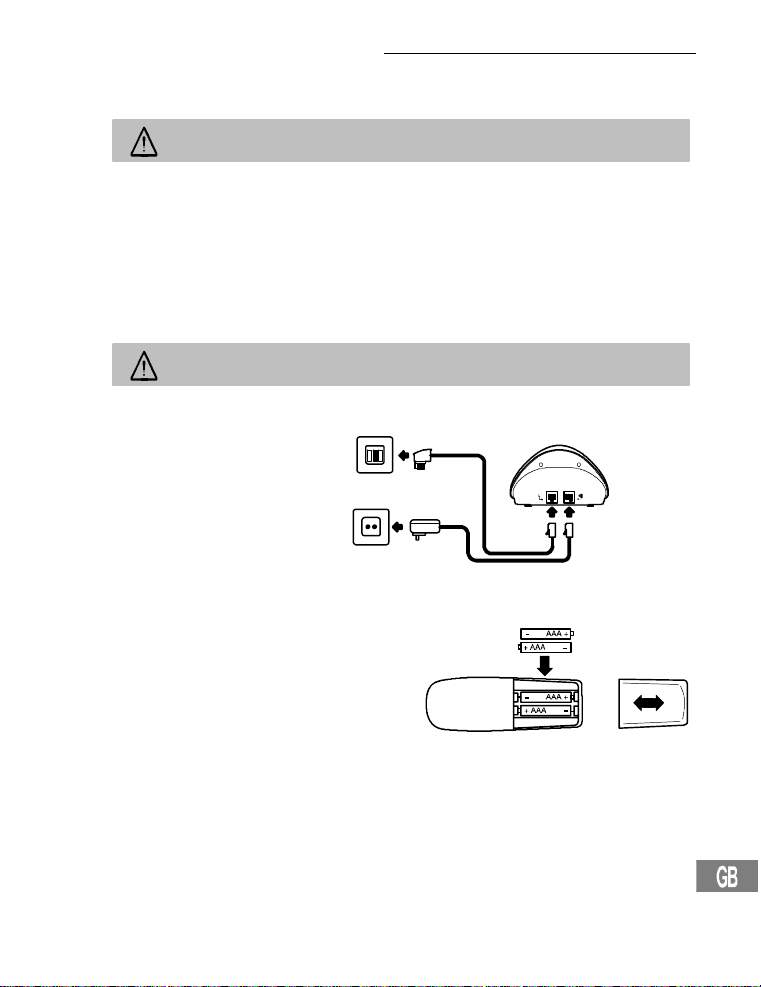
Putting the Telephone into Operation
2 Putting the Telephone into Operation
Safety note
Caution:It is essential to read the safetyinformation in Chapter 1 before pre-
paringthetelephoneforuse.
Checking the package contents
The package contains:
- a base stationwithpoweradapterplug - a telephoneconnectioncable
- a handset - two batteries
- an operatingmanual
Connecting thebase station
Caution:Position the base station witha distanceofatleast1meterto other
electronicequipmentbecauseit could lead tomutualdisturbance.
Connectthebasestationasillustrated in the diagram.Forreasonsofsafety,onlyusethe
poweradapterplugand telephoneconnectioncablesupplied.
Telephoneline socket
Mainspoweroutlet
Connecting thecharging station
Plugthepoweradapterplugina properlyinstalledmainspoweroutlet.
Inserting the batteries
Open the batterycompartmentand insertthebatteries.Onlyusebatteriesof the type AAA Ni-MH
1.2V.Payattentionto the correctpolarity.Close
thebatterycompartmentcover.
65
Page 66

Putting the Telephone into Operation
Charging the batteries
Beforeusingthehandsetforthe first time,placeitin thebasestation/chargingstation for
atleast14hours.Whenthehandsetiscorrectlyinsertedinthebasestation/ charging
station,anacousticsignal issued and the charge control lamp lights up. The handset
warmsupduringthechargingprocess.T his is normaland doesnotrepresenta risk. Do
notchargethehandsetwithchargingunitsfrom other manufacturers.Thecurrentbattery
charge status is indicated in the display:
Full Halfempty Weak Empty
Private branch exchanges
Ifyouwanttoconnectthe telephone to a private branch exchange, more informationis
providedonPage74.
66
Page 67
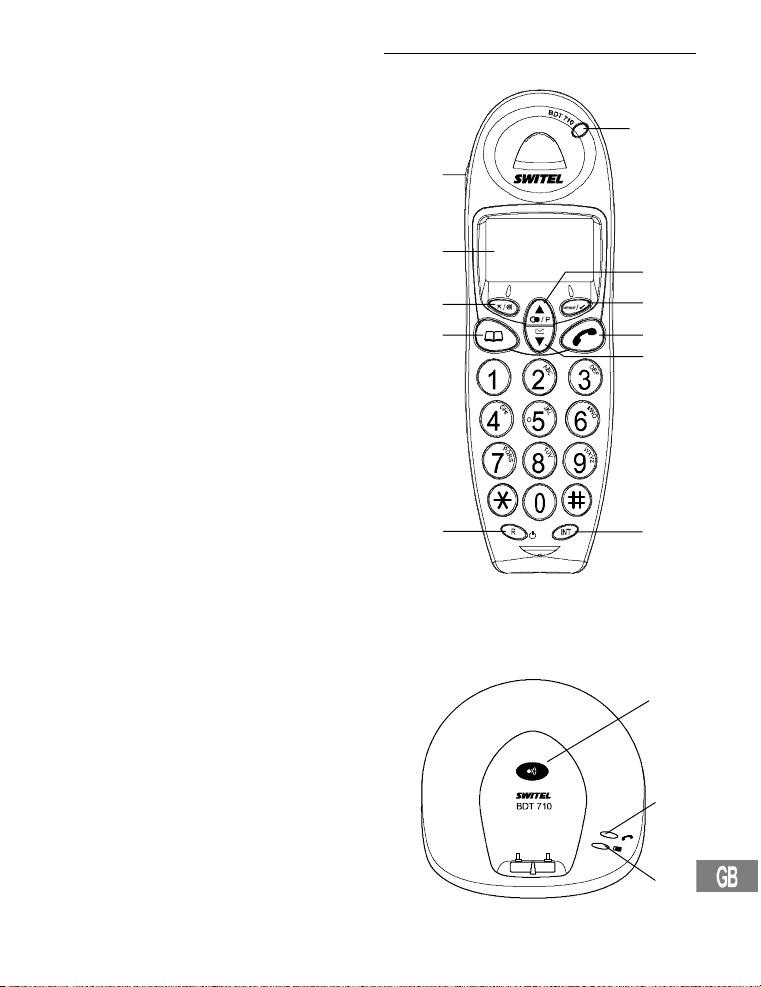
3 Operating Elements
Handset
1. Call indicator
2. Scrollingbutton/Redialling button
3. Menubutton
4. Call button
5. Scrollingbutton/ Calls list CLIP
6. Internalcalls
7. R button
8. Phonebook/Exitmenu
9. Mutingbutton/Clearbutton
10. Display
11. Handsfreemode
11
10
9
8
Operating Elements
1
2
3
4
5
Base station
1. Pagingbutton(locatehandset)
2. Call and power indicator
3. LED,chargecontrollamp
7
6
1
2
3
67
Page 68
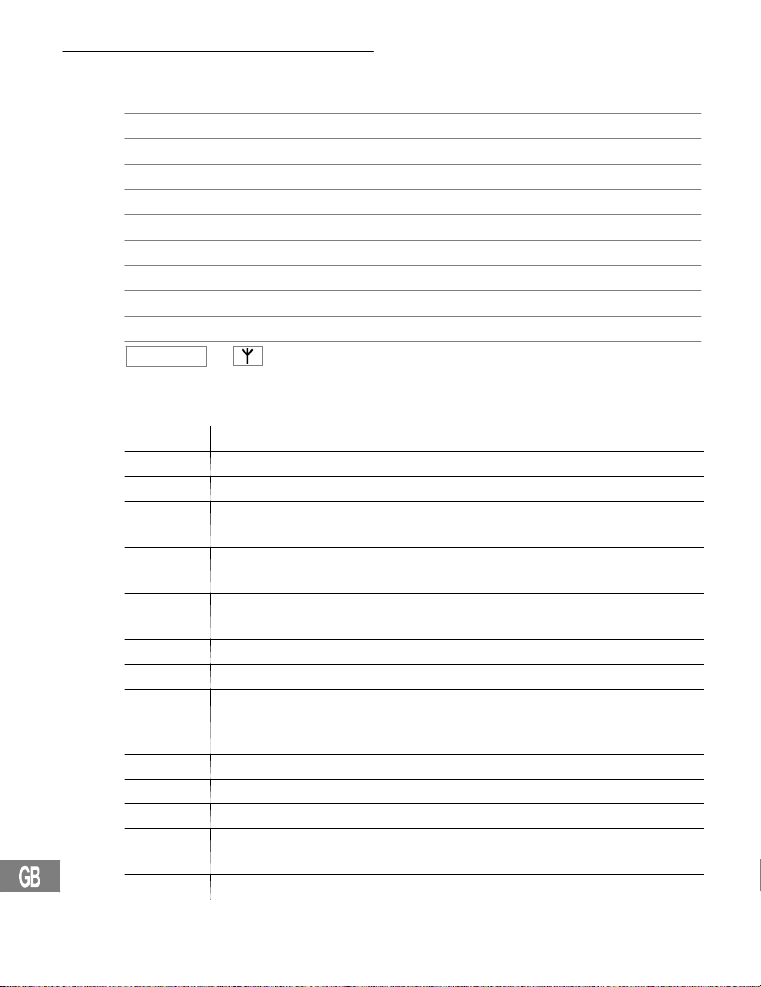
Operating the Telephone
4 Operating the Telephone
Illustrationand description of operations
ë Enter digits or letters
Pressthebuttondepicted briefly
2sec Pressthebuttondepicted for 2 seconds
Pressandhold Pressandhold the buttondepicted
Release Release the button depicted
{í} Handsetrings
{ì} Base stationrings
è Removethehandsetfromthe base station
é Placethehandsetinthebasestation
EXAMPLE
Iconsin the display
Icon Description
e
i
m On:Thephone numberisin excessof12digits.
or
a On:Acalliscurrentlybeing made.
b On:Handsfreemodehasbeenswitchedon.
On:Anexternalcalliscurrentlybeing made.
Flashing:Anexternalcallhasbeenreceived.
On:Aninternalcalliscurrentlybeingmade.
Flashing:Aninternalcallhasbeenreceived.
c
d
k On:The keylockfunctionisswitchedon.
On:Youhaveopened the callerlist(CLIP).
Flashing:Newcallshavebeenstoredinthecallslist(CLIP).
f On:Thisphonenumberinthecallslisthas not been calledback.
g O n: T his phone numberin thecallslist has already been called back.
Flashing:Pleasechargethehandset.
On:Displaysbatterycapacity.
Runsthroughthesegments:The handset is being recharged.
h On:Appearswhenusingthephonebook.
j On:Appearsimmediatelyprogramming mode has been activated.
On:The connectiontothebasestationisgood.
l
Flashing:The handsetisoutofrangeofthebasestation.
Textoriconsinthedisplay
68
Page 69
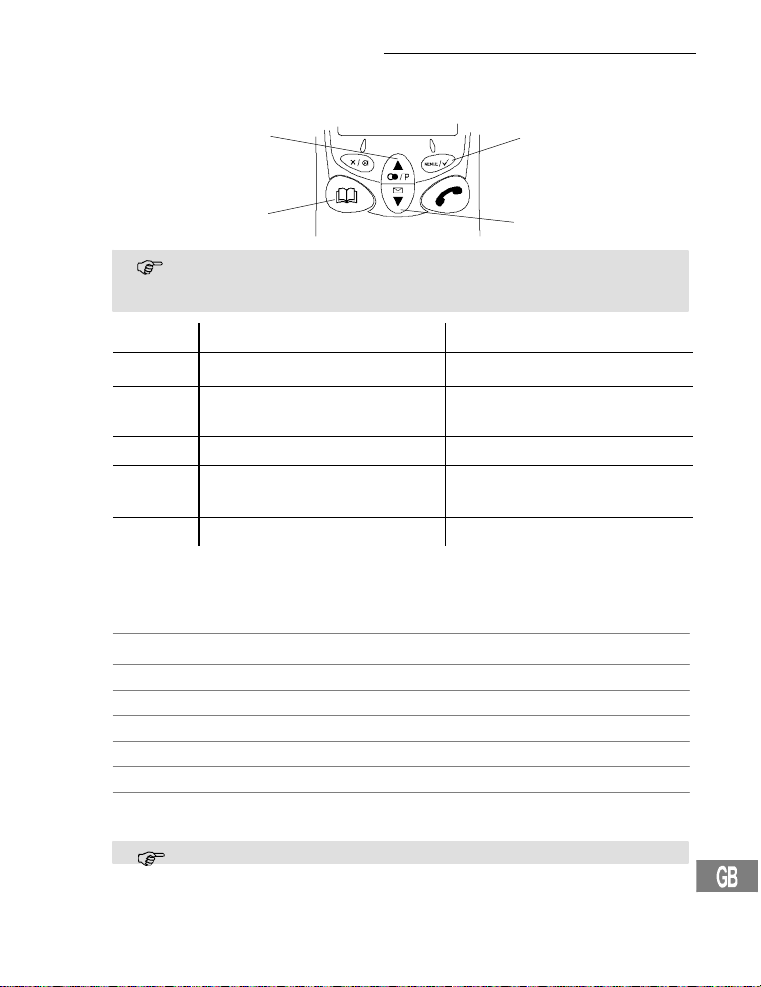
Operating the Telephone
Navigation buttons
Alldescriptionsinthisoperatingmanual assume that the handset is in Standbymode.
Standbymodeisactivatedby pressing the ¤ button.
Button In Standby mode In the menu
1
2 ,
3 ¤ - Opens thephone book - Skiponelevelback
4 +
R - Switchthehandseton/off - No function
Navigation in the menu
All thefunctionscanbeaccessedviathedifferentmenus.
RefertoMenuStructure . Page 75 for informationonhow toaccesseachrespective
function.
Open the main menu
+ or, Select the required submenu
Open the submenu
ë Usethedigitkeystoenternumbersor letters
Confirmtheinput
¤ Skiponelevelback
2sec¤ Interruptthe programming and saving processes and
17
4
+
3
¤
Thebuttonsdepictedin thedescriptivepassagesofthismanualhaveastandard
appearance,i.e. the contours and icons in thebuttonscoulddiffer slightlyfrom
theactualappearance.
- Opens themainmenu - Opensthemenudisplayed
- Opensthecallslist
- Openstherediallinglist
returntoStandbymode
Everyprocessis automatically cancelled ifthereisnoinputwithin30seconds.
- Scrollthroughthemenu
- Change thesettings
- Scrollthroughthemenu
- Change thesettings
1
2
,
69
Page 70

Operating the Telephone
Creating phone book entries - example
The exampleinCreating phone book entriesexplains how to navigate and make en-
triesinthephonebook.Thephone book memoryhasacapacityof30entries.
PHONE BOOK
,
ADD ENTRY , Select the functionandconfirmit
,
ë, Enterthenameandconfirmit
ë, Enterthephonenumberandconfirmi t
Proceedinthesamewayasinthisexampleforall settings.
RefertoMenuStructure . Page 75.
18
Open the main menu
70
Page 71

5 Telephoning
Switching the handset on/off
2secR Switchthehandseton
2secR Switchthehandsetoff
Taking a call
{í},è or ƒ Take the call
Ending a call
ƒ or é Endthecall
Making a call
ë Enterthephonenumber(max.20 digits)
Following incorrectinput,press to delete the last digit
ƒ Dial the phone number
ItisalsopossibletopresstheCallbuttonfirsttoobtainan outsideline. Thedigits
ofthephonenumberenteredare dialledimmediately. Itis notpossibletocorrect
anywrongdigitsinthe phone number enteredwhenusingthisdiallingmethod.
Redialling
The telephone storesthelastfive numbers dialled in a redialling list.
y Open therediallinglist
y or z, ƒ Selecttheentryrequired and dial thenumber
Callingback calls received
The telephone storesthelast20 callsreceived in a calls list.
z Open thecallslist
y or z, ƒ Selecttheentryrequired and dial thenumber
Diallingphone numbers from thephone book
Phonenumbersmusthavebeenstoredin thephonebook.. Page75.
¤ Open the phone book
y or z, ƒ Selecttheentryrequired and dial thenumber
Internal calls
Making internal calls
Inordertobeable tomakefreeinternalcalls,two or more handsets (HS1, HS2, ...) must
be registeredonabasestation.
HS1:I,e.g.2 Dial the internalphone number ofthehandset
required
HS2:ƒ Take the internal call on the otherhandset
HS1/HS2:ƒ Endtheinternalcall
Telephoning
71
Page 72

Telephoning
Transferring external calls internally
HS1:I,e.g.2 Dial the internalphone numberduring theexternalcall
HS2:ƒ Take the internal call on the otherhandset
HS1:ƒ Transferthe call
Ifthehandsetcalleddoesnotanswer,taketheexternalcallback bypressingthe
I button.
Holding a call / Brokering
While an externalcallisin progress,itispossibletodialanotherhandsetin order to consultwithsomeone.Theexternalcallerisputonholdwhileyouconversewiththesecond,
internalpersoncalled.You canswitchbetween the two callers as oftenasnecessary.
HS1:I,e.g.2 Dial the internalphone numberduring theexternalcall
HS2:ƒ Take the internal call on the otherhandset
HS1:I Switchbetweenthecallers
Conference calls
Anexternalcallcanbetransferredto another internal handset for a conferencecall.
HS1:I,e.g.2 Dial the internalphone numberduring theexternalcall
HS2:ƒ Take the internal call on the otherhandset
HS1:2secI Starttheconference facility
HS1/HS2:ƒ The conferencecallisended when one of the internal
Setting the receiver volume
The volumecan be adjustedtooneof5levelsduringa call.
+ or, Press the button during the call
Displaying the duration of a call
The durationofa call is displayedin hours,minutesandsecondsduringacallandfora
shortperiodafterithasbeenended.
Handsfree mode
Usethisfunctiontobe abletolistento the caller through the loudspeaker.
™ Switchonhandsfreemode
™ Switchoffhandsfree mode
Muting themicrophone in the handset
The microphonein thehandsetcanbeactivatedanddeactivated during a telephone conversation.
Switchthemicrophoneoff (mutingfunction)
Switchthemicrophoneon
callersendsthecall
72
Page 73
Telephoning
Key lock
Incomingcallscanstillbe takenin thenormalway even with the key lock activated.
3sec*
2x * Deactivatethekeylockfunction
Temporary tone dialling
Evenifyoucanonlyoperatethetelephoneusingpulsedialling,you can switch to tone
dialling temporarilyduringacallinorder,for example,toaccessanansweringmachine.
* Activatetemporary tone dialling
* Deactivatetemporary tonedialling
Diallingpause
When the phone is integratedina privatebranchexchange,itis necessary to dial a specificnumber(e.g.0 or9)inordertoobtainthediallingtoneforan outsideline. In the case of
olderexchanges,itcantakesome time until the dialling tone can be heard. Insertadialling pause in such cases.
0, 2secP, 1234... Insert thepause
19
The pause can also be entered with the phone numbersin the phone book.
Handset ringing melody
The handsetringing melodycanbe deactivated. Page75.
Thebasestationthenringsin the eventofan incomingcallbutnot the handset.
Locating the handset (Paging)
Ifyouhavemislaidthehandset,it can be located easily by means of an acousticsignal.
{í} Activatetheacousticsignal tolocate the handset
or ë Stop the acousticsignal
Range
The handset has a range of approx.50 metersindoorsandapprox.300metersoutdoors.
When the connectiontothebasestationisgood,the l iconappearsi n thedisplay.Ifthe
handsetismovedtoofarfromthe base station, thel icon flashesandacousticwarning
signalsareissued.Movenearertothe base station, otherwisethecallwill be disconnected.
Activate thekey lock function
73
Page 74

Private Branch Exchanges / Supplementary Services
6 Private BranchExchanges / SupplementaryServices
R button with private branch exchanges
Ifthetelephoneisconnectedto a private branch exchange, all the functionsassociated
with the R-button, such as transferringcalls,automatic call back,etc.,can be used.
Pleaserefertotheoperatingmanual providedwithyour private branch exchange to determinewhichRecalltimemustbesetto be abletousethefunctions.The retailerwhereyou
purchasedtheexchangecanprovideinformation as to whetherthetelephonewillwork
properlywiththeexchange.Setting the recall time . Page 75.
Diallingpause
When using privatebranchexchanges,itisnecessaryto dial a specific number to obtain
thediallingtoneforanoutsideline.Withsomeolder private branch exchanges, ittakesa
littletimebeforethe dialling tone becomes audible. Enter a dialling pause in the case of
suchprivatebranchexchanges.Youcanthendialthephonenumberwithouthavingto
waitforthediallingtone.Setting thedialling pause . Page 73.
The pause can also be entered with the phone numbersin the phone book.
R-button and supplementary services
The telephone supportsthesupplementaryservices offeredbyyourtelephonenetwork
provider,suchasbrokering,callwaitingandconferencecalls. These supplementary servicescanbeusedin conjunctionwiththeR-button. Please ask your telephone network
providerwhichrecalltimemustbe set in order to use the supplementary services.Contact
yourtelephonenetworkproviderwithregard to enabling supplementary services.Setting
therecalltime. Page75.
Answering machine in the telephone network
Ifyourtelephonenetworkprovider includes an answering machine for you in the telephone network,theenvelopeicon(VMWI
recordedforyou.Theavailabilityof an external answering machine and indication of new
messagesviatheenvelopeiconareoptionalservicesoffered by thetelephonenetwork
provider. These functionscanonlybeusedwhenyourtelephonenetworkprovideractuallyoffers theservice.Contactyour network provider for furtherinformation.
Caller number display (CLIP2)
Ifthisfunction is available with yourtelephoneline,thenumberofthecallerappearsin the
displaywhenthephonerings.Ifthecallerhassuppressed transferofhisphonenumber,
thecorrespondingmessageappears in thedisplay.Thephonenumberisnotdisplayed
and,thus,cannotbe storedin the calls list.
The caller number displayfunctionis an optional service offered by telephone
networkproviders.Contact your network providerforfurtherinformation.
1
)appearstoindicatenewmessageshavebeen
74
1
VMWI:VisualMessageWaiting Indication
2
CLIP:CallingLine IdentificationPresentation
Page 75

7 MenuStructure
PHONE BOOK ADDENTRY
DELETEENTRY
MODIFYENTRY
SETUP BASEVOLUME VOLUME 1, 2, 3, OFF
BASE MELODY MELODY 1, 2, 3
DELHANDSET PIN?
PIN CODE
DIALMODE TONE
RECALL RECALL 1 (100ms)
20
5
5
PIN?
PULSE
RECALL2(300 ms)
Menu Structure
HANDSET?
NEW PIN? RETYPE
DEFAULT PIN?
HANDSET BEEP KEYTONE ON - OFF
INT RING VOL VOLUME 1, 2, 3, OFF
EXT RING VOL
INT MELODY MELODY 1, 2, 3
EXT MELODY MELODY 1, 2, 3
AUTO ANSWER ON -OFF
NAME .........
LANGUAGE (7 LANGUAGES)
KEY LOCK
REGISTER SELECT BASE BASE 1___
REG BASE BASE1234
5
Defaultsystem PIN: 0000
2
If the function has been activated, an incoming call isautomatically taken on removing the handset from the
base station.
5
LOWBATTERY ON - OFF
RANGE ON - OFF
VOLUME 1, 2, 3, OFF
2
.........
CONFIRM
75
Page 76
Expanding the Telephone System
8 Expanding the Telephone System
The internationallyrecognisedGAP1standardensuresthecompatibilityofhandsetsand
basestationsfromdifferentmanufacturers.This enables SWITEL equipmentandthat
fromothermanufacturerstobeintegratedinonetelephonesystem.
Multiplehandsets
Up to5 handsetscanberegisteredonthebasestation.
Registering handsets
Beforebeginningwiththeregistration procedure forahandset,switchthe relevant base
stationtoRegistermode.
3sec ActivateRegistermode
Completetheregistration processforyourhandset. Page75.UsethePINcodecur-
rentlysetforthe registration process. Page75.
Afterbeingregistered,the handset is assigned an internal call number.T his i nternal call
numberappearsinthedisplay.
Toregisterhandsetsfromothermanufacturers,read theoperatingmanualprovided withtherespetivehandset.
Deregistering handsets
A handset registered on a base station can only be deregistered by another
handsetregisteredtothesame base station.
Multiple base stations
The handsetscanbesimultaneouslyregisteredon up to4 differentbasestations.Each
basestationrequiresitsown telephonelinesocket.Connectionswiththesameordifferentcallnumberscanbeused.
Callsin progress,however,cannotbetransferred fromone base stationto
another.
Increasing the range
Positionthebasestationsso that the ranges of the individual base stations overlap.Test
therangeofyourhandsetsbecauseobstructionsinbuildings restricttherange. Register
thehandsetonallthebasestations.Activate the Select Base functiononthebasestations. Page75.Thehandsetautomaticallysearches for the nearestbasestationwith
thebestconnection.
Mobilitythrough different installation locations
Registerthehandsetonvariousbasestations at differentlocations. ActivatetheSelect
Base functiononthebasestations. Page75.Regardlessof your current location,the
handsetautomaticallysearches for a base stationin range.
76
1
GAP:GenericAccessProfile=Standardforthei nteroperation of handsets and base
stationsfromother manufacturers.
Page 77

If Problems Occur
9 If ProblemsOccur
Service hotline
Shouldproblemsarisewiththetelephone,please refer to the following informationfirstof
all.Inthecaseofclaimsunder the terms of guarantee,pleasecontactyoursalesoutlet.
There is a 2 year period of guarantee.
Problems and solutions
Problems Solutions
No connectiontobasestationpossible
No telephonecallspossible - The telephone line is not correctedproperlyorisde-
Connectionisdisturbedor
cut off
The system no longer responds
The batteriesareemptyafter a very short time
The caller numberdisplay
(CLIP)doesnotfunction
- Checkthatthehandsethasbeenregisteredon the
basestationwiththecorrectPIN code. . 75
fective.Only use the telephone connection cable supplied.
- Testwhetherthetelephoneconnectionisinorderby
usinganothertelephone.
- The power adaptor plug is not plugged in or there is a
completepowerfailure.
- The rechargeable batteriesareemptyordefective.
- The handsetis toofarfromthebasestation.
- The incorrectdiallingmodeisset.. 75
- The handsetis toofarfromthebasestation.
- The base stationisinan unsuitablelocation.
- Resetallthefunctionstotheir default settings.. 75
- Disconnectthepoweradapterplugbrieflyfrom the
powersocket.
- The batteriesareemptyordefective.
- Placethehandsetinthebasestationproperly.Clean
thecontactsurfaces on the handsetand base station
usinga soft,drycloth.
- Insertthehandsetin thebase station for 14 hours.
- The caller numberdisplayfunctionisanoptionalserviceofferedby telephone network providers.Contact
yournetworkproviderforfurther information.
- The caller has suppressedthetransmissionof their
phone number.
77
Page 78

Technical Specifications
10 Technical Specifications
Technical data
Feature Value
Standard DECT-GAP
Powersupply Input:220/230 V,50 Hz
Range Outdoors: Approx.300 m
Standby Up to150 h
Max. talk time Up to11h
Rechargeablebatteries 2x1.2V,size:AAA
Dialling mode Tonediallingmode(default)
Permissibleambienttemperature 10°C to 30°C
Permissiblerelative humidity 20%to75%
Flash function 100 ms,300 ms
Handsetname DECT BDT 710 (adjustable)
Phonebook 30 entries
Callslist 30entries
Redialling list 5 entries
Batterycharge warning indicator Yes
Keytone On/Off
Outofrangewarning Yes
Automaticanswering On/Off
Ringing volume,handset(internalandex-
ternal)
Receivervolume 5l evels
Ringing melody,handset (internal and ex-
ternal)
1
DECT:DigitallyEnhanced C ordless Telephone = Standard for cordless telephones.
GAP:GenericAccessProfile=Standardforthei nteroperation of handsets and base
stationsfromother manufacturers.
78
1
Output:6.5V, 150 mA
Indoors:Approx.50 m
Pulsediallingmode
3 levels and off
3 melodies
Page 79

Technical Specifications
Keylock Yes
Ringing volume,basestation 3levelsandoff
PINcode 0000(default)
Handsfreemode Yes
RPAS Yes
No.ofhandsetsperbasestation Max.4
Languages 7
Accesstophonebookduringcall Yes
Conferencefacility Yes
Hearingaidcompatibility
The telephone is compatiblewithmostpopular hearing aidsonthemarket.However,it
cannotbeguaranteedthatallhearingaidswillworkperfectly.
Ifyourhearingaidisnotcompatiblewith the telephone and interference occurs,trythe following solutions:
-Donotswitchthehearingaidto“T”.
-Usethehandsfreefacility on the handsetand setthevolumeasloudaspossible.
-Holdthehandsetapprox.15cmfromthe hearing aid.
79
Page 80

Maintenance/ Guarantee
11 Maintenance /Guarantee
Maintenance
S Clean the housing surfaceswithasoft,fluff-freecloth.
S Neverusecleaning agentsorsolvents.
Guarantee
SWITELequipmentisproducedandtestedaccording to the latest productionmethods.
The implementationofcarefullychosen materials and highly developed technologiesensuretrouble-freefunctioning and a long servicelife. The terms of guaranteedo notapply
wherethecauseofequipmentmalfunction is the faultofthetelephonenetworkoperator
oranyinterposedprivatebranchextension system.Thetermsof guarantee do not apply
tothebatteriesorpowerpacksused in the products. The period of guarantee is 24 months
fromthedateofpurchase.
Alldeficienciesresultingfrommaterial or production faultswhichoccurduringtheperiod
ofguaranteewillbeeliminatedfreeofcharge.Rights to claims under the termsofguaranteeareannulledfollowinginterventionbythepurchaseror third parties. Damage caused
asa resultofimproperhandlingoroperation,incorrect positioning or storing,improper
connectionorinstallation,Acts of God or other external influenceare notcoveredbythe
termsofguarantee.In the case of complaints,wereservetherighttorepairor replacedefectpartsor provide a replacementdevice. Replacementpartsordevicesbecomeour
property.Rightstocompensationin the case of damage are excluded where there is no
evidenceofintentorgrossnegligencebythemanufacturer.
Ifyourdeviceshowssignsof defect during the period of guarantee, please returnittothe
salesoutletinwhichyoupurchasedtheSWITELdevice together with the purchase receipt.Allrightsto claims under the terms ofguaranteeinaccordancewiththisagreement
mustbeassertedexclusively with regard to your sales outlet.Twoyears after the purchaseandtransferofourproducts,claimsunderthetermsofguarantee can no longer be
asserted.
80
Page 81

12 Index
A
Answering machine in the
telephone network, 74
B
Base station, 67
Batteries, 64
Battery charge status, 66
Brokering, 72
C
Call and power indicator, 67
Call button, 67
Call indicator, 67
Caller number display, 74
Calling back missed calls, 71
Charge control lamp, 67
Charging the batteries, 66
Checking the package
contents, 65
Conference calls, 72
Connecting the base station, 65
Connecting the charging
station, 65
Creating phone book entries, 70
D
Deregistering handsets, 76
Descriptions, 68
Dialling pause, 73 , 74
Dialling phone numbers from the
phone book, 71
Display, 67
Disposal, 64
E
Ending a call, 71
Expanding the Telephone
System,76
G
Guarantee, 80
H
Handset, 67
Handsfree mode, 67 , 72
Holding a call, 72
I
Icons in the display,68
Increasing the range,76
Inserting the batteries, 65
Installation location, 64
Intended use, 64
Internal calls, 67, 71
K
Keylock,73
L
Locating the handset, 73
M
Maintenance, 80
Making a call, 71
Making internal calls, 71
Medical equipment, 64
Menu button, 67
Mobility, 76
Multiple base stations, 76
Multiple handsets, 76
Muting the microphone, 72
Muting/Clear button, 67
N
Navigation , 69
Navigation buttons, 69
O
Operating the Telephone, 68
Index
P
Paging, 73
Paging button, 67
Phone book / Exit menu, 67
Power failure, 64
Private branch exchanges, 74
Problems and solutions, 77
Putting the telephone into
operation, 65
R
R button, 67
R button with private branch
exchanges, 74
R-button and supplementary
services,74
Range, 73
Receivervolume, 72
Redialling, 71
Registering handsets, 76
Ringing melody, 73
S
Safety information, 64
Scrolling button/Calls list CLIP, 67
Scrolling/Redialling button, 67
Service Hotline, 77
Supplementary services, 74
T
Takingacall, 71
Talk time, 72
Technicaldata, 78
Telephoning,71
Temporarytone dialling, 73
Transferring external calls
internally, 72
V
VMWI, 74
81
Page 82

Page 83

Page 84

Declaration of conformity
WE TELGO AG
OF Routed’Englisberg17
CH-1763Granges-Paccot
Declareunderourown responsibilitythattheproduct
MODEL: BDT 710
DESCRIPTION: CordlessDECT telephone
Isinconformitywith directives:R&TTEDirective(1999/5/EC)
COMPLIANCE IS ACHIEVED BY CONFORMITY TO THE FOLLOWING:
TEST REPORT NUMBERS:
AUTHORISED BY:
Signed:
Name(printed): Selim Dusi
Positionincompany: ManagingDirector
Dateofissue:
Copiesofthisdocumentwillbeheldonfileforaperiodof10yearsafterthe last production.
Supplier: TELGO AG,Routed’Englisberg 17
Product: BDT 710
This productisintendedforconnectiontoanalogue PSTNlineswithinSwitzerland.However,
due todifferencesbetween the individual PSTNs provided in the differentcountries,the approvaldoes not,ofitself,give an unconditional assurance of successfuloperationoneveryPSTN
networkterminationpoint.
________________________
CH-1763Granges-Paccot
 Loading...