

Page 1
English version
4
English version
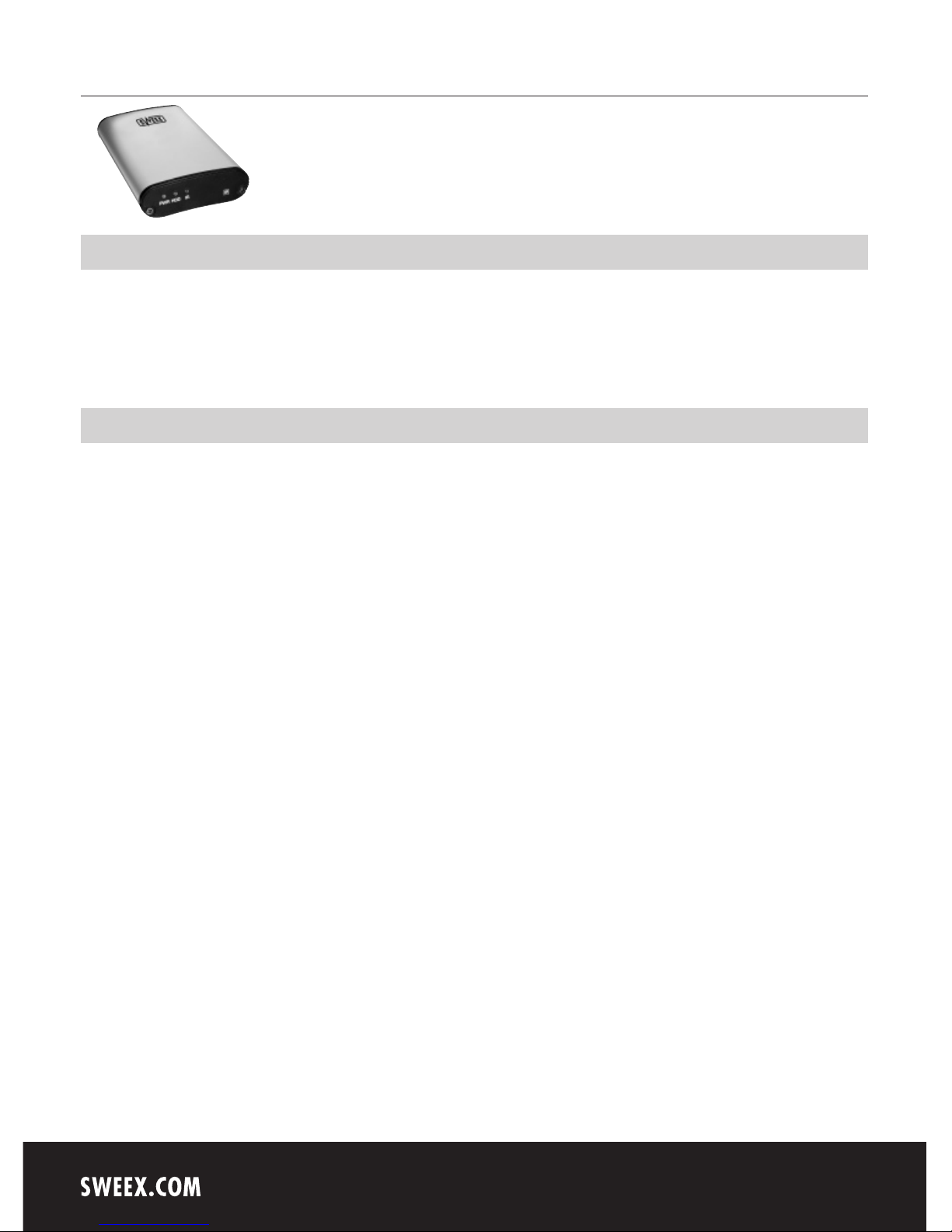
MM124 Sweex Portable Media Center
MM124UK Sweex Portable Media Center
Introduction
First of all, many thanks for purchasing this Sweex Portable Media Center. Easily enjoy movies, music and photos stored on the internal 2.5”
HDD inside on your TV. To ensure this product operates correctly, we advise you to carefully read this manual first. If despite this manual you still
experience problems during installation or operation of this product, go to www.sweex.com for additional information and look under the heading
service & support.
Contents of the box
Before use, check if all required parts are present. The following parts must be present in the box:
• Portable media center
• Remote control with battery
• Composite + Stereo L-R cable
• External remote control IR receiver
• USB cable
• Power adapter
• User manual
• CD-ROM with manual and driver
If one of the above parts is missing, please contact the supplier.
Page 2

English version
5
English version
Specifications
Power: 5V / 2A
Interface: USB 2.0
HDD type: 2.5 inch IDE HDD
HDD file system: NTFS / FAT32
TV type: NTSC / PAL
Supported format: - Movie: MPEG 1, 2, 4 (MPG, MPEG, AVI, M2V, DAT, VOB, IFO etc.)
DivX, XviD (except GMC, Qpel option applied)
- Music: MP3, OGG Vorbis, WAV, WMA (except WMA9 pro.lossless)
- Photo: JPG(JPEG)
Video output: COMPOSITE
COMPONENT Y, Pb, Pr (480p, 720p, 1080i progressive scan)
Audio output: STEREO L-R
DIGITAL COAXIAL (DTS Pass-Through Only)
Working temperature: 0˚C ~ 60˚C
Working humidity: 10% ~ 50%
Weight: 180g (without HDD)
Dimension: 80 x 148 x 24 mm
Supports: Windows 98SE, 2000 and XP
System Requirements
USB Requirements
Windows 98SE, 2000 or XP
Available USB 2.0, 1.1 Port (Recommend USB 2.0)
Precautions
We strongly recommend you to back up the data to another safe media. We are not responsible for data damage or loss in built-in hard-disk. It is
better to unplug the power adapter when you don’t use it for a long time. The Sweex Portable Media Center does not support the DivX, XviD codec
of video files that has GMC, Qpel option. The Sweex Portable Media Center only supports “Pass-Through” for DTS Audio codec.
Do not shut off the power while a file is playing. If the length of the USB cable is too long, it may not be connected smoothly (Recommend: up
to 3 meters). If you have USB 1.1 Host Adapter, the Sweex Portable Center works at USB1.1 speed. Be careful of dropping or impact or shock.
We recommend you to use the all supplied cables or accessories that are customized for the best performance of the Sweex Portable Media Center.
Using other cables or accessories may not support the best performance.
Page 3
English version
6
Installation Windows 98SE
First you have to install the Windows 98SE driver before connecting the Sweex Portable Media Center to the PC. De driver is located on the CD-ROM
and can be installed by choosing the right menu option. After installing the driver connect the Sweex Portable Media Center with a USB cable to the
PC and plug the power cable into the media center.
Installation Windows 2000/XP
There is no need to install a special driver for the Sweex Portable Media Center when you use it with a PC with Windows 2000 or Windows XP.
Connect the Sweex Portable Media Center with the provided USB cable to the PC and plug the power cable into the media center. Check “My
Computer” or “Explorer”, there should be a new volume. You can use this volume as a normal hard disk and copy data on it. After copying the data
remove the Sweex Portable Media Center with the remove icon at the bottom-right of your screen.
Connecting the Sweex Portable Media Center
Connect to a external AV Device
The Sweex Portable Media Center supports 3 types of video output: Composite, S-Video and Component. Use the connection that your TV supports.
Normally TV’s support composite video connections, this cable is included in the package. Connect the cable to the CVBS output on the Sweex
Portable Media Center (yellow connector) and to the Composite input on your TV. Also connect the red and white connectors (RCA) to the R and L
connectors on the Sweex Portable Media Center and on the TV.
When you don’t see a normal display on the TV cable, check the following:
1. “TV “– Switch to Video Input Mode: turn on TV, and switch to video input mode and select the right input. See the TV user manual for more
information on how to do this.
2. “Sweex Portable Media Center” – Switch to Video Output Mode: press [VIDEO] button repeatedly. Whenever you press [VIDEO], the video
output signal is changed.
3. After you see a normal screen, you have to save video configurations of the Sweex Portable Media Center. See Video Setup.
Page 4
English version
7
Video Setup
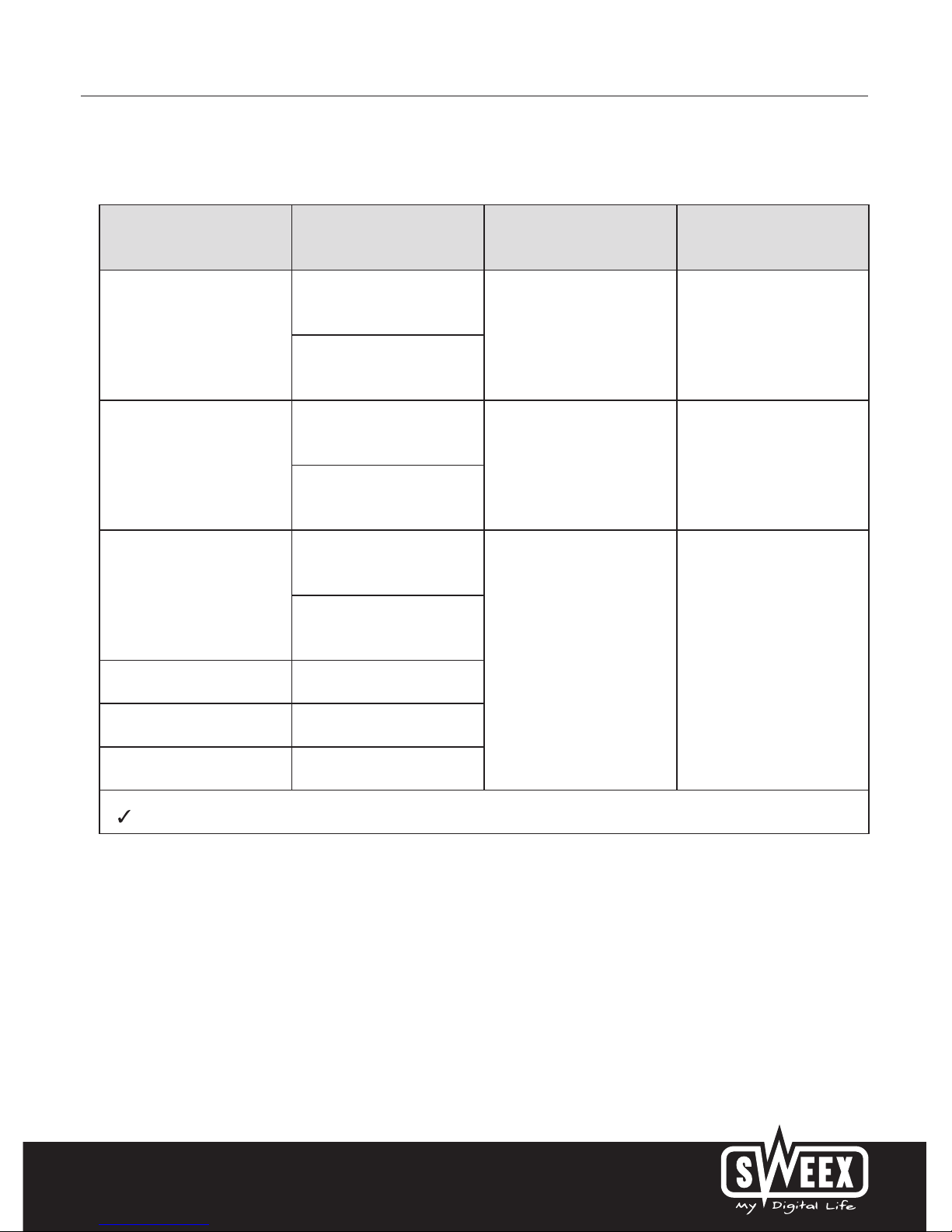
You have to setup the video output of the Sweex Portable Media Center the same as the TV’s input mode.
TV Video Input Mode Sweex Portable Media Center
Video Output Mode
Connection Jack of TV Video Cable Type
Normal Video
TV Out: NTSC C/S-Video
(HD Component OFF) CVBS or Composite Jack
(Generally Yellow Jack)
Yellow RCA Cable
(Supplied)
TV Out: PAL C/S-Video
(HD Component OFF)
S-Video
TV Out: NTSC C/S-Video
(HD Component OFF)
S-Video Jack
S-Video Cable
* Black rounded
TV Out: PAL C/S-Video
(HD Component OFF)
Component 480i
TV Out: NTSC C/YPbPr
(HD Component OFF)
Component 3 Jack
* Y(Green), Pb(Blue), Pr(Red)
Component Cable
* Y(Green), Pb(Blue), Pr(Red)
TV Out: PAL C/YPbPr
(HD Component OFF)
Component 480p HD Component Out On 480p
Component 720p HD Component Out On 720p
Component 1080i HD Component Out On 1080i
NTSC, PAL : Standard of TV Output. Select a proper one for using in your country.
Turn on the Sweex Portable Media Center and press [SETUP] on Mode Selection screen.
Move to ‘TV Out’ icon and press [ENTER]. Setup box will be displayed under icon menu.
Move to Video Output Mode that you want and press [ENTER].
Finally, press [SETUP] again for saving configurations.
Page 5
English version
8
Audio Setup
Analogue/DCPM: select when you connect the supplied audio cables (Red / White) to TV or Audio set directly.
Encoded digital: Select when you want to listen through 5.1Ch / DTS Dolby by connecting the receiver (or amplifier) with an optical or coaxial cable.
Turn on the Sweex Portable Media Center and press [SETUP] in Mode Selection screen. Move to ‘Audio’ icon and press [ENTER]. Setup box will be
displayed under icon menu. Move to Audio Output Mode that you want and press [ENTER]. Finally, press [SETUP] again for saving configurations.
Move to DHCP On and press [ENTER]. Finally, press [SETUP] again for saving configurations. Move to DHCP Off and press [ENTER]. Move to
'Subnet' and press [ENTER]. Subnet mask input box will be displayed. Write Subnet mask with arrow and number button of remote control. And
then, press [ENTER] again. Finally, press [SETUP] again for saving configurations.
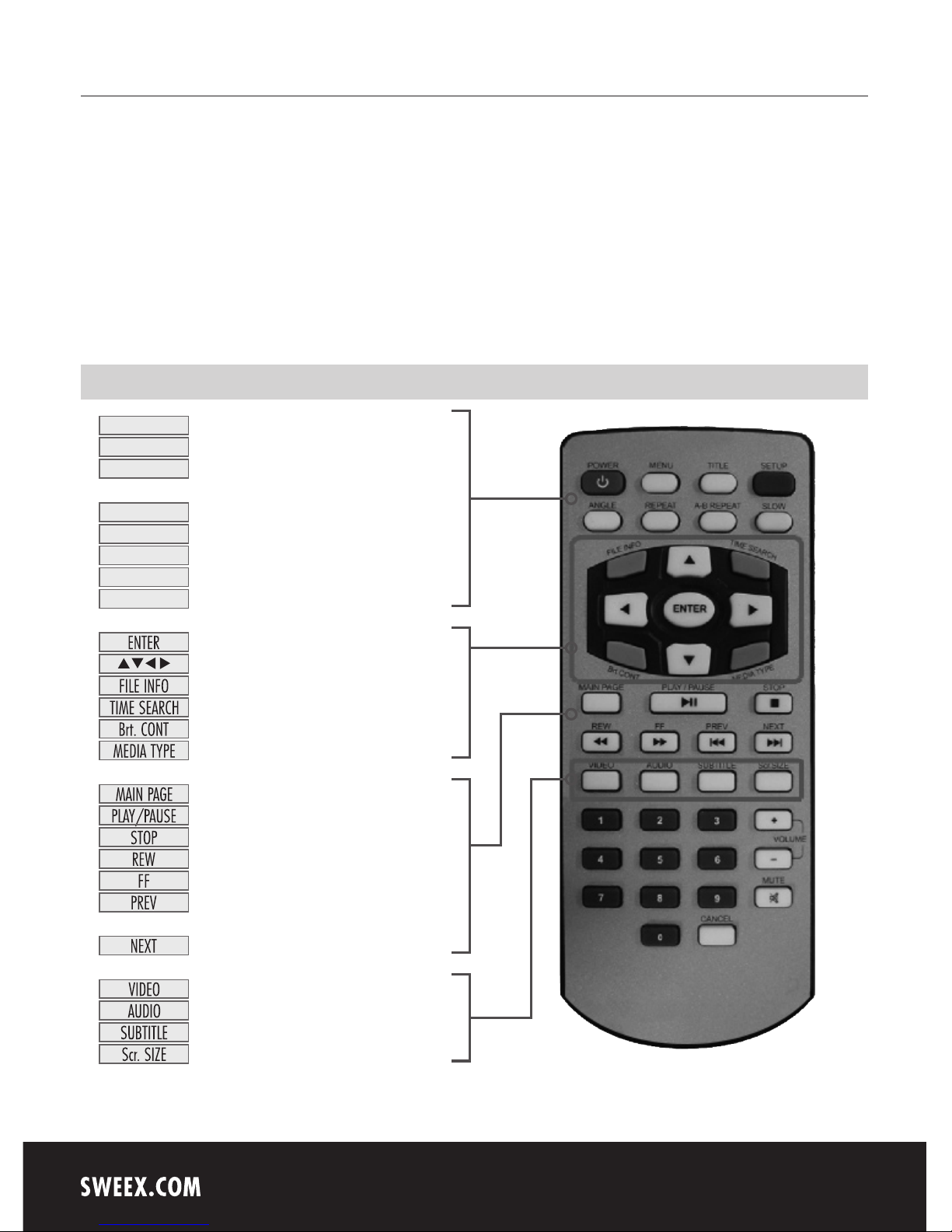
Remote Control
Turn On / Of
Go to Setup Screen
Go to DVD Main Menu,
Display Menu Icon When Playing Video File
Go to DVD Title Menu
DVD Angle, Photo Rotation
Set DVD Chapter, Title Repeat
Set DVD A-B Repeat
Play DVD Slowly
Play a File
Arrow Key (Return to Up Directory)
Show File Info
Jump to Specific play time
Set Luminosity, Color Depth, Brightness
Go to Media Type Selection Screen
Go to Mode Selection Screen.
Play next all files / Pause
Stop Play
Play Faster in Backward
Play Faster in Forward
Go to Previous Page,
Play Previous File in Play All
Go to Next Page / Play Next File in Play All
Change Video Output Mode
Change Audio Type of Video, DVD file
Subtitle Settings
Screen Size Settings
TITLE
ANGLE
REPEAT
A-B REPEAT
SLOW
MENU
SETUP
POWER
Page 6

English version
9
Warranty
All products under the Sweex brand are warranted for a period of three years. We do not grant support or warranties for any software and/or
(rechargeable) batteries included. Warranty claims are only settled via the dealer where the product concerned was purchased.
The rightful owner has and retains title to all brand names and related rights mentioned in this manual.
 Loading...