

Page 1
English
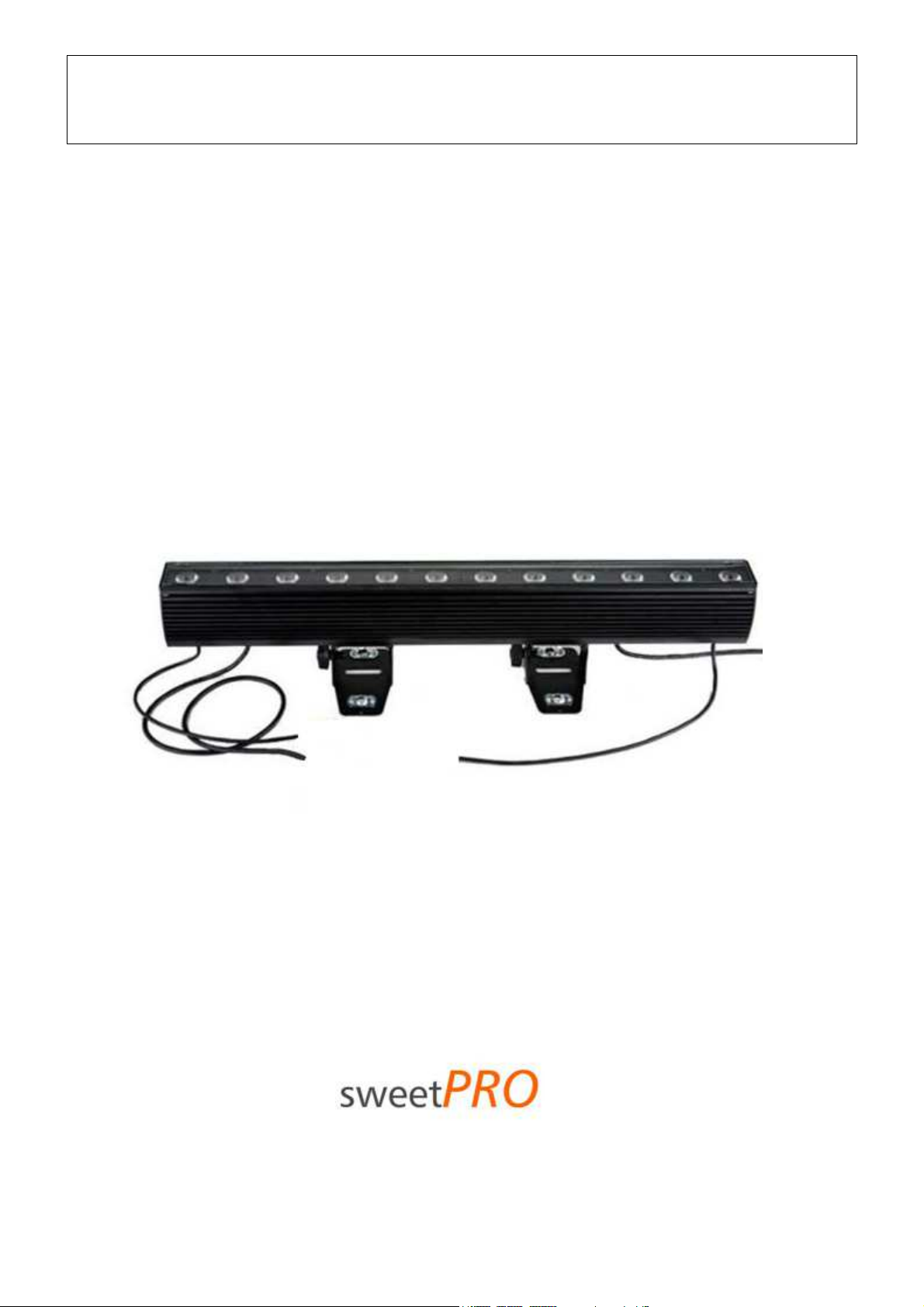
SweetPRO FR-12MC4
IP65 LED Outdoor Fluterrampe
Best.Nr.
SWPFR12MC4IP
User manual
Page 2
SweetPRO FR-12MC4 IP65 LED Outdoor Fluterrampe|Best.Nr. SWPFR12MC4IP
EN
With its compact dimensions and modern elegant design, SweetPRO FR-12MC4 IP65 LED Outdoor is ideal for theatrical, live shows and
architectural applications.
The new high power RGBW full color LED technology allows the creation of a wide range of colours, reduces considerably the
consumption and removes maintenance and lamp changing (the medium life of the LED is of 100.000 hours, 10 years in constant use).
IMPORTANT!
READ CAREFULLY THE INSTRUCTION LEAFLET IN ALL ITS PARAGRAPHS. THE KNOWLEDGE OF THE INFORMATION AND OF THE
LIMITATION HELD IN IT, IS BASIC AND FOUNDAMENTAL FOR A CORRECT AND SAFE USAGE OF THIS PRODUCT.
IMPORTANT!
BEFORE ANY (MAINTENANCE, CLEANING ETC.) ACTION, SWITCH OFF THE POWER SUPPLY.
IMPORTANT!
- This device is suitable for indoor and outdoor use (room temperature cannot be higher than 25°C)
- This device is suitable for direct assembling on normally flammable surfaces.
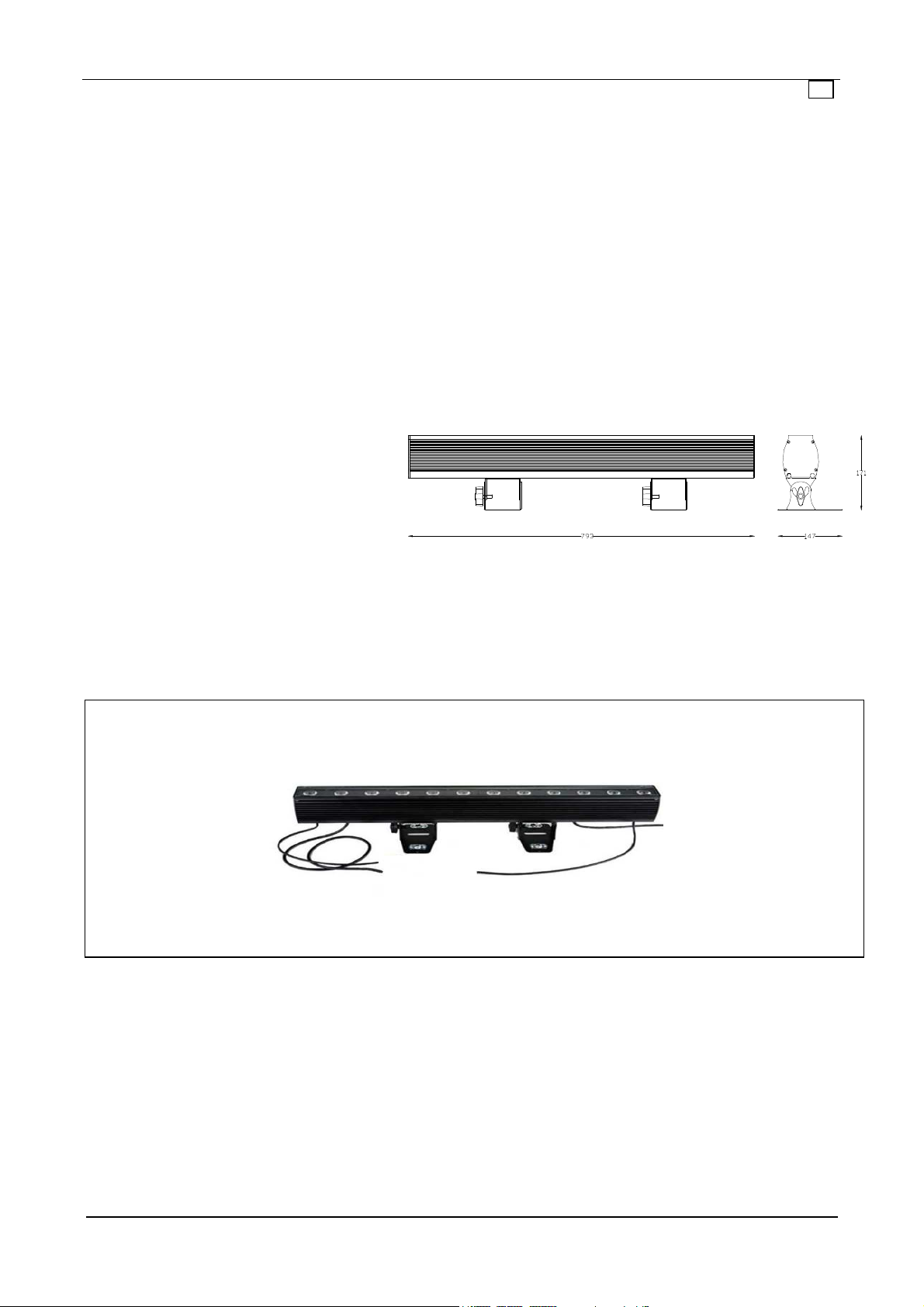
Technical specifications Dimensions
•
Body made of die-cast aluminium + steel sheets
•
Black epoxy powder coating
•
Power supply:100/240V 50/60Hz
•
Current: 0,6 A (230v)
•
Power: 120 W
•
Max power supply: 130VA
•
Source: 12 x10 W full color LED
•
Average LED life: 100.000 h
•
Colour changing: RGBW e HSV system
•
Functioning: DMX Signal and automatic mode
•
Channels: : 4/5/7/8/13, 8/16BIT DMX 512
•
Weight: 4,1 Kg
Installation
The projector can be fixed in any position. For floor installation, lean the projector using the two feet. For suspending use, it is needed
to install an appropriate clamp. It must be located in a well ventilated position. Make sure the structure You are fixing the product to
can stand the product load.
Accessories
• “c” Clamp
Page 2
Page 3
SweetPRO FR-12MC4 IP65 LED Outdoor Fluterrampe|Best.Nr. SWPFR12MC4IP
EN
1
2 3
4
Connections
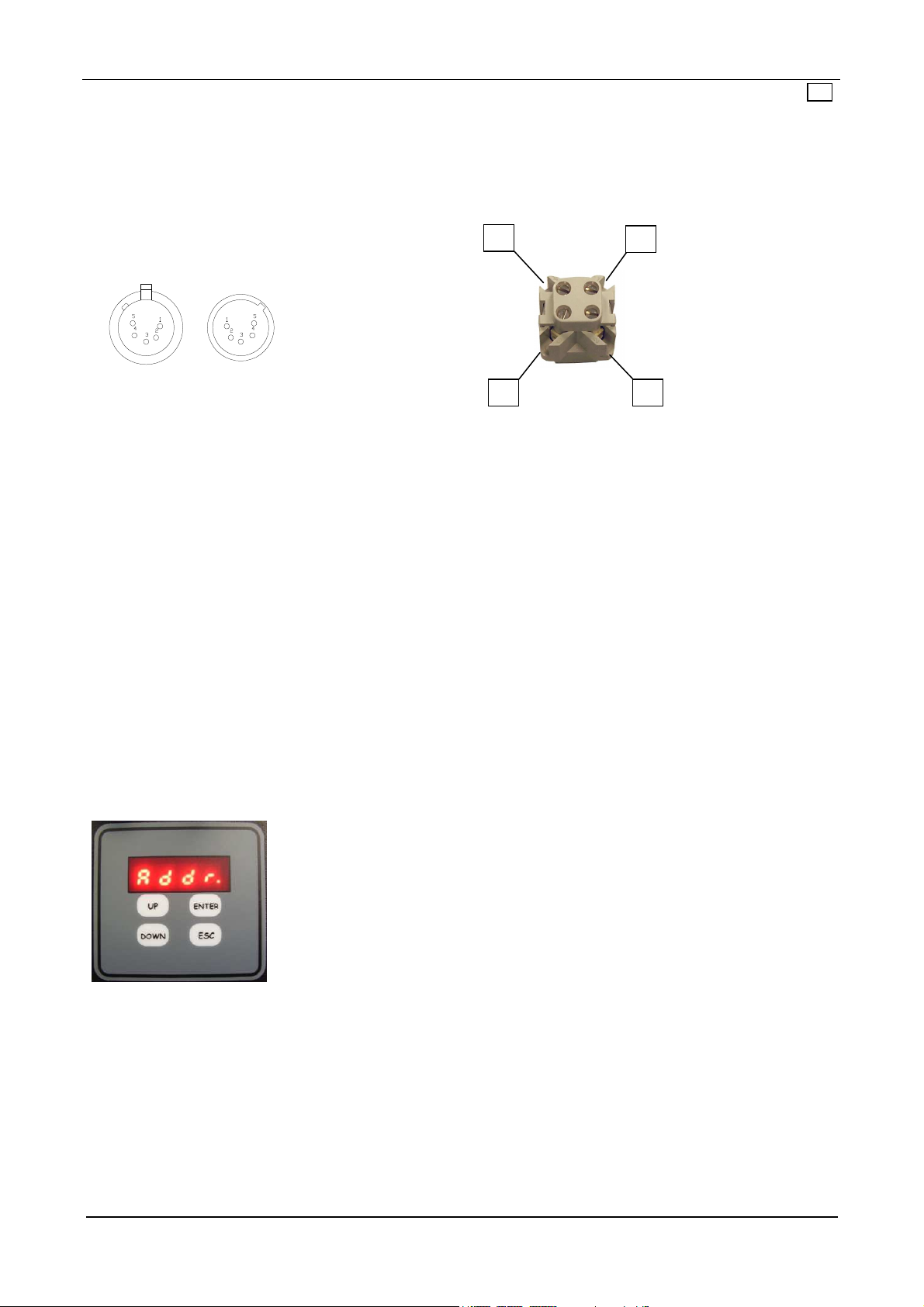
The projector is fitted with a power supply cable for power IN, a power supply cable for power OUT with IP65 connectors and two
XLR 5 Poles IP65 connectors for DMX IN and OUT signal (Fig.1)
Fig. 1
DMX OUT
Any modification to this luminaries, without authorization, is forbidden.
This lantern must be powered according to the voltage and frequency showed on its label (100/240V 50/60Hz). Connect the power
cable to the socket. We suggest to connect each projector to its own switch so that they can be individually switched on with a remote
control.
To remote control the projectors is required the use of a DMX512 control desk.
For the connection of signal use cable EIA rs-485 type: two core screened, 120Ω characteristic impedance, 22-24 AWG, low capacity, 1
XLR 5 poles MALE connector and 1 XLR 5 poles FEMALE connector.
To form a DMX chain, connect the DMX control desk to the first projector’s DMX IN, then from its DMX OUT to the DMX IN of the
second projector and so on.
For a correct functioning of the DMX signal, it is necessary to put a terminal into the DMX OUT of the last projector. This terminal is
made of 1 XLR MALE connector with a 120Ω resistance welded between PIN 2 and PIN 3.
DMX IN
DMX connector:
1: GND (screen)
2: data –
3: data +
4: NC
5: NC
Digital display and functioning options
Using the digital display, it is possible to change the functioning options, drive the projector in automatic mode with presets or
programs and with Master/Slave functions, display projector information and reset settings to default.
After 30 seconds without working, the display will turn off.
The low right dot is a dmx signal indicator:
- Fixed ON : dmx signal is linked
- Slow flashing: dmx signal is not linked
- Quik flashing: dmx signal is linked but control channels are not enough
Addressing of the projector
To control many SweetPRO FR-12MC4 IP65 LED Outdoor individually, it is necessary to assign to each one a different DMX address ,
setting the starting channel taking into consideration that one Projector books 8 channels (4 or 5 or 7 or 8 or 13 channels depending on
the functioning mode set).
For example, if we have 6 projectors, it will be necessary to set them on the channels 1, 9, 17, 25, 33, 41…
To set the DMX channel use buttons ‘UP’ or ‘DOWN’ until you can see ‘Address’ on the display , then press ‘ENTER’. Change the DMX
address using the ‘UP’ ‘DOWN’ keys and then press ‘ENTER’ to confirm.
Power supply
connection:
Power supply: 100/240V
50/60Hz
1 – Line
2 – Neutral
3 – N.C.
4 - Earth
Page 3
Page 4
SweetPRO FR-12MC4 IP65 LED Outdoor Fluterrampe|Best.Nr. SWPFR12MC4IP
EN
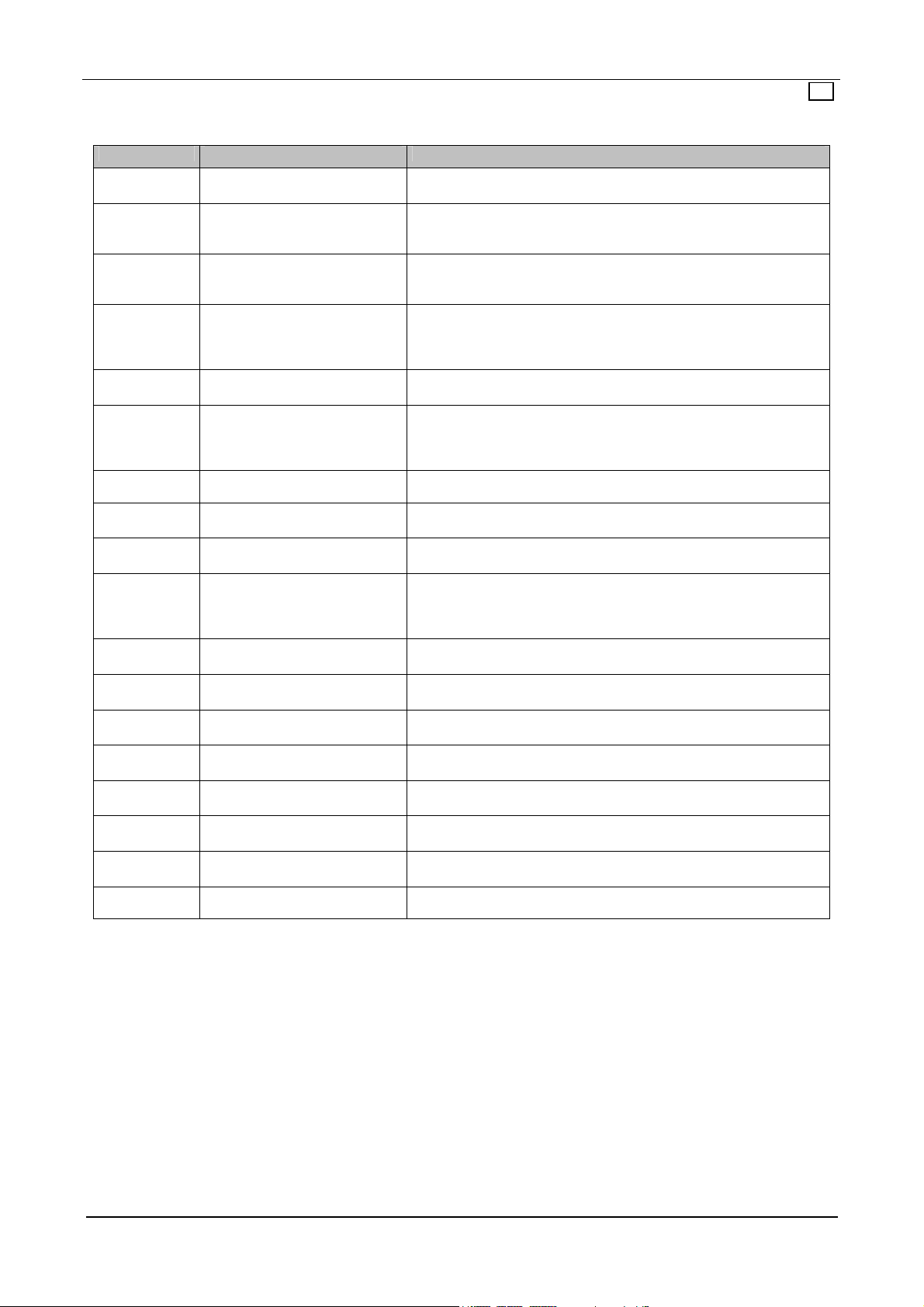
Description of the main menu
To scroll the items of this menu use ‘UP’ and ‘DOWN’ keys.
Visualizzation
Addr DMX addressing
Mode Setting of DMX mode
StdA Stand alone functioning
Dmxo
Hi-p Boost of LED power
Smoo Dimming mode
Fan Fan settings
Temp Projector temperature
Maxt Maximum projector temperature
Unit Unit of measurement
Calr Red calibration
Calg Green calibration
Calb Blue calibration
Calu White calibration
Def Set all the values to default
Vers Software version
Sern Serial number
PASS
Automatic functioning with DMX
Option Description
out
Press ‘ENTER’ to display the current DMX address. Use ‘UP and ‘DOWN’
keys to change value and press ‘ENTER’ to confirm or ‘ESC’ to cancel.
Press ‘ENTER’, the display will show the current DMX mode. Using ‘UP and
‘DOWN’ keys, change the DMX mode and then press ‘ENTER’ to confirm.
To see all possible settings, see the ‘DMX description’.
Press ‘ENTER’ to set the projector in stand alone mode. Press ‘UP’ and
‘DOWN’ to select the fixed colour (c) or the program (p) to play. N.B.
There is no DMX output. Press ‘ESC’ to stop this function.
Press ‘ENTER’ to set the projector in stand alone mode. Press ‘UP’ and
‘DOWN’ to select the fixed colour (c) or the program (p) to play. N.B.
There is DMX output to control other projectors on dmx line. Press ‘ESC’ to
stop this function.
Press ‘ENTER’ to display the current state of ‘Hi-p’ function. If it is ‘off’, the
supply of LEDS is 700 mA, if it is ‘on’ supply of LEDS is 820 mA
Press ‘ENTER’ to display the current dimming mode. Change the value
using the ‘UP or ‘DOWN’ keys then press ‘ENTER’ to confirm. If the value
is ‘off’, the dimming will be quick and nervous. If the value is ‘on’, the
dimming will be smooth.
On this model there is no effect.
Press ‘ENTER’ to display the current projector temperature. Press ‘ESC’ to
exit.
Press ‘ENTER’ to display the maximum projector temperature from the last
time it was turned on. Press ‘ESC’ to exit.
Press ‘ ENTER’ to display the current unit of measurement for the
temperature. The values can be ‘cels’ (Celsius) or ‘fahr’ (Fahrenheit). Press
‘UP’ or ‘DOWN’ to change the value and press ‘ENTER’ to confirm or ‘ESC’
to exit.
Press ‘ENTER’, set the maximum level for Red using ‘UP’ and ‘DOWN’ .
Press ‘ENTER’ to confirm and ‘ESC’ to exit.
Press ‘ENTER’, set the maximum level for Green using ‘UP’ and ‘DOWN’ .
Press ‘ENTER’ to confirm and ‘ESC’ to exit.
Press ‘ENTER’, set the maximum level for Blue using ‘UP’ and ‘DOWN’ .
Press ‘ENTER’ to confirm and ‘ESC’ to exit.
Press ‘ENTER’, set the maximum level for White using ‘UP’ and ‘DOWN’ .
Press ‘ENTER’ to confirm and ‘ESC’ to exit.
Press ‘ENTER’, select ‘reset’ using ‘UP and ‘DOWN’ to reset to default all
values. Press ‘ENTER’ to confirm and ‘ESC’ to exit.
Press ‘ENTER’ to display the firmware version of the projector. Press ‘ESC’
to exit.
Press ‘ENTER’ to display the serial number of the projector. Press ‘ESC’ to
exit.
Page 4
Page 5
SweetPRO FR-12MC4 IP65 LED Outdoor Fluterrampe|Best.Nr. SWPFR12MC4IP
EN
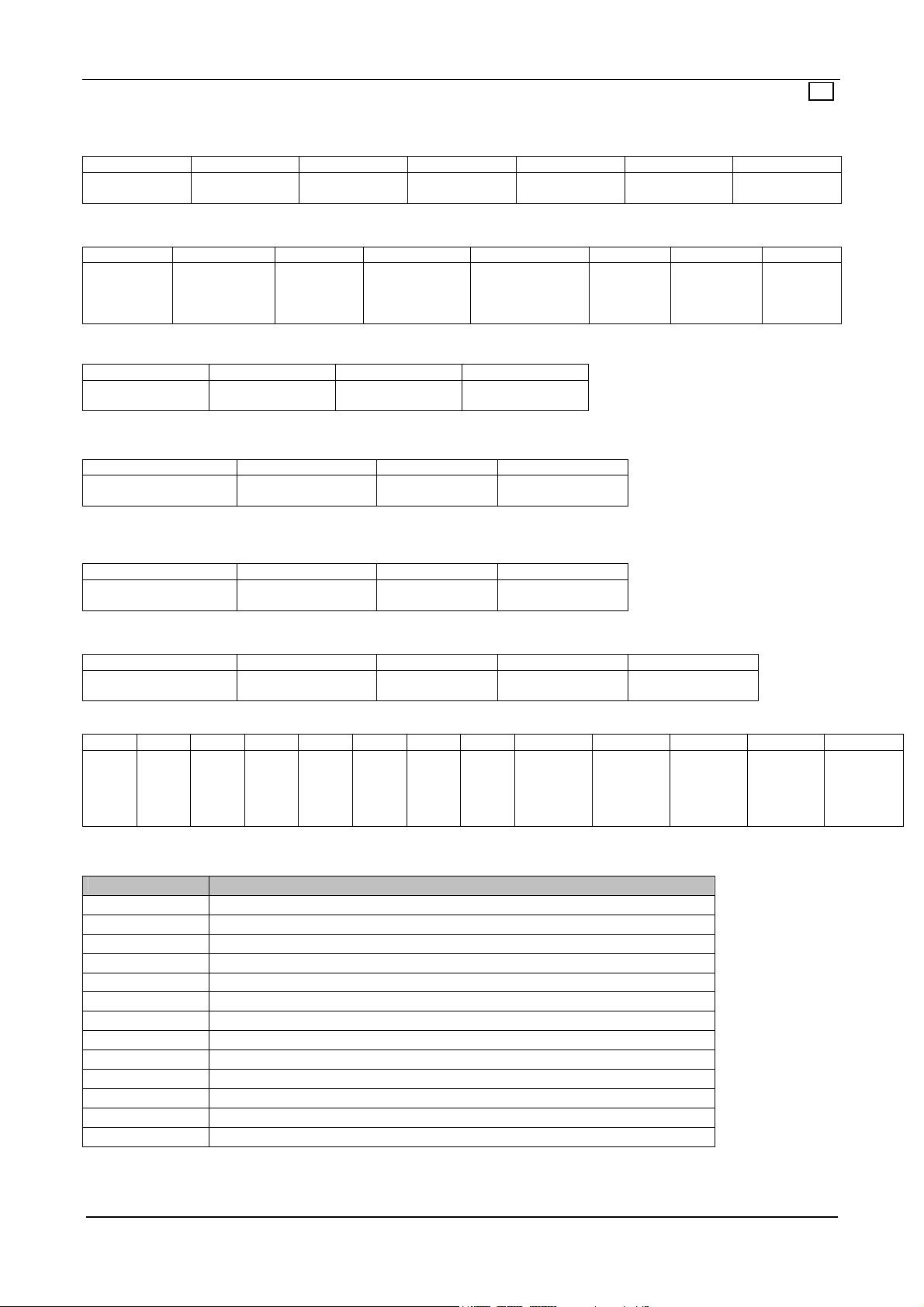
Description of the DMX channels:
mode=RGB7
CH 1 CH 2 CH 3 CH 4 CH 5 CH 6 CH 7
Red Dimmer
0-100%
Green Dimmer
0-100%
Blue Dimmer
0-100%
White Dimmer
0-100%
Strobe effect at
adjustable speed
Rainbow effect at
adjustable speed
Master Dimmer
0-100%
mode=RGB8
CH 1 CH 2 CH 3 CH 4 CH 5 CH 6 CH 7 CH 8
Red Dimmer
0-100%
mode=RGB4
CH 1 CH 2 CH 3 CH 4
Red Dimmer
0-100%
mode =HSV
mode= HSV-
+white from 251 to 255
mode= CMY5
Cyan Dimmer
mode=RGB11 (16 bit)
CH 1 CH 2 CH 3 CH 4 CH 5 CH 6 CH 7 CH8 CH 9 CH 10 CH 11 CH 12 CH 13
Red m
Dimmer
0-
100%
Built-in Preset and Programs
Preset Colour
Preset 1 Red
Preset 2 Orange
Preset 3 Yellow
Preset 4 Light Yellow
Preset 5 Green
Preset 6 Aqua green
Preset 7 Cyan
Preset 8 Azure
Preset 9 Blue
Preset 10 Violet
Preset 11 Magenta
Preset 12 Fucsia
Preset 13 White
Green Dimmer
0-100%
Green Dimmer
CH 1 CH 2 CH 3 CH 4
Hue
CH 1 CH 2 CH 3 CH 4
Hue
CH 1 CH 2 CH 3 CH 4 CH 5
0-100%
Red l
Dimmer
100%
Green
0-
m
Dimmer
0-
100%
Blue Dimmer
0-100%
0-100%
Saturation
Saturation Intensity
Magenta Dimmer
0-100%
Green l
Dimmer
100%
Blue m
Dimmer
0-
0-
100%
White Dimmer
0-100%
Blue Dimmer
0-100%
Master Dimmer
Master Dimmer
Blue l
Dimmer
0-
100%
Intensity
Yellow Dimmer
0-100%
White
Dimmer
100%
m
0-
White l
Dimmer
Strobe effect at
adjustable speed
White Dimmer
0-100%
Strobe effect at
adjustable speed
Strobe effect at
adjustable speed
Black Dimmer
0-100%
Strobe
0-
100%
effect at
adjustable
speed
Rainbow
effect at
adjustable
speed
Rainbow
effect at
adjustable
speed
Strobe effect at
adjustable speed
Dimmer m
Master
Dimmer
0-100%
Master
0-100%
White with
color
temperature
regulation
Master
Dimmer l
0-100%
White with
color
temperature
regulation
Page 5
Page 6
SweetPRO FR-12MC4 IP65 LED Outdoor Fluterrampe|Best.Nr. SWPFR12MC4IP
EN
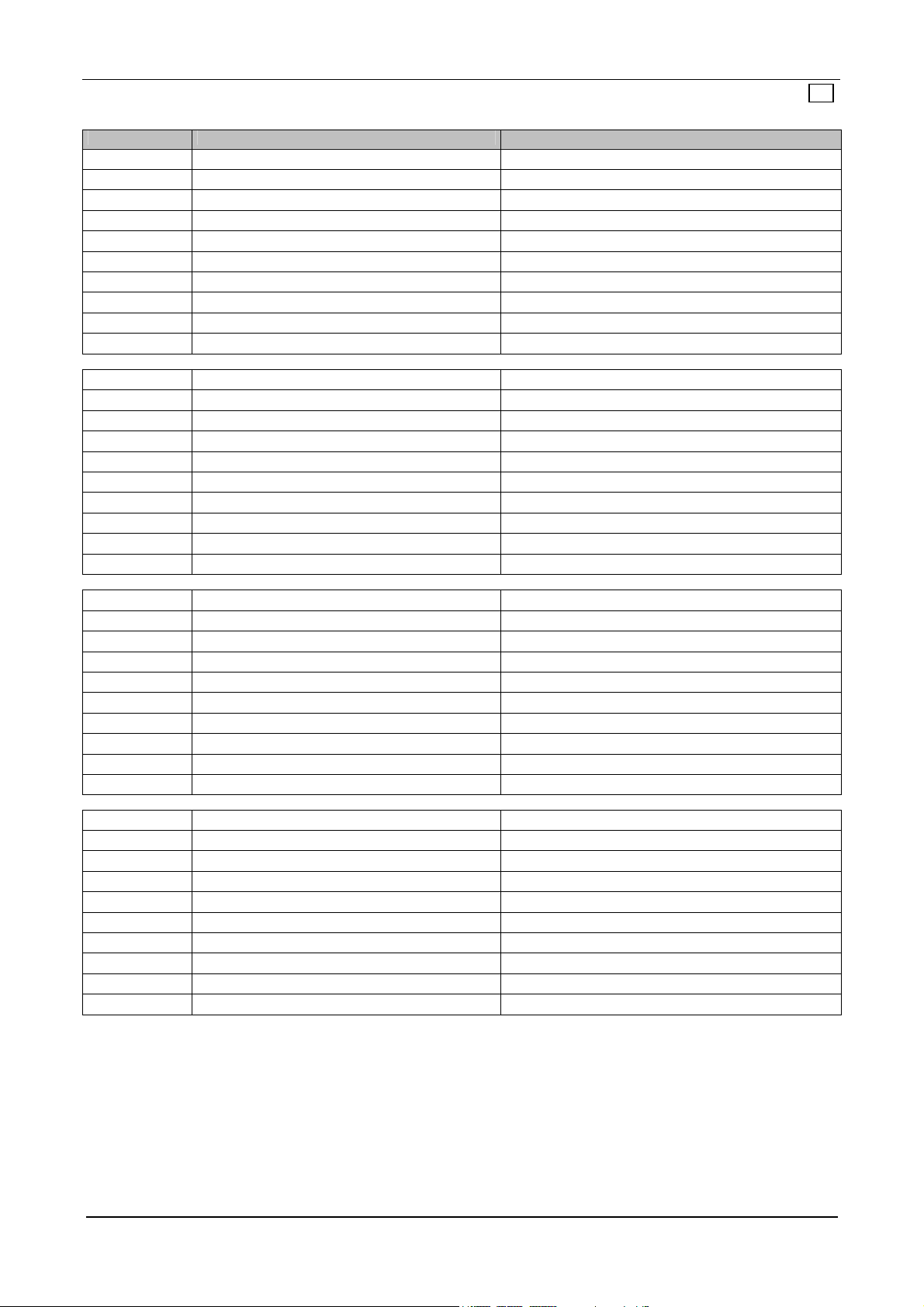
Program Colours Programmed times
Program 1 Red, Magenta, Blue, Cyan, Green, Yellow Pause time: 8 seconds / Fade time: 0,5 seconds
Program 2 Green, Azure, Violet Pause time: 8 seconds / Fade time: 0,5 seconds
Program 3 Red, Yellow, Blue Pause time: 8 seconds / Fade time: 0,5 seconds
Program 4 Blue, Green, Cyan Pause time: 8 seconds / Fade time: 0,5 seconds
Program 5 Orange, Blue, Green Pause time: 8 seconds / Fade time: 0,5 seconds
Program 6 Magenta, Yellow, Cyan Pause time: 8 seconds / Fade time: 0,5 seconds
Program 7 Red, Green, Blue Pause time: 8 seconds / Fade time: 0,5 seconds
Program 8 Blue, Cyan, Orange Pause time: 8 seconds / Fade time: 0,5 seconds
Program 9 Green, Yellow, Red Pause time: 8 seconds / Fade time: 0,5 seconds
Program 10 Red, Magenta, Blue, Cyan, Green, Yellow + Strobe Pause time: 8 seconds / Fade time: 0,5 seconds
Program 11 Red, Magenta, Blue, Cyan, Green, Yellow Pause time: 8 seconds / Fade time: 7 seconds
Program 12 Green, Azure, Violet Pause time: 8 seconds / Fade time: 7 seconds
Program 13 Red, Yellow, Blue Pause time: 8 seconds / Fade time: 7 seconds
Program 14 Blue, Green, Cyan Pause time: 8 seconds / Fade time: 7 seconds
Program 15 Orange, Blue, Green Pause time: 8 seconds / Fade time: 7 seconds
Program 16 Magenta, Yellow, Cyan Pause time: 8 seconds / Fade time: 7 seconds
Program 17 Red, Green, Blue Pause time: 8 seconds / Fade time: 7 seconds
Program 18 Blue, Cyan, Orange Pause time: 8 seconds / Fade time: 7 seconds
Program 19 Green, Yellow, Red Pause time: 8 seconds / Fade time: 7 seconds
Program 20 Red, Magenta, Blue, Cyan, Green, Yellow + Strobe Pause time: 8 seconds / Fade time: 7 seconds
Program 21 Red, Magenta, Blue, Cyan, Green, Yellow Pause time: 24 seconds / Fade time: 0,5 seconds
Program 22 Green, Azure, Violet Pause time: 24 seconds / Fade time: 0,5 seconds
Program 23 Red, Yellow, Blue Pause time: 24 seconds / Fade time: 0,5 seconds
Program 24 Blue, Green, Cyan Pause time: 24 seconds / Fade time: 0,5 seconds
Program 25 Orange, Blue, Green Pause time: 24 seconds / Fade time: 0,5 seconds
Program 26 Magenta, Yellow, Cyan Pause time: 24 seconds / Fade time: 0,5 seconds
Program 27 Red, Green, Blue Pause time: 24 seconds / Fade time: 0,5 seconds
Program 28 Blue, Cyan, Orange Pause time: 24 seconds / Fade time: 0,5 seconds
Program 29 Green, Yellow, Red Pause time: 24 seconds / Fade time: 0,5 seconds
Program 30 Red, Magenta, Blue, Cyan, Green, Yellow + Strobe Pause time: 24 seconds / Fade time: 0,5 seconds
Program 31 Red, Magenta, Blue, Cyan, Green, Yellow Pause time: 24 seconds / Fade time: 23 seconds
Program 32 Green, Azure, Violet Pause time: 24 seconds / Fade time: 23 seconds
Program 33 Red, Yellow, Blue Pause time: 24 seconds / Fade time: 23 seconds
Program 34 Blue, Green, Cyan Pause time: 24 seconds / Fade time: 23 seconds
Program 35 Orange, Blue, Green Pause time: 24 seconds / Fade time: 23 seconds
Program 36 Magenta, Yellow, Cyan Pause time: 24 seconds / Fade time: 23 seconds
Program 37 Red, Green, Blue Pause time: 24 seconds / Fade time: 23 seconds
Program 38 Blue, Cyan, Orange Pause time: 24 seconds / Fade time: 23 seconds
Program 39 Green, Yellow, Red Pause time: 24 seconds / Fade time: 23 seconds
Program 40 Red, Magenta, Blue, Cyan, Green, Yellow + Strobe Pause time: 24 seconds / Fade time: 23 seconds
Page 6
Page 7
SweetPRO FR-12MC4 IP65 LED Outdoor Fluterrampe|Best.Nr. SWPFR12MC4IP
Huss Licht & Ton GmbH & Co. KG | www.huss-licht-ton.de | [email protected]
Page 7
 Loading...