

Page 1
INSTRUCTION MANUAL
Model #:
CV300 - 4CH
www.svat.com
SVAT ELECTRONICS
now you can see
Version 1.0
COMPLETE SYSTEM
www.svat.com
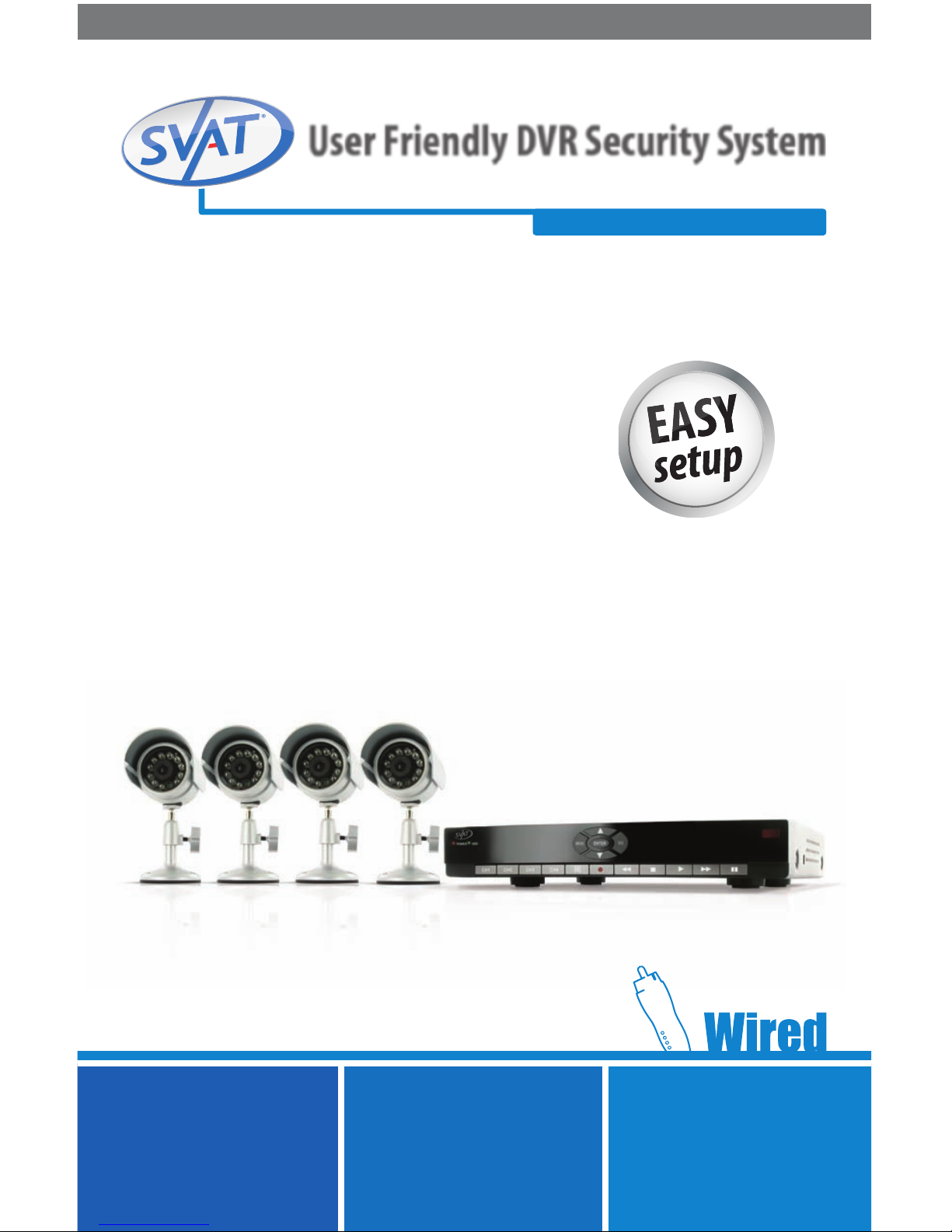
User Friendly DVR Security System
w/ 4 Indoor/Outdoor Night Vision Surveillance Cameras
Page 2
CV300 - 4CH 2
NEED
HELP?
DO NOT RETURN THIS
PRODUCT TO THE STORE
Please contact a SVAT customer support representative rst regarding any additional information on
product features, specications or assistance with set-up.
Please contact us via one of the methods below:
Toll free telephone:
1.866.946.7828
For more product information visit www.svat.com
Email:
Online live web chat:
Visit www.svat.com
Toll free fax:
1.888.771.1701
Note: This is manual version 1.1 for this product, you may nd updated versions by visiting our website.
IMPORTANT! PLEASE READ!
Page 3
TO REDUCE THE RISK OF ELECTRIC SHOCK, DO NOT REMOVE THE COVER (BACK).
NO USER SERVICEABLE PARTS INSIDE. REFER SERVICING TO QUALIFIED SERVICE PERSONNEL.
CAUTION
RISK OF ELECTRIC SHOCK, DO NOT OPEN MONITOR
CV300 - 4CH www.svat.com
PRODUCT WARRANTY INFORMATION
Please visit our website at www.svat.com
for information about your product’s warranty.
We take quality very seriously. This is why all of our products come with a one year warranty from the original purchase date
against defects in workmanship and materials. If you have warranty or support issues please contact us using any of the following
methods:
Phone: 1.866.946.7828 SVAT CANADA
Fax: 1.888.771.1701 4080 Montrose Road
Email: [email protected] Niagara Falls, ON
Website: www.svat.com Canada L2H 1J9
Warranty Terms
1. SVAT products are guaranteed for a period of one year from the date of purchase against defects in workmanship
and materials. This warranty is limited to the repair, replacement or refund of the purchase price at SVAT’s option.
2. This warranty becomes void if the product shows evidence of having been misused, mishandled or tampered with contrary
to the applicable instruction manual.
3. Routine cleaning, normal cosmetic and mechanical wear and tear are not covered under the terms of this warranty.
4. The warranty expressly provided for herein is the sole warranty provided in connection with the product itself and no other
warranty, expressed or implied is provided. SVAT assumes no responsibilities for any other claims not specically
mentioned in this warranty.
5. This warranty does not cover shipping costs, insurance, or any other incidental charges.
6. You MUST call SVAT before sending any product back for repair. You will be sent a Return Authorization form with return
instructions. When returning the product for warranty service, please pack it carefully in the original box with all supplied
accessories, and enclose your original receipt or copy, and a brief explanation of the problem (include RA #).
7. This warranty is valid only in Canada and the continental U.S.
8. This warranty cannot be re-issued.
SVAT USA
60 Industrial Parkway
Cheektowaga, NY
USA 14227
IMPORTANT! PLEASE READ!
Page 4

SVAT ELECTRONICS
now you can see
CV300 - 4CH
1
TABLE OF CONTENTS
INTRODUCTION ................................................................................................................................. 3
WHAT IS INCLUDED ............................................................................................................................ 3
FEATURES ......................................................................................................................................... 4
OPTIONAL ACCESSORIES ..................................................................................................................... 5
BUTTONS AND CONNECTIONS ............................................................................................................. 5
BASIC SETUP .................................................................................................................................... 7
THINGS TO CONSIDER BEFORE INSTALLATION ........................................................................................... 7
MOUNTING AND WIRING THE CAMERAS .................................................................................................. 7
CONNECTING ADDITIONAL DEVICES .........................................................................................................8
Monitor or Television ................................................................................................................... 8
Microphone ................................................................................................................................. 9
Computer......................................................................................................................................9
POWERING ON THE DVR ...........................................................................................................................9
Shutting Down .......................................................................................................................... 10
MAIN MENU .................................................................................................................................... 10
CAMERA SETUP .....................................................................................................................................11
Turning Cameras On and O .....................................................................................................11
RECORD SETUP ..................................................................................................................................... 12
Setting cameras to Record/Not Record ...................................................................................... 12
RECORD FRAMERATE .............................................................................................................................. 12
To Change the Frames Per Second ............................................................................................. 13
VIDEO QUALITY ....................................................................................................................................... 13
Adjusting Video Quality ............................................................................................................. 14
RECORD SCHEDULE .................................................................................................................................14
To Set the Schedule ..................................................................................................................14
SENSOR RECORD TIME ............................................................................................................................ 15
To Set the Sensor Record Time ..................................................................................................15
To Set the Alarm on Time ......................................................................................................... 15
To Set the Motion Detector Setup ............................................................................................15
Turning on and o Motion Detection .......................................................................................16
Setting the Level of Sensitivity ................................................................................................ 16
Setting the Motion Sensitive Area ............................................................................................ 16
HARD DRIVE SETUP ................................................................................................................................ 17
To Enable Overwrite .................................................................................................................. 18
To Format HDD ........................................................................................................................18
MISCELLANEOUS SETUP ........................................................................................................................18
To Change the Password .......................................................................................................... 19
To Set Time ............................................................................................................................... 19
Hidden Channel Setup ............................................................................................................ 19
Image Parameters ................................................................................................................... 19
Password Enable ..................................................................................................................... 20
Keypad Tones .......................................................................................................................... 20
Sequence Dwell Time .............................................................................................................. 20
Sequencing Instructions ......................................................................................................... 20
NETWORK SETUP ... ............................................................................................................................ 21
Terms ................................................................................................................................................21
Page 5

SVAT ELECTRONICS
now you can see
CV300 - 4CH
2
TABLE OF CONTENTS
LANGUAGE 21
RESET MENU ........................................................................................................................................... 21
RECORDING MENU 22
RECORDING INSTRUCTIONS .................................................................................................................. 22
Indications ............................................................................................................................... 22
To View Recorded Video through Monitor ................................................................................ 22
View Recording List ................................................................................................................. 23
Time Search ............................................................................................................................ 23
Event List ................................................................................................................................. 23
To Select a Particular Event ...................................................................................................... 23
SOFTWARE GUIDE 24
VIEWER SOFTWARE ................................................................................................................... ..........25
Video/Sound Controls ......................................................................................................................... 26
Side Panel Control Buttons .................................................................................................................. 28
NETWORK SETUP 31
SETTING UP THE DVR ONLINE ............................................................................................................... 31
CONNECTING DVR TO ROUTER .............................................................................................................. 32
FINDING YOUR DVR’s IP ADDRESS ......................................................................................................... 32
PREPARING YOUR COMPUTER FOR VIEWING DVR ................................................................................. 33
Method 1 ................................................................................................................................. 33
Method 2 ................................................................................................................................. 34
VIEWING YOUR DVR ON YOUR COMPUTER ............................................................................................ 34
Logging into DVR ..................................................................................................................... 35
Installing ActiveX Controls ....................................................................................................... 35
VIEWING DVR OUTSIDE OF YOUR NETWORK ......................................................................................... 35
Port Forwarding ....................................................................................................................... 36
Finding External IP Address ..................................................................................................... 36
If You Cannot Connect .............................................................................................................. 37
ONLINE SOFTWARE 38 .........................................................................................................................
BOTTOM BUTTONS AND FUNCTIONS .............................................................................................................................. 38
SIDE PANEL CONTROL BUTTONS ................................................................................................................ 41
CONFIGURING DVR TO WORK WITH DDNS .. .......................................................................................... 44
DDNS..... .............................................................................................................................................. 44
Provider Information ............................................................................................................... 45
Account Setup.......................................................................................................................... 45
DVR TROUBLESHOOTING ................................................................................................................... 47
DVR SPECIFICATIONS 50
CAMERA MANUAL............. ................................................................................................................ 53
WHAT IS INCLUDED .............................................................................................................................. 53
FEATURES ............................................................................................................................................ 53
CAMERA INSTALLATION ....................................................................................................................... 54
CAMERA TROUBLESHOOTING ............................................................................................................... 55
CAMERA SPECIFICATIONS ..................................................................................................................... 55
Page 6
SVAT ELECTRONICS
now you can see
CV300 - 4CH
3
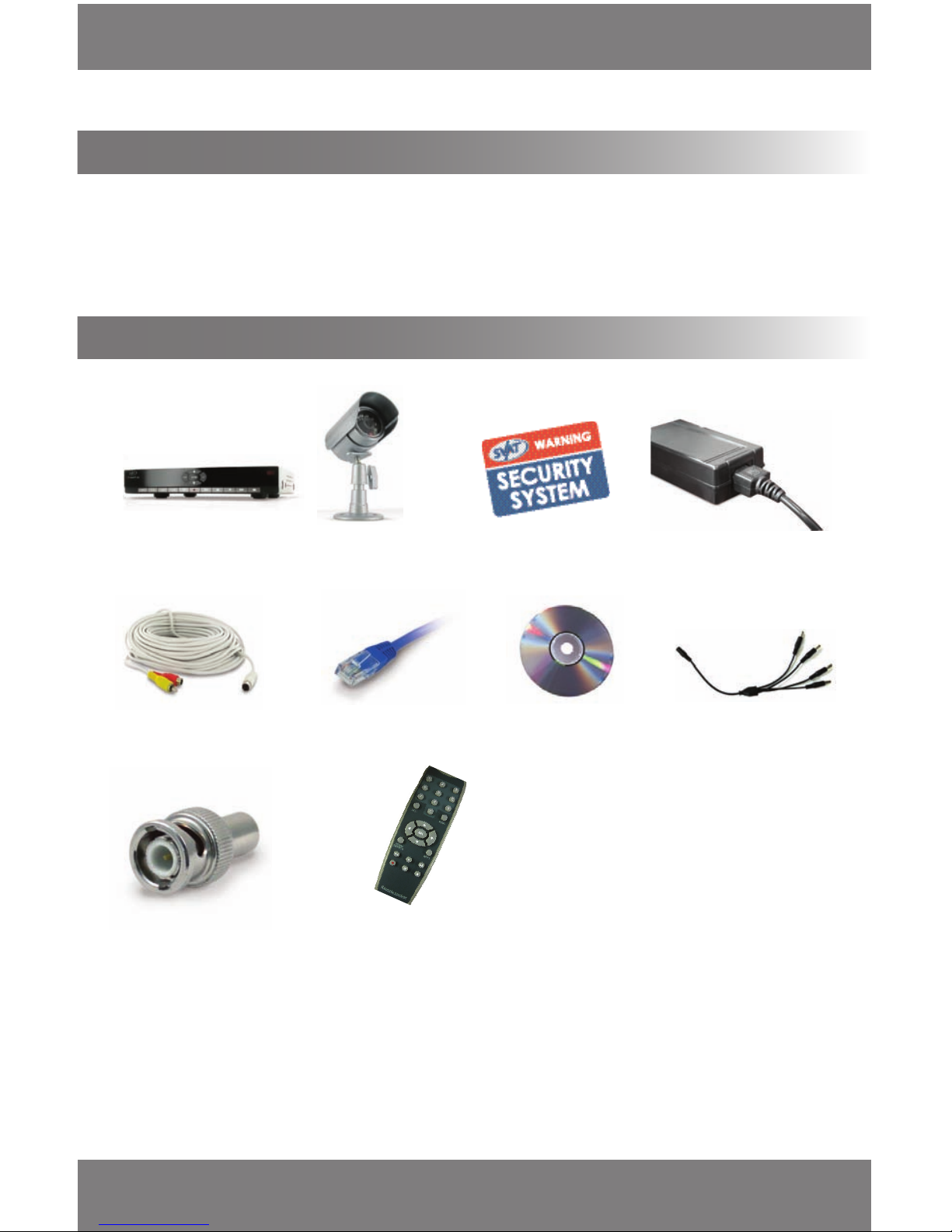
• 4 Camera Mounts
• Camera Mounting Hardware
• Software CD (For viewing DVR through USB connection)
• Quick Start Guide
• Instruction Manual
• RCA to RCA (Male) Cable
1 DVR (500GB Hard
Drive Installed)
4 Outdoor Night Vision
Cameras
2 Window Warning Stickers
1 x DC12V Power Adapter
for DVR
4 x 60ft 4 PIN DIN to RCA
(male) Power Cables
10ft RJ-45 Cable
Software CD 1 x 4 port power supply
for Cameras
5 RCA to BNC Connectors
IR Remote Control
Congratulations on your purchase of the CV300-4CH and taking the next step in keeping your home or business safe
and secure. Using this DVR you will be able to monitor and record the actions in your home or business from monitor
as well as online. Correct installation and use of this system will greatly increase the security of your home or business.
Please read through this manual carefully and follow the instructions to get the most out of your CV300-4CH.
• 1 Power Adapter for Cameras
• 1 USB cord (to connect the DVR to
a computer)
• 1 Year Warranty
• 24/7Lifetime Live Customer Support
INTRODUCTION
WHAT IS INCLUDED
INTRODUCTION
Page 7

SVAT ELECTRONICS
now you can see
CV300 - 4CH
4
FEATURES
Fast & Hassle-Free Setup
SVAT's stylish DVR is incredibly easy to set up and use. It is plug-and-play so you can do everything yourself within
minutes.
Record Over 2 Years of Video Footage
1
The 500GB hard drive can hold over 2 years of continuous video and is optimized for 24/7 surveillance. We only use
hard drives that are specically designed for high capacity writing, which ensures long product life and accurate video
data storage. Your DVR will alert you when your memory space is full so that you can overwrite your old video, stop
the unit from recording, or backup and transfer your video footage.
View Video Online with No Service Fees2 (Supports DDNS)
View live or recorded footage from any computer with Internet Explorer − anywhere in the world. The unique design
of the DVR operating system also means you don't have to pay for any additional services.
Back-Up Data to Your Computer
Transfer recorded footage directly to your PC computer using the included USB cable. View and archive video
eortlessly with the included software.
4 Weatherproof Cameras with Night Vision
The included cameras are built for the outdoors with professional grade weatherproof housing3 and sunshades. They
have multiple infrared (IR) LEDs that allow you to see in the dark, up to 15 feet away!4 They activate automatically
when it gets dark and deactivate during the day to save energy (CDS sensor).
Advanced Motion Activated Recording
You can set the DVR to record only when motion is detected and alert you with an audible alarm. You can even set
individual cameras to detect motion, and only video from those cameras will be recorded. Motion Mask allows you to
block areas with constant motion, ensuring that only suspicious activity is recorded.
Multi-Level Password Protection
Ensure that only authorized users at dierent levels of allowance can change DVR settings or halt recording.
24 hour Scheduled Recording
You can fully customize a daily recording schedule. You can choose which hours of the day you want to continuously
record, motion record, or not record at all. Each camera can be scheduled with dierent settings.
Worry Free Recording
After power is interrupted, the DVR will continue recording automatically based on your recording schedule. It will
also ensure that your DVR conguration and custom settings are stored.
Customize Your Camera Display
You can easily view all cameras simultaneously in quad screen mode, or individually in full screen mode.
Search by Date, Time, or Event
Finding your recorded footage is easy. Simply choose the desired date and time range, and the requested video
clips will appear. Clips are also labeled by event, which makes it easy to nd footage that was captured by motion
detection.
Page 8
SVAT ELECTRONICS
now you can see
CV300 - 4CH
5
FEATURES cont...
24/7 Lifetime Live Customer Support
Assistance is available whenever you need it. Simply visit www.svat.com for illustrated networking guides, simple tips
on how to protect your property, and instructional videos on topics such as camera placement. Our customer support
team can be reached by phone 24/7, or by e-mail and live web chat services so that you will always have access to
an expert.
1. 2 years of recording is based on a lowest amount of FPS and quality
2. There must connected to an internet in order for no additional fees to incur
3. Not for use in direct exposure to water, rain or snow.
4. IR illumination range up to 15ft (4.5M) under ideal conditions. Objects at or beyond this range may be partially or completely obscured,
depending on the camera application.
For more information please visit: www.svat.com
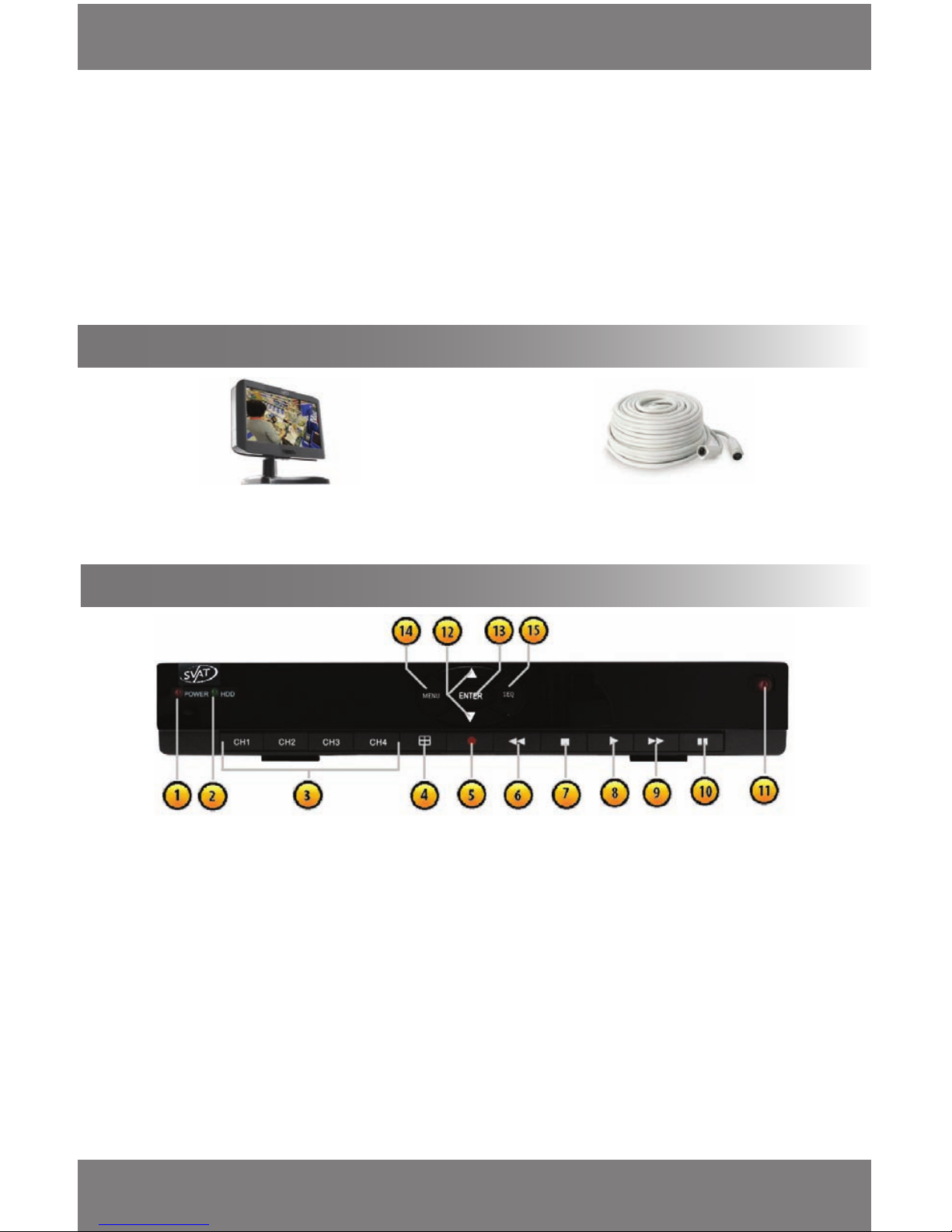
• CLEARVU7 (LCD Monitor)
• CVW62 (60 ft. Camera Extension Cable)
OPTIONAL ACCESSORIES
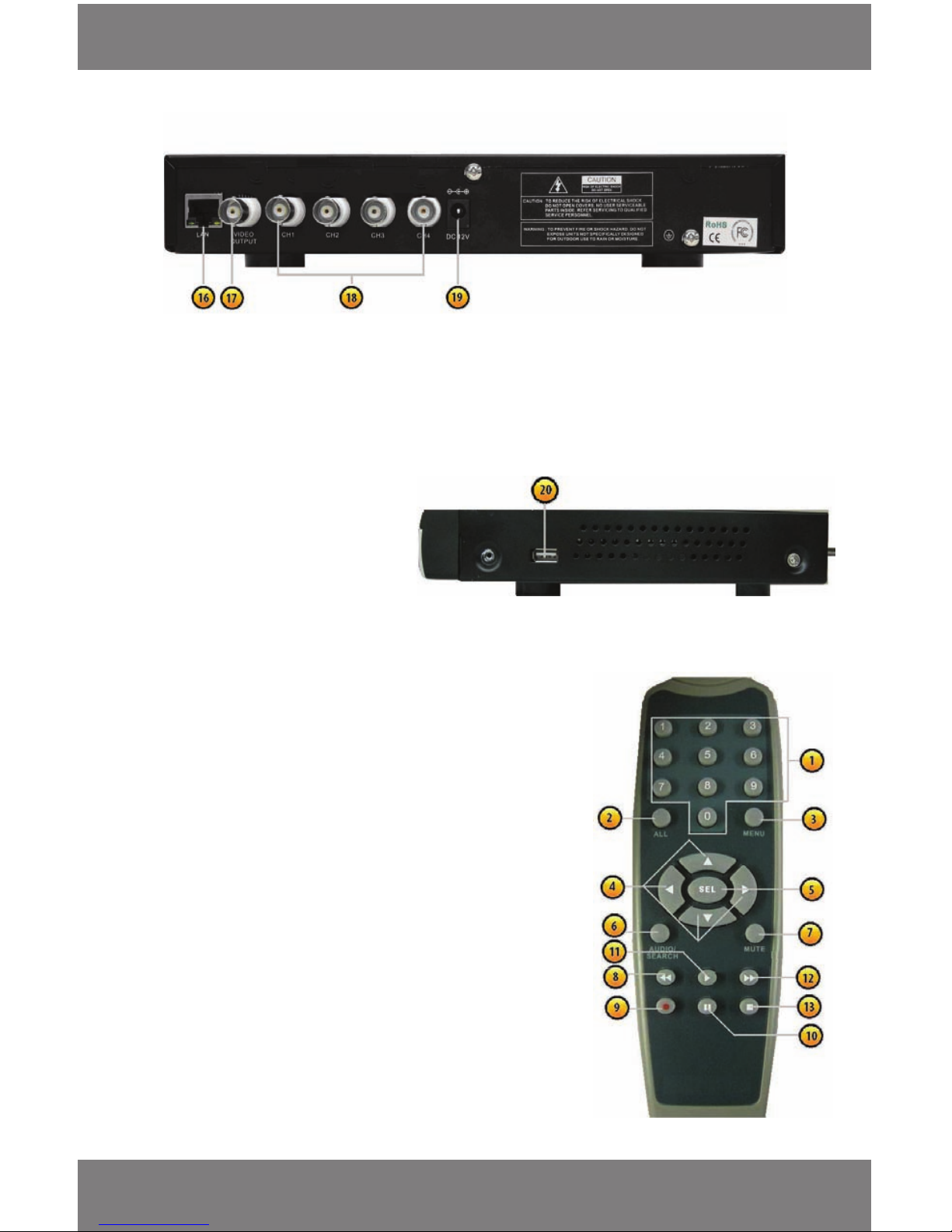
BUTTONS AND CONNECTIONS
FRONT PANEL
1. Power Indicator Light
2. HDD Activity Indicator Light
3. CH1-CH4 (Channel Selection Buttons) Select
to display individual cameras in live display
and playback
4. Quad Screen Button – Select to view all four
cameras at once
5. Record Button – Begins recording based on the
the 24 hour schedule
6. Reverse Button – Rewinds playback footage
and allows you to navigate to the left
7. Stop Button - Stops playback footage, and
stops Recording footage
8. Play Button – Calls up the playback menu
9. Fast Forward Button – Fast forwards through
playback footage and allows you to navigate the
menu to the right
10. Pause Button – Pauses playback footage
11. IR Sensor – Aim the IR remote control at the IR
sensor for best results
12. Directional Buttons – Allows you to navigate
up and down through the menu
13. Enter Button – Conrm changes and allows
you to select options
14. Menu – Allows you to access and exit the
main menu
15. Sequence - Starts full screen sequence of cameras
Page 9
SVAT ELECTRONICS
now you can see
CV300 - 4CH
6
BUTTON AND CONNECTIONS cont...
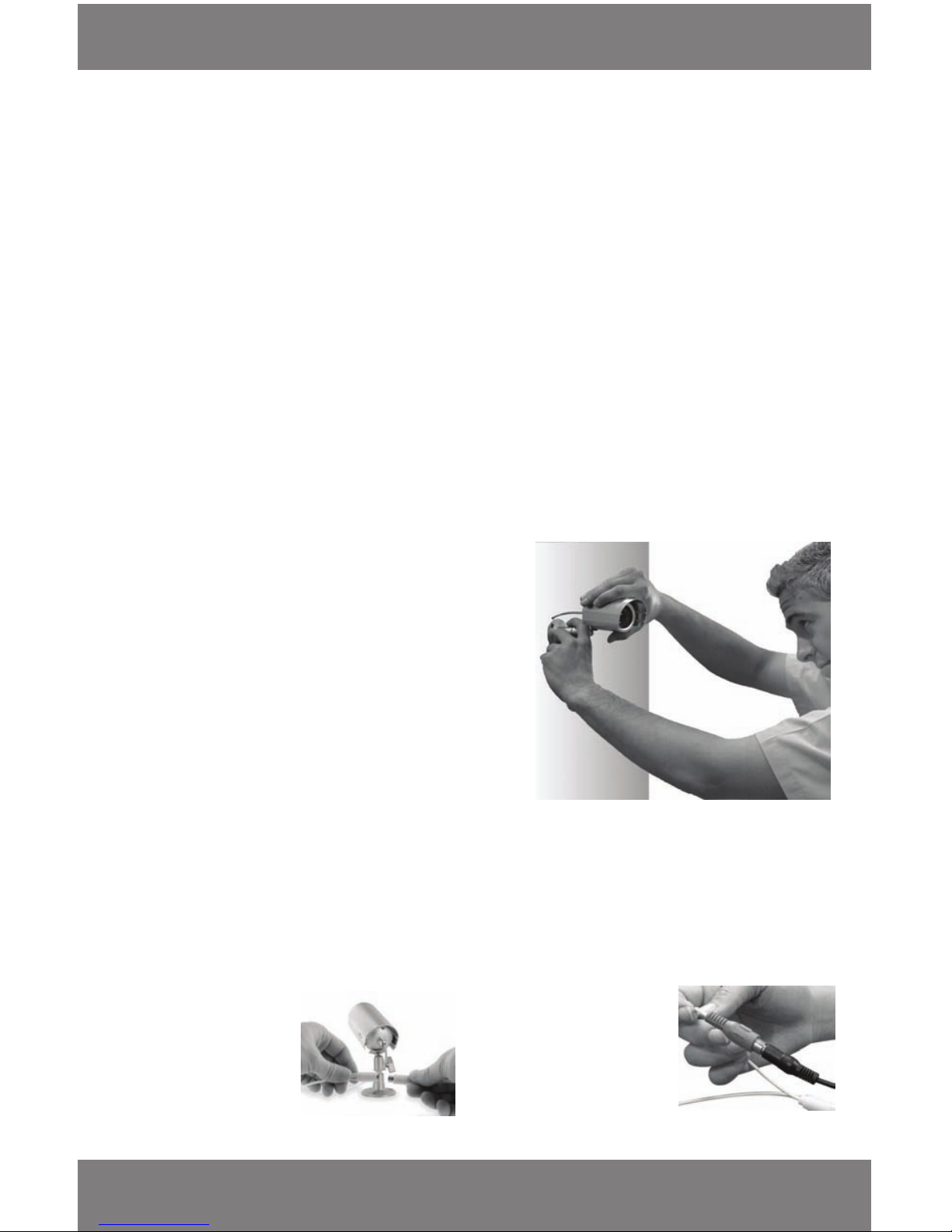
SIDE
20. USB Port - Used to connect DVR to
computer, using the included cable,
to back up or access HDD footage (not
compatible with USB ash drives)
16. Ethernet Port (LAN) – Connects the DVR to a router for network and internet viewing
17. Video Output – Connects DVR to a monitor or TV (not included)
18. CH1- CH4 (Video inputs) – Connect your cameras using the included BNC connectors
19. Power Input (DC12V)
BACK PANEL
REMOTE CONTROL
1. Numerical Keypad –Used to enter numeric passwords (when
prompted), Buttons 1-4 will display the corresponding camera on
full screen
2. All –Switch to quad viewing mode
3. Menu Button – Access the main menu and exits the current menu
4. Directional Buttons – Allow you to navigate through the menu
5. Select/Enter – Allows you to select options
6. Audio/Search – This DVR does not support audio, therefore this
button will not function
7. Mute – This DVR does not support audio, therefore this
button will not function
8. Reverse Button – Rewinds footage
9. Record Button - Begins recording based on the the 24
hour schedule
10. Pause Button - Pauses playback footage and starts/stops
Sequence mode
11. Play Button - Calls up the playback menu
12. Fast Forward Button – ast forwards through playback footage
and allows you to navigate the menu to the right
13. Stop Playback Button - Stops recording and/or playback footage
Page 10
SVAT ELECTRONICS
now you can see
CV300 - 4CH
7
BASIC SETUP
THINGS TO CONSIDER BEFORE INSTALLATION
• The camera should be installed 8 to 13ft above the area to be monitored
• Ensure there are no obstructions in the camera’s view to maximize viewing area
• Ensure that the adjustable sunshade is positioned to avoid glare and position camera away from direct
sunlight or indoor lighting
• Decide whether the camera will be wall-mounted, ceiling mounted or sit on a desk/table top. If wall or ceiling
mounting, use the mounting hardware in the package. We recommend that the mounting bracket is secured
using the included screws for all installations
• This camera comes with 60ft of video/power wire. Please make sure that you mount the cameras no more
than 60ft from the TV/monitor/VCR/DVR. If longer wiring distance is required, 60ft extensions can be
purchased (CVW62)
• We recommend using a surge protected power bar or UPS to protect the camera’s internal circuitry
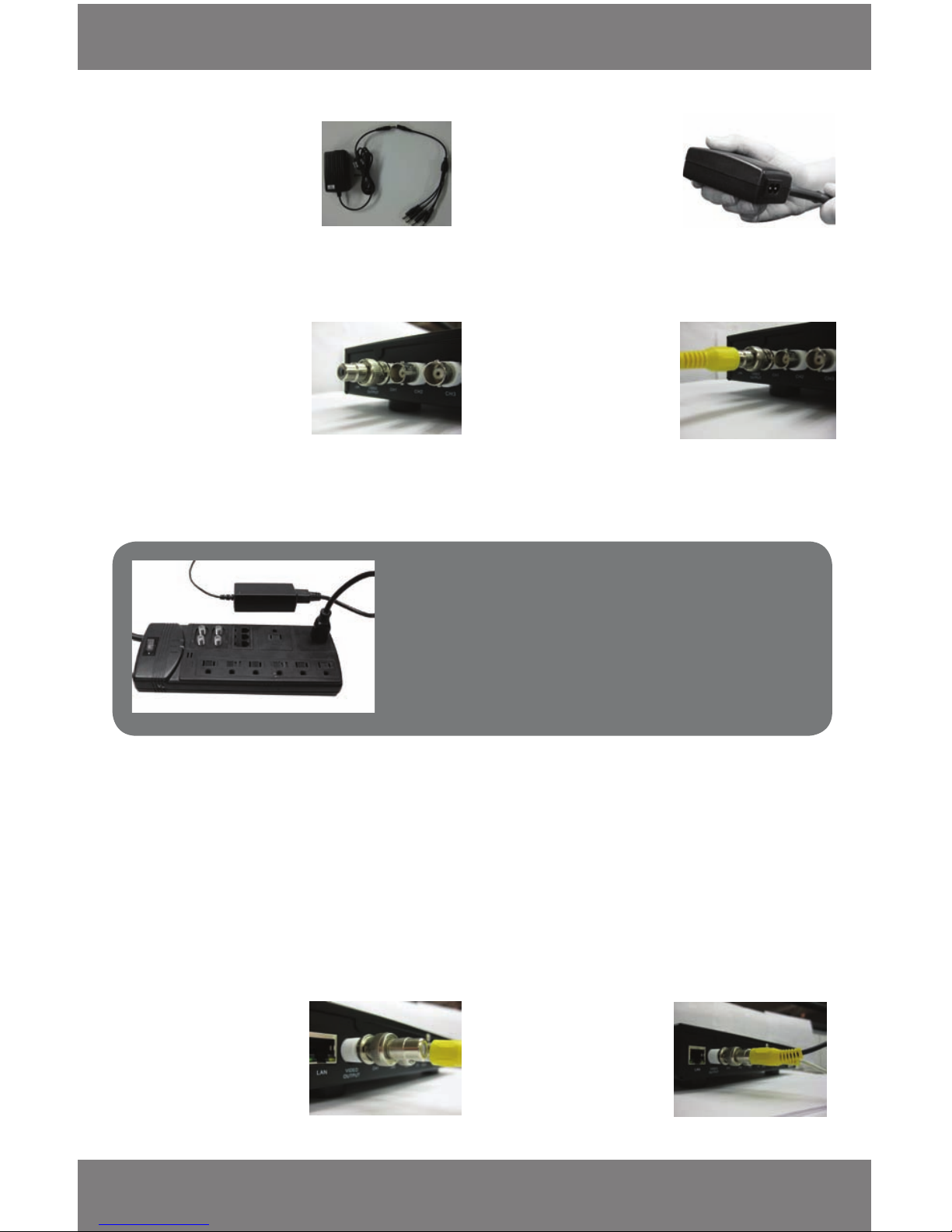
MOUNTING THE CAMERAS
1. Choose the mounting location for your camera. The
camera can be adjusted for each scenario by rotating
the camera and changing the angle of the mount
to the required viewing position.
2. Screw the mounting bracket into the camera’s
mounting hole, turning it clockwise.
3. Mount the camera in the desired location no more
than 60ft from the DVR unless you have purchased
camera extension cables.
4. Adjust cameras to the desired viewing angles.
5. Tighten the thumb screw until tightly secure.
1. Plug the 4PIN DIN
female connection on
the camera into the
4PIN DIN male
connection on the 60ft
video/power wire.
2. Plug the included 4
port power supply
cable into the red
power jack located on
the 60ft video/
power wire.
Follow these instructions for the installation of each camera. (The 60ft video/power wire has two connections: one for
video out, and one for power.)
WIRING THE CAMERAS
Follow these instructions for the installation of each camera. The 60ft video/power wire has three connections: one
for video out (yellow RCA), one for power (red power jack), and one to connect to the camera (4PIN DIN). All three of
these connections need to be connected properly for the cameras to function.
Page 11
SVAT ELECTRONICS
now you can see
CV300 - 4CH
8
NOTE: We recommend using a surge protected power bar and/or
Uninterrupted Power Supply (UPS) backup to prevent damage
to your cameras DVR system.
BASIC SETUP
3. Plug the end of the 4 to
1 power supply cable
into the included power
adapter for the cameras.
4. Plug the camera’s
power adapter into an
AC outlet or surge
protector.
5. Attach the BNC to RCA
connector to the
camera video inputs on
the back of the DVR.
6. Connect the male RCA
plug (yellow) from the
60ft power to the BNC
to RCA connector in
one of the camera
video inputs.
7. Repeat the above steps for all of the
included cameras.
This DVR has multiple connections which allow you to integrate additional devices to the system. Please note that
there are many makes and models of devices that are compatible with the CV300-4CH and the instructions below may
not be applicable to your device. Always refer to the device instruction manual for proper setup and operation.
CONNECTING ADDITIONAL DEVICES TO THE DVR
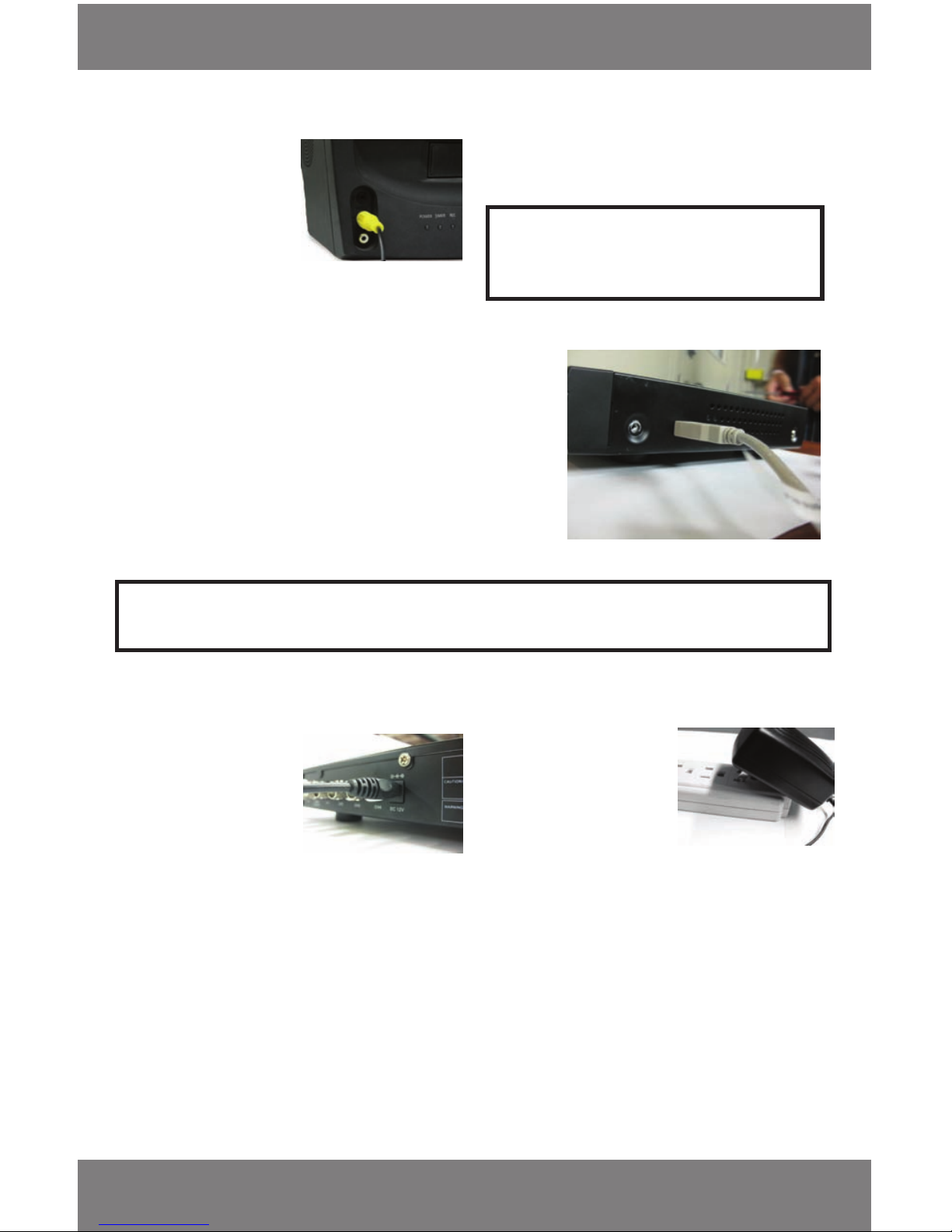
2. Plug the RCA cable into
the BNC connector.
CONNECTING A MONITOR OR TELEVISION TO THE DVR (RCA Composite)
A monitor is required for initial set up and for viewing the DVR footage, without a computer
1. Connect a BNC to RCA
connector to the video
output connection on
the back of the DVR.
Page 12
SVAT ELECTRONICS
now you can see
CV300 - 4CH
9
BASIC SETUP
3. Attach the other end
of the RCA cable to a
yellow RCA video
input on your monitor
or television.
4. Switch the TV/Monitor source to view the DVR.
CONNECTING DVR TO A COMPUTER
Using the included software you can have complete control over the
DVR’s hard drive for easy viewing and backup! Install the software
included on the CD before connecting the DVR to the computer.
1. Attach the USB cord to the USB port on the side of the DVR.
2. Attach the other end of the USB cable to a USB port on
your computer.
Note: You must install the software CD to be able to view any footage on your computer and you cannot access
the menu while the USB is connected to a computer
POWERING ON THE DVR
1. Insert the DVR power
supply into the DC12V
connection on the
back of the DVR.
2. Plug the power supply
cord into a power
adapter, then into
a power outlet. We
recommend using
a surge protected
power bar and/or
uninterrupted power
supply (UPS) to prevent
damage to your
DVR system.
3. If the DVR is properly connected to a monitor, you
will see the startup screen that detects and checks
the status of the hard drives. It will take a few
moments to load the settings and view
the cameras.
4. The DVR will begin normal operation and show
the default display of 4 channels. The DVR will
begin recording automatically and resume
recording according to the dened schedule.
Note: You only have access to the main menu when
viewing DVR through a monitor connected
by the video cable
Page 13
SVAT ELECTRONICS
now you can see
CV300 - 4CH
10
SHUTTING DOWN (Stops Recording)
To shut the DVR o you must disconnect it from its power source, either by unplugging it from the power outlet or
removing the power supply from the back of the DVR. The DVR requires power to operate, if it is not connected to a
power source it will not record.
MULTI SCREENS
The CV300-4CH allows you to look at each camera individually as well as look at all four at the same time (Quad View)
• To view one camera at a time:
1. Select cameras 1-4 by pushing the CH1-CH4 on the front of the DVR by pressing the numerical buttons on the
remote control.
2. To switch back to quad viewing, press the Quad button the front panel or press the ALL button on the remote.
MAIN MENU
Note: This manual was written with the remote being the main tool for navigation.
To move the cursor to each selection use the up and down arrow buttons on the remote or the up and down
arrows on the front of the DVR. To move them left and right, use the arrows on the remote or the rewind and fast
forward buttons on the DVR.
The Main Menu has 11 Options:
• Camera Setup
• Record Setup
• Record Framerate
• Video Quality
• Record Schedule
• Sensor Setup
• Hard Drive Setup
• Miscellaneous Setup
• Network Setup
• Language
• Reset Menu
Make sure your DVR is properly connected using the instructions provided
BASIC SETUP
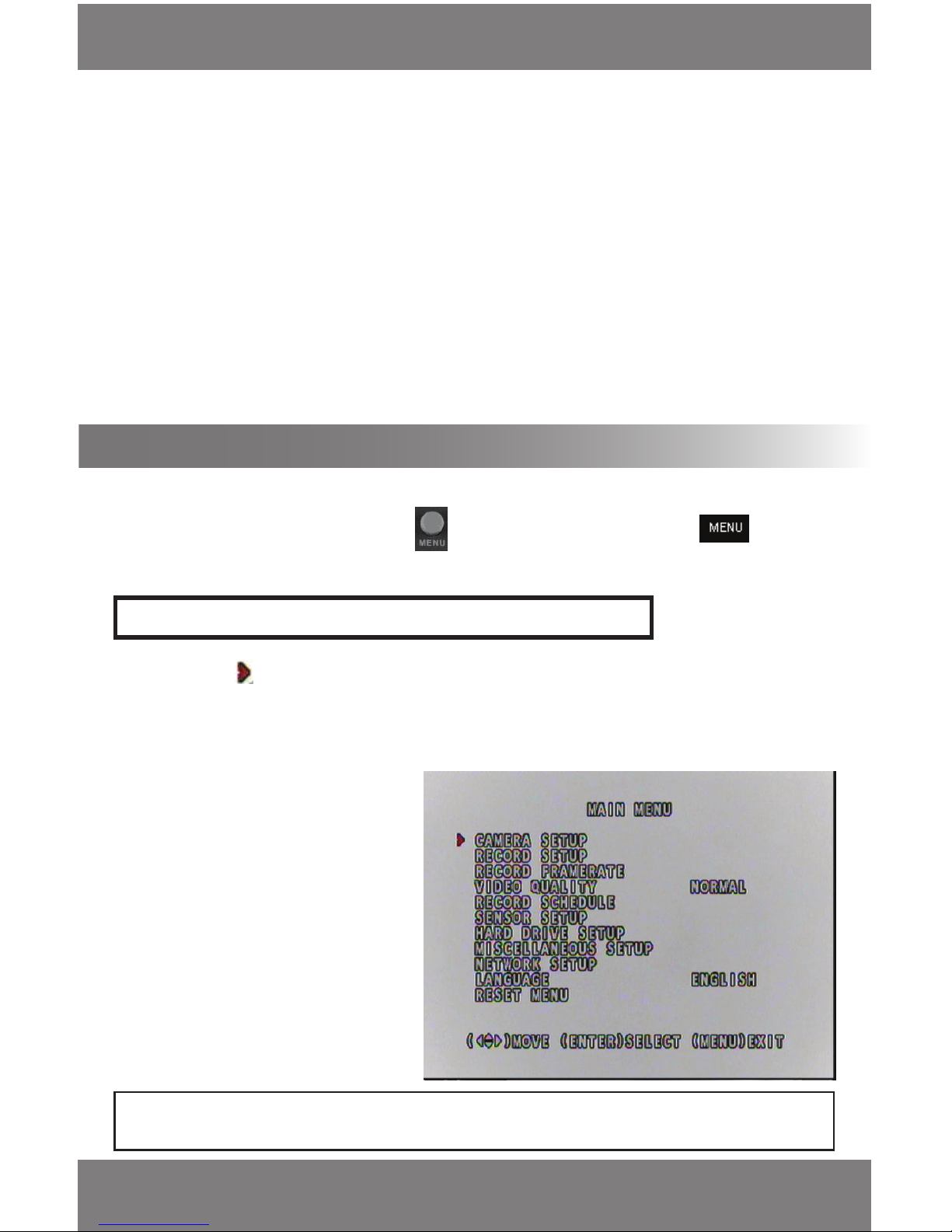
To access the main menu press the Menu button on the remote control provided. Or the menu
button on the front of the DVR.
Note: Enter and select are interchangable terms therefore, Enter (on the front of the DVR) and SEL (on
the remote) have the same function.
Page 14
SVAT ELECTRONICS
now you can see
CV300 - 4CH
11
Camera Setup
This option allows you to turn cameras on and o. If a Camera is o, it will not be displayed on the screen and
will not be able to be set to record. If it is on then it will record according to the Record Schedule.
MAIN MENU cont....
To Turn Cameras On and O:
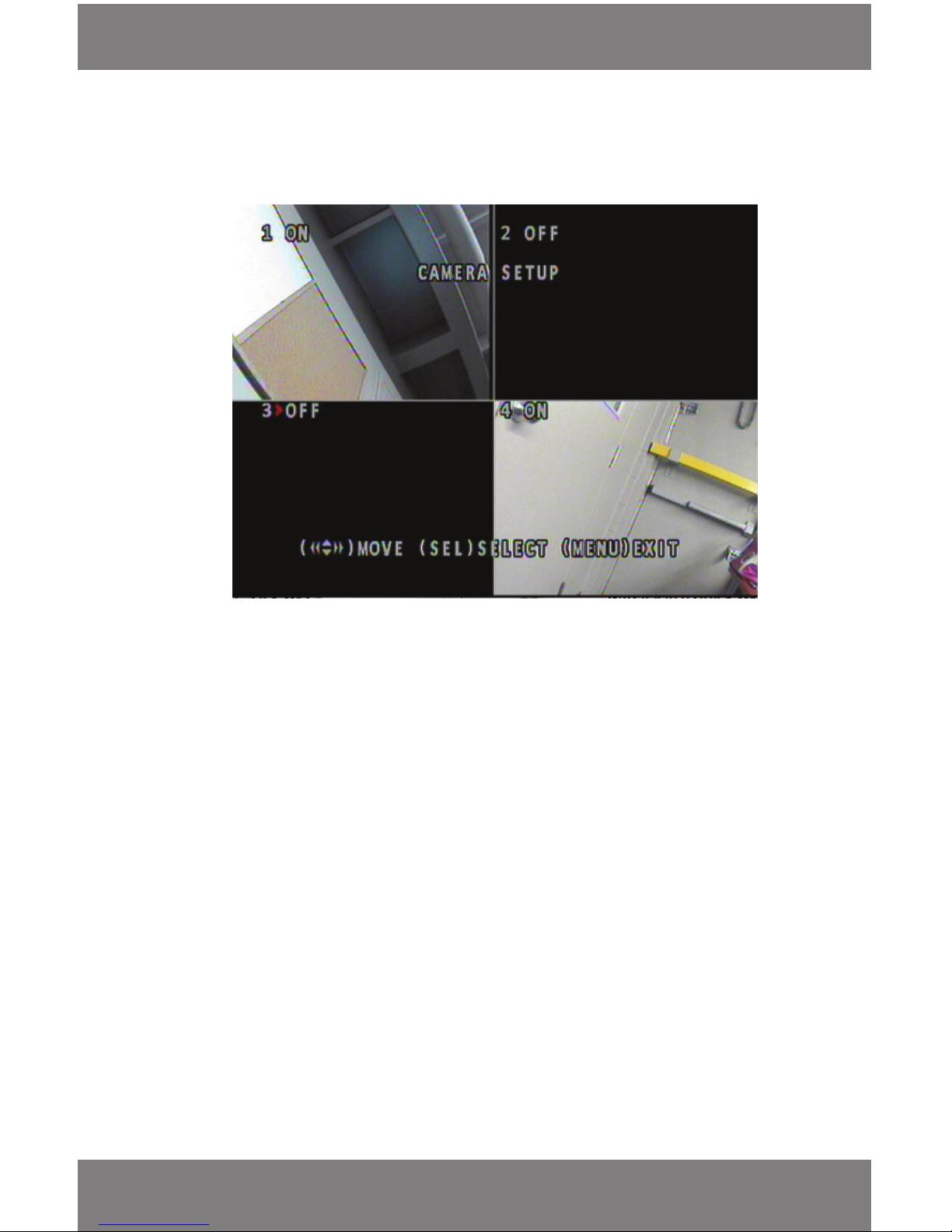
1. From the main menu press the enter button when CAMERA SETUP is highlighted.
2. To move the cursor to the camera you want to turn on or o use the arrows on the remote or the up,
down, fast forward (right) and rewind (left) buttons on the front of the DVR.
3. All the cameras should be set to ‘ON” by default. To turn the camera on, move the cursor to your camera
of choice and press the enter button, (on the front of the DVR and on the remote). Once successful ‘ON’
will be displayed next to that camera. (You will see the image the camera is seeing when the
camera is on).
4. To turn a camera o, move the cursor to your camera of choice and press the enter button
(on the front of the DVR and on the remote) once successful ‘OFF’ will be displayed next to that camera.
(Once the settings are saved the screen will go blank).
• As you can see in the above picture, Camera’s 1 and 4 are on and 2 and 3 are o. This means that 2 and 3
will not record or show any footage. They are completely shut o.
Record Setup
This option allows you to decide which cameras you want to record and which ones you do not want to record.
All cameras will still be displayed. If the record setting of the camera is turned OFF, it will not record, if it is set
to ON, it will record according to the Record Schedule.
Page 15
SVAT ELECTRONICS
now you can see
CV300 - 4CH
12
Record Setup
MAIN MENU cont....
To Set Cameras to Record/Not Record:
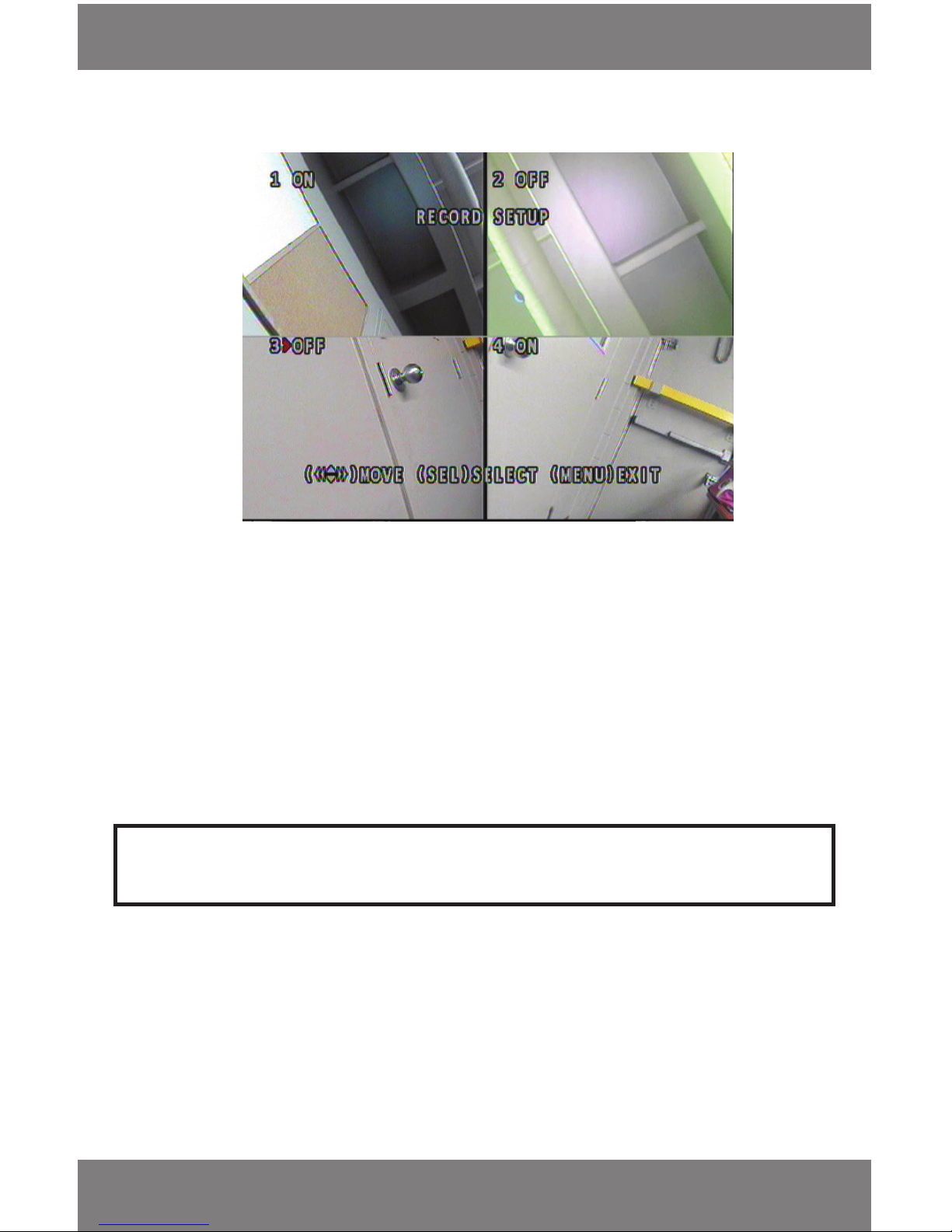
1. From the main menu press the enter button when the cursor is next to RECORD SETUP.
2. To move the cursor to the camera you want to have recording or not recording you can use the arrows on the
remote or the up, down, fast forward and rewind buttons on the front of the DVR.
3. To set the camera to record, move the cursor to the camera you wish to set to record and press the enter button
(on the front of the DVR and on the remote) Once successful ‘ON’ will appear next to the camera. When the DVR
is recording, the data from this camera will be recorded as well.
4. To prevent a camera from recording, move the cursor to the camera of your choice and press the enter button
(on remote or on front of DVR) once successful ‘OFF’ will appear next to the camera. When the DVR is recording,
this specic camera will NOT record.
• The above picture shows Camera 2 and 3 set to ‘OFF’ . This means that they will not record any footage, but
they will still show live footage through the monitor
Note: If you have the camera turned o (from Camera Setup) the screen where the camera would show will read
‘NOCAM’ and you will be unable to select the screen.
Record Framerate
• There are a total of 60 FPS that can be disbursed throughout the cameras; you have the choice on which
cameras have more or less FPS.
• This option allows you to choose how many Frames per Second (FPS) you will record each camera with.
Example: If you have a camera pointing to a cash register, you might want more FPS for that camera compared a
camera that is pointed somewhere else.
• The more FPS you have, the smoother the video; however it will take up more space on the hard drive. The less
FPS you have the choppier the video but less space taken on your hard drive.
Page 16
SVAT ELECTRONICS
now you can see
CV300 - 4CH
13
Note: To change the FPS for each camera it must be turned on (see Camera Setup) and set to record
(see Record Setup).
MAIN MENU cont....
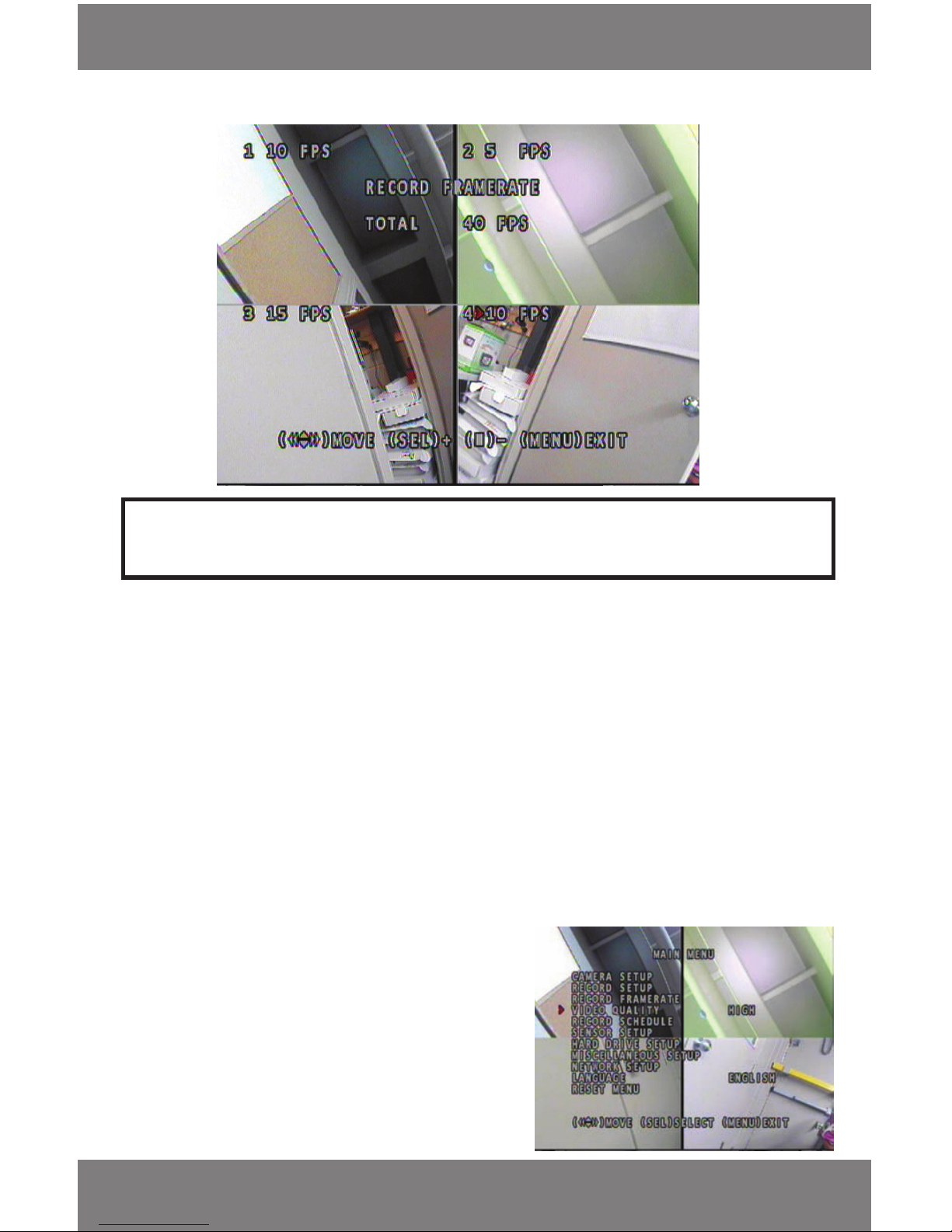
To Change the FPS
1. From the main menu press enter next to RECORD FRAMERATE.
2. Move the cursor to the camera you wish to adjust the FPS on.
3. Press enter to increase the number of FPS. Each time you press enter the FPS will go up. Each camera can record
at a maximum of 30 FPS.
4. To lower the FPS, press the stop symbol (on the remote and DVR). Each time you press the stop symbol the
number of FPS will decrease.
• The total FPS used is displayed near the center of the screen while adjusting the FPS. There is a maximum of
60 FPS that can be distributed according to your needs
• The above screen shows the total FPS set on each camera (Cam 1 = 10, Cam 2 = 5, Cam 3 = 15,
Cam 4 = 10) and the total amount of FPS used (40 FPS)
• The most FPS you can disburse through the cameras are 60 FPS, therefore there can still be 20 FPS disbursed
Video Quality
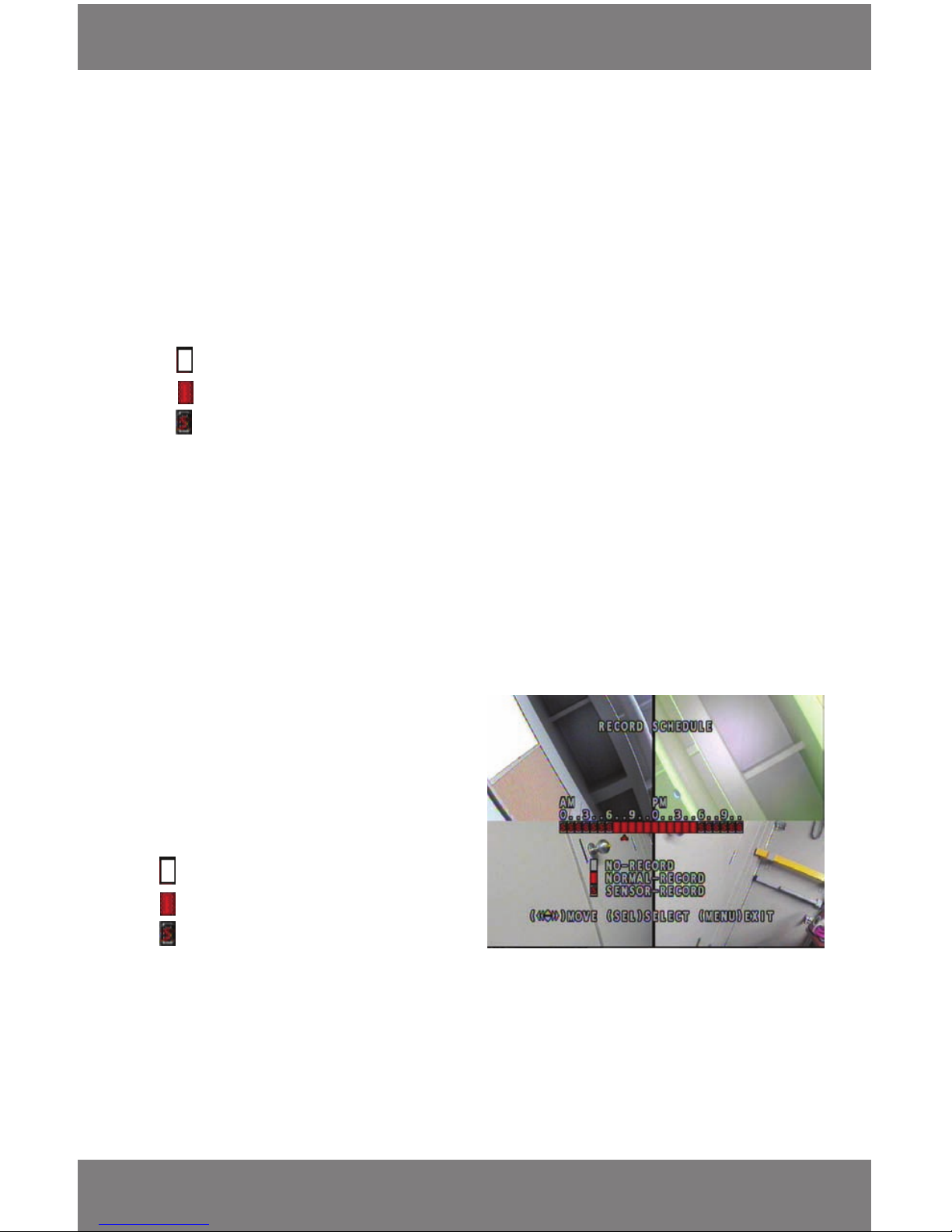
• This menu option allows you to select the quality of the
video you record. You have the choice between Highest,
High, Normal and Low. The higher the quality, the better
the picture; however higher quality also takes up more hard
drive space. When the quality is lower, the images are not
as impressive, but there is less space used on the hard drive.
Page 17
SVAT ELECTRONICS
now you can see
CV300 - 4CH
14
To Adjust the Video Quality
1. From the main menu move the cursor next to ‘VIDEO QUALITY’.
2. Press enter to change the quality.
3. Scroll through the 4 options (highest, high, medium and low) by pressing enter to select the video quality.
Record Schedule
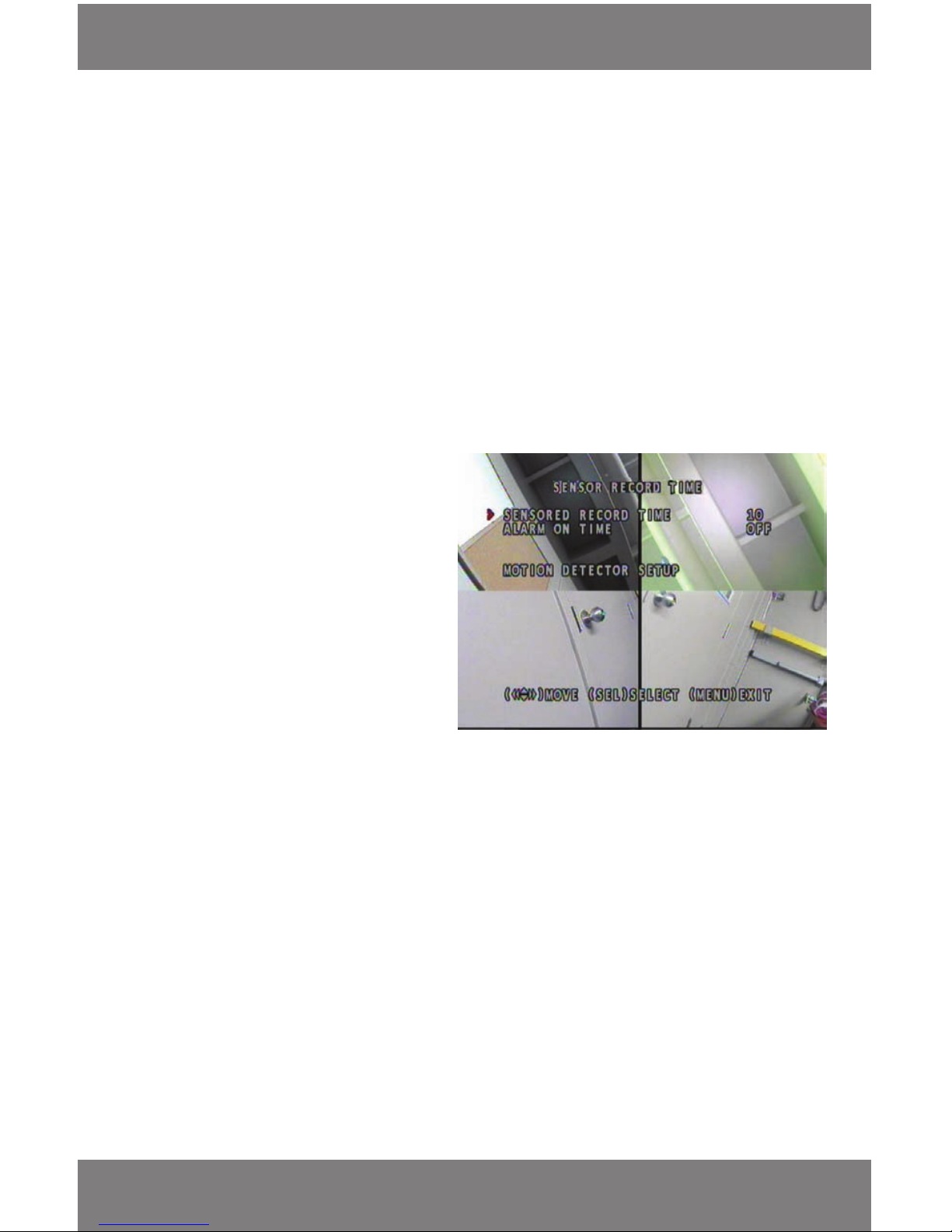
• The record schedule allows you to set up when/how your cameras will record in a 24 hour time frame.
• The clock in this 24 hour period is set like a 12 hour clock, except that 0 stands for 12 (AM and PM). Take note of
the AM and PM above the 0 to make sure you are setting up your recording schedule correctly
• There are three dierent recording options :
1. No record - The DVR will not record during the hour when this option is selected
2. Normal record - The DVR will continuously record for the hour it is selected (red box)
3. Sensor recording - The DVR will start recording when motion is detected in front of a camera
Additional Motion Detection settings can be set under Sensor Setup. ([S] box)
You can now set a custom schedule to record to your needs and specications
• There are several advantages of setting up a customized recording schedule. When the DVR is on FULL RECORD
24 hours a day, every day, your hard drive will ll up quickly. To optimize your HDD space, you may wish to
choose to record only when motion is detected during certain hours, or to not record at all. This will allow you to
get the most of your DVR’s hard drive space
To set schedule
1. From the main menu press enter next to ‘RECORD
SCHEDULE’.
2. Use the navigation buttons to move the cursor to
the hour you want a specied recording type
to happen.
3. When the cursor is under the specied time press
the enter button (on remote and DVR) and it will
cycle through the options:
No record
Normal record
Sensor recording
4. Once you have personalized your schedule to record
to your choice at specied times press menu.
• When you instruct the camera to record, it will record using whatever function you have it set to
record with based on your schedule
• The above photo shows a schedule that an oce would possibly use. It is set to sensor record at night and
early morning, when the business would be closed, and then set to straight record between 7 a.m. and 6
p.m. when it would be open
MAIN MENU cont....
Page 18
SVAT ELECTRONICS
now you can see
CV300 - 4CH
15
Sensor Record Time
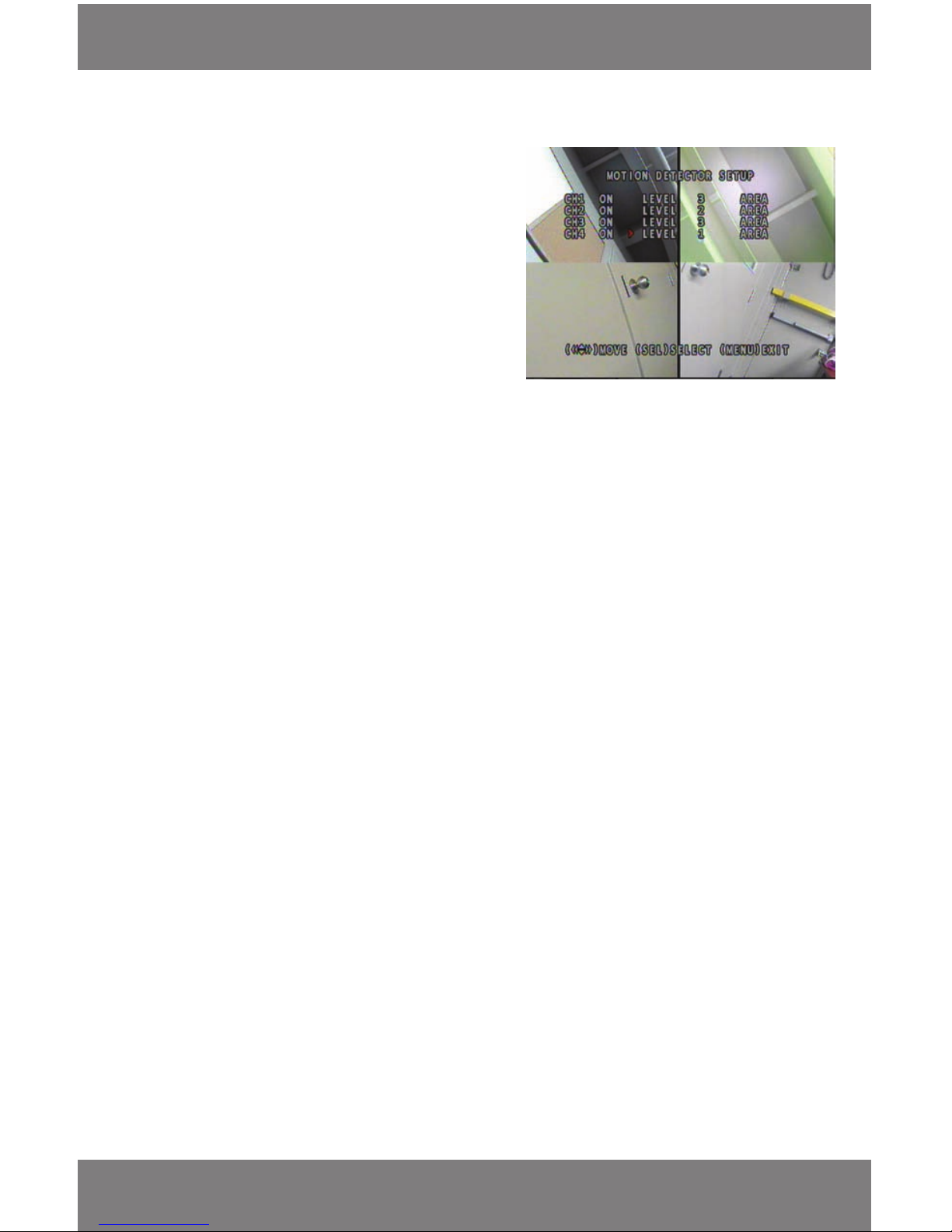
• Sensor record time gives you an option to set how long the DVR will record for after it has detected motion. You
can choose a recording time interval between 5 and 30 seconds
• Alarm on time gives you an option to have an alarm sound o from the DVR when motion is detected. It also
allows you to decide how long the alarm will go for. You can choose from 5 seconds to continuous alarm or o.
The alarm is an internal buzzer that will repeatedly beep according to this setting
• Motion detector setup allows you to turn motion detection on and o for each individual camera, as well as set
the level of sensitivity to motion on each camera and congure each camera so that there are certain areas
to detect motion and other areas to ignore where motion is detected
• For example, if you are monitoring your home, and there is a fan in the room, you can set the motion area to
detect motion everywhere but where the fan is. This way motion detection will not accidentally be triggered
and record insignicant movement
MAIN MENU cont....
To set the sensor record time
1. From the main menu press enter next to
‘SENSOR SETUP’
2. With the arrow next to the SENSOR RECORD
TIME press enter.
3. Each time you press enter the record time
after motion is detected will increase by
5 seconds.
• The picture to the right shows the sensor
record time to be 10 seconds; this means
that every time motion is triggered
the DVR will record as long as the motion is
going on and then 10 seconds after
the motion has stopped
To set the alarm on time
1. From the main menu press enter next to SENSOR SETUP.
2. With the arrow keys on the remote or DVR move the cursor next to the ALARM ON TIME option.
3. Each time you press enter on the remote or DVR the time options will scroll through (in seconds), starting
with ‘OFF’ and moving in increments of 5 seconds until it reaches CONT, which is the option to make the alarm
beep continuously when motion is detected.
• The picture above has the alarm time set to OFF
To set the motion detector setup
1. From the main menu press enter next to ‘SENSOR SETUP’.
2. With the arrow keys on the remote or DVR move the cursor next to the ‘MOTION DETECTOR SETUP’ option and
press enter on the remote or DVR.
• This opens up a separate menu
• This menu allows you to choose which cameras have motion detection on, what level of motion detection per
camera and adjust areas you do/do not want motion detection to trigger recording
Page 19
SVAT ELECTRONICS
now you can see
CV300 - 4CH
16
MAIN MENU cont....
Turning Motion Detection On and O
1. By using the arrow keys on the remote and DVR move the
cursor next to the camera you would like the motion
detection ON/OFF. (CH1 = Camera 1, CH2 = Camera 2…)
2. Press enter to switch motion detection from ‘ON’ and ‘OFF.’
• When the motion detection is turned ON, the DVR will
record when motion is detected in front of the camera
(this will only happen if the DVR is set on the sensor
record function in your schedule)
• When the motion detection is turned OFF, the DVR will
not record from a camera if motion is detected from it
• The photo to the right has all cameras set to ON, this means
that all cameras will record when motion is detected
Setting the Level of Sensitivity
1. By using the arrow keys on the remote or the arrows, FWD and REW buttons on the DVR move the cursor
beside the camera you want to adjust the sensitivity of, then move the cursor over beside the word ‘LEVEL’ next
to the camera you wish to set up.
2. Press the enter button on the remote or DVR and the level will scroll from 1 to 3, each time you press enter.
• Level 1 is the lowest sensitivity and level 3 is the highest sensitivity
• The above picture has the motion sensitivity set to 3 on Cameras 1 and 2, level 2 on Camera 2 and Level 1 on
Camera 4
Setting the Motion Sensitive Area
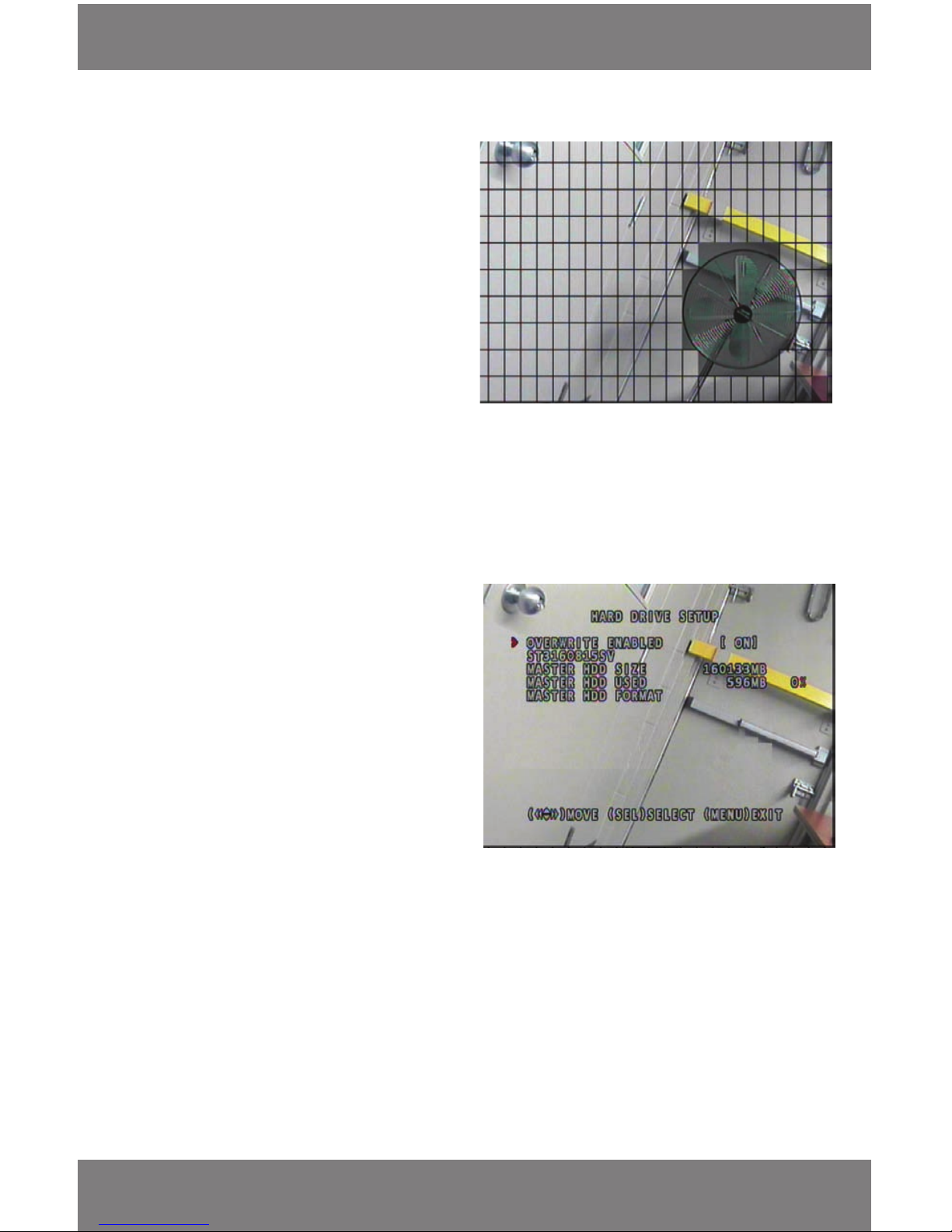
By default the entire grid (22 x 10) is set to detect motion. Here you choose whether to select the motion
detection area or to clear a section of the grid to not detect motion. Sections of the grid that are shaded grey
will not trigger motion detection.
1. By using the arrow keys on the remote or the DVR move the cursor next to the camera you would like to specify
where motion will or will not get detected then move the cursor beside the word ‘AREA’ and press enter on your
remote or your DVR.
2. This will bring you to a full screen view of the camera you choose with a grid over it. You will notice a grey
blinking box on the grid – this box is your starting point.
3. From your starting point, use the arrow keys on your remote or the arrows, fast forward and rewind buttons on
the front of the DVR and move the blinking box to the general area you would like the motion detection
blocked out.
4. Once you are in the spot you would like to not detect motion press enter (on remote or DVR) in the square once.
• If your cursor is still in the box, the box will blink. When you move the cursor the box should be shaded
dark grey, this means it is not detecting motion in that area
5. Move the cursor and press enter on each square of the grid you want to not detect motion until you have
completely blocked the area you want.
Page 20
SVAT ELECTRONICS
now you can see
CV300 - 4CH
17
Motion Detection Grid
MAIN MENU cont....
6. To clear the square, so that it detects motion in
the area again, go to the box and press enter (on
remote or DVR) once. When the cursor is moved,
it should leave the box clear.
7. To exit and save changes, press menu (on remote
or DVR).
8. Repeat the above steps for each camera you
would like to turn motion detection o of certain
areas of the cameras.
Hard Drive Setup
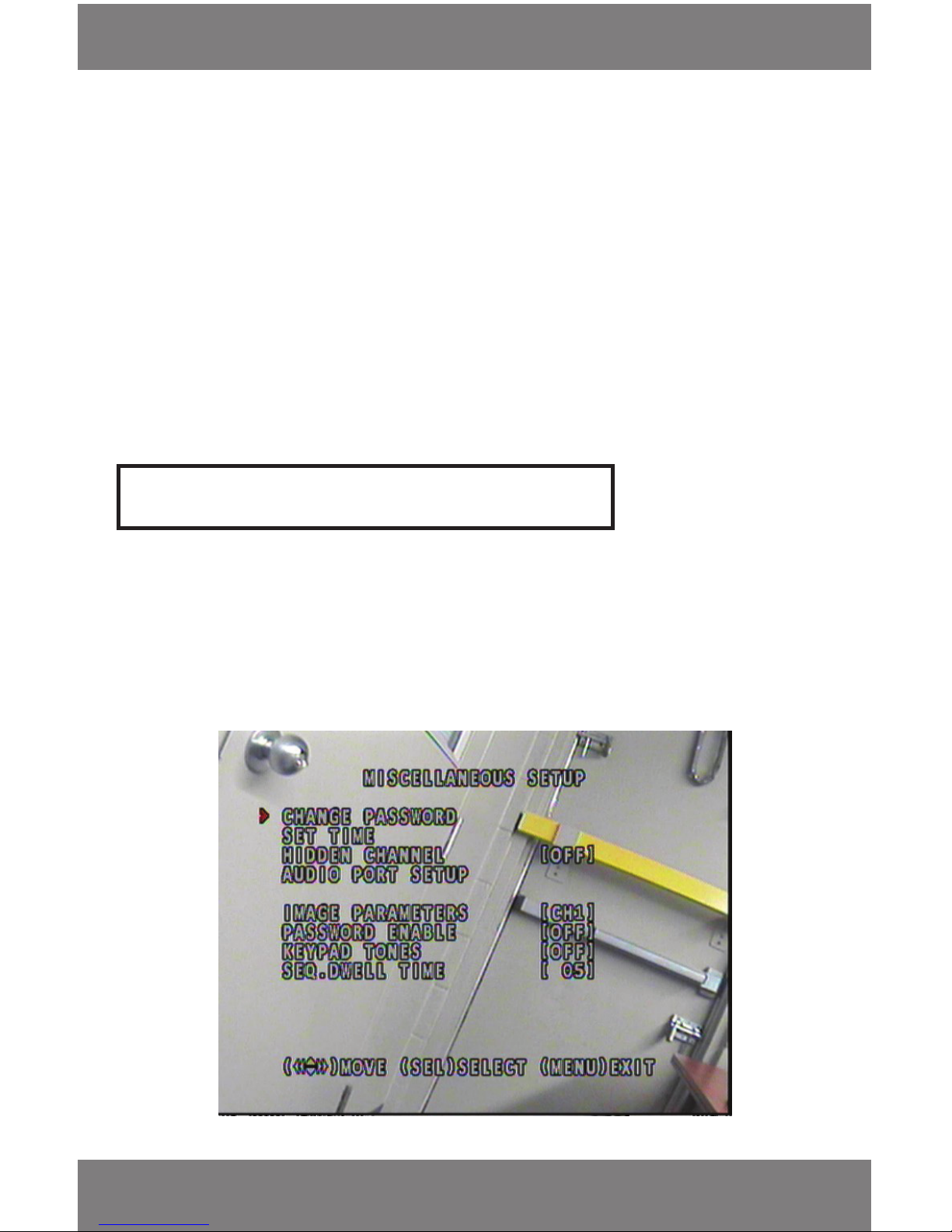
• This menu allows you to change, view the hard
drive settings, and erase all the video footage
from the hard drive (MASTER HDD FORMAT)
• ‘OVERWRITE ENABLED’ determines what to do
with the video footage once the hard drive is full.
This setting allows you to decide whether you
want to record over the oldest video footage
when the hard drive lls up or stop recording and
save old footage once the hard drive is full
• The alpha-numeric code beneath the ‘OVERWRITE
ENABLED’ option is the serial number of the hard
drive. This is just for reference
• The above photo shows a fan that is greyed out and blocked o from being detected by the motion detector.
That means that even if the fan is moving, its motion will not be detected by the DVR and therefore; the DVR
will not record the fan for no reason. However; it will record any other movement around the fan. This is a great
way to avoid undesired motion detection triggering. Other situations may be car trac on a busy road
• ‘MASTER HDD SIZE’ is telling you the total capacity of the hard drive. The above picture says 160133MB (160GB)
• ‘MASTER HDD USED’ noties you of how much space on your hard drive has been used in MB and the
percentage used
• ‘MASTER HDD FORMAT’ will format (erase everything) the hard drive. The password is required to complete
this function
Page 21
SVAT ELECTRONICS
now you can see
CV300 - 4CH
18
Note: Formatting the hard drive will erase all the recorded footage you have.
Miscellaneous Setup
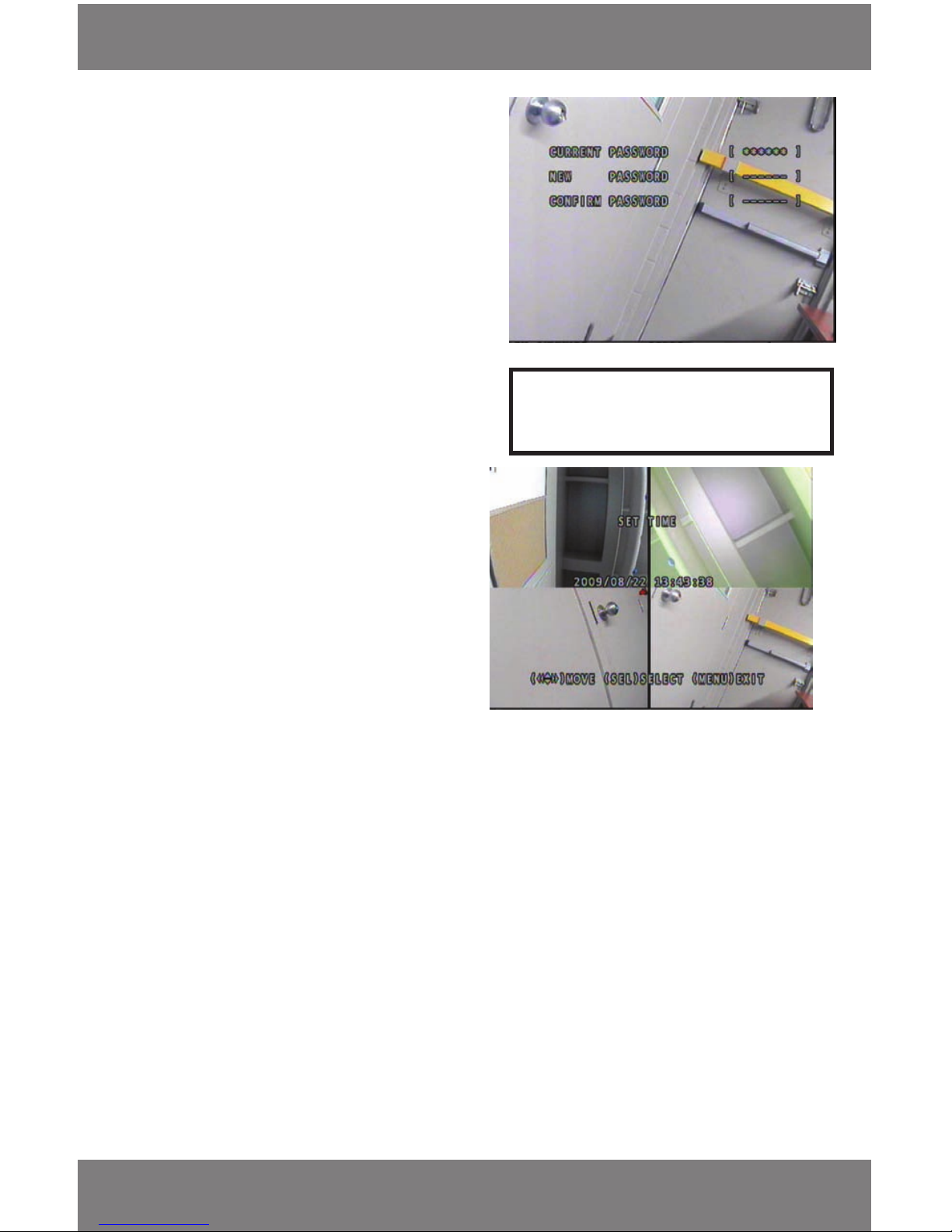
This menu option allows you to change the password, set the date and time, hide channels from being displayed in
the monitor, adjust the camera image parameters (contrast, brightness, hue and saturation), enable the password to
view footage, adjust keypad tone, and adjust sequence dwell time.
MAIN MENU cont....
To Enable Overwrite
1. Make sure the cursor is next to ‘OVERWRITE ENABLED’.
2. Press enter (on the remote or DVR) to switch it ON/OFF.
3. When the ‘OVERWRITE ENABLED’ is ON, the DVR will record over the oldest information on the DVR when the
hard drive is full – this means the DVR will not stop recording once the hard drive is full.
4. When the ‘OVERWRITE ENABLED’ is set to OFF, the DVR will stop recording when the hard drive is full. This means
that once the hard drive is full no new video footage will be recorded and previously recorded footage is saved.
To Format HDD
1. Bring the cursor next to ‘MASTER HDD FORMAT’ and press enter on the remote or DVR.
2. You will be brought to a screen that asks you to enter the Password – The default password is ‘111111’.
3. Type in the password and the hard drive will automatically format and return you to the previous screen.
4. To return to the main menu, press the menu button.
Page 22
SVAT ELECTRONICS
now you can see
CV300 - 4CH
19
MAIN MENU cont....
To Change the Password
1. Bring the cursor next to the ‘CHANGE PASSWORD’
option and press enter.
• Anything you type in now will go into the current
password space and automatically move down
the list, so don’t worry about using the arrows to
go down the list
2. Type in the current password (Default password
is ‘111111’).
3. After you have typed in the current password, don’t
move the arrow down, just begin typing the new
password again.
• it will move down the list automatically for you.
The password must be 6 characters long
Note: You can use the numbers and arrows for a
password.
To Set Time
1. Move the cursor below the dates/times you want
to change. You can only change one number at
a time.
2. Press enter under the number, each time you press
enter the number will increase by one.
3. To save changes and exit press the menu button.
• The photo to the right shows the set time menu
with the cursor under the day of the month. It
is set to August 22, 2009 at 1:43:38 PM
• Remember that is is a 24 hour clock when
setting the RECORD SCHEDULE
Hidden Channel setup
- A hidden channel is a channel that you would like to hide from being displayed on the monitor.
For example – If your monitor is able to be viewed by others and you don’t want them to see where or what is
being recorded – you can hide the channel from showing on the monitor. It will record as normal. You can only
hide one channel at a time.
1. Bring the cursor next to hidden channel.
2. Press enter; each time you press enter it will scroll through OFF, and numbers 1 to 4. Each number represents a
camera. (number 1 = Camera 1, 2 = Camera 2… etc.).
Image Parameters
Image parameter allows you to adjust the contrast, brightness, hue and saturation of the picture on each camera.
1. From the ‘MISCELLANEOUS MENU’ move the cursor down to ‘IMAGE PARAMETERS’.
2. Move the arrows on your remote or the fast forward and rewind buttons on your DVR to scroll through the
cameras, (CH1 – CH4 = Camera 1 – Camera 4) when you get to the camera you would like to adjust the image
on press enter.
Page 23
SVAT ELECTRONICS
now you can see
CV300 - 4CH
20
MAIN MENU cont....
3. Using the arrows on the DVR and remote
move the cursor next to the image
parameter you would like to adjust:
CON (contrast), BRI (Brightness), HUE
(hue) or SAT (saturation).
4. Once you have scrolled to the image
parameter you want to change, use
the left and right arrows on your remote or
the fast forward and rewind buttons on the
DVR to adjust the percentage.
• To exit the menu and save changes,
press menu
• Repeat the above steps for each camera
you would like to adjust
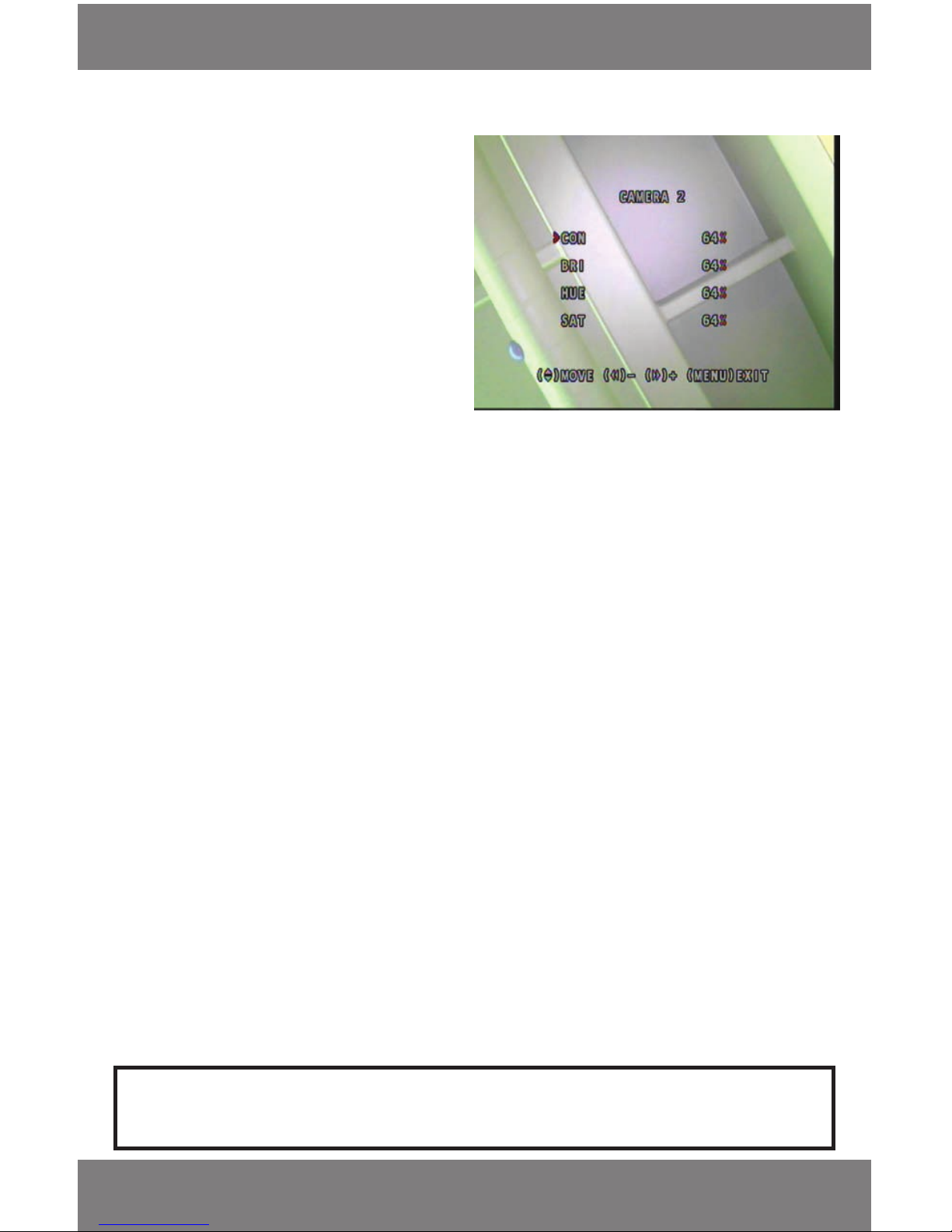
• The picture to the right shows the image
parameters for Camera 2 all set to 64%.
This is the default setting
Password Enable
Password enable allows you to choose whether or not your DVR requests a password when performing certain
actions. The actions it requests a password for are, stopping a recording and accessing the menu
• If you have the password enable ‘ON’ the DVR will request a password before you perform the above actions
1. Move the cursor to the ‘PASSWORD ENABLE’ option.
2. Press enter to scroll through on and o options.
Keypad tones
This option allows you to turn ON or OFF a tone when you press any buttons on the remote or DVR.
1. Move the cursor next to ‘KEYPAD TONES.’
2. Press enter to scroll through ‘on’ or ‘o’, if the keypad tone is ON, your DVR will beep every time you press a
button on the Remote or DVR.
Sequence Dwell Time
• You can set your DVR to display one camera at a time on the full screen and switch through the cameras after
certain periods of time
• The sequence dwell time is the time that each camera is displayed on the screen before switching to the
next camera
1. Move the cursor to SEQ DWELL TIME.
2. Press enter and the sequence dwell time will scroll through, the options will scroll from ‘OFF’ to 60 seconds.
3. To save changes and exit to the main menu press the menu button.
To Get the Screens to Sequence Though
1. Exit the menu until you are in live view or recording mode.
2. On the front of your DVR, press the SEQ button and the cameras will sequence through using your desired
sequence time..
Note: If you have the Sequence Dwell time set to ‘OFF’ the cameras will not start to sequence when you press
pause or SEQ in live view mode.
Page 24
SVAT ELECTRONICS
now you can see
CV300 - 4CH
21
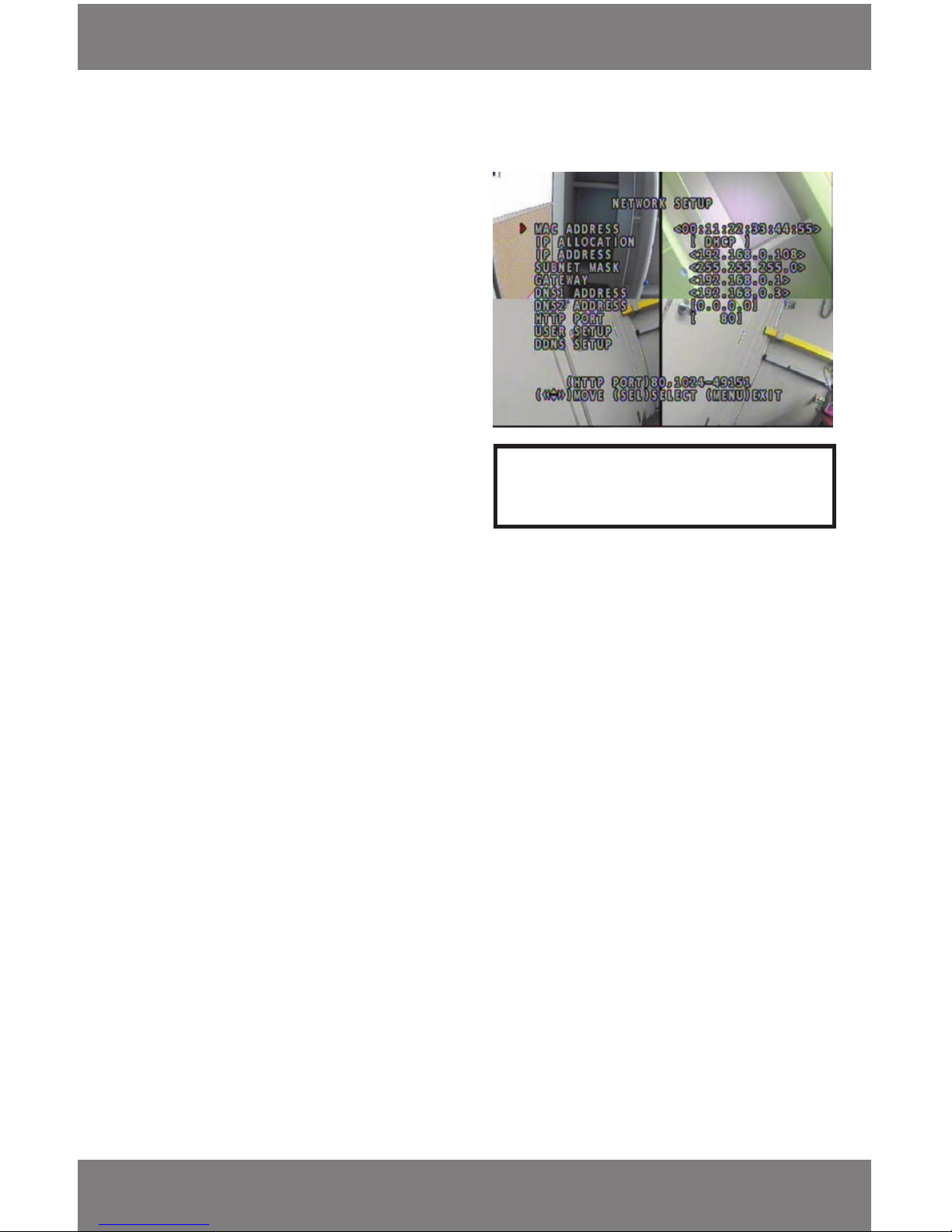
Network Setup Menu
Note: For more information on the Network Setup
Menu, please see the Network Guide Section
Language
Choose your desired language for the DVR to display. Press enter to cycle through the available languages. The
available languages are:
• English
• Italiano
• Français
• Deutsch
• Portugues
• Español
Reset Menu
This option allows you to reset the menu to all the factory default settings (except your password and recorded
video footage)
1. Move cursor down the main menu to the ‘RESET MENU’ option and press enter.
2. At this point you will be asked to input your password.
3. Once you put your password in, the screen will go back to the main menu and all the factory settings will be
restored to factory defaults.
MAIN MENU cont....
Terms
• MAC ADDRESS is a unique identier from the
manufacturer. This cannot be changed
• IP ALLOCATION decides how the DVR retrieves
IP addresses
• SUBNET MASK determines what subnet an IP
address belongs to
• GATEWAY the IP address that allows t he DVR to
connect to the internet
• DNS ADDRESS usually the routers IP address
• HTTP PORT identies how the message is going to
be sent (For port forwarding)
• USER SETUP allows you to set the main admin
name and password to control all settings as well as
a name and password to access the DVR through
the internet with less access. (see NETWORK SETUP)
• DDNS SETUP allows others to view DVR through
an internet program with a easier to remember
name instead of the IP address
(see NETWORK SETUP)
Page 25
SVAT ELECTRONICS
now you can see
CV300 - 4CH
22
RECORDING MENU
Recording Instructions
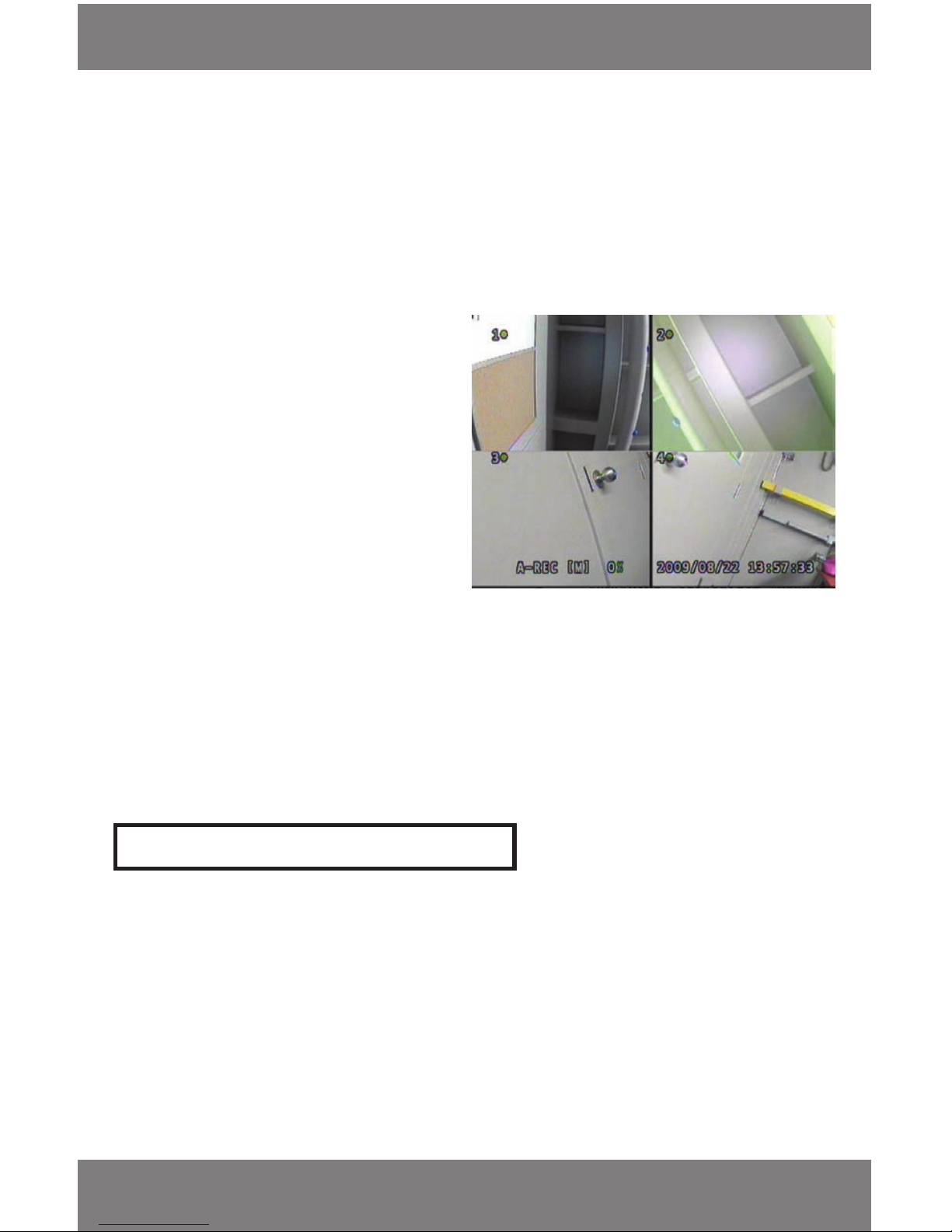
• To get the camera to start recording (according to the RECORD SCHEDULE) you must press record on the remote
or on the front of the DVR
• Based on the schedule you have set up the DVR will begin to record the cameras that are set up to record
• There will be an indication on the screen for what type of footage the camera is recording, which cameras are
recording as well as how much of the hard drive is used up, and the current time and date
• You can stop the recording at any time by pressing stop on the remote or the front of the DVR. The recording
schedule will not resume until you press record again.
The above photo shows:
• All four cameras are on and recording
• The footage that is recording is in Normal Recording mode
• The footage is recording to the Master HDD
The indications mean:
A-REC – Indicates that the Record Schedule is set to
Normal Record
S-REC – Indicates that the Record schedule is set to
Sensor Record
N-REC – Indicates that the Record Schedule is set to
No Record
[M] – Indicates that the footage is recording onto
the Master HDD
Note: DVR will NOT record while you are in playback mode
To View Recorded Video through monitor
• Make sure you are in live view mode (by pressing stop on remote or DVR to stop recording)
• To view the recorded footage through the monitor press play (on your remote or DVR)
• The most recent footage will automatically play
• To pause the footage press pause (on remote and DVR)
• To rewind or fast forward the footage press the rewind or fast forward buttons (on the remote or DVR)
• Each time you press the rewind or fast forward button the speed will increase by one until it is 6x the speed
Page 26
SVAT ELECTRONICS
now you can see
CV300 - 4CH
23
RECORDING MENU
View Recording List
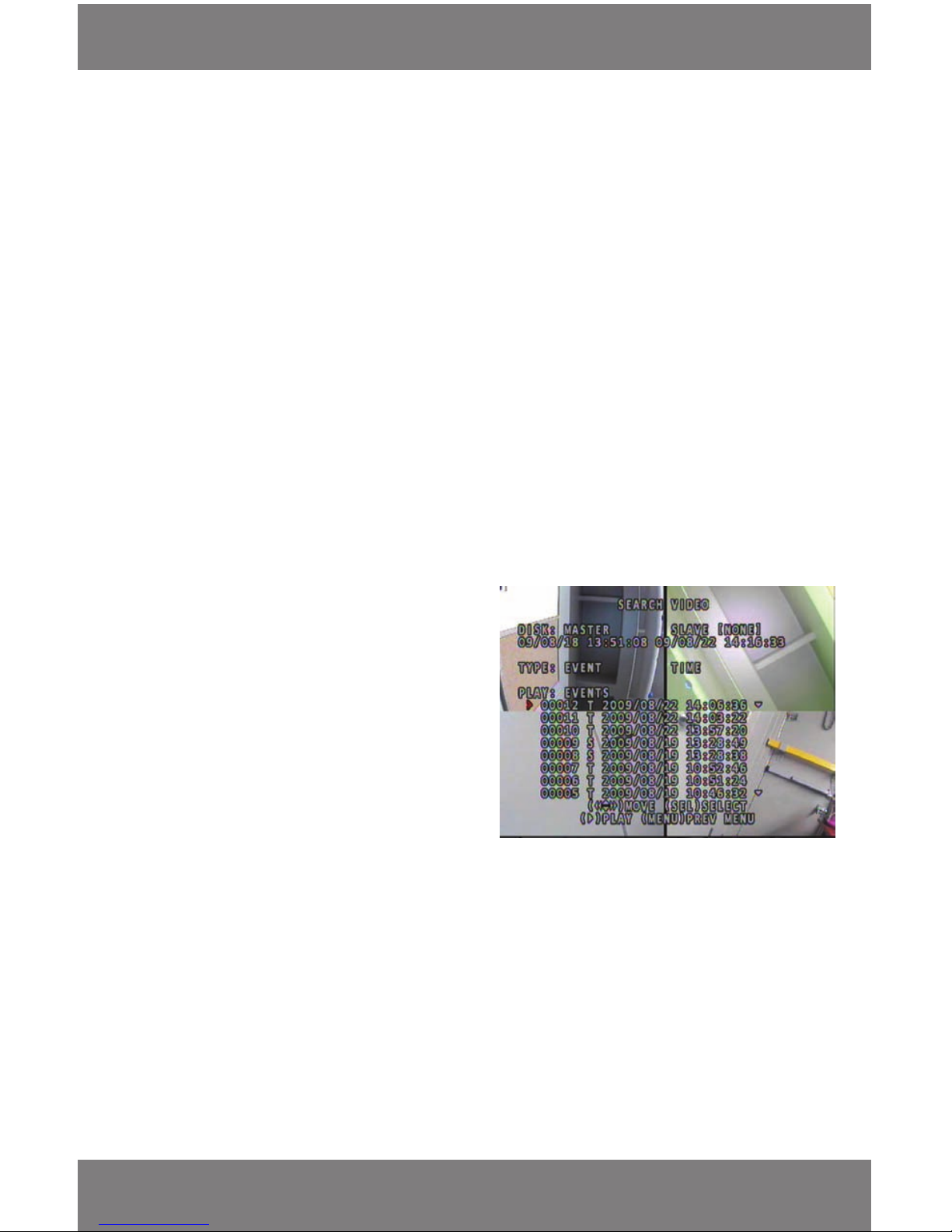
• To access the list of recorded footage press the menu button while in playback mode and the search video
screen will display
• The rst option that is visible on screen is the DISK. This DVR is only compatible with one Master Hard Drive. No
Slave disk drive is available. This option can be accessed by pressing the menu button twice once on the
Search Video page
• You will see the date/time range of the recorded video footage that is stored on the Hard Disk
• Type refers to the type of search options that are available. The two options are an Event List (default) and
a Time search. To change the type of search press menu one time from once on the search video page. The
cursor will go next to the current search mode. Use the navigation keys to choose Time or Event search
Time Search
• This mode allows you to choose the starting point from which to view the recorded footage. Use the Left and
Right or Rewind/Fast Forward buttons to move the cursor to the desired value to change
• Use the enter key to increase the selected value
• Press play once the desired time is entered
• If ‘NO EVENTS’ is displayed when pressing play, verify there is video footage at the time you selected and is
within the available time frame
Event List
• Below is the description of the displayed elds
(from left to right)
• Event Number - The number of recorded footage from
most recent to oldest footage (most recent video clip rst)
• Type of Recording - Whether it was sensory footage (S)
or normal Recording (T)
• The date it was recorded (year/month/day)
• The time it was recorded on a 24hr clock
To Select a Particular Event to Playback
• Move the cursor up or down the list using the arrow keys
(on remote or DVR)
• Bring cursor next to event you want to view and press play (on remote or DVR). The video will start playing
On the DVR when footage has nished playing the video will automatically pause
• To bring monitor back to live view press stop
• To bring monitor back to the search video screen press menu
The list in the photo shows
• That there are 12 recorded events
• It was recorded using Normal Record Mode
• It was recorded on August 22nd, 2009
• It was recorded at 2:06 pm
Page 27
SVAT ELECTRONICS
now you can see
CV300 - 4CH
24
Note: Make sure that the DVR is connected to a computer with a USB cord (instructions above)
Software Guide to View DVR Through USB Connected Computer
Note: The DVR can not record the camera footage or access the main menu when it is connected to a computer.
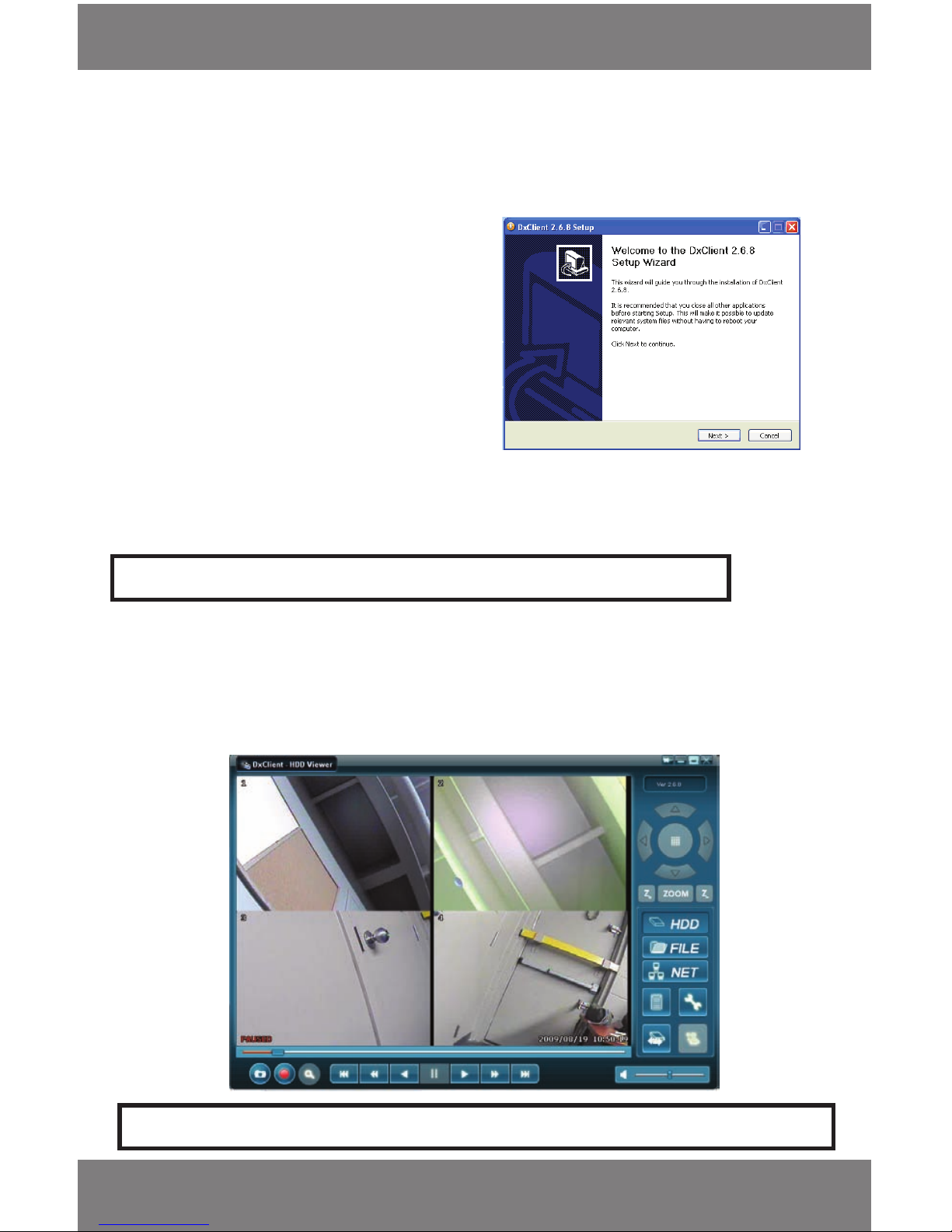
DxClient – HDD Viewer Software
• When the program is opened it will automatically start playing the stored footage from the earliest recorded
point in quad screen mode
• To switch to single camera mode, double click the camera you would like to see fully. To go back to the 4 screen
view, double click the camera again
SOFTWARE GUIDE
1. Insert software CD into the computer. The CD should
automatically load. If it does not, access the CD
drive from My Computer.
2. Double Click on the le DxClient.exe
3. Follow the installation Instructions on screen.
Click Next.
4. Choose the destination folder to install the software.
In most situations this eld does not need to
be changed.
5. Once installed, the Client program can be found on
the desktop or in the start menu.
6. Connect the DVR to the computer using the included
USB cable. You will see a message on the monitor for
the DVR that * HDD USED BY USB *.
When disconnected you will see the message * HDD
RELEASED BY USB *.
7. Once software is installed and the DVR is properly
connected double click the DxClient to open it.
Page 28
SVAT ELECTRONICS
now you can see
CV300 - 4CH
25
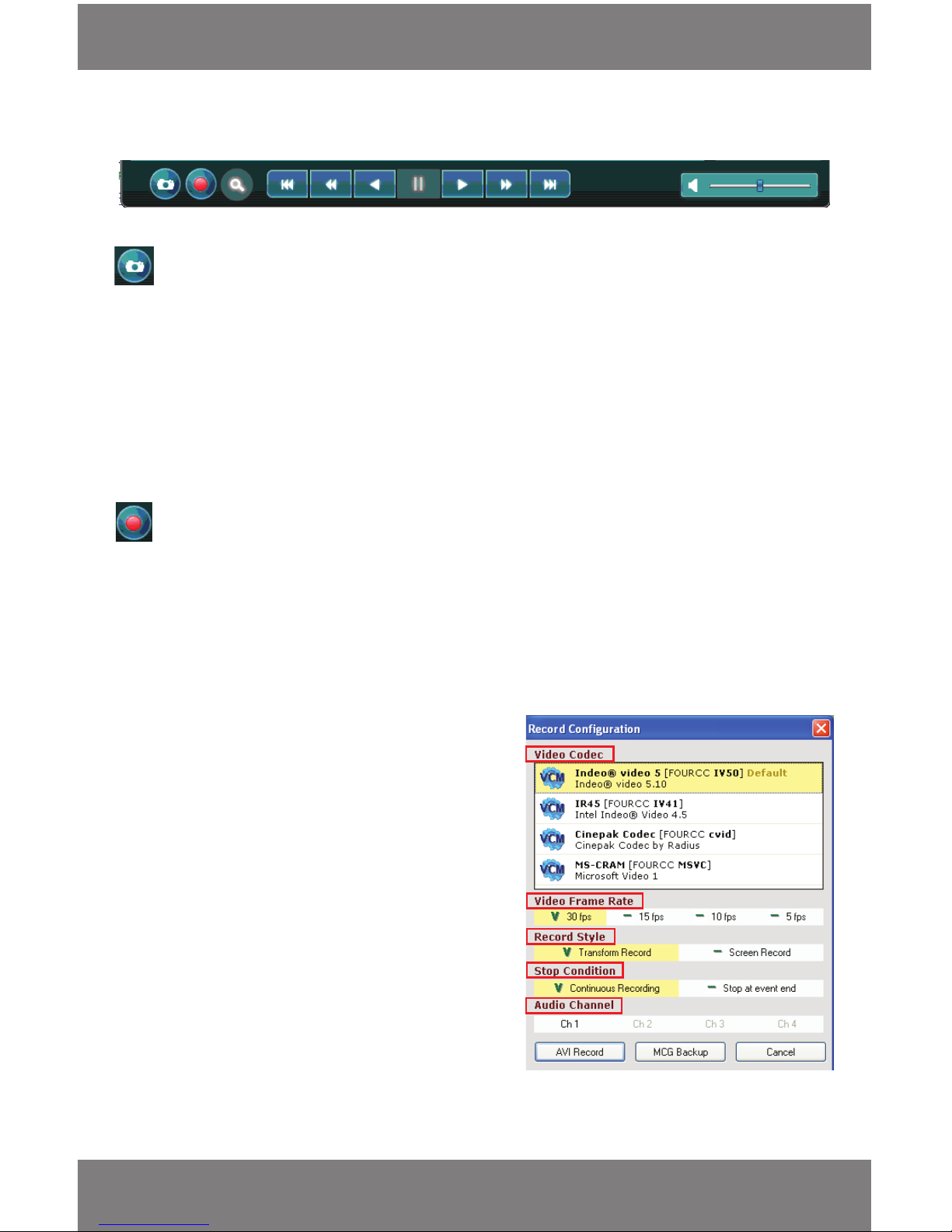
Video/Sound Control Buttons
The buttons and their functions along the bottom of the screen (from left to right) are as follows:
Capture
Clicking on this button takes a picture of the image on the screen and automatically places in a le on your C: Drive. You
will see a pop up message box which displays the location of the BMP image le. By default it will be stored under C:\
Program Files\DxClient\Capture.
- Once you take the photo you have the option to view the image immediately or not. If you choose not to it will
be saved in the C: drive.
1. Double click on the image. By default it will open with Windows Fax and Picture Viewer unless another image
viewing program is set to display bitmaps.
2. If you want to use a dierent viewing program, right click on the image le and select open with.
Record
Clicking this option records what is currently playing on your computer and saves it to your computer according to your
desired settings.
• When you click on the record button a separate menu pops up
Video Codec
Refers to the format you wish to use for saving the video onto
your computer. This option is for advanced users and is best
to leave the codec set to the default. If you are experiencing
diculty with the record function, try changing the codec.
Video Frame Rate
This option allows you to set how many Frames per Second
(FPS) you will record the currently displayed video with.
Choose between 30, 15,10, and 5 FPS.
• The more FPS you record with, the smoother the video;
however it will make the le size larger. The less FPS you
have, the choppier the video but smaller le size
• To change the FPS you simply click the FPS that you would
like to record the video in. When your choice is highlighted
and there is a V next to it, the video will record in that
particular frame rate
The instructions for the menu that pops up when the record feature is clicked are as follows:
SOFTWARE GUIDE
Page 29

SVAT ELECTRONICS
now you can see
CV300 - 4CH
26
SOFTWARE GUIDE
Record Style
This indicates how the video will record. You have a choice to do a transform recording or a screen recording. There are
very slight dierences between the two styles. It is recommended to use Transform record.
• Transform record (recommended) shows you the data it is recording as it is recording (Length of video, frames
recorded, le size and the software it is recording to). The data doesn’t show up when you play the footage back
• Screen record only shows the video play through and none of the information that transform record shows
• To select a particular record style you simply click the record style that you would like to record the video in. The
option is active if it is highlighted and there is a V next to it
• When playing the footage back both options look the same
Stop Condition
This option allows you to choose whether the video you are recording plays through each session you recorded one
after the other and records it, until you decide to stop the recording, or just records a one session of footage at a time.
• Continuous record – Will record all the footage you have recorded one event after the other until you stop it
(record button) or there is no video left on the DVR to record
• Stop at event end - Stops recording footage after the session has ended. A session of footage is each time the
DVR recorded and stopped that recording. (Example: If you had motion detection on and the DVR only recorded
motion, the record option would only record the one time that camera detected motion and automatically stop
recording the footage onto your computer when the camera did)
• To select a particular Stop Condition click the Stop Condition that you would like to record the video in. When
your choice is highlighted and there is a V next to it, the video will record in that particular FPS rate
Audio Channel
This DVR doesn’t support audio so this function will not do anything.
AVI Record
Clicking this will record the video and save it to the folder you selected the footage to save into. It will record what is
being viewed on screen. Windows Media player can usually be used to play the avi les.
• By default .avi backup les are stored in the same location as the snapshots: C:\Program Files\DxClient\Capture\
MCG Backup
Clicking this option will allow you to backup recorded footage in the form of an MCG le. This way you can burn the
le to a CD or DVD or backup a large segment of video footage. The DxClient software must be used to view
the backup.
• Choose the backup start date and time
• Choose the backup end date and time
• Total size will indicate the expected le size used for this backup
• Choose the drive to save the backup to
• Set the lename for the le. It is recommended to name the le by the dates for future reference
• Total size indicates the amount of HDD space on the target drive
Page 30
SVAT ELECTRONICS
now you can see
CV300 - 4CH
27
SOFTWARE GUIDE
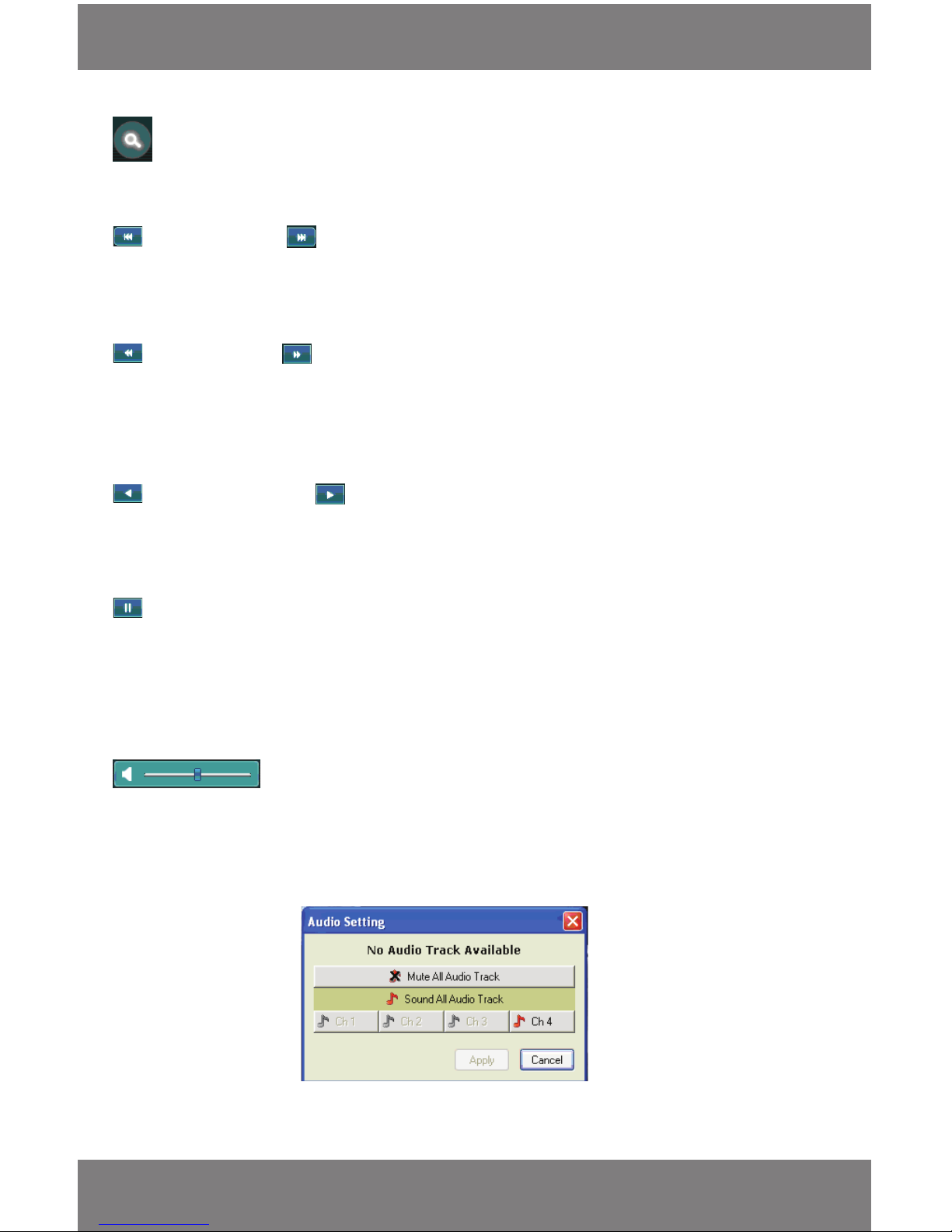
Search
This option allows you to search a specied date and time of footage you want to view. This function only works when you
are viewing the footage online (see network set up below).
Frame Backwards and Forwards (HDD Playback Only)
This option allows you to move forward and backwards, one frame at a time.
• Click the backwards or forwards buttons and the footage will move forward or backward by one frame and
then pause. Each time you press this button, it will move one frame forward or backwards then pause
Jump Back 60 sec Jump Forward 60 sec
This option allows you to rewind and fast forward through the recorded footage by one minute at a time.
• To go backwards or forwards by one minute, simply click the rewind or fast forward button and the
footage will move forward or backward by one minute (60 seconds) at a time and then pause. Each time
you press this button, it will move 60 seconds forward or backwards and pause
Reverse Playback and Forward Play back
This feature allows you to reverse and play back recorded footage in ‘real time’
• To go backwards or play the footage, simply click the back or play button and the footage will move back or
play in real time
Pause
Clicking this button will pause the footage when it is going backwards or playing (in real time)
• To pause the footage, simply click the pause button when footage is going backwards or playing in real
time. The pause only works when you are viewing footage in real time because the other features pause
automatically
Volume Control
This icon allows you to adjust the volume of the footage you are playing back.
• This DVR does not support audio, therefore, this function will not work, however, the following box will
still appear, adjusting it will not make any dierence to playback and/or backed up footage
Page 31
SVAT ELECTRONICS
now you can see
CV300 - 4CH
28
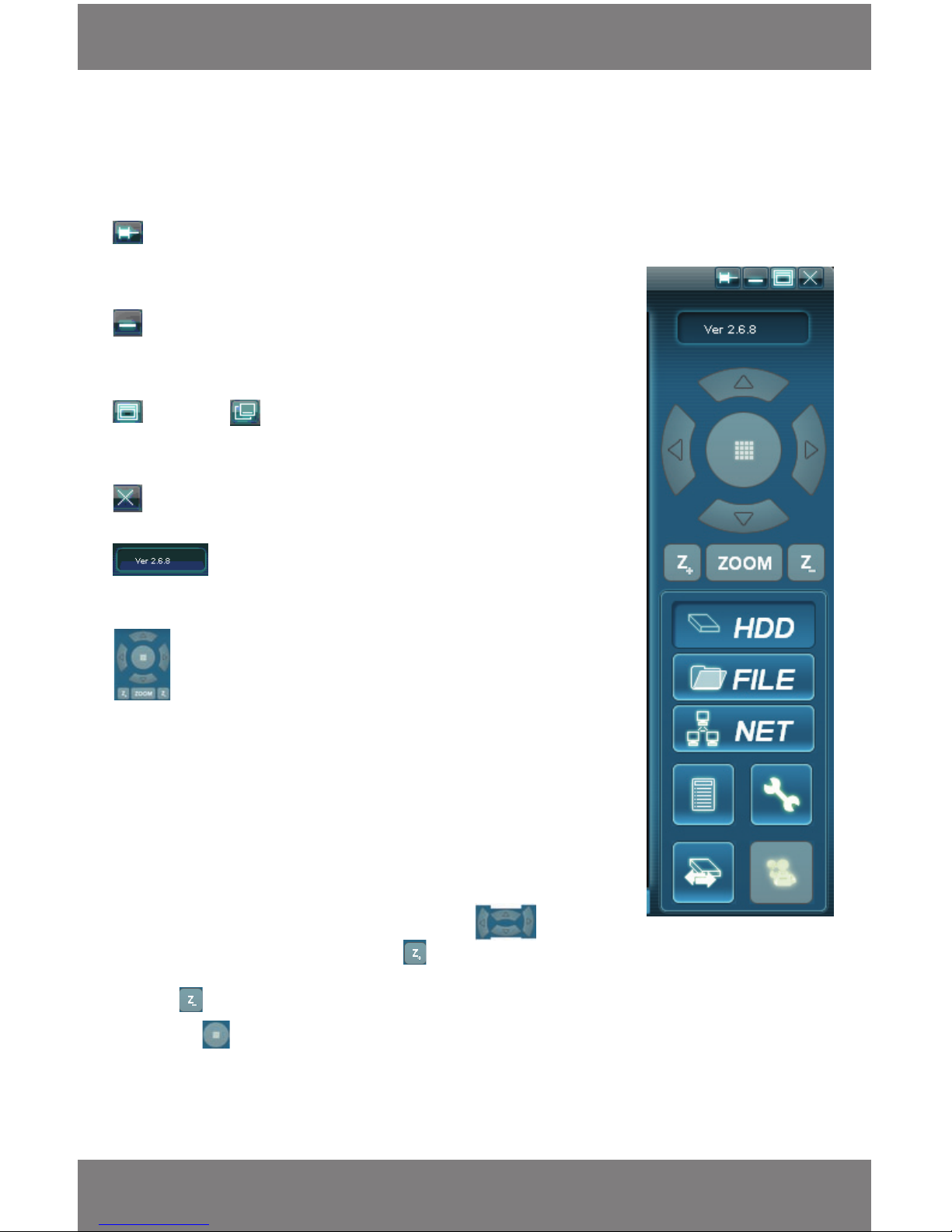
Side Panel Control Buttons
Always on top
If you click this icon the software will always be on top of all other running programs.
If you unclick it, the software will no longer be on top
Minimize
By clicking on this icon the program will minimize into the task bar at the bottom of
your screen
Maximize / Restore down
By clicking the maximize icon the program will expand to cover the entire screen, by
clicking the restore down icon the program will go back to normal.
Exit
Clicking this icon will exit out of the program.
Software Version
This indicates what version of the software you are using.
PTZ Camera Functions
This function is used if you have a PTZ camera connected to your DVR (not included/
not supported). PTZ stands for Pan, Tilt, Zoom and are commonly referred to as dome
cameras. They allow you to control the camera by panning left/right, tilting up/down,
and zooming in on a focus area.
*PTZ Cameras are not supported with the CV300-4CH
• If you are unsure about the PTZ camera or need instructions on setting up
your PTZ camera please refer to the instruction manual for the PTZ camera
or contact the PTZ camera manufacturer
• To move the camera around you would use the arrow keys , to
zoom you would click and hold down the button until you
have zoomed into your liking, to zoom out you would click and hold
the button until you have zoomed out to your liking
• The grid on the PTZ functions this grid allows you to decide which PTZ
camera you would like to control when viewing the online function
(see network setup below)
SOFTWARE GUIDE
Starting from the top and moving left to right, then down, the buttons and their functions are as follows:
Page 32
SVAT ELECTRONICS
now you can see
CV300 - 4CH
29
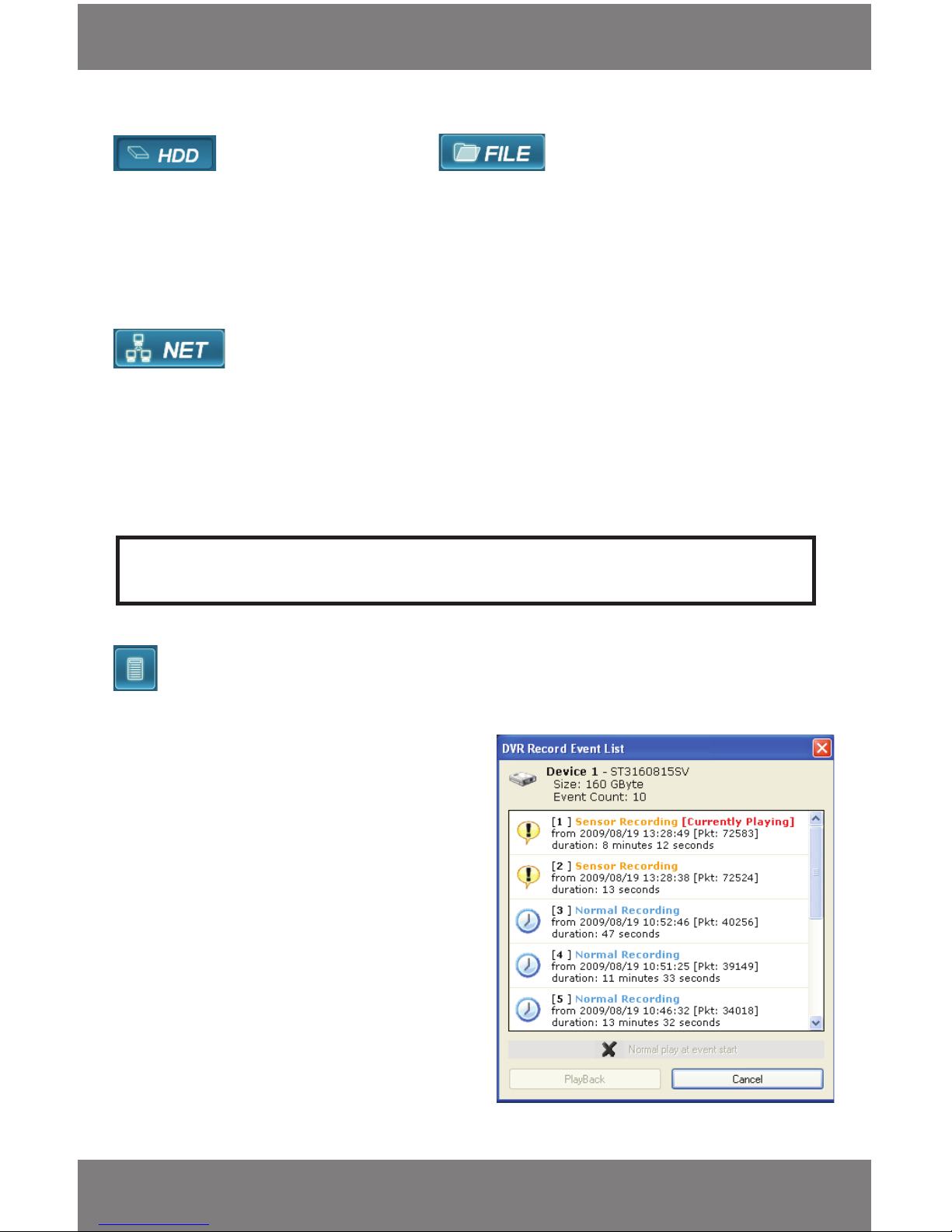
HDD (Hard Disk Drive)View and File/Backup View
This function allows you to choose between what video source you want to view.
• When you click HDD view, you will be viewing the footage that is stored on the hard drive of your DVR. The DVR
must be connected using the included USB cable
• When you click the le view icon you will be prompted to choose a video that you have backed up (using the
MCG Backup function). Select the backup le and press Open to begin viewing the backup footage
Net View
This option allows you to connect to view the DVR online on your computer.
• You will be prompted to enter a host name for the DVR you want to connect to. This will be the IP address of the
DVR. Type in the IP address without the “http://”
• By default the host port is 80. Unless this was changed on the DVR leave at 80
• User name by default is “admin”
• Password is the same password for accessing the DVR. By default it is: “111111”
List Footage
This option will display the recording event list when you click the icon:
• This menu lists the video that have been recorded.
The events listed with the newest footage rst and
the oldest footage last
• The list explains what type of recording method
was used (Sensory or Normal Record), the date and
time it was shot at, and the length of the
video recorded
• To select a particular video to view click the
listed video you would like
• Click PlayBack to load your footage and it will
appear on your screen paused. You must press the
play button to start the video
• To begin playing back the footage when PlayBack
is clicked, highlight the event and click on Normal
Play at event start
• Click PlayBack and the event will begin playing
automatically
Note: To view DVR online, make sure your DVR is connected to a router and set up to be viewed online (see
Network Guide)
SOFTWARE GUIDE
Page 33
SVAT ELECTRONICS
now you can see
CV300 - 4CH
30
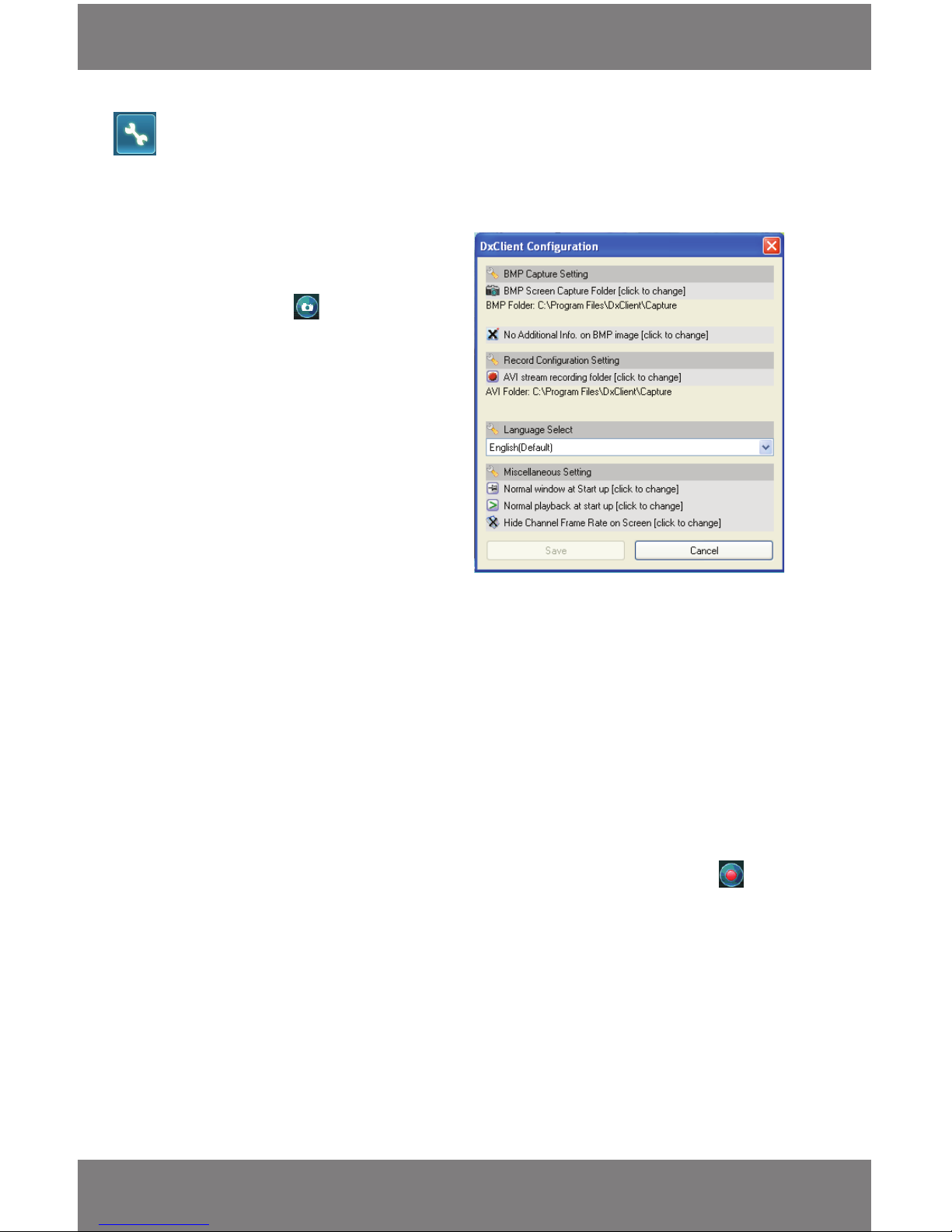
Settings
When you click the settings icon, many options for you to make changes to the program appear in a separate menu.
Each option and their function is as follows:
BMP Capture Setting
This setting allows you to pick which folder to save the
“captured” images to. These are the images that are
captured when pressing the button.
To change where your footage is being saved:
• Click on the AVI stream recording folder option
and scroll through your folders to where you
would like the footage to be stored then
highlight the folder and click OK
• The folder location should be listed below on the
settings list now
BMP Folder
Displays the current capture folder save location
No Additional Info on BMP Image
By clicking this option you can change whether or not the image capture you take appears with information about
the picture.
• The information is displayed on the bottom of the image
• [Device] – Details the DVR and hard drive information
• [Stream] – DVR Channel information
• [Capture] – Displays the date and time the image you took was recorded, the
size of the image and the color format
• If you do not want to display this picture information click on it so that a ‘X’ symbol appears on the left side.
Time and Date will still be recorded onto the screen capture
Record Conguration Setting
This setting allows you to pick which folder you would like the backup footage you record with the button to
be saved. To change where your pictures are being saved:
• Click on the AVI Stream Recording Folder option and scroll through your folders to where you would like the
pictures to be stored
• Highlight the folder and click OK
AVI Folder
Lists the current save folder for recorded AVI backups.
Language Select
English is the only supported language for this software.
SOFTWARE GUIDE
Page 34
SVAT ELECTRONICS
now you can see
CV300 - 4CH
31
Miscellaneous Settings
Normal Window Startup/Always on top Startup
By clicking this icon for it to say ‘always on top window at startup’ the software will always be on top of all other
running programs. If you click it to be normal, it will only go on top when you select it to.
Normal Playback at Start up/Pause at Start
If you click this option you can choose whether or not the footage you recorded will automatically play when the
program is started or not. If you set it to pause at start, your footage will not play automatically when you start the
software.
Show/Hide Channel Frame Rate
This allows you to show the frame rate that the video was recorded in while the video is paused/playing. This
information will be displayed over the camera image.
• Click Save to conrm all your changes
• If you do not want to save any changes you made then click cancel
Switch DVR
If you have more than one CV300-4CH DVR you can have multiple DVRs connected to the same computer.
Click this button to switch between connected DVR systems and the new footage will appear if it is compatible with
this software.
Settings
This option allows you to save and change any settings you make to the DVR while viewing the DVR online (if you are
signed on as main user). More detailed network settings are explained below.
NETWORK SETUP
The CV300-4CH allows you to view your DVR through the Internet. This is especially useful if you have the DVR setup
at an oce or business and you would like to see what is going on at your oce or business from home.
Setting up the DVR Online
Requirements:
You will need to have:
• The DVR connected to a router
• The Router connected to the Internet
• A PC or laptop that is connected to the same router that the DVR is connected to
• Internet Explorer 5.0 or higher
(To check the version of Internet explorer: Open IE. In the top menu bar select “Help” and then select “about
internet explorer”. The version of IE will be displayed.)
• A genuine and fully updated version of Windows XP or Vista
Note: The computer and DVR need to be connected to the same router. A computer is required at the location to
view the DVR for initial setup only.
SOFTWARE GUIDE
Page 35
SVAT ELECTRONICS
now you can see
CV300 - 4CH
32
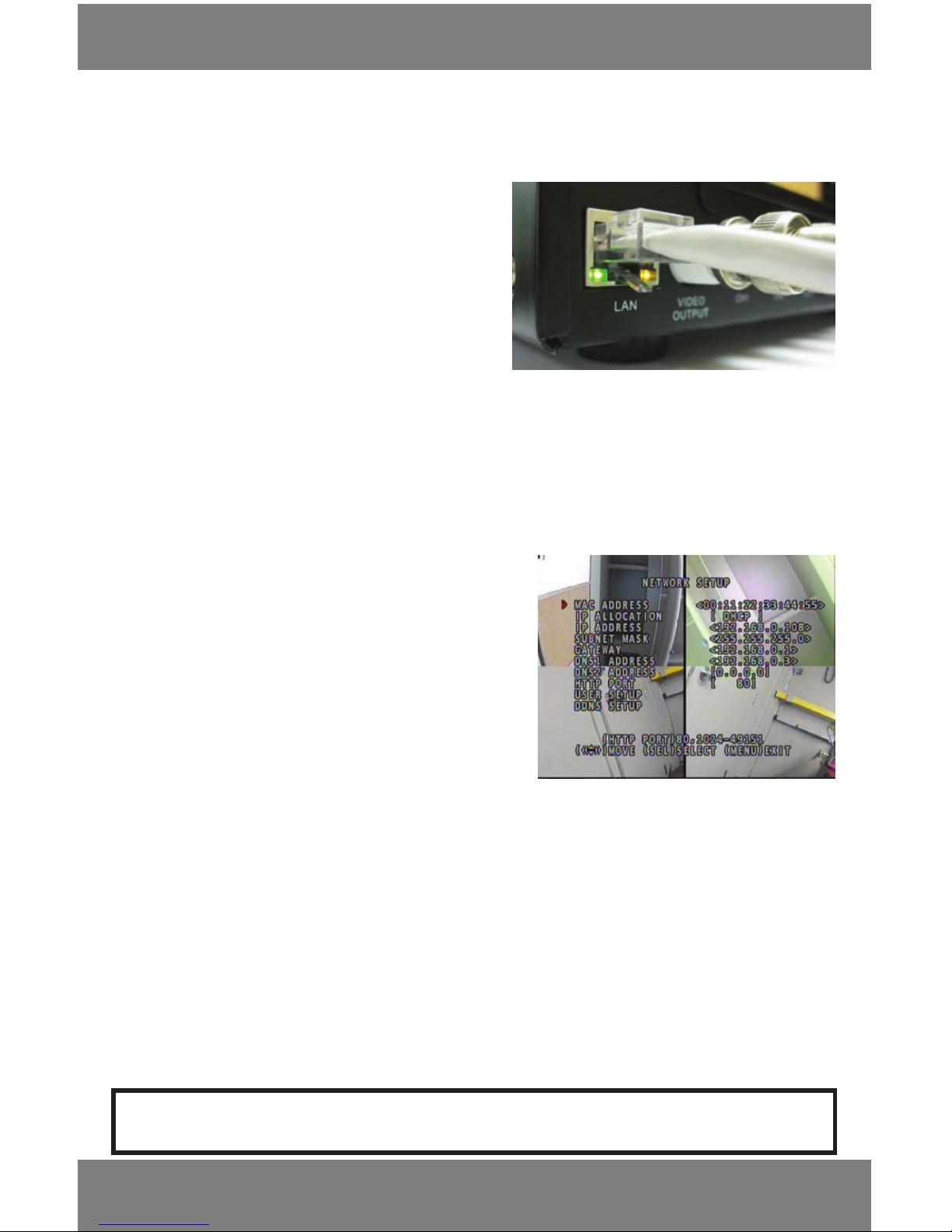
Connecting your DVR to the Router
1. Power o the DVR by removing the power cable
from the back of the DVR.
2. Connect the included network cable to the back of
the DVR in the “Ethernet” port (LAN).
3. Connect the other end of the network cable to an
available port on the router. The port should be
labeled 1-4, or 1-8.
4. Power on the DVR by reconnecting the power cable
on the back of the DVR.
A green link light should be present on the LAN connection of
the DVR and the port the DVR is connected to on the router. If
the link light is not on, the DVR is not properly connected or
powered on.
Finding your DVR’s IP Address (Internal IP Address)
By default, the DVR IP mode is set to DHCP. This means the DVR will automatically retrieve an IP address from the router
that it is connected to. Unless your network requires a static IP address leave the DVR IP Allocation set as DHCP.
1. Press Menu.
2. Move the cursor next to Network Setup and press enter.
3. Make sure the “IP Allocation” is set to DHCP. This setting is
acceptable for most users.
4. Write down your IP address, Subnet Mask, Gateway
and HTTP Port inside the brackets as they appear on the
DVR monitor. This information will be used in the next
few steps to view the DVR on your computer as well
viewing the DVR over the internet.
• The picture shows the IP address as 192.168.0.108,
The Subnet Mask as 255.255.255.0, and gateway as
192.168.0.1 (your DVR’s numbers will be dierent)
5. Go into User Setup and write down the Admin ID and Admin password. Default name is "admin" and the
password is "111111."
6. To change these settings press enter next to the setting you would like changed and adjust to whatever you
would like :
• The left and right arrows on your remote and the rewind and fast forward buttons to go backwards and
forwards
• To navigate through the numbers, letters and symbols use the up and down arrow keys on your remote
and DVR
• Press the record button to select the character
• Use the stop button to delete the selected eld
7. You can set the User ID and password the same way. The User ID will get limited access to settings when
accessing the DVR online.
If your router does not support DHCP, contact your network administrator to supply you with the proper IP information.
If the DVR needs to store PPPoE (DSL/ADSL) settings contact your ISP (Internet Service Provider) for the proper settings.
NETWORK SETUP
Page 36
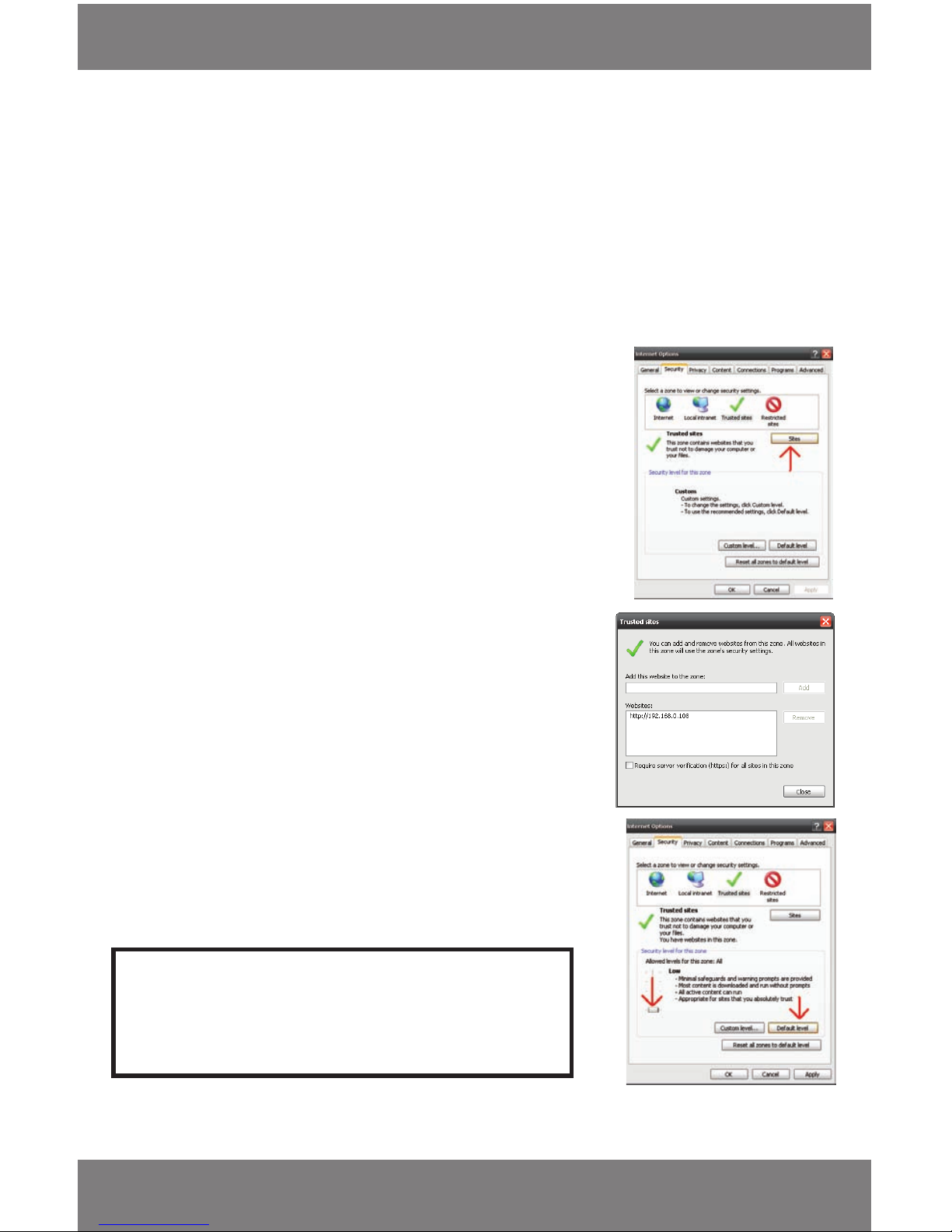
SVAT ELECTRONICS
now you can see
CV300 - 4CH
33
Preparing Your Computer for Viewing the DVR
Every computer that is accessing the DVR will need to be congured to download and run ActiveX controls. This is a one
time change and only needs to be made on the computer that is accessing the DVR. This can be done by following either of
the two methods below. Method 1 only aects websites that you specically add to the trusted sites list. To change for all
websites, use Method 2.
Method 1 (Recommended)
Add the DVR’s IP address to the Trusted Sites in Internet Explorer.
1. Open up Internet Explorer.
2. Click on TOOLS.
3. Click on INTERNET OPTIONS.
4. Click on the SECURITY Tab.
5. Click on TRUSTED SITES.
6. Click on the SITES button.
7. Type in the IP address of the DVR in the following format:
http://........ and click ADD.
8. If “Require server verication (https:) for all sites” is selected you will
need to uncheck the selection box. Click Add and close.
9. On main Settings, change the default settings for the TRUSTED
SITES zone to low. Click on DEFAULT LEVEL and change the security
level of the zone to “Low”. This can be done by sliding the slider
to the bottom. This will allow ActiveX controls from the DVR to be
downloaded and the DVR to be viewed on the computer.
10. Click APPLY.
11. Click OK.
Note: The IP address used in the example above is for internal
network viewing. If you are trying to access the DVR from a
remote location you will add the “External IP Address” to the
trusted sites list. (see Finding your External IP Address).
NETWORK SETUP
Page 37
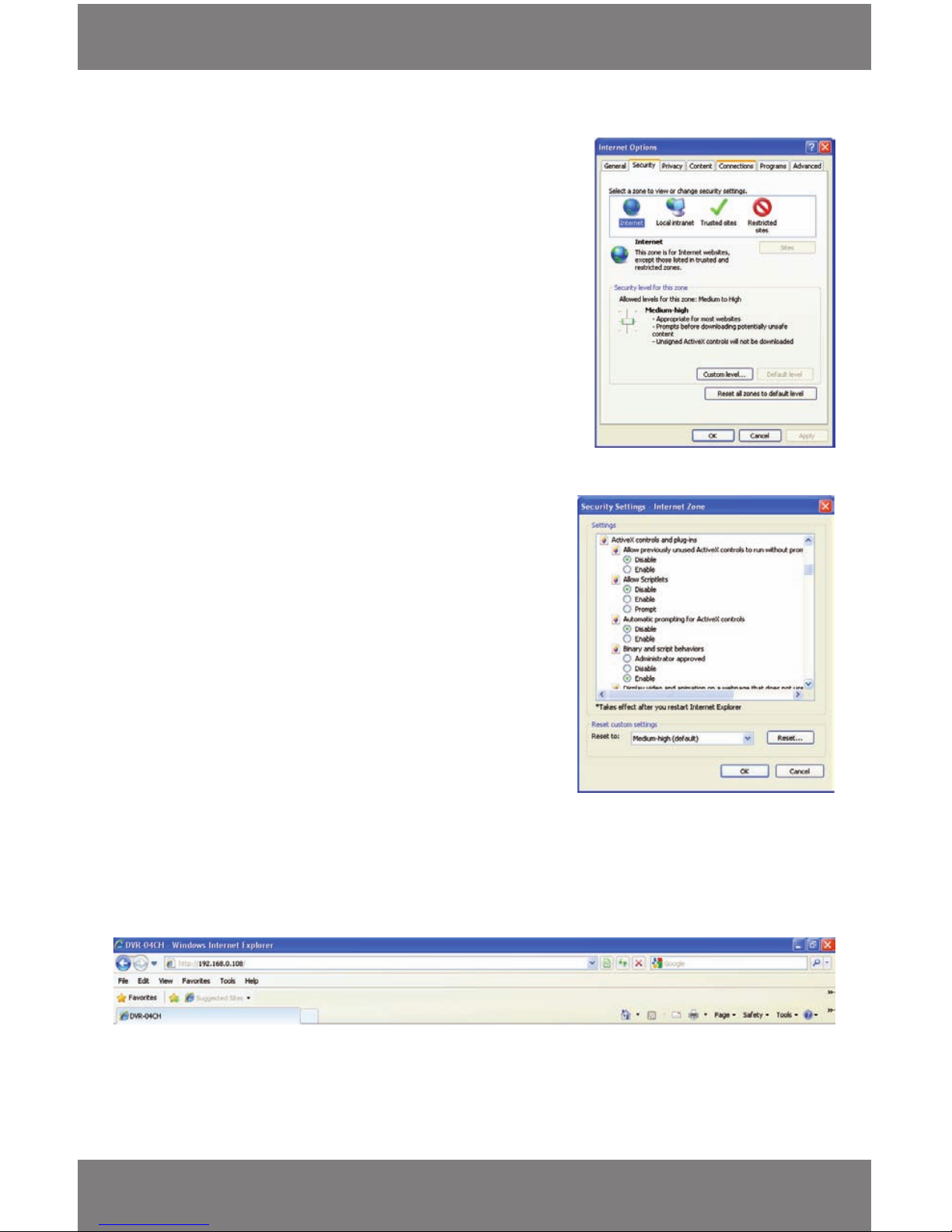
SVAT ELECTRONICS
now you can see
CV300 - 4CH
34
Method 2:
Adjusting ActiveX settings for all web pages:
1. Open up Internet Explorer.
2. Click on TOOLS.
3. Click on INTERNET OPTIONS.
4. Click on the SECURITY Tab.
5. Click on CUSTOM LEVEL.
6. Change the ActiveX Settings listed below.
• You may need to scroll down a bit before reaching the
ActiveX options
• Automatic Prompting for ActiveX controls: ENABLED
• Download signed ActiveX controls:
PROMPT or ENABLED
• Download unsigned ActiveX controls:
PROMPT
• Initialize and script ActiveX controls not marked as safe:
PROMPT
• Run ActiveX controls and plug-ins:
ENABLE
• Script ActiveX controls marked as safe for scripting:
ENABLE
If this is an option:
• Allow automatic prompting for le and code downloads:
ENABLE
7. Click OK.
8. Click APPLY.
9. Click OK.
Viewing Your DVR on Your Computer
Now that the computer is prepared to install the necessary ActiveX changes listed above, you are ready to start
viewing the DVR using your computer. Using Internet Explorer (Internet explorer is the only compatible browser), type
in the IP address of the DVR into the address bar using the following format: http://192.168.0.108 and press enter.
If the computer and the DVR are connected to the same router you can use the Internal IP address to view the DVR.
If the computer is not connected to the same router and is at a remote location you will need to use the External IP
address for the DVR to view the DVR from the remote computer.
NETWORK SETUP
Page 38
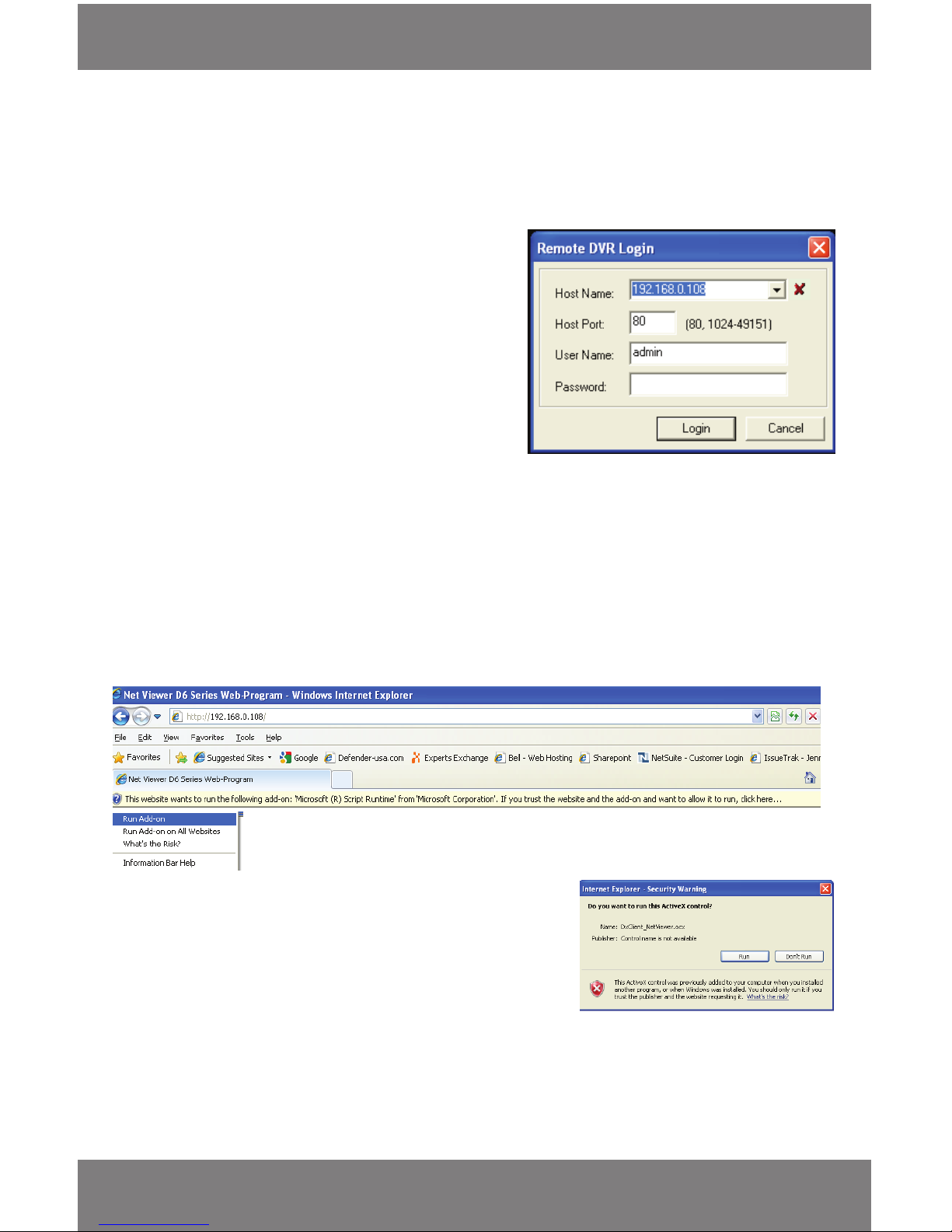
SVAT ELECTRONICS
now you can see
CV300 - 4CH
35
Host Name:
• If you are looking through a computer connected to the
same router you would use the DVR’s IP Address
• If you are looking through a dierent computer you
would use your External IP Address (instructions below)
Host Port: This is the HTTP port that is listed on the DVR.
By default the DVR uses port 80.
User Name: This can be the Admin ID or the User ID listed
under user setup on the DVR. By default it
is admin.
Password: This can be the Admin Password or the User
Password listed under user setup on the DVR.
By default is 111111.
Log in to the DVR (Using Internet Explorer)
Install the ActiveX Controls
The rst time a computer connects to the DVR there will be a yellow information bar that pops up below the address
bar in Internet Explorer.
Click on the yellow information bar and then select “Install This Add-on for All Users on This Computer…”. Please be
patient as the installation process can take a few moments.
If your ActiveX settings are set correctly you will see the following
dialogue box. Click INSTALL.
You should now see the web player and the connected cameras.
Viewing Your DVR Outside of Your Network
Now that you have successfully viewed your DVR and cameras from a computer it is time to set up your router to
view the DVR while at a remote location. This process is called Port Forwarding and there is a website with detailed
instructions on how to complete the required steps (http://portforward.com).
*Port forwarding is required if you want to view the DVR from a computer that is not connected to the same router.
By default the DVR will require a user to input a host name, host port, username and password before being able to
view the DVR online.
NETWORK SETUP
Page 39

SVAT ELECTRONICS
now you can see
CV300 - 4CH
36
NETWORK SETUP
Conguring your Router (Port Forwarding) to View the DVR Externally
Port forwarding is a necessary step that opens a path on your home/business network to allow you to view your DVR
video feed from outside your network (over the Internet).
There are hundreds of makes and brands of routers on the market , you can nd step by step instructions on http://www.
portforward.com.
*Networking Video Guides are available under the support section on the Defender website: http://defender-usa.com.
Open an Internet Browser and go to http://www.portforward.com:
• Select your router make and model from the list of DVRs
• Skip any advertisements that may be seen by clicking “Click here to skip this advertisement…” in the top right
hand corner
• You will see a list of various applications. The directions will be similar for all applications. Find a link for any DVR
or IP camera and click on it. If you are unable to nd a DVR, any application link will do - the instructions are all
very similar
• Follow the instructions using the HTTP port number assigned to the DVR
By default this port is 80 and can be veried by checking the NETWORK SETUP section in the menu of the DVR.
• All of the port forwarding steps must be performed correctly
• Once the port forwarding is complete you are ready to view your DVR from a remote location
• You can test to make sure the port forwarding is done correctly by visiting http://canyouseeme.org from a
computer that is connected to the same router as the DVR
• Visit the http://canyouseeme.org and type in the HTTP port in the “What Port?” eld. Click Check
• When you scroll down after entering in the DVR’s Port you should see a message that says: Success: I can see
your service on (External IP address) on port (HTTP port). Your ISP is not blocking port 80
FINDING YOUR EXTERNAL IP ADDRESS
The external IP address of the DVR is used to access the DVR from any remote location with Internet access. To nd the
external IP address of the DVR go to http://www.whatsmyip.org or http://www.showmyip.com using a computer that
is connected to the same router as the DVR. The web sites will display your external IP address in the top of the web
page for your reference. Make sure to write this down.
Now that you know your external IP address, you can perform a test to ensure your DVR is accessible from outside
your network (over the Internet). This test should be performed by a computer that is NOT on the same network as the
DVR. Although, using the External IP on the same network will occasionally work it may not work in all situations and
should be tested from a remote location.
1. Open Internet Explorer.
2. In the address bar type in the external IP address you
acquired from http://whatsmyip.org. It should be similar
to the following: http://74.14.243.111.
3. Press ENTER.
Note: If using a port other then the default port 80 (ex.
2000) the port will need to be entered at the end
of the IP address. Ex. http://74.14.243.111:2000
Page 40

SVAT ELECTRONICS
now you can see
CV300 - 4CH
37
NOTE: SVAT technical support cannot troubleshoot modems, since changing these settings can potentially
render your modem inoperable. Bridging or any other modications to the modem will need to be
completed by the ISP (Internet Service Provider).
Once you have your DVR set to view online, the software to view the footage diers slightly from the software that
is used when you connect the DVR to your computer. Please refer to the following instructions when viewing live
footage online:
• When you sign onto view your DVR you are seeing exactly what is being displayed on the monitor connected to
your DVR
NETWORK VIEWING AND PLAYBACK
TROUBLESHOOTING
IF SUCCESSFUL
You will be prompted to enter your username/password and install the ActiveX controls.
You are now able to view the DVR from any PC in the world with internet access and proper computer settings.
IF YOU CANNOT CONNECT
If the remote viewing does NOT connect it could be due to by one of the following reasons:
• Make sure the browser is Internet Explorer 6.0 or later and is on a Windows PC
• Port forwarding is not set up correctly. Review the section “CONFIGURING YOUR ROUTER (PORT FORWARDING)”
and http://www.portforward.com for setup instructions
• You can also go to www.defender-usa.com for an easy to follow networking video to guide you through
the setup
• A pop-up blocker is preventing the ActiveX controls from prompting you to install the activeX controls. Disable
all popup blockers
• Your router is blocking your computer from using the External IP Address from the same network as the DVR. If
on the same network as the DVR use the Internal IP address to access the DVR
• Port 80 is being blocked by your ISP (Internet Service Provider). Try changing the HTTP port to 2000. Port
forwarding will need to be set up for the new port and :2000 will need to be added to the IP address
• A DSL modem is preventing the connection because it is on a dierent sub-network. Contact your ISP to assist
with bridging the modem and router together. This is evident if your router says it has a WAN IP address of
192.168.#.# (advanced users)
• Check all the network connections are secure and properly inserted into the correct ports. Repeat all of the
networking steps again to make sure a conguration error was not made
• You may have to congure PPPoE settings to match the settings provided to you by your Internet Service
Provider (ISP). Consult your ISP for more information on your PPPoE settings
Page 41
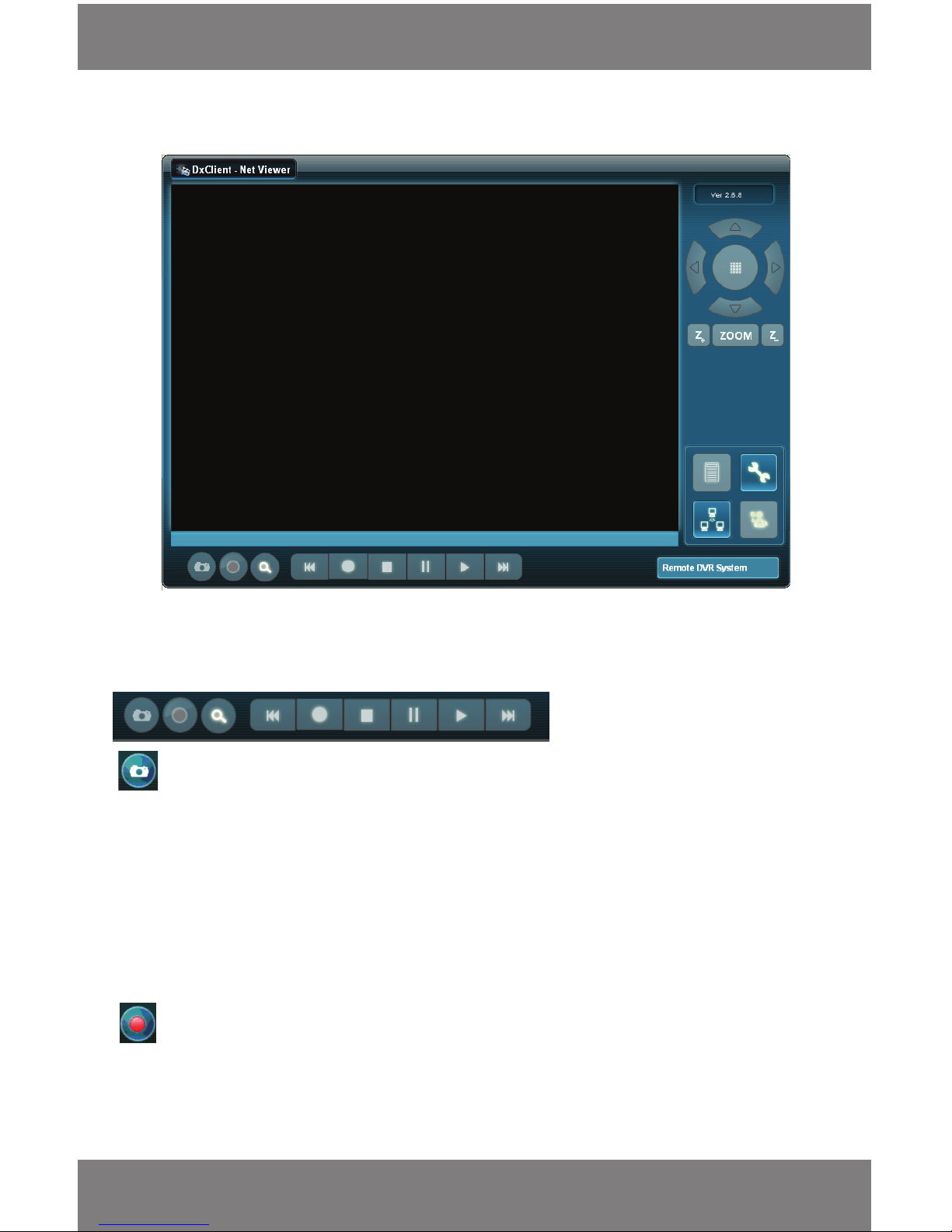
SVAT ELECTRONICS
now you can see
CV300 - 4CH
38
This is what the online viewing software will look like.
Capture
Clicking on this button takes a picture of the image on the screen and automatically places in a le on your C: Drive.
You will see a pop up message box which displays the location of the BMP image le. By default it will be stored
under C:\Program Files\DxClient\Capture.
- Once you take the photo you have the option to view the image immediately or not. If you choose not to it will
be saved in the C: drive
1. Double click on the image. By default it will open with Windows Fax and Picture Viewer unless another image
viewing program is set to display bitmaps.
2. If you want to use a dierent viewing program, right click on the image le and select open with.
Record
Clicking this option records what is currently playing on your computer and saves it to your computer according to
your desired settings.
• When you click on the record button a separate menu pops up
Bottom Buttons and Functions
If your DVR’s main menu is open (on your DVR) you will be unable to access any of the buttons or footage
ONLINE SOFTWARE
Page 42
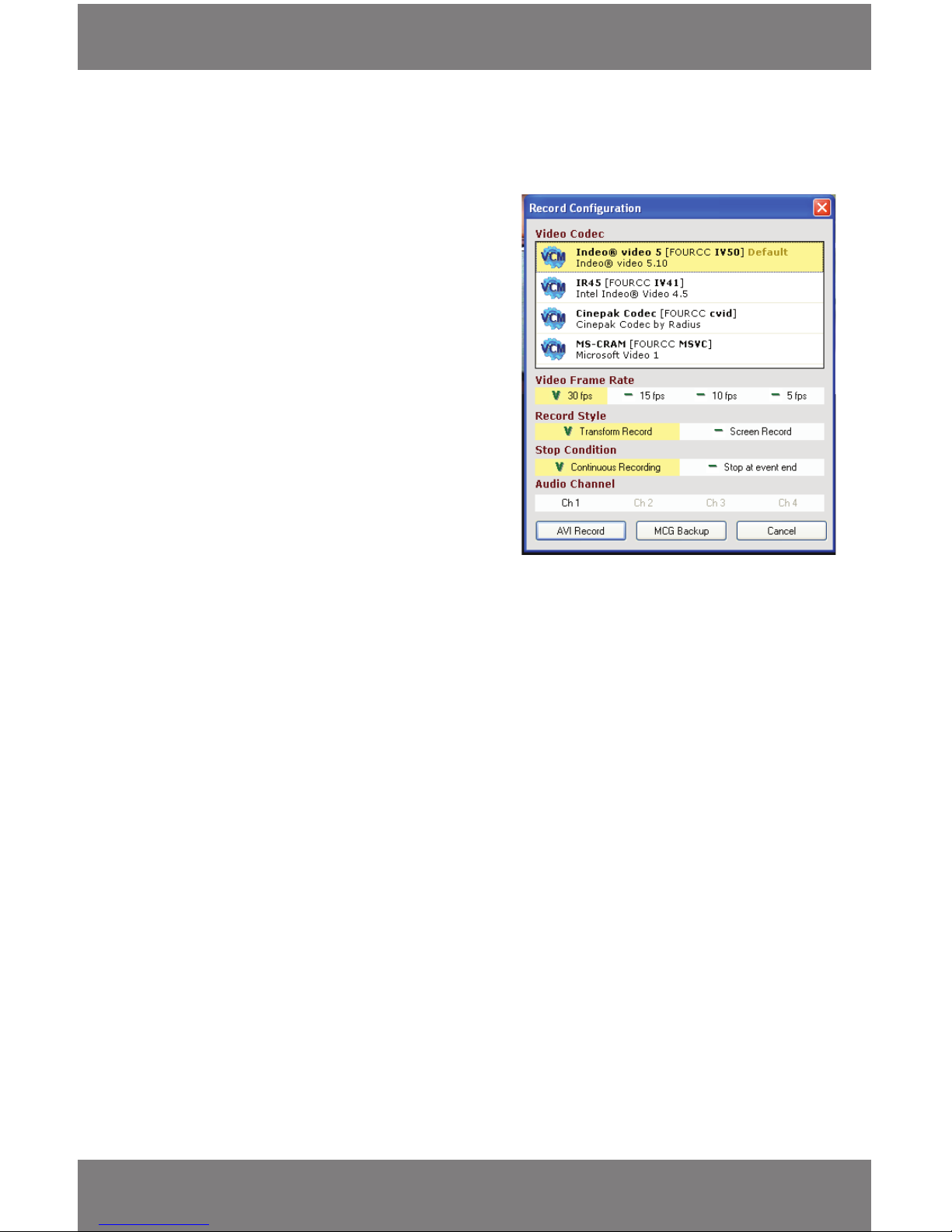
SVAT ELECTRONICS
now you can see
CV300 - 4CH
39
Video Codec
Refers to the format you wish to use for
saving the video onto your computer. This option is for
advanced users and is best to leave the codec set
to the default. If you are experiencing diculty with the
record function, try changing the codec.
Video Frame rate
This option allows you to set how many
Frames per Second (FPS) you will record the currently
displayed video with. Choose between 30, 15,10, and 5 FPS.
• The more FPS you record with, the smoother the video;
however it will make the le size larger. The less FPS you
have, the choppier the video but smaller le size
• To change the FPS you simply click the FPS that you would
like to record the video in. When your choice is highlighted
and there is a V next to it, the video will record in that
particular Frame rate
The instructions for the menu that pops up when the record feature is clicked are as follows:
Record Style
This indicates how the video will record. You have a choice to do a transform recording or a screen recording. There are
very slight dierences between the two styles. It is recommended to use Transform record.
• Transform record (recommended) shows you the data it is recording as it is recording (length of video, frames
recorded, le size and the software it is recording to) The data doesn’t show up when you play the footage back
• Screen record only shows the video play through and none of the information that transform record shows
• To select a particular record style you simply click the record style that you would like to record the video in. The
option is active if it is highlighted and there is a V next to it
• When playing the footage back both options look the same
Stop Condition
This option allows you to choose whether the video you are recording plays through each session you recorded one
after the other and records it, until you decide to stop the recording, or just records a one session of footage at a time.
• Continuous record – Will record all the footage you have recorded one event after the other until you stop it
(record button) or there is no video left on the DVR to record
• Stop at Event End - Stops recording footage after the session has ended, a session of footage is each time the
DVR recorded and stopped that recording. (Example: If you had motion detection on and the DVR only recorded
motion, the record option would only record one time the camera detected motion and automatically stop
recording the footage onto your computer when the camera did)
• To select a particular Stop Condition click the Stop Condition that you would like to record the video in. When
your choice is highlighted and there is a V next to it, the video will record in that particular FPS rate
ONLINE SOFTWARE
Page 43
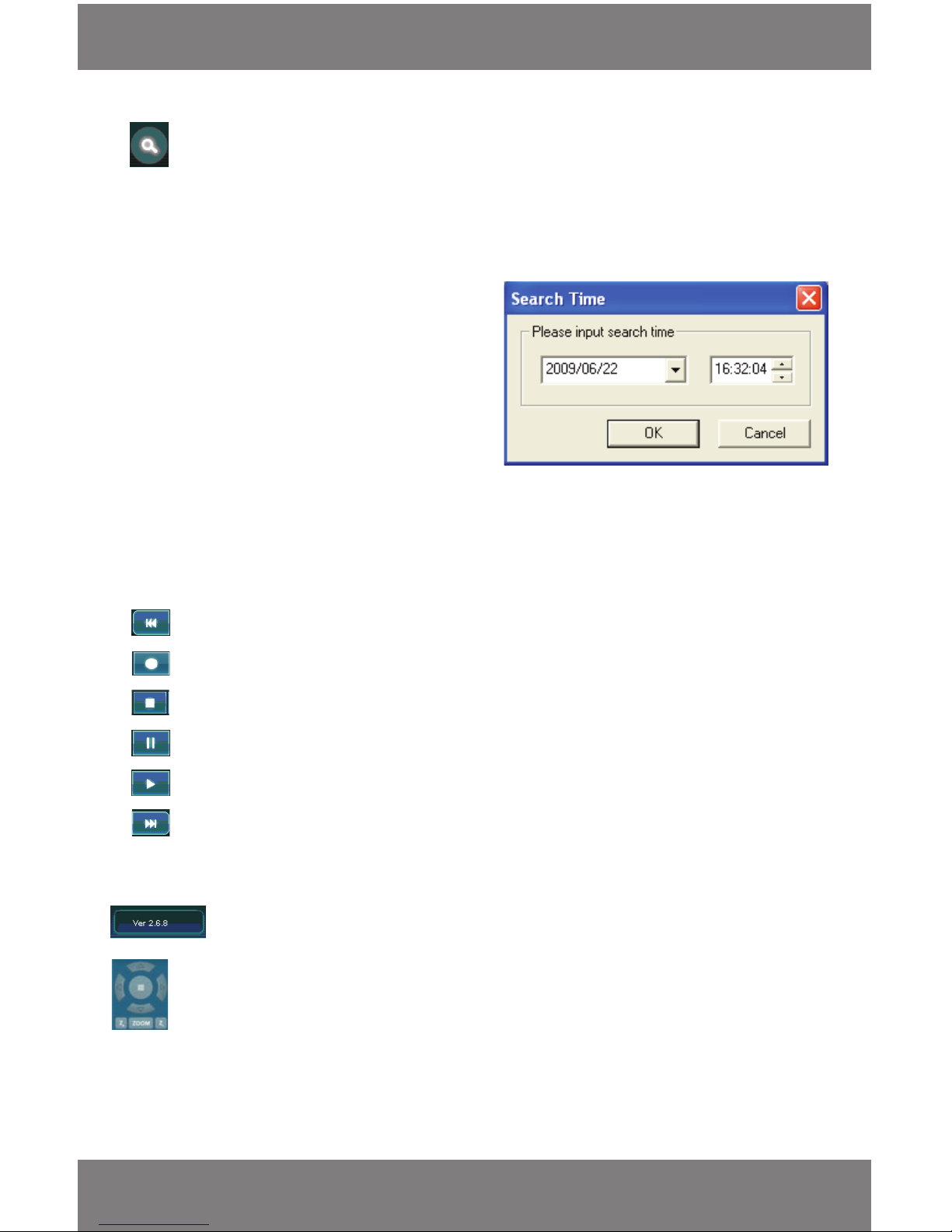
SVAT ELECTRONICS
now you can see
CV300 - 4CH
40
Search
This option allows you to search a specied date and time of footage you want to view. This function only works
when you are viewing the footage online
To view a specied date and time of footage:
1. Click on the search icon.
2. A dialog box will come up.
3. This box will ask you to input a search time.
• Click on the down arrow next to the date.
Choose your month day and year from the pop
up calendar
• Or you can type in the year, month and day
• Next set the time by clicking on the eld to
change and press the up and down arrows or
type in the number. Set the hour (24 hour
clock), minutes and seconds to search for on
the DVR
4. Once you have set the date and time you would like to view click the ‘OK’ button to search at that particular
time. If there is footage recorded at that time it will begin to play.
Rewind - Rewinds footage. The more times you click it the faster it rewinds.
Record - Sets the DVR to begin recording.
Stop - Stops the DVR from recording.
Pause - Pauses the playback footage.
Play - Plays the recorded footage (most recently recorded footage rst).
Fast forward - Fast forwards footage. The more times you click it the faster it fast forwards.
Side Panel Control Buttons
PTZ Camera Functions
This function is used if you have a PTZ camera connected to your DVR (not included/not supported). PTZ stands for Pan,
Tilt, Zoom and are commonly referred to as dome cameras. They allow you to control the camera by panning left/right,
tilting up/down, and zooming in on a focus area.
*PTZ Cameras are not supported with the CV300-4CH
Software Version - This indicates what version of the software you are using.
ONLINE SOFTWARE
Page 44
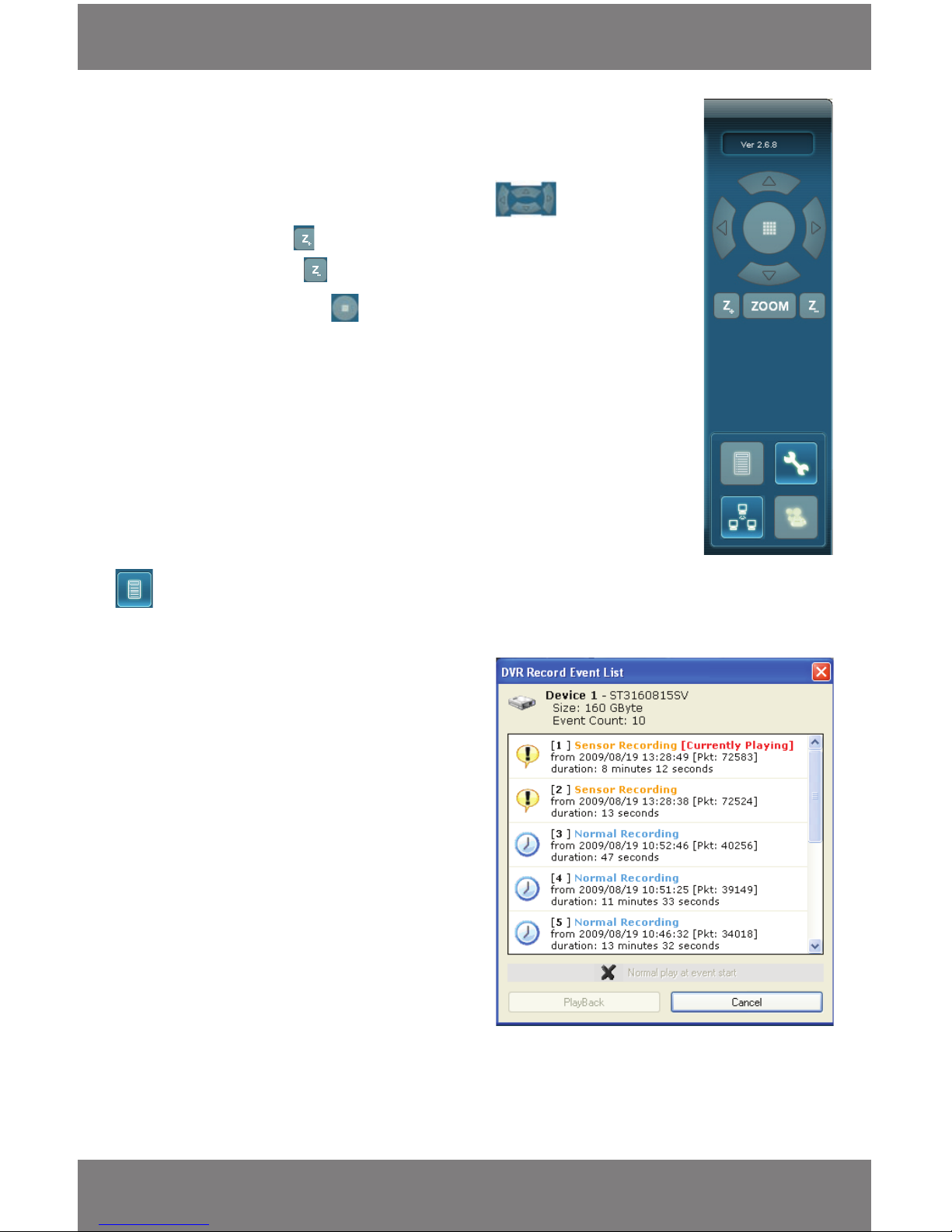
SVAT ELECTRONICS
now you can see
CV300 - 4CH
41
List Footage
This option will display the recording event list when you click the icon:
• This menu lists the video clips that have been
recorded. The events listed with the newest
footage rst and the oldest footage last
• The list explains what type of recording method
was used (sensor or normal record), the date and
time it was shot at, and the length of the
video recorded
• To select a particular video to view click the
listed video
• Click PlayBack to load your footage and it should
appear on your screen paused. You must press the
play button to start the video
• To begin playing back the footage when PlayBack
is clicked, highlight the event and click on Normal
play at event start
• Click PlayBack and the event will begin playing
automatically
• If you are unsure about the PTZ camera or need instructions on setting up
your PTZ camera please refer to the instruction manual for the PTZ camera
or contact the PTZ camera manufacturer
• To move the camera around you would use the arrow keys , to zoom you would
click and hold down the button until you have zoomed into your liking, to zoom out
you would click and hold the button until you have zoomed out to your liking
• The grid on the PTZ functions this grid allows you to decide which PTZ camera
you would like to control when viewing the online function (see network setup below)
ONLINE SOFTWARE
Page 45
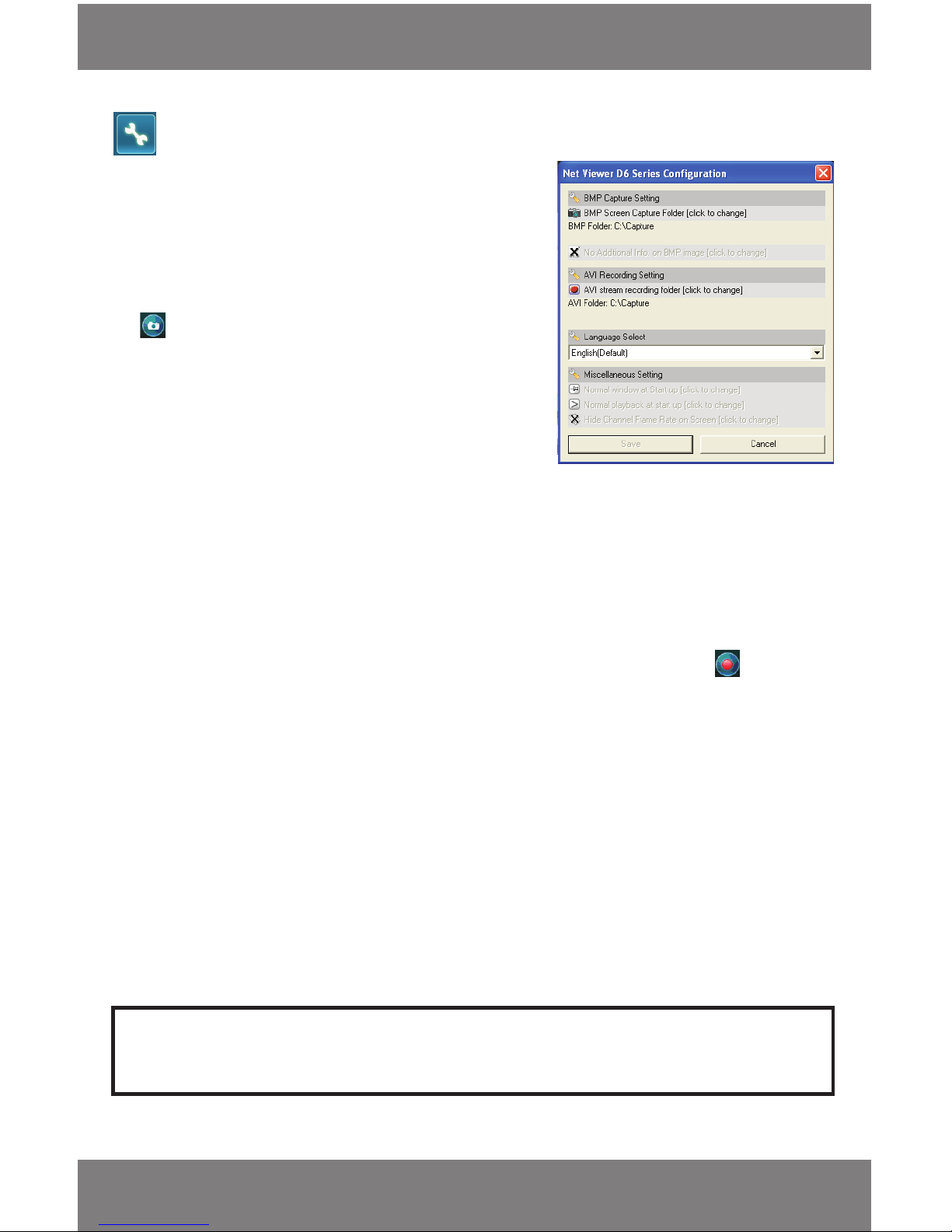
SVAT ELECTRONICS
now you can see
CV300 - 4CH
42
Settings
When you click the settings icon, many options for you to make
changes to the program appear in a separate menu, each option and
their function is as follows:
BMP Capture Setting
This setting allows you to pick which folder to save the “Captured”
images to. These are the images that are captured when pressing
the button.
To change where your footage is being saved:
• Click on the AVI stream recording folder option and scroll through
your folders to where you would like the footage to be stored
then highlight the folder and click OK
• The folder location should be listed below on the settings list now
BMP Folder
Displays the current capture folder save location
No Additional Info on BMP Image
This option is only available when you are viewing the software and the DVR is connected by a USB cable to a
computer. (see software instructions).
Record Conguration Setting
This setting allows you to pick which folder you would like the backup footage you record with the
button to
be saved.
To change where you pictures are being saved:
• Click on the AVI Stream Recording Folder option and scroll through your folders to where you would like the pictures to
be stored
• Highlight the folder and click OK
AVI Folder
Lists the current save folder for recorded AVI backups.
Language Select
English is the only supported language for this software.
Click Save to conrm all your changes.
If you do not want to save any changes you made then click cancel. If no changes have been made cancel will be the only
option available.
Note: The options that appear, but are unable to be accessed are from the software for your computer hookup
only. They cannot be changed with the Internet software.
ONLINE SOFTWARE
Page 46
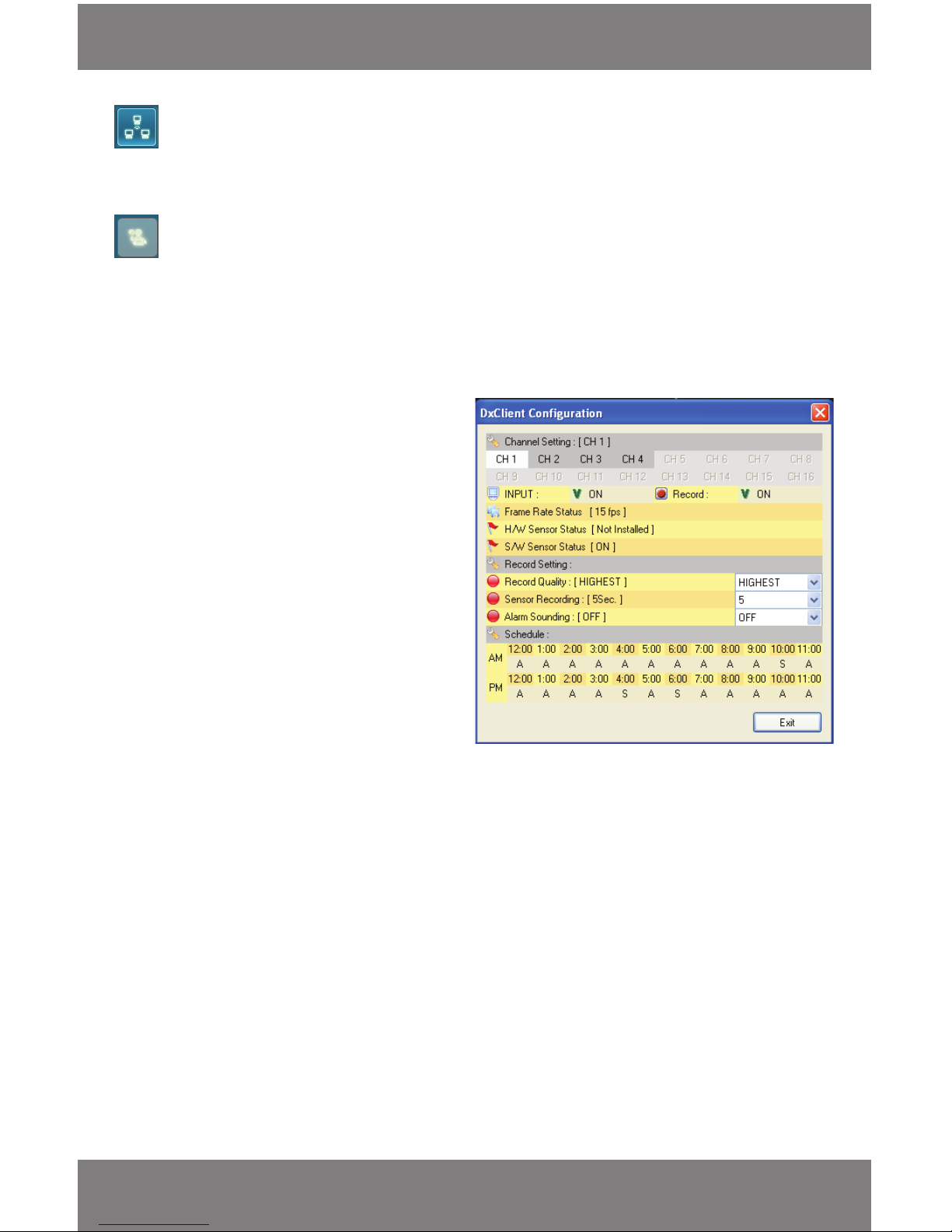
SVAT ELECTRONICS
now you can see
CV300 - 4CH
43
Connect/Disconnect
Clicking this function allows you to disconnect or connect to the system – the sign in menu will appear when you
want to connect back to the DVR footage.
Settings
This option allows you to change and save any settings you make to each camera while viewing the DVR online (if you
are signed on as main user). It also allows you to view certain settings that the DVR is set to. To adjust these settings
you must be in normal view mode.
The following settings and will appear on screen when you click this option:
Channel Settings
By selecting the CH# you will be able to view and
change the settings for the particular camera input.
This option allows you turn the camera and recording
on or o as well as displays the status of the camera.
To choose the camera:
Click on the channel number below Channel Setting
(CH1 = Camera 1, CH2 = Camera 2…) When channel
is highlighted you will be able to view and adjust the
settings for that particular camera.
Input
By clicking the on or o option next to this function
you will be turning the camera ON or OFF. This option
can be found in the DVR menu under Camera Setup.
Record
By clicking the On or O option next to this function
you will be turning the cameras recording On or O.
This option can be found in the DVR menu under
Record Setup.
Frame Rate Status
This option allows you view what the FPS (Frames per second) are set to on each camera. This only displays the FPS, it
does not allow you to change them – that can only be done directly through the DVR.
H/W Sensor Status:
This option allows you to view the status of a Hardware Alarm Sensor. The CV300- 4CH does not support external
alarms and the status will be set to Not Installed.
S/W Sensor Status:
This option allows you to view the status of the Software Sensor. This is eld will display whether the camera is setup
record using the DVR’s built in motion detection.
ONLINE SOFTWARE
Page 47

SVAT ELECTRONICS
now you can see
CV300 - 4CH
44
Record Settings
Allows you to change the DVR’s recording settings.
Record Quality
Adjust the recording quality from low, normal, high and highest. To change the record quality click to display the drop
down menu and select which recording quality level you would like.
Sensor Recording
This option allows you to choose how long you would like to record for after motion stops being detected by the DVR.
You have the option to record for 5 – 30 seconds (selection goes in intervals of 5).
Alarm Sounding
This option allows you to choose whether you would like your DVR to sound o an alarm when motion is detected.
This is a built in buzzer and emits a beeping sound. You have the choice to set them alarm duration between O, 5
seconds – Continuous Alert.
Schedule:
This option allows you set a schedule with dierent recording settings that your DVR will follow.
The type of recording can be adjusted for each hour. Click the symbol beneath the hour to change and the dierent
recording modes will change.
The Dierent Recording Modes are as follows:
(A) Normal Record – The DVR record continuously as long as it is set for this hour
(S) Sensor record – The DVR will only record when motion is detected. The event log will be updated when a
motion detection event occurs
(--) No Recording – Recording is disabled for the hour the symbol is displayed under
To save changes and exit the menu, click the exit button in the lower right corner.
DDNS (Dynamic DNS)
Instead of having to type in the IP address to access the DVR online you can use DDNS to create a easy to remember
website name to access the DVR. The DVR has many DDNS Provider web addresses built into it. The following
instructions are for DYNDNS.org and DDNS.CAMDDNS.COM. The sites are not owned nor operated by SVAT and
therefore support for these services will be done through their website.
To congure the DVR to Work with DDNS
1. Press menu and select NETWORK SETUP. Insert password if required. The default password is “111111”.
2. Navigate to DDNS and press enter.
3. Change DDNS SETTING to ENABLE.
Note: www.DynDns.com and www. DynDns.org are the same website.
ONLINE SOFTWARE
Page 48
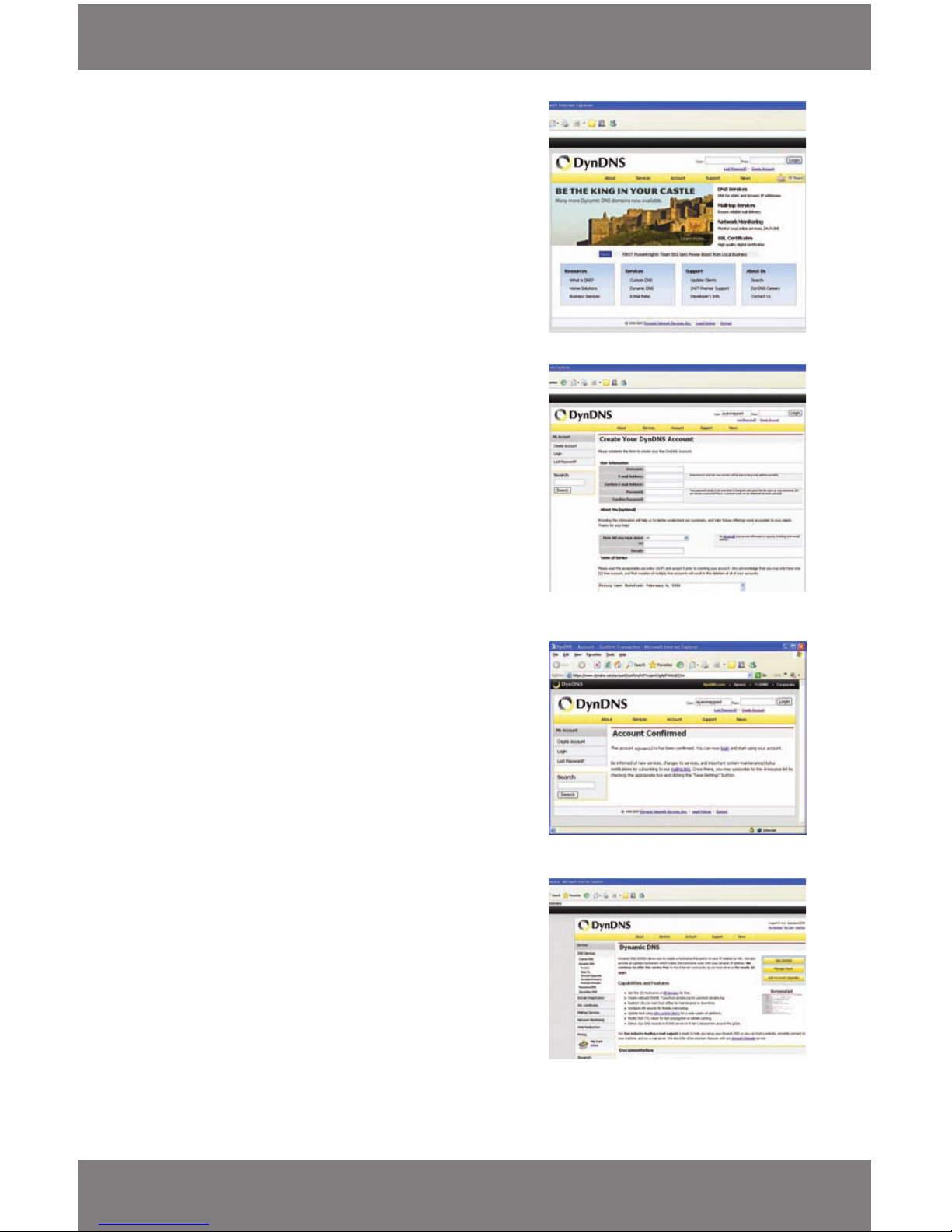
SVAT ELECTRONICS
now you can see
CV300 - 4CH
45
NETWORKING GUIDE
Step 1
DYNDNS.COM ACCOUNT SETUP
(required if using DYNDNS.ORG)
1. Open internet explorer and type http://www.dyndns.org
in the address bar.
2. Create a new account by clicking the “Create Account” link
in the top right hand corner of the site.
3. Enter your preferred user name, email address,
and password.
4. Optional information can be left blank, unless you would
like to enter it.
5. Read and agree to the Acceptable Use Policy (AUP) by
checking the box and click “Create Account”.
6. An account verication email will be sent to the email
address you supplied. You need to follow instructions in
order to complete the account activation.
Once the account has been conrmed you can log into
the account and set up for use with the DVR.
7. Enter the DYNDNS.org username and password you created
and click login.
8. Click on the “Services” button located on the top menu bar.
9. Click on the Dynamic DNS link, then the Dynamic DNS
free link.
10. Click on the “Get Started” link located on right side of
the screen. Next to Host Services Click on “Add Hostname”
11. Type in a desired host name. We recommend you use your
name, company name, or something that is easy for you
to remember.
12. Choose a domain name from the drop down menu. We
recommend using dyndns.org. Service Type should be set
to Host with IP address
13. In the IP address eld, type in the external IP address of
the DVR. This will only need to be done for the initial
set up as the DVR will connect and update with its current
IP address according to the UPDATE SCHEDULE on
the DVR.
Page 49
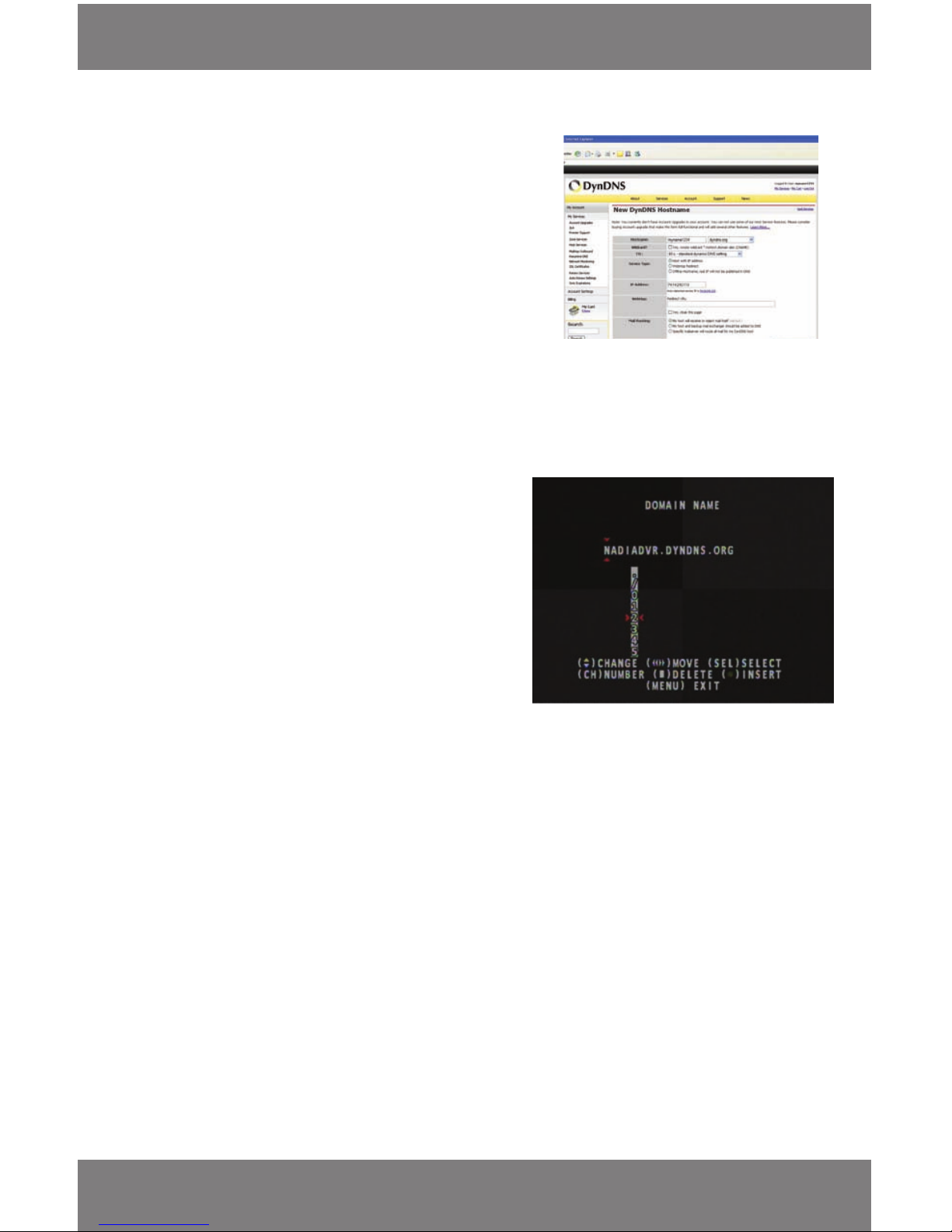
SVAT ELECTRONICS
now you can see
CV300 - 4CH
46
14. Leave all of the other options as is, and click “Create
New Host”.
15. Follow on screen instructions to activate and “Check out”
your free DDNS hostname.
16. Your dynamic DNS settings have been created
On your DVR go to MENU, then NETWORK SETUP and move cursor down to DDNS setup and press enter. The rest of the
information for the setup screen will be from the DDNS account you have set up online.
• To Navigate through the numbers, letters and symbols use
the up and down arrow keys
• Press the Record button to select
• The stop button to delete
• The left and right arrows on your remote or the rewind and
fast forward buttons to go backwards and forwards
1. Set the DDNS provider to dyndns.com
2. Enter the username of the account you created and used to
log into the account
3. Enter the password of the account you created and used to
log into the account
4. Enter the domain name for the DDNS host that was just created. It was set up on the website as the hostname.
(ex. NadiasDVR.dyndns.org)
5. Once you have entered all the appropriate information press Menu to save and exit back into live monitoring mode.
Setting your DVR for DYNDNS.ORG (requires a DYNDNS.COM account)
Step 2
VIEWING YOUR DVR THROUGH DNYDNS.COM
1. Go back to your computer and put in the DVR address you created on your DYNDNS account (example: nadiadvr.
dyndns.org) into the address bar and press enter.
2. You should be promted to enter a host name, Port and Password.
Host Name: DVR’s external IP Address
Port (Default): 80
Password (Default) : 111111
3. The cameras view and online software should appear. (instructions above)
Step 3
NETWORKING GUIDE
Page 50
SVAT ELECTRONICS
now you can see
CV300 - 4CH
47
DVR TROUBLESHOOTING
The cameras are not
sequencing
• Check if you have sequence dwell time set to a particular time under
the miscellaneous set up menu
• You must initiate the sequencing to get it to start by pressing the
pause button on the remote of the sequence button on the front of
the DVR then the cameras will sequence according to the sequence
dwell time
• You must be in live viewing mode
Nothing is recording but all the
images are appearing on screen
• You must initiate the recording to start by pressing the record button
• Check under Record Setup in the main menu to make sure all the
cameras are set to ‘ON’
• Check your record schedule to make sure the DVR is set to record that
present hour
The camera picture is too dark • Adjust the cameras brightness settings under Main
Menu>Miscellaneous setup> Image parameters
• Try moving your camera to a brighter area
• Make sure the camera is not pointing directly into a light source
• If using at night, make sure subject is no more then 15ft away from
camera. The LEDs need to reect o an object to display an image
• If using during the day, your camera may not be getting enough light
on it. Adjust the sunshade (top of camera) to let more sun hit
the camera
My night vision will not turn
on/I can’t see at night
• Night vision turns on automatically on the cameras when the sensor
detects a lack of light. If your cameras are in a space with too much
light, the night vision will not turn on
• The night vision cameras are made to see 10-15 ft in the dark. If you
have the cameras in an open area the night vision will be reduced. The
IR LEDs need to reect o an object to display an image
The video plays choppy when
viewing live footage online
• Multiple people viewing the DVR at a time, it will slow the connection
to the DVR. Try accessing the DVR at a later time
• This could be due to the speed of your internet connection, check
with your internet service provider if the video seems to be choppy no
matter when you check it
• It is normal for there to be a small time delay between the camera live
footage and the network viewing
The browser keeps freezing/
wont let me play the footage
• Make sure you have an up to date browser to view the footage
through with the proper ActiveX options
• Make sure the browser is Internet explorer, the software will not play
on any other browser
• Download all Windows Updates to make sure you have the latest
version of windows and Internet Explorer
Page 51

SVAT ELECTRONICS
now you can see
CV300 - 4CH
48
DVR TROUBLESHOOTING
Cannot power o DVR • The DVR is set to run as long as it is plugged in. To power o the DVR
disconnect the power cable
Playback video is choppy • Check the FPS for each camera that is recording the choppy video.
Refer to your settings in the main menu. The more FPS the smoother
the video. If the FPS is set to low the video will appear choppy
The schedule is not recording
properly to my set times
• Check to see if you have the proper time set on your DVR. Refer to the
instruction manual under Miscellaneous Setup
• Double check your schedule record times – you may have it set on the
no record function
• Remember that the DVR works on a 24 hour clock. 13:00 would be 1
O’clock PM
There is a beeping noise every
time I press a button
• Keypad tone is set to on. If you would like to turn o this feature refer
to the instruction manual under Miscellaneous Setup
Nothing happens when I press
Play
The DVR will not record while I
am watching recorded footage
The DVR will not let me access
the menu while in play back or
recording mode
• The SN300 is a simplex DVR, which means it can only do one thing at
a time. If you would like to play recorded footage, you must stop the
recording in progress
• If you would like to continue recording you must stop the playback footage
• If you want to access the menu, you must stop the recording/playing
back footage
I cannot see (all/one) of the
camera(s) on the monitor
• Check if the cameras are properly hooked up to the back of the DVR
and to a power source
• If using the 4 to 1 power connector, make sure it is plugged into a
power source and each of the cameras
• Check Camera Setup from the main menu to see if any of the cameras
are turned o
• Check if hidden camera is set to ON for any of the cameras under
miscellaneous set up menu
I have lost video footage • This could be from lost footage due to tampering of cameras, make
sure to check all connections are secure and set properly
• This could be because HDD overwrite is enabled. This means that once
the HDD is full the DVR will begin overwriting the earliest
stored footage
• Try unplugging the power to the cameras and/or DVR
Page 52

SVAT ELECTRONICS
now you can see
CV300 - 4CH
49
I can’t see the online footage
using my external IP address
• Sometimes your router will not allow you to view the footage with
your external IP address because the DVR is hooked up to the same
router. Try putting the DVR’s internal IP address in the address bar and
try to connect
• See the network set up section for set up instructions
• If using a Port other then 80 add ot to the end of the IP address
Cannot view the DVR through a
remote internet connection
• Port Forwarding may not be set up correctly
• The external IP address of the DVR may have changed. Try setting
up the DDNS account to always be up to date with the latest IP
information
• The ISP may be blocking network trac on Port 80. Try changing the
HTTP port to 2000 and recongure the port forwarding
• Refer to the Network Setup Section of the manual for more
troubleshooting and for detailed instructions on how to set up the
DVR for remote viewing
Remote control is not working • Make sure the batteries are installed correctly
• Make sure you are pointing the remote at the IR sensor (on the top
right side of DVR)
• Point the IR Remote at the camera lens and press a button. You should
be able to see the IR LED icker through the DVR monitoring device
• Try replacing the batteries in the remote
I plugged a mouse into the USB
port but it’s not working
• The CV300 - 4CH is not designed to operate with a mouse. The only
way to access the DVR settings is with the front panel or the remote
control
The DVR is not backing anything
up on my thumb drive when I
plug it into the USB port
• The CV300-4CH is not designed to operate with a thumb drive. You
must connect the USB directly to your computer and install the proper
software to view and back up footage from the DVR onto
your computer
The DVR keeps beeping at me • The sensor setup could be set to alarm when motion is detected in
front of the camera. To turn this o you must access the sensor setup
through the main menu
• There could be video loss on one or all of the cameras. The CV300-4CH
is set to alarm when there is video input loss. This is to alert you if
anything is tampering with the camera to DVR connections the alarm
will go o. Check your connections and keep the DVR in a safe place
where it will not me tampered with or moved around
• Disconnect and reconnect all camera connections to make sure they
are snug and tight tting
DVR TROUBLESHOOTING
Page 53
SVAT ELECTRONICS
now you can see
CV300 - 4CH
50
DVR SPECIFICATIONS
Resolution NTSC: 720 x 480 / PAL: 720 x 576
Recording Frame Rate Max.60fps(adjustable)
Recording Time 2 Years
Recording Resolution NTSC: 720 x 240 / PAL: 720 x 288
Recording Method Record as Each, Playback in Quad and Full Screen
Recording Qualities low, normal, high, highest
Recording Modes Motion Record, Continuous Record, Time Schedule Record
DVR TROUBLESHOOTING
The hard drive is lling up too
quickly
• Check your FPS that you are using. If you are using a high number of
FPS then the hard drive will ll up faster. Try lowering your FPS for
some cameras
• Check the video quality you are using. If you are using a high video
quality then the hard drive will ll up faster. Trying lowering the
video quality
• Adjust your schedule – If you on Normal Record for 24 hours a day the
hard drive will ll up faster. Try switching some times to sensor record
The DVR is telling me that my
SLAVE drive is empty
• The Slave drive is not supported with this DVR
I am prompted to put in a
password for everything
• This is because you have the password enable set to ON in the
Miscellaneous Setup.
The network settings on the
DVR are not showing me any
information
• Make sure the DVR is properly connected to the router. There should
be green link indicator lights if the DVR is properly connected.
• Make sure the DVR IP Allocation is set to DHCP. This is a standard
default setting that will work in most networking situations.
• Power cycle the DVR is it is properly connected and the IP Allocation is
set to DHCP
The HDD light is blinking • This is completely normal. If the hard drive is playing back footage
or recording, the light will blink to notify you that there is hard drive
activity on the hard drive
Page 54
SVAT ELECTRONICS
now you can see
CV300 - 4CH
51
Recording Media HDD (Backup via USB cable to PC)
Autostart Recording Yes
Auto Resume Recording Yes
HDD Type Internal
Video Format NTSC/PAL
Video Loss Alarm Auto Detect Alarm
Video Inputs 4 CH Composite BNC
Video Display Output 1 CH Composite BNC (Monitor)
Live Resolution NTSC: 720 x 480 / PAL: 720 x 576
Live Frame Rate 120fps
Live Viewing Full, Quad
Network Protocol TCP/IP, DDNS, DHCP,
Network LAN IP Static, Dynamic
Network Connection 10/100 BaseT Ethernet (RJ-45)
Back-up Via USB cable to PC
Play Search Mode Time/date, Event list
Play Speed Yes
Pan/Tilt/Zoom No
Play Mode Full, Quad
OSD and System Menu Display Yes
OSD Language Display Six Language(English, French, German, Italian, Spanish, Portuguese)
Time and Date Stamp Display Yes
Password Protection Yes
Adjustable Screen Settings Yes
File Transfer USB 2.0
DVR SPECIFICATIONS
Page 55
SVAT ELECTRONICS
now you can see
CV300 - 4CH
52
Operating System Linux
Disk Full Warning Yes
Automatic Overwrite Option Yes
Playback Navigation Play, Pause, Stop, FWD, REW
Watermark No
Housing Material Iron
Housing Color Black
Battery Life No
Power Input 12V DC 3A
Power Consumption 13W~30W
Power Adapter Input 100V 50/60HZ~240 50/60HZ
Operating Temperature (50~104)
Operating Humidity Under 90%
Dimensions 9.84 X 9.25 X 1.49 in
Weight 2.64 lbs
USB Port Backup
Remote Control Yes
Supported Peripherals Remote Control, USB 2.0
DVR SPECIFICATIONS
Page 56
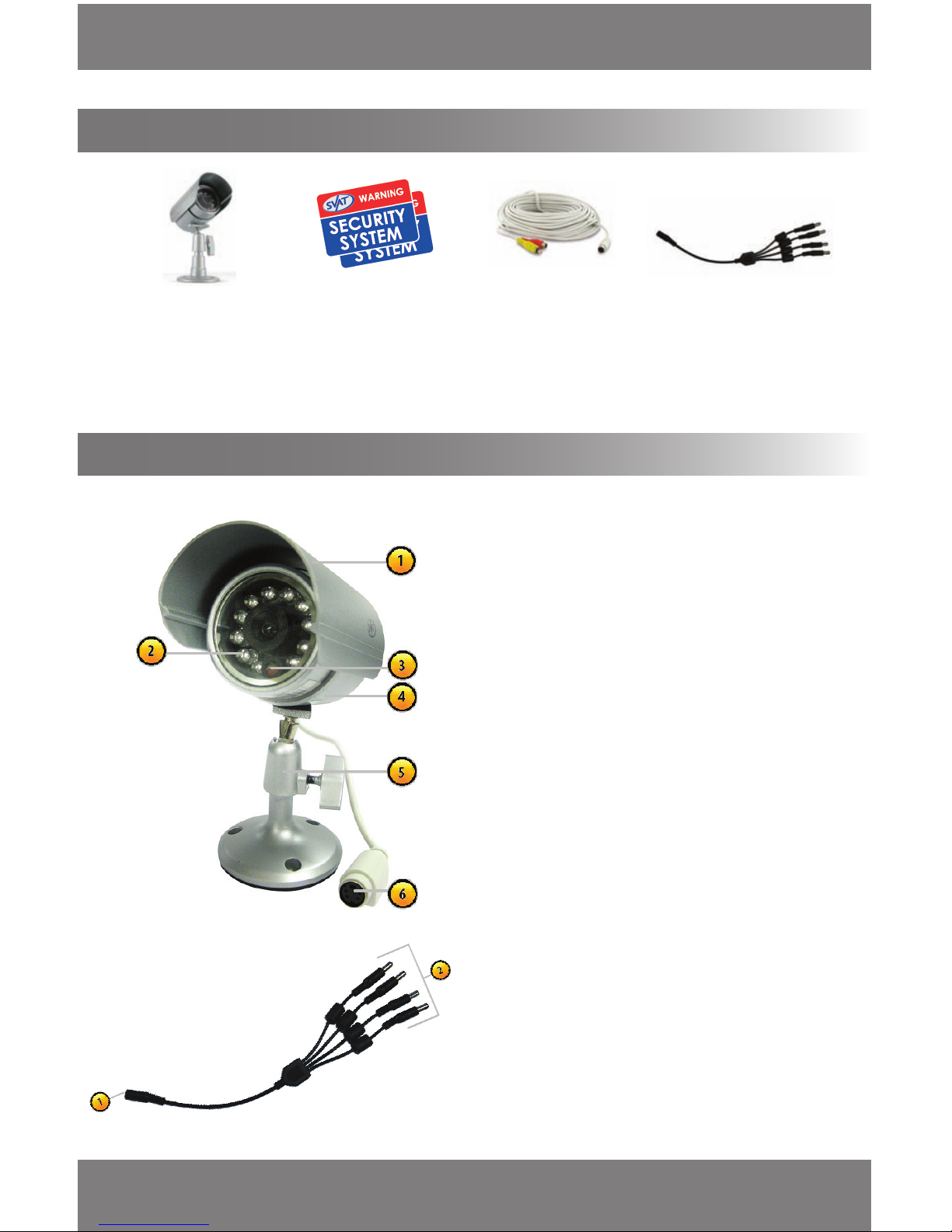
SVAT ELECTRONICS
now you can see
CV300 - 4CH
53
CAMERA MANUAL
WHAT IS INCLUDED
1 Indoor/Outdoor Night
Vision CMOS Color
Camera
2 Window
Security Stickers
4 PIN DIN (female) to RCA
(male) Video/Power Wire
• BNC to RCA Connector
• 1 Power Adapter for Camera
• Camera Mounting Hardware
1 x four to one Power
Supply Cable
• Instruction Manual
• 1 Year Warranty
• Online/Toll Free Support
FEATURES OF THE VU5
VU5
1. Sun Shield - Helps prevent glare from bright lights
2. Infrared (IR)LEDs - Allow the camera to see in the
dark up to 15ft away
3 CDS Sensor- Turns on the infrared LEDs when it
gets dark
4. Camera Housing - Made of protected metal to
prevent rust
5. Camera Mount - Allows the camera to be desk or
wall mounted
6. Connection to Video / Power Wire - Connection for
power and video out
IMPORTANT INFORMATION
While this camera is weatherproof, it is not 100%
waterproof. Please do not install it in areas that receive
direct rain or under eaves trough draining spots. Do not
cut the DC power cable of this camera to t with another
power source. Do not cut the video connection wire to t
with a dierent video connection type. Any unauthorized
modications will void your warranty.
Four to One Power Supply Cable
1. Female 12V Connection
2. Power Supply Ports
The four to one power Supply Cable allows you to plug
four cameras into one power source, saving you time
and space.
Page 57
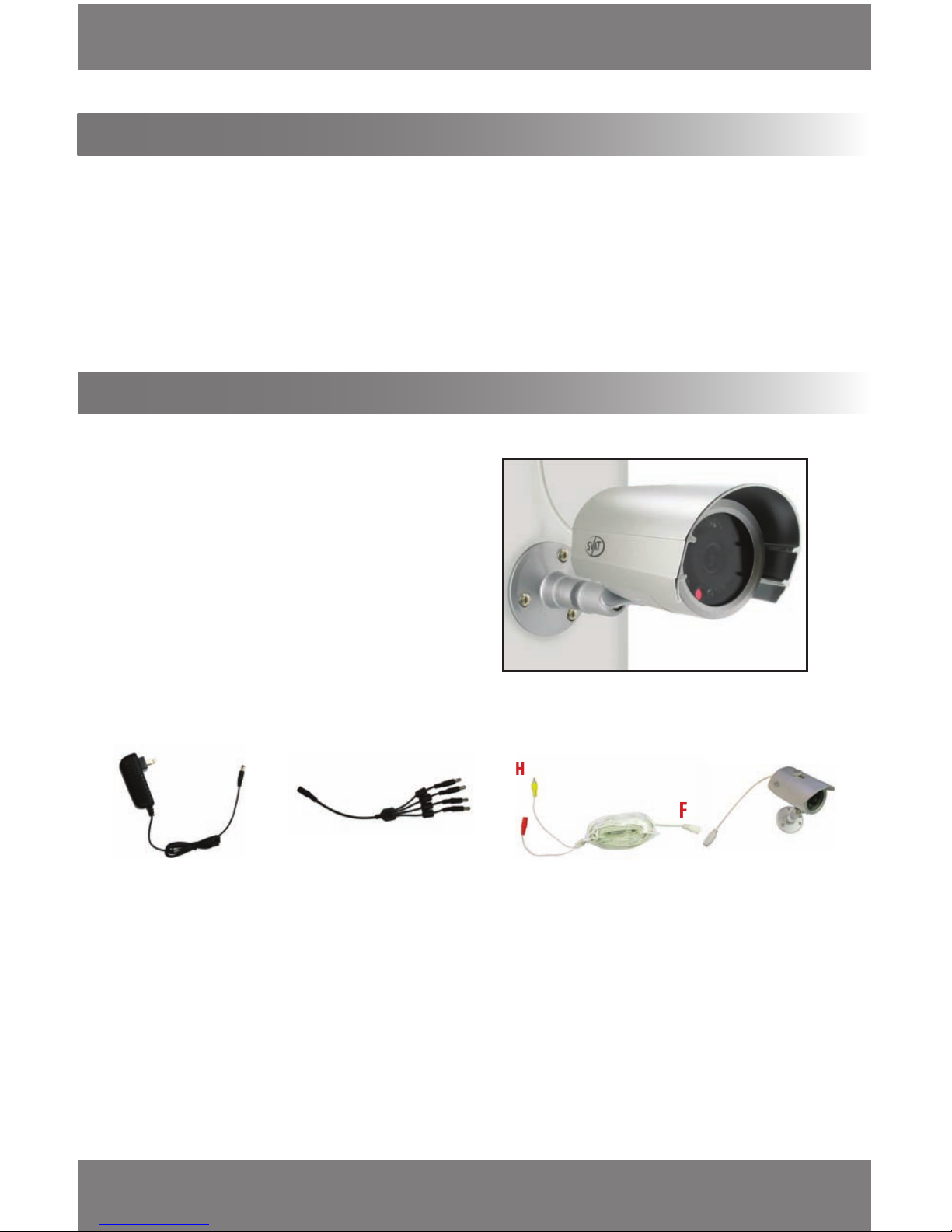
SVAT ELECTRONICS
now you can see
CV300 - 4CH
54
1. Screw the mounting bracket into the camera’s mounting
hole, turning it clockwise.
2. Mount the camera in the desired location no more than
60ft from the TV/monitor/VCR DVR unless you have
purchased additional wiring. You may wall mount or
desk mount these cameras. 60 ft. Extention wires may
be purchased.
3. Adjust cameras to the desired viewing angles.
• The camera should be installed 8 to 13ft above the area to be monitored
• Ensure there are no obstructions in the camera’s view, to maximize viewing area
• Ensure that the sunshade is positioned to avoid glare and position camera away from direct sunlight
• Decide whether the camera will be wall-mounted or sit on a desk/table top. If wall mounting, use the mounting
hardware in the package. We recommend that the mounting bracket is secured using the included screws for all
installations
• This camera comes with 60ft of wiring. Please make sure that you mount the cameras no more than 60ft from
the DVR
• We recommend using a surge protected power bar to protect the cameras internal circuitry
MOUNTING THE CAMERA
CAMERA INSTALLATION
USING THE FOUR TO ONE PORT POWER SUPPLY WITH CAMERAS
1. Plug 12V adapter (A) into electrical wall outlet or surge protecting power bar.
2. Plug the single end (female 12 V connection) of the four port power supply (C) into the male end of the 12V adapter (B).
3. Connect the 4 PIN DIN female connection on the camera (E) into the 4 PIN DIN male connection on the 60ft video/
power wire (F).
4. Plug the red adapter from the 60ft video/power wire (G) into one of the ports of the four port power supply (D)
5. Connect the RCA Video from the 60ft video/power wire (H) into the Channel/Camera inputs on your DVR or monitor.
5. Repeat for all cameras.
A
B
C
Wiring Diagram
Wiring Instructions
H
F
G
D
D
D
D
E
CAMERA MANUAL...continued
Page 58

SVAT ELECTRONICS
now you can see
CV300 - 4CH
55
Before contacting technical support, please follow the troubleshooting tips below for solutions to common
problems.
No picture/signal
• Make sure your TV/monitor is on the correct video input channel. This is NOT
channel 3. Common terms for this channel is INPUT, AV CHANNEL, LINE 1, LINE
2 and AUX. Please use your TV or VCR manual to correctly identify this channel
• If your camera is connected to a VCR/DVR, make sure that it is properly
connected to your TV/monitor
• Check all connections to make sure they are securly and properly connected
• Check your power supply to ensure that the camera is powered up
• Cup your hands around the front of the camera and look at the LEDs. They
should be glowing red. If they are not, check the power supply
Picture is too bright
• Make sure your camera is not aimed at direct sunlight
• Adjust the sunshade by sliding it forwards to block out excess light
• Make sure nothing is obstructing the CDS sensor on the camera. If the CDS
sensor is blocked, night vision mode will be active and may produce extra light
in your camera’s picture
• Move your camera to another location
Picture is too dark
• If using at night, make sure your camera’s subject is no more than 15ft away
(may vary based on amount of ambient light available)
• If using during the day, your camera may not be getting enough light. Adjust
the sunshade by sliding it backwards to let in more light
• Check the brightness and contrast settings on your TV/monitor
• If your camera is connected to a VCR/DVR, check the brightness and contrast
settings on the VCR/DVR
• Move your camera to another location
Night Vision is
not working
• The night vision turns on automatically when light levels drop. Try the camera in
a pitch black setting. The area that it is in may have too much light and may not
activatethe sensor
• Cup your hands around the front of the camera and look at the LEDs. They
should be glowing red. If they are not, check the power supply
CAMERA TROUBLESHOOTING
Toll free telephone:
1.866.946.7828
Email:
Online live web chat:
Visit www.svat.com
Toll free fax:
1.888.771.1701
Disclaimer:
The CV300-4CH has been designed to come equipped with Vu5 cameras. Depending on the product "kit " you have
purchased, your camera type or camera specications may vary.
Page 59

SVAT ELECTRONICS
now you can see
CV300 - 4CH
56
CAMERA SPECIFICATIONS
INDOOR/OUTDOOR CAMERA
Camera Type
Bullet
Image Sensors 1/4" Color CMOS
Resolution 400 TV Lines
Outdoor Use Yes
IP Rating IP55
Focal Length 6.0mm
Focus Type Fixed
Night Vision Yes
Sun Shield Yes
Number of IR LEDs (and Range) 11, up to 15ft
IR LED Control Automatic (CDS Sensor)
Min. Illumination 0 lux
Video Output 60ft 4 PIN DIN to RCA (male) Video/Power Wire
TV System NTSC
Microphone No
Motion Detection No
Viewing Angle 65 Degrees
Electronic Shutter 1/60 ~ 1/100000 sec
BLC Yes
AGC Automatic
ELC Automatic
IR Cut Filter Yes
Housing Material Metal
Housing Color Platinum Silver
Signal/Noise Ratio >48dB
Camera Bracket Yes
Operating Temperature 14°F ~ 122°F
Operating Humidity 95%
Camera Power Input DC 12V 200mA
Power Adapter Input 120V 60Hz
LED Power Indicator No
Dimensions 3 1/8" x 2" x 4 3/8"
Weight
0.06lbs (with stand)
Page 60

SVAT ELECTRONICS
now you can see
Model#:
CV300 - 4CH
www.svat.com
Disclaimer
SVAT does not endorse any of SVAT products for any illegal activities. SVAT is not responsible or liable in
any way shape or form for any damage, vandalism, theft or any other action that may occur while a SVAT
product is in use by the consumer.
VISIT US ON THE WEB!
Product Information
User Manuals
Quick Start Guides
Specication Sheets
Software Updates
Firmware Upgrades
www.svat.com
 Loading...