

Page 1
1
| |
It Loves-Me
User’s guide
| |
It Loves-Me
Page 2

2
| |
It Loves-Me
User’s guide
Product Specications
Bluetooth Version: 2.0 Class 2 up to 10 m of distance.
Chipset Solution: Omnivision OV3860 Bluetooth.
Maximum operative distance: 10 m. (class 2).
Sound Connections: 3,5 mm Line-In and Bluetooth.
Charging Connector: Throughout USB.
Battery: Lithium polymer , 400 mAh.
Battery Working Time: From 2,5H to 3H.
Battery Recharging Time: About 2H.
Product Size: 70 mm x 66 mm.
Product Weight: 105 grs.
Temperature range: - 10ºC~50ºC
Buttons: Volume “+” & “-”, Backward & Forward, Play/Pause,
Play/Pause, ON/OFF/ Pairing.
More information at: www.suvil.com
Page 3
3
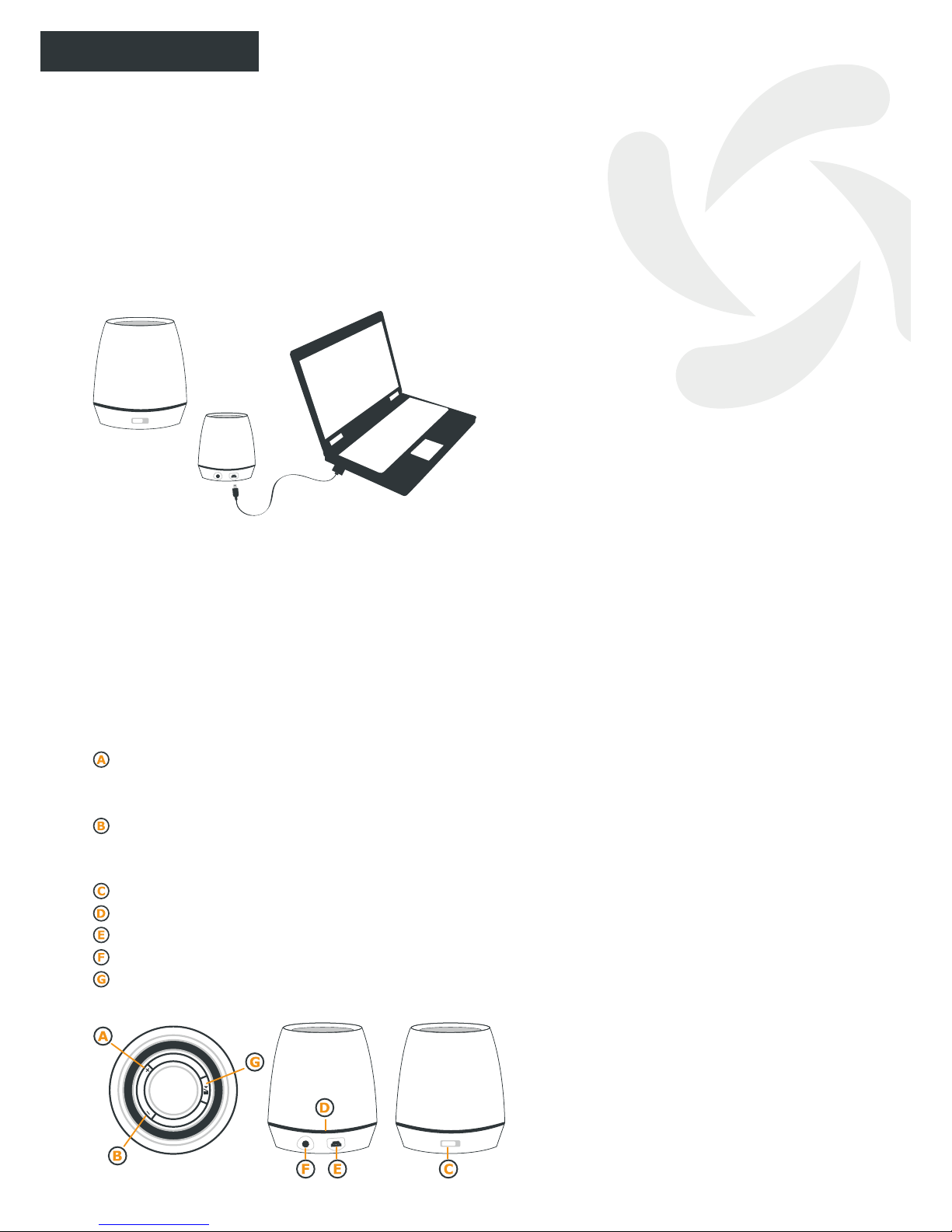
1. Contents
It Loves Me comes equipped with a USB
recharging lead and a 3.5mm sound input lead.
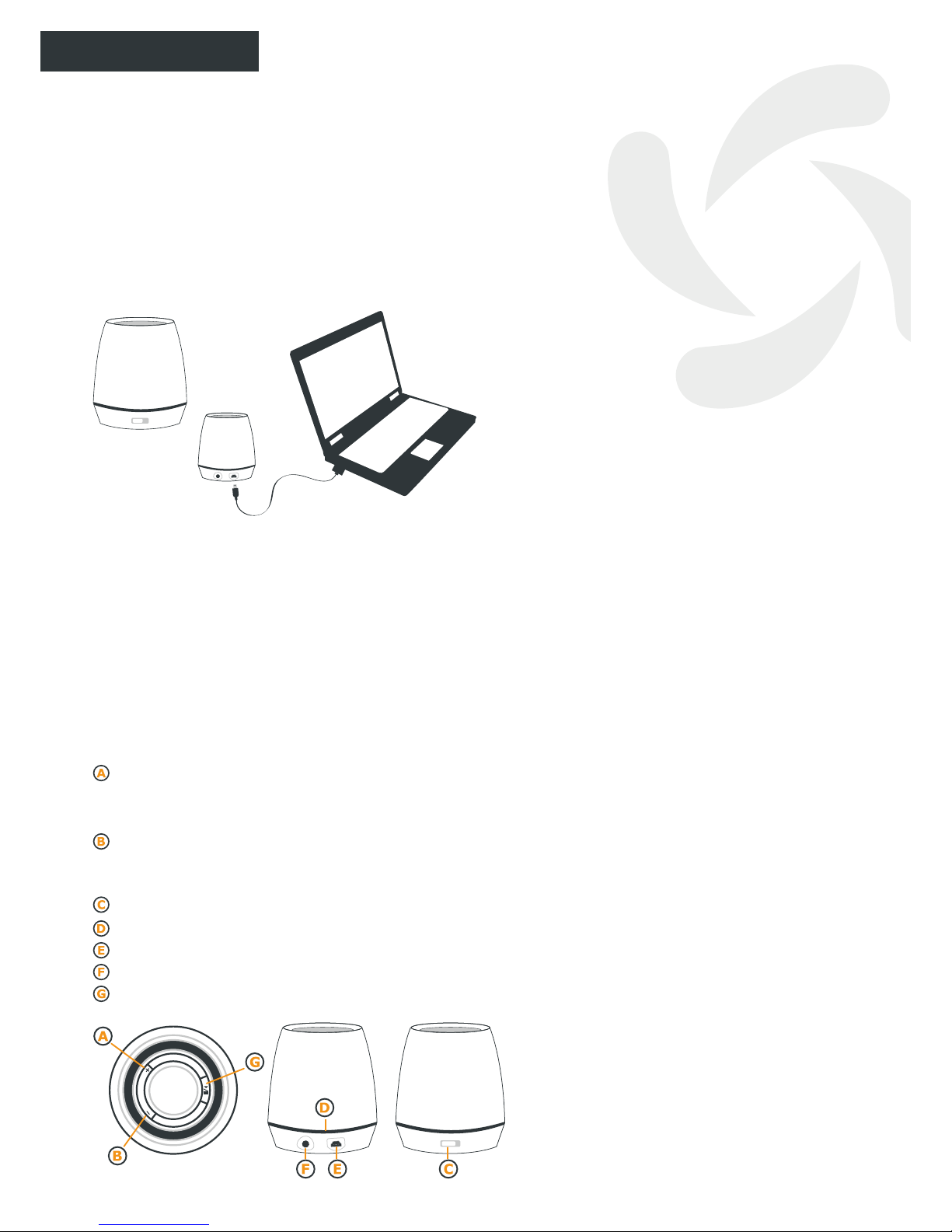
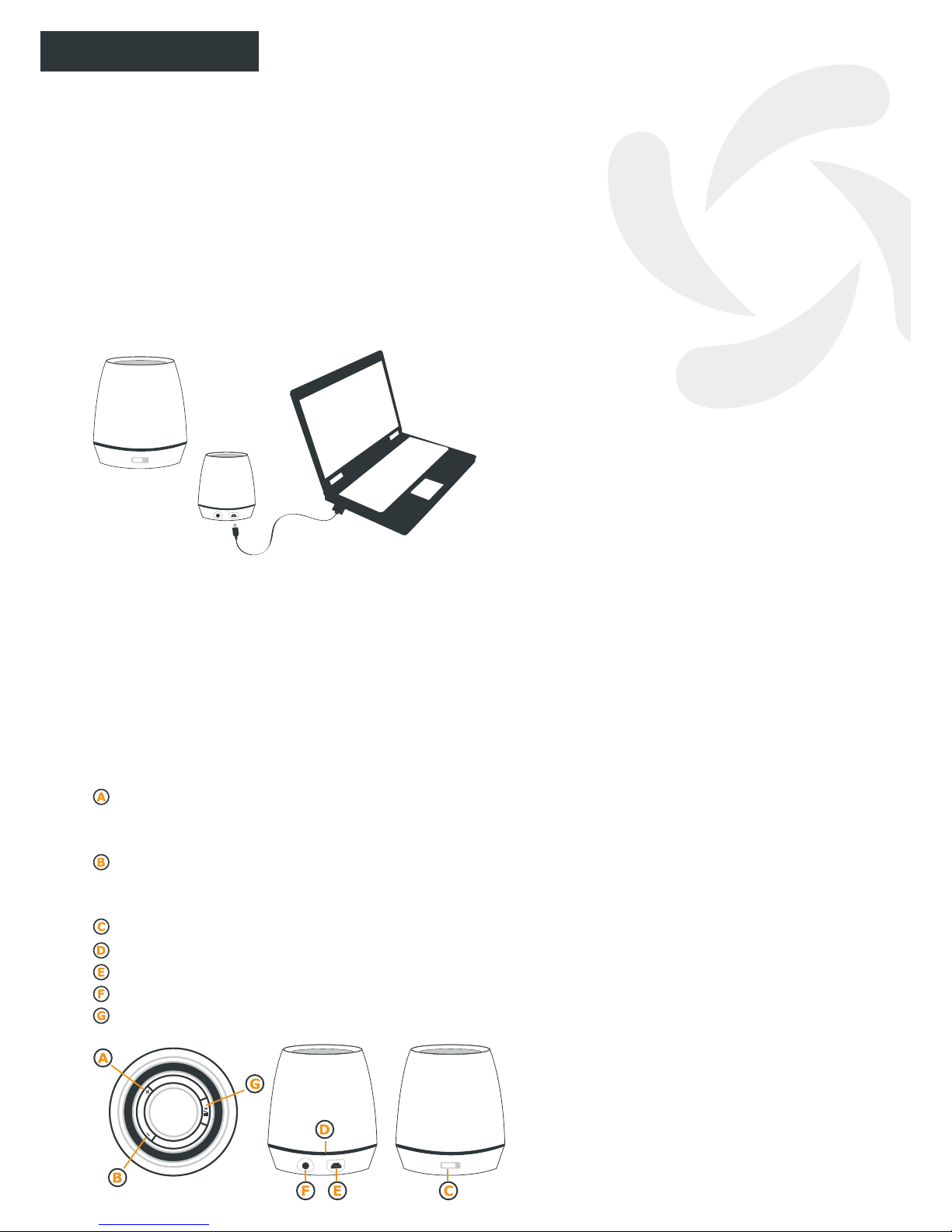
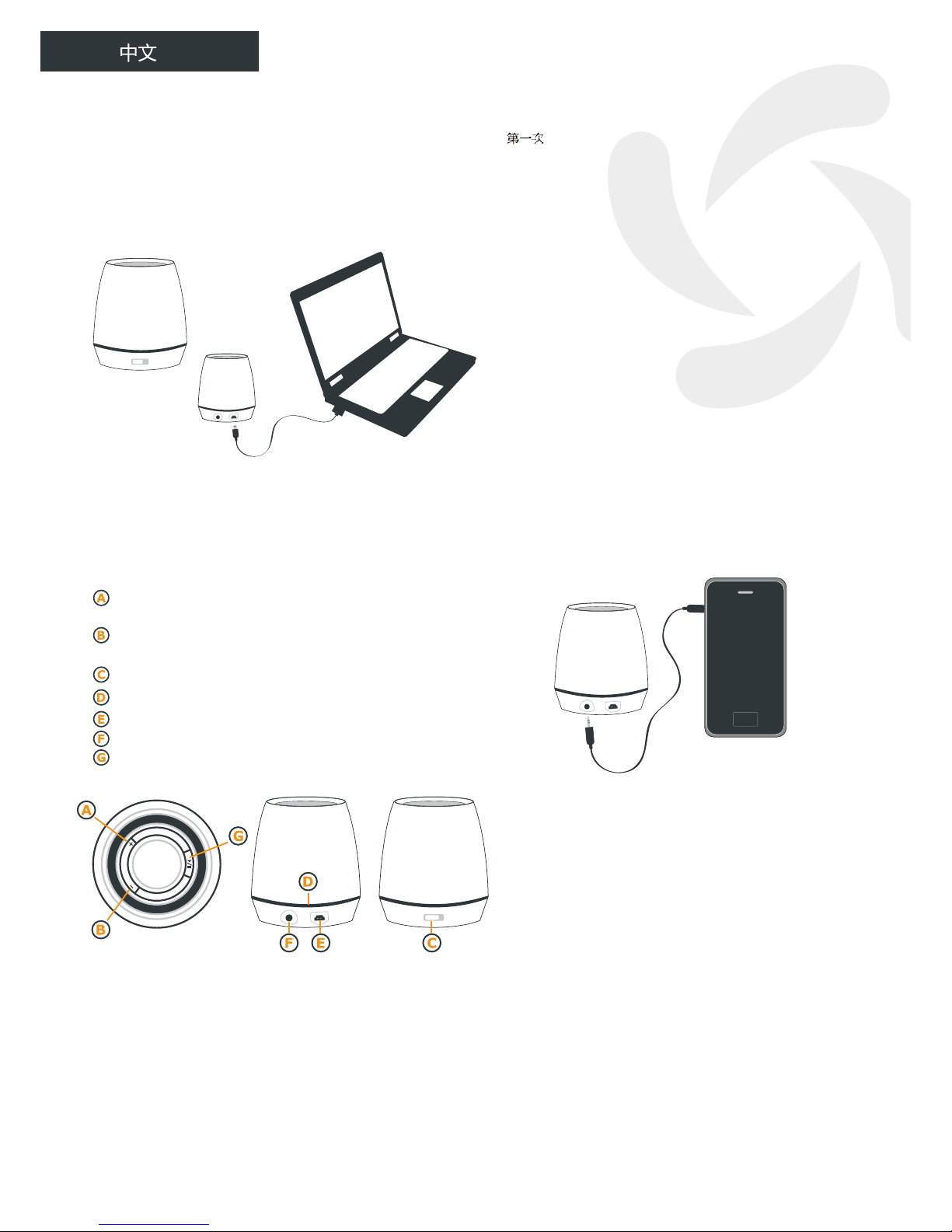
2. Battery recharge time
Slide the switch to the ON position and
recharge It Loves Me for about 3 hours. When
the battery is fully recharged the red LED light
will switch off.
3. Low battery
When the batter is low, the blue LED light will
go out and at the same time the speaker will
beep twice, then for a short time the green
LED light will remain on; however It Loves
Me will not be able to produce any sound until
the battery is recharged.
4. How to use the Buttons and
Microphone
Press the “+” button once or twice to move on
to the Next Song. Keep pressing the “+” button
to increase the Volume.
Press the “-” button once or twice to return
to the Previous Song. Keep pressing the “-”
button to lower the Volume.
ON/OFF switch.
LED indicator panel.
Mini-lead for USB recharge.
“Line-In” sound jack.
ON/Pause Music button.
ON/OFF
3h
| |
It Loves-Me
User’s guide
ENGLISH
5. Synching with your cellphone
When you use It Loves Me for the rst time
with another Bluetooth device, you will need to
synch them. Switch on both devices and place
them facing each other less than one meter
apart.
5.1. Switch on the Bluetooth option on your
cellphone – if you are unsure how to do this,
please consult the user manual for your
Bluetooth phone.
5.2. Having switched on Bluetooth on your
cellphone, select the option “synch” or “detect
devices” from the menu of Bluetooth options
on your phone.
During synching, the blue LED on the mini
speaker will ash rapidly.
5.3. When your cellphone requests your It
Loves Me Password, type in “0000” and then
“OK”.
5.4. Finally, select “Suvil Loves-Me” from the
list of Bluetooth devices on your phone.
5.5. When synching is complete, the circular
panel of LEDs around the name
It Loves Me will ash blue slowly every three
seconds.
5.6. At this point, you may return to your
cellphone’s main menu or to the folder where
you have stored your favorite songs to listen to
them using your It Loves Me.
6.“Bluetooth” Mode
When you switch on the mini speaker, it
will spend about 25 seconds searching for
previously synched Bluetooth devices. Those
that are ON will be connected to It Loves Me
and will be ready to send music or any other
sound signal to the mini speaker.
ON/OFF
Page 4
4
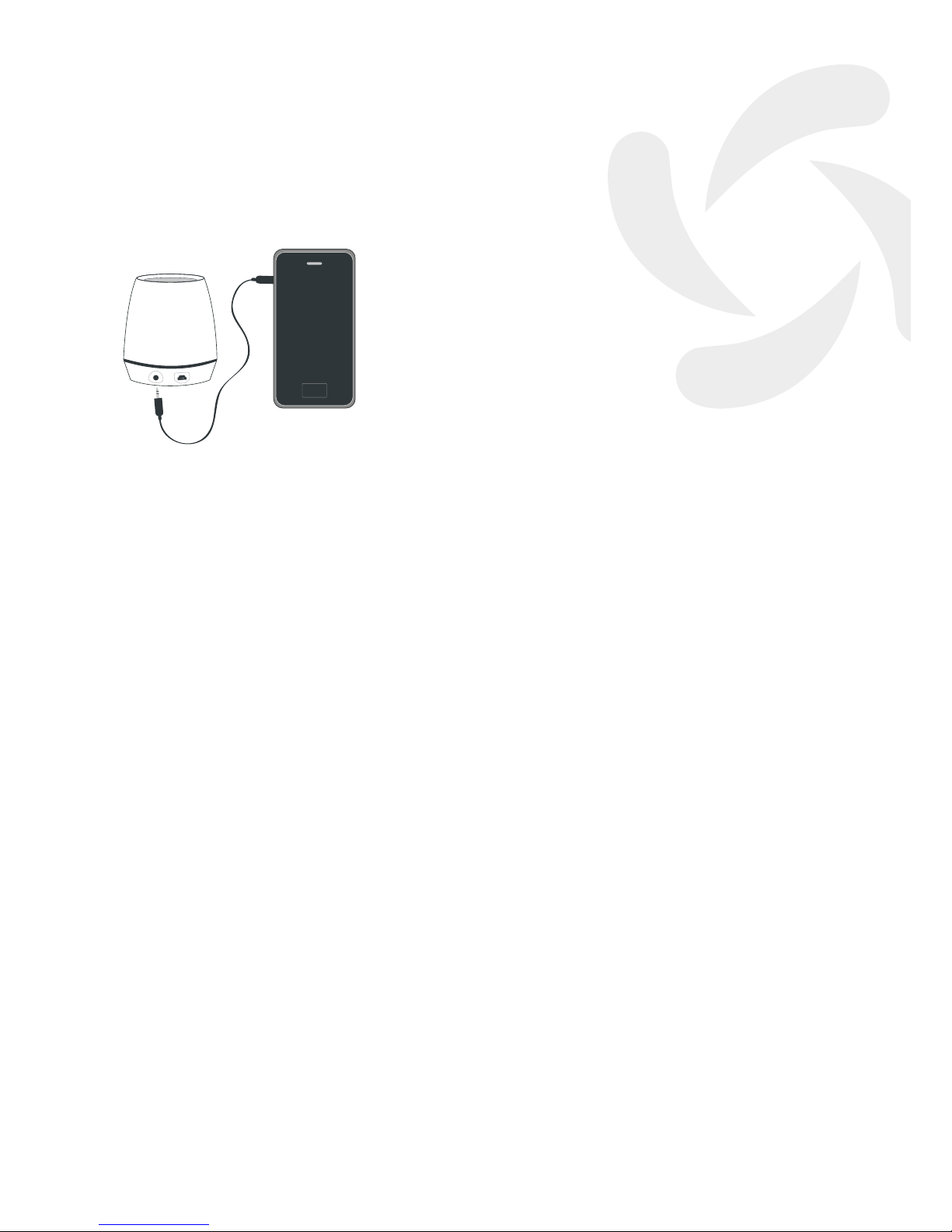
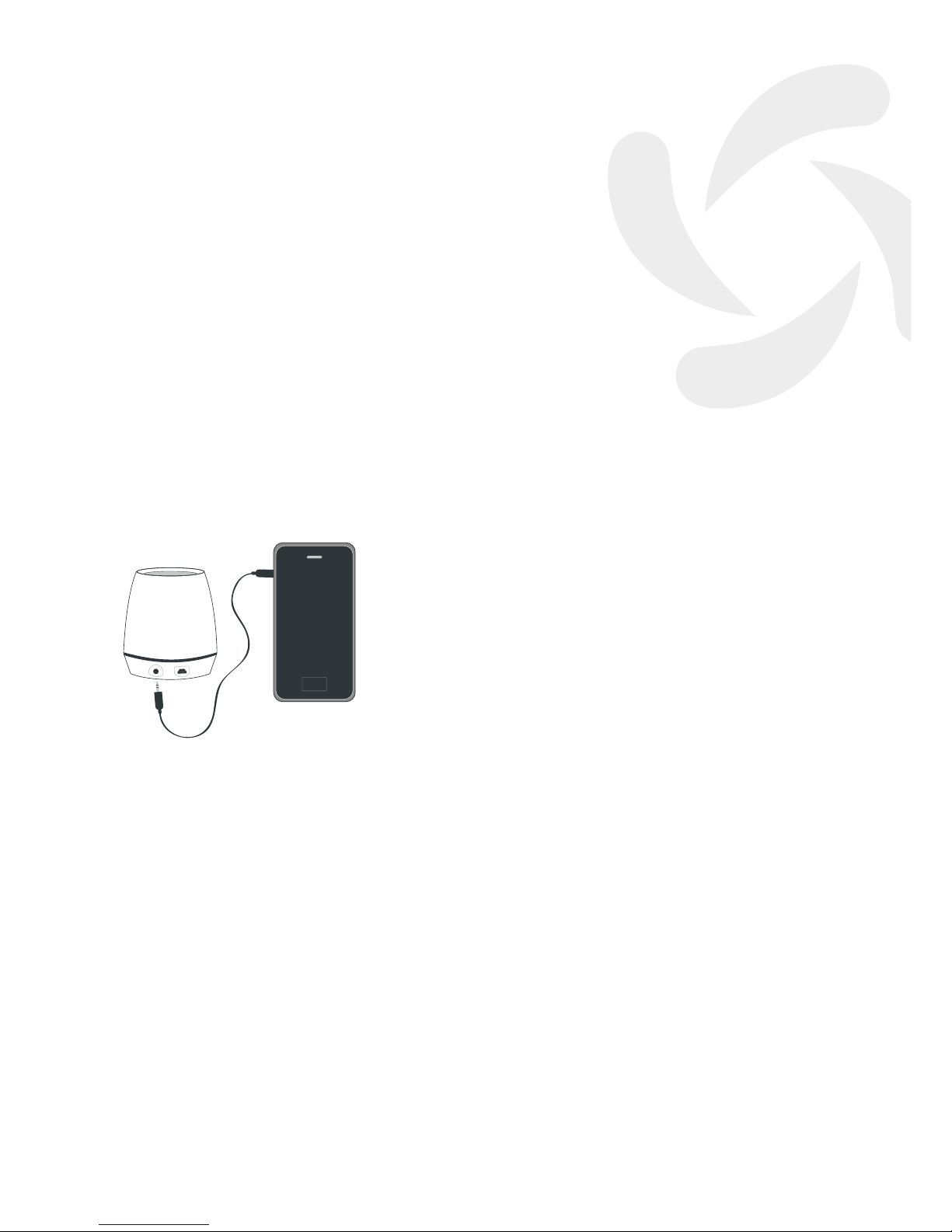
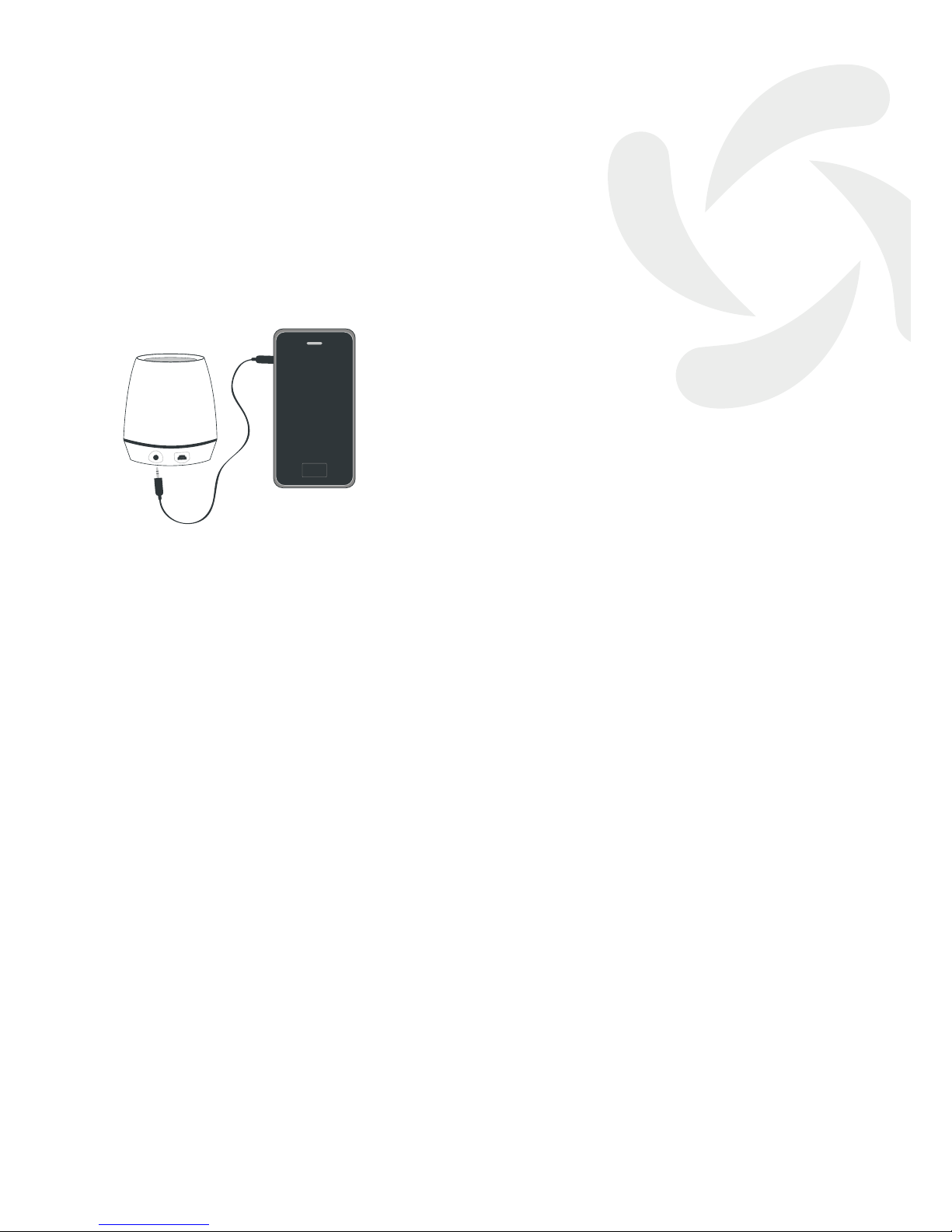
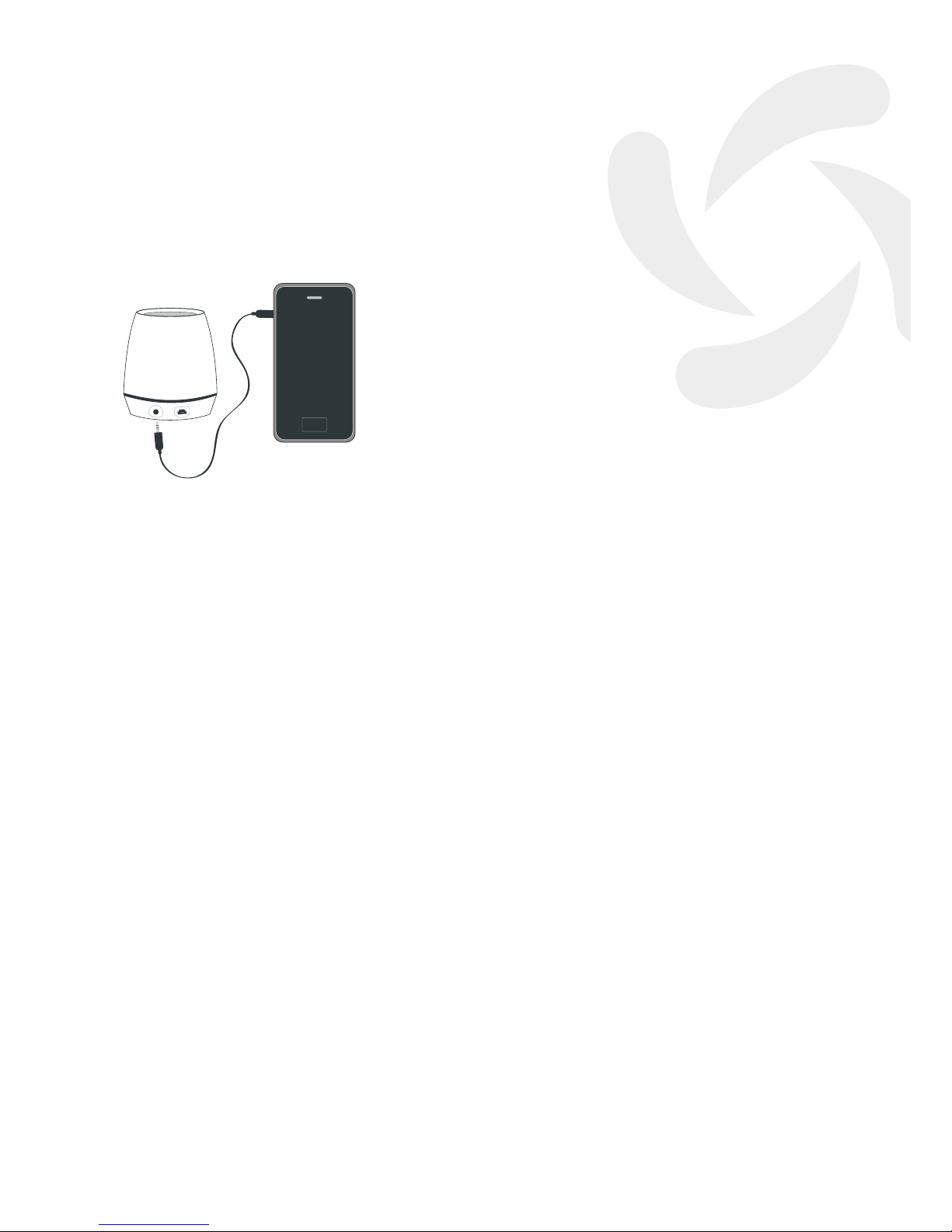
7. “Line-In” Mode
Insert one end of the3.5 mm connector lead
in the small round Jack in the lower part of the
mini-speaker and the other end in the Jack of the
output device (cellphone, MP4, iPhone, iPad, etc.).
In“Line-In” mode the mini speaker keys will be
overridden by those of the other device, i.e.
Volume, Previous/Last Song, etc.
8. LED MODES
LED Red: ON during recharging and OFF when
recharging is complete.
LED Green: ON during PLAY and ON/PAUSE and OFF
when mini speaker is switched off.
LED Blue: Rapid ashing during synching.
Slow ashing when connecting to
another device in “LINK MODE”.
OFF when mini speaker is switched off.
Page 5
5
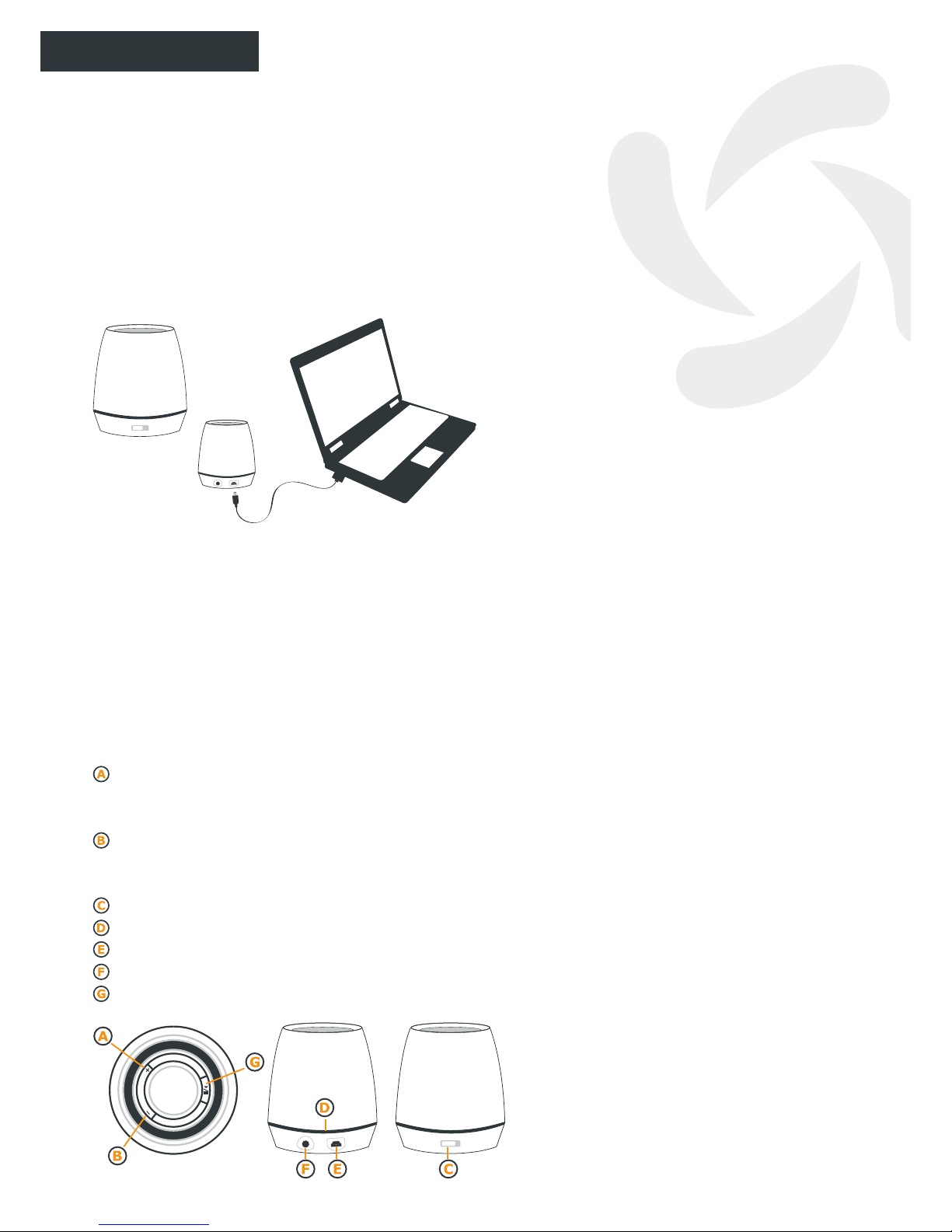
1. Contenido
It Loves Me viene con un cable USB de recarga
y otro de entrada de sonido “Line-In” de 3,5 mm.
2. Tiempo de Recarga de la Batería
Deslice el interruptor a la posición ON y
recargue It Loves Me durante unas 3 horas.
Cuando la batería esté recargada el LED de color
rojo se apagará.
3. Batería Baja
Cuando la batería este baja, el LED de color
azul se apagará a la vez que el altavoz
emitirá dos breves bips y únicamente quedará
encendido durante un rato el LED de color
verde pero sin que It Loves Me pueda seguir
sonando hasta que se vuelva a recargar la
batería.
4. Uso de los Botones y del Micrófono
De uno o dos clicks en el botón “+” para pasar
a la Canción Siguiente. Mantenga pulsado el
botón “+” para subir el Volumen.
De uno o dos clicks en el botón “-” para volver
a la Canción Previa. Mantenga pulsado el botón
“-” para bajar el Volumen.
Interruptor de Encendido ON/OFF.
Círculo de LEDS.
Mini conector USB de recarga.
Agujero de entrada de sonido “Line-In”.
Música ON/Espera.
ON/OFF
3h
| |
It Loves-Me
User’s guide
ESPAÑOL
5. Emparejamiento con el móvil
Cuando utilice por primera vez It Loves Me
con otro dispositivo Bluetooth, tendrá que
emparejarlos. Encienda ambos dispositivos
y colóquelos el uno enfrente del otro a una
distancia inferior a 1 metro.
5.1. Active la función Bluetooth de su teléfono
móvil -si no sabe como hacerlo; consulte
la guía del usuario de su teléfono móvil
Bluetooth-.
5.2. Una vez que la función Bluetooth de
su móvil este activada, elija la opción de
“emparejar” o “buscar dispositivos” dentro de
las opciones Bluetooth de su móvil.
Durante el emparejamiento, el LED azul del
mini altavoz emitirá rápidos destellos.
5.3. Cuando su móvil le pida la Password del
It Loves Me, escriba “0000” y de a OK.
5.4. Por ultimo, seleccione dentro de la lista
de dispositivos Bluetooth de su móvil: “Suvil
Loves-Me”.
5.5. Cuando el emparejamiento entre ambos
dispositivos Bluetooth se haya completado,
el círculo de LEDS que rodean It Loves Me,
parpadearán lentamente en color azul cada 3
segundos aproximadamente.
5.6. En este momento, ya puede volver al
menú principal de su móvil o a la carpeta
donde tiene almacenadas sus canciones
favoritas para que puedan ser escuchadas
desde su It Loves Me.
6. Modo “Bluetooth”
Después de encender el mini altavoz,
éste buscará durante unos 25 segundos
los dispositivos Bluetooth previamente
emparejados. Los que estén en ON, se
conectarán con It Loves Me y estarán
preparados para enviar música o cualquier
sonido al mini altavoz.
ON/OFF
Page 6
6
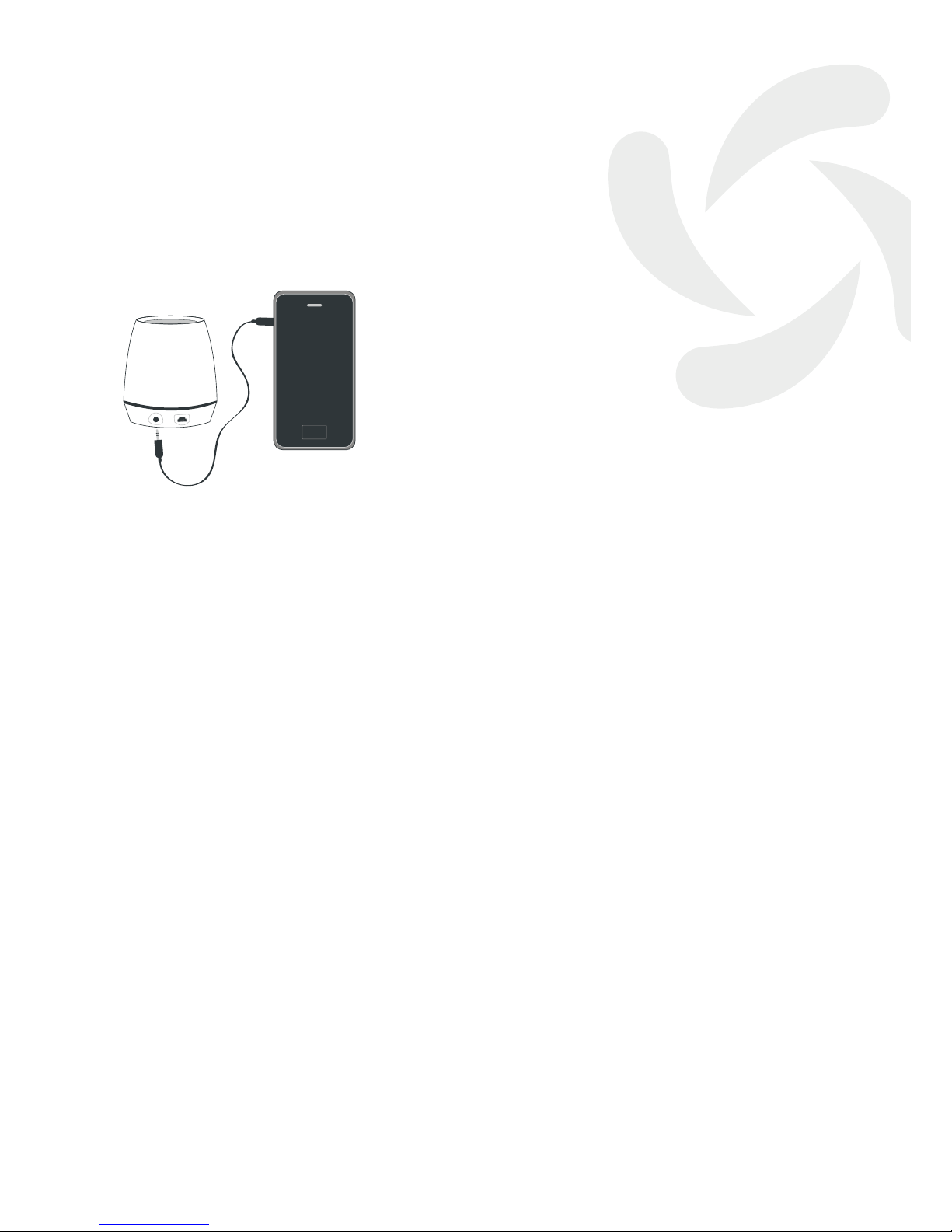
7. Modo “Line-In”
Inserte un extremo del cable con el conector
de 3,5 mm en el agujerito redondo de la parte
inferior del mini altavoz y el otro extremo al
de su dispositivo emisor (teléfono móvil, MP4,
iPhone, iPad, etc …).
En el modo “Line-In” las teclas del mini altavoz
quedarán anuladas por lo que el control del
Volumen, Canción Previa/Siguiente, etc, pasarán
al otro dispositivo.
8. Descripción del estado de los LEDS
LED Rojo : ON durante la recarga y OFF cuando
se ha terminado de cargar la batería.
LED Verde: ON durante Música en ON/Espera y
OFF cuando se apaga el mini altavoz.
LED Azul: Rápidos destellos durante el
emparejamiento.
Lentos destellos durante la conexión
con el otro dispositivo “linK mode”.
OFF cuando el mini altavoz está
apagado.
Page 7
7
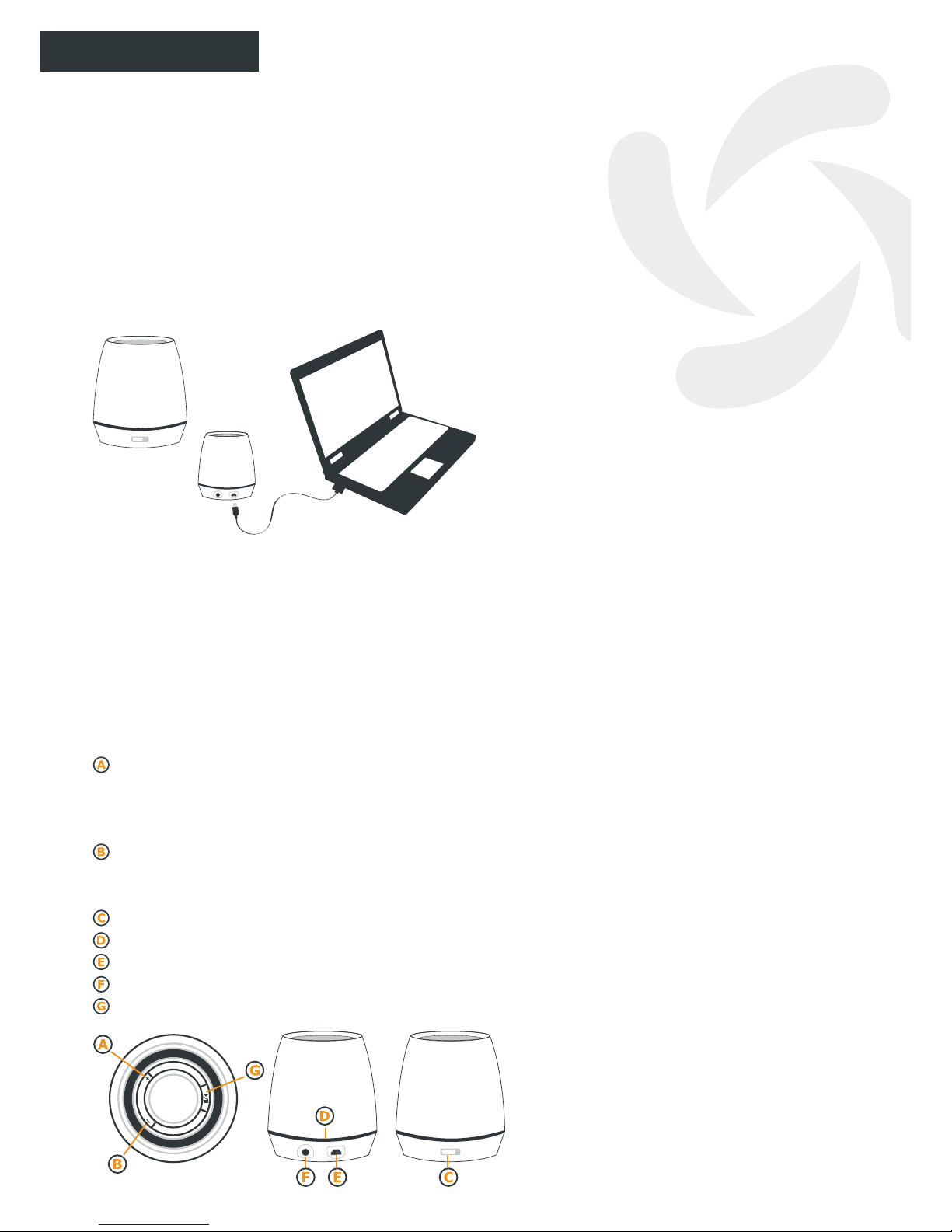
1. Contenuto
It Loves Me è dotato di un cavetto USB di
ricarica e un altro di entrata del suono “Line-In”
da 3,5 mm.
2. Tempo di Ricarica della Batteria
Collocare l’interruttore sulla posizione ON e
ricaricare It Loves Me durante circa 3 ore.
Quando la batteria è ricaricata il LED di color
rosso si spegnerà.
3. Batteria Bassa
Quando la batteria é bassa, il LED di color
azzurro si spegnerà e simultáneamente
l’altoparlante emetterà due brevi bips e resterà
acceso solamente durante poco tempo il LED di
color verde, ma senza che It Loves mi possa
continuare a suonare no a quando non si
ricaricherà la batteria.
4. Uso dei pulsanti e del Microfono
Dare uno o due click sul pulsante “+” per
passare alla Canzone Seguente. Mantenere
premuto il pulsante “+” per aumentare il
Volume.
Dare uno o due clicks sul pulsante “-” per
ritornare alla Canzone Precedente. Mantenere
premuto il pulsante “-” per abbassare il Volume.
Interruttore di Accensione ON/OFF.
Circolo di LEDS.
Mini connettore USB di ricarica.
Foro di entrata del suono “Line-In”.
Musica ON/Attesa.
ON/OFF
3h
| |
It Loves-Me
User’s guide
ITALIANO
5. Accoppiamento con il Cellulare
Quando si utilizza per la prima volta It Loves
Me con un altro dispositivo Bluetooth, si
dovranno accoppiarli. Accendere ambedue i
dispositivi e collocarli l’uno di fronte all’altro a
una distanza al di sotto di 1 metro.
5.1. Mettere in funzione il Bluetooth del
proprio Cellulare – se non si sa come farlo,
basta consultare la guida dell’utente del suo
telefono cellulare Bluetooth-.
5.2. Una volta che la funzione Bluetooth del
proprio cellulare è in attivo, scegliere l’opzione
di “accoppiare” o “cercare dispositivi” dentro le
opzioni Bluetooth del suo cellulare.
Durante l’accoppiamento, il LED azzurro
del mini altoparlante emetterà dei rapidi
lampeggiamenti.
5.3. Quando il suo cellulare le chiederà la
Password per It Loves Me, scrivere “0000” e
premere OK.
5.4. Per ultimo, selezionare dentro la lista dei
dispositivi Bluetooth del suo cellulare: “Suvil
Loves-Me”.
5.5. Quando l’accoppiamento fra ambedue i
dispositivi Bluetooth sarà terminato, il circolo
dei LEDS che circondano It Loves Me,
lampeggerà lentamente in color azzurro ogni
3 secondi circa.
5.6. In questo momento, potrà già ritornare al
menu principale del suo cellulare o alla cartella
dove ha immagazzinato le sue canzoni favorite
afnché possano essere ascoltate da It Loves Me.
6. Modo “Bluetooth”
Dopo di aver acceso il mini altoparlante, esso
ricercherà durante 25 secondi i dispositivi
Bluetooth previamente accoppiati. Quelli che
saranno in ON, si collegheranno con It Loves
Me e saranno preparati per inviare musica o
qualsiasi suono al mini altoparlante.
ON/OFF
Page 8
8
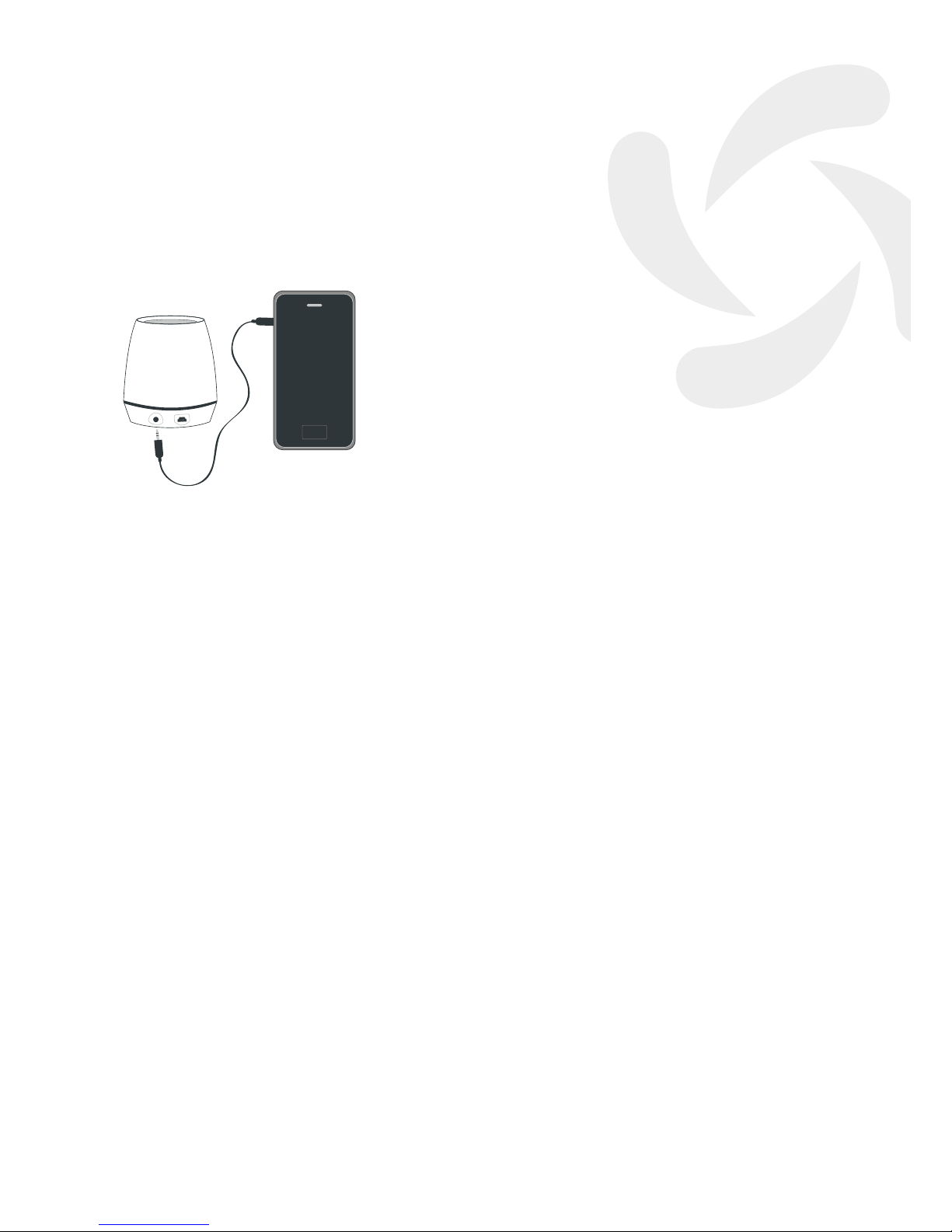
7. Modo “Line-In”
Inserire un estremo del cavetto con il connettore
da 3,5 mm nel foro rotondo della parte inferiore
del mini altoparlante e l’altra estremità a quello
del suo dispositivo emittente (telefono cellulare,
MP4, iPhone, iPad, ecc …).
Nel modo “Line-In” i tasti del mini altoparlante
saranno annullati e quindi il controllo del
Volume, Canzone Previa/Seguente, ecc.,
passeranno all’altro dispositivo.
8. Descrizione dello stato dei LEDS
LED Rosso: ON durante la ricarica e OFF quando
si è terminata di caricare la batteria.
LED Verde: ON durante Musica in ON/Standby e
OFF quando si spegne il mini
altoparlante.
LED Azzurro: Rapidi lampeggiamenti durante
l’accoppiamento.
Lenti lampeggiamenti durante la
connessione con l’altro dispositivo
“linK mode”.
OFF quando il mini altoparlante sarà
spento.
Page 9
9
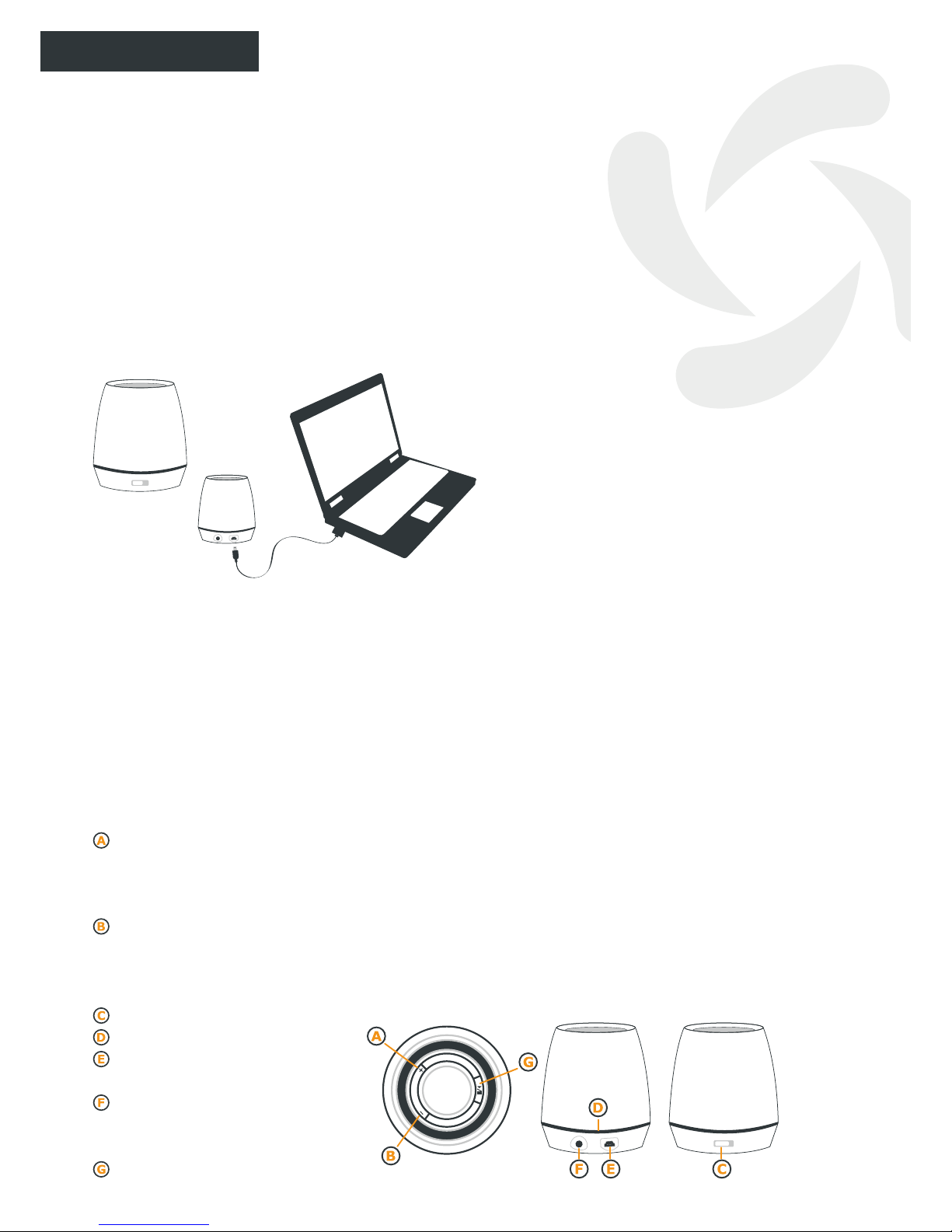
1. Inhalt
It Loves Me kommt mit einem USB-Ladekabel
und einem zusätzlichen Kabel mit einem 3,5 mm
Klinkenstecker für Linieneingänge von anderen
Audioquellen “Line-In”.
2. Auadezeit der Batterie
Schieben Sie den Schalter auf die Position ON
und laden Sie It Loves Me in dieser Stellung
während 3 Stunden. Sowie der Akku voll
aufgeladen ist, erlischt die eingebaute und bis
dahin rot leuchtende LED.
3. Ladezustand ungenügend
Wenn der Ladezustand des Akkus beginnt, für
den Gebrauch ungenügend zu werden, erlischt
die eingebaute blaue LED, und der Lautsprecher
gibt simultan zwei kurz Beep-Töne aus. In
diesem Zustand leuchtet dann nur noch die
grüne LED, und der Akku von It Loves Me
muss neu geladen werden.
4. Funktionen der Tasten und des
Mikrofons
Drücken Sie einmal oder zweimal auf die
Taste “+” um von einem Musikstück auf das
nächste zu gelangen. Halten Sie die Taste “+”
gedrückt, um die Lautstärke zu erhöhen.
Drücken Sie einmal oder zweimal auf die Taste
“-”, um auf das vorherige Musikstück zurück zu
gehen. Halten Sie die Taste “+” gedrückt, um
die Lautstärke zu senken.
EIN/AUS-Schalter
LED-Kreis
Mini USB-Anschluss zum Laden
des Gerätes
Eingangsbuchse für den
Toneingang von anderen
Audioquellen: “Line-In”
Musik EIN/Hold
ON/OFF
3h
| |
It Loves-Me
User’s guide
DEUTSCH
5. Kopplung mit einem Handy
Wenn Sie It Loves Me zum ersten Mal in
Verbindung mit einem anderen BluetoothGerät verwenden, müssen Sie die beiden
Geräte zunächst koppeln. Schalten Sie dazu
beide Geräte ein und stellen Sie diese in einer
Entfernung von ca. 1 m gegenüber auf.
5.1. Aktivieren Sie jetzt auf Ihrem Handy
die Funktion Bluetooth. Sollten Sie dazu
Hilfe benötigen, schauen Sie bitte in die
Funktionsbeschreibung des Handys.
5.2. Wenn Sie die Bluetooth-Funktion auf
Ihrem Handy aktiviert haben, wählen Sie unter
den gegebenen Bluetooth-Optionen Ihres
Handys entweder die Option “Koppeln” oder
“Geräte suchen”.
Während des Kopplungsvorganges sendet die
blaue LED des eingebauten Mini-Lautsprechers
kurze Lichtblitze aus.
5.3. Wenn Ihr Handy das Passwort für It
Loves Me anfordert, schreiben Sie den Code
“0000” und bestätigen Sie die Eingabe mit OK.
5.4. Wählen Sie abschließend auf der Liste der
Bluetooth-Geräte auf Ihrem Handy die Option:
“Suvil Loves-Me”.
5.5. Wenn der Kopplungsprozess der beiden
Bluetooth-Geräte erfolgreich abgeschlossen ist,
blinken die It Loves Me umkreisenden LEDs
in langsamer Folge mit einer Frequenz von ca.
3 Sekunden mit blauem Licht.
5.6. Jetzt können Sie wieder zum Hauptmenü
ihres Handys bzw. zur Mappe zurückkehren, in
der Sie Ihre Favoritensongs gespeichert haben,
und diese jetzt über Ihr It Loves Me abhören.
ON/OFF
Page 10
10
6. Betriebsart “Bluetooth”
Wenn Sie den Mini-Lautsprecher des Gerätes
einschalten, sucht dieses während ca. 25
Sekunden die im Vorfeld gekoppelten BluetoothGeräte. Diejenigen davon, welche sich im EINZustand benden, werden mit It Loves Me
zusammengeschaltet und stehen dann bereit,
Musik bzw. die jeweils gewünschte Audioquelle
an den Mini-Lautsprecher zu leiten.
7. Betriebsart “Line-In”
Stecken Sie das Kabelende mit dem 3,5
mm Klinkenstecker in die entsprechende
Eingangsbuchse im unteren Bereich des MiniLautsprechers und das andere Ende an Ihr
Sende-Gerät (Handy, MP4, iPhone, iPad, etc …).
In der Betriebsart “Line-In” sind die Tasten des
Mini-Lautsprechers ohne Funktion, sodass die
Steuerungen der Lautstärke, des vorherigen
bzw. nächsten Musikstückes und dergleichen von
dem jeweils anderen Gerät aus vorgenommen
werden müssen.
8. Zustandsbeschreibung der LEDs
LED Rot: EIN während des Ladevorganges des
Akkus und AUS bei voller Ladung.
LED Grün: EIN während die Musik im EIN bzw.
Hold steht und AUS wenn der Mini-
Lautsprecher ausgeschaltet ist.
LED Blau: Schnelle Lichtblitze während des
Kopplungsvorganges.
Langsames Blinken während des
Anschlusses an ein anderes Gerät im
“linK mode”.
AUS wenn der Mini-Lautsprecher
ausgeschaltet ist.
Page 11
11
1. Contenu de l’emballage
It Loves Me est fourni avec un câble USB de
recharge et un autre audio “Line-In” de 3,5 mm.
2. Temps de charge de la batterie
Faites glisser l’interrupteur sur la position ON
et chargez It Loves Me pendant 3 heures.
Une fois la batterie chargée, la DEL de couleur
rouge s’éteindra.
3. Batterie faible
Lorsque la batterie est faible, la DEL de couleur
bleu s’éteint. La DEL de couleur s’éteindra
lorsque le haut-parleur se mettra à émettre
deux bips courts et seule la DEL de couleur
verte restera allumée; It Loves Me ne pourra
pas fonctionner tant que la batterie ne sera pas
à nouveau chargée.
4. Utilisations des touches et du
microphone
Un à deux clics sur la touche “+” pour passer
au thème suivant. Laissez la touche “+”
appuyée pour augmenter le volume.
Un à deux clics sur la touche “-” pour passer au
thème précédent. Laissez la touche “-” appuyée
pour diminuer le volume.
Interrupteur d’allumage ON/OFF.
Cercle de DEL.
Mini-connecteur USB de charge.
Entrée audio “Line-In”.
Musique ON/Attente.
ON/OFF
3h
| |
It Loves-Me
User’s guide
FRANÇAIS
5. Couplage avec le portable
Lors de la première utilisation du It Loves Me
avec un autre dispositif Bluetooth, il conviendra
de les coupler. Allumez les deux dispositifs et
posez-les l’un en face de l’autre à une distance
inférieure à 1 mètre.
5.1. Activez la fonction Bluetooth de votre
téléphone portable -si vous ne savez pas
comment procéder, consultez le mode d’emploi
de votre téléphone portable Bluetooth-.
5.2. Une fois la fonction Bluetooth de votre
portable activée, choisissez l’option « coupler »
ou « rechercher dispositifs » dans les options
Bluetooth de votre portable.
Lors du couplage, la DEL bleue du mini hautparleur se mettra à clignoter rapidement.
5.3. Lorsque que votre portable vous
demandera le code du It Loves Me, indiquez
“0000” puis sélectionnez OK.
5.4. Enn sélectionnez dans la liste de
dispositifs Bluetooth de votre portable : “Suvil
Loves-Me”.
5.5. Une fois le couplage entre les deux
dispositifs Bluetooth complété, le cercle des
DEL entourant It Loves Me clignoteront
lentement en bleu toutes les 3 secondes
environ.
5.6. Vous pourrez alors revenir au menu
principal de votre portable ou au dossier dans
lequel vous conservez vos thèmes favoris et les
écouter sur votre It Loves Me.
6. Mode “Bluetooth”
Après avoir allumé le mini haut-parleur, ce
dernier recherchera pendant 25 secondes
environ les dispositifs Bluetooth qui ont été
couplés. Ceux qui se trouvent sur ON se
connecteront avec It Loves me et seront
prêts pour envoyer de la musique ou tout autre
signal audio au mini haut-parleur.
ON/OFF
Page 12
12
7. Mode “Line-In”
Introduisez une extrémité du câble avec le
connecteur de 3,5 mm dans le petit orice rond
de la partie inférieure du mini haut-parleur
et l’autre extrémité à celui de votre dispositif
émetteur (téléphone portable, MP4, iPhone,
iPad, etc.)
Sur le mode « Line-In », les touches du mini
haut-parleur seront annulées, le contrôle du
volume, chanson précédente/suivante, etc.
passant donc à l’autre dispositif.
8. Description de l’état des DEL
DEL Rouge : ON pendant la charge et OFF une fois
la batterie chargée.
DEL Verte : ON pendant la musique sur ON/
Attente et OFF lorsque le mini hautparleur s’éteint.
DEL Bleue : Clignotements rapides pendant
le couplage. Clignotements lents
pendant le branchement à l’autre
dispositif “linK mode”. OFF lorsque le
mini haut-parleur est éteint.
Page 13
13
1. Conteúdo
It Loves Me vem com um cabo USB de
carregamento e outro de entrada de som “LineIn” de 3,5 mm.
2. Tempo de Carregamento da Bateria
Deslize o interruptor para a posição
ON e carregue o It Loves Me durante
aproximadamente 3 horas. Quando a bateria
estiver carregada o LED de cor vermelho
apagar-se-á.
3. Bateria Baixa
Quando a bateria estiver baixa, o LED de cor
azul apagar-se-á ao mesmo tempo que a coluna
emitirá dois breves bips e apenas cará aceso
durante um pequeno período de tempo o LED de
cor verde mas sem que o It Loves Me possa
continuar a tocar até se voltar a carregar a
bateria.
4. Uso das Teclas e do Microfone
Dê um ou dois cliques no botão “+” para passar
para a Canção Seguinte. Mantenha premido o
botão “+” para aumentar o Volume.
Dê um ou dois cliques no botão “-” para voltar
para a Canção Anterior. Mantenha premido o
botão “-” para diminuir o Volume.
Interruptor de Ligação ON/OFF.
Círculo de LEDS.
Mini conector USB de carregamento.
Porta de entrada de som “Line-In”.
Música ON/Espera.
ON/OFF
3h
| |
It Loves-Me
User’s guide
PORTUGUÊS
5. Sincronização com o telemóvel
Quando utilizar pela primeira vez o It Loves
Me com outro dispositivo Bluetooth, terá de
os sincronizar. Ligue ambos os dispositivos
e coloque-os um à frente do outro a uma
distância inferior a 1 metro.
5.1. Active a função Bluetooth do seu
telemóvel -se não o sabe fazer; consulte o guia
do utilizador do seu telemóvel Bluetooth-.
5.2. Logo que a função Bluetooth do seu
telemóvel estiver ativada, escolha a opção
“sincronizar” ou “procurar dispositivos” dentro
das opções Bluetooth do seu telemóvel.
Durante a sincronização, o LED azul da mini
coluna emitirá rápidos ashes.
5.3. Quando o seu telemóvel lhe pedir a
Password do It Loves Me, escreva “0000” e dê OK.
5.4. Por último, selecione dentro da lista de
dispositivos Bluetooth do seu telemóvel: “Suvil
Loves-Me”.
5.5. Quando a sincronização entre ambos os
dispositivos Bluetooth tiver sido completada, o
círculo de LEDS que rodeiam o It Loves Me,
piscarão lentamente em cor azul a cada 3
segundos aproximadamente.
5.6. Neste momento, já pode voltar para o
menu principal do seu telemóvel ou para a
pasta onde tem armazenadas as suas canções
favoritas para que possam ser escutadas a
partir do seu It Loves Me.
6. Modo “Bluetooth”
Depois de ligar a mini coluna, esta procurará
durante uns 25 segundos os dispositivos
Bluetooth previamente sincronizados. Aqueles
que estiverem em ON, ligar-se-ão ao It Loves
Me e estarão preparados para enviar música
ou qualquer som para a mini coluna.
ON/OFF
Page 14
14
7. Modo “Line-In”
Insira uma extremidade do cabo com o conector
de 3,5 mm na porta redonda da parte inferior
da mini coluna e a outra extremidade ao do seu
dispositivo emissor (telemóvel, MP4, iPhone,
iPad, etc …).
No modo “Line-In” as teclas da mini coluna
carão anuladas pelo que o controlo do Volume,
Canção Anterior/Seguinte, etc, passarão para o
outro dispositivo.
8. Descrição do estado dos LEDS
LED Rojo : ON durante o carregamento e
OFF quando a bateria terminou o
carregamento.
LED Verde: ON durante Música em ON/Espera e
OFF quando a mini coluna se desliga.
LED Azul : Rápidos ashes durante a
sincronização.
Lentos ashes durante a ligação ao
outro dispositivo “linK mode”.
OFF quando a mini coluna está
desligada.
Page 15
15
1. 內容
It loves Me 配置 USB 充電孔以及3.5 mm 音源輸入孔
2. 電池充電時間
請將側邊開關切到 ON位置再將It Loves Me 充電約3小
時, 充電時LED紅燈會亮起, 充電完成, LED紅燈會熄滅。
3. 低電量
當電池電量不足時, 藍色LED燈會不亮,同時喇叭會出現警示
聲;接著會亮起綠燈提醒,但此時 It Loves Me 無法再使
用,需要重新充電。
4. 如何使用按鍵及麥克風
按壓 “ +”鍵 一次 或 兩次 可以跳到下一首歌。長壓 “+”鍵可
以增加音量。
按壓 “ -”鍵 一次 或 兩次 可以跳到上一首歌。長壓 “ - ”鍵可
以降低音量。
ON/OFF 切換開關
LED指示燈
Mini USB 充電孔
音源輸入孔
播放/暫停 音樂鍵
ON/OFF
3h
| |
It Loves-Me
User’s guide
5. 與手機配對
It Loves Me 時, 需要與其他的藍牙裝置先行配
對。先打開開關, 然後將要配對的裝置放在一公尺附近。
5.1. 打開手機上的藍牙功能, 如果不確定操作方法請參閱手
機的操作手冊。
5.2. 從手機的藍牙選項中選擇”新增裝置”。
5.3. 當您的手機要求輸入密碼時, 請輸入” 0000”然後
按OK。
5.4. 最後從藍牙裝置選單中,選擇” Suvil Loves-Me”。
5.5. 當配對完成時,環狀LED燈會呈現藍燈,每三秒緩慢
閃爍。
5.6. 完成後,您可以回到你手機上的主選單、或是檔案
夾,選擇您喜歡的歌曲透過 It Loves Me 播放。
6. “藍牙”模式
當你要使用這個迷你喇叭時,打開ON開關,它需要大約25秒
去搜尋已經配對的藍牙裝置,然後會自動連線使用。
7. “ Line-in 音源輸入” 模式
將一端音源線插入3.5 mm 音源孔,另一端接到外接裝置(
如手機, MP4, iPhone, iPad 等)。在此模式下,迷你喇叭
上的按鍵,如音量、選曲功能將無法使用。
8. LED 指示燈
紅燈: ON表示充電, OFF表示充飽電。
綠燈: ON 表示 可使用狀態,OFF 代表 關機。
藍燈: 交互閃爍 表示 配對中
緩慢閃爍 表示 使用中
熄滅 表示 關機
ON/OFF
 Loading...