

Sussman SSB 12-18, SSB 24-72, SSB 80-100, SSB 135-180 Installation, Operation And Maintenance Manual
Page 1

TABLE OF CONTENTS
Dimensional Information and
Component Identification . . . . . . . . . . . . . . . . . 2
Dimensional & Clearing Specifications . . . . . . . . . 3
Wiring Diagrams . . . . . . . . . . . . . . . . . . . . . . . . . 4-5
Installation
Piping, Wiring . . . . . . . . . . . . . . . . . . . . . . . . . . . 6
Pre-Operation Check . . . . . . . . . . . . . . . . . . . . . . . . 7
Pressure Controls, Operation & Testing . . . . . . . . 7
Operation. . . . . . . . . . . . . . . . . . . . . . . . . . . . . . . . . 8
Blowdown . . . . . . . . . . . . . . . . . . . . . . . . . . . . . . . . 8
Timing Switch . . . . . . . . . . . . . . . . . . . . . . . . . . . . . 9
Digital Timer Operation Instructions. . . . . . . . . . 10
Maintenance . . . . . . . . . . . . . . . . . . . . . . . . . . . . . 11
Standard Equipment
Auxiliary Low Water Cut Off . . . . . . . . . . . . . . . . 12
Line Pressure Water Feed System . . . . . . . . . . . . . 12
Optional Equipment . . . . . . . . . . . . . . . . . . . . . . . 12
High Pressure Water Feed System . . . . . . . . . . . . . 12
Automatic Blowdown System. . . . . . . . . . . . . . . . 12
Blowdown Separators . . . . . . . . . . . . . . . . . . . . . 13
Control Voltage Stepdown Transformer . . . . . . . . 13
Multistage Load Progressive Sequencers . . . . . . . . 13
Blowdown Separator Tanks . . . . . . . . . . . . . . . . . 14
Specification Charts . . . . . . . . . . . . . . . . . . . . . . . 15
Sizing . . . . . . . . . . . . . . . . . . . . . . . . . . . . . . . . . . . 16
Gauge Glass Installation. . . . . . . . . . . . . . . . . . . . 17
Gauge Glass Use and Care . . . . . . . . . . . . . . . . . . 18
Element Replacement . . . . . . . . . . . . . . . . . . . . . . 19
SSB Boilers have Stainless Steel all wetted metal parts. SSB
boilers shall be operated using only deionized water, having
a maximum conductance of 1 microSiemen per cm
(1 µS/cm) [minimum specific resistivity of 1 megohm per cm
(1ΜΩ/cm)].
PRODUCTS COVERED BY THIS MANUAL:
Max
Series KW Range Steam Rate* BHP Design Pres.
Work Pres.
______________________________________________________________________
SSB 12-180 36-542 lbs/hr 1.2-18.4 0-100 psig 85 psig
*Steam Rate- Steam @ 212 F with 50 F feed water
A Division of Sussman-Automatic Corporation
43-20 34th Street, Long Island City, NY 11101 • 718-937-4500
1-800-238-3535 • Fax: 718-937-4676 • email: [email protected]
www.sussmanboilers.com
PUR 101137SSB 3/13
states a hazard
which may cause serious injury or
death if precautions are not followed.
signals a situation where
minor injury or product damage may occur
if you do not follow instructions.
IMPORTANT NOTE:
This highlights information that is especially
relevant to a problem-free installation.
IMPORTANT NOTE:
As you follow these instructions, you will notice warning and caution symbols. This blocked information is important for the safe and efficient
installation and operation of electric boilers. These are two types of potential hazards that may occur during this installation and operation:
Model No. SSB- __________________
Boiler Serial No. _________________
National Board No. ______________
Safety Valve Set Pressure________psig
Power Circuit Voltage ____________
Control Circuit Voltage ___________
Amps _____ Phase _____ HZ ______
IMPORTANT:
This data file contains the National Board
Registration Certificate approving your boiler. It must be
kept near the boiler at all times.
M A D E I N U S A
!
CAUT I O N
!
WARNING
SSB Installation, Operation
and Maintenance Manual
Page 2
Installation, Operation & Maintenance Manual
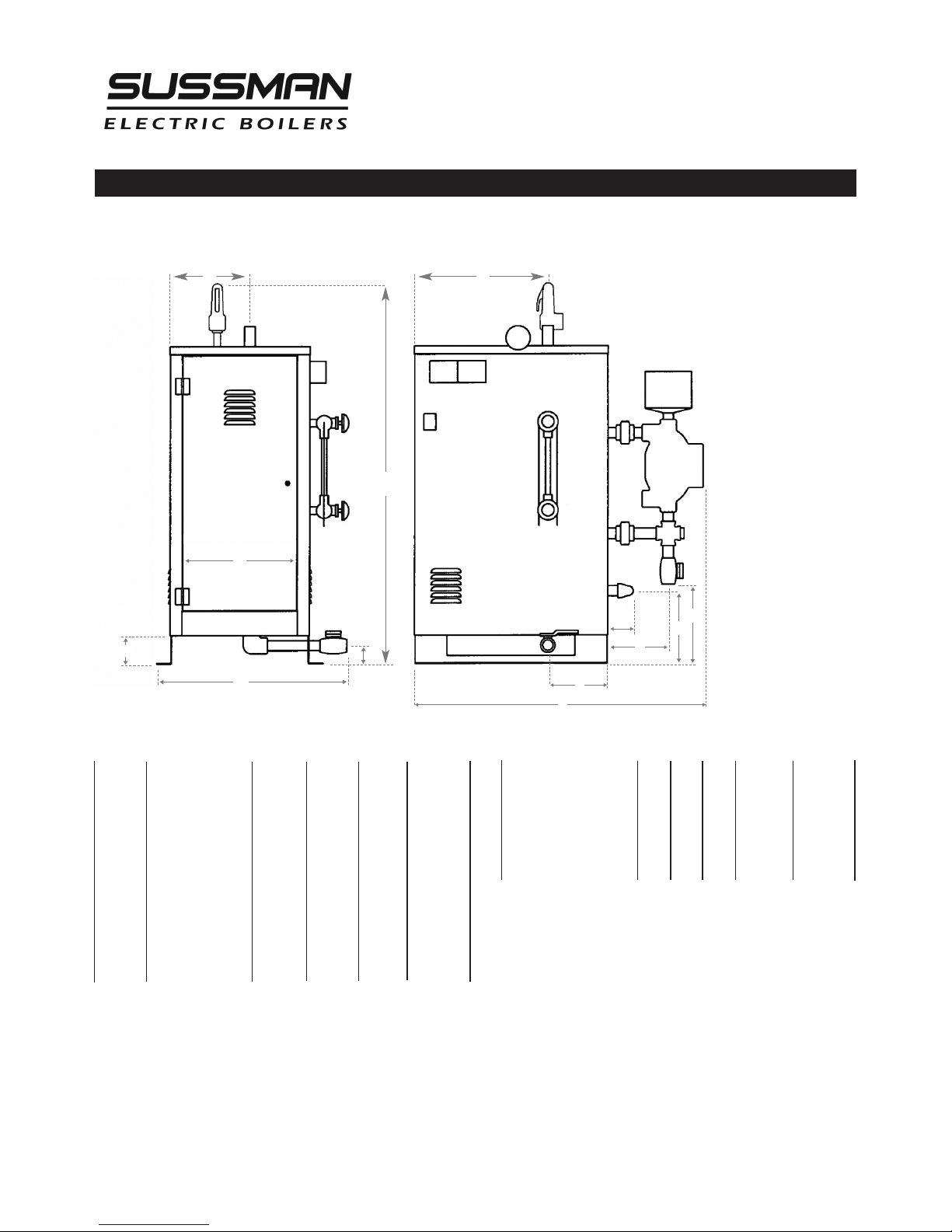
Dimensional Information & Component Identification
2
_______________________________________
WATER STEAM
MODEL H W* L INLET OUTLET
_______________________________________
SSB 12–18 37" 22" 32" 1/2”NPT 1/2”NPT
_________________________________________________
SSB 24–72 47" 27" 36" 1/2”NPT 1” NPT
_________________________________________________
SSB 80–100 63" 29" 36" 1/2”NPT 1
1
⁄2
”NPT**
_________________________________________________
SSB 135–180 63" 30" 38" 1/2”NPT 2” NPT**
_______________________________________
* Add 6 inches to the width when suppled with Automatic Blowdown
** Steam Outlet is 3” NPT on 15 PSI trimmed SSB-80-180.
NOTE: Recommended clearance is 36 inches all around for servicing.
Model SSB
_________________________________
SYMBOL ITEM
SSB12-18 SSB 24-72 SSB 100 SSB 135-180
___________________________________
A Steam Outlet 6
1
⁄4" 10" 81⁄4" 9"
__________________________________________________________________
B Steam Outlet 10
1
⁄4" 17" 171⁄4"181⁄4"
__________________________________________________________________
C M/M Drain Valve 5" 12" 17" 16
3
⁄4"
__________________________________________________________________
D M/M Drain Valve 6
1
⁄2" 6" 61⁄4"6
1
⁄4"
__________________________________________________________________
E Check Valve 14" 9" 17" 16
3
⁄4"
__________________________________________________________________
F PV Drain Valve 2
3
⁄4"2
1
⁄4"2
3
⁄4"2
3
⁄4"
__________________________________________________________________
G PV Drain Valve 6
1
⁄4"9
1
⁄2"7
3
⁄4"9
1
⁄4"
__________________________________________________________________
J Clearance 3
3
⁄4"3
1
⁄2" 4" 4"
__________________________________________________________________
K Check Valve 2
1
⁄2"2
3
⁄4" 3" 3"
__________________________________________________________________
M Door Width 8
3
⁄4" 14" 123⁄4"143⁄4"
__________________________________________________________________
A B
K
H
D
G
L
W
M
E
J
C
F
Page 3
Installation, Operation & Maintenance Manual
3
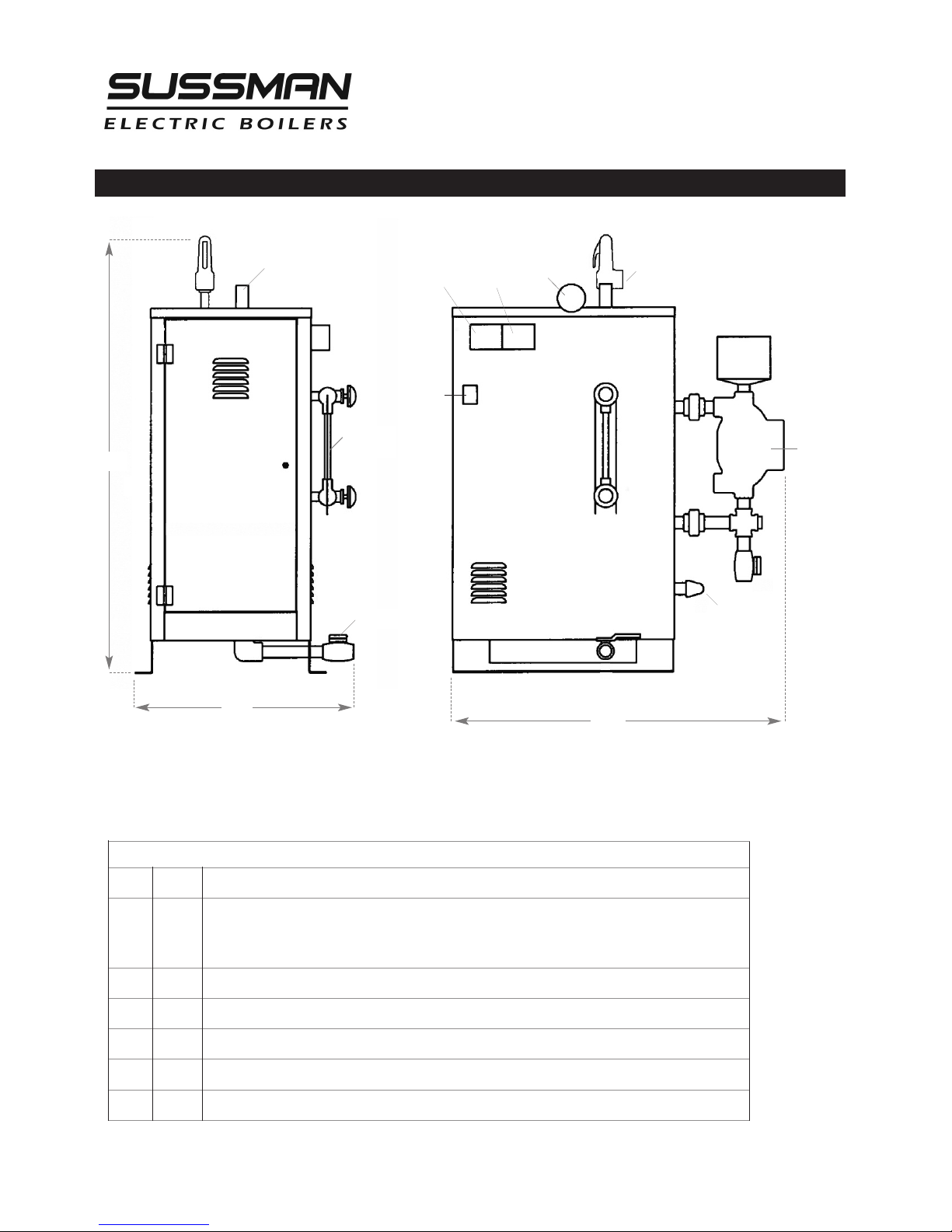
Dimensional & Clearance Specifications
SteamOutlet
Operating
Pressure
Control
H
igh Limit
Pressure
Control
Pressure
Gauge
Safety Valve
Liquid Level
Control
Water Feed
Inlet
F
E
L
D
A
B
E
R
Front
Left
Drain Valve
On/Off
Switch
Gauge Glass
Assembly
Height
Width
Length
Side Elevation Front Elevation
Allow 24" all around for servicing.
CLEARANCE FROM COMBUSTIBLE SURFACES
A
1" Clearance above top of boiler
B
A Clearance from Front of boiler. Prefix "C" to numeral indicates acceptability for
closet or alcove installations; prefix acceptability for alcove installations but not
for closet installations.
D
1" Clearance from back of boiler.
EL
1" Clearance from left side of boiler.
ER
16" Clearance from right side of boiler.
F
C Indicates type of flooring: "NC" for non-combustible; "C" for combustible.
G -
Total minimum free area in square inches of close ventilating openings.
Page 4
Installation, Operation & Maintenance Manual
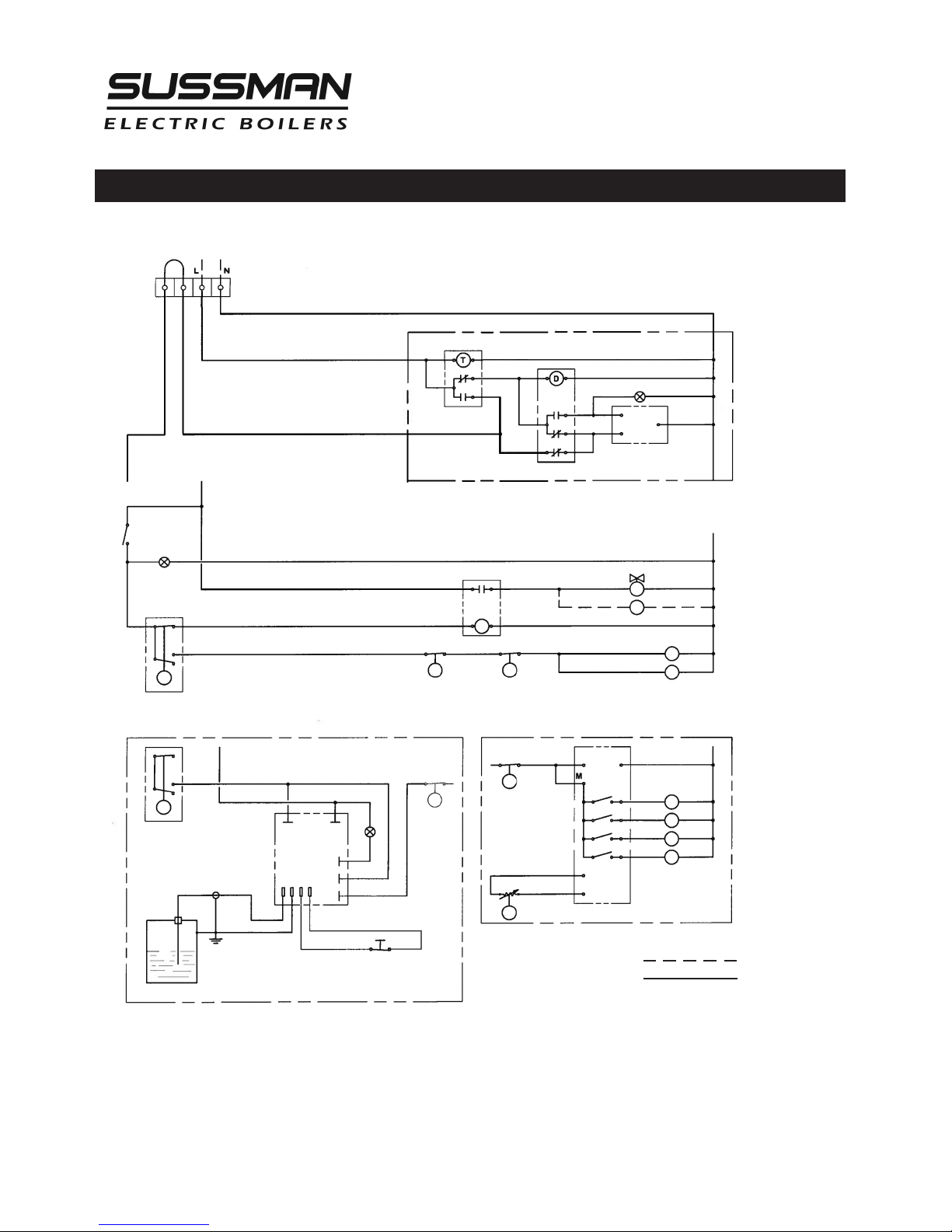
Wiring Diagram Control Circuit
4
Field Wiring
Factory Wiring
120V 1PH
INPUT
Control
Terminal Block
7-Day 24 Hr
T
imer
ES81600
A
utomatic
Blowdown System
T
ime Delay Relay
Pilot Light
O
pen
Close
M
otorized
B
lowdown
V
alve
SOLENOID
VALVE
PUMP MOTOR
C1
C2
CONTACTORS
R
RELAY
L
P1
HIGH LIMIT
PRESSURE
CONTROL
AUX LWCO
PROBE
BOILER SHELL
L1 L2
HC
COM
NO
GND
LOW
RESET
PILOT
LIGHT
L
LIQUID
LEVEL
CONTROL
C1
C2
C3
C4
CONTACTORS
135
OHM
COM
SEQUENCER
120V COM
1
2
3
4
P2
OPERATING
PRESSURE
CONTROL
PROPORTIONING
PRESSURE
CONTROL
MANUAL RESET
P2
P1
P2
AUX LWCO
PC BOARD
ON/OFF
SWITCH
S
M
2
1
3
Page 5
Installation, Operation & Maintenance Manual
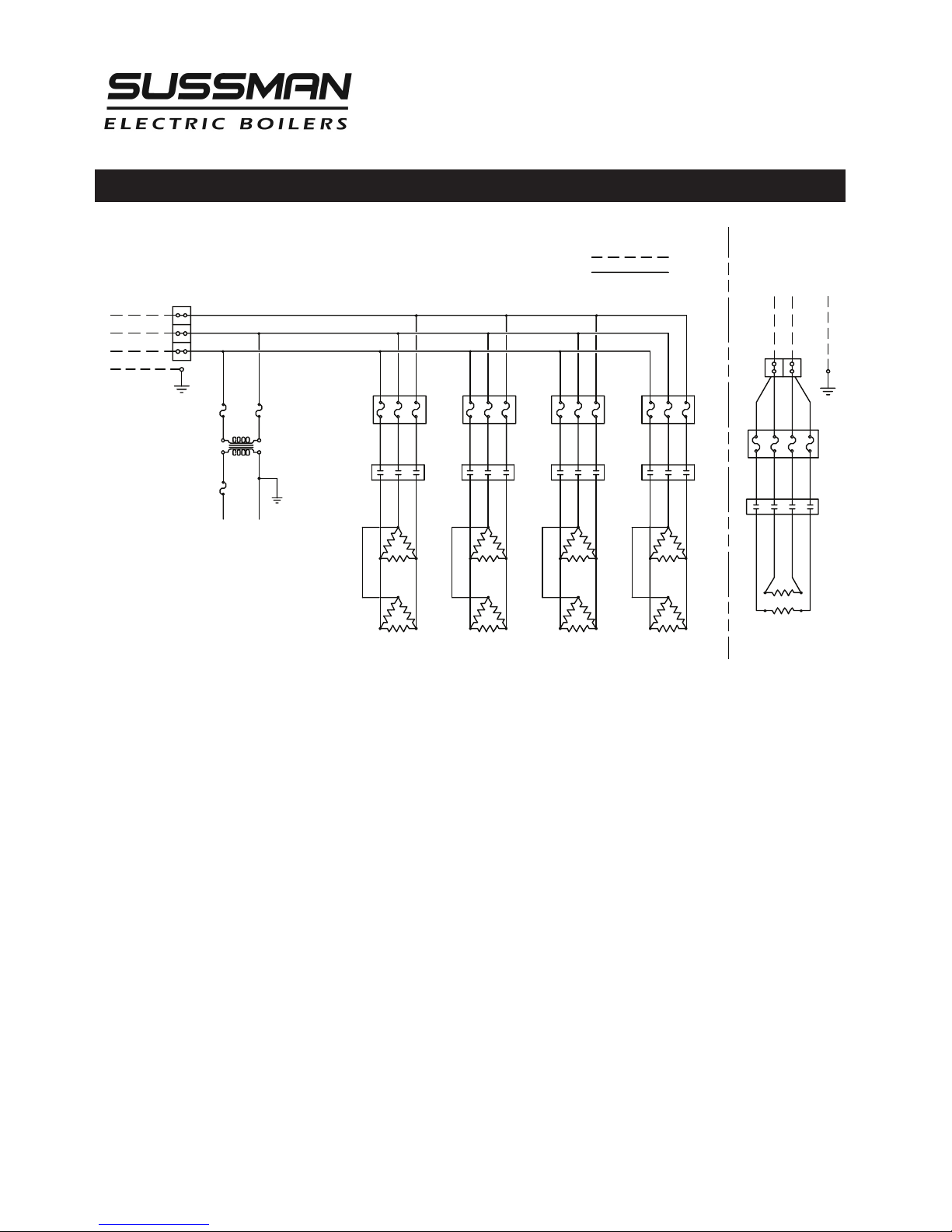
Wiring Diagram Power Circuit
H1 H3 H5 H7
FB1 FB2 FB3 FB4
FIELD WIRING
FACTORY WIRING
P
ILOT
L
IGHT
4
80V
1
20V
NOTES:
1. Power Terminal Block only on boilers with two or more contactors
2. Power Fuses only on boilers rated 120 amperes and larger.
3. See Parts List for contactor and heating element information.
H2 H4 H6 H8
TO CONTROL
CIRCUIT
HEATING
ELEMENTS
TRANSFORMER
(optional)
T
B 1
TB
FB
C
H
L1
L
2
L3
G
POWER FUSES
(see Note 2)
CONTACTORS C1 C2 C3 C4
SINGLE PHASE
M
AIN POWER SUPPLY
L
1 L2 G
T1
T
ERMINAL POWER BLOCK
(see note 1)
THREE PHASE
M
AIN POWER
SUPPLY
5
Page 6

ALL ELECTRICAL WIRING MUST BE PERFORMED BY A QUALIFIED ELECTRICIAN IN ACCORDANCE WITH NATIONAL AND
L
OCAL ELECTRICAL CODES.
Assure that the power voltage and phase being
supplied to the boiler matches the power voltage and phase of
the boiler. Connecting incorrect power supply can damage boiler
components or cause improper boiler operation. If the boiler
power requirements do not match the power to be supplied to
the boiler the boiler must be returned to the factory for
conversion. Boilers cannot be field converted.
All boilers are pre-
wired and tested prior to shipment.
1. Ground boiler according to National Electric Code
requirements to avoid shock.
2. Power wiring to boiler should be in accordance with National
and Local Electrical Code requirements following wiring
diagram supplied. Use proper size wire. Wire size is specified
adjacent to field wiring terminals. This label states the wire
size [AWG or MCM], minimum temperature rating (90 C) and
conductor material (copper only). Deviation from these
requirements may result in improper or unsafe boiler
operation.
3. A disconnect switch employing circuit breakers or fuses
should be installed between the main power source and the
boiler. This disconnect switch should be located near the
boiler and clearly marked for easy access and identification
should the boiler need to be turned off due to an emergency.
4. Boiler control circuit is 120 Volt*. Unless boiler has an
optional step down transformer, a separate 120 Volt power
feed wiring is required to be connected to the control circuit
terminal block. A 15 Amp circuit is required for all boilers. If a
3/4 HP feed water motor and pump assembly is connected to
the boiler, then a 20 Amp circuit is required.
5. If a separate control circuit is used, it should be connected to
the control circuit terminal block.
6. Remote mounted water feed systems (i.e. motor and pump)
should be connected to the junction box provided on the
outside of the boiler jacket.
7. With main power off, make sure all wiring terminations are
tight to avoid arcing, carbonizing or overheating of contacts.
Boilers are susceptible to lightning damage due
to water line connections. An industrial type lightning/surge
protector should be installed according to the manufacturer's
recommendation at the service entrance. Consult your
contractor or electrical dealer.
Substitution of components or modification of
wiring system voids the warranty and may lead to dangerous
operating conditions.
*220V for 380V and 415V boilers.
Wiring
!
CAUTI O N
!
CAUTI O N
!
WARNING
REFER TO NATIONAL AND ALL APPLICABLE LOCAL CODES FOR SPECIFIC INSTALLATION REQUIREMENTS.
1. The boiler should be mounted on a solid,
level foundation.
2. The boiler should be located with suitable
clearances, refer to page 2 and 3 and Code
requirements.
Installation
Piping
Installation, Operation & Maintenance Manual
6
ALL PIPING SHOULD BE INSTALLED BY A
QUALIFIED LICENSED PLUMBER IN ACCORDANCE WITH NATIONAL AND LOCAL
CODES.
1. When water feed is other than pump type
the water supply pressure must be 10 psig
greater than boiler operating pressure to
assure water supply maintains proper
water level in the boiler. Insufficient water
levels can result in improper boiler
operation. (Keep feed water valves open at
all times during normal operation.)
2. If pump and boiler are plumbed within 30
feet (pipe length) a minimum of 2 check
valves are required to avoid damage to
pump.
3. Connect steam line with customer supplied
outlet valve to boiler steam outlet.
4. Provide for boiler drain connection, a daily
blowdown is required. A "Blowdown
Separator Tank" may be necessary, check
with local code.
5. Safety valve shall be plumbed according to
local code.
6. SSB Boilers have Stainless Steel all wetted
metal parts. SSB boilers shall be operated
using only deionized water, having a
maximum conductance of 1 microSiemen
per cm
(1 µS/cm) [minimum specific resistivity
of 1 megohm per cm (1ΜΩ/cm)].
NOTE:
The safety valve shall not be plumbed
with a line sized less than the outlet size of
the safety valve.
Page 7

Installation, Operation & Maintenance Manual
7
Pressure Controls, Operation and Testing
NOTE:
All boilers are provided with one high limit
pressure control and at least one operating pressure
control.
1. The high limit pressure control is equipped with a
manual reset feature. There is no subtractive
differential scale with this type of control
2. All pressure controls are equipped with an
adjusting screw, allowing for setting of desired
operational and high limit pressures. To reduce
pressure setting, turn adjusting screw in direction
that allows indicator to point to a lower pressure
setting on the scale. To increase pressure setting
turn adjusting screw in direction that allows
indicator to point to a higher pressure on the scale
NOTE
: It is recommended that the high limit control
be set 10psig above the desired normal operating
pressure.
3. Operating pressure controls, have a separate
differential scale. Differential indicates pressure
below the main operating maximum pressure, the
pressure control will re-set. The differential set
point is adjusted in the same manner by turning
the adjusting screw in the desired direction to
increase or decrease the differential pressure
value.
Pre-Operation Check (All Boilers)
LWCO/PUMP CONTROL OPERATION AND TESTING
1. All valves for incoming water supply are to be fully
opened. Main disconnect switch is to be in the
"on" position. Boiler main switch is to be in the
"on" position. Since boiler will be empty the pump
or solenoid will be energized allowing the boiler
to fill with water. Control will automatically fill
boiler to proper operating water level and the
pump/solenoid will be de-energized. Contactors
will then energize, applying voltage to the heating
elements.
2. Pump switch operation – at this point water should
be visible approximately half way up the sight
glass. Slowly open the drain valve located at the
bottom of the boiler. Water level in the sight glass
will begin to drop, allowing the low water cut
off/pump control to energize the feed water
system. Close valve for proper operation.
3. Low water cutout switch performance – open the
drain valve completely. Maintain this condition
until water level falls within the gauge glass
enough to cause the low water cutout switch to
de-energize the heating elements. All of the
contactors will be in a de-energized or open state
at this time. Close the drain valve, water feed system
will automatically refill the boiler and the contactors
will re-energize.
Boilers equipped with an auxiliary low water cut-off
control with a manual re-set button (required as
mandatory equipment is some states): once the correct
operating water level has been reached, it will be
necessary to depress the reset button in order for the
contactors to re-energize.
NOTE:
For boilers equipped with an automatic
blowdown system:
• FOR TEST 1
- the blowdown time clock must be in
the “run” mode before the boiler will automatically
fill.
• FOR TEST 2 AND 3
- in order for the drain valve to
open the blowdown clock must be in the “off” mode.
(See blowdown time clock insert) The automatic
blowdown indicator light will be on when the valve is
open. This light will remain on for the duration of the
blowdown cycle (a few seconds). It may be necessary
to cycle the time clock from the “run” to “off” mode
several times.
4. Operating pressure control check: Close steam
outlet valve [supplied by customer] and adjust
operating pressure control to 20psig and the
differential to 10psig. Set the high limit pressure
control to 30psig. Switch boiler on to allow steam
pressure to build-up. Pressure gauge reading will
increase and the operating pressure control will deenergize the contactor(s) when the pressure gauge
indicates 20psig. Open steam outlet valve to bleed
off pressure. When the pressure gauge reading
decreases below 10psig (differential) the operating
pressure control will re-energize the contactor(s).
5. High limit pressure control check: FOR TEST
PURPOSES ONLY! Set the high limit pressure control
10psig lower than the operating pressure control.
Close the steam outlet valve and switch the boiler
on to allow boiler to build pressure. When the
pressure gauge indicates the pressure at which the
high limit pressure control is set, the high limit
pressure control re-set button will pop-up and the
control will de-energize the contactor(s). Open the
steam outlet valve to bleed off pressure. The
contactor(s) should not re-energize on pressure
drop. The contactor(s) should only re-energize when
the pressure has dropped and the high limit
pressure control reset button is depressed.
Page 8

Operation
With main disconnect “OFF” tighten
a
ll electrical connections before energizing boiler to
prevent arcing, carbonizing of contact and/or overheating
1. Set the desired operating pressure and differential
pressure on the operating pressure control.
2. Set the high limit pressure control. (Recommended to
be 10 psig above the operating pressure setting.)
3. Turn on water supply.
4. Turn main disconnect switch on.
5. Turn boiler control switch on. The water feed will begin
and continue until the water level reaches half way up
the gauge glass. The water feed will automatically shut
off and the contactor(s) will energize.
Blowdown
A daily blowdown is an essential part of boiler operation. It is the best and most important part of
preventative maintenance you can give your boiler and will add years of life to the unit. Make sure a
blowdown schedule is established and followed regularly.
MANUAL BLOWDOWN INSTRUCTIONS
1. At the end of the working day, while boiler is
still operating, turn boiler main switch to the
“OFF” position, close water supply valve and
open disconnect switch.
2. If blow down valve is plumbed into a
blowdown tank, the boiler can be discharged
at operating pressure.
3. If the blowdown valve is not plumbed into a
blowdown tank, consult with local plumbing
codes regarding boiler discharge.
4. When discharge is complete and boiler is
drained, close the blowdown valve, open the
water supply valve, turn boiler main switch to
“ON” position and close disconnect switch.
5. When refilling is complete, turn off the boiler
unless further operation is needed.
6. If boiler is equipped with a “Manual Re-set
Auxiliary Low Water Cut-off” (as required in
some states) the re-set button must be pushed
before the boiler will begin developing steam.
Do not push re-set button until the boiler has
refilled with water.
AUTOMATIC BLOWDOWN INSTRUCTIONS
(PN ES81600) 1” NPT, Starts, stops and blows down the boiler
automatically, utilizing a programmable time clock a timedelay relay and motorized ball valve.
If the blowdown valve is plumbed into a
blowdown tank, the boiler can be discharged at operating
pressure. If the blowdown valve is not plumbed into a
blowdown tank, consult with local plumbing codes regarding
boiler discharge.
NOTE: The manual valves from the boiler drain and the lower
float control equalization tube must be fully open for the
automatic blowdown to be effective.
1. Program time clock by setting the time boiler is to turn on
and off daily. (Refer to instructions in time clock insert.)
2. When the time clock turns the boiler “off” the blowdown is
activated. A red pilot light over the time clock will come on
and remain on while the motorized ball valve is open. The
time duration the valve is open is set by an adjustable
potentiometer built into the time delay board. The water
level in the boiler after blowdown is complete, will be
approximately at the lower gauge glass valve. (Elements are
not exposed to air between operations.)
3. Boiler will automatically refill at next programmed on cycle.
Blowdown program can be overridden to allow for
unscheduled blowdown or operational cycles. Refer to the time
clock instruction insert.
6. Boiler steam pressure will gradually increase to
the operating pressure control set point, at
which time the contactor(s) will de-energize.
7. With steam demand, the boiler steam pressure
will decrease. When the boiler pressure has
dropped below the operating pressure control
differential set amount, the contactor(s) will reenergize.
8. The boiler is equipped with float type liquid
level controls employing micro switches. They
are extremely sensitive and reliable and will
maintain the proper water level within the
boiler pressure vessel automatically during boiler
operation.
9. The boiler should be blown down daily. (See
blowdown instructions.)
!
CAU T I O N
!
CAU T I O N
Installation, Operation & Maintenance Manual
8
Page 9
Installation, Operation & Maintenance Manual
9
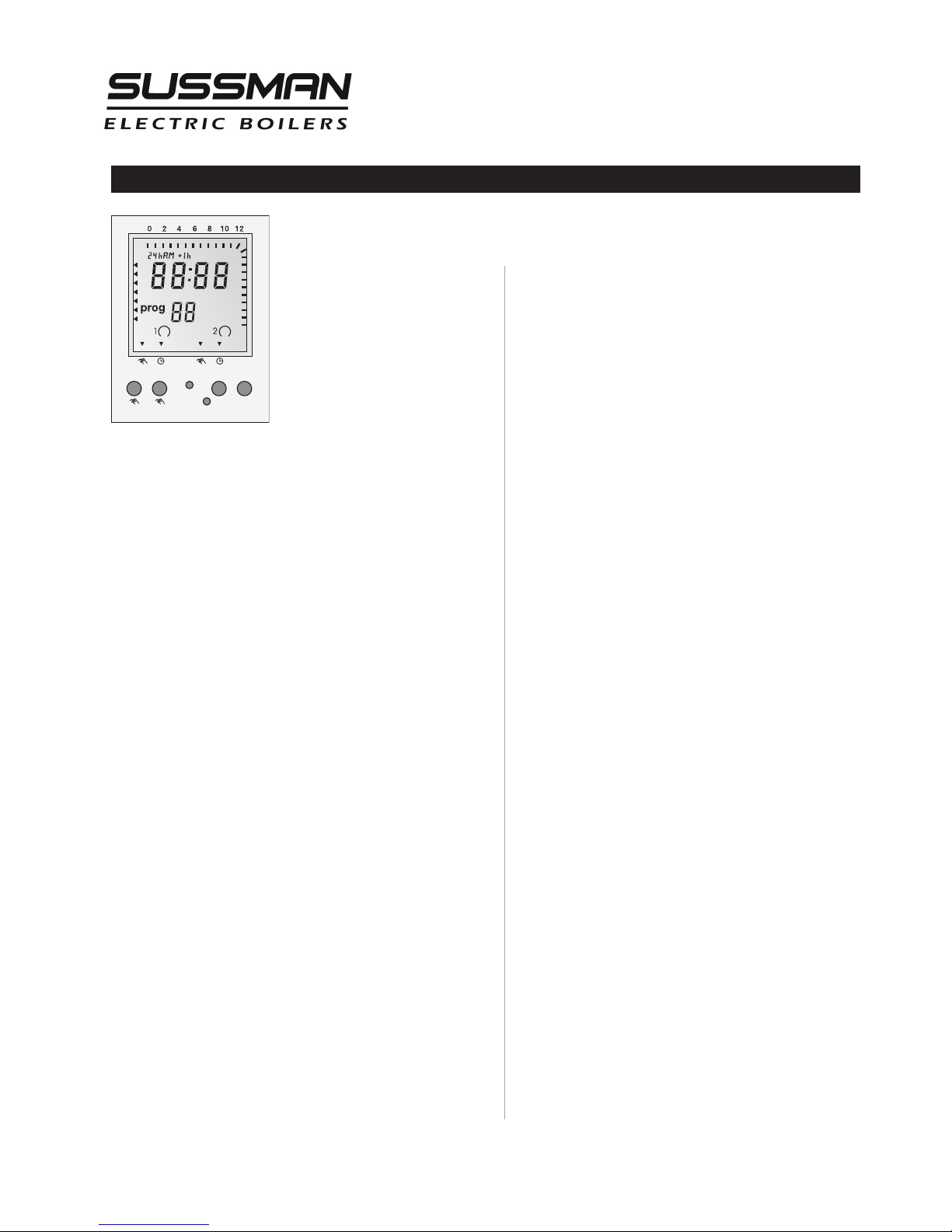
Digital Timer - Operation Instructions
TO SET TIME & DAY OF
CLOCK
1. Press Menu
2. 24h AM or PM blinking, press
+ or – to select, press OK
3. Hour (12:00) blinking, press +
or – to select, press OK
4. Minute (12:00) blinking, press
+ or – to select, press OK
5. Arrows for days
blinking,
press + or – to select, press OK
6. Go to step 8 to continue with programming or press
Menu to end.
TO SET TIMER ON/OFF TIMES
7. Press MENU and press OK four times to go
current time/day setting above
8. PROG 01 blinking and ON symbol
displayed, press +
or – to select, press OK
9. Hour (12:00) blinking, press + or – to select, press OK
10. Minute (12:00) blinking, press + or – to select, press
OK
11. Arrows for days
blinking, press + or – to select,
press OK
12. PROG 02 blinking and
OFF
symboldisplayed,
press + or – to select, press OK
13. Hour (12:00) blinking, press + or – to select,
press OK
14. Minute (12:00) blinking, press + or – to select, press
OK
15. Arrows for days
blinking, press + or – to select. See
possible combinations below.
16. Press MENU to end or press OK and repeat steps 8 to
15 to set more ON/OFF times.
PROGRAMMED DAY COMBINATIONS:
Every day (arrowson all days)
Monday to Saturday
Monday to Friday
Saturday and Sunday
Any individual day
RUN MODE
On Run mode, display will show current time/ date, on/off
status, override/automatic status, hourly on/off setting for
the day and Daylight Saving Time.
ON/OFF STATUS
ON
symboldisplayed when timer isonand
OFF
symboldisplayed when timer is off.
OVERRIDE/AUTOMATIC
When the timer is
ON, press + to manually turn
the timer
OFFand display arrowwill point to
OVR
. Press + again to go back to
ONand display
arrow
will point to
AUTO
.
When the timer is
OFF, press + to manually turn
the timer
ONand display arrowwill point to
OVR
.
Press + again to go back to
OFFand display
arrow
will point to
AUTO
.
When the timer is in the override mode
(on
OVR
),
timer will stay in that position until the next programmed time, at which time the arrow_will point
to
AUTO
and continue in the automatic mode.
HOURLY ON/OFF SETTING FOR THE DAY
Hash marks on the upper and right edges of the display show the hourly On times for the day. Absence
of hash mark on a specific hour indicates that the
timer is Off on that hour.
DAYLIGHT SAVING TIME.
In the Run mode, use a pencil point and press +
HR
for Daylight Saving Time and current time advances
one hour and +
HR
displayed. To revert back to
Standard Time, press +
HR
and current time falls
back one hour and +
HR
display disappears.
PROGRAMMING CONFLICTS.
Switch Off commands have priority over switch On
commands.
NOTES:
1. The timer is set according to the boiler operation.
When the timer is
ON
the boiler isONand the
blowdown is
OFF
.
2. Timer must be powered up during programming
to display
ON/OFF
status.
3. During programming, if no button is pressed after
1 minute, the timer will revert back to Run mode.
Mo
T
u
We
Th
Fr
Sa
Su
1
4
1
6
18
20
22
24
+- Menu OK
Res.
+1h
Page 10
Installation, Operation & Maintenance Manual
10
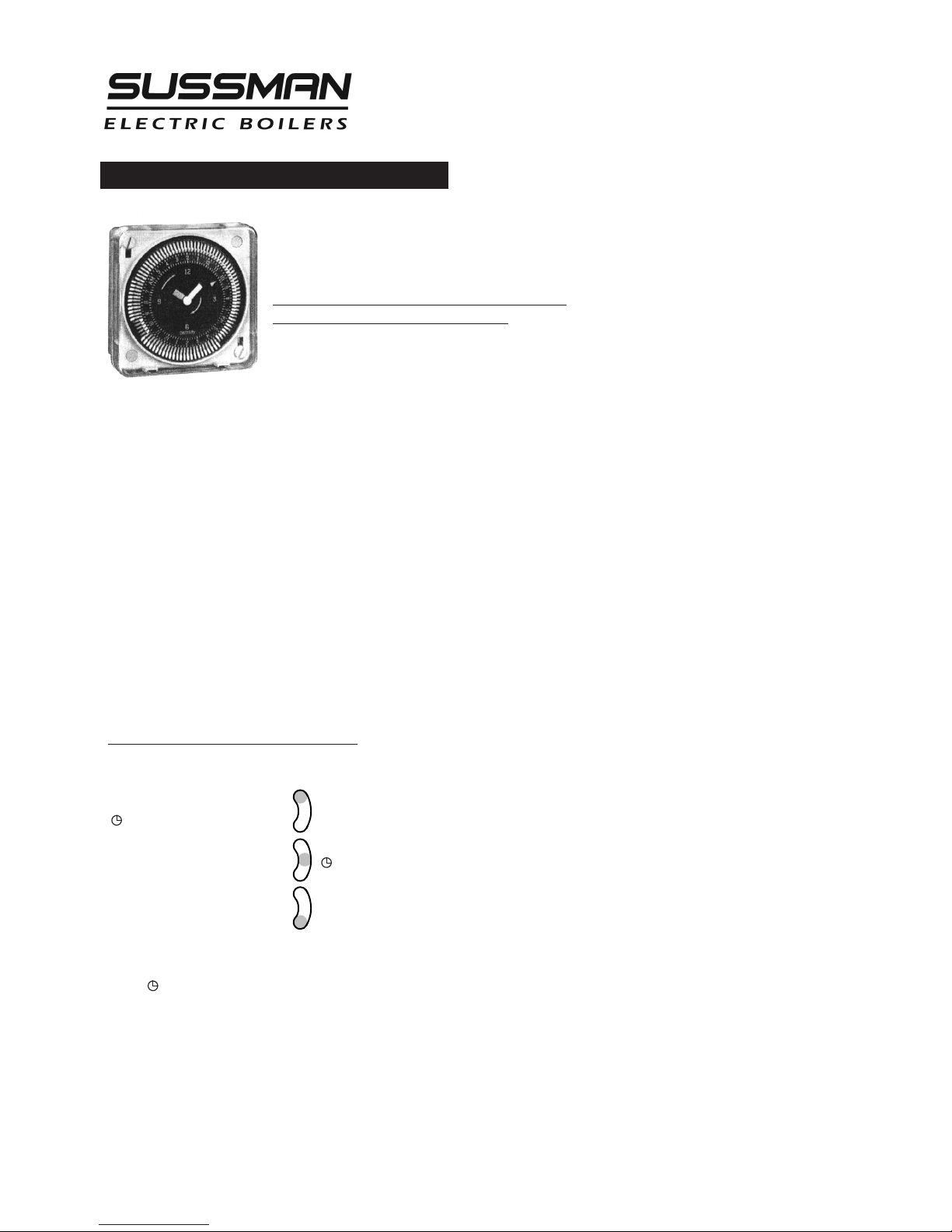
24-Hour and 7-Day Time Switches
P
ROGRAMMING
F
or electric steam boilers equipped with Automatic
Blowdown Systems ES 81600, refer to the following instructions for time clock operation and settings.
Timer settings for blowdown operation are at
the discretion of the owner/operator.
The weekly program dial shows the seven days of the week
and AM/PM imprints for each day.
The time switch is set by pushing the captive trippers to the
outer ring position for the entire period that the load is to be turned ON, i.e., 2 hours
to each tripper on the 7-day dial. When the tripper is pushed to the inside, the switch is
in the OFF position.
SETTING TIME
To set the current time and day of week, turn
the minute hand clockwise. Do not set the time
by rotating “Outer” Dial.
Turn the minute hand clockwise until the day of
the week and the time of day on the outer dial is aligned with the triangle marker on
the inner dial (two o'clock).
Example for 7-day program dial Monday 10:30 AM.Turn the minute hand clockwise
until Monday 10:30 AM is aligned with the triangle on the inner dial.The hour and
minute hand will show exactly 10:30.
FOR MANUAL OVERRIDE
Manual override can be accomplished
at the discretion of the owner/operator
as follows.
3-WAY MANUAL OVERRIDE SWITCH
I = permanent ON
I
= automatic
O = permanent OFF
O
IMPORTANT: It is recommended that for periodic
and effective blowdown,the override switch be set
in the automatic setting.
Page 11

Installation, Operation & Maintenance Manual
11
Maintenance
HAZARD OF ELECTRIC SHOCK.
DISCONNECT ALL ELECTRICAL POWER BEFORE WORKING
ON BOILER.
S
ussman Electric Steam Boilers are designed for years of trouble-free performance. To establish a good preventative maintenance program, we suggest that the facility maintenance person or engineer familiarize themselves with these simple rules.
1.
Daily blowdown at pressure is essential for ideal boiler
performance. Extended periods of operation may require
more frequent blowdown. If the boiler is not equipped
with an automatic blowdown, in order to safeguard the
heating elements, it is recommended to turn both the main
disconnect switch and the boiler switch to the off position
before manually blowing down the boiler.
2.
The sight glass should be checked frequently to assure the
boiler has adequate water.
3.
The sight glass should be checked daily for damage (i.e.
scratches, erosion, leaks etc.) The sight glass should be
replaced if damaged. (See insert.)
4.
A monthly inspection should be made of the internal wiring.
Open the access door and check all electrical connections
for tightness. Replace any wires that show signs of damage.
NOTE:
The electrical power MUST be shut off during this
maintenance procedure.
7.
Heating element mounting bolts should be checked and
tightened to a torque of 22 ft.-lbs. If there are indications
of steam leaks from an element, replace the element
gasket.
8.
A monthly check for leaks should be made; any loose or
damaged fittings should be tightened or replaced.
9.
Every four months the boiler float control should be checked
for proper operation. The lower equalization column can
be examined visually and manually to see if is clear and
clean. If there are signs of scale or mineral deposit buildup
the float control must be disassembled and cleaned.
One of the lower heating elements should be removed. If
scale or mineral deposits have begun to form all elements
should be removed cleaned and reinstalled using new
element gaskets.
Operating and high limit pressure control operation should
be checked. Pressure controls should be removed and
cleaned if necessary. Water feed supply check valves should
be inspected and replaced if necessary.
10.
If the boiler is equipped with an electronic auxiliary low
water cut-off every four months the probe should be
removed and checked for deposits. The probe should be
!
CAU T I O N
cleaned and reinstalled.
11. Replace probe every 10 years. More frequent
replacement of the probe is required if it is used
in locales where significant water treatment is
required.
12. Replace the auxiliary low water cut-off board
every 15 years.
13. Perform low water condition test every 12 months
and confirm auxiliary low water cut-off is
operating as intended.
AUXILIARY LOW WATER CUT-OFF TEST
1. To test the auxiliary low water cut-off,
simulate the failure of the primary low water
cutoff:
2. Turn off boiler power and control electric
supplies.
3. Drain boiler.
4. Close water feed supply valve.
5. Open Mercoid level control cover to access its
switches and terminal blocks.
6. Turn on boiler control voltage only.
7. Verify there is voltage at the yellow wire.
8. Manually work the upper switch to disable
pump.
9. Manually work the lower switch to engage
the heaters.
10. Pilot light near reset button will indicate low
water after 30 seconds.
11. Release the switches.
12. Open water feed supply valve.
13. Allow boiler to fill at proper level.
14. Push manual reset button to energize
contactors.
15. Install level control cover.
Page 12

Optional Equipment
Installation, Operation & Maintenance Manual
Standard Equipment
12
AUXILIARY LOW WATER CUT OFF
• For model SSB boilers SSB81017MR
(with manual reset).
Senses water level electronically using a resistance
probe. When a low water condition is detected,
the contactor control voltage circuit is interrupted and the heating elements are de-energized.
When water level returns to proper levels voltage
is restored to the contactor coils and the elements are re-energized. For controls with a manual reset button voltage to the contactor coils is
not restored until the water level has returned to
proper operating levels and the reset button is
pushed. Do not depress the reset button before
the correct water level is achieved.
LINE PRESSURE WATER FEED SYSTEM
• For model SSB boilersPNPN SSB99117
Water feed system used to supply makeup water
to the boiler when incoming water line pressure
is 10 psig greater than the operating pressure of
the boiler. Completely factory plumbed and
wired; 0-100psig range; 1/2” NPT size. Consists of
strainer, solenoid valve (120/1/50-60Hz), and check
valve for automatic feed. For SSB boilers PN
SSB99117 components are of stainless steel construction.
HIGH PRESSURE WATER FEED SYSTEM
• For model SSB12-72 PN SSB38002
• For model SSB100-180 PN SSB38020
Used to supply makeup water and to maintain constant water level when the boiler operating pressure
is equal to or greater than incoming water line pressure and condensate is not returned to the boiler.
• SSB38002A – Range is 0 – 100 psig, 1/2” NPT size consisting of strainer, solenoid valve and 1/3 HP 120/1/60
motor and pump.
• SSB38020A – Range is 0 – 125 psig, 3/4” NPT size consisting of strainer solenoid valve and 1/2 HP 120/1/60
motor and pump.
These assemblies are mounted on rubber shocks and
secured to a steel base mounting plate. These units
require field plumbing and wiring to the boiler.
SSB38002 and SSB38020 pump components are of
stainless steel construction.
AUTOMATIC BLOWDOWN SYSTEM
• Extends life of boiler
• Saves labor costs
• Starts the boiler automatically every day
• Shuts down the boiler every day
• Automatically blows down the boiler every day
• Completely programmable, can skip days, different
start and shutdown times, different operational durations.
• SSB81600 for all model boilers.
A stainless steel, motor driven straight-through, self-
cleaning ball valve with Teflon seats handles particles
and dirty fluid without the use of an up-stream strainer or other cleaning device. A timer (Standard analog
time clock is set for two hour time intervals, optional
digital time clock can be programmed to one minute
intervals.) and electronic time delay relay control the
boiler and the blowdown valve. A pilot light indicates
when the blowdown valve is open. The valve shall be
plumbed to a proper drain or receptacle. An automatic
blowdown system can be installed on any boiler,
regardless of size operating pressure or operating duty
cycle.
Page 13

Installation, Operation & Maintenance Manual
Optional Equipment
(cont.)
13
BLOWDOWN SEPARATORS
(see page 14)
• For models SSB12-48 PN BDT-ASME36
• For models SSB60-180 PN BDT-ASME42
A separator accepts the flash steam and effluent
from the boiler blowdown and reduces the temperature and pressure to insure a safe discharge of water
and sludge. Steam flash and pressure are absorbed
and pass harmlessly to the outside via a vent. The
separator design utilizes a water seal at the outlet,
which permits the operator to introduce cold water
from the bottom to mix with the hot water and boiler steam in the blowdown separator. This reduces
outlet temperature to a safe discharge level.
These separators require specific plumbing from the
boiler blowdown valve and require connection to a
cold water supply. (If the separator is less than half
full of water after the boiler is blown down cold
water must be added to bring the water level to the
halfway mark before the next blowdown).
• 0-30 PSIG pressure gauge; 0-200F temperature
gauge; water sight gauge glass and valve set assembly are included.
CONTROL VOLTAGE STEPDOWN
TRANSFORMER
• Provides 120 Volt (220 Volt export) from main power
supply. Factory wired and fused.
MULTISTAGE LOAD PROGRESSIVE
SEQUENCERS
Accurate control is provided by automatic progressive
sequencing in the use of energy and minimizing wear on
electrical components. The sequencers are designed to
apply power progressively to larger KW boilers. A factory
installed pressure sensitive sequential control reacting to
steam boiler pressure progressive energizes or de-energizes heating elements through power contactors. A
delay between sequencer steps before start-up and
between each subsequent step eliminates power surges.
Each sequencer is matched and factory pre- set to boiler
system requirements. Electronic progressive sequencers
give accurate control of multi-stage loads of the type
used in steam boilers. Features include progressive
sequencing (first on- first off) that equalizes the operating time of each load. Integral solid-state light emitting
diodes show active stages. Should a power interruption
occur, all elements are instantly de-energized for safety.
Upon resumption of power the control will re-stage the
loads one at a time.
Page 14
Installation, Operation & Maintenance Manual
14
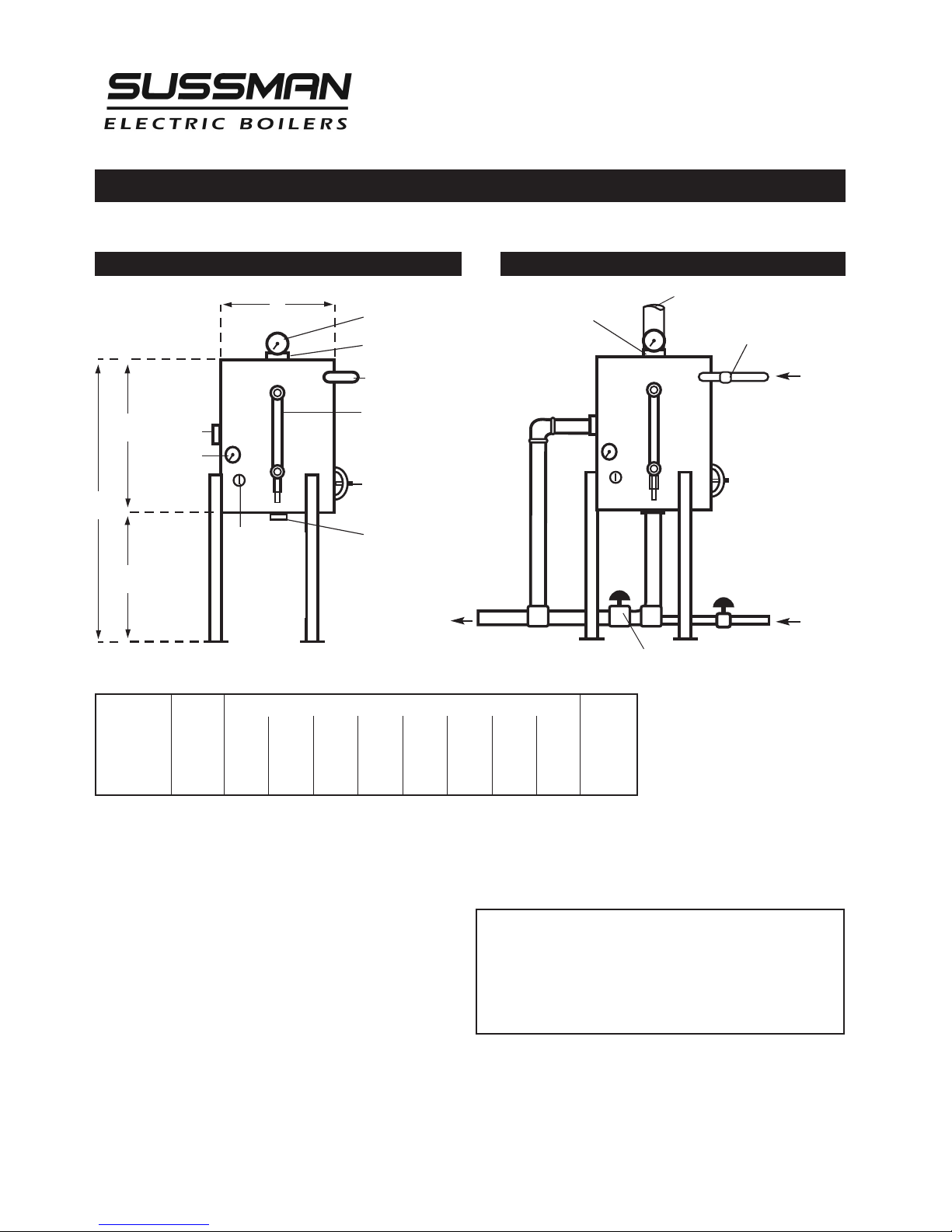
Blowdown Separator Tanks- Specifications and Data
MODELS BDT-ASME 36, 42
D
A
H
G
The Sussman Separator design incorporates a water
seal at the outlet which permits the operator to
introduce cold water from the bottom to mix with
the hot water and boiler steam blowdown in the
separator. This reduces the outlet temperature to
a level that makes it safe for discharge.
Note: 1BHP is approximately 10KW.
Dimensions and Features Suggested Hook-Up to Boiler
"C"Drain
Temperature
Gauge
Pressure Gauge
"E"Vent
"B"Inlet
Water Gauge
Handhole Assembly
3"x 4"
(exceptBDT-ASME 36)
"F" Cold Water Inlet
&Washout Drain
Maximum Boiler Working Pressure: 250 psi
Maximum Blowdown Separator Pressure: 65 psi
Blowdown Separators are sized in accordance with National Board Standards
Constructed in accordance with Section VII Division I ASME Boiler
& Pressure Vessel Code
BOILER DIMENSIONS SHIPPING
________________________________________________
HP
ABCDEFGHWEIGHT
_______________________________________________________________________
BDT-ASME 36 0-5 18" 1" 2" 12" 2" 2" 14" 32" 125
_______________________________________________________________________
BDT-ASME 42 6-25 24" 1" 2" 16" 2-1⁄2" 2" 18" 42" 230
Blowdown Separator
Blowdown Inlet
FromBoiler
Blowdown Outlets
Cold Water Supply
3/4"Coupling
for Temperature
Probe (opt.)
Drain Valve (closed duringnormal operator)
Vent toatmospheremust be full size
Tempered
Blowdown
to Drain
STANDARD EQUIPMENT
• 0-100 lb. Pressure Gauge
• 0-200˚ Temperature Gauge
• Water Level Gauge
Page 15

Installation, Operation & Maintenance Manual
Specifications
STEAM GAUGE
PRESSURE/
TEMPERATURE CHART
15
__________________________________________
Boiler Bhp Lbs/Hr 3-Ph
M
odel No. KW Rating Steam** Volts*** Amps
__________________________________________
208 34
SSB-12* 12 1.22 36.2 240 29
480 15
__________________________________________
208 50
SBS-18* 18 1.84 54.2 240 44
480 22
__________________________________________
208 67
SSB-24* 24 2.45 72.3 240 58
480 29
__________________________________________
208 84
SSB-30 30 3.06 90.4 240 73
480 37
__________________________________________
208 100
SSB-36 36 3.67 108 240 87
480 44
__________________________________________
208 134
SSB-48 48 4.90 145 240 116
480 58
__________________________________________
208 167
SSB-60 60 6.12 181 240 145
480 73
__________________________________________
208 200
SSB-72 72 7.35 217 240 174
480 87
__________________________________________
208 300
SSB-100 108 11.2 325 240 260
480 130
__________________________________________
208 400
SSB-135 144 14.7 434 240 347
480 173
__________________________________________
SSB-160 158 16.2 475
240 379
480 190
__________________________________________
SSB-180 180 18.4 542
240 434
480 217
__________________________________________
* Single phase available
** @ 212˚ F
*** Other voltage available
________________
Gauge Temperature
Pressure
PSIG
F˚ C˚
________________
1
5 179 82
________________________
10 192 89
_
_______________________
5 203 95
________________________
0 212 100
________________________
1 215 102
________________________
3 221 105
________________________
5 227 111
________________________
9 237 114
________________________
11 241 119
________________________
15 250 121
________________________
17 253 123
________________________
19 257 125
________________________
21 260 127
________________________
23 264 129
________________________
25 267 131
________________________
27 270 132
________________________
29 273 134
________________________
31 275 135
________________________
33 278 137
________________________
35 281 138
________________________
37 283 139
________________________
39 286 141
________________________
41 288 142
________________________
43 290 143
________________________
45 292 144
________________________
47 295 146
________________________
49 297 147
________________________
51 299 148
________________________
53 300 149
________________________
55 303 151
________________________
60 308 153
________________________
65 312 156
________________________
70 316 158
________________________
75 320 160
________________________
80 324 162
________________________
85 327 164
________________________
90 331 166
________________________
95 335 168
________________________
100 338 170
________________________
Page 16

Installation, Operation & Maintenance Manual
Sizing
16
Use the following Table to determine KW Boiler rating when steam load
and feedwater temperatures are known.
_________________________________________________________
Feed Water
0210 15 25 40 50 75 100
( F˚)
_________________________________________________________
40 .3347 .3355 .3375 .3388 .3406 .3422 .3431 .3447 .3458
_________________________________________________________
50 .3318 .3326 .3345 .3359 .3376 .3392 .3401 .3417 .3429
_________________________________________________________
60 .3288 .3296 .3316 .3329 .3347 .3363 .3372 .3388 .3400
_________________________________________________________
70 .3259 .3267 .3287 .3300 .3318 .3334 .3343 .3359 .3370
_________________________________________________________
80 .3229 .3238 .3278 .3271 .3288 .3305 .3313 .3329 .3341
_________________________________________________________
90 .3200 .3208 .3238 .3242 .3259 .3275 .3284 .3300 .3312
_________________________________________________________
100 .3171 .3179 .3199 .3212 .3229 .3246 .3255 .3271 .3283
_________________________________________________________
110 .3142 .3150 .3170 .3183 .3200 .3217 .3225 .3242 .3253
_________________________________________________________
120 .3112 .3210 .3140 .3154 .3171 .3287 .3196 .3212 .3224
_________________________________________________________
130 .3083 .3091 .3111 .3124 .3142 .3160 .3167 .3183 .3195
_________________________________________________________
140 .3054 .3062 .3082 .3095 .3113 .3129 .3137 .3154 .3165
_________________________________________________________
150 .3025 .3032 .3052 .3066 .3083 .3099 .3108 .3124 .3136
_________________________________________________________
160 .2995 .3003 .3029 .3036 .3054 .3070 .3079 .3095 .3107
_________________________________________________________
170 .2966 .2974 .2994 .3001 .3025 .3041 .3050 .3066 .3077
_________________________________________________________
180 .2937 .2945 .2964 .2978 2995 .3011 .3020 .3036 .3048
_________________________________________________________
190 .2907 .2915 .2935 .2948 .2966 .2982 .2981 .3007 .3019
_________________________________________________________
200 .2878 .2886 .2906 .2919 .2937 .2953 .2962 .2978 .2989
_________________________________________________________
Example:
Need a boiler to produce 450 lbs. steam/hr. at 75 psig with the available feedwater temperature 50˚ F.
From the chart above, find .3417 KW/Lb. of steam 450 lbs. steam/hr. x .3417= 153.8 KW boiler required
Page 17
IMPORTANT NOTE:
Read all warnings and instructions before performing installation or
maintenance. Safety glasses and gloves should be
worn at all times when working with or examining
water gauge glass and connections. Pressure in generator to be at zero before proceeding. Improper installation or maintenance of gauge glass and connections
can cause immediate or delayed breakage resulting in
bodily injury and/or property damage.
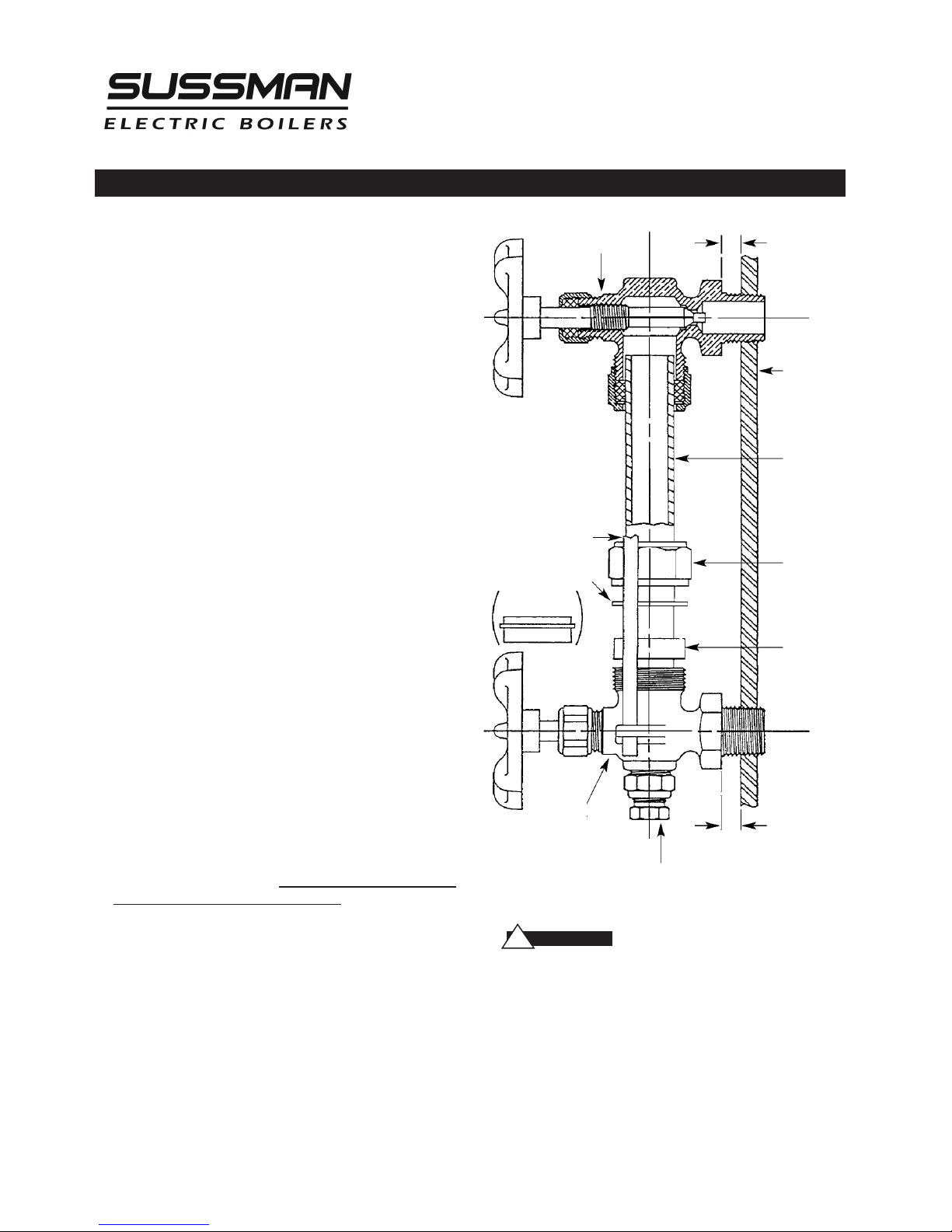
1. Apply Teflon tape or pipe dope to pipe threads.
Install top gauge fitting (fitting without a drain
valve) into the uppermost tapping. Wrench tighten
the fitting until it is snug and the glass outlet is
pointing at five o'clock (about 1/8 turn from its
final downward vertical position).
2. Install the bottom gauge fitting (the fitting with a
drain valve) until it is snug and the glass outlet is
pointing directly upward. Verify top and bottom
fittings are threaded into the tappings the same
number of turns (distance A= distance B).
3. Remove glass packing nut, friction washer (or
packing gland, depending upon the model), and
glass packing from the fittings, and place them, in
the same order, on to both ends of the gauge
glass. Push both packings about an inch up the
gauge glass.
4. Gently insert one end of the glass into the top
gauge fitting. Keeping the glass inside the top
fitting, gently rotate the top gauge fitting
clockwise until vertically aligned with the bottom
gauge, then insert glass into bottom fitting until
glass bottoms out on the shoulder inside the
bottom fitting.
5. Carefully raise glass about 1/16" and slide lower
glass packing down until the glass packing contacts
the lower gauge fitting. DO NOT allow the glass to
remain in contact with any metal!
6. Carefully slide upper glass packing up as far as
possible.
7. Hand tighten both glass packing nuts, then tighten
1/2 turn more by wrench. Tighten only enough to
prevent leakage. DO NOT OVER TIGHTEN! If any
leakage should occur, tighten lightly, a quarter turn
at a time, checking for leakage after each turn.
IMPORTANT NOTE:
Read all warnings and instructions before performing
installation or maintenance.
Safety glasses and gloves
should be worn at all times when working
with or examining water gauge glass and
connections.
Pressure in generator to be at zero before
proceeding.
Improper installation or maintenance of
gauge glass and connections can cause
immediate or delayed breakage resulting
in bodily injury and/or property damage.
Installation, Operation & Maintenance Manual
Gauge Glass Installation
17
Vessel Wall
Gauge Glass
Glass Packing
Nut
Glass Packing
Top Gauge
Fitting
Guard Rod
Friction Washer
(or Packing Gland)
Bottom
Gauge
Fitting
Drain Valve
A
B
!
WARN I N G
Page 18

Installation, Operation & Maintenance Manual
Gauge Glass Installation - Use and Care
18
DO NOTS
• DO NOT use glass if it contains any scratches, chips, or
any other visible signs of damage.
• DO NOT reuse any tubular glass or glass packings.
• DO NOT subject gauge glass to bending or torsional
stresses.
• DO NOT over tighten glass packing nuts.
• DO NOT allow glass to touch any metal parts.
• DO NOT exceed the recommended pressure of the
gauge or gauge glass.
• DO NOT clean the gauge or gauge glass while pressurized or in operation.
DO'S
• DO verify proper gauge has been supplied.
• DO examine gauge glass and packings carefully for
damage before installation.
• DO install protective guards and utilize automatic ball
checks where necessary to help prevent injury
in case of glass breakage.
• DO inspect the gauge glass daily, keep maintenance
records, and conduct routine replacements.
• DO protect glass from sudden changes in temperatures such as drafts, water spray, etc.
MAINTENANCE
Examine the gauge glass regularly for any signs
of clouding, scratching, erosion, or corrosion. The
glass should be inspected daily until the need for
replacement becomes apparent. This will help
establish the routine inspection and routine
replacement schedules.
CLEANING
Use commercial non-abrasive glass cleaners to
keep glass clean. Do not use wire brushes or any
other abrasive materials which could scratch the
glass.
INSPECTION
Examine the surface of the glass for scratches,
corrosion, chips, cracks, surface flaws, or nicks. To
do this, shine a very bright concentrated light at
an angle of about 45 degrees.A defective glass
will glisten as the light strikes imperfections. Glass
which appears cloudy or roughened, and will not
respond to cleaning, should be replaced.
STORING
Keep gauge glass in original packaging until
ready to install.
Page 19
Installation, Operation & Maintenance Manual
Element Replacement
19
READ INSTRUCTIONS COMPLETELY BEFORE STARTING WORK
B
efore Installing your new elements be sure the low
water cut-off and aux. low water cutoff (if supplied) is operating properly.
The float chamber and lower equalizer column of the liquid level control
must be completely clear of sludge or other foreign matter. Failure to do
this may cause the immediate burn-out of the new elements. If the unit
is probe equipped, check condition of the probes and isolator.
All elements are thoroughly checked before shipment The manu-facturer
cannot be responsible for burn-outs caused by a faulty low water cut-off.
The lower equalizer column can best be examined by breaking the unions
on either side and then visually and manually examining the piping with
your finger or probes to see if it is clear and clean.
1. Disconnect boiler from electric power supply at main safety switch or fuse panel.
Then turn boiler switch to “OFF" position.
2. Close water supply valve on incoming water supply line. Drain boiler completely
of water.
3. Open boiler door to access heating element.
4. Disconnect wire (electric) leads connecting element to main power system of
boiler. Again, note wire connections to facilitate re-assembly. Proceed to remove
and discard (6) bolts from flange.
IMPORTANT:
Note the wire connections to facilitate re-assembly (see wiring
schematic).Remove and discard six (5/16"-18) bolts from flange. Do not reuse
these bolts.
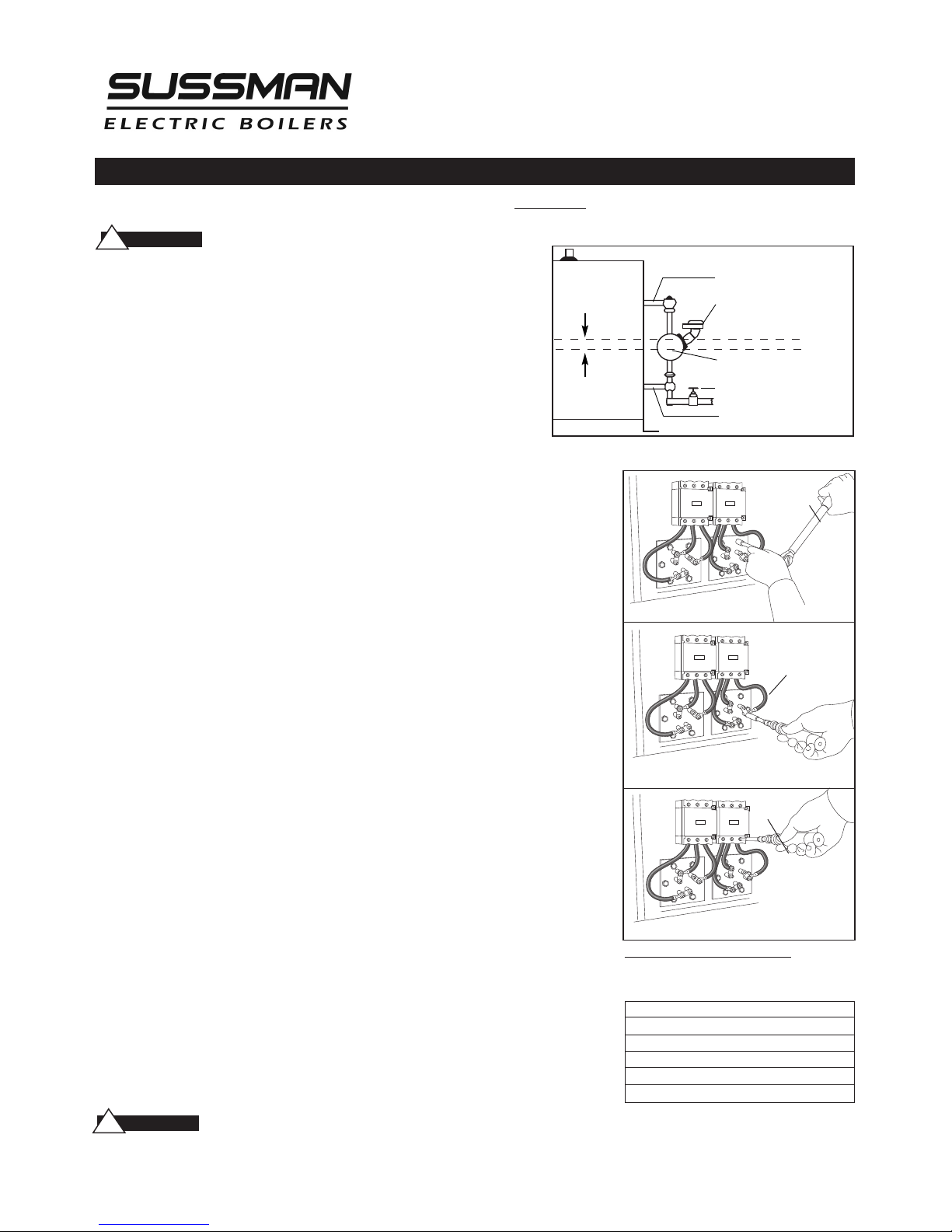
5. Thoroughly clean boiler flange of all foreign material. Be certain no part of old
gasket remains on flange.
6. Apply "Slic-Tite" Gasket Compound (or equal) to both surfaces of new gasket
supplied with replacement element. Proceed to install element flange assembly
with gasket between boiler flange and element flange. In doing this, be careful to
align flange holes so element wire connection terminals on element assembly are
in line with previously disconnected wire leads to facilitate easy connections.
NOTE:
Observe markings on element flange. Install element marking “TOP” on top.
7. Use only new element flange bolts. Tighten all (6) element flange bolts to a torque
value of 22 lb-ft each (see illustration).
8. Connect all wires to the terminals. Tighten all element terminals to a torque value
of 20 lb-in each (see illustration). Make sure all wires are clean and bright to assure
good electrical contact.
9. Check that the wires are correctly connected to the contactor terminals and are
tightened to a torque value of 45 lb-in. (see illustration). Make sure all wires are clean
and bright to assure good electrical contact.
10. Open water valve to allow water supply to reach boiler feed mechanism.
11. As boiler automatically refills, observe the new flange assembly for possible leaks.
If water
is noticed, the bolts must be re-tightened. Before doing this, turn the
boiler off at the main fuse safety switch.
12. When boiler reaches working pressure, check flange assembly again for leaks.
Follow maintenance instructions provided with the boiler.
Torque Values:
Element Flange Bolts: 22 lb-ft
Element Terminals: 20 lb-in
Contactor Terminals: see Torque chart
For Illustr at ive Purpose s On ly.
Power wiring show n in approxi mate
facto ry -inst al led lo catio n
T
orque
W
rench
Torque
Wrench
Torque
Wrench
11⁄2”
1”SteamEqualizingPipe
Pump andLowWaterControl
Normal Boiler Water Line
Cut-Off Level is ArrowMark
Blowdown Valve
1”Water EqualizingPipe
TORQUE VALUES
Element Flange Bolts 22 lb-ft
Element Terminals 20 lb-in
Contactor Terminals 50 amp 25 lb-in
60 amp 45 lb-in
75 amp 75 lb-in
!
CAU T I O N
!
CAU T I O N
Page 20

A Division of Sussman-Automatic Corporation
43-20 34th Street, Long Island City, NY 11101 • 718-937-4500
1-800-238-3535 • Fax: 718-937-4676 • email: [email protected]
www.sussmanboilers.com
PUR 101137SSB 3/13
M A D E I N U S A
 Loading...