

Page 1

Surpahs STT-978BL Digital Kitchen Scale
User Manual
Scan for shopping and support:
www.surpahs.com
®
The user manual can be downloaded through Surpahs website at http://www.surpahs.com
®
1
Page 2
SPECIFICATIONS
• Equipped with 4 high precision sensors
• Platform: Anti-Fingerprint Stainless Steel
• Display: Blue LCD with White Backlight. (V.A.: 58 x 26.5mm)
• Capacity: 5000g / 176.4 fl.oz / 11lb:0.4oz / 5000ml
• Minimal Weight: 2g
• Graduation: 1g / 0.1 fl.oz / 0.1oz / 1ml
• Weight Units: g / fl.oz / lb:oz / ml
• Power Supply: 4.5V (3 x AAA batteries)
• Auto-OFF Time: 180 Seconds of Non-Operation
• Working Environment: 0°C to 40°C, Humidity: ≤90% RH
• Storage Environment: -20°C to 60°C
• Low battery indication: Lo
• Overload Indication: Err
III. Weighing with TARE Function
a) When the scale is ON.
b) Place the holder, plate or any container on the platform, touch
(do NOT hold it) and wait about 1 second until “0” is shown.
c) Put the weight object into the container, screen reading is the object’s weight.
Note: You can use the TARE function for as many times as you need in one weighing process.
FUNCTION QUICK REFERENCE
• Turn Scale ON: Touch
• Turn Scale OFF: Press and hold for about 2 seconds.
• TARE function: When the scale is ON, touch once (do NOT hold it), wait the scale
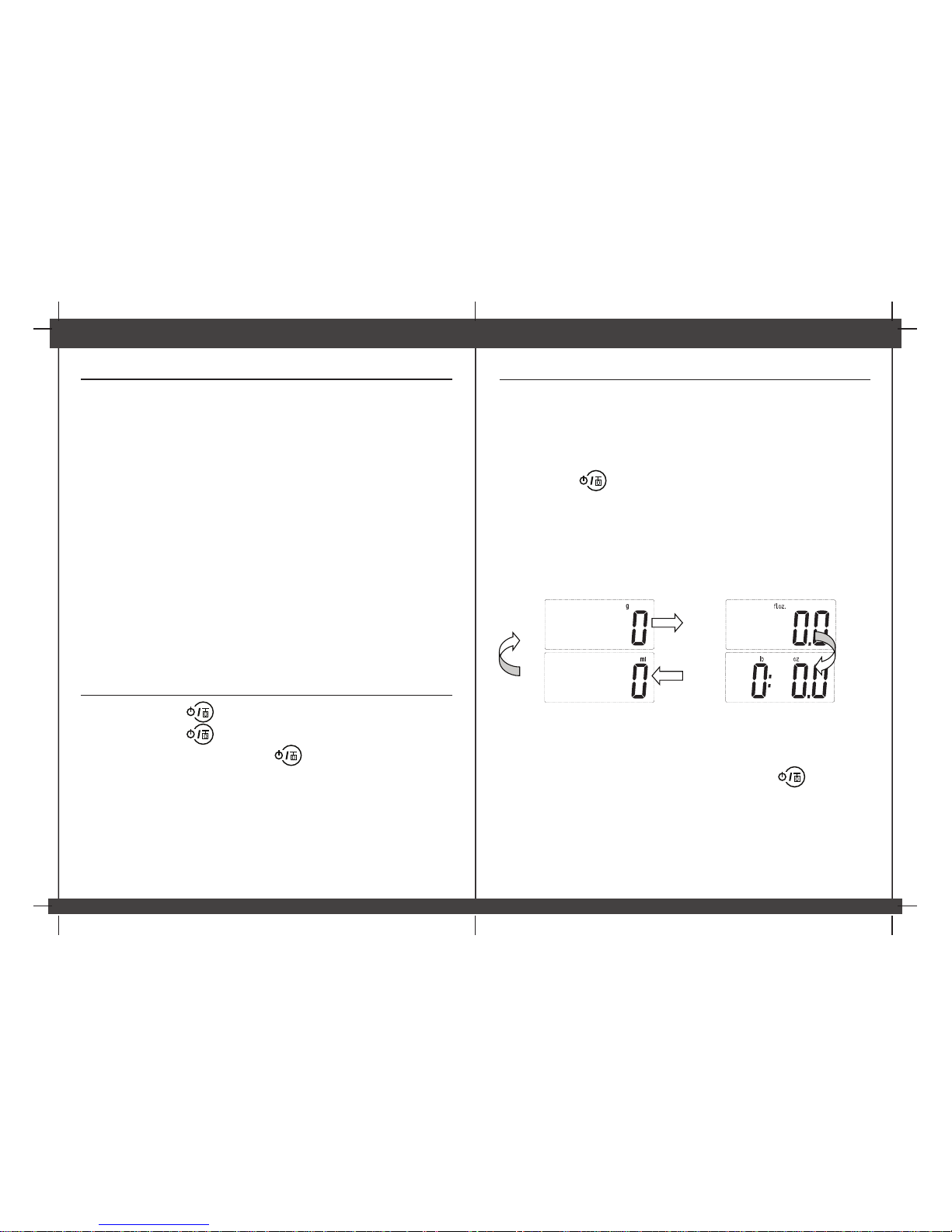
• Change UNIT: When the scale is ON, touch “UNIT” to switch to your desired unit from g,
fl.oz, lb:oz, and ml
• If no operation, the scale will turn off automatically in about 60 seconds
OPERATION INSTRUCTION
I. Weighing
a) Place the scale on hard flat even surface.
b) Turn the scale ON.
c) You can start to weigh when “0” is shown. If it shows a negative value or value rather
than “0”, touch once (do NOT hold it), wait the scale to set result to 0 in about
1 second.
d) Put the weight object onto the center of the platform, the weight result will be shown.
II. UNIT Selection
Touch “UNIT” key to select your desired unit:
to set result to 0 in about 1 second.
2
Page 3
TROUBLESHOOTING
MAINTENANCE AND CARE
• Please use the scale on a flat, level and hard surface free from vibration and drafts, use it at
room temperature.
• Please put the weight object in the center of the scale platform to obtain a more accurate
weight.
• This scale is not waterproof, do NOT expose to moisture.
• Store your scale in a clean, dry place. Dust, dirt, and moisture can accumulate on the
weighing sensors and electronics causing inaccuracy or malfunction.
• Avoid using your scale in close proximity to strong radio wave emitting devices such as
cordless phones.
• Gently apply all items to be weighed. Do not drop items onto the weighing platform. Overload
protection does not protect the sensor from shock loading.
• If the scale is not to being used for a long period, please remove the batteries,
• Clean the scale with a slightly damp cloth, do NOT immerse the scale in water or use
chemical/abrasive cleaning agents.
• Check the batteries first if you are having any trouble with your scale. This simple step can
remedy most scale issues.
WARRANTY
This product is warranted against defects in materials and workmanship for one year from the
date purchase, when used in accordance with the instructions provided. This warranty does
not cover damages or wear resulting from accident, misuse, abuse, commercial use, or
unauthorized adjustment and/or repair.
C8KE INC. shall not be liable for loss of use or any other incidental, consequential or indirect
costs, expenses or damages. There are no express warranties except as listed above. This
warranty gives you specific legal rights, and you may have other rights which vary from state
to state.
Should this product require service (or replacement at our option) while under warranty,
please visit website www.surpahs.com and submit a support ticket.
Surpahs , C8KE INC.,
DE 19809 , USA
www.surpahs.com
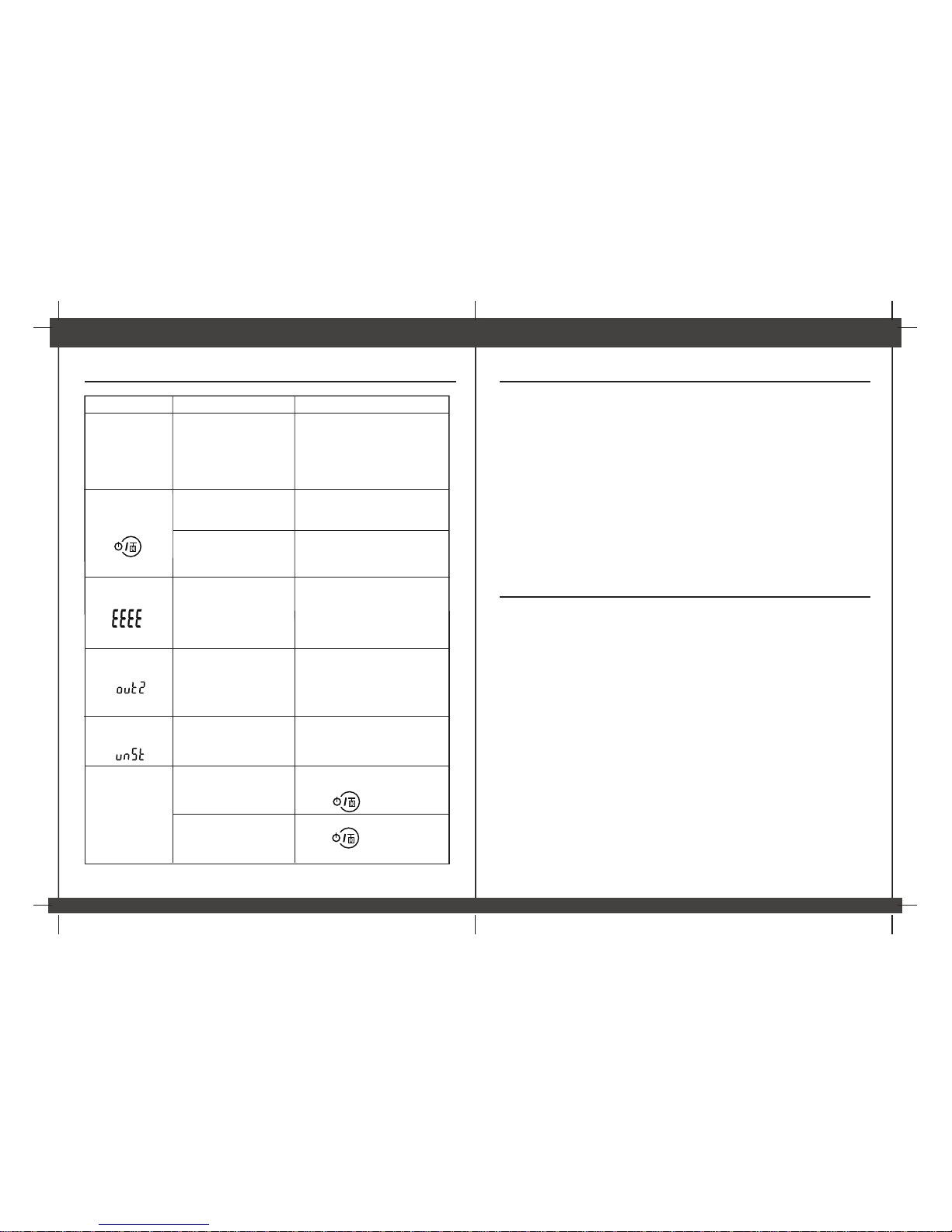
Problem Root Cause Solution
The LCD display is
dim or displays Lo
The device isn’t on
when you press the
The batteries are exhaust
Overload.
The LCD displays
Please remove the items on the
scale to protect the weighing
sensors.
The power is not enough
Please replace with 3xAAA
new batteries.
The LCD displays
Before you turn on the
scale,there is something
on thescale which are
over 1000g
Please replace with 3xAAA
new batteries.
The batteries are not
inserted correctly
Please insert batteries according
to the indication correctly.
The measurement is
not accurate or display
The item is not still Keep the item still
Remove the items from the
scale, wait until it displays
zero, then you can start weighing
Negative result
display
The scale is not on flat
surface.
The container or item taken
off from the scale when
TARE function is used
Place the scale on a flat even and
hard surface.
Touch to reset 0
Touch to reset 0
®
3
 Loading...