

Page 1
9
16-Port 100/10M Ethernet Desktop Switch
Users Guide
#471816XZZ200
www.surecom-net.com
www.surecom.com.tw
EP-816X
Technical Specifications
sdradnatS tenrehtET-ESAB013.208EEEI
tenrehtEtsaFXT-ESAB001u3.208EEEI
noitaitogen-otuayaW-N3.208dtSEEEI/ISNA
tnerapsnarT:sepytemarF3.208EEEI
setyB8151-46:ezisemarfreyalCAM3.208EEEI
xelpuD-lluFroflortnocwolfx3.208EEEI
LocotroP DC/AMSC
ygolopoT ratS
dohteMnoissimsnarT drawroF-dna-erotS
:etaRrefsnarT
:tenrehtE
tenrehtEtsaF
)xelpuD-lluF(M02;)xelpuD-flaH(M01
)xelpuD-lluF(M002;)xelpuD-flaH(M001
aideM
:T-ESAB01
:XT-ESAB001
)m001htgnelelbac.xaM(5,4,3.taCPTU
)m001htgnelelbac.xaM(5.taCPTU
stroPfo.oN stroP54-JRspbM01/00161
lairetaMgnisuoH citsalP
reffuBMAR ecivedrepsetybK215latoT
elbaTsserddAgniretliF ecivedrepseirtneK61
etaRgnidrawroF/gniretliFtekcaP )spbM01&spbM001rof(troprepdeepseriW
noisnemiD )HxWxL(mc2.5x6.51x4.81
thgieWteN gk5.0
rewoP A2/V5.7CD
noitpmusnoC W52
:erutarepmeT
:gnitarepO
:egarotS
0
0
55~OC
0
0
56~OC
:ytidimuH
:gnitarepO
:egarotS
%09~%01
%59~%5
ecnamrofnoC AssalCkraMEC,AssalCCCF
Page 2
1 2
The 16-Port 100/10M Ethernet Desktop Switch is designed for easy
installation and high-performance in an environment where traffic on
the network and the number of users increase continuously. Small businesses and
corporate branch offices can take full advantage of 100Mbps Fast Ethernet
performance and preserve exising desktop investment with no changes
required to PCs, NICs, cabling, drivers, or PC configurations.
Full/Half-Duplex
This Switch is ideal for deployment with multiple high-speed servers for
sharing bandwidth 100Mbps or 10Mbps workgroups. In 200Mbps fullduplex mode, any port can provide workstations with a congestion-free
data pipe for simultaneous access to the server. As all ports support
200Mbps full-duplex, it can be cascaded from any port and to any number
of switches.
Store-and-Forward Scheme
This Switch combines dynamic memory allocation with store-and-forward switching to ensure that the buffer is effectively allocated for each
port while controlling the data flow between the transmit and receive
nodes to guarantee against all possible packet loss.
Upgrade
This Switch offers you a simple way to increase Ethernet LAN performance at a very low per-port cost, letting you migrate power users to
high-performance switched ports. Ethernet workgroups can upgrade to
Fast Ethernet without needing to reconfigure the network. It is an
unmanaged 100/10Mbps Fast Ethernet Switch that offers solutions in
accelerating small Ethernet workgroups bandwidths.
Provides one Uplink port to cascade two or more switches
Provides Back-pressure in half-duplex and flow control in full-duplex
Store-and-forward switching scheme capability supports rate
adaptation and ensures data integrity
N-way Auto-negotiation on each RJ-45 port. This allows for autosensing of speed (100/10Mbps) and auto-detecting mode (FullDuplex or Half-Duplex) thereby providing you with automatic and
flexible solutions in your network connections
Auto-polarity detection for correction of incorrect polarity on the
received twisted-pair on each port
Data forwarding rate 148,800 pps per port at 100% of wire-speed
Data filtering rate eliminates all error packets, runts, etc. at 148,
800pps per port at 100% of wire-speed
All RMII interfaces with the 16 ports statically changeable to be
RMII/MII for flexible application
One 16-Port 100/10M Ethernet Desktop Switch
One DC Power Adapter
Four Rubber
One Users Guide
Note: If any item is damaged or missing, please contact
your supplier.
Introduction Performance Highlights
Package Contents
Page 3
43
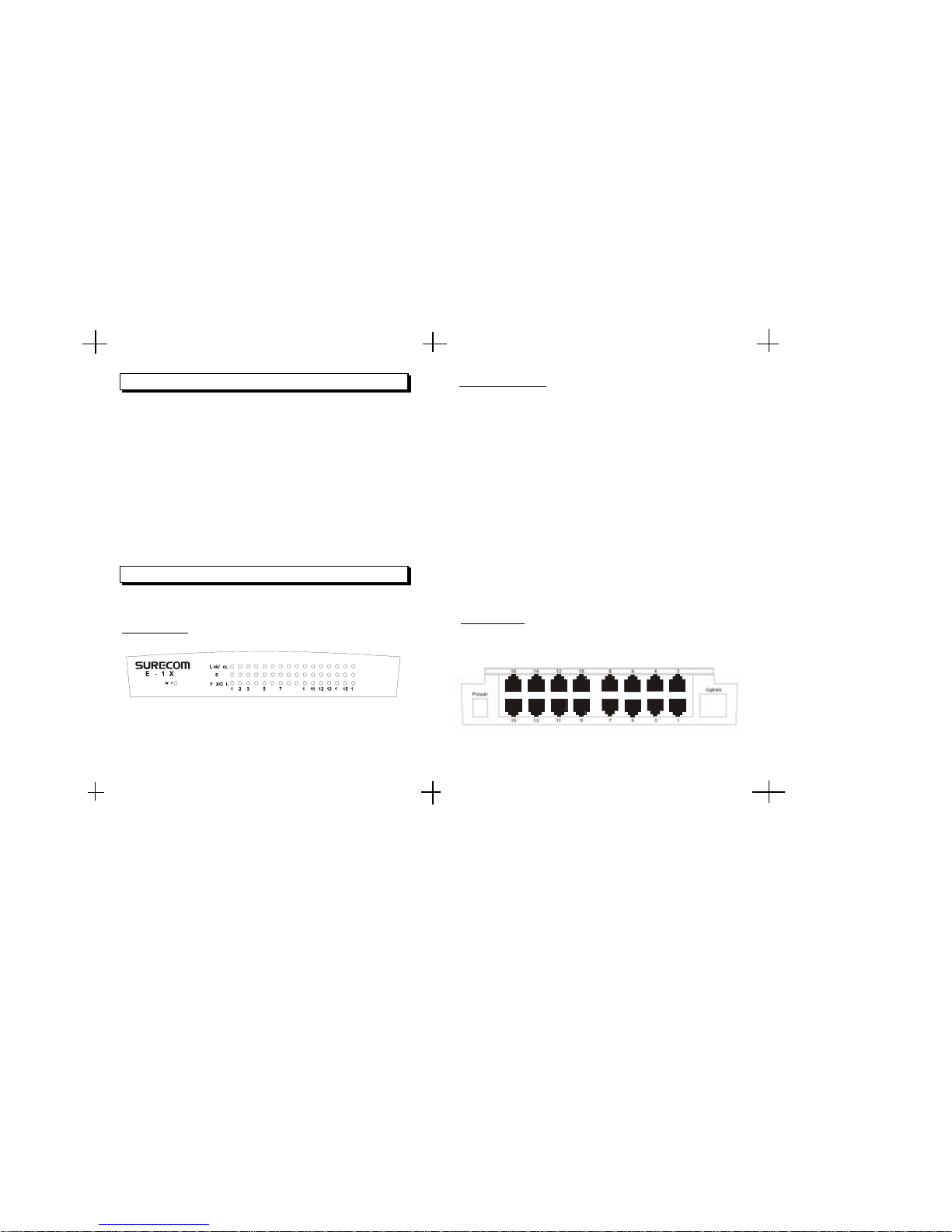
Front Panel
Following describes the front panel, LED indicators, and rear panel of
the Switch.
Rear Panel
Conforms to IEEE 802.3 10BASE-T, IEEE 802.3u 100BASE-TX , a nd
IEEE 802.3X flow control for full-duplex standards
Supports store-and-forward mode switching
Provides non-blocking sixteen ports full-wire speed access
Back pressure in half-duplex and flow control in full-duplex
Sixteen 100/10Mbps RJ-45 ports
Full and Half-Duplex mode operation on all ports
Supports one Uplink port
Auto-negotiation capability
Source address learning and aging function
LEDs to indicate Power, Link/Activity, Full-duplex/Collision, and
speed status
Key Features
Hardware
16 Port 100/10M Ethernet Desktop Switch
The LED indicators of the Switch include Power, Link/Act (Link Activity),
FDX/COL. (Full-Duplex/Collision) and Speed.
1. Power
This indicator operates when the Switch is turned on. If this indictor
is not lit, check the DC power connector to ensure proper insertion
of the power cord and that the power switch is turned ON.
2. Link/ACT.
These LED indicators are lighted up green when there is a secure
connection (or link) to a device at any of the ports. The LED indicators
blink whenever there is reception or transmission (i.e. Activity/ACT.)
of data occurring at a port.
3. FDX/COL.
This LED indicator is green when a respective port is in full-duplex
(FDX) mode. Otherwise, it is OFF for half-duplex (HDX) operations.
It blinks when collisions are occurring on the respective port.
4. Speed
This LED lights when the transmission rate is 100Mbps. It is OFF
when the transmission rate is 10Mbps or no linking.
LED Indicators
The rear Panel consist of 1 power port, 16 100/10M RJ-45 ports, and 1
UPLINK ports.
Page 4
5 6
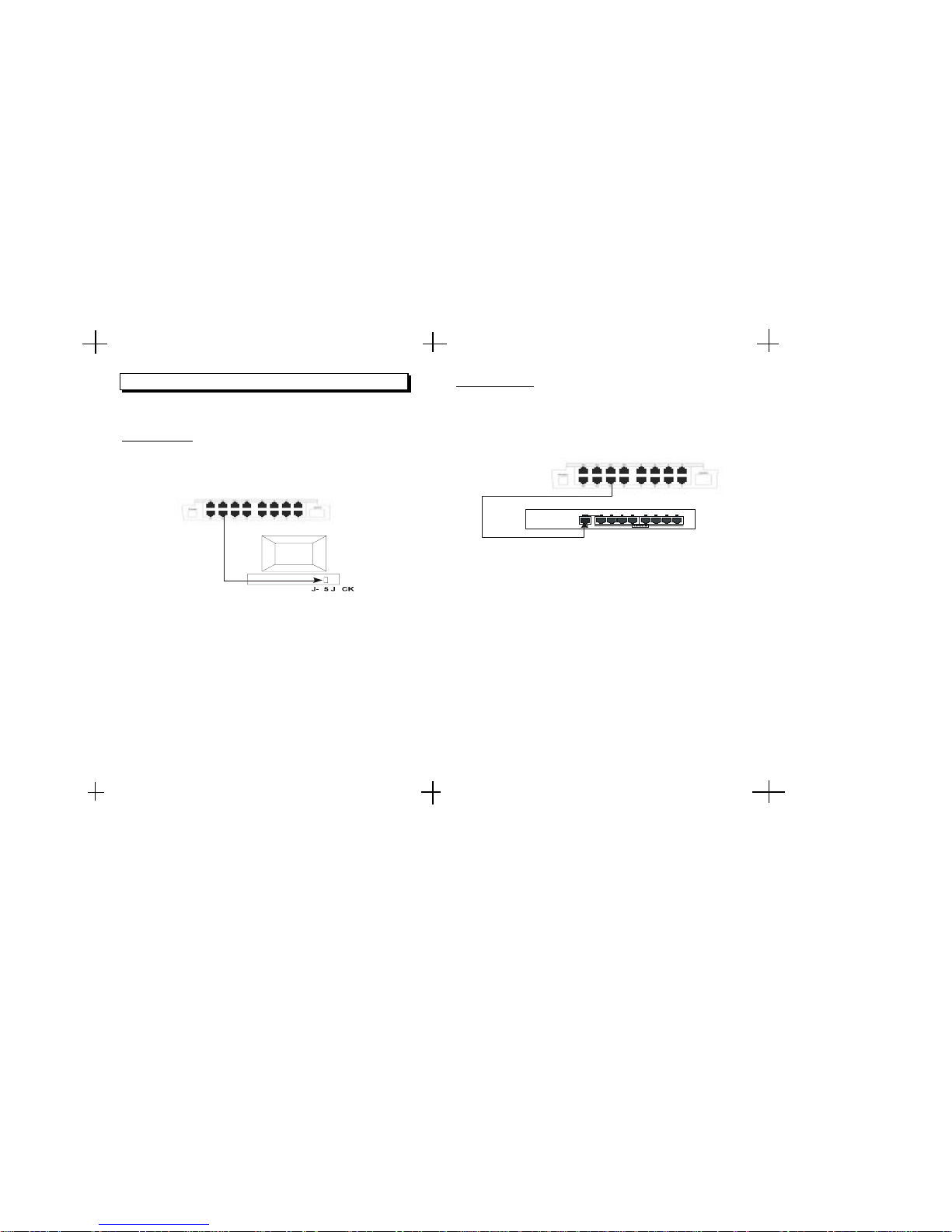
Following describes how to connect this Switch to your Fast Ethernet
network.
Switch to PC
A PC can be connected to the Switch via a twisted-pair Category 3, 4, 5
UTP /STP straight cable. The PC (equipped with a RJ-45 100/10Mbps
jack) should be connected to any of sixteen ports.
The LED indicators for PC connection are dependant on the LAN card
capabilities. If LED indicators are not illuminated after making a proper
connection, check the PC LAN card, the cable, Switch conditions and
connections.
The following are LED indicator possibilities for a PC to Switch
connection:
1. The Link/ACT. LED indicator illuminates upon hookup.
2. The FDX/COL. LED indicator depends upon LAN card capabilities.
3. The 100M LED indicator comes on for a 100 Mbps and stays off
for 10Mbps.
Network Connections Switch to Hub
A hub (10BASE-T or 100BASE-TX) can be connected to the Switch via
a twisted-pair Category 3, 4, 5 UTP/STP straight cable. The connection
is accomplished from the any port (MDI-X) to uplink port(MDI) of the
connected hub.
10BASE-T Hub
For a 10BASE-T hub, the Switch LED indicators should illuminate the
following:
Link/ACT. indicator is ON.
FDX/COL. indicator is OFF.
Speed indicator is OFF.
100BASE-TX Hub
For a 100BASE-TX hub, the Switch LED indicators should illuminate the
following:
Link/ACT. is ON.
FDX/COL. LED indicator is OFF.
Speed indicator is ON.
Hub
Page 5
FCC Statement
This equipment can generate, use and radiate radio frequency energy
and, if not installed and used in accordance with the instructions in this
guide, may cause interference to radio communications. This equipment has been tested and found to comply with the limits for a Class A
computing device pursuant to Subpart J of Part 15 of the FCC rules,
which are designed to provide reasonable protection against radio
interference when operated in a commercial environment. Operation
of this equipment in a residential area is likely to cause interference, in
which case the user, at his own expense, will be required to take
whatever measures are necessary to correct the interference.
CE Declaration of conformity
This equipment complies with the requirements relating to electromagnetic compatibility, EN 55022 class A for ITE and EN 50082-1. This
meets the essential protection requirements of the European Council
Directive 89/336/EEC on the approximation of the laws of the Member
States relating to electromagnetic compatibility.
Trademarks
All company, brand, and product names are trademarks or registered
trademarks of their respective companies.
2-Year Warranty
The manufacturer warrants to the original consumer /purchaser
free from defects in materials or workmanship for limited time
from the original factory shipment date.
DISTRIBUTOR
Date Purchased:
Where Purchased:
From Whom:
Model:
Serial :
TO:
ATTN:
WARRANTY REGISTRATION CARD
Please complete this form and return it within 10 days of
purchase to validate warranty
Name/Title:
Company:
Address:
Tel. No.: Signature:
Purchase Model: Serial No.:
Purchase from:
Address:
Date of Purchase:
"1
"1
Place
Stamp
Here
KEEP THIS STUB FOR YOUR RECORDS
MANUFACTURE
SURECOM
Page 6
7 8
Hub without Uplink (MDI) Port
If a hub is not equipped with an uplink (MDI) port, then connection can
be made using either straight cable or crossover cable (see Appendix A,
Technical Specifications for cable requirements).
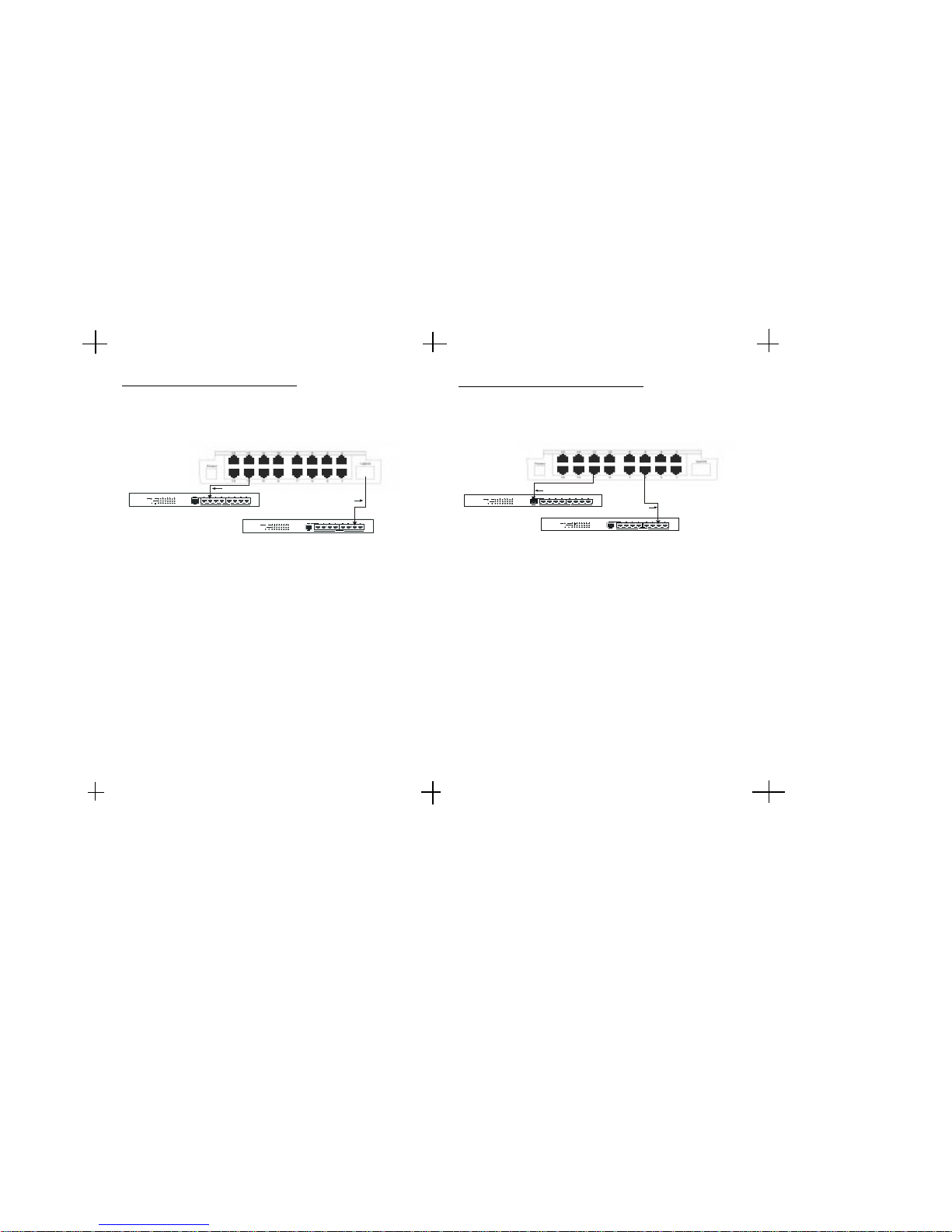
Using straight cable
When using straight cable, The connection can be made from the uplink
port of the Switch to any port of the Hub.
Using crossover cable
When using crossover cable, the connection can be made from any (Port
#1 - 16) port of the Switch to any port of the Hub.
FDX/ ColFDX/ Col
100/10M SWITCH A
FDX/ ColFDX/ Col
100/10M SWITCH B
Straight Cable
Crossover Cab le
Switch to Switch (Other Devices)
The Switch can be connected to another switch or other devices (routers,
bridges, etc.) via a twisted-pair Category 3, 4, 5 UTP/STP straight or
crossover cable.
Using straight cable
When using straight cable, this is done from the Uplink port of the Switch
(Switch A) to any of the 10Mbps or 100Mbps (MDI-X) port of the other
switch (switch B) or other devices.
Using crossover cable
When using crossover cable, this is done from any port of the Switch
(Switch A) to any of the 10Mbps or 100Mbps (MDI-X) port of the other
switch (switch B) or other devices.
Switch A LED indicators for the respective connected ports are as follows:
Link/ACT. is ON.
FDX/COL. depends on the connected switch or other device.
 Loading...