

Page 1

Bluetooth Headset / Intercom
for Motorcycle
Features
Automatic Volume Adjust
High/Low Audio Power Set-up
VOX
Rider to Passenger Intercom
Operating Manual
Page 2
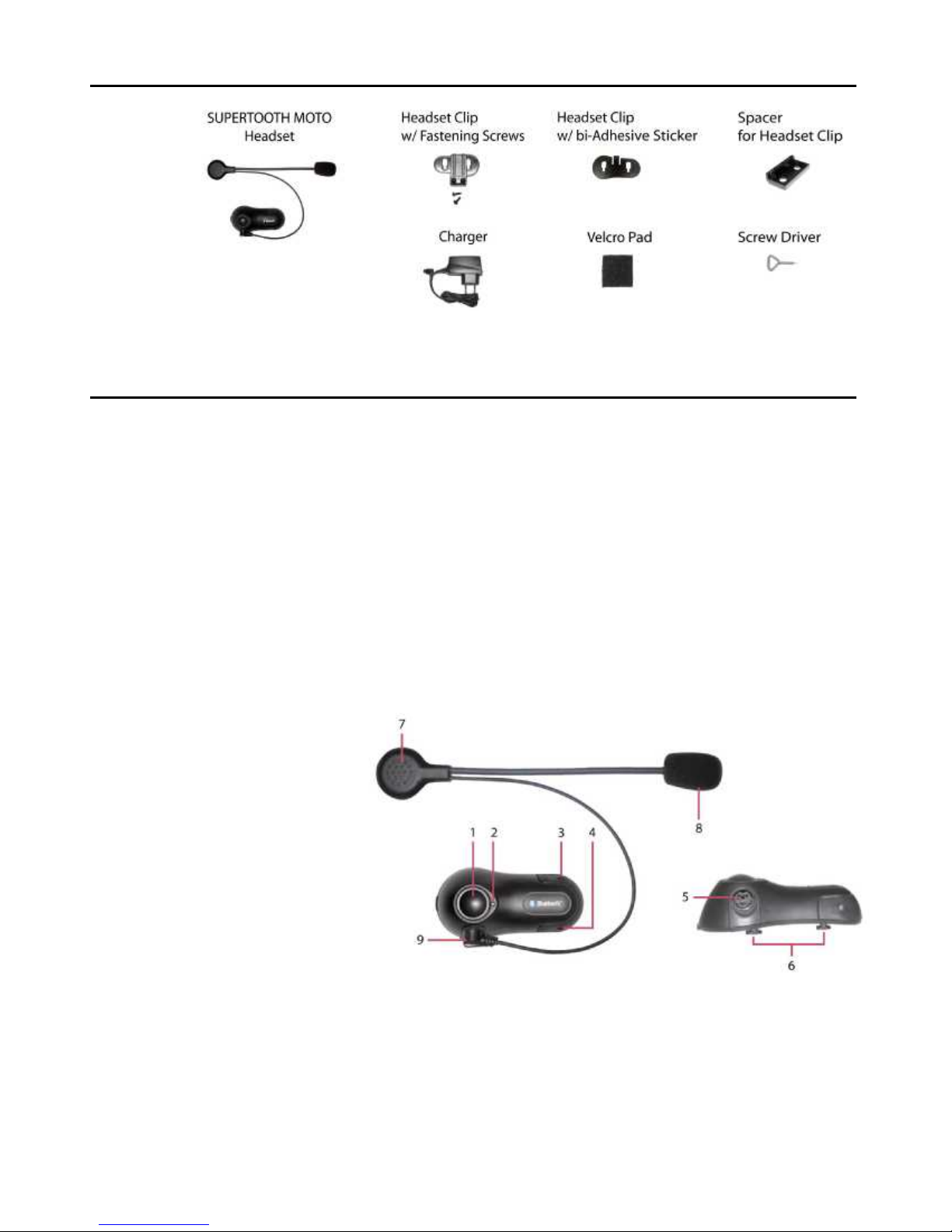
SUPERTOOTH MOTO Package
Product Description
SUPERTOOTH MOTO is a Bluetooth Headset designed for motorcycle rider or
passenger who wishes to have reliable hands-free, wireless and clear
communications while driving. This headset is equipped with hi-tech features:
VOX, Auto-Volume Level Adjust, Low/High Audio Power Set-up and Rider to
Passenger Intercom. This headset is compatible with a variety of Bluetooth mobile
phones and can be suited to any sort of helmet.
1 MFB or Multi-function Button
(power on & off / pairing / answer /
hang-up / reject / voice dial / etc.)
2 Status Indicator
3 Volume Up
4 Volume Down
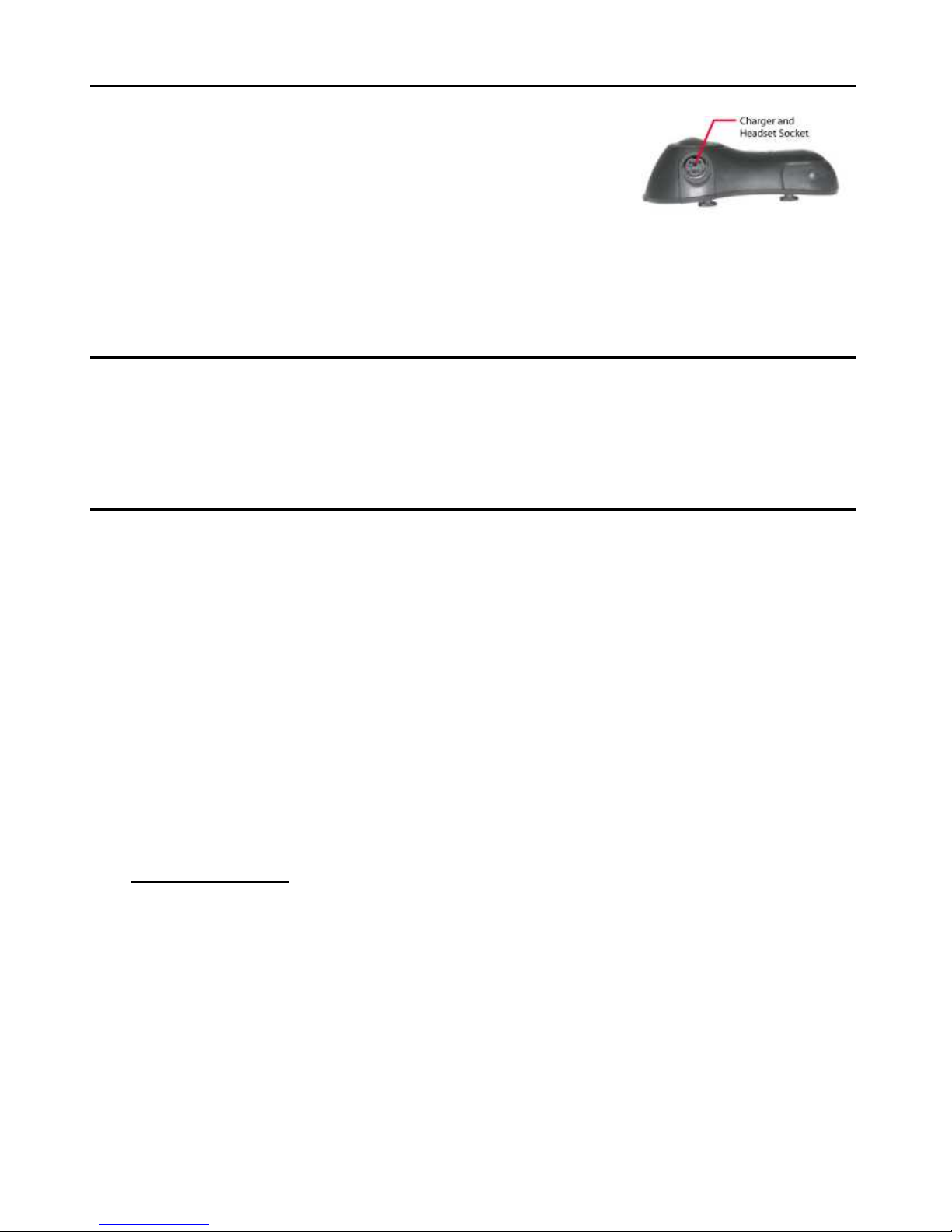
5 Charger and Headset Socket
6 Hook
7 Ear Speaker
8 Microphone
(On the flexible boom)
9 Headset Plug
2
Page 3
Charging
1. When the Status Indicator(2) turns blinking red, the battery is low. Charge
the unit using the provided charger.
2. Connect the charger’s plug to the Charger Socket
(5) in the SUPERTOOTH MOTO. Plug the charger
to the mains. (Note: Status Indicator(2): Blinking
Red/Green when charging).
3. When the Status Indicator(2) turns Steady Green, charging is complete.
4. Disconnect the charger.
Power On or Off
Power On: Press MFB(1) until Status Indicator(2) turns blue
or press for approximately 1 second (1st beep).
Power Off: Press MFB(1), until Status Indicator(2) turns red
or press for approximately 5 seconds (3rd beep).
Pairing to your Bluetooth Mobile Phone
Pairing will create the link or connection between the SUPERTOOTH MOTO and
your Bluetooth mobile phone. Pairing has to be done only at the first connection to
a phone.
1. From OFF, press and hold the MFB(1) of the SUPERTOOTH MOTO for
about 5 seconds (or until you hear the 2nd beep). When the LED turns
blinking red/blue, the SUPERTOOTH MOTO is in pairing mode.
2. While the headset is in pairing mode, access the Bluetooth menu of your
phone. Turn on the Bluetooth function then execute a Bluetooth search, or
discover (See your phone’s manual).
3. When the phone displays the list of Bluetooth devices, select ST MOTO.
4. When the phone asks for the passcode, enter 0000 and press ok.
5. Pairing is successful if the alternating red/blue lights of Bluetooth Indicator
changes to blinking blue.
Important Note: Some phones do not connect directly after entering 0000.
You need to connect manually after pairing by:
Pressing MFB (1st beep) to connect.
Or using the menu of your phone:
Go back to Bluetooth > Paired devices > highlight the name of this headset
(ST MOTO) > press Options > then press Connect).
The SUPERTOOTH MOTO is now ready to use.
3
Page 4
Installation
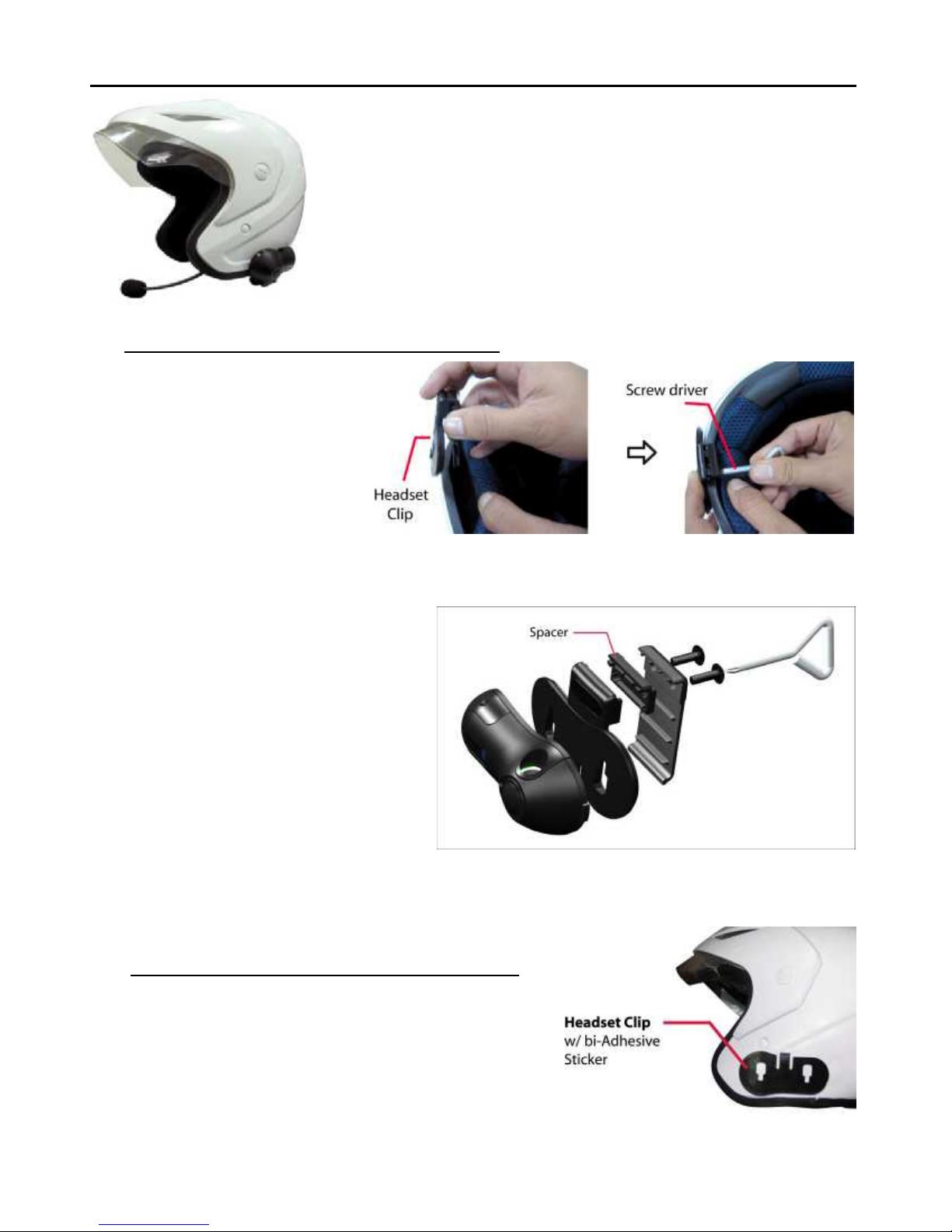
Important: There are 2 types of Headset Clips included in
this package. Headset Clip with fastening screws and
Headset Clip with bi-Adhesive Sticker. Use what suits
best for your helmet.
1. Using Headset Clip w/ Fastening Screws
Take the Headset Clip
w/ fastening screws
and find the best
location to fix it to the
shell of the helmet.
Tighten the screws
using the provided
Screw Driver.
Note: A Spacer may be
needed to put in between
the 2 parts of the Headset
Clip (if the helmet’s shell is
thick).
Using Headset Clip w/ bi-Adhesive Sticker
Take the Headset Clip w/ bi-Adhesive
Sticker and remove the film covering
the other side. Find the best location and
stick it to the outer shell of the helmet.
4
Page 5
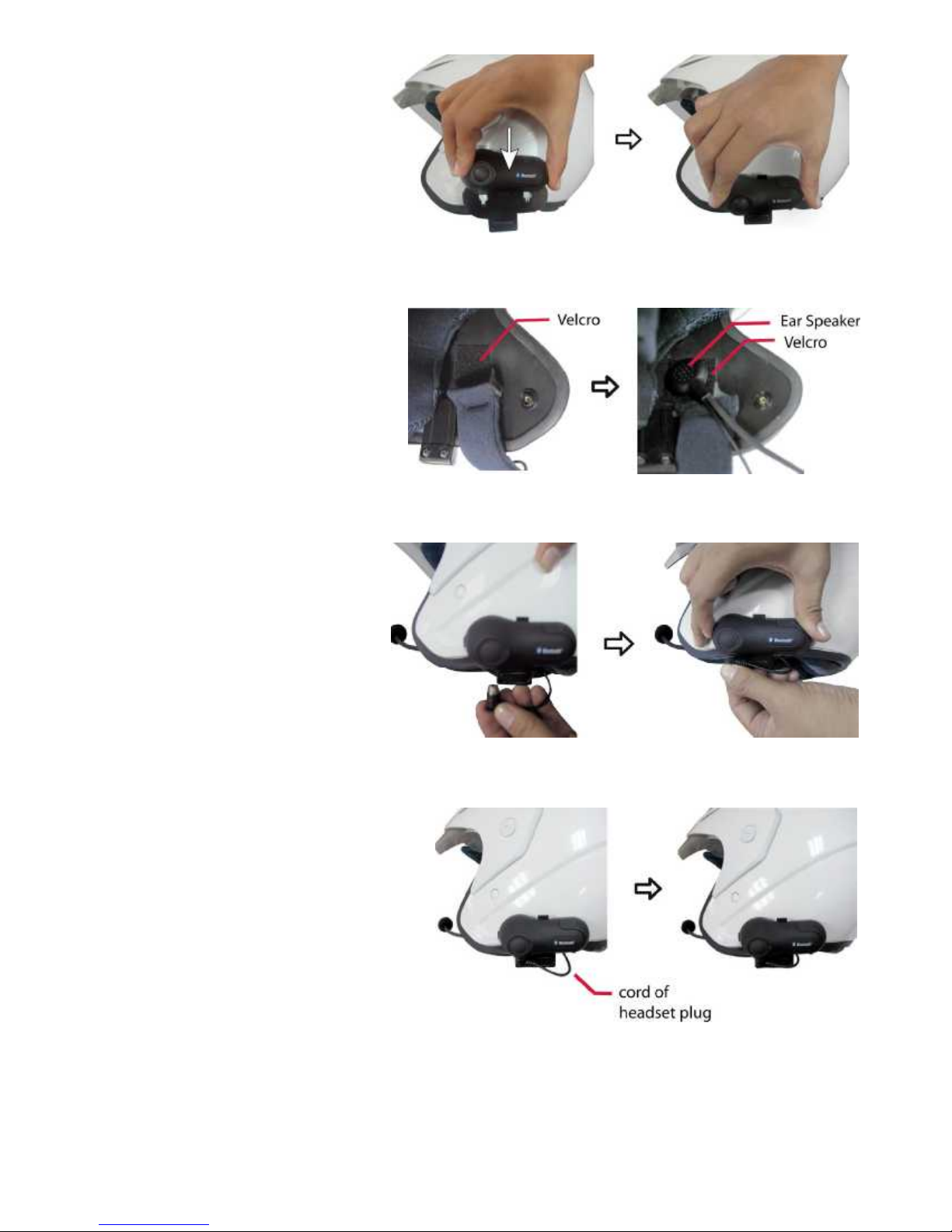
2. Take your SUPERTOOTH
MOTO and slide it down
into the slots in the
Headset Clip. Make sure
that it’s perfectly fitted and
locked into place.
3. Stick the Velcro pad to the
helmet’s ear pocket. Attach
the Ear Speaker(7) to it.
4. Connect the Headset
Plug(9) to the Headset
Socket(5).
5. Secure the cord of the Headset
Plug(9) inside the helmet.
Ensure that only few
centimeters of the cord comes
out.
You have successfully mounted the SUPERTOOTH MOTO.
5
Page 6
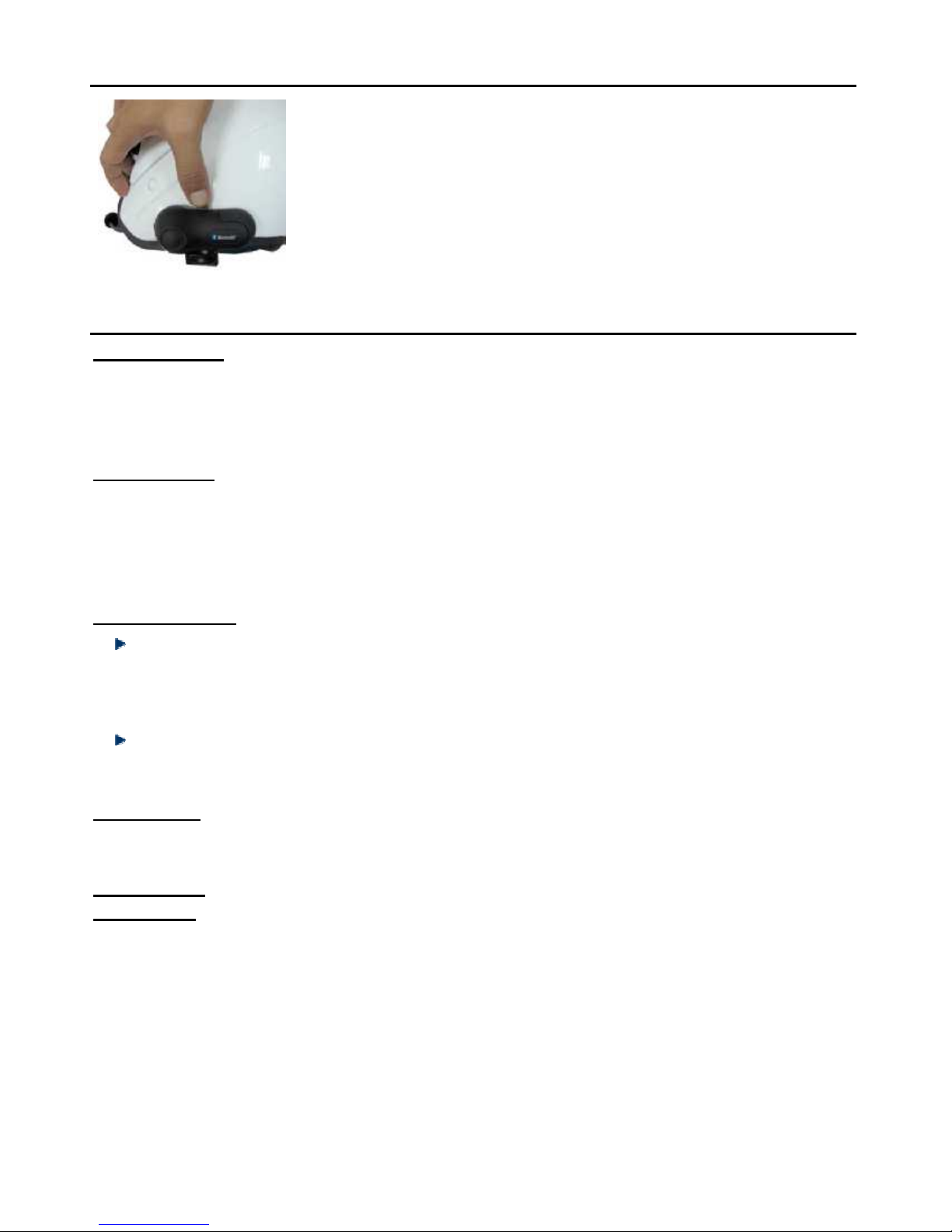
Removing the SUPERTOOTH MOTO from your helmet
Remove the SUPERTOOTH MOTO by pushing down the
lock as shown and then take out the SUPERTOOTH MOTO
in an upward motion.
Basic Operations
IMPORTANT:
The SUPERTOOTH MOTO needs to be ‘paired’ with your Bluetooth mobile phone
before you can use the following functions. (See Pairing to your Bluetooth
Mobile Phone on page 3.)
Make a Call: Dial the number using your phone. Audio will automatically be on the
headset.
Note: With some phones like Siemens S55 and Panasonic X70, audio is always
on the phone during an outgoing call. You will need to press MFB(1) to transfer
the audio to your headset.
Answer a Call:
Assuming the Vox is activated: Accept a call by loudly saying a word within
10 seconds. (Example: When you receive the ring tone, Say loudly ”Hello!”)
The call will be answered. Audio will be on the headset. Note: See Vox
Activation / Deactivation on page 8.
You also have the option to answer the call normally by just pressing
MFB(1) for 1 second (1st beep).
End a Call:
Press the MFB (1) for 1 second to end the call (1st beep).
Voice Dial:
Important: First, make sure to activate the voice dial function of your phone.
Record at least one voice tag. (Kindly refer to the procedure in your phone’s
manual.) Note: Voice dialing entries must be stored in the phone’s memory, not on
the SIM card!
1. Press MFB(1) for 1 second (1
beep will be heard on the headset prompting the user to say the voice tag of
the contact to call.
2. Say the voice tag. The voice will be played back to you then the phone will
dial the number automatically.
st
beep) to make a voice dial. Voice dial tone/
6
Page 7

Reject a Call (For Handsfree Profile Phones only):
Assuming Vox is activated: Be silent for 10 seconds. The call will
automatically be rejected.
You also have the option to reject a call by just pressing MFB(1) for 2
seconds (2nd beep).
Set the volume:
When at standby, (motorcycle not running, and no background noise): Press
Volume Up(3) or down(4) button until desired level is reached.
SUPERTOOTH MOTO Special Feature: Automatic Volume Adjust. When
motor is in motion (motorcycle running, and there is driving and background
noise): The SUPERTOOTH MOTO will automatically adjust the volume as
response to the background noise. This way, the user can continuously hear
the audio clearly even when there is loud background noise.
Audio Transfer (For Handsfree Profile Phones only): During an ongoing call,
audio transfer can be made.
From SUPERTOOTH MOTO to Phone:
Press the MFB(1) for 2 seconds (2nd beep). The audio will be transferred to
the phone.
From Phone to SUPERTOOTH MOTO: Press the MFB(1) for 1 second (1st
beep). The audio will be transferred back to the headset.
SUPERTOOTH MOTO Special Feature:
High Audio Power/Low Audio Power Activation:
Setting to high or low audio power depends on user’s helmet design or
structure. Some helmet type may require near or far positioning of the ST
MOTO’s Ear Speaker(7) from the user’s ear.
High Audio Power Activation is advised if you position the Ear Speaker(7)
far from your ear. This will enable you to still have a clear and audible audio.
Procedure:
1. From Off, press and hold the Volume Up(3).
2. Keep the Volume Up(3) pressed and then press the MFB(1) for 5
seconds.
3. Power On beep followed by a HIGH TONE can be heard. The Status
Indicator(2) will flash red-blue.
4. Release both buttons.
Note: Be careful. At full volume, the Ear Speaker (7) can be very loud. Do
not position your Ear Speaker close to your ear.
Low Audio Power Activation is advised if the positioning of your Ear
Speaker(7) is very near to your ear.
7
Page 8

Procedure:
1. From Off, press and hold the Volume Down(4).
2. Keep the Volume Down(4) pressed and then press the MFB(1) for 5
seconds.
3. Power On beep followed by a LOW TONE can be heard. The Status
Indicator(2) will flash red-blue.
4. Release both buttons.
SUPERTOOTH MOTO Special Feature: Vox Activation / Deactivation
When activated, the user can accept a call by saying any word within 10 seconds.
The user can also reject a call by being silent for 10 seconds.
When deactivated, apply normal answer and normal rejection of call.
Activation:
1. From Off, press and hold simultaneously the Volume Up(3) & Volume
down(4) buttons.
2. Keep both buttons pressed and then press the MFB(1) for 5 seconds.
3. Power On beep followed by a HIGH TONE can be heard. The Status
Indicator(2) will flash red-blue.
4. Release all 3 buttons
Deactivation:
1. From Off, press and hold simultaneously the Volume Up(3) & Volume
Down(4) buttons;
2. Keep both buttons pressed and then press the MFB(1) for 5 seconds.
3. Power On beep followed by a LOW TONE can be heard. The Status
Indicator(2) will flash red-blue.
4. Release all 3 buttons.
Advanced Functions
Driver to Passenger INTERCOM
The SUPERTOOTH MOTO has motorcycle intercom system that allows driver to
passenger conversations. This intercom features full-duplex communication so
driver and passenger may enjoy simultaneous conversations just like on the
telephones.
INTERCOM Pairing Procedure:
1. Prepare two SUPERTOOTH MOTO. Note: Make sure to switch off the
phones paired to these two headsets.
2. Set the two units to pairing mode (from off, press and hold the MFB(1) of the
SUPERTOOTH MOTO for about 5 seconds or until you hear the 2nd beep).
3. When the two are set to pairing, press Volume Up(3) button of
SUPERTOOTH MOTO 1 for about 5 seconds (1
successive beeps will be heard and then SUPERTOOTH MOTO 1 turns off).
8
st
beep followed by 5
Page 9

4. Wait for 3 seconds and then turn on SUPERTOOTH MOTO 1.
5. Press Volume Down(4) button of SUPERTOOTH MOTO 2 for about 5
seconds (1st beep followed by 5 successive beeps will be heard).
SUPERTOOTH MOTO 2 pairing blink will change to blinking blue while
SUPERTOOTH MOTO 1 will again turn off.
6. Wait for 3 seconds and then turn on again SUPERTOOTH MOTO 1.
7. Press MFB(1) of SUPERTOOTH MOTO 1 for about 3 seconds (2nd beep) to
connect to SUPERTOOTH MOTO 2.
The set-up has been successful. Both headsets are now connected. Full-
duplex conversations can be made.
Note: This has to be done only once everytime you want to use 2 different
SUPERTOOTH MOTO together.
Using Intercom:
To switch from phone to intercom, press MFB(1) for 3 seconds or until
you hear the 2nd beep.
To switch from intercom to phone, press MFB(1) for 1 second or until
you hear the 1st beep.
Important Notes:
1. Both SUPERTOOTH MOTO must be in intercom mode to allow intercom.
2. During intercom mode, the ring of the phone will not be transferred to the
SUPERTOOTH MOTO automatically. (Tip: Switch on your phone’s
vibrate option to notice an incoming call.)
3. Press the MFB(1) for 1 second to transfer the call to your headset. Some
phones may require 2 times press on MFB(1) in order to answer an
incoming phone call from intercom mode (1st press to transfer the call to
the headset, 2nd press to answer the call).
Multi-Pairing / Switching Connections between Phones
The SUPERTOOTH MOTO can be paired to 5 Bluetooth phones. An additional
pairing will automatically delete the phone that has not been used for the longest
time. Thus, maintaining 5 phones in its memory.
You can easily switch to any of the paired phones by:
1. Disconnecting the currently used phone using the “Active devices” in the
Bluetooth menu of that phone.
2. Connect to the wanted phone by using the “Paired devices” in the Bluetooth
menu of that wanted phone.
Note: Reconnection to a paired phone can also be done by pressing the
MFB(1). But when you press the MFB(1), the SUPERTOOTH MOTO will
attempt to connect to the last used phone only. So it is recommended to connect
to another paired phone using the phone’s menu.
9
Page 10

10
Specifications
Bluetooth Compliance:
Bluetooth Version 1.2 Specifications
Supported Bluetooth Profiles:
Bluetooth Headset and Handsfree Profiles with Automatic Detection
Operating Range:
Up to 10 meters
Frequency:
2.4GHz
Talk Time:
Up to 10 hours
Standby Time:
Up to 700 hours / 1 month
Charging Time:
4 hours
Battery type:
Rechargeable Lithium Polymer 350mAh
Special features:
Full Duplex
Full DSP Noise Cancellation / Echo Cancellation
Automatic Volume Adjustment depending on ambient noise and speed level
Intercom Mode
Easy to find Volume / Multi-Function buttons
Digital Volume Control
Voice Recognition Dialing (If phone supports)
VOX Command: Receive or reject incoming calls by voice control.
Water Proof
Aerodynamic and Compact Shape
Easy to install, compatible with most common helmets available in the
market
Main unit detachable from helmet mounting clip
Accessories:
*High Power ultra slim speaker with integrated microphone boom
*Two helmet mounting clips (clamp type and permanent type)
*Wall Charger
Dimensions (mm):
87x 43x 23
Weight:
35g excluding accessories
 Loading...