

Page 1

User Manual - PureTag v2.0
The information in this document is confidential to the pe rson to whom it is addr ess ed and should
USER MANUAL
PURETAG v2.0
Model: PRF-PURET20
not be disclosed to any other person. It may not be reproduced in whole , or in part, nor may any
of the information contained there in be disc losed without the prior consent of the SuperCom Ltd.
(‘the Company’). A recipient may not solicit, dir e c tly or indirectly (whether through an agent or
otherwise) the participatio n of anothe r ins titution or person without the prior approval of the
Any form of reproduction, dissemination, copying, disclosure, modification, distribution and or
publication of this material is strictly prohibited.
directors of the Company.
© All rights reserved. Supercom 2014
Confidential & Proprietary Page 1 of 12
Page 2

User Manual - PureTag v2.0
Date
Version
Comments
Author
24.12.2014
1.0
Initial version
Ehud Bachman
Author
Ehud Bachman
Approved by
Barak Trabelsi
Document version
1.0
Product
PRF-PURET20
Date
DECEMBER 2014
Document version management
Confidential & Proprietary Page 2 of 12
Page 3

User Manual - PureTag v2.0
Table of Contents
1 Introduction .................................................................................................................. 4
1.1 About this Guide ..................................................................................................... 4
1.2 Acronyms and Abbreviations .................................................................................. 4
1.3 Important Information.............................................................................................. 5
1.4 Safety Precautions.................................................................................................. 6
1.5 FCC Warnings ........................................................................................................ 7
2 Technical Specifications ............................................................................................. 8
2.1 Interfaces and MMIs ............................................................................................... 8
2.1.1 RF .................................................................................................................... 8
2.1.2 Tamper Resistance & Sensors ........................................................................ 8
2.1.3 MMI ................................................................................................................. 8
2.2 Power ..................................................................................................................... 8
2.3 Operational Temperature ........................................................................................ 8
3 Abstract ........................................................................................................................ 9
4 Operational Description ............................................................................................ 10
4.1 P/N: PRF-PURET20EM ........................................................................................ 10
4.2 P/N: PRF-PURET20AT ......................................................................................... 11
5 Appendix A: ................................................................................................................ 12
Confidential & Proprietary Page 3 of 12
Page 4

User Manual - PURETAG v1.5
1 Introduction
1.1 About this Guide
This User Guide contains important information for users of the PRF-PURET20 product and all of its
models.
This guide introduces the PRF-PURET20 and provides instructions on how to install, configure,
operate, and troubleshoot the device. Each section has both written and graphic explanations to
provide the technical information necessary for using, installing, and configuring the PRF-PURET20
device.
1.2 Acronyms and Abbreviations
API – Application Programmer Interface
ADC – Analog to Digital Conversion
RF – Radio Frequency
BLE - Bluetooth Low Energy
CPU – Central processing unit
CAD – Computer Aided Design
CISC –Complex Instruction Set Computing
DAC –Digital to Analog Convertor
ETSI –European Telecommunications Standards Institute
FCC –Federal Communications Commission
GUI – Graphical User Interface
I/O –Input/output
IRQ –Interrupt Request
ISO –International Organization for Standardization
Kbps –kilobits per second
LED –Light Emitting Diode
MCU – Micro Controller unit
MMI – man machine interface
RAM –Random Access Memory
ROM –Read Only Memory
Page 5

User Manual - PureTag v2.0
1.3 Important Information
SuperCom Inc. reserves the right to make corrections, modifications, enhancements, improvements,
and other changes to its products and services at any time and to discontinue any product or service
without notice. Customers should obtain the latest relevant information before placing orders and
should verify that such information is current and complete. All products are sold subject to SuperCom
Inc.’s terms and conditions of sale supplied at the time of order acknowledgment.
SuperCom Inc. warrants performance of its hardware products to the specifications applicable at the
time of sale in accordance with SuperCom Inc.’s standard warranty. Testing and other quality control
techniques are used to the extent SuperCom Inc. deems necessary to support this warranty. Except
where mandated by government requirements, testing of all parameters of each product is not
necessarily performed.
SuperCom Inc. assumes no liability for applications assistance or customer product design. Customers
are responsible for their products and applications using SuperCom Inc. components. To minimize the
risks associated with customer products and applications, customers should provide adequate design
and operating safeguards.
SuperCom Inc. does not warrant or represent that any license, either express or implied, is granted
under any SuperCom Inc. patent right, copyright, mask work right, or other SuperCom Inc. intellectual
property right relating to any combination, machine, or process in which SuperCom Inc. products or
services are used. Information published by SuperCom Inc. regarding third-party products or services
does not constitute a license from SuperCom Inc. to use such products or services or a warranty or
endorsement thereof. Use of such information may require a license from a third party under the
patents or other intellectual property of the third party, or a license from SuperCom Inc. under the
patents or other intellectual property of SuperCom Inc.
Resale of SuperCom Inc. products or services with statements different from or beyond the
parameters stated by SuperCom Inc. for that product or service voids all express and any implied
warranties for the associated SuperCom Inc. products or services and is an unfair and deceptive
business practice. SuperCom Inc. is not responsible or liable for any such statements.
All company and brand products and service names are trademarks or registered trademarks of their
respective holders.
Confidential & Proprietary Page 5 of 12
Page 6

User Manual - PureTag v2.0
1.4 Safety Precautions
! IMPORTANT:
The equipment contains communication devices. Any changes or modifications made to the
equipment without the written consent of SuperCom Inc., SuperCom Ltd., or Vuance Ltd., its
resellers or distributors can nullify the user’s authority to operate this equipment.
The user assumes all risks associated with the use and handling of the equipment, and
specifically acknowledges that SuperCom Inc., SuperCom Ltd., Vuance Ltd., and its resellers or
distributors will not be liable for any damages of any kind, including personal injury or property
damages resulting from use of the equipment.
! IMPORTANT:
Read carefully the safety information contained in this section and throughout this user guide
before installing, operating or performing any maintenance task on the equipment.
! IMPORTANT:
Operations not performed as per the instructions in this user guide are done at the user’s own
risk and liability.
! IMPORTANT:
Only trained, authorized personnel should install, maintain and repair the equipment.
!
Once you have thoroughly reviewed this user guide, if you have any questions, please
contact your reseller.
Confidential & Proprietary Page 6 of 12
Page 7

User Manual - PureTag v2.0
1.5 FCC Warnings
The FCC Wants You to Know
This equipment has been tested and found to comply with the limits
for a Class B digital device, pursuant to Part 15 of the FCC rules.
These limits are designed to provide reasonable protection against
harmful interference in a residential installation. This equipment
generates, uses and can radiate radio frequency energy and, if not
installed and used in accordance with the instructions, may cause
harmful interference to radio communications. However, there is no
guarantee that interference will not occur in a particular installation. If
this equipment does cause harmful interference to radio or television
reception, which can be determined by turning the equipment off and
on, the user is encouraged to try to correct the interference by one or
more of the following measures:
a) Reorient or relocate the receiving antenna.
b) Increase the separation between the equipment and
receiver.
c) Connect the equipment to an outlet on a circuit different
from that to which the receiver is connected.
d) Consult the dealer or an experienced radio/TV technician.
FCC Warning
Modifications not expressly approved by the manufacturer
could void the user's authority to operate the equipment
under FCC Rules.
THE MANUFACTURER IS NOT RESPONS IBLE FOR ANY RADIO OR
TV
INTERFERENCE CAUSED BY UNAUTHORIZED MODIFICATIONS
TO THIS EQUIPMENT. SUCH MODIFICATIONS COULD VOID THE
USER’S AUTHORITY TO OPERATE THE EQUIPMENT.
This device complies with Part 15 of the FCC Rules. Operation is subject to the
following two conditions:
(1) This device may not cause harmful interference and
(2) This device must accept any interference received, including
interference that may cause undesired operation.
Confidential & Proprietary Page 7 of 12
Page 8

User Manual - PureTag v2.0
2 Technical Specifications
2.1 Interfaces and MMIs
2.1.1 RF
1 x RF BLE 2.4 GHz ASK\FSK Transmitter module
1 x LF 125KHz OOK Receiver module
2.1.2 Tamper Resistance & Sensors
Case tamper resistant
Motion sensor
Tamper res istant strap (Optional)
2.1.3 MMI
Indication LED
2.2 Power
Internal battery 3v
2.3 Operational Temperature
-20°C to +60°C
Confidential & Proprietary Page 8 of 12
Page 9
User Manual - PureTag v2.0
3 Abstract
The PRF-PURET20 is part of SuperCom electronic monitoring solution.
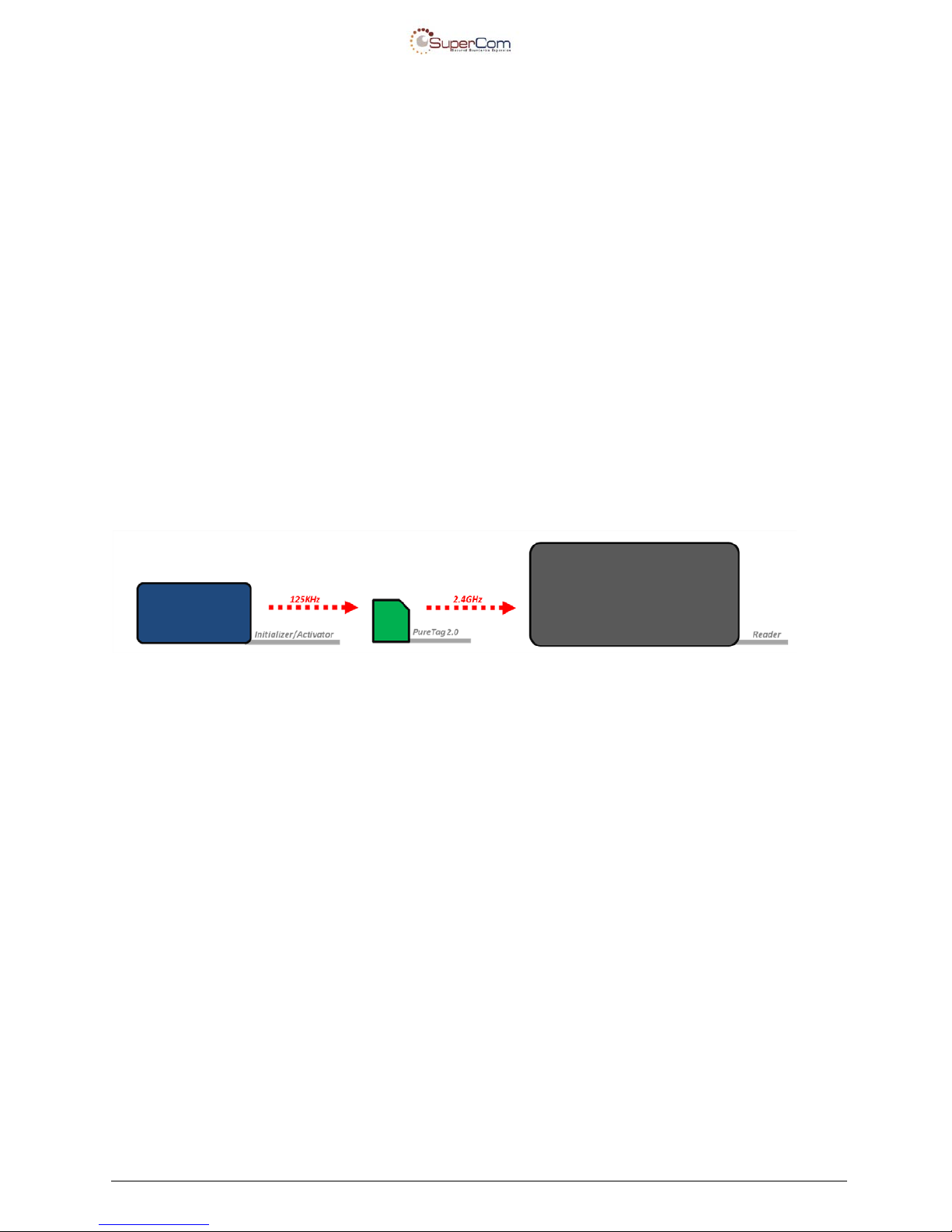
The PRF-PURET20 is a 4 layer PCB card. It communicates by over-the-air-channels via LF
and RF. Both channels are independent of one another and based on simplex topology.
The RF BLE channel (at 2.4 GHz) is set to communicate with the BLE reader by simplex
transmitting.
The second channel (at 125 KHz) is set to receive data (see
Figure 1).
Figure 1 Antenna Wavelength
Confidential & Proprietary Page 9 of 12
Page 10
User Manual - PureTag v2.0
4 Operational Description
This model currently has two sub-models (P/Ns):
• PRF-PURET20EM
• PRF-PURET20AT
4.1 P/N: PRF-PURET20EM
PRF-PURET20EM is geared for the EM market (Electronic Monitoring) to be used for
tracking and monitoring defendants or offenders who are under house arrest.
The unit comes in a sophisticated ankle unit to prevent a defendant or offender from easily
removing it.
The unit immediately sends an alert when a defendant or offender tries to remove or
sabotage the unit.
The unit sends an alert whenever a defendant or offender tries to leave the premises when
not allowed.
The unit is sold to governments and police departments around the world, along with
detailed installation instructions, tailored to their specific requirements and needs.
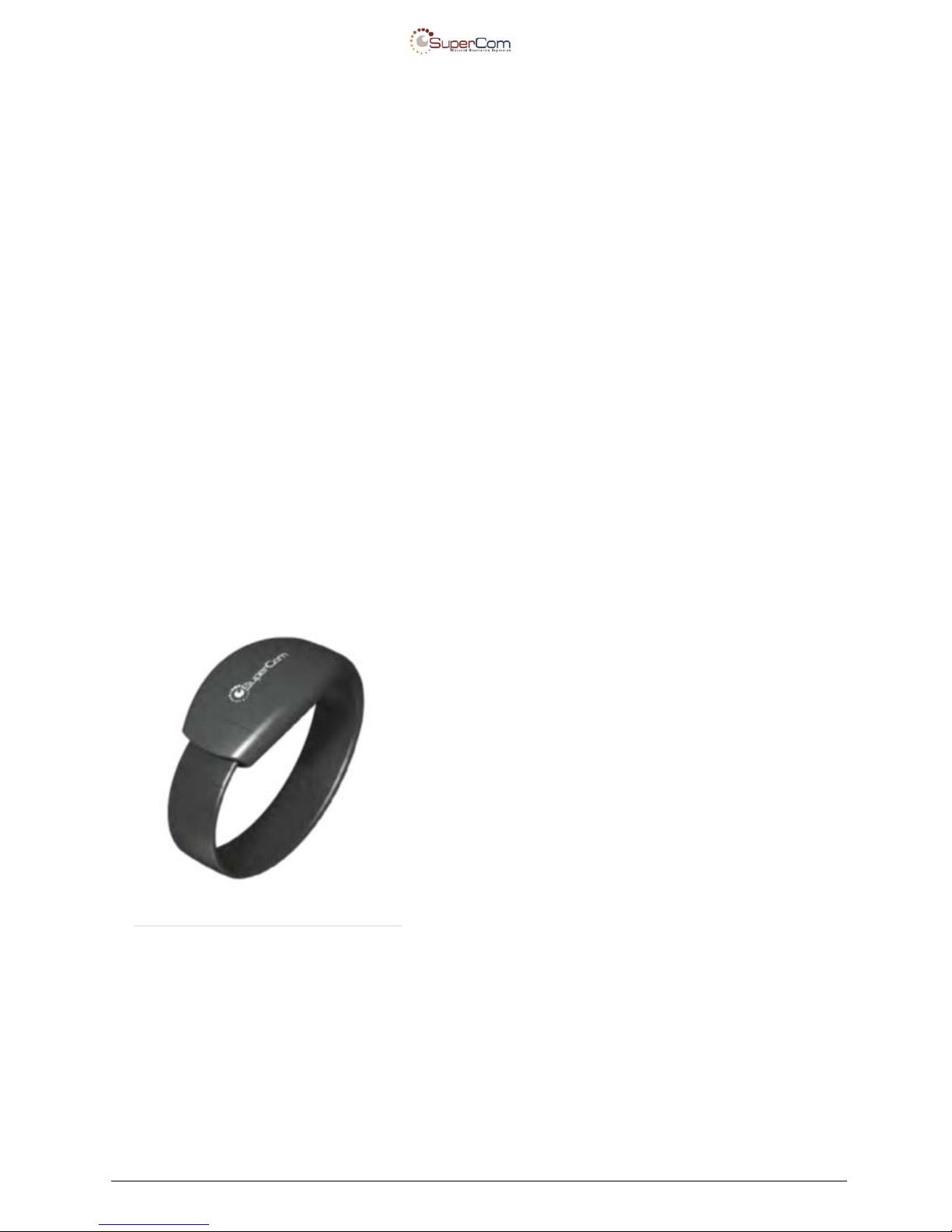
The PureTag bracelet is worn by defendants and
inmates and utilizes the latest advances in Bluetooth
Low Energy technology. PureTag is optimized for
precise indoor location verification in conjunction
with the PureTrack unit when GPS tracking is
required. PureTag is rugged, easy to install and
ergonomically designed for comfort. The bracelet is
designed to detect and immediately report any
tampering attempts. It works with a permanently
installed PureCom base unit or a PureTrack device
to generate real-time information about group
counts, traffic flow, population segmentation and
area restriction enforcement. Facility diagrams can
be easily uploaded to the PureMonitor software suite
for custom mapping overlays.
• No charging required
• Waterproof
• Lightweight
• Immediately reports tamper attempts
• Accomm odates fac ilit y and external
requirements
Confidential & Proprietary Page 10 of 12
Page 11
User Manual - PureTag v2.0
4.2 P/N: PRF-PURET20AT
PRF-PURET20AT is a device geared for asset management systems to track and monitor
inventory or assets.
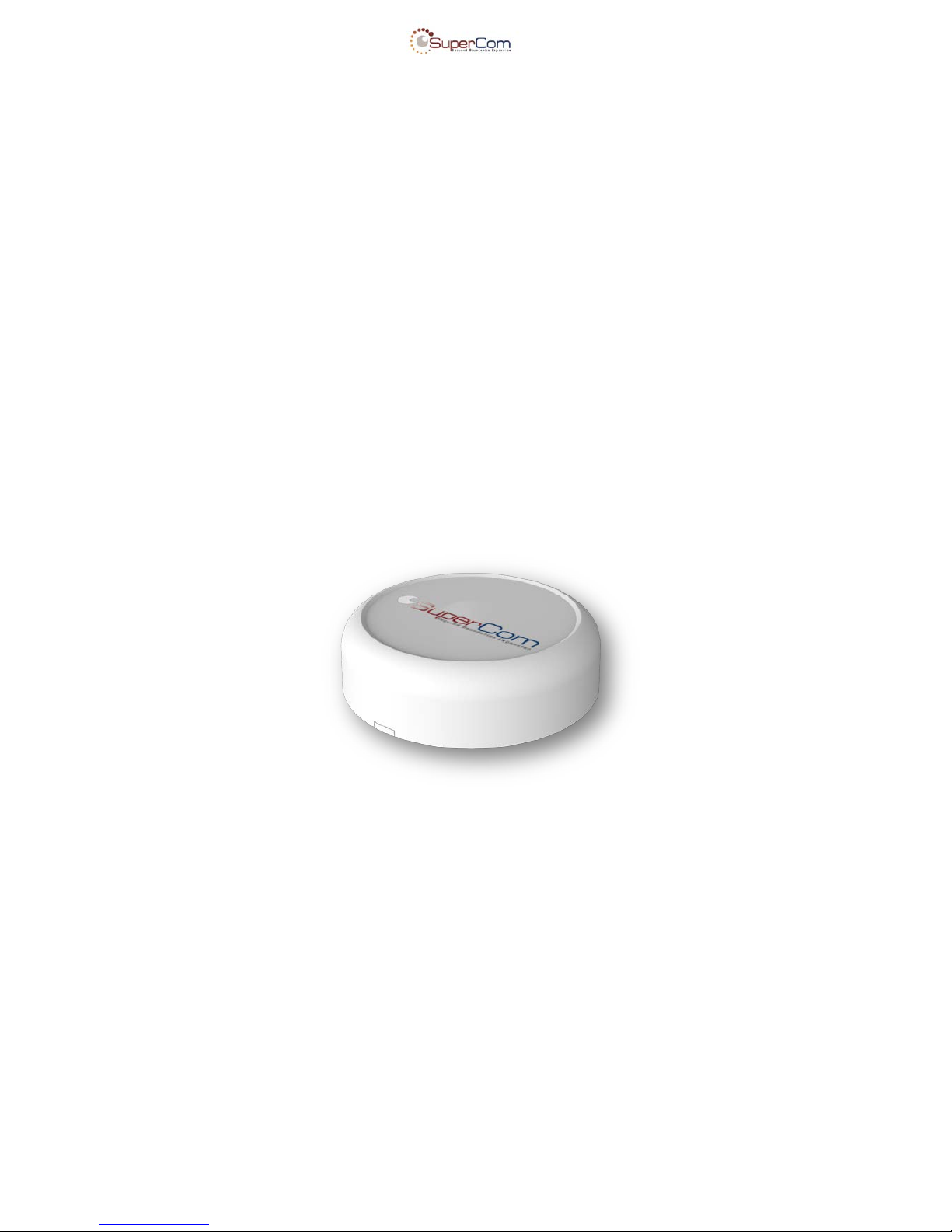
The unit comes in a mini, round case to be as small and as least noticeable as possible.
The unit sends an alert when it’s taken off from an item that is being monitored.
The unit shall be used in access control and asset management systems. Detailed
installation instructions are provided that depend on the specific requirements and needs of
the distributor/buy er .
The unit may come with slightly different designs, since it can be used with a logo sticker,
have a logo engraved on it, or simply without a logo.
An example photo of a PRF-PURET20AT device with a sticker logo:
Confidential & Proprietary Page 11 of 12
Page 12

User Manual - PureTag v2.0
5 Appendix A:
Model Name: PRF-PURET20
P/Ns types: PRF-PURET20EM
PRF-PURET20AT
The tables below describe the sensor combination that can be used with any PRF-PURET20,
For PRF-PURET20XX series:
FCC ID: W5P-PRF-PURET20
Pure Tag v2.0
Strap Tamper resistant
Strap Tamper resistant
Case Tamper resistant
Case Tamper resistant
Motion sensitive
Motion sensitive
Model: PRF-PURET20
EM enc.
EM enc.
Asset enc.
Asset enc.
Vehicle enc.
Vehicle enc.
PRF-PURET20EM
PRF-PURET20AT
SuperCom PN
EM
Asset Tag
Confidential & Proprietary Page 12 of 12
 Loading...