

Page 1
User Manual - PureCom v1.0
Confidential & Proprietary Page 1 of 11
USER MANUAL
PURECOM v1.0
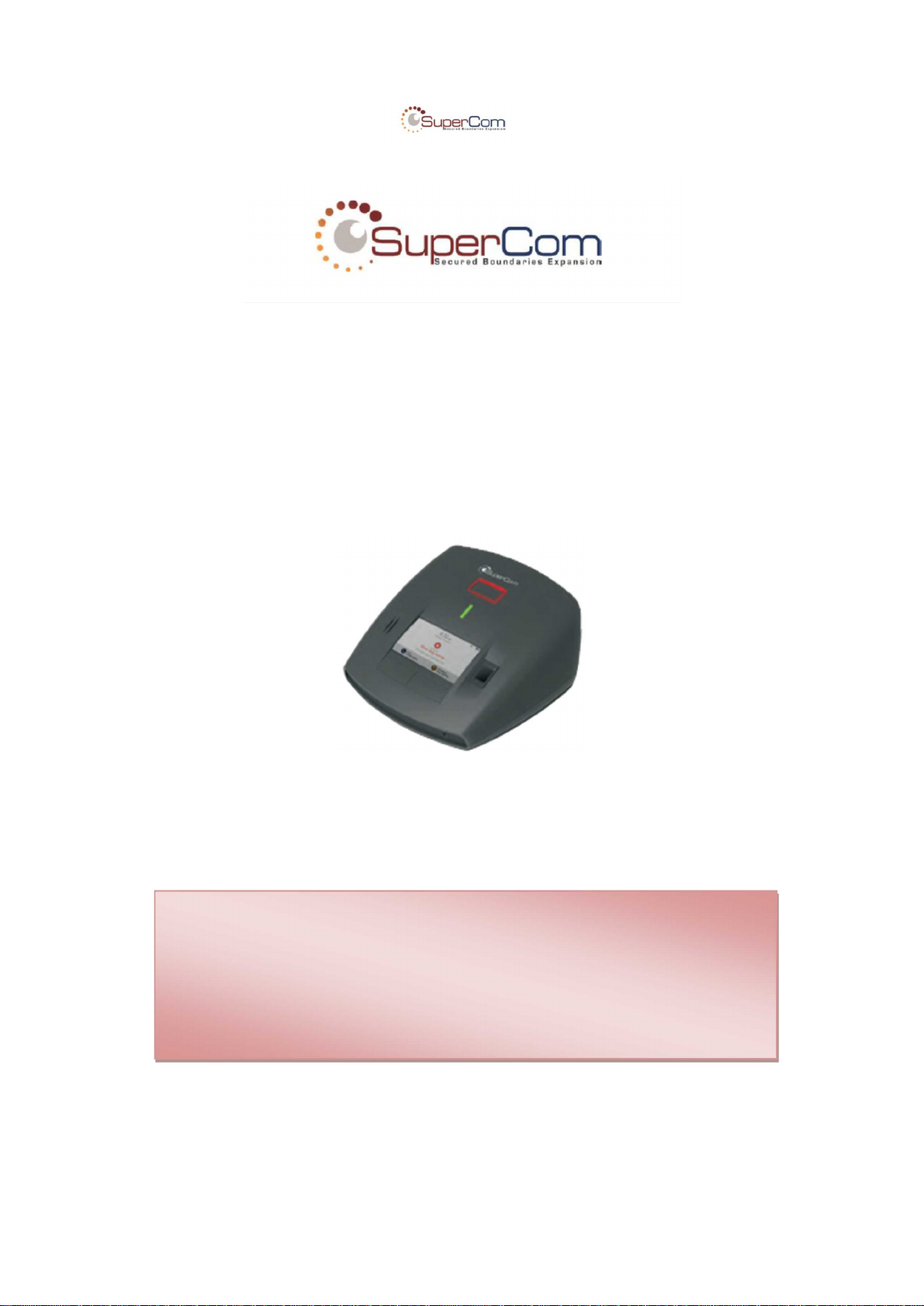
Monitoring base unit
The information in this document is confidential to the person to whom it is addressed and should
not be disclosed to any other person. It may not be reproduced in whole, or in part, nor may any
of the information contained therein be disclosed without the prior consent of the SuperCom Ltd.
(‘the Company’). A recipient may not solicit, directly or indirectly (whether through an agent or
otherwise) the participation of another institution or person without the prior approval of the
directors of the Company.
Any form of reproduction, dissemination, copying, disclosure, modification, distribution and or
publication of this material is strictly prohibited.
© All rights reserved. Supercom 2013
Page 2

User Manual - PureCom v1.0
Confidential & Proprietary Page 2 of 11
Document version management
Date
Version
Comments
Author
17.12.2014
1.0
Initial version
Ehud Bachman
Author
Ehud Bachman
Approved by
Barak Trabelsi
Document version
1.0
Product
PURECOM v1.0
Date
December 2014
Page 3

User Manual - PureCom v1.0
Confidential & Proprietary Page 3 of 11
Table of Contents
1 Introduction..................................................................................................................4
1.1 About this Guide.....................................................................................................4
1.2 Important Information..............................................................................................4
1.3 Safety Precautions..................................................................................................5
1.4 FCC Warnings........................................................................................................6
2 Technical Specifications.............................................................................................7
2.1 Interfaces and MMIs...............................................................................................7
2.1.1 RF....................................................................................................................7
2.1.2 Interfaces & Connectors..................................................................................7
2.1.3 Tampers & Sensors.........................................................................................7
2.1.4 MMI .................................................................................................................7
2.1.5 Operational temperature:.................................................................................7
2.2 Power Requirements..............................................................................................7
3 Unit Installation............................................................................................................8
4 Configuration .............................................................................................................10
5 Appendix A: Model Name and Variants...................................................................11
Page 4

User Manual - PureCom v1.0
1 Introduction
1.1 About this Guide
This User Guide contains important information for installers and users of the PRF-PURECOM10
product and all of its series. PureCom is a monitoring base unit especially designed for electronic
monitoring.
This guide introduces the PRF-PURECOM10 and provides instructions on how to install, configure,
operate, and troubleshoot the device. Each section has both written and graphically explanations to
provide the technical information necessary to be successful at using, installing, and configuring the
PRF-PURECOM10 device.
1.2 Important Information
SuperCom Inc. reserves the right to make corrections, modifications, enhancements, improvements,
and other changes to its products and services at any time and to discontinue any product or service
without notice. Customers should obtain the latest relevant information before placing orders and
should verify that such information is current andcomplete. All products are sold subject to SuperCom
Inc.’s terms and conditions of sale supplied at the time of order acknowledgment.
SuperCom Inc. warrants performance of its hardware products to the specifications applicable at the
time of sale in accordance with SuperCom Inc.’s standard warranty. Testing and other quality control
techniques are used to the extent SuperCom Inc. deems necessary to support this warranty. Except
where mandated by government requirements, testing of all parameters of each product is not
necessarily performed.
SuperCom Inc. assumes no liability for applications assistance or customer product design. Customers
are responsible for their products and applications using SuperCom Inc. components. To minimize the
risks associated with customer products and applications, customers should provide adequate design
and operating safeguards.
SuperCom Inc. does not warrant or represent that any license, either express or implied, is granted
under any SuperCom Inc. patent right, copyright, mask work right, or other SuperCom Inc. intellectual
property right relating to any combination, machine, or process in which SuperCom Inc. products or
services are used. Information published by SuperCom Inc. regarding third-party products or services
does not constitute a license from SuperCom Inc. to use such products or services or a warranty or
endorsement thereof. Use of such information may require a license from a third party under the
patents or other intellectual property of the third party, or a license from SuperCom Inc. under the
patents or other intellectual property of SuperCom Inc.
Resale of SuperCom Inc. products or services with statements different from or beyond the
parameters stated by SuperCom Inc. for that product or service voids all express and any implied
warranties for the associated SuperCom Inc.
Product or service and is an unfair and deceptive business practice. SuperCom Inc. is not responsible
or liable for any such statements.
All company and brand products and service names are trademarks or registered trademarks of their
respective holders.
Page 5

User Manual - PureCom v1.0
Confidential & Proprietary Page 5 of 11
1.3 Safety Precautions
! IMPORTANT:
The equipment contains communication devices. Any changes or modifications made to the
equipment without the written consent of SuperCom Inc. or SuperCom Ltd., or Vuance Ltd., and
its resellers or distributors, can nullify the user’s authority to operate this equipment.
The user assumes all risks associated with the use and handling of the equipment, and
specifically acknowledges that SuperCom Inc. & SuperCom Ltd. & Vuance Ltd., and its resellers
or distributors, will not be liable for any damages of any kind, including personal injury or
property damages resulting from use of the equipment.
! IMPORTANT:
Carefully read the safety information contained in this section, and throughout this user guide,
before installing, operating, or performing any maintenance task on the equipment.
! IMPORTANT:
Operations not performed as per the instructions in this user guide are done at the user’s own
risk and liability.
! IMPORTANT:
Only trained, authorized personnel should install, maintain and repair the equipment.
!
Unit shall be powered by a certified Limited Power Source supply adapter only (marked
“L.P.S”)
! IMPORTA
Caution! Risk of explosion if the rechargeable battery is replaced by an incorrect type.
Replace only with the same type and manufacturer. Disposal of used batteries in
accordance with the manufacturer instructions
Once you have thoroughly reviewed this user guide, if you have any questions, please
contact your reseller.
Page 6

User Manual - PureCom v1.0
Confidential & Proprietary Page 6 of 11
1.4 FCC Warnings
The FCC Wants You to Know
This equipment has been tested and found to comply with the limits
for a Class B digital device, pursuant to Part 15 of the FCC rules.
These limits are designed to provide reasonable protection against
harmful interference in a residential installation. This equipment
generates, uses and can radiate radio frequency energy and, if not
installed and used in accordance with the instructions, may cause
harmful interference to radio communications. However, there is no
guarantee that interference will not occur in a particular installation. If
this equipment does cause harmful interference to radio or television
reception, which can be determined by turning the equipment off and
on, the user is encouraged to try to correct the interference by one or
more of the following measures:
a) Reorient or relocate the receiving antenna.
b) Increase the separation between the equipment and
receiver.
c) Connect the equipment to an outlet on a circuit different
from that to which the receiver is connected.
d) Consult the dealer or an experienced radio/TV technician.
FCC Warning
Modifications not expressly approved by the manufacturer
could void the user authority to operate the equipment under
FCC Rules.
THE MANUFACTURER IS NOT RESPONSIBLE FOR ANY RADIO OR
TV INTERFERENCE CAUSED BY UNAUTHORIZED MODIFICATIONS
TO THIS EQUIPMENT. SUCH MODIFICATIONS COULD VOID THE
USER’S AUTHORITY TO OPERATE THE EQUIPMENT.
To comply with FCC Section 1.310 for human exposure to
radio frequency electromagnetic fields, implement the following
instruction:
A distance of at least 20 cm between the equipment and all
persons should be maintained during the operation of the
equipment.
Page 7

User Manual - PureCom v1.0
Confidential & Proprietary Page 7 of 11
2 Technical Specifications
2.1 Interfaces and MMIs
2.1.1 RF
2 x RF 433MHz ASK\FSK Receiver module
1 x LF 125KHz OOK Transmitter module
1 x RF Wi-Fi / Bluetooth module
1 x RF Cellular module
2.1.2 Interfaces & Connectors
Ethernet socket (RJ-45)
Modem socket (RJ-11)
Audio jacket (3.5")
Power adapter socket (DC 2.5mm)
2.1.3 Tampers & Sensors
Multiple tampers (electronic, mechanic and optic)
2.1.4 MMI
3 Push Buttons
Indication LED
Finger-Print Reader
Touch Screen (LCD)
Internal Speaker
Internal Microphone
2.1.5 Operational temperature:
-20°C to +60°C (battery discharge mode), -20°C to +40°C (battery charge mode)
2.2 Power Requirements
5VDC, 4A.
Page 8
User Manual - PureCom v1.0
Confidential & Proprietary Page 8 of 11
3 Unit Installation
The installation consists in a series of screens to navigate through till the screen displays the
confirmation that the installation has finished successfully, meaning the monitoring has actually
started.
The stand-alone installation is performed with the equipment in the location where the offender is
monitored.
Intuitive 3-stage installer menu:
o PMD pairing & verification
o Biometric enrollment
o RF Range calibration
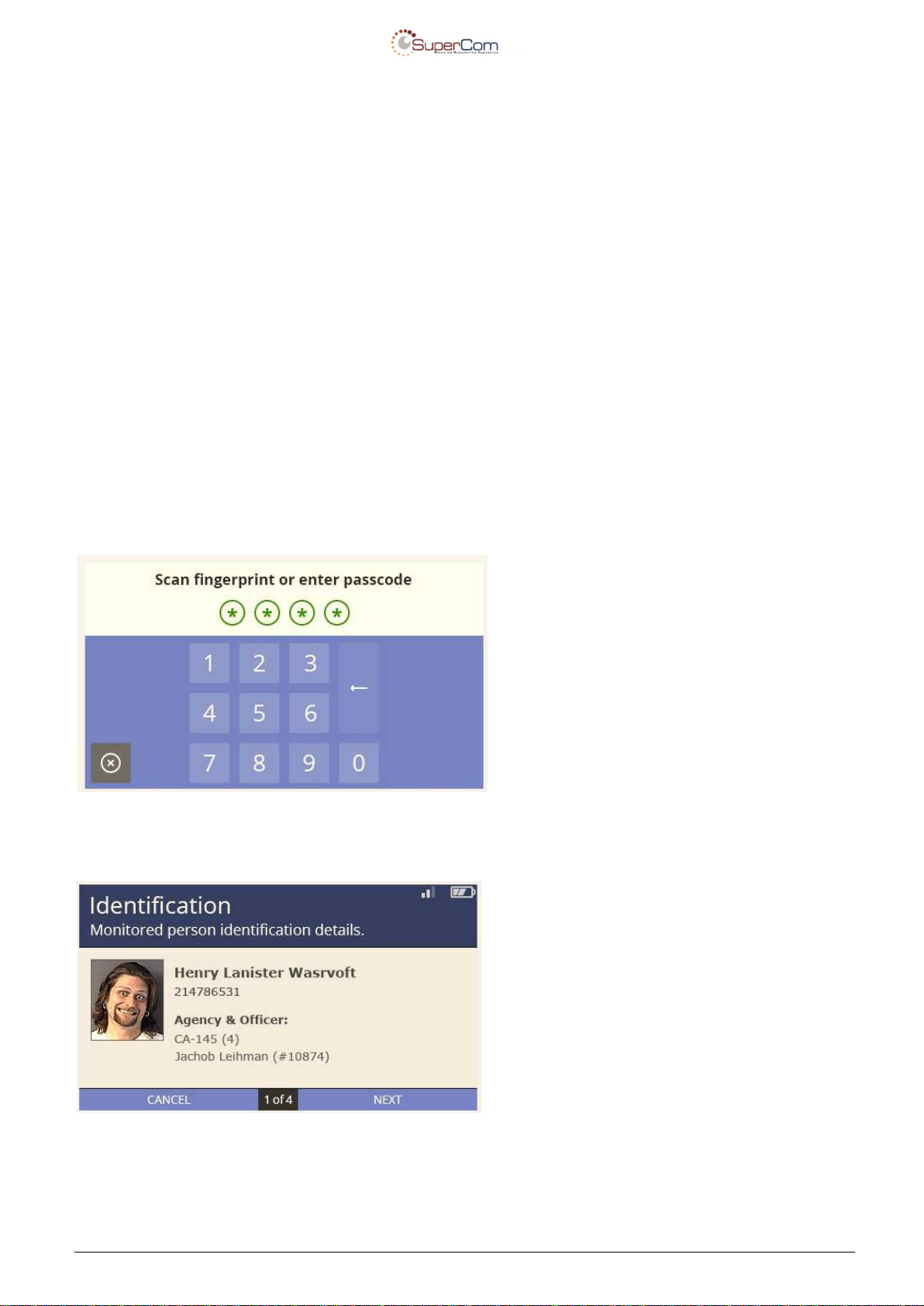
Before starting the installation the officer has to access the installation menu.
It can be done through a passcode or fingerprint if the officer is enrolled in the system.
Step 1: Offender Details – displays the offender’s details already downloaded from the server
(Monitoring application) to confirm everything is accurate
Page 9
User Manual - PureCom v1.0
Confidential & Proprietary Page 9 of 11
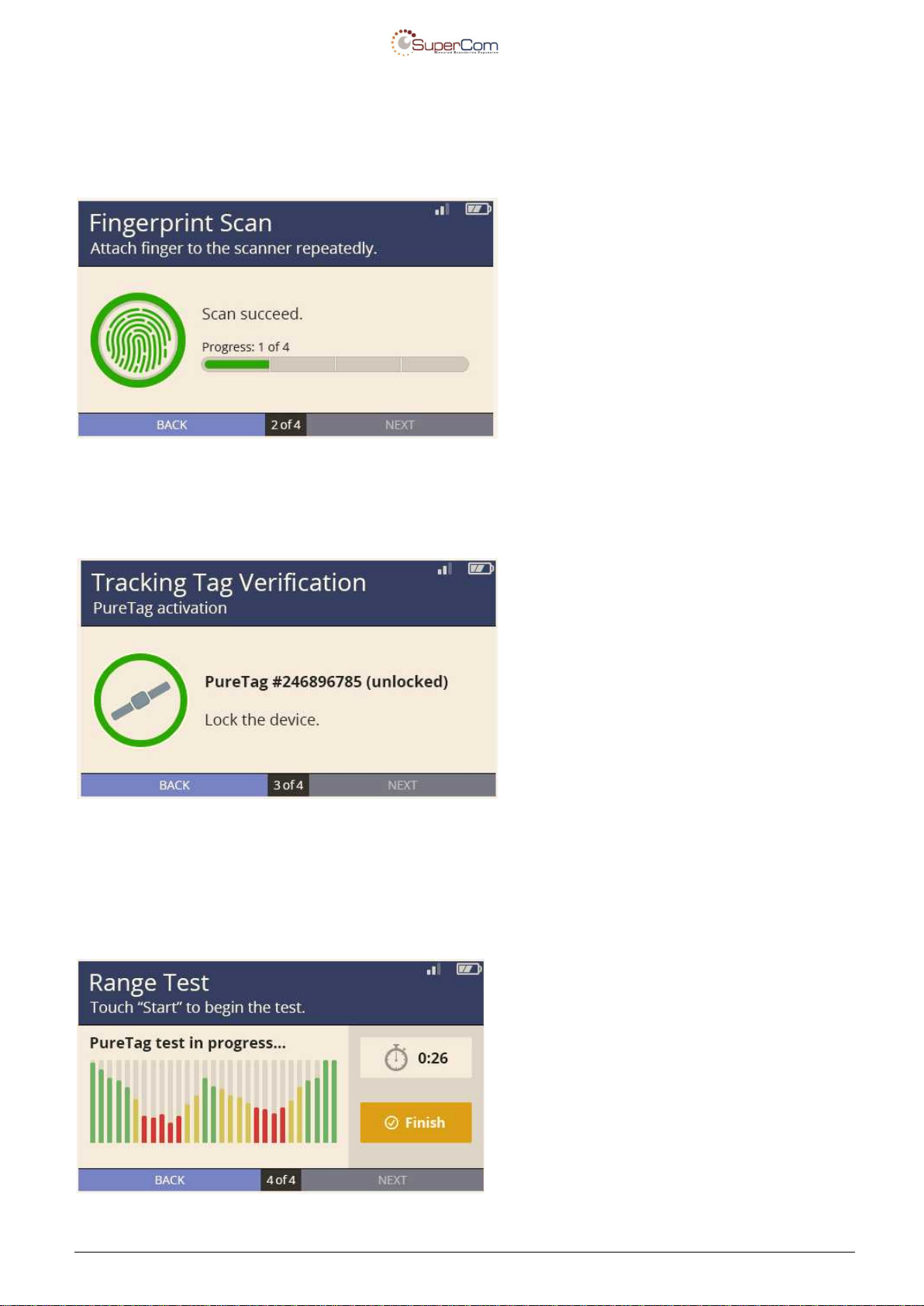
Step 2: Fingerprint Enrollment – enrolls the offender’s fingerprint
Whenever fingerprint verification is part of the surveillance program the offender has to enroll. If it
is not part of the surveillance program this step is skipped.
Step 3: Tag Status – Verifies the tag is locked on the offender’s leg and no tampers are open
(battery, case, etc.)
Step 4: Range Test – The range can be set from the monitoring software to existing default
values (short, medium, long) or performed from the stationary unit by asking the offender to walk
around the perimeter of the house and verifying the unit receive the signal correctly from every
corner of the offender house.
Page 10

User Manual - PureCom v1.0
Confidential & Proprietary Page 10 of 11
Each step of the installation must be completed successfully before continuing to the next step.
When all the installation is successful the screen displays a message confirming the installation
process is finished and the monitoring can now start.
NOTE:
Unit shall be powered by a certified Limited Power Source supply adapter only (marked “L.P.S”).
4 Configuration
The unit configuration is done remotely by the monitoring application (control center) via
secured internet connetion.
Page 11

User Manual - PureCom v1.0
Confidential & Proprietary Page 11 of 11
5 Appendix A: Model Name and Variants
Model Name: PRF-PURECOM10
PureCom v1.0 variants:
The list below describe the combination that can be for any PRF-PURECOM10,
For PRF-PURECOM10XX series
PRF-PURECOM10A - PureCom v1.0 without analog modem and without fingerprint reader.
PRF-PURECOM10F - PureCom v1.0 with fingerprint reader.
PRF-PURECOM10M - PureCom v1.0 with analog modem.
PRF-PURECOM10MF - PureCom v1.0 with analog modem and fingerprint reader.
 Loading...