

Page 1
User Manual - MFT v1.0
The information in this document is confidential to the person to whom it is addressed and should
not be disclosed to any other person. It may not be reproduced in whole, or in part, nor may any
of the information contained therein be disclosed without the prior consent of the SuperCom Ltd.
(‘the Company’). A recipient may not solicit, directly or indirectly (whether through an agent or
otherwise) the participation of another institution or person without the prior approval of the
directors of the Company.
Any form of reproduction, dissemination, copying, disclosure, modification, distribution and or
publication of this material is strictly prohibited.
© All rights reserved. Supercom 2013
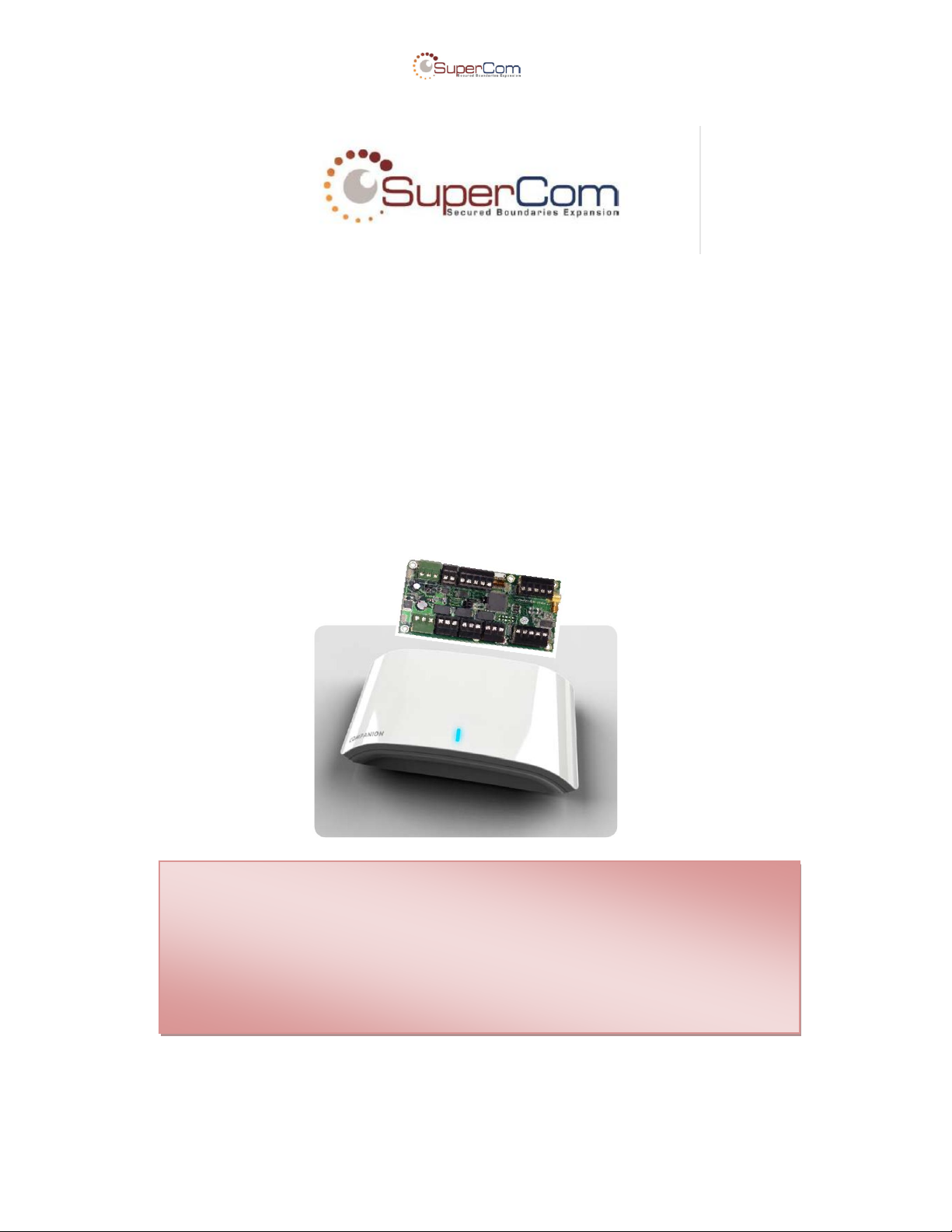
USER MANUAL
MFT v1.0
Multi Frequency Transmitter
Confidential & Proprietary Page 1 of 11
Page 2
User Manual - MFT v1.0
Date
Version
Comments
Author
26.6.2014
1.0
Initial version
Ehud Bachman
18.8.2014
1.1
Updated
Ehud Bachman
Author
Ehud Bachman
Approved by
Barak Trabelsi
Document version
1.1
Product
MFT v1.0
Date
August 2014
Document version management
Confidential & Proprietary Page 2 of 11
Page 3

User Manual - MFT v1.0
Table of Contents
1 Introduction .................................................................................................................. 4
1.1 About this Guide ..................................................................................................... 4
1.2 Important Information.............................................................................................. 4
1.3 Safety Precautions.................................................................................................. 4
1.4 FCC Warnings ........................................................................................................ 6
2 Technical Specifications ............................................................................................. 7
2.1 Interfaces and MMIs ............................................................................................... 7
2.1.1 RF .................................................................................................................... 7
2.1.2 Interfaces & Connectors .................................................................................. 7
2.1.3 Tampers & Sensors ................................ ......................................................... 7
2.1.4 MMI ................................................................................................................. 7
2.2 Power Requirements .............................................................................................. 7
3 Installation ................................................................................................ .................... 8
4 Configuration ............................................................................................................... 9
5 References ................................................................................................................. 10
5.1 Acronyms and Abbreviations ................................................................................ 10
6 Appendix A: ................................................................................................................ 11
Confidential & Proprietary Page 3 of 11
Page 4

FW & HW Test Plans - MFT v1.0
1 Introduction
1.1 About this Guide
This User Guide contains important information for installers and users of the PRF-MFT10 product
and all of its series. MFT stands for Multi Frequency Transmitter.
This guide introduces the PRF-MFT10 and provides instructions on how to install, configure, operate,
and troubleshoot the device. Each section has both written and graphically explanations to provide the
technical information necessary to be successful at using, installing, and configuring the PRF-MFT10
device.
1.2 Important Information
SuperCom Inc. reserves the right to make corrections, modifications, enhancements, improvements,
and other changes to its products and services at any time and to discontinue any product or service
without notice. Customers should obtain the latest relevant information before placing orders and
should verify that such information is current and complete. All products are sold subject to SuperCom
Inc.’s terms and conditions of sale supplied at the time of order acknowledgment.
SuperCom Inc. warrants performance of its hardware products to the specifications applicable at the
time of sale in accordance with SuperCom Inc.’s standard warranty. Testing and other quality control
techniques are used to the extent SuperCom Inc. deems necessary to support this warranty. Except
where mandated by government requirements, testing of all parameters of each product is not
necessarily performed.
SuperCom Inc. assumes no liability for applications assistance or customer product design. Customers
are responsible for their products and applications using SuperCom Inc. components. To minimize the
risks associated with customer products and applications, customers should provide adequate design
and operating safeguards.
SuperCom Inc. does not warrant or represent that any license, either express or implied, is granted
under any SuperCom Inc. patent right, copyright, mask work right, or other SuperCom Inc. intellectual
property right relating to any combination, machine, or process in which SuperCom Inc. products or
services are used. Information published by SuperCom Inc. regarding third-party products or services
does not constitute a license from SuperCom Inc. to use such products or services or a warranty or
endorsement thereof. Use of such information may require a license from a third party under the
patents or other intellectual property of the third party, or a license from SuperCom Inc. under the
patents or other intellectual property of SuperCom Inc.
Resale of SuperCom Inc. products or services with statements different from or beyond the
parameters stated by SuperCom Inc. for that product or service voids all express and any implied
warranties for the associated SuperCom Inc.
Product or service and is an unfair and deceptive business practice. SuperCom Inc. is not responsible
or liable for any such statements.
All company and brand products and service names are trademarks or registered trademarks of their
respective holders.
1.3 Safety Precautions
! IMPORTANT:
The equipment contains communication devices. Any changes or modifications made to the
equipment without the written consent of SuperCom Inc. or SuperCom Ltd., or Vuance Ltd., and
its resellers or distributors, can nullify the user’s authority to operate this equipment.
The user assumes all risks associated with the use and handling of the equipment, and
specifically acknowledges that SuperCom Inc. & SuperCom Ltd. & Vuance Ltd., and its resellers
Page 5

User Manual - MFT v1.0
or distributors, will not be liable for any damages of any kind, including personal injury or
property damages resulting from use of the equipment.
! IMPORTANT:
Carefully read the safety information contained in this section, and throughout this user guide,
before installing, operating, or performing any maintenance task on the equipment.
! IMPORTANT:
Operations not performed as per the instructions in this user guide are done at the user’s own
risk and liability.
! IMPORTANT:
Only trained, authorized personnel should install, maintain and repair the equipment.
!
Unit shall be powered by a certified Limited Power Source supply adapter only (marked
“L.P.S”)
! IMPORTA
Once you have thoroughly reviewed this user guide, if you have any questions, please
contact your reseller.
Confidential & Proprietary Page 5 of 11
Page 6

User Manual - MFT v1.0
The FCC Wants You to Know
This equipment has been tested and found to comply with the limits
for a Class B digital device, pursuant to Part 15 of the FCC rules.
These limits are designed to provide reasonable protection against
harmful interference in a residential installation. This equipment
generates, uses and can radiate radio frequency energy and, if not
installed and used in accordance with the instructions, may cause
harmful interference to radio communications. However, there is no
guarantee that interference will not occur in a particular installation. If
this equipment does cause harmful interference to radio or television
reception, which can be determined by turning the equipment off and
on, the user is encouraged to try to correct the interference by one or
more of the following measures:
a) Reorient or relocate the receiving antenna.
b) Increase the separation between the equipment and
receiver.
c) Connect the equipment to an outlet on a circuit different
from that to which the receiver is connected.
d) Consult the dealer or an experienced radio/TV technician.
FCC Warning
Modifications not expressly approved by the manufacturer
could void the user authority to operate the equipment under
FCC Rules.
THE MANUFACTURER IS NOT RESPONSIBLE FOR ANY RADIO OR
TV INTERFERENCE CAUSED BY UNAUTHORIZED MODIFICATIONS
TO THIS EQUIPMENT. SUCH MODIFICATIONS COULD VOID THE
USER’S AUTHORITY TO OPERATE THE EQUIPMENT.
1.4 FCC Warnings
Confidential & Proprietary Page 6 of 11
Page 7

User Manual - MFT v1.0
2 Technical Specifications
2.1 Interfaces and MMIs
2.1.1 RF
1 x RF 433MHz ASK\FSK Receiver module
2 x LF 125KHz OOK Transmitter module
2.1.2 Interfaces & Connectors
RS-485
2 x Relay outputs / 3 x OC drivers
2 x Wiegand Outputs
Ultra-Sonic module connector
Power adapter socket
2.1.3 Tampers & Sensors
Case tamper (Optional)
Ultra-Sonic module (Optional)
2.1.4 MMI
Push Button
Indication LEDs
Internal Buzzer
1 x DIP Switch
Operational temperature:
-20°C to +60°C
2.2 Power Requirements
12V DC, 2A.
Confidential & Proprietary Page 7 of 11
Page 8
User Manual - MFT v1.0
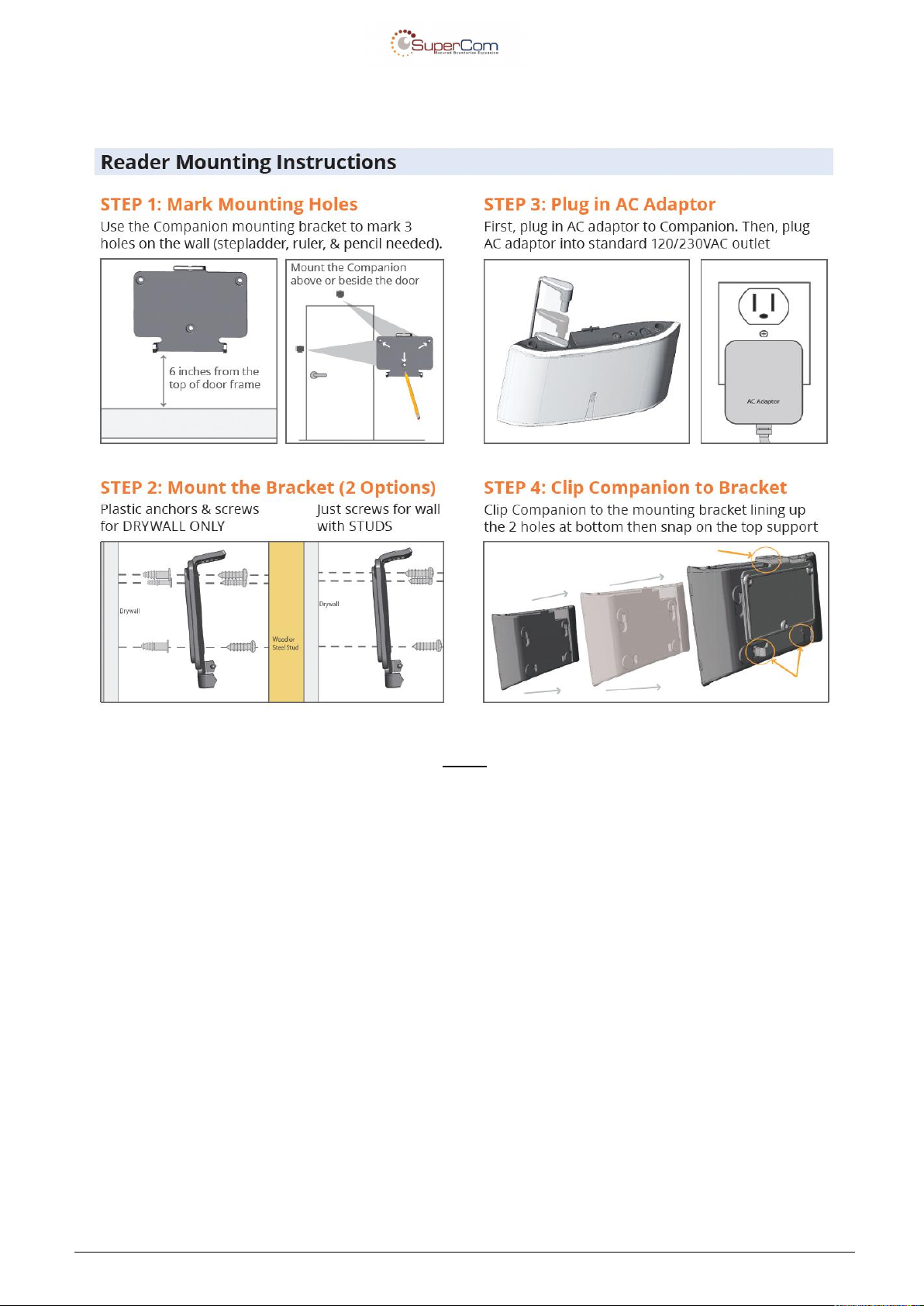
3 Installation
NOTE:
Unit shall be powered by a certified Limited Power Source supply adapter only (marked “L.P.S”).
Confidential & Proprietary Page 8 of 11
Page 9
User Manual - MFT v1.0
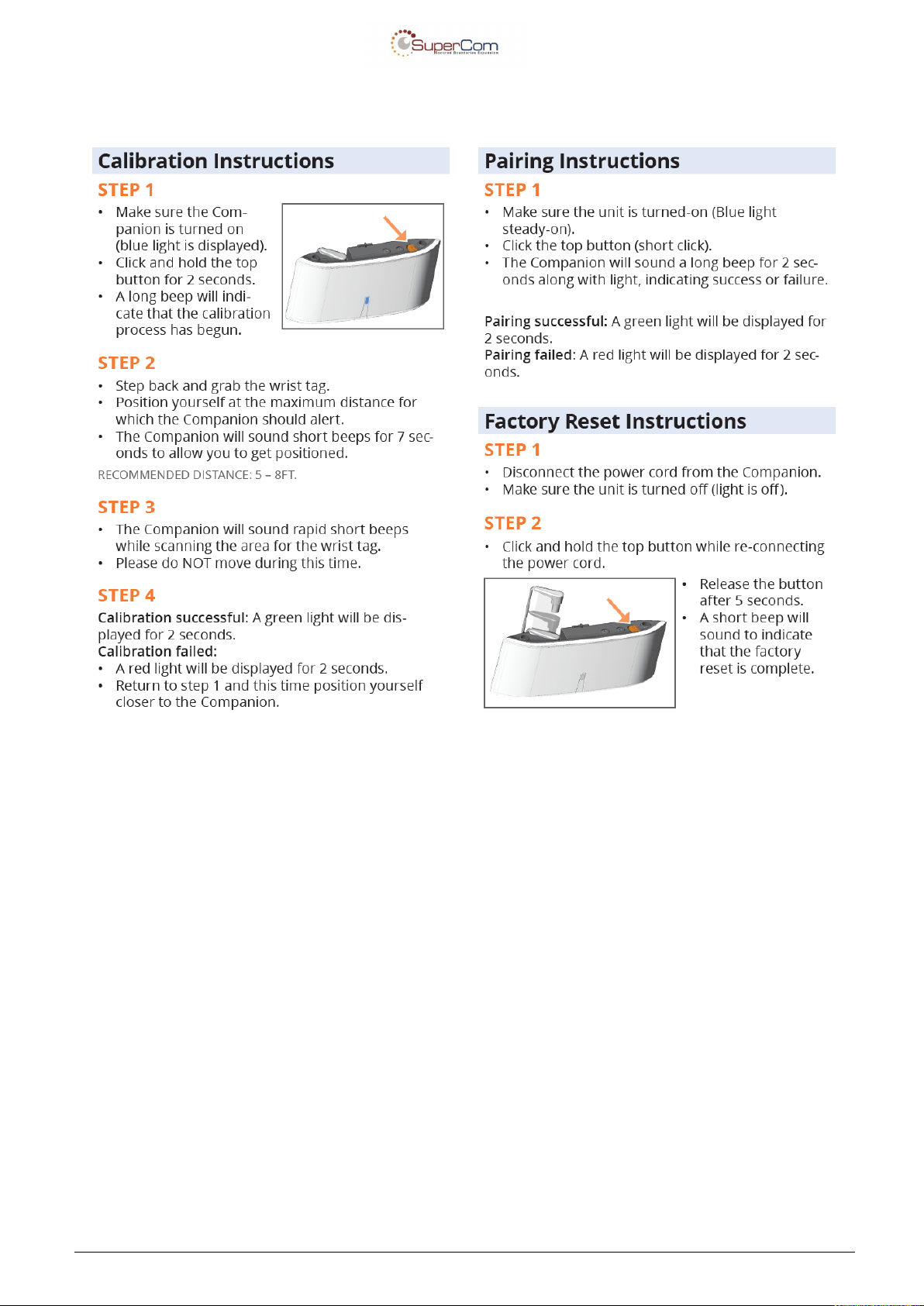
4 Configuration
Confidential & Proprietary Page 9 of 11
Page 10

User Manual - MFT v1.0
5 References
5.1 Acronyms and Abbreviations
API – Application Programmer Interface
ADC – Analog to Digital Conversion
RF – Radio Frequency
CPU – Central processing unit
CAD – Computer Aided Design
CISC –Complex Instruction Set Computing
DAC –Digital to Analog Convertor
ETSI –European Telecommunications Standards Institute
FCC –Federal Communications Commission
GUI – Graphical User Interface
I/O –Input/output
IRQ –Interrupt Request
ISO –International Organization for Standardization
Kbps –kilobit per second
LED –Light Emitting Diode
MCU – Micro Controller unit
MMI – man machine interface
RAM –Random Access Memory
ROM –Read Only Memory
Confidential & Proprietary Page 10 of 11
Page 11
User Manual - MFT v1.0
6 Appendix A:
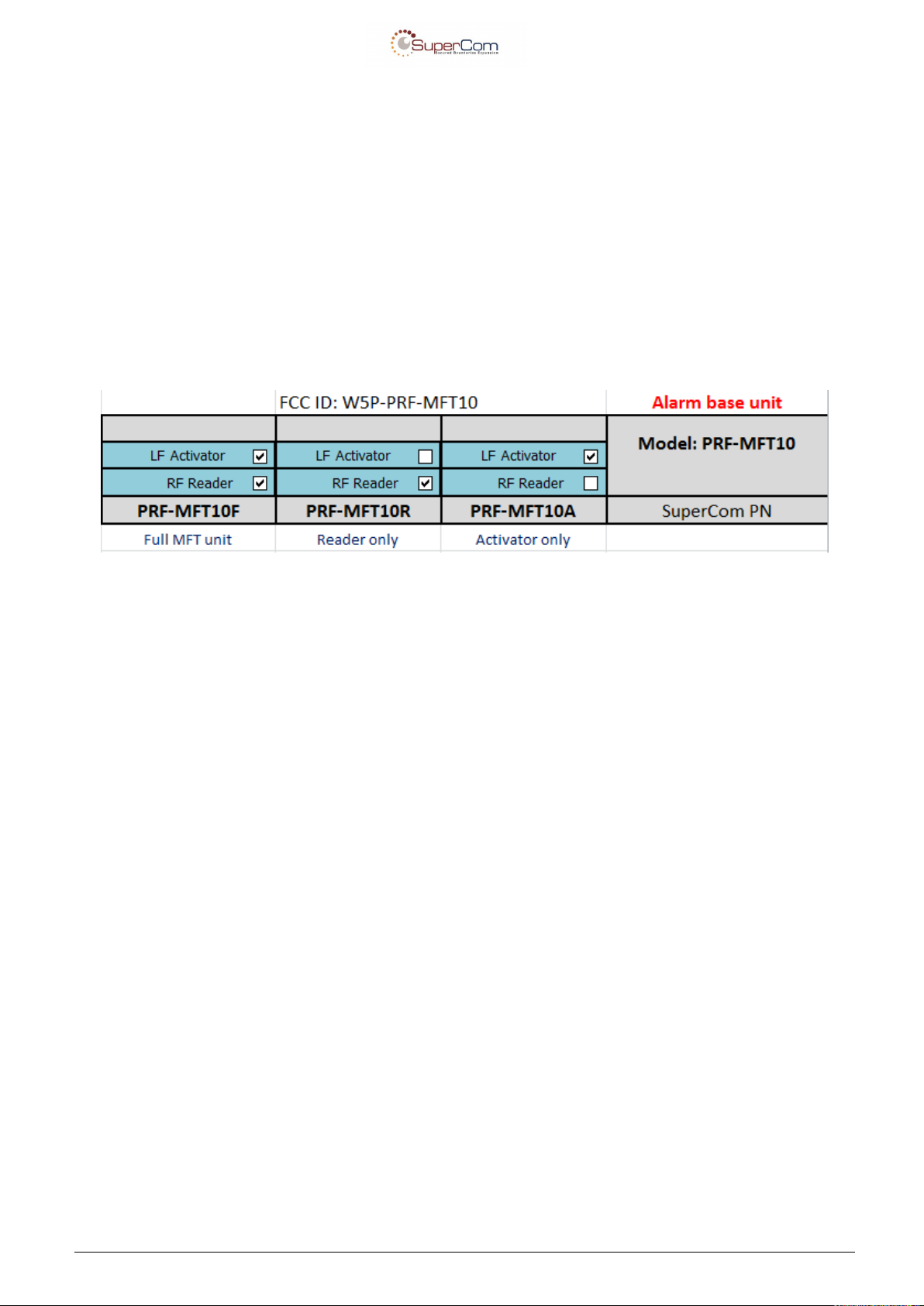
Model Name: PRF-MFT10
MFT Types: PRF-MFT10A, PRF-MFT10R, PRF-MFT10F.
The tables below describe the sensor combination that can be for any PRF-MFT10,
For PRF-MFT10XX series:
Confidential & Proprietary Page 11 of 11
 Loading...