

Page 1
!
!
!
! !
!
!
!
!
!
BT#10!
+!WEDGESCAN!
!!!!!!!!!The!smart!wireless!Bluetooth!scanner!
User!Manual!!
!"#$"%&'()*+,)-".%/0()
Page 2

!
"!
BT#10+'WEDGESSCAN:'THE'SMART'WIRELESS'BLUETOOTH'SCANNER' 4!
PACKAGE'CONTENTS' 5!
INTENDED'USE' 5!
REQUIREMENTS' 5!
USING'BT#10'+'WEDGESCAN'FOR'THE'FIRST'TIME' 6!
ADDITIONAL'BARCCODE'DEVICE'PROGRAMING'REQUIREMENT' 10!
HOW'TO'TURN'ON/EXIT'THE'WEDGESCAN+'BT#10' 10!
DETAILED'INSTRUCTIONS'ON'OPERATING'BT#10'SCANNER'DEVICE' 11!
RESETTING!BT?10!DEVICE
' 12!
CHARGING!BT?10!DEVICE
' 12!
DETAILED'INSTRUCTIONS'ON'OPERATING'BT#10'+WEDGESCAN'BLE'APP' 13!
DETAILED'INSTRUCTIONS'ON'WEDGESCAN'APP'FLOATING'SWITCH'OPTIONS' 14!
OTHER'WEDGESCAN'BLE'APP'FUNCTIONS' 15!
OTHER'WEDGESCAN'APP'FUNCTIONS' 16!
CUSTOMER'SERVICE'CONTACT' 17!
GENERAL'USAGE,'SAFETY'AND'PRECAUTIONS,'CLEANING' 17!
LIMITED'WARRANTY' 17!
Page 3

!
#!
BT#10'SERIES'SPECIFICATION'CHART' 18!
DISPOSAL' 23!
CERTIFICATIONS' 24!
!
!
Page 4
!
$!
!
!
!
!
!
!
!
BT#10+'WEDGESS CAN:'THE'SMART'WIRELESS'BLU ETOO TH 'SCANNER'
!
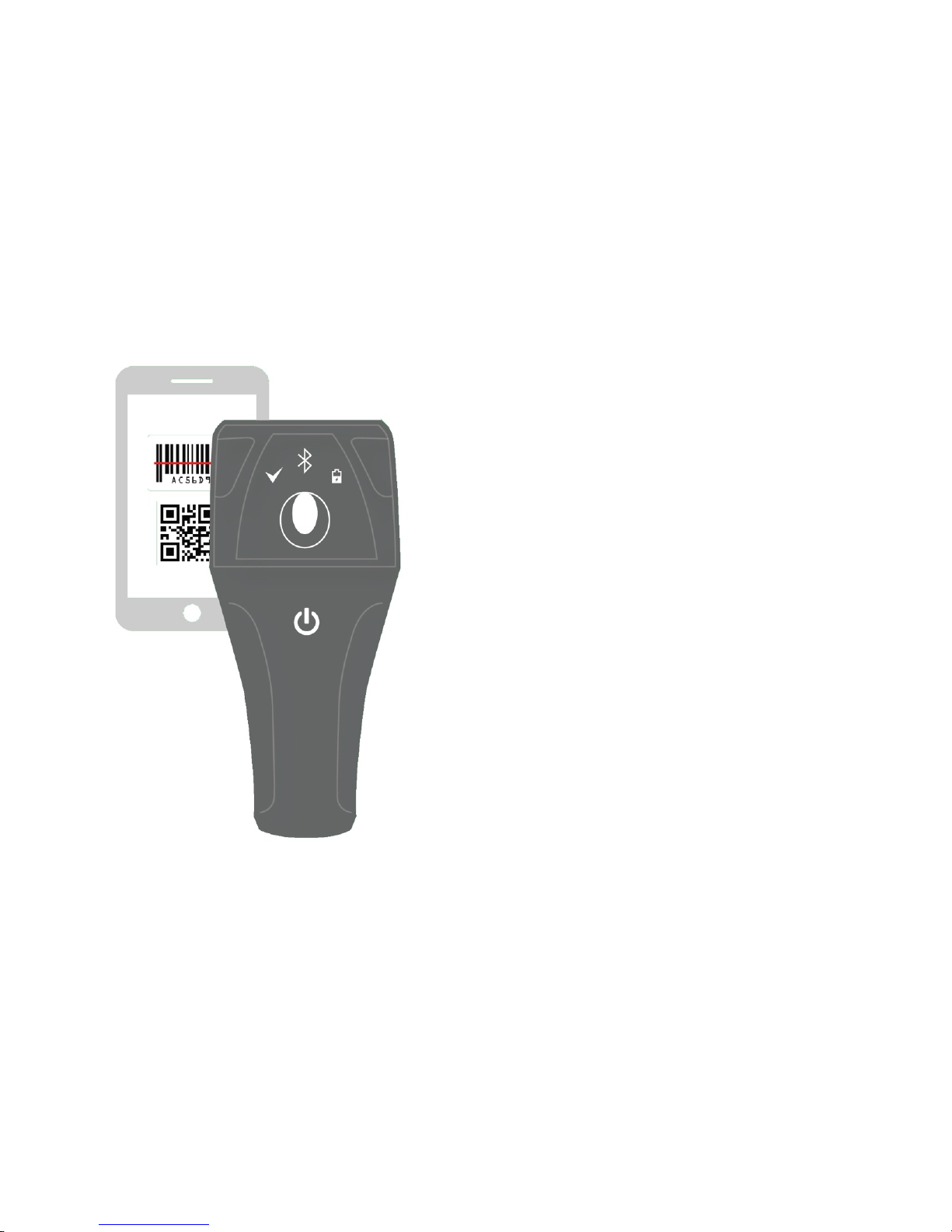
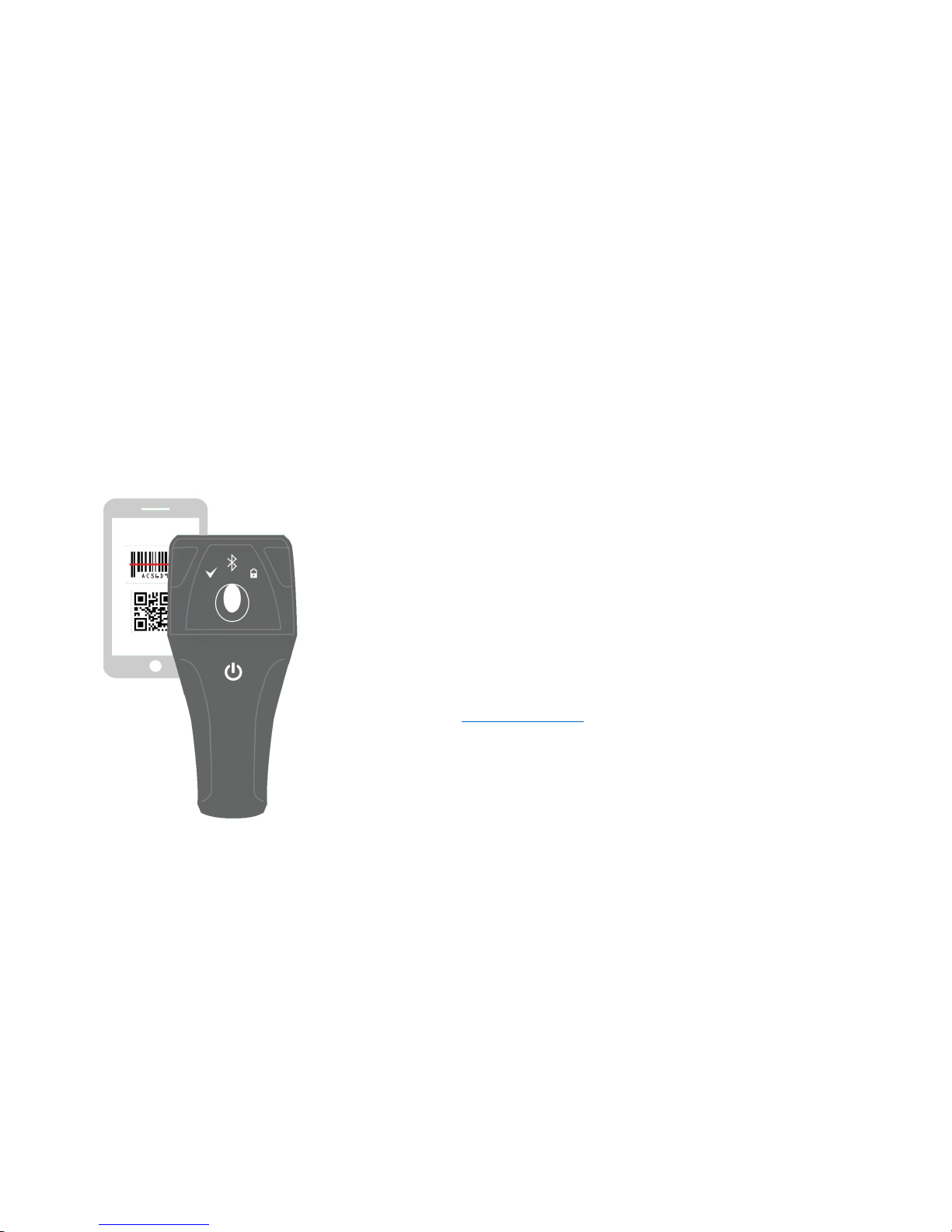
BT?10! is! an! innovative,! smart,! portable! Bluetooth! barcode! scanner.! Wedgescan! is! a! mobile!
application! designed! exclusively! to! work! with! BT?10! scanners.! ! BT?10+!Wedgescan! is!the! most!
convenient!scanning!method.!!
BT?10+!Wedgescan! provides! the! easiest!way!of! data! scanning!and! transmitting! that! helps!users!
collecting!data!effortlessly.!Our!devices!are!powerful!and!smart,!have!an!ergonomic!design!w ith!a!
delightful!user!experience!so!you!can!use!them!anytime,!anywhere.!!
With!its!ease!of!use!and!accuracy,!BT?10+Wedgescan!is!ideal!for!backroom!inventory!management,!
point?of?sale,!logistics,!and!any!other!applications!that!require!powerful!barcode!scanning.!!
Please! read! through! these! instructions! carefully! so!you! can! understand! all!functions! and!safety!
information.!We!want!you!to!have!a!great!scanning!experience!with!BT?10+Wedgescan.!If!you!have!
any!questions,!problems! or!suggestions,!please!contact!Suntop! at!http://suntopccd.com/contact?
us/,!or!visit!our!website!
www.suntopccd.com!for!more!information.!!
!
Page 5
!
%!
!
!
!
!
!
!
!
!
! !
INTENDED'USE'
BT?10! is! rated! by! Ingress! Protection! as! an! IP57!
waterproof! and! washable! wireless! Bluetooth! barcode!
scanner!device.!Wedgescan!is!a!patented! “parity!check”!
system! that! guarantees! 99 %! of! data! transmitting!
accuracy.! It! is! also! a! soft?keyboard! interface! system!
intended! to! auto?detect! the! input! scanning! languages.!
BT?10+Wedgescan!utilizes!a!touch!pad!button!that!can!be!
tapped!easily!to!capture!data.!Simply!download,!pair,!and!
start!scanning.!
PACKAGE'CONTENTS'
• BT?10! Bluetooth! wireless! barcode!
scanner!
•
Special!USB!charging!cable**!
•
Quick!User!Manual!!
•
A!manual!micro!CD!
!
REQUIREM E NT S '
BT?10!+!Wedgescan!requires!a!device!with:!
•
Bluetooth!Low!Energy!
•
Android!4.3!(API!Level!18)!or!later!
And!works!with:!
•
Android!phones!and!tablets!
In!order!to!use!your!BT?10+Wedgescan,!you! must!
download!the!free!Wedgescan!Input!BLE!App!from!
Google!Play,!or!go!to!
http://www.suntopccd.com/
!
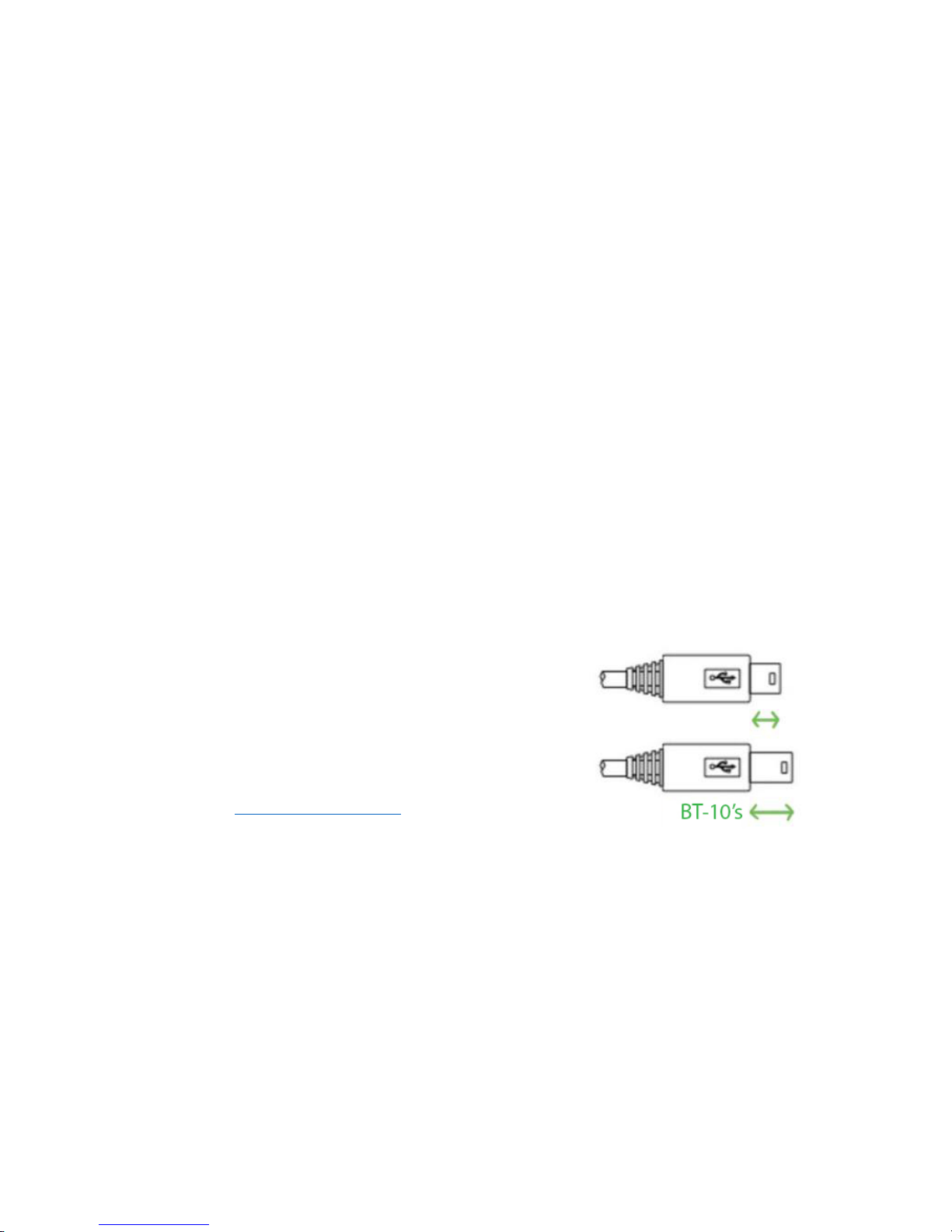
**SPECIAL'USB'CABLE:'
BT?10!device’s!Micro!USB!charging!cable!is!designed!
exclusively!to!work!with!BT?10!devices.!Only!the!BT?
10! custom iz ed! USB! charging! cable! w o uld! perform!
the!functionalities.!!
Page 6
!
&!
!
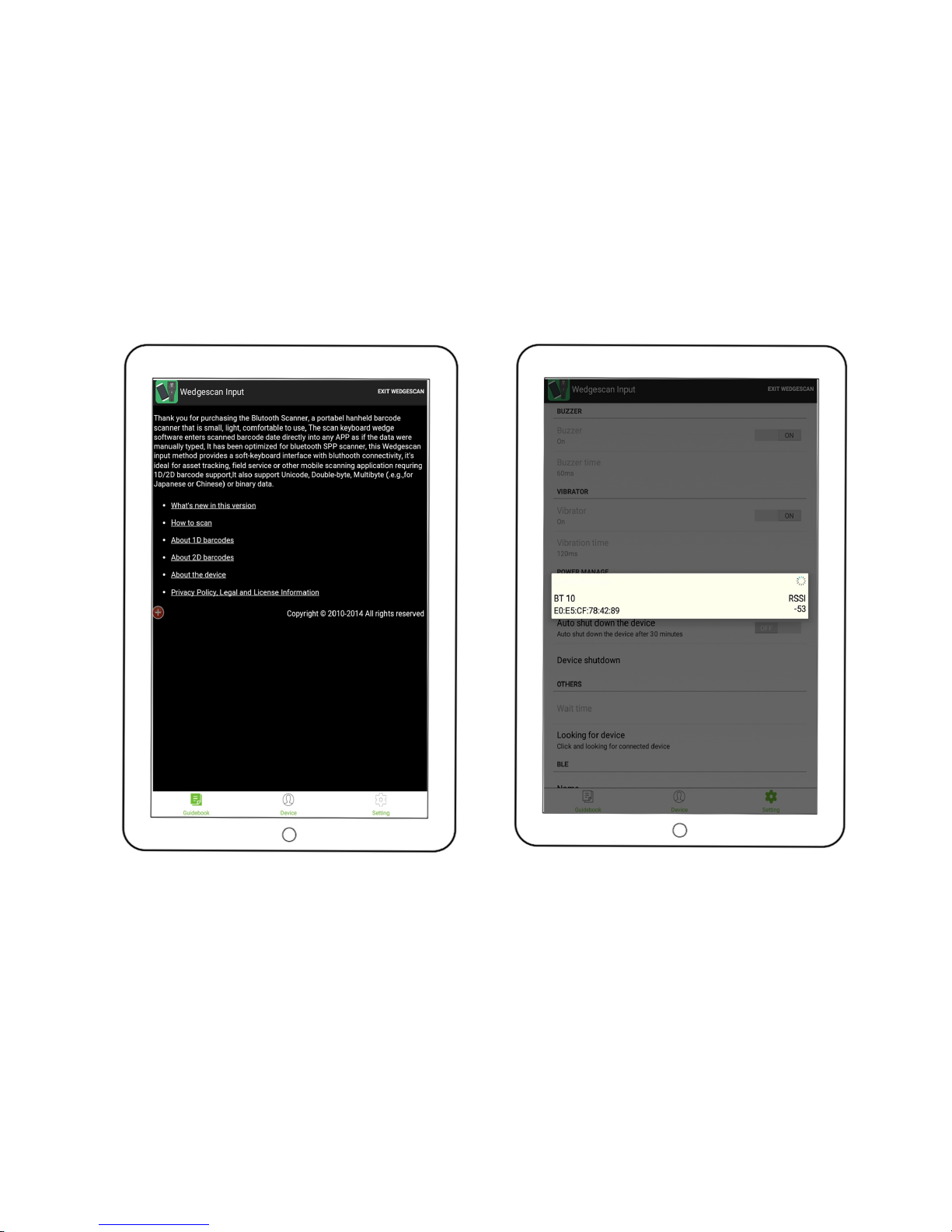
USING'BT #10'+'WEDGESCAN'FOR'TH E'FIRST'
TIME'
1.
Download! the! free! Wedgescan! BLE! App:! On! your! mobile!
phone! or! tablet! go! to! www.suntopccd.com
! and! when!
prompted,! download! the! app.! Alternatively,! go! on! Google!
Play.!
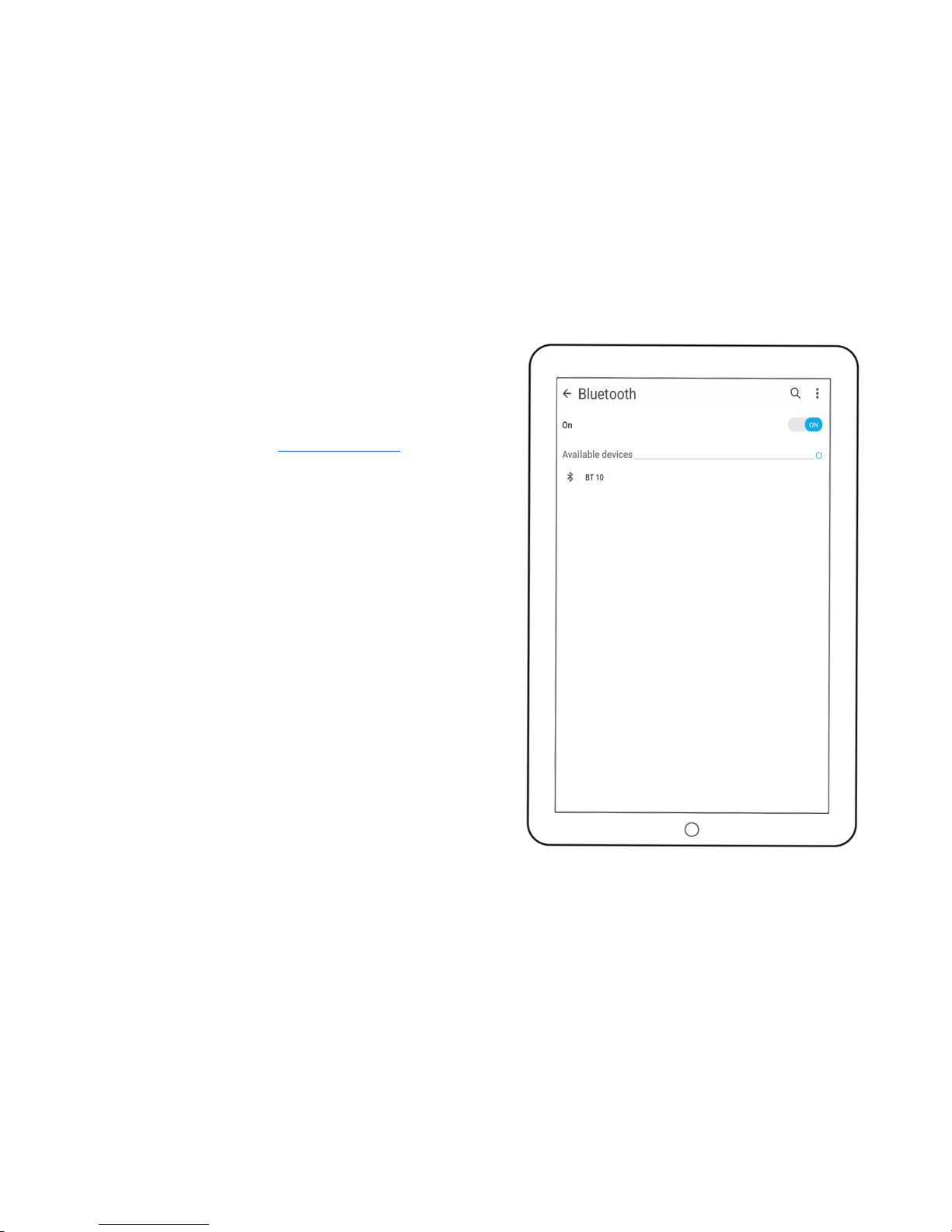
2. Long!press!the!power!button!to!turn!on!your!BT?10!scanner.!
You!will!see!the!Bluetooth!sign!LED!flashing!YELLOW.!
3. Enable!Bluetooth!on!your! device.!You!can! enable!Bluetooth!
under!the!Settings!menu!on!your!smartphone!or!tablet.!Make!
sure!BT?10!could!be!discovered!by!your!mobile!device.)1%2"3)
45!
67 Open!the!Wedgescan!BLE!App!on!your!phone!or!tablet.!Click!
the!Setting! button! and!the! App! will! automatically! detect! a!
near!by!BT?10!device.!When!prompted,!click!to!pair.!1%2"3)8)
9):5)
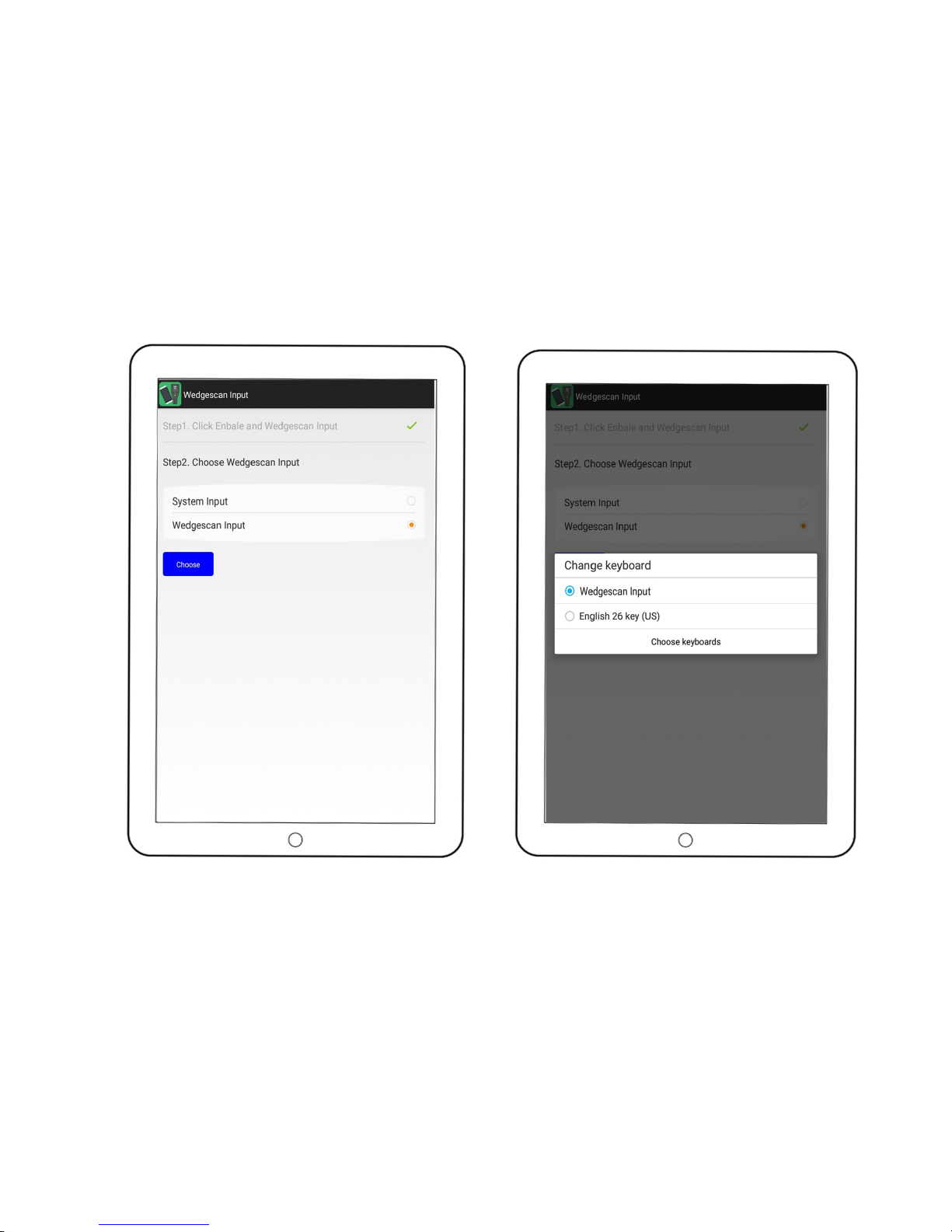
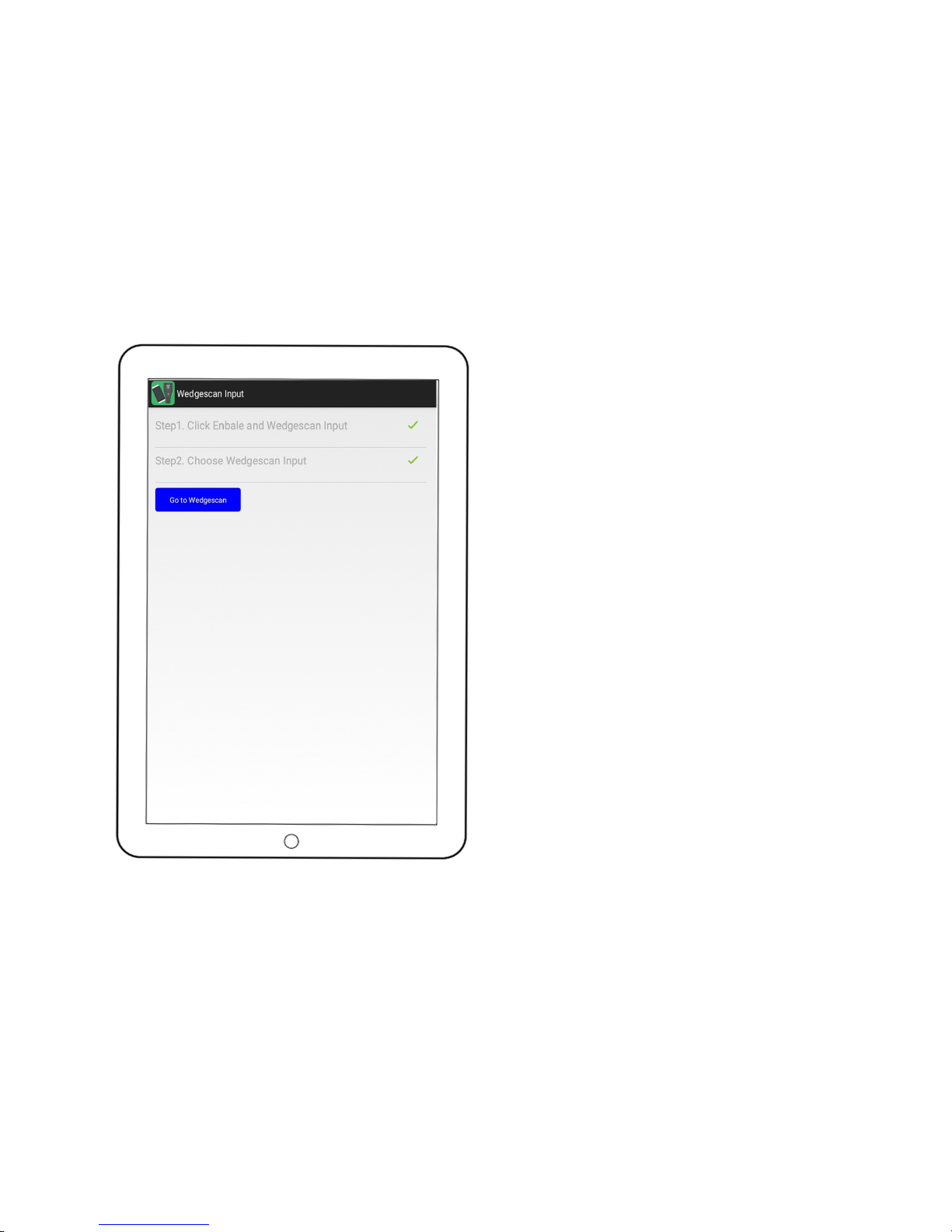
5. Open! the! Wedgescan! BLE! App! on! your! phone! or! tablet.!
Follow!the!on?screen!steps!to!enable!Wedgescan!and!choose!
it!as!your!default!input!scanning!language.!1%2"3)6;)<)9=5!
6. When! pairing! is! done! successfully,! the! Bluetooth! sign! LED!
indicator!will!appear!solid!BLUE.!
7. Open!any!App!you!would!like!to!keep!your!scanned!data,!and!
start!scanning.!
!
STEP'1'
Page 7
!
'!
!
!
!
!
!
!
!
!
!
!
!
!
!
!
STEP'2'
STEP'3'
Page 8
!
(!
!
! !
STEP'4'
STEP'5'
Page 9
!
)!
!
! !
STEP'6'
Page 10

!
*+!
!
HOW'TO'TURN'ON/EXIT'THE'
WEDGESCAN+'BT #10'
BT?10! scanner! device! turns! itself! off! when! it! has! been!
inactive!for!30!mins.)However,!there!are!couple!ways!to!turn!
on/!exit!the!Wedgescan+!BT?10:!
• Under! the! red! floa ting ! switch,! click! to! expand! the!
options!and!choose!!!!!!!!!!!!to!exit!
•
Simply!turn!your!BT?10!scanner!device!off!to!exit!!
For! more! detailed! operating! instructions,! please! %"")
#"2'/>"#)/(%2.?&2/0(%)0()03".'2/($)*@A4B)%&'((".)#"-/&"!'(#)
#"2'/>"#) /(%2.?&2/0(%) 0() 03".'2/($) !"#$"%&'() *+,) C33!
below.!
!
!
ADDITIONAL'BARCCODE'DEVICE'PROGRAMING'
REQUIREM EN T '
If! you! have! any! other! additional! barcode! programming!
requirement,! please! refer! to!
http://suntopccd.com/bt?10/
! (1D !
advanced! program! manual),!
http://suntopccd.com/bt?10/
! (2D!
advanced!program!manual).!
!
!
Page 11
!
**!
'
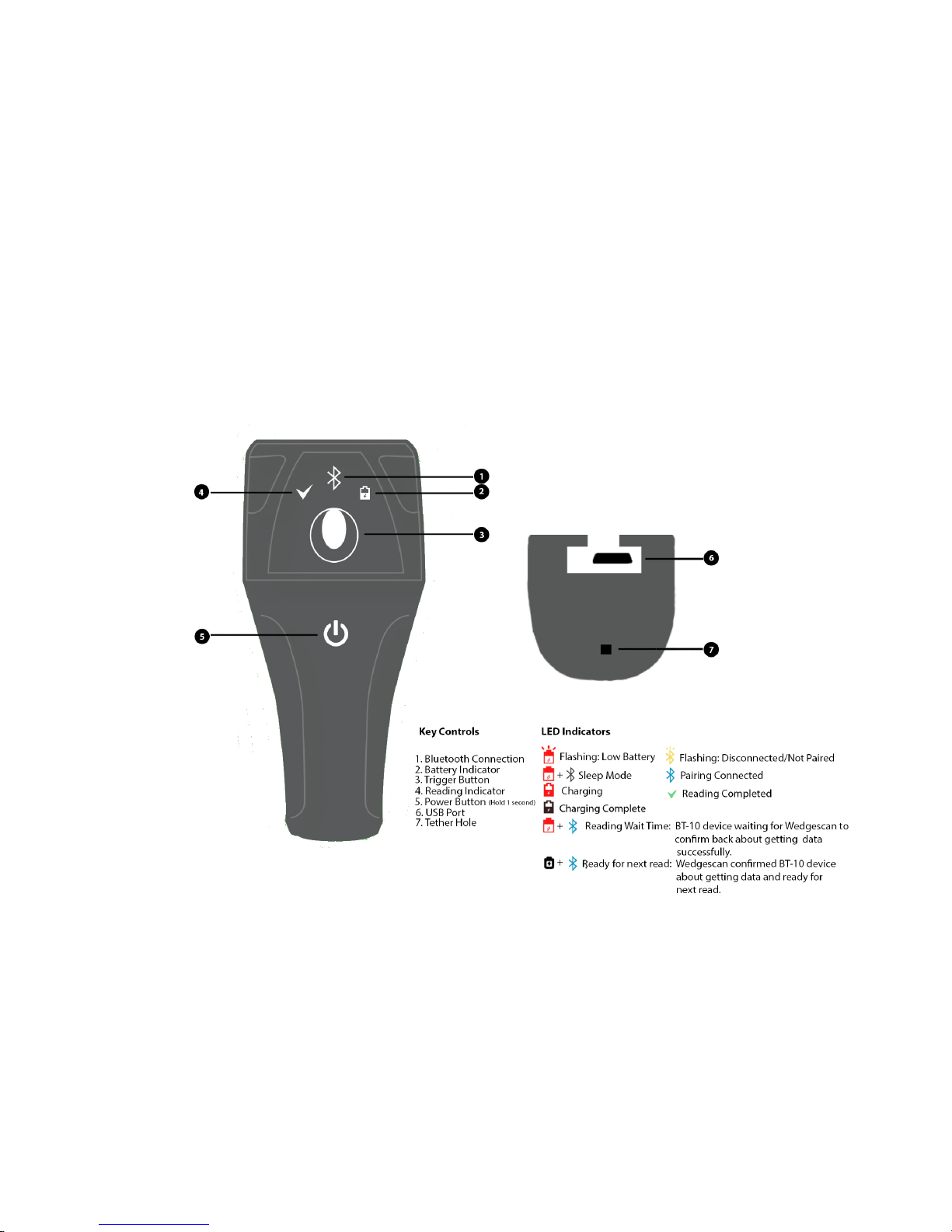
DETAILED'INSTRUCTIONS'ON'OPERATING'BT#10'SCANNE R ' DEVIC E'
Page 12
!
*"!
!
! !
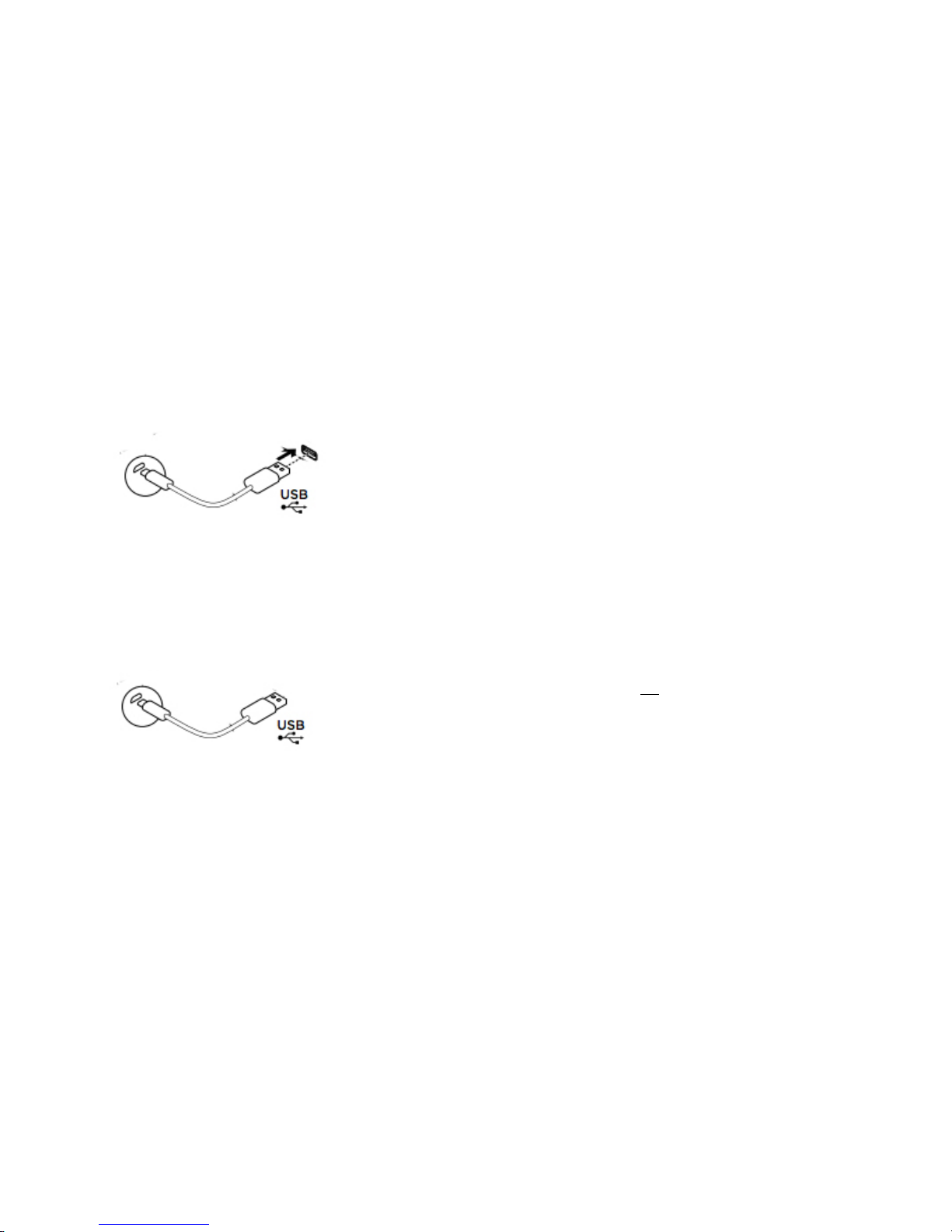
CHARGING!BT?10!DEVICE!
Charging!BT?10!scanner!device!is!only!allowed!with!the!BT?10!special!USB!cable:!
!
!
• Insert!the!Micro!USB!side!into!BT?10!device’s!USB!port!and!connect!the!USB!side!into!a!power!outlet !
!
RESETTING !BT?10!DEVICE!
Resetting!BT?10!scanner!device!is!only!allowed!with!the!BT?10!special!USB!cable:!
!
!
•
Insert!the!Micro!USB!side!into!BT?10!device’s!USB!port!(do!not!connect!the!USB!side!into!a!pow er!outlet),!
and!pull! out!to!reset!BT?10.!!
!
Page 13
!
*#!
! !
DETAILED'INSTRUCTIONS'ON'OPERATING'
BT#10'+WEDGESCAN'BLE'APP '
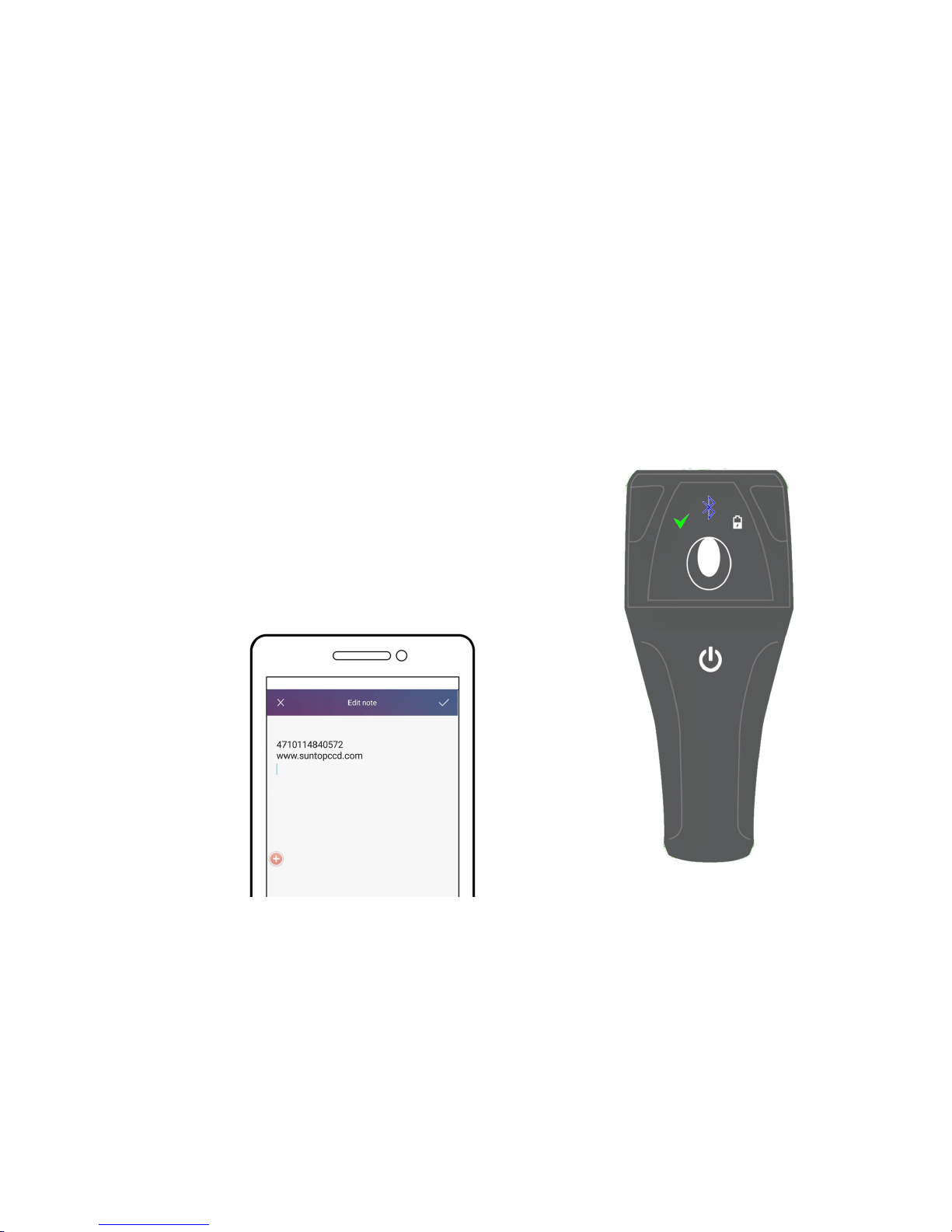
Scanning!with!BT?10+!Wedgescan!BLE!App!is!easy!and!is!done!
in!a!few!simple!steps:!
1.
Open!the!Wedgescan!BLE!App!on!your!Android!device.!
2.
Turn!on!your!BT?10!scanner!device!
3. Wedgescan!will! self?pair!with!the!previous! paired! BT?10!
scanner!device.!However,!if!you!can!still!pair!your!mobile!
device!with!another!BT?10!scanner.!
4. Open!any!App!you!w ould!like!to!keep!your!scanned!data!
and!start!scanning.!
!
!
When! BT?10! scanner! device! successfully! captures! a!
data,!it!will!have!a!short!beep!sound!and!the!check!sign!
LED! indicator! will! appear! a! short?term! solid! GREEN!
light.!Users! will! also!be! able! to!see! the! scanned! data!
appear!on!their!mobile!device.!
Page 14
!
*$!
! !
DETAILED'INSTRUCTIONS'ON'WEDGESCAN'
APP'FLOATING'SWITCH'OPTIONS'
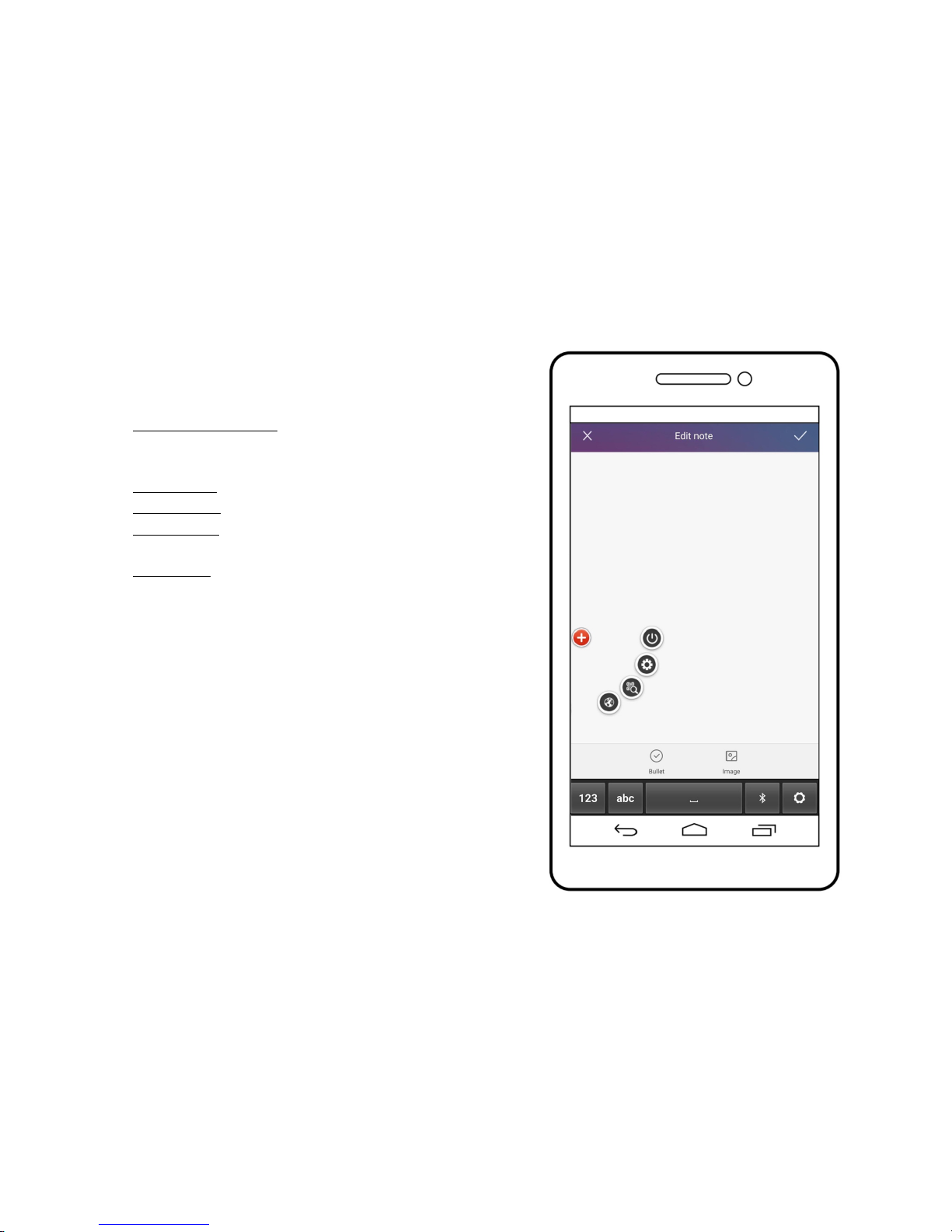
• Red! dot! floating! switch:! Tap! to! expand/close! the! options.!!!!!
The!red!will!appear!less!obvious!when!Wedgescan!BLE!App!is!
inactive.!!
•
Power!Button:!Turn!off!Wedgescan!
• Wedge!Button:!Click!to!go!back!to!Wedgescan!Setting!page!
• Search!Button:!Click!to!use!your!mobile!device!to!scan!when!
BT?10!scanner!device!is!not!available!
•
Earth!Button:!Click!to!switch!input!language!!!
Page 15
!
*%!
! !
OTHER'WEDGESCAN'BLE'APP'FUNCTIONS''
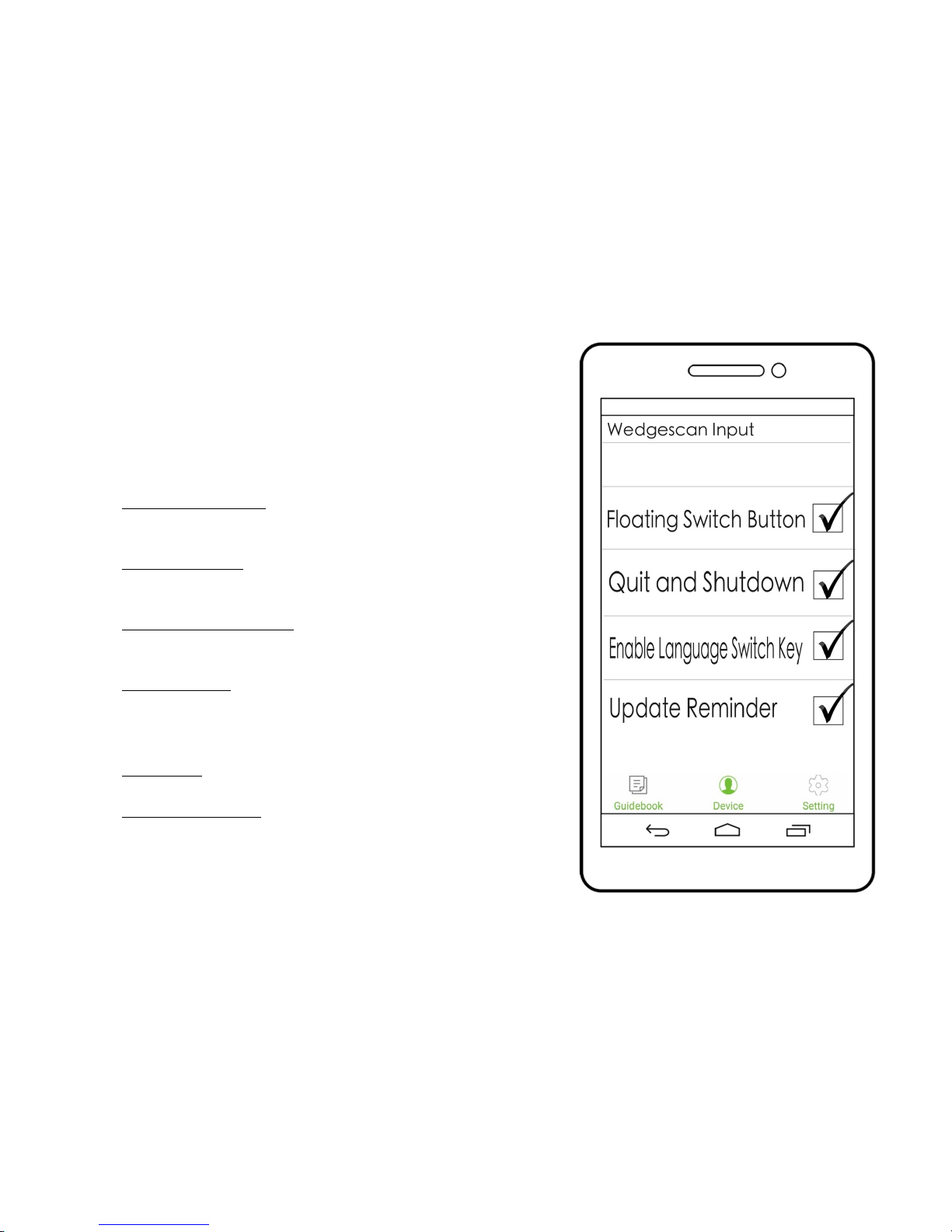
Under! Wedgescan! BLE! App! >! Device! section,! you! can! customize! your!
Wedgescan!BLE!App!settings.!
We!recommend!our!users!to!check!the!following!4!in!order!to!enable!the!
best!scanning!experience:!
!
Floating! Switch! Button:! This! function! provides! you! a! convenient!
shortcut! to! operate! between! BT?10+Wedgescan! and! your! mobile!
device!
!
Quit! and! Shutdown:! This! function! enables! you! to! power! off! BT?10!
scanner!device!in!the!same!time!when!you!choose!to!exit!Wedgescan!
App!
!
Enable!Language! Switch! Key:! This!permits! Wedgescan! to! detect!the!
input!scanning! language! automatically.! It! is!helpful! when! a! barcode!
contains!more!than!one!languages.!!
!
Update! Re minder:!Check! to! let! Wedgescan! notify! you! when! a! new!
version!is!available.!!
Other!setting!on!this!page:!
• Device!series:!You!can!change!your!BT?10!scanner!device!name!here.!
The!default!device!name!is!BT?10.!
• App!language!selection:!The!default!language!of!Wedgescan!BLE!App!
is!varied!by!users’!phone!def ault!language.!However,!you!can!change!
it!under!Device>!Language.!!
Page 16
!
*&!
! !
OTHER'WEDGESCAN'APP'FUNC T I ONS'
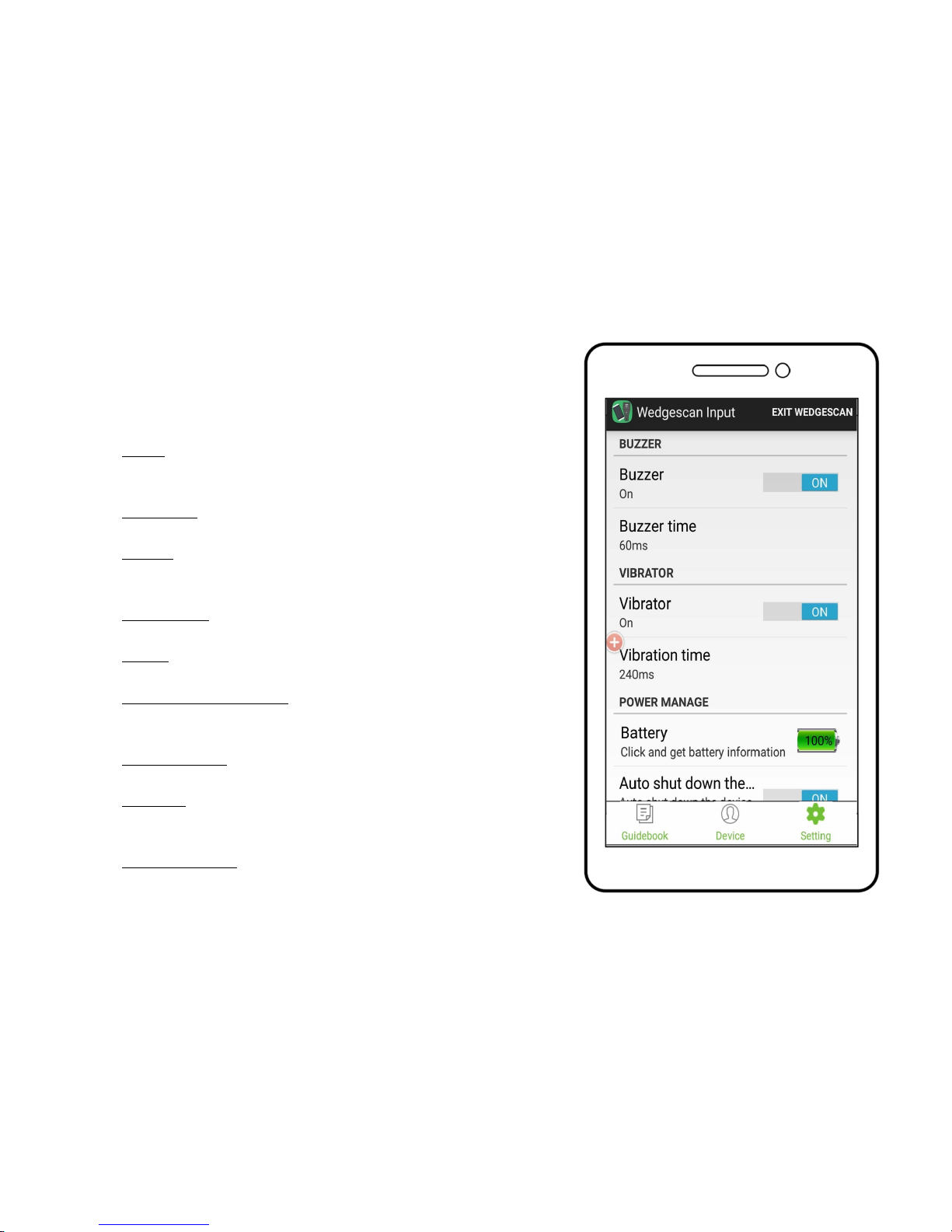
Under!Wedgescan!BLE!App>!Setting!section,!you!can!customize!your!
BT?10!scanner!device’s!settings.!
• Buzzer:! Turn! the! buzzer! switch! on! to! enable! BT?10!scanner! to!
give! you! a! sound! response! when! a! barcode! reading! is! done!
successfully.!
• Buzzer!Time:!This!gives!you!buzzer!time! options !between!60ms,!
120ms,!and!180ms.!The!system!default!setting!is!60ms.!!
• Vibrator:!Turn!the!vibrator!function!on!to!allow!BT?10!scanner!to!
give!you!a! vibration! response! when! a ! barcode!reading! is! done!
successfully.!
• Vibrator! Time:! This! gives! you! vibrator! time! options! between!
120ms,!180ms,!and!240ms.!The!system!default!setting!is!240ms.!
• Battery:! You! can! access! your! BT?10! scanner’s! current! power!
percentage.!
• Auto!Shut! Down!the!Device:!Turn!this!switch! on!to!allow!BT?10!
scanner! device! to! turn! itself! off! when! it! is! inactive! after! 30!
minutes.!!
• Device!shutdown:!Remote!control!your!BT?10! device!to!power!
off.!
• Wait!Time:!Customize!within!how!many!seconds!you!would!like!
BT?10!to!respond!back! with! a! beep!sound.!The! system! default!
setting!is!5s.!
• Looking! for! Device:! Click! to! look! for! your! paired! BT?10! device!
when!it!is!not!next!to!you.!!
!
Page 17

!
*'!
!
! !
GENERAL'USAGE,'SAFETY'AND'
PRECAUTIONS,'CLEANI NG '
•
Do! not! disassemble,! open,! crush,! deform,! band,!
puncture,!shred,!or!insert!foreign!objects!into!the!device!
that!may!cause!damages.!
• Avoid! placing! the! device! or! any! kind! of! device?related!
accessories!near!fire.!
• The!device!can!be!cleaned!with!a!soft,!slightly!damp,!lint?
free!cloth.!Sanitizing!the!device!with!alcohol!is!allowed.!
•
If! machine! malfunctions,! please! contact! maintenance!
personnel! with! detailed! incident/condition! report! and!
failure!message.!
'
'
CUSTOMER'SERVICE'CONTACT'
Suntop!customer!service!is!available!at!suntopccd.com/contact?us/!
!
LIMITED'WA RRANTY'
This!device!is!covered!by!one?year!limited!warranty!from!the!
date!of!shipment.!Battery!warranty!is!one?year!from!the!date!
of!shipment.!
The! limited! warranty! is! valid! only! on! presentation! of! the!
invoice!confirming!date!of!shipment.!Opening!or!alerting!the!
device!invalidates!the!limited!warranty.!
The!guarantee! does! not! cover! dam age!caused!by!importer!
handling,! accidents! or! non?compliance! with! the! operating!
instructions!and!normal!wearing!of!parts.!
!
!
!
!
Page 18

!
*(!
'
BT#10'SERIES'SPECIFICATIO N'CHART
PHYSICAL'CHARACTERISTICS'
Dimensions''
**(,)"--!.!/%+,&#--!0!/#$,(&--!1!!
Weight'
*++2!
Battery'
3455678!98:6!!
!
;<472=>2!<?@7A!
!
!
!
!
B?C67!;?>A@-:5=?>!
DED! *(&%+;FG! ""++-H<! IJD;! &"*##!
K675=L=6M!N455678O!
!
94P6A! @:! 5?! #,%<7A! 5?! N6! L@QQ8! K<4726M,!
;<472=>2!R=4! ST3! 5?! K?-:@567!?7! :?C67!
4M4:567,! !"#"$%&'( )$&*+,+*"%+-.)/( 5V#
(±#5%),#≥#1.5A)#
!
B?C67!?LLUA54>MN8V!""@H!IK4>!Q4A5!@:!5?!
**+!M48AO!!!!
B?C67!?>U0<6>!3Q@65??5<!=A! K?>>6K56M!
5?!-?N=Q6!M6R=K6V!
•! 347K?M6! 764M=>2! -?M6V! 47?@>M!
Page 19

!
*)!
*$+! -H! I4::7?/,! @:! 5?! *"<7!
C?7P=>2! 5=-6UK4>! 764M!
#&G+++!DHWX*#!K?M6O!
•! T54>MN8! -?M6V! 47?@>M! ""! -H!
I4::7?/,!Q4A5!@:!5?!$!M48AO!
Available'Colors'
3Q4KP!
PERFORMANCE'CHARACTERS'
!
Light'Source'
Y6M!.DZ!IC4R6!Q6>25<!&#+[&&+--O!
Scan'Speed'
"++!AK4>A!:67!A6K?>M!
Resolution'
\=>=-@-!#-=Q!
Field'of'View''
H>2Q6!$#]G!0=M5<!@:!5?!**+--!?7!-?76!IB;T)+^OG!Z=A54>K6!#%+--!IB;T_)+^O!
!
SYMBOLOGY'DECODE'CAPABILITY'
1D'
SB;XHG!SB;XH!HMMX`>!"U%G!SB;XDG!SB;XD!HMMX`>!"U%G!DHWX*#G!DHW!*#!HMMX`>!"U%G!
DHWX(G!DHWX(!HMMX`>!"U%G;?M6!#)G!;?M6!#)!a@QQ!HT;JJG!;?M4N47G!;?M4N47!T5475U!D>M!
;<474K567!98:6G!;?M6!)#G!;?M6!*"(G!S;;UDHW!*"(G!J>567Q64R6M!"!?L!%G!J>M@A57=4Q!"!?L!
%G!\457=/!"!?L!%G!;<=>4!B?A5! ;?M6G!\TJU!BQ6AA68G!;?M6!#"G!;?M6!**G!bT*X*$! IM6L4@Q5!
Page 20

!
"+!
`WOG!bT*X.=-=56M!IM6L4@Q5!`WOG!bT*XD/:4>M6M!IM6L4@Q5!`WO!
'
!
Bluetooth'Profile'Support'
TBB!
SECURITY'CERTIFICATION'
;675=L=6M!K?-:Q=-6>5!C=5<!J>276AA!B7?56K5=?>!4A!JB%'!
USER'ENVIRONMENT'
Operating'Temperature'
+c;!5?!$+c;U#"ca!5?!*+$ca!
Storage'Temperature'
X$+c;!5?!'+c;UX$+ca!5?!*%(ca!
Humidity'
*+^!5?!)%^G!>?>XK?>M6>A=>2!
Drop'Specifications'
S>=5!L@>K5=?>A!>?7-4QQ8!4L567!-@Q5=:Q6!*,%-!M7?:!5?!K?>K7656!
Ambient'Light'Immunity'
H-N=6>5!.=2<5!Y6d6K5=?>V!+!5?!*++G+++!.@/!-4/!
REGULATORY'
Light'source'safety'
;?-:Q=-6>5!C=5<!;DG!a;;G!Y?1T!
EMI/RFI'
a;;!Y@Q6A!e!Y62@Q45=?>A!B475!*%!T@N:475!;G!;DG!3T\JG!9D.D;G!W;;!
Page 21

!
"*!
!
! !
Radio'
3Q@65??5<f!.?C!D>6728!!
WORKS'WITH'
!
Y6g@=76A! 4! A-475! :<?>6! ?7! 54NQ65! C=5<! 3Q@65??5<! .?C! D>6728G! H>M7?=M! $,#! IHBJ! Q6R6Q! *(O! ?7! Q4567,! a766! 06M26AK4>! 3.D! H::!
<55:VUUA@>5?:KKM,K?-UI4R4=Q4NQ6!L?7!M?C>Q?4M!?>!b??2Q6!BQ48O,!!
Page 22
!
""!
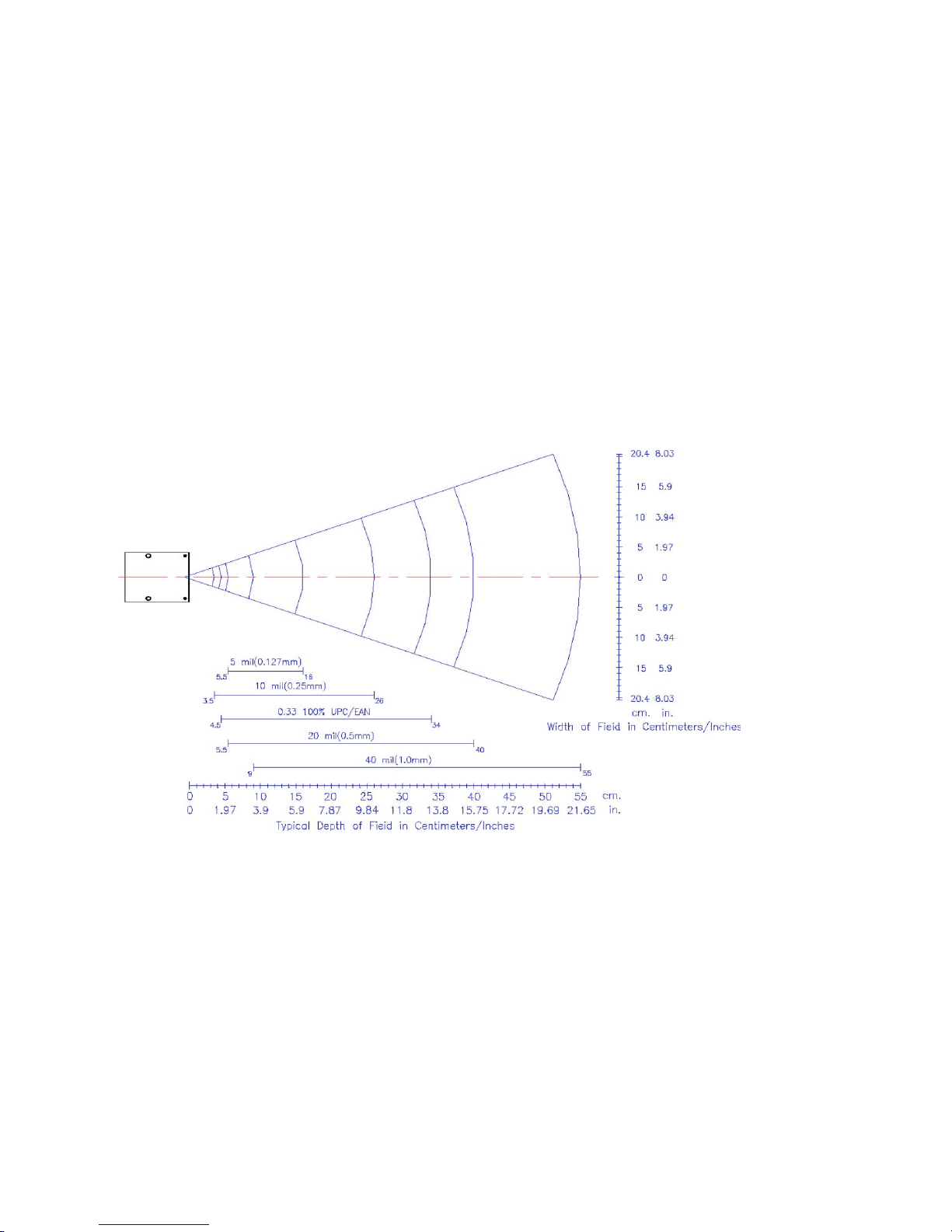
BT#10'SERIES'DECODE'RANGE'DIAGRAM:'
' '
Page 23

!
"#!
'
' '
DISPOSAL'
Actuation!of!Europe!directive! 2012/19/EU,!for! reduction!in!use!
of!dangerous!substances!in!the!electric!and!electronic!device!and!fo r!garbage!
disposal.!The!symbol!applied!on!the!device!or!its!packaging!means!that!at!the!
end!of!its!useful!life!the!product!must!not!be!disposed!of!with!domestic!waste.!
At!the!end!of!devices!useful!life,!the!user!must!deliver!it!to!the!able!collecting!
centers!for!electric!and!electronic!garbage,!or! give!back!to!the!retailer! when!
purchasing!a!new!device.!Disposing!of!the!product!separately!prevents!possible!
negative! consequences! for! the! environment! and! for! health,! deriving! from!
inadequate!disposal.!It!also!allows!the!recovery!of!materials!of!which!it’s!made!
up!in!order!to!obtain!an!important!saving!of!energy!and!resources!and!to!avoid!
negative!effects!to!the!environme nt!and!health.!In!case!of!abusive!disposal!of!
device!by!the!user,!will!be!applied!administrative!endorsements!in!compliance!
with!current!standard.!The!device!and!its!parts!is!made!with!regard!to!disposal,!
as!appropriate,!in!accordance!with!national!or!regional!regulations.
'
'
Page 24

!
"$!
'
CERTIFICATIONS '
This!device!complies!with!the!following!normative!documents:!
EN! 300! 328! V1.9.1! (2015?02):! Electromagnetic! compatibility! and! Radio! Spectrum! Matters! (ERM);! Wideband! transmission! systems;! Data!
transmission!equipment!operating!in!the!2.4!GHz!ISM!band!and!using!wide!band!modulation!techniques;!Harmonized!EN!covering!the!essential!
requirements!of!article!3.2!of!the!RED!Directive!
EN!301!489?1!V1.9.2!(2011?09):!Electromagnetic!compatibility!and!Radio!Spectrum!Matters!(ERM);!ElectroMagnetic!Compatibility!(EMC)!standard!
for!radio!equipment!and!services;!Part!1:!common!technical!requirements!
EN! 301! 489?17! V2.2.1! (2012?09):! Electromagnetic! compatibility! and! Radio! Spectrum! Matters! (ERM);! ElectroMagnetic! Compatibility! (EMC)!
standard!for!radio!equipment!and!services;!Part!1:!common!technical!requirements!
IEC/EN!62479:!2010:!Assessment!of!the!compliance!of!low?power!electronic!and!electrical!equipment!with!the!basic!restrictions!related!to!human!
exposure!to!electromagnetic!fields!(10!MHz!to!300!GHz);!covering!the!essential!requirements!of!article!3.1!(a)!Health!of!the!RED!Directive!
EN!60905?1:!2006+A11:!2009+A1:!2010+A12:!2011+A2:!2013:!Information!technology!equipment?!Part!1:!General!requirements!for!basic!safety!
and!essential!Performance.!!
IEC!62471:2006:!Evaluation!and!control!of!photobiological!hazards!from!all!electrically!powered!incoherent!broadband!sources!of!optical!radiation;!
in!the!wavelength!range!from!200nm!through!200nm.!!
Polycyclic!Aromatic!Hydrocarbons!(PAHs)!Test:!PAHs!control!in!under!annex!X!V II!of!REACH,!the!materials!comply!with!foreseeable!skin!contact!
for!longer!than!30!seconds!(long?term!skin!contact)!under!Category!2.!
!
!
'
Page 25

!
"%!
!
BT?10,!BT?10RTW,!BT?10LTW,!PX0100,!MD900BT,!BT?10RSW,!BT?
10LSW,! BT?10?2DSW,! BT?10?2DTW,! and! Wedgescan! Input! are!
either!registered!trademarks!or!trademarks!of!Suntop!Computer!
System!Corp!in!Taiwan!or!other!countries.!
!
The!Bluetooth®!word!m ark!and!logos!are!registered!trademarks!
owned! by! Bluetooth! SIG,! Inc.! and! any! use! of! such! marks! by!
Suntop! Computer! System! Corp! is ! under! license.! Other!
trademarks! and! trade! names! are! those! of! their! respective !
owners.!
!
BT?10+!Wedgescan!is!patented.!
!
!
!
'
!
!
!
!
!
Copyright©2011?2016!Suntop!Computer!System!Corp.!All!rights!reserved.!!
 Loading...