

Page 1
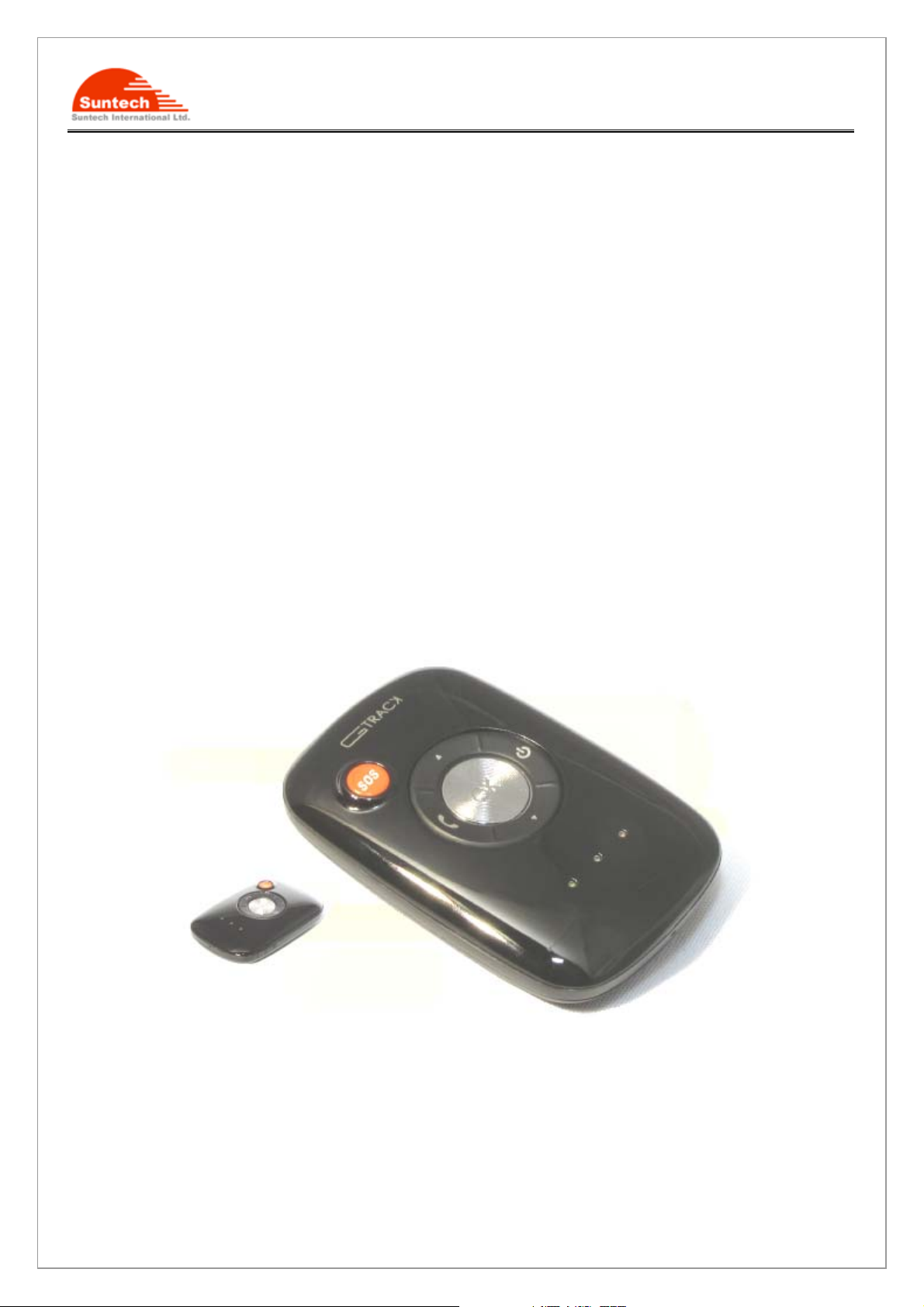
ST900 User Manual
Personal Tracker ST900
Ver. 0.2
ⓒSuntech Int. Ltd. All rights reserved. Reproducing or distributing this documents, or using or conveying its contents to third
parties without the express written consent of this issuing company is prohibited.
1/32
Page 2

ST900 User Manual
Table Contents
1. Introduction .............................................................................................................................. ................... 4
2. Features .............................................................. ........................................................................................ 4
2-1. Hardware Specification ............................................................................................................................ 4
2-1-1. GSM/GPRS specification................................................................................................................ 4
2-1-2. GPS specification ........................................................................................................................... 5
3. Accessories................................................................................................................................................. 6
4. Install SIM card ............................................................................................................................................ 6
5. Charging battery ......................................................................................................................................... 7
6. Appearance ............................................................................................................................. .................... 8
7. LED & Button description ........................................................................................................................... 9
8. Key Functions & LED indicator ................................................................................................................... 9
9. Commands ................................................................................................................................................ 11
Summary of Commands ............................................................................................................................... 17
APPENDIX ............................................................................................................................. ........................ 18
Worldwide mobile network Ac cess Point Name(APN) Settings. ........................................................... 18
ⓒSuntech Int. Ltd. All rights reserved. Reproducing or distributing this documents, or using or conveying its contents to third
parties without the express written consent of this issuing company is prohibited.
2/32
Page 3

ST900 User Manual
Blank Page
ⓒSuntech Int. Ltd. All rights reserved. Reproducing or distributing this documents, or using or conveying its contents to third
parties without the express written consent of this issuing company is prohibited.
3/32
Page 4
ST900 User Manual
1. Introduction
ST900 is a mobile personal tracking device which is small in size as well as cost competitive.
It can be attached to the belt and report the current location data to your mobile phone or to the designated server
for the display on a PC whenever.
You can find your children’s location on a real time base or your children can send you a SOS signal any time.
2. Features
z New technology and latest GPS Chipset.
z GSM Quad band support 850/900/1800/1900 Mhz band width.
z SMS/GPRS communication.
z Three speed dials.
z Voice monitoring
z Voice Call with Hands free kit
z Volume Up/Down in call
z SOS button for emergency.
z Notification for low battery
z Auto-report for real tracking.
z Built in motion detector for motion alarm.
z Safety zone function
z 50 Geo-fence for notification.
z Logs 10,000 waypoints(Not implemented)
z Speed violation alarm
z Remote update firmware by serial port(Not implemented)
z Power down mode
z Indicates for GSM,GPS and Battery capacitance level
2-1. Hardware Specification
2-1-1. GSM/GPRS specification
Item Description
Power Consumption
ⓒSuntech Int. Ltd. All rights reserved. Reproducing or distributing this documents, or using or conveying its contents to third
parties without the express written consent of this issuing company is prohibited.
Active mode :
report interval : 3min. – 77mA(10.8 Hours)
1Hour – 6.2mA(5.5 Days)
4/32
Page 5
ST900 User Manual
Sleep mode : 4.4mA (7.8 Days)
Notice :
Not guaranteed, it heavily varies, depending upon GSM network and
GPS signal condition.
Frequency / Sensitivity
GSM 850 / 900MHz -104dBm
DCS1800 / PCS1900MHz -102dBm
Temperature Range -20°C ~ +80°C
GPRS Multi-slot Class 10
Support all 4 coding schemes
(CS-1, CS-2, CS-3 and CS-4)
Battery Rechargeable 4.2V, Li-Polymer Battery- 800mAh
Dimension 49 x 73 x 16(T)
Weight 53(including the battery)
Approval CE, FCC, RoHS, GCF ( Option)
2-1-2. GPS specification
Item Description
Receiver Ty pe
50-channel
GPS L1 C/A Code
SBAS : WAAS, EGNOS, MASA, GAGAN
Update Rate 1Hz
Accuracy
Position 2.5m CEP
SBAS 2.0m CEP
Acquisition Cold starts 29sec.
Warm start 29sec.
Aided start <1sec.
Hot start <1sec.
Sensitivity
Tracking -160dBm
Reacquisition -160dBm
Cold start -144dBm
Supply Volt age Single voltage supply : 2.8V or 3.0V
Digital I/O Voltage Level 2.8V or 3.0V
ⓒSuntech Int. Ltd. All rights reserved. Reproducing or distributing this documents, or using or conveying its contents to third
parties without the express written consent of this issuing company is prohibited.
5/32
Page 6
ST900 User Manual
Antenna type Intenna
Operating Temp -40 ~ +85℃
1 All SV @ –130 dBm
2 Dependent on aiding data connection speed and latency
3 Demonstrated with a good active antenna
3. Accessories
Wall Charger ---1
Data Cable ---1
Carry bag(option –1
Hands Free(option) --1
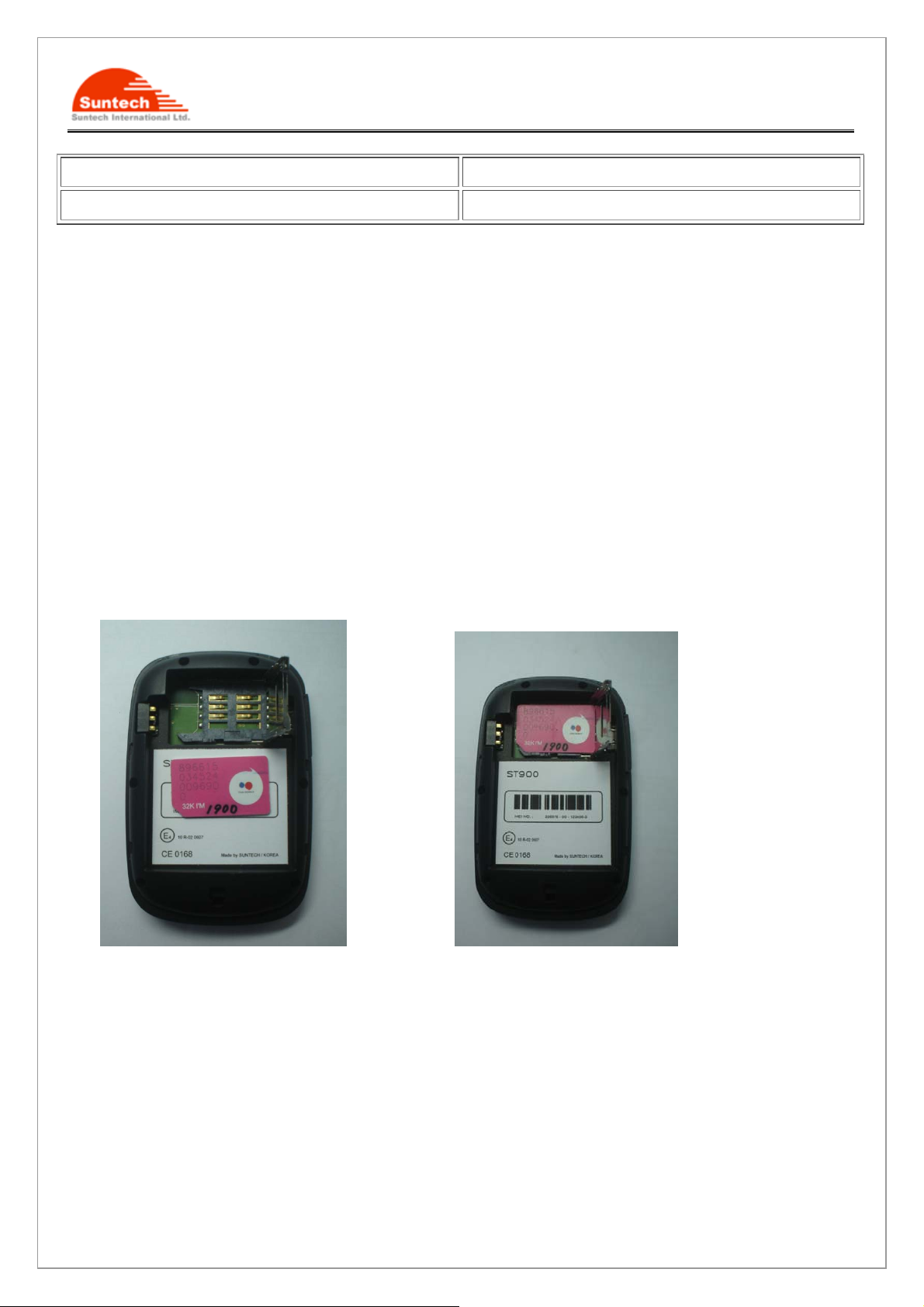
4. Install SIM card
Steps :
1. Pick up the stainless cover . 2. Put the SIM Card into the holder
3. Put down the stainless cover left and fasten it in place.
ⓒSuntech Int. Ltd. All rights reserved. Reproducing or distributing this documents, or using or conveying its contents to third
parties without the express written consent of this issuing company is prohibited.
6/32
Page 7
ST900 User Manual
5. Charging battery
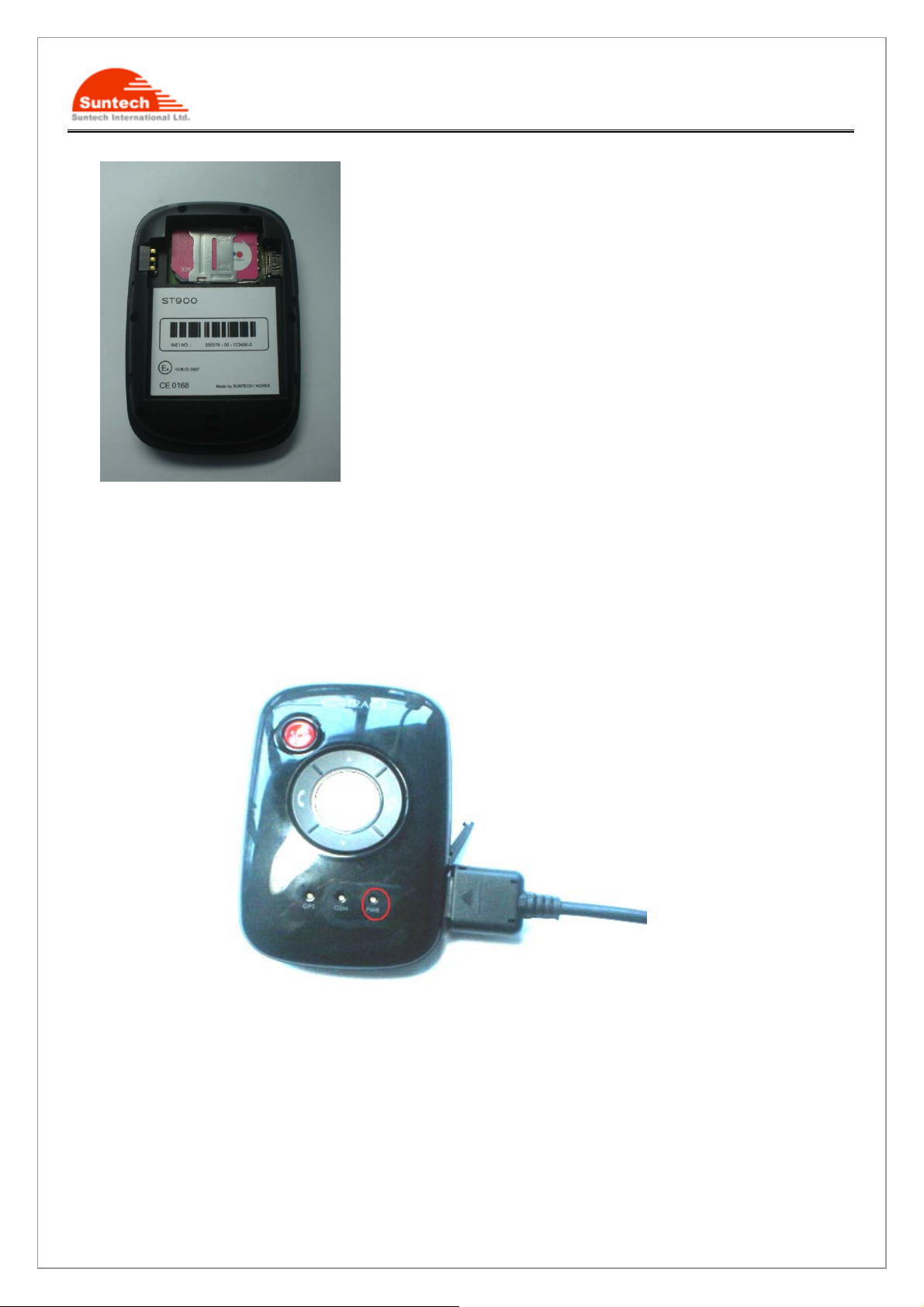
● Initially, the rechargeable battery is recommended to charge completely before device usage. Connect ST900
to its supplied charger cable and allow a 4 hour battery charge time as bellow.
< Charging Status>
Red LED blinking : under 30% of full capacitance
Orange LED blinking : 30- 90%
Green LED blinking : Almost Full
Green LED lighting : Full
ⓒSuntech Int. Ltd. All rights reserved. Reproducing or distributing this documents, or using or conveying its contents to third
parties without the express written consent of this issuing company is prohibited.
7/32
Page 8
ST900 User Manual
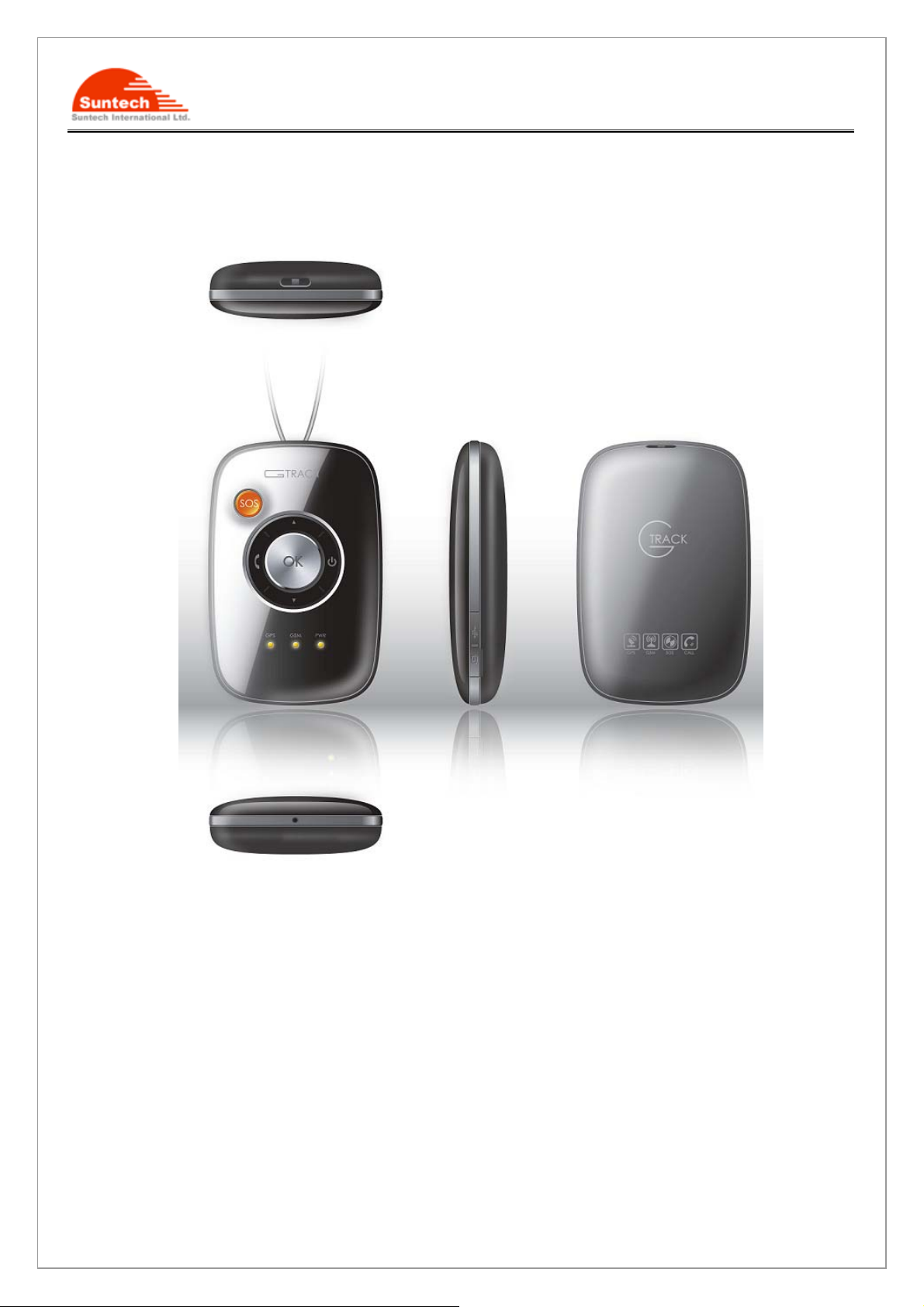
6. Appearance
ⓒSuntech Int. Ltd. All rights reserved. Reproducing or distributing this documents, or using or conveying its contents to third
parties without the express written consent of this issuing company is prohibited.
8/32
Page 9
ST900 User Manual
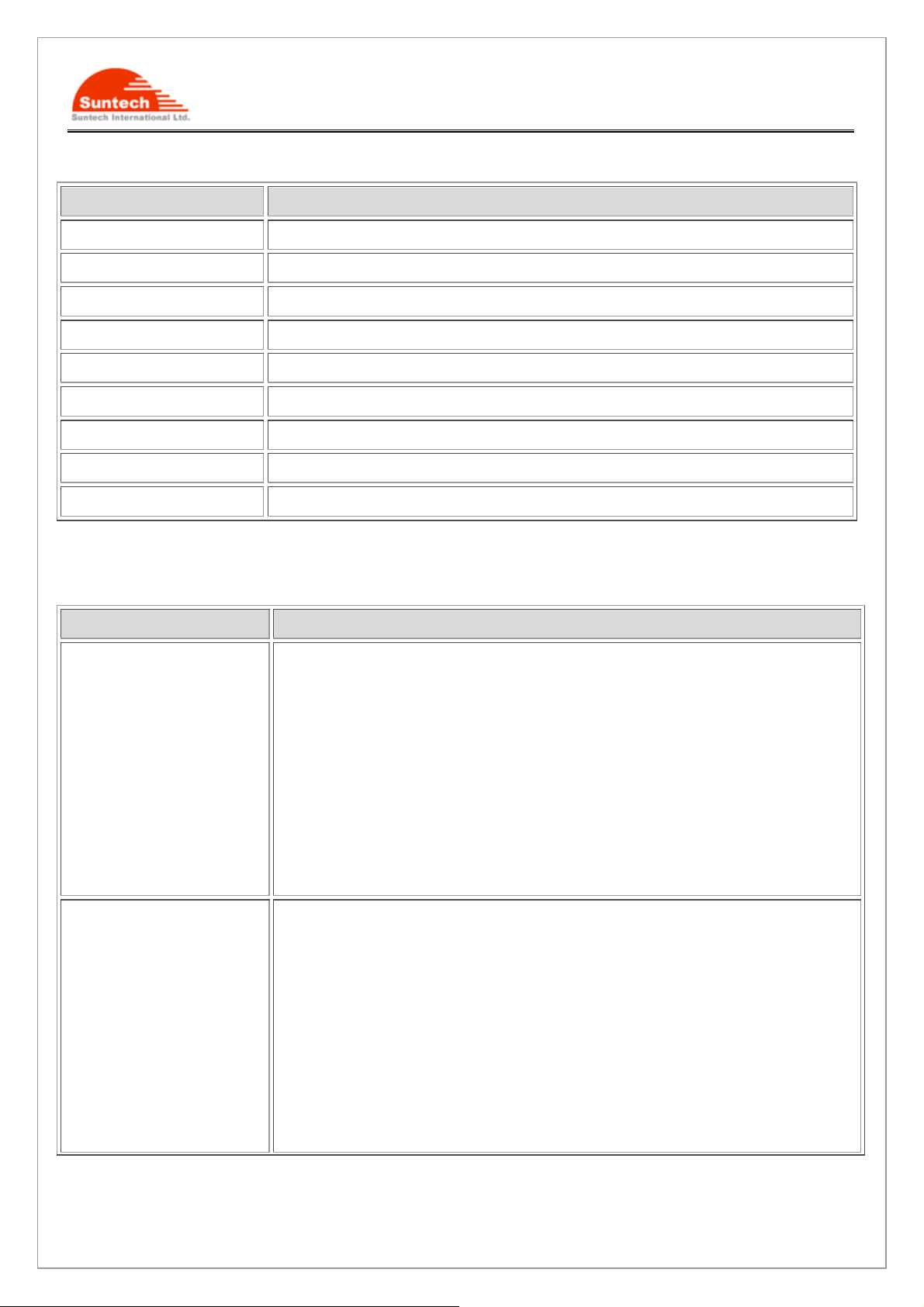
7. LED & Button description
Item Description
SOS Emergency button.
OK Acknowledge button.
CALL1 Preset Phone Number
CALL2 Preset Phone Number
CALL3 Preset Phone Number
Power Power On/Off
LED1 GSM network status
LED2 GPS signal status
LED3 Battery status
8. Key Functions & LED indicator
Functions Description
SOS
Call1/Call2/Call3
If you press the SOS button for more than 1sec,ST900 will send an emergency
SMS message with vibration to you after then, call up to your phone for voice
monitoring mode. If failed, the vibrator is generated for 2 times and trying to next
preset phone number. If it failed again in connection, call transfer to the next preset
phone number again. The SMS will send only one per each preset phone number.
If it failed all of these, it’s trying to first preset phone number again. It will be
looping until success.
If you want to cancel before successfully voice call, press OK button for more
2sec. then it will be stopped with vibration.
You can make a call to the preset phone number with CALL button.
Press the button for 1sec.or more, then the first phone number is ready to be
connected (it will be vibrated 1 time shortly). In this condition, It will be made. If you
want to call to the other phone number, then please press CALL2 or CALL 3 button
again and it will be vibrated 1 time shortly and then make it will trying outgoing call
also. If there’s any failed then it will be vibrated 2 times.
If you press the OK key for more than 2sec during the call, the call condition is
cancelled with 2 times vibration.
For voice communication, you need ear piece. If ear piece is not available, then
ⓒSuntech Int. Ltd. All rights reserved. Reproducing or distributing this documents, or using or conveying its contents to third
parties without the express written consent of this issuing company is prohibited.
9/32
Page 10
ST900 User Manual
ST900 will maintain ‘Silent Communication’ condition.
Notice : If it’s empty for pressed CALL key or can’t make a call then it will be
vibrated twice shortly.
Volume Up / Down
Ok
You can control the volume up or down in voice call.
CALL1 : Volume up, CALL3 : Volume down
1. Incoming call: If you press shortly less than 1sec. or press the key of ear
piece, it will be accepted. To reject, just press this for more 2 seconds.
2. In call: If you press the key more than 2sec. or press the key of ear piece,
it will be ended.
3. In idle : If you want to check the battery level, just press this key for 2sec.
You can see the color of LED for battery status.
Red color : almost empty.
Orange color : enough
Green color : Full
4. Safety zone : Just press 4 times this key, then ST900 will be set a virtual
circle to alert when it goes to outside.
Using a PC program, you can set a virtual perimeter (circle) on a
geographic map, so that ST900 will send an alert notification to you when
it exceeds the preset zone. You can set or adjust the virtual perimeter by
Power
Blue LED
SMS as well (min. 1 km).
In order to cancel this, just press 4 times again. It will be turn off with 2
times vibration.
The valid duration is 2 sec. under after press 1st OK pressed
Turn On :
If you press POWER button more than 3 sec, ST900 will be turn on with vibration,
LEDs and music sound through ear piece.
Turn Off:
If you press POWER button until turn on all of the LED, ST900 goes to shutdown
with sound through ear piece.
GSM network indicator
Turn off this if get a network.
Otherwise it will be blinking as bellow..
No GSM : 4 times.
GSM limited service : 6 times.
ⓒSuntech Int. Ltd. All rights reserved. Reproducing or distributing this documents, or using or conveying its contents to third
parties without the express written consent of this issuing company is prohibited.
10/32
Page 11
ST900 User Manual
Sim Error : 7 times.
White LED
LED3(3 colors)
GPS status indicator
Turn off if fixed GPS signal.
Otherwise it will be blinking as bellow.
No fixed : 2 times.
GPS error : 4 times.
Battery indicator
Normally, it’s blinking shortly to indicate the battery level for user.
RED : Almost empty
Orange : enough
Green : full
9. Commands
auth(Authentication)
ST900 has a password to prevent unauthorized users from accessing the unit. you can also access it by others
phone if you lose your phone.
Command format : <nick name>;AUTH;<password>;<new p assword>;<owner Number>
Command : ST900;AUTH;123456;54321;21140109
Response : OK; AUTH; ;123456;5 4321;21140109
Notice : Default : nick name -“ST900” password -12345
find(Location poll)
ST900 will reply the current location to you then you can know whether moving or staying with current speed and
heading. the other way is call to ST900. If ST900 received one or more RING and disconnected, it’s automatically
reply the current location to you.
Command format : <nick name>;FIND
Response format : <nick name>;date;hh:mm::ss;<la>;<lo>;<speed>;<course>;<position fix>
Command : ST900;FIND
Response : ST900;20100825;06:57:35;37.478888;126.888888;4.50;0.00;1
ⓒSuntech Int. Ltd. All rights reserved. Reproducing or distributing this documents, or using or conveying its contents to third
parties without the express written consent of this issuing company is prohibited.
11/32
Page 12

ST900 User Manual
call(Preset phone number)
The phone buttons on ST900 can be preset numbers. If user press long key such as CALL1,CALL2 or CALL3
then ST900 will make a call to preset phone number .
Command format : <nick name>;CALL;<Phone 1>;<Phone 2>;<Phone 3>
Command : ST900;CALL;21140101;211 40102;21140103
Response : OK; CALL;21140101;21140102;21140103
Notice : Even though you don’t have three preset phone number, you have to fill all of three fields.
Otherwise ST900 will be report parameter error.
speed(speed violation)
When ST900 moves at a greater velocity than the preset speed then it will report to owner.
Command format : <nick name>;SPEED;<speed limit>
Event Format : <nick name>;<status>;YYYYMMDD;HH:MM:SS;<Latitude>;<Longitude>;<speed>;<course>
;<gps fix>
Command : ST900;SPEED;100
Response : OK; SPEED;100
ST900;SPEED VIOLATE;20100826;11:25:26;+37.262839;+127.359847;160.000;000.00;1
ST900;SPEED OBEY ;20100826;11:25:26;+37.262839;+127.359847;30.000;000.00;1
network(network Information)
In order to use TCP communication, you have to configure the network information to ST900.
Refer to “Worldwide mobile network Access Point Name(APN) Settings”.
Command format :<nick name>;NETWORK;<Bearer>;<APN>;<User ID>;<Password>
Command :ST900;NETWORK;1;telcel;telcel;telcel
Response :OK; NETWORK :1;telcel;telcel;telcel
ⓒSuntech Int. Ltd. All rights reserved. Reproducing or distributing this documents, or using or conveying its contents to third
parties without the express written consent of this issuing company is prohibited.
12/32
Page 13

ST900 User Manual
zone(alarm zone)
ST900 can alert when it goes out from the specified zone.
Command format :<nick-name>;ZONE;<enable>,<Index-No>;<Lat>;<Lon>;<Radius>
,<In>;<Out>
Parameter description
<enable> - enable:1, disable :0
<Index-No> - 2~50
<Radius> - 1~10000
<In>/<Out> - Event enable :1, Disable :0
Command : ST900;ZONE;1;2;37.478811;126.885642;5;1;1
Response :OK; ZONE;1;2;37.478811;126.885642;5;1;1
Event Format : <nick name>;<status>;YYYYMMDD;HH:MM:SS;<Latitude>;<Longitude>;<speed>;<course>
;<gps fix>
Event Message :
ST900;GEO-OUT:2;20100826;12:22:22;+37.478811;+126.885642;160.000;000.00;1
ST900;GEO-IN:2;20100826;12:22:22;+37.478811;+126.885642;100.000;000.00;1
szone
You can set radius for safety zone.
Command format: <nick-name>,SZONE,<radius>
Command : ST900;SZONE;2
Response: OK,SZONE,2
Unit : km
Event Format : <nick name>;<status>;YYYYMMDD;HH:MM:SS;<Latitude>;<Longitude>;<speed>;<course>
;<gps fix>
Event Message :
ST900;SZONE-OUT; 20100826;12:22:22;+37.478811;+126.885642;100.000;000.00;1
ST900;SZONE-IN; 20100826;12:22:22;+37.478811;+126.885642;100.000;000.00;1
motion(alarm motion)
ST900 can detect any motion and report to owner. This is very useful for your trip. For example, if you place it
ⓒSuntech Int. Ltd. All rights reserved. Reproducing or distributing this documents, or using or conveying its contents to third
parties without the express written consent of this issuing company is prohibited.
13/32
Page 14

ST900 User Manual
door back before leave your hotel room and stranger open the door then ST900 recognize any motion and report
it to you. It will be automatically disable this function after report.
Command format : <nick name>;MOTION;<ON or OFF>,<Level>
Command : ST900;MOTION;ON;4
Response : OK;MOTION;ON;4
Level : 1 ~ 10
G-range : there are 10 steps in 2G only.
battery(alarm low battery)
ST900 report a warning message when battery is low(about 20% bellows).
Command format : <nick name>,BATTERY,<ON or OFF>
Command : ST900;BATTERY;ON
Response :OK, BATTERY,ON
svr(sever parameters)
ST900 can communicate by TCP to your Pc or the server.
Command format : <nick name>;SVR;<Server IP>;<Port>
Command : ST900;SVR;211.123.45.1;12345
Response :OK;SVR; 211.123.45.1;12345
report( Auto report)
ST900 can automatically report to you by setting interval time value.
Range : 1 ~ 65535
Disable : 0
Command format : <nick name>;REPORT;<Interval time(sec.)>
Command : ST900;REPORT;600
Response :OK;REPORT;600
Notice : In case of TCP sending, ST900 is not always connected to the server. therefore, there’s needs time to
GPRS network access and you can’t get them immediately if report time is very shortly.
ⓒSuntech Int. Ltd. All rights reserved. Reproducing or distributing this documents, or using or conveying its contents to third
parties without the express written consent of this issuing company is prohibited.
14/32
Page 15
ST900 User Manual
imei(Get IMEI)
ST900 send a message of IMEI information to you.
Command format : <nick name>;IMEI
Command : ST900;IMEI
Response : OK,IMEI,111111111111110
ver(Get version)
ST900 send a message of ST900 software version information to you
.
Command format : <nick name>;VER
Command ST900;VER
Response : OK;Ver.;ST900-00.00-090929-A
bat?(battery left)
ST900 send a message about battery level to you.
Command format : <nick name>,BAT?
Command: ST900;BAT?
Response : OK,BAT,91.8%
stype(Send Type)
ST900 can support the SMS and TCP communicati on.
There are four types in protocol as follows.
Protocol type <mode> Description
SMS Only 0 Report a message through SMS only.
SMS Preferred 1 Report a message through SMS first and if failed then retry it by TCP.
TCP Only 2 Report a message through TCP only.
TCP Preferred 3 Report a message through TCP first and if failed then retry it by SMS.
Command format : <nick name>;STYPE;<mode>
Response : OK,stype,3
ⓒSuntech Int. Ltd. All rights reserved. Reproducing or distributing this documents, or using or conveying its contents to third
parties without the express written consent of this issuing company is prohibited.
15/32
Page 16

ST900 User Manual
Ptype(Protocol type)
ST900 can support several protocol type for users such as server, personal..and so on.
Command format : <nick name>;PTYPE;<protocol type>
Command : ST900;PTYPE;0
Response:OK;PTYPE;0
10. Others
Voice Monitor
ST900 have a microphone. So you can listen to the sound what happen in there.
Data logger
ST900 can store 10,000 way points which is included location and time.
Command format: <nick name>;LOGGER;<Enable/DIsable>;<Interval>
ⓒSuntech Int. Ltd. All rights reserved. Reproducing or distributing this documents, or using or conveying its contents to third
parties without the express written consent of this issuing company is prohibited.
16/32
Page 17
ST900 User Manual
Summary of Commands
Command Format
Set Auth <nick name>;AUTH;<password>;<new password>;<owner Number>
Location poll <nick name >;FIND
Set preset phone number
(SOS, Call 1,Call 2)
Set Zone :<nick-name>;ZONE;<enable>,<Index-No>;<Lat>;<Lon>;<Radius>
Set Safety zone Radius <nick-name>,SZONE,<radius>
Set motion alarm <nick name>;MOTION;<ON or OFF>,<Level>
Set battery alarm <nick name>,BATTERY,<ON or OFF>
Set over speed alarm <nick name>;SPEED;<speed limit>
Set network parameters
(APN,Usr ID,PWD)
Set server parameters
(IP,Port)
Set Auto-report <nick name>;REPORT;<Interval time(sec.)>
Get IMEI <nick name>;IMEI
Get Request version <nick name>;VER
<nick name>;CALL;<Phone 1>;<Phone 2>;<Phone 3>
,<In>;<Out>
:<nick name>;NETWORK;<Bearer>;<APN>;<User ID>;<Password>
<nick name>;SVR;<Server IP>;<Port>
Get Battery Capacity <nick name>,BAT?
Set Send Type <nick name>;STYPE;<mode>
Set Protocol Type <nick name>;PTYPE;<protocol type>
Alert : speed violation, auto report, battery low, geo-fence violation, motion
Emergency : SOS
ⓒSuntech Int. Ltd. All rights reserved. Reproducing or distributing this documents, or using or conveying its contents to third
parties without the express written consent of this issuing company is prohibited.
17/32
Page 18
ST900 User Manual
APPENDIX
Worldwide mobile network Access Point Name(APN) Settings.
Country Network Access Point Name - APN User Name Password
Albania Vodafone Twa guest guest
Argentina CTI internet.ctimovil.com.ar guest guest
Argentina Movistar
Argentina Personal gprs.personal.com [mobile number] adgj
Australia Optus internet guest guest
Australia Telstra telstra.internet guest guest
Australia
Australia
Australia Three 3netaccess a a
Australia Vodafone vfinternet.au guest guest
Austria Drei drei.at guest guest
Austria Max Online gprsinternet GPRS [blank]
Austria
Telstra
(data bundles)
Telstra
(pay by time)
Max Online
(Business)
internet.gprs.unifon.com.ar
internet.unifon
telstra.datapack [blank] Telstra
telstra.pcpack [blank] Telstra
business.gprsinternet GPRS [blank]
wap wap
Austria
Austria Mobilkom A1 a1.net [email protected] ppp
Austria OneNet web.one.at web web
Austria tele.ring web [email protected] web
Azerbaijan Azercell internet guest guest
Bangladesh Grameen Phone gpinternet [blank] [blank]
Belarus VELCOM
Belgium Mobistar internet.be mobistar mobistar
ⓒSuntech Int. Ltd. All rights reserved. Reproducing or distributing this documents, or using or conveying its contents to third
parties without the express written consent of this issuing company is prohibited.
Max Online
(Metro)
gprsmetro GPRS [blank]
web.velcom.by
unlim.velcom.by
18/32
web
unlim
web
unlim
Page 19
ST900 User Manual
(personal)
Mobistar
Belgium
(business)
Belgium Orange orangeinternet guest guest
Proximus
Belgium
(Internet)
Proximus
Belgium
(intranet)
Botswana Mascom Wireless internet.mascom guest guest
Brazil Claro claro.com.br claro claro
Brazil Oi gprs.oi.com.br guest guest
Brazil Oi (WAP) wapgprs.oi.com.br oiwap oioioi
Brazil TIM tim.br tim tim
Brazil Velox wap.telcel.com iesgprs iesgprs2002
web.pro.be mobistar mobistar
internet.proximus.be guest guest
intraprox.be guest guest
Bulgaria GloBul internet.globul.bg globul [none]
Bulgaria M-Tel mms-gprs.mtel.bg mtel mtel
Cameroon MTN Cameroon INTERNET guest guest
Canada KORE Wireless apn.zerogravitywireless.com [blank] [blank]
Canada
Canada Rogers A T&T internet.com wapuser1 wap
Chile Entel PCS imovil.entelpcs.cl entelpcs entelpcs
Chile
China China Mobile cmnet guest guest
China China Unicom [none] guest guest
Croatia T-Mobile web.htgpr 38591 38591
Croatia VIPNET START gprs0.vipnet.hr 38591 38591
Microcell
(Fido)
Telefonica
Movil
internet.fido.ca fido fido
web.tmovil.cl web web
Croatia VIPNET PRO gprs5.vipnet.hr 38591 38591
Croatia VIPNET 3G 3g.vip.hr 38591 38591
ⓒSuntech Int. Ltd. All rights reserved. Reproducing or distributing this documents, or using or conveying its contents to third
parties without the express written consent of this issuing company is prohibited.
19/32
Page 20
ST900 User Manual
Colombia
Congo Vodacom vodanet vodalive [blank]
Costa Rica IceCelular icecelular guest guest
Czech
Republic
Czech
Republic
Czech
Republic
Czech
Republic
Czech
Republic
Czech
Republic
Movistar internet.movistar.com.co movistar movistar
Cesky Mobil
(contract)
Cesky Mobil
(CM Prepay)
Telefonica
(contract)
Telefonica
(Go)
Vodafone
(contract)
Vodafone
(pre-pay)
internet guest guest
cinternet guest guest
internet guest guest
gointernet guest guest
internet guest guest
ointernet guest guest
Czech
Republic
Denmark 3 [none] guest guest
Denmark Orange web.orange.dk guest guest
Denmark Sonofon [none] guest guest
Denmark TDC internet guest guest
Dominican
Republic
Egypt Click Vodafone internet.vodafone.net internet internet
Egypt MobiNil mobinilweb guest guest
Estonia EMT internet.emt.ee guest guest
Estonia RLE internet guest guest
Finland Dna internet guest guest
Finland
T-Mobile internet.t-mobile.cz guest guest
Orange orangenet.com.do guest guest
Elisa
(Radiolinja)
internet rlnet internet
Finland Saunalahti internet.saunalahti guest guest
ⓒSuntech Int. Ltd. All rights reserved. Reproducing or distributing this documents, or using or conveying its contents to third
parties without the express written consent of this issuing company is prohibited.
20/32
Page 21
ST900 User Manual
Finland
Finland Song internet.song.fi song@internet songnet
France Bouygues ebouygtel.com guest guest
France
France
France Orange MIB orange-mib mportail mib
France
France SFR websfr guest guest
Germany D2 Vodafone web.vodafone.de guest guest
Germany E-Plus internet.eplus.de eplus gprs
Germany O2 (3 G) surfo2 guest guest
Sonera internet [blank] [blank]
Bouygues
(B2Bouygtel)
Orange
(contract)
Orange
Mobicarte
b2bouygtel.com guest guest
orange.fr orange orange
orange-acte orange orange
Germany O2 (GPRS) internet guest guest
Germany Quam quam.de quam quam
Germany T-Mobile D1 internet.t-mobile internet.t-d1.de t-mobile
Areeba
Ghana
Greece Cosmote internet guest guest
Greece Telestet gnet.b-online.gr
Greece TIM gint.b-online.gr web web
Greece Vodafone internet.vodafone.gr guest guest
Guatemala Comcel Wap.tigo.gt Wap Wap
Guatemala PCS Digital ideasalo guest guest
Guyana GT&T Cellink Plus wap.cellinkgy.com test test
(formerly
Spacefon)
internet.spacefon.com guest guest
MSISDN, e.g.
3093XXXXXXX
24680
Hong Kong CSL
Hong Kong New World internet guest guest
ⓒSuntech Int. Ltd. All rights reserved. Reproducing or distributing this documents, or using or conveying its contents to third
parties without the express written consent of this issuing company is prohibited.
hkcsl or
internet
guest guest
21/32
Page 22
ST900 User Manual
Hong Kong
Hong Kong People internet guest guest
Hong Kong SmarTone internet guest guest
Hong Kong Sunday internet guest guest
Hong Kong Three web-g.three.com.hk guest guest
Hungary
Hungary
Hungary
Hungary
Hungary
Orange web.orangehk.com guest guest
Pannon
(normal)
Pannon
(flat rate)
Pannon
(compressed)
T-Mobile
(subscription)
T-Mobile
(non-sub.)
net guest guest
netx guest guest
snet guest guest
internet [supplied] [supplied]
internet wap Wap
Hungary
Hungary
Hungary
Hungary
Hungary
India AirTel airtelgprs.com guest guest
T-Mobile
(MMS)
Vodafone
(contract)
(compr.)
Vodafone
(contract)
(un-comp.)
Vodafone
(pre-pay)
(comp.)
Vodafone
(pre-pay)
(un-comp.)
mms-westel mms [supplied]
internet.vodafone.net guest guest
standardnet.vodafone.net guest guest
vitamax.internet.vodafone.net guest guest
vitamax.snet.vodafone.net guest guest
India BPL bplgprs.com bplmobile [blank]
India BSNL celloneportal guest guest
ⓒSuntech Int. Ltd. All rights reserved. Reproducing or distributing this documents, or using or conveying its contents to third
parties without the express written consent of this issuing company is prohibited.
22/32
Page 23
ST900 User Manual
India
India
India Idea Cellular internet guest guest
India MTNL Mumbai mmsmtnlmum mtnl mtnl123
India
Indonesia Excelcomindo www.xlgprs.net xlgprs proxl
Indonesia IM3
Indonesia
Indonesia Telkomsel
Hutch
(normal)
Hutch
(Gujarat)
MTNL Mumbai
(Plan 2)
Indosat
(Matrix)
www guest guest
web guest guest
gprsmtnlmum mtnl mtnl123
www.indosat-m3.net
wap.indosat-m3.net
satelindogprs.com
indosatgprs
internet
telkomsel
gprs im3
guest guest
wap wap123
Ireland Meteor isp.mymeteor.ie my meteor
Ireland
Ireland
Ireland
Ireland
Israel Cellcom internetg guest guest
Israel MTC-Vodafone apn01 guest guest
Israel Orange orangeinternet guest guest
Italy Blu INTERNET guest guest
Italy H3G tre.it guest guest
Italy TIM ibox.tim.it guest guest
O2
(contract)
O2
(pre-pay)
Vodafone
(contract)
Vodafone
(pre-pay)
open.internet gprs gprs
pp.internet gprs gprs
isp.vodafone.ie vodafone vodafone
live.vodafone.com vodafone vodafone
Italy Vodafone web.omnitel.it guest guest
ⓒSuntech Int. Ltd. All rights reserved. Reproducing or distributing this documents, or using or conveying its contents to third
parties without the express written consent of this issuing company is prohibited.
23/32
Page 24
ST900 User Manual
(Omnitel)
Italy Wind
Jamaica Cable & Wireless wap guest guest
Jamaica Digicel web.digiceljamaica.com wapuser wap03jam
Vodafone
Japan
(J-Phone)
Jersey (See UK)
Kazakhstan Beeline internet.beeline.kz internet.beeline [blank]
Kenya Safaricom web.safaricom.com web web
Laos ETL etlnet guest guest
Latvia LMT internet.lmt.lv [blank] [blank]
Latvia Tele2 internet.tele2.lv gprs internet
Lebannon Cellis FTML internet.ftml.com.lb plugged plugged
internet.wind
internet.wind.biz
vodafone ai@vodafone vodafone
Wind Wind
Lebannon MTC Touch gprs.mtctouch.com.lb guest guest
Lithuania Bite GSM banga guest guest
Lithuania
Lithuania
Luxembourg LUXGSM web.pt.lu guest guest
Luxembourg Tango internet tango tango
Luxembourg VOXmobile vox.lu guest guest
Macau CTM ctm-mobile guest guest
Macau
Macau
Malaysia DIGI diginet guest guest
Omnitel
(contract)
Omnitel
(no contract)
Macau Hutchison
Telecom (Internet)
Macau Hutchison
Telecom (MMS)
gprs.omnitel.net guest guest
gprs.startas.lt omni omni
web.hutchisonmacau.com hutchison 1234
mms.hutchisonmacau.com hutchison 1234
Malaysia Celcom celcom.net.my guest guest
ⓒSuntech Int. Ltd. All rights reserved. Reproducing or distributing this documents, or using or conveying its contents to third
parties without the express written consent of this issuing company is prohibited.
24/32
Page 25
ST900 User Manual
Malaysia
Malaysia
Malaysia
Malaysia Timecel
Malaysia TM T ouch internet guest guest
Malta
Malta
Mexico Telcel internet.itelcel.com webgprs webgprs2002
Moldavia Moldcell internet gprs gprs
Maxis 2G
(contract)
Maxis 3G
(contract)
Maxis
(pre-pay)
Go Mobile
(contract)
Go Mobile
(pre-pay)
internet.gprs.maxis guest guest
unet maxis wap
net maxis net
timenett.com.my
(timenet.com.my?)
gosurfing guest guest
guest guest
rtgsurfing guest guest
Morocco Maroc Telecom iam wac 1987
Morocco Medi Telecom wap.meditel.ma MEDIWAP MEDIW AP
Netherlands KPN Mobile internet KPN gprs
Netherlands O2 internet guest guest
Netherlands
Netherlands Telfort internet telfortnl password
Netherlands
Netherlands
New Zealand
New Zealand
T-Mobile (Ben)
active
Vodafone
(normal)
Vodafone
(business)
Vodafone
(unrestricted)
Vodafone
(restricted)
internet guest guest
web.vodafone.nl vodafone vodafone
office.vodafone.nl vodafone vodafone
internet guest guest
www.vodafone.net.nz guest guest
Nicaragua Alo Pcs internet.ideasalo.ni internet internet
ⓒSuntech Int. Ltd. All rights reserved. Reproducing or distributing this documents, or using or conveying its contents to third
parties without the express written consent of this issuing company is prohibited.
25/32
Page 26
ST900 User Manual
Nigeria
Nigeria
Nigeria MTN Nigeria web.gprs.mtnnigeria.net wap gprs
Nigeria Vmobile wap.vmobile wap wap
Norway Netcom internet.netcom.no netcom netcom
Norway TalkMore (same as Netcom)
Norway
Pakistan UFone ufone.internet ufone ufone
Panama Cable & Wireless apn01.cwpanama.com.pa xxx xxx
Paraguy CTI internet.ctimovil.com.py ctigprs ctigprs999
Peru Claro (TIM) tim.pe tim tulibertad
Globacom
(Internet)
Globacom
(WAP)
Telenor Mobil
(Vodafone)
gprs wap [blank]
glowap wap wap
Internet
internet.vodafone.net
guest guest
Philippines
Philippines
Philippines Smart internet witsductoor banonoy
Philippines Sun Cellular minternet guest guest
Poland ERA erainternet erainternet erainternet
Poland Heyah heyah.pl heyah heyah
Poland Orange internet internet internet
Poland Polkomtel www.plusgsm.pl guest guest
Portugal Optimus internet guest guest
Portugal TMN internet guest guest
Portugal
Globe Telecoms
(Web)
Globe Telecoms
(WAP)
Vodafone
(Telecel)
internet.globe.com.ph globe globe
www.globe.com.ph globe globe
internet.vodafone.pt guest guest
Russia BeeLine internet.beeline.ru beeline beeline
Romania
ⓒSuntech Int. Ltd. All rights reserved. Reproducing or distributing this documents, or using or conveying its contents to third
parties without the express written consent of this issuing company is prohibited.
Connex
(Vodafone)
internet.connex.ro internet.connex.ro connex
26/32
Page 27
ST900 User Manual
Romania
Russia
Russia
Russia
Russia
Russia
Russia
Russia
Orange internet guest guest
Megafon
(dv)
Megafon
(kvk)
Megafon
(ltmsk)
Megafon
(Moscow)
Megafon
(mc)
Megafon
(NWGSM)
Megafon
(Siberia)
internet.dv guest guest
internet.kvk guest guest
internet.ltmsk guest guest
internet.msk gdata gdata
internet.mc guest guest
internet.nw guest guest
internet.sib guest guest
Russia
Russia
Russia
Russia
Russia MTS
Russia NCC internet ncc [supplied]
Russia NTC internet.ntc guest guest
Russia PrimTel internet.primtel.ru guest guest
Saint Lucia Cable & Wireless internet guest guest
Saint Vincent &
the Grenadines
Megafon
(UGSM)
Megafon
(usi)
Megafon
(Volga)
Motiv
(uses BeeLine)
Digicel wap.digiceloecs.com wapoecs wap03oecs
internet.ugsm guest guest
internet.usi.ru guest guest
internet.volga guest guest
internet.beeline.ru beeline beeline
internet.mts.ru
internet.kuban
mts mts
Saudi Arabia STC jawalnet.com.sa guest guest
ⓒSuntech Int. Ltd. All rights reserved. Reproducing or distributing this documents, or using or conveying its contents to third
parties without the express written consent of this issuing company is prohibited.
27/32
Page 28
ST900 User Manual
SÈnÈgal
Serbia-
Montenegro
Serbia-
Montenegro
Serbia-
Montenegro
Serbia-
Montenegro
Singapore M1 mobilenet guest guest
Singapore SingTel internet guest guest
Singapore Starhub shwapint guest guest
Slovakia Eurotel internet guest guest
Slovakia Globtel internet guest guest
Slovakia Orange internet jusernejm pasvord
Tigo wap.sentelgsm.com guest guest
Mobtel Srbija internet mobtel gprs
Telekom Srbija gprsinternet mts 064
Telekom Srbija
(MMS service)
Telekom Srbija
(WAP servi ce )
mms mts 064
gprswap mts 064
Slovenia
Slovenia
Slovenia Simobil [none] guest guest
South Africa Cell-C internet guest guest
South Africa MTN internet guest guest
South Africa Vodacom internet guest guest
South Africa Virgin Mobile vdata guest guest
Spain Amena internet CLIENTE AMENA
Spain
Sri Lanka
Sri Lanka
Mobitel
(Internet)
Mobitel
(Internet Pro)
Telefonica
(Movistar)
Dialog GSM
(contract)
Dialog GSM
(pre-pay)
internet mobitel internet
internetpro mobitel internet
movistar.es movistar movistar
www.dialogsl.com guest guest
ppwap guest guest
ⓒSuntech Int. Ltd. All rights reserved. Reproducing or distributing this documents, or using or conveying its contents to third
parties without the express written consent of this issuing company is prohibited.
28/32
Page 29
ST900 User Manual
Sri Lanka
Spain
Sweden Tele2, Comviq isplnk1.swip.net gprs internet
Sweden Tele2 (3G) internet.tele2.se wap wap
Sweden
Sweden
Sweden Telia online.telia.se guest guest
Sweden Tre (3G) data.tre.se void void
Switzerland Orange internet guest guest
Switzerland Sunrise internet internet internet
Switzerland Swisscom gprs.swisscom.ch guest guest
Mobitel isp guest guest
Vodafone
(Airtel)
Telenor
(GPRS)
Telenor
(3G)
airtelnet.es vodafone vodafone
internet.vodafone.net guest guest
services.vodafone.net guest guest
Taiwan
Taiwan Far EasTone fetnet01 guest guest
Taiwan KG Telecom internet guest guest
Taiwan Taiwan Cellular internet guest guest
Thailand AIS internet ais ais
Thailand DTAC www.dtac.co.th guest guest
Turkey Aycell aycell guest guest
Turkey Telsim telsim telsim telsim
Turkey Türkcell internet gprs gprs
UAE Etisalat mnet mnet mnet
UK 3 three.co.uk guest guest
UK
Chunghwa
Telecom
Jersey
Telecom
emome or
internet
pepper abc abc
guest guest
UK
ⓒSuntech Int. Ltd. All rights reserved. Reproducing or distributing this documents, or using or conveying its contents to third
parties without the express written consent of this issuing company is prohibited.
O2
(contract)
mobile.o2.co.uk web password
29/32
Page 30
ST900 User Manual
O2
UK
UK
UK
UK
UK T-Mobile general.t-mobile.uk user pass
UK Virgin Mobile goto.virginmobile.com user [space]
UK
UK
Ukraine Djuice www.djuice.com.ua igprs igprs
(contract)
-fasterO2
(pre-pay)
Orange
(Pay Monthly)
Orange
(Pay and Go)
Vodafone
(contract)
Vodafone
(pre-pay)
mobile.o2.co.uk faster password
payandgo.o2.co.uk payandgo payandgo
orangeinternet user pass
orangewap Multimedia Orange
internet web webs
pp.vodafone.co.uk wap wap
Ukraine Jeans www.jeans.ua guest guest
Ukraine Kyivstar www.kyivstar.net igprs internet
Ukraine Mobi-GSM internet.urs guest guest
Ukraine UMC www.umc.ua guest guest
Uruguay ANCEL gprs.ancel guest guest
Uruguay CTI internet.ctimovil.com.uy ctiweb ctiweb999
Uruguay Movistar webapn.movistar.com.uy movistar movistar
USA
USA
USA
Cingular
(ex A T&T)
Cingular
(With
acceleration)
Cingular
(NO acceleration)
proxy guest guest
ISPDA@
ISP.CINGULAR
ISP.CINGULAR
CINGULARGPRS
.COM
ISP@
CINGULARGPRS
.COM
CINGULAR1
CINGULAR1
ⓒSuntech Int. Ltd. All rights reserved. Reproducing or distributing this documents, or using or conveying its contents to third
parties without the express written consent of this issuing company is prohibited.
30/32
Page 31
ST900 User Manual
Cingular
WAP@
USA
(non-contract)
WAP.CINGULAR
CINGULARGPRS
.COM
CINGULAR1
USA T-Mobile (Internet) internet2.voicestream.com guest guest
USA T-Mobile (VPN) internet3.voicestream.com guest guest
T-Mobile (non-
USA
contract)
wap.voicestream.com guest guest
Uzbekistan Uzdunrobita net.urd.uz user pass
Venezuela Digitel TIM gprsweb.digitel.ve guest guest
Revisions
Rev. Date Changes Initial
0.0 2009-10-18 Created HG.Park
ⓒSuntech Int. Ltd. All rights reserved. Reproducing or distributing this documents, or using or conveying its contents to third
parties without the express written consent of this issuing company is prohibited.
31/32
Page 32
FCC RF exposure information
This Quad band GSM tracker is a radio transmitter and receiver. It is designed and manufactured not to
exceed the emission limits for exposure to radio frequency (RF) energy set by the Fededral
Communications Commission of the U.S. Government.
The exposure standard for GSM tracker employs a unit of measurement known as the Specific Absorption
Rate, of SAR. The SAR limit set by the FCC is 1.6 W/kg. The tests are performed in positions and
locations (e.g., worn on the body) as required by the FCC for each model. The SAR value for this model
when tested for use worn on the body, as described in this user guide, is 0.297 W/kg for GPRS 850 and
1.440 W/kg for GPRS 1900.
Body-warn operation
For body worn operation, this tracker has been tested and meets the FCC RF exposure guidelines when
used with the accessories supplied for this product.
The FCC has granted an Equipment Authorization for this model handset with all reported SAR levels
evaluated as in compliance with the FCC RF emission guidelines. SAR information on this model h andset
is on file with the FCC and can be found under the Display Grant section of http://www.fcc.gov/oet/fccid
after searching on FCC ID: WA2ST900
Additional information on Specific Absorption Rates (SAR) can be found on the Cellular
Telecommunications Industry Asso-ciation (CTIA) website at http://www.phonefacts.net.
The belt clip which provided by manufacturer is designed to maintain a safe distance between the
equipment and the user’s body. Do not attach the equipment to the body using any non-appr oved
accessories. Use of other accessories may not ensure compliance with FCC Radio Frequency exposure
guidelines. Without belt clip, at least 1.5 cm safe distance between the equipment and the user’s body
should be maintained.
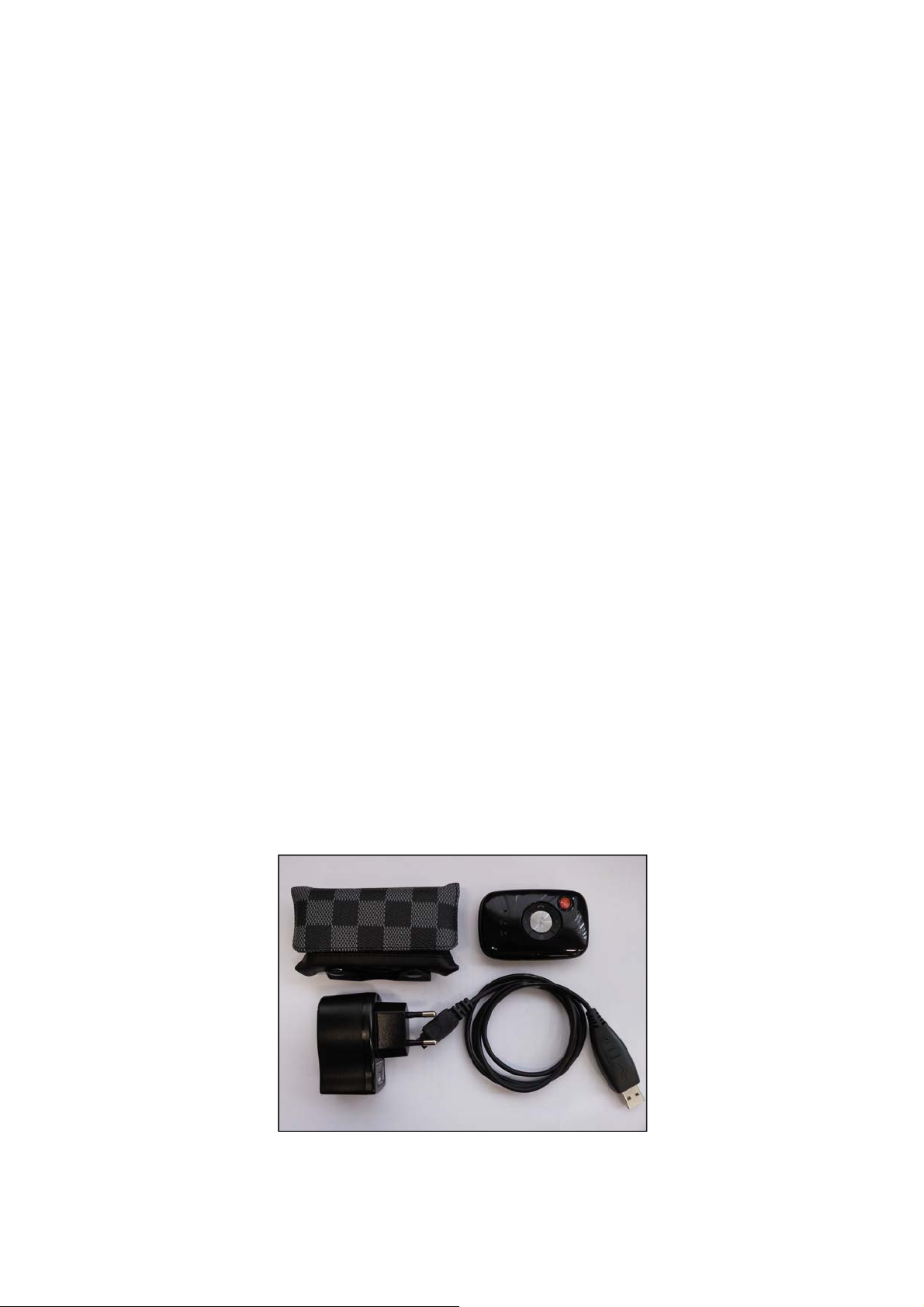
ST900 Packing List
Page 33

FCC Notice and Cautions
FCC Notice
• The device complies with Part 15 of the FCC Rules. Operation is subject to the following two conditions:
(1) this device may not cause harmful interference,and (2) this device must accept any interference
received, includinginterference that may cause undesired operation.
• This equlpment has been tested and found to comply with the limits for a Class B digital device, pursuant
to part 15 of the FCC Rules. These limits are designed to provide reasonable protection agalnst harmful
interference in a residential installation.
Cautions
Modifications not expressly approved by the party responsible for compliance could vold the user’s
authority to operate the equlpment.
This equipment has been tested and found to comply with the limits for a Class A digital device, pursuant
to part 15 of the FCC Rules. These limits are designed to provide reasonable protection against harmful
interference when the equipment is operated in a commercial environment. This equipment generates,
uses, and can radiate radio frequency energy and, if not installed and used in accordance with the
instruction manual, may cause harmful interference to radio communications. Operation of this equipment
in a residential area is likely to cause harmful interference in which case the user will be required to corr ect
the interference at his own expense.
 Loading...