

Page 1
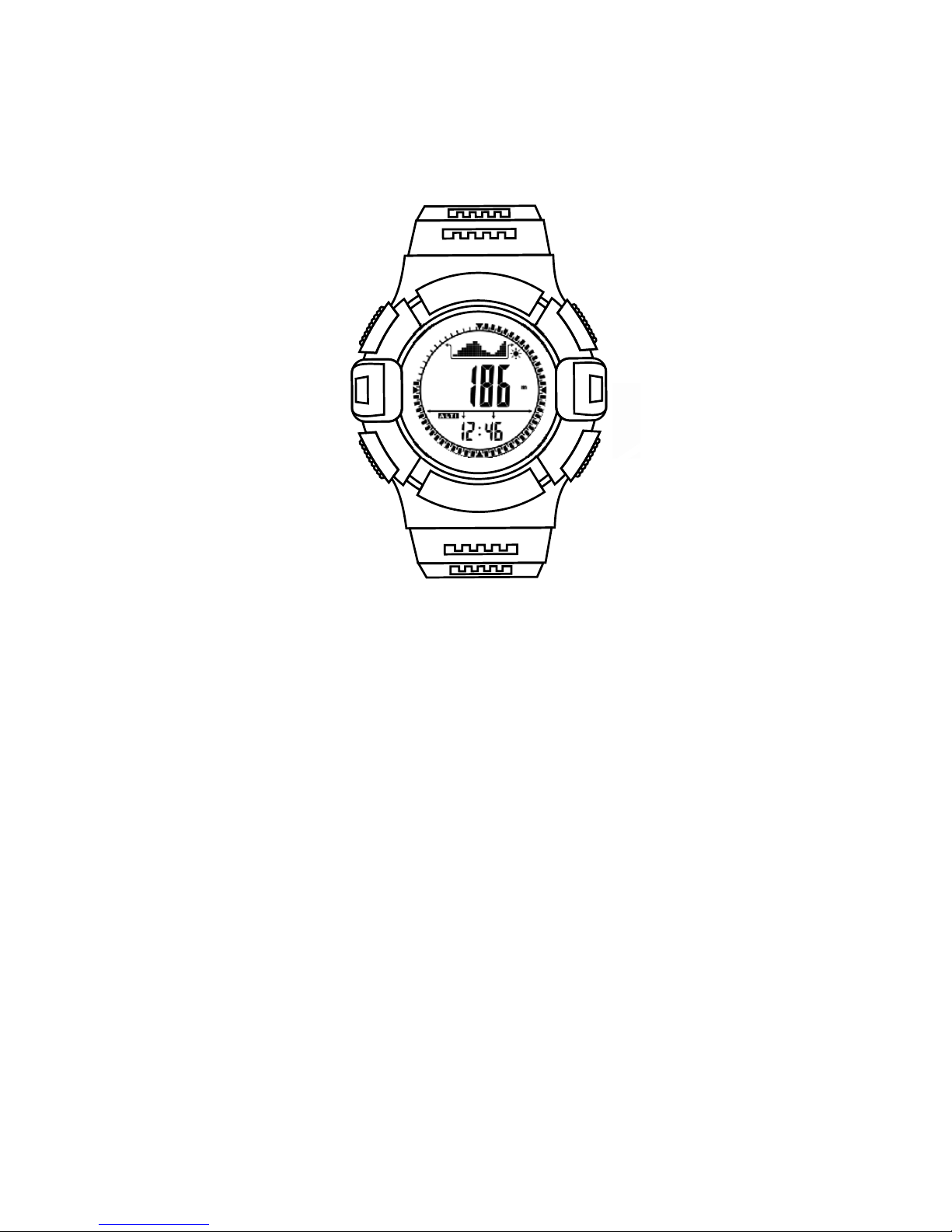
Sports watch
运动手表
USER GUIDE
用户指南
Page 2

Page 3

Thank you for your purchase of this sports watch. It will bring more happy for
your outdoor sports. It incorporates altimeter, barometer, compass, pedometer,
altimeter trend chart, air pressure trend chart, thermometer, world time, clock,
stop watch, countdown timer and weather forecast etc.
The following user guide provides step by step instructions for operation.
Every chapter describes one mode with LCD display and operation setting
method. Just enjoy it.
1. :
●
Features
Time functions: hour, minute, second, year(2000-2099), month, date,
weekday, 12H/24H
● Pedometer, step counter, calorie, distance record
● Alarm clock (2 sets alarm clock, hourly alarm)
● Countdown timer( 99:59:59~0)
● Stopwatch (0~99:59:59), 11sets of data
● 10 level contrast adjustment of LCD
● Corporates digital compass, altimeter, barometer, thermometer,
air pressure trend and altitude trend
● 24hours air pressure trend chart
● 12hours altitude trend chart & Climb rate
● Weather forecast
● Worldtime funtions (daylight saving time switch automatically)
● Button tone on or off
● Battery life remind
● EL backlight
1
Page 4
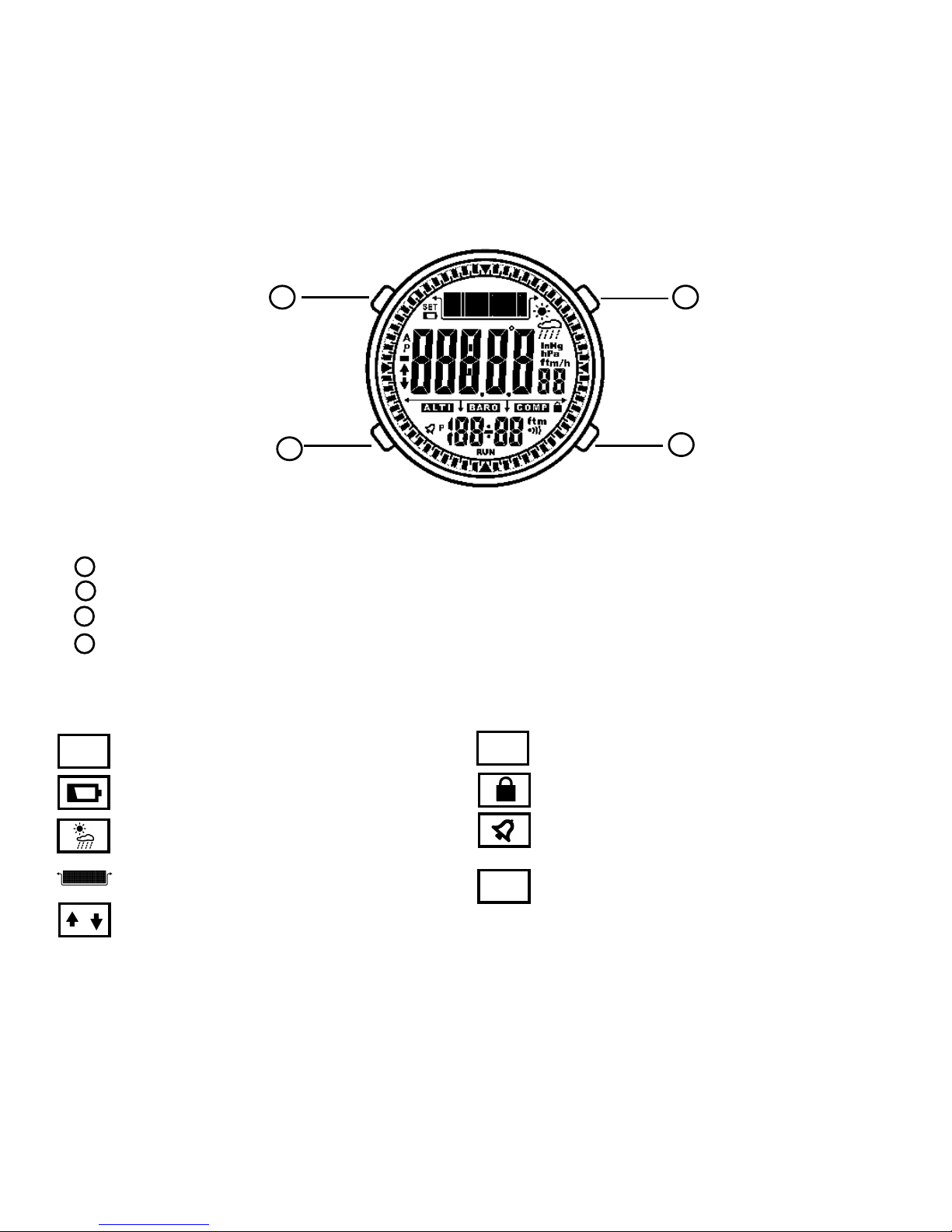
2. LCD display and controls
C
B
A
B
C
D
Button:
Light / Lock button: EL backlight and lock mode
Mode/View button: Set and switch functions
Comp/- button: and decrease dataCompass function
A.B/+ button: Altimeter function or Barometer function and increase data
Icon:
SET Setting mode
Battery remind
12 hours format
Weather forecast
Lock mode
Alarm clock
RUN
Turn on pedometer, stop watch
and countdown timer
Altitude / barometric trend chart
2
A/P
A
B
C
D
Light/Lock
Mode/View
Comp/-
A.B/ +
/
Air pressure trend arrow
Page 5
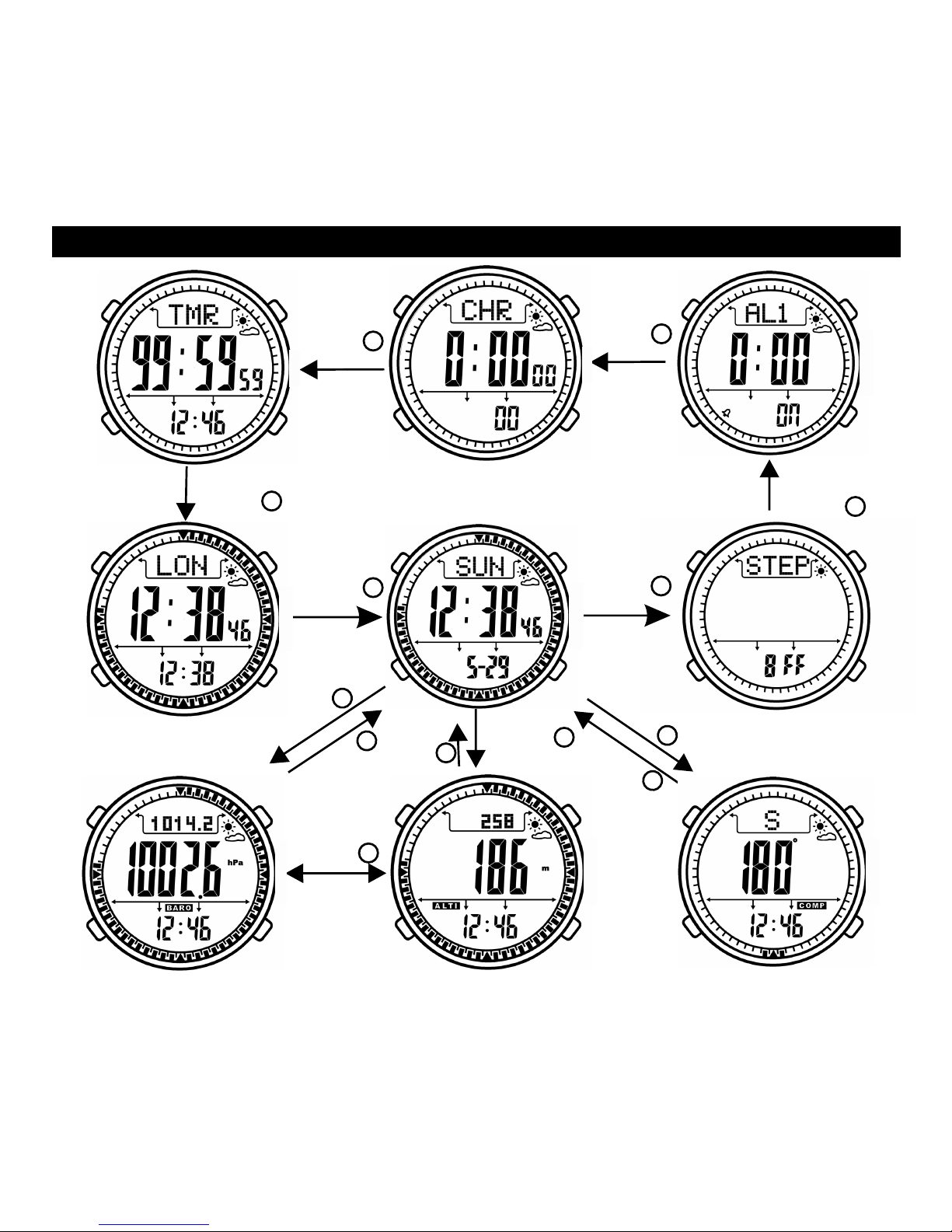
3. Function mode
LCD display of function mode
Press
B
Press
B
Press
B
Press
B
Press
B
Press
D
Pre
s
s
Pre
s
s
C
Barometer mode Altimeter mode Compass mode
Time mode Pedometer
Countdown timer Stop watch Alarm clock
3
P
re
s
s
D
B
Pr
e
ss
B
Press
B
World time mode
Press
Press
B
B
Page 6
Long press
D
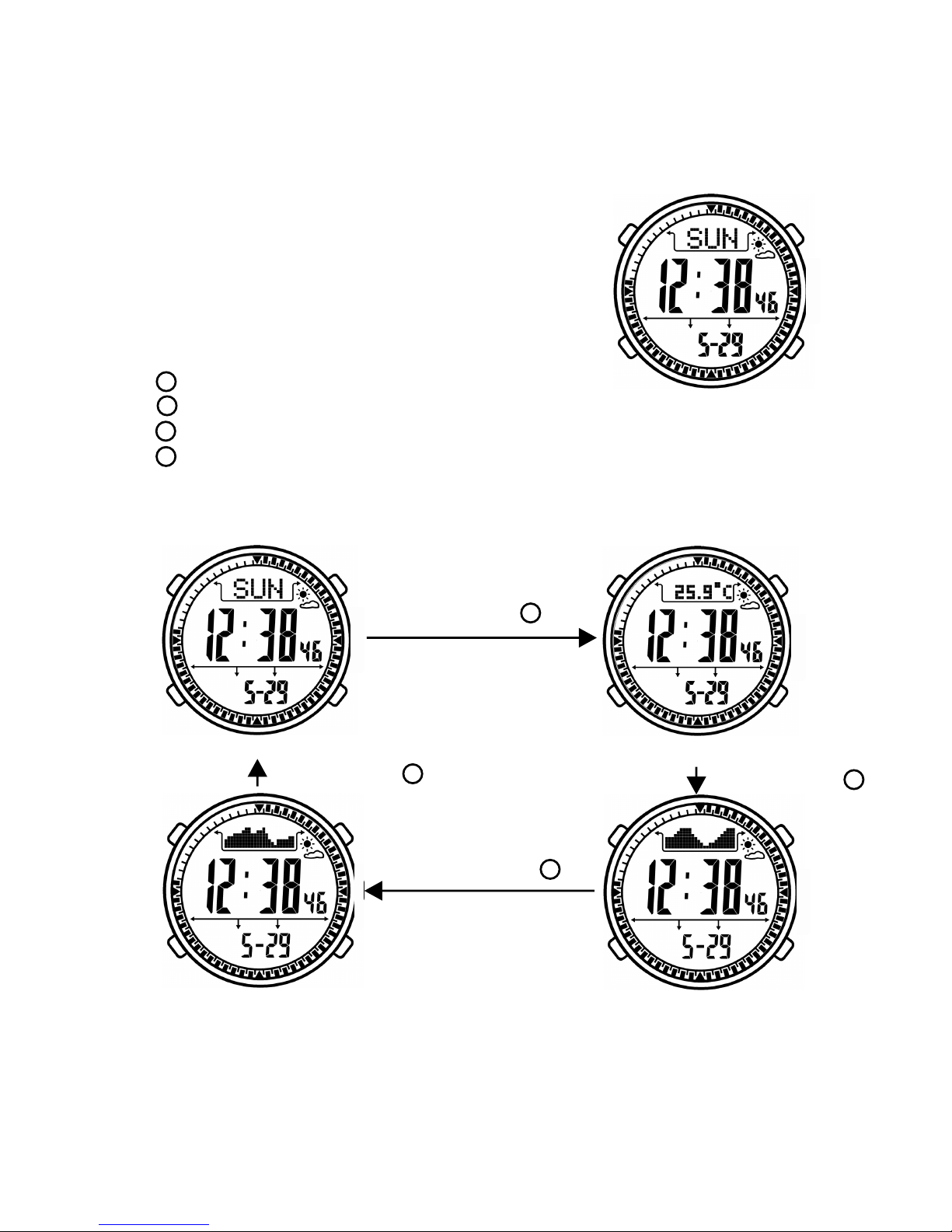
Barometric chart Altitude chart
3. 1 Time mode
LCD display:
- Upper: Week
Weather forecast
- Middle: Time
- Below: Date
Button function:
- Press
- Press to
- Press to
- Press to
EL backlight will be turned on 6 seconds
enter pedometer mode, long it to enter time setting mode.
enter compass mode
enter altimeter / barometer mode, long press it to switch
among week, temperature, altitude chart, barometric chart
B
A
B
C
D
Long press
D
Long press
D
Long press
D
Week Temperature
4
Page 7
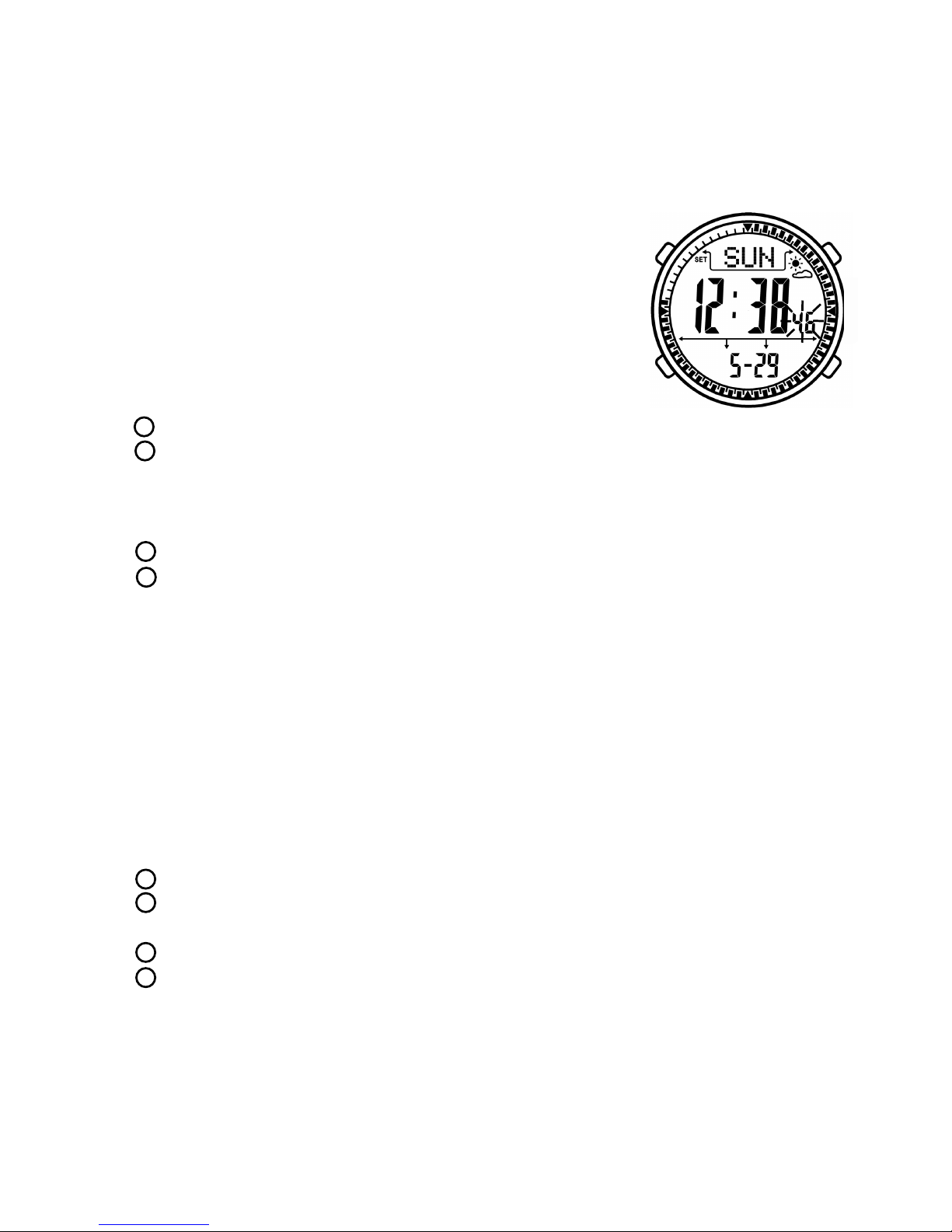
Time setting mode
- Upper: SET
Week
Weather forecast
- Middle: Time
- Below: Date
Button function:
- Press
- Press to
to
- Press to to
- Press to ress it to
- I
Under time mode, long press button B to enter setting mode.
EL backlight will be turned on 6 seconds
switch among hour, minute, second, year, month, date, MMDD/
DDMM, 12/24H, LCD contrast, button tone, temperature unit, altitude unit, air
pressure unit, pedometer weight. Selected item will be flashed, long press it save and exit setting
mode. SET icon will be disappeared.
decrease data, long press it decrease data quickly
increase data, long p increase data quickly
f there is no operation in 30 seconds. It will save and exit setting mode,
SET icon will be disappeared.
LCD display:
B
A
B
C
D
3.2 Pedometer
Under time mode, press button B to enter pedometer mode. Then press button
D to turn on pedometer. “RUN” icon will be displayed on LCD screen.
LCD display:
- Upper: STEP
Weather forecast
- Middle: Steps
- Below: Sports time
Button function:
- Press
mode
EL backlight will be turned on 6 seconds.
A
5
enter alarm clock mode, pedometer is turned off at the same time.
Long p enter pedometer setting mode.
switch between steps mode and calorie mode.
turn on or off pedometer. When turn off pedometer, long press it to
clear zero.
- Press to
ress it to
- Press to
- Press to
B
B
C
D
Page 8
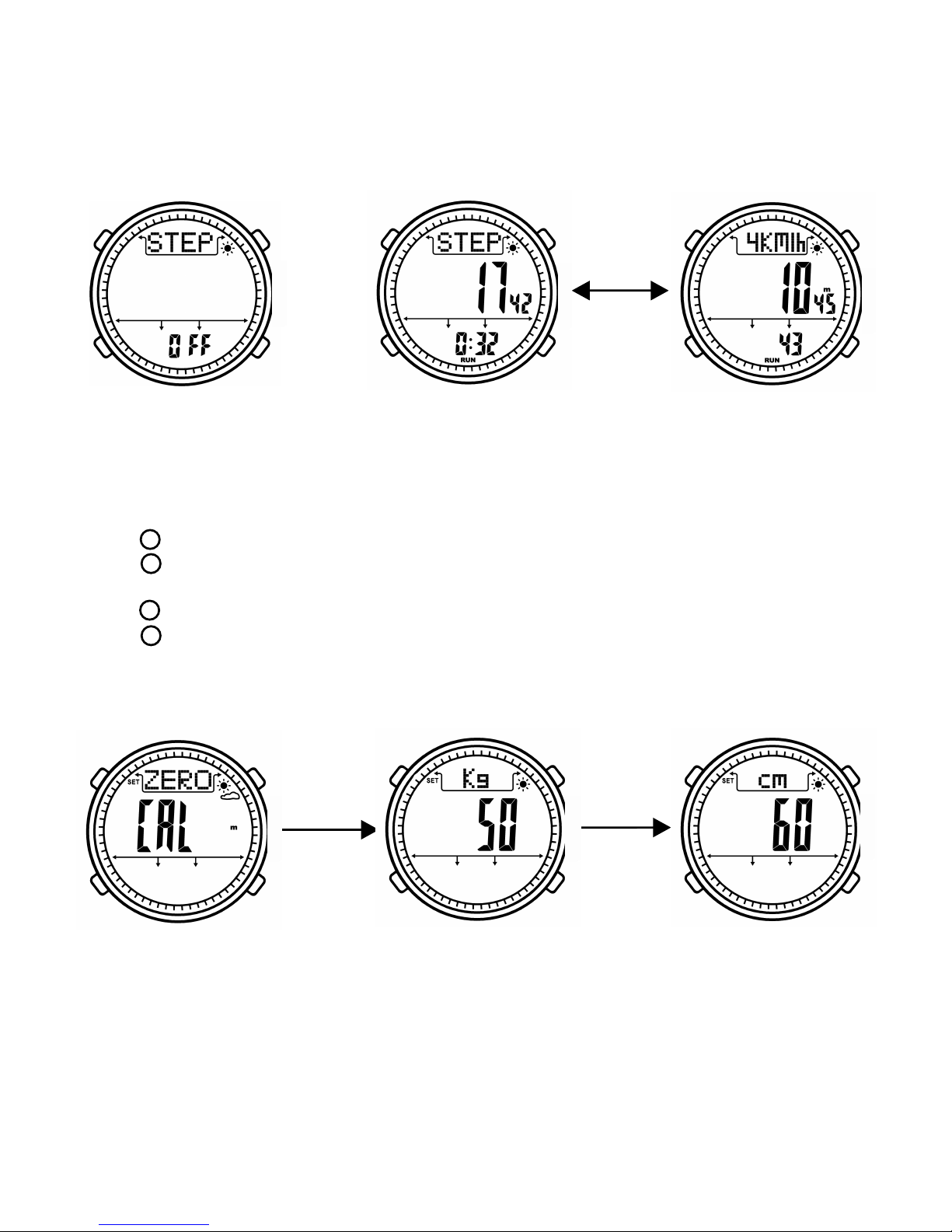
Pedometer setting mode
Button function:
- Press
- Press to
ress it to
- Press to to
- Press to
- I
Under pedometer mode, long press button B to enter pedometer setting mode.
EL backlight will be turned on 6 seconds
switch setting items including clear zero, weight and step legth.
long p save and exit setting mode. “SET” icon will be disappeared.
decrease data, long press it decrease data quickly
increase data, long press it to increase data quickly
f there is no operation in 30 seconds. It will save and exit setting mode,
“SET” icon will be disappeared.
B
A
B
C
D
6
Pedometer mode Step mode Calorie mode
Press C
Clear zero for step Weight setting Step legth setting
Press B
Press B
Page 9
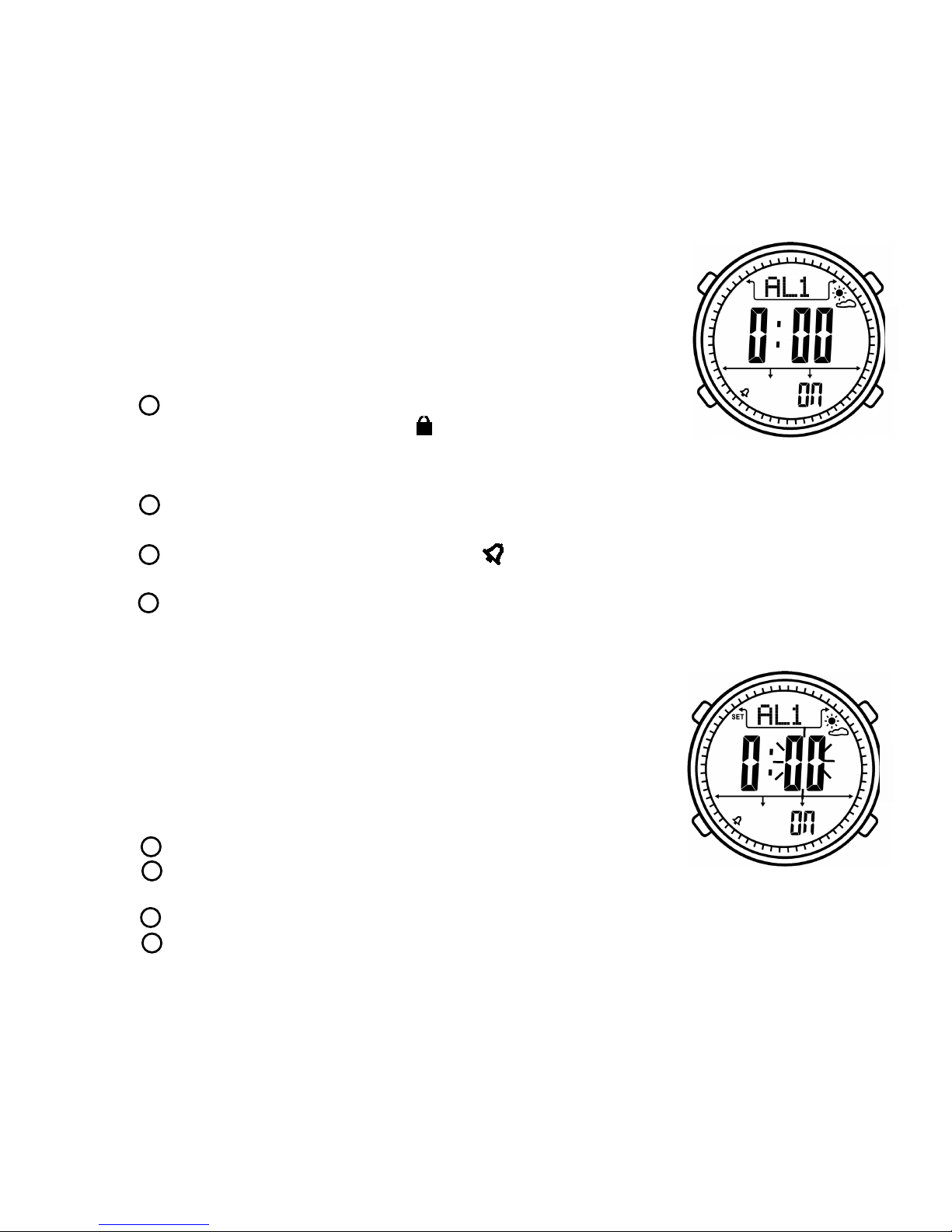
3.3
Under time mode, press button B two times to enter alarm clock mode.
LCD display:
- Upper: AL1 (alarm clock group)
Weather forecast
- Middle: Alarm time
- Below: ON/OFF
Button function:
- Press ,
to
ess button A
- Press to ress it to
- Press to
- Press to
Alarm clock mode
EL backlight will be turned on 6 seconds,
long press it enter lock mode. “ ” icon will be displayed on
LCD. When system is locked, it will not exit to time mode automatically after 30
seconds. Long pr again to exit lock mode.
enter stop watch mode, long p enter alarm clock setting
mode to set current alarm clock.
turn on or off alarm clock. “ ” icon will be displayed on LCD
when turn on alarm clock.
switch alarm clock group among AL1(1st group),AL2(2nd group),
Chime(hourly alarm)
A
B
B
C
D
Alarm clock setting mode
Button function:
- Press
- Press to
ress it to
- Press to to
- Press to
- I
Under alarm clock mode, long press button B
to enter alarm clock setting mode.Under hourly
alarm mode, long press button B can not enter
setting mode.
EL backlight will be turned on 6 seconds
switch hour and minute,
long p save and exit setting mode. “SET” icon will be disappeared.
decrease data, long press it decrease data quickly
increase data, long press it to increase data quickly
f there is no operation in 30 seconds. It will save and exit setting mode,
“SET” icon will be disappeared.
A
B
C
B
D
7
Page 10
8
4
three
D
Page 11
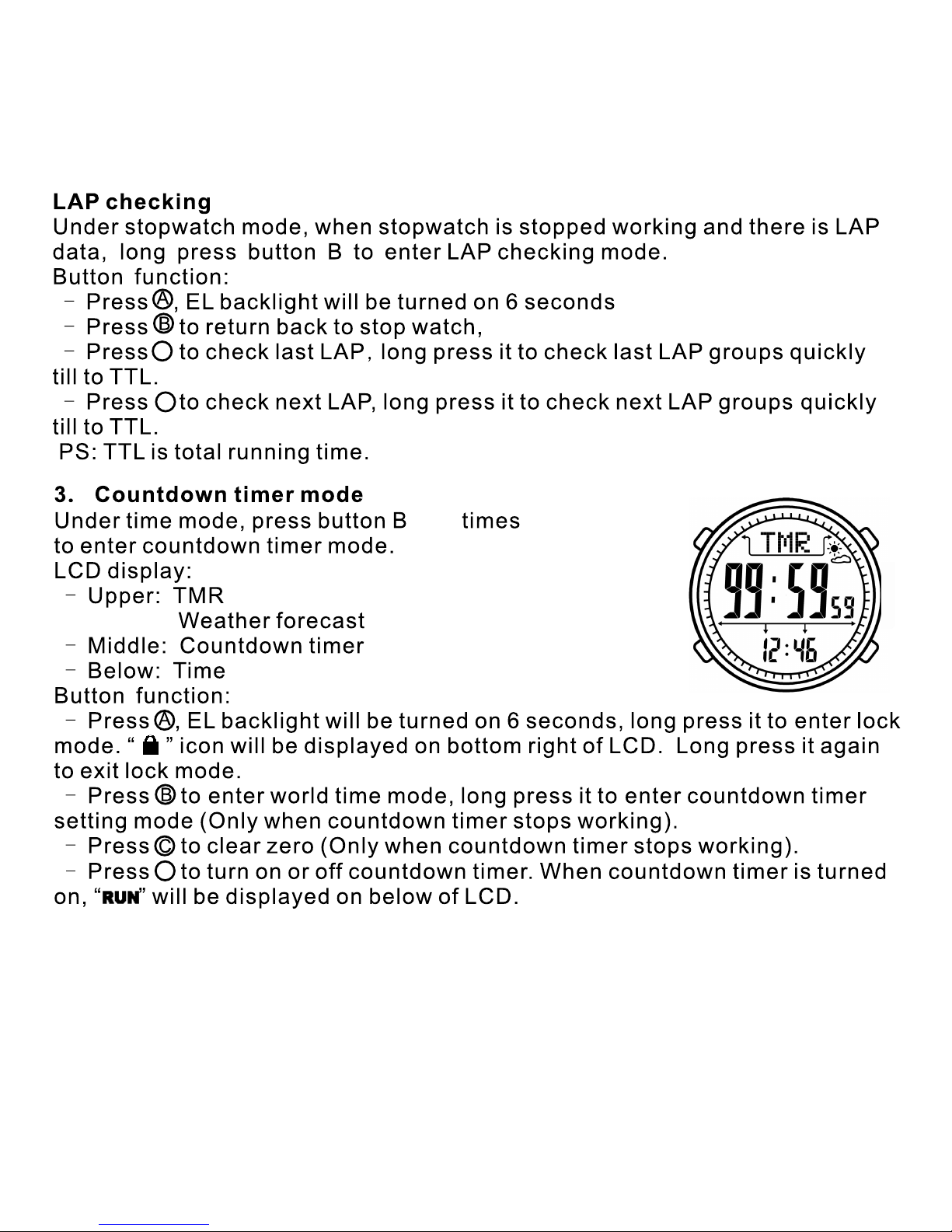
9
B
C
5
four
D
D
Page 12
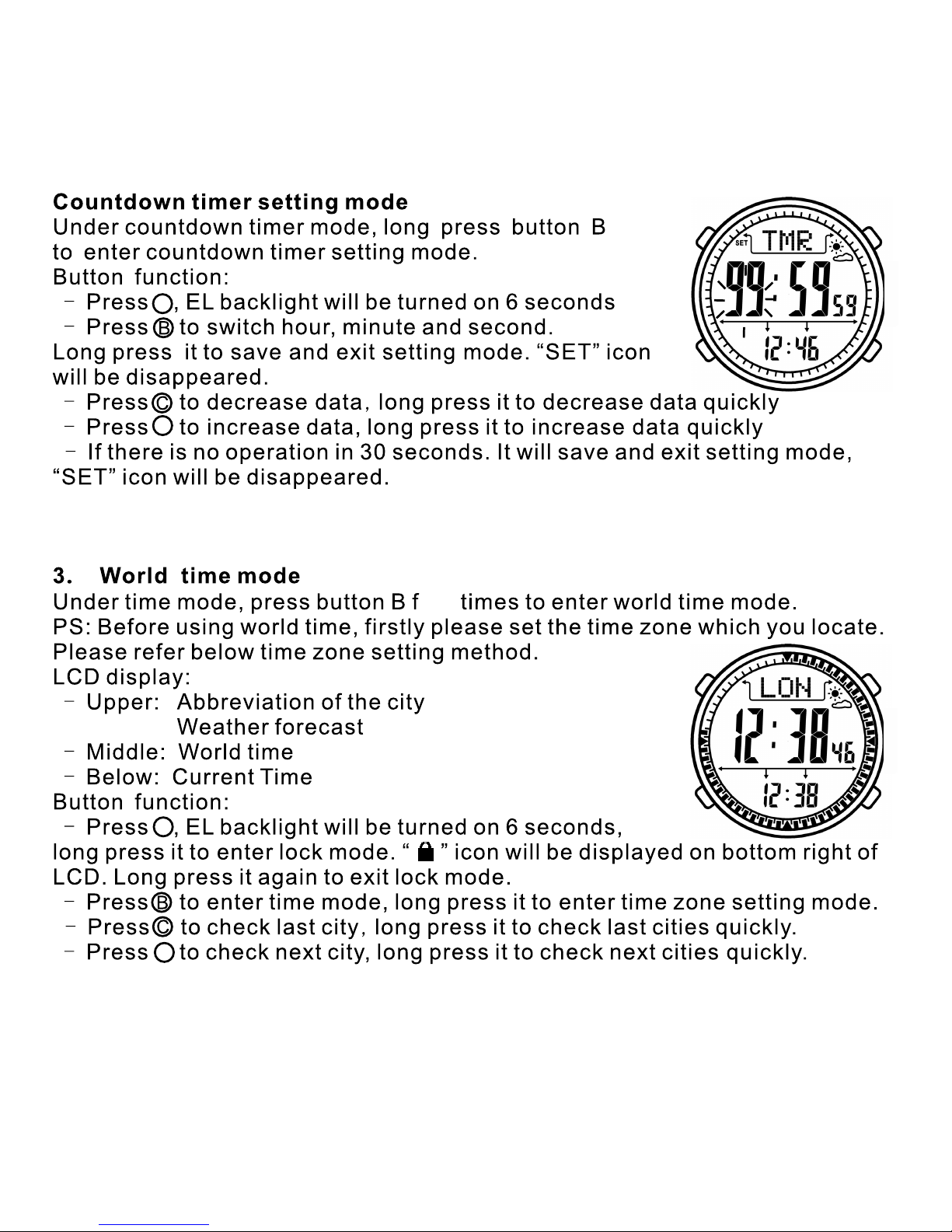
A
A
C
C
6
10
ive
D
D
Page 13
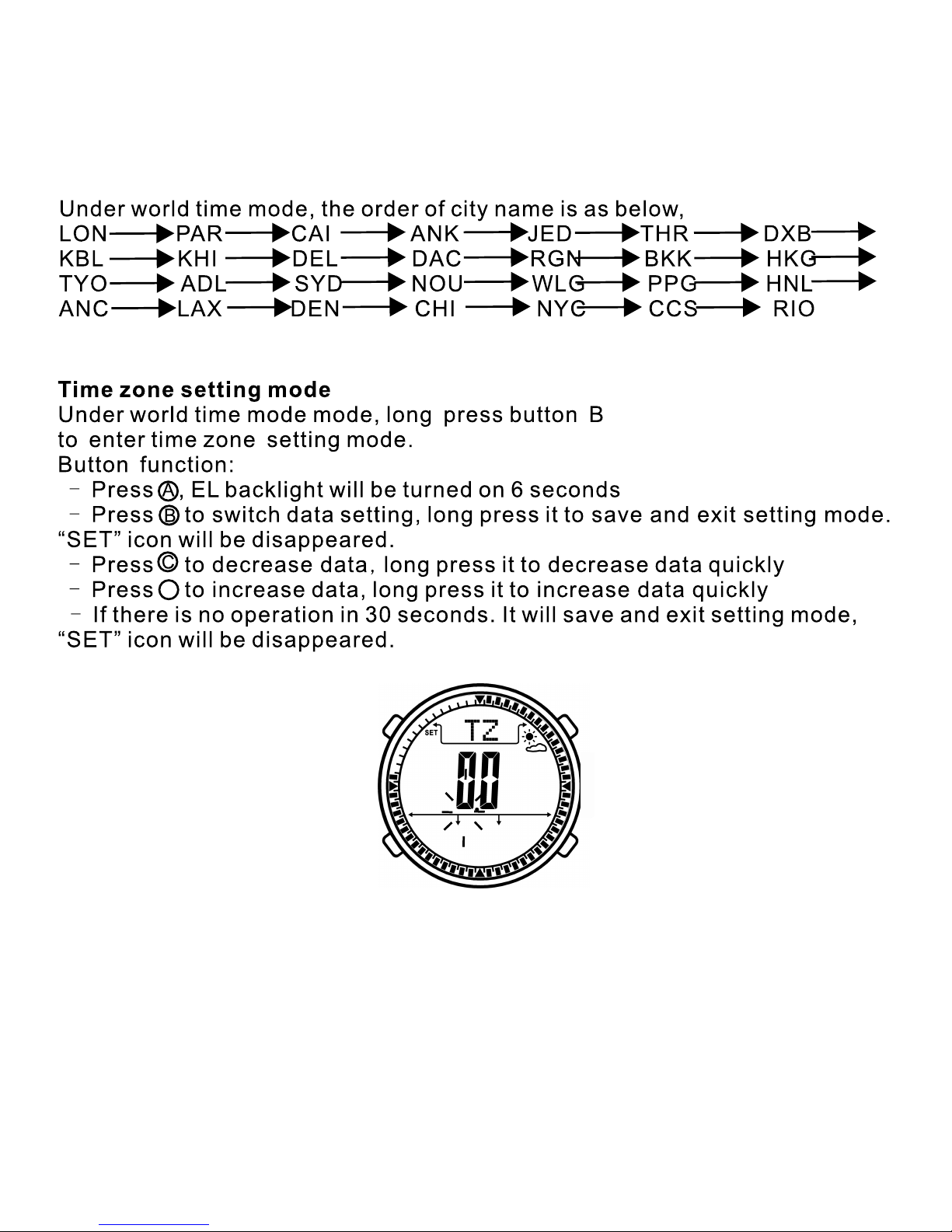
B
11
D
Page 14

City list of worldtime
12
Code City GMT Other major cities in same time zone
LON London 0 Dublin, Lisbon, Casablanca, Dakar, Abidjan
PAR Paris 1
Milan, Rome, Madrid, Amsterdam, Algiers. Hamburg,
Frankfurt, Vienna, Stockhoim, Berlin.
CAI Cairo 2 Athens Helsinki, Istanbul, Beirut, Damascus, Cape town
ANK Ankara 2 Ankara
JED Jeddah 3 Kuwait, Riyad,Aden, Addis, Ababa,Nairobi, Moscow,
THR Tehran 3.5 Shiraz
DXB Dubai 4 Abu Dhabi Muscat
KBL Kabul 4.5 Kabul
KHI Karachi 5 Male
DEL Delhi 5.5 Mumbai Kolkata,Colombo
DAC Dhaka 6 Chittagong
RGN Yangon 6.5 Yangon
BKK Bangkok 7 Jakarta, Phnom Penh, Hanoi Vientiane
HKG HongKong 8
Singapore, Kuala, Lumpur, Beijing, Taipei, Manlla,
Perth, Ulaanbaatar
TYO Tokyo 9 Seoul, Pyongyang(SEL Seoul
)
ADL Adelaide 9.5 Darwin
SYD Sydney 10 Melboume, Guam, Rabaul
NOU Noumea 11 Pt Vila
WLG Wellington 12 Christchrch, Nadi Nauru Is
PPG Pago Pago -11 Pago Pago
HNL Honolulu -10 Papeete
ANC Anchorage -9 Nome
LAX Los Angeles -8
San Francisco, Las Vegas, Vancouver,
Seattle/Tacoma, Dawson City
DEN Denver -7 El Paso, Edmonton
CHI Chicago -6
Houston, Dallas/Ft, worth, New Orleans, Mexico City,
Winnipeg
NYC New York -5
Montreal, Detroit, Miami, Boston, Panam City, Havana,
Lima, Bogota
CCS Caracas -4.5 La Paz, Santiago, Pt Of Spain
RIO Rio De Janeiro -3
Sao Paulo, Buenos Aires, Brasilia, Montevideo
Page 15
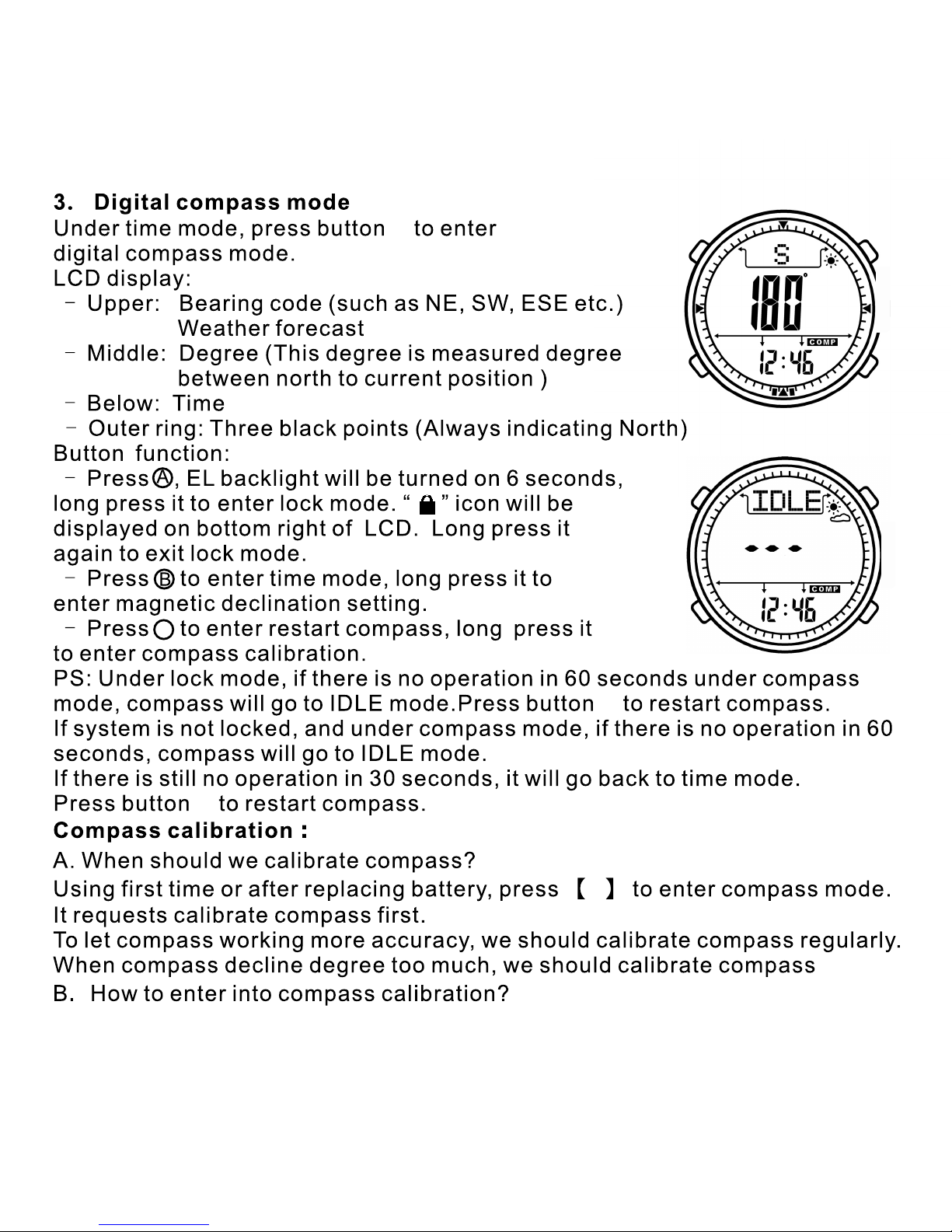
B
7
13
C
C
C
C
C
Page 16
C
C
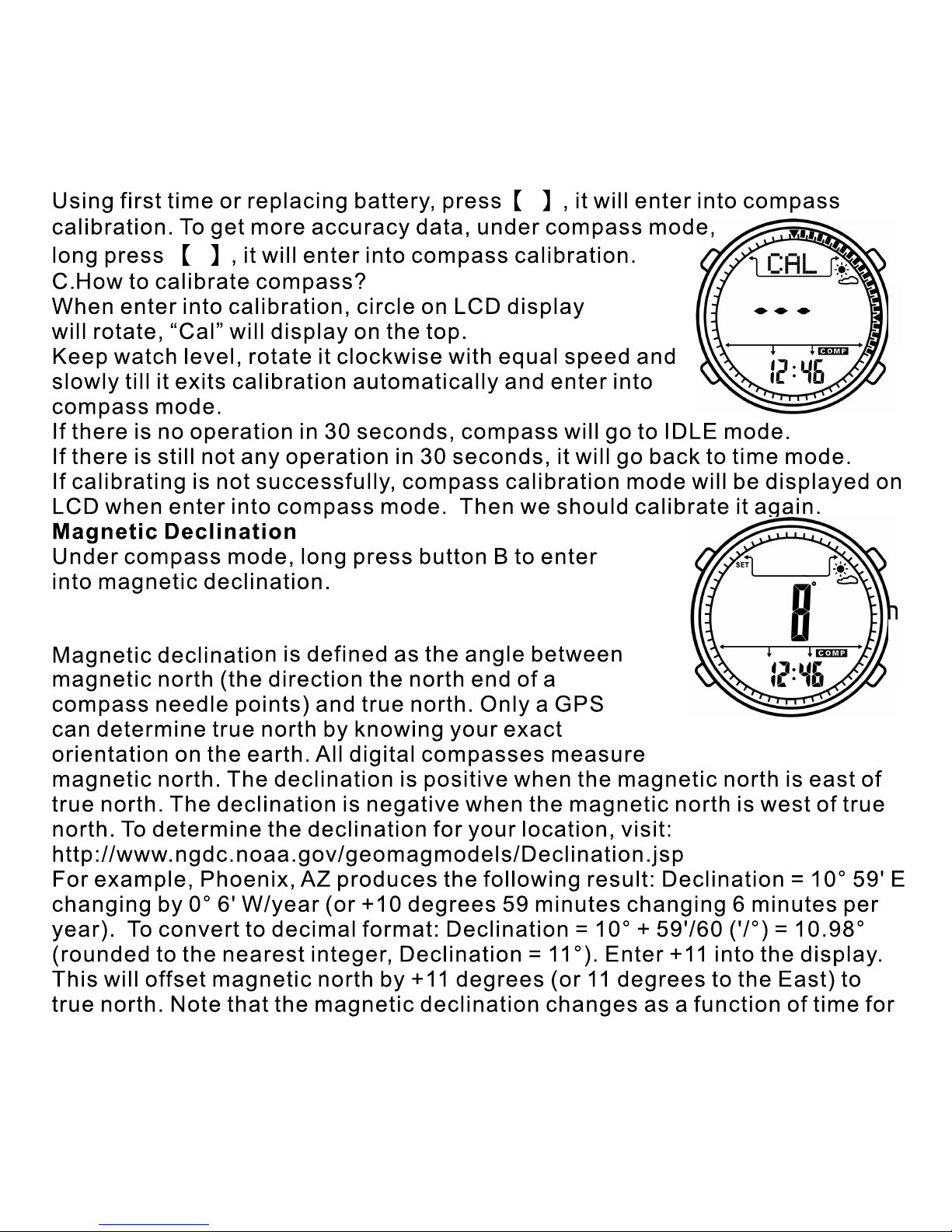
Press C or D to decrease or increase data.
Long press B to save and exit setting.
14
Page 17
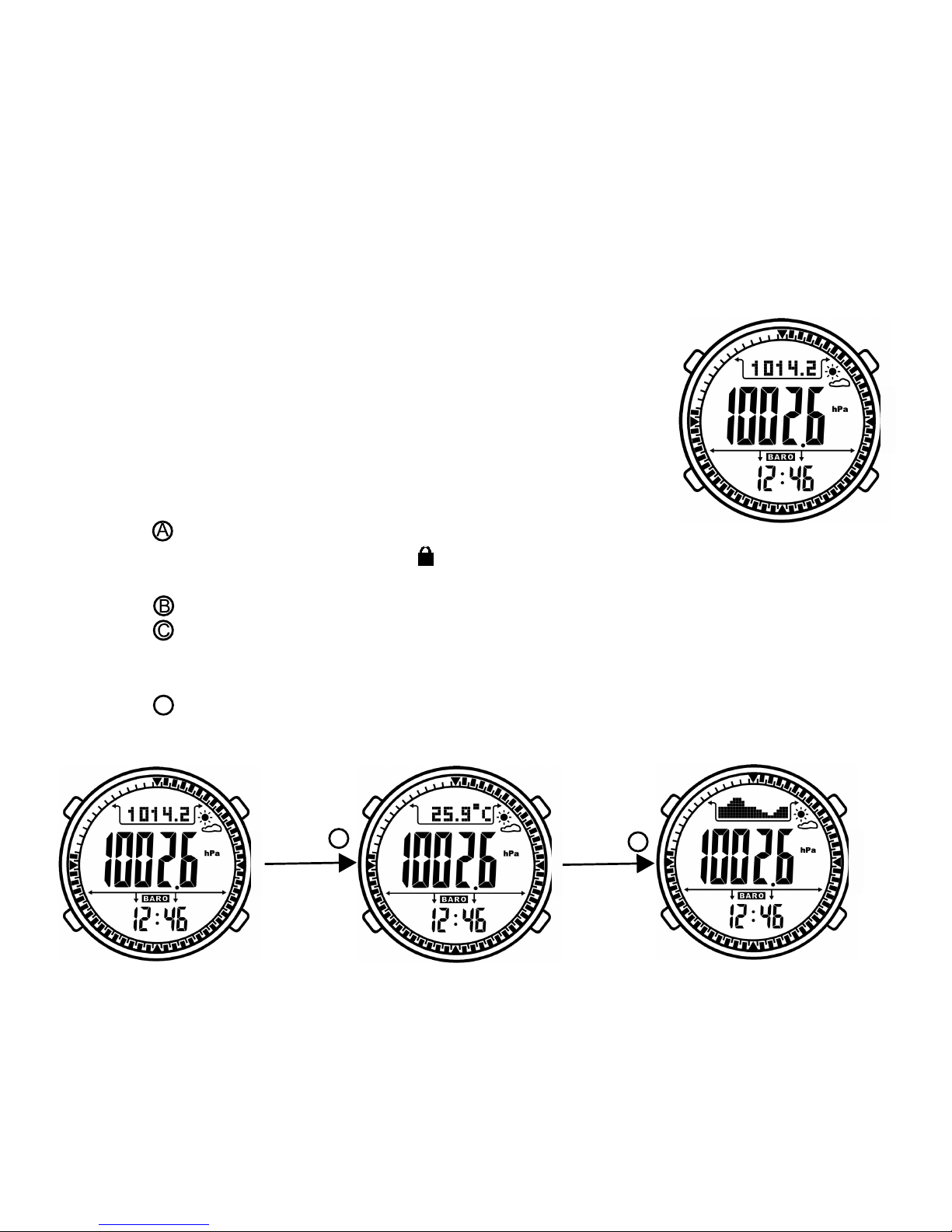
Your location. In the above example, the declination changes -6 minutes (or
0.10° per year, or about 1° every 10 years). Thus, time function is insignificant.
mode
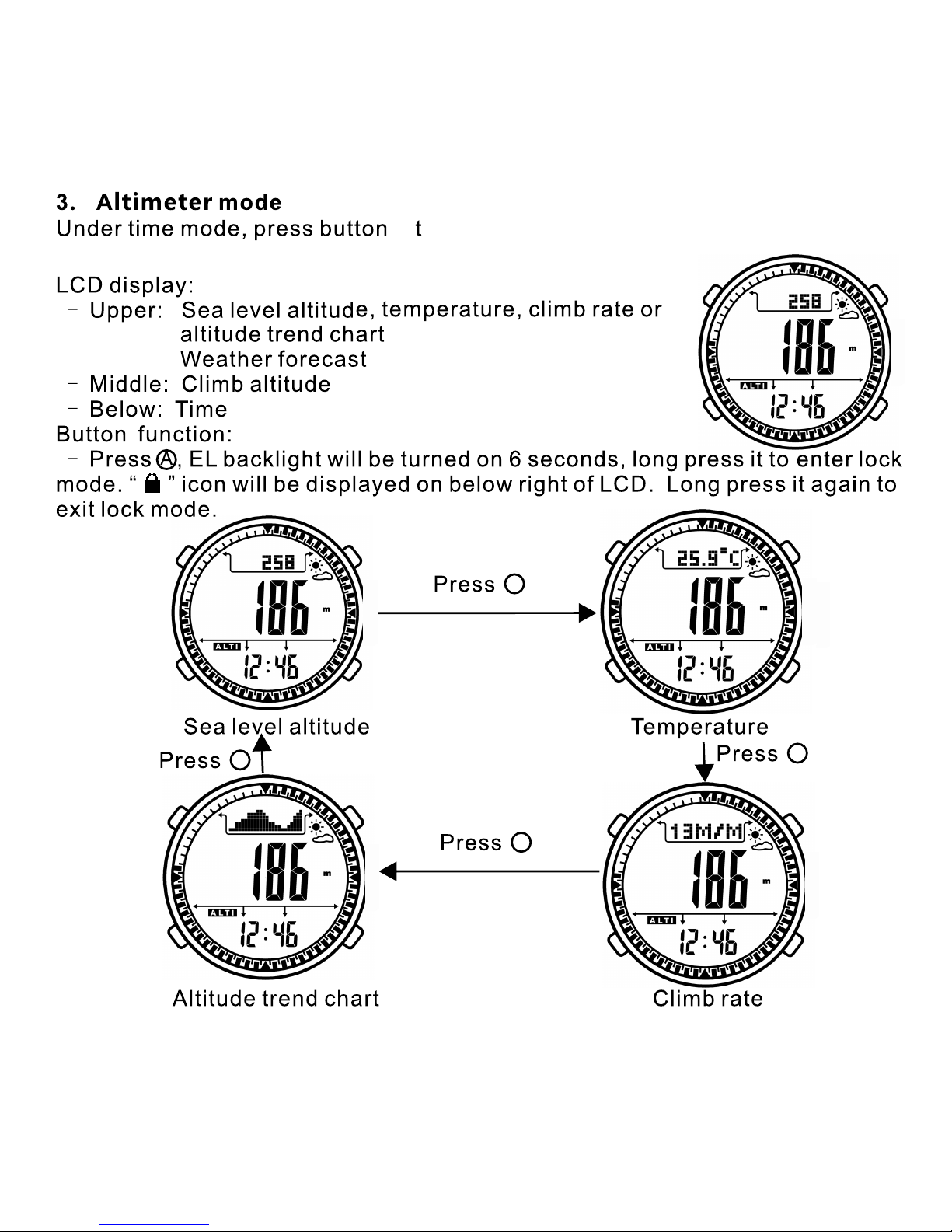
LCD display:
- Upper: Sea level air pressure, temperature or
sea level air pressure trend chart
Weather forecast
- Middle: Air pressure
- Below: Time
Button function:
- Press ,
ress it to
ress it
- Press to
- Press to check sea level air pressure for last hour. The line of air pressure
trend chart will be changed at same time. (Only when sea level air pressure
trend chart display on upper of LCD. )
Press to switch among sea level air pressure, temperature, sea level air
pressure trend chart
ress it to switch between altimeter / barometer mode.
3. 8 Barometer
Under time mode, press button D to enter barometer / altimeter mode..
Under altimeter mode, long press button D to switch to barometer mode..
EL backlight will be turned on 6 seconds,
long p enter lock mode. “ ” icon will be displayed on below right of
LCD. Long p again to exit lock mode.
enter time mode
.
Long p
C
B
Press
Press
Sea level air pressure Temperature Sea level air pressure trend chart
15
D
D
D
E
Page 18
9
16
D
o enter into altimeter / barometer mode.
Under barometer mode, long press D to enter into altimeter mode.
D
D
D
D
Page 19
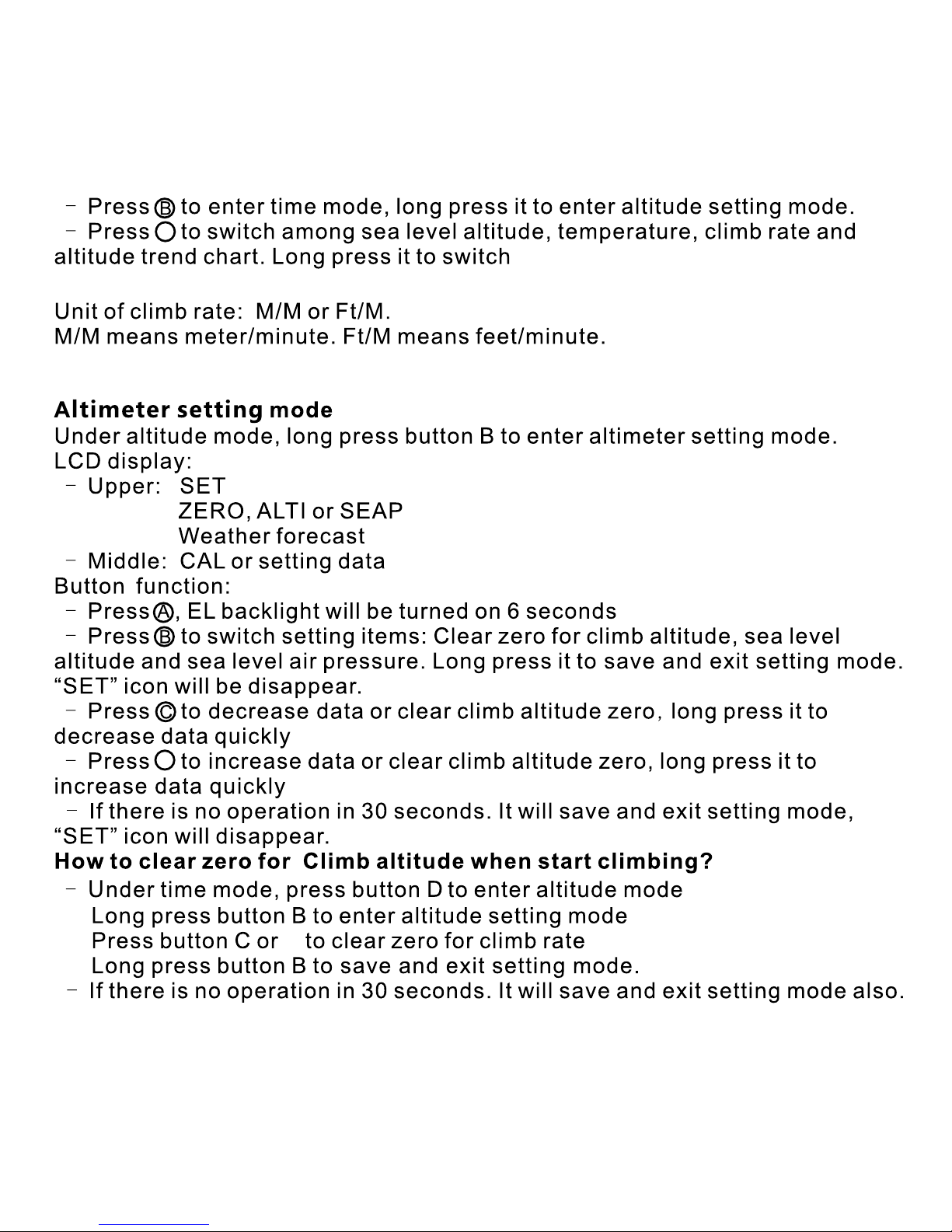
17
D
D
D
between altimeter / barometer
mode.
Page 20
C
18
Page 21

 Loading...